
Most mornings I wake up to a to-do list that’s already been updated—because my always-on team of agentic AI assistants has been working while I sleep. I rely on Claude to orchestrate these agents so routine prep, follow-ups, and retrospectives never slip through the cracks.
When a podcast recording hits my calendar, my podcast-manager agent (powered by Claude) automatically creates a podcast-interview-prep task with a concise summary of who I’m interviewing and what they are building. It also creates a transcript review document with the correct share settings. After the recording, it adds a task to my to-do list to share the transcript with the podcast participants.
For sales, my sales-admin agent (also powered by Claude) prepares a sales-meeting-prep task with notes on who I’m meeting with, where they are in the sales process, and what I need to move the deal forward. After the call, it generates clear next-step tasks so momentum doesn’t stall.
Every week, my coding-manager agent (still powered by Claude) compiles a report from my prior week’s coding sessions and offers targeted tips. It flags recurring mistakes or dead ends, shows how to avoid them, and suggests ways to work better with Claude. It’s the retrospective I never skip.
In this walkthrough, I’ll explain how I get Claude to complete tasks for me while I’m away from the computer—and how I designed the system to balance power, safety, and cost control.
I first explored this approach after seeing the rapid growth of OpenClaw. OpenClaw is an open-source "agent harness" that lets you configure personalized agents to act on your behalf. It’s incredibly promising, but the early wave of enthusiasm also revealed pitfalls: complex safety configuration, overly broad machine access (browser, terminal, files, credentials), third-party skills of varying quality, and surprise usage bills.
After hearing one too many horror stories about wasted hours and unexpected charges, I set out to design a safer, more predictable way to capture the benefits of OpenClaw while managing risk and spend. That’s what led to my current agent setup.
For transparency: I’m a long-time practitioner and a genuine fan of Claude Code. I have not received any compensation from Anthropic for writing about my approach. If that ever changes, I will disclose it—both because it’s required by the FTC in the U.S. and because it’s simply the right thing to do.
An Overview of How My Agent Team Works
Today, I run three specialized agents: a podcast manager, a sales admin, and a coding manager. As I invest more, I expect this team to grow—because the pattern scales cleanly across use cases.
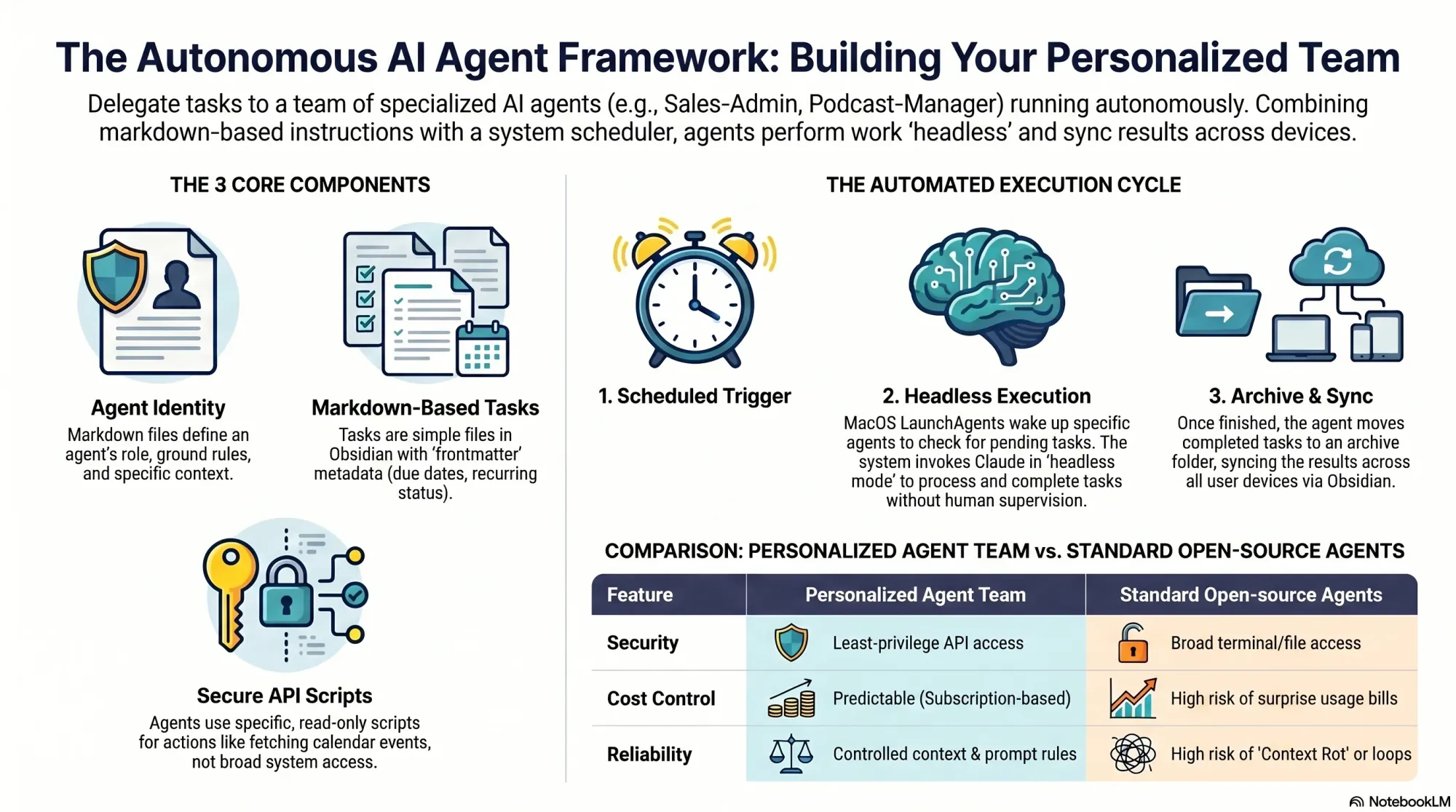
This system runs on four core components that keep everything reliable, auditable, and cost-aware.
First, agent identity. I use a simple but powerful convention: an identity markdown file that tells the agent who it is, where its task folder lives, and provides context for the types of tasks it will do. This keeps scope tight and intent explicit—critical for safety and predictable automation.
Second, the scheduler. I’m using MacOS’s built-in scheduler (via LaunchAgents). This is like cron, but runs with all your user permissions on Mac. That means I can run all of this under my Claude Code Max subscription or my ChatGPT/Codex subscription. The result is a dependable heartbeat for my AI workflows without relying on fragile cloud glue.
Third, tasks. Each agent owns a dedicated folder of tasks. A task is a markdown file with frontmatter. That structure makes work items easy to create, parse, review, and version—perfect for repeatable automation with a human-in-the-loop safety net.
Fourth, scripts. Each agent has its own scripts folder with utilities it can call on demand or that run on a schedule. These scripts are small, composable, and transparent—so I can evolve capabilities without ballooning risk or complexity.
Agent identity, tasks, and scripts are saved in Obsidian—not Claude Code skills or agents. The scheduler runs on my always-on Mac Mini. The benefit of this is it just works across all of my devices and I can seamlessly switch between Claude Code, Codex—or any other coding CLI—as I need to. All it takes is updating my script that the scheduler uses.
In practice, this architecture delivers exactly what I want from agentic AI: clarity of responsibility, strong guardrails, and outcomes that compound. My podcast manager keeps interviews buttoned up, my sales admin removes administrative drag, and my coding manager turns lessons learned into steady skill gains—all while I focus on higher-leverage product management work.
If you’re considering a similar setup, start with a single agent and a narrow task, then expand. Keep identities crisp, scripts small, and schedules explicit. With that foundation, you’ll get the benefits of automation and delegation—without surrendering control.
Inspired by this post on Product Talk.


Leave a Reply