Tag: gen ai

  • How Snapbar Turned Crisis Into an AI-Native Photo Experience Revolution

    How Snapbar Turned Crisis Into an AI-Native Photo Experience Revolution

    What does it take to reinvent a 14-year-old company, not once, but twice? I ask that question often when I look at mature product organizations, because the hardest transformations rarely start with a clean slate. They start with real customers, legacy expectations, operational muscle memory, and a market that suddenly refuses to behave the way it used to.

    Snapbar is a useful case study in that kind of transformation. The company began as a wedding photo booth side hustle, grew into a national events company, and then watched COVID wipe out the entire business overnight. As a product leader, I find that moment especially important because it separates teams that are attached to the current expression of their product from teams that understand the deeper customer need underneath it.

    The deeper need was never just a physical photo booth. It was identity, participation, memory, brand engagement, and a shareable experience that people could take with them. When in-person events disappeared, Snapbar went from physical photo booths to a cross-platform virtual product built on WebRTC in spring 2020. That was not a cosmetic pivot. It was a first-principles rebuild under pressure.

    I have seen many teams talk about innovation when conditions are favorable. Snapbar’s story is more interesting because the team had to innovate when the existing business model was unavailable. That kind of constraint can be clarifying. It forces product teams to ask: What job are we really doing for customers, and what parts of our current solution are merely historical artifacts?

    The next reinvention came from generative AI. Pushed by declining repeat business, Snapbar dove deep into Stable Diffusion, custom LoRA fine-tunes on H100/H200 GPUs, and eventually a reasoning-model-powered generative image and video pipeline. What stands out to me is not simply that the team adopted gen ai. It is that they connected AI capabilities to a domain they already understood deeply: photography, events, brand activations, and experiential marketing.

    This distinction matters. In product management, technology FOMO can lead teams to bolt AI onto workflows without a clear strategic advantage. Snapbar appears to have moved differently. They used 14 years of industry knowledge to identify where AI could change the experience itself, not just automate a back-office task or generate a novelty output.

    The product evolution is a strong example of applied AI. Snapbar integrated Stable Diffusion 1.5 as their first generative AI model and ran custom LoRA fine-tunes on H100/H200 GPUs to produce brand-quality outputs nobody else in their space could match. That level of execution shows the difference between experimenting with a model and building a differentiated product system around it.

    I also appreciate the way the team moved from negative prompts to reasoning model long-form prompts. In brand environments, creative control and safety control are not optional. A brand activation must feel imaginative, but it also has to remain on-message, inclusive, and predictable enough for a live event setting. Better prompt engineering becomes part of the product’s trust layer.

    One of the most important product details is the meta-prompting pre-processing pipeline designed to ensure user likenesses, including non-obvious details like disabilities, are accurately represented in generated images. That is not a minor implementation detail. It reflects a more mature view of AI risk management, representation, and customer experience.

    From my perspective, this is where product strategy and ethical technology intersect. Generative AI systems can easily flatten people into generic outputs. A thoughtful product team has to decide what fidelity means, what consent means, and how much control users and brands should have over the final artifact. Snapbar’s approach suggests that representation is not just a model-quality problem; it is a product-design problem.

    Podcast cover art for Just Now Possible with Teresa Torres, featuring bold white and yellow text on a navy background and Snapbar AI photo booth branding.
    Just Now Possible spotlights Snapbar’s journey from photo booths to AI-powered brand experiences, framing reinvention, creativity, and applied AI as the center of the conversation.

    The company’s experiential marketing platform lets brands “world build” at conferences, trade shows, and live events by bringing fans into branded creative worlds. That phrase matters because it reframes the photo booth from a capture device into a participatory brand system. The user is not merely photographed. The user becomes part of a designed world.

    I see this as a broader shift in product experience. Static brand impressions are giving way to co-created moments. Snapbar added participatory user inputs through Mad Lib-style prompts and prompt injection, turning photo experiences into co-creation moments between brands and their audiences. That is a more durable engagement loop than simply asking someone to pose in front of a branded backdrop.

    The operational story is just as relevant for product and engineering leaders. Snapbar used Claude Code and Codex to build and ship features rapidly as a small bootstrap team, and developed a four-pillar agent orchestration framework: context, tools, verification, and workflows. I like that framing because it treats AI-assisted development as a system of work, not a magic shortcut.

    In my own product leadership work, I keep coming back to the same lesson: AI workflows only become reliable when the team defines the surrounding operating model. Context determines whether the agent understands the problem. Tools determine what it can actually do. Verification determines whether the output is trustworthy. Workflows determine whether the capability compounds across the organization.

    Snapbar is now building customer-facing “vibe coding” using the Claude Agent SDK so brands can configure and create experiences themselves within Snapbar’s platform. That is a meaningful product move. It shifts creation closer to the customer while keeping the workflow inside a controlled product environment. For brand teams, that could reduce dependency on custom service work while still preserving creative flexibility.

    This is the kind of AI Strategy I find most compelling: not a generic claim that AI will transform everything, but a specific path from domain expertise to product capability to customer empowerment. Snapbar did not abandon its past. It converted years of event, photography, and brand knowledge into a new interface for generative AI.

    The core lesson for product teams is clear. Reinvention does not always mean discarding the original business. Sometimes it means identifying the durable customer need, rebuilding the delivery mechanism, and then using new technology to expand what the experience can become. Snapbar’s journey from wedding photo booths to virtual WebRTC experiences to AI world building shows how a team can preserve its market intuition while changing nearly everything about the product surface.

    For product leaders evaluating gen ai opportunities, I would take three practical lessons from this story. First, start with the customer experience, not the model. Second, treat brand safety, representation, and verification as product requirements from the beginning. Third, use agentic AI internally only when the team has a clear framework for context, tools, verification, and workflows.

    Snapbar’s story resonates because it is not about chasing a trend. It is about a team using necessity, curiosity-led self-education, and disciplined product thinking to build something that feels native to the generative AI era. That is the difference between adopting AI and becoming AI-native.


    Inspired by this post on Product Talk.


    Book a consult png image
  • How I Make AI Agents Speak Like Our Team: A Conversation Design Playbook That Lifts CSAT

    How I Make AI Agents Speak Like Our Team: A Conversation Design Playbook That Lifts CSAT

    If nobody on our team trains the Agent on how to communicate, it will sound like an LLM when it speaks to customers—because it is one. I never want a customer to feel like they’re talking to a machine that doesn’t get them. That’s why I treat conversation design as a core product capability, not an afterthought.

    Conversation design is an emerging discipline in AI-first support teams built to solve this exact problem. In practice, I make someone explicitly own how the Agent communicates—tone, structure, level of detail, customer experience, and the handoff and escalation process—because that’s where trust is won or lost.

    When there’s no clear owner and no explicit guidance, the Agent starts making its own choices. I’ve seen it over-explain when a short answer would do, reply in a flat tone when a customer is frustrated, or trigger a handoff too late. None of those are model problems; they’re design problems.

    The cost is measurable. Customers who get awkwardly structured responses won’t trust the answer—even when it’s accurate—so they escalate to a human to hear the same thing phrased differently. Others will skip the Agent entirely. And when the Agent does hand off, a poor transition means the support rep inherits a frustrated customer. Every one of these outcomes is avoidable; conversation design exists to prevent them.

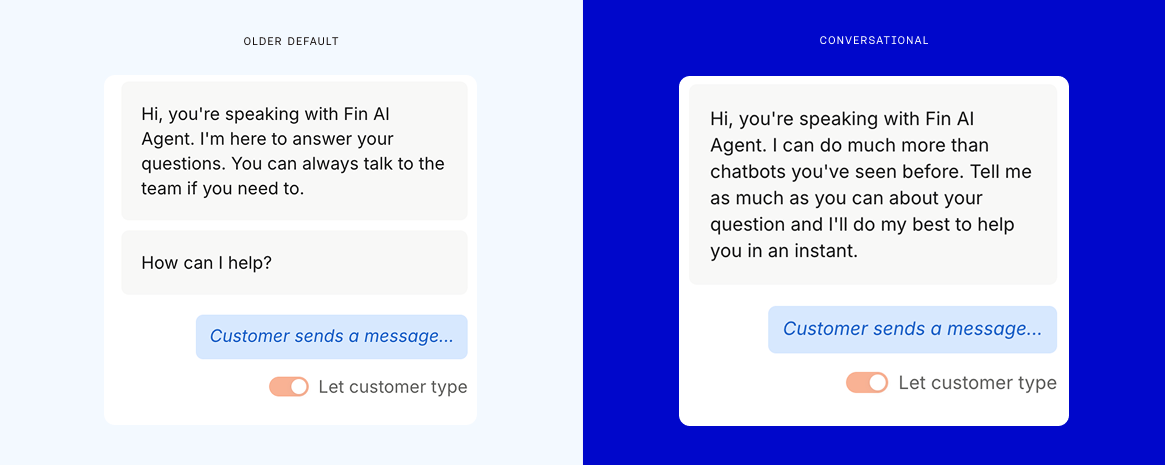
    I’ve seen A/B tests where a warmer, more conversational opening message meaningfully lifted customer satisfaction—CSAT moved from 72.8% to 78.4%. A single design change, applied to the very first message, drove a measurable difference. That’s the kind of leverage I look for as a product leader.

    Here’s the scope I use when I talk about conversation design—five areas that shape the customer experience end to end:

    1) Tone and personality: Define the Agent’s voice, level of detail, and how formal or casual it should sound—and specify where that register adapts to the situation (for example, urgent access issues versus exploratory product questions).

    Screenshot of an AI agent conversation design dashboard showing guidance for tone of voice, communication style, product naming, and a live preview, with callouts highlighting brand voice controls and response formatting.
    Design how your AI agent talks. Set tone, style, and product naming rules, then preview replies instantly. Clear callouts showcase brand voice consistency and flexible formatting so your bot communicates like your team.

    2) Response structure: Ensure the Agent matches the level of detail to the customer’s request, keeping answers tight when the ask is simple and expanding only when complexity demands it.

    3) Handoff logic: Decide when to escalate, how to communicate the transition, and what context to carry over so the human teammate can help immediately without rework.

    4) Interaction flow: Map how a conversation progresses—clarifying questions, answers, resolution, or handoff—and design for smooth pivots when customers change direction.

    5) Response quality: Go beyond technical correctness to ensure answers feel clear, helpful, and on-brand. Accuracy without clarity erodes trust.

    To put this into practice, I start with the feel of the conversation. Before tuning individual responses, I write down one tight paragraph describing the Agent’s voice. I don’t need a full brand bible—just a north star I can use to make consistent decisions about tone. The voice stays consistent, while the register adapts to the context: a locked-out customer needs directness and speed; a feature explorer might value more context and examples.

    I design the handoff with extreme care because it’s one of the highest-friction moments. Customers shouldn’t have to re-explain anything. The support rep should receive the full conversation history, the underlying context, what the Agent already tried, and why the escalation happened. Even the phrasing matters—“Let me connect you with a teammate who can help with this” feels very different from a silent handover.

    CX analytics dashboard with a CX Score of 3 and a donut chart of drivers: policy feedback, answer quality, customer effort, product or service feedback, and strong emotion beside an AI agent chat transcript.
    The new CX Score adds context to every conversation: a donut chart surfaces drivers like policy feedback and effort, while a side panel explains why this interaction earned a 3 based on signals from an AI agent chat.

    I also build a failsafe. If the Agent can’t resolve the issue cleanly, a graceful fallback still gives the customer a smooth experience. A customer might be frustrated with AI at that point, but a well-handled transition can turn that around.

    Follow-ups deserve the same rigor as handoffs. If someone drops mid-conversation—with the Agent or a human—how do we reach back out to confirm they got what they needed? Most teams miss this moment; customers don’t.

    Another common pitfall is over-explaining. The Agent has access to a lot of information, and left unguided, it will overshare. The fix is simple: match the answer’s depth to the question. A password reset shouldn’t take three paragraphs; a complex integration might. When there’s more to offer, the Agent should ask before expanding.

    I also design for the conversation the customer is actually having—not the script I wish they’d follow. Customers change direction, stack questions, or bring up unrelated follow-ups. The Agent should pivot with them, not force them back into a rigid flow. I also consider whether flows vary by channel and whether different segments merit distinct experiences.

    On the instruction side, I keep guidance short. Teams often react to edge cases by adding more rules until the LLM is parsing paragraphs before it can reply. I’ve seen it everywhere. My rule: if it’s about content or information, it belongs in the knowledge base. If it’s about tone or handling specific situations, it belongs in the Agent’s instructions. “Be direct about pricing” does more than a paragraph explaining the philosophy behind your pricing communication strategy.

    If you’re using Fin, much of this work happens in Guidance. It’s where conversation design takes shape, helping you define how the Agent should sound, how much it should say, and how it should respond in different situations.

    Word 'Blueprint' drawn as blue vector outlines with anchor points on a light grid, with text about the AI Agent Blueprint as a strategic map for launching and scaling AI in customer service.
    On a crisp grid, 'Blueprint' appears as editable vector paths, underscoring a methodical plan. The image promotes the AI Agent Blueprint—a framework to launch and scale customer service automation with confidence.

    Most teams won’t hire a dedicated conversation designer on day one—that’s fine. But someone still needs to own the Agent’s communication, even if it’s part of an existing role. I’ve often seen this start within support operations or knowledge management. As the Agent scales to more conversations, the responsibility becomes formal—and eventually becomes a dedicated role.

    Here’s how I’d start, step by step:

    1) Name an owner. Make accountability explicit; it doesn’t have to be a new hire.

    2) Pick one conversation type that isn’t landing well. Look for cases where the Agent answered correctly but the customer still escalated or left negative feedback. If you’re using Fin, CX Score can help you surface these; it shows which topics and conversation types are scoring poorly and why, so you can see whether the issue is answer quality, customer effort, or something else.

    3) Audit the Agent’s instructions. If they’ve grown beyond a few focused rules, trim them. Move content into the knowledge base and keep instructions focused on behavior.

    4) Fix your worst handoff. Review a handful of conversations that escalated. Did the customer have to repeat themselves? Did the rep have enough context? Redesign that single transition first.

    The impact of these small improvements compounds. A warmer opening can lift CSAT, trimming instructions makes responses sharper, and a better handoff prevents reps from inheriting frustrated customers. None of this requires new knowledge—just someone paying close attention to the conversation itself and designing it with intention.


    Inspired by this post on The Intercom Blog.


    Book a consult png image
  • Why We Made Fin the Most Open Agent: Instant HubSpot & Freshdesk Support With 76% Resolutions

    I’ve spent my career pairing product strategy with customer reality, and nothing is more clear right now than the demand for openness and speed. Today, we’re announcing that Fin can be used as a Service Agent on top of HubSpot and Freshworks, meaning you can use the world’s best Agent without migrating off your helpdesk.

    Hubspot and Freshdesk customers can now:

    Get Fin live, integrated, and working seamlessly in less than an hour.

    Delivering a 76% average resolution rate.

    Across all customer channels (voice, email, chat, social, and more).

    Resolving complex queries that require reading and writing to third party systems.

    With everything fully configurable to follow the unique policies of every individual business.

    This launch is a very visible step in a journey we’ve been on from day one: building an open, customer-first platform that plays well with the rest of your stack. We’ve long known that businesses want flexibility in how they configure their customer-facing tech stack. Since the very beginning, we have built Fin as an open platform, with APIs, MCPs, CLI, and opening up access to Apex, our proprietary trained model that delivers best in class performance.

    To make things easy for our customers, we have extensive public documentation of our product on our website, in our help center, and in our developer docs. We are the only Agent company in our space to do this, others hide most details behind sign-in screens, which we don’t believe is the right thing to do.

    Open Agent platforms will win because customers refuse to be boxed into closed ecosystems. We now believe our category has reached a stage where customers demand open platforms, that those who open up are more likely to win, and those who remain closed and protectionist will accelerate their demise.

    We are operating in a fast changing world, and customers do not want to be locked into a single vendor or closed ecosystem. They want the ability to experiment, to swap things in and out, and move everything with ease, technically and commercially.

    In an open world, the best product will win. In a world where businesses can easily swap vendors, the best product will win. We are happy to compete on that front, confident that Fin delivers the best customer experience and the highest performance.

    From a product management lens, this openness is powered by agentic AI patterns paired with robust CRM integration. Under the hood, we use Model Context Protocol (MCP), well-documented APIs, and orchestrated AI workflows to read from and write to third-party systems. That’s how Fin handles true multi-channel work—including voice AI agent scenarios—while giving teams the observability they need through Agent Analytics.

    If you are a Hubspot or Freshdesk customer, you can now have Fin integrated and live within an hour, without needing any help from us. We’re here if you want us, but as part of our commitment to building an open platform, we’ve designed everything to be self-servable—start in minutes or watch a quick demo of how everything works.

    Fin for Hubspot

    Fin for Freshdesk


    Inspired by this post on The Intercom Blog.


    Book a consult png image
  • From Prototype to Production: How I Built Reliable AI-Generated Opportunity Solution Trees

    From Prototype to Production: How I Built Reliable AI-Generated Opportunity Solution Trees

    I just wrapped an all-out engineering sprint. That still sounds odd coming from me, because while I’ve written code on and off for years, I don’t self-identify as an engineer. I’m a product manager who used to be a designer. It’s been a long time since I wrote code for a living.

    But AI has expanded what’s just now possible—for our products, and for us. It’s pushed me to do more than I imagined. In that spirit, I want to share a recent engineering story. It includes technical details, and a year ago I couldn’t have done any of it. I learned it with the help of AI, and my aim is to show what’s now within reach.

    I’ve been building two services with a partner at Vistaly: AI-generated interview snapshots and AI-generated opportunity solution trees. We put out a call for alpha partners, received over 100 applicants, and selected eight design partners to start.

    Opportunity Solution Tree diagram with a blue Desired Outcome branching to green Opportunity nodes, yellow Solution nodes, and orange Assumption Tests for product discovery and AI workflows.
    A clear, color‑coded map from desired outcome to opportunities, solutions, and assumption tests—showing how to structure discovery work and prompt AI to generate, compare, and validate product ideas.

    Each team uploaded three customer interviews. I identified the key moments and opportunities and then generated an opportunity solution tree from those snapshots. I provide the AI services; Vistaly is building the UI and workflows around them.

    Early feedback was strong. Teams immediately asked to upload more interviews—exactly the kind of demand signal you hope to see—so we got to work making that possible.

    Dark interface screenshot of an opportunity solution tree with colored cards and dotted connectors, showing merged, moved, and evidence-added Opportunity notes about onboarding, support, and bot readiness.
    Go behind the scenes as AI turns raw feedback into a clear Opportunity Solution Tree. Linked cards reveal user needs—onboarding, support offload, and bot-readiness signals—so product teams can spot priorities and next steps at a glance.

    Updating an opportunity solution tree with new interview content is far harder than generating a new tree from scratch. I initially underestimated the complexity. Our goal wasn’t to produce a tree and declare it truth. We wanted teams to engage, correct, and collaborate with the AI—scaffolding cross-interview synthesis instead of doing it for them.

    To support that, we needed a way to communicate precisely how a tree would change after new interviews were added. We took inspiration from git diff and set out to build the equivalent for opportunity solution trees—step-by-step change sets that explain each proposed modification.

    Diagram of an opportunity solution tree with an Outcome node pointing to Opportunity A and Opportunity B; B branches to child opportunities and shows source evidence, labeled “Updates Can't Result in Data Loss.”
    A clear visual of AI‑generated opportunity solution trees: outcomes feed opportunities that branch into sub‑opportunities, while evidence is preserved. The structure ensures updates stay traceable and never cause data loss.

    That decision was right, but the lift was larger than I expected. It wasn’t enough to generate an updated tree; I also had to provide a clear, ordered walkthrough of what changed and why.

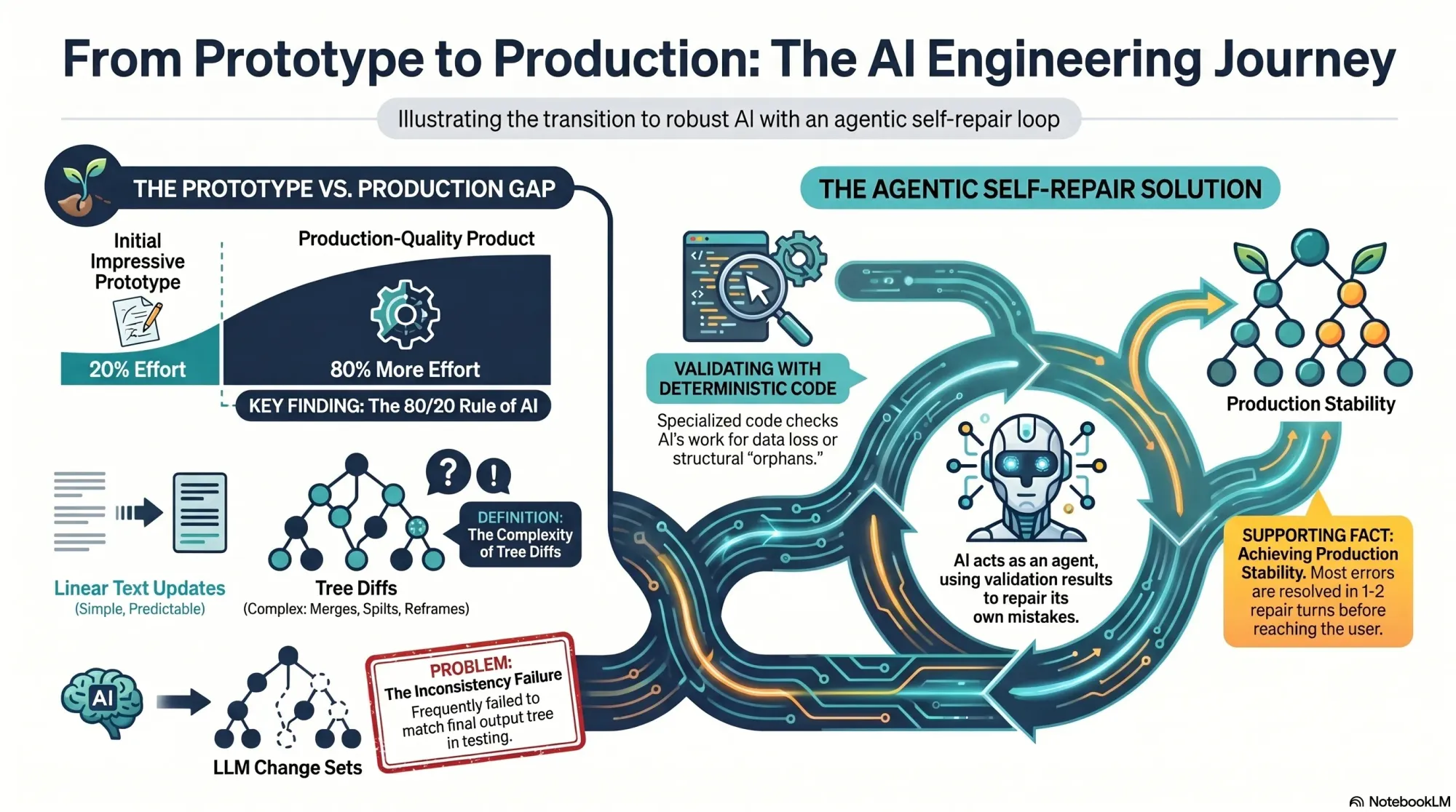
    I often see the same pattern with AI: it’s easy to get to an impressive prototype, but much harder to reach a production-grade product. That was exactly my experience here. My service actually comprised two sub-services: generating a new tree from scratch and updating an existing tree with new interviews. The first worked well in alpha; the second had to be built before anyone could add a fourth interview.

    Opportunity Solution Tree diagram: teal Outcome links to Opportunities A and B; Opportunities C and D branch under B; right panel lists the change set steps for adding nodes.
    Explore how an outcome expands into an Opportunity Solution Tree: Opportunities A and B stem from the goal, with C and D nested under B, while a concise change set tracks every node added along the way.

    On the surface, these services look similar. In reality, updates must preserve existing structure unless new evidence requires a change. You have to account for compound operations—merges, splits, deletes—while guaranteeing no data loss. Every node has source opportunities (supporting evidence from interviews) and children (tree sub-opportunities), and neither can be dropped.

    In classic AI fashion, I got a reasonable version working in a few days and shipped it to our design partners. One team quickly hit our beta limits and asked to convert to a paid subscription so they could keep going. They showed a willingness to pay, converted, and started uploading aggressively.

    Diagram of an Opportunity Solution Tree showing how parent 'Opportunity A' with children x, y, z is split into 'Opportunity A' and 'Opportunity B' to reassign evidence and connections.
    Watch an Opportunity Solution Tree evolve: the original parent A with x, y, z branches is split into A and B, shifting evidence while preserving links—mirroring how AI refines scope and structure in discovery.

    At the 14th, 15th, and 16th uploads, the cracks appeared. We saw odd behavior in some trees. The Vistaly team noticed that the change sets—the step-by-step instructions emitted by my service—didn’t always reconstruct the final tree my service also emitted. We needed those steps to match exactly, so teams could review and accept, modify, or reject each change with confidence.

    They flagged the issue the day I was flying to New Orleans for Jazz Fest. In hindsight, I’m glad I didn’t grasp the scope of what awaited me. I had roughly 80% of the work still to do to make tree updates rock solid. At least I got to enjoy the music first.

    Flowchart merging two opportunity solution trees: Opportunity B with children y and z, and Opportunity C with t, u, v, consolidated into one tree led by Opportunity C connected to five child opportunity nodes.
    From fragments to focus: this diagram shows how Opportunities B and C are merged into a single Opportunity Solution Tree, removing duplicates and unifying context so AI can rank and explore five related opportunities with clarity.

    Back home, I started diagnosing. My service was a pipeline: several LLM-driven steps followed by deterministic code to compare trees and produce change sets. As I dug in, I realized that approach was flawed. Tree diffs, unlike linear document diffs, are ambiguous.

    In a document, if I add a sentence, the diff shows an addition. If I delete a paragraph and rewrite it, the diff shows a removal and an addition. Simple. But trees are different. Suppose I split opportunity A into A and B, and later merge B with C. The split can disappear from the final diff.

    Diagram of an opportunity solution tree labeled 'Input Tree' showing an Outcome node branching to Opportunity A and C, each with child nodes x-z and t-v, with arrows indicating hierarchy.
    Peek inside our process: a simple opportunity solution tree maps an outcome to prioritized opportunities A and C with downstream options x-z and t-v. A clear snapshot of how AI organizes product discovery.

    When the model splits an opportunity, it must distribute A’s source opportunities and children between A and B. For instance, if A has source opportunities 1, 2, 3 and children x, y, z, after the split A might keep 1, 2, and x, while B takes 3, y, and z.

    Now suppose the model merges B into C. If C originally had source opportunities 4 and 5 and children t, u, v, then after the merge C now has source opportunities 3, 4, 5 and children t, u, v, y, z. When you compare the original and final trees, it looks like A somehow donated some evidence and children directly to C. The split and merge that explain why are invisible to a naive diff.

    Opportunity Solution Tree diagram titled Output Tree: a blue Outcome node branches to green Opportunity A and Opportunity C, which expand to nodes x-v with arrows; Product Talk badge.
    See how an AI-generated Opportunity Solution Tree unfolds: one Outcome flows to Opportunities A and C, then into options x–v. Clean colors and arrows reveal the hierarchy from goal to opportunities at a glance.

    That was the core insight: we didn’t just need to show what changed—we needed to show why it changed. I had to reconstruct each move step-by-step. That meant getting the model to show its work, which opened a new can of worms.

    I refactored my prompts so the model produced both the final output and the exact change set it used to get there. The action language was explicit: add, delete, reframe, merge, split, and so on. Crucially, I asked the model to describe its moves in user-meaningful terms—“split A into A and B, then merge B into C”—not as opaque reassignments of sources and children.

    Diagram of an AI-generated Opportunity Solution Tree: blue Outcome node with children Opportunity A and Opportunity B; B branches to Opportunity C and D. A right-hand list shows the change set for each step.
    Watch an opportunity solution tree take shape: start with the outcome, add opportunities A and B, then extend B to C and D. The paired change set makes every edit transparent—ideal for AI-assisted product discovery.

    For each LLM step, the model now emitted its recommendation and the corresponding change set. This helped, but it wasn’t perfect. After extensive testing and error analysis, two classes of errors emerged: (1) the model attempted an invalid move, and (2) the change set didn’t actually generate the recommendation.

    Category 1 felt like designing a game while the model played it creatively. For example, what happens when the model tries to merge a parent with a child? If opportunity A has children B, C, and D and the model merges A with B, the merge is directional. If the instruction is “keep A, delete B,” that works—the parent absorbs the child. But if the instruction is “keep B, delete A,” then C and D become orphans. These puzzles were solvable and even fun.

    Diagram of Opportunity Solution Tree merge rules: merging node B into parent A is allowed, while merging A into B is not because it would orphan opportunities B, C, and D.
    Visual explainer from Product Talk on AI-generated Opportunity Solution Trees. It contrasts an allowed merge (B into A) with a not-allowed merge (A into B) that leaves child opportunities orphaned, guiding safe hierarchy edits.

    Category 2 was harder. Despite prompt iterations, I could only push the discrepancy rate down to about 1 in 40 instances. With 10–20 LLM calls per run, that meant roughly half of all runs still failed. Not acceptable for production. I hit a wall. A paying customer was waiting, and more design partners were queued up.

    Next, I tried to correct the model’s mistakes with deterministic code. I had promised that my change sets would generate the output tree, so I wrote verifiers: detect conflicts (e.g., delete a node, then try to use it later), guard against data loss, prevent orphaned nodes, and more. Detection was straightforward; correction was not. Fixing issues required guessing the model’s intent. If the sequence said “delete A, then merge A with B,” should I remove A entirely or salvage A’s sources and children by merging into B? There were dozens of such cases with no unambiguous answer.

    Workflow diagram titled 'My Simple Repair Loop' showing an iterative validation cycle: Generate the Change Set → Run the validation tool → Check Result, with branches to retry on failure or exit on pass.
    A step-by-step loop shows how changes are validated: generate a change set, run a validation tool, review the result, then repeat on failure and exit on pass—mirroring iterative work behind AI-built Opportunity Solution Trees.

    After 11 straight days of deep work—including weekends—I was exhausted. I dislike hustle culture; this isn’t how I design my life. But I was stuck, and then I had an insight.

    On a walk with my husband (also an engineer), I realized I could have the LLM repair its own mistakes. My data contract with Vistaly requires that the change set must generate the output tree. I had already built robust validation code. I knew exactly when a change set failed—and why. No amount of prompt tuning alone was fixing it. So I turned the validator into a tool for the model and created a simple agentic loop.

    The loop works like this: the model proposes a change set, calls the validation tool, and gets back a pass/fail plus specific feedback. If it fails, the model uses those instructions to repair the change set and calls the tool again. Iterate until success or a max number of turns.

    I prototyped in Node.js with a single model call, a verifier pass, and a repair attempt. At first, the loop didn’t converge—it just accumulated compute. I experimented with how to communicate errors, how much context to include, and how to sequence feedback. Eventually, it clicked: the model began fixing its own mistakes and typically returned a valid change set in one or two repairs. It was, in practice, eval-driven development applied to LLM outputs.

    I had already built an agent loop utility for another AI workflow, so I productionized quickly: model call, optional tool invocation, tool result returned to the model, repeat until the validator signals success or the loop times out. I integrated the new loop into the pipeline and shipped the revamped service to Vistaly on Monday at noon. They’re integrating now, and it will be in the hands of our design partners shortly. I’m relieved—and ready for a day off.

    Reflecting on the last two weeks, a few things stand out. First, I shed limiting beliefs about being an engineer. To make this reliable, I had to solve legitimately hard problems, and that feels good.

    Second, this was genuinely fun. Designing the action set and watching the model push those boundaries was like working through elegant puzzles. Models are incredibly creative, and harnessing that creativity with the right constraints is deeply satisfying.

    Third, I learned when I can and can’t trust Claude to write code for me. Since Opus 4.6 came out, I gave Claude a much longer leash. After the past two weeks, Claude is back on a short leash. I found a lot of gaps in my implementation in areas where I simply trusted that Claude got it right, when in fact it didn’t. If you don’t have the right infrastructure—planning, testing, code review—this can be disastrous. I’ll be investing more here and sharing what I learn.

    Finally, if this work had been spread over two months, it would have been thoroughly enjoyable. I’m discovering how much I like being an AI engineer. It feels like a new chapter where I can combine opportunity solution trees with modern AI engineering—and deliver real value to product teams doing continuous discovery.

    I’m excited to share more of what we’re building with Vistaly and to onboard more design partners soon. If you’re interested, get on the waiting list. And if you’ve been hesitant to stretch beyond your current skill set, I hope this story nudges you to take the first small step toward what’s just now possible.


    Inspired by this post on Product Talk.


    Book a consult png image
  • Taste vs. Evidence in the AI Era: What Product Leaders Must Invest In Now

    Taste vs. Evidence in the AI Era: What Product Leaders Must Invest In Now

    I just finished listening to "Taste – All Things Product Podcast with Teresa Torres & Petra Wille," and as a product leader shipping AI-powered capabilities at HighLevel, Inc., I wanted to pressure-test the sudden obsession with "taste."

    If you're curious, you can listen to this episode on Spotify or Apple Podcasts.

    The core question landed perfectly for our moment: Is "taste" the must-have skill of the AI era — or just the latest tech buzzword in a world where AI is eating through design, delivery, and discovery?

    Teresa pushes back hard, highlighting how slippery the term can be. "It's just this month's flavor of founder mode." She points out that "taste" is rarely defined, can't be easily taught, and too often becomes shorthand for "my preference trumps yours." Just as importantly, "It's not about your taste. It's about your customer's taste."

    Petra adds needed nuance from years in the craft: pattern-recognition is real, and some people do develop sharper product sense over time. As she put it, "I am a strong believer that you develop product sense and taste over time. It's never finished."

    Both threads lead back to familiar roots in product: product sense, founder mode, and the enduring myth of the lone visionary. They even grapple with the big question on everyone’s mind—Will AI Eat Taste Too?—and where that leaves product teams navigating GenAI, LLMs for product managers, and evolving product strategy.

    Here’s my take. "Taste" can be useful as a personal north star, but it is not a decision system. In my teams, we bias toward evidence: continuous discovery, customer interviews, discovery synthesis with opportunity solution trees, and tight collaboration in product trios. Opinion can start the conversation, but evidence should end it.

    Practically, that means investing in the skills that compound: Discovery skills — understanding customers, matching solutions to real needs. Human-to-human interaction skills. Learning to collaborate with AI effectively. Critical thinking and judgment grounded in evidence.

    On AI collaboration specifically, we treat GenAI as a force multiplier, not a decider. We prototype with AI to explore breadth, then narrow with qualitative and quantitative signals, ablation-style experiments, and clear success criteria. The bar I hold myself to is simple: taste without evidence is just opinion.

    Three lines I underlined from the conversation:

    "It's just this month's flavor of founder mode." — Teresa Torres

    "It's not about your taste. It's about your customer's taste." — Teresa Torres

    "I am a strong believer that you develop product sense and taste over time. It's never finished." — Petra Wille

    If you want to go deeper, these references are helpful for sharpening judgment without falling into the "great man" theory trap.

    Follow Teresa Torres: https://ProductTalk.org

    Follow Petra Wille: https://Petra-Wille.com

    Founder mode

    Marty Cagan: Founder-Style Leadership

    Vercel/v0 CEO Guillermo Rauch on building taste: from Lenny Rachitsky’s Linkedin post

    Continuous discovery (Read Teresa’s Everyone Can Do Continuous Discovery—Even You! Here’s How

    The "great man" theory

    Steve Jobs and the myth of the lone product visionary

    Have thoughts on this episode? Leave a comment below and share how your team balances product sense with evidence in the age of AI.


    Inspired by this post on Product Talk.


    Book a consult png image
  • Supercharge Claude and Cursor with Amplitude Plug and Play: Your AI Analytics Expert in One Install

    Supercharge Claude and Cursor with Amplitude Plug and Play: Your AI Analytics Expert in One Install

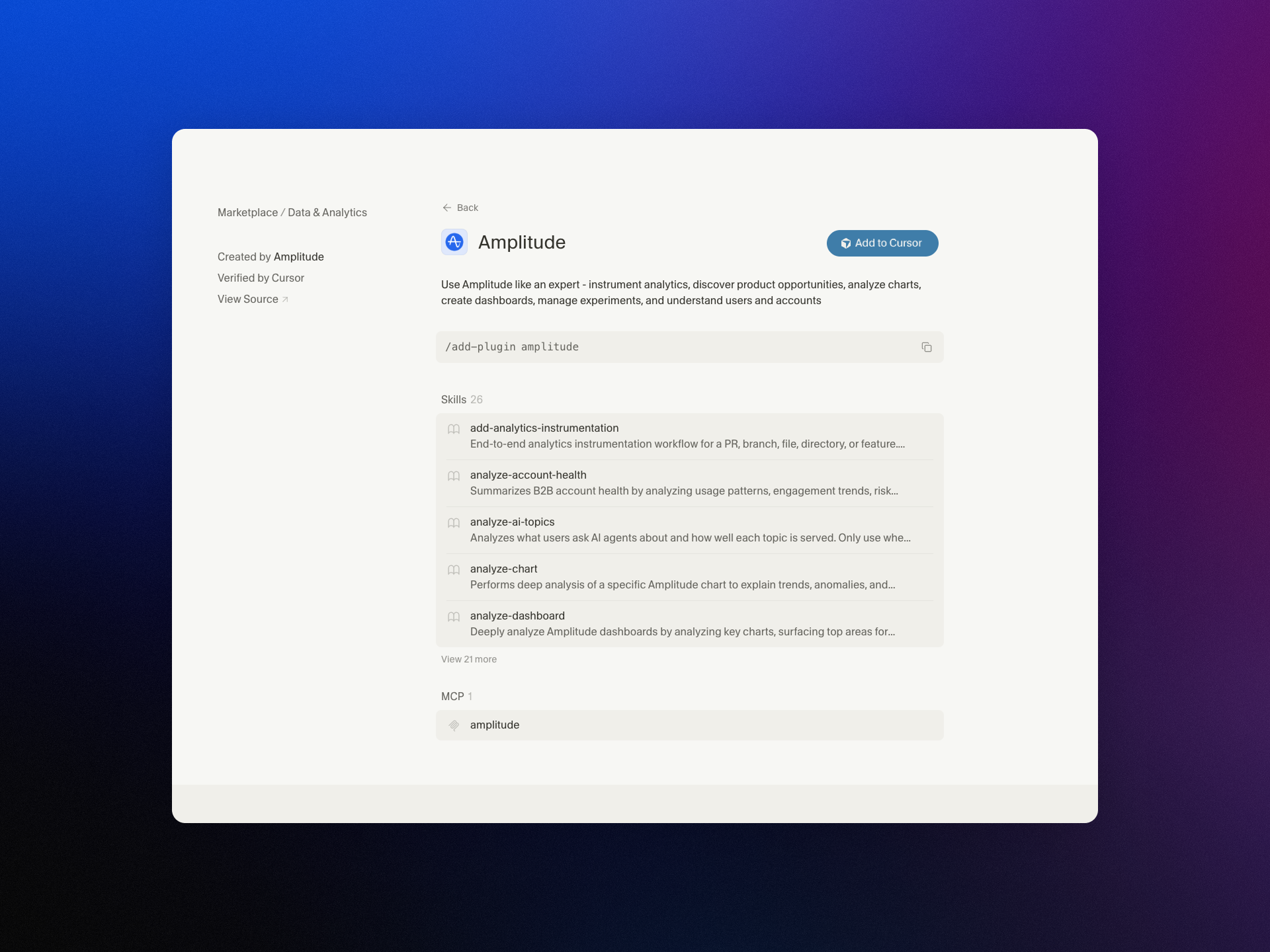
    I’m excited to share that we’ve brought Amplitude Plug and Play to the Claude and Cursor marketplaces—a lightweight way to infuse your everyday prompts with serious product analytics context and speed.

    "Learn more about our new AI plugin, the easiest way to turn your favorite AI client into an analytics expert with a single-install."

    For years, I’ve watched teams lose momentum hopping between dashboards, docs, and spreadsheets just to answer simple questions like “What changed in activation last week?” or “Which cohort is driving retention?” With Amplitude analytics and behavioral analytics at the core, Amplitude Plug and Play collapses that friction by bringing the answers to where you already think and build—inside Claude and Cursor.

    In practice, this means I can ask natural-language questions such as “Show me the funnel from signup to activation by region,” “Compare retention week over week for new users from our latest release,” or “Summarize our last A/B testing results on onboarding” and get structured, context-aware responses. The goal is to keep me in flow while still honoring the rigor of a unified analytics platform.

    What I love most is how this elevates both discovery and delivery. Product managers can accelerate continuous discovery by querying cohorts, drivers, and anomalies mid-conversation. Engineers working in Cursor or with Claude Code can validate event definitions, sanity-check metrics, and spot regressions without leaving their IDE. The result is tighter feedback loops and better decision quality.

    Just as importantly, the experience is designed for clarity and consistency. When I ask about activation, I expect the same canonical definition every time. When I explore a retention analysis, I want clear assumptions and transparent logic. By anchoring responses to well-defined metrics and event taxonomies, the plugin helps reinforce good data governance while keeping the interaction fast and conversational.

    Getting started takes only a few minutes. Open the Claude or Cursor marketplace, search for Amplitude Plug and Play, complete the single-install flow, and connect to your Amplitude analytics workspace. From there, start prompting as you normally would—only now your AI client can reason with product context.

    This launch is part of how I see gen ai reshaping AI workflows for product teams: less context switching, more signal per prompt, and a shared, accessible understanding of what’s really moving the business. If you’re ready to turn your AI assistant into a trusted partner for product insight, Amplitude Plug and Play is a powerful next step.


    Inspired by this post on Amplitude – Best Practices.


    Book a consult png image
  • From Brain Dump to Done: How Todoist’s Ramble Captures Tasks in Real Time with AI

    From Brain Dump to Done: How Todoist’s Ramble Captures Tasks in Real Time with AI

    Turning a rambling stream of consciousness into a clean task list while someone is still talking has been a longtime product dream of mine. With Ramble, Todoist brought that dream to life by using live audio AI to capture tasks in real time—no transcription step required. The result is a voice-to-task flow that feels natural, fast, and surprisingly disciplined.

    As I listened to the Doist team—Ernesto Garcia (Front-end Product Engineer), Thomas Jost (Backend Software Engineer), and Hugo Fauquenoi (Product Manager)—walk through their approach, I heard a blueprint for building pragmatic GenAI features. What began as a two-to-three month AI exploration became one of their most technically deliberate releases: a “Gemini-powered pipeline that makes tool calls while the user is still speaking, surfacing tasks on screen in real time without any text output from the model.”

    The breakthrough started with user research. People weren’t merely dictating tasks; they were doing a “brain dump” first—often into pen and paper or even ChatGPT voice—and only then committing items to Todoist. Meeting users where they already are reframed the problem: don’t force structure upfront; capture fluid thought and translate it into actionable tasks instantly.

    That insight led to a bold architectural choice: skip transcription entirely and process raw audio directly with a Gemini live audio model. By removing the brittle middleman of text, the team reduced latency and kept the model focused on one job—turning intent into structured actions. It’s a crisp example of AI workflows designed for reliability over novelty.

    The real magic is in the real-time “tool calls.” As the user speaks, the model triggers add task, edit task, and delete task operations immediately. For high-friction contexts like driving, they paired visual task cards with subtle sound effects as confirmation cues. It’s thoughtful conversation design that respects attention and safety without sacrificing speed.

    Teaching the model to capture tasks literally—without over-interpreting or trying to complete the work—required careful prompt engineering for voice and temperature tuning. Drawing a bright line between “capture versus do” kept the experience trustworthy. In my own AI Strategy work, I’ve found that establishing explicit agentic guardrails early prevents unintended autonomy later.

    Dates were the sleeper challenge. The team had to inject the current date, normalize to days vs. months, and always output dates in English for the natural language parser—while preserving the user’s original language for everything else. If you’ve ever shipped date handling across locales, you’ll appreciate how many edge cases hide in “Taming Dates and Time.”

    Quality didn’t hinge on intuition alone. They built an LLM-judge eval system using real employee recordings from 100+ people across 35 countries in 20+ languages to catch prompt regressions. That’s eval-driven development done right: representative data, repeatable scoring, and tight feedback loops as models and prompts evolve.

    For project and label matching, they chose direct context injection over RAG. Instead of building a retrieval pipeline, they injected the full project/label list into the system prompt. With smart context window management and a sharply constrained task schema, this was both simpler and more accurate. Sometimes the fastest path to product-market fit is removing moving parts, not adding them.

    One product principle stood out: easy correction beats perfect first-time accuracy. Natural language interfaces earn trust when users can fix misfires in a tap or two. That bias toward quick recovery over false precision is how you ship AI that feels useful from day one.

    Looking ahead, the roadmap is compelling: multimodal task capture from images and text blobs, Apple Watch support, and automation integrations. As voice AI agent patterns mature, this “tool-only architecture” sets a solid foundation for going from capture to coordinated execution—without losing the simplicity that makes Ramble shine.

    If you want to hear the full conversation, you can listen on Spotify or Apple Podcasts. It’s a masterclass in building focused GenAI features that trade cleverness for clarity—and still delight.

    Resources & Links: Todoist • Doist • Google Vertex AI (Gemini)


    Inspired by this post on Product Talk.


    Book a consult png image
  • Never Lose Your AI Superpowers: How I Sync Context and Skills Across Every Device

    Never Lose Your AI Superpowers: How I Sync Context and Skills Across Every Device

    I spend a meaningful portion of my week helping teams operationalize AI workflows, and one theme comes up over and over: how to share context files and skills seamlessly across devices and with colleagues. Hosting Claude Code office hours has only reinforced it—sharing context and skills is the single biggest blocker to reliable, repeatable outcomes.

    I hear from leaders driving AI adoption who have built robust, high-signal context systems and carefully crafted skills. Their challenge isn’t creating value—it’s distributing it. They need a way to make the same trusted workflows available to teammates and to keep everything in sync across laptops, desktops, and phones.

    I hit the same wall myself. I work across multiple devices (a Mac Mini for day-to-day, a MacBook Air on the road, and an iPhone) and I collaborate with a full-time admin. I wanted my context and skills to be consistent everywhere, for both of us. In this piece, I’ll share my setup—what I store where, how I share it across devices and with my team, the trade-offs of each option, and how I keep everything current. We’ll cover four different syncing services: git/GitHub, Obsidian Sync, Dropbox and iCloud.

    If you’re new to this series, this is the eighth installment. Earlier pieces provide foundational context: Claude Code: What It Is, How It's Different, and Why Non-Technical People Should Use It; Stop Repeating Yourself: Give Claude Code a Memory; How to Use Claude Code Safely: A Non-Technical Guide to Managing Risk; How to Choose Which Tasks to Automate with AI (+50 Real Examples); How to Build AI Workflows with Claude Code (Even If You're Not Technical); How to Use Claude Code: A Guide to Slash Commands, Agents, Skills, and Plug-ins; and Context Rot: Why AI Gets Worse the Longer You Chat (And How to Fix It).

    The day it really hit me was right before my interview with Claire Vo on How I AI. I was staying in an AirBnB with only my laptop, and I planned to demo my /today command along with my context file structure. Minutes before the session, I realized the latest version of my /today command wasn’t on that machine. I was able to remote into my Mac Mini and grab it—crisis averted—but it was a wake-up call. I needed a more reliable, shareable approach for syncing context and skills across devices and with my admin.

    I started by testing the tools I already used—Dropbox, iCloud, and GitHub—to see what might fit. Each got me partway there, but each also introduced friction that mattered in daily use.

    First, absolute file paths don’t travel well. I began with Dropbox but quickly ran into cross-linking headaches. Good context systems rely on rich interlinking—index files point to other context files, and those context files link to each other. When Claude creates a link from one context file to another, it tends to use the full file path: /Users/ttorres/Library/CloudStorage/Dropbox. That worked on my Mac Mini and MacBook (same user name), but not on my phone—and not for my admin. I tried to force relative links (~/Dropbox), but couldn’t get Claude to do it consistently, which led to broken links. This isn’t unique to Dropbox; Claude prefers full paths because they’re reliable on a single machine, but they’re brittle across devices and useless when sharing with colleagues. Claude is trained to use relative file paths when working within a git repository, but I struggled to get it to work reliably in Dropbox.

    Second, skills live in a user directory by default. By default, skills live in ~/.claude/skills. Most sync services aren’t designed to share your ~/ folder. iCloud is the exception, but then you’re limited to Apple devices—no Windows or Android. There is a workaround: set up a claude folder in Dropbox and create a symlink from ~/.claude to your synced claude folder, so all skills, commands, and settings live in Dropbox. Then, on each device (yours or a colleague’s), you set up a symlink to that folder so Claude can find the files. This works, but I was running into another limitation that made Dropbox a poor fit.

    Third, Obsidian on iOS doesn’t sync cleanly with Dropbox. I rely on Obsidian’s file browser alongside my notes to navigate context quickly. Storing vaults in Dropbox gave me parity across my Mac Mini and MacBook Air, but I couldn’t get the iOS Obsidian app to reliably load my Dropbox vaults. That friction was a dealbreaker for on-the-go work.

    At that point, I explored git/GitHub. GitHub is cloud storage for git repositories. A git repository is a folder of shared files used so engineers can collaborate on the same code base. Each person clones a local copy, works locally, then pushes changes back to the hosted repo on GitHub; others pull to update. Git’s merge and conflict tooling is excellent. Git is the powerhouse of file syncing and version control. It easily handles syncing context and skills, Claude behaves better with relative links in a git repo, and I can open the repo in my IDE with a clean file browser. For me, that checked all the boxes—until I factored in my admin. Git has a learning curve, requires manual pull/push hygiene, and often assumes an IDE workflow. That overhead was too heavy for a non-technical collaborator.

    The turning point was Obsidian Sync. A colleague suggested it, and it ended up being the sweet spot. Obsidian is a markdown reader; files are stored locally in a normal folder you can open in Finder or File Explorer. There’s no proprietary format—you can read files with any text editor, and Claude can access them via bash commands. Obsidian Sync is simpler than git: open a note and it syncs in the background. I can access the same vaults across my Mac Mini, MacBook Air, and iPhone, and I can share a vault with my admin so we can both create and access notes.

    Because we’re in different time zones and rarely edit the same note simultaneously, limited conflict handling hasn’t been an issue. Obsidian’s internal link notation also means one note can link to another and those links just work across devices. Claude can follow these links, so the brittle file path problem disappears.

    Here’s where I landed. After a lot of trial and error, I have a setup that works across my devices and for my admin, who uses both a Windows desktop and a Mac laptop. I keep my core context in Obsidian vaults synced with Obsidian Sync, which preserves portability, link integrity, and ease of use. For skills, I avoid scattering files in machine-specific locations and instead centralize what Claude needs to reference in shared, human-readable folders. If you require advanced version control with branching and reviews, git/GitHub is excellent. If your priority is low-friction, cross-device access for non-technical teammates, Obsidian Sync is a practical, reliable choice. And if you must use Dropbox or iCloud, consider symlinks and be vigilant about relative paths—just know that absolute paths won’t travel well.


    Inspired by this post on Product Talk.


    Book a consult png image
  • Inside the Most Politically Dangerous C‑Suite Role: Hard Truths on Culture, Layoffs, and Leadership

    Inside the Most Politically Dangerous C‑Suite Role: Hard Truths on Culture, Layoffs, and Leadership

    I’ve long believed the people function is a strategic engine, not a support lane. That conviction was only reinforced in a recent deep dive with Katie Burke, now COO at Harvey after joining as Chief People Officer. Before Harvey, she spent 11 years in HR leadership at HubSpot, helping build one of tech’s most distinctive cultures. In this piece, I unpack what resonated most for me as a product leader: a marketing-minded approach to HR, deliberate hiring from hospitality, and the non-negotiable case for culture as a core business strategy.

    The first principle is simple and often overlooked: HR leaders should think like marketers. Employer brand is a product; your candidate and employee journeys are funnels; and your programs deserve the same rigor we bring to product—segmentation, positioning, channels, and continuous A/B testing. When we treat onboarding, performance, and manager enablement like iterative product launches—complete with activation metrics, retention curves, and NPS—we stop guessing and start compounding results.

    One line has become a north star for how I approach executive leadership: “Don’t ask for a seat at the table. Build the table.” In practice, that means codifying the operating system—decision rights, principles, cadences, and accountability—so the organization isn’t improvising strategy in every meeting. Product, People, and Finance should co-own this OS; that’s how you scale clarity faster than headcount.

    Transparency is the tax we pay for alignment, and it compounds trust. After an IPO, the impulse can be to close ranks. The better move is radical transparency with context: what changed, why it matters, and how decisions get made now. On my teams, that looks like publishing decision records, sharing tradeoffs explicitly, and using written docs to reduce rumor velocity—core muscles in stakeholder management as complexity grows.

    I also loved the counterintuitive hiring bet: prioritize hospitality backgrounds alongside traditional corporate pedigrees. People who’ve thrived in service environments bring customer empathy, operational resilience, and a bias for proactive care—traits that elevate everything from onboarding to incident response. In product terms, they’re culturally accretive hires with high signal on service quality and consistency.

    The trickiest part of the Chief People Officer role isn’t process—it’s politics. You are the executive team’s own HR business partner, which requires coaching, candor, and conflict mediation at the highest stakes. The goal is to “Be the Michael Jordan of your exec team”—the teammate who elevates standards, makes others better, and chooses the hard right over the easy familiar.

    Layoffs create a culture debt that accrues interest. Expect a “2.5-year cultural hangover after a layoff”—in many companies, an inevitable two-year layoff hangover—unless you actively repay it. That repayment plan includes narrating the why with specificity, rebuilding trust through manager enablement, and re-anchoring on performance and values. Measure leading indicators (manager effectiveness, time-to-decision, psychological safety) alongside lagging ones (regretted attrition) to track the true recovery arc.

    People leaders also need to create “graceful exits.” Doing this well preserves dignity for the person, protects the team’s morale, and safeguards the company’s brand. The bar is straightforward: clear rationale, fair process, useful feedback, generous support, and alumni pathways. A graceful exit signals that even when business realities bite, respect is non-negotiable.

    Expectation-setting matters. Two truths cut through the noise: “The workplace shouldn’t be Disneyland” and “Our job is not to make you happy every day.” The promise is not perpetual happiness; it’s meaningful work, fair standards, growth opportunities, and leaders who tell the truth. When we set that contract clearly, engagement becomes an outcome of purpose and progress—not perks.

    On feedback, I use the protein vs. sugar rule for employee feedback. Sugar feedback is pleasant and perishable; protein feedback is specific, sometimes uncomfortable, and growth-driving. Great cultures build a taste for protein—clear role expectations, crisp examples, and written follow-ups. Mechanically, that looks like structured 1:1s, decision retros, skip-levels, and manager training that demystifies “what good looks like.”

    Being a Chief People Officer isn’t for the faint of heart. The role must be demanding by design—on executive hiring quality, performance management courage, and values enforcement. Moments like “Berry-Gate” are reminders that small symbolic issues can balloon when feedback loops are unclear. Close the loop fast, publish the rationale, and ensure there’s a predictable path for concerns to be heard and resolved.

    When hiring, beware patterns that predict friction. That’s why “frequent flyers” are a new-hire red flag. Movement can signal adaptability—but weather-vein pivots and blame-shifting often repeat. Probe for ownership, learning moments, and sustained impact; you want people who compound value, not just sample it.

    Clarity on scope prevents leadership whiplash. Which company decisions fall to the Chief People Officer? Think leveling frameworks, compensation philosophy and bands, performance calibration, manager standards, ER policies, and org design guardrails—always in lockstep with Finance and the CEO. Escalate when there are values collisions or systemic risks; otherwise, push decisions to the right altitude and owner.

    Scaling exposes the same few failure modes on repeat: fuzzy decision rights, a thin manager bench, brittle processes that don’t flex, and inconsistent leveling that erodes trust. The antidote is an operating model that pairs clear principles with lightweight mechanisms—documented roles, regular calibration, and reviews that audit for both outcomes and operating behaviors.

    Comparing a scaled SaaS like HubSpot with an AI-native company like Harvey surfaces important differences. The former optimizes for durable systems, predictable cadences, and governance; the latter optimizes for rapid learning loops, emergent org design, and a higher tolerance for ambiguity. The art is porting the right controls at the right time without crushing velocity.

    AI is already changing the people function. GenAI can draft job descriptions, summarize performance notes, classify themes from engagement surveys, and power AI workflows that resolve common HR tickets. The human-in-the-loop remains essential for judgment, context, and ethics—especially around data governance and privacy-by-design. A pragmatic AI Strategy here frees HRBPs for higher-order coaching and organizational development work.

    One practice I recommend widely: share your own performance reviews. Modeling openness normalizes growth and turns feedback into a shared craft, not a secret ritual. It also builds trust when you later ask the organization to lean into sharper, protein-rich feedback.

    Finally, disagreements with the CEO are inevitable—and healthy. Handle them with pre-briefs, crisp written proposals, explicit tradeoffs, and a shared decision record. Argue like scientists, not politicians; once a call is made, disagree and commit. That combination of candor and alignment is what keeps executive teams high-trust and high-velocity.

    The people leader’s chair may be the most politically dangerous role in the C-suite—but it’s also one of the most leveraged. Build the table, tell the truth, design for standards and dignity, and treat culture like the product that powers everything else.


    Book a consult png image
  • Beat AI FOMO: A Product Leader’s Playbook to Choose Tools, Stay Focused, and Learn Deeply

    Beat AI FOMO: A Product Leader’s Playbook to Choose Tools, Stay Focused, and Learn Deeply

    Lately, it feels like every morning brings a new AI launch, a dazzling demo, or a must-try tool. I love the pace of innovation, but the constant stream can trigger counterproductive FOMO if I’m not intentional. As a product leader, I’ve learned to turn that anxiety into a disciplined learning system—one that keeps me curious without letting novelty hijack my focus.

    That’s exactly why this conversation with Petra Wille and Teresa Torres resonated with me. They explore how to stay experimental in the AI era without chasing every shiny object. Their perspective aligns closely with my own operating cadence: start with real problems, go deep on a small set of tools, and create explicit boundaries between work, learning, and play.

    Listen to this episode on: Spotify | Apple Podcasts

    Here’s the mindset I apply. I don’t start with tools—I start with problems. When I encounter concrete friction in a workflow or see a credible opportunity to improve an outcome, that’s my trigger to explore a new capability. This mirrors the continuous discovery habit of prioritizing opportunities over solutions, and it’s how I avoid performing “innovation theater.”

    To keep exploration healthy, I time-box my learning. I block recurring windows specifically for experiments, reading, and hands-on trials so they don’t overrun my core product work. During these blocks, I’ll set a clear question, run a tight test, and capture what I learned. No rabbit holes, no endless tinkering.

    I also separate “interesting” from “actionable.” Plenty of inputs are worth awareness, but very few deserve immediate action. I bookmark the rest for later. This simple filter reduces cognitive load and keeps my backlog—from ideas to proofs of concept—well-governed.

    Social media can amplify technology hype cycles, so I establish boundaries. I batch consumption, mute low-signal channels, and prioritize practitioner communities over performative threads. The goal isn’t to be first; it’s to be right for my customers, my team, and our strategy.

    When choosing what to try next, I use a practical rubric. Does the tool target a real friction I’ve seen in discovery or delivery? Can it plug cleanly into our AI workflows without unsustainable glue work? Do we have a safe, compliant way to test it? Is there a plausible path from trial to compounding value? If the answer isn’t a confident yes to most of these, I wait.

    Depth beats breadth. I’d rather take one promising tool into a real use case, instrument it, and measure outcomes than skim ten trending demos. That tighter loop produces sharper intuition, clearer product bets, and better partner decisions. A quick opportunity solution tree helps me connect user pain to outcomes before I let any solution onto the field.

    In the episode, Petra Wille and Teresa Torres talk candidly about managing FOMO, deciding which tools to explore, and designing intentional learning systems. They discuss why starting with a problem is more valuable than starting with a tool, how social media amplifies technology FOMO, and why going deeper with fewer tools can lead to better learning. If you’ve ever felt like you’re falling behind because you haven’t tried the latest AI tool yet, this conversation will help you rethink how you approach learning and experimentation.

    If you’re curious about what came up, here are some of the tools and communities mentioned: Claude Code, OpenClaw (formerly Clawdbot, Moltbot), NotebookLM, Product Talk, ElevenLabs, Lenny’s Newsletter Community, and even a nod to Bridgerton for a touch of levity.

    My takeaway is simple but powerful: curiosity doesn’t require constant experimentation. The best product managers cultivate a balanced system—grounded in product discovery, energized by focused experiments, and protected by clear boundaries—so we can learn faster while staying pointed at outcomes that matter.

    Discussion Question: How do you decide which new tools or technologies are worth exploring—and which ones you can safely ignore?

    Resources & Links: Follow Teresa Torres: https://ProductTalk.org | Follow Petra Wille: https://Petra-Wille.com

    Full transcripts are only available for paid subscribers.

    Have thoughts on this episode? Leave a comment below.


    Inspired by this post on Product Talk.


    Book a consult png image
  • Inside Banani: How a Canvas-First AI Designer Elevates UX and Accelerates Product Teams

    Inside Banani: How a Canvas-First AI Designer Elevates UX and Accelerates Product Teams

    I believe the future of product design isn’t about replacing designers—it’s about giving every team access to one. That’s why Banani grabbed my attention. It’s an AI product designer that doesn’t just generate code—it generates design. For solo founders, stretched design teams, and early-stage startups, that shift matters: it raises the design floor without lowering the creative ceiling.

    I spent time with Vlad Solomakha (CEO & Co-founder), Vova Kovalchuk (CTO & Co-founder), and Vlad Ostapovats (Founding Growth) to unpack how they took Banani from a Figma plugin proof-of-concept to a canvas-first AI design tool generating hundreds of thousands of designs per week. Vlad brings a decade of design experience and a precise north star: AI should produce beautiful, tasteful design rather than average, undifferentiated UI.

    The architectural choices stood out. They engineered their agent to handle parallel screen edits, manage per-screen context across canvases with hundreds of frames, and make surgical edits without regenerating entire screens. This is the kind of agentic AI work that product leaders have been waiting for: concrete advances in context window management, tool orchestration, and prompt engineering that translate into higher throughput without sacrificing quality.

    Equally important is how they addressed the "gulf of specification"—the mismatch between how designers think visually and how agents understand text. Banani’s canvas-first approach acknowledges that design is spatial, hierarchical, and iterative. Rather than forcing a chat-first UX, they center the canvas and let the agent do production work while keeping the designer firmly in control. In practice, this narrows intent ambiguity, speeds up iteration, and preserves taste.

    The team made another pivotal bet: Why Banani doesn’t compile running applications — just HTML/CSS mockups — and how that shapes everything. By decoupling the design artifact from runnable code, they optimize for velocity, taste, and exploration. In my experience, this separation is the right product strategy for early discovery and gen ai for product prototyping—move fast on aesthetics and flows, then converge on implementation once you’ve validated the direction.

    I also appreciated their pragmatic evaluation approach. Instead of traditional evals, they spin up 10 screens from one prompt to compare models. It’s hands-on, outcome-based, and aligned with eval-driven development in real product environments. They’re relentlessly discerning about when to work around model limitations versus when to wait for the models to improve—an essential discipline when building at the edge of what’s possible.

    Under the hood, context engineering and specialized agent tools do the heavy lifting. Per-screen history with shared project context enables precise, reversible changes across large canvases. The result: fewer destructive regenerations, more reliable design intent preservation, and a workflow that feels like collaborating with a strong mid-level designer who’s exceptionally fast and consistent.

    If you want a quick tour, I recommend jumping to a few highlights: 20:13 Product Tour Canvas First AI, 33:40 Gulf of Specification, 42:54 Agent Architecture Under Hood, 48:48 State History Context Tricks, and 56:04 Navigating Busy Canvases. Each segment reveals a different layer of the system design and product thinking behind Banani’s canvas-first UX.

    For product leaders, this is a compelling blueprint for raising the design floor while protecting the last mile of craft. It aligns with empowered product teams, continuous discovery, and LLMs for product managers who need leverage without losing judgment. If you’re exploring agentic AI in design, this is a thoughtful, execution-focused model worth studying and trialing on your next product tour or redesign.

    Resources worth exploring: Banani and TL Draw. To hear the full conversation, you can listen on Spotify or Apple Podcasts. Then, pressure-test the approach inside your own product development lifecycle and see how a canvas-first AI designer reshapes your team’s velocity and quality bar.


    Inspired by this post on Product Talk.


    Book a consult png image
  • Bad Advice from Your AI Clone? Ethics, IP, and How Product Leaders Protect Quality

    Bad Advice from Your AI Clone? Ethics, IP, and How Product Leaders Protect Quality

    What happens when an AI starts giving advice in your voice—advice you’d never actually give? I’ve been thinking a lot about that question, and this conversation hit home for me as a product leader navigating the fast-evolving reality of AI “clones.”

    Listen to this episode on: https://open.spotify.com/episode/7DNDIlIimwbbMOytArewRp?ref=producttalk.org | https://podcasts.apple.com/kh/podcast/bad-advice/id1794203808?i=1000756914818&ref=producttalk.org. Prefer video? Watch on YouTube: https://www.youtube.com/embed/RF4BwaeMMlg?feature=oembed

    The episode examines AI “clones” built from podcast transcripts and public content—where the experimentation feels exciting, where it crosses ethical lines, and what happens when mediocre AI outputs get attributed to real people. The tension is real: when a bot confidently answers in your style but misses the nuance, “it’s not me” becomes more than a disclaimer—it’s a reputational defense.

    We dig into the messy parts: IP ownership of open-sourced transcripts, the role of pirated books in LLM training sets, rising inference costs, and the uncomfortable economic question: if anyone can prompt “act like Teresa,” how do creators make a living? In my own decision-making, I look for clear consent, guardrails that prevent impersonation, and transparent UX that never confuses a synthetic perspective with a human expert.

    This isn’t anti-AI. It’s a nuanced conversation about quality, consent, and remembering there are real humans behind the ideas.

    Here’s how I translate the key takeaways into practice. Using AI for perspective is fine—equating it to the real person isn’t. Free-feeling AI outputs still rely on someone’s work. Expertise is more than past content—it’s context, judgment, and evolution. If someone’s work influences you, find a way to support them. These principles help teams benefit from gen ai without eroding trust or the creator ecosystem.

    “Technically possible” doesn’t mean “ethically okay.” My AI Strategy playbook includes privacy-by-design, clear data governance on training materials, and a bright line between inspiration and impersonation. When we ship AI features, we label synthetic outputs, avoid mimicking living experts without permission, and create paths to compensate or promote the humans whose thinking underpins the experience.

    I’ve also tested the “act like X” pattern to stress-test product quality. Even when outputs sound plausible, they rarely capture the expert’s mental models, trade-offs, or the evolution of their thinking—especially in complex product discovery work. That gap is the difference between average AI text and expert product management leadership.

    If you listen, consider a few reflection prompts: Have you ever used AI to “act like” someone you admire? Could you tell whether the output matched that person’s actual thinking? How do you decide what’s ethically okay when using public content in LLMs? And how can we support creators while still embracing new tools?

    Resources & Links you may find helpful: Follow Teresa Torres: https://ProductTalk.org; Follow Petra Wille: https://Petra-Wille.com; Delphi.ai (AI bot platform discussed): https://www.delphi.ai/?ref=producttalk.org; Lenny’s Podcast: https://www.lennysnewsletter.com/podcast?ref=producttalk.org; ChatGPT: https://chatgpt.com/?ref=producttalk.org; Petra’s Coaching Packages: https://www.petra-wille.com/coaching-packages?ref=producttalk.org; Teresa’s Product Talk: https://www.producttalk.org/; Teresa’s book Continuous Discovery Habits: https://www.producttalk.org/continuous-discovery-habits/; Lenny’s open-sourced podcast transcripts: https://www.dropbox.com/scl/fo/yxi4s2w998p1gvtpu4193/AMdNPR8AOw0lMklwtnC0TrQ?rlkey=j06x0nipoti519e0xgm23zsn9&e=1&st=ahz0fj11&dl=0&ref=producttalk.org

    Have thoughts on this episode or practices that have worked in your org? Share them below—I’m keen to learn how other teams are balancing innovation with integrity.


    Inspired by this post on Product Talk.


    Book a consult png image