Tag: personal knowledge management

  • Never Lose Your AI Superpowers: How I Sync Context and Skills Across Every Device

    Never Lose Your AI Superpowers: How I Sync Context and Skills Across Every Device

    I spend a meaningful portion of my week helping teams operationalize AI workflows, and one theme comes up over and over: how to share context files and skills seamlessly across devices and with colleagues. Hosting Claude Code office hours has only reinforced it—sharing context and skills is the single biggest blocker to reliable, repeatable outcomes.

    I hear from leaders driving AI adoption who have built robust, high-signal context systems and carefully crafted skills. Their challenge isn’t creating value—it’s distributing it. They need a way to make the same trusted workflows available to teammates and to keep everything in sync across laptops, desktops, and phones.

    I hit the same wall myself. I work across multiple devices (a Mac Mini for day-to-day, a MacBook Air on the road, and an iPhone) and I collaborate with a full-time admin. I wanted my context and skills to be consistent everywhere, for both of us. In this piece, I’ll share my setup—what I store where, how I share it across devices and with my team, the trade-offs of each option, and how I keep everything current. We’ll cover four different syncing services: git/GitHub, Obsidian Sync, Dropbox and iCloud.

    If you’re new to this series, this is the eighth installment. Earlier pieces provide foundational context: Claude Code: What It Is, How It's Different, and Why Non-Technical People Should Use It; Stop Repeating Yourself: Give Claude Code a Memory; How to Use Claude Code Safely: A Non-Technical Guide to Managing Risk; How to Choose Which Tasks to Automate with AI (+50 Real Examples); How to Build AI Workflows with Claude Code (Even If You're Not Technical); How to Use Claude Code: A Guide to Slash Commands, Agents, Skills, and Plug-ins; and Context Rot: Why AI Gets Worse the Longer You Chat (And How to Fix It).

    The day it really hit me was right before my interview with Claire Vo on How I AI. I was staying in an AirBnB with only my laptop, and I planned to demo my /today command along with my context file structure. Minutes before the session, I realized the latest version of my /today command wasn’t on that machine. I was able to remote into my Mac Mini and grab it—crisis averted—but it was a wake-up call. I needed a more reliable, shareable approach for syncing context and skills across devices and with my admin.

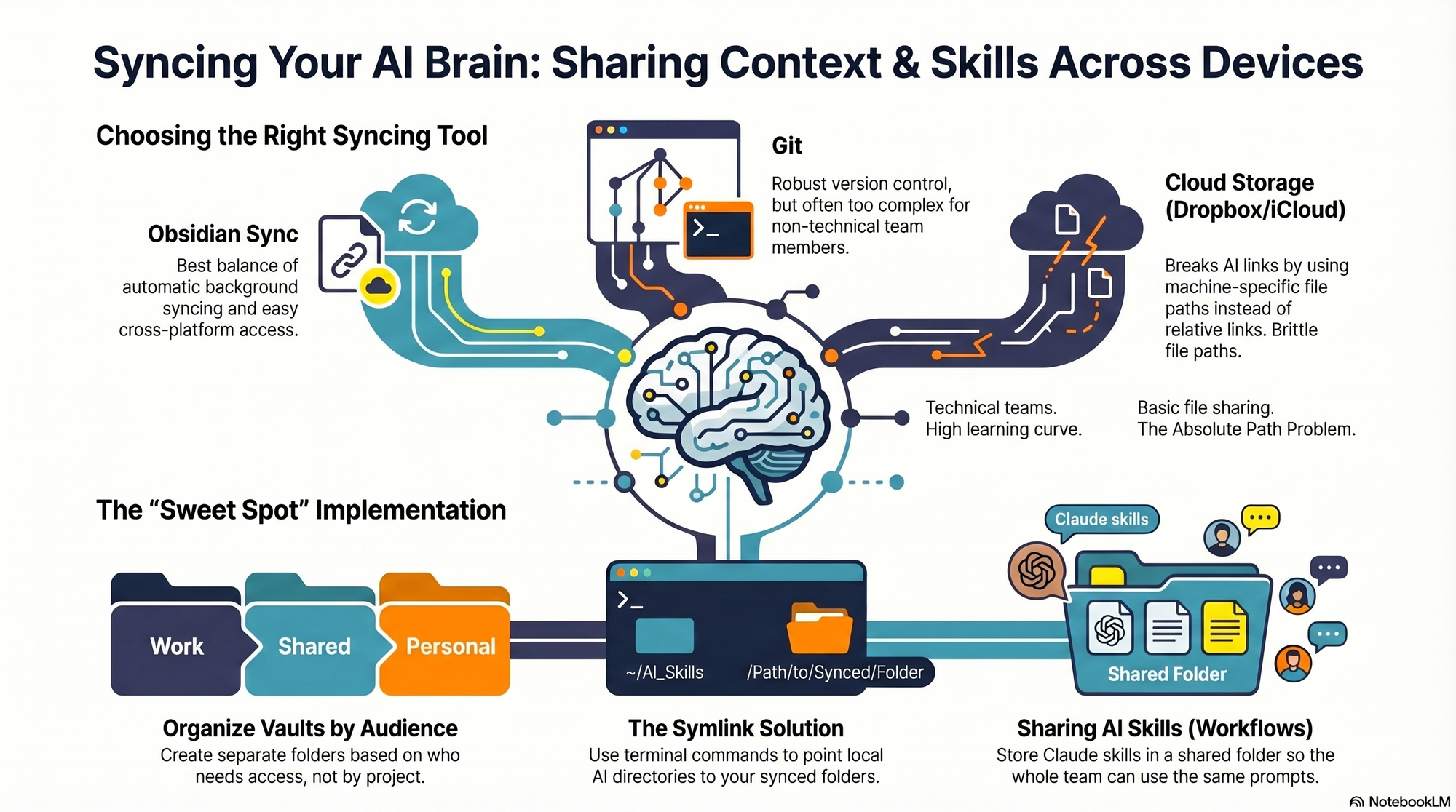
    I started by testing the tools I already used—Dropbox, iCloud, and GitHub—to see what might fit. Each got me partway there, but each also introduced friction that mattered in daily use.

    First, absolute file paths don’t travel well. I began with Dropbox but quickly ran into cross-linking headaches. Good context systems rely on rich interlinking—index files point to other context files, and those context files link to each other. When Claude creates a link from one context file to another, it tends to use the full file path: /Users/ttorres/Library/CloudStorage/Dropbox. That worked on my Mac Mini and MacBook (same user name), but not on my phone—and not for my admin. I tried to force relative links (~/Dropbox), but couldn’t get Claude to do it consistently, which led to broken links. This isn’t unique to Dropbox; Claude prefers full paths because they’re reliable on a single machine, but they’re brittle across devices and useless when sharing with colleagues. Claude is trained to use relative file paths when working within a git repository, but I struggled to get it to work reliably in Dropbox.

    Second, skills live in a user directory by default. By default, skills live in ~/.claude/skills. Most sync services aren’t designed to share your ~/ folder. iCloud is the exception, but then you’re limited to Apple devices—no Windows or Android. There is a workaround: set up a claude folder in Dropbox and create a symlink from ~/.claude to your synced claude folder, so all skills, commands, and settings live in Dropbox. Then, on each device (yours or a colleague’s), you set up a symlink to that folder so Claude can find the files. This works, but I was running into another limitation that made Dropbox a poor fit.

    Third, Obsidian on iOS doesn’t sync cleanly with Dropbox. I rely on Obsidian’s file browser alongside my notes to navigate context quickly. Storing vaults in Dropbox gave me parity across my Mac Mini and MacBook Air, but I couldn’t get the iOS Obsidian app to reliably load my Dropbox vaults. That friction was a dealbreaker for on-the-go work.

    At that point, I explored git/GitHub. GitHub is cloud storage for git repositories. A git repository is a folder of shared files used so engineers can collaborate on the same code base. Each person clones a local copy, works locally, then pushes changes back to the hosted repo on GitHub; others pull to update. Git’s merge and conflict tooling is excellent. Git is the powerhouse of file syncing and version control. It easily handles syncing context and skills, Claude behaves better with relative links in a git repo, and I can open the repo in my IDE with a clean file browser. For me, that checked all the boxes—until I factored in my admin. Git has a learning curve, requires manual pull/push hygiene, and often assumes an IDE workflow. That overhead was too heavy for a non-technical collaborator.

    The turning point was Obsidian Sync. A colleague suggested it, and it ended up being the sweet spot. Obsidian is a markdown reader; files are stored locally in a normal folder you can open in Finder or File Explorer. There’s no proprietary format—you can read files with any text editor, and Claude can access them via bash commands. Obsidian Sync is simpler than git: open a note and it syncs in the background. I can access the same vaults across my Mac Mini, MacBook Air, and iPhone, and I can share a vault with my admin so we can both create and access notes.

    Because we’re in different time zones and rarely edit the same note simultaneously, limited conflict handling hasn’t been an issue. Obsidian’s internal link notation also means one note can link to another and those links just work across devices. Claude can follow these links, so the brittle file path problem disappears.

    Here’s where I landed. After a lot of trial and error, I have a setup that works across my devices and for my admin, who uses both a Windows desktop and a Mac laptop. I keep my core context in Obsidian vaults synced with Obsidian Sync, which preserves portability, link integrity, and ease of use. For skills, I avoid scattering files in machine-specific locations and instead centralize what Claude needs to reference in shared, human-readable folders. If you require advanced version control with branching and reviews, git/GitHub is excellent. If your priority is low-friction, cross-device access for non-technical teammates, Obsidian Sync is a practical, reliable choice. And if you must use Dropbox or iCloud, consider symlinks and be vigilant about relative paths—just know that absolute paths won’t travel well.


    Inspired by this post on Product Talk.


    Book a consult png image
  • Staying Sane as a Product Leader: Practical Strategies I’m Using from Teresa Torres & Petra Wille

    Staying Sane as a Product Leader: Practical Strategies I’m Using from Teresa Torres & Petra Wille

    The world can feel like it’s spinning, and as a product leader, I feel that pressure acutely—juggling customer needs, stakeholder expectations, and the relentless news cycle. I recently listened to a powerful conversation with Teresa Torres and Petra Wille about staying grounded when everything feels “bonkers,” and it offered a practical, human way to keep showing up without losing yourself.

    What resonated most was the invitation to live my values through small, consistent actions. Rather than waiting for grand gestures or perfect solutions, I’m leaning into the mindset of “Something is better than nothing.” It’s the same spirit we bring to continuous improvement in product: make a change, evaluate impact, iterate.

    “Create the world you want to live in” has become a daily prompt for me. I’m applying it to how I spend my attention, time, and platform—three scarce resources for any product management leader. I’m not going to do everything perfectly, but I can make better trade-offs this week than I did last week, and I can keep improving.

    Practically, that looks like reconsidering which speaking invites I accept, especially when representation is skewed. If a stage is heavily male, I now ask organizers about their plan for balance before committing. I also question travel expectations for short talks when a high-quality virtual experience is possible—good for sustainability, budgets, and energy. These choices compound, just like product roadmapping and sprint planning decisions.

    Petra’s “under-complexity” lens was a wake-up call. In product, oversimplified narratives—whether a single KPI, a vanity metric, or a forced binary—usually increase fear and bad decisions. The same is true in civic discourse. To counter that, I’m seeking more nuance on purpose: reading multiple sources on the same story, listening for who’s not in the room, and noticing how the same facts can carry different meanings depending on who’s telling it.

    One simple habit helps: I’ll read The New York Times and The Wall Street Journal on a headline, then follow up with Tangle by Isaac Saul, which lays out “what the left says / what the right says / editor’s take,” sometimes including perspectives from affected communities. It’s a lightweight form of personal knowledge management that improves my product judgment and my citizenship.

    Another idea that stuck with me is swapping media proxies for human connection. In product, we don’t ship based on secondhand opinions—we run customer interviews, co-create with users, and build empowered product teams. The same principle applies in community: talk to someone directly affected, ask real questions, and stay curious. When conversations get heated, I try to build bridges, reduce proxies, and look people in the eye.

    I’m also reflecting on platform responsibility. Even a “small” platform can snowball through weak ties inside a company or community. I’m asking: When should I speak up? Where should I draw lines? And when is “staying in your lane” actually a way to avoid necessary leadership? These are the same stakeholder management questions we navigate in product strategy—assess impact, clarify intent, and act with integrity.

    Local grounding matters, too. I’ve found energy and clarity in community-level action: voting, attending public protests when it feels right, mentoring, and supporting nonprofits like World Pulse. I love the framing of “don’t mess with my neighbors”—it keeps me focused on tangible care when the internet starts to feel like reality. I’ve also seen leaders use angel investing in agriculture-related efforts as a counterbalance to “internet reality,” channeling resources into durable, real-world outcomes.

    If you want to experiment this week, pick one small lever you control: where you spend money, time, attention, or your platform. Add nuance by reading at least two different perspectives before reacting. Replace proxies with people by talking to someone with lived experience. Reduce polarization by asking, “what shaped that view?” before judging it. And go local—connect with neighbors or a community group and let small actions compound.

    If you’d like to hear the full conversation that inspired these reflections, you can listen on Spotify or Apple Podcasts. Here are the direct links: Spotify: https://open.spotify.com/episode/1sxEFquu73ZB9fL9gGk6Om and Apple Podcasts: https://podcasts.apple.com/kh/podcast/staying-sane/id1794203808?i=1000755696295

    Resources I’m exploring and recommend: World Pulse (https://www.worldpulse.org/), The New York Times (https://www.nytimes.com/), The Wall Street Journal (https://www.wsj.com/), and Tangle by Isaac Saul (https://www.readtangle.com/ and https://www.readtangle.com/author/isaac-saul/). For builders and writers, I also appreciate Ghost (https://ghost.org/) as an open-source publishing platform. If you work in or with the MENA ecosystem, take a look at MENA Product Summit ’26 (https://www.prdkt.plus/summit26). Colleagues like Jeff Merrell (https://jeffdmerrell.com/) and grassroots efforts such as No Kings Protest (https://www.nokings.org/) offer additional perspectives and ways to get involved.

    If this resonates, share it with a teammate who’s been feeling the weight of the world. I’d love to hear one small, values-aligned action you’re taking this month—what “something” will you try next?


    Inspired by this post on Product Talk.


    Book a consult png image
  • From Chaos to Clarity with Claude Code: My Hands-On Playbook for Product Leaders

    From Chaos to Clarity with Claude Code: My Hands-On Playbook for Product Leaders

    I’ve been pushing hard to operationalize AI for real product work, and this episode zeroes in on the moment Claude Code stops feeling like a demo and starts behaving like a dependable teammate. If you’ve ever wondered how to go from clever prompts in the browser to durable, repeatable workflows on your machine, this walkthrough is for you.

    Listen on: Spotify | Apple Podcasts.

    My first honest reaction to installing and configuring the desktop agent was the all-too-relatable “this tool thinks everything is a code repo” reality. That framing helped me reset expectations fast: instead of treating it like a magical universal assistant, I began designing guardrails, context, and repeatable routines—exactly how I’d onboard a new team member.

    The shift from Claude-in-the-browser to Claude Code on my machine was the unlock. Locally, it can finally work with my files, folders, and workflows. That meant I could ground it in real artifacts—project docs, meeting notes, product specs, and historical decisions—so responses weren’t just plausible; they were contextual and verifiable.

    On setup, I now treat /init and Claude MD files as my product requirements. I define roles, boundaries, and canonical sources up front, then run in a deliberate “walled garden.” The “treat it like an intern” model works beautifully: scope access intentionally, expand privileges as trust grows, and keep a tight audit trail of what it can touch and why.

    Surprisingly, task management became my ideal on-ramp. It’s easy to validate, the feedback loops are tight, and the ROI is immediate. I export calendar windows rather than granting full calendar access, then let the agent map priorities into Trello, reconcile time blocks, and surface trade-offs. Fast wins build confidence—mine and the agent’s.

    Model switching matters more than I expected. When speed is king and “good enough” will do, Haiku keeps the loop snappy. When stakes are higher—complex synthesis, nuanced product strategy, or gnarly ambiguity—I step up to Claude Opus 4.5. Being intentional about when to optimize for latency versus depth is a quiet superpower.

    Web tasks can still spiral. When that happens, I pause its autonomy, toggle to fewer steps, and ask, “What are you doing?” Paired with Claude’s Web fetch tool, this makes the agent explain its chain-of-thought planning without exposing hidden reasoning, so I can spot brittle assumptions, prune distractions, and re-ground the task.

    Content retrieval has become a killer workflow. I point the agent at my archives—blog posts, book drafts, transcripts, notes—and ask, “Where have I talked about this before?” It assembles a map of prior art, connects themes I’d forgotten, and prevents me from reinventing work. Over time, this evolves into a Zettelkasten-style research system that upgrades rigor and accelerates synthesis.

    I’ve also turned Claude Code into a publishing engine. From a single transcript, it drafts titles, descriptions, show notes, and chapters, then routes artifacts to Ghost for formatting. Before anything ships, I run fact-checking workflows that validate claims against transcripts and research sources. The output improves, but more importantly, the scaffolding makes quality repeatable.

    Reusable workflows compound. I rely on slash commands to trigger common jobs, break down larger efforts with sub-agents, and wire in hooks and plugins where external systems are needed. This is agentic AI at its most practical: fewer hero prompts, more reliable processes.

    Audience analytics and content prioritization are helpful with caveats. I let the agent cluster themes and flag gaps, then I pressure-test its suggestions against first-party data and strategic goals. As with any model-driven insight, triangulation beats blind faith.

    Two metaphors guide my day-to-day. First, Claude Code is like a dog—sometimes it returns with the stick, sometimes it gets lost in the woods. Second, the “intern” framing keeps me honest: don’t hand it the whole company on day one. With that mindset, my output jumped—more volume without sacrificing quality—because the workflow scaffolding got better.

    In this episode, I cover what Claude Code is and why it’s useful even if you’re not an engineer, the real difference between the browser experience and running locally, how to shape behavior with /init and Claude MD files, why task management is the perfect proving ground, when to export calendar windows versus connecting directly, and when model-switching makes sense—Haiku for speed, Opus for depth.

    I also dig into debugging web tasks by asking “What are you doing?”, content retrieval workflows across personal archives, building reusable slash-command systems with sub-agents, hooks, and plugins, practical publishing stacks from transcripts, fact-checking against transcripts and research sources, and using analytics to prioritize content—with a healthy respect for uncertainty.

    If you’ve been trying to make Claude Code feel less like “throwing a stick into the woods,” this is the candid, tactical tour I wish I’d had on day one. Drop your questions and experiments below—I’m eager to compare notes and refine the playbook together.


    Inspired by this post on Product Talk.


    Book a consult png image
  • Build Your Personal Operating System with Claude Code: A Playbook for Focus, Speed, Clarity

    Build Your Personal Operating System with Claude Code: A Playbook for Focus, Speed, Clarity

    This is the year to build your personal operating system. For me, that line isn’t a slogan; it’s a commitment to eliminate context switching, compress decision cycles, and turn fragmented information into a reliable source of truth. As a product leader, I needed a system that blends judgment, data, and automation—so I built mine around Claude Code.

    When I say “personal operating system,” I mean an integrated set of AI workflows, rituals, and tools that capture knowledge, structure decisions, and automate execution. It’s where product discovery meets delivery: a place to synthesize signals, prioritize with clarity, and move from insight to action without friction. The outcome is fewer ad hoc decisions, more deliberate strategy, and a calmer, more focused day.

    Claude Code sits at the center because it helps me translate intent into working software and repeatable processes. I use it to scaffold small utilities, write adapters for APIs, and evolve prompts into robust patterns. It accelerates everything from research synthesis and PRD drafting to backlog grooming and stakeholder updates—while keeping me in the loop for final judgment.

    Under the hood, I run a retrieval-first pipeline that connects notes, docs, tickets, research transcripts, and roadmaps into a searchable, living memory. With careful context window management, I feed only the most relevant snippets into Claude Code, preserving accuracy and speed. The result: richer answers, fewer hallucinations, and an assistant that “remembers” what matters without drowning in noise.

    My daily loop is simple: capture, synthesize, decide, and act. I capture customer signals and meeting notes into a personal knowledge management vault; synthesize patterns with prompt engineering that emphasizes evidence; decide using outcomes vs output OKRs; and act by generating drafts, creating tasks, and updating artifacts. Claude Code helps me wire this end-to-end, so the system works even on my busiest days.

    If you’re implementing this from scratch, start small. Pick one high-friction workflow—say, product feedback triage—and build a narrow agentic AI flow to classify, summarize, and route items. Use eval-driven development to test prompts against known edge cases. Add guardrails and privacy-by-design practices from day one, then expand to neighboring workflows once the first loop is reliable.

    Governance matters. I treat AI risk management, data governance, and security as first-class citizens: limited data scopes, clear audit trails, human-in-the-loop approvals, and rollback plans. Feature flags control changes; observability tracks drift and quality; and a simple playbook documents how we deploy, monitor, and improve the system.

    Measure what this personal operating system earns you. Track decision latency, cycle time from signal to action, meeting-to-output ratios, and the signal-to-noise ratio of inputs. When the system is working, you’ll feel it: fewer meetings, more momentum, and sharper product strategy supported by trustworthy AI workflows.

    The goal isn’t to automate judgment—it’s to protect it. By letting Claude Code handle the glue work and information wrangling, I preserve energy for high-leverage thinking: positioning, sequencing, and trade-offs. Build your personal operating system now, and make this the year your product practice runs with clarity and composure.


    Inspired by this post on Pendo – Best Practices.


    Book a consult png image
  • Year-End Reflection for Product Leaders: Values, Themes, and the 100‑Wishes Reset

    Year-End Reflection for Product Leaders: Values, Themes, and the 100‑Wishes Reset

    I’ve been closing the year with a deliberate reflection ritual for more than a decade, and this season I found fresh energy for it after listening to an insightful conversation with Teresa Torres and Petra Wille on All Things Product. Their approaches mirror the evolution many product leaders experience: moving from rigid annual goal-setting to values-led themes, longer time horizons, and a healthier respect for spaciousness. In my own practice, that shift has created better focus, less pressure, and far more meaningful outcomes.

    Prefer to listen? You can find this episode here: Spotify | Apple Podcasts. I took notes with my team in mind and translated the discussion into a simple, values-driven framework that any product organization can adopt.

    Why does annual reflection matter for product people? Because our work lives at the intersection of ambiguity, trade-offs, and time. If we only measure ourselves by shipped output or quarterly OKRs, we overlook the compounding value of learning, relationships, and judgement. I treat this ritual as a strategic reset: a chance to surface patterns, adjust expectations, and recommit to outcomes over output.

    My own reflection habit started scrappy—paper notebooks, messy timelines, and even artful visualizations inspired by Dear Data by Giorgia Lupi & Stefanie Posavec. Like Petra, I’ve found that tactile, analog artifacts unlock insights I miss in a spreadsheet. Over time, I’ve kept the spirit and simplified the mechanics: a “what went well” review, a short list of hard lessons, and a handful of decisions that paid off—or didn’t.

    The biggest evolution for me has been moving from rigid annual goals to values and themes. I still run OKRs, but I use them to track progress, not identity. The lens of process vs. outcome goals—reinforced by ideas from Atomic Habits—helped me set fewer, better commitments. For example, instead of “launch X by Y,” I’ll emphasize the cadence of customer discovery, the health of the product trio, and the quality of decisions made along the way.

    One exercise that changed my practice is the “100 wishes” list. It’s powerful—and surprisingly difficult. Pushing past 30 or 40 wishes forces me to name latent interests and long-range intentions I rarely say out loud. Combined with decade-level themes, the list helps me balance ambition with patience. I don’t try to do it all next year; I use it to spotlight direction, not deadlines.

    I also review patterns across years: Where did over-scheduling create hidden costs? When did I protect focus time and what did that unlock? Paul Graham’s Maker’s Schedule, Manager’s Schedule remains a useful calibration tool here. And when I feel the pull toward constant throughput, I revisit Stefan Sagmeister’s The Power of Time Off (TED Talk) to remind myself why strategically creating space often yields the most valuable ideas.

    Of course, not every year follows plan—and that’s normal. Reflection helps me spot unrealistic expectations early and let them go. When setbacks hit, I’ll rewatch Dealing with Setbacks and re-ground in continuous discovery. The question isn’t “Did we do everything?” but “Did we learn fast, protect customer value, and make trade-offs aligned with our values?” That’s how empowered product teams compound impact.

    My sharing philosophy has become more nuanced over time. Some reflections are public to invite dialogue and accountability; others stay private so I can process honestly. I’ve found it helpful to publish what I’m saying no to, capture a theme for the year ahead, and keep the rest for myself and my team. This balance preserves motivation while still contributing to the broader product management leadership community.

    If you’re designing your own ritual, consider this lightweight flow: review wins and tough calls, write your “100 wishes,” extract a few values-based themes, then translate those into process goals for Q1. Revisit monthly, not just annually. If you like structured prompts, Chris Guillebeau’s How to Conduct Your Own Annual Review from The Art of Nonconformity offers a practical template you can adapt to your context.

    For deeper dives and complementary ideas, I bookmarked these as part of my year-end reset: What I’m Saying No to This Year—And Why, Ask Teresa: My Leaders Still Want Roadmaps with Timelines—What Should I Do?, Scaling Impact: A Look at the Year Ahead (2022), Let’s Connect in 2025: A Look at the Year Ahead, The Interview Coach, and Petra’s own year-ahead reflections (here and her 2026 version). I also recommend revisiting the prior conversation on leadership and change: Role of Leadership in Transformations.

    I’d love to hear how you approach your end-of-year reflection. What questions bring you the most clarity? Which practices help you set an intentional, values-driven path for the next year? Share your process—I’m always looking to learn from other product creators and leaders.


    Inspired by this post on Product Talk.


    Book a consult png image
  • How to Design a Product Community of Practice That Works

    How to Design a Product Community of Practice That Works

    If your community of practice needs constant reminders, fills its agenda with updates, and produces little that teams use afterward, the problem probably is not motivation. The community was given a meeting cadence before it was given a job.

    Your job as a product leader is to create a repeatable path from a live problem to a better decision, a stronger practice, and knowledge another team can reuse. That is how you design continuous learning as a system instead of hoping it emerges from another recurring call.

    Give the community a practice to improve, not a topic to discuss

    A broad subject can attract interest without changing anyone’s work. Product strategy, discovery, AI, leadership, and experimentation are all reasonable areas of interest, but each is too large to serve as an operating purpose.

    Start with a practice that members perform and can inspect. Opportunity framing is a practice. Writing an AI evaluation plan is a practice. Preparing an experiment decision is a practice. Stakeholder management is still too broad until you identify the behavior you want to improve, such as exposing trade-offs before a roadmap commitment is made.

    A useful purpose statement has four parts:

    • Members: Who needs to learn together?
    • Practice: What recurring part of their work should get better?
    • Learning activity: What will they examine, attempt, or critique together?
    • Work consequence: What should change in a decision, artifact, or team behavior?

    For example: This community helps product trios improve opportunity framing by critiquing active discovery artifacts, so teams can separate evidence from assumptions before choosing a solution.

    That statement is narrow enough to guide an agenda. It tells members what to bring, tells a facilitator what kind of discussion belongs, and gives a sponsor something more meaningful to inspect than attendance.

    Choose a quarterly learning theme with these filters:

    • Members are encountering the problem in current work, not merely expressing general interest in it.
    • The practice is shared enough that one person’s case can teach something useful to others.
    • A real artifact can make the practice visible. That might be an opportunity map, discovery plan, evaluation set, experiment brief, decision record, or stakeholder narrative.
    • Improvement can be noticed in later work. You should be able to point to a changed question, assumption, method, trade-off, or decision.
    • The theme is narrow enough to defer adjacent subjects. A community without boundaries becomes an internal conference with no coherent learning loop.

    Write those choices into a short charter. Include the theme, target practice, current definition of good, artifact members will examine, evidence of progress, and what is out of scope. Treat the definition of good as a starting hypothesis. Learning can reveal a stronger standard after the work begins; the charter should be stable enough to focus the community but not so rigid that it prevents that discovery.

    Combine learning from people with learning with people

    A community needs external input and collaborative practice. Input without practice becomes content consumption. Collaboration without input can recycle the same local assumptions. Design both modes deliberately.

    Learning modeUse it when you needUseful inputsExpected output
    Learning from peopleDepth, a reference point, or a clearer definition of goodA tightly curated personal learning network, talks, books, courses, examples, and practitioners whose decisions you can examineA heuristic, annotated example, sharper question, or alternative approach to test
    Learning with peopleFeedback, accountability, new patterns, or pressure-testingPeer circles, artifact critiques, hackathons, meetups, and cross-functional working sessionsA revised artifact, changed decision, new experiment, or reusable lesson

    The bridge between the two modes matters more than the volume of material consumed. Begin with a live question from the work. Curate external input that can sharpen that question. Bring the work artifact to peers. Critique its assumptions and trade-offs. Record what changed. Store the lesson where the next person facing the problem can retrieve it.

    For an AI product community, the live question might concern an evaluation plan for a support agent. External examples can help the group notice missing failure cases, but reading alone does not improve the plan. Members need to inspect the proposed evaluation set, challenge what it represents, identify gaps, and document the resulting change. The work becomes the learning surface.

    Your personal learning network should be curated around the same quarterly theme. Start with one practitioner whose judgment you respect, learn who they regularly exchange ideas with, attend a relevant meetup with a specific learning goal, and follow up with a structured exchange. Do not confuse a large feed with a useful network.

    Track the network as working infrastructure. For each person or resource, note the practice you are learning, the artifact or decision that demonstrates it, the question it helps answer, and the action you intend to try. Prune the list when the theme changes or an input repeatedly fails to affect your thinking. The goal is not to follow everyone worth knowing. It is to make the right expertise retrievable when a decision needs it.

    Build a cadence that ends in changed work and reusable artifacts

    A community meeting is only one step in the learning loop. If the loop begins with an agenda and ends when the call finishes, members may enjoy the conversation while the organization loses most of its value.

    A lightweight operating model can fit alongside product delivery:

    • Set a quarterly theme. Tie it to a practice teams currently need to improve.
    • Curate a small learning network. Gather examples and perspectives that challenge the community’s current standard.
    • Run monthly critiques. Use current work from product, design, and engineering rather than hypothetical exercises.
    • Publish one teaching artifact. Turn the strongest learning into a talk, guide, workshop, template, annotated example, or decision pattern.
    • Close the loop. Write down what changed in a decision, discovery cadence, product bet, or working method.

    This cadence connects a quarterly theme, monthly peer critique, a teaching commitment, and a record of changed decisions. Each element compensates for a weakness in the others. A theme creates focus. Critique creates feedback. An artifact creates reuse. The change record creates evidence that the community is affecting work.

    Make every critique artifact-first

    Do not ask a member to present everything they know about the theme. Ask them to bring something unfinished that matters to a real decision. The critique should answer a small set of questions:

    • Decision: What decision is the owner preparing to make?
    • Artifact: What document, model, prototype, dataset, or plan exposes the current thinking?
    • Evidence: What is known, what is assumed, and where is confidence weak?
    • Trade-off: Which constraint or competing objective makes the decision difficult?
    • Critique request: What does the owner want peers to challenge?
    • Change: What will the owner revise, test, reject, or investigate after the session?

    The final question prevents critique from dissolving into commentary. Advice is not yet learning. Learning becomes visible when the owner changes an artifact, runs a test, revises a decision, or explains why the critique did not alter the course.

    Keep the feedback about the work, not the person’s competence. Sensitive examples can be anonymized, but stripping out every constraint makes the exercise artificial. Preserve the decision context, evidence, and trade-offs that peers need in order to give useful criticism.

    Separate community roles so the founder is not the system

    A community becomes fragile when one enthusiastic leader selects every topic, provides every answer, facilitates every discussion, and writes every note. Distribute the work:

    • Steward: Maintains the charter, boundaries, and relationship to organizational priorities.
    • Curator: Finds relevant people, examples, and learning inputs for the current theme.
    • Facilitator: Keeps sessions focused on the stated decision and critique request.
    • Artifact owner: Brings live work and decides what to do with the feedback.
    • Synthesizer: Captures the reusable lesson, change made, and retrieval metadata.

    A small community can combine roles, but the responsibilities should still be explicit. Rotating artifact ownership also prevents the group from becoming an expert’s help desk. Members learn to expose their reasoning, offer precise critique, and teach what they have understood.

    A commitment to teach is especially useful because it forces vague understanding into a form another person can inspect. Committing to a talk, guide, course, or workshop creates productive pressure to clarify the thinking. Public does not have to mean published on the open internet. For confidential work, the relevant public can be the product organization or another approved internal audience.

    Use the same structure for every durable artifact: context, decision, evidence, critique, change, result still to be observed, and reusable principle. Tag it by practice and decision type rather than only by meeting date. A folder full of chronological notes is an archive. A collection organized around future retrieval is a knowledge system.

    Diagnose failure modes and show evidence of impact

    Community leaders often respond to weak participation by adding speakers, reminders, or more topics. Those actions can increase activity while preserving the design flaw. Read the symptom as evidence about the operating model.

    What you noticeLikely design problemWhat to change
    Sessions become status updatesLive work is being reported rather than examinedRemove the progress round. Require a decision, artifact, and explicit critique request.
    Conversations are energetic but nothing changes afterwardThe learning loop ends at discussionClose every critique with a named change, test, investigation, or reason for retaining the current approach.
    The same experts do most of the talkingThe community has become a help desk or lecture seriesRotate artifact ownership and ask members to expose their judgment, not just request answers.
    Every session covers a different subjectThe theme is too broad or absentReturn to one quarterly practice and place adjacent requests in a backlog.
    Notes accumulate but are rarely reusedCapture is organized around meetings rather than retrievalUse a common artifact template and tag lessons by practice, decision, and problem.
    People attend but stop bringing unfinished workCritique may feel unsafe, performative, or disconnected from current decisionsReview the invitation, keep feedback about the artifact, and let owners state the feedback they need.
    The community depends on its founderOperational knowledge and authority have not been distributedMake roles explicit, rotate them, and document the cadence.

    Do not make attendance your primary success measure. Attendance can show reach, but it cannot tell you whether anyone learned, changed a practice, or made a better-informed decision. It is possible to fill every session and still run a content club with no operational effect.

    Use an evidence chain that a product or executive sponsor can inspect:

    • Participation: Members bring relevant work and a real decision question.
    • Artifact change: A plan, model, evaluation, narrative, or discovery artifact is revised after critique.
    • Practice change: A team adopts, tests, or deliberately rejects a method with its reasoning recorded.
    • Knowledge reuse: Another person can find the artifact and apply it to a later decision.
    • Decision trace: The close-loop note identifies what changed in the team’s cadence, choices, or bets.

    This chain is more defensible than claiming the community directly produced a business outcome. Product teams still own delivery and results. The community improves the quality and availability of the practices those teams use. Connect it to business impact when the trace is real, but do not skip the intermediate evidence.

    At the end of the quarterly theme, review the artifacts and ask: Which critiques changed work? Which lessons were reused? Which assumptions survived testing? Which part of the definition of good became clearer? Which unresolved practice deserves the next theme? If you cannot answer those questions, adjust the design before adding another meeting.

    Key takeaways

    • Define the community around a recurring practice and a visible change in work, not a broad topic or an attendance goal.
    • Combine curated learning from people with artifact-based learning alongside peers.
    • Use a quarterly theme, monthly critique, teaching artifact, and change record to complete the learning loop.
    • Make unfinished work the center of each session and end with a revision, test, investigation, or explicit decision.
    • Organize knowledge for retrieval by practice and decision type, not merely by meeting date.
    • Show impact through artifact changes, practice changes, reuse, and decision traces before connecting the community to business results.

    Before scheduling the next session, write the purpose sentence and name the artifact members will examine. Invite them to bring a live decision, then publish a short record of what changed after the critique. If you cannot name the practice or the expected output yet, keep designing the community before you create its calendar.

    References