Tag: Claude Code

  • Package Hack Wake-Up Call: My Playbook for Securing Cowork, Coding Agents, and Secrets

    Package Hack Wake-Up Call: My Playbook for Securing Cowork, Coding Agents, and Secrets

    I love being a builder. It feels like a superpower I can’t stop using, and lately I’ve been channeling it into better workflows, faster experimentation, and sharper product thinking.

    I tinker with my Claude Code workflows to make every day more effortless. I’m having a blast creating AI-generated interview snapshots and opportunity solution trees for Vistaly. I also spend time digging into traces and iterating on the AI coaches I use for our discovery courses.

    Then the recent wave of malicious software spreading through the open-source community popped my bubble. It hit companies big and small—names like OpenAI, PostHog, and Zapier. As I dug in, I realized what many cybersecurity experts have long known: this is a deep rabbit hole. If I want to build responsibly, I have to get significantly better at protecting my devices, credentials, and code. And if you’re building with AI or modern tooling, you likely do, too.

    Here’s why. We all rely on open-source software. Most modern applications assemble tried-and-true components—parsing a PDF, handling dates across time zones, visualizing spreadsheet data, connecting to an API—rather than reinventing them. The same is true for agent skills and MCP servers; they accelerate how we get value from models. This is overwhelmingly a good thing. But it also creates an attack surface that bad actors exploit.

    We don’t need to abandon third-party code. We do need to understand the mechanisms attackers use and consistently defend against them.

    Infographic titled 'When Trusted Packages Go Rogue' summarizing a talk on package hacks: worm spread, defense framework, risks from AI coding tools, and practical mitigation steps, with security-themed icons.
    When one malicious worm compromises hundreds of packages, what should dev teams do? This visual teaser maps the agenda—how it spreads, how to guard against it, AI tool risks, and concrete steps to mitigate.

    On May 11th, I started seeing tweets about a TanStack hack. At that time, I didn’t know what TanStack was. But apparently, it’s a popular set of JavaScript libraries that are used by a lot of React sites. At first, I didn’t pay much attention. Then I learned the packages were compromised by a worm—malicious software that self-replicates—and it spread quickly. Within hours, dozens of packages were implicated; by day’s end, it was in the hundreds. That’s when I knew I had to lean in.

    If you’ve explored safe development practices with coding agents before, you’ve seen the basics of package safety. A package is a bundle of reusable code shared through registries, and nearly every app you use depends on them. The unfortunate twist with this specific hack, known as the Mini Shai-Hulud worm, is that it shows prior “safe enough” heuristics aren’t sufficient. Popularity and trust signals don’t guarantee safety. We have to do more.

    So here’s what I’ll cover today: how malicious software typically works, a practical framework for guarding against it, the specific risks of using Cowork to write and run code, and concrete steps to mitigate that risk. My goal is simple: help you keep building—despite the risks—while protecting your data and your business.

    Quick disclaimer: I’m not a security expert. I’m sharing my personal journey and what I’ve learned through research and hands-on work. Please use your best judgment when applying any of this.

    Infographic showing a 3‑step pattern in malicious software: enter via package or script, search a device for sensitive data, then exfiltrate to an attacker, with icons and expanding entry points.
    Package hacks share a simple playbook: get in, sweep for secrets, and phone home. This visual breaks down the 3 steps and flags new entry points—from packages to MCP servers, agent skills, and app extensions.

    An agent recently scoured over 230,000 malicious software incidents and found that most malicious software follows a similar pattern. First, it needs an entry point onto your computer. Once installed, it scours your device for sensitive data, and then it uses your network connection to send that data to its own servers. The Mini Shai-Hulud worm spreads via malicious package install scripts that run at download time, then searches the device for credentials (including package publishing rights), poisons additional packages to continue replicating, and uses multiple channels—including the victim’s own GitHub public repos—to distribute secrets.

    In practice, most attacks boil down to three steps: 1) It finds an entry point to your device. 2) It searches your device for sensitive data. 3) It sends that data to its own server. The good news: this pattern also tells us how to defend. We can harden entry points, minimize what code and agents can access, and constrain outgoing network traffic.

    Keep in mind that install scripts aren’t the only entry vector. Any code that runs on your machine could contain malicious payloads: third-party packages, agent skills, MCP servers, browser or desktop extensions—the list is long. As coding agents and “vibe coding” tools become mainstream, more non-engineers are exposed to the same risks engineers have managed for years.

    You might be at elevated risk if you do any of the following: you download and use third-party skills or MCP servers; you let Claude Code, Codex, or other coding agents write scripts that run locally and use third-party packages; you use an IDE like VS Code or Cursor with third-party extensions; or you install third-party extensions in tools like Obsidian. This isn’t an exhaustive list, but if any of these apply, it’s worth tightening your approach.

    Infographic titled 'Are You at Risk?' listing third-party code exposure points: agent skills and MCP servers, coding agents on local devices, IDE extensions (VS Code, Cursor), and Obsidian plugins.
    Relying on third-party code? This visual highlights four common risk zones—agent skills/MCP servers, coding agents, IDE extensions, and Obsidian plugins—and urges a review of downloads, local scripts, and add-ons.

    The “safest” approach would be to avoid installing third-party software on your local device entirely. That’s not realistic. We all depend on third-party components in our stack. So I’ll start with one of the most common paths for non-engineers writing and running code today: Cowork.

    Evaluating Cowork’s safety was eye-opening. Cowork offers meaningful protection—more than running code directly on your machine—but it isn’t bulletproof. There’s a notable gap you should understand.

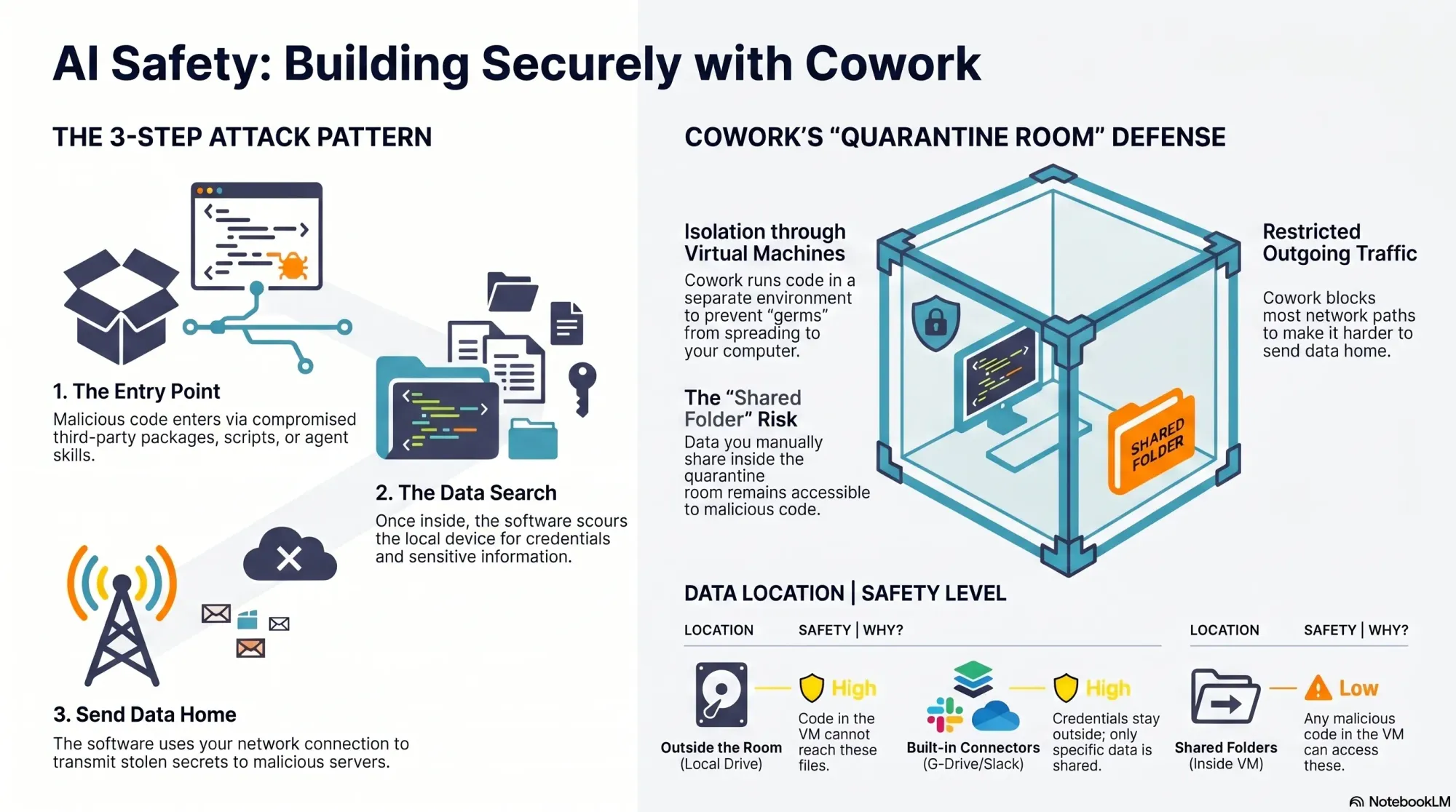
    Here’s how Cowork helps. It runs code inside a virtual machine, which isolates the execution environment from your real device—a quarantine room for code. While Cowork doesn’t fully control what comes into the room (that part is on you), if malicious code gets in, it’s contained and cannot reach the rest of your filesystem. Cowork also limits outbound network traffic from the virtual machine, which helps disrupt data exfiltration. However, it’s not foolproof.

    Because Claude can install packages inside Cowork, it remains susceptible to malicious code like the Mini Shai-Hulud worm. And GitHub is on the allow list so Cowork can read and write to your repos. Since the Mini Shai-Hulud worm uses GitHub to publish secrets, this creates exposure. The crucial mitigation: if you never give Cowork access to sensitive data, there’s nothing for an attacker to steal.

    Infographic titled 'Does Cowork Keep You Safe?' with three points: entry point contained, data safe only if kept outside, and partially limited network traffic, highlighting risks in package attacks.
    A quick visual from a security deep dive on package hacks shows how Cowork handles threats: entry points are contained, data is only safe when kept outside, and network traffic is partly limited—making shared data the gap to watch.

    Your responsibility is straightforward but critical: your data is only safe if it stays outside the virtual machine. When you mount folders into Cowork, those folders become accessible to any code running inside the VM. That includes malicious scripts. Before sharing, ask two questions: do the folders contain any credentials or secrets, and do they include proprietary data that would be harmful if accessed?

    It’s common for code to need credentials. That’s why Cowork includes connectors to third-party sources like Google Drive and Slack. Credentials configured for these connectors never enter the VM—they remain outside the quarantine room—so they’re not exposed to malicious code. But if your code requires additional credentials inside the VM, scope them tightly and assume they could be compromised.

    You can also use custom MCP servers you create yourself with Cowork. Those credentials stay outside the VM as well, provided the MCP servers are remote (hosted on a web server, not downloaded locally). It’s more work than dropping in a local server, but it keeps secrets out of reach from VM-executed code.

    Beyond credentials, scrutinize the actual content you share with Cowork, including anything accessed through connectors. Least privilege is the rule: grant only what’s absolutely necessary for the task, and nothing more.

    Infographic titled 'Keep Building. Stay Safe.' outlining a 3-part series for AI builders: 1 Cowork Safety, 2 Claude Code Config, 3 Off-Device Development, with teal security, AI, and cloud icons and a 'Product Talk' label.
    Amid a wave of package-supply attacks, this Product Talk visual launches a 3-part guide to safer AI building—starting with Cowork safety today, then Claude code config next week, and off-device development coming soon.

    What about skills? Cowork supports skills, and you can add third-party skills inside the quarantine room. If you’re not placing your own data in that room, you can afford more risk. The moment you add sensitive or proprietary data, be selective. Skills can include third-party code, and bad actors use skill directories to distribute malicious payloads. Personally, I never use third-party skills as-is. If one looks useful, I read through the files, then ask Claude to recreate it so I understand what it does and maintain control. If I were to use third-party skills, I’d do it in Cowork and keep their data access to the minimum necessary.

    Overall, Cowork is a solid, “safe-ish” option if you’re disciplined about what you share. The challenge is that utility often requires access to real data—exactly what we’re trying to protect. In an upcoming deep dive, I’ll outline strategies to keep malicious code out in the first place. While I’ll focus on local development, the same patterns can extend to Cowork with a bit of setup.

    One more important clarification: don’t confuse Cowork with the Code tab in the Claude Desktop app. Cowork runs code inside a virtual machine. The Code tab does not. If you ask Claude to write and execute code from the Code tab, that code runs on your local device and you’re fully responsible for security. There is one exception: the Code tab can run code in Anthropic’s cloud; I’ll cover that approach when we get into moving development off the local machine.

    To summarize Cowork’s protections against the attacker’s three-step pattern: installs and scripts still run, but they’re contained inside an isolated virtual machine instead of your real device; access to sensitive data is strongly limited to the specific folders you mount, leaving the rest of your filesystem (including unrelated credentials) out of reach; data exfiltration is partially constrained because Anthropic limits outbound network traffic from the VM—helpful, but not absolute. By contrast, local Code tab sessions offer no isolation, no filesystem restrictions, and no network limits—so any malicious install scripts run directly on your machine with full access and open egress.

    My takeaways so far: I still love building with AI, but I’m doing it more cautiously. Cowork offers meaningful containment when used deliberately. I still prefer the flexibility of Claude Code, and I’ve reconfigured my setup to reduce risk. Even so, “safer” isn’t “safe,” which is why I’m increasingly shifting development off my local device to more controlled environments. I’ll share the practical details—tools, configs, and scripts—in the next installments.

    If this perspective is useful, let me know. I want builders to move fast—and safely—through this new era of agentic AI. Until then, stay safe out there.


    Inspired by this post on Product Talk.


    Book a consult png image
  • My Always‑On AI Team: How I Get Claude Agents to Tackle Work While I’m Offline

    My Always‑On AI Team: How I Get Claude Agents to Tackle Work While I’m Offline

    Most mornings I wake up to a to-do list that’s already been updated—because my always-on team of agentic AI assistants has been working while I sleep. I rely on Claude to orchestrate these agents so routine prep, follow-ups, and retrospectives never slip through the cracks.

    When a podcast recording hits my calendar, my podcast-manager agent (powered by Claude) automatically creates a podcast-interview-prep task with a concise summary of who I’m interviewing and what they are building. It also creates a transcript review document with the correct share settings. After the recording, it adds a task to my to-do list to share the transcript with the podcast participants.

    For sales, my sales-admin agent (also powered by Claude) prepares a sales-meeting-prep task with notes on who I’m meeting with, where they are in the sales process, and what I need to move the deal forward. After the call, it generates clear next-step tasks so momentum doesn’t stall.

    Every week, my coding-manager agent (still powered by Claude) compiles a report from my prior week’s coding sessions and offers targeted tips. It flags recurring mistakes or dead ends, shows how to avoid them, and suggests ways to work better with Claude. It’s the retrospective I never skip.

    In this walkthrough, I’ll explain how I get Claude to complete tasks for me while I’m away from the computer—and how I designed the system to balance power, safety, and cost control.

    I first explored this approach after seeing the rapid growth of OpenClaw. OpenClaw is an open-source "agent harness" that lets you configure personalized agents to act on your behalf. It’s incredibly promising, but the early wave of enthusiasm also revealed pitfalls: complex safety configuration, overly broad machine access (browser, terminal, files, credentials), third-party skills of varying quality, and surprise usage bills.

    After hearing one too many horror stories about wasted hours and unexpected charges, I set out to design a safer, more predictable way to capture the benefits of OpenClaw while managing risk and spend. That’s what led to my current agent setup.

    For transparency: I’m a long-time practitioner and a genuine fan of Claude Code. I have not received any compensation from Anthropic for writing about my approach. If that ever changes, I will disclose it—both because it’s required by the FTC in the U.S. and because it’s simply the right thing to do.

    An Overview of How My Agent Team Works

    Today, I run three specialized agents: a podcast manager, a sales admin, and a coding manager. As I invest more, I expect this team to grow—because the pattern scales cleanly across use cases.

    This system runs on four core components that keep everything reliable, auditable, and cost-aware.

    First, agent identity. I use a simple but powerful convention: an identity markdown file that tells the agent who it is, where its task folder lives, and provides context for the types of tasks it will do. This keeps scope tight and intent explicit—critical for safety and predictable automation.

    Second, the scheduler. I’m using MacOS’s built-in scheduler (via LaunchAgents). This is like cron, but runs with all your user permissions on Mac. That means I can run all of this under my Claude Code Max subscription or my ChatGPT/Codex subscription. The result is a dependable heartbeat for my AI workflows without relying on fragile cloud glue.

    Third, tasks. Each agent owns a dedicated folder of tasks. A task is a markdown file with frontmatter. That structure makes work items easy to create, parse, review, and version—perfect for repeatable automation with a human-in-the-loop safety net.

    Fourth, scripts. Each agent has its own scripts folder with utilities it can call on demand or that run on a schedule. These scripts are small, composable, and transparent—so I can evolve capabilities without ballooning risk or complexity.

    Agent identity, tasks, and scripts are saved in Obsidian—not Claude Code skills or agents. The scheduler runs on my always-on Mac Mini. The benefit of this is it just works across all of my devices and I can seamlessly switch between Claude Code, Codex—or any other coding CLI—as I need to. All it takes is updating my script that the scheduler uses.

    In practice, this architecture delivers exactly what I want from agentic AI: clarity of responsibility, strong guardrails, and outcomes that compound. My podcast manager keeps interviews buttoned up, my sales admin removes administrative drag, and my coding manager turns lessons learned into steady skill gains—all while I focus on higher-leverage product management work.

    If you’re considering a similar setup, start with a single agent and a narrow task, then expand. Keep identities crisp, scripts small, and schedules explicit. With that foundation, you’ll get the benefits of automation and delegation—without surrendering control.


    Inspired by this post on Product Talk.


    Book a consult png image
  • From PM to AI Engineer: RAG, Evals, and Discovery—The Surprising Playbook I’m Applying

    From PM to AI Engineer: RAG, Evals, and Discovery—The Surprising Playbook I’m Applying

    I just finished a standout conversation on AI engineering and product discovery that hit squarely at the questions I hear from product leaders every week: What does practical AI engineering actually look like for product managers, and how do we ramp without a traditional software background?

    Listen to this episode on: Spotify | Apple Podcasts

    Here’s the arc that resonated with me: a product leader goes from occasional tinkerer to spending 60% of her time on real engineering work—building AI-powered tools for continuous discovery, forming a licensing partnership with Vistaly, and quietly constructing "Teresa Bot," an AI discovery coach trained on everything she’s ever written. The journey is less about mastering every framework up front and more about structuring learning, tightening feedback loops, and shipping useful outcomes.

    The most energizing throughline is the myth-busting: you don’t need a deep engineering pedigree to operate in this space. Curiosity, rigorous discovery habits, and eval-driven development will take you further than brute-force coding. As one moment put beautifully, "I know anything that I don't know how to do, Claude will teach me how to do. And Claude is infinitely patient." That captures the posture I expect modern PMs to adopt with LLMs and tools like Claude Code.

    On the nuts and bolts, the discussion gets concrete about AI engineering in practice: context engineering, prompt writing, RAG, observability, and evals. This is the real stack—think retrieval-first pipeline design, prompt engineering guardrails, instrumentation for model drift, and continuous, automated evals to protect behavior as you iterate. If you’ve been dabbling with context window management but haven’t formalized your test harnesses or dashboards, this is your cue.

    What I appreciated most is how directly discovery skills transfer. Framing assumptions, running tight customer interviews, mapping opportunity solution trees, and aligning stakeholders—these are precisely the muscles you need to shape problem spaces before you “vibe code” solutions. As one reflection nails it, "The moment I learned more about data science, all of my discovery work became so different." That’s the bridge from qualitative sense-making to measurable, model-centered learning.

    The partnership with Vistaly is also a smart build vs buy case study. Rather than reinvent infrastructure, the choice to license purpose-built opportunity solution tree software keeps focus on the differentiated layer—learning systems and product outcomes. As it’s put plainly: "I don't want to build all that stuff. I don't really want to be a software company. I'm almost set up like an AI researcher." Product leaders should internalize this lens for platform choices across their AI roadmaps.

    On "Teresa Bot," the implementation breadcrumbs are familiar and pragmatic: pair a solid retrieval-first pipeline (RAG) with clean content sources, keep prompts modular, enforce code review even for vibe coding, and stand up observability and evals early. I’ve had similar success using Claude Code for rapid iteration while treating every prompt and context change as a versioned artifact. That discipline pays dividends when you need to trace regressions or prove improvements.

    If you’re a PM ready to lean in, start small and systematic. Pick one high-signal discovery workflow, model the knowledge you already have, and wire up basic evals before you scale. Keep a lab notebook, use programmatic tests to gate deployments, and measure outcome movement—not just model cleverness. This is where LLMs for product managers move from novelty to execution readiness.

    Resources mentioned: Watch the episode on YouTube, Claude Code, Vistaly (opportunity solution tree software), Opportunity Solution Trees: Visualize Your Discovery to Stay Aligned and Drive Outcomes, Product Talk Academy, Just Now Possible Podcast, Vibe Coding Best Practices: Avoid the Doom Loop with Planning and Code Reviews, and the AI Evals for Engineers and PMs course on Maven.

    What stood out to you—RAG design choices, eval frameworks, or the discovery-to-engineering mindset shift? Drop your thoughts below; I’d love to learn how you’re applying these patterns in your own product roadmaps.


    Inspired by this post on Product Talk.


    Book a consult png image
  • Level Up: May 26 Claude Code Show & Tell + Final Product Discovery Fundamentals Cohort

    I’m excited to share two opportunities this season to uplevel your craft, connect with peers, and leave with practical, repeatable techniques you can apply immediately to your product work.

    We will be doing another round of Claude Code: Show and Tell on May 26th at 9am PDT. These community-driven sessions are hands-on and fast-paced—we swap proven workflows, compare prompts, and pressure-test approaches together. You’ll see how product teams are operationalizing AI workflows in real contexts and walk away with ideas you can adapt for your own roadmap and experimentation pipeline. Invites will go out to Supporting Members and CDH Members tomorrow. If you'd like to join us, keep an eye on your inbox for the invite.

    I love these Show & Tell sessions because they translate tacit knowledge into clear, reusable playbooks. Whether you’re refining evaluation loops for LLMs, streamlining discovery synthesis, or standardizing prompts for consistency, the shared rigor and camaraderie make it a high-signal hour for any product leader invested in AI workflows.

    I also want to share that I'll be teaching our June 4th – July 9th cohort of Product Discovery Fundamentals. This is the last time I'll be teaching this cohort in its current format. If you've been thinking of enrolling in this program, and want to take it with me, this is your last chance. Register here.

    Across this cohort, we’ll practice continuous discovery habits—framing opportunities, tightening assumptions, running lean experiments, and aligning product trios on evidence-backed decisions. If you want a rigorous, repeatable system for turning customer insight into confident prioritization and compelling product strategy, I’d be thrilled to have you in the room.


    Inspired by this post on Product Talk.


    Book a consult png image
  • Why I Bet on First-Time Executives: Inside Figma’s Playbook for AI, IPO Readiness, and Scale

    Founders should bet on first-time executives. I’ve seen it pay off repeatedly, and a recent deep dive with Praveer Melwani, CFO at Figma, reinforced exactly why. Praveer joined Figma in 2017 as the company’s first business operations and finance hire—when the team was around 30 people and not yet charging for the product—and stepped into the CFO seat in 2022, helping to lead the company’s IPO in 2025. His journey from IC to CFO isn’t just a career arc; it’s a blueprint for scaling leadership capacity in high-velocity environments.

    What struck me first was the clarity of the step functions that took him from operator to “whole-company” leader. Early on, he optimized for doing the work—building driver trees, stress-testing go-to-market assumptions, and putting the basics of board management in place. As the business matured, he shifted from answering questions to defining them, owning capital allocation, and shaping the operating cadence. That evolution—from execution to orchestration—is exactly the arc I look for when I’m hiring first-time VPs.

    Another takeaway: Figma started acting like a public company three years before its IPO. That wasn’t optics; it was operating discipline. Quarterly rhythms, tight controls, an audit-proof close, and forward-looking narrative management helped the company move faster, not slower. In my experience, this kind of public-company readiness clarifies trade-offs, compresses decision cycles, and strengthens cross-functional trust—especially between product, finance, and go-to-market leadership.

    We also unpacked what separates world-class finance leaders from a traffic-cop CFO. The latter enforces rules and guards budgets; the former uses first principles decision making to direct resources toward asymmetric upside. World-class CFOs help the company understand risk in a post-ChatGPT world, design SaaS pricing that matches product reality, and build reliable instrumentation for outcomes—not just outputs. They’re partners in product strategy as much as stewards of the balance sheet.

    On pricing, I appreciated the courage behind selling the exec team on AI consumption pricing. Consumption SaaS pricing introduces variance, but it also aligns value with usage and accelerates time-to-value—especially for AI-driven features whose unit economics evolve rapidly. It requires tight stakeholder management, robust telemetry, and a crisp value proposition, but when executed well it can unlock both growth and discipline.

    One of the boldest moves: Figma intentionally cut its 90% gross margin to invest in AI. That’s a masterclass in capital allocation. The reflex to protect margins is strong, but durable advantage often comes from compounding learning loops, not short-term optics. Framed correctly, AI Strategy isn’t a cost center—it’s an option on multiple future S-curves. The key is to define decision guardrails, instrument usage, and keep a living risk register for AI risk management.

    I was also intrigued by how AI is changing the CFO craft itself. Tools like Claude Code are now part of the financial leader’s toolbox—useful for scenario modeling, policy drafting, and exploring new domains without slowing down the team. Paired with strong data governance and controls, this is where FinOps meets executive leverage: faster cycles, tighter experiments, and better communication with product and engineering.

    Leadership transitions can catalyze phase shifts. When a COO leaves or a company re-architects its operating model, great executives don’t just fill gaps—they redesign the system. That’s when clarity about swimlanes, escalation paths, and decision rights matters most. The lesson for founders: hire for adaptability, not just pedigree, and look for people who can turn ambiguity into momentum.

    Hiring leaders in functions you don’t deeply understand is a common founder challenge. The best antidote is a first-principles test for hiring VPs: can the candidate map the business model, define success metrics, and explain trade-offs in plain language? Do they show how they’d build the team, not just run it? Can they teach you something new in 30 minutes? I use this pattern across executive hiring because it scales better than relying on domain buzzwords.

    Another practice I recommend: build an internal board of peer CFOs and operators. Regular, no-agenda check-ins create a community of practice that shortens feedback loops and surfaces non-obvious risks. It’s one of the most efficient ways to de-risk capital allocation and sharpen strategic narratives ahead of real board meetings.

    We talked about scope versus depth: how deeply in the details should a CFO be? My view aligns with what I heard here—be in the details often enough to validate the model and coach the team, but not so deep that you become the bottleneck. The executive job is to raise the quality of decisions at scale, not to personally make every decision.

    There were personal lessons, too—from the nine-year working relationship with Dylan Field to foundational team-building insights from time at Dropbox. Strong teams are built on crisp roles, tight feedback loops, and a bias for writing things down. That muscle—organizational development through clarity—is what separates resilient companies from merely lucky ones.

    If you’re a founder weighing whether to back a rising operator or recruit a “proven” exec, this story tips the scale toward the former. Bet on slope, not just intercept. Create the scaffolding—public-company behaviors early, transparent metrics, and a culture that rewards learning—and your first-time executives will scale with the business. Done right, it’s the highest-LEVERAGE people decision you can make.


    Book a consult png image
  • Beyond the Product Builder Hype: How AI, org design, and joy shape PM success

    Beyond the Product Builder Hype: How AI, org design, and joy shape PM success

    I recently spent time with the debate behind the "product builder" trend—asking whether it’s the future of product management or just another wave of tech FOMO. The conversation featuring Teresa Torres and Petra Wille is a useful prompt, but what matters most is how we translate these ideas into healthy product practices inside our own organizations.

    Here’s my take: the product builder movement is neither a mandate nor a fad—it’s a tool. The right question isn’t "should product managers code?" but whether leaning into building advances outcomes for our customers and our teams. In practice, that means letting interest and skill—not pressure—set the pace.

    Petra captured it perfectly: "Just because I can do it — is it something I enjoy doing? And do I have enough experience to really get into the flow?" Those two tests—joy and depth—are underrated filters. I’ve seen PMs light up when prototyping or vibe coding a thin slice, and I’ve also seen well-meaning dabbling create hidden complexity that slows everyone down later.

    Org design determines whether this works. It’s not about the tools—it’s about clarity of roles, healthy interfaces between product, design, and engineering, and explicit guardrails for where experiments stop and production begins. AI has raised the stakes: "AI can make unskilled work look polished. That’s a feature and a bug — executives see the shine, engineers inherit the mess." If you’ve ever watched a glossy demo turn into weeks of refactors, you know exactly what this looks like.

    To avoid that trap, I deliberately separate the three layers where AI is changing product work: personal productivity, team process, and product strategy. Treating these as different stacks keeps expectations clean: a prompt that accelerates personal workflows isn’t the same as an AI-enhanced process that reshapes delivery, and neither automatically produces durable product advantage. Don’t conflate them.

    Discovery remains stubbornly human. "Why discovery still requires talking to your customers (sorry)" is more than a friendly nudge. AI can broaden our search space and sharpen analysis, but it doesn’t replace qualitative conversations or the judgment that comes from pattern recognition across real customer contexts. Continuous discovery and disciplined customer interviews are still the most reliable compasses we have.

    Where does "vibe coding" fit? It’s great for roughing out concepts, de-risking slices, and communicating intent when words or static mocks won’t cut it. Tools like Claude Code make this faster than ever, and familiar stacks like Ruby on Rails lower the bar for spinning up functional prototypes. But remember the design system trap: AI can make bad decisions look good on the surface. If you don’t control for architecture, accessibility, data contracts, and handoff quality, your team pays the integration tax later.

    In well-set-up orgs, the output-oriented muscle memory gets rewired. When AI frees up time, strong teams reinvest it into better problem framing, sharper opportunity solution trees, and tighter product strategy—rather than simply chasing more output. That’s a leadership challenge, not a tooling problem, and it shows up quickly in how teams make trade-offs.

    Here’s how I operationalize this with empowered product teams: we articulate clear boundaries for prototypes versus shippable code, define decision rights for when PMs or designers "build," and align on review gates that protect quality without stifling speed. We also make the three AI layers explicit in roadmapping and retros, so improvements to personal workflows don’t get mistaken for strategic advantage.

    My distilled guidance echoes the episode’s throughline. The product builder trend isn’t a mandate — it’s a tool. Let enjoyment and skill guide who on your team leans into it. Organizational readiness determines whether AI empowers your team or creates chaos. Don’t conflate personal efficiency, process change, and product impact—they require different responses. Discovery fundamentals haven’t changed; AI helps you go deeper, not skip the work. And the real takeaway on product builders: not everyone has to build, but everyone can if they want to.

    If you want to hear the full discussion that sparked these reflections, listen on Spotify or Apple Podcasts. Then tell me: where will you apply builder energy in your team—and where will you deliberately say no?

    Resources & Links: Follow Teresa Torres: https://ProductTalk.org. Follow Petra Wille: https://Petra-Wille.com. Mentioned in this episode: Claude Code, Vibe coding, Ruby on Rails.

    One more quote I loved because it centers autonomy and craft: "It’s a tool in our toolbox. We can decide who on our team has fun with it, wants to do it, wants to contribute." That’s the mindset that sustains both momentum and morale.


    Inspired by this post on Product Talk.


    Book a consult png image
  • AI Agents Can Ship Code, But You Own the Bugs: Debug Faster in Claude or Cursor with Amplitude MCP

    AI Agents Can Ship Code, But You Own the Bugs: Debug Faster in Claude or Cursor with Amplitude MCP

    AI agents are getting remarkably good at scaffolding features and writing tests, yet when production issues surface, accountability still lands on me and my team. The last mile of quality—reproducing the issue, isolating the root cause, and validating a durable fix—remains a human responsibility, even in an era of agentic AI. That’s why I’ve built a repeatable debugging approach that blends behavioral analytics with agent-assisted coding to close the loop quickly and safely.

    Investigate bugs directly in Claude or Cursor with Amplitude MCP. Learn two Session Replay workflows to debug faster.

    The goal is simple: transform messy, anecdotal bug reports into actionable, prioritized work that my developers can resolve confidently. By pairing Session Replay with Amplitude analytics, I can quantify impact, capture precise reproduction steps, and feed rich context into Claude or Cursor. The result is a faster path from signal to solution—and fewer back-and-forth cycles with engineering, support, and product.

    Here’s how I use Session Replay to tighten the feedback loop. First, I lean on behavioral analytics to detect anomalies and segment affected users, so I know whether we’re facing an edge case or a widespread degradation. Then I use the replay to see exactly what the customer experienced: the path they took, the UI state, the environment details that matter (device, browser, version), and the precise moment things went sideways. This contextual backbone lets me enter Claude or Cursor with high-signal inputs, rather than guesswork.

    Workflow 1: From customer session to reproducible issue. I start with the offending Session Replay and capture the exact steps to reproduce, including state transitions and timestamps for any console errors or API failures. In Claude or Cursor, I provide those steps, reference the replay link, and ask the model to propose a minimal failing test and a hypothesis for root cause. With Amplitude MCP as the connective tissue, I can keep the model anchored to the relevant events and user path while it generates patches or targeted instrumentation. I validate the hypothesis locally, run the failing test, and then move the fix through CI/CD with feature flags so we can verify in production without overexposing risk.

    Workflow 2: From code symptoms back to customer evidence. Sometimes I begin in the IDE or agent environment with a flaky test, a suspicious diff, or a performance regression. In that case, I ask Claude or Cursor to outline likely failure modes and the critical code paths. Then I pivot to Session Replay for corroboration: do real users hit these paths, under what conditions, and how often? Using Amplitude MCP to anchor the agent in actual user journeys helps separate theoretical fixes from changes that will meaningfully improve outcomes. I confirm with replays after the patch lands, monitor Web Vitals and related behavioral metrics, and only then ramp the flag.

    Two practices make these workflows consistently effective. First, I frame prompts to keep the model tightly scoped: reproduction steps, expected vs. actual behavior, impacted segments, and any known constraints (e.g., rate limits, third-party dependencies). Second, I treat the agent as a proactive pair-programmer: it drafts hypotheses, tests, and diffs, while I provide ground truth from Session Replay and analytics. That division of labor keeps the LLM productive without letting it drift from the evidence.

    Operationally, I also align this approach with our incident management and observability standards. For high-severity issues, SREs and product managers share the same replay artifacts, event timelines, and roll-forward criteria. We document root causes and guardrails as docs-as-code, then socialize them via developer evangelism so similar classes of bugs get caught earlier. Over time, this tightens our DORA metrics—particularly lead time for changes and deployment frequency—without compromising stability.

    Privacy-by-design is non-negotiable. We ensure Session Replay redacts sensitive fields, enforces least-privilege access, and complies with our data governance policies. When I involve an agent, I include only the minimum data necessary to reach a fix and prefer structured artifacts (event IDs, stack traces, and test cases) over raw PII. These safeguards let us move quickly without trading away trust.

    The takeaway is pragmatic: agents can accelerate creation, but accountability for quality still rests with us. By grounding Claude or Cursor in real user behavior via Amplitude MCP and Session Replay, I get faster reproduction, more accurate fixes, and cleaner rollouts. The combination turns “mysterious customer bug” into “verified hypothesis and passing test” in a fraction of the time—and that’s how we ship responsibly at speed.


    Inspired by this post on Amplitude – Best Practices.


    Book a consult png image
  • 5 Proven Agent Skills I Use to Automate Weekly Product Reviews with Claude, Cursor, and Codex

    5 Proven Agent Skills I Use to Automate Weekly Product Reviews with Claude, Cursor, and Codex

    Weekly product reviews are where strategy meets execution, and over the past year I’ve turned them into a high-signal, low-friction ritual by leaning on agentic AI. As VP of Product Management at HighLevel, Inc., I’ve standardized a set of agent skills that compress preparation time, surface the right insights, and keep PMs, engineers, and designers focused on decisions—not document wrangling.

    "Learn how our teams use agent skills with claude, cursor and codex to run product reviews as PMs, engineers, and designers. Here are 5 killer use cases for builder."

    Below, I walk through the five skills I rely on most in our weekly cadence—each one mapped to a clear product management outcome. They’re simple to set up, easy to govern, and aligned with core practices like continuous discovery, product roadmapping and sprint planning, and eval-driven development.

    Skill 1 — Backlog triage with signal extraction: I point an agent at fresh tickets, customer notes, and experiment results to cluster themes, tag impact, and flag regressions. Using a retrieval-first pipeline and Agent Analytics, the assistant ranks items by value, effort, and risk so our meeting starts with a prioritized, explainable shortlist instead of a raw queue.

    Skill 2 — PRD and spec synthesizer: Ahead of the review, an agent drafts a one-page PRD update from design diffs, git history, and decision logs. With Claude Code and Cursor, it highlights interface changes, acceptance criteria, and open questions, linking back to sources. The result is a crisp, auditable brief that keeps product trios aligned without re-litigating context.

    Skill 3 — Experiment and metrics analyzer: An analytics agent pulls A/B testing readouts, checks minimum detectable effect assumptions, and annotates anomalies. It turns raw telemetry into a narrative: what moved, by how much, and whether we trust it. This makes our discussion about tradeoffs, not spreadsheets, and speeds commitments on next steps.

    Skill 4 — Voice-of-customer synthesizer: The assistant clusters interviews, support threads, and NPS verbatims into jobs-to-be-done and pain themes. It proposes opportunity solution tree updates and calls out places where our roadmap diverges from customer signal. That keeps continuous discovery alive in the room—even when time is tight.

    Skill 5 — Roadmap and sprint planning co-pilot: After decisions, an agent converts outcomes into scoped backlog items, engineering tasks, and stakeholder updates. It drafts sprint goals, flags dependency risks, and aligns work to objectives. Because it’s grounded in the meeting record, it preserves intent while removing ambiguity.

    Under the hood, prompt engineering patterns and guardrails keep these workflows predictable: a retrieval-first pipeline for context, eval-driven development for quality checks, and role-specific prompts for PMs, engineers, and designers. With Claude Code I generate structured diffs and test scaffolds; with Cursor I accelerate code-review summaries; and with codex I bootstrap utility scripts that keep the loop tight between insights and implementation.

    The payoff is tangible: higher decision velocity, fewer meetings to “re-clarify,” and clearer accountability across the product organization. Just as important, governance and privacy-by-design are built in—every agent logs rationale, cites sources, and respects data boundaries—so leaders can scale AI workflows confidently.

    If you’re looking to level up your product reviews, start with these five skills, measure impact with Agent Analytics, and iterate. Small automations compound quickly, and the more consistently you run them, the more your team’s attention shifts from preparing content to making better product decisions.


    Inspired by this post on Amplitude – Perspectives.


    Book a consult png image
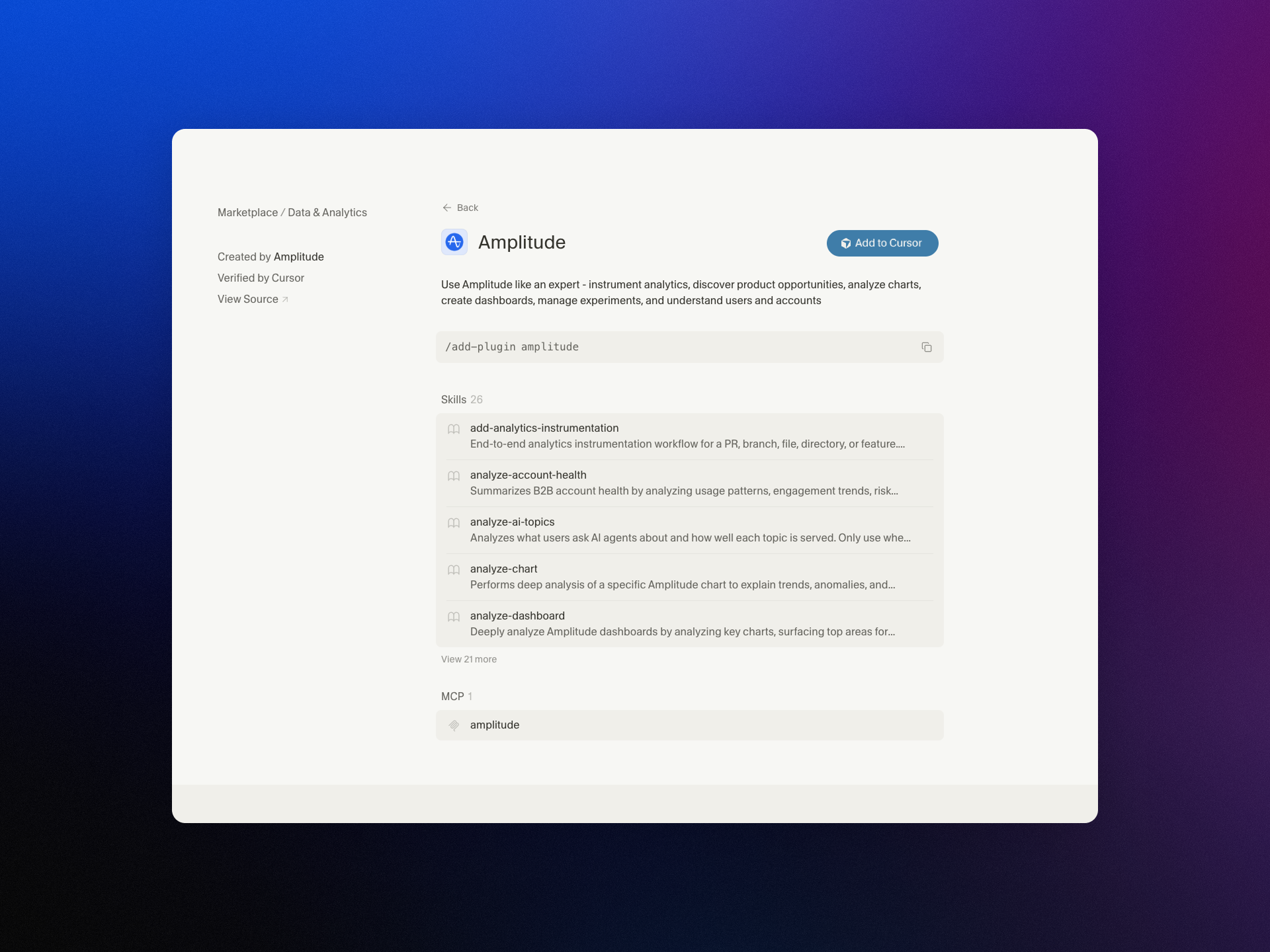
  • Supercharge Claude and Cursor with Amplitude Plug and Play: Your AI Analytics Expert in One Install

    Supercharge Claude and Cursor with Amplitude Plug and Play: Your AI Analytics Expert in One Install

    I’m excited to share that we’ve brought Amplitude Plug and Play to the Claude and Cursor marketplaces—a lightweight way to infuse your everyday prompts with serious product analytics context and speed.

    "Learn more about our new AI plugin, the easiest way to turn your favorite AI client into an analytics expert with a single-install."

    For years, I’ve watched teams lose momentum hopping between dashboards, docs, and spreadsheets just to answer simple questions like “What changed in activation last week?” or “Which cohort is driving retention?” With Amplitude analytics and behavioral analytics at the core, Amplitude Plug and Play collapses that friction by bringing the answers to where you already think and build—inside Claude and Cursor.

    In practice, this means I can ask natural-language questions such as “Show me the funnel from signup to activation by region,” “Compare retention week over week for new users from our latest release,” or “Summarize our last A/B testing results on onboarding” and get structured, context-aware responses. The goal is to keep me in flow while still honoring the rigor of a unified analytics platform.

    What I love most is how this elevates both discovery and delivery. Product managers can accelerate continuous discovery by querying cohorts, drivers, and anomalies mid-conversation. Engineers working in Cursor or with Claude Code can validate event definitions, sanity-check metrics, and spot regressions without leaving their IDE. The result is tighter feedback loops and better decision quality.

    Just as importantly, the experience is designed for clarity and consistency. When I ask about activation, I expect the same canonical definition every time. When I explore a retention analysis, I want clear assumptions and transparent logic. By anchoring responses to well-defined metrics and event taxonomies, the plugin helps reinforce good data governance while keeping the interaction fast and conversational.

    Getting started takes only a few minutes. Open the Claude or Cursor marketplace, search for Amplitude Plug and Play, complete the single-install flow, and connect to your Amplitude analytics workspace. From there, start prompting as you normally would—only now your AI client can reason with product context.

    This launch is part of how I see gen ai reshaping AI workflows for product teams: less context switching, more signal per prompt, and a shared, accessible understanding of what’s really moving the business. If you’re ready to turn your AI assistant into a trusted partner for product insight, Amplitude Plug and Play is a powerful next step.


    Inspired by this post on Amplitude – Best Practices.


    Book a consult png image
  • Forget Crystal Balls: How Scenario Planning Helps Me Ship Smarter in the Age of AI

    Forget Crystal Balls: How Scenario Planning Helps Me Ship Smarter in the Age of AI

    AI headlines are everywhere—and many claim they know exactly what’s coming next. In product management, I’m often asked to make single-point predictions about gen ai and LLMs for product managers. I resist that temptation because confident forecasts are seductive—and usually wrong.

    Listening to Teresa Torres and Petra Wille unpack why certainty fails reinforced what I practice with my product trios: scenario planning. Instead of betting on one future, I explore several plausible ones, define the signals that would confirm or disconfirm each, and translate those insights into product strategy and product roadmapping and sprint planning we can adapt as evidence evolves.

    Their argument mirrors what I see with customers and stakeholders: people are bad at predicting the future, and overconfidence creates fragility. Early adopters don’t represent everyone, so when we extrapolate from enthusiasts to the mainstream, we waste time and erode trust by building the wrong things.

    Here’s how I apply this to avoid technology FOMO and make sharper AI Strategy decisions. I treat every bold claim as one possible future, then ask, “what else could happen?” I push extremes—AI everywhere vs. AI as invisible utility; GUIs vanish vs. GUIs evolve; centralized vs. edge compute—and hunt for the needs that stay true across scenarios. Those invariants anchor empowered product teams to outcomes, not outputs, and they help us stage bets responsibly.

    Listen to this episode on: Spotify | Apple Podcasts

    My key takeaways: Confident predictions are often wrong. Early adopters don’t represent everyone. Treat predictions as one possible future. Scenario planning > trying to be right. Focus on patterns, not hype.

    In short: We’re in a period of change—but no one can predict exactly how it plays out. Strong predictions often ignore uncertainty.

    A better approach in practice: Treat every prediction as a scenario. Ask: what else could happen? Use multiple futures to guide decisions.

    As you evaluate roadmaps, watch for traps like “My experience = everyone’s future” thinking, over-indexing on early adopters, and ignoring real-world constraints like budgets, compliance, and change management.

    Tactically, we run quick scenario exercises, push ideas to extremes to explore implications, and extract the underlying insight (not the exact prediction). This complements continuous discovery and helps us write outcomes vs output OKRs that are resilient to uncertainty.

    00:00 – The problem with future predictions

    04:00 – Why experts get it wrong

    06:00 – Scenario planning explained

    12:00 – Early adopters vs. reality

    20:00 – AI, GUIs, and extreme takes

    27:00 – Using scenarios in product work

    34:00 – Final thoughts

    Resources & Links:

    Follow Teresa Torres: https://ProductTalk.org

    Follow Petra Wille: https://Petra-Wille.com

    Mentioned in this episode:

    Claude Code

    What did I miss—or what scenarios are you considering for your team? Leave a comment below and let’s compare notes.


    Inspired by this post on Product Talk.


    Book a consult png image
  • Never Lose Your AI Superpowers: How I Sync Context and Skills Across Every Device

    Never Lose Your AI Superpowers: How I Sync Context and Skills Across Every Device

    I spend a meaningful portion of my week helping teams operationalize AI workflows, and one theme comes up over and over: how to share context files and skills seamlessly across devices and with colleagues. Hosting Claude Code office hours has only reinforced it—sharing context and skills is the single biggest blocker to reliable, repeatable outcomes.

    I hear from leaders driving AI adoption who have built robust, high-signal context systems and carefully crafted skills. Their challenge isn’t creating value—it’s distributing it. They need a way to make the same trusted workflows available to teammates and to keep everything in sync across laptops, desktops, and phones.

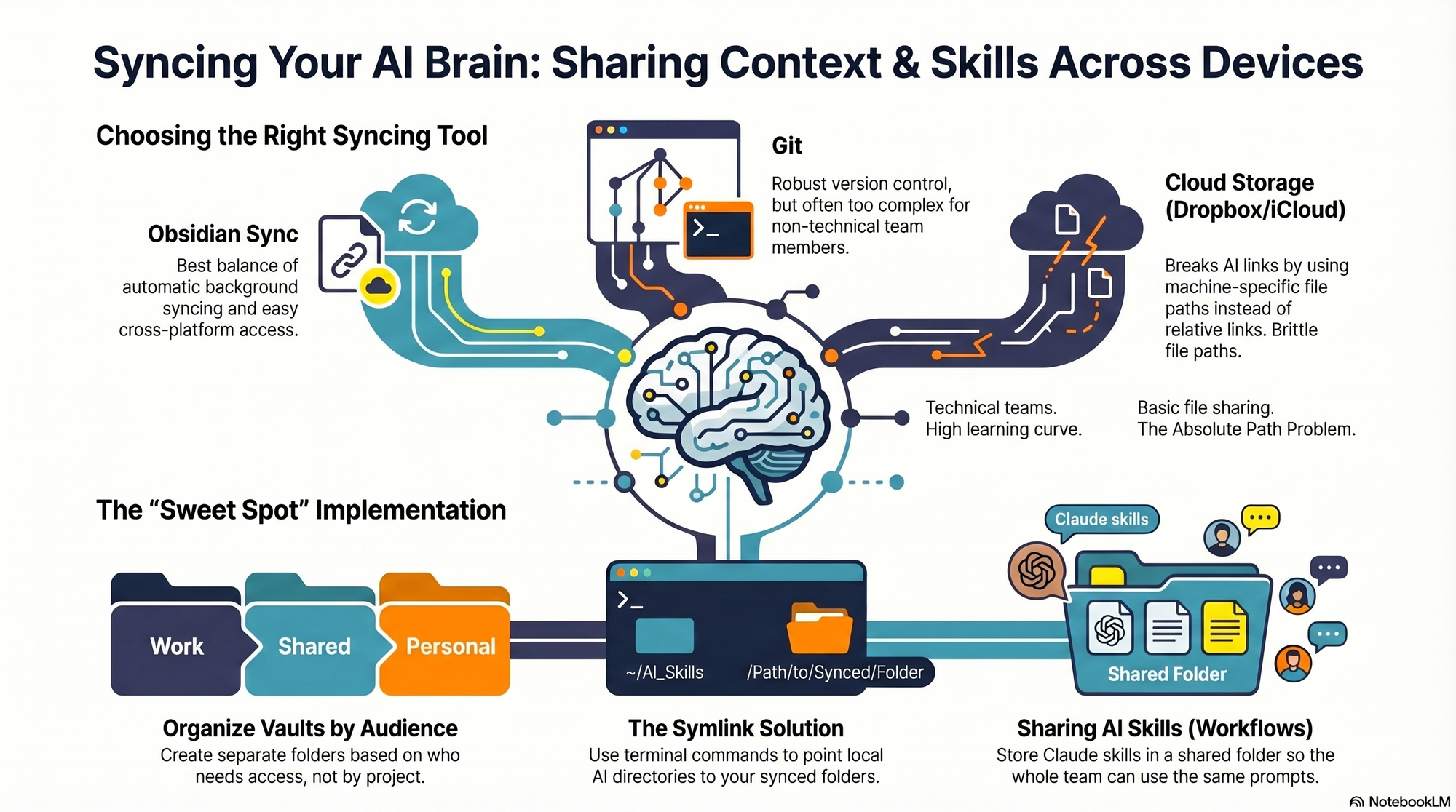
    I hit the same wall myself. I work across multiple devices (a Mac Mini for day-to-day, a MacBook Air on the road, and an iPhone) and I collaborate with a full-time admin. I wanted my context and skills to be consistent everywhere, for both of us. In this piece, I’ll share my setup—what I store where, how I share it across devices and with my team, the trade-offs of each option, and how I keep everything current. We’ll cover four different syncing services: git/GitHub, Obsidian Sync, Dropbox and iCloud.

    If you’re new to this series, this is the eighth installment. Earlier pieces provide foundational context: Claude Code: What It Is, How It's Different, and Why Non-Technical People Should Use It; Stop Repeating Yourself: Give Claude Code a Memory; How to Use Claude Code Safely: A Non-Technical Guide to Managing Risk; How to Choose Which Tasks to Automate with AI (+50 Real Examples); How to Build AI Workflows with Claude Code (Even If You're Not Technical); How to Use Claude Code: A Guide to Slash Commands, Agents, Skills, and Plug-ins; and Context Rot: Why AI Gets Worse the Longer You Chat (And How to Fix It).

    The day it really hit me was right before my interview with Claire Vo on How I AI. I was staying in an AirBnB with only my laptop, and I planned to demo my /today command along with my context file structure. Minutes before the session, I realized the latest version of my /today command wasn’t on that machine. I was able to remote into my Mac Mini and grab it—crisis averted—but it was a wake-up call. I needed a more reliable, shareable approach for syncing context and skills across devices and with my admin.

    I started by testing the tools I already used—Dropbox, iCloud, and GitHub—to see what might fit. Each got me partway there, but each also introduced friction that mattered in daily use.

    First, absolute file paths don’t travel well. I began with Dropbox but quickly ran into cross-linking headaches. Good context systems rely on rich interlinking—index files point to other context files, and those context files link to each other. When Claude creates a link from one context file to another, it tends to use the full file path: /Users/ttorres/Library/CloudStorage/Dropbox. That worked on my Mac Mini and MacBook (same user name), but not on my phone—and not for my admin. I tried to force relative links (~/Dropbox), but couldn’t get Claude to do it consistently, which led to broken links. This isn’t unique to Dropbox; Claude prefers full paths because they’re reliable on a single machine, but they’re brittle across devices and useless when sharing with colleagues. Claude is trained to use relative file paths when working within a git repository, but I struggled to get it to work reliably in Dropbox.

    Second, skills live in a user directory by default. By default, skills live in ~/.claude/skills. Most sync services aren’t designed to share your ~/ folder. iCloud is the exception, but then you’re limited to Apple devices—no Windows or Android. There is a workaround: set up a claude folder in Dropbox and create a symlink from ~/.claude to your synced claude folder, so all skills, commands, and settings live in Dropbox. Then, on each device (yours or a colleague’s), you set up a symlink to that folder so Claude can find the files. This works, but I was running into another limitation that made Dropbox a poor fit.

    Third, Obsidian on iOS doesn’t sync cleanly with Dropbox. I rely on Obsidian’s file browser alongside my notes to navigate context quickly. Storing vaults in Dropbox gave me parity across my Mac Mini and MacBook Air, but I couldn’t get the iOS Obsidian app to reliably load my Dropbox vaults. That friction was a dealbreaker for on-the-go work.

    At that point, I explored git/GitHub. GitHub is cloud storage for git repositories. A git repository is a folder of shared files used so engineers can collaborate on the same code base. Each person clones a local copy, works locally, then pushes changes back to the hosted repo on GitHub; others pull to update. Git’s merge and conflict tooling is excellent. Git is the powerhouse of file syncing and version control. It easily handles syncing context and skills, Claude behaves better with relative links in a git repo, and I can open the repo in my IDE with a clean file browser. For me, that checked all the boxes—until I factored in my admin. Git has a learning curve, requires manual pull/push hygiene, and often assumes an IDE workflow. That overhead was too heavy for a non-technical collaborator.

    The turning point was Obsidian Sync. A colleague suggested it, and it ended up being the sweet spot. Obsidian is a markdown reader; files are stored locally in a normal folder you can open in Finder or File Explorer. There’s no proprietary format—you can read files with any text editor, and Claude can access them via bash commands. Obsidian Sync is simpler than git: open a note and it syncs in the background. I can access the same vaults across my Mac Mini, MacBook Air, and iPhone, and I can share a vault with my admin so we can both create and access notes.

    Because we’re in different time zones and rarely edit the same note simultaneously, limited conflict handling hasn’t been an issue. Obsidian’s internal link notation also means one note can link to another and those links just work across devices. Claude can follow these links, so the brittle file path problem disappears.

    Here’s where I landed. After a lot of trial and error, I have a setup that works across my devices and for my admin, who uses both a Windows desktop and a Mac laptop. I keep my core context in Obsidian vaults synced with Obsidian Sync, which preserves portability, link integrity, and ease of use. For skills, I avoid scattering files in machine-specific locations and instead centralize what Claude needs to reference in shared, human-readable folders. If you require advanced version control with branching and reviews, git/GitHub is excellent. If your priority is low-friction, cross-device access for non-technical teammates, Obsidian Sync is a practical, reliable choice. And if you must use Dropbox or iCloud, consider symlinks and be vigilant about relative paths—just know that absolute paths won’t travel well.


    Inspired by this post on Product Talk.


    Book a consult png image
  • Product Management Isn’t Dead: Why ‘Product Builders’ Will Win in the AI Era—and How to Upskill Now

    Product Management Isn’t Dead: Why ‘Product Builders’ Will Win in the AI Era—and How to Upskill Now

    “Is product management dead?” I hear this question at almost every conference hallway chat. After listening to the latest Product Builders – All Things Product Podcast with Teresa Torres & Petra Wille, I’m more convinced than ever: product management isn’t dead—it’s evolving fast, and the leaders will be those who embrace the shift.

    Listen to this episode on: Spotify | Apple Podcasts

    The core take resonated deeply with my day-to-day at HighLevel: product management isn’t dying—“the traditional product trio (PM, design, engineering) is collapsing into something new.” The center of gravity is shifting from swim lanes to outcomes, from rigid handoffs to fluid collaboration, and from role definitions to capabilities that actually ship value.

    AI is raising the baseline across the board. That “80/20 shift: AI handles patterns, humans handle hard problems” is real on my teams. With LLMs like “GPT 5.2” and “Opus 4.5,” coding agents such as “Claude Code” and “Codex,” and tools like “Replit” and “Lovable,” we’re compressing cycle time on the repeatable 80%. The bottleneck is no longer typing code or drafting copy—it’s selecting the right problems, crafting sharp product strategy, and making confident trade-offs.

    This is why the future belongs to “product builders” — people with a shared foundation across disciplines and deep expertise in one area. I look for teams that can shape, prototype, validate, and iterate in tight loops, blending continuous discovery with empowered product teams. The baseline expands, the craft deepens.

    Functional expertise still matters—more than ever—because the hard parts are getting harder. We need leaders who can weigh platform scalability against time-to-value, protect privacy-by-design, apply AI risk management, and navigate data governance while sustaining product-market fit. When AI accelerates execution, judgment becomes the differentiator.

    For leaders, this creates a clear mandate: “What product leaders must do to create safe AI infrastructure.” In practice, that means building guardrails early—security reviews tailored to AI workflows, QA harnesses that include eval-driven development, model performance observability, and human-in-the-loop review systems. You can’t bolt this on later without paying a tax in velocity and trust.

    Hiring signals are already shifting. “How job descriptions and hiring expectations are already shifting” shows up in my reqs: we emphasize cross-functional range, fluency with AI workflows, prompt engineering literacy, and the ability to frame measurable outcomes. We still want craft depth—design systems, systems thinking in engineering, rigorous discovery—but we prize people who move seamlessly from discovery to delivery.

    In the episode, I appreciated the crisp framing of why product management isn’t dying—but changing. The rise of the “product builder” foundation reframes team topology and unlocks smaller, more cross-functional squads. AI changes the baseline skill set across product teams, and ignoring it is a career risk. If you’re not learning AI tools, you’re falling behind.

    My key takeaways were straightforward and actionable. Smaller, more cross-functional teams are likely. Deep expertise still matters—especially for complex trade-offs. Leaders need guardrails: security, QA, and review systems built for an AI-driven workflow. And if you work in product, design, or engineering, this episode is your signal to start upskilling now.

    “The risk of ignoring AI in your craft” is not hypothetical. I encourage PMs to carve out weekly lab time for hands-on experiments with LLMs for product managers, build lightweight prototypes with Replit or Lovable, and pressure-test opportunity solution trees with data-informed discovery. Pair with your engineers on agentic AI use cases, and integrate model evals into your CI/CD pipelines.

    “Mentioned in the episode” were several resources worth exploring: “Product at Heart” (June, Hamburg), “Replit,” “Lovable,” “Every,” “Petra’s Coaching Packages,” and “coding agents (Claude Code, Codex) and LLMs (GPT 5.2, Opus 4.5).” These are great jumping-off points for your own product builder toolkit.

    My recommendation: queue up the episode on your commute, then pick one workflow to augment with AI before the week ends. Replace a handoff with a shared canvas. Automate a repetitive analysis. Ship a scrappy prototype. Momentum compounds.

    Have thoughts on this episode? Leave a comment below. I’d love to hear how your teams are evolving your product trios, what AI workflows are sticking, and where governance has been most challenging.


    Inspired by this post on Product Talk.


    Book a consult png image