
We just launched Operator, an Agent for your customer operations that helps you understand, manage, and improve your entire customer experience. I’ve spent years shipping AI-driven products at production scale, and this one reflects the lessons I’ve learned the hard way about what it really takes to go from a flashy demo to a dependable system your team trusts.
To give you a clear view of just how powerful this Agent is, I want to share the technical infrastructure and engineering choices that make Operator work reliably at production scale across thousands of customer workspaces. My goal is to demystify the gap between a well-prompted LLM and a true, production-grade Agent—so you can make an informed build vs. buy decision.
If you’re a technical leader evaluating whether to build something like this yourself, or trying to understand the difference between a well-prompted LLM and a production Agent system, this is for you.
Escaping the “it’s just an LLM” trap
Most engineering teams in this space start the same way: a prototype. You take a foundation model, give it API access to your support data, add a system prompt with some domain context, and you’ve got something that queries your database, summarizes tickets, and generates reports that look right. It demos convincingly—and I’ve been there, impressed in the moment, only to watch it buckle under real-world complexity.
The problem with that prototype is that it obscures the scope of what’s actually required. It demonstrates the 10% of the system that’s straightforward to build, and it’s easy to assume the rest is just as straightforward. It isn’t. The gap between a working demo and a production system your team depends on daily is where most of the engineering investment lives. That’s precisely the gap we focused on closing.
With Operator, we’ve invested deeply in every layer: tooling, reasoning, how the Agent takes action, and the infrastructure that makes it reliable at scale. Here’s a closer look at the architecture and why it matters for agentic AI, platform scalability, and observability.
The tooling layer
The first thing we had to confront was that the obvious approach (giving a model access to your APIs and letting it figure things out) doesn’t hold up in production. The model makes reasonable decisions for simple queries, but operating across thousands of customer workspaces with different configurations, data models, and usage patterns, a “figure it out” approach isn’t nearly precise enough.
What you need is purpose-built tooling: tools that encode decisions about what data to fetch, how to structure it, what context to include, and what to leave out. Operator has over 50 of these tools and 10 skills.
A tool is a single action that Operator takes (search content, run a query, look up a conversation). A skill chains multiple tools together to complete a whole job, like debugging a conversation end-to-end, rolling out a content update across an entire help center, and identifying the next automation opportunity. This is where AI workflows move from abstract prompts to dependable, repeatable outcomes.
The difference between using thin wrappers around API endpoints and purpose-built tooling shows up in something as seemingly simple as a performance question. When you ask “how did Fin perform last week?”, a naive implementation runs a query and hands back a table. Operator runs a reporting tool that determines which metrics are relevant for your specific workspace, which are meaningful for your particular question, and what the numbers actually mean in context, giving you a much richer answer that you can do something tangible with.
Developing that behavior took months of engineering. Not because any individual piece is conceptually hard, but because getting it right across the full range of customer workspaces, configurations, and edge cases is an iterative process. You build it, you test it against real conversations, you find the cases where it breaks, you fix those, and you repeat. There’s no shortcut—and in practice, this is where most DIY efforts stall.
The intelligence layer
The tooling layer solves what to do, but beneath it is a harder problem: understanding what’s worth doing, and why. This is the layer that makes Operator understand your business rather than just query it. Three components go into it, and in my experience they’re non-negotiable for a reliable Agent.
1. Semantic search
Unlike solutions that rely on keyword matching, Operator uses a system that understands what content is about, not just what words it contains. When it searches your help center, it’s using the same semantic search engine we’ve spent years optimizing for Fin itself. This is a retrieval system that’s been tuned against millions of real support conversations, with precision and recall characteristics we’ve measured and improved continuously. This retrieval-first pipeline is the backbone of grounding and dramatically reduces hallucinations.
2. Attribute awareness
Operator has access to your data and knows what is meaningful for different questions. It knows which metrics are actually in use in your workspace, which custom attributes carry signals, and which fields are populated versus effectively empty. We’ve built specific skills that give Operator this meta-knowledge, so when it’s investigating a performance question, it’s looking at the right things, not hallucinating insights from sparse data.
3. Intelligent reasoning
A well-built Agent can answer your question and anticipate what you should ask next. If you ask Operator about escalations spiking, it doesn’t just say, “escalations increased 23% week-over-week.” It’ll continue on to tell you why this happened by examining the escalated conversations and identifying that a disproportionate number involved a specific product area, before moving on to check whether the relevant help content is up to date, and, if it isn’t, proposing an update. That chain of reasoning isn’t prompt engineering. It’s encoded in the skills we’ve built, refined against the patterns we see across our entire customer base.
The action layer
This is where the engineering complexity increases by an order of magnitude because instead of just analyzing problems and recommending solutions, Operator takes action to solve them itself. It can update Guidance rules, draft and publish help articles, create Procedures, configure data connectors, and modify your Fin configuration. Moving from read-only insights to write-capable actions is a fundamentally different class of product and infrastructure problem—one that demands rigorous SRE practices and rock-solid safeguards.
Every one of these actions has to be safe, reversible, and auditable. An analytics tool that occasionally returns a wrong number is frustrating. but an Agent that occasionally applies a wrong configuration change to a live support system is a different category of problem. To prevent this, we built a robust proposal system, whereby every change Operator suggests is presented as a reviewable diff. You see exactly what will change before anything is applied, with the option to accept, reject, or refine. Nothing goes live without your explicit approval.
What else sets Operator apart
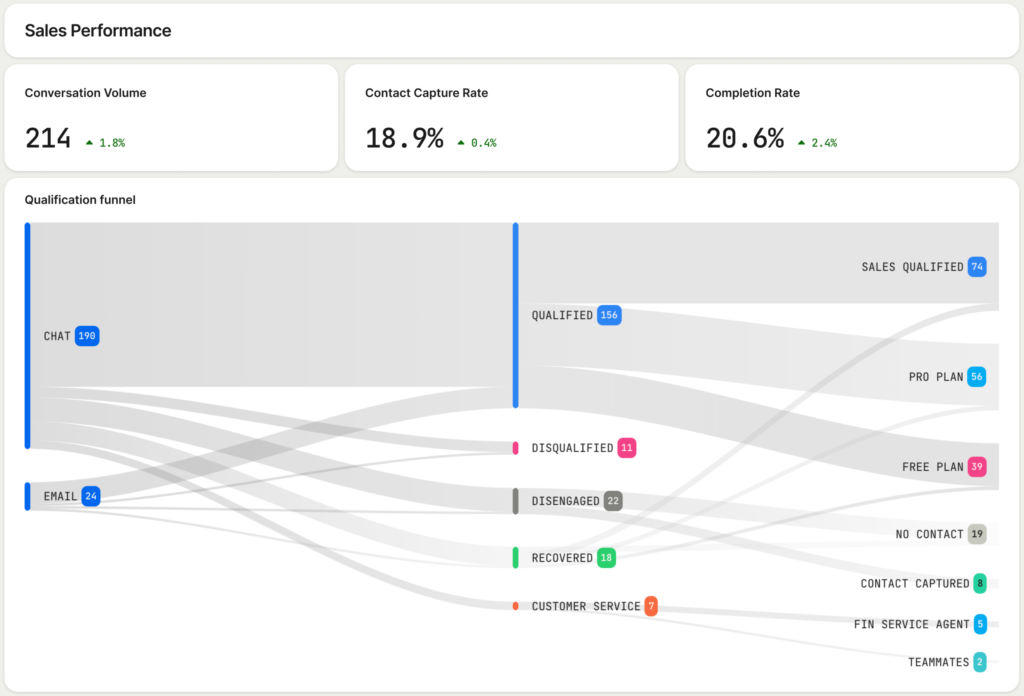
A UI that’s both conversational and graphical, not one or the other. Operator blends conversational interaction with purpose-built graphical components. Proposal diffs show exactly what will change in an article. Inline charts visualize performance trends. Dashboards render directly inside the conversation thread. In practice, that means a knowledge manager reviews a structured diff—not a wall of LLM-generated text—and a team lead asking about weekly performance gets an accurate chart with context, not a paragraph approximating data.
Building this hybrid experience is extremely difficult outside of a native platform integration. In a chat interface or CLI, you’re limited to text output; in a standalone dashboard, you lose conversational context. Operator does both in the same thread, so every interaction is detailed and context-rich—and importantly, actionable in the flow of work.
It lives where your team already works. Operator is built into the same platform your team uses every day. It’s not a separate tool with a separate login, nor is it a Slack bot your engineer set up that only three people know about. It operates exactly where you are, alongside the conversations, help center articles, workflows, and data you’re working with. That tight integration closes the gap between finding a problem and fixing it: spot an outdated article while reviewing a Fin conversation, and Operator can surface the fix in the same session. Notice an escalation spike in the morning, and you can ask Operator to investigate without switching tools, waiting for a data pull, or filing a ticket.
The compounding advantage
Every customer using Operator teaches us something. We see which debugging approaches work across different types of support operations, learn which content structures perform better, and identify automation strategies that consistently land. Those patterns get encoded back into Operator’s skills and tools. When we discover that a particular sequence of investigation steps reliably identifies the root cause of a spike in escalations, we build that into Operator’s diagnostic skill. When we find that a specific way of structuring help articles leads to higher Fin resolution rates, we encode that into the content creation skill. Our engineering team is continuously shipping improvements based on what we observe across the entire customer base.
A custom-built solution gives you exactly what you built, meaning it doesn’t get smarter unless you invest engineering resources into making it smarter. And that usually means taking time and talent away from your core product. I’ve watched teams underestimate the ongoing cost of eval-driven development, model upgrades, and API churn—costs that only grow as your footprint expands.
We’re not locking the door
Some teams want to build their own Agents. Some of our most technical customers do this. But when you do, you’re working with raw APIs and building your own tooling on top of them. When you use Operator, you’re working with a system that already knows what questions to ask, understands your data, and encodes the best practices we’ve learned from thousands of support teams. We recently launched the Fin CLI, which means you can use third-party agents like Claude Code or Cursor to interact with your Fin data and configuration. That door is open. What I hope this post has clarified is everything that goes into the build of Operator: Over 50 tools and 10 skills, purpose-built for support operations. Years of investment in semantic search. Deep integration with every layer of Fin’s stack. The proposal system. The intelligence layer. The reliability infrastructure.
If you’d still like to move ahead with building a custom solution, here’s an honest assessment. You can build a useful read-only tool in weeks. It’ll query your data, summarize tickets, and generate reports, but turning it into a production system will take quarters. Reliability, security, edge case handling, multi-tenant data isolation, and graceful degradation are all important architectural decisions that you’ll need to get right from the start. The action layer is also where you might risk stalling out. Going from “here’s what’s wrong” to safely making changes in a production system is a fundamentally different engineering problem than analysis. Most DIY projects never get there. Finally, you’ll be maintaining it forever. Every model upgrade, API change, and new capability in your support platform means updating your custom tooling. We have a team dedicated to this. You’ll need one too.
The economics still favor buying when a vendor has invested more in the problem than you can justify internally. What I hope this post adds is a clearer picture of what that investment actually looks like from an engineering perspective—and why it compounds into a durable advantage for your support organization.
The investment is ongoing. The problems we’re solving at the infrastructure level today are harder than the ones we solved a year ago, and that trajectory isn’t slowing down. If you’re ready to see the difference a production-grade Agent can make, explore Operator.
Inspired by this post on The Intercom Blog.


Leave a Reply