"Can you critique the landing page for my new Story-Based Customer Interviews course?" That simple ask used to kick off hours of back-and-forth where I fed an AI the same context over and over—only to get generic feedback that wouldn’t land with my audience or fit my products. As a product leader, that inefficiency was unacceptable; as a writer, it was just plain frustrating.
Not anymore. Today, Claude not only critiques my work, it helps me produce it. It generates marketing copy—in my voice. It helps me write blog posts. It knows what search terms are relevant to my business and helps me optimize my articles for SEO and now AEO. It helps me with competitive research, academic research, and discovery research. And it does all of this with little prompting from me.
I don’t upload files to a web-based project. I don’t manage elaborate prompt libraries. I don’t repeat myself. I ask for help and Claude knows exactly what to do. The shift happened when I learned how to give Claude Code a memory. Claude now knows who my target customer is, the key value propositions I focus on, the specific opportunities each product addresses, my revenue model, my marketing channels, and so much more.

With that memory, I consistently get high-quality output tailored to my audience and aligned to my products and services. I don’t retype the same context; Claude just remembers. In this article, I’ll show you exactly how I set up that memory. It relies on Claude Code (which requires a Pro subscription), and it’s worth it. If you’re new to Claude Code, start with "Claude Code: What It Is, How It’s Different, and Why Non-Technical People Should Use It."
Here’s the underlying problem: with large language models, every conversation starts from scratch. Yes, ChatGPT can remember some things and Claude can search past conversations, but practically speaking each new thread wipes the slate clean. If I were working on a new landing page, I’d normally need to upload target customer context, product details, primary and secondary value propositions, FAQ questions and answers, plus testimonials and logos for social proof—every single time.
Projects in web-based tools help a bit, but they introduce a new dilemma. When I move to the next landing page targeting the same customer but a different product and value proposition, do I start a new Project (tedious) or keep expanding the old one (which muddies the context window and degrades output quality)? The good news: Claude Code solves this by giving the model a precise, durable memory without overloading any single conversation.
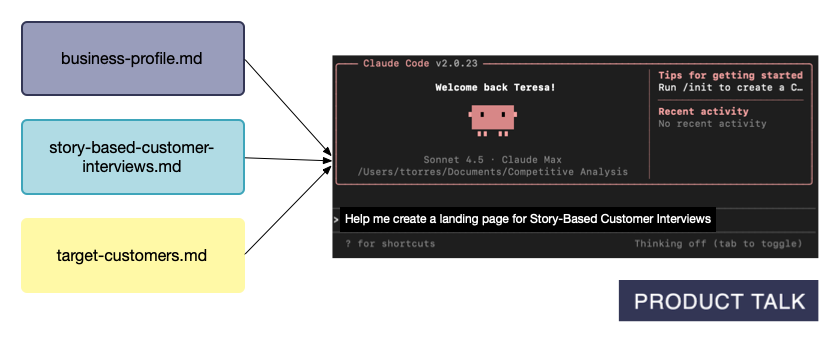
Claude Code can read files on my local machine, which is an understated superpower. I use those files to create a persistent, reusable memory that works across all chats and Projects. Files can be mixed and matched, so I give Claude exactly what it needs for the task at hand—and nothing more. For a first landing page, I reference the target customer and the relevant product; for the second, I reuse the same target customer file and point to the new product file.

When you give an LLM the exact right context, output quality jumps. More context only helps if it’s the right context. For a landing page, Claude needs to know about the current product and perhaps related products for differentiation—but it doesn’t need to know about unrelated offerings. Structure your memory so Claude gets precisely what’s required.
Once I did this, Claude shifted from “intern who needs handholding” to trusted advisor and capable teammate. It doesn’t guess at my value propositions—I’ve already told it. It writes in my voice because it has my writing guide and samples. It knows who owns which course and which use cases map to which features. The setup takes a bit of upfront work, but it compounds: update a file when something changes and you’re done. Most of this information already lives in your system; the trick is making it easy for Claude to use.

Because the files live on my machine, I own the system. No vendor or device lock-in. I decide when and who to share with. I can work with Claude on one project and ChatGPT on another—both can rely on the same file-based memory strategy. It’s an AI strategy that scales with product discovery, accelerates go-to-market content, sharpens competitive differentiation, and supports product-led growth.
Here’s how I design the memory: I use three layers. Claude Code already encourages global preferences and Project-specific instructions, but the third layer—reference context—is where the real power lives.
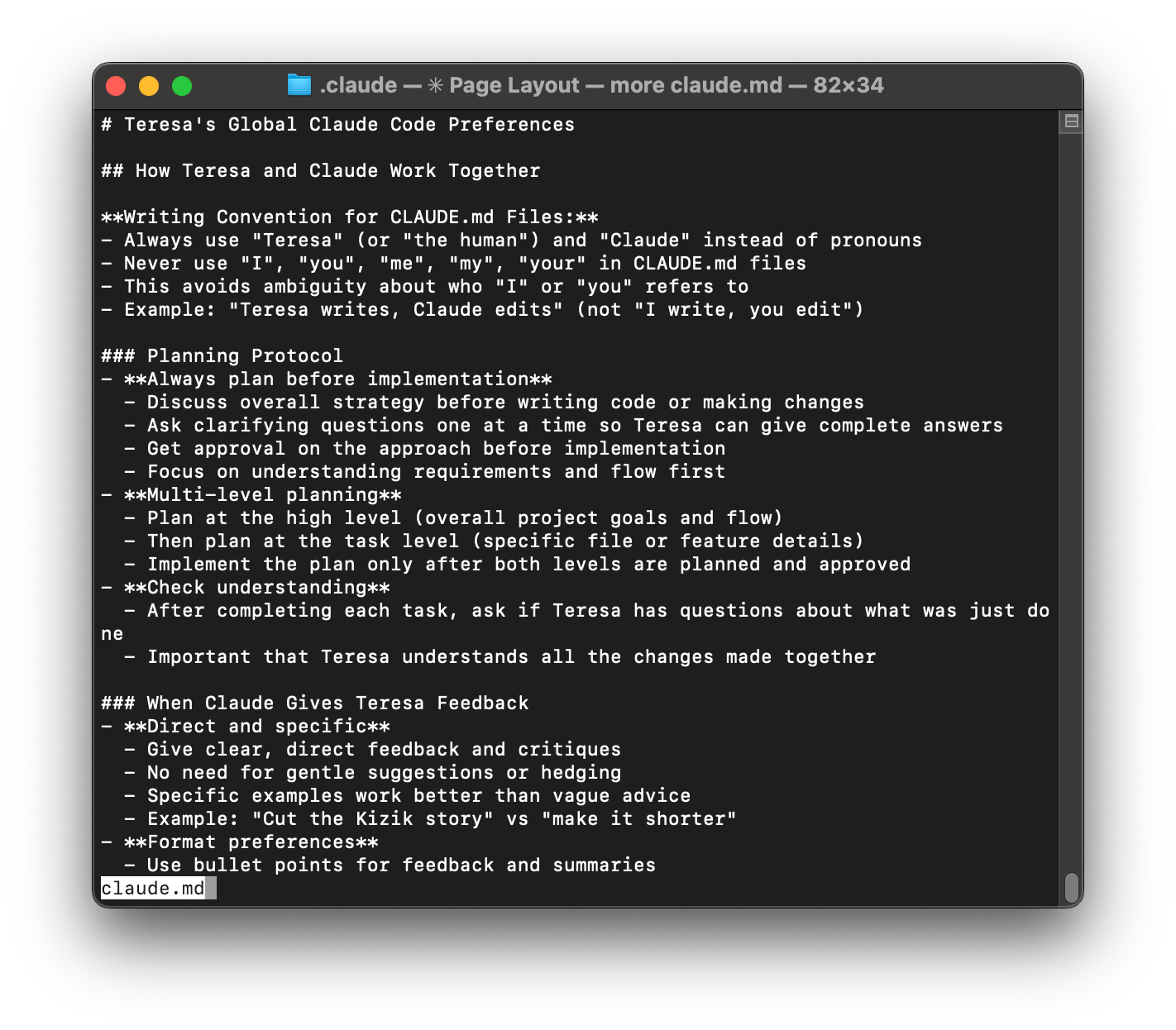
Layer 1: Global Preferences (Always on). The first time I launched Claude Code, I created a CLAUDE.md file at ~/.claude/CLAUDE.md. This is where I keep the cross-project rules of engagement—how I like to work with Claude. Mine includes: Always create a plan for me to review before you start any work; Give me direct feedback (no hedging, no gentle suggestions); Use bullet points for summaries; Ask clarifying questions one at a time so I can give complete answers; No emojis unless I explicitly ask for them. Claude Code automatically loads this file at the start of every session, so I never restate my preferences.
Layer 2: Project-Specific Instructions. Different projects have different rules. In my writing workspace, the Project CLAUDE.md sets the roles (I’m the primary writer; Claude is my thought partner and editor), defines a multi-round review flow (content → structure → accuracy → typos), prioritizes human readability over SEO, and points to my writing style guide. In my task management system, I include how my Trello integration works, file naming conventions for tasks, and how to process research papers into summaries. In my code projects, I specify the technology stack (Node.js vs. Python), testing framework (Jest for Node.js, pytest for Python), code style and conventions, project architecture and directory structure, and which dependencies and libraries to use. Each project directory has its own CLAUDE.md, and Claude automatically loads the relevant file when I’m working there.

Layer 3: Reference Context (Pull as Needed)—the real power. LLMs have a context window—a limit to how much they can process at once. Even within that limit, loading too much degrades performance due to “context rot.” The remedy is ruthless context management: small, targeted files that load only when needed. Keep CLAUDE.md files concise and focused on rules and workflows. For detailed knowledge, create separate reference files and list them in your CLAUDE.md so Claude knows they exist and when to fetch them. When I ask for help creating a landing page, Claude knows to use my business profile, the product file, and my target customers context.
Here’s what most people miss: you don’t cram everything into global or Project files. You maintain small, reusable reference files that Claude only loads on demand. In my walkthrough, I share exactly which context files I created and why; how I got Claude Code to help me create them; how I break them into small, reusable components so Claude gets precisely what it needs; how I keep everything up to date; and step-by-step instructions so you can set up a similar memory system.
Let’s dive in.
Inspired by this post on Product Talk.