
I followed the energy at Fin Labs Paris and immediately zeroed in on the announcement of Monitors. In my view, it’s the missing piece that turns Fin’s powerful automation into an observable, trustworthy system—sitting alongside Insights and Recommendations to form a complete observability suite that gives teams confidence in what Fin is doing.
With Monitors, you define what conversations get reviewed, both Fin and human, and set evaluation criteria using Custom Scorecards. That level of control ensures you’re measuring the metrics that matter most to your business and holding support quality to your bar, not a generic one.
Used in concert with Insights and Recommendations, you can finally see what’s happening across your support operation, evaluate every conversation against your standards, and take targeted action to continuously move toward perfect customer experiences.
As Agents become more powerful, transparency and control become critical. I’ve seen this shift firsthand: AI is advancing fast, and the stakes are no longer theoretical—Agents are resolving real customer issues with real consequences at scale.
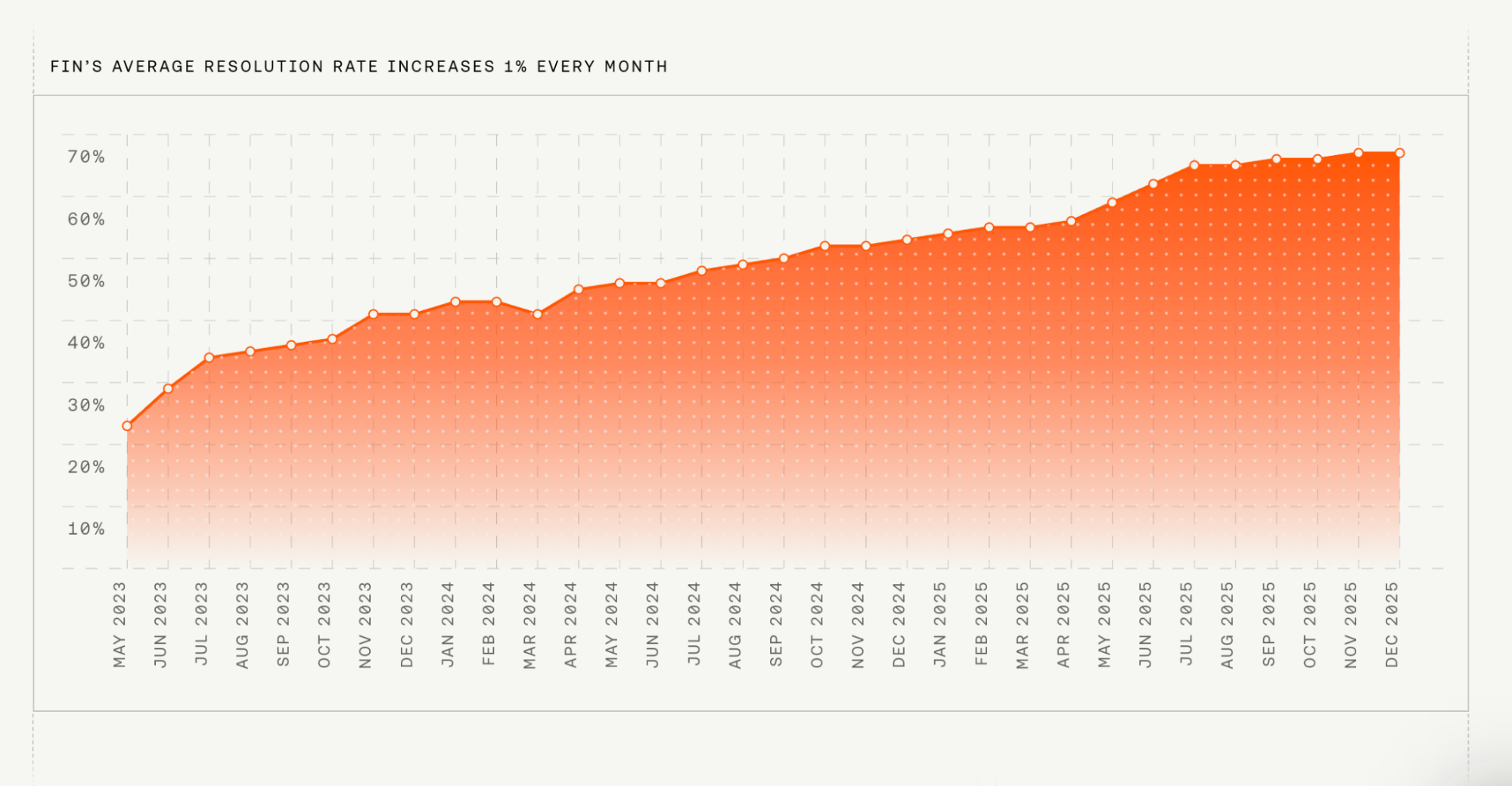
Fin has almost 8,000 customers, averages a 67% resolution rate, and resolves close to 2 million customer queries every single week, including highly complex queries in regulated industries.
At that scale, observability isn’t a nice-to-have; it’s a necessity. Traditional CSAT and small QA samples weren’t built for Agent-led operations—they miss edge cases, don’t scale, and can’t explain drift. The result is a black box. What teams need most right now is confidence, built on data you can trust and act on.
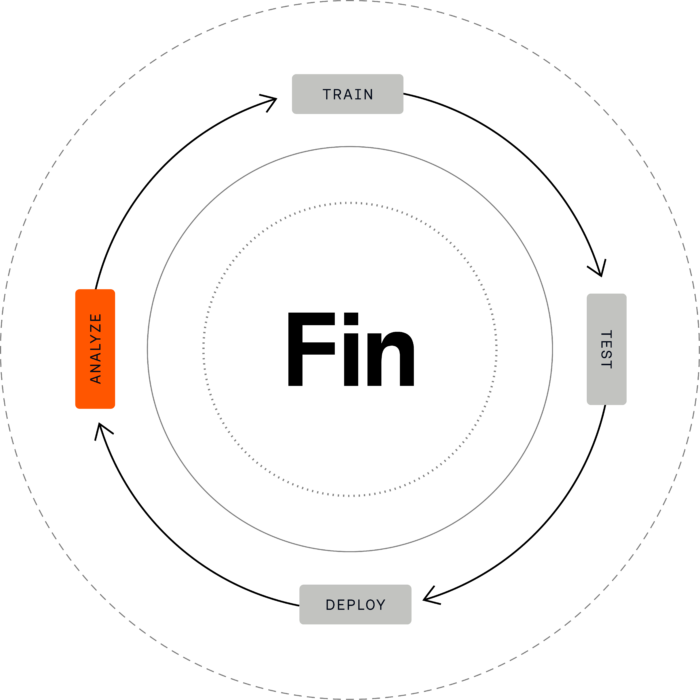
At Intercom, this is called the Fin Flywheel: Train, Test, Deploy, Analyze.
Analyze is the step where you find out what’s actually happening and it’s where improvement begins.
In my experience, achieving confidence in an AI support operation requires three things: (1) a complete understanding of what Fin, your human team, and your customers are talking about; (2) a way to monitor and score conversations based on the criteria that matter most to your business; and (3) AI-powered recommendations that make it easy to act on what you find. Intercom launched Insights and Recommendations to address the first and third. Now, Monitors completes the system for full observability and opens the black box.
Monitors: know whether every conversation met your standards. Customer sentiment is important, but it’s different from determining whether a conversation was handled correctly. With Monitors, you can do both—and do it at scale.
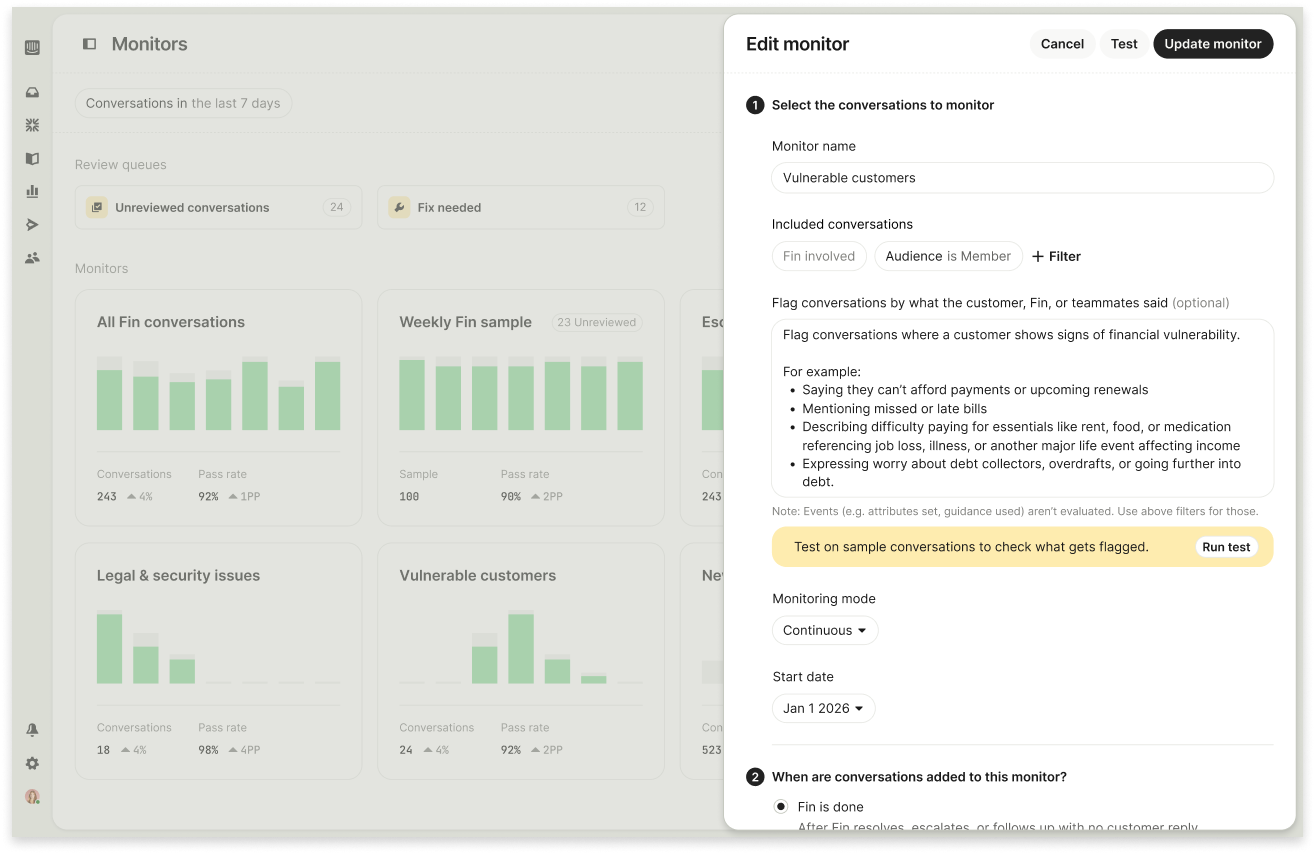
Monitors is a new QA capability that delivers a structured, repeatable way to define which conversations get reviewed and evaluate them against quality criteria you set. It replaces ad-hoc sampling and spreadsheet-driven QA with a system that scales as your volume grows.
Two components work together: Monitors define what gets reviewed and Custom Scorecards define how each conversation is evaluated. That pairing brings the rigor of Agent Analytics and the discipline of eval-driven development to everyday CX operations.
Random sampling has always been a blunt tool. When AI is handling thousands of conversations a week, a small, arbitrary slice won’t reliably capture your highest-risk edge cases, your most complex escalations, or where quality is starting to drift. I’ve felt that pain in operations reviews—too many unknowns, not enough signal.
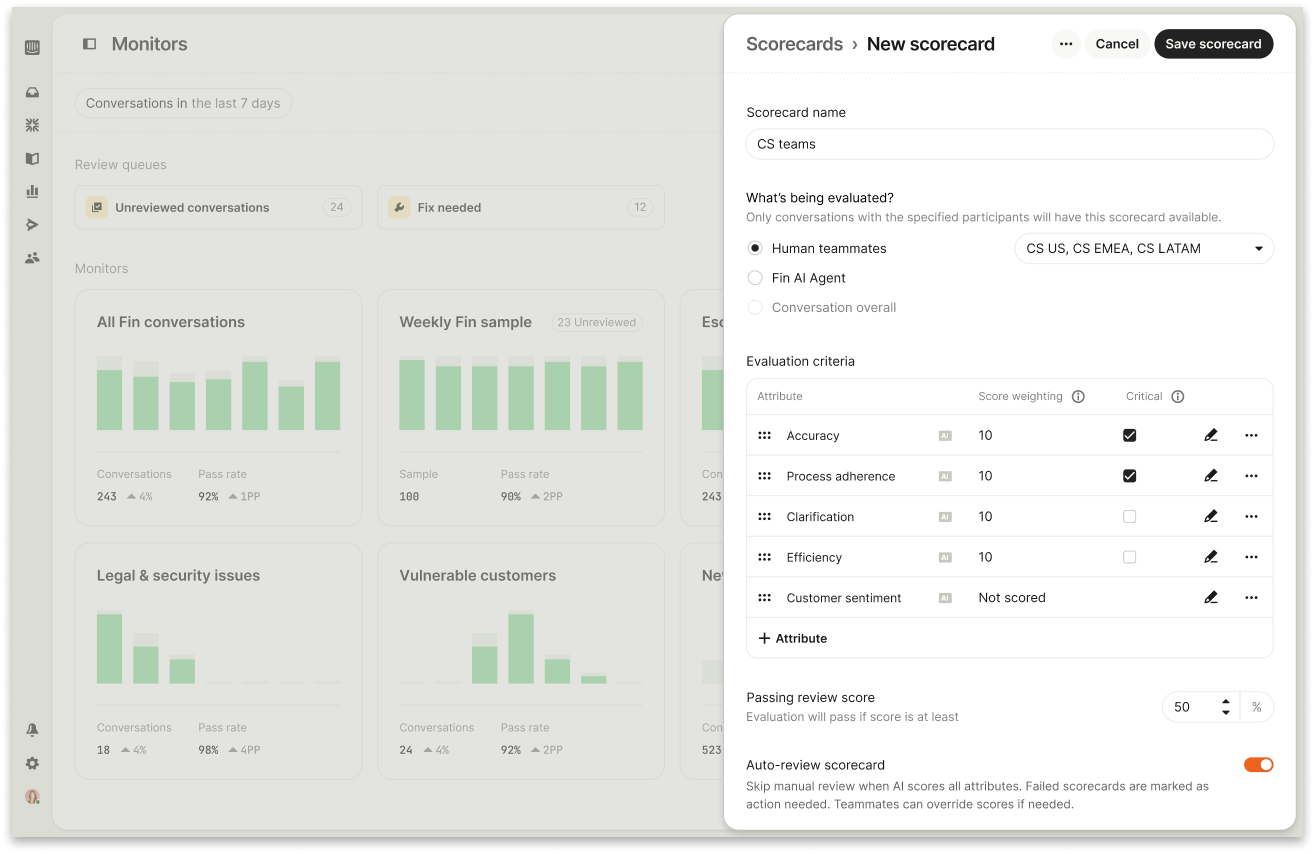
With Monitors, you select and evaluate conversations with intent. You can target specific signals of risk or failure, like “the customer showed signs of financial vulnerability” or “Fin looped around with the same answer without resolving the issue.” Or you can create consistent, repeatable samples to benchmark quality over time. Use the existing library of filters (customer data, channel, Fin-specific metrics) or describe nuanced scenarios in natural language. Most teams will do both: hone in on the conversations that matter most and maintain a steady, structured QA sample each week.
"When I saw Monitors, my first reaction was — this is exactly what we need. The ability to track quality continuously, instead of relying on spot checks, is a big shift for us." Ineke Oates, Head of Support, Agorapulse
Custom Scorecards make your standards explicit and enforceable. One-size-fits-all rubrics never reflect your brand voice, industry constraints, or customer expectations. With Custom Scorecards, you define what “good” looks like for your business and turn that into a measurable, comparable quality score for every conversation.
You define the criteria that matters, how each should be measured, and how important each one is. Some criteria can be scored automatically by AI, others reviewed by a human, or both — all within the same scorecard. This means you’re not choosing between scale and judgment; you get both in one system.
Each conversation is then evaluated against these criteria, and the system calculates an overall quality score based on your configuration. You can weigh what matters most, or mark certain criteria as critical, so a single failure can fail the entire evaluation when needed.
The result is a single, consistent quality score that reflects your standards—not a generic metric, and not a collection of disconnected checks. That’s what makes quality measurable over time and comparable across AI and human support.

There’s an important distinction here: CX Score tells you how customers felt about a conversation. Custom Scorecards tell you whether it met your standards. You need both.
"We looked at dedicated QA tools, but what's compelling about Monitors is that it lives where our conversations already happen. We don't need another system — we can run QA across Fin and our human team in one place." Jared Ellis, Senior Director, Global Product Support, Culture Amp
When a conversation meets your criteria for review, Monitors routes it into a Review Queue. Each conversation is assigned to the right reviewer with its scorecard attached and status tracked end to end: Not reviewed, Reviewed, Needs a fix, Fix complete. Reviewers work directly in Intercom, capture what went wrong, and propose concrete fixes—like updating documentation or refining a workflow—so quality loops end in action, not just scores.
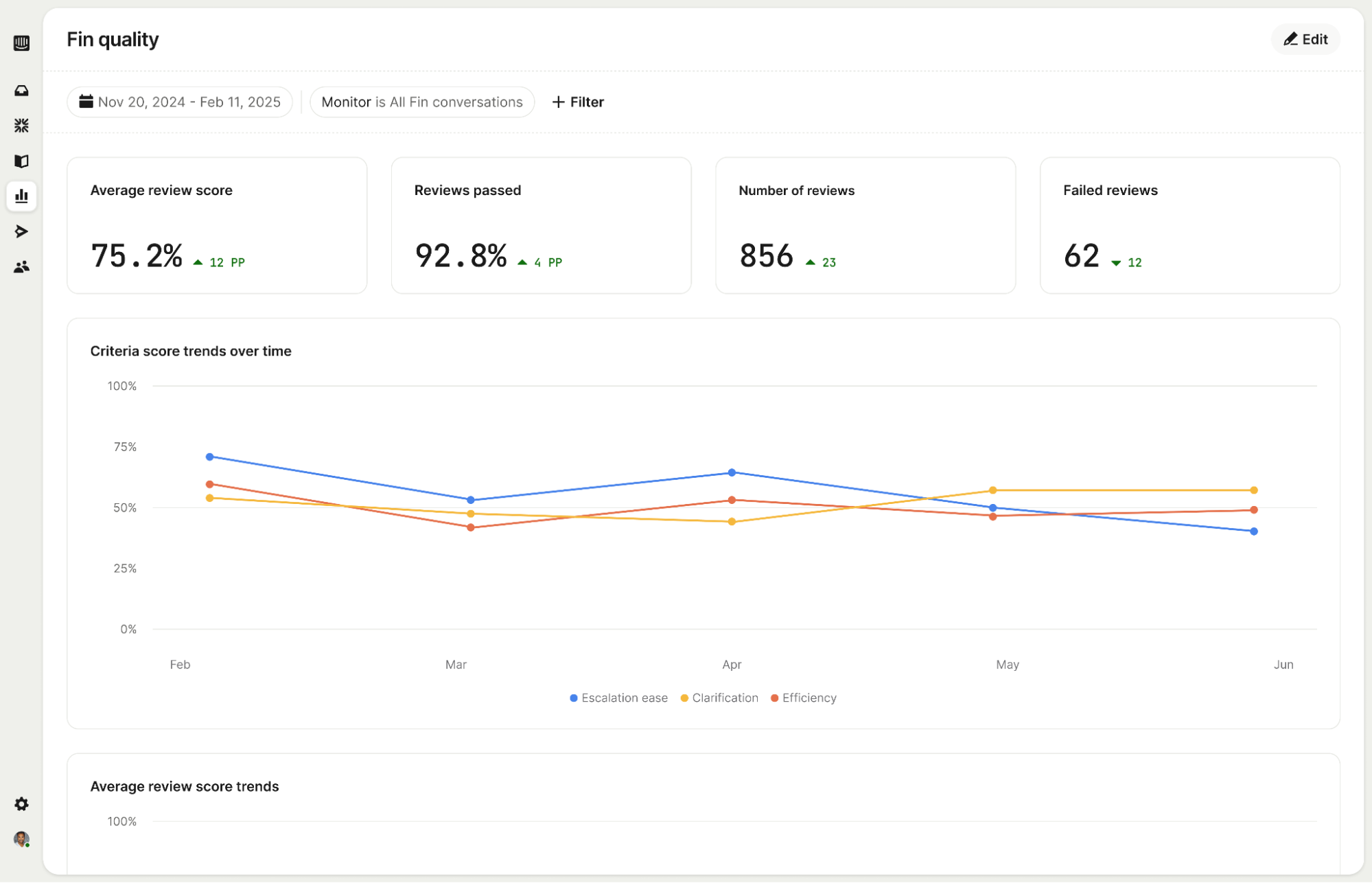
Reporting turns QA into a continuous signal rather than a one-off audit. You can track review scores over time across Monitors and Scorecards, and compare them directly to CX Score, resolution rate, and other performance metrics. Patterns that were previously invisible become clear: a topic consistently underperforming, a quality dip correlated with a recent knowledge base change, or a team whose scores are improving week over week. This is observability applied to CX—evidence you can act on.
Monitors for Fin conversations is live today, and the roadmap goes further. Human agent QA will bring the same structured evaluation to your human team’s conversations, creating one consistent quality system across your entire support operation.
Real-time alerts will notify you the moment a conversation crosses a threshold you’ve defined—before the issue reaches more customers and risks compounding negative sentiment.

Knowledge base evaluation will connect AI scoring directly to your content so conversations are assessed against your latest policies and documentation, catching inaccurate or outdated responses and providing clear rationale linked to the relevant source.
Creating perfect customer experience with AI requires transparency. You need to understand how the system is performing if you want to maintain and improve quality over time. With Insights, Monitors, and Recommendations, this is now possible—a complete analysis suite that lets you see what’s happening across every conversation, ensure it meets your standards, and pinpoint improvement opportunities when they matter most.
I’ve long advocated for a retrieval-first, eval-driven approach to AI Strategy because it makes risk visible and manageable. Monitors operationalizes that philosophy for CX leaders: you get continuous signal, shared definitions of quality, and a direct path from flags to fixes. If you’re scaling AI support, this is how you replace uncertainty with control—and turn the black box into a competitive advantage.
Inspired by this post on The Intercom Blog.






Leave a Reply