Most teams ship AI agent personalities by accident—emergent quirks, brittle prompts, and uneven behavior. We refused to let that happen. From day one, we treated personality as a first-class product surface, one that should be designed, instrumented, and iterated with the same rigor as any core capability.
Learn how we designed Global Agent’s personality and fine-tuned its inquisitiveness and helpfulness using Agent Analytics.
In my role leading product at HighLevel, Inc., I framed our approach around agentic AI and conversation design: personality is not “flavor text”; it is the control system for how an agent interprets context, asks questions, and decides when to act. Our product strategy prioritized clarity, empathy, and consistency—so the agent would be curious enough to resolve ambiguity without becoming interrogatory, and helpful enough to move work forward without overstepping.
We made that intent measurable. Using behavioral analytics, we defined operational signals such as clarification-question rate, resolution-path efficiency, and escalation quality. We combined eval-driven development with targeted A/B testing to compare prompt patterns and tool strategies, ensuring each change had a clear hypothesis and measurable outcome.
To calibrate inquisitiveness, we mapped decision points where the agent should ask follow-ups versus proceed autonomously. Prompt engineering codified those thresholds, while a retrieval-first pipeline reduced unnecessary questions by improving context completeness up front. When the agent did ask, we constrained tone and cadence to keep queries concise, respectful, and progress-oriented.
To enhance helpfulness, we prioritized precise action-taking and unambiguous guidance. Context window management preserved relevant facts without diluting intent, and guardrails aligned with AI risk management principles ensured the agent stayed within policy, privacy, and compliance boundaries. The result was an assistant that resolved more tasks end-to-end, with fewer stalls and clearer handoffs when human help was warranted.
Agent Analytics became our nervous system. We instrumented every dialog turn to attribute outcomes to design choices, then used driver trees to connect micro-behaviors to macro results like time-to-resolution and customer satisfaction. This closed-loop view let us ship confidently, knowing which levers improved helpfulness, which sharpened curiosity, and which merely added noise.
Process mattered as much as tooling. Product trios ran continuous discovery with customers to surface edge cases—ambiguous intents, multi-intent turns, and sensitive scenarios—while our engineering partners operationalized experiments with clean rollback paths. We favored small, testable changes over sweeping rewrites, building momentum and trust with each iteration.
The payoff is a personality that feels consistent across use cases: curious when clarity is missing, decisive when action is obvious, and transparent when limits are reached. Users experience fewer dead ends, faster resolutions, and a brand voice that shows up the same way every time—because it was defined, measured, and improved on purpose.
If you’re building agentic AI, don’t leave personality to chance. Treat it like a product: set clear outcomes, instrument deeply with Agent Analytics, and iterate with eval-driven development and A/B testing. That’s how curiosity becomes a feature, helpfulness becomes a habit, and your agent becomes reliably, intentionally excellent.
Inspired by this post on Amplitude – Best Practices.
When I consider where product development is headed, one statement captures the mandate perfectly: "Eric Carlson is a Principal AI Engineer helping to shape and build Amplitude's next generation vision of of agentic and data driven product development." That vision resonates deeply with how I lead teams—anchoring strategy in behavioral analytics while enabling agentic AI to act on insights with speed, safety, and measurable impact.
Translating that vision into execution starts with clarity of outcomes. I frame driver trees that connect customer value to leading indicators—activation, engagement depth, and retention—then instrument product telemetry with Amplitude analytics and behavioral analytics to surface the moments that matter. From there, we operationalize learning with A/B testing and feature flags, ensuring each hypothesis gets a fair, observable run and that we can safely ramp what works.
Agentic AI changes the operating model. Instead of static dashboards, we design autonomous workflows that observe signals, reason over context, and take action—grounded in a retrieval-first pipeline and governed by eval-driven development. For product managers, this demands fluency with LLMs for product managers and practical prompt engineering, plus rigorous AI Strategy around data governance, privacy-by-design, and risk scoring so agents remain trustworthy under real-world conditions.
Cross-functional cadence is everything. I partner closely with Principal AI Engineers and product trios to blend continuous discovery with execution: rapid user interviews to reveal intent, opportunity solution trees to prioritize, and outcomes vs output OKRs to align incentives. The result is a system where insights are unified, decisions are explainable, and agents improve through tight feedback loops across analytics, experimentation, and production telemetry.
If you’re building toward an agentic, data-driven future, invest in a unified analytics platform, shorten the path from signal to action, and measure learning velocity as carefully as feature delivery. With the right foundations, agentic AI becomes more than a feature—it becomes a force multiplier for product strategy, customer value, and sustainable growth.
Inspired by this post on Amplitude – Perspectives.
I just wrapped an all-out engineering sprint. That still sounds odd coming from me, because while I’ve written code on and off for years, I don’t self-identify as an engineer. I’m a product manager who used to be a designer. It’s been a long time since I wrote code for a living.
But AI has expanded what’s just now possible—for our products, and for us. It’s pushed me to do more than I imagined. In that spirit, I want to share a recent engineering story. It includes technical details, and a year ago I couldn’t have done any of it. I learned it with the help of AI, and my aim is to show what’s now within reach.
I’ve been building two services with a partner at Vistaly: AI-generated interview snapshots and AI-generated opportunity solution trees. We put out a call for alpha partners, received over 100 applicants, and selected eight design partners to start.
A clear, color‑coded map from desired outcome to opportunities, solutions, and assumption tests—showing how to structure discovery work and prompt AI to generate, compare, and validate product ideas.
Each team uploaded three customer interviews. I identified the key moments and opportunities and then generated an opportunity solution tree from those snapshots. I provide the AI services; Vistaly is building the UI and workflows around them.
Early feedback was strong. Teams immediately asked to upload more interviews—exactly the kind of demand signal you hope to see—so we got to work making that possible.
Go behind the scenes as AI turns raw feedback into a clear Opportunity Solution Tree. Linked cards reveal user needs—onboarding, support offload, and bot-readiness signals—so product teams can spot priorities and next steps at a glance.
Updating an opportunity solution tree with new interview content is far harder than generating a new tree from scratch. I initially underestimated the complexity. Our goal wasn’t to produce a tree and declare it truth. We wanted teams to engage, correct, and collaborate with the AI—scaffolding cross-interview synthesis instead of doing it for them.
To support that, we needed a way to communicate precisely how a tree would change after new interviews were added. We took inspiration from git diff and set out to build the equivalent for opportunity solution trees—step-by-step change sets that explain each proposed modification.
A clear visual of AI‑generated opportunity solution trees: outcomes feed opportunities that branch into sub‑opportunities, while evidence is preserved. The structure ensures updates stay traceable and never cause data loss.
That decision was right, but the lift was larger than I expected. It wasn’t enough to generate an updated tree; I also had to provide a clear, ordered walkthrough of what changed and why.
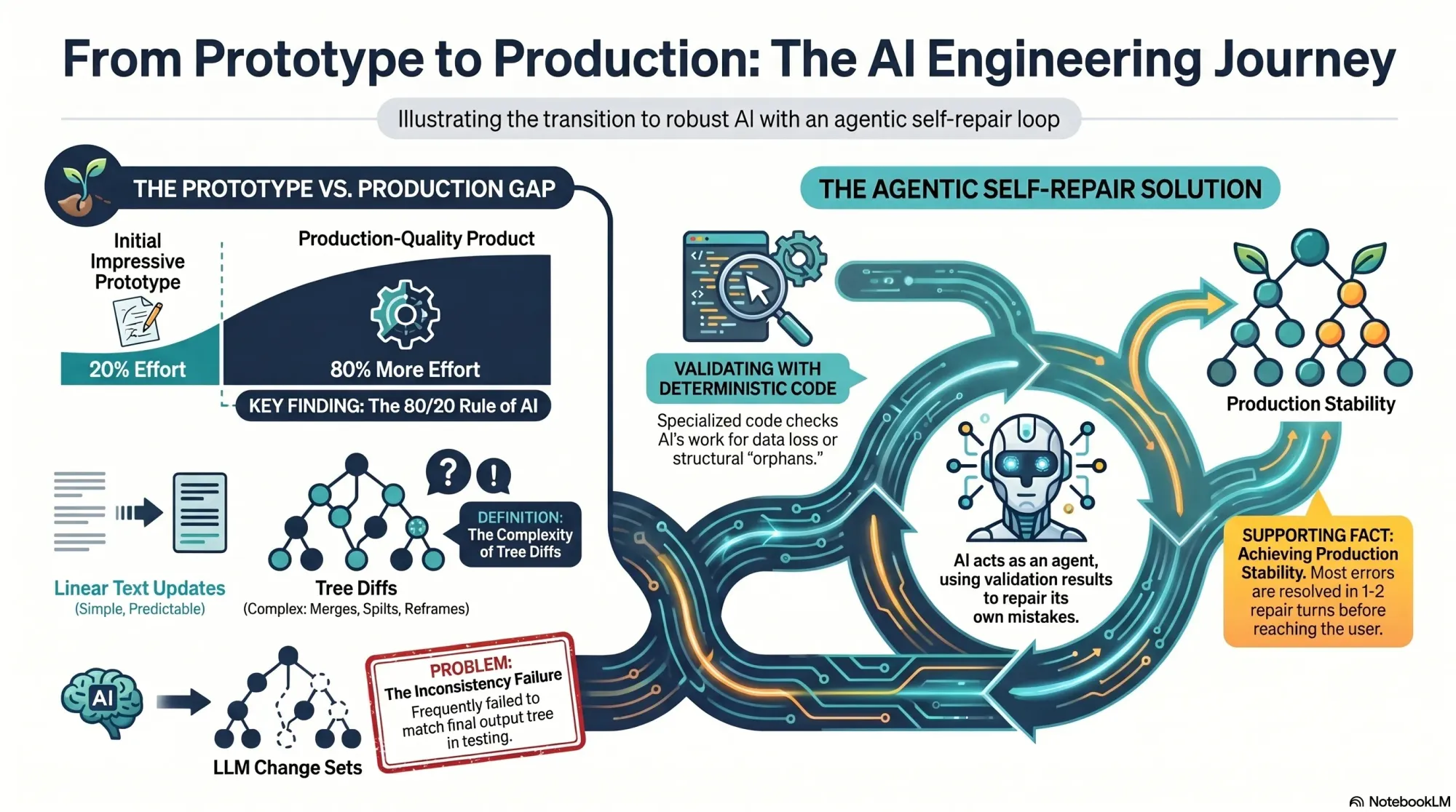
I often see the same pattern with AI: it’s easy to get to an impressive prototype, but much harder to reach a production-grade product. That was exactly my experience here. My service actually comprised two sub-services: generating a new tree from scratch and updating an existing tree with new interviews. The first worked well in alpha; the second had to be built before anyone could add a fourth interview.
Explore how an outcome expands into an Opportunity Solution Tree: Opportunities A and B stem from the goal, with C and D nested under B, while a concise change set tracks every node added along the way.
On the surface, these services look similar. In reality, updates must preserve existing structure unless new evidence requires a change. You have to account for compound operations—merges, splits, deletes—while guaranteeing no data loss. Every node has source opportunities (supporting evidence from interviews) and children (tree sub-opportunities), and neither can be dropped.
In classic AI fashion, I got a reasonable version working in a few days and shipped it to our design partners. One team quickly hit our beta limits and asked to convert to a paid subscription so they could keep going. They showed a willingness to pay, converted, and started uploading aggressively.
Watch an Opportunity Solution Tree evolve: the original parent A with x, y, z branches is split into A and B, shifting evidence while preserving links—mirroring how AI refines scope and structure in discovery.
At the 14th, 15th, and 16th uploads, the cracks appeared. We saw odd behavior in some trees. The Vistaly team noticed that the change sets—the step-by-step instructions emitted by my service—didn’t always reconstruct the final tree my service also emitted. We needed those steps to match exactly, so teams could review and accept, modify, or reject each change with confidence.
They flagged the issue the day I was flying to New Orleans for Jazz Fest. In hindsight, I’m glad I didn’t grasp the scope of what awaited me. I had roughly 80% of the work still to do to make tree updates rock solid. At least I got to enjoy the music first.
From fragments to focus: this diagram shows how Opportunities B and C are merged into a single Opportunity Solution Tree, removing duplicates and unifying context so AI can rank and explore five related opportunities with clarity.
Back home, I started diagnosing. My service was a pipeline: several LLM-driven steps followed by deterministic code to compare trees and produce change sets. As I dug in, I realized that approach was flawed. Tree diffs, unlike linear document diffs, are ambiguous.
In a document, if I add a sentence, the diff shows an addition. If I delete a paragraph and rewrite it, the diff shows a removal and an addition. Simple. But trees are different. Suppose I split opportunity A into A and B, and later merge B with C. The split can disappear from the final diff.
Peek inside our process: a simple opportunity solution tree maps an outcome to prioritized opportunities A and C with downstream options x-z and t-v. A clear snapshot of how AI organizes product discovery.
When the model splits an opportunity, it must distribute A’s source opportunities and children between A and B. For instance, if A has source opportunities 1, 2, 3 and children x, y, z, after the split A might keep 1, 2, and x, while B takes 3, y, and z.
Now suppose the model merges B into C. If C originally had source opportunities 4 and 5 and children t, u, v, then after the merge C now has source opportunities 3, 4, 5 and children t, u, v, y, z. When you compare the original and final trees, it looks like A somehow donated some evidence and children directly to C. The split and merge that explain why are invisible to a naive diff.
See how an AI-generated Opportunity Solution Tree unfolds: one Outcome flows to Opportunities A and C, then into options x–v. Clean colors and arrows reveal the hierarchy from goal to opportunities at a glance.
That was the core insight: we didn’t just need to show what changed—we needed to show why it changed. I had to reconstruct each move step-by-step. That meant getting the model to show its work, which opened a new can of worms.
I refactored my prompts so the model produced both the final output and the exact change set it used to get there. The action language was explicit: add, delete, reframe, merge, split, and so on. Crucially, I asked the model to describe its moves in user-meaningful terms—“split A into A and B, then merge B into C”—not as opaque reassignments of sources and children.
Watch an opportunity solution tree take shape: start with the outcome, add opportunities A and B, then extend B to C and D. The paired change set makes every edit transparent—ideal for AI-assisted product discovery.
For each LLM step, the model now emitted its recommendation and the corresponding change set. This helped, but it wasn’t perfect. After extensive testing and error analysis, two classes of errors emerged: (1) the model attempted an invalid move, and (2) the change set didn’t actually generate the recommendation.
Category 1 felt like designing a game while the model played it creatively. For example, what happens when the model tries to merge a parent with a child? If opportunity A has children B, C, and D and the model merges A with B, the merge is directional. If the instruction is “keep A, delete B,” that works—the parent absorbs the child. But if the instruction is “keep B, delete A,” then C and D become orphans. These puzzles were solvable and even fun.
Visual explainer from Product Talk on AI-generated Opportunity Solution Trees. It contrasts an allowed merge (B into A) with a not-allowed merge (A into B) that leaves child opportunities orphaned, guiding safe hierarchy edits.
Category 2 was harder. Despite prompt iterations, I could only push the discrepancy rate down to about 1 in 40 instances. With 10–20 LLM calls per run, that meant roughly half of all runs still failed. Not acceptable for production. I hit a wall. A paying customer was waiting, and more design partners were queued up.
Next, I tried to correct the model’s mistakes with deterministic code. I had promised that my change sets would generate the output tree, so I wrote verifiers: detect conflicts (e.g., delete a node, then try to use it later), guard against data loss, prevent orphaned nodes, and more. Detection was straightforward; correction was not. Fixing issues required guessing the model’s intent. If the sequence said “delete A, then merge A with B,” should I remove A entirely or salvage A’s sources and children by merging into B? There were dozens of such cases with no unambiguous answer.
A step-by-step loop shows how changes are validated: generate a change set, run a validation tool, review the result, then repeat on failure and exit on pass—mirroring iterative work behind AI-built Opportunity Solution Trees.
After 11 straight days of deep work—including weekends—I was exhausted. I dislike hustle culture; this isn’t how I design my life. But I was stuck, and then I had an insight.
On a walk with my husband (also an engineer), I realized I could have the LLM repair its own mistakes. My data contract with Vistaly requires that the change set must generate the output tree. I had already built robust validation code. I knew exactly when a change set failed—and why. No amount of prompt tuning alone was fixing it. So I turned the validator into a tool for the model and created a simple agentic loop.
The loop works like this: the model proposes a change set, calls the validation tool, and gets back a pass/fail plus specific feedback. If it fails, the model uses those instructions to repair the change set and calls the tool again. Iterate until success or a max number of turns.
I prototyped in Node.js with a single model call, a verifier pass, and a repair attempt. At first, the loop didn’t converge—it just accumulated compute. I experimented with how to communicate errors, how much context to include, and how to sequence feedback. Eventually, it clicked: the model began fixing its own mistakes and typically returned a valid change set in one or two repairs. It was, in practice, eval-driven development applied to LLM outputs.
I had already built an agent loop utility for another AI workflow, so I productionized quickly: model call, optional tool invocation, tool result returned to the model, repeat until the validator signals success or the loop times out. I integrated the new loop into the pipeline and shipped the revamped service to Vistaly on Monday at noon. They’re integrating now, and it will be in the hands of our design partners shortly. I’m relieved—and ready for a day off.
Reflecting on the last two weeks, a few things stand out. First, I shed limiting beliefs about being an engineer. To make this reliable, I had to solve legitimately hard problems, and that feels good.
Second, this was genuinely fun. Designing the action set and watching the model push those boundaries was like working through elegant puzzles. Models are incredibly creative, and harnessing that creativity with the right constraints is deeply satisfying.
Third, I learned when I can and can’t trust Claude to write code for me. Since Opus 4.6 came out, I gave Claude a much longer leash. After the past two weeks, Claude is back on a short leash. I found a lot of gaps in my implementation in areas where I simply trusted that Claude got it right, when in fact it didn’t. If you don’t have the right infrastructure—planning, testing, code review—this can be disastrous. I’ll be investing more here and sharing what I learn.
Finally, if this work had been spread over two months, it would have been thoroughly enjoyable. I’m discovering how much I like being an AI engineer. It feels like a new chapter where I can combine opportunity solution trees with modern AI engineering—and deliver real value to product teams doing continuous discovery.
I’m excited to share more of what we’re building with Vistaly and to onboard more design partners soon. If you’re interested, get on the waiting list. And if you’ve been hesitant to stretch beyond your current skill set, I hope this story nudges you to take the first small step toward what’s just now possible.
I recently spent time with the debate behind the "product builder" trend—asking whether it’s the future of product management or just another wave of tech FOMO. The conversation featuring Teresa Torres and Petra Wille is a useful prompt, but what matters most is how we translate these ideas into healthy product practices inside our own organizations.
Here’s my take: the product builder movement is neither a mandate nor a fad—it’s a tool. The right question isn’t "should product managers code?" but whether leaning into building advances outcomes for our customers and our teams. In practice, that means letting interest and skill—not pressure—set the pace.
Petra captured it perfectly: "Just because I can do it — is it something I enjoy doing? And do I have enough experience to really get into the flow?" Those two tests—joy and depth—are underrated filters. I’ve seen PMs light up when prototyping or vibe coding a thin slice, and I’ve also seen well-meaning dabbling create hidden complexity that slows everyone down later.
Org design determines whether this works. It’s not about the tools—it’s about clarity of roles, healthy interfaces between product, design, and engineering, and explicit guardrails for where experiments stop and production begins. AI has raised the stakes: "AI can make unskilled work look polished. That’s a feature and a bug — executives see the shine, engineers inherit the mess." If you’ve ever watched a glossy demo turn into weeks of refactors, you know exactly what this looks like.
To avoid that trap, I deliberately separate the three layers where AI is changing product work: personal productivity, team process, and product strategy. Treating these as different stacks keeps expectations clean: a prompt that accelerates personal workflows isn’t the same as an AI-enhanced process that reshapes delivery, and neither automatically produces durable product advantage. Don’t conflate them.
Discovery remains stubbornly human. "Why discovery still requires talking to your customers (sorry)" is more than a friendly nudge. AI can broaden our search space and sharpen analysis, but it doesn’t replace qualitative conversations or the judgment that comes from pattern recognition across real customer contexts. Continuous discovery and disciplined customer interviews are still the most reliable compasses we have.
Where does "vibe coding" fit? It’s great for roughing out concepts, de-risking slices, and communicating intent when words or static mocks won’t cut it. Tools like Claude Code make this faster than ever, and familiar stacks like Ruby on Rails lower the bar for spinning up functional prototypes. But remember the design system trap: AI can make bad decisions look good on the surface. If you don’t control for architecture, accessibility, data contracts, and handoff quality, your team pays the integration tax later.
In well-set-up orgs, the output-oriented muscle memory gets rewired. When AI frees up time, strong teams reinvest it into better problem framing, sharper opportunity solution trees, and tighter product strategy—rather than simply chasing more output. That’s a leadership challenge, not a tooling problem, and it shows up quickly in how teams make trade-offs.
Here’s how I operationalize this with empowered product teams: we articulate clear boundaries for prototypes versus shippable code, define decision rights for when PMs or designers "build," and align on review gates that protect quality without stifling speed. We also make the three AI layers explicit in roadmapping and retros, so improvements to personal workflows don’t get mistaken for strategic advantage.
My distilled guidance echoes the episode’s throughline. The product builder trend isn’t a mandate — it’s a tool. Let enjoyment and skill guide who on your team leans into it. Organizational readiness determines whether AI empowers your team or creates chaos. Don’t conflate personal efficiency, process change, and product impact—they require different responses. Discovery fundamentals haven’t changed; AI helps you go deeper, not skip the work. And the real takeaway on product builders: not everyone has to build, but everyone can if they want to.
If you want to hear the full discussion that sparked these reflections, listen on Spotify or Apple Podcasts. Then tell me: where will you apply builder energy in your team—and where will you deliberately say no?
Resources & Links: Follow Teresa Torres: https://ProductTalk.org. Follow Petra Wille: https://Petra-Wille.com. Mentioned in this episode: Claude Code, Vibe coding, Ruby on Rails.
One more quote I loved because it centers autonomy and craft: "It’s a tool in our toolbox. We can decide who on our team has fun with it, wants to do it, wants to contribute." That’s the mindset that sustains both momentum and morale.
I just finished listening to "Taste – All Things Product Podcast with Teresa Torres & Petra Wille," and as a product leader shipping AI-powered capabilities at HighLevel, Inc., I wanted to pressure-test the sudden obsession with "taste."
If you're curious, you can listen to this episode on Spotify or Apple Podcasts.
The core question landed perfectly for our moment: Is "taste" the must-have skill of the AI era — or just the latest tech buzzword in a world where AI is eating through design, delivery, and discovery?
Teresa pushes back hard, highlighting how slippery the term can be. "It's just this month's flavor of founder mode." She points out that "taste" is rarely defined, can't be easily taught, and too often becomes shorthand for "my preference trumps yours." Just as importantly, "It's not about your taste. It's about your customer's taste."
Petra adds needed nuance from years in the craft: pattern-recognition is real, and some people do develop sharper product sense over time. As she put it, "I am a strong believer that you develop product sense and taste over time. It's never finished."
Both threads lead back to familiar roots in product: product sense, founder mode, and the enduring myth of the lone visionary. They even grapple with the big question on everyone’s mind—Will AI Eat Taste Too?—and where that leaves product teams navigating GenAI, LLMs for product managers, and evolving product strategy.
Here’s my take. "Taste" can be useful as a personal north star, but it is not a decision system. In my teams, we bias toward evidence: continuous discovery, customer interviews, discovery synthesis with opportunity solution trees, and tight collaboration in product trios. Opinion can start the conversation, but evidence should end it.
Practically, that means investing in the skills that compound: Discovery skills — understanding customers, matching solutions to real needs. Human-to-human interaction skills. Learning to collaborate with AI effectively. Critical thinking and judgment grounded in evidence.
On AI collaboration specifically, we treat GenAI as a force multiplier, not a decider. We prototype with AI to explore breadth, then narrow with qualitative and quantitative signals, ablation-style experiments, and clear success criteria. The bar I hold myself to is simple: taste without evidence is just opinion.
Three lines I underlined from the conversation:
"It's just this month's flavor of founder mode." — Teresa Torres
"It's not about your taste. It's about your customer's taste." — Teresa Torres
"I am a strong believer that you develop product sense and taste over time. It's never finished." — Petra Wille
If you want to go deeper, these references are helpful for sharpening judgment without falling into the "great man" theory trap.
Follow Teresa Torres: https://ProductTalk.org
Follow Petra Wille: https://Petra-Wille.com
Founder mode
Marty Cagan: Founder-Style Leadership
Vercel/v0 CEO Guillermo Rauch on building taste: from Lenny Rachitsky’s Linkedin post
Continuous discovery (Read Teresa’s Everyone Can Do Continuous Discovery—Even You! Here’s How
The "great man" theory
Steve Jobs and the myth of the lone product visionary
Have thoughts on this episode? Leave a comment below and share how your team balances product sense with evidence in the age of AI.
Weekly product reviews are where strategy meets execution, and over the past year I’ve turned them into a high-signal, low-friction ritual by leaning on agentic AI. As VP of Product Management at HighLevel, Inc., I’ve standardized a set of agent skills that compress preparation time, surface the right insights, and keep PMs, engineers, and designers focused on decisions—not document wrangling.
"Learn how our teams use agent skills with claude, cursor and codex to run product reviews as PMs, engineers, and designers. Here are 5 killer use cases for builder."
Below, I walk through the five skills I rely on most in our weekly cadence—each one mapped to a clear product management outcome. They’re simple to set up, easy to govern, and aligned with core practices like continuous discovery, product roadmapping and sprint planning, and eval-driven development.
Skill 1 — Backlog triage with signal extraction: I point an agent at fresh tickets, customer notes, and experiment results to cluster themes, tag impact, and flag regressions. Using a retrieval-first pipeline and Agent Analytics, the assistant ranks items by value, effort, and risk so our meeting starts with a prioritized, explainable shortlist instead of a raw queue.
Skill 2 — PRD and spec synthesizer: Ahead of the review, an agent drafts a one-page PRD update from design diffs, git history, and decision logs. With Claude Code and Cursor, it highlights interface changes, acceptance criteria, and open questions, linking back to sources. The result is a crisp, auditable brief that keeps product trios aligned without re-litigating context.
Skill 3 — Experiment and metrics analyzer: An analytics agent pulls A/B testing readouts, checks minimum detectable effect assumptions, and annotates anomalies. It turns raw telemetry into a narrative: what moved, by how much, and whether we trust it. This makes our discussion about tradeoffs, not spreadsheets, and speeds commitments on next steps.
Skill 4 — Voice-of-customer synthesizer: The assistant clusters interviews, support threads, and NPS verbatims into jobs-to-be-done and pain themes. It proposes opportunity solution tree updates and calls out places where our roadmap diverges from customer signal. That keeps continuous discovery alive in the room—even when time is tight.
Skill 5 — Roadmap and sprint planning co-pilot: After decisions, an agent converts outcomes into scoped backlog items, engineering tasks, and stakeholder updates. It drafts sprint goals, flags dependency risks, and aligns work to objectives. Because it’s grounded in the meeting record, it preserves intent while removing ambiguity.
Under the hood, prompt engineering patterns and guardrails keep these workflows predictable: a retrieval-first pipeline for context, eval-driven development for quality checks, and role-specific prompts for PMs, engineers, and designers. With Claude Code I generate structured diffs and test scaffolds; with Cursor I accelerate code-review summaries; and with codex I bootstrap utility scripts that keep the loop tight between insights and implementation.
The payoff is tangible: higher decision velocity, fewer meetings to “re-clarify,” and clearer accountability across the product organization. Just as important, governance and privacy-by-design are built in—every agent logs rationale, cites sources, and respects data boundaries—so leaders can scale AI workflows confidently.
If you’re looking to level up your product reviews, start with these five skills, measure impact with Agent Analytics, and iterate. Small automations compound quickly, and the more consistently you run them, the more your team’s attention shifts from preparing content to making better product decisions.
Inspired by this post on Amplitude – Perspectives.
I’m excited to share that we’ve brought Amplitude Plug and Play to the Claude and Cursor marketplaces—a lightweight way to infuse your everyday prompts with serious product analytics context and speed.
"Learn more about our new AI plugin, the easiest way to turn your favorite AI client into an analytics expert with a single-install."
For years, I’ve watched teams lose momentum hopping between dashboards, docs, and spreadsheets just to answer simple questions like “What changed in activation last week?” or “Which cohort is driving retention?” With Amplitude analytics and behavioral analytics at the core, Amplitude Plug and Play collapses that friction by bringing the answers to where you already think and build—inside Claude and Cursor.
In practice, this means I can ask natural-language questions such as “Show me the funnel from signup to activation by region,” “Compare retention week over week for new users from our latest release,” or “Summarize our last A/B testing results on onboarding” and get structured, context-aware responses. The goal is to keep me in flow while still honoring the rigor of a unified analytics platform.
What I love most is how this elevates both discovery and delivery. Product managers can accelerate continuous discovery by querying cohorts, drivers, and anomalies mid-conversation. Engineers working in Cursor or with Claude Code can validate event definitions, sanity-check metrics, and spot regressions without leaving their IDE. The result is tighter feedback loops and better decision quality.
Just as importantly, the experience is designed for clarity and consistency. When I ask about activation, I expect the same canonical definition every time. When I explore a retention analysis, I want clear assumptions and transparent logic. By anchoring responses to well-defined metrics and event taxonomies, the plugin helps reinforce good data governance while keeping the interaction fast and conversational.
Getting started takes only a few minutes. Open the Claude or Cursor marketplace, search for Amplitude Plug and Play, complete the single-install flow, and connect to your Amplitude analytics workspace. From there, start prompting as you normally would—only now your AI client can reason with product context.
This launch is part of how I see gen ai reshaping AI workflows for product teams: less context switching, more signal per prompt, and a shared, accessible understanding of what’s really moving the business. If you’re ready to turn your AI assistant into a trusted partner for product insight, Amplitude Plug and Play is a powerful next step.
Inspired by this post on Amplitude – Best Practices.
In the age of AI, I’ve come to believe we’re all builders—yet not all building is the same. There is a very meaningful difference between building to learn (known as product discovery) versus building to earn (known as product delivery). When we confuse the two, we waste precious time, budget, and team energy on output over outcomes. My goal in this FAQ-style reflection is to clarify when and how to choose each mode so we can make smarter, faster, more confident product decisions.
Why does this distinction matter so much right now? Because as the cost of product delivery continues to drop, the scarce resource shifts from shipping capacity to clarity of problem, solution, and value. Cloud infrastructure, CI/CD, feature flags, and even gen AI code assistance have made it cheaper to launch. That’s great—but if we don’t learn the right things before we scale, we’ll efficiently deliver the wrong product. Discovery is how we de-risk that.
What do I mean by build to learn? I use discovery to quickly validate problems, test value, and shape solutions before committing delivery teams to scale. In practice, that means continuous discovery with customer interviews, rapid prototyping, and lightweight experiments that put us in front of real users fast. I rely on product trios and empowered product teams to co-own outcomes, not just output, and I anchor decisions with outcomes vs output OKRs so we stay focused on measurable impact.
How do I structure discovery sprints? I start with an opportunity solution tree to map customer pain points and candidate solutions, then select the smallest test that can invalidate a risky assumption. When signals are ambiguous, I refine the questions and instrument better learning loops rather than pushing harder on delivery. For experiments, I keep a bias to speed: clickable prototypes, concierge tests, or gen ai for product prototyping often reveal more in days than a coded MVP does in weeks. When experiments go live, I use a clear minimum detectable effect (MDE) and resist reading noise as signal.
Where does AI change the calculus? LLMs for product managers are turbocharging discovery by accelerating research synthesis, persona drafts, and early concept validation. I pair that with eval-driven development to set crisp acceptance criteria for AI behaviors before any production integration. Prompt engineering and conversation design are part of the toolkit, but the same rule applies: prototype to learn, not to impress. AI can make bad ideas cheaper to build—so disciplined discovery matters more than ever.
So when do I switch to build to earn? Once I have evidence of value and feasibility, I shift into product delivery to scale with quality, security, and reliability. This is where I bring in product roadmapping and sprint planning, DORA metrics to monitor deployment frequency and lead time, and strong SRE and observability practices to safeguard the user experience. The handoff isn’t a wall; discovery continues inside delivery to refine scope, reduce risk, and maintain momentum.
What pitfalls do I watch for? The biggest is treating delivery as discovery—shipping features to “see what happens” without a clear learning thesis. Another is tech-first decisions driven by technology FOMO instead of product strategy and customer value. I also see teams set output-based commitments that crowd out learning; outcomes vs output OKRs keep us honest. And when considering build vs buy, I evaluate whether the capability differentiates us; if not, I’ll buy to preserve discovery capacity on what truly matters.
My operating conviction is simple: invest early and deliberately in build to learn so build to earn becomes high-confidence, high-velocity, and high-impact. In practical terms, that means smaller bets, faster feedback, clearer outcomes, and tighter collaboration across product, design, and engineering. If we get discovery right, delivery feels inevitable—and customers feel understood.
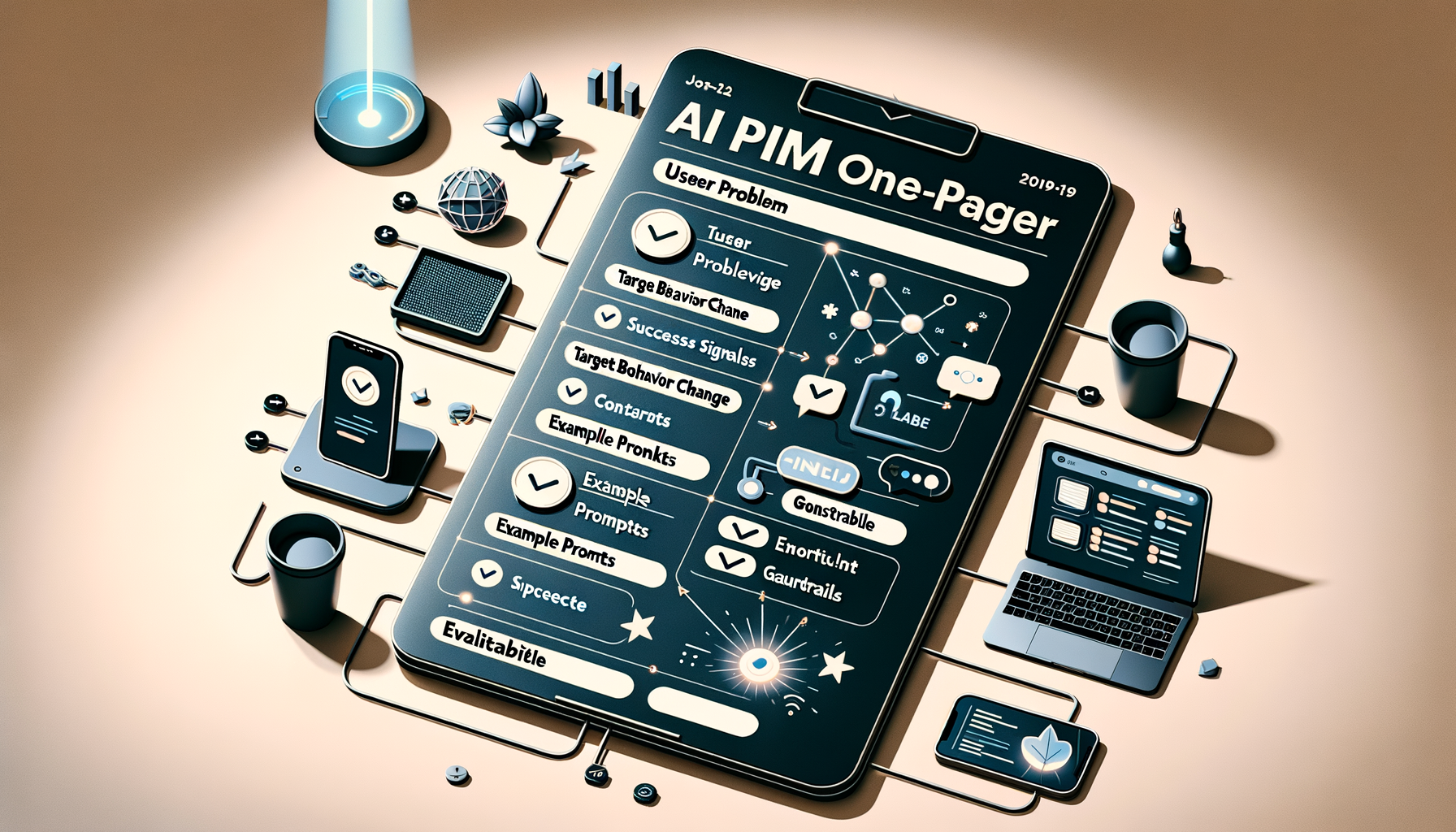
I move fastest in Generative AI when I strip work down to its essential signals. At HighLevel, I rely on a single-page format—”Prototyping Requirements: The One-Pager for AI PMs”—to turn ideas into testable artifacts within hours, not weeks. This approach reinforces AI Strategy, minimizes coordination overhead, and keeps Product Management focused on learning over ceremony.
“Prototyping requirements go rogue: one page, zero bureaucracy, built for AI. Shape concepts fast, prompt tools directly, and get to the truth sooner.”
In practice, my one-pager captures only what’s required to run an immediate experiment: the user problem, the target behavior change, success signals, core constraints, intended AI workflows, and the smallest realistic path to an evaluable demo. I also include example prompts, guardrails, and evaluation criteria so the team can apply prompt engineering and LLMs for product managers without guessing.
This is eval-driven development in action. I document a minimal hypothesis, concrete inputs/outputs, and a quick plan for metrics, including qualitative signals from product discovery and continuous discovery. By prompting tools directly, we expose assumptions early, shorten feedback loops, and build an AI product toolbox that compounds learning sprint after sprint.
I run this with a product trio to ensure we balance feasibility, usability, and value. We align on risks, dependencies, and what “good” looks like, then we integrate the learnings into product roadmapping and sprint planning. The result: fewer meetings, tighter collaboration, and empowered product teams delivering sharper outcomes with less friction.
If you want speed and clarity without sacrificing rigor, adopt the one-pager. It centers the conversation on evidence, accelerates AI workflows from prompt to prototype, and makes it obvious what to try next—and what to stop doing. Most importantly, it keeps the team focused on truth over theater, which is how great AI products actually ship.
You have an interview transcript waiting to be synthesized, a roadmap debate with more opinions than evidence, and a stakeholder update due before the decisions are settled. A general-purpose chatbot can help with each task. It can also produce a polished version of the wrong answer.
If you begin with a tool, its demo will define your use case. You will end up generating summaries, specifications, and slide copy because those outputs are easy to show, not because they remove the most important constraint in your product process.
Begin with a decision that is slow, inconsistent, or poorly supported. Write the workflow in one sentence:
When [trigger occurs], [owner] uses [approved evidence] to produce [decision artifact], which [reviewer] checks before [downstream action]. Success is measured by [workflow metric] and [product metric].
For customer discovery, that might become: when an interview round closes, the product manager uses transcripts, participant metadata, and the research question to produce a theme map and a list of unresolved questions. A research or design partner checks the evidence before the findings enter an opportunity solution tree. Synthesis time, evidence corrections, and the quality of the next research questions show whether the workflow is helping.
A strong first use case has four properties:
It recurs. A workflow used repeatedly gives you enough opportunities to find failure modes and improve the prompt.
Its evidence is bounded. You can identify the transcripts, event definitions, strategy documents, or decision logs the model is allowed to use.
A qualified person can review it. The reviewer knows what a plausible but unsupported answer looks like.
The improvement is observable. You can compare cycle time, rework, evidence quality, or another meaningful measure before and after introducing AI.
My rule is to start with frequent, evidence-rich work where a mistake is reversible. Interview synthesis, experiment readouts, roadmap option framing, and release communication are usually better learning environments than an autonomous decision that immediately changes customer data or launches an experience.
Capture a baseline before changing the workflow. Record how long the work takes, where review cycles occur, which errors appear repeatedly, and what downstream decision the artifact supports. Without that baseline, faster drafting can look like progress even when reviewers spend the saved time correcting unsupported claims.
Drop-off patterns, affected segments, anomalies, and testable hypotheses
Turning correlation into causation or analyzing an incorrectly defined event
Knowledge and retrieval layer
Grounding answers in current product context
Strategy, decision logs, research, taxonomy, policies, and product documentation
Traceable answers with evidence and visible conflicts
Retrieving stale, unauthorized, or contradictory material without warning
Workflow and experience automation
Moving an approved decision into repeatable execution
Approved copy, segments, triggers, stop conditions, owners, and measurement events
In-app guides, product tours, handoffs, checklists, and status updates
Publishing or acting before human approval, measurement, or rollback is ready
Use the table to expose missing layers. If research synthesis is strong but event definitions are unreliable, another writing assistant will not improve opportunity sizing. If analytics is mature but the model cannot access the current strategy or decision history, its prioritization advice will remain generic. If automation is available but ownership and rollback are unclear, speed will amplify operational risk.
Evaluate each candidate against the workflow, not against a feature checklist. Ask:
Can it work where the approved evidence already lives, or will people create uncontrolled copies?
Can a reviewer trace a conclusion back to a transcript, event definition, document, or decision record?
Can access, retention, sharing, and deletion follow your data governance rules?
Can you test a stable workflow with representative examples instead of judging a polished demo?
Can you observe failures, corrections, latency, and cost after rollout?
Does the total cost include integration, governance, evaluation, review time, and maintenance rather than only the license?
A vendor can be impressive and still be wrong for your operating environment. The decisive question is whether it strengthens a specific product decision without weakening evidence quality, privacy, or accountability.
Turn the tools into repeatable PM workflows
The prompt is not the workflow. A production workflow includes prepared inputs, an output contract, a review step, a decision owner, and a place to record what happened. The following patterns cover the PM work where AI can create leverage without pretending to replace product judgment.
Synthesize interviews without manufacturing certainty
Qualitative synthesis becomes unreliable when the model merges observation, interpretation, and recommendation into one smooth narrative. Preserve those boundaries. Give each participant a stable identifier, retain relevant segment context, and tell the model to cite the evidence behind every theme.
Copy-paste prompt: Act as a product research analyst. Use only the supplied interviews and research brief. For each theme, return the claim, supporting participant identifiers, contradictory evidence, affected segment, confidence with a reason, and the next unanswered question. Separate direct observations from interpretation and recommendation. Do not infer market prevalence from this interview sample. If a conclusion lacks evidence, label it unsupported.
Review the output by opening the cited passages, not by judging whether the summary sounds plausible. Look for participants who do not fit the dominant theme. Check whether two different needs have been combined because they use similar words. Confirm that the model has not converted the loudest quotation into the most important opportunity.
Only then move the findings into your discovery structure. The useful handoff is not a list of themes. It is a set of evidence-backed needs, open questions, affected segments, and assumptions that the product trio can investigate.
Combine behavioral data with customer evidence
Behavioral analytics can tell you where users drop out, which segments behave differently, and whether a pattern is large enough to deserve attention. It does not tell you why the behavior occurred. Interviews can reveal possible motivations, but a qualitative sample does not establish how common each motivation is. Use the two evidence types together without asking either to answer the other’s question.
Before involving an LLM, verify the event name, event meaning, user or account grain, relevant cohort, and analysis window. If instrumentation changed, include that context. Prefer aggregated or appropriately governed data; do not paste raw personal or confidential customer data into an unapproved model.
Copy-paste prompt: Use the supplied event definitions, cohort table, funnel, and interview themes. Identify the largest observed behavior changes by segment. For each change, distinguish the observed fact from possible explanations. List data quality questions, supporting customer evidence, conflicting customer evidence, and the cheapest analysis or experiment that could reduce uncertainty. Do not claim causation from a correlation.
Return to the analytics system to validate every material claim. The model is useful for connecting evidence and generating hypotheses; the governed analytics layer remains the place to confirm event behavior, segment definitions, retention patterns, and experiment results.
Frame roadmap choices as options, not generated certainty
A roadmap debate rarely fails because nobody can generate feature ideas. It fails when alternatives, assumptions, constraints, and expected outcomes are implicit. AI is most useful here as an argument compiler: it can turn scattered evidence into comparable options and expose what each option requires you to believe.
Copy-paste prompt: Use the supplied product objective, customer evidence, behavioral evidence, strategic constraints, technical constraints, and decision history. Create a set of distinct options rather than a ranked feature backlog. For each option, state the target outcome, supporting evidence, contradictory evidence, critical assumptions, excluded alternatives, leading indicator, delivery risk, and cheapest test. Flag any recommendation that lacks a traceable source. Do not make the final priority decision.
This format makes outcome-versus-output confusion visible. An option such as build a new onboarding checklist is an output. Improve successful first-time setup for a defined customer segment is an outcome. The first can support the second, but the relationship is still a hypothesis. Keep that hypothesis visible in the roadmap and in the experiment plan.
The human decision owner should record the selected option, why it won, what evidence mattered, which assumption remains unresolved, and when the decision should be revisited. That decision log becomes grounding material for later planning instead of forcing the next model session to reconstruct context from scattered documents.
Move an approved launch into an observable experience
Once the decision is approved, AI can reduce the mechanical work of adapting positioning into release notes, support context, product tours, and in-app guides. The risky part is not drafting the words. It is allowing generated content to reach the wrong segment, appear at the wrong moment, or launch without a measurement and stop condition.
Copy-paste prompt: Using only the approved positioning, UX terminology, target segment, trigger event, and product constraints, draft an in-app sequence. For each message, state its purpose, trigger, target user, action requested, dismissal behavior, stop condition, and measurement event. Preserve the approved claim boundaries. Flag any copy that introduces a benefit, capability, or promise not present in the supplied material.
Review the experience in context. Confirm that the audience definition matches the analytics definition, the trigger can actually be observed, the requested action exists in the current interface, and users can dismiss or complete the sequence. Keep experiment design and success analysis outside the copy generator. Fluent wording cannot declare the launch successful.
Make every output inspectable before it becomes operational
The difference between a useful personal assistant and a dependable organizational workflow is inspectability. A reviewer must be able to see which evidence was available, which instructions shaped the answer, what the model produced, what a person changed, and which decision followed.
Use a retrieval-first pipeline grounded in product documents and decision logs. Do not rely on model memory for current strategy, naming, policy, or product behavior. Define an authority order for conflicting material. A current approved decision record should not silently lose to an older planning document simply because the older document contains more text.
Your grounding layer should preserve permissions. Retrieval is not an excuse to expose every document to every workflow. Record the owner and freshness of important material, remove obsolete versions from the approved collection, and instruct the model to show conflicts instead of resolving them invisibly.
Treat each repeated prompt as a small product surface with a contract:
Goal: the decision or artifact the workflow must support.
Allowed evidence: the documents, data, and tools the model may use.
Definitions: the product terms, entities, events, segments, and metrics that must remain consistent.
Method constraints: what the model must separate, preserve, cite, or avoid inferring.
Output contract: the required fields, order, labels, and evidence links.
Uncertainty behavior: when to flag missing context, conflicting inputs, or unsupported conclusions.
Review and stop conditions: who approves the output and what prevents it from moving downstream.
Then create an evaluation set from representative work. Include ordinary inputs, ambiguous cases, conflicting documents, incomplete evidence, sensitive-data traps, and previously observed failures. A good evaluation checks groundedness, traceability, coverage, decision usefulness, confidentiality, and consistency. Writing quality matters, but polish is not evidence.
Re-run the evaluation whenever the model, prompt, connector, knowledge collection, event taxonomy, or output schema changes. A workflow that passed yesterday’s cases can regress when one dependency changes. This is why eval-driven development, observability, privacy-by-design, and AI risk management belong in the product manager’s toolbox rather than in a separate governance document.
For each operational run, retain enough information to diagnose failure: workflow name, input sources, prompt or configuration version, output, reviewer corrections, final decision, latency, and cost where available. The record should support improvement without retaining sensitive data longer than your policy permits.
A screenshot checklist can make the workflow easier to teach and audit. Capture the approved input location, relevant access setting, prompt configuration, evidence-linked output, human edits, final decision record, and measurement view. Screenshots do not replace logs or documentation, but they give PMs and stakeholders the same operating picture during onboarding and review.
Scale adoption through gates and measurable outcomes
Do not roll an AI tool out to every product manager and hope good practices emerge. Move one workflow through explicit gates:
Baseline the current workflow. Record cycle time, review effort, recurring errors, and the downstream outcome it supports.
Run in shadow mode. Produce the AI-assisted artifact without allowing it to drive the real decision. Compare it with the normal process and save failure cases.
Introduce assisted use. Let a named human owner use and edit the output. Require evidence checks before it reaches stakeholders or customers.
Standardize the operating pattern. Publish the input rules, prompt contract, evaluation set, owner, storage location, escalation path, and fallback process.
Expand only after the workflow holds up. Add users, data sources, or automation after quality, privacy, and review behavior remain dependable.
Measure the workflow at more than one level. Cycle time tells you whether work moves faster. Correction rate and review effort show whether speed is hiding rework. Evidence coverage shows whether claims can be defended. The linked product metric shows whether the artifact supports a meaningful outcome. Total cost tells you whether licenses, integration, evaluations, governance, and human review are worth the saved effort.
Do not count prompts submitted, words generated, summaries created, or seats assigned as product impact. Those are activity measures. A workflow is valuable when it shortens a real decision cycle, improves the evidence behind a decision, reduces preventable rework, or helps the team learn about an outcome sooner.
Pause or roll back the workflow when material claims cannot be traced, confidential data crosses an unapproved boundary, reviewers begin rubber-stamping output, small configuration changes cause unpredictable recommendations, or the review and governance burden cancels the useful gain. A graceful fallback to the previous process is part of the design, not an admission that AI failed.
Key takeaways
Choose a recurring product decision before choosing an AI product.
Combine LLMs, research synthesis, behavioral analytics, grounded knowledge, and automation only where the workflow needs them.
Require bounded evidence, visible uncertainty, traceable claims, and a named human decision owner.
Turn repeated prompts into governed contracts with evaluations, observability, and clear stop conditions.
Judge the toolbox by cycle time, evidence quality, rework, product learning, and total cost rather than by generated output.
This week, select one recurring PM decision and write its workflow sentence. Baseline the current process, run the AI-assisted version in shadow mode, and save every failure as an evaluation case. Your toolbox becomes valuable when it improves a decision you can defend, not when it produces more material to review.
Turning a rambling stream of consciousness into a clean task list while someone is still talking has been a longtime product dream of mine. With Ramble, Todoist brought that dream to life by using live audio AI to capture tasks in real time—no transcription step required. The result is a voice-to-task flow that feels natural, fast, and surprisingly disciplined.
As I listened to the Doist team—Ernesto Garcia (Front-end Product Engineer), Thomas Jost (Backend Software Engineer), and Hugo Fauquenoi (Product Manager)—walk through their approach, I heard a blueprint for building pragmatic GenAI features. What began as a two-to-three month AI exploration became one of their most technically deliberate releases: a “Gemini-powered pipeline that makes tool calls while the user is still speaking, surfacing tasks on screen in real time without any text output from the model.”
The breakthrough started with user research. People weren’t merely dictating tasks; they were doing a “brain dump” first—often into pen and paper or even ChatGPT voice—and only then committing items to Todoist. Meeting users where they already are reframed the problem: don’t force structure upfront; capture fluid thought and translate it into actionable tasks instantly.
That insight led to a bold architectural choice: skip transcription entirely and process raw audio directly with a Gemini live audio model. By removing the brittle middleman of text, the team reduced latency and kept the model focused on one job—turning intent into structured actions. It’s a crisp example of AI workflows designed for reliability over novelty.
The real magic is in the real-time “tool calls.” As the user speaks, the model triggers add task, edit task, and delete task operations immediately. For high-friction contexts like driving, they paired visual task cards with subtle sound effects as confirmation cues. It’s thoughtful conversation design that respects attention and safety without sacrificing speed.
Teaching the model to capture tasks literally—without over-interpreting or trying to complete the work—required careful prompt engineering for voice and temperature tuning. Drawing a bright line between “capture versus do” kept the experience trustworthy. In my own AI Strategy work, I’ve found that establishing explicit agentic guardrails early prevents unintended autonomy later.
Dates were the sleeper challenge. The team had to inject the current date, normalize to days vs. months, and always output dates in English for the natural language parser—while preserving the user’s original language for everything else. If you’ve ever shipped date handling across locales, you’ll appreciate how many edge cases hide in “Taming Dates and Time.”
Quality didn’t hinge on intuition alone. They built an LLM-judge eval system using real employee recordings from 100+ people across 35 countries in 20+ languages to catch prompt regressions. That’s eval-driven development done right: representative data, repeatable scoring, and tight feedback loops as models and prompts evolve.
For project and label matching, they chose direct context injection over RAG. Instead of building a retrieval pipeline, they injected the full project/label list into the system prompt. With smart context window management and a sharply constrained task schema, this was both simpler and more accurate. Sometimes the fastest path to product-market fit is removing moving parts, not adding them.
One product principle stood out: easy correction beats perfect first-time accuracy. Natural language interfaces earn trust when users can fix misfires in a tap or two. That bias toward quick recovery over false precision is how you ship AI that feels useful from day one.
Looking ahead, the roadmap is compelling: multimodal task capture from images and text blobs, Apple Watch support, and automation integrations. As voice AI agent patterns mature, this “tool-only architecture” sets a solid foundation for going from capture to coordinated execution—without losing the simplicity that makes Ramble shine.
If you want to hear the full conversation, you can listen on Spotify or Apple Podcasts. It’s a masterclass in building focused GenAI features that trade cleverness for clarity—and still delight.
Resources & Links: Todoist • Doist • Google Vertex AI (Gemini)
I spend a meaningful portion of my week helping teams operationalize AI workflows, and one theme comes up over and over: how to share context files and skills seamlessly across devices and with colleagues. Hosting Claude Code office hours has only reinforced it—sharing context and skills is the single biggest blocker to reliable, repeatable outcomes.
I hear from leaders driving AI adoption who have built robust, high-signal context systems and carefully crafted skills. Their challenge isn’t creating value—it’s distributing it. They need a way to make the same trusted workflows available to teammates and to keep everything in sync across laptops, desktops, and phones.
I hit the same wall myself. I work across multiple devices (a Mac Mini for day-to-day, a MacBook Air on the road, and an iPhone) and I collaborate with a full-time admin. I wanted my context and skills to be consistent everywhere, for both of us. In this piece, I’ll share my setup—what I store where, how I share it across devices and with my team, the trade-offs of each option, and how I keep everything current. We’ll cover four different syncing services: git/GitHub, Obsidian Sync, Dropbox and iCloud.
If you’re new to this series, this is the eighth installment. Earlier pieces provide foundational context: Claude Code: What It Is, How It's Different, and Why Non-Technical People Should Use It; Stop Repeating Yourself: Give Claude Code a Memory; How to Use Claude Code Safely: A Non-Technical Guide to Managing Risk; How to Choose Which Tasks to Automate with AI (+50 Real Examples); How to Build AI Workflows with Claude Code (Even If You're Not Technical); How to Use Claude Code: A Guide to Slash Commands, Agents, Skills, and Plug-ins; and Context Rot: Why AI Gets Worse the Longer You Chat (And How to Fix It).
The day it really hit me was right before my interview with Claire Vo on How I AI. I was staying in an AirBnB with only my laptop, and I planned to demo my /today command along with my context file structure. Minutes before the session, I realized the latest version of my /today command wasn’t on that machine. I was able to remote into my Mac Mini and grab it—crisis averted—but it was a wake-up call. I needed a more reliable, shareable approach for syncing context and skills across devices and with my admin.
I started by testing the tools I already used—Dropbox, iCloud, and GitHub—to see what might fit. Each got me partway there, but each also introduced friction that mattered in daily use.
First, absolute file paths don’t travel well. I began with Dropbox but quickly ran into cross-linking headaches. Good context systems rely on rich interlinking—index files point to other context files, and those context files link to each other. When Claude creates a link from one context file to another, it tends to use the full file path: /Users/ttorres/Library/CloudStorage/Dropbox. That worked on my Mac Mini and MacBook (same user name), but not on my phone—and not for my admin. I tried to force relative links (~/Dropbox), but couldn’t get Claude to do it consistently, which led to broken links. This isn’t unique to Dropbox; Claude prefers full paths because they’re reliable on a single machine, but they’re brittle across devices and useless when sharing with colleagues. Claude is trained to use relative file paths when working within a git repository, but I struggled to get it to work reliably in Dropbox.
Second, skills live in a user directory by default. By default, skills live in ~/.claude/skills. Most sync services aren’t designed to share your ~/ folder. iCloud is the exception, but then you’re limited to Apple devices—no Windows or Android. There is a workaround: set up a claude folder in Dropbox and create a symlink from ~/.claude to your synced claude folder, so all skills, commands, and settings live in Dropbox. Then, on each device (yours or a colleague’s), you set up a symlink to that folder so Claude can find the files. This works, but I was running into another limitation that made Dropbox a poor fit.
Third, Obsidian on iOS doesn’t sync cleanly with Dropbox. I rely on Obsidian’s file browser alongside my notes to navigate context quickly. Storing vaults in Dropbox gave me parity across my Mac Mini and MacBook Air, but I couldn’t get the iOS Obsidian app to reliably load my Dropbox vaults. That friction was a dealbreaker for on-the-go work.
At that point, I explored git/GitHub. GitHub is cloud storage for git repositories. A git repository is a folder of shared files used so engineers can collaborate on the same code base. Each person clones a local copy, works locally, then pushes changes back to the hosted repo on GitHub; others pull to update. Git’s merge and conflict tooling is excellent. Git is the powerhouse of file syncing and version control. It easily handles syncing context and skills, Claude behaves better with relative links in a git repo, and I can open the repo in my IDE with a clean file browser. For me, that checked all the boxes—until I factored in my admin. Git has a learning curve, requires manual pull/push hygiene, and often assumes an IDE workflow. That overhead was too heavy for a non-technical collaborator.
The turning point was Obsidian Sync. A colleague suggested it, and it ended up being the sweet spot. Obsidian is a markdown reader; files are stored locally in a normal folder you can open in Finder or File Explorer. There’s no proprietary format—you can read files with any text editor, and Claude can access them via bash commands. Obsidian Sync is simpler than git: open a note and it syncs in the background. I can access the same vaults across my Mac Mini, MacBook Air, and iPhone, and I can share a vault with my admin so we can both create and access notes.
Because we’re in different time zones and rarely edit the same note simultaneously, limited conflict handling hasn’t been an issue. Obsidian’s internal link notation also means one note can link to another and those links just work across devices. Claude can follow these links, so the brittle file path problem disappears.
Here’s where I landed. After a lot of trial and error, I have a setup that works across my devices and for my admin, who uses both a Windows desktop and a Mac laptop. I keep my core context in Obsidian vaults synced with Obsidian Sync, which preserves portability, link integrity, and ease of use. For skills, I avoid scattering files in machine-specific locations and instead centralize what Claude needs to reference in shared, human-readable folders. If you require advanced version control with branching and reviews, git/GitHub is excellent. If your priority is low-friction, cross-device access for non-technical teammates, Obsidian Sync is a practical, reliable choice. And if you must use Dropbox or iCloud, consider symlinks and be vigilant about relative paths—just know that absolute paths won’t travel well.