Tag: eval-driven development

  • Agentic Architecture Demystified: How Modern AI Systems Plan, Learn, and Execute at Scale

    Agentic Architecture Demystified: How Modern AI Systems Plan, Learn, and Execute at Scale

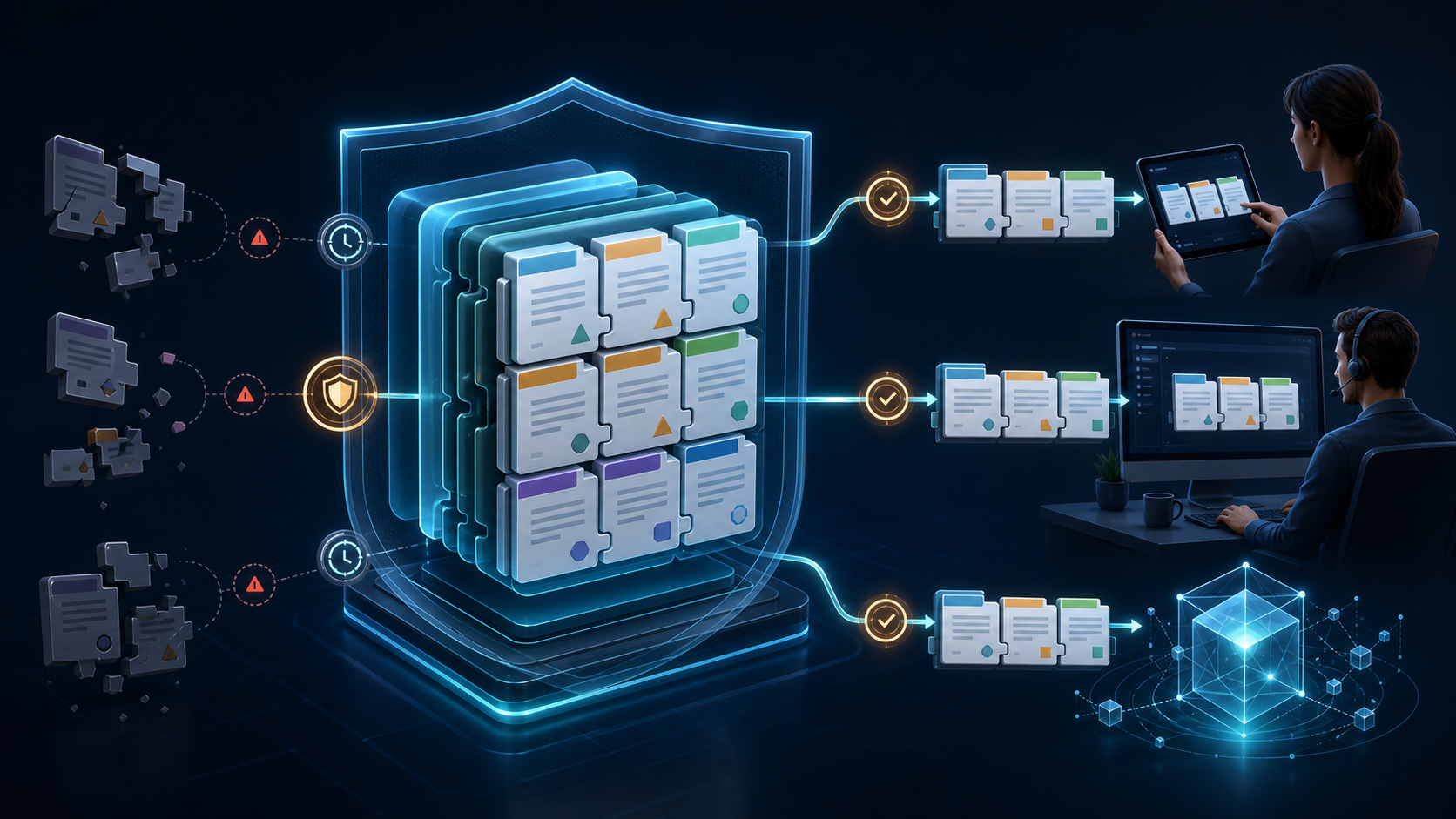
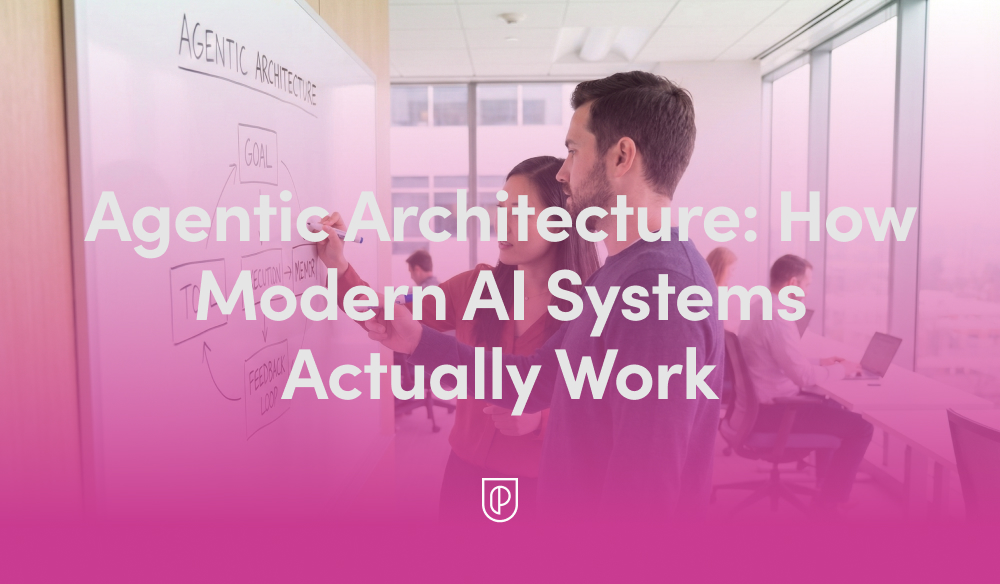
    In my role leading product teams at HighLevel, I’m often asked to explain what’s really happening behind the scenes of today’s AI products. The short answer is that modern systems are built on "Agentic Architecture: How Modern AI Systems Actually Work"—not just a single model, but a coordinated loop of planning, tool use, memory, and evaluation. Once you see that pattern, the design decisions snap into focus and the roadmap becomes far easier to prioritize.

    At its core, agentic AI treats the model as a reasoning engine embedded within an AI workflow. The agent interprets intent, plans steps, calls the right tools and APIs, grounds itself in trusted data, and then evaluates outcomes before deciding to continue or stop. This loop creates reliability, reduces hallucinations, and enables the system to operate in real-world, multi-step scenarios.

    Here’s the practical lifecycle I rely on. A user provides intent (a goal or request). We run a retrieval-first pipeline to ground the model in accurate, current data. Prompt engineering structures the task and primes the agent with constraints and success criteria while managing context window management. The agent generates a plan, executes steps by calling tools or services, evaluates intermediate results, reflects or revises as needed, and only then returns a final answer with clear citations or evidence.

    For more complex work, I orchestrate multiple specialized agents—commonly a planner, a solver, and a critic—coordinated by a lightweight controller. This multi-agent pattern reduces single-agent blind spots, encourages self-checking, and mirrors how empowered product teams collaborate. Whether it’s conversation design for support flows or a voice AI agent driving hands-free tasks, orchestration is the difference between a clever demo and a dependable product.

    Memory is the second pillar. Short-term working context sits in the prompt, while long-term memory lives in vector stores or databases to track past interactions, preferences, and outcomes. Retrieval augments the model with the right facts at the right time, and tight context window management ensures the agent stays focused on signal, not noise. The result is faster responses, lower costs, and far better accuracy.

    Reliability is earned through eval-driven development and robust AI risk management. I define offline and online evaluations, guardrails, and human-in-the-loop checkpoints before scaling traffic. These evaluations become living, automated tests that protect against regressions as prompts, models, and tools evolve. The payoff is real: fewer escalations, higher trust, and measurable improvements to quality over time.

    From a product strategy perspective, I resist over-engineering. Start with a simple retrieval-first pipeline and a single agent; prove value; then layer in multi-agent orchestration only where it moves key metrics. Instrument everything—latency, cost, grounding coverage, and outcome quality—and build Agent Analytics dashboards so teams can diagnose issues and iterate with confidence.

    If you’re looking for a practical playbook, here’s mine: clarify the user intent and success criteria; design the tools the agent can call; ground with authoritative data; write prompts that constrain scope and define termination conditions; add reflection and automated evaluations; and ship behind feature flags for safe, staged rollout. Each step compounds reliability without killing velocity.

    The diagram and the video above bring these patterns to life. If you watch closely, you’ll see the same loop—plan, retrieve, act, evaluate—show up in every effective implementation, regardless of domain. That repetition isn’t accidental; it’s the backbone of agentic architecture and a blueprint you can adapt to your own stack.

    Ultimately, what matters is outcomes. When we build around agentic AI, we create systems that are explainable to stakeholders, maintainable by engineers, and genuinely helpful to customers. That’s how we move past hype to durable impact—shipping AI products that plan, learn, and execute at scale.


    Inspired by this post on Product School.


    Book a consult png image
  • February Fin Breakthroughs: Master complex workflows, natural voice, 2-minute Shopify, smarter ops

    February Fin Breakthroughs: Master complex workflows, natural voice, 2-minute Shopify, smarter ops

    Every update we shipped this month removed a specific constraint on what teams can do with Fin. In my world, the demo-to-production gap shows up as complexity, control, and confidence. Can the agent handle the query that actually matters? Will it sound right on a call? Can the team deploy it without filing an engineering ticket? Can managers understand what it’s doing? That’s the bar I hold us to.

    This month, we delivered answers to all four. Here’s how.

    Procedures and Simulations (0:51). The hardest problem in AI-powered customer service isn’t answering FAQs—it’s executing complex queries with real business logic and real consequences if anything goes wrong. Think billing refunds, multi-step flows, and actions that must be right the first time.

    We made it dramatically easier to build and manage Fin for those complex queries—without pulling in an engineer. You can author in natural language, test every step in simulation, and deploy with confidence.

    The workflow starts with AI drafting the procedure from your existing source material. You edit in natural language, with structured hooks to pull in live data, apply business logic, and add code for deterministic control where you need it. That’s how you handle multi-step flows with the precision that matters when things go wrong.

    Simulations are the test environment. Define a test case, pass in the data Fin would receive in a real conversation, and watch it work through each step. You see what Fin is doing, why, and whether it’s meeting the criteria you set. Full transparency at every point. I’ve run these end-to-end myself, and there’s a particular confidence that comes from watching it work before it goes anywhere near a customer.

    Two colleagues in a studio sit at a wooden table with laptops during a Fin Product Updates discussion; an overlaid quote highlights selling and supporting customers in under two minutes.
    A conversational moment from the February Fin Product Updates recap: two teammates trade insights with laptops open, while a bold pull-quote drives home the promise—Fin removes complexity to start selling and supporting in under two minutes.

    For a deeper look at Procedures and Simulations, head to fin.ai/procedures.

    Fin Voice: three major updates. When something’s off in chat, it can take a few exchanges to notice; on a call, it’s immediate. Pronunciation, noise handling, and tone all matter because they’re the customer’s first impression.

    Pronunciation rules (4:18). Fin has high out-of-the-box pronunciation accuracy, but it doesn’t know your brand—your product names, your industry terminology, the way your company uses certain words. Alihan Zinna, Staff ML Scientist, showed this with an IKEA example: without pronunciation rules, Fin mispronounced both “IKEA” and a product name; after adding rules, both were corrected and sounded natural.

    New natural voices (5:48). We’ve added 11 new voices tuned to a range of brand tones so you can choose one that sounds like it truly belongs to your company—not a generic AI assistant.

    Background noise reduction (6:28). People call from airports, shops, and busy offices. Fin now monitors background noise continuously and increases noise reduction when the environment demands it. No configuration needed. As Alihan put it, “This is one of those things customers really notice when it’s not working. The goal was to make it invisible. That’s what we built.”

    Video still of a presenter beside a laptop and the Fin Call Metrics dashboard, showing tiles for hold times, missed and declined call counts, outbound dialing time, and a monthly stacked bar chart.
    Catch up on February’s Fin Product Updates with a walkthrough of the Call Metrics dashboard—saved filters, hold‑time tiles, missed and declined call counts, and a monthly breakdown that helps support teams act faster.

    Shopify setup experience (8:21). Fin began as a Service Agent and is quickly becoming a Customer Agent—working across the whole lifecycle to support, sell, and guide, even before a customer has an issue. The revamped Shopify setup is a clear step forward.

    Shopify catalogs are complex—thousands of products, variants, and dynamic inventory—and connecting all of that to an agent has historically been painful. We removed the friction.

    Setup now takes three steps: first, connect your store. Second, install the Messenger directly in Shopify—no code, just a few clicks. Third, deploy Fin. Total time: under two minutes. We timed it live.

    What that unlocks is real. In the demo, a first-time snowboarder asked for recommendations. Fin searched the catalog, reasoned about attributes that matter to a beginner (there’s no “beginner” tag in the catalog), personalized suggestions by height and weight, and added a board to the cart.

    Even better, one customer updated their website copy to promote a sale. Fin immediately picked up the new context and began recommending sale items, nudging shoppers to add more to the cart to access a discount—no extra configuration required. It read the situation and acted.

    Presenter explains Fin's Holiday Office Hours feature beside a laptop, with a UI screen showing office hours, reply times, and holiday closures settings for customer support teams.
    See how the latest Fin update streamlines support scheduling. A product expert walks through Holiday Office Hours, showing how to set default hours, track response metrics, and add closures so teams stay consistent.

    Three steps, and you have a real-time shopping assistant that knows your store and sells on your behalf.

    Helpdesk improvements (12:31). Fin works with any helpdesk, but many teams consolidate to take advantage of our native Intercom helpdesk integration. We’ve shipped 19 helpdesk improvements in 2026 so far; two from this month stand out.

    11 new call metrics. Hold time, outbound dial time, missed and declined calls, call terminating party, and more. These give leaders the visibility to analyze workload distribution and call handling quality in detail.

    Holiday office hours. Teams no longer need to manually update office hours for every public holiday. This was the most upvoted request in our community, and we shipped it.

    Across the board, we removed the constraints that hold teams back: the complexity ceiling in automation, the quality ceiling in voice, the setup barrier in Shopify, and the operational overhead in the helpdesk.

    We closed out the month with a Star Wars–style crawl of 22 additional updates. All features mentioned here are live and available now. Explore more at fin.ai/updates. More to come—see you next month.


    Inspired by this post on The Intercom Blog.


    Book a consult png image
  • Ship MVPs in Days, Not Months: My Proven Prompt Prototyping Playbook for Product Teams

    Ship MVPs in Days, Not Months: My Proven Prompt Prototyping Playbook for Product Teams

    Most MVPs take too long, cost too much, and still miss the mark. Over the past year, I’ve shifted my team to a prototyping prompts approach that lets us validate problem-solution fit in days, not months. The result is faster learning loops, clearer tradeoffs, and a dramatically higher hit rate on features that actually move the needle.

    When I say prototyping prompts, I mean structured, layered instructions that guide gen ai systems to produce the right artifacts at the right fidelity. Instead of jumping straight to code, we generate concise problem briefs, user stories, interaction flows, low-fidelity UI descriptions, and test plans. Each pass is constrained by acceptance criteria and business outcomes, which keeps the work grounded in value rather than output.

    Here’s the playbook my product trios use to go from idea to a testable MVP in 48–72 hours. First, we anchor on outcomes vs output OKRs and clarify the customer job-to-be-done using evidence from customer interviews and support data. This is classic continuous discovery, but we compress it by focusing on the single riskiest assumption to de-risk this week.

    Second, we build a prompt scaffold. We specify the role, constraints, target users, success metrics, and the exact output format we expect. We also define evaluation upfront, borrowing from eval-driven development. For example, before any generation, we list the acceptance tests that a good solution must pass, including edge cases and compliance considerations. This discipline keeps hallucinations in check and improves repeatability.

    Third, we spin up multiple prototypes in parallel. One prompt generates a lean product brief; another outlines user flows; a third proposes UI states and error handling. If we’re exploring voice, we add prompt engineering for voice to script dialogs and repair strategies. For data-heavy features, we call out retrieval-first pipeline patterns so the model references source-of-truth data rather than guessing.

    Fourth, we validate with real users using the lightest-weight experiment possible. Fake-door tests, concierge workflows, and guided click-throughs let us measure intent before we invest. Where we can, we run quick A/B testing and size the effort using minimum detectable effect (MDE) so we don’t over- or under-sample. The point isn’t perfection; it’s fast, directional signal to inform the next iteration.

    Fifth, we instrument and ship behind feature flags. We track activation, task completion, and time-to-value from day one. On the delivery side, we watch DORA metrics and deployment frequency to ensure we’re learning continuously rather than batching big bets. This bridges discovery and delivery so roadmaps reflect real-world feedback, not assumptions.

    One recent example: we needed to evaluate a voice AI agent for appointment scheduling. In 72 hours, prompts produced the problem brief, dialog flows, error recovery strategies, and a sandbox to simulate inbound requests across three user personas. We exposed a thin slice to a pilot cohort, captured call outcomes, and iterated the repair prompts twice before writing any production code. The pilot converted at a higher rate than our control flow and gave us the confidence to invest in full integration.

    This approach only works if we treat governance as a first-class concern. We bake in privacy-by-design, clear data governance boundaries, and AI risk management from the start. Prompts include guardrails on personally identifiable information, explicit constraints on data use, and links to approved sources. We also maintain a prompt repository with versioning and automated evaluations so changes are observable and reversible.

    Practically, strong prompt scaffolds share three traits. They’re specific about context and constraints, they define success in measurable terms, and they separate concerns by artifact type. I’ll often ask for three variants with different tradeoffs, then run a quick synthesis prompt that highlights points of parity and differentiation. This gives the team structured options rather than a single, brittle path.

    If you’re starting from zero, begin with one high-leverage workflow. Write a crisp outcome statement, draft your acceptance tests, and create a prompt that outputs a one-page brief, three user flows, and the top five risks with mitigations. Validate with five users in 48 hours, then decide: double down, pivot, or park. Rinse and repeat, and your product roadmapping and sprint planning will shift from speculation to evidence.

    The bottom line is simple. Prototyping prompts won’t replace product judgment, but they will accelerate it. By turning ideas into testable artifacts in hours, you minimize waste, maximize learning, and ship better MVPs—fast.


    Inspired by this post on Product School.


    Book a consult png image
  • Prevent Strategy Drift: AI that flags ‘merge conflicts’ in product plans before a quarter derails

    Prevent Strategy Drift: AI that flags ‘merge conflicts’ in product plans before a quarter derails

    "What if an AI could spot the moment two product teams start pulling in opposite directions — before it derails a quarter?" That question hooked me, because I’ve lived through the costly fallout of subtle misalignments that only surface at the end of a sprint—or worse, during quarterly business reviews.

    I recently dug into an episode of Just Now Possible featuring Matthias and Charlotte Kleverud, co-founders of Momental. Their vision for "GitHub for product management" hits a nerve in the best possible way: find "merge conflicts" in strategy, not code, and do it early enough to save execution time, trust, and outcomes.

    Here’s the core: Momental ingests documents, meeting transcripts, and voice recordings across an organization, then uses AI agents to map them into a structured context layer—a set of interconnected trees covering goals, decisions, learnings, and who's doing what. When it finds a conflict—say, one team betting on retention while another is prioritizing conversion—it surfaces the misalignment for humans to resolve, just like a merge conflict in code. That framing is both familiar (for anyone who’s shipped software) and powerful (for anyone who’s scaled product strategy across multiple teams).

    Their journey tracks with what many of us have learned the hard way. "Starting in 2022 with DaVinci 002 and learning that the market wasn't ready for AI-assisted product thinking" pushed them toward experiments with agent teams. "The origin story: building a team of AI agents in 2024, only to discover agents hit the same alignment problems as humans" is exactly the kind of meta-lesson I’d expect when you scale autonomy without shared context. The breakthrough was an "OODA-loop-driven document processing agent" that continuously curates a living knowledge graph rather than relying on static prompts or brittle pipelines.

    One model that stood out was "The product chain: signals → learnings → decisions → principles, and how AI maps it." That is the backbone of healthy product thinking. When this chain is explicit and inspectable, you can trace why a team chose Path A over Path B—and detect when new signals should invalidate old decisions. I’ve seen this accelerate continuous discovery and improve executive decision hygiene.

    I also appreciated the organizational modeling: "Three trees that model an organization: the product tree (OKRs to epics), the wisdom tree (decisions and their reasoning), and the people/time tree." This maps cleanly to how we run quarterly planning at scale—tying outcomes to work, preserving rationale, and grounding ownership and timelines. With that structure, "How conflicts are detected, auto-resolved, or escalated to humans with merge options" becomes a pragmatic workflow, not a theoretical AI demo.

    On the technical front, they’re blunt about limits: "Why traditional chunking and RAG breaks down at scale and what Momental does instead." Anyone who’s tried to stitch strategy from ad hoc notes knows that naive retrieval won’t cut it. You need durable context boundaries, rich metadata, and graph-aware reasoning. Which brings me to one of my non-negotiables: "Why metadata—who said it, when, and in what context—is critical to preventing hallucinations." In my world, we treat provenance like test coverage—you can’t ship without it.

    Process-wise, the product philosophy resonated: "How a document processing agent uses OODA-loop thinking to extract and connect context across documents" reinforces the need for short feedback cycles, explicit hypotheses, and continuous refactoring of knowledge. Pair that with "The self-improving agent: collecting user feedback weekly and rewriting its own prompts" and you’ve got a blueprint for eval-driven development that keeps the system honest over time.

    Their UI choices also mirror a pattern I’ve adopted: "Moving from chat-first to UI-first to proactive agents as an AI product design pattern." Chat can feel magical, but alignment work benefits from concrete artifacts—trees, timelines, driver trees, and opportunity solution trees—so people can reason together. Then, let proactive agents watch for drift and nudge teams before the cost of change spikes.

    Two broader themes are worth calling out. First, "Specialized tools win" when the problem is deep, cross-functional context like product strategy. General-purpose chatbots struggle here; domain-specific models with strong information architecture have the edge. Second, product culture matters: "Discovery Versus Vibe Coding" is not just a catchy contrast—it’s a reminder that disciplined discovery beats intuition theater when stakes are high.

    As for the roadmap, I’m encouraged by their "Design partner strategy and what's next for Momental's public launch." Early design partners are where you validate signal quality, precision of conflict detection, and the ergonomics of human-in-the-loop resolution. I’m especially curious how this intersects with LLMs for product managers, outcomes vs output OKRs, and product roadmapping and sprint planning in large portfolios.

    Finally, a nod to the broader ecosystem. The conversation touched on "Claude Code" and a shift "Beyond documents and vectors" that many of us are living through—toward retrieval-first pipelines that respect context windows, stronger governance, and measurable improvements in decision quality. If you care about AI Strategy for empowered product teams, this is a space to watch—and to pilot.

    Bottom line: If you’ve ever wished you could prevent strategy drift before it shows up in your dashboards, this "GitHub for product management" approach is worth your attention. Make the chain of signals, learnings, decisions, and principles explicit. Keep humans in the loop for the hard calls. And let proactive, agentic AI do what it does best: flag misalignments early, so your teams can move fast together.


    Inspired by this post on Product Talk.


    Book a consult png image
  • Battle-Tested AI Agent Orchestration Patterns for Reliable, Observable, Product-Ready Systems

    Battle-Tested AI Agent Orchestration Patterns for Reliable, Observable, Product-Ready Systems

    Shipping agentic AI into production is exhilarating—until a flaky output torpedoes trust. Over the past year, I’ve led teams at HighLevel to operationalize agents across customer-facing and internal workflows, and I’ve learned that reliability isn’t an afterthought; it’s an architecture. In this piece, I share the AI Agent Orchestration Patterns for Reliable Products that consistently deliver dependable outcomes at scale.

    When we talk about orchestration, we’re talking about more than a single prompt. The shift is from monolithic calls to coordinated “agentic AI” where routers, planners, and specialists collaborate through structured “AI workflows.” In practice, I rely on a few canonical patterns: a planner–executor loop for multi-step tasks, a router–specialist setup for skill selection, and a “retrieval-first pipeline” that grounds generation with authoritative context before a single token is produced.

    Reliability-by-design starts with typed inputs/outputs and strict validation. I standardize on JSON schemas, enforce tool/function signatures, and implement idempotency keys so retries don’t wreak havoc on downstream systems. Timeouts, circuit breakers, and backpressure protect the platform under load, while rate limiting and dead-letter queues keep failure modes contained. Most importantly, we engineer graceful degradation: agents “abstain” when uncertain, fall back to deterministic paths, and escalate to humans instead of guessing.

    Safety is a first-class concern, not a bolt-on. Our “AI risk management” pipeline includes PII redaction, allow/deny lists for tools and data, and the principle of least privilege for every connector (yes, even the ChatGPT connector). We codify policy-as-code for repeatability and require human-in-the-loop approvals for sensitive or irreversible actions. In my experience, clear red lines and reversible defaults prevent the vast majority of regrettable outcomes.

    Without strong “observability,” you’re flying blind. I instrument agents with an “Agent Analytics” layer that captures traces, spans, tool invocations, and token usage across the entire chain. The essential metrics are outcome quality (task success rate), latency (p50/p95), tool failure rates, cost per task, and user-level satisfaction signals. Cross-agent lineage allows us to pinpoint where a plan went awry and which tool or prompt introduced drift—vital for rapid remediation.

    Quality improves fastest when it is measured relentlessly. I practice “eval-driven development” with golden datasets, rubric-based scoring, and risk-weighted sampling of edge cases. LLM-as-judge can help, but we always calibrate against human ratings and monitor agreement. In production, I blend online metrics with controlled “A/B testing” and plan experiments to hit a realistic minimum detectable effect (MDE). The result is a virtuous loop where prompt tweaks, tool changes, and retrieval adjustments are verified before wide rollout.

    Agents need the same rigor we expect from any modern system. I gate releases through “CI/CD” with linting for prompts, schema checks for tools, and simulation runs for critical paths. “Feature flags” enable shadow and canary deployments so we can throttle exposure by segment or workflow. I also track reliability with “DORA metrics” and “deployment frequency,” and I partner closely with “SRE” for on-call coverage, runbooks, and incident postmortems tailored to agent failure modes.

    Context is a resource to allocate, not a bottomless pit. Thoughtful “context window management” means curating retrieval, summarizing long-running threads, setting memory time-to-live, and constraining what the agent can see at any given step. I bias hard toward retrieval over recall, keep chunks small and semantically precise, and validate that the “retrieval-first pipeline” truly returns the right evidence—not just the nearest match.

    In day-to-day product work, I lean on a compact playbook: a router that selects the best specialist; a planner that decomposes tasks and allocates tools; a deterministic guard that verifies preconditions; an execution loop with explicit budgets; and a fallback policy that prefers abstaining over hallucinating. Together, these patterns create an agent that behaves like a dependable teammate rather than a creative wildcard.

    No architecture thrives without the right rituals. Product trios keep discovery continuous, while clear outcomes (not output) align teams on value instead of vanity. We map risks early, maintain a public quality dashboard, and rehearse failure recoveries so incidents never become improvisations. The cultural signal is simple: we celebrate root-cause clarity and safe iteration over heroics.

    If you’re just starting, implement three patterns first: retrieval before generation, abstain-and-escalate for low confidence, and canary releases under feature flags. Instrument everything from day one, run a weekly eval review, and expand scope only when the data says you’re ready. With these habits, your agents will earn user trust—and keep it.


    Inspired by this post on Product School.


    Book a consult png image
  • From Tickets to Strategy: How AI Is Rewriting Support Careers—and Why Now Is the Moment

    From Tickets to Strategy: How AI Is Rewriting Support Careers—and Why Now Is the Moment

    To truly transform with AI, I’ve learned it’s never just about the technology—it’s about redesigning how we work. The teams that win don’t bolt AI on; they re-architect around it. That means rethinking roles, workflows, and governance to build a system that sustains and improves AI performance over time.

    In The 2026 Customer Service Transformation Report, teams at every stage of maturity describe human agents taking on more proactive work—training AI systems, handling the hardest queries, and owning tasks that demand judgment. Job descriptions are shifting, too, with many organizations explicitly adding AI-related responsibilities.

    I’m also seeing a clear rise in dedicated AI specialists. Conversation analysts, knowledge managers, and AI operations leads are fast becoming standard. For support professionals, this opens new, higher-leverage career paths—and creates a talent pipeline that blends service excellence, data fluency, and product thinking.

    Support once centered on queue-level activity—ticket triage, routing, translations, and answering FAQs. Now, as AI handles more frontline interactions, our human roles are moving up the stack toward optimization, oversight, and continuous improvement.

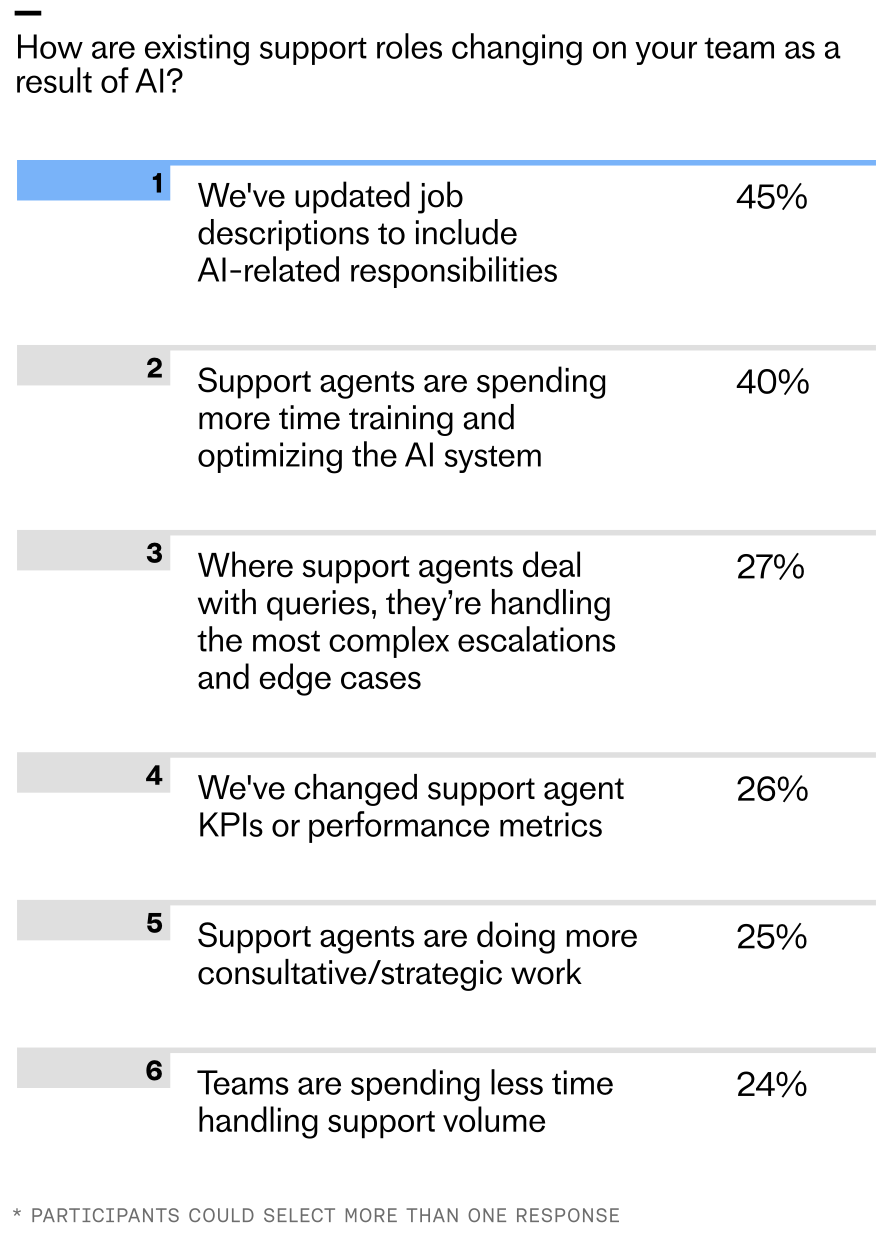
    According to the latest research, 45% of teams report updating job descriptions to include AI-related responsibilities, with 40% saying their human agents are now more focused on training AI systems. Another 27% report that human agents primarily handle the most complex escalations and edge cases, while a quarter say agents are doing more consultative and strategic work.

    Even at the initial deployment stage, 16% of teams report spending less time handling support volume since implementing AI – and among teams who’ve reached maturity, that figure rises to 28%.

    When Intercom’s Research, Analytics & Data Science (RAD) team interviewed 166 of our customers, similar themes emerged. Nearly all participants (≈95%) reported meaningful workflow changes, with manual processes being handled by AI, and humans focusing more on monitoring or fine-tuning AI outputs. Eighty-three percent of participants also reported seeing their team’s roles and responsibilities change to become more strategic and supervisory in nature.

    Infographic of AI-driven customer support roles and adoption rates: conversation analyst 32%, knowledge manager 30%, AI operations lead 28%, support automation specialist 24%; 8% say no new roles added.
    AI is reshaping support teams: organizations are adding conversation analysts (32%), knowledge managers (30%), AI operations leads (28%), and support automation specialists (24%). Just 8% report no new AI roles.

    It’s not just the work that’s evolving; organizational structures are, too. Some teams are reallocating existing talent into AI-focused roles; others are hiring entirely new skill sets. Many of the most common job titles in this space didn’t exist two years ago.

    Consider a Senior AI Knowledge Manager, Beth-Ann Sher, who transitioned from a help center manager role. Like many careers transformed by AI, her work evolved from administrative to strategic. Instead of focusing solely on customer-facing, self-serve content, her mandate expanded to designing and optimizing knowledge inputs that directly improve AI Agent Fin’s performance—work that materially lifts resolution rates.

    Or look at a Senior Conversation Designer, Fred Walton, hired specifically for an AI-first function. He focuses on frictionless customer journeys with Fin, smoothing handoffs between automation and human support while keeping customer satisfaction front and center—hallmarks of mature AI workflows and conversation design.

    In high-performing organizations, roles like these typically sit within a dedicated AI support team under senior CS leadership. Clear ownership and accountability for AI performance is critical; without it, optimization stalls and trust erodes.

    These shifts aren’t isolated. Take Robb Clarke from RB2B. He went from Head of Technical Operations to Head of AI. With Fin, his focus moved from repetitive support questions to managing knowledge and improving the system behind it—freeing him to be proactive about product improvements and fix issues before they hit customers.

    Or consider Eric Broulette from Bloomerang, a support leader who leaned into AI and became the VP of Support and Education. By deploying Fin, his team found breathing room to invest in what’s next. Agents stepped into new roles, contributed to meaningful projects, and built skills that had previously felt out of reach. As Eric puts it: “Do not wait to embrace AI. It will unlock more career growth for your teams than you can imagine.”

    Neon green hero graphic reading 'The 2026 Customer Service Transformation Report', with subhead 'The AI deployment gap is widening' and a black 'Get the report' button over a bar-chart pattern.
    Leaders are racing ahead with real AI in support. Explore the 2026 Customer Service Transformation Report to see where deployment is stalling, benchmark your team, and get practical steps to scale automation that delights.

    Bringing AI into support will eventually change every agent’s day-to-day work. For leaders at the start of the journey, that can feel daunting. My perspective: the most successful teams treat this as an operating model shift, not a tooling rollout—anchored in AI Strategy, governance, and continuous improvement.

    Be transparent about what’s changing, why it matters, and how success will be measured. Define how AI performance will be evaluated (resolution rate, containment, CSAT impact), empower agents to train and improve the system, and communicate how responsibilities will evolve. When teams help build the AI, they’re invested in making it great.

    Here’s the playbook I rely on with support leaders: First, reset expectations about time allocation—less time in the queue, more time improving the AI system that serves the queue. Second, elevate knowledge management as a core capability. Prioritize content quality and coverage for your AI Agent, and carve out dedicated “out of the inbox” time so every agent contributes. Third, keep outcome metrics—especially resolution rate—front and center. It gives the team a north star for experimentation and iteration.

    Scaling AI is as much a people challenge as it is a technology challenge. As automation takes on more work, support roles become more proactive, strategic, and cross-functional—even early in the journey. Responsibilities expand, new roles emerge, and team structures adapt to concentrate on and amplify AI performance. In the process, support careers are transformed.

    If you’re leading this shift, now’s the moment to reimagine your operating model: clarify ownership, invest in knowledge and conversation design, adopt eval-driven development, and build the muscle for continuous improvement. That’s how you move from tickets to strategy—and unlock compounding value for your customers, your business, and your teams.


    Inspired by this post on The Intercom Blog.


    Book a consult png image
  • 12 Game-Changing Updates to Fin Procedures & Simulations for Complex Queries

    12 Game-Changing Updates to Fin Procedures & Simulations for Complex Queries

    Today, I’m excited to share 12 major updates to Fin’s Procedures and Simulations—the foundation that lets Fin handle complex work while keeping teams fully in control of the customer experience.

    In my work building AI workflows with product and support leaders, I’ve seen how the right blend of natural language instructions, deterministic controls, and fully agentic behavior turns Fin into a reliable problem solver. Procedures make this blend possible by enabling Fin to act like a human—yet with the repeatability and governance of software. Simulations then let us test those complex Procedures at scale before they reach customers, so we can deploy with confidence.

    Together, these capabilities make Fin self-manageable, transparent, and ready for genuinely complex work.

    Here’s what’s new at a glance: we’ve made Procedures easier to build and maintain; enhanced deterministic controls for precision and policy compliance; expanded agentic behavior so Fin can adapt in real time; and delivered more powerful Simulations to validate end-to-end workflows before go-live.

    Why did we build this? Many teams see early AI gains in speed, coverage, and cost to serve—but then hit a ceiling. They keep AI confined to simple automation and information retrieval, rather than setting it up to handle the nuanced, multi-step workflows they still trust to humans. We designed Procedures and Simulations to remove that ceiling, so teams can confidently set up, govern, and iterate on complex AI workflows without bottlenecks.

    Dark UI diagram of a continuous AI/ML lifecycle loop on a grid, labeled ANALYZE, TRAIN, TEST, and DEPLOY, with TRAIN highlighted in orange to signal iterative model development and evaluation.
    Follow the AI lifecycle as it cycles from Analyze to Train to Test to Deploy. This streamlined loop spotlights the TRAIN phase, underscoring faster iteration and feedback that power more capable procedures and realistic simulations.

    We also heard that teams needed an easy way to connect data so Fin could reliably check customer status or eligibility and then take action. And they didn’t want to route through engineering every time they needed to create or amend logic for mid-conversation decisions. Procedures combines natural language instructions and intuitive data connector setups. You tell Fin in your own words how you want it to behave, and you’ll be guided through creating conditional steps so Fin will react consistently, with the option to add in any code snippets for circumstances where absolute precision is required. Once you build one Procedure, we believe you’ll want to build several, so Fin will constantly read the conversation it’s in to ensure it’s following the most relevant Procedure, and jump to a more relevant one if the user intent changes.

    I know that taking something like this live the first time can feel like a leap of faith. That’s exactly why we built Simulations—to test Procedures comprehensively, uncover edge cases, and launch with confidence.

    Reaching mature deployment takes a deliberate, ongoing commitment to training workflows, validating them before deployment, measuring performance in production, and refining them over time. At Intercom, we call this the Fin Flywheel: train, test, deploy, analyze. Procedures form the foundation of the train stage, and Simulations make the test stage reliable at scale. Together, they enable Fin to handle complex work, and teams to stay in control of it.

    Procedures: Define exactly how Fin handles complex work. With Procedures, I can set Fin up to resolve complex, time-consuming queries that require multiple steps or business logic. Fin follows standard operating procedures and applies sound judgment—just like a seasoned teammate—so even complicated queries are resolved in controllable, predictable ways.

    Interface screenshot of a customer service Procedures editor titled 'Procedure: Damaged food order,' showing when-to-use guidance, Train Fin on examples, and Test, Save, Set live actions.
    A snapshot of the Procedures builder in action, mapping a clear path for handling damaged food orders while letting teams train Fin on examples, target channels, quickly test updates, and publish with Set live.

    Procedures combine three powerful elements. First, natural language instructions. You write a Procedure in plain language, just like documenting a process for a new teammate. You can paste in your existing SOPs, write from scratch, or let AI draft them for you, then iterate yourself.

    What’s new: Draft Procedures with AI. Share an outline of your process and Fin drafts a complete Procedure using your conversation history, knowledge hub content, and relevant data. If additional context is needed, it prompts you with clarifying questions to make sure the Procedure is thorough and tailored to your use case, significantly reducing setup time. For example: if you’re creating a refund workflow, the system can draft conditional paths for eligibility, approval thresholds, and verification steps based on your historical cases and policies.

    What’s new: Break complex workflows into Sub-procedures. Write a process once and reference it across multiple Procedures by breaking it down into reusable steps, called Sub-procedures. This makes workflows easier to read, faster to build, and simpler to maintain as things change.

    Second, deterministic controls. Natural language is flexible, but some steps need to be exact. You can layer in deterministic controls where precision matters, starting with a fully natural language Procedure and introducing structure gradually where it adds value: conditional steps (branching logic) to handle decision points so Fin’s behavior is consistent and predictable; data connectors so Fin can pull information from your tools or take actions automatically; code snippets for when absolute accuracy is essential; and checkpoints to pause for approval or hand off to a teammate.

    Screenshot of a Transaction dispute procedure showing IF/ELSE logic, a code step for check_dispute_eligibility, and a Data Connector menu with Freeze credit card and Get upcoming invoice.
    Fin demonstrates structured troubleshooting: a transaction dispute flow with eligibility checks, clear IF/ELSE steps, and quick Data Connector actions like freezing a card or pulling invoices, streamlining complex support tasks.

    What’s new: Instruct Fin to read specific content from your knowledge hub. You can set clear rules for Fin to reference a specific policy or article from your knowledge hub in defined situations so Fin always surfaces the right context in a conversation.

    What’s new: Explicit Procedure switching under defined conditions. You can set rules that deterministically trigger a switch to a different Procedure, for example, escalating to a complaints Procedure if specific risk signals are detected mid-conversation.

    What’s new: Internal notes for human handoffs. When Fin hands off to a teammate, it can now include internal notes with relevant context so the person picking up the conversation knows exactly what happened and what needs to happen next.

    Third, fully agentic behavior. Because real conversations rarely follow the happy path, Procedures let Fin reason through what’s happening and adapt—jumping to the right step or switching Procedures entirely if a customer changes their mind or the issue shifts.

    Product UI showing a Simulations panel where a 'Food order damage clear' test is running, with a simulated user and Fin AI Agent exchanging messages and green checks marking triggered steps.
    Procedures and Simulations in action: Fin rehearses a food order damage scenario, confirming details and progressing through each trigger. Teams validate complex flows end to end as steps turn green and outcomes are tracked.

    What’s new: Automatic Procedure switching. If a customer starts in a billing workflow but then asks about cancelling their subscription, Fin transitions to the relevant Procedure without forcing the customer to restart.

    What’s new: Structured data extraction from uploaded files. Fin can now extract structured data directly from PDFs and images uploaded by customers—like invoices, forms, or receipts—and use that data within the conversation. Customers don’t have to copy and paste or repeat themselves.

    As MONY Group put it:

    “ If a customer starts down one path but their issue turns out to be something else entirely, Fin adapts seamlessly – no more getting stuck in loops or forcing customers into the wrong workflow. ”

    Screenshot of a Simulations panel for AI support workflows, listing scenarios: Damage confirmed (Pass), Refund subscription (Fail), No subscriptions (Not run yet), with Run all, New, and suggested tests.
    Simulations help teams rehearse procedures and verify outcomes before going live. Run all tests or launch a new one to ensure Fin handles tricky customer scenarios—from damage confirmation to refunds and missing subscriptions.

    The result is a conversation that feels fluid, but always follows your intended rules.

    Making complexity easier to manage is just as important as unlocking new capabilities. Beyond the core updates, we’ve focused on creation, governance, and scale—while keeping ownership with your team.

    What’s new: Improved instruction authoring. We’ve made it easier to write, edit, and structure Procedures, so building and updating them takes less time and requires less effort.

    What’s new: Reporting on when Procedures trigger, resolve, or hand off. You can now track how Procedures are performing directly within the Procedures UI, seeing exactly when they trigger, when they resolve, and when they hand off to a teammate. This visibility helps you spot issues early and improve over time.

    Two-column graphic with customer testimonials on Fin’s Procedures and Simulations update, citing payment query handling, ~94% CSAT for Payment Information, and real-time claims via API-driven decisions.
    Customer stories from Raylo and Mony Group show how Fin now resolves payment issues and complex claims in-chat, checks account data via APIs, and lifts CSAT to about 94%, highlighting the impact of Procedures and Simulations.

    Simulations: Test complex workflows at scale before they reach customers. Simulations let you validate how Procedures will perform before anything goes live, and continuously revalidate as things change. Deploying complex AI can feel uncertain; Simulations remove that uncertainty so you can launch with confidence and iterate safely.

    You can simulate full conversations. For any Procedure, choose a user or customer segment and run a complete, multi-turn simulated conversation. You see every step Fin takes, how it applies your rules, reasons through decisions, and where it passes or fails—giving you the observability to debug and fix issues before they ever reach customers.

    What’s new: Upload images for richer testing. Simulations now support image uploads, so you can test workflows that involve receipts, invoices, or forms—the same inputs your customers actually send.

    What’s new: Clearer visibility into Fin’s reasoning. You can now see exactly how Fin is thinking through each step of a Simulation, making it easier to understand behavior, catch unexpected decisions, and refine Procedures with confidence.

    You can also use AI to create, store, and rerun tests. Writing test coverage manually doesn’t scale. Fin’s AI Assistant generates Simulations directly from your Procedures, suggesting realistic edge cases like partial refund disputes, missing invoice uploads, or no subscription found, so you can expand coverage without expanding overhead. All the Simulations you create are stored in a central library. When a product changes, a policy updates, or a Procedure is edited, hit “run all” to instantly check whether anything has regressed. This applies the same rigor to AI automation that engineering teams bring to software testing.

    What’s new: AI-suggested Simulations. You can now use AI to generate a full set of Simulations from any Procedure. The AI Assistant suggests realistic variations based on your workflow, so you can build comprehensive test coverage fast.

    Customers are already seeing this in production. “Fin can now handle payment-related queries that were never possible before… The impact on CSAT and overall CX has been pretty shocking – the Payment Information procedure CSAT is sitting at ~94%, and CX score is significantly higher than our average.” – Raylo

    “Procedures have fundamentally changed what we can achieve with Fin. Previously, complex processes like cashback claim investigations could only be handled through a static form on our website… Now, Fin can handle these sophisticated scenarios in real-time within the conversation itself. It checks account information via API calls, makes complex decisions, and guides customers through the entire claims process dynamically.” – MONY Group

    Procedures and Simulations are available now. I’m eager to see how teams use these updates to scale agentic AI, deliver faster resolutions, and raise the bar for customer experience—without sacrificing control, compliance, or quality.


    Inspired by this post on The Intercom Blog.


    Book a consult png image
  • Human-in-the-Loop Mastery: Proven Oversight Tactics That Elevate AI Quality and Trust

    Human-in-the-Loop Mastery: Proven Oversight Tactics That Elevate AI Quality and Trust

    Human-in-the-loop oversight is the fastest and most reliable way I know to elevate AI quality, build user trust, and reduce risk. At HighLevel, my teams treat oversight as a product feature—not an afterthought—because dependable AI experiences come from deliberate design choices across data, models, and people.

    When I say “human-in-the-loop,” I mean a system that blends automation with targeted human judgment at key moments: during data curation, prompt engineering, evaluation, deployment, and post-launch learning. This approach turns “AI workflows” into measurable, repeatable processes and keeps me honest about what’s working, what’s drifting, and where a human safety net must step in.

    Architecturally, I start with a retrieval-first pipeline to ground outputs in trusted knowledge, then wrap it in guardrails. Deterministic preprocessing, careful prompt engineering, and post-processing validators catch obvious failure modes. Confidence thresholds and policy checks route ambiguous or sensitive cases to a human reviewer, while clear, auditable traces show why the system chose automation versus escalation. This balance supports reliability at scale while preserving agility for “agentic AI” patterns when they add value.

    Quality is only real if I can measure it, so I build with eval-driven development from day one. I maintain golden datasets, rubric-based scoring guidelines, and an automated evaluation harness that runs on every change to prompts, models, or data. Pre-production gates protect against regressions, while production telemetry surfaces drift by segment and use case. When it’s time to run experiments, I use A/B tests sized with a minimum detectable effect (MDE) to avoid overfitting to noise.

    Operationally, I optimize for outcomes, not output. I track task success rate, time-to-resolution, safety violation rate, hallucination rate, and cost-to-serve, then connect these to outcomes vs output OKRs. The signal I want is simple: are we reliably solving the user’s job-to-be-done with lower effort and higher confidence? If not, I tighten prompts, refine retrieval, or expand human review where it pays off most.

    Risk governance is non-negotiable. I design with privacy-by-design and data governance from the start—role-based access, audit trails, PII redaction, and red-team tests for safety. Clear reviewer playbooks and calibration sessions reduce bias and ensure consistent decisions. These practices aren’t bureaucracy; they’re how I operationalize AI risk management while maintaining velocity.

    Teams make or break this model. I empower product trios to own the full lifecycle—discovery, build, and learning—so feedback loops close quickly. In-product feedback widgets, reviewer queues, and incident management playbooks help us respond in hours, not weeks. Over time, human review becomes a targeted scalpel rather than a blanket requirement as the system learns and improves.

    Economics guide the level of oversight. I treat each workflow like a portfolio: where the value of accuracy is high and ambiguity is common, I route more to humans; where tasks are simple, frequent, and well-bounded, I automate aggressively. The goal isn’t zero humans—it’s optimal humans, deployed precisely where their judgment compounds ROI.

    If you’re getting started, begin with one high-impact workflow, establish your golden set and evaluation rubric, and wire in a simple review queue. Prove the lift, then scale. In the short video above, I walk through the patterns I use to design these loops, measure quality with rigor, and ship AI that teams—and customers—can trust.


    Inspired by this post on Product School.


    Book a consult png image
  • How to Build AI-Ready Product Analytics and Experiments

    How to Build AI-Ready Product Analytics and Experiments

    You are about to approve an AI feature. The demo works, the team has an adoption dashboard, and every response can collect a thumbs-up or thumbs-down. Yet nobody can answer the questions that will matter after launch: Did the feature help customers finish the job? Was the improvement caused by the AI? Did quality hold across important customer segments? Was the gain worth the latency, cost, and risk?

    Do not solve that problem by adding more charts. Build an evidence chain from eligibility and exposure through model behavior and human action to a completed customer outcome. An AI-ready measurement system makes model telemetry and product behavior part of the same decision. That is what lets you improve prompts, retrieval, models, and product design without confusing technical progress with customer value.

    Key takeaways

    • Define the product decision, eligible population, primary outcome, guardrails, and minimum detectable effect before choosing events or building dashboards.
    • Instrument a traceable sequence from eligibility to exposure, request, response, user action, task completion, and repeat value. Shared identifiers matter more than a large event catalog.
    • Keep model quality, product behavior, reliability, cost, risk, and business outcomes as separate measurement layers, but make them queryable through the same identities and version fields.
    • Move through offline evaluation, production shadowing, and a controlled rollout. Each stage answers a different question and needs its own exit criteria.
    • End every experiment with an explicit decision: ship, iterate, restrict, or stop. A result that produces another indefinite request to collect data is not a decision system.

    Start with an evidence contract, not an event list

    An instrumentation plan often begins too late in the reasoning process. Someone opens a spreadsheet and lists clicks, generations, feedback actions, and errors. The events may all be valid, but they do not guarantee that the resulting data can answer a product question.

    Start with a one-page evidence contract. It should force the product, engineering, data, and AI owners to agree on the decision they are trying to make. Complete these fields before implementation:

    1. Decision: State what will change if the evidence is positive, negative, or inconclusive. For example, the decision might be whether to expand a drafting assistant from one workflow to every workflow.
    2. User problem: Name the job the customer is trying to complete. Avoid substituting the proposed AI capability for the problem.
    3. Eligible population: Define who could reasonably benefit, including account type, workflow state, permission, and any relevant exclusions.
    4. Intervention: Specify what is different from the current experience. Include the product surface and the model, prompt, retrieval, and guardrail configuration that define the treatment.
    5. Primary outcome: Choose one customer behavior that represents successful completion of the job. Give it an exact numerator, denominator, and observation window.
    6. Diagnostics: Identify the signals that will explain why the outcome moved, such as output acceptance, editing, retries, fallbacks, and time to completion.
    7. Guardrails: Define the reliability, safety, customer-experience, and cost conditions that the treatment cannot violate.
    8. Decision rule: Predefine the minimum effect worth detecting, how uncertainty will be handled, which segments will be inspected, and what would cause an early rollback.

    A useful hypothesis has a visible causal claim: For an eligible cohort, a defined AI experience will improve a named task outcome over a stated observation window, while specific guardrails remain acceptable. Consider a support workflow. “Customers will like AI drafts” is not testable enough. “Giving eligible support agents an AI-generated draft will improve successful ticket completion without degrading customer satisfaction, safety, latency, or cost per successful resolution” tells you what to instrument and what could veto a rollout.

    Separate the six measurement layers

    One composite AI score is tempting and usually unhelpful. A single number hides trade-offs and makes failures difficult to diagnose. Keep the layers distinct:

    Measurement layerQuestion it answersUseful measuresDecision it informs
    Eligibility and adoptionDid the intended customer have a real opportunity to use the feature?Eligible users or accounts, exposures, first use, repeat useReach, discoverability, onboarding, and denominator quality
    Task outcomeDid the customer complete the job better?Task success, time to value, completion without rework, durable repeat behaviorWhether the feature creates customer value
    Model qualityWas the output usable for this use case?Rubric score, groundedness where relevant, acceptance, edits, rejection, regenerationPrompt, retrieval, data, and model improvements
    Reliability and efficiencyCan the experience operate consistently?Latency, error rate, fallback rate, availability, cost per successful outcomeArchitecture, model routing, and operational readiness
    Risk and trustDid the system cross a boundary that should block scale?Safety violations, moderation triggers, unsupported responses, user overridesGuardrails, restrictions, and rollback
    Business outcomeDoes the customer value become durable business value?Activation, retention, support deflection, account expansion, or attributable revenueInvestment level and product strategy

    Choose one primary outcome for the experiment. The other layers are not decorative. Product and model diagnostics explain the result, while guardrails can veto it. A faster workflow that creates unacceptable safety failures is not a win. A highly rated output that does not improve task completion is not yet a product outcome.

    Instrument one traceable chain, not a bag of events

    The core unit of AI analytics is a traceable attempt to complete a job. You need to follow that attempt across the product interface, AI runtime, and downstream outcome. If each system produces isolated records, the dashboard may show healthy model performance and healthy adoption without revealing whether the same customers received both.

    A practical event sequence looks like this:

    1. ai_feature_eligible: The user or account entered a state in which the feature could provide value. This creates the denominator for reach and experiment eligibility.
    2. ai_feature_exposed: The experience was actually rendered or otherwise made available. Keep assignment separate from display so delivery failures remain visible.
    3. ai_request_submitted: The customer initiated an AI-assisted action. Capture the intended use case, not the full sensitive input by default.
    4. ai_response_generated: The AI system produced a response. Record the configuration, latency, error state, fallback behavior, and attributable cost.
    5. ai_response_presented: The output reached the customer. A generated response that never rendered should not count as a usable response.
    6. ai_output_action_taken: The customer accepted, copied, edited, regenerated, rejected, or undid the output. Preserve the difference between no action and an explicit rejection.
    7. ai_task_outcome_recorded: The workflow reached its product-level success or failure state. Link this outcome to the request even if it occurs later in another system.
    8. ai_repeat_value_observed: The user or account returned to the workflow and obtained value again. This distinguishes novelty from an emerging habit.

    Those names are examples, not a mandatory standard. Your taxonomy should match the language of your product. The important distinction is semantic: eligibility is not exposure, exposure is not use, generation is not delivery, delivery is not acceptance, and acceptance is not task success.

    Give every layer the same join keys

    The event chain works only when the records can be joined without relying on an email address, timestamp guess, or mutable account field. At minimum, decide how you will represent:

    • Identity: Stable user and account identifiers, plus an explicit anonymous-to-authenticated identity rule where needed.
    • Workflow: A workflow or task identifier that survives navigation, retries, and asynchronous processing.
    • AI execution: Request and response identifiers that distinguish one customer request from multiple internal model or retrieval calls.
    • Experiment state: Experiment identifier, assigned variant, assignment timestamp, and the reason a user or account was eligible.
    • Configuration: Model, prompt template, retrieval index, tool, policy, and guardrail versions. A treatment is not stable if these change invisibly during the test.
    • Product context: Use case, surface, lifecycle stage, account segment, permission state, and other dimensions selected in the evidence contract.
    • Operational result: Latency, error class, fallback reason, moderation result, and cost fields defined consistently across providers.
    • Governance: Schema version, data classification, consent or policy state where applicable, and retention treatment.

    Capture context at the time of the event. If an account changes plan or segment later, a query should not silently rewrite the conditions under which the experiment ran. Preserve both the stable identity and the relevant historical snapshot.

    Apply privacy-by-design to inputs, outputs, and feedback. Raw prompts and generated text can contain customer data that does not belong in a broadly accessible analytics platform. Prefer structured categories, redacted attributes, content-type labels, and references to a separately governed evaluation store. Store the minimum information needed for the decision, not every token merely because it is available.

    Catch instrumentation defects before launch

    AI workflows create several failure modes that ordinary click tracking can miss. Add these checks to the release path:

    • Count one logical customer request separately from provider retries, tool calls, retrieval queries, and fallback calls. Otherwise usage and cost denominators will disagree.
    • Use idempotency or deduplication rules for events emitted by asynchronous jobs. A replayed queue message should not create a second successful task.
    • Validate required properties and accepted values automatically. Schema checks and feature flags belong in the delivery workflow, not in a cleanup project after launch.
    • Version an event when its meaning changes. Adding an optional property may be compatible; changing what counts as task success is a new semantic contract.
    • Test identity resolution across the full journey, including anonymous use, authentication, account switching, shared workspaces, and delayed downstream outcomes.
    • Reconcile generated, presented, and acted-on counts. A large unexplained gap often reveals a delivery, client, or instrumentation failure before it becomes a misleading product conclusion.

    Turn model quality into a product scorecard

    An offline model score and an online product metric answer different questions. The offline evaluation asks whether a configuration can produce an acceptable result on a defined set of cases. The online measurement asks whether the experience changes behavior and outcomes for real customers. You need both, and you should not let either impersonate the other.

    Use denominators that expose failure

    Every rate should state what had the opportunity to enter its numerator. These definitions are more useful than labels such as quality score or engagement:

    • Task success rate = successful target tasks divided by eligible tasks that reached the defined opportunity.
    • Delivered response rate = responses presented to the customer divided by valid submitted requests.
    • Helpful output rate = reviewed outputs that satisfy the use-case rubric divided by outputs with a completed review.
    • Fallback rate = requests that used the defined fallback path divided by eligible AI requests.
    • Safety intervention rate = requests that triggered a defined safety intervention divided by requests evaluated by that policy.
    • Cost per successful outcome = attributable AI runtime cost divided by successful target tasks. Use a consistent cost boundary so model, retrieval, and fallback costs are not included selectively.
    • Repeat value rate = users or accounts that complete the target task again within the chosen window divided by those that first completed it.

    Display the numerator, denominator, missing-outcome count, and metric definition beside the rate. A percentage can look healthy because delivery failures disappeared from its denominator or because only enthusiastic users submitted feedback.

    Human signals such as thumbs, edits, acceptance, deflection, and customer satisfaction are valuable diagnostics, but each has an interpretation problem. Thumbs reflect the minority who choose to respond. Acceptance can reward a convenient draft that still needs correction later. A large edit may mean the output was poor, or that it provided a useful starting structure. Regeneration can indicate failure, exploration, or a request for variety. Pair these signals with task completion, time to value, downstream correction, and representative human review.

    Build the offline evaluation around the product decision

    A representative evaluation set is a product artifact, not merely a model-engineering artifact. Construct it deliberately:

    1. Define the unit being judged. It may be an answer, classification, draft, action plan, tool decision, or completed multi-step workflow.
    2. Write a rubric that separates must-pass requirements from preferences. Include factual or grounded behavior, task completion, policy compliance, and format only where they matter to the user job.
    3. Sample the cases the target population actually produces. Preserve important slices such as use case, complexity, language, account type, or risk level when those dimensions affect the decision.
    4. Define how ambiguous cases, missing context, and evaluator disagreement will be handled. Do not force false certainty into a label simply to complete a dataset.
    5. Record the exact model, prompt, retrieval, tool, and guardrail configuration for every run. A score without a reproducible configuration cannot guide a rollout.
    6. Keep a stable benchmark for comparison while adding a governed set of newly discovered failure cases. If every prompt change also changes the test, improvement becomes impossible to interpret.

    Offline success is an entry condition for production learning, not evidence of customer impact. It can eliminate weak configurations cheaply and expose slice-level failures before customers encounter them. It cannot tell you whether people discover the feature, trust it, change their behavior, or retain because of it.

    Run experiments as a sequence of risk-reducing gates

    Do not ask one A/B test to discover whether the model works, whether the infrastructure survives production, whether the interface is understandable, and whether the business case holds. Move through offline evaluation, production shadowing, and controlled rollout. Each gate removes a different uncertainty.

    1. Offline evaluation: Compare the candidate configuration with the current baseline on the representative evaluation set. Review overall quality, must-pass requirements, important slices, safety behavior, and cost. Exit only when the candidate is good enough to justify production exposure.
    2. Shadow mode: Run the candidate against production traffic without showing its output to customers or changing the workflow. Use this stage to verify input distribution, integration behavior, latency, failures, fallbacks, policy coverage, and attributable cost. Shadow mode cannot demonstrate customer lift because the customer never experiences the treatment.
    3. Controlled rollout: Deliver the experience through a feature flag to a randomized treatment group while preserving a valid control. Measure the primary outcome and guardrails using the assignment unit specified in the evidence contract.
    4. Scaled release: Expand only after the decision rule is met. Continue monitoring for distribution shifts, configuration changes, operational regressions, cost drift, and safety failures that a time-bounded experiment may not capture.

    Feature flags are more than a release convenience. They preserve a control, enable a rapid rollback, restrict exposure when a feature is safe only for a defined cohort, and separate model deployment from product exposure. Name an owner for the flag, the rollout decision, and the rollback action before traffic begins.

    Pre-register the experiment brief

    Pre-registered hypotheses, guardrails, and minimum detectable effect prevent a familiar failure: the team sees a noisy result and rewrites the question until something appears positive. Your brief should contain:

    • The product decision and the hypothesis being tested.
    • The eligible population and every exclusion that will be applied.
    • The baseline experience and the complete treatment configuration.
    • The randomization unit, assignment method, and exposure definition.
    • The primary metric, including numerator, denominator, and observation window.
    • The minimum detectable effect: the smallest improvement that would be material enough to justify the cost or complexity of rollout.
    • Guardrail definitions, acceptable boundaries, and rollback conditions.
    • The diagnostic metrics that may explain the result but will not be promoted to primary after the test begins.
    • The segments that will be examined and why they matter to the product decision.
    • The analysis method, expected decision point, and owner of the final call.

    The minimum detectable effect is a product choice before it is a statistical input. If a smaller gain would not change the roadmap, do not design the experiment around detecting it. Traffic, baseline behavior, outcome variability, assignment unit, observation window, and the selected effect all shape whether the experiment can be conclusive. When traffic is insufficient, the honest choices are to run longer, test a larger change, use a nearer but defensible outcome, combine learning with other evidence, or decline to run an underpowered experiment. Lowering the standard after seeing the result does not create evidence.

    Avoid the analysis traps specific to AI products

    • Do not treat every generation as an independent experimental subject. A single user or account may generate repeatedly, and those observations share the same behavior and assignment.
    • Randomize at the account level when treatment can spill across a shared workspace, team process, or common customer record. User-level randomization in that setting can contaminate the control.
    • Do not analyze only people who clicked the AI control. Treatment may change whether they click, so filtering on that action can remove part of the treatment effect. Start from the assigned eligible population and use triggered views as diagnostics.
    • Do not change the model, prompt, retrieval source, or guardrail silently inside a treatment. If an urgent fix is necessary, record the version boundary and decide whether the test remains interpretable.
    • Do not optimize an intermediate signal in isolation. More generations can mean adoption or repeated failure; more acceptance can coexist with lower downstream accuracy; faster responses can be worse responses.
    • Do not repeatedly inspect the result, stop when it looks favorable, and then present that stopping point as planned. Follow the pre-registered analysis or use a statistical design that explicitly supports sequential decisions.
    • Do not search every segment for a winner after an inconclusive overall result. Treat an unexpected segment pattern as a hypothesis for validation, not automatic authorization to scale.

    Create an operating loop that can say stop

    A technically correct dashboard does not create accountability. The system becomes useful when the team knows who reviews each signal, what action follows, and which metric has authority when measures disagree.

    Use one semantic layer and several decision views

    You do not need one dashboard for every audience. You need shared definitions and trustworthy product, marketing, and customer signals underneath purpose-built views:

    • Leadership view: Primary customer outcome, durable business outcome, cost per successful outcome, major guardrails, rollout status, and decision owner.
    • Product view: Eligibility-to-outcome funnel, activation, repeat use, retention by cohort, time to value, and the diagnostics behind the current experiment.
    • AI quality view: Offline rubric results, online review results, feedback behavior, fallbacks, and performance by use case, model version, and important slice.
    • Operations and trust view: Latency, errors, availability, cost, moderation triggers, safety interventions, and rollback state.

    Every view should resolve to the same metric registry. The registry needs a definition, owner, source events, inclusion and exclusion rules, observation window, grain, version, and change history. If task success means one thing in the product review and another in the model review, a common dashboard tool will not create a common truth.

    Put measurement into the delivery workflow

    1. During discovery, write the evidence contract alongside the problem statement. The primary outcome should be agreed before the implementation solution hardens.
    2. During implementation, review event semantics, identity, privacy, configuration versioning, and metric formulas. Run automated schema checks with the same seriousness as other release validations.
    3. Before rollout, verify the offline gate, shadow-mode results, experiment assignment, dashboards, alerts, flag owner, and rollback path.
    4. During the experiment, review data quality and guardrails on the agreed cadence. Distinguish operational monitoring from an unplanned search for a favorable outcome.
    5. At the decision point, record the result, uncertainty, segment findings, guardrail status, configuration, and action. Make the record reusable by the next prompt, retrieval, model, or experience iteration.
    6. After the decision, remove abandoned dashboards and events, close obsolete flags, and update the evaluation set with newly validated failure modes. Measurement debt compounds when every experiment leaves permanent debris.

    The decision itself should fall into one of four states:

    • Ship: The primary outcome meets the decision rule, the evidence is interpretable, and guardrails and economics remain acceptable.
    • Iterate: The result is not ready to scale, but diagnostics identify a plausible and testable failure in quality, retrieval, interaction design, reliability, or targeting.
    • Restrict: The value is credible only for a defined cohort or use case, and that boundary can be enforced and validated without creating unacceptable risk.
    • Stop: The effect is below what would justify the investment, a critical guardrail fails, the economics do not work, or the experiment cannot be made interpretable without redesign.

    Cost, safety, privacy, and customer trust are not secondary metrics that a conversion lift can overrule. If one is a hard boundary, say so in the evidence contract and give it the power to stop the rollout.

    If your current analytics cannot support this full system, start with one high-value AI workflow. Write its evidence contract, implement the traceable event chain, assemble a representative offline evaluation set, and place the experience behind a controlled flag. Your first useful deliverable is not a larger dashboard. It is a product decision that can be made without debating what the data was supposed to mean.

    References

  • How to Build an AI-Native Go-to-Market Operating System

    How to Build an AI-Native Go-to-Market Operating System

    Your team may already use AI to draft emails, summarize calls, research accounts, and answer website questions. Yet the lead still waits in a queue, the seller still reconstructs context, and the customer still repeats the same information after every handoff.

    If you are deciding how to make go-to-market genuinely AI-native, do not start with another list of tools. Decide which part of the revenue journey can run as a complete, observable workflow: AI handles defined decisions and actions, humans take over at explicit boundaries, and both work from the same customer state.

    Redraw the revenue workflow before automating its tasks

    Adding an assistant to every department can make individual tasks faster without making the revenue system faster. Marketing produces more content, sales receives more research, and customer success gets more summaries, but the queues and handoffs between those functions remain intact. More output can even make those bottlenecks worse.

    An AI-native workflow has a different unit of design. It owns a bounded outcome over time. It can observe an event, retrieve approved context, choose among permitted actions, update the CRM, evaluate what happened, and either continue or escalate. The distinction matters: generating a follow-up email is a task; noticing that a qualified buyer has gone quiet, selecting the appropriate follow-up, sending it under policy, recording the attempt, and changing course based on the response is a workflow.

    Map one live customer journey before discussing models or vendors. For every transition, write down six things:

    1. Trigger: What observable event starts the work? Examples include a demo request, an unanswered question, a completed trial action, or a missed follow-up.
    2. State: What must be known before anyone acts? Include the account, buyer, stage, previous interactions, consent, product usage, and open commitments that matter.
    3. Decision: What choice is being made? Qualification, routing, next-best action, escalation, or disqualification should not be hidden inside a vague prompt.
    4. Action: What is the agent actually allowed to do? Drafting, sending, booking, calling, demonstrating, updating a field, or creating a human task are different permission levels.
    5. Evidence: What will prove that the action was appropriate and completed? Preserve retrieved passages, tool results, timestamps, policy checks, and the resulting CRM change.
    6. Exception owner: Who takes responsibility when confidence is low, the buyer objects, the data conflicts, or the request falls outside policy?

    This map exposes where AI can remove elapsed time rather than merely reduce typing. Baseline the current path using measures you already trust: time between stages, abandonment points, manual touches, repeated discovery, and incomplete CRM records. Then choose one customer outcome, such as completing a qualified next step, instead of treating generated messages as success.

    My test is simple: if the proposed system cannot identify its current state, show why it acted, and recover from a failed action, it is still a feature. It is not yet part of the revenue operating system.

    Start with a bounded inbound motion, then earn more autonomy

    I would usually start where the buyer has already expressed intent. An inbound visitor asking a product question or requesting a demonstration gives you a clear trigger, an identifiable job, and a natural human fallback. You can observe whether the interaction advances the buyer without asking an agent to manufacture demand across an ambiguous market.

    A strong first workflow has five properties:

    • The entry event and desired next state are unambiguous.
    • The agent can answer from an approved and maintainable body of knowledge.
    • Most actions are reversible, or a human can approve them before execution.
    • Failure and frustration can be detected quickly.
    • The business outcome appears in a system of record rather than a separate AI dashboard.

    Inbound qualification, guided product education, demo support, meeting preparation, and structured follow-up often fit these conditions. A practical early implementation can be deliberately modest: a voice interaction, reusable product demonstrations, and a retrieval-first knowledge layer. Retrieval gives the agent current, company-approved material without forcing every sales fact into a prompt, and it gives evaluators evidence against which to judge an answer.

    Treat the interaction surface as part of the workflow, not as decoration. In one documented implementation, adding a realistic avatar changed how prospects behaved: they interrupted, probed, and requested demonstrations in ways associated with a live sales conversation. That is evidence that an interface changes the behavior it invites, not proof that every buyer or sales motion needs an avatar. Test chat, voice, and video against the buyer’s actual job. Do not choose the most human-looking interface by default.

    Expand autonomy in gates rather than with one large launch:

    1. Shadow: The agent recommends an answer, decision, or next action while a human remains responsible for execution. Use disagreements to build the first evaluation set.
    2. Constrained execution: The agent handles approved questions and actions, writes every result to the CRM, and routes exceptions to a named person.
    3. Bounded workflow ownership: The agent can continue across interactions and days, but only inside an explicit state machine, policy envelope, and escalation contract.
    4. Adjacent expansion: Reuse proven capabilities in another stage, such as onboarding or customer success, only after the first workflow is stable and measurable.

    Gate movement on evidence, not enthusiasm or a calendar date. The agent should not receive a new action merely because it can generate plausible language. It should receive that action when you can detect a bad decision, contain its consequence, and restore the customer journey.

    Give agents distinct jobs and humans a real handoff contract

    A single prompt that qualifies, pitches, retrieves facts, controls tools, remembers history, evaluates itself, and decides when to escalate becomes difficult to test. It also mixes goals that can conflict. A persuasive sales response and a conservative policy check should not compete for attention in the same undifferentiated instruction block.

    A useful architecture separates five responsibilities:

    • Knowledge or creator agent: Turns approved documentation, training material, and transcript patterns into versioned playbooks and retrievable knowledge.
    • Conversation agent: Handles the live interaction, asks the next appropriate question, and stays within the current objective.
    • Workflow orchestrator: Maintains state across channels and time, selects the next permitted step, invokes tools, and pauses when an exception occurs.
    • Evaluator: Scores the interaction for grounding, policy compliance, conversation quality, sentiment, and task completion.
    • Human owner: Resolves ambiguity, negotiates unusual terms, restores trust, and changes the playbook when the system exposes a recurring gap.

    Specialized conversation roles can also help manage latency, context limits, and model weaknesses. Greeting, discovery, qualification, and pitching do not necessarily need identical instructions or context. The important design move is not the number of agents; it is the ability to isolate a responsibility and test it. Deterministic paths can handle predictable stages while orchestration manages contextual departures.

    Do not split a workflow into a swarm merely because multi-agent architecture sounds advanced. Start with the fewest independently testable components. Split one when its context becomes noisy, its latency threatens the experience, its permissions need separate control, or its failures require a different evaluation method.

    The orchestrator should persist a compact state record that another worker can understand. At minimum, capture the current objective, stage, known facts, supporting evidence, confidence, unresolved questions, commitments already made, next permitted action, and current owner. Keep the transcript available, but do not force every downstream decision-maker to reconstruct state from raw conversation history.

    A human handoff is a product contract, not an emergency notification. Define its triggers before launch. Useful triggers include:

    • The agent cannot find approved evidence for a material answer.
    • Confidence falls below the level you have defined for that action.
    • The buyer repeats a correction, expresses frustration, or explicitly requests a person.
    • The request involves commercial, security, legal, or contractual judgment outside the approved playbook.
    • A tool fails, CRM state conflicts with the conversation, or the proposed action would duplicate an existing commitment.

    The receiving person needs more than a transcript link. Send the buyer’s goal, the current stage, facts already established, the reason for escalation, supporting evidence, actions attempted, promises made, urgency, and the decision the human must make. Pause further automated outreach until ownership is acknowledged. Otherwise, the agent can send a cheerful follow-up while a seller is handling a sensitive objection.

    After the human resolves the case, specify whether control returns to the workflow and what state must change first. That return path is where many pilots quietly become permanent manual operations.

    The CRM must carry this shared state in both directions. Agents should read the latest account context and write back decisions, actions, outcomes, and evidence. A system that conducts a convincing conversation but leaves the record incomplete creates invisible work for the next person. Tight CRM integration and persistent workflow orchestration are what turn an interface into an operating capability.

    Use evaluations and revenue governance as the control plane

    A polished demonstration proves that a workflow can succeed once. Revenue leaders need evidence that it succeeds repeatedly, fails visibly, and improves without silently regressing. That requires an evaluation system tied to release decisions.

    Build the control loop in this order:

    1. Define the failure taxonomy. Separate unsupported facts, policy violations, missed discovery, poor routing, broken tools, excessive latency, incorrect CRM updates, weak handoffs, and incomplete outcomes. A single quality score hides the repair you need.
    2. Create a representative evaluation set. Include common interactions, important segments, known edge cases, adversarial requests, tool failures, and examples that should trigger escalation. Label the expected action and unacceptable actions, not only an ideal sentence.
    3. Review production conversations aggressively at the start. One practical deployment pattern reviews every interaction during early operation and tapers toward a sample of about 5% as confidence grows. The reduction is earned through observed quality; it is not a default schedule. Customer review, evaluator scoring, and sampling can operate as one quality loop.
    4. Turn failures into regression tests. When a human corrects an answer, routing decision, or handoff, add a durable test before changing the prompt or playbook. Otherwise, fixing one conversation can break another without detection.
    5. Release progressively. Use proof-of-concept validation, controlled exposure, A/B rollout where appropriate, CRM logs, and dashboards. Preserve a rollback path for prompts, models, playbooks, tools, and policies.
    6. Expand authority only after two kinds of evidence agree. Agent quality must remain acceptable, and the intended business outcome must improve without shifting damage into complaints, bad-fit pipeline, downstream rework, or customer churn.

    Your dashboard should distinguish system quality from business performance. Both are necessary, and neither can substitute for the other.

    Measurement layerQuestion it answersUseful signals
    Agent qualityDid the system act correctly?Grounding, policy compliance, playbook adherence, tool completion, latency, and evaluator-human disagreement
    Buyer experienceDid the interaction preserve clarity and trust?Repeated questions, corrections, frustration signals, unresolved requests, escalation rate, and handoff continuity
    Revenue outcomeDid the workflow advance the right customer?Qualified progression, completed bookings, stage movement, activation, retention, and downstream rejection of poor-fit opportunities
    Operating healthCan the capability run and improve reliably?CRM completeness, failed actions, recovery, human review load, overrides, version history, and cost per completed outcome

    Do not reward the agent for conversion alone. A system can raise a local conversion metric by overpromising, qualifying weak opportunities, or making escalation harder. Review performance by segment and release version, and keep quality and downstream outcome guardrails beside the target metric.

    Governance also needs named owners. The CRO should own the end-to-end revenue outcome and the interlocks across marketing, sales, solutions engineering, onboarding, and customer success. Product and AI leaders should own agent behavior, experience, evaluation infrastructure, and release gates. Revenue operations should own CRM state, definitions, attribution, and operational dashboards. Functional leaders should own their playbooks and exception policies. Humans in the workflow should own judgment where trust, negotiation, and ambiguity matter.

    Centralize the parts that must remain consistent: data definitions, core tooling, pricing guardrails, evaluation standards, and foundational enablement. Let segment plays, partner motions, and contextual field execution stay closer to the teams that understand them. This avoids two common extremes: every function buying its own disconnected agent, or a central AI group becoming the queue for every revenue experiment.

    Pair gated releases with a 24-26 month design horizon. The longer view is not a promise that you can forecast models or markets precisely. It forces you to ask what breaks at higher volume, which capabilities must remain centralized, how roles will change, and what data or evaluation debt would block the next level of autonomy. The release in front of you can remain small while the operating architecture anticipates scale.

    The first leadership review should produce five concrete artifacts: a workflow map, an agent charter, a human handoff contract, an evaluation set, and a dashboard with a named decision-maker for every release gate. If the meeting ends with only a vendor shortlist, the transformation has not yet been designed.

    Key takeaways

    • If an agent cannot read and update shared customer state, it is an interface attached to the revenue system, not a worker inside it.
    • If the handoff criteria and return path are unclear, the agent’s autonomy is already too broad.
    • If production failures do not enlarge the evaluation suite, the organization is collecting incidents rather than compounding learning.
    • If a buyer must repeat discovery after escalation, the context architecture has failed even when the AI behaved politely.
    • If the roadmap is organized around tools instead of revenue-state transitions, no executive truly owns the transformation.

    At your next go-to-market review, choose one live inbound path and walk a real lead through it from trigger to next customer outcome. Assign state, evidence, permissions, and an exception owner at every transition. Automate only the steps whose failure you can detect and recover from. That is how you earn the right to give AI more of the revenue journey.

    References

  • Implementing AI Agents That Scale: My Playbook for One‑Person Departments with Amplitude

    Implementing AI Agents That Scale: My Playbook for One‑Person Departments with Amplitude

    Over the past few years, I’ve led cross-functional teams to deploy agentic AI in production, and I’ve learned that success rarely hinges on the model alone. It comes from methodically designing the right workflows, instrumenting every step, and building a feedback loop that compounds. Learn how companies like Replit are consolidating workflows, creating one-person departments, and building systems for scale with Amplitude.

    When I talk about AI agents, I’m describing software that behaves like a focused teammate—owning a clear job to be done end-to-end. In practice, that means consolidating fragmented tasks into a single accountable “one-person department,” then giving it the context, tools, and analytics to perform reliably. This is how agentic AI moves beyond demos into durable business impact.

    I start with outcomes, not algorithms. I map a driver tree from business goals (e.g., lower response time, higher activation, better retention) to the specific moments an agent can influence. This outcome-first alignment keeps scope tight, informs guardrails, and grounds the value proposition in measurable change instead of vanity metrics.

    Next, I define the workflow the agent will fully own. I look for high-volume, rules-adjacent processes—think lead qualification, support triage, or billing inquiries—where clear decision criteria already exist but human time is the bottleneck. I document triggers, inputs, decision points, and handoffs, then design the ideal-state flow the agent will run autonomously, with transparent escalation paths to humans.

    On architecture, I favor a retrieval-first pipeline to keep responses accurate and current. I scope the knowledge base, implement context window management, and standardize tools the agent can call (search, CRM actions, ticket updates). For teams new to this, I coach “LLMs for product managers” fundamentals so we make sensible trade-offs between speed and reliability rather than chasing model-of-the-week headlines.

    Instrumentation is where the system becomes self-improving. I use Amplitude analytics and an Agent Analytics schema to track intent detection, tool usage, resolution rate, time-to-resolution, deflection, and escalation causes. A unified analytics platform lets me connect agent outcomes to core product metrics—activation, retention, and conversion—so we can see the real revenue and experience impact, not just local efficiency gains.

    To validate impact, I run A/B testing when traffic allows, setting a minimum detectable effect (MDE) upfront to avoid inconclusive reads. In lower-volume scenarios, I lean on eval-driven development: curated test sets for edge cases, scenario-based regression suites, and error taxonomies that accelerate iteration. Feature flags let us stage capabilities safely (shadow mode, assistive, autonomous) while we monitor deltas before full rollout.

    Reliability and trust are designed in from the start. I apply AI risk management practices—privacy-by-design, data governance, and policy-aligned prompt templates—paired with observability to trace decisions. Clear escalation policies, incident management runbooks, and human-in-the-loop checkpoints ensure the agent fails safe, not silently.

    Shipping cadence matters. I use CI/CD to increase deployment frequency, keep prompts and tools versioned, and gate risky changes with targeted rollouts. As patterns stabilize, we scale horizontally to new use cases, sharing core capabilities (retrieval, analytics, guardrails) as a platform. This is how “one-person departments” multiply without multiplying overhead.

    Change management closes the loop. I partner with product trios and frontline teams to co-design prompts, set acceptance criteria, and define what “good” looks like in plain language. In-app guides and product tours introduce the agent’s role and limits, and structured feedback channels feed directly into our discovery and iteration rhythm.

    The throughline of this playbook is simple: treat agents like real teammates with a job description, operating procedures, and performance reviews. With disciplined workflow design, a retrieval-first pipeline, and outcome-level instrumentation in Amplitude, agentic AI stops being a science project and starts compounding into durable product-led growth.


    Inspired by this post on Amplitude – Perspectives.


    Book a consult png image
  • An End-to-End AI Product Workflow From Discovery to Deployment

    An End-to-End AI Product Workflow From Discovery to Deployment

    You have customer interviews, an AI prototype, and a launch request. What you may not have is a defensible chain connecting them. The prototype can look convincing while the team still disagrees about the customer problem, the acceptable failure rate, the limits of automation, and what should happen when the model or a connected tool fails.

    A durable AI product workflow makes those decisions explicit. It connects customer evidence to a bounded opportunity, the opportunity to an interaction model, that model to an evaluation contract, and the contract to a guarded production release. You should be able to trace every automated action backward to a customer need and forward to a metric, an owner, and a recovery path.

    Turn interviews into an opportunity map, not a feature request

    AI products often go wrong before anyone writes a prompt. A customer describes a slow or frustrating task, someone proposes an assistant, and the proposed interface quietly becomes the problem definition. The team then tests whether it can build the assistant instead of whether solving that part of the workflow changes the customer’s outcome.

    Start by defining the discovery boundary. Name the user, the workflow, the outcome the user is trying to reach, and the part of that outcome your product could reasonably influence. Keep interviews in the same outcome or product space when you synthesize them. A small batch of three interviews can be enough to produce a useful first draft, but it is not a universal saturation threshold or proof that you understand the market.

    The sequence of synthesis matters. Analyze each interview on its own before looking for patterns across interviews. That preserves the situation, sequence, and meaning around each customer’s comments. If you combine transcripts immediately, repeated vocabulary can appear more important than the underlying context, and an unusual but consequential problem can disappear into the average.

    1. Write the outcome anchor. State whose behavior or result should change. Avoid a feature-shaped outcome such as “increase use of the AI assistant.” A better outcome describes progress in the customer’s work.
    2. Create one snapshot per interview. Capture the customer’s goal, the relevant sequence of events, key moments, obstacles, current workaround, and evidence supporting each inferred opportunity.
    3. Separate observation from interpretation. Preserve what happened and what the customer said separately from the team’s explanation of why it happened. Label uncertainty instead of filling gaps with generated prose.
    4. Synthesize across snapshots. Look for shared opportunities, meaningful differences, dependencies, and contradictions. Similar wording does not automatically mean the same need.
    5. Organize opportunities before proposing solutions. Build an opportunity solution tree or equivalent map that connects the product outcome to customer opportunities. Keep solution ideas outside the opportunity labels.
    6. Review the generated structure as a team. Ask what was merged incorrectly, what was missed, what lacks evidence, and which branch reflects a solution disguised as a need.

    AI is useful here as a first-pass analyst, not as an authority. It can extract moments, propose opportunity statements, and suggest a hierarchy. Human reviewers contribute product context, recognize important exceptions, and challenge confident-looking inferences. The strongest practical model is an AI-generated draft that the team refines.

    Your exit gate for discovery is not a polished tree. It is agreement on a selected opportunity, the evidence behind it, the customer outcome it should influence, and the opportunities deliberately excluded from the current scope. If the team cannot explain those choices without mentioning a model or interface, it is not ready to prototype.

    Choose assistance or autonomy before choosing the architecture

    The next decision is not which model to use. It is what responsibility the product will accept. An LLM can generate or classify content. An agent wraps model behavior in a workflow that plans, uses tools, retains relevant state, and attempts to complete an outcome. That difference changes the customer promise, the evaluation plan, the permission model, and the consequences of failure.

    DecisionCopilotAgent
    Best task shapeHigh-context work that benefits from judgment, nuance, or brand voiceBounded, tool-heavy work with a verifiable completion state
    Customer promiseDrafts, explains, recommends, or acceleratesCompletes an agreed task within a defined scope
    Human roleReviews and commits the resultSets policy, handles exceptions, and approves sensitive actions
    Default permissionsRead, retrieve, and proposeNarrowly scoped tool access, including only the writes required for the task
    Primary proofUseful, grounded output that improves the user’s workEnd-to-end task success without unacceptable actions or loops
    Failure consequenceA poor suggestion reaches the reviewerA poor decision can propagate into another system

    When the task still depends on tacit knowledge or subjective review, start with a copilot. When it is bounded, tool-heavy, and objectively checkable, consider an agent. The safer product progression is to start assistive and grant autonomy only after success is measurable. Autonomy should be earned capability by capability, not declared at the product level.

    You can make that progression concrete without redesigning the entire experience. Let the product draft first. Then let it recommend a plan and show the evidence behind the recommendation. Next, allow reversible actions through a narrow tool whitelist. Keep approval immediately before actions that affect customers, money, permissions, or durable data. Expand the scope only when production evidence supports the previous boundary.

    Once the responsibility is clear, define the architecture around it:

    • Authoritative context: retrieve relevant product, account, policy, or workflow information before asking the model to decide. A retrieval-first pipeline reduces dependence on whatever happens to be encoded in model weights.
    • Explicit scope: state the role, allowed objectives, prohibited actions, and conditions that require escalation.
    • Controlled tools: expose only the operations needed for the selected job. Apply unit limits and validate tool inputs outside the model.
    • Deliberate memory: separate temporary working state, durable customer facts, and governing policy. Do not treat the entire conversation history as an undifferentiated memory store.
    • Visible checkpoints: show the user what will happen, what data will be used, and which action requires approval.
    • Traceable execution: record retrieval results, model and prompt versions, tool calls, approvals, guardrail events, and final task status.

    This architecture is more durable than a large prompt because each component has a distinct failure mode and owner. Retrieval can be evaluated for evidence quality. Tools can be tested deterministically. Policy can be reviewed independently. The model remains important, but it no longer carries responsibilities that ordinary software can enforce more reliably.

    The exit gate is a written responsibility boundary. The team should be able to say what the product may read, what it may write, what it must never do, when a person intervenes, and how successful completion is verified. If any answer is “the model will decide,” the boundary is still incomplete.

    Write the evaluation contract before optimizing the prompt

    A compelling demo proves that a path can work. It does not establish how often it works, which inputs break it, whether its evidence is trustworthy, or whether it completes the customer’s job at an acceptable cost. Prompt iteration without an evaluation contract tends to optimize whatever the last reviewer noticed.

    Write the contract in product language. For each target task, define the eligible input, the expected outcome, the evidence the product may use, allowed actions, prohibited outcomes, completion criteria, escalation conditions, and fallback. Add latency and cost limits chosen for your product economics. There is no universal threshold that makes an AI workflow production-ready; the important discipline is setting the threshold before seeing launch results.

    Build the evaluation set from discovery evidence. Include representative customer inputs, important workflow variations, ambiguous cases, missing context, conflicting instructions, tool failures, and requests the product must refuse or escalate. Remove or protect sensitive data according to your governance rules. Every case should identify the acceptable outcome, not merely an ideal sentence, because multiple responses may solve the same job.

    For copilots, measure the quality of assistance

    • Time to first token: how long the user waits before the response begins.
    • Response latency: how long the useful result takes to complete.
    • Groundedness: whether material claims are supported by the authoritative context supplied to the model.
    • User satisfaction: whether the assistance was useful in the actual workflow, not merely fluent.
    • Task impact: whether the user completes the selected job faster, with less effort, or with fewer corrections, using the outcome defined during discovery.

    For agents, measure the whole execution

    • Task success rate: successfully completed eligible tasks divided by all eligible attempts. Define completion in the customer’s system of record where possible.
    • Steps per task: the number of model and tool steps required to finish. A rising count can expose inefficient planning or repeated work.
    • Tool error rate: failed, rejected, or malformed tool calls relative to attempted calls.
    • Loop detection: executions stopped because the agent repeated actions or failed to make progress.
    • Guardrail triggers: attempts blocked or redirected by policy. A trigger is diagnostic evidence, not automatically a success or a failure.
    • Human escalation: tasks handed to a person because the agent lacked permission, confidence, context, or a valid recovery path.
    • Cost per successful task: total execution cost divided by successful completions. Cost per request can hide expensive retries and failed runs.
    • Containment rate: eligible tasks completed within the automated workflow without human handling. Publish the eligibility and escalation rules with the metric so teams do not improve containment by narrowing the denominator invisibly.

    These agent analytics complement rather than replace end-to-end task success. A fast response can still be wrong. A low tool error rate can coexist with a bad plan. High containment can be harmful if the agent completes the wrong task. Choose one outcome metric, pair it with quality and safety constraints, and retain the diagnostic metrics needed to find the cause of failure.

    Route failures to the component that can fix them. Unsupported claims point first to retrieval and grounding. Correct plans with failed actions point to tool integration. Repeated steps point to orchestration or stopping logic. Frequent, legitimate escalations may mean the autonomy boundary is too broad. High model scores with low customer satisfaction should send the team back to the opportunity definition or user experience.

    The exit gate is a versioned evaluation suite with release criteria, prohibited outcomes, an approved cost ceiling, and named escalation rules. Run it against every material change to the model, prompt, retrieval configuration, tool contract, or policy. Treat prompts and evaluation cases as product assets under version control, not as text pasted into a dashboard.

    Release through gates and design the failure path

    Deployment is where an AI capability becomes a product promise. The team now has to manage model variability, external tool behavior, changing knowledge, permissions, cost, and customer expectations at the same time. A launch plan that covers only the happy path is unfinished.

    1. Put the capability behind a feature flag. Separate deployment from exposure so the team can stop new executions without waiting for a code release.
    2. Open a gated beta around one bounded job. Limit the eligible users, tool permissions, data scope, and advertised promise. Make it clear whether the product recommends an action or performs it.
    3. Use a canary for broader production traffic. Expand exposure gradually while comparing task success, guardrail events, tool errors, latency, escalation, and cost per successful task with the release criteria.
    4. Change one material layer at a time when practical. Simultaneous changes to the model, prompt, retrieval index, tools, and policy make regressions difficult to attribute.
    5. Expand only after the previous boundary is stable. More users, more tools, and more autonomy are separate risk decisions. Do not bundle them into one rollout.
    6. Keep rollback and fallback distinct. Rollback restores a known model, prompt, policy, or tool version. Fallback gives the customer a safe alternative when the AI path is unavailable.

    Feature flags, gated betas, canary rollouts, incident paths, and rehearsed fallbacks are ordinary operational controls, but they carry unusual weight in AI products because model and tool behavior can drift independently of an application release.

    Design specific degraded states before launch:

    • Model unavailable: preserve the user’s work, explain that automation is unavailable, and offer the established manual path.
    • Retrieval unavailable or evidence missing: do not silently generate an ungrounded answer. Ask for the missing context, provide a limited response, or escalate.
    • Write tool fails: stop, report the actual system state, and reconcile before retrying. Blind retries can duplicate durable actions.
    • Execution stops making progress: terminate the loop at the configured limit and hand over the trace rather than consuming resources indefinitely.
    • Policy or permission check fails: block the action, preserve the audit record, and route the user to an authorized path.
    • Tool behavior changes: disable the affected capability until its contract and evaluation cases pass again.

    Privacy and auditability belong in the release gate, not in a later compliance review. Document what customer data enters prompts, retrieval, memory, and logs; who can access it; how long each class is retained; and how deletion propagates. For actions affecting customers, money, permissions, or durable data, preserve enough detail to reconstruct the input, retrieved evidence, model and prompt version, tool parameters, approval, guardrail result, and final system state.

    The operating stack also needs an ownership decision. Build the workflow logic, data model, and user experience that encode your differentiated value. Consider buying undifferentiated capabilities such as observability, prompt versioning, red-team infrastructure, and policy enforcement when an external component meets your control and governance needs. This build-versus-buy boundary keeps product attention on the parts customers actually choose you for without treating commodity infrastructure as strategically unique.

    The production exit gate should require a visible scope statement, passing evaluations, a feature flag, a rollback target, a customer-safe fallback, usable audit traces, an incident owner, and a tested escalation route. If the team cannot explain what the customer sees during failure, it has not finished designing the feature.

    Keep discovery, evaluation, and production in one learning loop

    Once the product is live, production behavior becomes new discovery input. That does not mean replacing customer conversations with dashboards. Metrics show where the workflow breaks; customer evidence explains what the break means and whether fixing it matters.

    Review failures against the original opportunity map. Concentrated escalation around one scenario may reveal an opportunity that was hidden during initial synthesis. High groundedness with low satisfaction may indicate that the product answered accurately but tackled the wrong job. A growing step count may expose orchestration waste, while a rising tool error rate points to integration reliability. If cost per successful task increases, inspect failure and retry paths before making the model cheaper; optimizing unit cost cannot rescue an unsuccessful workflow.

    Every meaningful production failure should produce at least one durable change: a corrected opportunity assumption, a new evaluation case, a narrower permission, a tool-contract test, a policy update, a clearer interaction, or a revised fallback. That is how customer discovery and operational learning remain connected instead of becoming separate product and engineering rituals.

    Key takeaways

    • Synthesize each customer interview separately before looking across interviews, then review the AI-generated opportunity structure with human judgment.
    • Select a customer opportunity before selecting the AI interface. A fluent prototype is not evidence that the underlying job matters.
    • Use a copilot for judgment-heavy work and consider an agent only for bounded, tool-heavy tasks with verifiable completion.
    • Define task success, prohibited outcomes, escalation, cost, and fallback before optimizing prompts or choosing a model.
    • Measure copilots as assistance and agents as end-to-end execution. Do not mistake latency, containment, or tool-call success for customer success.
    • Release behind flags, expand through gated exposure, and rehearse rollback, fallback, and incident paths before granting more autonomy.

    At your next AI product review, ask to see the outcome and opportunity map, the responsibility boundary, the evaluation contract, and the rollout and recovery plan. If one is missing, pause the launch decision at that handoff. Closing that gap is usually more valuable than adding another prompt, tool, or autonomous step.

    References