We open-sourced our AI Skills library. Here's what we built, why we built it, and how to use it. I’m sharing the approach we’ve used to move faster with more confidence across product discovery, prototyping, and production—while keeping governance, safety, and measurement front and center.
What we built is a modular, open-source library of “skills” for agentic AI and LLM-powered workflows—things like retrieval and grounding, summarization, classification, tool-use, data enrichment, safety guardrails, and evaluation harnesses. Each skill follows consistent interfaces and conventions so teams can compose them like building blocks, swap implementations without breaking flows, and standardize best practices across products.
Why we built it is simple: we kept rebuilding the same core capabilities across experiments and teams. Standardizing these skills accelerates time-to-value, reduces integration risk, and helps product trios collaborate with a common language. It also lets us scale what works—prompt patterns, eval datasets, telemetry—so every new initiative starts on third base instead of at bat.
How to use it in practice: start by running a quick-start example to see a baseline skill chain in action. Then compose your own flow by selecting skills (for example, retrieval + summarization + tool call), configure them with environment variables and guardrails, and wire in evaluation datasets. From there, instrument the pipeline with metrics so you can compare variants and promote the best-performing chain to your main app or API.
In a typical stack, the library dovetails with analytics and experimentation: ship skill variants behind feature flags, measure impact with A/B testing, and observe runtime behavior with logs and traces. CI/CD hooks let you run evals pre-merge, and production dashboards keep an eye on latency, cost, and outcome quality. This creates a virtuous loop where ideas move from prototype to production with clear evidence.
Common use cases include customer support summarization and triage, lead scoring and enrichment, anomaly detection in product telemetry, and automated content workflows. Because the skills are composable, you can try multiple retrieval-first strategies, swap prompt templates, or add tools (search, RAG, calculators, connectors) without rewriting everything from scratch.
Governance and safety are built in. Guardrails handle PII redaction, content policy checks, and rate limiting; configs make it easy to enforce privacy-by-design; and evaluation harnesses encourage an eval-driven development culture. The result is faster iteration without sacrificing data governance or reliability.
If you want to contribute, add a new skill, improve prompts, share eval datasets, or open an issue with a scenario you want supported. The roadmap focuses on richer retrieval adapters, better test fixtures, and deeper observability so teams can debug and optimize complex chains with confidence.
I’m excited to see how you’ll use the library to accelerate your roadmap. Clone it, run a quick start, and compose your first workflow today—then measure, iterate, and scale what works. I’ll keep sharing patterns, learnings, and updates as we grow the skills catalog and sharpen the tooling.
Inspired by this post on Amplitude – Perspectives.
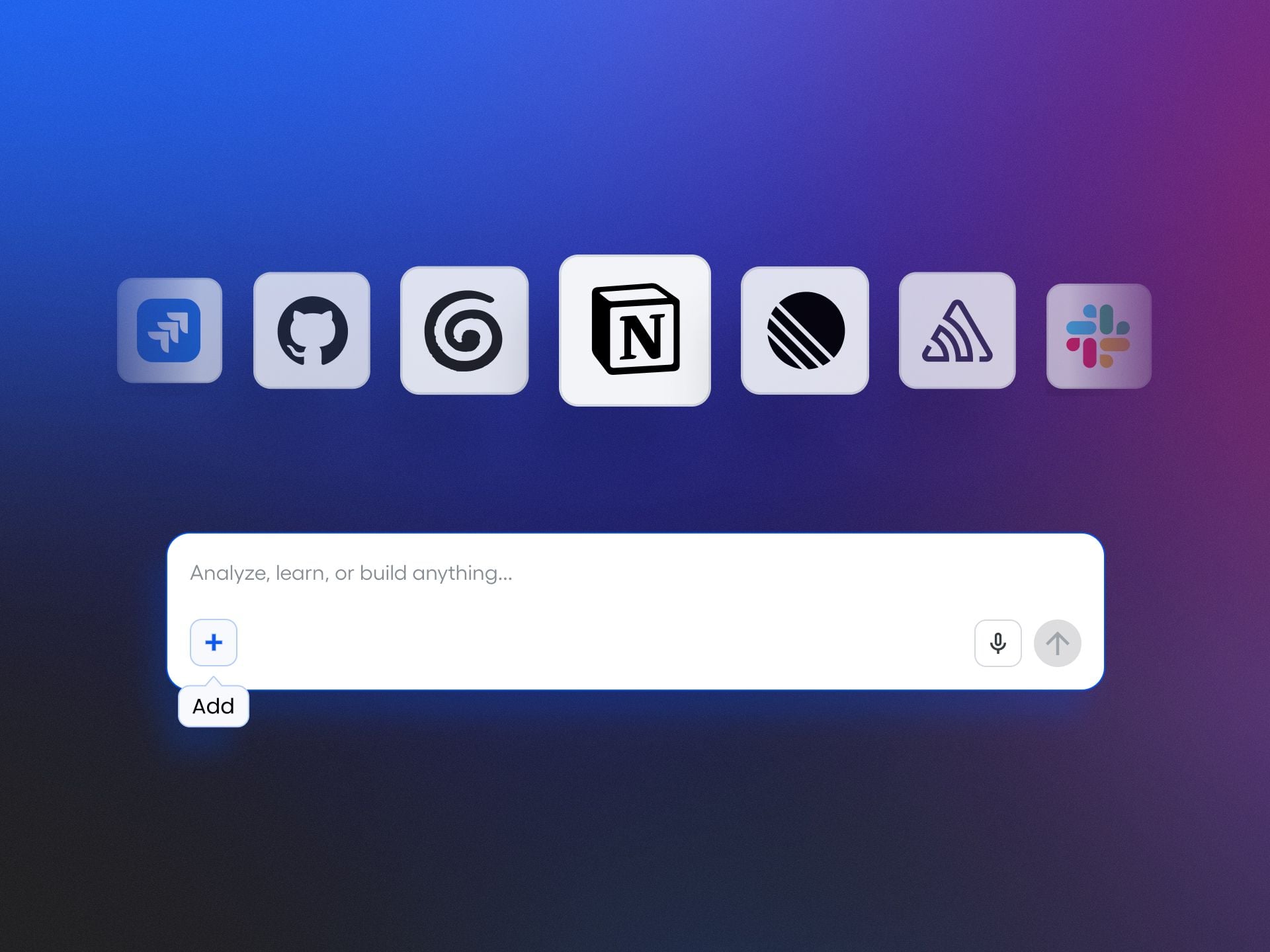
I’ve led enough multi-tool product organizations to know how quickly momentum erodes when insights and actions live in different places. When my teams bounce between Notion, Atlassian, Slack, Linear, and analytics dashboards, we pay a real tax in context switching. That’s why I’m excited about what Amplitude is enabling with Agent Connectors—bringing our daily work and our data-driven decisions into one fluid, agentic AI workflow.
Connect Notion, Atlassian, Slack, Linear, and more to Amplitude's Global Agent. Get richer analysis and take action across tools without leaving Amplitude.
Practically, this means I can treat Amplitude analytics as a unified analytics platform where analysis and execution finally meet. Instead of exporting charts or copying insights into docs, I can drive Agent Analytics directly from the same surface where I manage behavioral analytics, reducing friction and accelerating decisions. For my product strategy, that’s a meaningful shift—from “insight later” to “insight-to-action now.”
Here’s how I’d use it on a typical day: I ask the agent to synthesize signals from recent feature usage, spotlight anomalies, and then draft a concise summary for our Slack channel. In the same flow, I can prompt it to reference our Notion specs for context and queue next steps in Linear, keeping Atlassian stakeholders looped in without any extra swiveling between tabs. The value isn’t just faster execution; it’s tighter alignment across teams because the analysis and the plan live together.
From an operating model perspective, this is how I scale AI workflows responsibly. I can define clear prompts, approval paths, and ownership so the agent augments—not replaces—expert judgment. Data governance and permissions remain front and center: the agent sees what your teams are allowed to see, and we maintain auditability on critical workflow steps. The outcome is a trustworthy, repeatable system that compounds learning over time.
If you’re exploring agentic AI for product teams, start small and instrument your ROI. Pick one or two connectors (Slack and Notion are great first choices), define a measurable workflow—like pushing weekly retention insights and creating prioritized follow-ups in Linear—and iterate using continuous discovery. In my experience, the first wins appear as reduced time-to-insight, fewer meetings to align, and faster cycle time from observation to shipped change.
The big picture is simple: bring your work to your analytics, and your analytics to your work. With Agent Connectors, Amplitude’s Global Agent helps close the loop from understanding behavior to taking action—without leaving the place where your insights are born.
Inspired by this post on Amplitude – Best Practices.
I love being a builder. It feels like a superpower I can’t stop using, and lately I’ve been channeling it into better workflows, faster experimentation, and sharper product thinking.
I tinker with my Claude Code workflows to make every day more effortless. I’m having a blast creating AI-generated interview snapshots and opportunity solution trees for Vistaly. I also spend time digging into traces and iterating on the AI coaches I use for our discovery courses.
Then the recent wave of malicious software spreading through the open-source community popped my bubble. It hit companies big and small—names like OpenAI, PostHog, and Zapier. As I dug in, I realized what many cybersecurity experts have long known: this is a deep rabbit hole. If I want to build responsibly, I have to get significantly better at protecting my devices, credentials, and code. And if you’re building with AI or modern tooling, you likely do, too.
Here’s why. We all rely on open-source software. Most modern applications assemble tried-and-true components—parsing a PDF, handling dates across time zones, visualizing spreadsheet data, connecting to an API—rather than reinventing them. The same is true for agent skills and MCP servers; they accelerate how we get value from models. This is overwhelmingly a good thing. But it also creates an attack surface that bad actors exploit.
We don’t need to abandon third-party code. We do need to understand the mechanisms attackers use and consistently defend against them.
When one malicious worm compromises hundreds of packages, what should dev teams do? This visual teaser maps the agenda—how it spreads, how to guard against it, AI tool risks, and concrete steps to mitigate.
On May 11th, I started seeing tweets about a TanStack hack. At that time, I didn’t know what TanStack was. But apparently, it’s a popular set of JavaScript libraries that are used by a lot of React sites. At first, I didn’t pay much attention. Then I learned the packages were compromised by a worm—malicious software that self-replicates—and it spread quickly. Within hours, dozens of packages were implicated; by day’s end, it was in the hundreds. That’s when I knew I had to lean in.
If you’ve explored safe development practices with coding agents before, you’ve seen the basics of package safety. A package is a bundle of reusable code shared through registries, and nearly every app you use depends on them. The unfortunate twist with this specific hack, known as the Mini Shai-Hulud worm, is that it shows prior “safe enough” heuristics aren’t sufficient. Popularity and trust signals don’t guarantee safety. We have to do more.
So here’s what I’ll cover today: how malicious software typically works, a practical framework for guarding against it, the specific risks of using Cowork to write and run code, and concrete steps to mitigate that risk. My goal is simple: help you keep building—despite the risks—while protecting your data and your business.
Quick disclaimer: I’m not a security expert. I’m sharing my personal journey and what I’ve learned through research and hands-on work. Please use your best judgment when applying any of this.
Package hacks share a simple playbook: get in, sweep for secrets, and phone home. This visual breaks down the 3 steps and flags new entry points—from packages to MCP servers, agent skills, and app extensions.
An agent recently scoured over 230,000 malicious software incidents and found that most malicious software follows a similar pattern. First, it needs an entry point onto your computer. Once installed, it scours your device for sensitive data, and then it uses your network connection to send that data to its own servers. The Mini Shai-Hulud worm spreads via malicious package install scripts that run at download time, then searches the device for credentials (including package publishing rights), poisons additional packages to continue replicating, and uses multiple channels—including the victim’s own GitHub public repos—to distribute secrets.
In practice, most attacks boil down to three steps: 1) It finds an entry point to your device. 2) It searches your device for sensitive data. 3) It sends that data to its own server. The good news: this pattern also tells us how to defend. We can harden entry points, minimize what code and agents can access, and constrain outgoing network traffic.
Keep in mind that install scripts aren’t the only entry vector. Any code that runs on your machine could contain malicious payloads: third-party packages, agent skills, MCP servers, browser or desktop extensions—the list is long. As coding agents and “vibe coding” tools become mainstream, more non-engineers are exposed to the same risks engineers have managed for years.
You might be at elevated risk if you do any of the following: you download and use third-party skills or MCP servers; you let Claude Code, Codex, or other coding agents write scripts that run locally and use third-party packages; you use an IDE like VS Code or Cursor with third-party extensions; or you install third-party extensions in tools like Obsidian. This isn’t an exhaustive list, but if any of these apply, it’s worth tightening your approach.
Relying on third-party code? This visual highlights four common risk zones—agent skills/MCP servers, coding agents, IDE extensions, and Obsidian plugins—and urges a review of downloads, local scripts, and add-ons.
The “safest” approach would be to avoid installing third-party software on your local device entirely. That’s not realistic. We all depend on third-party components in our stack. So I’ll start with one of the most common paths for non-engineers writing and running code today: Cowork.
Evaluating Cowork’s safety was eye-opening. Cowork offers meaningful protection—more than running code directly on your machine—but it isn’t bulletproof. There’s a notable gap you should understand.
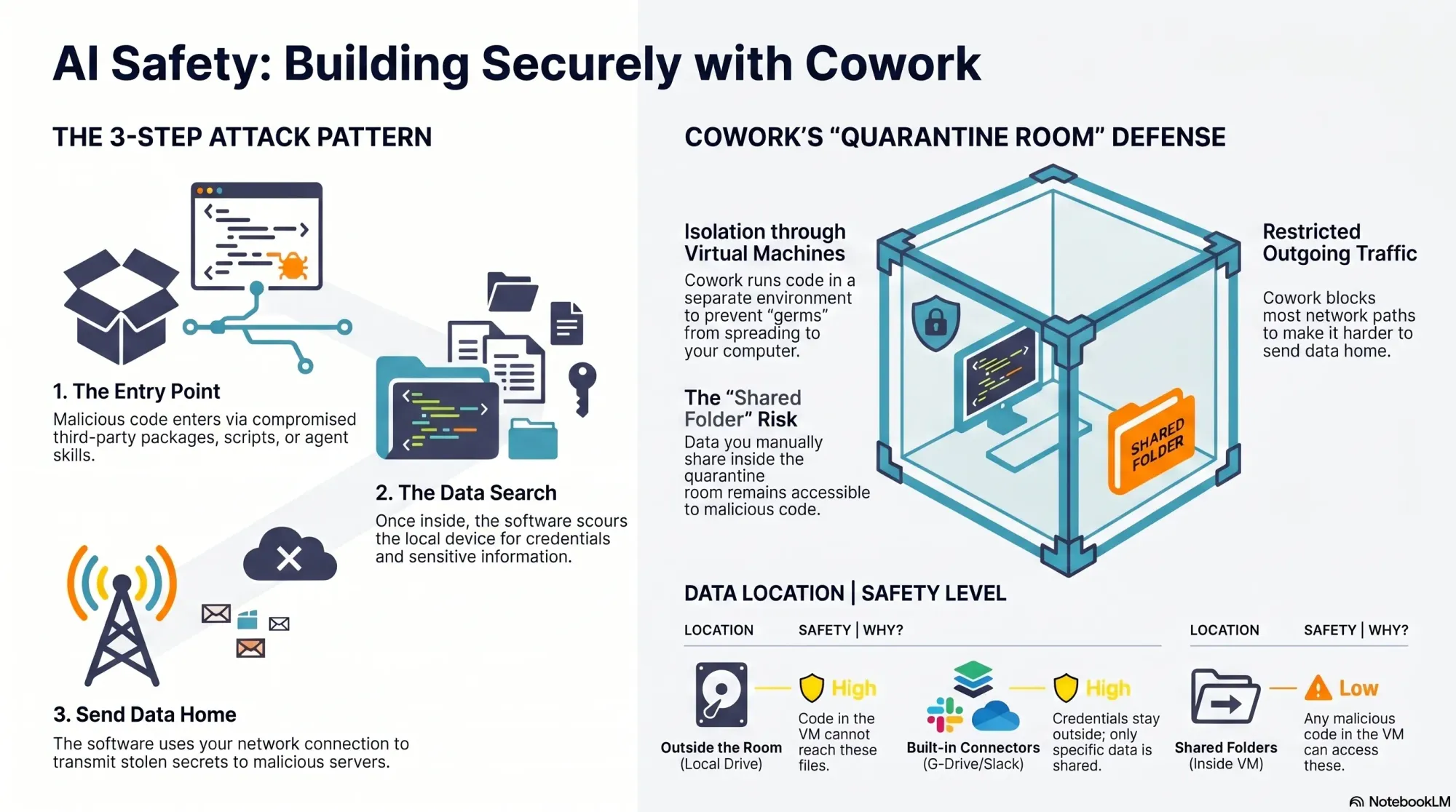
Here’s how Cowork helps. It runs code inside a virtual machine, which isolates the execution environment from your real device—a quarantine room for code. While Cowork doesn’t fully control what comes into the room (that part is on you), if malicious code gets in, it’s contained and cannot reach the rest of your filesystem. Cowork also limits outbound network traffic from the virtual machine, which helps disrupt data exfiltration. However, it’s not foolproof.
Because Claude can install packages inside Cowork, it remains susceptible to malicious code like the Mini Shai-Hulud worm. And GitHub is on the allow list so Cowork can read and write to your repos. Since the Mini Shai-Hulud worm uses GitHub to publish secrets, this creates exposure. The crucial mitigation: if you never give Cowork access to sensitive data, there’s nothing for an attacker to steal.
A quick visual from a security deep dive on package hacks shows how Cowork handles threats: entry points are contained, data is only safe when kept outside, and network traffic is partly limited—making shared data the gap to watch.
Your responsibility is straightforward but critical: your data is only safe if it stays outside the virtual machine. When you mount folders into Cowork, those folders become accessible to any code running inside the VM. That includes malicious scripts. Before sharing, ask two questions: do the folders contain any credentials or secrets, and do they include proprietary data that would be harmful if accessed?
It’s common for code to need credentials. That’s why Cowork includes connectors to third-party sources like Google Drive and Slack. Credentials configured for these connectors never enter the VM—they remain outside the quarantine room—so they’re not exposed to malicious code. But if your code requires additional credentials inside the VM, scope them tightly and assume they could be compromised.
You can also use custom MCP servers you create yourself with Cowork. Those credentials stay outside the VM as well, provided the MCP servers are remote (hosted on a web server, not downloaded locally). It’s more work than dropping in a local server, but it keeps secrets out of reach from VM-executed code.
Beyond credentials, scrutinize the actual content you share with Cowork, including anything accessed through connectors. Least privilege is the rule: grant only what’s absolutely necessary for the task, and nothing more.
Amid a wave of package-supply attacks, this Product Talk visual launches a 3-part guide to safer AI building—starting with Cowork safety today, then Claude code config next week, and off-device development coming soon.
What about skills? Cowork supports skills, and you can add third-party skills inside the quarantine room. If you’re not placing your own data in that room, you can afford more risk. The moment you add sensitive or proprietary data, be selective. Skills can include third-party code, and bad actors use skill directories to distribute malicious payloads. Personally, I never use third-party skills as-is. If one looks useful, I read through the files, then ask Claude to recreate it so I understand what it does and maintain control. If I were to use third-party skills, I’d do it in Cowork and keep their data access to the minimum necessary.
Overall, Cowork is a solid, “safe-ish” option if you’re disciplined about what you share. The challenge is that utility often requires access to real data—exactly what we’re trying to protect. In an upcoming deep dive, I’ll outline strategies to keep malicious code out in the first place. While I’ll focus on local development, the same patterns can extend to Cowork with a bit of setup.
One more important clarification: don’t confuse Cowork with the Code tab in the Claude Desktop app. Cowork runs code inside a virtual machine. The Code tab does not. If you ask Claude to write and execute code from the Code tab, that code runs on your local device and you’re fully responsible for security. There is one exception: the Code tab can run code in Anthropic’s cloud; I’ll cover that approach when we get into moving development off the local machine.
To summarize Cowork’s protections against the attacker’s three-step pattern: installs and scripts still run, but they’re contained inside an isolated virtual machine instead of your real device; access to sensitive data is strongly limited to the specific folders you mount, leaving the rest of your filesystem (including unrelated credentials) out of reach; data exfiltration is partially constrained because Anthropic limits outbound network traffic from the VM—helpful, but not absolute. By contrast, local Code tab sessions offer no isolation, no filesystem restrictions, and no network limits—so any malicious install scripts run directly on your machine with full access and open egress.
My takeaways so far: I still love building with AI, but I’m doing it more cautiously. Cowork offers meaningful containment when used deliberately. I still prefer the flexibility of Claude Code, and I’ve reconfigured my setup to reduce risk. Even so, “safer” isn’t “safe,” which is why I’m increasingly shifting development off my local device to more controlled environments. I’ll share the practical details—tools, configs, and scripts—in the next installments.
If this perspective is useful, let me know. I want builders to move fast—and safely—through this new era of agentic AI. Until then, stay safe out there.
I’m continually inspired by platform specialists who champion their analytics platforms end to end. When I study their work, I look for the connective tissue between strategy and execution—how behavioral analytics informs decisions, how a unified analytics platform reduces tool sprawl, and how great documentation and enablement convert insights into habit across product, engineering, and go-to-market teams.
What consistently stands out is the rigor behind the scenes: clear data governance, privacy-by-design, and instrumentation standards that keep events trustworthy as products evolve. Platform scalability isn’t just about throughput; it’s about guardrails—naming conventions, schema versioning, and lineage—that let teams move quickly without sacrificing integrity. These are the unsung details that make insights reliable and repeatable at scale.
I also pay close attention to how experimentation gets operationalized. Thoughtful A/B testing, well-scoped feature flags, and crisp definitions of “minimum detectable effect (MDE)” ensure that experiments produce signal instead of noise. Driver trees, opportunity solution trees, and continuous discovery keep teams anchored on outcomes, while retention analysis translates curiosity into durable growth. This is the backbone of product-led growth: small, fast bets tied to measurable behavioral shifts.
Reliability and insight quality go hand in hand. Observability for event pipelines, anomaly detection to surface data drift, and targeted session replay help teams debug both product experience and analytics instrumentation. Paired with Web Vitals and clear ownership models, these practices shorten feedback loops, reduce blind spots, and keep platform credibility high—because trust is the real KPI behind every dashboard.
In my own practice, I translate these lessons into roadmaps that balance discovery with delivery, and align solutions engineering, product, and design around the same north-star metrics. The result is a culture where platform champions don’t just advocate for tools—they enable outcomes. If you’re scaling an analytics stack or elevating your product strategy, these principles will help you move faster, with confidence, and make every insight count.
Inspired by this post on Amplitude – Best Practices.
I focus every day on turning raw customer signals into meaningful product experiences that create measurable outcomes. Human37 is a Brussels-based customer data strategy agency helping organizations turn data into real customer experiences. That statement sets a useful standard for the kind of partner I look for: one that helps us move beyond reports and into shipped value customers can feel.
What matters most to me is the bridge between discovery and delivery—how insights inform product strategy and roadmaps without slowing execution. The strongest partners operationalize behavioral analytics within a unified analytics platform, connect qualitative learning with quantitative evidence, and make journey mapping a living artifact rather than a slide. Tools like Amplitude analytics can accelerate this work, but the real differentiator is the operating model that converts data into decisions and decisions into outcomes.
When I evaluate a customer data strategy partner, I look for five things: rigorous data governance and privacy-by-design; clean event taxonomy and robust identity resolution; clear experimentation workflows that tie to activation and retention analysis; practical enablement for product teams (not just analysts); and a bias for product-led growth rooted in real user behavior. If a partner can’t articulate how insights ladder to user activation and long-term value, they’re not ready to guide the roadmap.
Here’s how I sequence the work to turn signals into experiences: first, define the outcomes that matter and the driver trees behind them; second, instrument events and unify identities to power trustworthy behavioral analytics; third, map critical paths with journey mapping to expose friction and moments of delight; fourth, run focused experiments linked to product strategy, not vanity metrics; finally, scale what works with in-product experiences and lifecycle messaging that compounds retention.
The payoff is speed and clarity: faster time-to-insight, more confident bets, and fewer handoffs between data teams and product builders. If you’re exploring European partners, a Brussels-based agency with a sharp customer data strategy capability can help you move from analysis to action. The litmus test is simple—can they help your team ship experiences that customers notice and your metrics confirm?
Inspired by this post on Amplitude – Perspectives.
There’s a question that runs underneath every AI Agent evaluation: what can it do?
Two years ago, that was the right question to ask because Agents were limited and capability was a genuine constraint. The gap between what organizations needed and what the technology could deliver was wide. I felt that gap acutely in early pilots—plenty of ambition, not enough dependable execution.
That gap has since narrowed considerably, and yet most organizations are running their Agents well below what’s technically possible. I see teams lean on answering and routing, but stop short of looking things up, taking actions, or resolving complex, multi-step problems—especially where data, process variance, or risk come into play.
The standard explanation is that AI isn’t good enough yet—models must improve, or vendors must ship more features. But after studying organizations across industries actively expanding their AI automation, I’ve found that this explanation holds up less often than people assume. The blockers tend to be elsewhere.
The teams I’ve observed weren’t primarily constrained by what their AI could do; they were constrained by what their organization was structured to let it do. In other words, the ceiling wasn’t the Agent’s capability—it was organizational readiness, governance, and risk tolerance.
“Readiness” for AI breaks into five distinct types, and most organizations have some but not all of them. Below is how I assess them with product, operations, and engineering leaders.
Content readiness is whether you can explain your product and policies clearly and consistently. Most companies can. In practice, that means up-to-date knowledge bases, unified policy language, and clear versions that Agents can cite and apply.
Scope readiness is whether you’ve defined the edges: when should AI engage, and when should it step aside? Edge cases multiply, intent varies by customer segment, sensitive topics surface mid-conversation, but most teams can work through this with effort. Clear guardrails reduce ambiguity and shrink risk.
Procedural readiness is where things start to get harder. This is about whether you can articulate your processes clearly enough for something other than a human with years of tacit knowledge to follow. The happy path is rarely the problem. It’s the failure paths, decision branches, variations that have never been written down because they’ve always lived in someone’s head.
Data readiness is the first real cliff. Can you reliably identify the right user, account, or object at the moment a decision needs to be made? Is the data trustworthy in real time? Are the APIs stable, accessible, and actually connected? For most organizations, the honest answer is “partially, but we’re not always sure when it breaks.”
Execution readiness is the highest bar. Not just technically (can the Agent make the change?) but organizationally. Who owns it when the wrong refund gets processed? Who detects it? Who recovers? Does someone with authority actually accept the risk?
Most companies have the first two, some have the third, fewer have the fourth and fifth. When I map this with teams, we often discover that their Agent’s ceiling is really a reflection of operational maturity and data plumbing, not model quality.
We studied companies across six industries – energy, healthcare, ecommerce, gaming, financial services, property management – all trying to expand what their Agents could do. The pattern was consistent: teams set out to automate real actions—looking up account status, processing changes, handling transactions. In most cases, the AI could technically do it, but at a certain point (somewhere between guiding a user through a process and looking something up on their behalf) they hit a wall.
One team tried to automate application changes but couldn’t reliably identify which application to modify across their internal systems. Another explored billing automation but couldn’t access live account data due to regulatory constraints. A third needed to verify status across third-party vendor systems their Agent couldn’t reliably reach. I’ve seen similar constraints surface around CRM integration, data governance, and vendor SLAs—none of which are model issues.
In most cases, the team redesigned around what their infrastructure could support. They moved toward guiding—walking users through processes step by step, rather than executing changes on their behalf. It worked, it resolved conversations and delivered real value, just differently than anyone planned. In customer support, this often looks like consultative flows that shorten time-to-resolution even without direct writes.
Most Agent evaluations are built around capability. Can it handle complex queries? Does it support multiple channels? Can it integrate with our systems? These are reasonable things to evaluate for, but they produce a capability score, and that doesn’t tell you whether your organization can actually use what you’re buying.
The teams that got to deeper automation, the ones executing actions early, didn’t have “better AI,” they had more standardized operations. Actions that were already well-defined, consistently applied, and exposed through stable systems with clear rules. Automation wasn’t inventing new behavior, it was triggering actions that were already tightly controlled elsewhere.
Readiness enables capability, not the other way around. Which reframes the evaluation question from “can the AI do this?” to “are we actually ready for it to?”
Something that gets lost in most conversations about AI readiness is that organizations are often further along than they assume, just not for the kind of work they were planning for. A team that set out to automate refunds but can reliably guide users through complex troubleshooting has genuine capability deployed. They’re operating at the level their readiness supports, which is a starting point, not a deficit.
The more useful frame isn’t “are we ready?” – it’s “what are we ready for, and what specifically stands between here and the next level?” The gaps tend to be concrete: a missing API, data that lives in three systems that don’t agree, a process that’s never been documented, or an ownership question nobody has answered. These are solvable problems. They just require a different kind of investment than buying a more capable Agent.
What nobody has worked through seriously yet is how organizations actually build readiness. Does it develop naturally through using AI at shallower levels first? Or is it mostly a function of prior decisions, like system architecture choices made years ago, operational maturity that accumulated over time, engineering investments that have nothing to do with AI? When readiness does increase, what actually changes? Does the support team develop it? Does engineering grant it? Does it require executive sponsorship and investment in infrastructure with no obvious AI label on it?
In my experience, progress comes from a joint effort: product to define scope and guardrails, operations to codify procedures and edge cases, engineering to harden APIs and observability, and leadership to underwrite risk with clear ownership. When those pieces align, agentic AI moves from guided assistance to safe, auditable execution.
Until there are clearer answers, the pattern is likely to continue. Companies will buy capable Agents, plan ambitious rollouts, and find that the harder work is building the organizational infrastructure. The Agents can do the work. The question is what it takes to let them.
I spend a lot of time helping financial services teams adopt AI analytics without compromising on risk, compliance, or customer trust. The stakes are high: regulations are evolving, data sensitivity is non‑negotiable, and a single misstep can erode confidence. That’s why my approach centers on governed AI, rigorous data governance, and measurable business value—not flashy demos.
Learn how Amplitude delivers safe, governed AI analytics for financial services—aligned to compliance, built for trust, and ready for real workflows.
In practice, “safe and governed” means clear lines of accountability and controls that hold up under audit. I look for privacy-by-design principles, role-based access controls, robust audit trails, and granular data permissions that keep sensitive data segregated. Strong AI risk management also requires model oversight—documented policies, human-in-the-loop review where needed, and explainability for high-impact decisions. Above all, the platform must meet regulatory compliance expectations and support the organization’s risk posture without slowing teams down.
Real workflows are where the value shows up. In financial services, that can mean using behavioral analytics to understand user intent, applying anomaly detection to surface suspicious patterns earlier, and empowering product managers and analysts to iterate safely within a unified analytics platform. When these capabilities are built into the core analytics motion, I see faster detection of issues, clearer attribution of outcomes, and more confident decision-making—all while staying within governance guardrails.
When I evaluate a solution, my checklist is simple and strict: does it enforce strong data governance by default; does it provide transparent, auditable AI behaviors; can it scale securely to meet enterprise requirements; does it tie insights directly to product and growth outcomes; and will it help risk, compliance, and product teams work together instead of at cross purposes? If the answer is yes across that list, the platform earns a place in the enterprise toolbelt.
Done right, governed AI analytics give financial services teams the confidence to move faster with less risk. You gain sharper insights from behavioral data, earlier warning from anomalies, and the trust that comes from controls that are aligned to compliance and resilient under scrutiny. That’s the path to durable advantage: responsible AI that accelerates learning, protects customers, and translates directly into better products and performance.
Inspired by this post on Amplitude – Best Practices.
Session replay should illuminate user behavior, not slow it down. That belief drove us to rebuild the delivery layer behind our Session Replay from the ground up so it’s lighter on your pages while capturing richer, more reliable signals for behavioral analytics and product insights.
Our objective was clear: preserve page performance and Core Web Vitals while improving data completeness under real-world conditions. We focused on reducing client-side overhead, smoothing network bursts, and scaling the pipeline so it performs consistently during long sessions, high-traffic spikes, and complex interactions—without compromising observability or user experience.
To get there, we redesigned how events flow from the browser to our edge and storage layers. We decoupled capture from delivery, introduced adaptive batching and backpressure-aware controls, tightened compression strategies, and prioritized critical events to reduce jitter and dropped packets. The result is a delivery path that’s resilient to network variance, efficient in payload size, and friendlier to the main thread—key ingredients for platform scalability and SRE-grade reliability.
Get a glimpse into how we overhauled Session Replay’s data delivery, and how you can expect more complete data, lower payload sizes, and more. In practice, that means steadier capture across long sessions, fewer gaps during rapid DOM changes, and leaner, faster uploads that respect the constraints of modern browsers and mobile networks. It’s an upgrade designed to protect page speed while strengthening the fidelity of what you see in replay.
These changes elevate how product teams, analysts, and support engineers diagnose issues and optimize funnels. With higher-fidelity replay and lighter page impact, you can connect the dots faster—from anomaly detection and conversion bottlenecks to subtle UX friction—within a unified analytics platform. It’s a meaningful step forward for data-driven product strategy and for keeping your observability toolkit both accurate and performance-aware.
While performance guided every decision, privacy and governance stayed first-class. Our delivery patterns work hand-in-hand with data governance practices to help teams maintain responsible capture boundaries while still achieving the completeness and granularity they need. This balance lets you scale replay confidently across surfaces and teams.
We’ll continue monitoring downstream impact across Web Vitals, long tasks, error rates, and event integrity—iterating as we learn. If you rely on session replay to inform roadmaps, triage incidents, or accelerate product-led growth, you should feel the difference: a lighter footprint on your page and a stronger foundation for trustworthy insights.
Inspired by this post on Amplitude – Best Practices.
I’m excited to share that we’ve brought Amplitude Plug and Play to the Claude and Cursor marketplaces—a lightweight way to infuse your everyday prompts with serious product analytics context and speed.
"Learn more about our new AI plugin, the easiest way to turn your favorite AI client into an analytics expert with a single-install."
For years, I’ve watched teams lose momentum hopping between dashboards, docs, and spreadsheets just to answer simple questions like “What changed in activation last week?” or “Which cohort is driving retention?” With Amplitude analytics and behavioral analytics at the core, Amplitude Plug and Play collapses that friction by bringing the answers to where you already think and build—inside Claude and Cursor.
In practice, this means I can ask natural-language questions such as “Show me the funnel from signup to activation by region,” “Compare retention week over week for new users from our latest release,” or “Summarize our last A/B testing results on onboarding” and get structured, context-aware responses. The goal is to keep me in flow while still honoring the rigor of a unified analytics platform.
What I love most is how this elevates both discovery and delivery. Product managers can accelerate continuous discovery by querying cohorts, drivers, and anomalies mid-conversation. Engineers working in Cursor or with Claude Code can validate event definitions, sanity-check metrics, and spot regressions without leaving their IDE. The result is tighter feedback loops and better decision quality.
Just as importantly, the experience is designed for clarity and consistency. When I ask about activation, I expect the same canonical definition every time. When I explore a retention analysis, I want clear assumptions and transparent logic. By anchoring responses to well-defined metrics and event taxonomies, the plugin helps reinforce good data governance while keeping the interaction fast and conversational.
Getting started takes only a few minutes. Open the Claude or Cursor marketplace, search for Amplitude Plug and Play, complete the single-install flow, and connect to your Amplitude analytics workspace. From there, start prompting as you normally would—only now your AI client can reason with product context.
This launch is part of how I see gen ai reshaping AI workflows for product teams: less context switching, more signal per prompt, and a shared, accessible understanding of what’s really moving the business. If you’re ready to turn your AI assistant into a trusted partner for product insight, Amplitude Plug and Play is a powerful next step.
Inspired by this post on Amplitude – Best Practices.
On the Amplitude growth team, the mission is clear: make it easier than ever to get (great) data flowing in Amplitude. That focus resonates deeply with me because, in my experience leading product organizations, nothing accelerates value creation faster than clean, trustworthy behavioral data reaching the right people at the right moment.
When Amplitude analytics is fueled by high-quality event streams, product teams can move from guesswork to precision. With consistent, enriched signals, behavioral analytics becomes a daily superpower—shortening time-to-first-insight, sharpening user activation strategies, and aligning everyone on outcomes. This is the foundation of a unified analytics platform that actually drives product-led growth.
“Great” data isn’t accidental; it’s designed. It starts with a clear tracking plan, human-readable event names, and strict schema validation. It continues with robust data governance, CI/CD-friendly instrumentation, and docs-as-code so analytics definitions don’t drift. When teams instrument once and trust forever, they reduce thrash, avoid rework, and build a durable decision-making muscle across product, engineering, and customer success.
The payoff shows up where it matters: onboarding becomes clearer, user activation improves, and experiments become more conclusive. With in-app guides and thoughtful product tours reinforced by reliable event data, I can see where users hesitate, why they drop, and which nudges actually help them succeed. That makes it easier to prioritize the highest-leverage changes and to communicate impact credibly to stakeholders.
I’ve repeatedly seen teams cut weeks of analysis down to days once they standardize event taxonomies, automate QA for instrumentation, and establish lightweight governance. The result is a smoother path to retention analysis, faster iteration on activation milestones, and a culture that treats data as a first-class product—not an afterthought.
Ultimately, making it effortless to get (great) data flowing in Amplitude is about dignity for the end user and leverage for the business. It’s how we turn curiosity into clarity, align teams around measurable outcomes, and scale product-led growth with confidence.
Inspired by this post on Amplitude – Best Practices.
Protecting product data has never felt more urgent. Every week, my teams experiment with gen ai prototypes and LLM-powered capabilities, and I’m accountable for ensuring our innovation never compromises cybersecurity, privacy, or customer trust. The goal is not to slow down—it's to build in the right guardrails so speed and safety reinforce each other.
Understand AI data security risks in product teams, what product data is most exposed, and how to use AI tools responsibly without slowing innovation.
When I assess AI risk with product managers, I start with how data moves. The biggest threats usually come from prompt and context leaks, unsafe logging of sensitive inputs or outputs, permissive access controls, unmanaged third-party model usage (shadow AI), and unclear data-retention policies. For LLMs for product managers, I emphasize that every step in AI workflows—from collection to processing to storage—must assume adversarial conditions.
In my experience, the product data most exposed includes customer PII and payment identifiers, internal strategy documents and roadmaps, analytics and behavioral telemetry tied to users, feature flags and configuration values, embeddings and vector stores that can reveal sensitive patterns, and the prompts or contexts themselves. Even “harmless” evaluation datasets can contain inferred identities. Treat all of this as high-value assets in your data governance model.
I apply privacy-by-design from the first discovery conversation: minimize data by default, redact or tokenize before any external model call, and separate identities from content wherever possible. A retrieval-first pipeline helps keep raw customer data within our boundary while still enabling relevant context. We combine deterministic safeguards (policy-based redaction, allow/deny lists) with runtime observability to detect anomalous prompts, outputs, or access patterns.
To keep velocity high, we operationalize risk rather than debate it ad hoc. A lightweight risk scoring rubric classifies each capability (e.g., internal-only, customer-facing, regulated data adjacent) and dictates controls: redaction requirements, human-in-the-loop thresholds, eval-driven development gates, and incident response readiness. These controls live in CI/CD so product teams get fast, automated feedback without waiting on meetings.
Partnership is essential. I bring Security, Legal, and Data partners into the product trios early to align on regulatory compliance and threat modeling while scoping solutions that meet outcome goals. We maintain a shared catalog of approved providers and architectures, document data flows, and version our policies just like code—so everyone can see what changed and why.
Vendor diligence is non-negotiable. I ask LLM providers about data retention and training usage, encryption at rest and in transit, key management, regional data controls, audit posture (SOC 2, ISO 27001, HIPAA where needed), and support for private networking. We restrict scopes with least-privilege access and instrument robust observability for threat detection and response across the full path, not just the API call.
Culture makes the biggest difference. I coach teams on prompt hygiene, secret handling, and context window management; we publish redaction patterns, approved libraries, and clear do/don’t examples. When incidents happen, we treat them as learning opportunities, run blameless reviews, and update our playbooks, guardrails, and training materials accordingly.
The outcome I aim for is confidence with speed: we ship AI features that customers love while protecting the data they entrust to us. With a clear risk model, strong data governance, and embedded controls, product teams can innovate boldly—without compromising on security or trust.
Every so often, a single line captures the essence of platform thinking at scale. "Vinay is a Staff AI Engineer at Amplitude. He builds the foundational AI platforms that empower internal innovation and help define the future of AI analytics." That statement crystallizes the mandate many of us share: create durable AI capabilities that compound value across teams, products, and customers.
When I think about "foundational AI platforms" in the context of Amplitude analytics and behavioral analytics, I see more than infrastructure. I see a product strategy choice: invest in a unified analytics platform that lowers the cost of experimentation, increases the trustworthiness of insights, and speeds time-to-learning for empowered product teams. That’s the engine behind sustainable product-led growth.
For me, the platform blueprint starts with three layers: high-quality data foundations (schema design, governance, lineage), model lifecycle rigor (evaluation, observability, versioning), and safe, self-serve interfaces that meet teams where they work. Without strong data governance and clear accountability, even the smartest gen ai features struggle to gain adoption. With them, platform scalability and reliability become a competitive advantage—not just an operational checkbox.
Empowering internal innovation requires thoughtful constraints. I’ve seen the best teams pair self-serve tooling with guardrails: templates for use cases, bias and risk checks, and well-documented pathways from prototype to production. This balance turns AI Strategy from a slide into a system—one that helps teams decide when to build vs buy, how to measure value, and how to retire what no longer serves the roadmap.
Looking ahead, the future of AI analytics is about making intelligence ambient. That means stitching together event data, product usage, and customer context so insights surface exactly when decisions are made. It also means bringing gen ai responsibly into the workflow—summarizing behavior, explaining anomalies, and suggesting next best actions—while maintaining transparency and auditability.
My practical takeaways: invest early in shared components that everyone can use (feature stores, evaluation harnesses, data contracts); standardize interfaces so teams ship faster with fewer handoffs; and measure platform outcomes with product metrics, not just infrastructure metrics. Done well, this approach compounds: faster cycles, higher confidence, and a steady drumbeat of wins that reinforce a culture of learning.
In short, building the right AI foundations is how we unlock scale, create leverage for every team, and keep our edge in a dynamic market. That one line about building foundational AI platforms isn’t just a role description—it’s a north star for any product leader serious about shaping the next era of analytics.
Inspired by this post on Amplitude – Perspectives.