Your analytics agent can turn a question into a chart. Then a product leader asks which activation definition it used, an analyst gets a different cohort result, or security discovers that the agent queried data the user could not normally access. That is where a promising pilot becomes an enterprise risk.
The way through is not a better chat interface. You need a controlled path from question to decision: approved definitions, bounded tools, task-level evaluations, visible evidence, and permissions that expand only after the agent proves it can handle a specific workflow reliably.
Before you give an agent a task, define its contract. The contract should answer five questions:
What decision is being supported? A request to explain a funnel is different from a request to change the funnel definition or publish a recommendation.
Which definitions are authoritative? Identify the canonical metric, its version, the population, the unit of analysis, the time window, and any approved exclusions.
What may the agent access and do? Specify datasets, fields, tools, credentials, and whether the task is read-only, produces a draft, or can trigger an action.
What evidence must accompany the answer? Require the metric identifier, query or tool calls, filters, lineage, assumptions, and enough result detail for an analyst to reproduce the work.
When must the agent stop? Define the ambiguities, policy conflicts, statistical gaps, and high-consequence actions that require clarification or approval.
Consider a seemingly simple question: Did activation decline for new accounts? The answer depends on the approved activation event or event sequence, cohort entry rule, identity resolution, time zone, date range, and exclusions. If the agent silently supplies one of those details, it has made a product decision while pretending to perform analysis.
The safe behavior is straightforward. The agent should retrieve the approved definition, display the material assumptions, and ask for clarification when the remaining ambiguity could change the result. It should not create a new activation definition in the course of answering the question. Changes to definitions belong in a governed workflow with an owner, review, version history, and rollback path.
This distinction also gives you a better definition of accuracy. An answer fails if it uses the wrong metric, violates an access rule, omits a material assumption, or cannot be reproduced, even when the final number happens to be correct. Trust is a property of the whole execution path, not only the sentence shown to the user.
Move through four levels of autonomy one task at a time
Teams often treat agent maturity as a platform-wide label. That hides risk. The same system may be mature enough to draft a funnel but not mature enough to interpret an under-specified experiment. Assign maturity to each task, dataset, and action instead.
Level
Agent role
Evidence required before moving forward
L0: Conversational interface
Summarizes charts or reports that already exist.
The agent accurately identifies the selected artifact, preserves its filters and caveats, and does not imply that it performed new analysis.
L1: Grounded retrieval
Retrieves definitions and context from the analytics catalog, taxonomy, or metric store before answering.
Canonical definitions are consistently selected, citations and assumptions are visible, and retrieval respects the requesting user’s permissions.
L2: Governed tool use
Reads schemas, generates safe SQL, calls approved tools, and reconciles results against canonical definitions.
Representative tasks pass golden-data and regression evaluations; queries, tool calls, lineage, errors, latency, and cost are observable.
L3: Bounded autonomous workflow
Completes an end-to-end workflow with approval gates, audit logs, feature flags, and rollback controls.
The exact workflow has a stable evaluation history, clear ownership, tested failure handling, and a reversible execution path.
L0 can still be useful. It reduces navigation work and helps a user understand an existing dashboard. The mistake is presenting that convenience as autonomous analytics. L1 improves trust by grounding language in the organization’s own definitions, but retrieval alone does not prove that a newly calculated result is correct.
L2 is the consequential transition. The agent is no longer explaining an approved artifact; it is producing analytical work. Schema awareness, safe SQL, result reconciliation, and complete traces become release requirements rather than optional diagnostics.
L3 should describe a narrow, governed workflow, not a general promise that the agent can handle anything. For example, an agent might autonomously refresh an approved weekly retention analysis while still requiring an analyst to approve a new cohort definition. Broaden the task boundary only after the additional behavior has its own tests and controls.
Build evaluations around the work people actually do
A generic chatbot benchmark will not tell you whether an agent can support your product decisions. Your evaluation unit should be a complete analytics task performed under your definitions, schemas, policies, and edge cases.
I hear the same refrain from product leadership peers everywhere: we’re overwhelmed. Shrinking headcount, constant AI disruption, economic uncertainty, and relentless context switching make it feel like we’re carrying two jobs—setting strategy while shielding our teams. I recently listened to an episode of All Things Product that zeroes in on what a real support system for product leaders looks like, and it resonated deeply with my day-to-day.
Want to listen to the conversation yourself? Find it on Spotify or Apple Podcasts.
Here’s the core tension I see (and felt early in my own leadership journey): product leaders tend to underinvest in themselves. We hold onto work because it feels faster, safer, or “just easier if I do it.” But that pattern quietly taxes strategy, slows learning, and caps team throughput. The hidden cost of “doing it all yourself” is real.
Early in my tenure leading product, I tried to keep every plate spinning—roadmap reviews, stakeholder prep, user research, executive updates—while protecting my team’s focus. I was busy and useful, but not maximally valuable. The turning point came when I started building a lightweight support stack: a few hours of executive assistant help each week, targeted research support for bet sizing, and a personal cadence with a leadership coach. The result wasn’t just more time; it was better time.
One provocative point that landed hard: product leaders rarely have executive assistants—and that’s a problem. If your calendar is your operating system, an EA is an extension of your leverage. Mine now handles scheduling, meeting hygiene, prep packets, and post-meeting artifacts. That shift moved me from “calendar triage” to “strategic curation.” It also reinforced a core principle: delegation is a leadership skill, not a weakness. When I delegate outcomes (not just tasks), my team learns, ownership grows, and we ship decisions faster.
Support for strategy work shouldn’t stop at the calendar. Research and data enable better bets. Lightweight research ops, access to product analytics, and brief synthesis sprints keep me anchored in evidence without drowning in artifacts. Paired with a strong community of practice, I get a steady stream of comparative patterns—how other leaders delegate, scope advisory boards, or run decision reviews—which short-circuits trial-and-error.
Coaches were framed as shortcuts for clarity, accountability, and skill-building—and I agree. A good coach compresses cycles, sharpens decision quality, and holds the mirror up when you drift into doer mode. Two quotes captured the mindset perfectly: “You are a pro athlete. It makes sense to think about how you scale your impact without adding more to your calendar.” — Petra Wille. “As you get busier, it becomes more important to focus on the value only you can bring.” — Teresa Torres.
There’s also a helpful nudge to let go of perfectionism: “80% done by someone else is 100% awesome.” — Dan Martell (quoted). In practice, that means I accept great drafts from others, then add the 10–20% only I can contribute—context, narrative, and the sharp edges of the decision.
What about AI? The conversation hits a practical middle ground I share: use AI where it compounds leverage—meeting summaries, research synthesis starters, doc outlines, and backlog triage. But keep humans where judgment, alignment, and context truly matter—strategy framing, stakeholder management, and the final decision-making loops. In other words, apply an AI Strategy that respects product leadership’s uniquely human work.
Key themes I took away: why product leaders struggle to scale themselves; the true cost of “doing it all yourself”; why not having executive assistants limits impact; delegation as a core leadership capability; how to identify and protect the work only you can uniquely do; using research and data to inform strategy; coaches as accelerators for clarity and accountability; communities of practice as a force multiplier; adopting a “professional athlete” mindset; when AI helps—and when humans still matter; and the liberating mantra that “80% done by someone else is 100% awesome.”
If you’re wondering where to begin, start small and practical. Audit your time: what work truly requires you? Experiment with small amounts of support (even a few hours a week). Delegate outcomes, not just tasks. Keep the hands-on work you love—but be intentional. Use peers, coaches, and communities to learn how others delegate. Don’t wait until burnout to build your support system.
Resources mentioned if you want to go deeper: Follow Teresa Torres: https://ProductTalk.org. Follow Petra Wille: https://Petra-Wille.com. Petra’s Coaching for Product Leaders: https://www.petra-wille.com/coaching-packages. Dan Martell’s book Buy Back Your Time: https://www.buybackyourtime.com.
I’m curious: what’s one outcome you’ll delegate this week, and what support would make it stick? Share your thoughts in the comments—your playbook might be exactly what another product leader needs right now.
In my day-to-day building AI products, I’ve learned a simple truth: a single model can be brilliant, but a coordinated team of specialized agents is what consistently ships outcomes customers trust. That’s the promise of multi-agent systems—multiple AIs with distinct roles collaborating inside robust AI workflows to deliver accuracy, speed, and resilience you can’t get from a lone model.
Think of a multi-agent system as a well-run product trio for machines: a planner decomposes the job, specialists execute focused tasks, a reviewer checks quality, and an orchestrator keeps everyone aligned. This agentic AI approach mirrors how high-performing teams work—divide complex problems, play to strengths, and create tight feedback loops.
When does one AI stop being enough? Whenever tasks require tool use, domain retrieval, multi-step reasoning, or policy adherence under real-world constraints. In those moments, specialized agents shine—one for search using a retrieval-first pipeline, another for reasoning, another for action execution, and a final one for validation. The result is better accuracy with manageable latency and cost.
The core architecture I rely on starts with a planner that breaks a goal into steps, followed by execution agents equipped with tools and grounded context. I pair this with context window management to keep prompts lean and relevant, and I insert a verifier (or critic) to catch logic slips and policy violations before results reach customers. A lightweight orchestrator coordinates handoffs and retries to keep the whole flow resilient.
To make this production-grade, I treat observability as non-negotiable. Agent Analytics helps me see which agents are adding value versus adding latency, where failures cluster, and how prompts drift over time. From there, eval-driven development gives me measurable confidence: I codify representative tasks, run offline and shadow evaluations, and only promote changes that move accuracy and safety in the right direction.
Governance is equally critical. I design privacy-by-design from the start, restrict data movement with strong data governance, and enforce policy constraints inside the workflow rather than after the fact. This includes red-teaming failure modes, rate-limiting tools, and capturing immutable traces for audits and post-incident reviews—habits borrowed from SRE culture that map well to AI systems.
On the practical side, prompt engineering remains foundational, but it’s the system design that converts clever prompts into reliable outcomes. Tool access, retrieval quality, memory strategy, and error handling matter more than wordsmithing alone. I’ve found that small prompt improvements are amplified when the surrounding workflow is sound—and are overwhelmed when it isn’t.
If you’re just starting, begin with a narrow use case and a minimal set of agents—planner, executor, and verifier—then expand. Use continuous discovery with real users to learn where the workflow fails in the wild, and iterate with tight release cycles. Treat every agent like a microservice with clear contracts, test coverage, and metrics, and you’ll unlock compounding gains without losing control.
The payoff is tangible: faster shipping cycles, fewer regressions, and outcomes customers can actually rely on. When stakes are high and ambiguity is real, one AI is often a talented soloist—but a disciplined ensemble of agents is how I deliver dependable, scalable value at product velocity.
Over the last year, I’ve had the same conversation with a lot of support leaders.
They’ve deployed AI and are seeing initial efficiency gains, but want to push beyond these early results and achieve meaningful transformation.
When AI is first introduced, the gains show up quickly. Teams resolve higher volumes of queries, free up capacity, and deliver faster responses. But the real opportunity for impact extends well beyond those initial wins. As AI becomes more deeply integrated into support operations, taking on harder, more complex work, those results compound, new ways to create and measure value open up, and the economics of support change entirely. That shift is where I spend most of my time with leaders—turning early efficiency into durable business value.
This sits at the heart of “The 2026 Customer Service Transformation Report.” In this reflection, I explore how deeper integration compounds impact and why that makes business value easier to articulate across the organization—especially to finance and product peers who need to see outcomes, not just output.
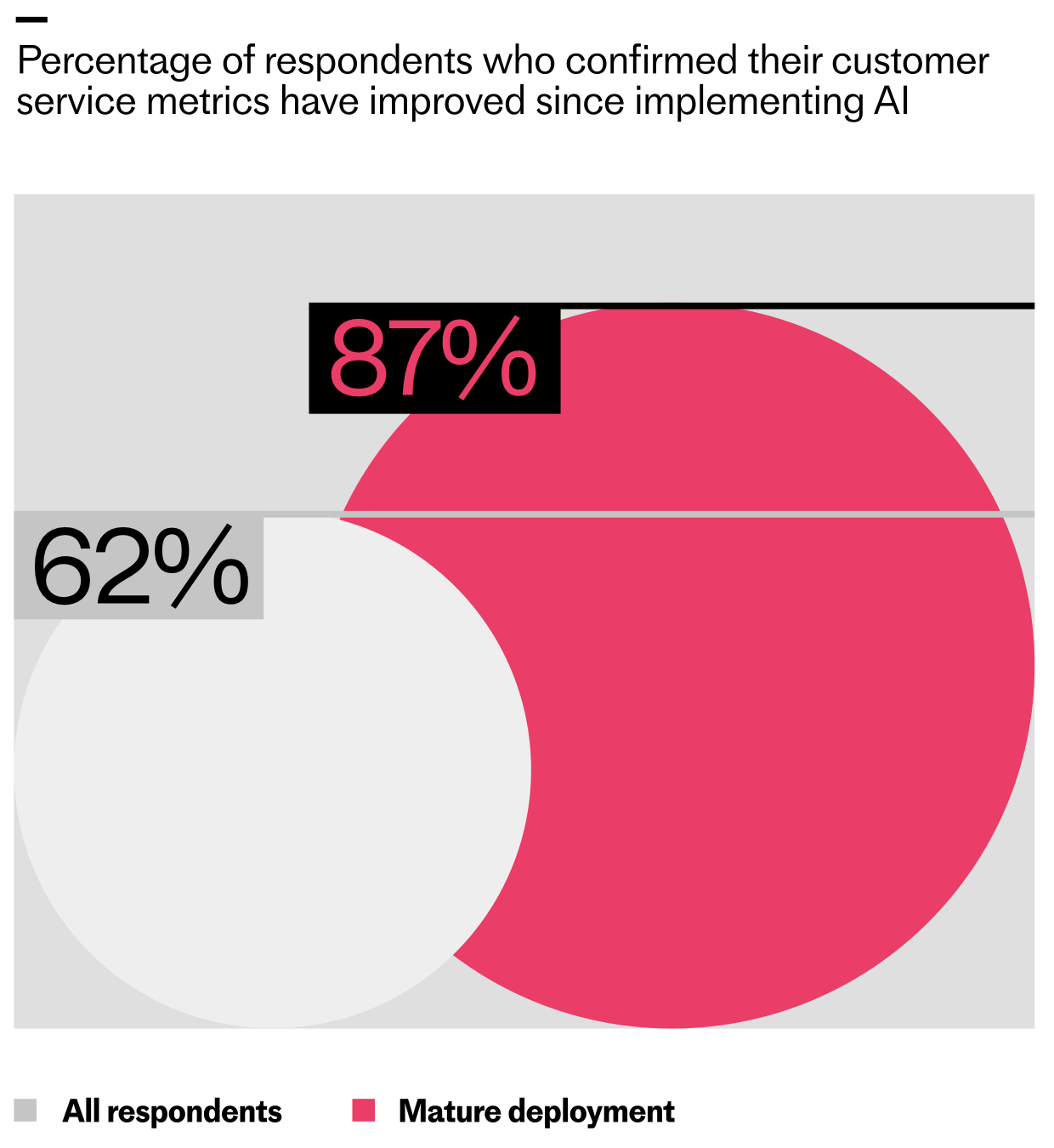
The teams going deeper are seeing higher returns. The research shows that 62% of support teams have seen their customer service metrics improve since implementing AI, with early wins showing up most clearly in speed and efficiency. But for teams that have reached mature deployment (where AI is fully integrated into operations) that number jumps to 87%.
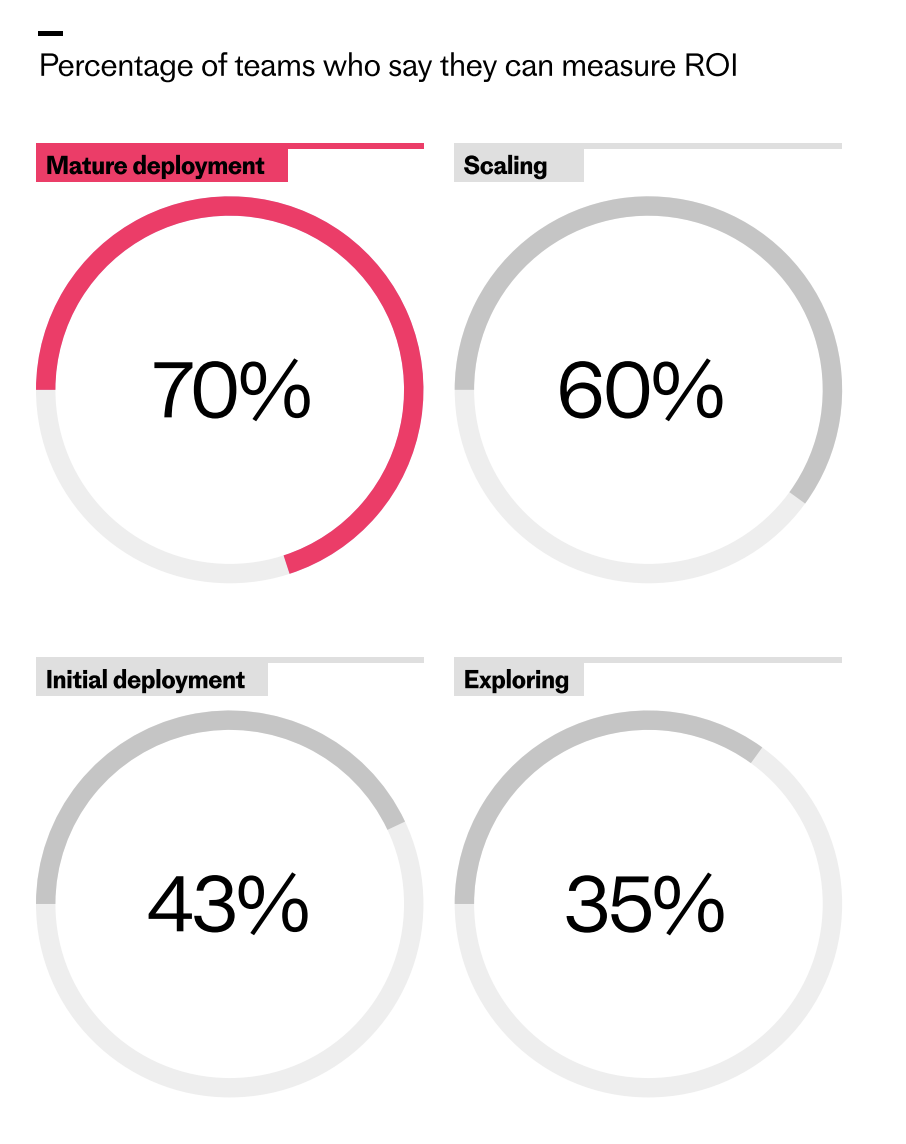
As AI programs advance, measurement confidence surges. This chart shows how ROI tracking rises from 35% in exploring to 70% in mature deployments—evidence of a widening execution gap in customer service.
The same pattern holds for the ability to measure ROI. Among teams in early exploration, just 35% say they can measure their return on AI investment, but for teams at the mature deployment stage, that rises to 70%. In my experience, this is the moment the conversation shifts from “is AI working?” to “how much leverage are we creating?”
As AI becomes more embedded in support workflows, what teams choose to measure starts to change. In the early stages of deployment, ROI is typically understood through improved customer response times, lower cost to serve, and freeing up capacity. Teams focus on how much time AI creates and whether it’s relieving pressure on the support organization. These signals help validate that the system is working, but they say little about how that capacity is ultimately used.
As deployments mature, measurement starts to reflect a different intent. Instead of stopping at time saved, teams look at where that capacity is reinvested—into higher value customer work and revenue-generating activities. ROI becomes less about relief and more about leverage. I encourage teams to set targets for capacity redeployment and tie them directly to activation, retention, and expansion outcomes.
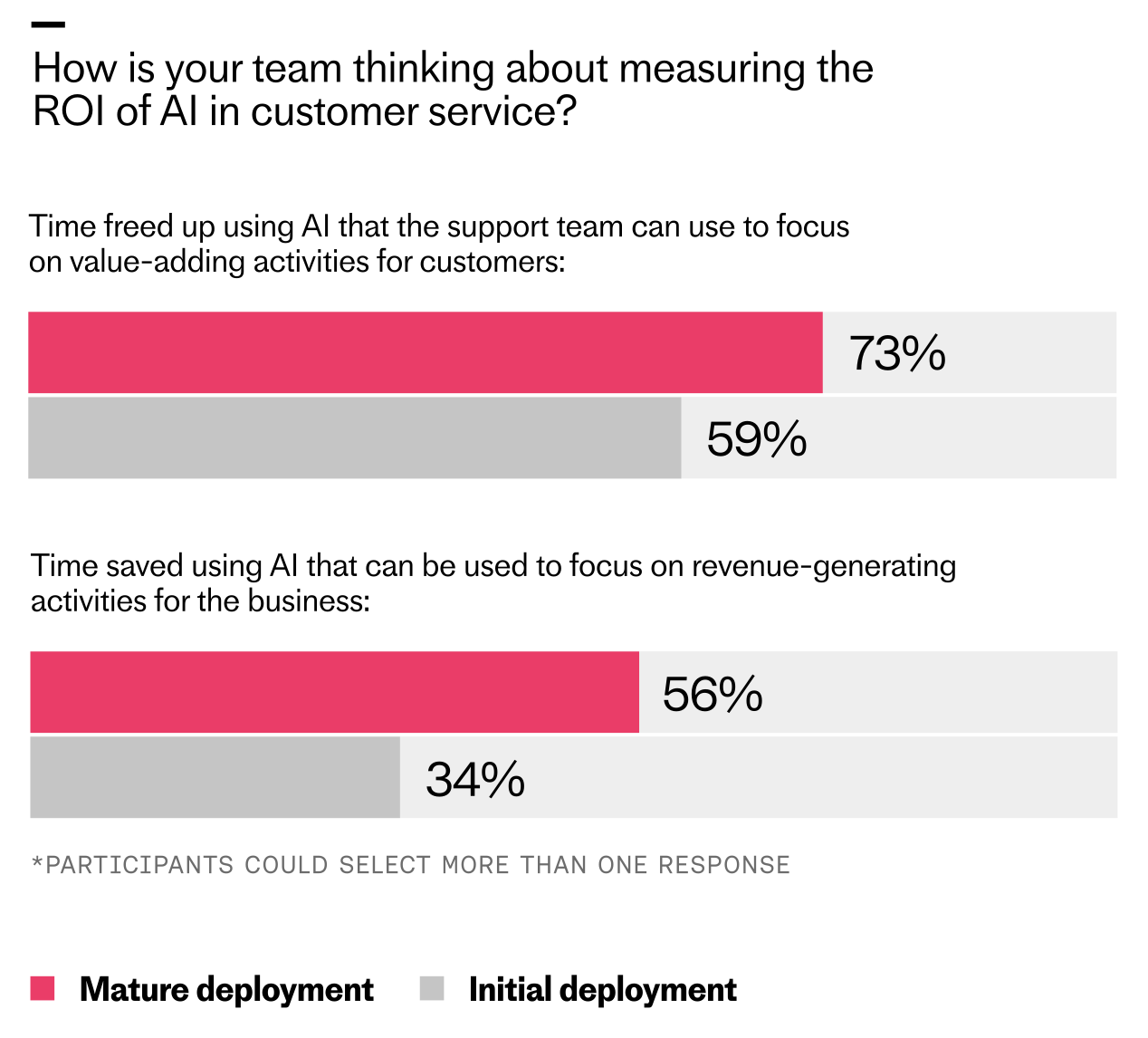
The report data shows this clearly. Across all maturity stages, the most commonly cited measure of ROI is "time freed up that the support team can use to focus on value-adding activities for customers." But at mature deployment, that signal intensifies, with 73% of teams citing it, compared to 56% at early exploration.
Mature AI deployments reveal clearer ROI: teams report more time freed for value-adding customer work (73% vs 59%) and more hours redirected to revenue-generating tasks (56% vs 34%) than initial rollouts.
What’s also interesting is that 56% of mature teams say freed capacity is being directed toward revenue-generating activities, up from 34% at initial deployment. That’s a powerful indicator that AI is shifting from a cost narrative to a growth narrative.
The result is a shift in economic intent: from measuring what AI saves to demonstrating how the capacity it creates is reinvested to drive growth. As a product leader, I anchor this conversation in outcome-based metrics and clear counterfactuals: what would it have cost to deliver the same experience without AI?
As AI takes on more work, the question moves from “does it save money?” to “how does it change the economics of support?” Legacy support economics were built for linear growth: more customer tickets meant more headcount, more outsourcing, and more software costs. Success was measured through containment—the number of queries that didn’t reach human agents. These models worked when volume and effort were tightly linked, but AI doesn’t scale linearly, and it needs to be evaluated differently.
To sustain AI investment and expand its impact, teams need to move beyond cost-cutting narratives and build a clearer case for business value. When done right, AI goes far beyond improving support efficiency. It rewires the financial model, breaking the link between support costs and revenue growth, and turning support into a contributor to customer activation, retention, and lifetime value. This means treating your AI Agent as a new workforce capability that changes how your support function creates and captures value. Here’s what value looks like in an AI-first model:
Deeper AI integration decouples growth from headcount. This split chart shows support volume surging while team size plateaus, revealing how automation unlocks scale, reduces costs, and makes ROI easier to prove.
Human productivity: Your team focuses on more strategic areas, not the queue.
System improvement: Every resolved query makes the system smarter.
Revenue influence: Support becomes a lever for activation, retention, and growth.
Organizational agility: You scale service without scaling headcount.
Leaders are racing ahead with real AI in support. Explore the 2026 Customer Service Transformation Report to see where deployment is stalling, benchmark your team, and get practical steps to scale automation that delights.
How does this look in practice? Intercom offers a compelling example with Fin. What started as a focused effort to improve their customer support experience has become one of the clearest illustrations of what happens when AI is fully embraced across an organization.
Since 2022, Fin has helped Intercom absorb more than a 300% increase in customer demand while improving the consistency of delivery—including supporting new routes into support for trial customers and website visitors. Today, Fin is involved in 97% of their customers' conversations. Of those, it resolves 83.5% end-to-end, putting their overall automation rate at 81%.
That depth of deployment allowed Intercom to scale service without scaling headcount. Without Fin, they would have needed at least 100 additional support teammates to meet rising demand and service standards.
As Fin took on the majority of day-to-day volume, the human support team shifted toward consultative work—helping customers adopt Fin more deeply, succeed faster, and unlock more value from the platform. Intercom now tracks metrics like “direct revenue generated” and “expansion revenue influenced” to understand the impact of these consultative support activities. This repositioned support from a cost center to an active contributor to long-term growth.
The throughline from The 2026 Customer Service Transformation Report is that deployment depth makes a significant difference. Teams that are investing in deeply integrating AI are reshaping how support scales and contributes to growth. Value becomes clearer as AI takes on more work, and support leaders can articulate that value to the rest of the business.
The gap between these teams and those still in the early stages is widening. A select group of pioneers are setting a new bar for what AI-powered customer service can deliver, and understanding what they’re doing differently is the first step toward closing that gap. If you want to dive deeper into the data and frameworks, you can download the report here: https://www.intercom.com/customer-transformation-report?utm_source=blog&utm_medium=internal&utm_campaign=20260128-report-owned-2026cstransformationreport&utm_content=chapterseries_2
I keep a simple mantra front and center: Figma is not the source of truth. The customer is. In practice, that means the only thing that truly counts is what we ship, how it performs, and whether users come back for more. Mockups are hypotheses; production usage is evidence. When my teams adopt this lens, velocity improves, judgment sharpens, and quality rises where it matters most.
So what does design actually do in a software company? At its best, design builds leverage for the whole system—engineering, product, and marketing—by clarifying problems, raising the quality bar, and making complex decisions legible. The standard I hold is ancient and still essential: products must be useful, usable, and desirable — and above all, used. When we calibrate around “used,” debates about pixels give way to outcomes, and cross-functional partners feel the difference.
I often trace the roots of our craft back well beyond the digital era. The lineage from industrial design to software is real; constraints, ergonomics, affordances, and systems thinking didn’t start with screens. If you’ve ever mapped delight, performance, and reliability in a Kano Model, you’ve touched this lineage. The translation to software is simple: design the full journey, not just the interface—prioritize what improves time-to-value, reduces cognitive load, and earns habitual use.
One lesson I’ve learned the hard way: why design leaders who stop designing stop leading. I still sketch flows, write UX copy, and prototype when it unblocks the team or sets a decisive quality bar. The altitude changes constantly—one hour I’m in a strategic roadmap review, the next I’m in a critique or poking at a prototype. Great design leaders jump up and down in altitude to connect vision to details without becoming a bottleneck.
Over time, I’ve come to rely on four pillars every design manager must master: craft (raising taste and execution), product strategy (clarifying choices and trade-offs), people leadership (coaching, feedback, and hiring), and systems (processes, rituals, and design ops that scale). Neglect any one of these and either quality, speed, or team health will eventually falter.
Perfectionism is a double-edged sword. Over-indexing on quality can paralyze decision-making, but lowering the bar indiscriminately is worse. I’ve seen moments where relaxing standards to “go faster” actually cost the business—rework piled up, trust eroded, and customer value stalled. The answer is principled delegation: I define what “must be true” at each milestone, delegate ownership with clear guardrails, and reserve my veto power for moments where product integrity is genuinely at risk.
Measuring success as a design leader starts with outcomes vs output OKRs. I care about activation, retention, time-to-first-value, NPS verbatims tied to key journeys, and the operational metrics that earn the right to build the next thing. Design output is visible; design outcomes are durable. When trade-offs are needed, I optimize for the smallest shippable surface that still proves the core value proposition, then expand with data.
Scaling judgment is the multiplier. I build it through pattern matching—studying enduring product systems from companies like Airbnb, Amazon, Apple, Asana, Notion, Stripe, Nest, and others—to distinguish where polish compels usage versus where it’s ornamental. Strong opinions matter, but so does being easy to convince with new evidence. I encourage designers to articulate the pattern they’re invoking, why it fits the job-to-be-done, and how we’ll know it worked.
Operating cadence matters. My week is anchored around recruiting, crits, and staff meetings that actually make decisions. In critiques, I use the Do/Try/Consider framework to give actionable direction without micromanaging. On one-on-ones, the question isn’t “Should one-on-ones exist?” but “What are they for right now?”—coaching, performance, or clearing execution blockers. If a meeting doesn’t increase clarity or commitment, it gets redesigned or removed.
Execution-wise, I’ve taken inspiration from Rippling’s operating system—especially its emphasis on speed, precise ownership, and hard commitments. The lesson is timeless: go fast on the right things, make clear promises, and instrument your work so you can see reality quickly. When speed is paired with crisp decision rights and observable outcomes, momentum compounds rather than frays trust.
Hiring your first design leader? Look for someone who can set standards, scale judgment, and ship. They should be able to zoom from company narrative to interaction copy in a single afternoon, coach product trios, and build rituals that make taste and trade-offs explicit. Above all, they should have a point of view on where quality moves the business and where speed is the quality.
Here’s how my team’s approach differs from many: Figma is not the source of truth. We design in Figma, but we learn from production. We pair designers with engineering early, prototype in code when it reduces risk, and wire telemetry into every critical path. Product trios use discovery to validate “useful, usable, desirable — and used,” then commit to outcomes with clear, testable definitions of success. The result is faster iteration, fewer surprises, and experiences customers actually adopt.
The throughline is simple and demanding: design for reality, not for the board. Keep your standards where they create business value, scale judgment with explicit patterns, and instrument everything so learning never stops. When teams embrace that, the work gets better, customers feel it, and the roadmap starts to pull you forward.
Your team can generate a PRD, summarize an interview, and draft acceptance criteria in minutes. Yet the product still may not ship faster. Customer evidence remains scattered, decisions lose their rationale at handoffs, and nobody knows whether an AI-generated recommendation deserves to be trusted.
An AI-native product development workflow fixes that operating system. It connects evidence, decisions, delivery, and evaluation in one traceable learning loop. The goal is not to produce more documents. It is to shorten the path from a customer signal to a reliable product decision, then carry the result back into the next decision.
Change the unit of work from an artifact to a decision
AI-assisted teams use a model inside an existing process. They write the same documents, hold the same handoffs, and make the same decisions, only with faster drafting. That can save time, but it leaves the fundamental bottlenecks untouched.
An AI-native workflow reorganizes the process around decisions. Every meaningful unit of work should carry enough context for the next person or system to understand what is being decided, why it matters, and what evidence would change the decision.
Use a decision packet with five parts:
Decision: State the exact choice in front of the team. Replace broad assignments such as improve onboarding with a decision such as whether to change the first-session setup flow for a defined customer segment.
Evidence: Link the customer examples, research moments, usage data, and business constraints that support the problem. Preserve the original evidence rather than storing only an AI summary.
Assumptions: Separate what the team knows from what it believes. An assumption should be written so that new evidence can confirm or challenge it.
Success condition: Name the customer or business behavior expected to change. For an experiment, define the hypothesis and, where appropriate, the minimum detectable effect before exposure begins.
Decision state: Record the owner, status, unresolved questions, next test, and reason for the latest change.
The model can retrieve evidence, compress it, identify inconsistencies, draft alternatives, and check whether required fields are missing. A person still owns the interpretation, trade-offs, priority, and release decision. This boundary prevents polished language from being mistaken for product judgment.
Apply a simple test to every AI-generated artifact: what decision will this change? If the answer is unclear, the artifact is probably workflow noise. If the answer is clear, attach the artifact to the decision packet instead of allowing it to become another disconnected document.
Build an evidence spine before adding more automation
Most product workflows fragment evidence before a model ever sees it. Support tickets sit in one system, sales notes in another, interviews in folders, and behavioral data in an analytics platform. A prompt cannot recover relationships that the operating system never preserved.
Normalize incoming evidence while preserving its source identifier, relevant customer or segment context, and access permissions.
De-duplicate repeated signals and cluster related evidence without erasing meaningful differences between customers or use cases.
Retrieve a small set of representative examples for the decision being made. Do not dump the entire evidence store into the model context.
Write the approved decision, its assumptions, and its rationale into durable external state.
Return experiment results, release outcomes, and new qualitative feedback to the same evidence system.
Keep three forms of information distinct. The evidence store contains raw and normalized inputs. Working context contains only the material needed for the current task. The decision log contains approved conclusions, rejected alternatives, owners, and changes. Mixing all three creates stale prompts, contradictory instructions, and summaries that can no longer be audited.
A prioritization recommendation, for example, should link back to representative customer records and the relevant analytics view. A summary without those links is compression, not evidence. When somebody challenges the recommendation, the team should be able to inspect the underlying material without asking the model to reconstruct its reasoning from memory.
This is also where data governance belongs. Decide which systems the workflow may retrieve from, which fields require redaction, who can see sensitive records, and how model outputs will be retained before connecting those systems. Privacy-by-design, cybersecurity, and regulatory controls need to sit alongside the workflow, not appear as a review after customer information has already crossed an inappropriate boundary.
Run one closed loop from discovery to shipped learning
The product trio remains important in an AI-native workflow. Product, design, and engineering use automation to reach the evidence faster and explore more alternatives, while keeping explicit human gates around interpretation, feasibility, customer experience, and risk. Clear handoffs between context design, external memory, and orchestration make those responsibilities easier to see.
For each stage, name the AI job, the human gate, and the durable output. That turns a collection of AI tools into an operating workflow.
Stage
AI accelerates
Human gate
Durable output
Intake and triage
Normalize, de-duplicate, cluster, and retrieve representative customer signals.
Verify that a cluster reflects a real customer problem rather than repeated wording or a noisy channel.
An opportunity record linked to original evidence.
Discovery
Draft interview guides, summarize transcripts, extract entities, and tag moments of friction.
Interpret what the customer meant, identify contradictions, and decide which uncertainty deserves another conversation.
An evidence-backed problem narrative with open questions.
Opportunity sizing
Organize evidence against a driver tree and assemble available inputs about potential impact.
Choose the outcome, inspect data quality, expose assumptions, and make the prioritization trade-off.
A ranked opportunity with decision criteria and explicit assumptions.
Test desirability, usability, feasibility, strategic fit, and the cost of being wrong.
A solution hypothesis, acceptance criteria, and a test plan.
Planning and execution
Break an approved bet into sequenced work, surface dependencies, and check artifacts for missing requirements.
Set scope, choose rollout controls, confirm instrumentation, and approve release readiness.
An instrumented release plan connected to feature flags, CI/CD, and observability.
Iteration
Compare expected and actual outcomes, organize qualitative feedback, and surface anomalies for review.
Decide whether to scale, revise, stop, or collect more evidence.
An updated decision record returned to the evidence spine.
Exit criteria keep each stage honest. Discovery is not complete because the transcripts have been summarized. It is complete enough to move forward when the team can name the customer problem, the supporting evidence, and the uncertainty it intends to resolve next. Solution shaping is not complete because a PRD exists. It is complete when the hypothesis, constraints, acceptance criteria, test method, and required telemetry are clear enough for a responsible decision.
Plan measurement before release. If the team will use an A/B test, write the hypothesis and minimum detectable effect before looking at the result. If controlled experimentation is not appropriate, name the expected behavior change and the qualitative evidence that would support or challenge it. Feature flags provide controlled exposure, while observability helps the team understand why behavior changed rather than merely showing that it changed.
Engineer context, evaluations, and decision rights together
Reliability cannot be added as a final quality check. Every AI transformation can lose evidence, introduce unsupported language, or carry stale assumptions into the next stage. The workflow needs controls at the moment each failure can occur.
Give each task a context contract
One large prompt that tries to perform discovery, prioritization, specification, and planning will accumulate irrelevant material and conflicting instructions. Break the workflow into smaller tasks, each with a compact context contract:
Use a sub-agent when a task benefits from an isolated context or a separate review, such as checking a PRD against approved evidence. Do not add one merely to make the system look agentic. Every additional agent creates another handoff whose inputs, outputs, permissions, and failure behavior must be evaluated.
Build an evaluation harness before scaling the workflow
An evaluation should answer a repeatable question: does this workflow produce an acceptable result on representative work? A few impressive demonstrations do not tell you whether a prompt, retrieval change, or model update made the system more dependable.
Start with real task types your team already performs. Preserve representative inputs, the evidence that should be used, the requirements an acceptable output must satisfy, and known failure conditions. Then run those cases whenever you change the prompt, model, retrieval logic, tool permissions, or output schema.
Evaluate at least these dimensions:
Grounding: Can each important claim be traced to approved evidence?
Fidelity: Did the output preserve material differences, uncertainty, and constraints rather than flattening them into a convenient narrative?
Completeness: Are the fields required for the next decision present?
Decision usefulness: Does the output help a named owner make a specific choice?
Data handling: Did the workflow respect access, redaction, and retention rules?
Format and tool behavior: Did the model follow the schema and use only permitted systems or actions?
Documents generated, prompts executed, and summaries produced are activity measures. They can rise while product decisions become less reliable. Use four layers of measurement instead:
Learning flow: Time from a customer signal to an evidence-backed decision, time spent waiting at handoffs, and rework caused by missing context.
AI quality: Evaluation results by task, unsupported claims found during review, required fields missed, and human corrections before approval.
Customer outcome: The activation, adoption, retention, or other behavior named in the original hypothesis.
Delivery health: Deployment frequency, change failure rate, and the operational signals relevant to the release.
Keep decision rights visible beside those measures. The model may propose a priority, but the accountable product leader approves it. The model may draft a customer interpretation, but the product trio validates it against evidence. The model may prepare a release plan, but engineering owns operational readiness. Feature flags, access controls, and human approval are not signs that the workflow is insufficiently automated. They are what make greater automation responsible.
Log the decision, evidence references, model version, prompt or workflow version, retrieval configuration, evaluation result, and approving owner. Documenting decisions, model versions, and test artifacts makes a nuanced call auditable and gives the team a concrete starting point when quality changes.
Key takeaways: a 30/60/90-day rollout
Do not begin by automating the full product lifecycle. Start with one recurring decision, connect its evidence to its outcome, and prove that the loop can be operated reliably. A practical 30/60/90 sequence expands from the evidence foundation to selected workflows and then into planning and delivery.
Days 1-30: Map the evidence systems used for one recurring product decision. Define the decision packet, access rules, retrieval path, current human gates, and initial evaluation cases. Build the smallest retrieval-first pipeline that can preserve links from a recommendation back to original evidence.
Days 31-60: Pilot continuous discovery and PRD drafting. Keep approval manual, evaluate representative cases, record recurring corrections, and tighten the context contract. Do not expand until the team can identify why an output passed or failed.
Days 61-90: Extend the proven pattern to prioritization and experiment design. Connect approved outputs to planning, CI/CD, feature flags, and observability. Feed release outcomes and customer feedback back into the evidence spine.
By the end of the rollout, you should be able to trace an AI recommendation to customer evidence, reconstruct why a decision changed, detect a quality regression after a workflow update, and compare the expected outcome with what happened after release. If one of those paths is missing, fix it before adding another agent or automating another handoff.
Your next move can be small. Choose one product decision scheduled for this week. Put its evidence, assumptions, success condition, and state into a decision packet. Then follow that packet through discovery, delivery, and the first outcome review. That single trace will reveal where your workflow is genuinely AI-native and where faster drafting is only hiding an old bottleneck.
I’ve been pushing hard to operationalize AI for real product work, and this episode zeroes in on the moment Claude Code stops feeling like a demo and starts behaving like a dependable teammate. If you’ve ever wondered how to go from clever prompts in the browser to durable, repeatable workflows on your machine, this walkthrough is for you.
Listen on: Spotify | Apple Podcasts.
My first honest reaction to installing and configuring the desktop agent was the all-too-relatable “this tool thinks everything is a code repo” reality. That framing helped me reset expectations fast: instead of treating it like a magical universal assistant, I began designing guardrails, context, and repeatable routines—exactly how I’d onboard a new team member.
The shift from Claude-in-the-browser to Claude Code on my machine was the unlock. Locally, it can finally work with my files, folders, and workflows. That meant I could ground it in real artifacts—project docs, meeting notes, product specs, and historical decisions—so responses weren’t just plausible; they were contextual and verifiable.
On setup, I now treat /init and Claude MD files as my product requirements. I define roles, boundaries, and canonical sources up front, then run in a deliberate “walled garden.” The “treat it like an intern” model works beautifully: scope access intentionally, expand privileges as trust grows, and keep a tight audit trail of what it can touch and why.
Surprisingly, task management became my ideal on-ramp. It’s easy to validate, the feedback loops are tight, and the ROI is immediate. I export calendar windows rather than granting full calendar access, then let the agent map priorities into Trello, reconcile time blocks, and surface trade-offs. Fast wins build confidence—mine and the agent’s.
Model switching matters more than I expected. When speed is king and “good enough” will do, Haiku keeps the loop snappy. When stakes are higher—complex synthesis, nuanced product strategy, or gnarly ambiguity—I step up to Claude Opus 4.5. Being intentional about when to optimize for latency versus depth is a quiet superpower.
Web tasks can still spiral. When that happens, I pause its autonomy, toggle to fewer steps, and ask, “What are you doing?” Paired with Claude’s Web fetch tool, this makes the agent explain its chain-of-thought planning without exposing hidden reasoning, so I can spot brittle assumptions, prune distractions, and re-ground the task.
Content retrieval has become a killer workflow. I point the agent at my archives—blog posts, book drafts, transcripts, notes—and ask, “Where have I talked about this before?” It assembles a map of prior art, connects themes I’d forgotten, and prevents me from reinventing work. Over time, this evolves into a Zettelkasten-style research system that upgrades rigor and accelerates synthesis.
I’ve also turned Claude Code into a publishing engine. From a single transcript, it drafts titles, descriptions, show notes, and chapters, then routes artifacts to Ghost for formatting. Before anything ships, I run fact-checking workflows that validate claims against transcripts and research sources. The output improves, but more importantly, the scaffolding makes quality repeatable.
Reusable workflows compound. I rely on slash commands to trigger common jobs, break down larger efforts with sub-agents, and wire in hooks and plugins where external systems are needed. This is agentic AI at its most practical: fewer hero prompts, more reliable processes.
Audience analytics and content prioritization are helpful with caveats. I let the agent cluster themes and flag gaps, then I pressure-test its suggestions against first-party data and strategic goals. As with any model-driven insight, triangulation beats blind faith.
Two metaphors guide my day-to-day. First, Claude Code is like a dog—sometimes it returns with the stick, sometimes it gets lost in the woods. Second, the “intern” framing keeps me honest: don’t hand it the whole company on day one. With that mindset, my output jumped—more volume without sacrificing quality—because the workflow scaffolding got better.
In this episode, I cover what Claude Code is and why it’s useful even if you’re not an engineer, the real difference between the browser experience and running locally, how to shape behavior with /init and Claude MD files, why task management is the perfect proving ground, when to export calendar windows versus connecting directly, and when model-switching makes sense—Haiku for speed, Opus for depth.
I also dig into debugging web tasks by asking “What are you doing?”, content retrieval workflows across personal archives, building reusable slash-command systems with sub-agents, hooks, and plugins, practical publishing stacks from transcripts, fact-checking against transcripts and research sources, and using analytics to prioritize content—with a healthy respect for uncertainty.
If you’ve been trying to make Claude Code feel less like “throwing a stick into the woods,” this is the candid, tactical tour I wish I’d had on day one. Drop your questions and experiments below—I’m eager to compare notes and refine the playbook together.
“You don’t have to trust the algorithm; you can see exactly why a conversation earned the score it did.”
We recently shared how we redesigned CX Score to deliver deeper, more actionable insights across every conversation. The most common follow-up from support leaders was simpler and incredibly important: “Can I trust it?” It’s the right question—and it’s the one I use as my own bar for whether a metric is ready for the C‑suite.
CS teams are the subject matter experts on customer experience. They understand the nuance of what customers feel, the context behind every interaction, and the difference between a technically resolved issue and a genuinely satisfied customer. I’ve learned, conversation by conversation, that any metric we ship has to capture that nuance at scale—or it doesn’t deserve to be used.
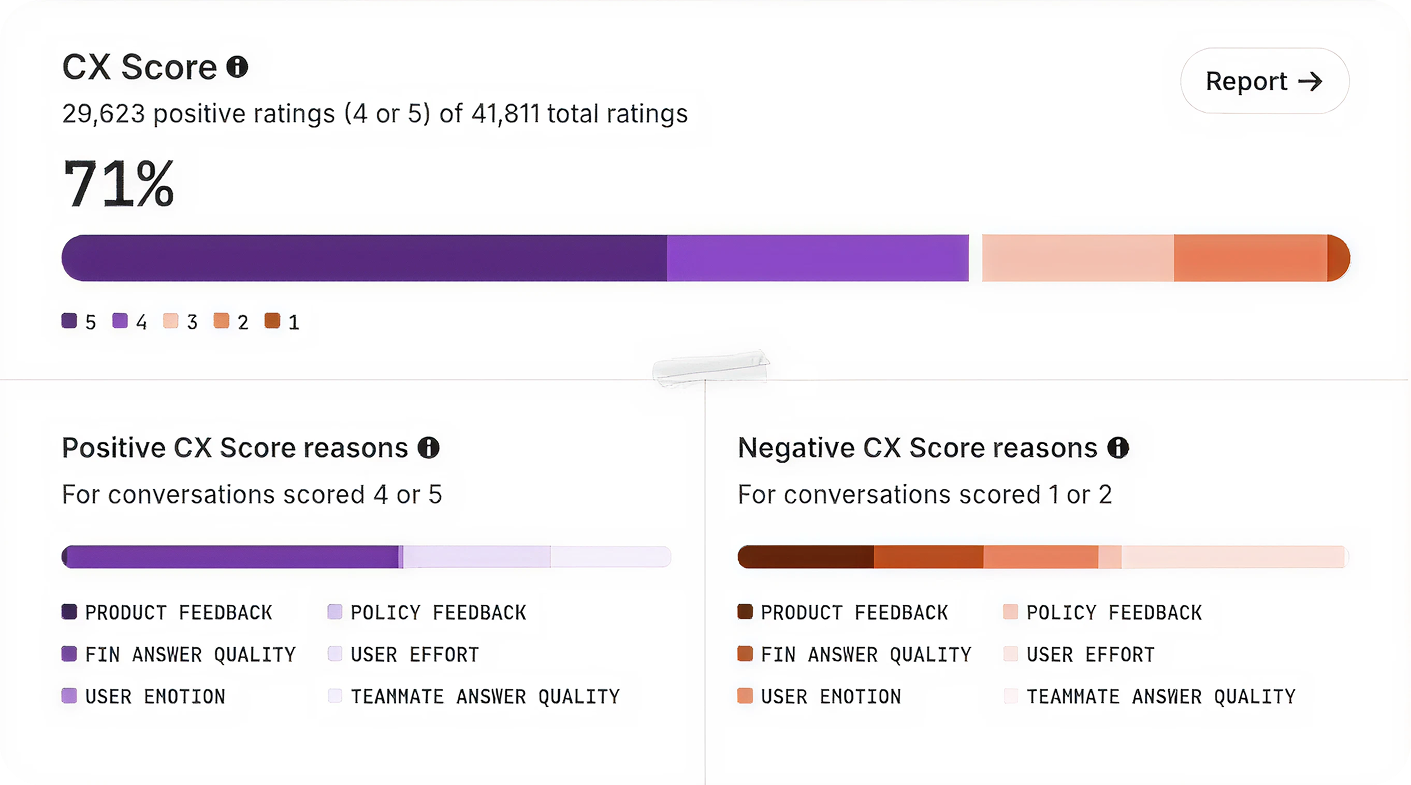
We built CX Score to give support teams a complete view of how their customers feel across every conversation. It surfaces what’s working, what’s not, and why—so leaders can communicate impact clearly and drive change across support, product, and the wider business.
A CX Score in action: repeated CSV export failures trigger a low score and customer frustration, while the AI agent clarifies next steps and gathers details—turning raw signals into actionable support insights.
Here’s exactly how I approached building a trustworthy metric that support leaders can inspect, explain, and defend.
1) It’s grounded in how support teams define quality. I started with how experienced support professionals actually evaluate conversations—collecting real examples of strong, mixed, and poor interactions across industries, identifying the specific factors that shape overall experience, and writing plain-English rules for each. The result: CX Score applies the same criteria a trained support professional would use, not generic LLM assumptions.
2) It’s aligned with human judgment. We created a dataset of thousands of real customer conversations spanning multiple industries, languages, channels, and agent types. Each was manually reviewed by experienced support professionals—with two reviewers per conversation where possible and disagreement resolution to create stable consensus labels. The result: CX Score is trained and tested to behave like an expert reviewer, not a language model making broad guesses.
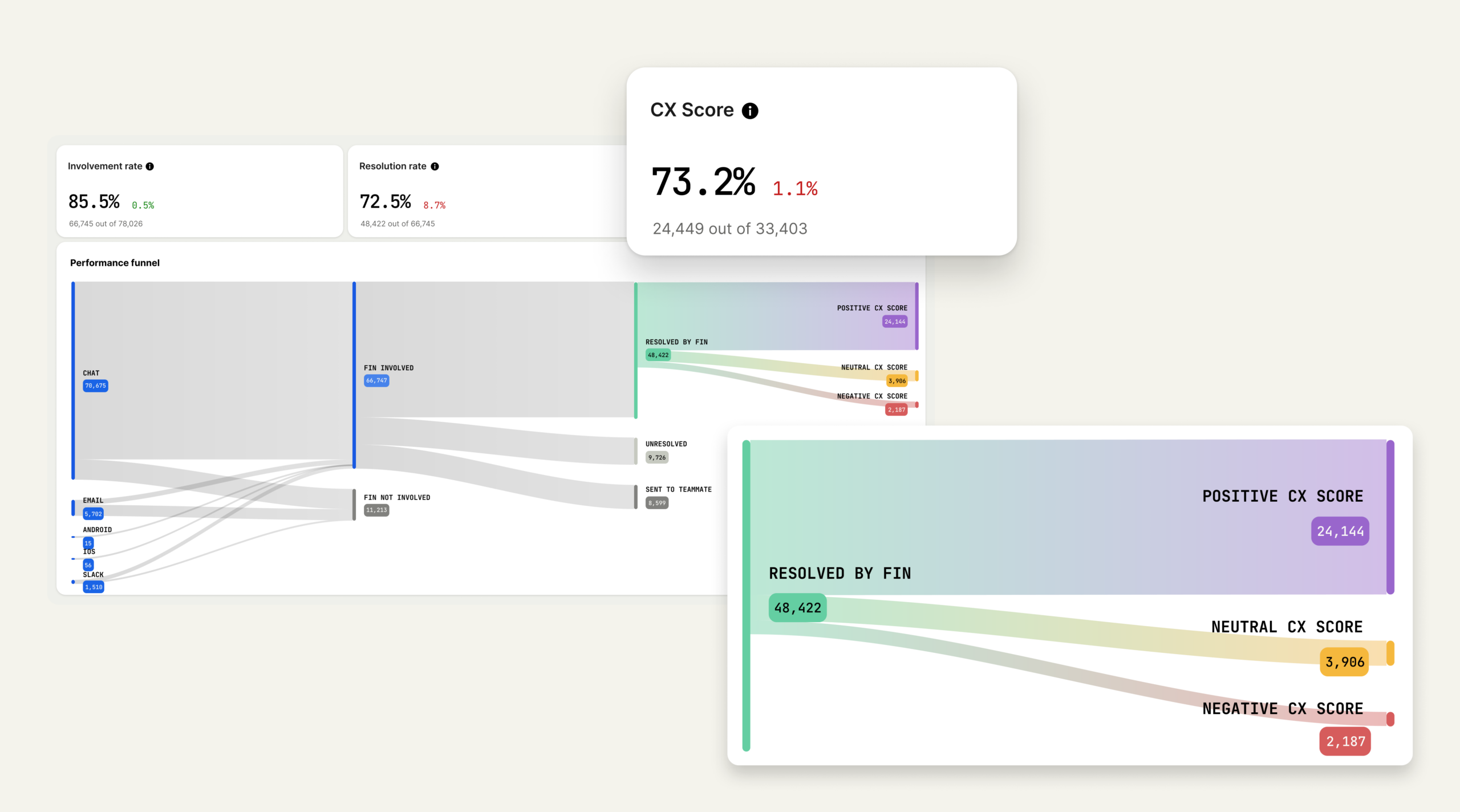
A modern CX analytics view shows how conversations flow from chat, email, and mobile into AI assistance, then to resolutions and sentiment outcomes—turning messy support data into a single, defensible CX Score.
3) It’s engineered by AI specialists. CX Score isn’t a prompt attached to an LLM. It’s a production system built by Intercom’s AI Group: 37 ML scientists and 350 engineers whose full-time focus is AI for customer service. The system includes specialized handling for long transcripts, model configuration tailored for support language and subtle sentiment, prompt engineering designed to default to neutral when evidence is weak, and a multi-stage evaluation pipeline that checks for precision, consistency, and reliability. The result: A metric built by a team that understands LLM behavior in production support environments, where accuracy and consistency matter most.
4) It’s validated statistically, not qualitatively. Trust requires measurement, not vibes. We tested CX Score across standard ML metrics: Precision (when the model flags a negative experience, how often do humans agree?), recall (how many human-identified issues does it catch?), and F1 score (the balance between both). We set an explicit bar: F1 above 0.8, representing high agreement with human judgment. We reran these evaluations through every revision, checking for regressions or biases, and I focused especially on negative experiences, because a false negative hides a real problem. The result: CX Score meets a measurable standard before it ships—not a gut check, a statistical requirement.
5) It was battle-tested with real customers. Lab accuracy isn’t enough. Customer environments are messy: Varied ticket types, mixed languages, unpredictable edge cases. Before release, we ran a multi-phase field test—shadow-scoring conversations with both old and new models, validating sensible behavior across agent type and conversation length, then rolling out to a controlled customer group who confirmed the scores felt right, reasons were clear, and insights were actionable. The result: CX Score shipped because real teams told us it made sense in practice, not because it passed internal tests.
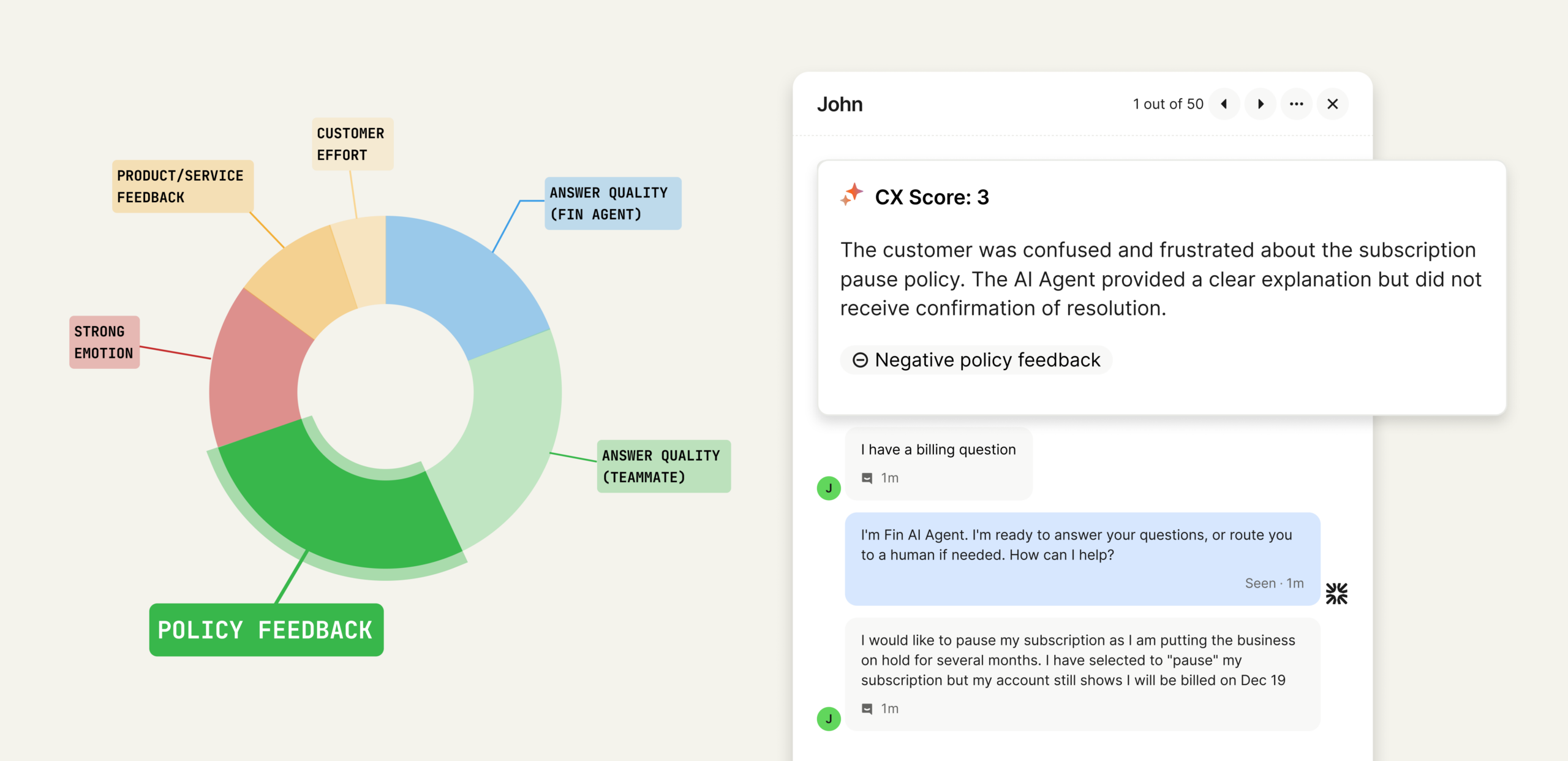
From conversation to clarity: this visual maps the drivers behind a CX Score. Explore how policy feedback, answer quality, and effort combine to produce defendable insights support leaders can act on.
The importance of explainability. One of the most critical choices I made was ensuring CX Score isn’t a black box. Every score comes with clear reasons, concrete excerpts, and a short explanation of what influenced the rating. This turns the metric into something you can inspect, audit, and explain to executives. You don’t have to trust the algorithm. You can see exactly why a conversation earned the score it did.
A metric that evolves with your business. Customer expectations shift. Products change. AI improves. A trustworthy metric can’t be static. CX Score evolves with the same commitments that shaped its redesign: Evaluate the real signals that shape customer experience, keep the logic simple and interpretable, and ensure leaders can make clear decisions from it. It’s built to be a durable source of truth across every conversation.
The takeaway. In a world where products look the same and AI can generate any interaction, customer experience is one of the few differentiators that actually matters. Support leaders have built that expertise conversation by conversation. What they’ve lacked is a measurement system that could validate it at scale—one that’s reliable enough to report to the C-suite, explainable enough to defend in strategy meetings, and rigorous enough to drive real decisions. That’s what CX Score is designed to be: A metric that reflects the reality support leaders see every day, backed by the technical rigor to make it credible everywhere else.
Want to see CX Score in your workspace? Ask your admin to enable it for your team, and start using explainable AI insights to improve customer experience and coach with confidence.
Shipping AI agents is not like shipping a typical feature. The system learns, reasons, and takes action in unpredictable environments, and when it’s customer-facing, the stakes are high. Over the past few years, I’ve refined a practical checklist that helps my teams move quickly without breaking trust. It balances speed with safety, and ambition with accountability—exactly what you need to scale agentic AI in production.
This checklist was forged in real launches—some smooth, some humbling. Early on, I watched an otherwise brilliant agent confidently offer a refund policy we didn’t have. That one incident made it clear: AI agents require a higher bar for guardrails, evals, and observability. Today, I won’t greenlight an AI rollout without these steps being explicit, owned, and testable.
Start with outcomes, not output. I define the job-to-be-done, the target users, and the measurable business impact using outcomes vs output OKRs and driver trees. Success is not “ship an agent,” it’s “reduce first-response time by 40% with no drop in CSAT,” or “increase qualified demo bookings by 20% at a lower cost per acquisition.” Clear outcomes give the agent a purpose and the team a north star.
Prepare the knowledge the agent will use. A retrieval-first pipeline beats raw prompting for most enterprise cases. I inventory sources of truth, set access controls, and enforce data governance from day one. That includes PII handling, redaction, retention policies, and privacy-by-design. If the agent can’t reliably retrieve the right fact at the right time, the rest doesn’t matter.
Choose models and prompts with discipline. I align model selection with context window management, cost, latency, and tool-use requirements. Then I build prompts and tools together, not in isolation, and I keep temperature, stop conditions, and function-calling explicit. Most importantly, I use eval-driven development: golden datasets, task-specific metrics (accuracy, helpfulness, latency, cost), and target thresholds that must be met before widening rollout.
Manage AI risk upfront. I treat jailbreaks, toxicity, and data leakage as product risks, not just security issues. I implement layered defenses—input/output filtering, policy checks, rate limits, and abuse monitoring—and define escalation paths and human-in-the-loop handoffs for ambiguous cases. Every risky capability needs an owner, a playbook, and a test.
Build the pipeline that lets you iterate safely. Prompts, tools, policies, and retrieval configs go through the same CI/CD rigor as code. I use feature flags for progressive delivery, canary cohorts to limit blast radius, and clear rollback procedures. Observability isn’t optional; I track latency, token usage, cost, failure modes, and user outcomes. I also watch DORA metrics and deployment frequency to ensure we’re improving the engine, not just the output.
Constrain autonomy intentionally. Agent behavior design matters as much as model choice. I set step limits, define tool whitelists, separate read vs write permissions, and specify decision checkpoints. When the agent is uncertain or confidence drops below a threshold, it hands off to a human or a deterministic workflow. Guardrails aren’t barriers; they’re bumpers that keep you on the track.
Instrument what users experience, not just what models produce. I track activation, task success, self-serve completion rates, and time-to-value. I pair Agent Analytics with journey analytics so I can see where the agent helps or hurts. I also invest in UX trust cues—transparent explanations, undo paths, and in-app guides—so users feel in control. When the agent changes behavior through learning, the interface should make that understandable.
If you’re shipping a voice AI agent, test in realistic conditions. I set targets for ASR accuracy, barge-in responsiveness, TTS prosody, and end-to-end latency. I predefine safe transfer logic for complex calls and ensure compliance for call recording and data retention. Voice amplifies both the magic and the mistakes; operational excellence is non-negotiable.
Plan the business rollout like a product, not a press release. I align pricing (often consumption SaaS pricing), packaging, and SLAs with actual unit economics—tokens, inference, and retrieval. I equip solutions engineering with playbooks and reference architectures, wire up CRM integration for attribution, and put feedback loops into Intercom or the support stack so we learn from every interaction.
Run operations like an SRE team. I define incident severity for AI-specific failures (e.g., harmful output, runaway cost, degraded retrieval), add alerting, and keep runbooks current. I schedule postmortems that feed directly into eval baselines and backlog priorities. Continuous discovery isn’t a ceremony; it’s the safety net that keeps improvements compounding.
Close the loop on compliance and governance. From day zero, I document data flows, vendor scopes, and audit logs. I verify regulatory compliance and adopt privacy-by-design so I’m not retrofitting later. Transparency, user consent, and opt-outs aren’t just legal checkboxes; they’re trust-building tools that differentiate your product.
The result of this checklist is speed with confidence. It gives my teams a common language to debate trade-offs, a clear path to production, and the guardrails to scale safely. If you’re preparing to deploy an agent, adapt these steps to your stack and your customers. Your future self—and your users—will thank you.
I’ve been exploring what I call the next level of vibe coding: orchestrating agentic AI to build complex product artifacts in minutes, not days. The breakthrough comes from ditching linear handoffs and embracing true parallelism—letting specialized agents tackle the work simultaneously while I steer the orchestration. In product management contexts where speed and clarity matter, this shift changes everything.
Building a KPI Driver Tree in two hours becomes possible when you stop building sequentially and start building with parallel agents.
For product leaders, a KPI Driver Tree is the fastest way to make strategy legible. It ties high-level outcomes to the levers we can actually pull—features, channels, pricing, onboarding, activation, and retention mechanics—so we can prioritize with confidence. Done well, it connects outcomes vs output OKRs, clarifies measurement, and aligns the team around a shared, testable model of growth.
Here’s how I operationalize it with agentic AI and AI workflows. I spin up a small team of specialized parallel agents: a Metrics Librarian (taxonomy and definitions), a Data Modeler (event and table design), a Research Synthesizer (voice of customer and causal hypotheses), a UX Prototyper (visualizing the tree and flows), and a QA/Evaluator (logic and consistency checks). An Orchestrator coordinates these agents, resolves conflicts, and composes outputs into a single, production-ready artifact—while I set constraints, review deltas, and decide.
In a typical two-hour sprint, all agents run at once. While the Metrics Librarian finalizes the KPI ontology, the Data Modeler validates instrumentable events and joins, and the UX Prototyper renders an interactive driver tree for a unified analytics platform. Meanwhile, the Synthesizer maps qualitative insights to quantitative levers, and the Evaluator stress-tests assumptions. Because we’re not waiting for sequential handoffs, we converge on a coherent driver tree and its initial measurement plan in one pass.
The payoff isn’t just speed—it’s higher-quality decisions. Parallel agents reduce context loss, expose trade-offs earlier, and allow me to compare multiple viable paths side-by-side. This accelerates continuous discovery, aligns with product strategy, and gives product managers and LLMs for product managers a clear, living map of how inputs roll up to outcomes. It’s the closest I’ve found to running a product trio at machine speed.
Guardrails matter. I pair this approach with strong data governance, privacy-by-design, and eval-driven development so every agent’s output is testable and auditable. Clear prompts, scoped corpora, and consistent acceptance criteria keep the Orchestrator honest, while lightweight Agent Analytics helps me see where reasoning falters and where to improve the system.
If your team is still tackling analytics artifacts sequentially—requirements, then instrumentation, then visualization—consider switching mental models. Treat the driver tree as the backbone, empower parallel agents to co-create around it, and reserve human judgment for the critical calls. This is vibe coding for product management: creative, fast, and grounded in measurable outcomes.
Your customer-service AI agent is live. It answers common questions, the launch dashboard looks healthy, and the next budget conversation is already about scale. Then a harder question arrives: which customer problems can the system actually own from start to finish?
That answer separates a production pilot from a mature deployment. Maturity is not the number of channels using AI or the quality of the demo. It is your ability to give the system meaningful responsibility, measure the result, recover safely when it fails, and improve it as part of normal operations. The framework below will help you diagnose where your deployment is shallow and decide what to build next.
Maturity begins where the pilot stops
Investment no longer distinguishes an AI leader. Among 2,470 global support professionals surveyed by Intercom, 82% of senior leaders said their teams had invested in AI during the previous year, 87% planned to invest in 2026, and 77% said AI was meeting or exceeding expectations. Yet only 10% classified their deployment as mature.
Those are self-reported responses collected by an AI-support vendor, so treat them as a directional benchmark rather than causal proof. The useful signal is the gap: buying and launching AI has become common, while redesigning customer service around it remains rare.
A pilot proves that an AI agent can participate. A mature operation proves that it can take responsibility. Participation might mean generating an answer before handing the conversation to a person. Responsibility means resolving the customer’s need, completing any permitted action, recording what happened, and escalating with context when human judgment is required.
Dimension
Pilot-shaped deployment
Mature operating behavior
Scope
A few answerable intents on one surface
Selected journeys owned from initial request through verified outcome
Work performed
Retrieves information or drafts a reply
Explains, gathers context, uses approved tools, and completes permitted tasks
Ownership
A launch team watches aggregate results
A named operator owns performance, failures, and the improvement backlog
Knowledge
Content is cleaned up before launch
Knowledge coverage, accuracy, and maintenance are governed as production dependencies
Testing
The happy path works in a demo
Realistic scenarios, boundary cases, and regressions are evaluated before changes ship
Handoffs
Escalation is an undifferentiated escape route
Every handoff has a reason, preserves context, and feeds the next improvement decision
Success
Containment or deflection rises
Verified resolution, task completion, quality, safety, and customer impact improve together
Use this as a constraint map, not an average score. A deployment with excellent content but unreliable account permissions is not ready to complete account changes. A deployment with strong automation but no failure taxonomy cannot improve systematically. Your least-developed operating dependency usually limits the next safe increase in responsibility.
Expand responsibility one customer intent at a time
The safest unit of expansion is not a channel, market, or percentage target. It is a customer intent with a defined outcome. Shipping an AI agent to every messaging surface can increase reach without increasing capability. Giving it end-to-end ownership of one additional support journey creates measurable depth.
For each intent, move up this responsibility ladder only when the previous level is dependable:
Answer: Retrieve and explain approved information.
Clarify: Ask the minimum questions needed to identify the customer’s situation.
Contextualize: Use authenticated account, product, region, or history data to provide the applicable answer.
Act: Complete a permitted task through a reliable tool or workflow, then confirm the result.
Intervene proactively: Detect a relevant condition and offer or perform an appropriate next step under explicit rules.
This ladder explains why an answer bot and an operational AI agent can look similar in a dashboard but create very different value. The first reduces reading and typing. The second can remove an entire unit of work for the customer and the support team.
The reported difference between early and deep deployments appears in the type of work performed. Mature teams were more likely than teams in initial deployment to report automation of manual work, proactive engagement, and task completion: 63% versus 52%, 51% versus 41%, and 45% versus 28%, respectively. Mature teams also reported higher quality and consistency more often. The figures do not establish that deployment depth alone caused the gains, but they show what deeper responsibility looks like in practice.
Before promoting an intent to the next rung, answer these questions:
Outcome: Can you state exactly what successful resolution means for the customer?
Knowledge: Is there an approved, current answer for the common case and its important exceptions?
Identity: Does the workflow know who the customer is when personalization or action requires authentication?
Authorization: Can the system verify that this customer and this AI workflow are allowed to perform the action?
Inputs: Can required values be validated before an action is submitted?
Confirmation: Can the system verify that the downstream task succeeded instead of assuming that a tool call worked?
Recovery: Is there a safe retry, rollback, approval, or human-handoff path?
Evidence: Can an operator reconstruct which knowledge, data, rules, and tool results produced the outcome?
Evaluation: Do your test scenarios cover ambiguity, missing information, exceptions, and known failure modes?
If an answer is no, you have found the next capability to build. Do not compensate with a more confident prompt. Missing permissions need a permission model. Unreliable data needs an integration fix. Conflicting policy pages need knowledge governance.
Use additional care for refunds, cancellations, account changes, identity-sensitive requests, and other consequential actions. Start with reversible or approval-gated operations. Validate the customer, the requested change, the permitted amount or scope, and the downstream result. A fast autonomous action is not a success if it creates financial loss, locks the wrong account, or leaves no reliable audit trail.
Build the operating system behind the agent
An AI agent does not mature on its own after launch. Performance plateaus when ownership, content, testing, integrations, and analysis remain side projects. These capabilities need to operate as one system.
Give performance to a named operator
Executive sponsorship and operational ownership solve different problems. The sponsor aligns customer experience, economics, organizational design, and cross-functional priorities. The operator turns failures into changes and makes sure those changes reach production safely. One person can fill both roles in a smaller organization, but the accountabilities should still be explicit.
The operator should own a working backlog organized by customer intent. Each entry needs enough context to support a decision:
The customer intent and desired outcome.
Where the current journey begins and ends.
Conversation volume and customer impact drawn from your own data.
The primary failure mode, supported by examples.
The proposed content, behavior, integration, or policy change.
The person responsible for the dependency.
The scenarios that will validate the change.
The deployment status, observed result, and rollback decision.
This prevents the backlog from becoming a collection of prompt tweaks. It also exposes systemic problems. If several intents fail because account status arrives late, the priority is the shared data dependency, not separate wording changes in every conversation.
Treat knowledge as a runtime dependency
Content quality is not a launch task. The AI agent depends on current knowledge every time it answers, just as a transactional workflow depends on a functioning service. A policy change can therefore create production failures even when no AI configuration changes.
Create a content contract for every intent you expect the agent to own:
Canonical location: Identify the approved source rather than allowing several conflicting pages to compete.
Coverage: Include the common case, eligibility conditions, exceptions, prerequisites, and the point where human judgment begins.
Scope: Separate product, plan, market, language, and policy variants when the answer differs.
Owner: Assign the person or function authorized to approve changes.
Freshness trigger: Tie review to the product, pricing, policy, or workflow event that can make the content stale.
Retirement: Remove or clearly supersede obsolete information so retrieval does not surface an old rule.
Validation: Attach representative scenarios that should pass whenever the knowledge changes.
A retrieval-first pipeline makes content maintainable because the approved explanation lives in governed knowledge instead of being buried inside prompts. Prompt behavior should decide how to use policy, not become a second unofficial policy store.
Run every change through an evaluation loop
A useful production loop is Train, Test, Deploy, Analyze. Its value is not the labels. It is the discipline of connecting an observed failure to a controlled change and then checking whether the change improved real outcomes.
Train: Change the relevant knowledge, behavior, data access, or tool. Record the failure you expect the change to fix.
Test: Run representative customer scenarios, including the happy path, ambiguous wording, missing data, policy exceptions, tool failure, and required escalation. Govern or redact conversation data under your privacy controls.
Deploy: Release to the intended intent, channel, customer segment, language, or market with a known fallback and rollback path.
Analyze: Check the customer outcome and guardrails, inspect new failure patterns, and decide whether to keep, revise, expand, or revert the change.
Your evaluation set should evolve with production. Add scenarios when a customer finds a new ambiguity, a product release changes the journey, or an integration fails in a way the original tests did not anticipate. Keep regression cases after the immediate defect is fixed. Otherwise, one improvement can quietly reintroduce an old failure elsewhere.
Make actions observable and recoverable
Answer quality alone is insufficient once the AI agent can perform tasks. Your operation must distinguish a bad explanation from a failed action, a denied permission, stale account data, a duplicate request, and a downstream timeout. Those failures require different owners and different fixes.
For each consequential workflow, preserve the facts needed to reconstruct the outcome: the detected intent, the applicable knowledge or policy version, required customer inputs, authorization result, tool invoked, request status, returned result, confirmation shown to the customer, and handoff reason. The goal is not indiscriminate data collection. Retain only what your privacy and security rules permit, but retain enough operational evidence to diagnose a failure.
Design the human path at the same time as the autonomous path. A handoff should carry the customer’s request, relevant facts already collected, actions attempted, results received, and the unresolved decision. Making the customer repeat the conversation transfers the AI agent’s failure cost directly to them.
Turn handoffs into the improvement backlog
A handoff is not automatically a failure. Some requests require empathy, judgment, negotiation, policy discretion, or authority that should remain with a person. The operational failure is an unexplained handoff. When every escalation looks the same in analytics, you cannot tell whether to improve knowledge, retrieval, workflow reliability, or the boundary itself.
Handoff or failure type
What to inspect
Likely improvement
Knowledge gap
No approved answer, missing exception, or obsolete policy
Create or update canonical content and add regression scenarios
Retrieval mismatch
Relevant content exists but the wrong variant is selected
Improve structure, metadata, scoping, or content separation
Interpretation or behavior error
The right information is available but applied incorrectly
Refine behavior instructions and add boundary-case evaluations
Missing customer context
The answer depends on account, plan, region, or history data that is unavailable
Connect the required data or ask a precise clarifying question
Authorization boundary
The requested action is not permitted for this customer or workflow
Preserve the guardrail; improve explanation or approval routing
Tool or data failure
A permitted action fails, times out, or returns an uncertain result
Improve integration reliability, confirmation, retry, and fallback behavior
Deliberate human boundary
The request requires judgment, discretion, or specialized handling
Keep the handoff and improve context transfer
Apply one primary reason to each reviewed failure, even when several contributing factors exist. Route the item to the owner who can change that dependency. Over time, the distribution of reasons tells you whether the deployment is becoming more capable or merely handing off in different places.
Measure the operation as a stack rather than relying on one headline rate:
Reach: Where was the AI agent involved, broken down by intent, channel, language, market, and product area?
Outcome: Was the customer’s issue actually resolved, and did any requested task complete successfully?
Quality: Was the answer correct, consistent, clear, and appropriate for the applicable policy and context?
Customer impact: What happened to satisfaction, repeat contact, abandonment, and escalation experience?
Guardrails: Were there unauthorized actions, incorrect confirmations, failed tools, or missed mandatory handoffs?
Diagnostics: Which knowledge gaps, retrieval mismatches, behavior errors, and integration failures drove the result?
Do not confuse involvement with success. It measures how often the system participated. Do not treat a conversation that ended without a human as verified resolution either; the customer may have abandoned the interaction or returned through another channel. Tie autonomous resolution to evidence that the intended outcome occurred, especially when a tool or account change was involved.
Aggregate containment is also easy to misread. It can rise because the mix shifted toward simpler questions while a high-impact journey deteriorated. Review results by intent and relevant customer segment before crediting a model or configuration change. If containment improves while repeat contacts, task failures, or customer satisfaction worsen, the operation has not become more mature.
Key takeaways
AI deployment maturity is the ability to give an AI agent measurable, recoverable responsibility for customer outcomes, not simply expose it to more conversations.
Expand one customer intent at a time through answering, clarification, contextualization, action, and carefully governed proactive work.
Do not automate consequential actions until identity, authorization, validation, confirmation, observability, and recovery are in place.
Assign a named operator to own intent-level performance, failure analysis, dependencies, evaluations, and the improvement backlog.
Manage knowledge as production infrastructure with canonical content, explicit scope, accountable owners, freshness triggers, and regression scenarios.
Classify handoffs by root cause and measure verified resolution, quality, customer impact, and guardrails alongside containment.
At your next operating review, choose one important intent that the AI agent currently answers but does not own. Map it onto the responsibility ladder, run the readiness questions, name its operator, classify its current handoffs, and put the next change through the evaluation loop. The scope is deliberately narrow. The maturity gain is real: one more customer problem resolved safely from beginning to end.
If your team has plenty of dashboards but still spends too much time turning a product question into a cohort, an explanation, and a decision, the bottleneck is no longer data collection. It is the work between asking the question and acting on the answer.
Treat the upgrade as a decision system, not an AI shortcut
A weak rollout starts by giving everyone access and encouraging them to try prompts. That produces activity, but it does not establish whether the technology is improving product work.
Define the unit of value as a completed decision. Each use of AI Visibility should move through a traceable sequence:
Start with a specific product question that could change an action.
Translate the question into an explicit cohort and metric definition.
Examine the relevant behavioral evidence.
Draft a narrative that separates observations from interpretations.
Record the decision, owner, and next action.
The enhancements reduce different kinds of friction inside that sequence. AI chat can reduce the interface work involved in expressing a segment. Content generation can reduce the effort required to turn analysis into a readable brief. A clearer interface can make the workflow easier for cross-functional partners to follow. Reliability improvements can support confidence in the system. None of those changes removes the need to define the question or approve the conclusion.
I would begin with two or three recurring, high-value use cases, not every analytics task. A good pilot question appears often, has a trusted baseline for comparison, and ends in a recognizable decision. Activation analysis, churn exploration, and experiment reporting meet those conditions for many product teams.
Match each enhancement to a concrete product job
Do not ask a team to use AI for analytics in the abstract. Give each workflow an input contract: the decision being considered, the population, the behavior, the observation period, the metric, and the exclusions. This prevents a fluent prompt from hiding an underspecified question.
Find an activation bottleneck without redefining activation
An activation question usually sounds simple: which new users reach value, and where do the others stop? The difficult part is deciding what counts as a new user, what behavior represents value, how long the observation period lasts, and which internal or test activity should be excluded.
Set those definitions before opening AI chat. Then describe the desired cohort in behavioral language and use chat-driven segmentation to iterate on it. Before analyzing the result, compare the AI-created segment with a known cohort, a manually configured version, or an established dashboard. If the populations differ, investigate the definition rather than explaining the chart.
Once the segment is accepted, use content generation to draft a brief that identifies the observed drop-off, the affected population, the relevant comparison, and the question that deserves further discovery. Keep causal language out unless the evidence supports it. A funnel can show where behavior changes; it does not, by itself, explain why.
Explore churn precursors without turning correlation into cause
Churn analysis becomes unreliable when a cohort mixes users who never activated, customers who became inactive, and accounts that formally cancelled. Those are different states with different product implications.
Write a plain-language definition of the state you care about before generating the segment. A useful prompt pattern is: create a cohort of the specified customer population that completed the core behavior during the reference period but did not complete it during the comparison period; exclude internal and test activity; then separate the result by the business attribute relevant to the decision.
Use AI chat to test legitimate variations in that definition, not to invent the definition for you. When a behavioral difference appears, label it as a precursor or association until customer evidence or an experiment supports a causal explanation. The next action may be another analysis, a customer interview, or a retention experiment. It should not automatically be a roadmap commitment.
Draft experiment reports without delegating the decision
AI-generated experiment summaries are useful because the structure is repetitive even when the decision is not. Give the system the approved hypothesis, eligible population, exposure definition, primary outcome, guardrail measures, and underlying analysis. Ask for a draft that covers what changed, what remained uncertain, which segments require caution, and what decision the evidence supports.
The generated narrative should never become the statistical authority. The experiment analysis remains the record for effect estimates, uncertainty, and data-quality caveats. The brief exists to make that evidence understandable and actionable. If the prose and the analysis disagree, correct the prose before it travels to stakeholders.
Put human review around definitions and conclusions
AI can make a loosely defined request look finished. That is the central operating risk. The safest control is to review the workflow where meaning enters and where meaning leaves: validate the segment before interpreting the result, then validate the narrative before sharing it.
Validate the segment before reading the result
Confirm the identity unit. A user, device, workspace, and customer account are not interchangeable.
Check that event names and properties map to the team’s current tracking taxonomy.
Make inclusion rules, exclusions, sequence requirements, and observation periods explicit.
Compare membership or aggregate trends with a trusted manual definition when one exists.
Inspect surprising differences before using them as evidence. A mismatch may come from the cohort definition rather than user behavior.
Store a plain-language definition with the accepted cohort so another person can reproduce the analysis.
Validate the narrative before distributing it
Require each material claim to point back to a chart, table, or approved metric.
Separate observed behavior from a proposed explanation.
Verify that the population, date range, and comparison in the prose match the analysis.
Remove unsupported causal language and any detail the audience is not permitted to access.
State the decision, the remaining uncertainty, and the person responsible for the next action.
Content generation reduces drafting work; it does not transfer review responsibility to the model. This distinction is especially important for executive briefs, where polished language can make a weak inference appear more certain than it is.
Govern prompts, access, and workflow changes
Basic prompt templates, access policies, review steps, and data-governance controls turn experimentation into a repeatable capability. A prompt template should specify the business question, required definitions, exclusions, expected output, evidence standard, and reviewer. Access should follow the same least-privilege principles applied to the underlying analytics data.
Reliability also needs operational visibility. Keep a lightweight record of the original question, accepted cohort definition, supporting analysis, generated brief, reviewer, and resulting decision. When an answer changes unexpectedly, that record helps you distinguish a tracking problem from a cohort change, a prompt change, or an interpretation error.
Measure whether the rollout changes product decisions
Prompt volume and generated summaries are adoption signals, not proof of value. Establish a baseline before the pilot, run the selected use cases through the new workflow, and compare the result using measures tied to decisions.
Signal
How to observe it
What a weak result means
Time-to-insight
Track elapsed time from an accepted question to a reviewed analysis brief.
If the time does not fall, find the handoff or review step that still creates delay.
Stakeholder adoption
Track whether product, design, engineering, growth, and leadership use the workflow in recurring decisions.
If only analysts use it, the interface or output may not fit cross-functional work.
Decision velocity
Track elapsed time from requesting evidence to recording an explicit decision or next action.
If output increases but decisions do not move sooner, the workflow is producing content rather than clarity.
Review quality
Count material corrections to cohort definitions, metrics, and conclusions before and after sharing.
If rework rises, improve the event taxonomy, prompt contract, validation process, or reviewer guidance before expanding access.
Trust exceptions
Record cases in which an AI-assisted result conflicts with validated analytics or cannot be reproduced.
If exceptions persist, pause expansion and resolve the data, definition, or workflow problem.
Judge the pilot as a system. Faster segmentation with heavy correction is not a win. Faster drafting with unchanged decision velocity is not a win either. The useful outcome is a shorter path from question to reviewed decision, with stable or improving quality.
Expand only after the pilot workflow is reproducible. At that point, turn the accepted prompt patterns, cohort definitions, review criteria, and measurement approach into a shared operating playbook. The cleaner interface can help more partners participate, but the playbook is what keeps participation consistent.
Key takeaways
Use Amplitude AI Visibility to shorten a decision workflow, not merely to increase the volume of segments and summaries.
Begin with two or three recurring use cases that have trusted baselines and recognizable decisions.
Define the population, behavior, period, metric, and exclusions before asking AI to create a segment.
Validate cohort meaning before interpreting behavior, then validate the generated narrative before sharing it.
Scale the workflow only when faster output is accompanied by reproducibility and sound review.
Choose the next recurring product decision that still involves too much manual translation. Write its input contract, capture its current path to a reviewed decision, and use that single workflow to determine whether AI Visibility is removing the right friction.