I recently spent time with an episode of All Things Product that hit especially hard as we head into year-end: Petra Wille and Teresa Torres ask, “What do you want to be known for in your work?” As someone leading product management and building high-performing teams, I regularly bring this question into my Q4 conversations. It’s a powerful lens for product management leadership, career transitions, and how we show up for our customers and colleagues.
Listen to this episode on: Spotify | Apple Podcasts
In this conversation, I appreciated how clearly they unpack the nuances of impact, craft, personal brand, and values—and how those ideas shape the footprints we leave in teams, organizations, and the broader product community. Their stories and lessons learned are equal parts relatable and practical, which is exactly what we need when we’re balancing execution with reflection.
Let’s talk about “legacy.” The word can feel loaded—big, vague, and distant. I reframe it with my teams into a question we can act on now: What meaningful change did we enable for customers and our organization this quarter, and what do we want colleagues to remember about how we did it? That framing keeps us grounded in outcomes and behaviors, not just lofty aspirations.
The distinction between impact and craft is central. Impact is the difference our work makes—what changes because of our decisions. Craft is what we hone for intrinsic reward—our product discovery techniques, decision-making frameworks, and communication muscles. Early in my career, I over-indexed on impact metrics and under-invested in craft. I shipped value, but I wasn’t building the repeatable habits that elevate a product creator for the long haul. Over time, I learned that craft compounds—and it pays dividends in both product-market fit lessons and leadership credibility.
Personal brand and values also matter more than many of us admit. When the pressure is on, people remember how we decide, how we communicate trade-offs, and how consistently we anchor on customer value. I want to be known for rigorous product discovery, clarity under uncertainty, and the integrity to say “no” when it protects long-term outcomes. Those cues travel fast across an organization and quietly define our leadership legacy.
Feedback gaps can reveal blind spots—and we all have them. I proactively create multiple feedback loops: structured 1:1s, skip-levels, stakeholder debriefs after key product decisions, and customer touchpoints. I specifically ask for disconfirming evidence—what am I missing, where did my decision-making create friction, and how might I simplify? Weekly customer learning is non-negotiable for me; it keeps the team grounded and accelerates product discovery. If you need a starting point, Teresa’s work on weekly customer interviews is a solid playbook: Customer Interviews: How to Recruit, What to Ask, and How to Synthesize What You Learn.
Here are the prompts I’m using with my team for Q4 reflection. Why “legacy” can feel loaded—and better ways to frame the question. The difference between impact (what changes because of your work) and craft (what you hone for intrinsic reward). How personal brand and values influence what colleagues remember about you. Why feedback gaps can reveal blind spots—and how to proactively seek better input. Reflection prompts to carry into your Q4 (and beyond). I encourage folks to journal on these, then bring two concrete actions into our next planning cycle.
If you’re thinking about your own growth, preparing for career transitions, or simply curious how others reflect on their product practice, this episode offers both inspiration and pragmatic takeaways. I’m weaving these themes into our planning and calibrations because reflection is a force multiplier—it sharpens strategy, strengthens culture, and ultimately improves customer outcomes.
Follow Teresa Torres: https://ProductTalk.org
Follow Petra Wille: https://Petra-Wille.com
Mentioned in the episode: Petra’s Thought-Provoking Questions to Prompt Your End-of-Year Reflection
Mentioned in the episode: Xing
Mentioned in the episode: Teresa’s work on weekly customer interviews: Customer Interviews: How to Recruit, What to Ask, and How to Synthesize What You Learn
Mentioned in the episode: Petra’s guide: The Product Leader’s Guide to Giving Feedback
Join the conversation with me: What do you want to be known for in your product work this coming year? Share your thoughts below and let’s learn from one another.
Full Transcript
Full transcripts are only available for paid subscribers.
What if my next teammate wasn’t a human hire but an AI coworker—one that can answer support tickets, process invoices, or draft emails—and my non-technical colleagues could teach it how to do those tasks themselves? That is the practical promise behind Neople’s “digital coworkers,” and it’s a shift I’ve been anticipating across customer support and operations: AI that blends the reliability of automation with the empathy and flexibility of modern agents.
Listen to this episode on: Spotify | Apple Podcasts
In exploring how Neople builds and deploys these agents, I appreciated the clarity from Seyna Diop (Chief Product Officer), Job Nijenhuis (CTO & Co-founder), and Christos C. (Lead Design Engineer). They walked through the evolution from simple response suggestions to fully autonomous customer service agents, the architecture powering their conversational workflow builder, and the evaluation loops that include customers as part of the quality process. As a product leader, this resonates deeply with how I approach product discovery, product management leadership, and go-to-market enablement for gen AI in customer support.
Moved from “LLMs will solve everything” to finding the right balance between code, agents, and guardrails
Designed evals that run in production to detect hallucinations before an email ever reaches a customer
Helped non-technical users build automations conversationally — and taught them decomposition along the way
Turned customers’ feedback loops into eval pipelines that improve product quality over time
From a customer support AI strategy standpoint, these choices are decisive. I’ve seen teams struggle when they lead with model horsepower rather than a layered system of retrieval, business logic, and guardrails. The Neople approach aligns with what I’ve practiced: set clear task boundaries, ground responses in trustworthy knowledge, and instrument every step so evals reflect real-world behaviors—not just lab benchmarks.
I also love the emphasis on conversational building for non-technical users. Teaching decomposition implicitly—by guiding users to break down tasks into steps—accelerates adoption and reduces support burden. It’s a practical onramp to gen ai for product prototyping: let users design flows in natural language, then progressively reveal structure, data dependencies, and edge cases as they iterate.
Scaling these agents “where you work” requires deep integrations and visibility. We discussed how the team makes agents feel native in existing tools, maintains “Visibility and Transparency in Neople Responses,” and keeps humans in the loop for sensitive workflows. That transparency is non-negotiable: if an AI is going to act on behalf of my team, I want traceable reasoning, source citations, and reversible actions.
Quality, of course, is where most agent initiatives rise or fall. Running evals in production, detecting hallucinations before messages reach customers, and converting feedback loops into continuous improvement pipelines—this is exactly how you earn trust at scale. It mirrors how I deploy forward deployed engineers with customers: ship intentional constraints, watch real usage, and feed structured signals back into the system to compound quality.
The roadmap beyond support is equally compelling. Once agents demonstrate reliability in high-volume, high-variance environments like customer support, adjacent functions—sales ops, finance ops, and onboarding—become reachable. That’s a credible path to product-market fit lessons: start where the pain is sharp and measurable, prove value with operational KPIs, then expand horizontally with guardrails intact.
For those who want to go deeper, the conversation spans the origin story and real-world applications, through “Integrations and Scaling: Making Neople Work Everywhere,” into techniques for “Ensuring Quality in Customer Knowledge Bases,” “Customer Feedback and Error Analysis,” and the “Technical Details of Knowledge Retrieval.” It also touches “Embedding Strategies and Document Types,” “Automation and Actions in Customer Support,” and “Expanding Beyond Customer Support.” It’s a comprehensive, pragmatic tour of what it takes to make AI coworkers production-ready.
Neople.io – Learn more about Neople’s AI coworkers
The Joy Lab – Neople’s community and podcast about AI and work
If you’re piloting agents today, my recommendations are straightforward: choose a single, high-impact use case; define guardrails and “safe failure” modes; stand up production evals that mirror customer outcomes; and make transparency a default. With that foundation, AI coworkers can become dependable teammates—ones your non-technical colleagues can actually work with, trust, and improve.
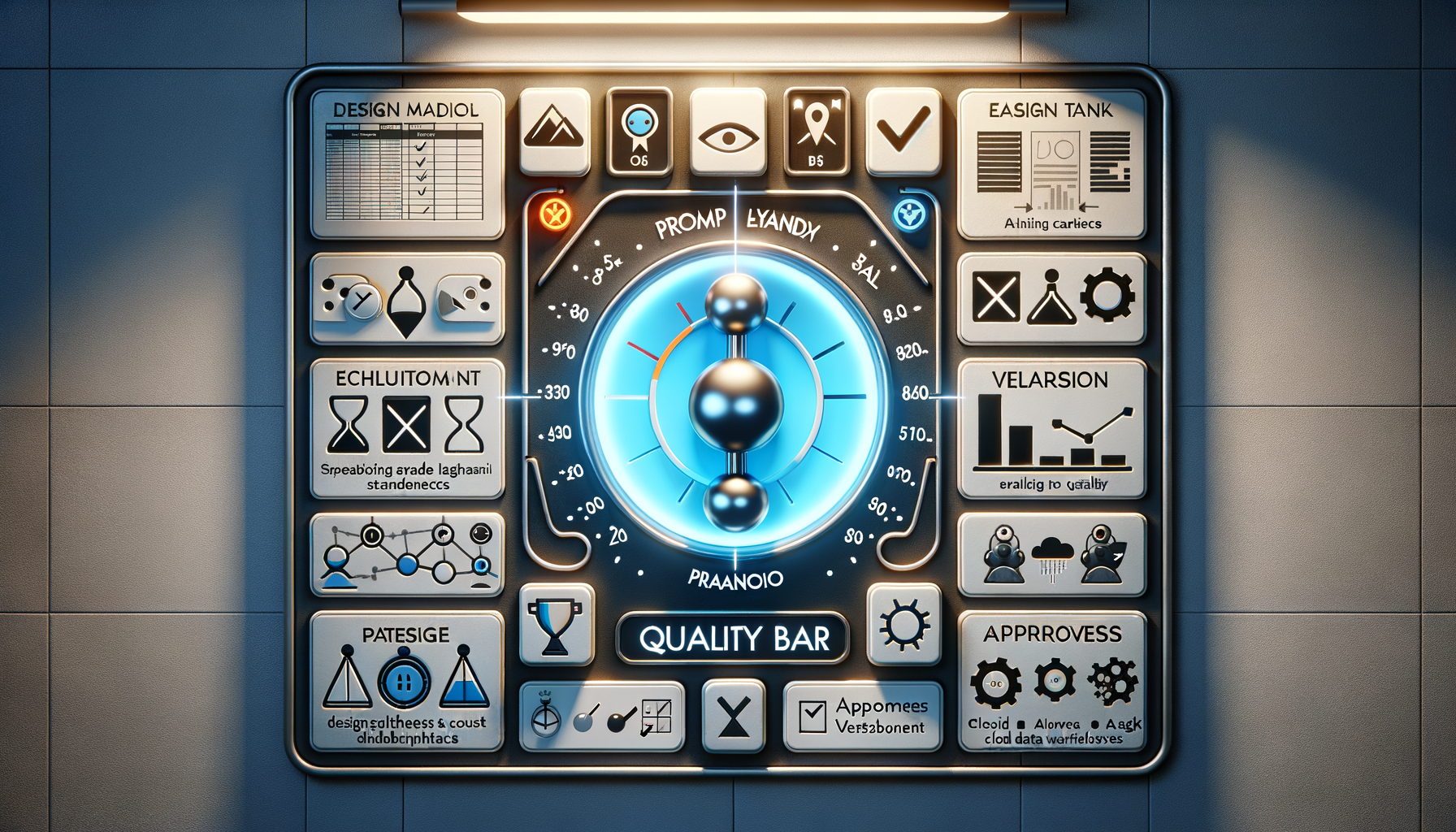
Product-market fit in the GenAI era is elusive because both the technology surface area and user expectations change weekly. That’s why Braintrust caught my eye: they set a relentless quality bar, delayed go-to-market on purpose, and used real-world evaluation pain to shape an end-to-end platform for building AI apps. In my work leading product management teams, I recognize this pattern as the difference between shipping demos and shipping durable value.
Context matters. Ankur Goyal’s journey runs through MemSQL (now SingleStore), Impira, and Figma. Working with high-bar users at MemSQL forged a bias toward precision, performance, and reliability—traits that translate directly to AI infrastructure where flaky evals and brittle prompts can quietly erode trust. When you build for exacting users early, the feedback loop is unforgiving—and that’s a gift.
The throughline is quality. Great software often comes from a place of “paranoia”—the productive kind that compels us to fail proofs, harden edge cases, and verify outcomes under load. In AI product development, that paranoia shows up as rigorous evals, clear data contracts, reproducibility, and measured rollouts. It’s not glamorous, but it’s how you earn compounding trust with builders and operators.
Recruiting is strategy. The trick to recruiting well is selecting for taste, curiosity, and ownership—people who elevate the craft and sweat the engineering details. In AI-heavy products, I’ve had the most success with forward deployed engineers who live with users long enough to discover the non-obvious constraints that should drive the roadmap. Taste plus proximity beats velocity without context.
Impulse control creates leverage. Braintrust delayed go-to-market, which is counterintuitive when the market is hot. But in a new category, premature scaling yields fake signals. The better move is to tighten the loop: instrument the “prompt playground,” pressure-test evals, validate the inner loop of building AI apps, and only then broaden access. When the core interaction is right, growth compounds; when it’s off, every feature feels like a workaround.
Figma-era frustrations with evals became the opportunity. Anyone who has tried to standardize AI evaluations across prompts, models, and datasets knows how quickly the surface area explodes. Converting that frustration into Braintrust’s product thesis—reliable, end-to-end workflows for AI app development—speaks to a classic product discovery principle: go deep on a painful, persistent job-to-be-done before you go broad.
How to recognize a real market opportunity: look for high-frequency workflows with measurable outcomes, teams who already duct-tape solutions, and buyers who have the budget and urgency to pull the product in. When you see repeatable pull from discerning users—and you can demonstrate quality with transparent evals—you’re approaching true PMF rather than narrative fit.
Inside the first six months, the right posture is deliberate focus. For a platform like Braintrust, that means obsessing over the developer inner loop: data in, prompt iteration, eval rigor, versioning, approvals, and productionization. The “prompt playground” must evolve from experimentation to governance, so teams can move from clever demos to reliable deployments with confidence.
AI continues to reshape the platform’s future. As model ecosystems shift (OpenAI and beyond) and the data plane sprawls (Databricks, Snowflake), developers want a unified surface to build, evaluate, and ship. Integrations with familiar tools like Airtable, Coda, Zapier, and Figma lower adoption friction by meeting teams where they already work, while enterprise-grade controls unlock buyers at the scale of Goldman Sachs.
The cultural choices matter as much as the code. Make big bets with extreme clarity, or don’t make them at all. Stay mission-driven when novelty tempts distraction. Write down the customer promise and keep it tight. Hiring mistakes—especially around quality, curiosity, and ownership—compound quickly in AI product teams, so reset the bar early and protect it.
What PMF really looks like here: customers self-discover core value, usage deepens without hand-holding, and cross-functional teams (engineering, data science, and operations) align around shared definitions of quality. Support volume becomes more about how-to than break-fix. Roadmap prioritization becomes easier because the next best feature reveals itself in the workflow data.
My playbook takeaways for product management leadership in GenAI: prioritize eval rigor before growth, use forward deployed engineers for product discovery, specialize the prompt playground into a governed inner loop, and delay go-to-market until high-bar users pull you in. These are the same principles I apply to gen ai for product prototyping and customer support ai strategy—because durable PMF in AI still comes down to quality, focus, and earned trust.
Referenced:
• Airtable: https://www.airtable.com/
• Adam Prout: https://www.linkedin.com/in/adam-prout-0b347630/
• Braintrust: https://braintrust.dev
• Brian Helmig: https://www.linkedin.com/in/bryanhelmig/
• Coda: https://coda.io/
• Databricks: https://www.databricks.com/
• David Kossnick: https://www.linkedin.com/in/davidkossnick/
I’ve spent the last few years watching AI reshape product roadmaps, developer workflows, and customer expectations. One idea now feels undeniable: the web must evolve to serve a new primary user—AIs. That shift changes how we think about search, reliability, governance, monetization, and ultimately, how we design products that scale with trust.
Parag Agrawal is the co-founder and CEO of Parallel, a startup building search infrastructure for the web’s second user: AIs. Before launching Parallel, Parag spent over a decade at Twitter, where he served as CTO and later CEO during a period of intense transformation, as well as public scrutiny.
I was particularly struck by how crisply this frames the next frontier for product leaders: build systems that machines can consume at massive scale without sacrificing accuracy, provenance, or trust. In particular, I was drawn to the emphasis on “deep research,” where Parallel is tackling “deep research” challenges by prioritizing accuracy over speed, and the design choices that make their APIs uniquely agent-friendly. As someone who has shipped AI features into production, that trade-off resonates—speed gets demos; accuracy earns renewals.
Here’s how I’m synthesizing the most actionable takeaways for product, engineering, and go-to-market leaders. First, design for AI as the primary customer. That means structuring content and APIs so agents can reliably reason, verify, and self-correct. Agent-friendly interfaces need deterministic schemas, explicit provenance, stable latency envelopes, and predictable failure modes. If an agent can’t trust your contract, it won’t chain your service into complex workflows, and you’ll lose the compounding effects that make AI platforms defensible.
Second, bring a systems mindset to accuracy. “Accuracy over speed” isn’t a slogan—it’s an architecture choice. In my experience, that shows up as retrieval strategies tuned for recall and precision trade-offs, multi-pass verification, and human-in-the-loop escalation paths for high-risk queries. For deep research use cases, you need to make the cost of being wrong explicit in your design and your SLAs.
Third, expect your ICP to evolve as AI matures. Early adopters may be research-heavy teams and product creators building agentic workflows. Over time, as reliability improves, your ideal customer shifts toward operational teams that demand measurable outcomes—support deflection, conversion lift, cycle-time reduction. I map these stages explicitly in the roadmap and keep pricing, packaging, and onboarding aligned to each phase.
Fourth, consider business models that keep the web open for AI while aligning incentives. If AIs are the web’s second user, publishers need fair value exchange for structured access, provenance, and usage. In practice, that could look like tiered access, usage-based pricing, attribution requirements, or revenue-sharing tied to agent-driven outcomes. The key is ensuring that openness and sustainability are not at odds.
Fifth, build engineering teams that are both pragmatic and research-aware. On my teams, I look for a balance between high-potential builders who move fast with ambiguous specs and experienced hands who can productionize novel systems. Forward deployed engineers can be a force multiplier here—embedding with customers to surface edge cases, close the verification loop, and turn qualitative insights into productized patterns.
Sixth, recognize how the software engineer’s role is evolving in an AI-assisted world. Engineers are increasingly orchestrators—composing models, retrieval layers, tools, and policies—rather than only writing business logic. That requires better observability for prompts and agents, reproducibility for experiments, and contracts that make emergent behavior inspectable and testable. This is where “uniquely agent-friendly” APIs show their value—clear contracts enable safe autonomy.
Seventh, treat launch timing as a function of trust, not just velocity. Founders often ask when to ship. My rule: launch when you can document bounds, prove repeatability on critical paths, and explain failure semantics. In AI, your narrative is your control surface—fundraising frameworks and customer conversations both benefit when you can quantify reliability, not just showcase capability.
Finally, the long-term vision matters. If agents are finally becoming useful in production, the platforms that win will combine: machine-readable content at scale, accuracy-first retrieval and verification, agent-safe API design, and sustainable economics for an open web. That’s the blueprint I’m applying to my own product strategy: build for agents, measure for trust, and align incentives so the ecosystem compounds rather than fragments.
To product leaders navigating this shift: revisit your ICP, rewrite your API contracts for agents, and make “accuracy over speed” a first-class requirement. To engineering leaders: invest in evaluation harnesses, data quality pipelines, and forward deployed engineers who can turn messy customer workflows into reusable system capabilities. The AI era rewards teams that pair ambition with discipline—and that’s where the next wave of durable advantage will be built.
You have customers, a growing backlog, and pressure to hire. Some accounts love the product. Others need executive attention, custom onboarding, or one more feature before they will commit. The decision in front of you is not simply whether to scale. It is whether the thing you are about to scale is customer pull or organizational effort.
Scaling amplifies the system you already have. Repeatable value becomes efficient growth. Ambiguous positioning becomes a larger pipeline of poor-fit prospects. Manual rescue becomes an expensive services operation. Before you add people, products, or channels, you need to locate the earliest unproven link between customer pain and repeatable economics.
Treat product-market fit as a chain of proof
Product-market fit is not a permanent badge attached to a company. It belongs to a specific combination of customer, job, product promise, and market condition. You can have strong fit with one segment and weak fit everywhere else. You can also have a product customers value without yet having a repeatable way to acquire, onboard, and support them.
That distinction matters because weak fit often looks like progress from inside the company. Sales creates urgency through relationships. Founders rescue implementations. Product accepts unrelated feature requests. Discounts overcome hesitation. Revenue arrives, but each account succeeds for a different reason.
Strong fit produces different behavior. Customers bring the product into their workflow, return to it, involve colleagues, expand its use, and react when it fails. In an early market, you may not have mature renewal data yet. You can still look for dependency: repeated use of the critical workflow, customer-initiated follow-up, willingness to share data or complete integrations, and internal advocacy when procurement becomes difficult.
Gate
Question to answer
Evidence that counts
Common false positive
Problem
Does a defined customer face an urgent job under recognizable conditions?
A recent incident, a costly workaround, an accountable owner, and a reason to act now
General agreement that the problem sounds important
Solution
Can the product complete the outcome that matters?
The user reaches the promised result through the critical path, including necessary trust and support steps
Feature usage without the intended customer outcome
Pull
Does value change customer behavior?
Repeat use, invitations, advocacy, renewal intent, expansion, or meaningful concern when the product is unavailable
Compliments, survey enthusiasm, or a pilot with no operational commitment
Repeatability
Can similar customers succeed through a recognizable motion?
Consistent positioning, buying criteria, onboarding steps, time-to-value pattern, and support needs
Revenue held together by founder access, discounts, or custom work
Expansion
Will the next product or segment inherit an advantage from the wedge?
A large adjacent market that requires a new customer, promise, channel, and operating model
Use the gates in order. Evidence at a later gate cannot repair a missing earlier one. A large pipeline does not prove urgency. High activation does not prove retention. A successful enterprise account does not prove that the implementation can be repeated.
Keep an evidence ledger for recent wins, losses, active customers, and churned accounts. Record the segment, triggering event, previous workaround, promised outcome, time-to-value path, manual interventions, commercial exceptions, and observed post-launch behavior. Separate what the product accomplished from what a founder, salesperson, implementation specialist, or discount accomplished. That separation is often where the real scaling constraint becomes visible.
Build a narrow wedge that still solves the whole critical job
A narrow wedge is not a thin product. It is a complete promise made to a constrained customer. The discipline is to narrow the persona, trigger, and job while preserving everything required for a credible outcome.
Payroll illustrates the distinction. A first product can omit broad people-management capabilities, but it cannot treat accuracy, compliance, and support as optional polish. Financial infrastructure can defer secondary workflows, but resilient integrations, risk controls, and clear operations are part of the product customers are buying. An emergency communications tool may begin with one high-value workflow, but interoperability, reliability, and human control determine whether the product can be trusted at all.
This is where the usual interpretation of an MVP causes trouble. Minimum should describe the surface area, not the integrity of the result. If a missing edge prevents the customer from safely completing the job, it is not an edge. It is part of the core.
Test urgency with behavior, not adjectives
When a prospect calls the idea useful, interesting, or impressive, you have learned very little. Ask about the last time the problem occurred:
What triggered the problem, and what happened next?
Who noticed it first, and who became accountable for resolving it?
What workaround did the customer use?
What did the delay, error, or manual process affect?
What has prevented the customer from fixing it already?
Why would the customer change now rather than in a later planning cycle?
The strongest signals impose a cost on the customer. They share operational data, introduce the real buyer, schedule implementation work, navigate security review, or change an existing process. These actions do not guarantee a sale, but they reveal more than enthusiastic language does.
Rejection is equally useful when you classify it correctly. A prospect may lack the pain, distrust a new vendor, have no current priority, face a switching barrier, involve the wrong buyer, or need a missing capability. Only the last category resembles a feature request, and even then it belongs on the roadmap only when the need repeats inside the chosen customer profile. A forceful no from the wrong segment should sharpen your positioning, not broaden your product.
Write the wedge as an operational contract
Before approving a scaling plan, require a one-page wedge definition that a product, sales, and customer success leader would interpret the same way:
Customer: the specific user, buyer, and organization profile you are serving.
Trigger: the event or condition that makes the job urgent.
Current alternative: the incumbent product, manual process, internal tool, or decision to do nothing.
Promise: the outcome the customer should be able to verify.
Critical path: the shortest end-to-end journey from entry to that outcome.
Trust requirements: the reliability, compliance, security, explainability, support, or human-review conditions that make the outcome usable.
Exclusions: the segments, use cases, and requests you are deliberately not serving yet.
For an AI product, include the human decision boundary in the promise. If the product summarizes events, detects anomalies, translates information, or recommends an action, define what the system may do automatically, what evidence the user can inspect, and where a person remains accountable. A demonstration can prove model capability. It does not prove that the workflow is dependable enough to scale.
Choose a growth engine that matches the market friction
Companies often copy a fashionable go-to-market motion without copying the conditions that made it work. Product-led growth is powerful when users can discover value quickly and carry the product to others. Direct sales is necessary when value depends on organizational change, integration, or risk approval. Community distribution works when participation by one role naturally invites another. None is inherently more advanced.
Market condition
Promising first motion
Product capability the motion requires
An individual can create value quickly, and the output is naturally visible to others
Self-serve adoption with product-led sharing
Fast onboarding, an early success moment, reusable templates, and a reason to share the result
Several connected roles benefit from participation
Community or network-led distribution
Simple invitations, role-specific value, safe defaults, and repeated interactions across the network
A small business has an urgent, high-trust operational job
Focused founder-led selling followed by a standardized assisted motion
A complete workflow, clear pricing, easy migration, credible support, and rapid value realization
A mid-market operator needs change across physical or operational workflows
Direct sales paired with field discovery
Ease of use, reliable implementation, flexible integrations, and evidence that frontline users adopt the system
A technical enterprise buyer needs proof before procurement
Product-led enterprise selling with forward-deployed support
An undeniable demonstration, fast pilot-to-production movement, deep integrations, and referenceable outcomes
A government or safety-critical buyer faces high institutional risk
Trust-first entry through a narrow deployment, partnership, or subsidized wedge
Interoperability, procurement support, security, auditability, and mission-critical reliability
Canva’s early focus on social media managers joined three useful properties: a recurring design job, an immediate visual outcome, and public output that could attract another user. ClassDojo’s classroom-to-family interactions made participation itself a distribution path. Samsara used direct contact with mid-market operators because physical operations required field learning and change management. Applied Intuition could let sophisticated technical value lead an enterprise conversation, then use credibility, references, and deployment speed to move through procurement. Prepared used a trust-building entry strategy in public safety, where adoption could not be separated from integrations and institutional risk.
The lesson is not to reproduce any one motion. It is to map the friction. Ask whether the user is also the buyer, whether value can be experienced before procurement, whether output travels, whether another participant improves the experience, whether data must be integrated, and how much organizational risk the buyer assumes. Your primary growth engine should remove the largest constraint revealed by those answers.
Then measure the engine at its point of truth. A self-serve motion needs activation by persona, repeat use of the core workflow, and invitations or shared output that lead to retained users. An enterprise motion needs qualified opportunities reaching production, a stable time-to-value path, and referenceable outcomes. A network motion needs successful cross-role participation, not just account creation. Aggregate sign-ups or pipeline can rise while the actual engine deteriorates, so preserve segment and acquisition-channel cohorts.
Free entry deserves particular care. ClassDojo delayed monetization for seven years while building trust and reach, and Prepared gave away its first product for years in a procurement-heavy market. Those choices made sense within their specific distribution constraints. Free is not proof of demand, and it is not a substitute for a business model. Treat it as a financing decision: state what adoption, standardization, trust, or network advantage must be created before the paid value can emerge.
Scale repeatability instead of scaling heroics
You are ready to scale a motion when similar customers can move from trigger to value through a recognizable path. The path does not need to be effortless. Enterprise and regulated products will retain human involvement. It does need bounded variation: teams should know which steps are standard, which exceptions are acceptable, who owns them, and what they cost.
Look for the following conditions before adding substantial capacity:
The same customer profile and urgent job explain a meaningful share of wins.
The same positioning attracts the customer and survives the sales conversation.
Implementation follows a common critical path, even when integrations differ.
Customers reach comparable outcomes without routine executive rescue.
Pricing and packaging can be explained without inventing a new deal structure for every account.
Support requests reveal fixable patterns rather than a different product expectation in every segment.
Expansion follows realized value instead of a discount or a contractual bundle customers do not use.
If these conditions are missing, headcount may hide the problem temporarily. More salespeople create more poorly qualified demand. More implementation staff normalize product gaps. More product teams accept more local requests. The company becomes busy faster without becoming more repeatable.
Turn founder knowledge into an operating system
Founder-led discovery and selling generate dense context. Scaling fails when that context remains trapped in memory or gets reduced to a generic sales script. Codify the reasoning, not just the words:
Which triggering events identify a serious prospect?
Which objections reveal poor fit, and which reveal a solvable adoption barrier?
What must be true before a pilot begins?
What customer behavior marks first value?
Which implementation exceptions require product work?
Which promises may sales make without escalation?
Who decides when a request is important enough to change the standard path?
A practical operating rhythm combines a weekly review of customer and delivery evidence with periodic strategy resets. The weekly review should examine wins, losses, activation, value realization, retention signals, implementation exceptions, and support patterns by segment. The strategy reset should decide whether the customer profile, wedge, growth engine, or resource allocation needs to change. Mixing those decisions into every weekly meeting creates thrash; waiting for an annual planning cycle leaves weak assumptions in place too long.
Pre-brief and debrief consequential customer interactions. Before the meeting, record the hypothesis, missing evidence, and decision the conversation may affect. Afterward, separate observations from interpretation and identify what changed. This keeps the loudest anecdote from becoming the roadmap while preserving important qualitative signal.
Protect quality with explicit ownership
Rapid growth exposes the edges customers could previously route around. Reliability, reconciliation, permissions, integrations, incident handling, and support become product surfaces. Assign a clear owner to each critical path, maintain a decision log for high-impact changes, and prepare runbooks before the next crisis. During a serious incident, one source of operational truth and one accountable owner per path reduce contradictory decisions.
Team design should preserve both commercial accountability and journey coherence. Revenue-only squads can accumulate one-off commitments. Experience-only squads can polish surfaces disconnected from adoption or retention. A hybrid scorecard makes the trade-off visible: each team owns a customer or business outcome while remaining accountable for the quality of the shared journey.
Hiring is part of this operating system. Humility and intrinsic motivation matter because scaling creates more ambiguous handoffs, not fewer. Test whether candidates revise a view when evidence changes, surface risks early, and protect the customer promise when short-term pressure rises. Executive alignment on pace, product quality, cost discipline, and decision rights is more valuable than complementary resumes paired with incompatible operating assumptions.
Keep fixed costs tied to proven constraints. If discovery is weak, another delivery team will not fix it. If qualified demand exceeds a stable implementation path, sales capacity may compound the bottleneck. If repeated customer needs are consuming manual effort, productization or operational tooling may be justified. Every hiring request should name the proven constraint it removes and the evidence that the constraint, rather than weak fit, is limiting growth.
Expand only when the wedge creates an inherited advantage
A successful wedge creates pressure to move upmarket, add personas, or launch adjacent products. The market size can make almost any adjacency look reasonable. The better question is whether the new bet inherits an advantage from the core or quietly starts a second company.
Gusto could broaden beyond payroll because the original workflow earned trust around money and people operations. Canva could extend from individual creation toward teams and enterprises, but doing so required identity, permissions, governance, brand controls, and performance work that changed the architecture, not just the packaging. ClassDojo could add services for an existing education community after distribution and trust had compounded. Applied Intuition pursued multiple products early because simulation, tooling, and infrastructure formed a coherent technical system. Samsara combined a broad platform direction with acute operational use cases rather than asking customers to buy an abstract platform first.
These paths expose two valid models. In a wedge-first model, depth creates trust and distribution before adjacent products arrive. In a systems-first model, multiple products may be justified earlier because they share technical primitives, customer data, deployment workflows, and a single buyer problem. The second model demands unusually strong coherence. A collection of features sold to the same logo is not automatically a platform.
Require an expansion memo to answer six practical questions:
When millions of conversations flow through a platform every day, reliability isn’t just a technical metric—it’s the foundation of customer trust. I’ve learned the hard way that green dashboards can still mask red-hot customer pain. That’s why I push teams to focus on outcomes, not just infrastructure signals.
For me, reliability starts with one essential question: “Can our customers do the job they’ve hired us to do?” That single question cuts through complexity and forces a customer-outcome lens on everything from alerting to SLAs.
That mindset leads naturally to what I call “heartbeat metrics” — vital signs that instantly tell us if systems are truly serving their purpose. Think of them as a pulse check on real customer outcomes. If the pulse weakens, customers feel it instantly. A heartbeat metric is the clearest signal you can get that a product is alive and doing its job.
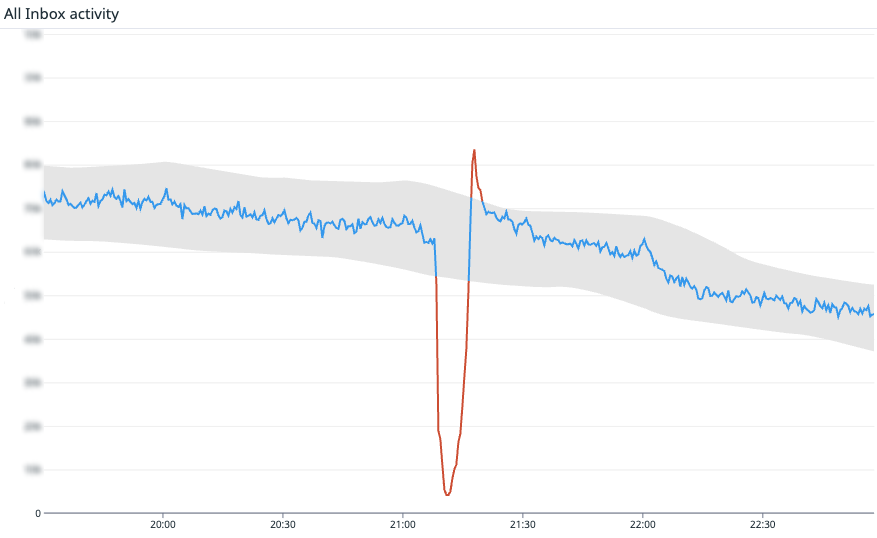
I’ve seen this put into practice at scale. At Intercom, where the AI Agent Fin resolves millions of customer inquiries autonomously, their fundamental heartbeat metric is the rate of new messages and replies across Intercom. For Fin, it’s successful AI responses. If those dip, it’s hitting the ability to connect. It might be a database failover, a misconfigured fleet, or a bad code change — it doesn’t matter. What matters is that it’s hitting customers’ ability to use Intercom.
Intercom isn’t alone. Amazon tracks order volume as their heartbeat. Affirm watches checkout attempts. If those numbers fall below expected levels, they don’t wait for a support ticket—they investigate immediately, because they know their customers’ success depends on it.
Not every metric qualifies as a heartbeat. The best ones share three traits: they’re directly tied to customer value (the main job your product is hired to do), high-volume and predictable (so anomaly detection can spot small drifts quickly), and binary in spirit (a drop is a clear sign something is broken, not just “a bit slower than usual”).
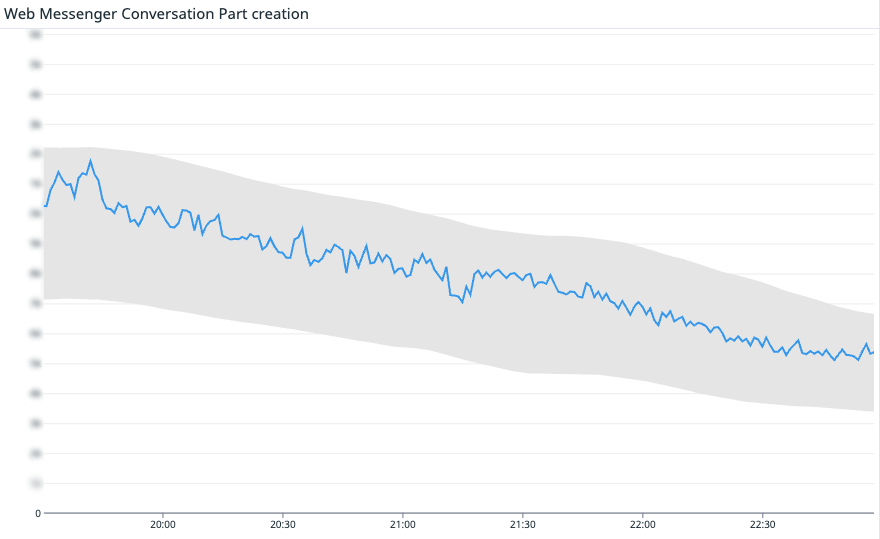
Stop watching servers—start watching customer impact. This chart tracks conversation-part creation over time; the blue line descends within a shaded band, indicating expected behavior and clear SLIs aligned to your SLA.
When we anchor on heartbeat metrics, three benefits show up fast: we detect issues faster than user reports or support tickets, we keep teams focused on what truly matters to customers, and we create a direct tie to our SLA—a system-level answer to, “Is the promise we made being kept?”
To be clear, I still monitor the usual suspects—latency, error rates, and infrastructure health. Heartbeat metrics don’t replace those; they complement them. They’re the fastest shortcut to understanding customer impact.
At scale, one pulse isn’t enough. Complex systems need multiple vital signs that reflect how different user groups succeed. Intercom started simple—are customers creating messages at the expected rate?—and then broke that signal down across core systems. Together, these metrics form a complete picture: Fin replies to your customers. Teammates reply in the Inbox. Teammates interact with the Inbox UI. Users on your website can message with the Web Messenger. Users on your app can message with the Mobile Messenger. If even one of them drops, it’s a major customer-impacting problem.
Speed matters when the heartbeat alarm fires. After months of reliable signal, automation becomes a force multiplier—paired with human oversight. Here’s what happens when a heartbeat metric drops: If we have just deployed new code to production, we automatically roll it back. Rolling back recent changes is a safe, and fast operation. We automatically create an incident in incident.io and page in engineering and an incident commander. If this alarm fires, it’s likely we will need our full incident response including status page updates. The system automatically suggests initial actions to first responders. For example, we use incident.io’s Investigations feature to get a head start on suggesting root causes.
This kind of automation pays off. On April 24th, a server issue slowed the Inbox, impacting teammates’ ability to use the Inbox. Heartbeat metrics caught it fast, and the issue was resolved in 10 minutes. End-user messaging was unaffected. This counted as downtime toward the SLA, with a full root cause analysis shared publicly here. That level of transparency keeps trust intact even when incidents happen.
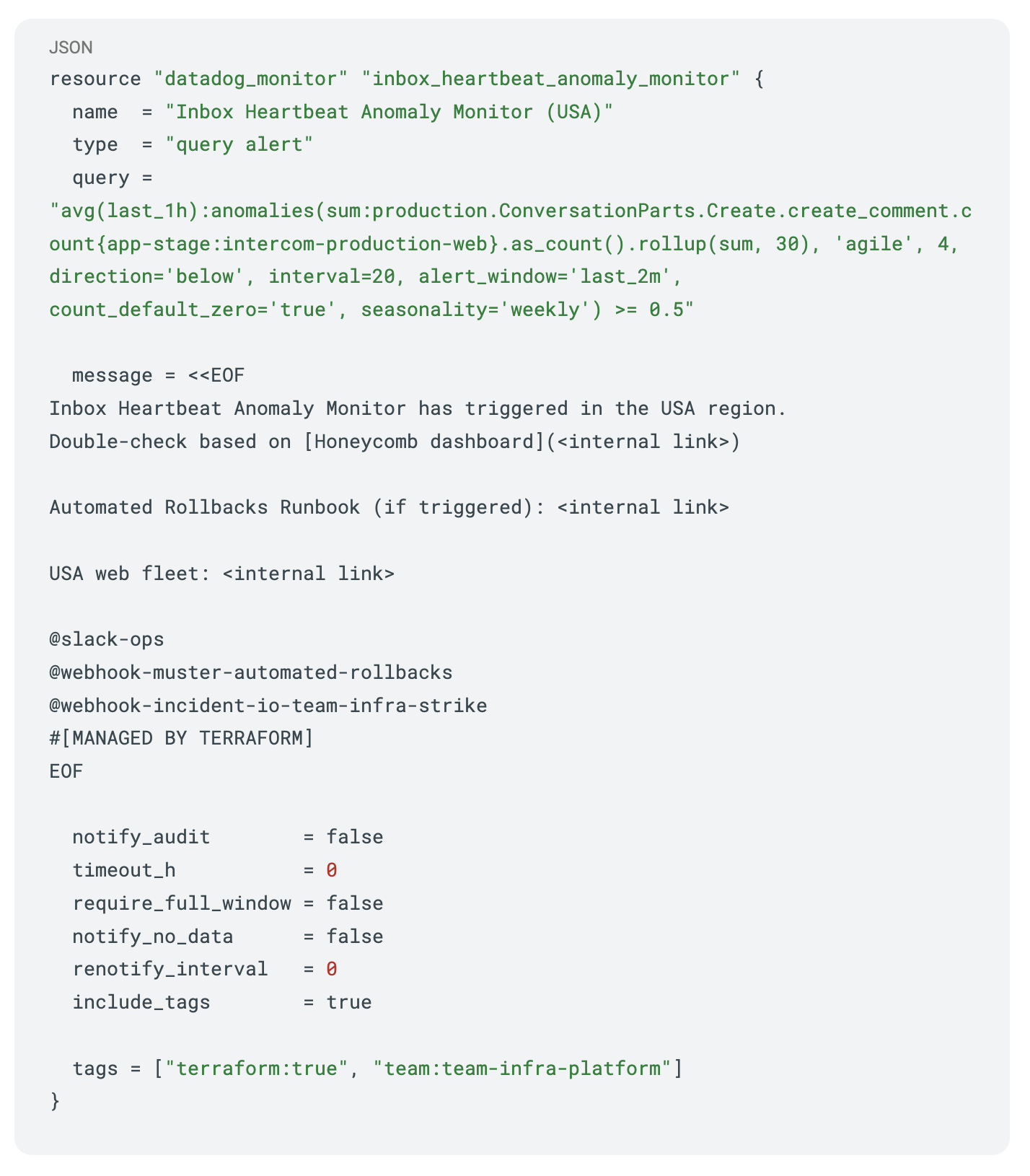
Outcome-first monitoring in action: a Terraform-managed Datadog heartbeat anomaly alert with Honeycomb double-checks, rollback runbook links, and Slack/webhook routing for SLA-conscious operations.
Where heartbeat metrics truly shine is in how they define and enforce accountability. They don’t just monitor; they inform SLAs in a way customers understand. Two independent SLAs matter most in this model: Core Platform SLA: If your team can’t reply in the Inbox or customers can’t message via the Messenger, that’s downtime. Fin SLA: If Fin cannot generate text answers, we record downtime.
Measurement matters. Many status pages stay green as long as an HTTP probe returns 200 OK, even when users are stuck. Heartbeat metrics close that gap by checking real customer outcomes, not just server responses. I also favor anomaly detection—tracking expected patterns over time and flagging when something looks off—and tooling that lets us drop to a per-customer level when we need to understand individual impact.
If you don’t have a heartbeat metric yet, start simple. Pinpoint your product’s must-do job—the one thing customers must accomplish to succeed. Choose a metric with volume so you can detect drifts quickly, not just total failures. Make it binary in spirit so a drop clearly signals breakage. Hook it to your alerts so it’s loud and reaches the right responders. Use it to align teams on what to do when the heartbeat falters. And stick to it, 24/7—reliability isn’t a 9-to-5 job.
For monitoring, I like practical guardrails. Here’s a Datadog monitor pattern I recommend for an Inbox-style heartbeat (Terraform syntax, simplified for clarity): keep a tight baseline window, alert on negative deviations beyond statistically expected ranges, auto-page responders, and attach standard operating procedures for immediate rollback and incident initiation. It’s simple, auditable, and fast.
Modern systems grow more complex every quarter. The question that matters stays refreshingly simple: “Can our customers do what they came here to do?” Build a reliability heartbeat that answers that question in real time, and you’ll keep your teams honest, aligned, and fast. Define yours—it might become your most valuable signal.
How do you lead a support team in this new world with AI metrics? That question has been front and center for me as we integrate AI-first customer service tools into our daily operations.
The technology is amazing, but our assumptions and processes for understanding and leveraging AI metrics are very different from traditional support metrics. Our new CX Score is the perfect example.
Two months ago, we launched CX Score – a new way to analyze every single conversation and give you a complete view of your support experience. I was genuinely excited as someone who’s battled with CSAT survey mechanics, teammate exclusion processes for CSAT, and the nagging truth that this is only a small portion of our volume. As we’ve navigated CX Score, we’ve learned lessons that apply broadly to AI metrics. Two takeaways stand out for me.
First, lots of data calls for new processes. One of the first things we noticed was the sheer amount of data. For better or worse, CSAT was a small enough sample size to review every comment – particularly unhappy ones. Our QA team would read and categorize each response, and follow up with customers. Managers would read most comments for their team (~15 in total per manager), and discuss in 1:1s.
But what do you do with 1,600+ reviews across the org? This is the reality of AI metrics, and when you have more data than ever before, the old processes don’t scale. We briefly tried reviewing all unhappy CX ratings. We tried taking a sample, but this felt just as limited as CSAT. We exported the trends and conversation data back into an LLM for analysis, but without in-depth prompting the results were only okay.
What worked was reframing how we use the signal. Because CX Score is great for reviewing trends, we use it to measure week-over-week performance for both Fin and as a team wide KPI for human support. We also use CX Score to review specific targeted areas, like a new hire’s conversations on a certain product area. And we use it to review the customer experience for a group of customers, or to analyze a customer’s entire case history so we can lean in at the customer level.
An isometric blueprint reveals how an AI agent powers modern support—from triage to resolution—linking chat, knowledge, and workflows so teams scale service without losing accuracy, context, or the human touch.
Second, the complexities of AI mean we won’t always know the “why” – and that’s ok! People naturally want to know “the why” – especially support folks. When we started using CX Score, one of the biggest challenges was the team wanting to dig deeper into why a specific score was given. While the score provides a great overview, people wanted a detailed, step-by-step explanation. But LLMs are mostly a “black box” – especially to the everyday person. As AI becomes more and more ingrained in our work, we’ll need to accept not always knowing every detail.
This required a mindset shift for both the wider team and leadership as we moved into a world of AI metrics. We focused on the outcome vs. the process, celebrating positives and highlighting insights and actions previously impossible with only CSAT. We refused to compare to humans, reminding ourselves that many of the unknowns of AI are equally true with humans; even with a large survey, we never know for sure how customers feel. And we acknowledged emotions. Our Ops Manager William would poll the leadership team in our weekly ops meeting, asking, “In one word, how did the CX Score make you feel last week?” That simple ritual gave managers space to surface wins and challenges, and it kept us grounded.
What’s next is continuing to revamp how we work and adjusting our collective mindset for AI tools and metrics. The pros highly outweigh the cons, so I encourage you to jump in and start experimenting with AI metrics, especially where they can augment customer experience, operational cadence, and product feedback loops.
Lastly, this technology is improving very quickly. Just yesterday we added deeper AI explanations and additional attributes to explain the CX Score and aggregate summaries across topics. I’m excited to try it out!
Subscribe to The Ticket here – a bi-weekly LinkedIn newsletter delivering key insights for customer service professionals in this time of mind-blowing change.
In my role leading product management and partnering with forward deployed engineers, I’ve worked with countless companies on AI adoption. Across sizes, budgets, and ambitions, I see the same pattern: teams start with the right intentions and still end up disappointed.
The problem isn’t that AI doesn’t work. The problem is that AI done wrong wastes time, money, and trust — and most teams aren’t set up to vet tools, ask the right questions, or structure implementation for success.
To help teams evaluate and deploy with confidence, I often point leaders to The AI Agent Blueprint. It’s a practical roadmap for a moment when everyone’s trying to figure out what comes next.
In this post, I share the lessons I wish every team had before they started. Whether you’re evaluating a solution like Intercom’s Fin or just exploring what gen AI can do, these are the patterns I rely on to make smart, scalable decisions.
Core concepts to help you vet AI solutions like an expert
Before we get into the common pitfalls, let’s cover a few key concepts. You don’t need to become an engineer to thoroughly evaluate AI Agents, but you do need to understand a few foundational terms. This knowledge will help you:
– Ask sharper questions during demos.
– Spot red flags in vendor pitches.
– Choose scalable, future-proof solutions.
– Guide internal alignment and buy-in.
– Build confidence in your final decision.
A little technical fluency goes a long way. Keep in mind these are just a few of the many terms out there. But here are the ones I’d suggest getting comfortable with today:
Retrieval-Augmented Generation (RAG)
RAG enhances generative AI by pulling in real-time, relevant information from your company’s data sources before generating a response.
Why it matters: Most AI tools claiming to “know your business” only use pre-uploaded or static training data. RAG-based systems dynamically search live sources like help centers, product docs, or internal wikis, making them far more accurate and adaptable (assuming your data hygiene and permissions are in good shape).
Easy way to remember: Think of RAG as an AI assistant with an open-book exam. Instead of relying only on memory (pre-trained data), it searches for the latest, most relevant information before responding. This makes RAG especially useful for AI Agents, customer support systems, and AI-driven search engines, ensuring responses are more accurate and up to date.
Vector search
Vector search enables AI to match by meaning, not just keywords. It converts both the user’s question and your documentation into numerical vectors and retrieves the closest semantic match even when the phrasing differs.
Why it matters: Without vector search, your AI may only work if the user phrases things “just right.” With it, users can speak naturally and still get the correct response.
Easy way to remember it: Vector search is like finding a song by its vibe, not its title. It works by intent, not exact match – essential for intuitive AI experiences.
Agentic AI
Agentic AI goes beyond answering simple questions; it can initiate actions, pursue goals, and carry out multi-step tasks.
Why it matters: Most AI tools today are passive. They only respond when prompted. Agentic AI drives outcomes. For example, Intercom’s Fin is evolving to handle actions like checking order status, triggering refunds, or escalating issues, all without human involvement.
Easy way to remember it: Agentic AI is like a rockstar project manager, not just a note-taker. It doesn’t just reply with information when simple questions are asked. It plans, acts, and follows through to get the job done.
MCP (Model Context Protocol) Server / Client
MCP is an emerging approach for managing AI agents at scale. It involves three core components:
– The model (the AI system itself).
– The context (what data and information it can access).
– The protocol (the rules for how it talks to other tools and data).
Why it matters: As AI gets embedded across your organization, centralized governance becomes critical. MCP ensures agents act within rules, respect permissions, and scale responsibly – without needing to hard-code logic into every use case.
Easy way to remember it: Think of MCP as a control tower for your AI agents. It manages what they know, what data they can use, and what boundaries they stay within.
Understanding concepts matters because they help you ask better questions and spot red flags during vendor evaluations. But understanding terminology alone isn’t enough.
Common mistakes I see teams make
Here are five mistakes I see even well-informed teams make, and how I advise product and support leaders to avoid them.
Mistake #1: Treating all AI tools the same
The AI space is moving fast. It’s a constantly evolving landscape and full of buzzwords, which can create confusion. I often see teams treat “chatbots” and AI Agents as interchangeable, without realizing there’s a massive difference between things like:
– A legacy rules-based bot with generative copy slapped on top.
– A true agentic AI system that takes action, learns from context, and scales with your business.
If you don’t understand core terms like RAG, MCP, or the differences between LLMs and agentic AI, it’s nearly impossible to ask the right questions during your evaluation process. I’ve heard of too many teams buying solutions that are outdated or require heavy upkeep after deployment. Educating your team on the fundamentals gives you the confidence to separate real capability from flashy demos.
Mistake #2: Assuming you can build it in-house
There’s a real cost and complexity of building AI Agents internally – orchestration, retrieval systems, prompt chaining, governance, and more. It’s not just a weekend project. It’s a long-term infrastructure investment. And for most companies, it quickly becomes a distraction rather than a differentiator.
Many teams assume building their own AI Agent will be faster, cheaper, or more flexible than buying. On paper, it sounds reasonable – especially if you’ve got a strong engineering team, access to top-tier models, and a healthy budget. But in practice, that path is much harder than it looks.
I smile writing this because I’ve been there. I’ve built multiple AI apps on nights and weekends. Early wins feel amazing — then reality sets in. Shipping something truly polished, even at tiny scale, demands far more infrastructure, reliability work, and governance than most teams anticipate.
At a company level, those challenges only grow. Building an AI Agent from scratch means committing to:
– Data chunking, embedding, and relevance tuning.
– Prompt chaining, context management, and hallucination reduction.
– Real-time retrieval architecture and RAG pipelines.
– Fine-tuning, model upgrades, and fallback orchestration.
– Security, permissions, audit logs, AI governance… and so much more!
Even well-resourced teams often circle back to buying after burning time, money, and momentum. The true cost of building isn’t just engineering — it’s maintenance and velocity. High-performing teams focus on their differentiators and partner for the rest.
Mistake #3: Betting on the wrong vendor
I often see teams focus too narrowly on slick demos or assume a vendor will “figure it out later.” In a market moving this fast, that’s a risky bet. The result is a tool that can’t keep up, needs constant hand-holding, or becomes too rigid to scale.
The best vendors learn quickly, ship frequently, and keep driving value. When I evaluate, I ask:
– Is the vendor investing meaningfully in AI R&D?
– Does their team have a clear roadmap for improvement?
– Can this system adapt to your workflows without needing engineering support at every step?
– How much ongoing maintenance will be needed?
These questions separate vendors building for tomorrow from those selling yesterday’s technology. You want a partner who’s staying ahead, not catching up.
Mistake #4: Ignoring your internal foundation
Even the best AI Agents need fuel. Your content and systems are the inputs that determine quality. If your help center is outdated, documentation is thin, or APIs are missing, you’ll get “garbage in, garbage out.”
I’ve watched teams buy best-in-class AI and still stall because they hadn’t invested in the inputs that make it powerful:
– A well-structured help center.
– Clear, detailed documentation.
– Internal process visibility (for things like internal AI/copilot).
– Robust APIs.
You don’t need to overhaul everything on day one. But clean, accessible content dramatically improves accuracy, confidence, and resolution rate.
Another misconception is expecting AI to resolve 100% of support conversations immediately. In reality, no AI tool starts at perfection — and your team needs a shared understanding of how resolution rate works to set expectations.
For context, Fin typically resolves over 65% of support questions out of the box, with minimal training needed, and continues to improve month-over-month. What separates great implementations isn’t just where you start; it’s how you optimize. Tightening content, closing automation gaps, and iterating on prompts and retrieval all compound over time.
If you’re not tracking your current resolution rate or don’t know how your vendor defines it, it’s hard to see progress. Establish a baseline, set realistic targets, and measure consistently. Treat resolution rate as a growth metric, not a fixed score.
Final thoughts
The teams that win with AI don’t just adopt tools — they implement future-proof systems that connect knowledge, workflows, and decision-making to drive real business outcomes.
– They don’t build everything from scratch.
– They don’t fall for flashy demos of stale technology.
– They partner with vendors already building what’s next.
If your team is exploring AI — whether you’re starting fresh or rethinking your stack — start with the concepts and lessons here. Use them to evaluate options, align stakeholders, and choose partners who are building what’s next, not just what’s trendy.
And if you want a broader strategic roadmap, The AI Agent Blueprint is a great place to dive deeper. It lays out how to go from launching an AI Agent to building successful systems that scale and drive real business value.
AI isn’t just a trend. It’s a capability your business will depend on. Done right, it becomes your most powerful teammate.
Rolling out an AI Agent doesn’t just change how your team works – it changes who your team is.
I learned that in the crucible of a fast-moving launch. Before we launched Fin publicly, our Support team became its first alpha/beta tester and we had to move fast. No roadmap. No step-by-step guide. Just a powerful new technology, and a steep learning curve.
That experience is exactly what led us to create The AI Agent Blueprint – a resource we wish we’d had when we were starting out, and one we hope will give other support teams a clearer path forward.
Looking back, I won’t lie and say I was cool, calm, and confident about how to do this – I was nervous as hell. I had no idea how to implement an AI Agent and ensure it resulted in huge cost savings and stellar customer experiences.
We had older machine learning technology available to us (shout out to our first-gen chatbot, Resolution Bot), but as a complex software business, we really only used it for basic FAQs. In all honesty, we still had a way to go – both in using automation more effectively and in making the chatbot experience actually enjoyable for our customers.
So why the urgency?
When ChatGPT burst onto the scene nearly three (!!) years ago, Intercom’s Machine Learning team immediately spotted the opportunity and dived into building the world’s first (and objectively best) AI Customer Service Agent.
Suddenly, we were being asked to pilot this brand new technology with real customers and go all in ASAP. Because we were selling this powerful new functionality, we had to use it ourselves and show it off in the best possible light so customers would want to use it too. #nopressure
There was no playbook, just a lot to figure out. As a product management leader, I had to switch into rigorous product discovery while staying execution-minded.
Steady involvement, rising resolutions. From February to July, teams maintain a high 87–93 involvement range as resolution rates climb from 65 to 82—signaling how AI-driven workflows can boost support efficiency and outcomes.
How do we do a phased rollout, but scale very quickly?
How do we QA Fin’s responses and make continuous improvements?
How will we produce and manage all the content Fin needs?
What will we do about all the outdated content we already have?
What are the success metrics now? Should they be different to original Support KPIs?
Who’s responsible for the success metrics? Who manages this newcomer to our team?
It was daunting. We had to take a brand new technology, figure out how to use it, build a team around it, and move at breakneck speed to implement every new feature that rolled out. It was ambiguous, fast-moving, and a massive lift.
But we got there and the results speak for themselves: Fin is now resolving over 75% of our inbound support volume.
An isometric blueprint reveals how an AI agent powers modern support—from triage to resolution—linking chat, knowledge, and workflows so teams scale service without losing accuracy, context, or the human touch.
That outcome didn’t happen by accident. We embedded forward deployed engineers with Support, treated our AI Agent like a product creator in its own right, and used gen ai for product prototyping to tighten our iteration loops. We prioritized a customer support AI strategy that balanced containment with quality: containment rate, CSAT on AI-resolved conversations, first-response latency, and recontact rates became our core scorecard.
That success led to real change for me and my team: new roles, new responsibilities, and new career paths. I now run a whole new function that didn’t exist before: AI Support. We’ve created new and elevated roles like Conversation Designers and Knowledge Managers. Fin hasn’t just changed how we support customers – it’s transformed the structure of our team and the trajectory of our careers.
And now, we’re helping our customers do the same.
In all transparency, if I hadn’t been this close to the work, I might have waited to see how generative AI played out before committing. I might have waited for a blueprint for how to deploy and scale an AI Agent. I wish I had something like that when we got started, or even later when we had a solid foundation but needed to scale our AI strategy.
How much less scary would it be to implement an AI Agent if something like that existed?
Whether you’re just getting started or already using AI in some way, you’re not early anymore—and you shouldn’t have to figure it all out alone. Strong product management leadership, a clear change plan, and tight feedback loops are what separate experiments from outcomes.
That’s why we created The AI Agent Blueprint – a practical map for launching and scaling AI in support. It brings together everything we’ve learned from our own journey, and from working closely with our customers who are doing the same.
If you’re ready to operationalize gen ai in support, align on the right metrics, and redesign roles for the future, this blueprint will help you move from pilots to pervasive impact with confidence.
Bold, pragmatic bets separate teams that merely deliver from teams that truly accelerate. As a product leader, I’m drawn to decisions that reduce friction, empower engineers, and compound over time. Intercom’s recent investment in a new frontend direction is a standout example of this mindset—and it offers lessons any product, engineering, or design leader can apply.
Over the past two years, Intercom made one of the most significant changes an engineering organization can make: moving its core frontend from Ember to React. That choice fits a clear pattern of high-agency decision making in service of speed, quality, and developer experience.
Back in 2014, Ember was the right call for their main application. Its strong opinions and “batteries-included” approach aligned with a strategy I respect: make big decisions once, enable teams to move fast, and spend energy on customer problems instead of endless architecture debates. The result was scale few achieve—more than two million lines of code and 100,000+ pull requests merged.
I’ve been in the room when constraints outgrow the original bet. By 2023, “local builds stretched beyond 90 seconds,” and they were stuck on older framework versions that blocked adoption of modern build tools. Even with deep community engagement and contributions to the Embroider Initiative, the cost of staying put was compounding. Something had to change.
What I admire is the rigor behind their pivot. They ran workshops, health checks, and set explicit trigger conditions—then honored those triggers. When the evidence crossed the threshold, they chose a new path and framed the work with a clear, galvanizing banner: “The Future of Frontend.” That’s the kind of governance and narrative clarity that de-risks large platform shifts.
React quickly emerged as the right fit—not because of hype, but because it met practical criteria at scale. “React was already a core technology at Intercom (powering Messenger, Help Center, and our marketing site),” backed by a robust ecosystem, strong documentation, and broad familiarity internally and across the industry. Most importantly, it integrates naturally with AI-driven developer tools—a non-negotiable for the next decade of engineering productivity.
Fast forward to today, and the momentum is clear. “React is now the default for new UI development at Intercom.” That single sentence says a lot about organizational alignment and execution readiness.
The outcomes speak for themselves. “Blazing fast feedback loops: React builds in under 10 seconds locally, with sub-1s rebuilds – much faster than our Ember app’s 90+ seconds.” That kind of drop in cycle time unlocks more iteration, tighter designer–engineer collaboration, and faster learning loops.
Speed without joy is a half-win. “Higher developer velocity: Engineers consistently report being faster, happier, and more effective, particularly when paired with AI tools like Cursor, Augment, and Claude Code.” I’ve seen similar effects: once teams feel flow again, quality and ambition both rise.
Adoption at breadth matters as much as depth. “Wider adoption: Since March 2025, 10+ Product teams have shipped React features, contributing over 840 pull requests.” That level of traction signals a platform shift that’s not just technically sound but operationally viable.
The AI-enabled developer experience is the real unlock. “AI synergy: React just “clicks” with modern AI tooling. Designers and engineers are using agents to write code, generate components from Figma, and even build design playgrounds themselves.” That’s the future: product creators working in shared, generative environments where ideas move from Figma to code in minutes.
One engineer captured the productivity gain perfectly: “The work I had predicted would take me a week to achieve took me two days”. That’s not a marginal improvement—that’s a step-change.
This story isn’t just about frameworks; it’s about preparing for a decade where velocity, AI-native workflows, and developer experience determine competitive advantage. The ambition to “double our productivity over the next 12 months” requires removing friction, leaning into AI, and standardizing on tools that compound learning across teams. React is a pragmatic enabler for that journey.
I also appreciate the organizational design behind the change. A small, focused group—Team Frontend Tech—partnered tightly with Product teams to shape the new stack, build a design system, and accelerate adoption. That model creates a high-trust bridge between platform and product, which is essential for landing a migration at scale.
For leaders navigating similar crossroads, the playbook is clear: set explicit trigger conditions, articulate the future state, pick a stack that compounds with AI, and invest in a cross-functional nucleus to shepherd adoption. For engineers and designers, this is an exciting moment—one where your tools finally catch up with your ambition.
The takeaway I’m carrying forward: make the bold call when the evidence is conclusive, optimize for feedback loops and flow, and treat AI as a first-class partner in the creative process. That’s how we keep shipping fast, raise the quality bar, and focus on what really matters—solving meaningful problems for customers.
Over the past 18 months, I’ve watched the ground shift under support leaders. For many support leaders, the world before and after AI feels drastically different—and I feel it too.
Rewind to before Q1 of 2023, and while the details varied, the challenges support leaders faced were largely the same as they had been for decades. Before AI, support leaders were tasked with improving the customer experience with under-resourced teams; finding ways to improve the cost-to-revenue ratio; preventing team attrition (despite managing people with difficult jobs and low compensation); and representing customers’ needs to teams with competing priorities.
Support was expected to operate behind the scenes, often absorbing work from other departments. Despite being essential for customer retention, it was still viewed primarily as a cost center, and leaders rarely had strong executive advocacy. Those conditions sharpened valuable muscles—creativity, scrappiness, and people leadership—but they didn’t prepare most teams to operate in an AI-first world.
Now with AI, the mandate has expanded. The core responsibilities persist, but the “how” has changed. Leaders are suddenly expected to be AI experts, spearhead large AI implementation initiatives, and keep operations rock-solid while the plane is being rebuilt mid-flight.
They’re being asked to step out from behind the scenes to center stage and lead the company in its first large adoption of AI. They’re being asked to regularly communicate with executives who previously had little interest in their initiatives or ideas. They’re being asked to run high-lift, high-impact, cross-functional projects without the infrastructure in place to manage it. They’re also now expected to hit AI performance metrics that an executive heard somewhere were possible—targets that might be unrealistic for the actual use case.
Oh, and if they fail, they’ll likely lose their job. And if they succeed, they could cause job loss for their team members. I’ve felt that tension firsthand: accelerate AI to drive outcomes, while also protecting the humans who make your customer experience exceptional.
It’s tempting to wait for the storm to pass—to delay AI change until someone else takes it over and hope they don’t undo what you’ve built. I’ve seen that playbook, and it rarely ends well.
There’s a better approach: harness the storm’s energy to elevate your customer experience, your team, and your own influence.
Harnessing AI’s momentum
This new era can reduce your support operation to a transactional, robotic experience—or transform it into what you’ve always envisioned. The outcome depends on how you respond to the demand to implement AI. This is one of the most unique opportunities of your career: you will have your executives’ attention, unprecedented access to product and engineering resources, and far less friction persuading stakeholders that change is essential for customers and the business.
With the right plan, you can reframe your team from cost center to value driver, expand services instead of sweating basic metrics, and move from surviving to thriving.
Here are the three areas I encourage every support leader to master.
Become the AI subject matter expert
Start by learning. Understand what is actually possible with AI now, and what may be possible in the near future. Go at least a layer or two deeper than the average person using ChatGPT. Know what it takes to implement more than a glorified answer bot—especially if your goal is end-to-end resolution, not just deflection.
Then anticipate the pitfalls I see most often in AI adoption.
Not digging deep enough with vendors. Demos often look similar and impressive with minimal lift. The truth emerges in a proof of concept. Run multiple trials with different vendors to uncover real capabilities and limitations—and to calibrate what “good” looks like for your environment.
Only finding a technology solution, not a partnership. Many tools can deliver similar outcomes; partners are not interchangeable. Choose a vendor whose values align with yours, who will support your use cases post-sale, who moves at a pace you can absorb, and who is committed for the long haul (not merely positioning for acquisition in a year or two).
Not knowing what good actually looks like. Ask each vendor about AI involvement rate and AI resolution rate. Ask what AI CSAT typically looks like in your industry. Document these answers to build benchmarks and set realistic expectations with executives.
Not learning from others’ mistakes. Many teams have overestimated AI’s impact and underestimated the human resources still required. Some laid off hundreds of support team members—only to rehire later—damaging their brand and wasting resources. Move with purpose and pace, but not so fast that you repeat these mistakes.
Not communicating your plan effectively. Be able to articulate why deflecting 50% of inquiry volume does not equal a 50% headcount reduction. Cite logistics like coverage windows and redundancy for SLAs, growth needs, natural attrition, and all the non-inquiry work your team handles. Practice a concise, compelling rationale for executives.
Create a clear AI plan
Your company is in uncharted territory. Unless you’ve hired a specialist recently, none of your executives have deployed AI in support. That makes you the most qualified person to draw the map and lead the way. Here’s what your plan should include.
1) A vendor evaluation plan. Define how you’ll research providers, who advances from demo to trial, how many you’ll test, and in what timeframe. Establish criteria for what AI must accomplish and the effectiveness and quality metrics you’ll use to evaluate it.
2) Implementation phases. AI is not a “set it and forget it” tool. Because AI touches customers so quickly, mitigate risk with phased rollouts. Phases don’t have to be slow—just deliberate. Sequence by audience, use case, and channel, and publish a clear timeline so cross-functional partners can plan resources.
3) How you’ll measure success. Reuse your evaluation metrics and go deeper. Track AI involvement rate and AI resolution rate (together, your deflection rate). Measure quality through CSAT and CX Scores, and run regular QA. Quantify impact on your support cost-to-revenue ratio—your CFO cares deeply about this.
4) How your team will use reclaimed time. If your AI program frees 20% of capacity, what value will you create? How will you improve the customer experience, drive revenue or retention, and upskill your team? Quantify the upside and set milestones for capability-building and value-added work. If you fail to plan this, you will be pushed to let too many people go.
5) How you’ll report on progress. Communication failures sink AI programs. Align with your executive sponsor on format and cadence, then over-communicate—regularly, clearly, concisely. You can’t afford to under-communicate.
Own the initiative at a higher level
Support leaders are great at taking ownership, often absorbing projects other teams drop. This initiative is different: it’s highly visible and enterprise-critical. Treat it like a flagship product rollout.
Project management. Use a tool your team can execute in and that lets you summarize progress succinctly for executives. Borrow best practices from your product managers and signal early that you’ll be partnering with them. Learn your sponsor’s preferred update style and tailor to it.
Communication. Overcommunicate—with brevity and rhythm. Don’t let a week pass without your sponsor knowing status. For executives, I recommend weekly or bi-weekly updates with a one-line summary, three impact statements, and a link to the plan. For example: “Saved customers 30K waiting hours M/M,” “Improved full resolution time by 30% M/M,” “Next initiative will improve X metric by Y%.”
Showcase your thought leadership. Reference industry benchmarks proactively when you set goals, and reactively when questions arise. Having succinct, data-backed answers that tie to benchmarks signals expertise and builds trust.
The storm is here—what will you do?
The pressure around AI is intensifying and isn’t fading anytime soon. This storm can crush your team as you know it—or become the wind under your wings that elevates your support operation to its maximum potential. The choice is yours: wait and risk cuts, or step up as the support AI expert, form a plan, and transform your team into a value engine. I’ve chosen the latter—and I invite you to do the same.
At Pioneer 2025, Fin 3 was announced as the most capable AI Agent yet for resolving deep, complex queries across every channel. As a VP of Product Management, I’ve been eager to see whether an agent can match concierge-level service at scale—and this is the first time I’ve seen the pieces come together in a way that genuinely raises the bar for customer experience and operational efficiency.
The goal is simple and ambitious: give customer service teams the tools to deliver concierge-level service to every customer, every time. To do that, the team built Fin 3 and invested deeply in the Fin Flywheel—train, test, deploy, and analyze—so the system learns faster, behaves predictably, and performs consistently across channels like Voice, Slack, and Discord.
The evolution here matters. We’ve come a long way since we launched Fin 1 just over two years ago. It was the very first AI Agent for customer service and focused on using your knowledge content to resolve informational queries, enabling it to do all frontline support and free teams to do higher-level work. Then we launched Fin 2. It answered the question of whether AI Agents could deliver human-quality service (it could).
Since we launched Fin 2, its average resolution rate has continued to climb to 66% across our 6,000+ customers. Over 20% of our customers are getting above 80%.
Those numbers are impressive, but they revealed an important truth I’ve seen across many product organizations: resolution rate isn’t the whole story. Answering a quick FAQ in chat isn’t the same as investigating a payment dispute or verifying a refund over the phone. The real measure to optimize is automation rate—the share of overall workload handled end-to-end. Fin 3 is built for that frontier, with a focus on two levers: solving increasingly complex queries and expanding into more channels.
Procedures are the big breakthrough for training. They let teams encode multi-step workflows and nuanced business logic—like troubleshooting login issues, handling return requests, or investigating potential fraud—so Fin can resolve them from start to finish. In practice, that means Fin is trained to follow your standard operating procedures carefully while exercising judgment just like a seasoned teammate.
1. Natural language instructions
Teach Fin the same way you’d train a new teammate. You can copy and paste your existing SOPs straight in (most support teams already have them written up in Google Docs or Notion) and describe how Fin should act using natural language. The editing experience feels familiar and lightweight, so teams can start writing Procedures immediately without needing engineers or special syntax.
2. Deterministic controls
When a Procedure needs more structure or precision, you can layer in deterministic elements. Data connectors let Fin check information or take actions directly in your tools. Conditional steps handle decision points (for example, whether a refund should be approved) so Fin’s behavior is consistent and predictable. And when absolute accuracy is essential, you can add small code snippets that guarantee the same input always produces the same output. You can also add checkpoints where Fin pauses for approval or hands off to a teammate before taking certain actions, keeping sensitive workflows under human control.
3. Fully agentic behavior
Conversations rarely follow a happy path. Procedures are designed so Fin reasons in real time, moves up and down steps, or switches between Procedures without getting stuck. If a customer changes an answer, Fin adapts and continues naturally. The result is a fluid conversation that still follows your process end-to-end.
4. AI Assistant support
AI Assistant helps teams write and maintain Procedures faster. You can start with a brief overview and supporting documents; it drafts an initial version based on what Fin already knows from your knowledge base and past conversations. As you expand, it suggests additional controls or generates boilerplate code for API connectors, lowering the barrier to entry and accelerating iteration.
Together, these elements let Fin reason like a human with the precision of software. Most teams can begin with no-code or low-code Procedures and bring in engineering only for advanced integrations. That balance of power and control is exactly what high-performing support leaders need.
“Support needs natural conversation and control. Procedures optimize for both – agentic where you want it, designed where you need it – rather than a generic agent builder.”
– Chris Dalley, Director of Product Management at Intercom
Of course, adding agentic power requires robust testing. That’s where Simulations come in. Real-world workflows explode into dozens of paths across policy thresholds, customer states, and edge cases. Manual testing won’t scale, so Simulations let you pick any Procedure, choose a user or segment, and run a full, multi-turn simulated conversation from start to finish. You see exactly how Fin reasons and where to refine, then re-run as needed.
AI Assistant is integrated here too. If a Procedure needs an adjustment, it suggests changes you can accept with a click. It also recommends additional Simulations for complex Procedures to ensure coverage. As you create scenarios, you store them in a Simulation library so that when products, policies, or teams change, you can run the entire suite to catch regressions early. This is how you build confidence that Fin behaves exactly as intended while your automation expands.
Channel coverage is equally critical for customer service. Customers expect help wherever they are. Fin already works across more channels than any other AI Agent, and now it extends to Slack and Discord with meaningful upgrades to Voice.
Fin in Slack feels native—threaded replies, proper formatting, and controls to determine when Fin responds versus when a human steps in. If a teammate joins, Fin automatically steps back. Every interaction is logged for reporting and analysis, which matters when you’re tuning automation rate and resolution quality.
Discord support brings the same benefits to communities that increasingly serve as support hubs. Meeting customers where they are is how you compound both satisfaction and efficiency.
Voice has evolved dramatically since launch, and this matters because phone expectations are different. Rather than waiting on hold, navigating IVRs, or getting one-word answers from a brittle bot, customers get immediate, natural conversation. Since we launched Fin Voice, we’ve added much more power and configurability: better guidance, more customization, better testing and deployment, and call transcripts and summaries. These make Voice practical to run at scale.
Voice isn’t just chat with speech. Latency must be low because long pauses feel wrong. Answer shape matters—shorter, chunked replies outperform long paragraphs. Interruptions and endpointing are the norm, so the Agent must detect when to talk and when to listen. And cost pressures are higher on phone, which makes automation even more valuable.
How natural the Agent sounds shapes customer trust. When a voice bot sounds robotic, people assume it’s limited and escalate immediately. Fin avoids that by speaking naturally, pacing correctly, and adjusting tone as it listens. It can detect sentiment directly from audio—laughter, frustration, or urgency—and respond with empathy to keep conversations on track.
“We’ve seen that how natural the Agent sounds signals to people how smart it is. If it sounds robotic, they escalate immediately – especially on phone where issues are more urgent.”
– Peter Bar, Principal Product Manager at Intercom
Performance has improved significantly, with latency down around 30–40% since launch—conversations now feel fluid rather than stop-start. Unlike voice systems that falter against large help centers, Fin handles real-world knowledge bases at scale using the same reasoning engine that powers chat. Fin Voice is multilingual out of the box and can currently answer calls in 28 languages, with configurable voices and greetings. You can tailor how it operates day-to-day, from call start to escalation rules and office-hour routing. Every call is logged automatically in Intercom, complete with a transcript, summary, and outcome, giving your team full visibility to review performance and refine over time.
Practically, this means Fin can take on more of the phone workload—triaging calls, summarizing transcripts, and handing off cleanly when needed—reducing average handle time and freeing agents to focus elsewhere. Because Voice runs on the same foundation as chat, improvements to Fin’s knowledge apply everywhere, creating consistent behavior across channels.
“Customers often say they’re amazed it’s not a real person – Fin Voice sounds natural, responds in context, and doesn’t feel robotic at all.”
With Fin set up to tackle more complex queries across more channels, the next question is measurement—how well is it working, and where should you improve? The Insights product answers this with upgrades to CX Score, Topics Explorer, and AI-powered Suggestions.
CX Score gives a unified view of support quality across interactions. The new CX Score Reasons provide a more representative and transparent picture—was a low score driven by product feedback or answer quality? These attributes are built into reporting for full filtering and segmentation, which is essential for targeted improvements.
Topics Explorer analyzes and organizes every conversation into topics and sub-topics to reveal what’s driving volume and impacting quality. The new Topic Trends report highlights the most important weekly changes—volume spikes, drops in Fin resolution, and emerging issues—so teams can act before customer experience is impacted. You can now curate topics with merge, rename, move, and create controls, then get AI-powered reporting on the areas you care about most.
AI-powered Suggestions close the loop by proposing exact, ready-to-publish updates to your help content based on what your support team is saying. Suggestions now spots duplications and contradictions, learns from rejections to improve future recommendations, provides one-click updates if you use Zendesk or Salesforce, and proposes changes to data, actions, and guidance—not just content. That last capability is especially important because it helps you unlock higher automation on complex queries.
Fin 3 builds on everything learned since the first AI Agent for customer service launched in 2023. It’s trained through Procedures, tested with Simulations, deployed across every major channel including Voice, Slack, and Discord, and measured through richer Insights. All of it adds up to a simple outcome: Fin now does more of the work for you, resolving the complex, time-consuming queries that used to belong only to humans.
Learn more about Fin 3 here: https://fin.ai/fin3 . Some capabilities are available now, with the rest rolling out quickly. From a product leadership perspective, the takeaway is clear—optimize for automation rate, govern with Procedures and Simulations, expand channel coverage, and instrument with Insights. That’s how you deliver concierge-level CX at scale with a single AI Agent.