Over the past year, I’ve been shipping agentic AI into production and coaching product teams on what it really takes to make these systems trustworthy in the wild. One story that crystallizes the playbook comes from Trainline’s move to an agentic architecture for travel assistance—an approach that mirrors what I’ve seen work in high-stakes, real-time customer experiences.
Trainline—the world’s leading rail and coach platform—helps millions of travelers get from point A to point B. Now, they’re using AI to make every step of the journey smoother.
I studied how "David Eason (Principal Product Manager) Billie Bradley (Product Manager), and Matt Farrelly (Head of AI and Machine Learning)" approached the build of "Travel Assistant, an AI-powered travel companion that helps customers navigate disruptions, find real-time answers, and travel with confidence." Their work exemplifies the kind of end-to-end thinking required to move beyond demos into dependable, on-the-go assistance.
They share how they: Identified underserved traveler needs beyond ticketing; Built a fully agentic system from day one, combining orchestration, tools, and reasoning loops; Designed layered guardrails for safety, grounding, and human handoff; Expanded from 450 to 700,000 curated pages of information for retrieval; Developed LLM-as-judge evals and a custom user context simulator to measure quality in real-time; Balanced latency, UX, and reliability to make AI assistance feel trustworthy on the go.
I align strongly with their core takeaways: "AI assistants need both scalable reasoning and deep domain context to be useful." "Tool design and guardrails are as critical as prompt design in agent systems." "LLM-as-judge evals make it possible to measure open-ended systems without massive labeling costs." And perhaps most importantly, "Even legacy companies can move fast when they embrace experimentation and tight PM–engineering collaboration."
From an AI strategy perspective, starting "fully agentic" was the right call. When the problem space is dynamic—disruptions, route changes, fare conditions—reasoning loops and orchestration aren’t luxuries; they’re table stakes. Tool selection becomes product design: you need the right retrieval interfaces, constraint-aware planners, and API contracts that are resilient to partial failures. Layered guardrails for safety, grounding, and human handoff reduce hallucination risk while preserving responsiveness—critical when users are standing on a platform waiting for an answer.
The retrieval scale-up—"Expanded from 450 to 700,000 curated pages of information for retrieval"—is a classic inflection point. I’ve seen teams stall here when they treat content growth as a pure indexing problem. The winning move is curation and structure: normalize sources, encode policy-level constraints, and align retrieval chunks to decision boundaries the agent actually uses. That’s how you keep precision high while coverage explodes.
Evaluation is where most open-ended assistants fail quietly, which is why I was encouraged to see "Developed LLM-as-judge evals and a custom user context simulator to measure quality in real-time." In practice, LLM-as-judge gives you scalable, scenario-based scoring without prohibitive labeling, while a user context simulator surfaces regressions tied to persona, itinerary state, and device constraints. The combination closes the loop between model behavior, tool layer changes, and UX outcomes.
On product delivery, the decision to have the system "Balanced latency, UX, and reliability to make AI assistance feel trustworthy on the go" shows mature prioritization. For travel, trust accrues in seconds: fast-enough responses, graceful degradation when upstream data lags, and explicit handoff when confidence dips. This is where guardrails meet UX writing—clear, bounded language signals competence even when the system defers.
Finally, the organizational pattern matters. The teams that win in agentic AI are cross-functional, experimentation-driven, and ruthless about instrumentation. Tight PM–engineering collaboration, explicit safety thresholds, and an eval stack that mirrors real user journeys are what turn promising architectures into dependable products.
It’s a behind-the-scenes look at how an established company is embracing new AI architectures to serve customers at scale.
If you’re building agentic AI in production, borrow these moves: invest early in tool and guardrail design, scale retrieval with curation not just volume, adopt LLM-as-judge plus context simulation for continuous evaluation, and treat latency and reliability as core product requirements—not afterthoughts. That’s how you ship AI assistance that customers trust when it matters most.
I’m excited to share that we’re opening our next R&D hub in Berlin to support significant investment in our AI customer service platform, Intercom, and market-leading AI Agent, Fin. We intend to hire 100 people in Berlin over the year ahead across engineering, AI, data science, product, and design. This move reflects our AI Strategy, our commitment to product management leadership, and our focus on building enduring product-led growth.
We believe that in a short number of years, the vast majority of customer service will be done by AI. Fin is already the world’s best Customer Service Agent. At Pioneer, our recent summit for AI customer service leaders in NYC, we talked about how Fin will become a true end-to-end Customer Agent, extending far beyond service. We showcased how companies like WHOOP, Anthropic, and Lightspeed are already pushing Fin in ways that help them grow their business.
This market opportunity is massive and expanding at unprecedented pace. Our ambition is to earn our place as one of the most successful AI businesses during this wave of AI disruption, and we want more brilliant people on our team to pursue this as aggressively as possible. If you’re motivated by Generative AI, LLMs, and building real products that scale, you’ll find both challenge and impact here.
We are already on track to be one of the fastest growing private software companies. Fin is the primary contributor to this, and is months away from passing $100m in ARR. So far, more than 7000 businesses have transformed their customer service with Fin, including German companies like electricity provider Ostrom, smart home technology provider tado°, and grocery delivery company Flink, along with global leaders like Vanta, Clay, Lovable, and Miro.
Why Berlin? We’re drawn to the city’s rare blend of deep technical talent and rich creative culture—within a vibrant, globally connected ecosystem close to our R&D hubs in Dublin and London. It’s a place where top-tier engineers and designers thrive, and where ambitious builders from around the world want to relocate and create category-defining products.
Momentum is building: this month-by-month chart shows a consistent rise from the mid-20s to nearly 70% between May 2023 and Sep 2025—signaling strong progress as we expand engineering, AI, and automation at our new Berlin R&D hub.
We needed a new location that would sustain the high ambition and standards held by our world-class AI teams in Dublin and London. Berlin has emerged as one of Europe’s hottest centers for AI talent, with a high density of AI-focused startups, applied research labs, and practitioners who bring exceptional literacy, optimism, and ambition. It’s the right accelerator for our AI hiring and a place to bring in brilliant minds to shape the future of our product and business.
While Intercom’s reach is global with our headquarters in San Francisco, our R&D leadership remains anchored in Dublin, where half of the executive team sits—making Berlin both geographically and strategically an ideal next location for our growth.
This isn’t our first time expanding our footprint; we previously bet on London and are delighted with how that’s been working. When we shared our Berlin news internally, the energy was palpable, with many teammates volunteering to help spin up the hub successfully—including colleagues who helped make London a big success, like Danny. That level of ownership and momentum is exactly what we aim to cultivate in Berlin.
We’re looking for people who thrive in a high-intensity, high-ambition, high-standards environment and want to help build one of the world’s best AI companies. For builders like that, the opportunity for impact, growth, and career progression is extraordinary. As with London and Dublin before it, the early Berlin cohort will have a disproportionate influence on team norms, culture, and long-term outcomes. We are in the middle of a huge disruptive wave with AI, and Fin is one of the leading examples of commercially successful AI applications. Joining Intercom is an opportunity to be part of this disruptive wave, and help us build out our vision for Fin becoming the world’s best Customer Agent.
On a minimalist stage, four speakers share insights on AI research, automation, and engineering as part of a panel tied to Berlin expansion and the launch of a new European R&D hub.
There are plenty of AI companies to join, but our technology and culture set us apart. Any AI product is only as good as the AI layer powering it. Ours is industry-leading, built by a highly talented, ambitious, and technical team of over 40 machine learning scientists, engineers, and designers in Europe who continuously optimize Fin’s performance through cutting-edge research, experimentation, and innovation. Fin’s average resolution rate increases 1% every month. That kind of steady, compounding improvement is exactly what great customer support AI strategy looks like in practice.
We also build in public and share our progress and learnings with the AI community at large. Recently, our Chief AI Officer Fergal Reid and SVP of Engineering Jordan Neill joined leaders from Cognition, Harvey, and Perplexity in San Francisco to share real lessons, challenges, and breakthroughs from building frontier AI products. Our AI team regularly publishes their insights on the AI research blog; from optimizing inference speed and availability, to building our own proprietary models that outperform general purpose models for CX.
Our AI group and the broader R&D org they operate within work at extraordinary scale and speed. We recognize that moving fast can’t be taken for granted—you must fight for it—and we’re doing just that, embracing the capabilities AI tooling brings us to achieve 2x the throughput. One example of this mindset in practice is us “Betting on the future of frontend at Intercom,” making a technology choice that optimizes for our teams’ ability to build high-quality product, fast.
Our design and product teams are world-class and forward-thinking; they’re embracing AI to evolve how they work, as shared in our 3-point framework for AI-driven design and recently presented by Emmet Connolly, our SVP of Design, at this year’s Hatch conference in Berlin. As a product leader, I’m grateful to work alongside brilliant product and design thinkers—it gives me confidence that we’re solving the right problems, solving them well, and driving real impact.
From live demos to hands-on coding, this snapshot captures the momentum we're bringing to our Berlin R&D hub – AI experiments, hand-tracking prototypes, and simulation tools powering our next wave of engineering.
We plan to open our Berlin office space in December or January. To get the office started, we’re hiring Senior Product Engineers, Machine Learning Scientists, Product Managers, Senior Product Designers, Engineering Managers, and Data Scientists immediately. If your craft sits at the intersection of LLMs for product managers, agentic AI, and empowered product teams, you’ll be right at home.
You can learn more about our open roles, company, culture, and locations on our careers site, or feel free to reach out to me, Jordan, Fergal, or Brian directly on LinkedIn if you have any questions.
Some of our engineering team will also be at LeadDev Berlin on November 3rd—come say hi if you’re attending.
I’m looking forward to continuing to build Intercom as one of our generation’s best AI companies—and I’m excited for our expansion into Berlin to be a major contribution to that success.
Context is king in AI-powered product work—and I felt that deeply while digging into “Context is King – All Things Product Podcast with Teresa Torres & Petra Wille.” The conversation affirmed a truth I see daily: AI becomes a powerful teammate only when we give it the right context, just as we do with empowered product teams. When we treat AI like a colleague joining mid-flight—without our company history, industry nuances, or strategy—we instantly unlock better outcomes.
Listen to this episode on: Spotify | Apple Podcasts
Here’s what stood out and how I’m applying it. First, most AI outputs fail without proper context. That’s not a model problem; it’s a leadership problem. Thinking of AI like onboarding a new intern is the right mental model—start with the minimum viable context, then iterate. Practical first steps matter: decision logs, clear success metrics, and structured documentation. The art is balancing enough context to guide performance without overloading the system. The parallels are striking: the way we create strategic context for product trios and teams is the same way we’ll empower agentic AI systems.
In my teams, we prepare for AI collaboration by operationalizing context. We keep decision logs to capture the why behind choices, use outcome-based success metrics (not just output), and maintain machine-readable documentation that LLMs for product managers can parse reliably. We define guardrails up front—constraints, customer segments, privacy-by-design considerations, and the non-goals that often trip up gen ai. This foundation turns AI from a novelty into a force multiplier for product discovery and product roadmapping and sprint planning.
I use a simple “context pack” to onboard AI agents and teammates alike: 1) business goals and outcomes, 2) constraints and guardrails, 3) canonical artifacts (like PRDs, journey maps, interview notes), 4) domain vocabulary and definitions, and 5) operating procedures (how we make decisions, when to escalate, what good looks like). Start small, then refine as the AI demonstrates capability. This mirrors great onboarding—and it works just as well for agentic AI as it does for humans.
Not all context is helpful. More isn’t better; the minimum effective context is. I resist the urge to dump our entire Confluence on an AI system. Instead, I progressively reveal relevant details—just like I would with a new PM on a complex problem space. This keeps signals high, noise low, and performance measurable against clear success metrics.
If your org isn’t adopting AI yet, don’t wait. You can become AI-ready now by documenting strategic intent, decision rationale, and definitions in structured, searchable, machine-readable ways. Treat this as core AI Strategy work that strengthens empowered product teams—regardless of tooling—while building your AI product toolbox for tomorrow.
For those who want to explore further, these resources and mentions are a strong complement to the episode’s themes.
Follow Teresa Torres: https://ProductTalk.org
Follow Petra Wille: https://Petra-Wille.com
Agentic AI
Teresa’s new podcast, Just Now Possible in Youtube, Apple Podcast, and Spotify
Petra’s Coaching Packages
ChatGPT
Henrik Kniberg’s talk at Product at Heart on treating AI agents like interns
Teresa’s webinars on how she built the Product Talk Interview Coach: Behind the Scenes: Building the Product Talk Interview Coach and How I Designed & Implemented Evals for Product Talk’s Interview Coach
Josh Seiden’s blog series about AI
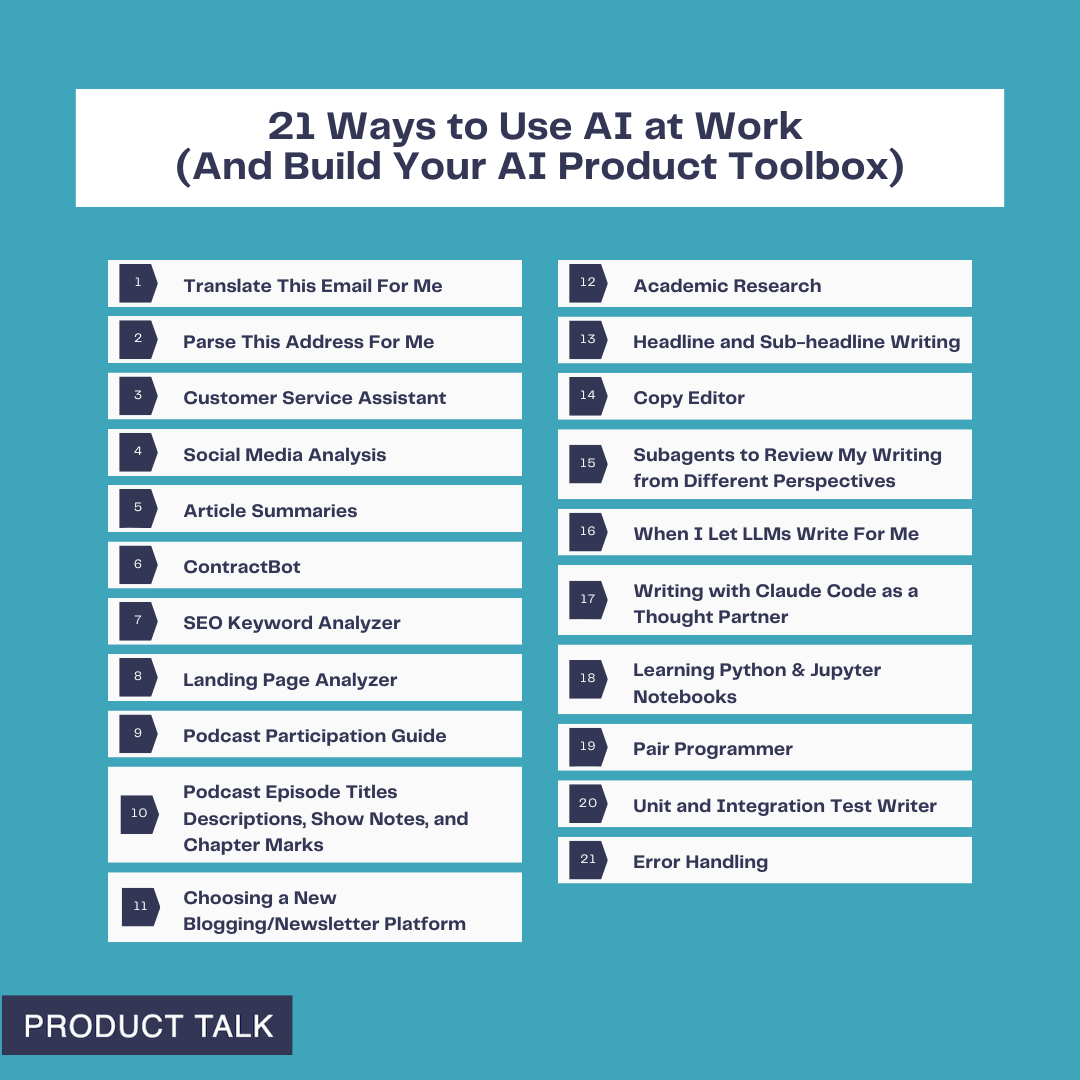
Teresa’s new blog posts: 15 Ways to Use AI at Home (and Fill Your AI Product Toolbox) and 21 Ways to Use AI at Work (And Build Your AI Product Toolbox)
Petra's new blog post: Why Context, Not Just Data, Will Define AI-Ready Product Teams
Have thoughts on this episode or how you’re preparing your teams to collaborate with AI? Leave a comment below—let’s compare playbooks and level up together.
AI overwhelm is real. Whether you’re a complete novice who isn’t sure where to begin or you’re deep into building AI features, it can feel like everyone else is light years ahead. The hype is loud, adoption is exploding, and it’s easy to assume you’re already behind. Take a breath—you have more time than the headlines suggest.
Here’s how I approach it: start with simple, low-stakes use cases you can do today. Then add a little complexity at a time. With each step, you’ll pick up a new capability—prompting, structuring context, decomposing tasks, and eventually automating workflows. Before long, you’ll be designing your own use cases and systems. And if you’re being asked to deliver AI products yesterday, the same skills will make you a more confident builder when it’s time to ship.
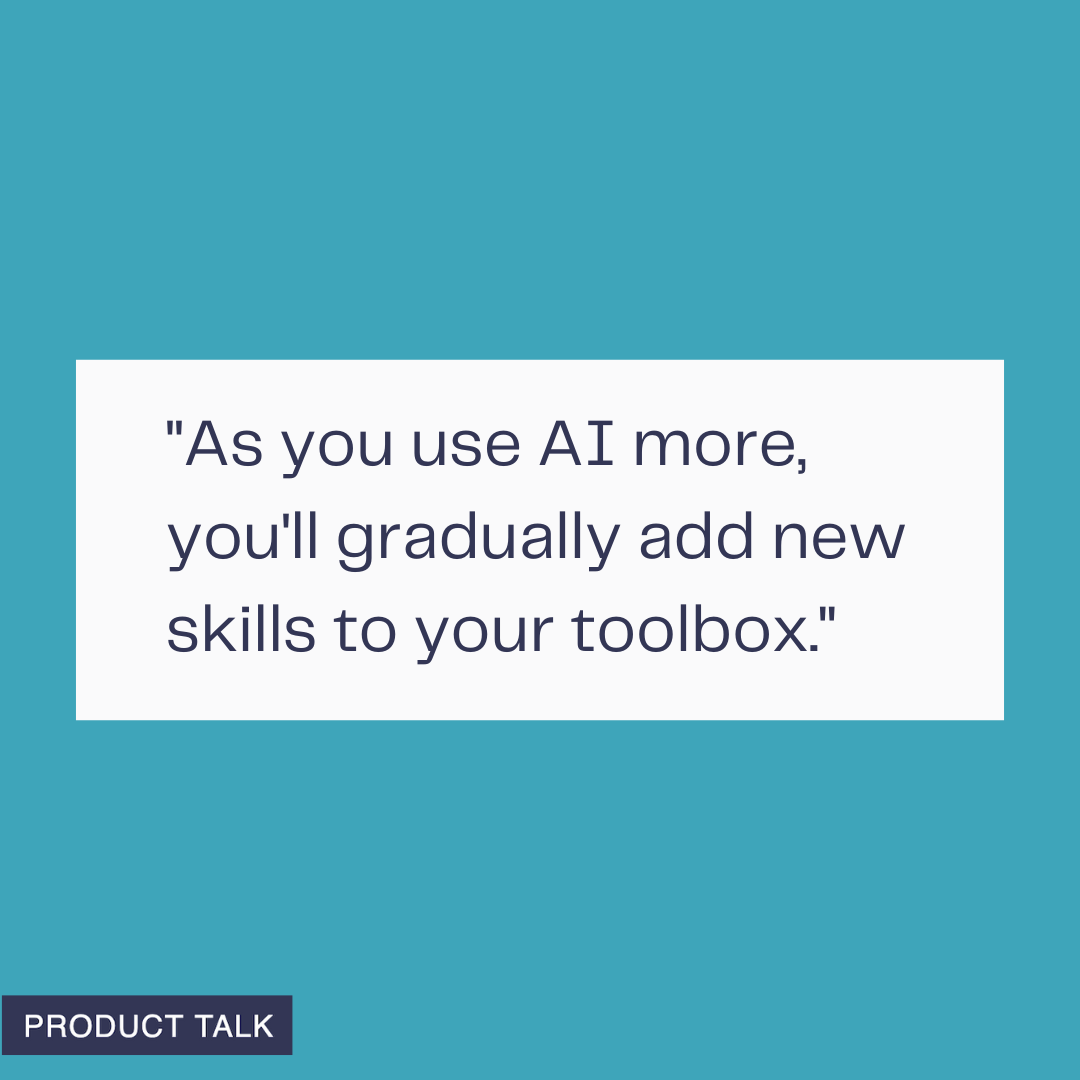
Start small, build fast. Every time you try an AI tool at home—whether for planning meals, organizing tasks, or learning—you're adding a new skill to your product toolbox and unlocking more ways to create.
My journey from AI consumer to AI builder started with ChatGPT. I used it like a cleaner, faster search engine—and appreciated the lack of ads. Very quickly, my questions got more complex. I began using it for day-to-day problem-solving and task execution. Through experimentation, I learned how to give the right context, what worked and what didn’t, how to use persistent memory, and how to conduct deep research. That hands-on tinkering began to influence my roadmap. In my role leading product, those experiments sparked prototypes that translated directly into features and workflows we could ship.
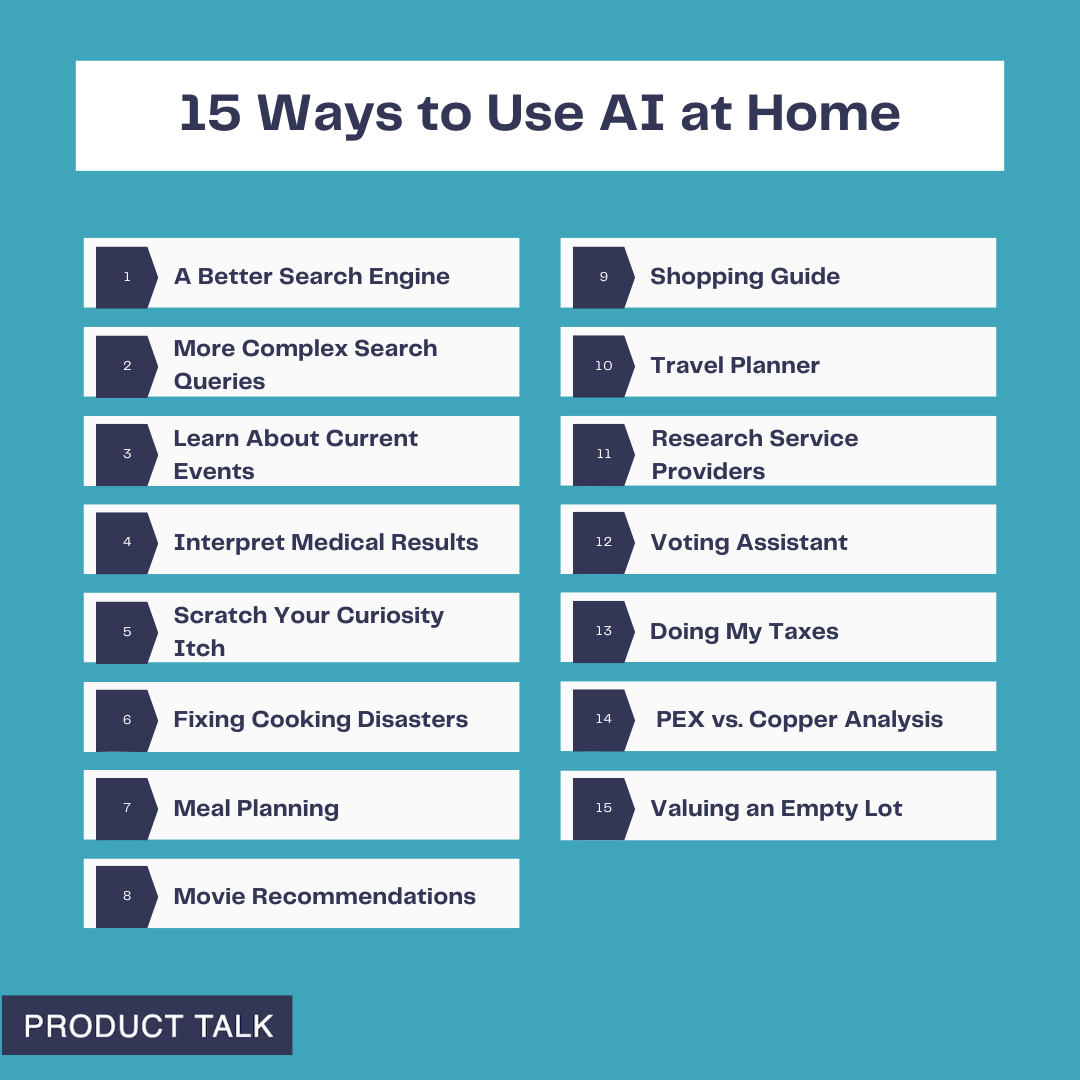
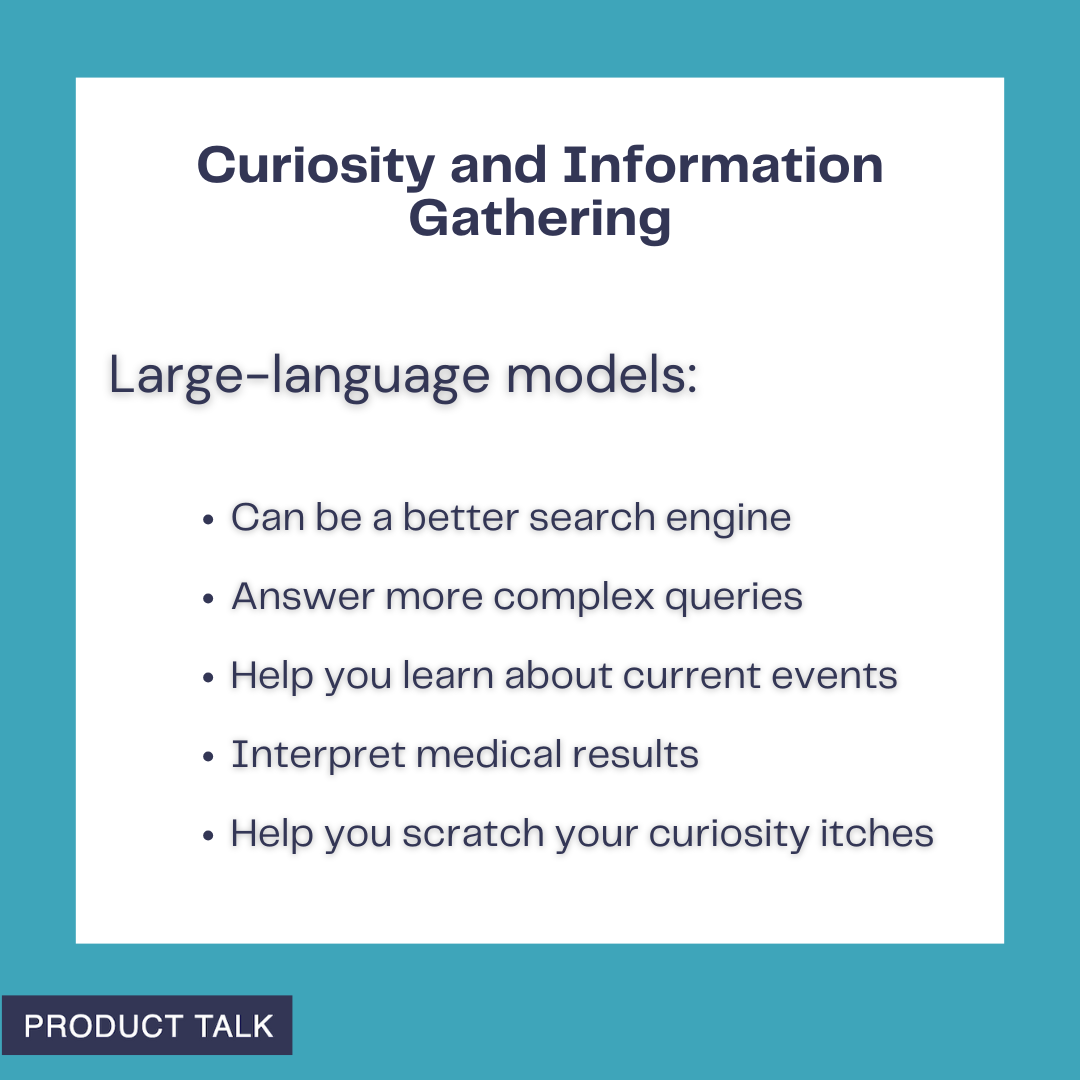
From 15 Ways to Use AI at Home: see how large-language models turbocharge information gathering—work as smarter search, tackle complex questions, explain medical results, and keep you informed about current events.
You can follow the same path. Start small. Pick something tedious or annoying. Ask ChatGPT, Claude, or Gemini for help. When you have a prompt that works, try to automate it. If automation is new to you, tools like Zapier, Make, or n8n are a great starting point—and your company might already use them. You’ll make everyday life easier while building the exact skills that underpin modern AI product work: prompt engineering (giving the right context), task decomposition, and multi-step workflows.
Turn everyday curiosity into answers. This prompt-style graphic shows how AI can quickly check civic data, like the age makeup of the US Senate, helping you build a practical, at-home AI toolbox.
To help you get started, here are the personal use cases that built my AI muscles at home, ordered from simple to more advanced. I group them into three buckets: Curiosity and Information Gathering, Everyday Life, and Deep Research. Start at the top and move down as your confidence grows.
Curiosity drives everyday learning at home. This Product Talk quote card shows someone seeking answers about the Middle East—illustrating how generative AI can support research, summaries, and safe, guided exploration.
Curiosity and Information Gathering is where large language models really shine. They’ve been trained on large portions of the internet as well as thousands of books and other resources. Here’s how I put them to work.
Use AI wisely at home: let LLMs help you prepare for appointments—organize symptoms, draft questions, and summarize records—but never treat them as a replacement for professional medical care.
1. A Better Search Engine. I rarely Google things anymore. I ask ChatGPT and get faster answers without the noise. I still use it for simple queries like: “Can my dog eat this?”, “Can I slow peaches from ripening if I put them in the fridge?”, “Does oatmeal go bad?”, “Can my dog be off-leash at Todd Lake?”, and “What’s a good coleslaw recipe that isn’t sweet or too mayonnaise-y?” If you’re brand-new to AI, this is the perfect on-ramp. You’ll get comfortable chatting with LLMs and quickly overcome the “What do I use this for?” hurdle.
A minimalist quote card captures an everyday question—how big a tractor to buy—showing how AI can turn casual curiosity into smart guidance for home projects, purchases, and product research.
2. More Complex Search Queries. The real power shows up when your question needs reasoning or synthesis. I recently wondered how many US Senators are over 75. Google returned lists of all 100 senators; I’d still have to count. ChatGPT gave me the answer immediately—there are 10 US Senators over the age of 75—listed each one, cited Axios, and offered another way to cross-check. That was more than good enough for my purpose and a great reminder of what LLMs can do better than search engines.
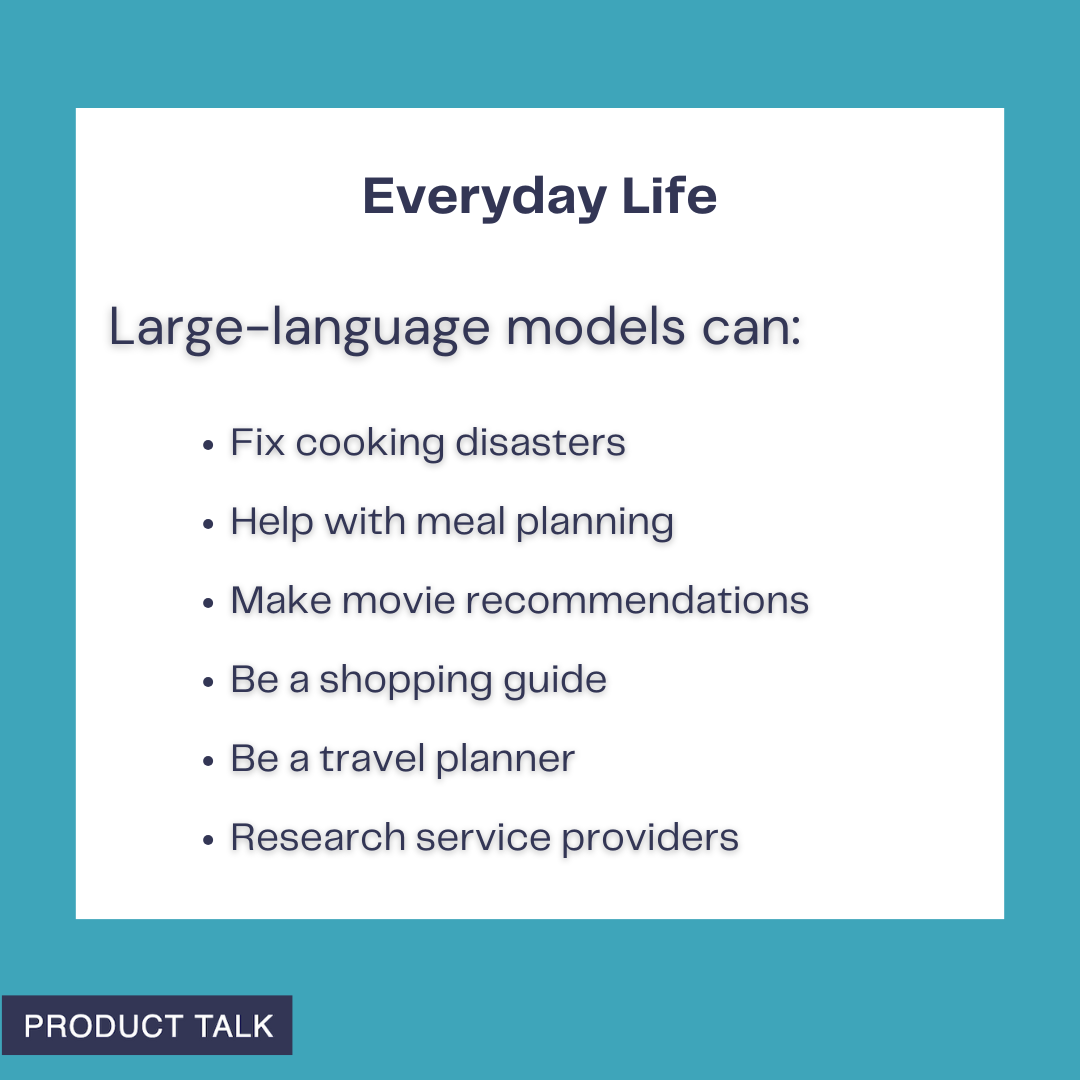
From kitchen fixes to trip planning, generative AI can streamline daily decisions. This Everyday Life graphic spotlights how large-language models support meals, movies, shopping, travel, and finding trusted service providers.
3. Learn About Current Events. When Hamas attacked Israel on October 7, 2023, I had a lot of questions—some I felt I should already know. I used ChatGPT to explore the region’s history, the etymology of “anti-Semitism,” and the context around Hamas, Hezbollah, and Jordan. It was empowering—and it also made me more vigilant about bias and hallucinations. I asked for sources, spent time on Wikipedia, and triangulated with trusted outlets. Now, I routinely use LLMs as a starting point to frame questions and then verify. You’ll learn to explore new topics while staying mindful of bias and accuracy.
From meal planning to DIY fixes, this quote shows how ChatGPT becomes your go-to helper. Explore practical, at-home ways to use generative AI and build a product toolbox you’ll actually rely on.
4. Interpret Medical Results. Medicine is full of information asymmetry. I use LLMs to prepare for appointments so I can ask better questions. After an ankle surgery, I read my operative notes and saw a ligament repair described as “secondary.” I pasted the entire report into ChatGPT and asked for an explanation. I learned that a secondary repair indicates an old tear—not the current injury. I dug into common repair types and their trade-offs, which helped me have a more productive follow-up with my surgeon. When bloodwork flags an out-of-range value, I ask ChatGPT to explain potential implications. I once tested high for bilirubin; both ChatGPT and my doctor explained that I likely have Gilbert’s Syndrome—a benign genetic variant that explains easy bruising and isn’t a concern. I never use LLMs in place of seeing a qualified medical practitioner, but they’re excellent preparation tools.
Context powers useful AI at home. This clean quote graphic underscores that adding goals, constraints, and examples leads to smarter assistants and a stronger AI product toolbox for everyday tasks.
5. Scratch Your Curiosity Itch. Once you’re comfortable, let LLMs become your curiosity engine. My husband dreams of building a trials course in our yard and wondered what size tractor could move a “4' x 2' x 2'” rock. ChatGPT asked about rock type, then reasoned: Central Oregon has basalt; basalt’s density is X; the estimated weight for a 4' x 2' x 2' basalt rock is Y; therefore, you need a tractor that can lift Z pounds; here are some models that meet your specs. We won’t be buying a tractor—but it was a fun, fast way to learn. Any time a question blends information and reasoning, an LLM can be a great copilot.
Personalization should get smarter over time—not forget you. This quote kicks off our 15 Ways to Use AI at Home series, highlighting how to diagnose drifting models and keep preferences front and center.
Everyday Life is where LLMs move from interesting to indispensable. I rely on them as all-purpose problem solvers.
Kickstart your home AI experiments by asking ChatGPT to define clear criteria for tasks and tools. With a simple prompt, you can compare options, set priorities, and grow a practical AI product toolbox.
6. Fixing Cooking Disasters. One night, I cooked rice with the wrong ratio—twice the water for half the rice—and ended up with a pot of soup. ChatGPT gave me three ways to salvage it. The first approach worked well enough to save dinner. I regularly ask for ingredient substitutions mid-recipe, fresh ideas for dinner, and tweaks to avoid dietary triggers. The more you throw at it, the faster you’ll learn what LLMs are great at (and where they stumble) and you’ll build the habit of turning to them first.
Clear prompts power better AI. This quote from our Product Talk series reminds us: add context to your requests or expect generic results. Use it as a rule of thumb for home AI tasks and experiments.
7. Meal Planning. I use ChatGPT to plan meals in a few ways: starting with what’s in the fridge, asking for a week’s worth of meals based on preferences, and, most often, requesting creative ideas when we’re bored with our rotation. The key is context. Allergies, likes and dislikes, what you’ve eaten lately, and any dietary framework all improve the suggestions. This is a perfect sandbox for practicing how to provide the right context to get high-quality output.
AI can take on the heavy lifting so you can focus on life. Discover 15 practical ways to use ChatGPT at home—from planning and chores to learning and creativity—plus tips to grow your AI product toolbox.
8. Movie Recommendations. The second hardest daily decision in my house—after dinner—is what to watch. We began with a ChatGPT thread where I listed our likes and dislikes with examples. It recommended a short list with synopses, we asked clarifying questions, picked a film, and enjoyed it. Over months, the recs got stale—ChatGPT started suggesting titles I had already rejected. That was my first brush with a context window limit. I moved to a Claude Project and added three documents: our preferences, movies we liked, and movies we didn’t. Recommendations improved dramatically. The hit rate is now much higher than the miss rate. The same setup works for TV, music, or books. Along the way, you’ll learn about context window limits, how examples improve quality (few-shot or n-shot prompting), using persistent state/memory, and iterative refinement.
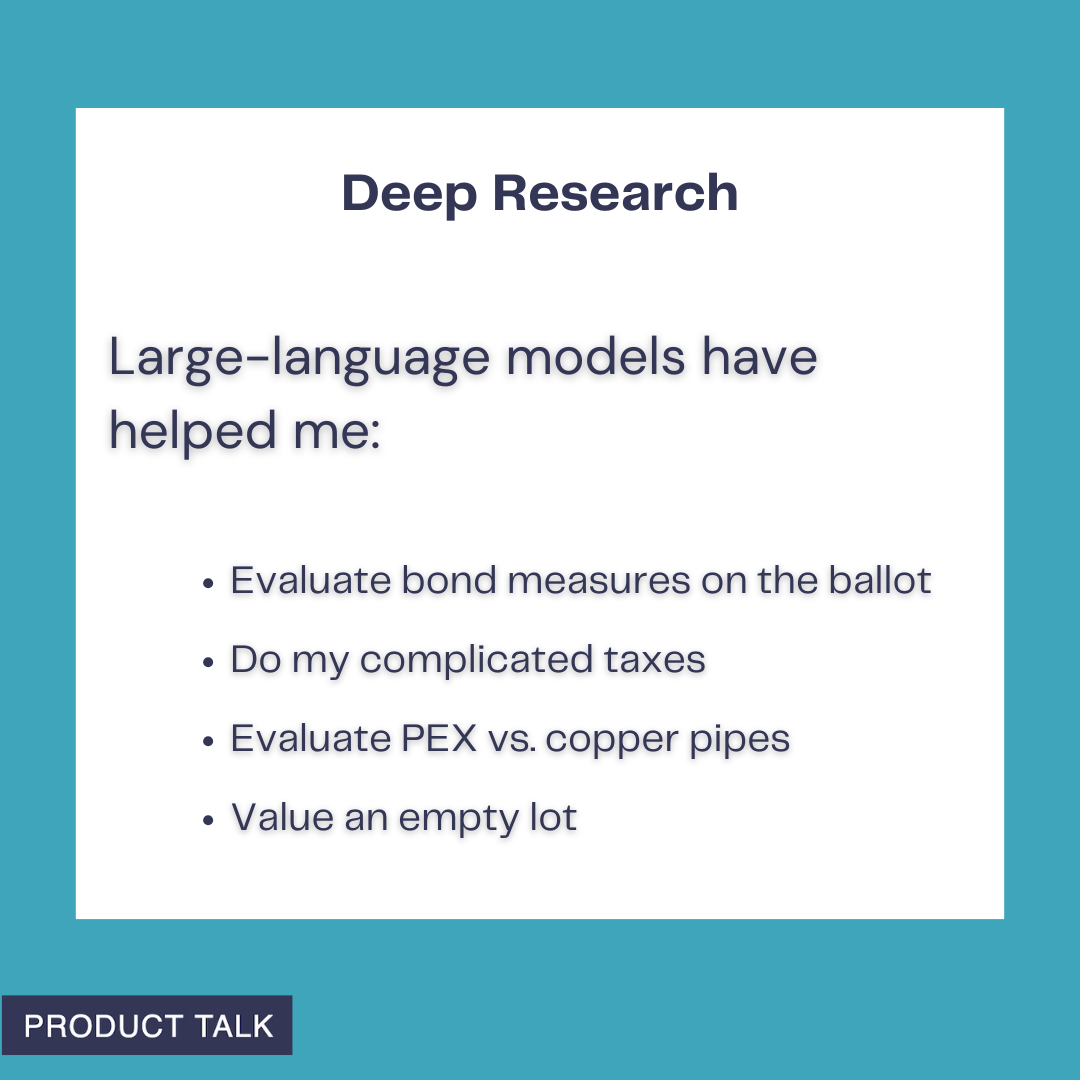
Deep Research with LLMs: from civic choices to home projects, AI helps evaluate bond measures, untangle complex taxes, compare PEX versus copper pipes, and estimate the value of an empty lot—everyday, practical wins.
9. Shopping Guide. Sometimes I outsource the whole decision; other times I use LLMs to structure criteria and compare options. I needed a new webcam without autofocus issues, explained my use cases (calls, webinars, talks, recorded video), and prioritized picture quality. ChatGPT suggested three options; I asked a few follow-ups, picked one, and was done in under ten minutes. In another case, we adopted a picky border collie/pit bull mix and wanted to level-up her food. We got overwhelmed between better kibble, fresh food, grain-free choices, and countless permutations. ChatGPT helped us define criteria, including several vet ratings that reflect nutritional balance and sustainability—both important to us. Then it generated a detailed comparison grid for top kibble and top fresh options. What felt impossible became tractable. You get to decide how much autonomy to give the LLM—pick for you, or inform your choice. Both add value.
10. Travel Planner. For the inaugural Product at Heart conference in Germany, we turned the trip into three weeks of exploring. Our shortlist included biking through wine country, visiting friends in Munich, spending time on Lake Constance, and, of course, Hamburg. I spent weeks researching and then realized I could ask ChatGPT; it compiled the core options in minutes. More recently, we needed a beachside, high-end resort near Del Mar and San Marcos for family visits, with active surf for my husband. After sifting through dated hotels, I was ready to give up. ChatGPT suggested the Alila Marea Beach Resort in Encinitas. The location was perfect, the resort delivered, the surf worked, and we booked with points. If you don’t provide context, you’ll get generic suggestions—so let the LLM interview you to surface your implicit preferences and constraints.
11. Research Service Providers. I procrastinate on chores like finding contractors. Selling our Portland townhouse forced my hand: I needed movers and someone to stretch and re-tack carpet, on a tight timeline. I asked ChatGPT for a short list of providers with strong reviews, reliable communication, and good punctuality. It then offered to draft an email—yes, please—which included questions I wouldn’t have thought of (“Do you use a power stretcher?” “Do you guarantee your work?”) and listed contact info for each. For movers, I needed a long-distance crew (three hours over a mountain pass) that could also move a hot tub. After striking out, I told ChatGPT what went wrong; it refined the search and found companies that specifically handle heavy items. I got quotes and booked the move. Having a coach that does the heavy lifting is a game-changer. If an LLM misses, tell it why and ask it to try again.
Deep Research is where LLMs become indispensable. These are the projects I wouldn’t tackle without one: being a more informed voter—including using an LLM to build a detailed model of my school district’s expenses to better evaluate a bond measure; filing both an S-corp return and a fairly complex personal tax return, and why I chose that route instead of continuing to work with my tax accountant; evaluating PEX vs. copper for a plumbing repipe when two well-respected plumbers argued opposite sides; and pricing an empty lot next door to evaluate whether it was a good purchase for us (later validated when the listing hit the market at the high end of ChatGPT’s range).
The meta-skill across all of these is partnering with LLMs: define the job to be done, supply crisp context, iterate, verify with sources when needed, and automate when a workflow stabilizes. Do that, and by the time you’re ready to build your first AI product, your toolbox will already be half full.
I recently shared 15 ways I'm using AI at home—from fixing cooking disasters to researching school bonds—and those experiments turned into real skills: learning to chat with large language models (LLMs), providing the right context, verifying results, and more.
Now it’s time to apply those same skills at work. The stakes feel higher, the problems are more complex, and we have to navigate when and how AI is acceptable at work. But the foundation we built at home makes the leap far less intimidating.
My goal is to inspire you to start experimenting (if you aren’t already). Along the way, you’ll add practical techniques to your AI product toolbox.
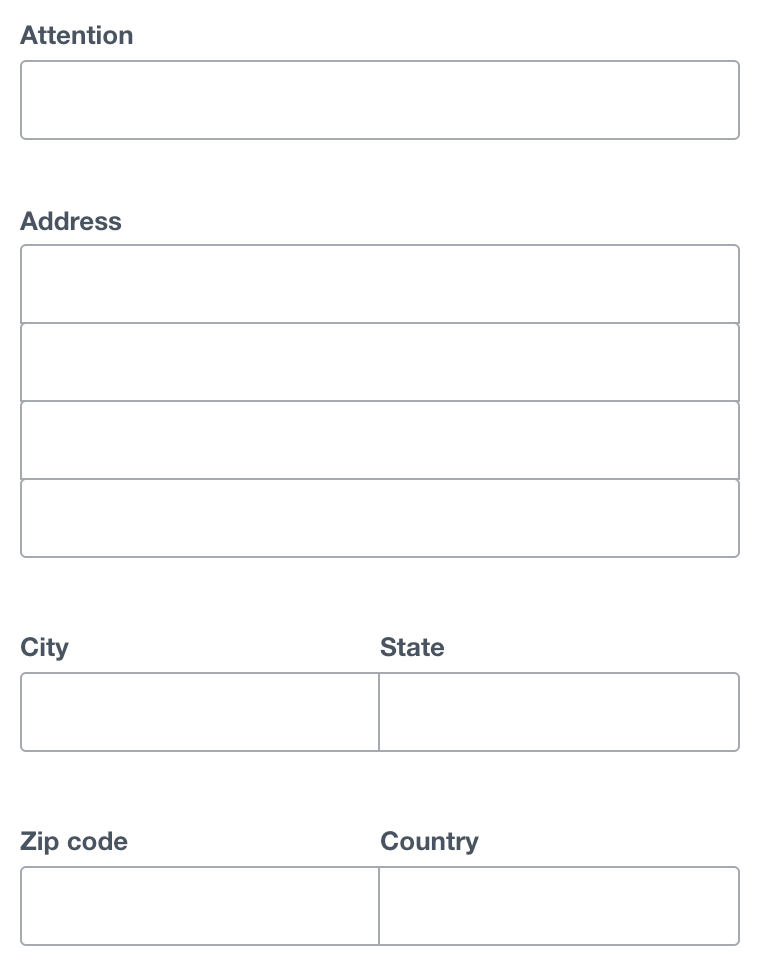
A clean address form ready for automation: fields for Attention, Address, City, State, ZIP, and Country invite AI-driven autofill, validation, and routing, accelerating workflows and reducing manual typing at work.
Using AI at home taught the basics—prompting, context windows, and hallucinations. At work, I layer in orchestration and automation. Don’t worry; we’ll take it step by step.
To make this actionable, I organize my work use cases by complexity, so you can start at the top and move down as your confidence grows. I group them into five buckets: Translator, Do the Work, Researcher, Writing Partner, and Coding Partner. Everyone can access the first three categories; I reserve the last two for subscribers.
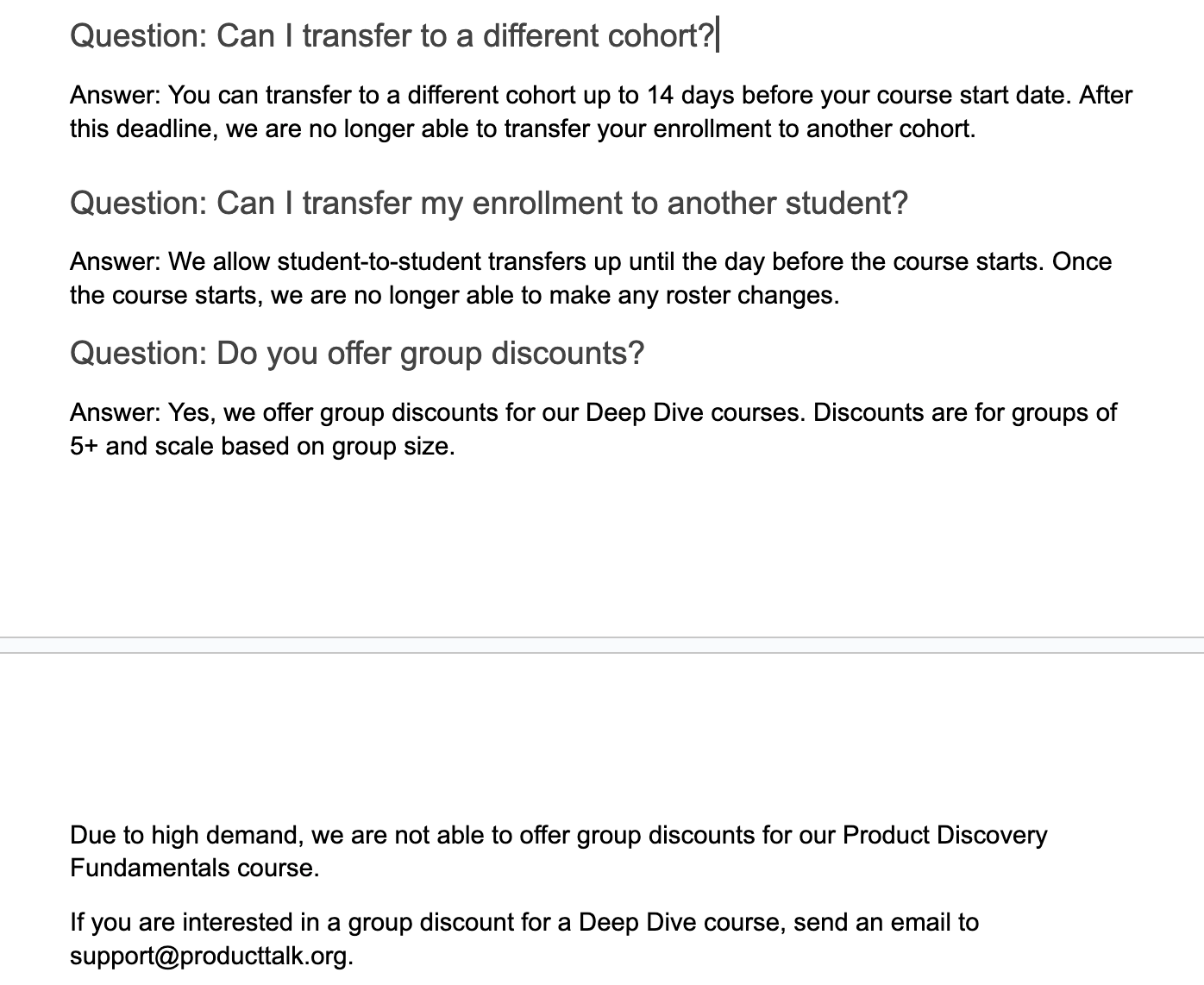
Clear course policies at a glance: switch cohorts up to 14 days before start, transfer a seat to another student until the day prior, and get scaled group discounts for Deep Dive courses, though Fundamentals is excluded.
Translator: I’ll start simple with low-stakes examples that build confidence and momentum.
1) Translate this email for me. My last name is common in both Spanish and Portuguese, so people often assume I speak both. I can get by in Spanish, but not Portuguese. When I get an email in another language, I ask ChatGPT for a translation. I used to use Google Translate, but ChatGPT tends to interpret context better. It’s a quick win that gets you comfortable with LLM interactions.
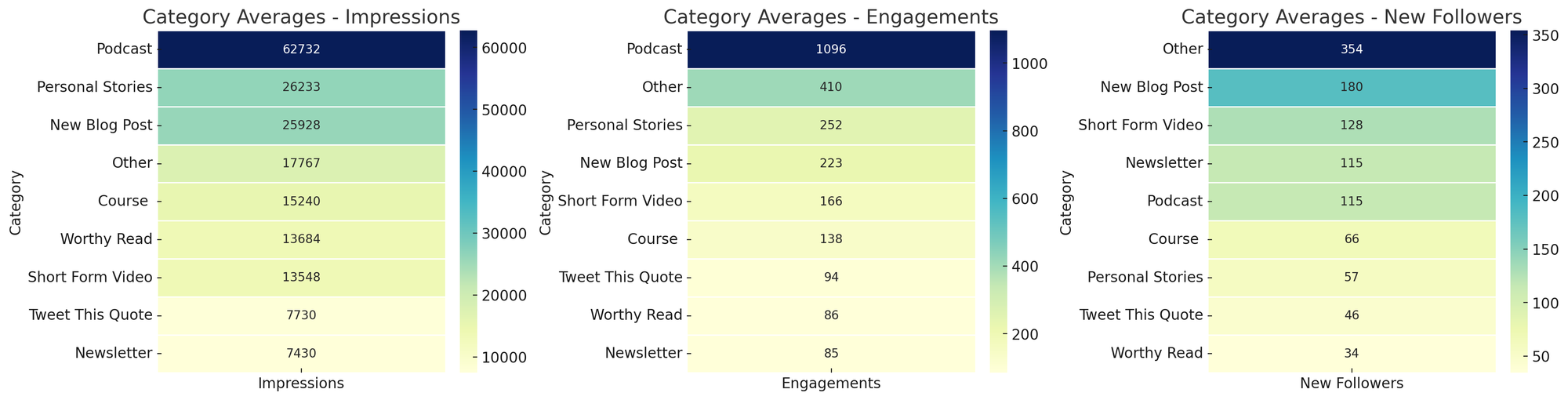
Curious which formats perform best? These heatmaps compare category averages for impressions, engagements, and new followers—spotlighting podcasts for reach and 'Other' for follower gains.
2) Parse this address for me. I live in the United States and work with companies around the world. In Xero, I have to enter addresses by street, city, state/region, country, and zip code. For international addresses, I’m not always sure how to parse fields. ChatGPT is great at this, so I created a CustomGPT to avoid rewriting the prompt. I paste the address, and it returns values mapped to Xero’s fields. If you’re new to CustomGPTs, think of them as reusable prompt-and-context bundles you can share with colleagues. Skills I built: when to use a CustomGPT versus an ad hoc prompt, and how to templatize repetitive formatting tasks.
Do the Work: This is where the magic shows up—AI accelerates execution—provided you set clear guardrails and keep humans in the loop where quality matters.
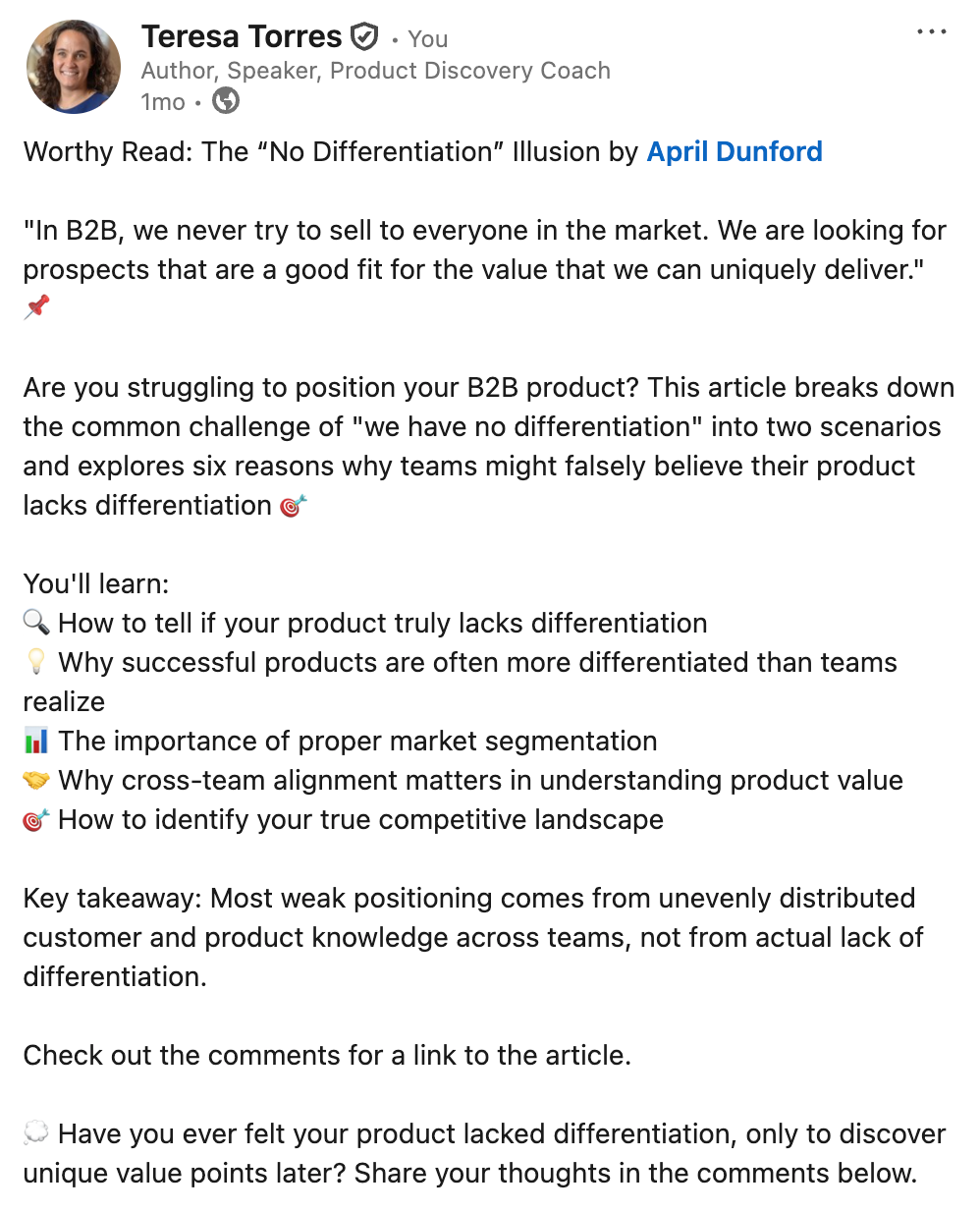
This concise social post tackles the “no differentiation” myth in B2B, highlighting how segmentation, team alignment, and a clear view of competitors reveal real product value—prompting readers to reflect and join the discussion.
3) Customer service assistant. My company offers a range of products and services, so we created a knowledge base with common questions and template answers to train support. But finding the right response in the moment is slow. I uploaded our content into a CustomGPT and instructed it to surface the most relevant templates, given an inbound email. The key decision: I did not let the model draft final replies. My admin uses suggestions to respond faster, but she remains responsible for the email content. Skills I built: discerning where human oversight is essential and using LLMs to speed up, not outsource, attention-intensive work.
4) Social media analysis. I share my work on social channels and want to know what resonates. LinkedIn lets me export analytics on top posts. Each month I export the last 30 days, ask a CustomGPT to create topic and category heat maps for impressions, engagements, and followers, and I chart trends over time. Patterns become obvious—personal stories drive impressions and engagement; short-form video drives followers. This workflow, inspired by Andy Crestodina at Orbit Media, turns raw analytics into actionable content strategy. Skills I built: using LLMs for data analysis and visualization, moving from exports to insights, and spotting outliers at a glance.
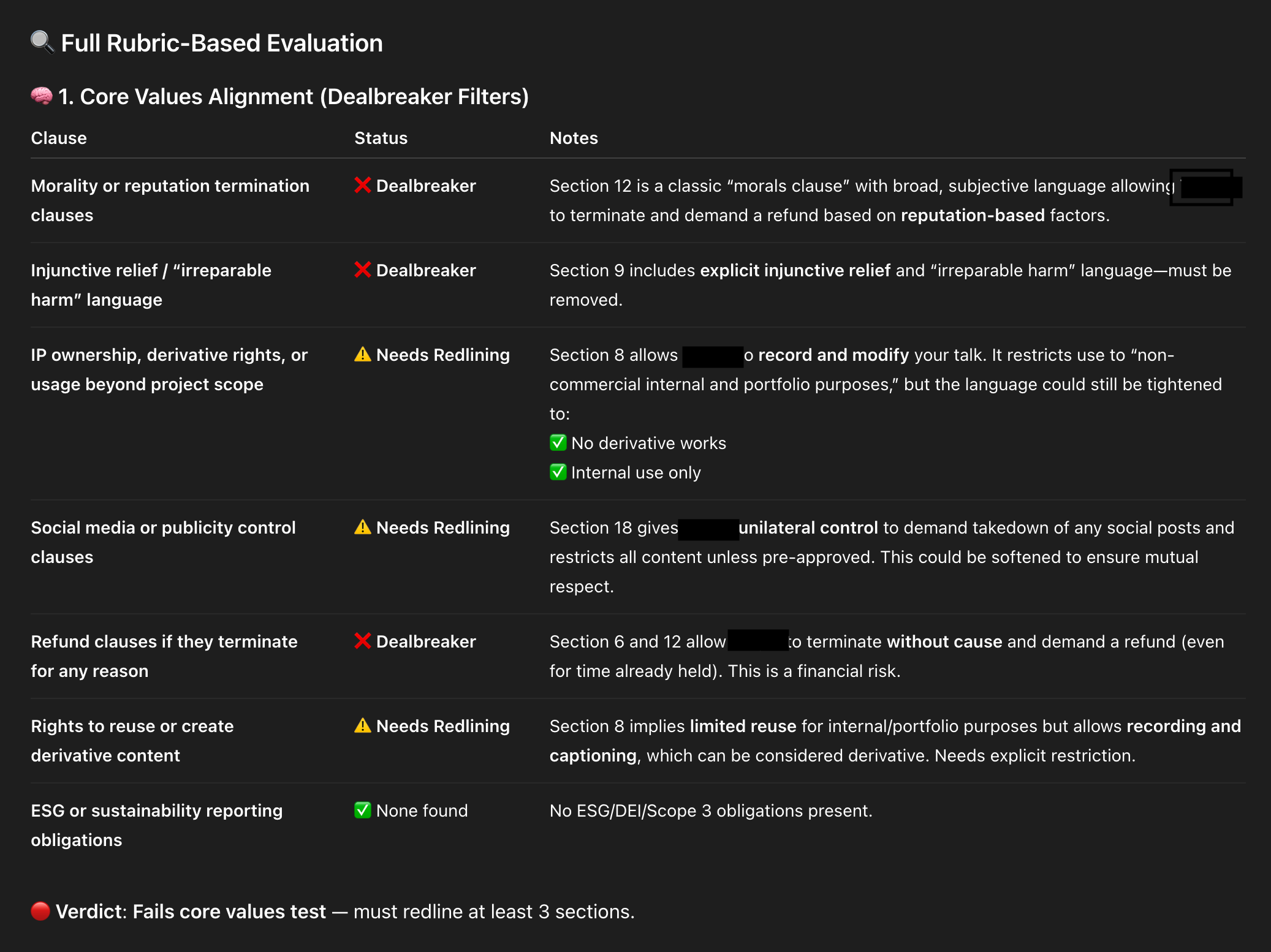
An AI-powered contract review snapshot flags risky clauses and where to push back. Clear labels—Dealbreaker, Needs Redlining, None Found—help teams tighten IP rights, social media controls, refund terms, and injunctive relief.
5) Article summaries. I used to share Worthy Reads—recommended articles—on LinkedIn and X, and I wanted stronger summaries. I asked Claude to generate them in the author’s voice, not “LLM voice.” I gave tone and style guidelines, writing samples, and a clear structure. Quality improved with each iteration. To save time, I automated the workflow with a Zapier zap: when I add a new article to my database, the Anthropic API generates a draft summary and emails it to me for a quick human review. If it looks good, I do nothing. If not, edits are one click away. Skills I built: providing precise context for tone and structure, creating a simple automation, and keeping a light human-in-the-loop review for quality.
6) ContractBot. I regularly review long legal documents and dislike every minute of it, so I built ContractBot as a CustomGPT. It started with a one-sided contract full of red flags—intellectual property, morality clauses, payment terms, and more. I asked ChatGPT to identify issues, we worked through them, and then I had ChatGPT write the reusable prompt that became ContractBot. Now I upload any new contract and get a summary of redlines tailored to my preferences. When new issues arise, I update the CustomGPT prompt, and it evolves with me. Skills I built: iterating preferences over time, using LLMs to translate and revise dense documents, and leveling information asymmetry during negotiations.
Need customer interview guidance fast? This snapshot rounds up five high-ranking guides with quick notes—perfect for scanning options and choosing the best how-to. Use it to kickstart research and structure your interview plan.
7) SEO keyword analyzer. “SEO is dead. People don’t use search engines. Now they just ask LLMs.” But LLMs still use search engines—so SEO is not dead. I still care about ranking for relevant terms, and I use ChatGPT to help. I give it a target keyword and one of my articles, then ask it to analyze the top ten Google results and highlight what they do that I don’t. I get a prioritized gap analysis. I don’t take every suggestion—I write for humans first—but many SEO improvements also boost readability, so it’s a win-win. This workflow, also inspired by Andy Crestodina, made me care about SEO because the effort is now minimal. Skills I built: competitive research and gap analysis, balancing SEO with human readability, and codifying a repeatable research pattern.
8) Landing page analyzer. I don’t love writing sales copy, but landing pages matter. I use ChatGPT to critique my course landing pages, with rich context: an ideal customer profile from real discovery interviews, a course syllabus, student testimonials, and the same knowledge base my support team uses. With all that context, I ask for a critique from the buyer’s point of view. Context is king—the more I provide, the sharper the feedback. I don’t accept every suggestion, and I still run demand and usability tests, but a second set of (virtual) eyes helps me move faster on a task I’d otherwise procrastinate. Skills I built: using LLMs to push through resistance, feeding the right context, and soliciting targeted “expert” feedback.
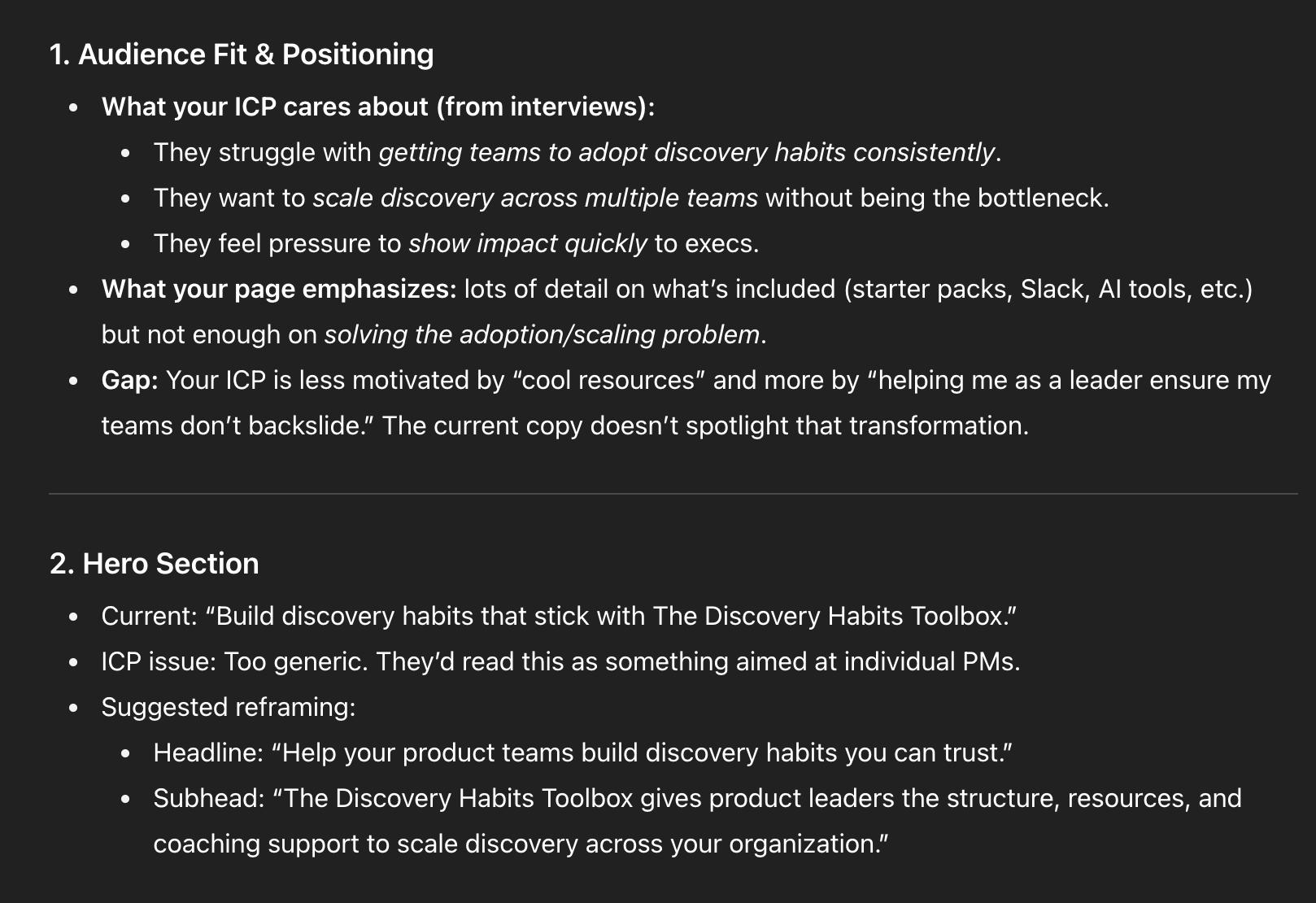
Messaging teardown in a sleek, dark theme shows how to turn interview findings into sharper copy: center ICP struggles with adoption and scaling, and rework the hero to speak directly to product leaders under pressure.
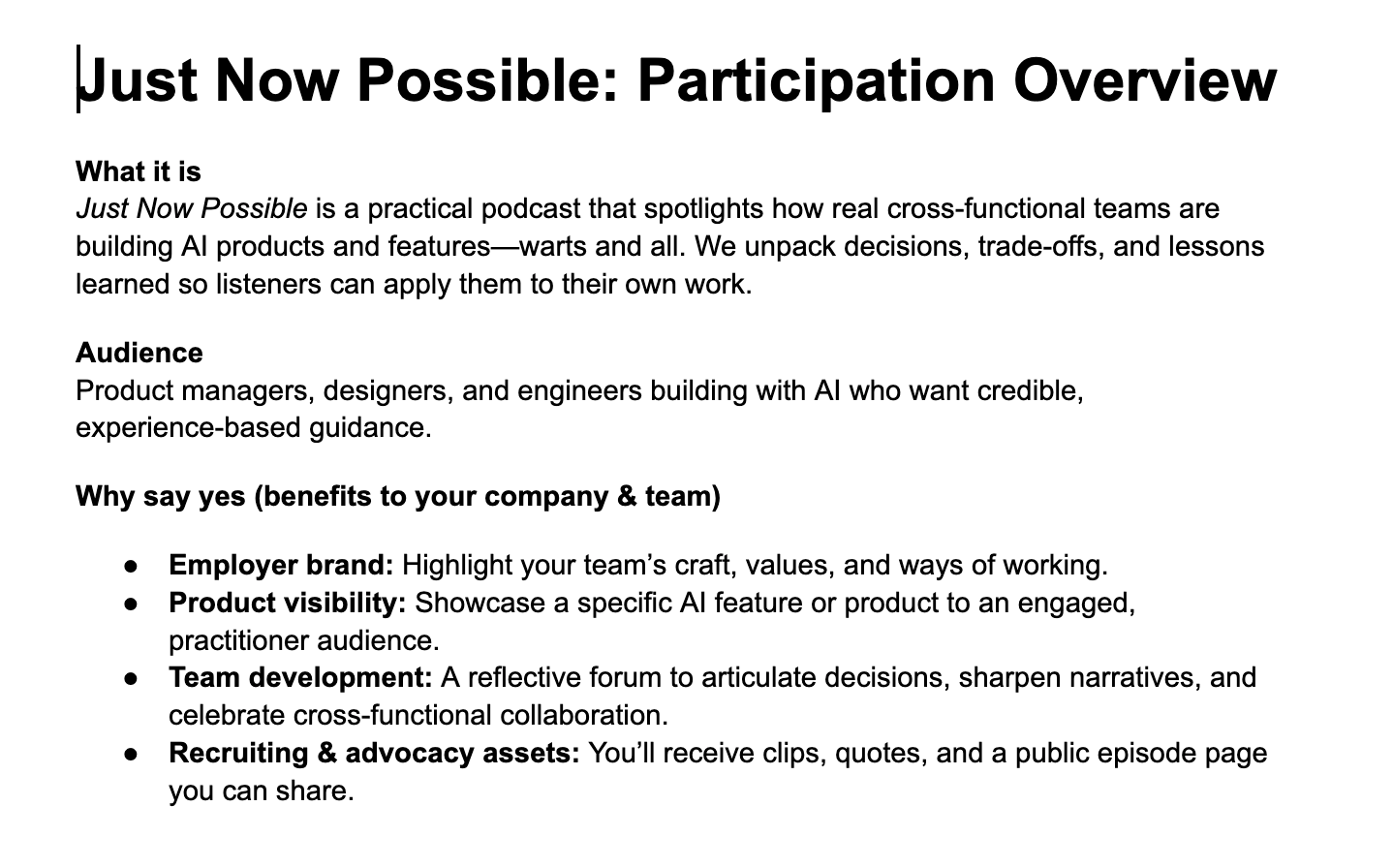
9) Podcast participation guide. I launched a new podcast, Just Now Possible, where I interview product teams about the AI products and features they’re building. Guests often need company approval to join, and I’d never had to ask for permission before. I set up a ChatGPT Project with background files—target listener, goals, and differentiation strategy—then asked it to draft a one-pager for executives explaining why their team should participate. It nailed the brief because the Project was already loaded with the right context. Skills I built: setting up Projects for ongoing domains and compounding context over time for higher-quality assistance.
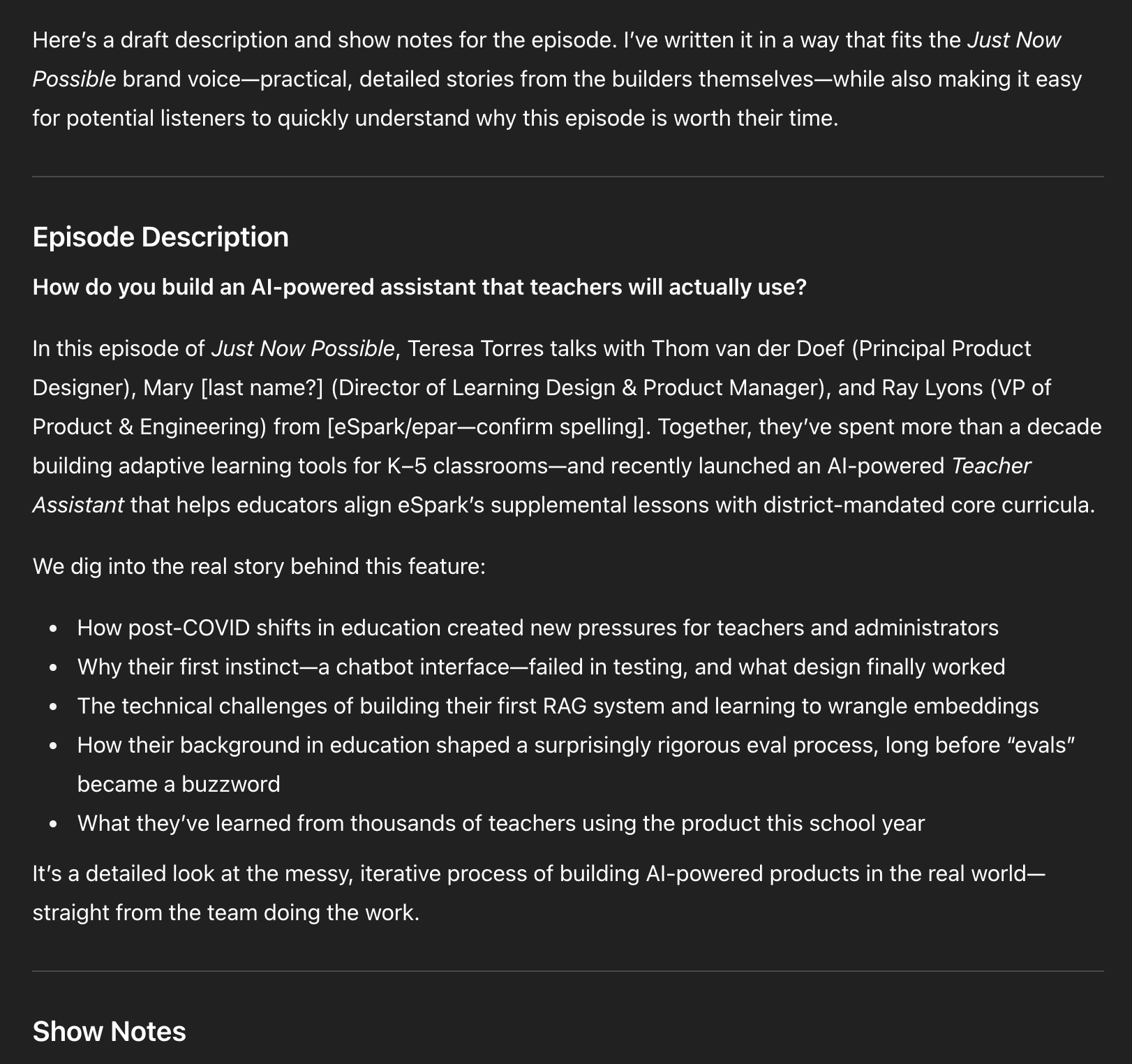
10) Podcast episode titles, descriptions, show notes, and chapter marks. In the same Project, I paste episode transcripts and ask for titles, descriptions, show notes, and chapters. As volume grows, I’m transitioning this into a CustomGPT with actions so I can click “Generate episode metadata,” paste the transcript, and go. Later, I’ll add actions for social posts and more. I don’t need to design the full system upfront; I evolve it as needs emerge. Skills I built: when to move from Projects to CustomGPTs, how to define actions, and how to evolve LLM tools incrementally.
Explore how the Just Now Possible podcast turns real AI product work into practical guidance. This overview invites PMs, designers, and engineers to share decisions, showcase features, strengthen employer brand, and gain recruiting assets.
Researcher: If you’ve tried using LLMs as an expert researcher at home, the returns at work are even better. Here are two recent examples.
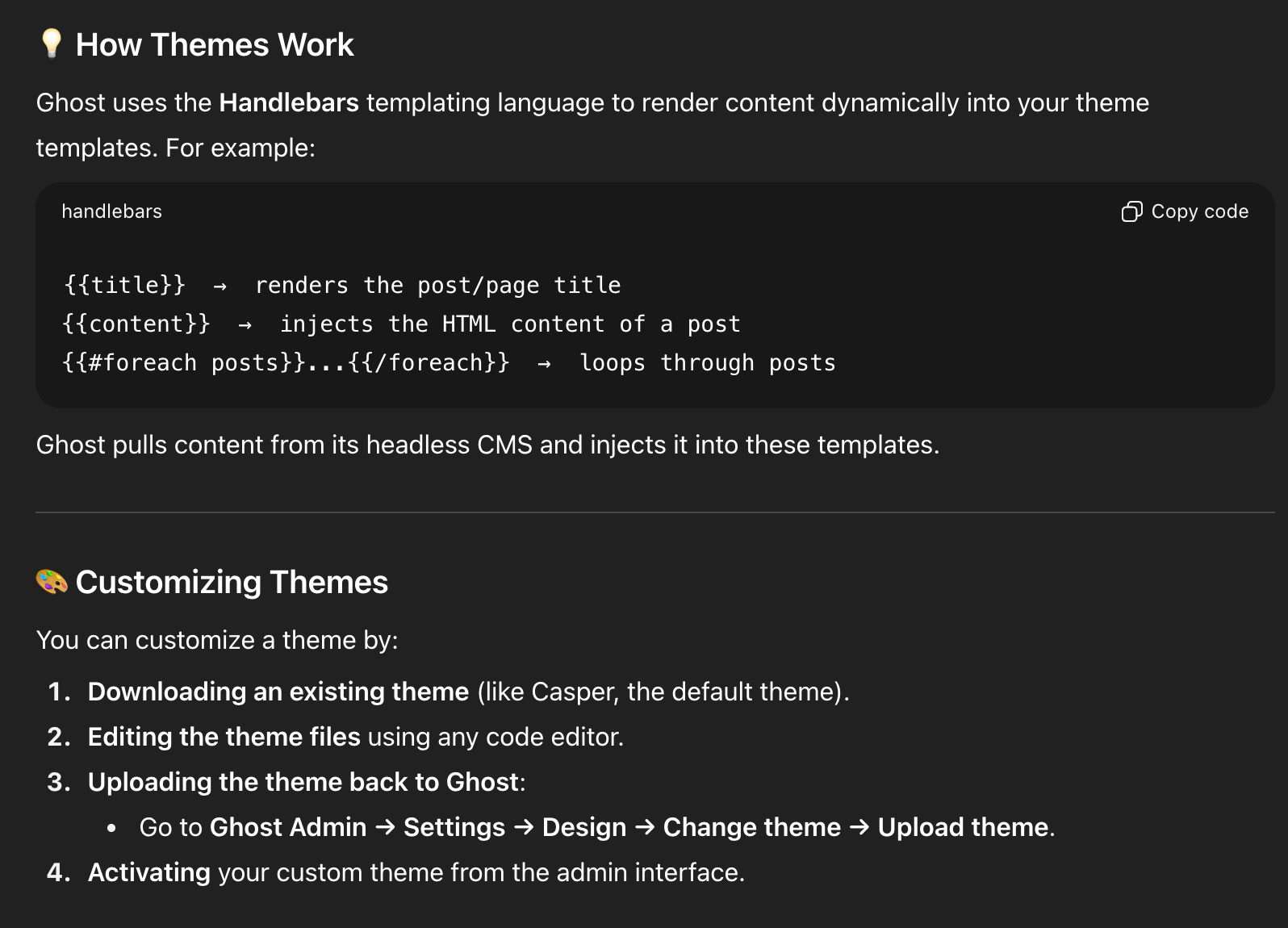
11) Choosing a new blogging/newsletter platform. After 14 years on WordPress, my site started breaking—plugin auto-updates caused critical errors, Google flagged 500s and performance issues, and I was over managing plugins. I’d also switched from Mailchimp to Kit and wasn’t thrilled. I considered Substack but had mixed feelings. I laid out constraints and goals in ChatGPT, compared options, and landed on Ghost. Before committing, I used ChatGPT to dive deep: theme customization, memberships, API documentation, and migration tasks. On a free trial, ChatGPT walked me through exporting from WordPress and importing into Ghost; Claude Code helped with theme tweaks. By the end of two weeks, I had imported data, customized the site, validated fit, and built confidence. We officially migrated in August 2025. Skills I built: tackling big projects with an AI guide on call, running structured vendor comparisons, and piloting major tech decisions with AI-assisted validation.
A draft episode description in dark mode outlines a talk on creating an AI Teacher Assistant for K–5 schools—covering post‑COVID pressures, why a chatbot interface failed, building a first RAG system, and lessons from real teacher use.
12) Academic research. I draw heavily from research on decision-making, problem-solving, and learning science, but I’m not an academic and can’t spend hours in journals. ChatGPT’s Deep Research changed that. Quarterly, I generate a report on topics like decision-making with parameters such as date ranges, peer-reviewed sources, and clear citations. I automated the pipeline so reports land in my Readwise inbox alongside other articles. I also seeded a course design Project in ChatGPT with Deep Research reports on scaffolding, modeling, and learning styles, so my course design support is evidence-based by default. Skills I built: running Deep Research on-demand and automating it so staying current is effortless.
Learning to use AI as a thought partner has been the biggest unlock for me. It’s hard to describe, so I’ll show you with detailed examples. I’ll start with how I write with AI—headline generation and copy editing—and quickly get to more advanced workflows. You’ll see how I set up subagents to review my writing from different perspectives, where I let LLMs draft versus where I insist on drafting myself, and why I now write in VS Code with Claude Code following along.
See how Ghost uses Handlebars to render posts and customize themes quickly. The screenshot highlights template helpers and a straightforward flow: download a theme, edit locally, upload in Ghost Admin, then activate.
These workflows helped me produce more, higher-quality content, and—unexpectedly—brought the joy back to writing.
I’ll also share how I use LLMs to help me code: how ChatGPT taught me to set up and use a Python Jupyter Notebook for eval data analysis, how I pair program with Claude Code, how I get Claude Code to generate high-quality unit and integration tests, and how I leveled up error handling with both Claude Code and ChatGPT. I have a light coding background; I couldn’t have done this without LLMs. Even if you don’t code today, there’s a lot here you can apply.
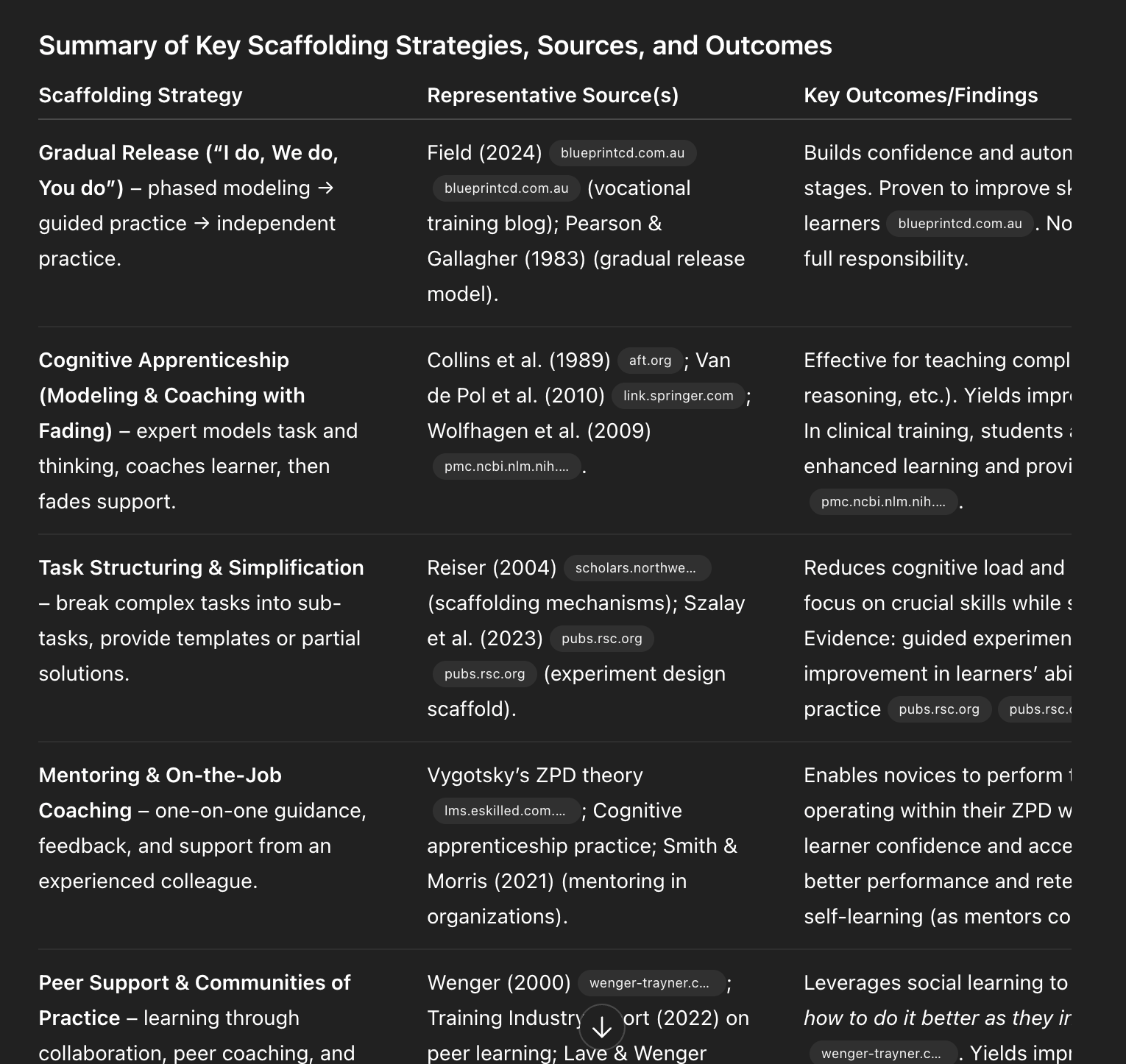
Evidence-backed scaffolding methods at a glance—gradual release, cognitive apprenticeship, task simplification, mentoring, and communities of practice—show how to teach AI skills, build confidence, and accelerate adoption at work.
As a reminder, those last two sections—my Writing Partner and Coding Partner playbooks—are for paid subscribers. I’ll also use comments to dig into your workflows. I hope you’ll join us.
I was initially reluctant to use LLMs as a writing partner. I’m not trying to outsource my thinking; writing is how I think. But staring at a blank page is real. I write, delete, and write again. The breakthrough was realizing the model doesn’t have to think for me—it can help me think more clearly. It can tell me when a draft is weak, offer structured feedback, and help me brainstorm ways to get unstuck. That’s how I began using LLMs as a true thought partner.
I see customer conversations as a goldmine for every team—yet too often, they’re trapped inside the support platform. That silo makes it harder to make confident, customer-first decisions across product, sales, marketing, and leadership. I’ve felt that pain firsthand, which is why this update matters.
From today, the new Intercom connector for ChatGPT changes this. Intercom customers can now allow all teams to securely access conversations, tickets, and user data directly inside ChatGPT. Without having to switch tools, you can now get all the context you need to put the customer first across every area of your business.
Here’s how I approach it in practice: when frontline insights are accessible in the same workspace where I ideate, plan, and write, my team moves faster with more conviction. It’s the difference between guessing at customer needs and grounding decisions in real conversations.
How to connect Intercom to ChatGPT
Connecting Intercom to ChatGPT is easy:
1. In ChatGPT, open Settings → Connectors.
2. Search for “Intercom” and select it.
3. Sign in with your Intercom account to approve the secure connection.
(The connector is read-only and respects your existing Intercom permissions, so people only see what they already have access to. See more about security and setup details here.)
Once you’re in, you can start exploring your customer data using prompts written in natural language, like:
“Help me prepare for a meeting with customer X by updating me on outstanding issues raised in the last four weeks.”
“Find positive Intercom conversations mentioning our new feature Y, and add customer quotes to my campaign brief in Drive.”
“Build a list of the most common feature requests based on customer inquiries.”
What this unlocks
Connecting Intercom to ChatGPT makes customer feedback available across the company in a usable way. In my own workflow, this turns previously buried signals into actionable inputs for roadmaps, messaging, and enablement—without hopping between tools.
Support tickets contain direct information about what’s breaking, what’s confusing, and what people actually need. Normally, that information stays siloed in the support team. When I can query those conversations in plain language, I get immediate clarity on friction points and opportunities, and I can share that context with cross-functional partners in minutes.
When anyone can query it in plain language, it becomes useful for decision-making across the board. Teams stop working at cross-purposes because they’re looking at different parts of the picture. Now, product can see what’s actually frustrating users. Sales can understand common objections. Marketing can use the language customers actually use. Leadership can spot trends as they’re happening.
My recommendation: establish a lightweight ritual around this data. For example, build a weekly highlights digest sourced from Intercom conversations and review it in your product sync or go-to-market standups. It’s a simple way to align stakeholders and keep customer reality front and center.
We’ll be adding more connectors soon so you can access Intercom data in other AI tools your team already uses.
I’m constantly looking for ways to turn messy, multi-source signals into decisions leaders can trust. Recently, I dug into how Zencity powers government decision-making with community voices—and it’s a masterclass in building AI products that are both responsible and useful.
Noa Reikhav, Head of Product, Zencity; Andrew Therriault, VP of Data Science, Zencity; and Shota Papiashvili, SVP of R&D, Zencity share a comprehensive view of how they designed an AI that listens and acts without sacrificing rigor.
How do you use AI to help city leaders truly hear their residents?
I was struck by the clarity of their platform vision—“They share how Zencity brings together survey data, 311 calls, social media, and local news into a unified platform that helps cities understand what people care about—and act on it.” That single line captures the essence of a unified analytics platform done right.
You’ll hear how the team built their AI assistant and workflow engine by being thoughtful about their data layers, how they combined deterministic systems with LLM-driven synthesis, and how they keep accuracy and trust at the core of every AI decision.
It’s a fascinating look at how modern AI infrastructure can turn noisy, messy civic data into clear, actionable insight.
Here are the takeaways that resonated with me most, and they align closely with how I approach AI Strategy and product management leadership. Data architecture defines what AI can do. Guardrails and transparency matter more than flashy outputs. Agentic systems become powerful when grounded in real, multi-tenant data. AI in the public sector can make democracy more responsive—if built responsibly.
The team’s layered data model is the backbone that enables trustworthy synthesis: raw data → elements → highlights → insights → briefs. As a product leader, I love how each layer introduces meaning and structure while preserving traceability. It’s the difference between a demo-friendly prototype and a durable platform.
Why context is everything when building AI for civic use. That’s not a platitude—it’s a requirement. Community conversations are hyper-local, emotionally charged, and policy-laden. Without context and rigorous data governance, you risk misclassification, bias, and broken trust.
How the team designed their AI assistant using MCP servers to safely negotiate data access. This is a smart pattern for privacy-by-design: let the assistant request access, let the system adjudicate, and make the boundary explicit and auditable. In multi-tenant environments, that clarity is the difference between scaling confidently and shipping risk.
Balancing agentic flexibility with deterministic trust. I’ve found this to be the most practical framing for real-world agentic AI: give the system room to explore, but bind its outputs to deterministic rails where it matters—taxonomy, citations, permissions, and evaluation criteria.
Evaluating accuracy when latency matters: how they think about evals, citations, and model-as-judge systems. I appreciate the pragmatism here. In production, you don’t have the luxury of slow truth-finding. You need tight feedback loops, interpretable citations, and layered evals to keep both precision and speed.
Using workflows like annual budgeting or crisis communication to deliver AI-generated briefs to the right people at the right time. This is where product-market fit shows up: not in features, but in end-to-end workflows aligned to real decision cycles and stakeholders.
Why government workflows are the ultimate “jobs to be done” framework. When the job is a public process—with deadlines, accountability, and high scrutiny—you don’t just need insights; you need timely, contextualized briefs that match the cadence of the work.
From my lens, the magic isn’t any single model. It’s the orchestration: deterministic systems with LLM-driven synthesis, strong guardrails, transparent citations, and an orchestration layer that routes the right brief to the right role at the right moment. That’s how you turn community noise into legitimate signal—and signal into action.
If you’re building AI for regulated, high-stakes environments, take note: invest in your data layers, make context a first-class citizen, embrace privacy-by-design with clear access negotiation, and treat evaluation as a living system. Do that, and you’ll earn the trust that makes your AI assistant—and your organization—indispensable.
Go hard early is more than a mantra—it’s a product strategy. When I study the most durable enterprise companies, I see the same pattern: you win by shipping fast, obsessing over the customer’s day-to-day pains, and delivering consumer-quality experiences to business buyers. That lens is exactly why Serval’s recent momentum caught my attention and why the lessons behind it matter for every product and IT leader building in AI.
Jake is the founder and CEO of Serval, an AI-driven IT automation and service management platform that just raised $47M in Series A funding this week. Before founding Serval, Jake spent over five years at Verkada, where he led multiple products from 0-1 and helped scale the company across hardware and software. His years at Verkada taught him that winning in enterprise means delivering consumer-quality experiences to business buyers — a lesson that shapes how Serval turns complex IT automation into something that feels magical.
From my vantage point, the most counterintuitive lesson here is the power of building “in existing categories.” Rather than inventing a new market, the better move can be to redefine expectations inside a known one—where buyers, budgets, and success criteria already exist. That’s how you compress sales cycles, build trust rapidly, and create a wedge for product-led growth without boiling the ocean.
Another playbook thread I admire: turning “hard mode” into a moat. The teams that lean into gnarly integrations, real workflow depth, and enterprise-grade reliability end up compounding an advantage that’s very hard for fast followers to copy. That mindset shows up in Serval’s platform strategy and, more importantly, in how they translate complex IT work into something that feels intuitive on day one and powerful on day 100.
Customer intimacy sits at the center of that strategy. The customer interview question that unlocked the IT buyer’s hidden pain points is the kind of move I try to operationalize across product trios and forward-deployed teams. When you ask not just, “What do you do?” but, “What do you do when everything breaks?” you surface the real constraints: shadow runbooks, brittle scripts, brittle processes, and the political friction that slows down response times. That’s where durable value—and competitive differentiation—lives.
How Serval’s automation builder uses AI to generate code-based workflows is a particularly smart architectural choice. Code-first doesn’t mean hard-to-use; it means source-controlled, interoperable, and shareable across teams—exactly what IT leaders want when automation moves from side project to system of record. Tie that to agentic orchestration and you get reliable automations with clear observability, safety rails, and the ability to scale without collapsing under edge cases.
I’m also a believer in redefining engineering and PM roles with forward-deployed engineers. When engineers partner directly with customers, discovery accelerates, prioritization sharpens, and product bet quality improves. You avoid ping-ponging requirements through layers, and you raise the hiring bar for true product creators who can think in outcomes, not just output.
Keeping the hiring bar high in an AI-native startup isn’t optional—it’s existential. The best teams screen for candidates who can reason from first principles, ship quickly with taste, and articulate the value proposition in plain language. The ultimate hiring litmus test is whether someone can improve the product on day one by clarifying a user journey, simplifying a workflow, or tightening a metric that actually matters.
There’s also Why there’s a “land grab” moment right now in enterprise AI. Incumbents are strong on breadth but often slow to re-architect for AI-native workflows. New entrants that show up with opinionated defaults, pragmatic security, and crisp buyer narratives can establish points of parity quickly while extending into true points of differentiation. That’s the window to seize—especially when building for mid-market and enterprise.
Here are the core themes I took away and how I translate them into practice across product roadmapping and sprint planning, product discovery, and go-to-market strategy.
Why building “in existing categories” can be more powerful than creating new ones. Use the market’s mental models, measure against known alternatives, and win by delivering a meaningfully better experience—not by forcing buyers to invent new procurement paths.
The lessons from Verkada that shaped Serval’s platform strategy. Treat UX polish as a strategic asset, make setup effortless, and let power users go deep without friction. Consumer-grade quality is not a veneer; it’s a trust accelerator in enterprise.
The customer interview question that unlocked the IT buyer’s hidden pain points. Go beyond happy-path discovery. Ask about the 3 a.m. moments, the panic buttons, and the messy handoffs—then design for those first.
How Serval’s automation builder uses AI to generate code-based workflows. Pair AI generation with reviewability, versioning, and safe rollbacks. Make it easy to see, test, and share what the agent is doing under the hood.
Redefining engineering and PM roles with forward-deployed engineers. Collapse feedback loops by putting builders where the problems are. It’s the fastest path to product-market fit lessons and real-world reliability.
Keeping the hiring bar high in an AI-native startup. Look for taste, speed, and ownership. Optimize for people who can both prototype with gen ai and ship production-hardened systems.
Why there’s a “land grab” moment right now in enterprise AI. Move quickly, but anchor on outcomes. Land with a wedge use case, expand with measurable value, and maintain clear points of parity while you deepen differentiation.
If you want to follow or explore the companies and leaders referenced, these links are a useful starting point.
This podcast on all platforms: https://review.firstround.com/podcast
References:
Alex McLeod: https://www.linkedin.com/in/alexmcleodio/
Clay: https://www.clay.com
Cloudflare: https://www.cloudflare.com
Cursor: https://cursor.sh
Filip Kaliszan: https://www.linkedin.com/in/kaliszan/
Hans Robertson: https://www.linkedin.com/in/hansrobertson
Linear: https://linear.app
Okta: https://www.okta.com
Rippling: https://www.rippling.com
Serval: https://www.serval.com/
ServiceNow: https://www.servicenow.com
Verkada: https://www.verkada.com
Workday: https://www.workday.com
Timestamps and topic highlights for easy navigation and deeper study:
(02:25) Lessons from holding different product roles
(07:29) Turning “hard mode” into a moat
(10:49) The early days of Serval
(12:59) Scratching the founder itch
(14:57) Unconventional interview techniques
(17:47) Solving core interview challenges
(21:10) Planning the early product roadmap
(23:03) The surprising power of patience
(26:12) Serval’s impressive technical advantage
(27:35) Disrupting legacy incumbents
(31:13) Building for mid-market and enterprise
(33:35) Serval’s enduring roadmap
(36:08) How to sell to an existing market
(39:16) The evolving role software plays
(43:55) Building for AI that didn’t exist yet
(49:49) Serval’s forward-deployed engineers
(58:31) The hybrid PM-GM
(1:00:27) “You can over-prioritize”
(1:02:48) The unexpected value of panic buttons
(1:04:50) What Serval looks for in new talent
(1:07:01) The ultimate hiring litmus test
(1:13:59) Building out Serval’s go-to-market function
(1:16:31) The evolving IT market in 2025
My bottom line: build where budgets already live, ship with uncompromising UX, embed engineers with customers, and hold the line on talent. Do that, and you won’t just keep up with the enterprise AI “land grab”—you’ll define the standard others have to meet.
Over the past few years leading product at HighLevel, I’ve watched too many teams rush to demo flashy agents before they’ve built a reliable foundation. The metaphor I use in every AI roadmap review still hits home: “Think of AI readiness as a three-layer cake. Most companies are trying to build the fancy frosting (the agent interface) without bothering to bake the actual cake underneath.” If we want durable impact, we have to bake first, frost later.
When I design an AI Strategy, I anchor on three elements that map directly to that cake: a data and instrumentation foundation, a governance and risk layer, and finally the agent experience itself. This sequence isn’t theory—it’s how we de-risk delivery, accelerate product-market fit, and create competitive differentiation without compromising trust.
Layer 1 — Data and instrumentation: The base of the cake is clean, well-instrumented data flowing through a unified analytics platform. I start with a clear event schema, rigorous data quality checks, and tight CRM integration so we can connect outcomes to users, accounts, and journeys. Privacy-by-design is nonnegotiable: we minimize PII, define retention, and ensure consent flows are explicit. With this in place, gen ai features have the context they need—retrieval works, grounding holds, and feedback loops from production inform continuous improvement.
On top of that, I build measurement in from day one: activation, retention, task success, latency, and satisfaction. Every AI interaction is observable. We run A/B testing with a well-defined minimum detectable effect, pair quant with qualitative review, and feed human-in-the-loop judgments back into ranking and prompt libraries. This is how we avoid “demo-ware” and deliver real, repeatable value.
Layer 2 — Governance and risk: Before scaling, I formalize AI risk management and data governance. That includes model evaluation against safety and quality thresholds, red-teaming for jailbreaks, and threat detection and response for prompt injection and data exfiltration. We establish policy for model and provider selection, versioning, and rollback; we log prompts, responses, and decisions for auditability; and we define escalation paths when the system is unsure. These controls don’t slow us down—they create the confidence needed for faster iteration and board management alignment.
I also align legal, security, and product early on a taxonomy of risks—bias, hallucinations, privacy, IP leakage—so we can write tests and guardrails once and reuse them across features. The result is fewer surprises in customer pilots and a far smoother path through enterprise procurement.
Layer 3 — The agent experience: Only now do we invest in the frosting—the agent interface and workflows. Here I focus on clear jobs-to-be-done, crisp UX writing, and transparent system behavior. We design agentic AI flows that show reasoning steps when helpful, ask for clarification when confidence is low, and gracefully hand off to humans in customer support scenarios. Product tours, in-app guides, and tooltips reduce the learning curve and accelerate user activation.
Crucially, we measure the interface, not just the model. Agent Analytics tracks intents, tool use, fallbacks, and user corrections so we can tune prompts, tools, and policies. This closes the loop from experience back to data and governance, and it directly informs product roadmapping and sprint planning. When the cake is baked this way, go-to-market becomes easier: we can prove ROI with hard numbers, fine-tune pricing, and scale adoption with product-led growth tactics.
If your AI roadmap feels stuck, start with an honest readiness audit against these three elements. Shore up instrumentation and data pipelines, codify governance, then refine the agent interface with real user telemetry. Bake first. Frost last. That’s how we ship AI that customers trust—and keep winning after the first demo high fades.
I spend a lot of time reviewing how customers move through our product and where their momentum stalls or accelerates. The tools you use to build and optimize software experiences are evolving. That simple truth reshapes our strategy every quarter, from the analytics we trust to the in-app touchpoints we design and the experiments we run to improve product-led growth.
When I say SXM, I’m talking about a comprehensive software experience management approach that unifies analytics, experimentation, in-app guides, messaging, and feedback loops. SXM vs. the rest is the real-world choice between an integrated platform and a patchwork of point solutions. I’m not married to one path; I’m obsessed with outcomes—speed to learning, lower friction for teams, and compounding retention gains.
The foundation is a unified analytics platform and a clean, consistent event schema. From there, I pair behavior analytics with in-app orchestration: tools like Amplitude analytics for deep behavioral insights and Pendo for targeted in-app guides, product tours, and contextual nudges. I instrument rigorous A/B testing with a clearly defined minimum detectable effect (MDE) and follow through with retention analysis to validate whether an uplift sticks beyond vanity metrics. Great UX writing and thoughtful tooltip design often make the difference between a nudge that converts and a prompt that gets ignored.
I choose between best-of-breed and platform consolidation using first principles decision making. If a point solution unlocks a capability that meaningfully advances our product discovery or activation work, I adopt it. If multiple tools converge on the same points of parity, I consolidate to streamline governance, reduce integration overhead, and accelerate delivery. The goal is not more software; it’s faster, clearer learning that informs product positioning and drives customer value.
AI now sits at the center of this stack. I apply gen ai and agentic AI to accelerate hypothesis generation, automate cohort detection, draft UX microcopy, and suggest next-best actions inside the product. That said, AI risk management, privacy-by-design, and data governance are non-negotiable. I won’t trade trust for tempo; we can have both by putting guardrails around training data, access controls, and evaluation criteria.
Operating rhythm matters as much as tooling. Product trios set outcomes vs output OKRs, then test and iterate—starting with onboarding, activation, and the moments that trigger value realization. We build in measurable in-app guides, run A/B testing with tight feedback cycles, and keep our go-to-market strategy aligned so every nudge, message, and feature release supports product-led growth.
My playbook is simple: clarify the outcomes, instrument the journey end-to-end, choose the smallest toolset that can answer the biggest questions, and learn faster than the market. Map critical paths, standardize taxonomy, and make experimentation a habit—not a project. Then double down where signal is strongest and retire anything that adds minimal lift to retention or expansion.
SXM isn’t a buzzword; it’s a disciplined way to build software that feels intuitive, responsive, and valuable from the first click. With the right blend of analytics, in-app guidance, experimentation, and AI—grounded in strong product management leadership—we can turn insights into momentum and momentum into durable growth.
AI has fundamentally changed how I lead design and testing, not by replacing craft, but by compounding it. When my teams pair generative models with time‑tested product management practices, we move faster, learn sooner, and ship with more confidence—without compromising privacy-by-design or quality. The result is a tighter loop from product discovery to product-market fit lessons.
Learn how Pendo’s product design team is using genAI and traditional tools to speed up design and development.
That single line captures my own operating model: blend genAI with established toolchains to accelerate, not shortcut. In practice, I treat AI as a force multiplier for product trios—PM, design, and engineering—so empowered product teams can explore broader solution spaces while staying anchored to outcomes vs output OKRs.
In discovery, genAI helps me synthesize qualitative inputs at scale—interviews, support threads, and in-app behaviors—into testable opportunity statements. I triangulate those insights with a unified analytics platform and Amplitude analytics to spot friction, then use in-app guides and product tours to target learning, recruit the right cohorts, and validate problems before we overbuild.
For prototyping, gen ai for product prototyping is a game-changer. I generate multiple UX writing variants, microcopy, and flows in minutes, then narrow the set using heuristics and stakeholder feedback. Before any A/B testing, we precompute the minimum detectable effect (MDE) and sample size, making sure our experiments are powered to detect meaningful differences, not noise.
In testing, I combine classic A/B testing with AI-assisted analysis to surface patterns faster. GenAI drafts experiment summaries, flags anomalous segments, and proposes follow-up tests, while my team makes the final calls. We deploy targeted in-app guides to onboard users into trials, monitor adoption via event telemetry, and iterate quickly until the value proposition is unmistakable.
Execution depends on rigor and guardrails. We codify AI risk management and data governance policies, keep humans-in-the-loop for critical judgments, and log model prompts and outputs for auditability. This lets us move with speed and integrity, aligning stakeholder management, product roadmapping and sprint planning, and go-to-market strategy around measurable outcomes.
The payoff is material: shorter cycle times, clearer value narratives, and stronger product-led growth curves. By fusing genAI with traditional practices, we preserve the craft of design while scaling our capacity to learn. That’s how we differentiate—through faster insight generation, smarter testing, and experiences that feel unmistakably intuitive.
Leading product at HighLevel, I’m watching the convergence of SaaS + AI reshape how we build, price, and scale software. The winners will combine a sharp AI Strategy with disciplined product management leadership to ship real outcomes, not just demos. That’s why my team and I have been focused on giving you pragmatic ways to move fast without breaking trust.
Give your company an intelligent foundation for the SaaS + AI era with our Summer 2025 Release.
When I set priorities for this release, I optimized for three things: speed with quality, responsible AI, and measurable business impact. Practically, that means enabling agentic AI and gen ai workflows where they actually create leverage, unifying analytics so teams can make decisions from a single source of truth, and hardwiring data governance and privacy-by-design into every layer.
If you’re wondering how to keep up, here’s what’s working for us and our customers: tighten product roadmapping and sprint planning around clear outcomes, not outputs; align teams with simple, observable OKRs; and empower product trios to run lean product discovery loops. These practices reduce cycle time while raising confidence, especially when introducing AI into core experiences.
On the go-to-market side, I’m doubling down on product-led growth—shipping value into the product with in-app guides, thoughtful product tours, and frictionless onboarding. Pair that with rigorous retention analysis and A/B testing, and you’ll see which AI-powered moments actually move activation, adoption, and expansion. Don’t overlook the fundamentals either: smart SaaS pricing (including consumption models where it fits) can unlock the economics that sustain AI investments.
My goal is to give you a foundation that is both ambitious and accountable—a platform you can trust to scale responsibly while your teams iterate quickly. If you’re planning your 2H roadmap, this release is built to help you ship faster, de-risk AI, and create outsized customer value in the moments that matter most.