
customer support ai strategy
- AI Strategy (315)
- Generative AI (106)
- IT Leadership (33)
- Leadership (76)
- Product Management (344)
- Product Management Leadership (306)
- Uncategorized (32)
-
Taming 1,000+ Vendor Emails: How Xelix’s AI Helpdesk Delivers Fast, Confident Answers
Vendor communication is noisy, costly, and ripe for AI—if you build it right. I break down how an AI Helpdesk can transform 1,000+ daily vendor emails…
-

How to Evaluate AI Voice Support in Real-World Conditions
A practical framework for testing AI voice support across live conversation, backend actions, failure recovery, escalation, and rollout readiness.
-

Why We’re Building Our Next AI R&D Hub in Berlin—and Hiring 100 to Power Fin’s Growth
We’re opening our next AI R&D hub in Berlin to accelerate Intercom and our AI Agent, Fin, and we plan to hire 100 people across engineering,…
-

Beyond Digital: How AI Transformation Builds Adaptive, Intelligent Organizations That Win
AI transformation isn’t a tool rollout; it’s an operating model shift toward adaptive, intelligent systems that learn from every interaction. The payoff comes from aligning AI…
-

Inside Alyx: Dogfooding, Evals, and Observability That Power an Agentic AI Future
This is a pragmatic, first-hand look at how Alyx was built by dogfooding Arize’s own platform—moving from messy notebooks to a disciplined eval and observability stack.…
-
AI Coworkers That Actually Work: Inside Neople’s Guardrails, Evals, and Customer-Ready Agents
I explore how Neople builds “digital coworkers” that blend automation reliability with AI flexibility to handle real customer work. You’ll see how the team balances code,…
-
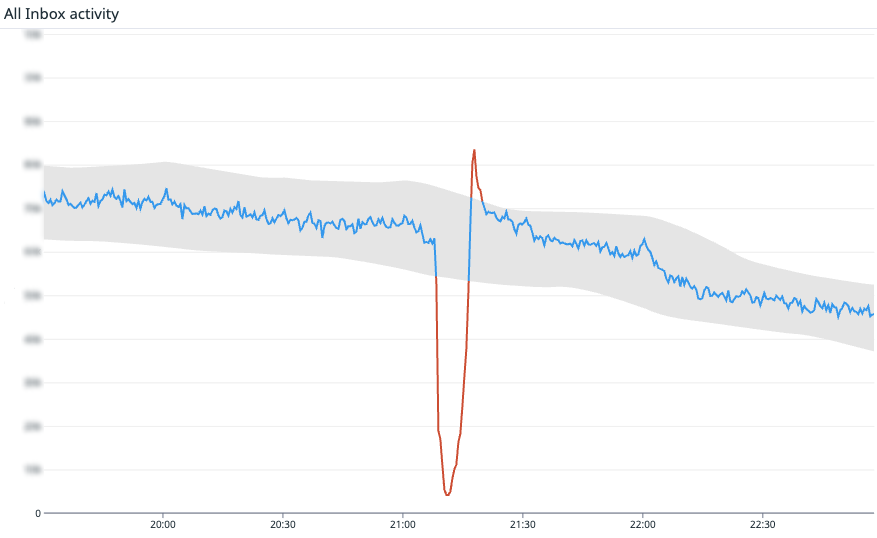
Stop Monitoring Systems—Start Monitoring Outcomes with Heartbeat Metrics That Protect Trust
Outcomes beat dashboards. By centering on heartbeat metrics—signals directly tied to customer value—you detect incidents faster, align engineering on what truly matters, and make SLAs meaningful.…
-

Leading Support with AI Metrics: How CX Score Transformed Our Scale and Mindset
AI metrics have changed how I lead support, from the questions I ask to the processes I run. With CX Score, we went from limited CSAT…
-

Cut Through AI Hype: A Product Leader’s Guide to Vet, Buy, and Deploy with Confidence
AI can deliver real outcomes, but only if you choose and implement it deliberately. I share the core concepts leaders need — RAG, vector search, agentic…
-
The AI Support Blueprint: From Zero Playbook to 75% Resolution and a Reimagined Team
Rolling out an AI Agent doesn’t just change workflows—it reshapes the team itself. I share how we went from no playbook to a functional AI Support…
-

Harness the AI Storm: My Playbook to Elevate Support, Win Executives, and Protect Teams
AI has changed support overnight, expanding expectations while raising the stakes for leaders and teams. In this playbook, I share how to harness AI’s momentum—becoming the…
Weekly digest
One email a week on AI products, enablement and hiring. No fluff.
Browse topics
- AI Strategy (315)
- Generative AI (106)
- IT Leadership (33)
- Leadership (76)
- Product Management (344)
- Product Management Leadership (306)
- Uncategorized (32)
Work with me
45-minute consultation on AI product strategy, GTM and PM hiring — no charge.