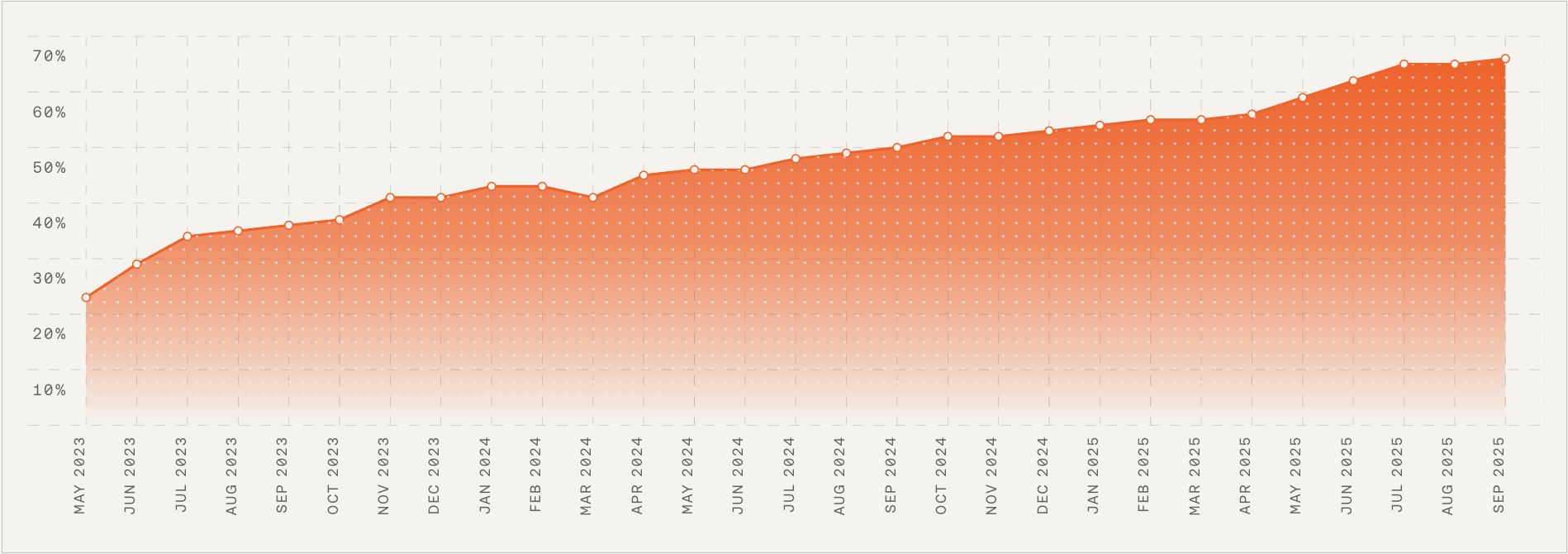
AI doesn’t fail because the model is bad, it fails because ownership is missing.
When someone truly owns your AI, everything changes. Resolution and automation rates climb, the system self-improves, and the customer experience transforms in ways a dashboard alone will never show you.
This is part three of our five-part series on customer service planning for 2026. We’ll be sharing all five editions on our blog and on LinkedIn.
If you’d rather have them emailed to you directly as they’re published, drop your details here.
Last week, we introduced the four roles that make AI actually work in a support organization. These roles are already showing up inside the teams who are scaling AI the fastest, and this week, we get closer to the ground.
Here’s what these roles look like in practice — what they do, how they work, and why your AI performance will inevitably drift without them.
AI operations lead — owns AI performance, every day. I think of this person as the air-traffic controller for our AI Agent. I treat the AI as a living system that needs ongoing supervision, evaluation, and tuning. This role is accountable for what leaders care about most: quality, reliability, and continuous improvement.
The AI ops lead sees the whole picture: conversation quality, missing knowledge, flawed assumptions, unexpected failures, new opportunities for automation, and the subtle signals that the system is beginning to drift. In practice, that vigilance is the difference between steady gains and slow decline.
Day-to-day, here’s what I expect from this role.
1. Reviews AI conversations and surfaces performance patterns. The AI ops lead monitors the AI Agent’s behavior — the tone shift after a product launch, a sudden dip in resolution for a specific intent, or conversation clusters revealing new customer behavior. They scan for anomalies, trends, and early warnings, with an emphasis on what’s happening right now, not last week. Without this intentional ownership, I’ve watched a 2% dip turn into a 10% drop in days.
2. Prioritizes fixes and improvements. Once patterns emerge, they triage fixes like a product team handles bugs. Missing or incorrect content? They route it to the knowledge manager. Behavioral issues? They adjust guidance and guardrails. Action or system issues? They partner with the automation specialist. This connective tissue turns individual fixes into compounding improvements.
3. Defines and maintains AI guardrails. Leaders everywhere worry about AI doing things it shouldn’t. This role answers that fear by establishing clarification logic, escalation rules, “never answer” policies, and safety boundaries. The goal is predictable behavior that protects customer trust — an essential pillar of any AI Strategy and AI risk management practice.
4. Aligns reporting with leadership. The AI ops lead reports on resolution rate, CX Score, CSAT, automation coverage, and hours saved — making the economic impact visible. That visibility is a foundational step in any credible customer support ai strategy.
Why this role exists now. AI systems are dynamic and require constant tuning. A small dip in quality quickly becomes an operational issue, and no existing role naturally owns that. When someone does, teams feel the benefit almost immediately.
Knowledge manager — builds and maintains the structured knowledge AI depends on. I hear the same thing from leaders again and again: AI is only as good as the content you give it. This role is rapidly evolving from classic knowledge management into knowledge strategy — part content designer, part systems thinker, part information architect. Their job is to build the knowledge scaffolding that lets AI answer accurately, consistently, and safely.
Here’s how the knowledge manager creates leverage.
1. Writes, maintains, and improves support knowledge — continuously. After every product change, they update articles, remove duplication, resolve contradictions, and pay down “knowledge debt” that quietly erodes accuracy. The upkeep is shaped by AI performance; when patterns expose gaps, they fix the source.
2. Structures knowledge for AI, not for browsing. Traditional help centers are for humans skimming pages. AI needs clean intent signals, crisp formatting, and clearly structured language. The knowledge manager designs that structure as intentionally as the content itself.
3. Works hand-in-hand with AI ops. Many performance issues stem from missing or unclear knowledge. When the AI ops lead surfaces recurring misunderstandings or low-resolution categories, the knowledge manager resolves the root cause at the source.
4. Ensures accuracy and compliance at scale. As AI handles more sensitive situations, the knowledge manager safeguards correctness, currency, and compliance — critical for data governance and regulatory alignment.
5. Develops a cross-functional knowledge strategy. The role creates a canonical, cross-functional source of truth that product, engineering, product marketing, go-to-market, and support (AI and human) can all rely on.
Why this role exists now. This is one of the highest-leverage positions in an AI-first support org. Teams like Rocket Money and Anthropic are hiring knowledge managers because AI accuracy depends on the quality of knowledge feeding it. Without this role, resolution rate caps out early and never climbs.
Conversation designer — designs how the AI speaks, clarifies, and interacts. AI isn’t just a tool customers use; it’s a representative they interact with. Tone, clarity, pacing, and conversational structure matter, especially in voice. Every word affects perceived expertise, trustworthiness, and brand. The conversation designer ensures the AI feels human-friendly without pretending to be human — the sweet spot that builds trust without misleading customers.
In my experience, staffing conversation design early accelerates results. It changes not only how we tune AI, but how we understand the end-to-end customer experience.
Here’s what great conversation design looks like.
1. Shapes the AI’s tone, voice, and communication style. This role refines phrasing, tunes politeness, adjusts how confusion is handled, and shapes micro-interactions that determine whether customers feel cared for or dismissed. On voice channels, natural cadence is make-or-break.
2. Designs flows for high-value conversations. They design how the AI clarifies intent, branches, communicates uncertainty, verifies details, escalates, hands off, and returns to the main thread without feeling mechanical — treating customer experience as a product with language as the interface.
3. Translates procedures and complex workflows into natural language and logic. As AI runs structured procedures and actions, this role becomes a conversational system architect, translating SOPs into conditional logic with exceptions and fallbacks. For example, in Intercom, our conversation designer uses Simulations to run simulated conversations to see where the AI Agent gets confused, over-confident, or awkward, and refine flows until the interaction feels effortless end-to-end.
4. Ensures transitions to humans feel smooth and respectful. Handoffs should provide clear context to the human agent and maintain continuity so customers never feel dropped.
Why this role exists now. As AI becomes the primary interface, conversation design directly influences trust, brand perception, and operational outcomes. It’s a core competency for any Generative AI and LLMs for product managers program.
Support automation specialist — builds the backend actions that allow AI to do real work. If the conversation designer shapes expression, this role shapes capability. They transform AI from an answering machine into an outcome engine by bridging AI and the systems it must safely and deterministically act on.
Support teams increasingly expect AI to do what a human would do: refund a charge, adjust a subscription, verify an identity, update an account setting, or pull relevant data. That expectation creates a new technical role at the edge of support, ops, and engineering.
What I rely on this specialist to deliver.
1. Creates and maintains backend workflows the AI executes. This includes building and maintaining: Fin Tasks. Fin Procedures with embedded steps. Action flows that call internal and external APIs. Automations that span billing systems, user identity layers, CRM objects, subscription entitlements, refund tools, and more. They ensure the AI can act compliantly and predictably — the playbooks that turn intent into action.
2. Owns the integrations required for advanced automation. Many problems require data elsewhere — billing platforms, internal databases, systems of record. The specialist ensures the AI can retrieve, validate, and use that information safely, often partnering closely on CRM integration and internal services.
3. Partners closely with product and engineering. Some workflows require new endpoints, permission layers, safety gates, or deterministic fallbacks. This role drives those changes across the stack.
4. Ensures reliability and safety at every step. Guardrails, validation logic, exception handling, safe execution paths — all are essential. They confirm that the AI has access to the correct data, the action matches policy, edge cases are accounted for, risky flows have deterministic constraints, and every action is auditable and reversible.
Why this role exists now. Customers don’t want answers, they want outcomes. AI can now deliver those outcomes, but only with the right backend scaffolding. This role modernizes operational architecture and unlocks end-to-end automation.
How these roles work together — the new operating loop. These roles aren’t silos; they’re interdependent parts of one system. The AI ops lead identifies patterns and performance gaps. The knowledge manager resolves inaccuracies or missing content. The conversation designer improves clarity, tone, and flow. The automation specialist expands the system’s ability to take action. Each improvement compounds the next, moving you from early automation to transformational resolution rates through continuous refinement.
This loop is what separates teams that plateau early from teams that scale AI into a reliable, high-performing system — the essence of a durable AI Strategy.
How to get started (even if you can’t hire all four roles today). Most teams phase into this model: assign partial ownership, formalize responsibilities, then specialize as AI volume grows. Here’s the progression I recommend.
Phase 1: Assign ownership. Give each role’s core responsibilities to someone who can devote five to 10 hours weekly. Early on, support ops, enablement, senior ICs, and technically inclined teammates can anchor the work.
Phase 2: Formalize the responsibilities. As AI resolves more queries, optimization becomes core operational work. Formalizing ownership prevents performance drift and knowledge debt.
Phase 3: Specialize and hire. Once AI handles 50–70% of incoming volume, these responsibilities become full-time roles. Investing in specialization becomes essential infrastructure for the next scale stage.
The bottom line. AI changes the shape of your support team. These four roles — AI operations lead, knowledge manager, conversation designer, and support automation specialist — form the backbone of the AI-first support organization. They bring order to a constantly changing environment and enable AI to deliver the outcomes leaders and customers expect heading into 2026.
Next week, we’ll continue the 2026 planning series with a deep dive into org design models for AI-first support teams — how to structure people, workflows, and accountability in a world where AI resolves most conversations before a human ever sees them.
To follow along with the series and have each new edition emailed to you directly, drop your details here.
Inspired by this post on The Intercom Blog.