Tag: conversation design

  • Beyond Accuracy: How I Evaluate AI Customer Service Agents That Delight and Scale

    When teams evaluate AI Agent options for customer service, I often see the rigor aimed at the wrong subset of criteria. After leading and observing dozens of proof of concept (POC) efforts with our customers and prospects, I understand why performance—accuracy scores, resolution rates, and benchmark tests on curated datasets—soaks up most of the attention. But those indicators alone won’t guarantee success once you leave the sandbox and face real customers.

    If your POC only proves that the AI “works,” you’re missing the bigger picture. Here’s what else I look for to make the best long-term decision.

    How does it handle your real-world setup?

    Performance is table stakes, but it has to reflect the messiness of an actual support environment. The best-performing Agents don’t just get answers right—they exhibit resilient, human-like behavior under pressure. I watch how the Agent behaves when it doesn’t know an answer: does it recover or spiral? Does it stay on track through multi-step requests, and how gracefully does it hand off to human agents? If your knowledge base depends on a retrieval-first pipeline, test cross-source retrieval and grounding—not just single-document lookups.

    When I build evaluation scenarios, I put the Agent through its paces with a broad, realistic mix:

    • Multi-turn queries that require the Agent to carry context across a conversation, not just answer isolated questions.
    • Vague or fragmented inputs, like typos, grammatical errors, and incomplete questions, because that’s how customers actually write.
    • Edge cases and sensitive scenarios, like billing disputes, frustrated customers, and questions that sit at the boundary of what the Agent is trained on.
    • Different phrasings of the same question. An Agent that handles one version well but fails on a rephrasing has a knowledge problem, not a performance problem.
    • Queries that require pulling from multiple knowledge sources. Real issues are rarely answered by a single help article, and an Agent that can only handle single-source questions will hit a ceiling fast.
    • Multilingual conversations, if your customer base requires it. Performance can vary significantly across languages and it’s better to discover that in testing than in production.

    This preparation is worth the effort. Any Agent can look impressive in a demo; what matters is how it holds up as part of your team, serving your customers in production.

    What does it feel like to interact with the Agent?

    Two AI Agents can post the same quantitative scores—resolution rates, containment rate, and more—and still deliver very different customer experiences. Resolution rate tells me whether the Agent finishes conversations; it says nothing about how customers felt during them. I deliberately assess the experience, not just the outcome, because conversation design shapes trust and brand perception.

    Here’s what I look for to ensure the AI Agent is enjoyable to interact with:

    • Is the tone natural and on-brand, or does it feel robotic and generic?
    • Does it build trust early in the conversation, or does it create friction that makes customers want to immediately request a human?
    • When it doesn’t know the answer, does it handle that gracefully?
    • When it hands off to a human, is that transition seamless, or does the customer feel abandoned?

    As George Dilthey at Clay put it when evaluating their AI setup: “Keep what’s important to your business up front and center. For us, that was transparency and control over the customer experience.”

    That framing is exactly right. The Agent represents your brand in every conversation. Customers don’t experience “accuracy,” they experience conversations. An Agent that’s technically accurate but tonally off-brand will erode customer trust over time.

    I make the experience dimension explicit in my POCs. I have people on my team—and when possible, a small cohort of real customers—interact with the Agent under realistic conditions. Then I ask how it felt, not just whether it worked.

    Can you keep improving it after launch?

    This is the dimension most teams don’t evaluate at all, and it’s possibly the most important one. Choosing an Agent that works today and ensures you can continuously improve the customer experience over time requires more than a functional demo. You’re buying a system that must get better every week, not just during the first sprint.

    The feedback loop

    Can your team easily review conversations and identify where the Agent is underperforming? Can you pinpoint specific gaps (missing knowledge, incorrect tone, poor handoff decisions) and act on them quickly? The faster the loop between “something isn’t working” and “we’ve fixed it,” the more value compounds over time. In practice, that means instrumenting conversations, leveraging Agent Analytics, tagging misroutes and tone slips, and running targeted evals on known failure modes.

    The speed of iteration

    When you identify a gap, how quickly can you address it? This is partly a question of tooling (how easy is it to update knowledge, refine guidance, adjust behavior?) and partly a question of team capability. The teams getting the most out of AI are the ones that have changed how they operate and made continuous improvement a part of their everyday work. They’ve committed to going all-in for the long term, not just the first few weeks when launching their AI Agent. We treat this as eval-driven development: automate evaluations that mirror real tickets, tighten prompt engineering and retrieval settings, and ship small fixes daily.

    The vendor partnership

    The vendor behind the Agent matters just as much as the solution itself. You’re choosing a partner for transformation that will help you evolve how your business delivers customer experience. Ask:

    • How does customer feedback influence the product roadmap, and can they show you examples?
    • If you have feedback on limitations or weaknesses, do they engage transparently or get defensive?
    • What kind of support will you get post-launch?
    • Are they shaping where AI customer experience is going, or reacting to what others are building?

    How a vendor responds to those questions tells you more about the long-term relationship than any benchmark result.

    What a good POC proves

    If your POC only proves “the AI works,” you haven’t done enough. A strong proof of concept tests performance in realistic conditions, evaluates the experience from the customer’s perspective, and validates the system that will support continuous improvement after launch. Done well, it sets you up for long-term operational success and builds organizational AI readiness—not just a flashy demo.


    Inspired by this post on The Intercom Blog.


    Book a consult png image
  • Stop Losing Users: How a Second Message and Prompt Audit Drive 2–3x Retention

    Stop Losing Users: How a Second Message and Prompt Audit Drive 2–3x Retention

    Default prompts are quietly sabotaging agent retention. I learned this the hard way while reviewing early funnels for our voice and chat agents—engagement looked great at the greeting, but the moment the agent stopped after a single reply, the conversation flatlined. The fix wasn’t a fancy LLM trick; it was a disciplined second message and a rigorous audit of defaults across every entry point.

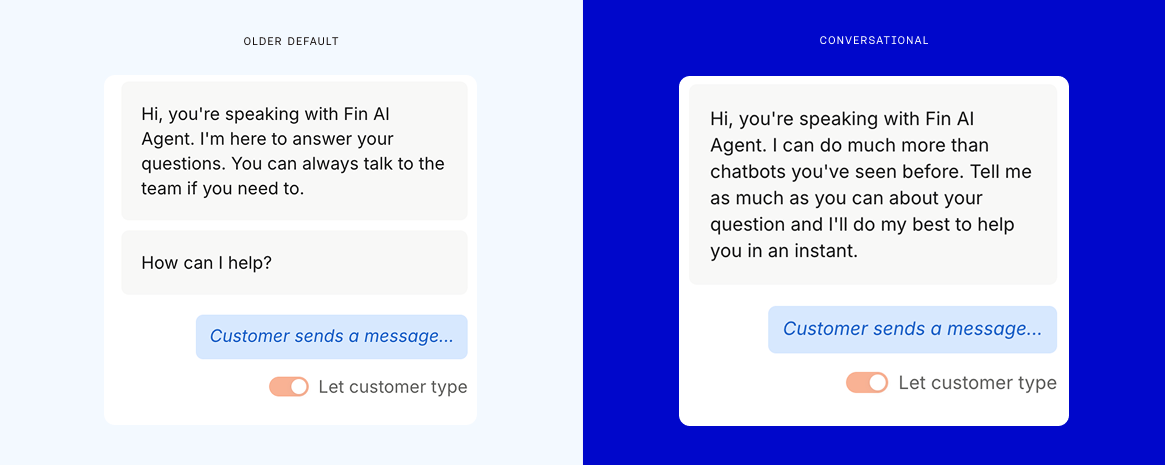
    When an AI agent opens with a generic, low-friction greeting and then waits, users hesitate. Cognitive load rises, intent stays fuzzy, and drop-off follows. A thoughtful second message—delivered quickly, with clarity and options—reduces ambiguity and gives people a low-effort path to progress. It’s a small behavioral nudge that pays off in outsized retention gains.

    Here’s the pattern that consistently works for me. First, keep the initial default prompt short, confident, and specific to the channel and task domain. Then ship a fast follow-up if the user hesitates for a few seconds. That second message should clarify what the agent can do, present 2–3 concrete choices, and invite free-form input. I’ve repeatedly seen this simple sequence unlock a 2–3x retention lift in early sessions, especially for first-time users.

    Auditing default prompts is where the leverage lives. I inventory every ingress—web widget, IVR, SMS, in-app, help center—and catalogue the exact default system, developer, and user-facing prompts. Then I inspect turn-1 and turn-2 transcripts in Agent Analytics to quantify where users stall: time-to-first-intent, clarification rate, option selection rate, and completion. This makes the drop-off visible and turns “vibes” into data we can A/B test.

    Designing the second message is a conversation design exercise, not a copy tweak. My recipe: empathize with the user’s likely uncertainty, constrain scope so the agent appears capable, and apply choice architecture. For voice AI agents, I keep it shorter, use confirmation questions, and bias toward read-back for accuracy. For chat, I include tappable options and examples that mirror top intents. The goal is momentum without feeling pushy.

    Operationally, I run controlled A/B tests on default and second-message variants, sized to a realistic minimum detectable effect. I segment by source (ad, organic, support), device, and use case, because the winning prompt for sales qualification rarely matches the one for customer support. With proper instrumentation in our analytics stack, we track retention curves over the first 3–5 sessions, not just single-session reply rates, to avoid optimizing for chatter over outcomes.

    Strong prompt engineering underpins the experience. I keep system prompts stable and explicit about persona, tone, and refusal behavior; manage the context window so examples don’t drown live intent; and use a retrieval-first pipeline when domain knowledge matters. The most expensive mistake I see is shipping defaults like “How can I help you?” without guardrails or examples—great for demos, bad for real users.

    If you’re starting fresh, begin with a prompt audit this week: list all defaults, map them to top intents, and pair each with a channel-appropriate second message. Instrument the funnel, launch two variants, and set a crisp success metric (e.g., turn-2 continuation rate to task start, then task completion). This is one of those rare changes that is simple to ship and compounds across onboarding, activation, and long-term retention.

    The takeaway is straightforward: don’t let your best work stall after the first reply. A disciplined second message and a focused default prompt audit will lift engagement, reduce ambiguity, and create the kind of early momentum that sustains retention over time.


    Inspired by this post on Amplitude – Perspectives.


    Book a consult png image
  • Operator Unleashed: The AI Agent That Transforms Customer Ops across Fin and Intercom

    Operator Unleashed: The AI Agent That Transforms Customer Ops across Fin and Intercom

    Today I’m introducing Operator, an Agent that works across both Fin and the Intercom helpdesk to help you manage your customer operations.

    In practical terms, Operator manages help content, builds automation, does the ongoing work that determines how well Fin performs, and runs the operational work your human team doesn’t have time for. That combination is precisely what modern support teams need to move from reactive firefighting to proactive, consultative support.

    Why does this matter? Running a customer operation means managing AI and humans simultaneously, and doing this well requires more capacity than most teams realistically have. I’ve felt that strain firsthand—competing priorities, constant context switching, and a never-ending queue that blurs strategic focus.

    On the AI side, Fin’s performance is largely influenced by what surrounds it: the accuracy of your help content, the quality of your Fin configuration, and how well you understand what’s working and why. When product teams ship daily, keeping your help center current means finding every affected article before customers notice the gaps. When Fin gets a conversation wrong, diagnosing it requires reading through what happened, identifying the root cause at the configuration level, making the fix, and verifying it worked. Analyzing why your resolution rate dropped means pulling conversations, finding patterns, and tracing the cause back to something actionable. And beyond individual fixes, there’s the ongoing question of what to automate next – what your human reps are still handling repetitively, whether it’s worth building a Procedure for it, and how to test it before it goes live.

    On the human side, the demands are just as continuous. When an incident hits, someone needs to identify every affected customer, draft the right response, and send it before the problem compounds. Team leads need visibility into rep performance across hundreds of conversations to coach effectively and prep for 1:1s. Reps need to know what to prioritize without spending the first part of their day figuring it out. In fast-moving environments, that operational overhead wastes energy you should be investing in better customer outcomes.

    Black-and-white testimonial graphic from Synthesia about Fin Operator: a smiling professional at left and a quote at right describing how asking Operator clarifies what happened and makes improving Fin easier.
    Meet Operator, the agent that explains your customer conversations. This Synthesia testimonial shows how simply asking Operator reveals what happened and makes refining Fin faster for support and enablement teams.

    Too often, the work outpaces what teams can manage, so it happens reactively, or not at all. Operator was built to change that, giving teams a new way to understand, manage, and improve their customer operations. Here’s how I put Operator to work across AI workflows and human-led processes.

    First, I use Operator to ask my data anything. Your support operation generates more useful data than most teams have time to process. Operator gives you direct access to it. You can ask it any question about what’s happening in your operation (why a metric changed, what’s driving escalations, how the team performed last week) and it returns structured answers with charts, breakdowns, and the ability to dig further. It analyzes samples of real conversations on the fly to surface patterns and identify root causes. If your head of product wants to know what customers are saying about a new release, you can ask Operator rather than spending half a day pulling a report together. It also works across your entire operation, analyzing Fin’s performance, your human reps’ performance, and customer sentiment.

    Crucially, I don’t start from scratch every time. Give Operator ongoing work, like analyzing your automation rate every Monday, flagging anything that needs attention, and posting the report in your Fin workspace. It’ll run the analysis, write the report, and deliver it without you having to go looking for it. That’s the kind of agentic AI leverage that compounds week after week.

    Second, I keep the knowledge base current without writing a single article. Your knowledge base is only as useful as it is accurate. When product teams ship fast, keeping pace with content updates is a substantial, ongoing job. Give Operator a brief about anything, from a new feature or policy change to release notes, and it finds every article in your help center that needs updating, drafts the edits in your tone of voice and style, identifies content gaps, and drafts new articles to fill them. It even handles localized versions. Every change is formatted as a proposal (Operator’s version of a pull request) for you to review, edit, and approve before anything goes live. It feels like adding several knowledge managers to the team overnight, without the ramp time.

    Monochrome testimonial graphic showing a bearded person's headshot beside bold copy from Raylo praising Fin Operator for accurate analysis, strong trend insights, and reporting beyond basic LLM connectors.
    See why teams choose Fin Operator for customer operations: accurate analysis, trend insights, and conversation debugging—going beyond basic LLM connectors. A Raylo testimonial spotlights daily, real-world impact.

    Third, I build, test, and ship improvements to Fin directly through Operator. When Fin gets a conversation wrong because of a content gap or misconfigured rule, Operator can debug it by reading through the conversation, identifying what caused the problem, proposing a fix, and running simulation tests to verify it before you approve. You see what changed and why before anything goes live. Beyond debugging, Operator has deep knowledge of every Fin feature and capability, so you can ask it directly to help you configure whatever you need. If you need a Procedure for a specific query type, describe the outcome you want and Operator builds it, including triggers, multi-step instructions, edge case handling, and a simulation test, all from a single prompt. The same applies to configuring Guidance rules, data connectors, monitors, and workflows. You don’t need to know which feature solves your problem or how to configure it; you just describe what you want.

    For teams looking to increase their overall automation rate, Operator can handle that strategically too. Ask it to analyze where your biggest automation opportunities are and it surfaces them by volume, along with an estimate of the weekly team time each one is consuming. Pick one, and it builds the solution for you to approve. That’s consultative support, productized.

    Finally, I use Operator to effortlessly manage the human side of support. When an incident hits, Operator identifies every affected conversation, drafts targeted responses, and sends them proactively, turning what would normally be hours of reactive triage into minutes of review and approval. For ongoing management, a team lead prepping for 1:1s can ask Operator to pull each rep’s metrics, flag outliers, and surface what’s worth digging into. A rep coming back from a meeting can ask what to focus on next and get a prioritized queue based on urgency, customer value, and wait time. And because Operator sees patterns across everything your human team is handling, it can surface the conversations they’re still resolving manually, flagging your next automation opportunity before you’ve had time to go looking for it.

    Here’s why this works. Operator isn’t a general-purpose AI model given access to your data. It’s built on a library of purpose-built tools that encode expertise specific to support operations, like how to pick the right attributes for a given analysis, search a knowledge base semantically, debug Fin’s reasoning in a specific conversation, or write and test a Procedure that will actually work. That specialized toolkit is what makes its recommendations trustworthy and its execution reliable.

    Minimalist banner reading 'Transform your support operation with Operator' above a bright orange square with an abstract purple-green knot logo, suggesting AI-driven customer support automation.
    Elevate customer service with Operator. The bold headline and vivid knot logo introduce a modern AI platform that streamlines workflows, speeds resolutions, and scales support operations without extra headcount.

    The proposal (pull request) system makes this possible. When Operator updates content, adjusts configuration, or modifies how Fin behaves, it creates a proposal – a structured diff of what’s changing and why. You review it, edit if needed, and approve before it takes effect. Operator does the cognitive work; the human stays in control of what goes live.

    More than 200 early users are already trying Operator, and every one of them is finding new use cases. It’s a genuine step change in capability, and I expect it will change the way support teams run their operation. We’re working towards a vision of Operator being increasingly agentic, expanding across every new role Fin takes on.

    Operator is available in early access now. If you’re ready to transform your customer operations across Fin and the Intercom helpdesk with agentic AI, start here: https://fin.ai/operator.


    Inspired by this post on The Intercom Blog.


    Book a consult png image
  • No More Accidental Agents: How We Engineered Global Agent’s Helpful, Curious Personality

    No More Accidental Agents: How We Engineered Global Agent’s Helpful, Curious Personality

    Most teams ship AI agent personalities by accident—emergent quirks, brittle prompts, and uneven behavior. We refused to let that happen. From day one, we treated personality as a first-class product surface, one that should be designed, instrumented, and iterated with the same rigor as any core capability.

    Learn how we designed Global Agent’s personality and fine-tuned its inquisitiveness and helpfulness using Agent Analytics.

    In my role leading product at HighLevel, Inc., I framed our approach around agentic AI and conversation design: personality is not “flavor text”; it is the control system for how an agent interprets context, asks questions, and decides when to act. Our product strategy prioritized clarity, empathy, and consistency—so the agent would be curious enough to resolve ambiguity without becoming interrogatory, and helpful enough to move work forward without overstepping.

    We made that intent measurable. Using behavioral analytics, we defined operational signals such as clarification-question rate, resolution-path efficiency, and escalation quality. We combined eval-driven development with targeted A/B testing to compare prompt patterns and tool strategies, ensuring each change had a clear hypothesis and measurable outcome.

    To calibrate inquisitiveness, we mapped decision points where the agent should ask follow-ups versus proceed autonomously. Prompt engineering codified those thresholds, while a retrieval-first pipeline reduced unnecessary questions by improving context completeness up front. When the agent did ask, we constrained tone and cadence to keep queries concise, respectful, and progress-oriented.

    To enhance helpfulness, we prioritized precise action-taking and unambiguous guidance. Context window management preserved relevant facts without diluting intent, and guardrails aligned with AI risk management principles ensured the agent stayed within policy, privacy, and compliance boundaries. The result was an assistant that resolved more tasks end-to-end, with fewer stalls and clearer handoffs when human help was warranted.

    Agent Analytics became our nervous system. We instrumented every dialog turn to attribute outcomes to design choices, then used driver trees to connect micro-behaviors to macro results like time-to-resolution and customer satisfaction. This closed-loop view let us ship confidently, knowing which levers improved helpfulness, which sharpened curiosity, and which merely added noise.

    Process mattered as much as tooling. Product trios ran continuous discovery with customers to surface edge cases—ambiguous intents, multi-intent turns, and sensitive scenarios—while our engineering partners operationalized experiments with clean rollback paths. We favored small, testable changes over sweeping rewrites, building momentum and trust with each iteration.

    The payoff is a personality that feels consistent across use cases: curious when clarity is missing, decisive when action is obvious, and transparent when limits are reached. Users experience fewer dead ends, faster resolutions, and a brand voice that shows up the same way every time—because it was defined, measured, and improved on purpose.

    If you’re building agentic AI, don’t leave personality to chance. Treat it like a product: set clear outcomes, instrument deeply with Agent Analytics, and iterate with eval-driven development and A/B testing. That’s how curiosity becomes a feature, helpfulness becomes a habit, and your agent becomes reliably, intentionally excellent.


    Inspired by this post on Amplitude – Best Practices.


    Book a consult png image
  • The Ultimate Knowledge Management Playbook to Supercharge Your AI Sales Agent

    The Ultimate Knowledge Management Playbook to Supercharge Your AI Sales Agent

    Revenue leaders are starting to use AI to generate better leads, capture peak buyer intent, and scale their pipeline without a linear increase in headcount. I see it every day in my own teams: when we get the foundations right, AI doesn’t just answer questions—it accelerates qualification and turns curiosity into pipeline.

    Done well, an AI-first inbound sales experience engages buyers 24/7 in any language, qualifies leads intelligently, and routes high-intent prospects to the right conversion path. But behind that experience, there’s an unsung hero: knowledge management. I’ve learned the hard way that even the smartest Agent underperforms if it’s not fed the right information.

    A Sales Agent is only as good as what you give it to work with. If you’re using an Agent, like Fin, to run inbound sales motions end to end, it needs an extensive pool of knowledge to draw from. You need to feed it accurate answers on pricing, features, and plan fit, and clear rules for how to qualify and route each prospect. Without it, your Agent can’t do its job, and your sales team is back to answering the same questions manually and triaging leads that could have been handled automatically.

    In this guide, I walk through everything you need to know about building and maintaining the knowledge base that powers your Sales Agent—what to include, how to launch, what to measure, and how to iterate so results compound over time.

    What is knowledge management and why is it so important?

    Definition: Knowledge management is the process of creating, organizing, sharing, and maintaining knowledge in your business.

    Black-and-white testimonial graphic for Fin with a close-up portrait on the left and a large quote on the right highlighting how knowledge management boosts sales funnels, conversion, pipeline, and revenue.
    Knowledge is your sales agent's edge. This Fin testimonial shows how organizing and optimizing content removes friction in the funnel, lifting conversion and unlocking millions in pipeline and revenue for growing teams.

    Your public website and product pages are classic examples, but those are just the tip of the knowledge management iceberg. In an inbound sales motion, knowledge management involves a range of activities such as creating resources (FAQs, pricing overviews, competitive battlecards, case studies, internal sales materials), identifying gaps in documentation and qualification criteria, implementing systems that make information easy to access and use, and developing processes to keep everything current. In my experience, these elements are what allow an Agent to move from merely answering questions to recommending the right plan and explaining why it fits.

    Why knowledge management matters even more in the age of AI

    Your knowledge base is no longer just static collateral for buyers to read. It powers your Sales Agent and entire inbound motion. It’s the key to accurately answering complex prospect queries, guiding product discovery, qualifying intent in real time, and accelerating the path to pipeline. Two realities shape my approach:

    1) Your Agent is only as strong as what you “feed” it. Your Agent is only as good as the knowledge and content that it has access to. A lack of information, poorly structured sales materials, or out-of-date pricing documentation all prevent it from providing clear and correct answers to your buyers, leading to poor buying experiences that degrade trust and cost you deals. No large language model (LLM) knows your business like you do. It doesn’t understand your prospects’ specific needs, pain points, pricing tiers, or use cases. That knowledge is unique to you and your organization, which means you need to map it all out and explicitly feed it to your Agent. You need to feed it facts about your product, and also give it the context behind those facts so it can guide buyers to the right solution rather than just answering their questions.

    2) Every investment of knowledge has compounding results. Making the switch to AI isn’t just adopting a new tool. It means adapting to a new ecosystem. Think of it as a flywheel. Every piece of knowledge you add makes your Agent more effective. It generates better conversations and data, which tells you what to add or refine next. The more you invest in it, the faster it compounds.

    Monochrome quote graphic for Fin featuring a grayscale headshot on the left and a large quote on the right about avoiding duplicate content for sales, highlighting efficient knowledge management.
    Smart sales teams don’t copy what already works for service—they connect to it. This Fin quote card reminds readers to reuse trusted knowledge, cut duplication, and keep content manageable for faster, more accurate selling.

    “You have to think about AI like a new sales rep. On day one, it needs coaching, guidance, and feedback. But over time, as you refine the inputs and learn from real conversations, it becomes more autonomous and the level of coaching required decreases significantly.” Pascaline Albin, Director of Sales Development at Fin

    Every upfront investment you make in your sales knowledge has long-term, revenue-generating impact. Whether you hire someone to do this work full time or give your sales reps time away from the inbox each week, the ROI speaks for itself. I’ve routinely seen small content improvements unlock big conversion gains.

    Think of it this way: say it takes 30 minutes to document a new competitive battlecard or update pricing information. That 30-minute investment results in hours saved for your sales team, highly engaged buyers who get instant answers, and actionable data to optimize your inbound motion.

    Calculate: Average time to compose a response × frequency of question = time saved for your team. More importantly, that’s time your SDRs and AEs can reinvest in multi-threading into accounts, running complex evaluations, and closing high-value deals that actually move pipeline.

    Calculate: Number of prospects who ask this query × average time to respond = total time saved for buyers.

    Black-and-white headshot of a smiling professional beside a bold quote about Fin's AI Customer Agent and testing Fin for Sales to ensure complete knowledge, perfect customer experience, and faster revenue.
    Give your sales agents the knowledge they need from Day 0. A friendly portrait sits next to a bold statement on using Fin's AI Customer Agent to optimize content, guide reps, and turn buyer intent into pipeline and revenue.

    “For sales funnels, identifying knowledge gaps or friction can result in a huge improvement in conversion. When you optimize Fin with the right content, the incremental improvements have a big impact on our bottom line and can lead to millions of dollars in pipeline and revenue. That's why knowledge management is an integral part of our training and optimization process.” Tommy Dunton, Senior Manager of Sales Development at Fin

    The best way to start generating that data is simply to start. The sooner you begin, the sooner you can capture insights about what your buyers want and need from your inbound sales experience. I prioritize quick deployment, fast feedback loops, and continuous iteration.

    What to include in your knowledge base

    Wrangling and prioritizing all of your internal and external sales documentation can feel daunting, but with the right technology, it doesn’t have to. The ideal platform provides data-driven insights to show what buyers actually ask and a centralized place to create, manage, and optimize your knowledge content. For example, with Fin for Sales, you get access to a leads report that gives you insight into disengaged prospects. Intercom’s Knowledge Hub enables you to create a single source of truth for your public-facing collateral and internal sales materials. Using Content Targeting, you can segment this information so your Sales Agent only uses the exact content you want.

    1) Pricing and product FAQs. What it is: answers to the most common discovery questions buyers have, from pricing and plan differences to implementation, integration, and security or trust topics. How to source: analyze your sales inbox and early discovery calls. Where to use: public website, Sales Agent, and proactive outbound messages.

    Illustration of a sales agent using an AI-powered knowledge management dashboard on a laptop, with chat bubbles, documents, and analytics icons for faster answers and improved customer messaging.
    Give every seller instant, trusted answers with an AI-powered knowledge base that unifies docs, FAQs, and playbooks into a single source of truth—accelerating ramp, boosting call confidence, and improving every customer conversation.

    2) Competitor comparisons and battlecards. What it is: guidance for handling competitor mentions, addressing friction, and highlighting unique value propositions. How to source: talk to top-performing AEs or your product marketing team. Where to use: internal snippets for your Sales Agent and internal sales materials.

    3) Case studies and social proof. What it is: proof points that help buyers build business cases and gain confidence, speeding deal cycles. How to source: collaborate with customer success and marketing on ROI stories. Where to use: Sales Agent, website, and sales collateral.

    4) Specific use cases and buyer personas. What it is: targeted content for cohorts with similar pain points and jobs-to-be-done (e.g., engineering teams, startups). How to source: combine product marketing’s value propositions with real discovery conversations. Document the exact probing questions your best SDRs and AEs use so your Agent can uncover context in real time. Where to use: website and Sales Agent to enable contextual solution matching.

    Content formats and sources

    When sourcing knowledge, cast a wide net. You likely have more relevant content than you realize, and almost any information is useful once framed correctly. With Fin, you can use public articles (product FAQs, pricing overviews, feature benefits), internal articles (internal sales materials, internal FAQs), snippets (short-form text like promotions or battlecards), website pages (synced from your marketing site), and PDFs (whitepapers, technical specs, detailed sales materials).

    Sales Performance dashboard with KPIs—Conversation Volume 214, Contact Capture Rate 18.9%, Completion Rate 20.6%—and a Sankey-style funnel from Chat and Email to outcomes like Sales Qualified and Pro Plan.
    Turn conversations into revenue with a clear Sales Performance view. Track rising KPIs and follow leads from Chat and Email through Qualified, Disqualified, and Recovered to outcomes such as Sales Qualified, Pro Plan, or Free Plan.

    Create a knowledge management process that fuels your Agent: 5 steps

    Step 1: Audit what you have. Start by reviewing your current materials to prevent your Agent from learning outdated information and to identify gaps. If you’re already using a Customer Agent, much of that content can pull double duty for sales—no need to start from scratch. Make your existing content available for your Sales Agent and build sales-specific content on top, like pricing comparisons, competitive battlecards, customer case studies, and qualification criteria that wouldn’t apply to service conversations. If you’re starting fresh, audit pricing, product FAQs, feature details, competitor comparisons, case studies, and buyer use cases.

    Put yourself in your buyer’s shoes. Walk through the same steps your prospects take, including their first interaction with your Sales Agent. Before going live, test it yourself. If you’re using Fin, you can do this using the built-in Preview panel to validate answers, routing, and missing topics or objections. Confirm that your Agent asks the right probing questions about goals, fit, and urgency before making a routing decision.

    “We're moving incredibly fast at Fin with our Customer Agent, which means optimising our content, guidance and experience with Fin is a constant focus. Before we launch new products, we're testing Fin for Sales to ensure it's got all of the knowledge it needs to make sure the customer experience is perfect and we can convert that intent into pipeline and revenue from Day 0 of that launch.” Tommy Dunton, Senior Manager of Sales Development at Fin

    Seek input from across your GTM organization. Don’t rely solely on sales. Involve marketing, growth, revenue ops, and sales ops to align content with campaigns and routing logic, and to integrate with systems like your CRM. Your SDRs and AEs bring real-world objections, use cases, and competitor insights that win deals—and those should feed directly into your Agent’s knowledge base. Judging fit is as much art as science, and your best SDRs can teach the Agent to interpret subtle signals.

    Black-and-white headshot beside a bold quote about Fin AI for sales agents, stressing ongoing training and high‑quality knowledge bases to lift performance; clean, minimalist layout.
    Scalable selling starts with better knowledge. This graphic pairs a monochrome portrait with a bold Fin quote showing how training agents and curating a strong knowledge base compound AI performance over time.

    Step 2: Plan and prioritize. Decide where to start by focusing on questions your team still answers manually that, if documented, would help your Agent capture more qualified intent. Identify the content your reps share most (demos, explainers, case studies) and ensure the Agent can access it. Look at leads reporting to find early-stage questions, stuck points, and high-volume disengaged outcomes, then strengthen objection-handling content. Prioritize based on pipeline value—build competitive battlecards and enterprise-tier documentation before free-plan details. Use reporting to find funnel drop-offs and content that hasn’t been updated recently—refresh pricing immediately if it has changed.

    Allocate time and resources. Treat your Sales Agent like a core GTM channel, not a side project. Assemble a cross-functional project team with clear roles. The Agent owner translates sales strategy into prompts, routing logic, integrations, and rollout. The optimization owner reviews performance data, identifies drop-offs, and drives changes to content or Agent behavior. Early alignment ensures your Agent operates as a professional extension of your sales team.

    Step 3: Go live and learn. Deploy broadly across your marketing site and pricing pages to accelerate learning. Within weeks, you’ll see where the Agent guides discovery and qualifies buyers versus where it stalls. Investigate drop-offs—often these point to missing answers or weak probing questions. If your Agent and knowledge base live in the same platform, you’ll get full visibility into your qualification funnel and content performance across touchpoints.

    Track metrics to measure success. Monitor completion rate (conversations reaching a clear routing decision), pipeline created (opportunities generated through Agent-handled conversations), meetings booked (qualified prospects routed to a call), and customer satisfaction (quality of the experience). These metrics show what content is working and where to improve.

    Step 4: Iterate and improve. Expect gaps early on. That’s good—it surfaces what buyers need to convert. When the Agent gives a poor response, the root cause is usually missing, outdated, or shallow content. Close the gaps, then monitor your metrics and conversation reviews to keep compounding improvements.

    Black-and-white headshot on the left, with a large Fin-branded quote on the right stating that content powers a Sales Agent's discovery responses and keeps them current on the latest offerings.
    Your Sales Agent runs on great content. This Fin-themed graphic pairs a professional headshot with a bold statement highlighting how strong knowledge enables discovery answers and timely updates across the GTM motion.

    Build ongoing maintenance into your workflow. Knowledge management is continuous. As your product, personas, and goals evolve, so must your content. Define owners, review cadences, and working time to refresh and create content—don’t wait for launch week chaos. Encourage a “knowledge management” mindset by logging content requests from SDRs and AEs when they hear new objections or discover probing questions that uncover true pain points.

    “Training Agents to get better over time is fundamental to using AI. Fin learns from our website and help center, so the quality of those resources directly impacts its performance. The more we’ve invested in our knowledge base, the more success we’ve seen with Fin and those gains continue to compound.” Beth-Ann Sher, Senior AI Knowledge Manager at Fin

    Step 5: Build knowledge management into future launch plans. Make Agent-ready sales content part of every product or pricing launch checklist. Partner with engineering, product marketing, and revenue operations to update catalogs and your Agent’s knowledge base on day zero. Then review early discovery conversations to add resources, address new objections, and fine-tune contextual solution matching.

    “Content should no longer be an afterthought. It is one of your strongest GTM levers because your Sales Agent relies on it to handle discovery questions and stay up to date on your latest offerings.” Beth-Ann Sher, Senior AI Knowledge Manager at Fin

    Best practices for Agent-friendly knowledge management

    Fin quote graphic with a grayscale portrait next to text about unifying conversation data, lead reporting, and agent configuration to improve sales qualification, content insights, and the buyer experience.
    A pull-quote from Fin explains why one platform matters in sales: centralize conversation data, lead reporting, and agent configuration to spot funnel drop-offs, learn which content works, and elevate the buying journey.

    Use the terms your buyers use. Language varies by industry, persona, and role. Analyze discovery calls and on-site searches to capture how buyers actually speak and train your Agent accordingly. Test internally across SDRs, revenue ops, and marketing to reveal variations and content gaps.

    Simplify language and remove ambiguity. Machine-friendly language is buyer-friendly. Avoid jargon, spell out acronyms, and clearly explain key product terms so value propositions land.

    Keep the experience consistent and on-brand. Ensure product terminology, feature names, and pricing tiers are consistent everywhere. Proof for tone, spelling, grammar, and use standardized templates to build trust.

    Add context to your answers. If your internal FAQ is full of “yes/no” answers, expand on the why. Restate the question, provide business context, and equip the Agent with follow-ups that keep the conversation alive and uncover goals and constraints.

    Add text to images and videos. Show and tell—always include clear explanatory text so your Agent and all users, including those with accessibility needs, can benefit.

    Minimalist hero graphic with the headline 'Add Fin to your sales team today,' a glossy 3D blue spiral at center, and a black 'Start free trial' button, promoting Fin for Sales as an AI customer agent.
    Introduce Fin for Sales to your team with this clean hero banner: bold headline, signature blue spiral, and a clear 'Start free trial' call to action—inviting readers to explore an AI customer agent built for revenue.

    Create a scannable structure. Use clear headers and lists in your source content so both Agents and humans can navigate quickly. Avoid dynamic elements that hide crucial details.

    Collect bite-size information in FAQ articles. Package tactical intel—seasonal promotions, short battlecards, edge cases—into concise snippets so your Agent can retrieve and deliver them instantly.

    A connected Agent turns every conversation into insight. When a Sales Agent is connected to your CRM and enrichment tools, every interaction, qualification signal, and piece of sales content flows into a connected system. “A single platform matters in sales. When your conversation data, lead reporting, and Agent configuration all live in one place, you get much better visibility into your qualification funnel. You can see where buyers are dropping off, what content is working, and can improve the buying experience.” Fred Walton, Senior AI Conversation Designer at Fin

    Every conversation makes your knowledge base sharper, showing you what’s resonating, what’s missing, and where to invest next. That’s the retrieval-first pipeline mindset I push with my teams.

    Make knowledge management a core sales function

    Behind every high-performing Sales Agent is a comprehensive, machine-friendly knowledge management process. Without it, even the most capable Agent will struggle to deliver the pipeline gains AI can deliver. This isn’t a one-time project; it’s a continuous investment. The teams treating knowledge management as a core sales function are building systems that improve with every conversation, turning inbound demand into a compounding growth engine.


    Inspired by this post on The Intercom Blog.


    Book a consult png image
  • Inside AITropos: Lightning-Fast AI Employees for Hospitality That Take Orders on WhatsApp

    Inside AITropos: Lightning-Fast AI Employees for Hospitality That Take Orders on WhatsApp

    I’ve been closely tracking how agentic AI reshapes frontline operations, and few case studies are as instructive as AITropos. Their north star is deceptively simple: take a food order over WhatsApp — correctly, every time, fast enough that customers can’t tell it’s not a person. That’s the challenge Santi Marchiori and Juan Haedo embraced, and it’s a masterclass in product strategy, conversation design, and systems engineering.

    What they’ve built is an AI order-taking agent that handles the full flow — menu recommendations, modifiers, delivery zones, payment links, and status updates — entirely inside WhatsApp. Choosing the customer’s preferred channel wasn’t just a UX decision; it set the bar for speed, reliability, and trust. In hospitality, seconds matter. Latency becomes brand.

    Their path to this solution reflects disciplined continuous discovery. They spent two years exploring hundreds of startup ideas before finding the niche of AI-powered order taking in hospitality, then iterated through three product forms — hardware for waiters, a waiter app, and finally a customer-facing WhatsApp agent — before landing on the right form factor. In my experience, this is what real product-market fit lessons look like: follow the problem, not the artifact.

    Under the hood, the hardest problem is translating "non-deterministic human conversation" into structured "POS-compatible order data." To hit real-time response speed requirements, they chose a "tools-based architecture" over "MCP" or pipelines. That decision minimizes orchestration overhead and keeps the agent focused on the shortest path from intent to action — a pragmatic approach I recommend when SLAs are tight and context changes fast.

    They also engineered for throughput and precision. A parallelized pipeline searches for multiple products simultaneously and pre-fetches product context before the agent even calls a tool. Complementing that, smaller, fast sub-agents assemble an "immediate system prompt" that injects relevant data into each turn without extra tool calls. Think of it as a retrieval-first pipeline designed to slash latency while preserving accuracy — a pattern every team building AI workflows should study.

    Focus is evident in their KPIs. They identified order item identification accuracy as their single most important KPI. Picking one metric that truly governs customer trust is a hallmark of strong product management; it clarifies trade-offs in model selection, prompt engineering, and fallback behavior.

    Quality assurance is equally rigorous. Before going live in any new venue, they test with thousands of agent-simulated customer conversations overnight. This approach de-risks deployment, surfaces edge cases early, and provides the data backbone for Agent Analytics and iteration. It’s a practical blueprint for teams operationalizing LLMs for product managers who need both scale and safety.

    Operationally, the payoff shows up in onboarding. They reduced new customer onboarding from three months to a few weeks — and continue to shrink it as they build domain templates. Standardizing schemas, prompts, and flows for repeatable segments is exactly how you turn bespoke wins into a scalable go-to-market engine.

    Stepping back, a few lessons stand out for product leaders building agentic AI in high-velocity environments: meet customers where they already are (WhatsApp), pick an architecture that serves your latency constraints (tools over complex workflows), pre-inject context to reduce tool calls, simulate at scale before launch, and anchor teams around one trust-defining KPI. Do these consistently, and you transform AI from a novelty into an always-on employee your customers actually prefer to use.


    Inspired by this post on Product Talk.


    Book a consult png image
  • Scale Support with Heart: How AI Makes Every Customer Interaction Faster and More Human

    Scale Support with Heart: How AI Makes Every Customer Interaction Faster and More Human

    Every day at HighLevel, I talk with support leaders who are balancing two imperatives that can feel at odds: scaling service efficiently while deepening empathy in every interaction. My product lens is simple—use AI to clear the path for humans to do what only humans can do: listen, understand, and solve nuanced problems with care.

    Discover how AI helps support teams deliver faster, more empathetic experiences. Automate the repetitive, so agents can focus on what matters: the customer.

    That principle anchors our customer support AI strategy. We deploy AI workflows that handle the heavy lift—classification, intent detection, summarization, knowledge retrieval, and next-best-action—so agentic AI can triage, resolve routine issues, and hand off the right context when a human touch is needed. The result is a queue that moves faster, with more signal and less noise, and a team freed to bring empathy and judgment to the moments that matter most.

    On the front line, a voice AI agent or chat interface deflects repetitive requests, while conversation design ensures the experience feels respectful, transparent, and helpful. Inside the console, Agent Analytics surface what leaders care about: which topics spike, where customers get stuck, how sentiment and CSAT shift, and which playbooks actually shorten time to resolution. When an agent steps in, AI-assisted replies, real-time summarization, and suggested macros reduce cognitive load—so attention goes to the customer, not the keyboard.

    Shipping these capabilities responsibly requires rigor. My playbook pairs LLMs for product managers with a retrieval-first pipeline that grounds responses in audited knowledge, backed by privacy-by-design and data governance. We use eval-driven development to measure safety and quality, and A/B testing to quantify impact before broad rollout. This isn’t just about automation; it’s about trust, reliability, and continuous discovery with real customers.

    Context is king, so CRM integration is non-negotiable. By unifying tickets, purchase history, prior conversations, and lifecycle stage, agents walk in with empathy already loaded. Whether the channel is Intercom, HubSpot, or native chat, a unified analytics platform connects signals across journeys, enabling proactive outreach, smarter product tours, and in-app guides that prevent avoidable tickets in the first place.

    The outcome is a support organization that scales without sacrificing humanity. AI handles the repetitive; people handle the relational. Teams spend less time searching and more time solving. Leaders coach with data instead of guesswork. And customers feel heard—because they are. That’s how we make human support more human, at scale.


    Inspired by this post on Amplitude – Perspectives.


    Book a consult png image
  • Unleashing Inbound Sales with AI: My Playbook for Launching and Scaling Sales Agents Fast

    Unleashing Inbound Sales with AI: My Playbook for Launching and Scaling Sales Agents Fast

    Inbound leads shouldn’t wait for a rep’s calendar. When we first launched The Service Agent Blueprint, support leaders finally had a clear AI path. Go-to-market and revenue teams are now facing similar uncertainty, so I’m introducing The Sales Agent Blueprint—a practical map for launching and scaling AI for sales with confidence.

    For most sales teams, inbound motions require a lot of manual work. I’ve watched leads pile up in queues, waiting for availability rather than being prioritized by buyer intent. That delay costs meetings, pipeline, and momentum—and it’s exactly where a modern AI Strategy can transform your go-to-market strategy.

    Agents can run sales conversations end to end – engaging buyers, qualifying leads, and routing high-intent opportunities to the right team to move prospective buyers forward quickly. Humans will still be involved, but will move their focus to the consultative conversations and higher-value work they did not have time to focus on before. In practice, this shift enables cleaner AI workflows, better conversation design, and a healthier balance between sales-led growth and product-led growth.

    The questions many go-to-market and revenue leaders are facing now are where do you start? What should success look like? How do you actually test and deploy these solutions? These are the right questions—and the ones I hear most often when teams weigh build vs buy decisions, evaluation frameworks, and CRM integration nuances.

    The Sales Agent Blueprint answers those questions. It’s designed to be a strategic guide for sales, revenue, and AI transformation leaders who want to deploy AI for inbound sales fast, prove value, and build momentum. If you’re aiming for eval-driven development, this will help you define success up front and operationalize it.

    What’s inside is simple by design yet deep enough to take you from zero to value. The Sales Agent Blueprint is structured around two tracks that reflect how high-performing teams adopt agentic AI: first, launch for quick wins; next, scale for durable growth.

    Minimal blue banner for Introducing the Sales Agent Blueprint with a bold 'Scale it' headline, abstract halftone device graphic, subtle crop marks, and a 'Coming Soon' badge in the upper-right corner.
    Coming soon: Sales Agent Blueprint. A sleek, blueprint-inspired teaser with the call to 'Scale it' signals tools, playbooks, and workflows to grow revenue, streamline operations, and scale teams with confidence.

    Today, I’m releasing the first part of the Blueprint: “Launch it.” It’s a practical guide for getting your Agent live and seeing real results. You’ll learn how to deploy a Sales Agent that runs inbound sales conversations end to end, engaging buyers, qualifying leads, and routing high-intent opportunities to the right outcome in real time—without disrupting your current CRM integration or pipeline processes.

    By the end of the “Launch it” track, you’ll be ready to execute with clarity. Here’s how I frame the essential steps, based on what consistently works in the field.

    Understand what a Sales Agent is: Discover why they’re different from chatbots and how they work. Build a business case: Prove the basic economics of AI, decide whether to buy or build, and get the buy-in and budget you need to move forward.

    Evaluate an Agent: Learn how to define success, choose the right evaluation criteria, and run a focused, high-impact assessment with our five-step framework.

    Deploy with confidence: Build a deployment plan that gets your Agent live quickly to engage buyers at peak intent. Learn what to expect at each stage.

    Vector-style 'Blueprint' title on a light grid with Bézier points, plus a royal-blue panel reading '1 Launch it' next to a satellite icon; footer shows FIN.AI/BLUEPRINT/SALES promoting the Sales Agent Blueprint.
    Introducing the Sales Agent Blueprint. This crisp, grid-based graphic spotlights step 1—Launch it—signaling day-one activation for an AI sales agent. Explore the framework and get started at fin.ai/blueprint/sales.

    Continuously improve performance: After launch, your Agent becomes a system to manage. We’ll show you how to implement a repeatable process to train, test, deploy, and optimize.

    The second track, “Scale it” (coming soon), focuses on the organizational and systems design work that unlocks compounding gains. Launching AI is only the beginning. To unlock its full potential, you need to rewire your inbound sales motion—redesigning the buyer journey, building AI-first systems and ownership models, and rethinking how pipeline is generated and scaled. This is where governance, measurement, and team roles evolve to support sustainable growth.

    I’ll be building this Blueprint in public as I navigate the same challenges—sharing what works, what to avoid, and how to accelerate time-to-value without sacrificing quality or trust. If you’re ready to turn intent into revenue with agentic AI, this is your head start.

    The Sales Agent Blueprint is live now. Explore the full guide at fin.ai/blueprint/sales and start your “Launch it” sprint today.


    Inspired by this post on The Intercom Blog.


    Book a consult png image
  • Fin for Sales: Instantly Engage, Qualify, and Close High‑Intent Leads with an AI Customer Agent

    Fin for Sales: Instantly Engage, Qualify, and Close High‑Intent Leads with an AI Customer Agent

    Today, I’m spotlighting Fin for Sales, a new role for Fin Customer Agent that runs your inbound sales motion end-to-end. From my vantage point leading product management and collaborating closely with revenue teams, this is a meaningful evolution in how we capture, qualify, and convert high-intent demand with precision and speed.

    The promise here is simple and powerful: a single Customer Agent with shared context, memory, and business goals that supports the entire journey from first touch to close. Fin for Sales brings Fin to the start of the customer journey so it can engage prospects, guide them through your funnel, and ensure the best opportunities reach your sales team without delay.

    At a high level, here’s what stands out to me in practice. Fin engages every prospect instantly at the moment intent is highest. It runs discovery like your best rep with clear pricing guidance, product education, and objection handling. It qualifies and routes in real time using your playbook and syncs full context to your CRM. And it closes deals while you sleep by booking meetings, starting trials, and steering buyers to the right next step—boosting MQLs, pipeline, and early close/win rates.

    Fin engages every prospect instantly. It starts the right conversation when interest peaks, re-engages before prospects go cold, and works on every channel, in every language, 24/7. In my experience, that immediacy is the difference between a lead that converts and a lead that disappears.

    Screenshot of a Fin for Sales chat widget on a dark abstract background, where an AI assistant compares Free vs Pro CRM plans, recommends Pro for reporting needs, and offers to book a sales call.
    Introducing Fin for Sales, a conversational assistant that qualifies prospects in real time. The chat compares Free vs Pro, spotlights reporting and Salesforce integrations, and invites users to book a call.

    Fin runs discovery like your best rep. It explains pricing, guides product discovery, handles objections, and personalizes each interaction based on who the prospect is and what they care about. This is where thoughtful conversation design and consistent playbook execution really compound.

    Fin qualifies and routes in real time. Using your playbook, it collects and enriches data about your prospects, sends qualified leads to your sales team or down self-serve paths, while syncing full context to your CRM. Your team never works the wrong lead. That’s operational rigor revenue leaders crave.

    Fin closes deals while you sleep. It can book meetings, start trials, and guide buyers to the right next step. Early customers are already seeing impressive results, increasing MQLs, growing pipeline and seeing close/win rates of nearly 50% in the first month. That’s the kind of lift that reshapes go-to-market strategy and forecasting confidence.

    Graphic showing Fin for Sales connecting a prospect insights panel to Salesforce. A dark UI card lists contact details and signals like purchase intent, opportunity, and timeline over blue shapes.
    Fin for Sales links customer agent insights with Salesforce, turning live conversations into rich profiles and lead scores. View key details, intent and opportunity signals, and guided next steps like booking a meeting.

    Why this matters: most online sales experiences still rely on forms, queues, and follow-ups—exactly when prospects want clarity and momentum. Hiring enough reps to cover every time zone, channel, and hour is unrealistic, and even the best teams burn cycles on leads that were never going to convert. I’ve watched high-intent demand slip through the cracks simply because the response wasn’t fast, consistent, or contextual enough.

    Revenue leaders need a system that meets every inbound interaction immediately, without sacrificing quality, and routes only the right opportunities to sales. Incremental automation doesn’t fix the core issue; an agentic approach does. Fin for Sales closes that gap by pairing instant engagement with disciplined qualification and crisp handoffs.

    How it works in the moment: when a prospect is actively exploring your site, any delay—a form, a queue, a “we’ll get back to you”—erodes intent. Fin engages in real time through the Spotlight Messenger, a new interface built specifically for sales conversations. It can proactively start a conversation based on context like the page someone is on or how they’re browsing, and it offers smart suggestions to kick-start engagement.

    Chat widget for Fin for Sales displaying an in-chat calendar and time-slot picker for March 2026, with Friday, March 9 highlighted and a Confirm booking button on a blue gradient background.
    Fin for Sales schedules meetings directly in chat. A sleek widget shows a March 2026 calendar with selectable time slots and a clear Confirm booking CTA, streamlining lead capture and speeding up sales follow-ups.

    Prospects who might have waited—or never reached out—now get answers immediately. Fin also works across channels including messenger and email, so buyers can engage however they prefer. Whether someone is browsing your pricing page at 2am or comparing features during a lunch break, Fin responds instantly and relevantly so no lead is left behind.

    To move prospects toward a decision, Fin guides personalized discovery conversations that clarify needs and accelerate choices. Four pillars make this consistent and trustworthy. Playbook: you brief Fin in natural language on desired outcomes and scenarios; it follows your rules, handles objections with approved guidance, and stays on track. Knowledge: it draws from your product knowledge base to answer pricing, features, and plan fit, and can reuse what you’ve already trained for customer service—no duplicate setup. Enrichment: once Fin learns a user’s email or name, it enriches that data with outside sources to improve qualification, personalization, and routing. Memory: if Fin recognizes a returning visitor, it remembers context so the buyer never starts over.

    As conversations progress, Fin surfaces the opportunities most likely to close. It qualifies like your best SDR—asking about use case, budget, fit, and timing—and applies your existing playbook to identify the strongest opportunities. Details captured in conversation, plus enrichment, produce a complete picture that’s structured and synced into your CRM for immediate sales action. And when a lead isn’t a fit, Fin gracefully disqualifies or redirects to self-serve resources, ensuring your pipeline stays focused.

    Minimalist hero graphic with the headline 'Add Fin to your sales team today,' a glossy 3D blue spiral at center, and a black 'Start free trial' button, promoting Fin for Sales as an AI customer agent.
    Introduce Fin for Sales to your team with this clean hero banner: bold headline, signature blue spiral, and a clear 'Start free trial' call to action—inviting readers to explore an AI customer agent built for revenue.

    When a lead is ready to act, Fin closes. It books meetings via tools like Chili Piper or Calendly, guides qualified buyers into trials or subscriptions, and routes opportunities to your sales team with full context. Crucially, it passes the full conversation history and an AI-generated summary so reps pick up exactly where the buyer left off—no repeated questions, no lost nuance. For self-serve motions, Fin can guide prospects from discovery to trial signup or even paid conversion, automatically assigning the right path.

    Real results underscore the model’s value. Fin is already delivering measurable results for early customers across different company sizes, sales motions, and go-to-market models. Attio, an AI CRM built for scaling go-to-market intelligently, deployed Fin to replace their traditional form-and-wait inbound flow with real-time conversational engagement. In three months, Fin handled over 1,600 conversations with website visitors, qualified more than 50 leads for sales, and routed over 30 applicants into their startup program. One returning prospect engaged with Fin, had their questions answered in real time, and converted to a paying customer at six times Attio’s average contract value.

    Fellow, an AI-powered meeting assistant and management platform, started by deploying Fin overnight, a window where no human was online and prospects waited up to 18 hours for a reply. In January alone, Fin booked 18 meetings the team would never have reached, converting at around 48%. Importantly, the human team maintained its booking rate while Fin added net-new meetings—proof that automation layered on top of strong human coverage can be additive, not cannibalistic.

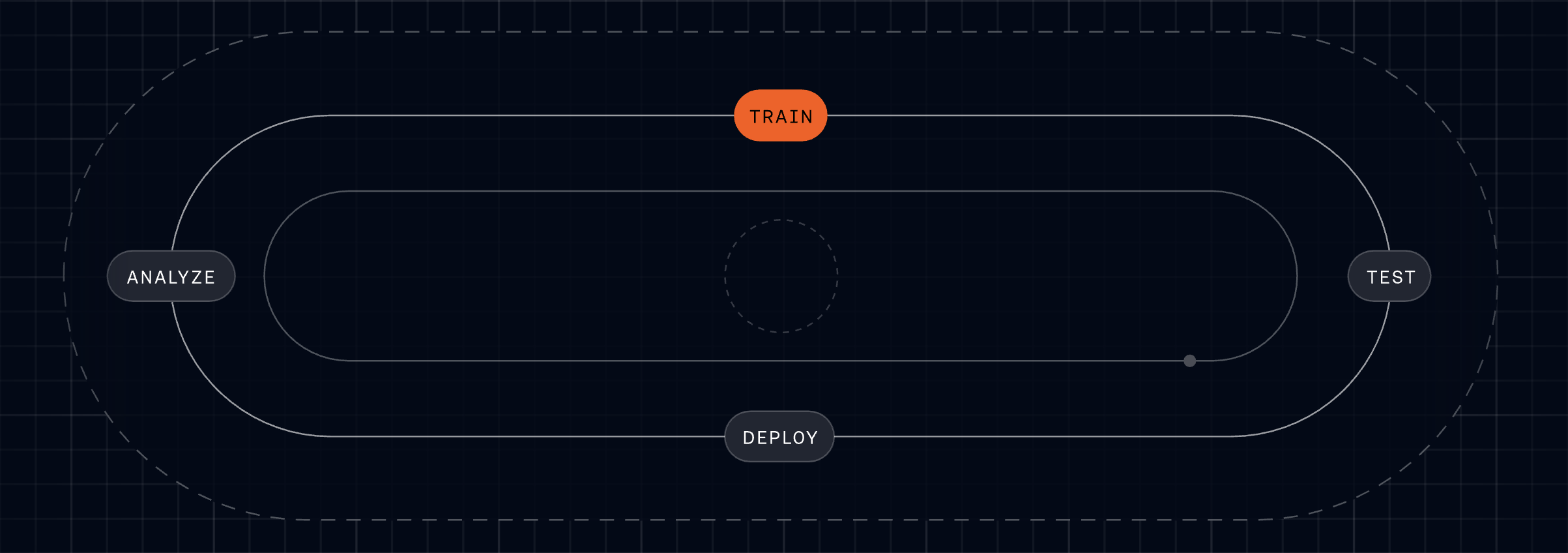
    Fin for Sales is built on the same AI platform that powers the highest-performing Agent in customer service, which keeps the end-user experience consistent. If a prospect asks a support question mid-sales conversation, Fin can handle it—no handoffs to other vendors, no lost context. It shares knowledge and memory across its platform, always knows whether it’s talking to a prospect or a customer, and moves between roles as needed. Setup follows the same Fin Flywheel: Train, Test, Deploy, Analyze. Describe your sales playbook, qualification criteria, and routing rules in natural language; test in preview; deploy live; and use Analyze to understand performance and iterate quickly.

    Fin for Sales is available today, and there’s more coming. I share the conviction that the future is a single Customer Agent, vertically integrated down to the model layer, orchestrating customer experience across the entire lifecycle. If you want to see it in action, go to fin.ai/sales and talk to Fin—then imagine that instant, high-quality engagement running across your inbound sales engine, every hour of every day.


    Inspired by this post on The Intercom Blog.


    Book a consult png image
  • Kaizen for the AI Era: Tiny Daily Wins That Build Smarter, Scalable Customer Support

    Kaizen for the AI Era: Tiny Daily Wins That Build Smarter, Scalable Customer Support

    Every day, I challenge my teams to make one small, meaningful improvement—something so lightweight it’s impossible to ignore and easy to repeat. That tiny daily motion compounds, and over time it reshapes customer experience, operational quality, and team culture.

    That’s the essence of Kaizen, the Japanese philosophy of continuous improvement. Developed in post-war Japan and popularized by companies like Toyota, Kaizen proves that small, steady changes lead to significant long-term results. In product management and customer support, this approach transforms big ambitions into daily behaviors that actually stick.

    Crucially, Kaizen isn’t passive or unstructured. It thrives on three principles I reinforce across my org. First, small changes reduce resistance—when you lower the activation energy, teams move faster. Second, improvement is continuous, not occasional; instead of waiting for quarterly reviews or major releases, you ask: “What can we improve right now?” Third, everyone participates—the people closest to the work are best positioned to improve it. That’s how momentum spreads.

    In practice, the cycle is simple: identify a small problem, test the change, measure the result, refine, and repeat. The point isn’t radical transformation in a single swing; it’s steady progress guided by data and observation—a rhythm that aligns beautifully with eval-driven development and continuous discovery.

    At Intercom, we apply this same philosophy to how we manage our Agent Fin through a process we call the “Fin Flywheel”. Here’s how this works.

    Train: Teach Fin how to handle and resolve the most complex customer queries.

    Test: Run fully simulated customer conversations from start to finish to see exactly how Fin will behave before going live.

    Deploy: Launch Fin across all channels so customers get consistent support wherever they reach out.

    Analyze: Use AI-powered insights to review and improve Fin’s performance so it can deliver better customer experiences.

    This isn’t a one-time setup; it’s a continuous loop where every interaction feeds ongoing improvement. Rather than deploying AI and assuming it will perform as expected, improvement is built into the system itself. The more Fin is used, the better it gets. That’s the hallmark of agentic AI done right—tight feedback loops, purposeful conversation design, and clear Agent Analytics that illuminate what to tune next.

    But continuous improvement doesn’t stop with AI. Within our Human Support operations, I emphasize the same mindset that drives great LLMs for product managers: you instrument the experience, learn from real usage, and close gaps fast. We operate with a simple mindset: the first time that you solve a customer issue should be the last time it happens.

    When a conversation reaches a human, we pause to diagnose and prevent recurrence. Why did this reach me? Why couldn’t Fin resolve it? How can we prevent this from happening again? Those questions anchor a culture of root-cause thinking and accelerate product-led growth by removing friction at the source.

    To make this effortless, we’ve built a lightweight, AI-powered way to log suggestions in the moment—no long explanations or heavy admin required. Ideas are reviewed quickly and implemented by subject matter experts or by the team themselves. This keeps the flywheel spinning: insights flow in, fixes go out, and measurable outcomes improve.

    The result is a frontline that evolves from reactive problem-solvers into a proactive improvement engine. The people closest to customers spot friction, suggest fixes, and see their insights shaped into meaningful change. It’s continuous discovery embedded in everyday work, not a side project.

    Kaizen demonstrates that lasting progress doesn’t come from occasional transformation; it comes from intentional, everyday refinement. The “Fin Flywheel” applies that philosophy to AI. Our Human Support continuous improvement process applies it to human insights. Together, they create a shared system where both people and AI learn continuously from customer interactions.

    When improvement is built into the mechanics of how you work, it stops being a one-off project and becomes an ingrained capability. Over time, those small daily improvements don’t just add up—they compound into a sustainable, data-driven advantage that elevates customer experience and differentiates your customer support ai strategy.


    Inspired by this post on The Intercom Blog.


    Book a consult png image
  • How We Automated 81% of Customer Support with AI—While Uplifting CX, Speed, and ROI

    How We Automated 81% of Customer Support with AI—While Uplifting CX, Speed, and ROI

    Leading the Support function for a company that builds a leading Agent and AI-forward customer service platform has been, for me, unique, exciting, and yes—daunting. It’s where product ambition meets operational reality, and where every decision I make is immediately tested by customers who expect excellence.

    It’s unique because we use the same technology as our customers. We live in the product every day, which puts us in a privileged position to be the voice of the customer across the organization. That tight feedback loop has shaped how I prioritize, what I build next, and how I measure success.

    It’s exciting because we get to try all of the new features and capabilities of Fin and the Intercom helpdesk. With a relentless focus on AI innovation, I’ve had access to remarkable tools that help us deliver an incredible customer experience—and I’ve seen firsthand how the right workflows and guardrails turn those tools into outcomes.

    And it’s daunting because expectations for our own Customer Support (CS) team are sky high. If we can’t deliver incredible support using our own technology, we undermine its value proposition. That imperative has kept me honest, focused, and fast.

    In our new research, “The 2026 Customer Service Transformation Report,” we’ve been sharing how forward-looking teams use AI to transform their support models. If you’d like to get straight to the report, download it here.

    When Intercom changed its focus in late 2022 to prioritize the customer service use case, we undertook a critical review of the support experience we were delivering and committed to driving meaningful change under an AI-first framework. That was a turning point: I aligned product strategy and operations around a single north star—automate with quality, and elevate humans to higher-value work.

    Three years on, Fin now resolves over 81% of all our customer support volume, delivering immediate and high-quality resolutions. We have absorbed a 300%+ increase in customer demand since 2022 without proportional headcount growth. Without Fin, we would have needed at least 100 additional CS team members to meet that demand and our improved service levels – a net saving to Intercom of between $7.5M–$9M annually.

    Throughout this work, we drew on research from the 2026 Customer Service Transformation Report and applied the lessons directly to our own org design, knowledge management, and AI workflows. What follows is our story of transformation and how we achieved a mature deployment of Fin.

    The problems we set out to solve

    Back in 2022, our challenges looked familiar to any modern support organization, and I knew we needed a step-change—not incremental tweaks.

    We faced increased support demand from new and existing customers: Intercom was launching major features and changes at speed, driving up overall customer conversation volume and requiring additional headcount for the CS team. I could see we were scaling people faster than processes—unsustainable without automation.

    Our support policy (as defined by our service level objectives) was not based on a high bar: In most cases, we were only committed to “business hours” coverage for the majority of our customers, impacting first response times. Even with SLOs that were not considered best in class, we were struggling to meet our commitments. I wanted 24/7 coverage and faster first responses without sacrificing quality.

    We wanted to do more: As we pivoted our strategy, we wanted to open new routes to our support team, such as providing support to website visitors with technical questions and to trial customers. That meant meeting customers earlier in their journey with accurate, on-brand responses—at scale.

    What we did

    We made a very conscious decision to become our own best reference customer. As Intercom embraced the opportunity that generative AI presented to transform customer service, we intentionally moved to an AI-first strategy for our Customer Support team. I set a simple operating principle: ship value quickly, measure relentlessly, and let evidence guide the next bet.

    We started with the highest-volume, informational queries and saw our resolution rates climb quickly. With that foundation in place, we pushed Fin further, training it on deeper documentation and internal procedures, and eventually giving it the ability to take actions on behalf of customers. As Fin took on more complex work, our results started to compound—and trust in the system grew across the organization.

    Early adoption and building trust. When “AI Assist” features came to the Intercom Inbox, the CS team got early exposure to AI and were empowered to provide feedback directly to our product teams. This built awareness and trust across the team about what we were trying to achieve with AI, and helped shape the product roadmap. We were also the first beta customer for Fin, rolling it out to a subset of customers to watch sentiment and outcomes closely. With no adverse reaction and an initial resolution rate of over 25%, we deployed Fin to most customer segments within weeks. I’ll never forget the first week we put Fin in front of real customers—the silence of issues that never reached humans was the loudest signal of success.

    Knowledge management as a product. We recognized quickly that time spent tuning our help center and knowledge assets for Fin would pay dividends. We transitioned our Help Center Manager into a “Knowledge Manager,” with a dedicated remit to optimize content for Fin. We embedded knowledge creation into our “New Product Introduction” (NPI) process, targeting that Fin would resolve at least 50% of customer issues at every new product and feature launch. Over time, we added new sources, including “Developer Documents,” enabling Fin to handle increasingly complex issues. We built a culture of continuous improvement—allocating “out of the inbox” time so every teammate could close content gaps and raise the bar.

    Conversation design end-to-end. To ensure a consistent, high-quality customer experience, we created a new “Conversation Designer” role that owns the journey across automation and human handoffs. Using Intercom’s Workflows, we introduced “skills-based routing” so that when a customer asks for a human, the conversation reaches someone with the right expertise quickly. This is now handled by Fin directly using a feature called “Attributes.” The result: a seamless, on-brand experience regardless of channel or escalation path.

    Neon green hero graphic reading 'The 2026 Customer Service Transformation Report', with subhead 'The AI deployment gap is widening' and a black 'Get the report' button over a bar-chart pattern.
    Leaders are racing ahead with real AI in support. Explore the 2026 Customer Service Transformation Report to see where deployment is stalling, benchmark your team, and get practical steps to scale automation that delights.

    Organization changes that unlocked leverage. As we scaled Fin, we stood up a dedicated AI Support team under a senior CS leader to continuously optimize automation and define our AI adoption strategy across the journey. We restructured human roles into “Technical Support Specialist” and “Technical Support Engineer” to better align with the complexity of incoming work. We also expanded Support Operations to focus on optimization—using AI to uplevel Enablement, Workforce Management, QA, Process Management, and Data Insights. Just as important, we reset expectations about the balance between time spent supporting customers directly versus improving AI. That mindset shift created compounding returns.

    Pushing Fin further with new capabilities. As capabilities matured, we were early adopters and saw measurable wins:

    Fin Guidance: Multiple Guidance rules provide additional controls and a more personalized, targeted experience for customers.

    Fin Tasks and Procedures: Enables Fin to carry out activities such as updating customers on incident status and deep troubleshooting for technical issues.

    Insights: AI-driven dashboards provide deep insight into Fin’s performance and surface recommendations for further optimization. Insights also provides a Customer Experience (CX) Score for every customer interaction, enabling more targeted improvement efforts and opening up new ways to close the loop with customers who have had a poor experience.

    What we achieved

    What started as a focused effort to improve our customer support experience became the strongest proof point for what’s possible when you fully embrace AI. Fin now resolves over 81% of all our customer support volume and has allowed us to absorb a 300%+ increase in demand without proportional headcount growth. Over 90% of our customers now benefit from improved first response performance, 24/7 coverage, and outbound phone support.

    What the numbers don’t fully capture is the shift in how our team operates. With volume absorbed by Fin, our CS teammates now deliver consultative support—guiding next best actions, deepening product adoption, and contributing directly to retention and expansion. Customers that receive these engagements adopt Fin at a much deeper level and achieve greater support success. What was once a reactive, volume-driven team is now a function that generates significant revenue.

    What’s next

    Customer expectations are always rising, so we’re building on our progress by embracing the Fin Flywheel—an actionable framework for ongoing improvement and optimization. This keeps us honest about the discipline required to sustain AI performance at scale.

    Train: Teach Fin to resolve even the most complex queries with Procedures, knowledge, and policies.

    Test: Run fully simulated customer conversations from start to finish to see exactly how Fin will behave before going live.

    Deploy: Set Fin live across every channel – voice, email, chat, and social – for consistent support wherever customers reach out.

    Analyze: Use AI-powered Insights to analyze and improve Fin’s performance and deliver better customer experiences.

    We are also investing in our support teammates so they can adjust to the new world of AI—taking on more complex work and being valued for the subject matter expertise, consultative engagement, and empathy they bring to the role. That human layer is where differentiation shines.

    We will continue to develop and share best practices for deploying an Agent, based on our own experience with Fin and the lessons learned from our most forward-looking customers. These are captured and continually evolving in The Agent Blueprint.

    Transformation takes commitment

    The most successful teams aren’t bolting AI onto old processes; they’re rebuilding support around it—investing in knowledge and people alongside technology, and treating AI as a continuous discipline rather than a one-time deployment. That’s the real change required. For support teams willing to make it, there’s a rare opportunity to redefine what customer service can deliver—higher CSAT, faster resolution, and durable ROI.


    Inspired by this post on The Intercom Blog.


    Book a consult png image