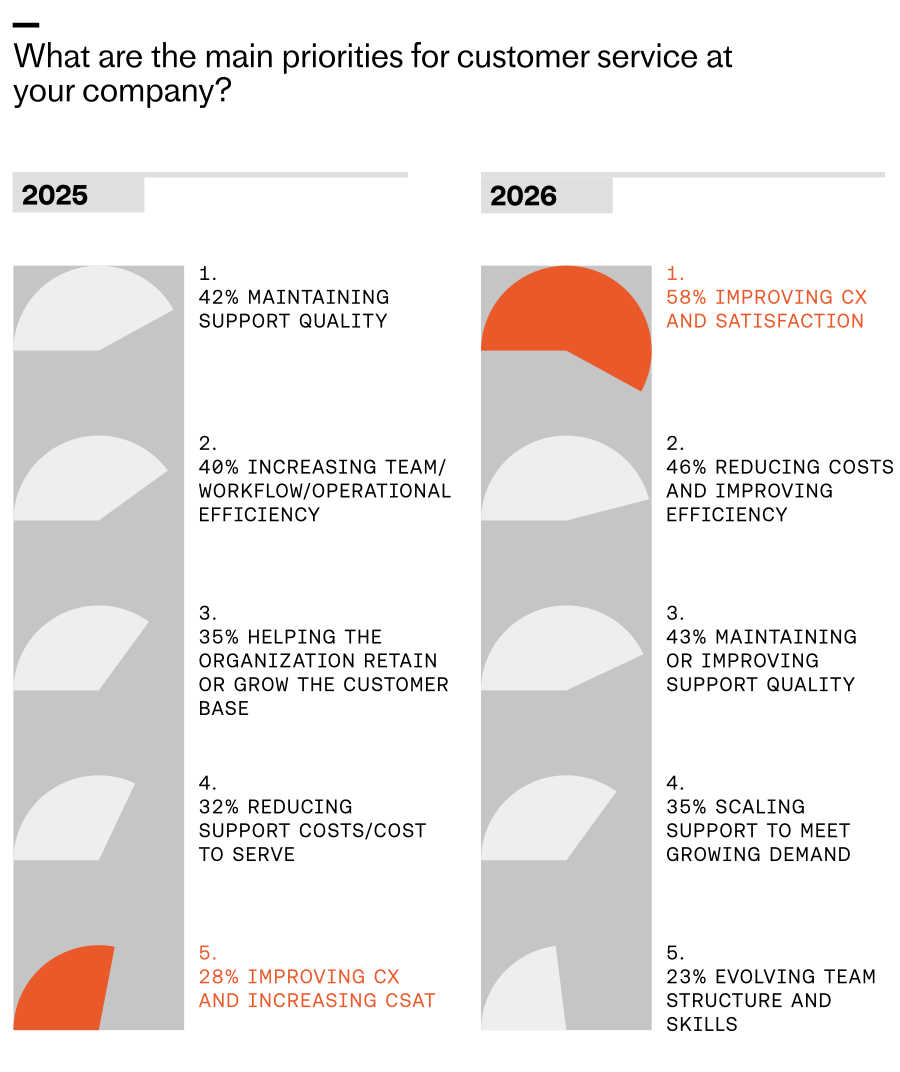
For years, I chased the elusive goal of delivering a perfect customer experience. Today, with AI embedded in our support operations, that standard is finally within reach—and it’s reshaping how we prioritize, design, and scale service.
In “The 2026 Customer Service Transformation Report,” teams report early, tangible wins from AI: faster responses, higher efficiency, and consistent coverage across languages and time zones. Those gains create the capacity we’ve always needed. The more we push the technology, the more quality improvements we unlock.
This marks a fundamental shift. As AI takes on more, our focus can finally move from firefighting to crafting the customer experience. When the AI is working, the measure of success becomes how well it’s working—across accuracy, tone, resolution, and end-to-end journey quality.
I’ve seen this transformation firsthand. Mature AI deployment gives my team “breathing room,” so we can design for consistently excellent outcomes rather than obsess over deflection. That means widening access to support, removing friction on the path to resolution, and anticipating customer needs before they escalate.
In our own support organization, we opened support to trial customers, accelerated first response times, and added consultative sessions during onboarding. We absorbed a 300% increase in total demand without adding headcount—made possible by deep integration of an AI Agent and a disciplined AI strategy.
Teams with mature customer service deployments are nearly three times likelier to say they always meet increasing expectations—27% vs 9% at initial rollout—highlighted by bold orange and gray comparison bubbles.
Across the industry, the pattern is similar. When teams initially deploy AI, only 9% say they can always meet customer expectations. That number triples as teams reach a mature level of deployment. Even as expectations rise, the organizations that deeply integrate AI—complete with clear ownership, robust instrumentation, and continuous improvement loops—are the ones most likely to meet (and exceed) the bar.
Looking ahead to 2026, I expect omnichannel consistency to become a key differentiator. The data shows planned investment is distributed nearly equally across chat, email, and social messaging (36% each), closely followed by phone/voice (31%). The question is no longer “Which channel should we optimize?” but “How do we deliver a consistent, AI-powered experience everywhere our customers are?”
Teams that solve for omnichannel consistency will bridge the long-standing gap between what customers expect and what support can deliver. Every touchpoint becomes an opportunity to exceed expectations and build durable trust.
Consider Clay, a team that scaled support without sacrificing quality. Support is one of their main growth drivers, and as their customer base expanded, ticket volume surged. Early on, they concentrated much of their effort in Slack, cultivating close, transparent community relationships. But relying on a single channel created friction as they grew; customers wanted the flexibility of email and in-app chat, and Clay needed to deliver the same high standard everywhere.
Where AI investment is headed for customer service in 2026: chat, social, and email lead at 36%, with phone/voice close behind at 31%. A bold visual snapshot of shifting channel priorities in CX.
By unifying their support experience with an AI Agent, Clay brought consistency across channels. Today, AI is involved in 90% of all queries and handles half of Clay’s total volume, upwards of 7,000 queries a month. First response rates improved significantly, freeing the team to focus on proactive, high-impact work.
That work includes identifying content gaps for education and content marketing, reaching customers before they need to ask for help, and surfacing feature requests and recurring challenges to product teams. Clay proves that when support is truly great, it becomes a competitive edge.
So how do you build a superior customer experience with an AI Agent? Here are five principles I use when scaling toward mature deployment.
1) Treat customer experience like a product. Treating support as a product means designing, building, and managing the support experience with the same rigor as your core product. You define goals (faster onboarding, higher CSAT or CX Score, lower churn). You map flows (AI starts the conversation, human handovers, proactive nudges). You instrument the journey (track handoffs, drop-offs, success states). You run tests and ship improvements (tone tweaks, fallback paths, training updates). You own the outcomes (gather feedback, measure performance, use insights to continuously improve the system).
Leaders are racing ahead with real AI in support. Explore the 2026 Customer Service Transformation Report to see where deployment is stalling, benchmark your team, and get practical steps to scale automation that delights.
2) Lead with AI, back with humans. AI isn’t replacing the human touch. It’s redefining when, where, and how it’s most valuable. In a scaled model, AI is the first responder and the end point for most conversations. Humans step in where they add the most value—particularly during high-stakes issues—and those handoffs should feel seamless. Meanwhile, your team focuses on improving AI performance and optimizing the end-to-end journey.
3) Be proactive. Use AI to anticipate needs, guide customers before problems arise, and nudge them toward successful outcomes. This is where customer support AI strategy shines—moving from reactive triage to journey orchestration that protects momentum and builds trust.
4) Build for trust. Many customers still carry the legacy of clunky chatbots that delivered vague answers and dead ends. You earn trust by showing that your system works. Don’t hide your AI Agent behind layers of “choose an option.” Get customers to the AI quickly, demonstrate real problem-solving, and ensure that when a human is needed, they join with full context to resolve complex issues efficiently.
5) Make it feel personal. Your AI Agent represents your brand. The way it speaks, follows policies, and responds matters. Use tone control, fallback logic, and language preferences to align the experience to your standards. Consistency builds trust; personality builds connection and loyalty.
Perfect really is possible. With deep AI implementation, you can scale comprehensive, fast, and personal support across channels—so customers feel supported not just when they reach out, but throughout their journey. That’s the promise of modern AI workflows in support, and it’s what will separate leaders from laggards in the years ahead.
Over the past few years, I’ve led cross-functional teams to deploy agentic AI in production, and I’ve learned that success rarely hinges on the model alone. It comes from methodically designing the right workflows, instrumenting every step, and building a feedback loop that compounds. Learn how companies like Replit are consolidating workflows, creating one-person departments, and building systems for scale with Amplitude.
When I talk about AI agents, I’m describing software that behaves like a focused teammate—owning a clear job to be done end-to-end. In practice, that means consolidating fragmented tasks into a single accountable “one-person department,” then giving it the context, tools, and analytics to perform reliably. This is how agentic AI moves beyond demos into durable business impact.
I start with outcomes, not algorithms. I map a driver tree from business goals (e.g., lower response time, higher activation, better retention) to the specific moments an agent can influence. This outcome-first alignment keeps scope tight, informs guardrails, and grounds the value proposition in measurable change instead of vanity metrics.
Next, I define the workflow the agent will fully own. I look for high-volume, rules-adjacent processes—think lead qualification, support triage, or billing inquiries—where clear decision criteria already exist but human time is the bottleneck. I document triggers, inputs, decision points, and handoffs, then design the ideal-state flow the agent will run autonomously, with transparent escalation paths to humans.
On architecture, I favor a retrieval-first pipeline to keep responses accurate and current. I scope the knowledge base, implement context window management, and standardize tools the agent can call (search, CRM actions, ticket updates). For teams new to this, I coach “LLMs for product managers” fundamentals so we make sensible trade-offs between speed and reliability rather than chasing model-of-the-week headlines.
Instrumentation is where the system becomes self-improving. I use Amplitude analytics and an Agent Analytics schema to track intent detection, tool usage, resolution rate, time-to-resolution, deflection, and escalation causes. A unified analytics platform lets me connect agent outcomes to core product metrics—activation, retention, and conversion—so we can see the real revenue and experience impact, not just local efficiency gains.
To validate impact, I run A/B testing when traffic allows, setting a minimum detectable effect (MDE) upfront to avoid inconclusive reads. In lower-volume scenarios, I lean on eval-driven development: curated test sets for edge cases, scenario-based regression suites, and error taxonomies that accelerate iteration. Feature flags let us stage capabilities safely (shadow mode, assistive, autonomous) while we monitor deltas before full rollout.
Reliability and trust are designed in from the start. I apply AI risk management practices—privacy-by-design, data governance, and policy-aligned prompt templates—paired with observability to trace decisions. Clear escalation policies, incident management runbooks, and human-in-the-loop checkpoints ensure the agent fails safe, not silently.
Shipping cadence matters. I use CI/CD to increase deployment frequency, keep prompts and tools versioned, and gate risky changes with targeted rollouts. As patterns stabilize, we scale horizontally to new use cases, sharing core capabilities (retrieval, analytics, guardrails) as a platform. This is how “one-person departments” multiply without multiplying overhead.
Change management closes the loop. I partner with product trios and frontline teams to co-design prompts, set acceptance criteria, and define what “good” looks like in plain language. In-app guides and product tours introduce the agent’s role and limits, and structured feedback channels feed directly into our discovery and iteration rhythm.
The throughline of this playbook is simple: treat agents like real teammates with a job description, operating procedures, and performance reviews. With disciplined workflow design, a retrieval-first pipeline, and outcome-level instrumentation in Amplitude, agentic AI stops being a science project and starts compounding into durable product-led growth.
Inspired by this post on Amplitude – Perspectives.
I hear the same refrain from product leadership peers everywhere: we’re overwhelmed. Shrinking headcount, constant AI disruption, economic uncertainty, and relentless context switching make it feel like we’re carrying two jobs—setting strategy while shielding our teams. I recently listened to an episode of All Things Product that zeroes in on what a real support system for product leaders looks like, and it resonated deeply with my day-to-day.
Want to listen to the conversation yourself? Find it on Spotify or Apple Podcasts.
Here’s the core tension I see (and felt early in my own leadership journey): product leaders tend to underinvest in themselves. We hold onto work because it feels faster, safer, or “just easier if I do it.” But that pattern quietly taxes strategy, slows learning, and caps team throughput. The hidden cost of “doing it all yourself” is real.
Early in my tenure leading product, I tried to keep every plate spinning—roadmap reviews, stakeholder prep, user research, executive updates—while protecting my team’s focus. I was busy and useful, but not maximally valuable. The turning point came when I started building a lightweight support stack: a few hours of executive assistant help each week, targeted research support for bet sizing, and a personal cadence with a leadership coach. The result wasn’t just more time; it was better time.
One provocative point that landed hard: product leaders rarely have executive assistants—and that’s a problem. If your calendar is your operating system, an EA is an extension of your leverage. Mine now handles scheduling, meeting hygiene, prep packets, and post-meeting artifacts. That shift moved me from “calendar triage” to “strategic curation.” It also reinforced a core principle: delegation is a leadership skill, not a weakness. When I delegate outcomes (not just tasks), my team learns, ownership grows, and we ship decisions faster.
Support for strategy work shouldn’t stop at the calendar. Research and data enable better bets. Lightweight research ops, access to product analytics, and brief synthesis sprints keep me anchored in evidence without drowning in artifacts. Paired with a strong community of practice, I get a steady stream of comparative patterns—how other leaders delegate, scope advisory boards, or run decision reviews—which short-circuits trial-and-error.
Coaches were framed as shortcuts for clarity, accountability, and skill-building—and I agree. A good coach compresses cycles, sharpens decision quality, and holds the mirror up when you drift into doer mode. Two quotes captured the mindset perfectly: “You are a pro athlete. It makes sense to think about how you scale your impact without adding more to your calendar.” — Petra Wille. “As you get busier, it becomes more important to focus on the value only you can bring.” — Teresa Torres.
There’s also a helpful nudge to let go of perfectionism: “80% done by someone else is 100% awesome.” — Dan Martell (quoted). In practice, that means I accept great drafts from others, then add the 10–20% only I can contribute—context, narrative, and the sharp edges of the decision.
What about AI? The conversation hits a practical middle ground I share: use AI where it compounds leverage—meeting summaries, research synthesis starters, doc outlines, and backlog triage. But keep humans where judgment, alignment, and context truly matter—strategy framing, stakeholder management, and the final decision-making loops. In other words, apply an AI Strategy that respects product leadership’s uniquely human work.
Key themes I took away: why product leaders struggle to scale themselves; the true cost of “doing it all yourself”; why not having executive assistants limits impact; delegation as a core leadership capability; how to identify and protect the work only you can uniquely do; using research and data to inform strategy; coaches as accelerators for clarity and accountability; communities of practice as a force multiplier; adopting a “professional athlete” mindset; when AI helps—and when humans still matter; and the liberating mantra that “80% done by someone else is 100% awesome.”
If you’re wondering where to begin, start small and practical. Audit your time: what work truly requires you? Experiment with small amounts of support (even a few hours a week). Delegate outcomes, not just tasks. Keep the hands-on work you love—but be intentional. Use peers, coaches, and communities to learn how others delegate. Don’t wait until burnout to build your support system.
Resources mentioned if you want to go deeper: Follow Teresa Torres: https://ProductTalk.org. Follow Petra Wille: https://Petra-Wille.com. Petra’s Coaching for Product Leaders: https://www.petra-wille.com/coaching-packages. Dan Martell’s book Buy Back Your Time: https://www.buybackyourtime.com.
I’m curious: what’s one outcome you’ll delegate this week, and what support would make it stick? Share your thoughts in the comments—your playbook might be exactly what another product leader needs right now.
Over the last year, I’ve had the same conversation with a lot of support leaders.
They’ve deployed AI and are seeing initial efficiency gains, but want to push beyond these early results and achieve meaningful transformation.
When AI is first introduced, the gains show up quickly. Teams resolve higher volumes of queries, free up capacity, and deliver faster responses. But the real opportunity for impact extends well beyond those initial wins. As AI becomes more deeply integrated into support operations, taking on harder, more complex work, those results compound, new ways to create and measure value open up, and the economics of support change entirely. That shift is where I spend most of my time with leaders—turning early efficiency into durable business value.
This sits at the heart of “The 2026 Customer Service Transformation Report.” In this reflection, I explore how deeper integration compounds impact and why that makes business value easier to articulate across the organization—especially to finance and product peers who need to see outcomes, not just output.
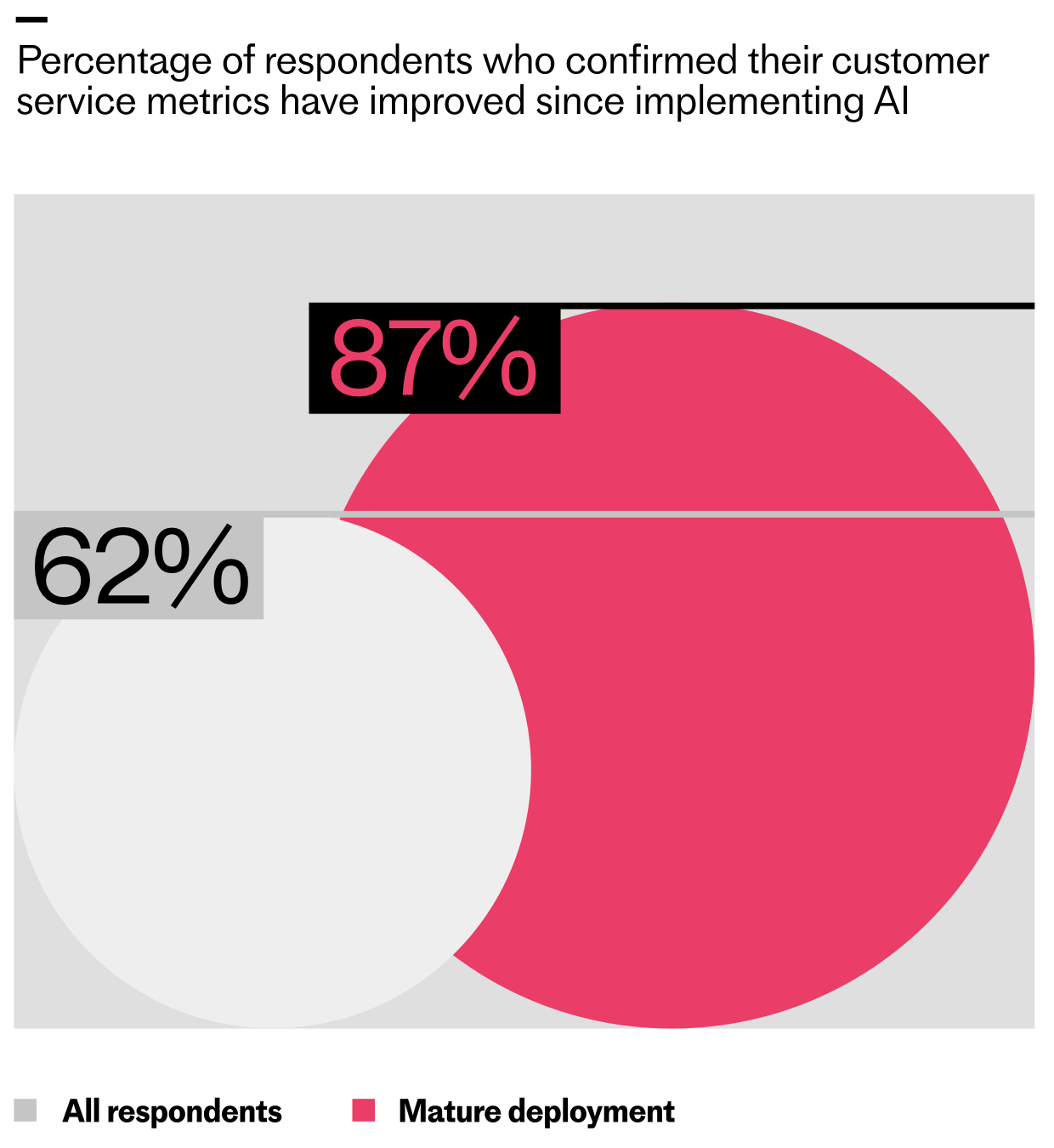
The teams going deeper are seeing higher returns. The research shows that 62% of support teams have seen their customer service metrics improve since implementing AI, with early wins showing up most clearly in speed and efficiency. But for teams that have reached mature deployment (where AI is fully integrated into operations) that number jumps to 87%.
As AI programs advance, measurement confidence surges. This chart shows how ROI tracking rises from 35% in exploring to 70% in mature deployments—evidence of a widening execution gap in customer service.
The same pattern holds for the ability to measure ROI. Among teams in early exploration, just 35% say they can measure their return on AI investment, but for teams at the mature deployment stage, that rises to 70%. In my experience, this is the moment the conversation shifts from “is AI working?” to “how much leverage are we creating?”
As AI becomes more embedded in support workflows, what teams choose to measure starts to change. In the early stages of deployment, ROI is typically understood through improved customer response times, lower cost to serve, and freeing up capacity. Teams focus on how much time AI creates and whether it’s relieving pressure on the support organization. These signals help validate that the system is working, but they say little about how that capacity is ultimately used.
As deployments mature, measurement starts to reflect a different intent. Instead of stopping at time saved, teams look at where that capacity is reinvested—into higher value customer work and revenue-generating activities. ROI becomes less about relief and more about leverage. I encourage teams to set targets for capacity redeployment and tie them directly to activation, retention, and expansion outcomes.
The report data shows this clearly. Across all maturity stages, the most commonly cited measure of ROI is "time freed up that the support team can use to focus on value-adding activities for customers." But at mature deployment, that signal intensifies, with 73% of teams citing it, compared to 56% at early exploration.
Mature AI deployments reveal clearer ROI: teams report more time freed for value-adding customer work (73% vs 59%) and more hours redirected to revenue-generating tasks (56% vs 34%) than initial rollouts.
What’s also interesting is that 56% of mature teams say freed capacity is being directed toward revenue-generating activities, up from 34% at initial deployment. That’s a powerful indicator that AI is shifting from a cost narrative to a growth narrative.
The result is a shift in economic intent: from measuring what AI saves to demonstrating how the capacity it creates is reinvested to drive growth. As a product leader, I anchor this conversation in outcome-based metrics and clear counterfactuals: what would it have cost to deliver the same experience without AI?
As AI takes on more work, the question moves from “does it save money?” to “how does it change the economics of support?” Legacy support economics were built for linear growth: more customer tickets meant more headcount, more outsourcing, and more software costs. Success was measured through containment—the number of queries that didn’t reach human agents. These models worked when volume and effort were tightly linked, but AI doesn’t scale linearly, and it needs to be evaluated differently.
To sustain AI investment and expand its impact, teams need to move beyond cost-cutting narratives and build a clearer case for business value. When done right, AI goes far beyond improving support efficiency. It rewires the financial model, breaking the link between support costs and revenue growth, and turning support into a contributor to customer activation, retention, and lifetime value. This means treating your AI Agent as a new workforce capability that changes how your support function creates and captures value. Here’s what value looks like in an AI-first model:
Deeper AI integration decouples growth from headcount. This split chart shows support volume surging while team size plateaus, revealing how automation unlocks scale, reduces costs, and makes ROI easier to prove.
Human productivity: Your team focuses on more strategic areas, not the queue.
System improvement: Every resolved query makes the system smarter.
Revenue influence: Support becomes a lever for activation, retention, and growth.
Organizational agility: You scale service without scaling headcount.
Leaders are racing ahead with real AI in support. Explore the 2026 Customer Service Transformation Report to see where deployment is stalling, benchmark your team, and get practical steps to scale automation that delights.
How does this look in practice? Intercom offers a compelling example with Fin. What started as a focused effort to improve their customer support experience has become one of the clearest illustrations of what happens when AI is fully embraced across an organization.
Since 2022, Fin has helped Intercom absorb more than a 300% increase in customer demand while improving the consistency of delivery—including supporting new routes into support for trial customers and website visitors. Today, Fin is involved in 97% of their customers' conversations. Of those, it resolves 83.5% end-to-end, putting their overall automation rate at 81%.
That depth of deployment allowed Intercom to scale service without scaling headcount. Without Fin, they would have needed at least 100 additional support teammates to meet rising demand and service standards.
As Fin took on the majority of day-to-day volume, the human support team shifted toward consultative work—helping customers adopt Fin more deeply, succeed faster, and unlock more value from the platform. Intercom now tracks metrics like “direct revenue generated” and “expansion revenue influenced” to understand the impact of these consultative support activities. This repositioned support from a cost center to an active contributor to long-term growth.
The throughline from The 2026 Customer Service Transformation Report is that deployment depth makes a significant difference. Teams that are investing in deeply integrating AI are reshaping how support scales and contributes to growth. Value becomes clearer as AI takes on more work, and support leaders can articulate that value to the rest of the business.
The gap between these teams and those still in the early stages is widening. A select group of pioneers are setting a new bar for what AI-powered customer service can deliver, and understanding what they’re doing differently is the first step toward closing that gap. If you want to dive deeper into the data and frameworks, you can download the report here: https://www.intercom.com/customer-transformation-report?utm_source=blog&utm_medium=internal&utm_campaign=20260128-report-owned-2026cstransformationreport&utm_content=chapterseries_2
I’ve been pushing hard to operationalize AI for real product work, and this episode zeroes in on the moment Claude Code stops feeling like a demo and starts behaving like a dependable teammate. If you’ve ever wondered how to go from clever prompts in the browser to durable, repeatable workflows on your machine, this walkthrough is for you.
Listen on: Spotify | Apple Podcasts.
My first honest reaction to installing and configuring the desktop agent was the all-too-relatable “this tool thinks everything is a code repo” reality. That framing helped me reset expectations fast: instead of treating it like a magical universal assistant, I began designing guardrails, context, and repeatable routines—exactly how I’d onboard a new team member.
The shift from Claude-in-the-browser to Claude Code on my machine was the unlock. Locally, it can finally work with my files, folders, and workflows. That meant I could ground it in real artifacts—project docs, meeting notes, product specs, and historical decisions—so responses weren’t just plausible; they were contextual and verifiable.
On setup, I now treat /init and Claude MD files as my product requirements. I define roles, boundaries, and canonical sources up front, then run in a deliberate “walled garden.” The “treat it like an intern” model works beautifully: scope access intentionally, expand privileges as trust grows, and keep a tight audit trail of what it can touch and why.
Surprisingly, task management became my ideal on-ramp. It’s easy to validate, the feedback loops are tight, and the ROI is immediate. I export calendar windows rather than granting full calendar access, then let the agent map priorities into Trello, reconcile time blocks, and surface trade-offs. Fast wins build confidence—mine and the agent’s.
Model switching matters more than I expected. When speed is king and “good enough” will do, Haiku keeps the loop snappy. When stakes are higher—complex synthesis, nuanced product strategy, or gnarly ambiguity—I step up to Claude Opus 4.5. Being intentional about when to optimize for latency versus depth is a quiet superpower.
Web tasks can still spiral. When that happens, I pause its autonomy, toggle to fewer steps, and ask, “What are you doing?” Paired with Claude’s Web fetch tool, this makes the agent explain its chain-of-thought planning without exposing hidden reasoning, so I can spot brittle assumptions, prune distractions, and re-ground the task.
Content retrieval has become a killer workflow. I point the agent at my archives—blog posts, book drafts, transcripts, notes—and ask, “Where have I talked about this before?” It assembles a map of prior art, connects themes I’d forgotten, and prevents me from reinventing work. Over time, this evolves into a Zettelkasten-style research system that upgrades rigor and accelerates synthesis.
I’ve also turned Claude Code into a publishing engine. From a single transcript, it drafts titles, descriptions, show notes, and chapters, then routes artifacts to Ghost for formatting. Before anything ships, I run fact-checking workflows that validate claims against transcripts and research sources. The output improves, but more importantly, the scaffolding makes quality repeatable.
Reusable workflows compound. I rely on slash commands to trigger common jobs, break down larger efforts with sub-agents, and wire in hooks and plugins where external systems are needed. This is agentic AI at its most practical: fewer hero prompts, more reliable processes.
Audience analytics and content prioritization are helpful with caveats. I let the agent cluster themes and flag gaps, then I pressure-test its suggestions against first-party data and strategic goals. As with any model-driven insight, triangulation beats blind faith.
Two metaphors guide my day-to-day. First, Claude Code is like a dog—sometimes it returns with the stick, sometimes it gets lost in the woods. Second, the “intern” framing keeps me honest: don’t hand it the whole company on day one. With that mindset, my output jumped—more volume without sacrificing quality—because the workflow scaffolding got better.
In this episode, I cover what Claude Code is and why it’s useful even if you’re not an engineer, the real difference between the browser experience and running locally, how to shape behavior with /init and Claude MD files, why task management is the perfect proving ground, when to export calendar windows versus connecting directly, and when model-switching makes sense—Haiku for speed, Opus for depth.
I also dig into debugging web tasks by asking “What are you doing?”, content retrieval workflows across personal archives, building reusable slash-command systems with sub-agents, hooks, and plugins, practical publishing stacks from transcripts, fact-checking against transcripts and research sources, and using analytics to prioritize content—with a healthy respect for uncertainty.
If you’ve been trying to make Claude Code feel less like “throwing a stick into the woods,” this is the candid, tactical tour I wish I’d had on day one. Drop your questions and experiments below—I’m eager to compare notes and refine the playbook together.
“You don’t have to trust the algorithm; you can see exactly why a conversation earned the score it did.”
We recently shared how we redesigned CX Score to deliver deeper, more actionable insights across every conversation. The most common follow-up from support leaders was simpler and incredibly important: “Can I trust it?” It’s the right question—and it’s the one I use as my own bar for whether a metric is ready for the C‑suite.
CS teams are the subject matter experts on customer experience. They understand the nuance of what customers feel, the context behind every interaction, and the difference between a technically resolved issue and a genuinely satisfied customer. I’ve learned, conversation by conversation, that any metric we ship has to capture that nuance at scale—or it doesn’t deserve to be used.
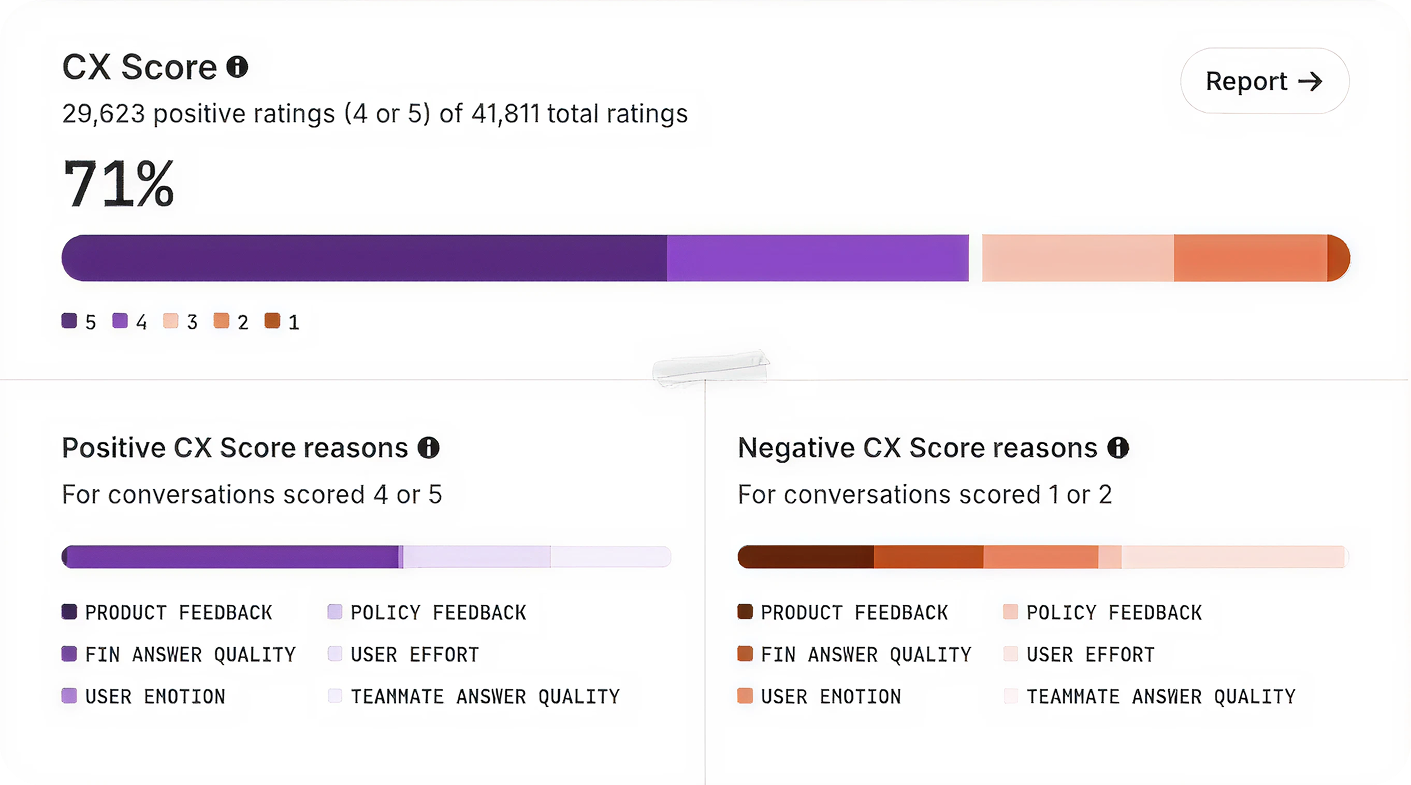
We built CX Score to give support teams a complete view of how their customers feel across every conversation. It surfaces what’s working, what’s not, and why—so leaders can communicate impact clearly and drive change across support, product, and the wider business.
A CX Score in action: repeated CSV export failures trigger a low score and customer frustration, while the AI agent clarifies next steps and gathers details—turning raw signals into actionable support insights.
Here’s exactly how I approached building a trustworthy metric that support leaders can inspect, explain, and defend.
1) It’s grounded in how support teams define quality. I started with how experienced support professionals actually evaluate conversations—collecting real examples of strong, mixed, and poor interactions across industries, identifying the specific factors that shape overall experience, and writing plain-English rules for each. The result: CX Score applies the same criteria a trained support professional would use, not generic LLM assumptions.
2) It’s aligned with human judgment. We created a dataset of thousands of real customer conversations spanning multiple industries, languages, channels, and agent types. Each was manually reviewed by experienced support professionals—with two reviewers per conversation where possible and disagreement resolution to create stable consensus labels. The result: CX Score is trained and tested to behave like an expert reviewer, not a language model making broad guesses.
A modern CX analytics view shows how conversations flow from chat, email, and mobile into AI assistance, then to resolutions and sentiment outcomes—turning messy support data into a single, defensible CX Score.
3) It’s engineered by AI specialists. CX Score isn’t a prompt attached to an LLM. It’s a production system built by Intercom’s AI Group: 37 ML scientists and 350 engineers whose full-time focus is AI for customer service. The system includes specialized handling for long transcripts, model configuration tailored for support language and subtle sentiment, prompt engineering designed to default to neutral when evidence is weak, and a multi-stage evaluation pipeline that checks for precision, consistency, and reliability. The result: A metric built by a team that understands LLM behavior in production support environments, where accuracy and consistency matter most.
4) It’s validated statistically, not qualitatively. Trust requires measurement, not vibes. We tested CX Score across standard ML metrics: Precision (when the model flags a negative experience, how often do humans agree?), recall (how many human-identified issues does it catch?), and F1 score (the balance between both). We set an explicit bar: F1 above 0.8, representing high agreement with human judgment. We reran these evaluations through every revision, checking for regressions or biases, and I focused especially on negative experiences, because a false negative hides a real problem. The result: CX Score meets a measurable standard before it ships—not a gut check, a statistical requirement.
5) It was battle-tested with real customers. Lab accuracy isn’t enough. Customer environments are messy: Varied ticket types, mixed languages, unpredictable edge cases. Before release, we ran a multi-phase field test—shadow-scoring conversations with both old and new models, validating sensible behavior across agent type and conversation length, then rolling out to a controlled customer group who confirmed the scores felt right, reasons were clear, and insights were actionable. The result: CX Score shipped because real teams told us it made sense in practice, not because it passed internal tests.
From conversation to clarity: this visual maps the drivers behind a CX Score. Explore how policy feedback, answer quality, and effort combine to produce defendable insights support leaders can act on.
The importance of explainability. One of the most critical choices I made was ensuring CX Score isn’t a black box. Every score comes with clear reasons, concrete excerpts, and a short explanation of what influenced the rating. This turns the metric into something you can inspect, audit, and explain to executives. You don’t have to trust the algorithm. You can see exactly why a conversation earned the score it did.
A metric that evolves with your business. Customer expectations shift. Products change. AI improves. A trustworthy metric can’t be static. CX Score evolves with the same commitments that shaped its redesign: Evaluate the real signals that shape customer experience, keep the logic simple and interpretable, and ensure leaders can make clear decisions from it. It’s built to be a durable source of truth across every conversation.
The takeaway. In a world where products look the same and AI can generate any interaction, customer experience is one of the few differentiators that actually matters. Support leaders have built that expertise conversation by conversation. What they’ve lacked is a measurement system that could validate it at scale—one that’s reliable enough to report to the C-suite, explainable enough to defend in strategy meetings, and rigorous enough to drive real decisions. That’s what CX Score is designed to be: A metric that reflects the reality support leaders see every day, backed by the technical rigor to make it credible everywhere else.
Want to see CX Score in your workspace? Ask your admin to enable it for your team, and start using explainable AI insights to improve customer experience and coach with confidence.
Shipping AI agents is not like shipping a typical feature. The system learns, reasons, and takes action in unpredictable environments, and when it’s customer-facing, the stakes are high. Over the past few years, I’ve refined a practical checklist that helps my teams move quickly without breaking trust. It balances speed with safety, and ambition with accountability—exactly what you need to scale agentic AI in production.
This checklist was forged in real launches—some smooth, some humbling. Early on, I watched an otherwise brilliant agent confidently offer a refund policy we didn’t have. That one incident made it clear: AI agents require a higher bar for guardrails, evals, and observability. Today, I won’t greenlight an AI rollout without these steps being explicit, owned, and testable.
Start with outcomes, not output. I define the job-to-be-done, the target users, and the measurable business impact using outcomes vs output OKRs and driver trees. Success is not “ship an agent,” it’s “reduce first-response time by 40% with no drop in CSAT,” or “increase qualified demo bookings by 20% at a lower cost per acquisition.” Clear outcomes give the agent a purpose and the team a north star.
Prepare the knowledge the agent will use. A retrieval-first pipeline beats raw prompting for most enterprise cases. I inventory sources of truth, set access controls, and enforce data governance from day one. That includes PII handling, redaction, retention policies, and privacy-by-design. If the agent can’t reliably retrieve the right fact at the right time, the rest doesn’t matter.
Choose models and prompts with discipline. I align model selection with context window management, cost, latency, and tool-use requirements. Then I build prompts and tools together, not in isolation, and I keep temperature, stop conditions, and function-calling explicit. Most importantly, I use eval-driven development: golden datasets, task-specific metrics (accuracy, helpfulness, latency, cost), and target thresholds that must be met before widening rollout.
Manage AI risk upfront. I treat jailbreaks, toxicity, and data leakage as product risks, not just security issues. I implement layered defenses—input/output filtering, policy checks, rate limits, and abuse monitoring—and define escalation paths and human-in-the-loop handoffs for ambiguous cases. Every risky capability needs an owner, a playbook, and a test.
Build the pipeline that lets you iterate safely. Prompts, tools, policies, and retrieval configs go through the same CI/CD rigor as code. I use feature flags for progressive delivery, canary cohorts to limit blast radius, and clear rollback procedures. Observability isn’t optional; I track latency, token usage, cost, failure modes, and user outcomes. I also watch DORA metrics and deployment frequency to ensure we’re improving the engine, not just the output.
Constrain autonomy intentionally. Agent behavior design matters as much as model choice. I set step limits, define tool whitelists, separate read vs write permissions, and specify decision checkpoints. When the agent is uncertain or confidence drops below a threshold, it hands off to a human or a deterministic workflow. Guardrails aren’t barriers; they’re bumpers that keep you on the track.
Instrument what users experience, not just what models produce. I track activation, task success, self-serve completion rates, and time-to-value. I pair Agent Analytics with journey analytics so I can see where the agent helps or hurts. I also invest in UX trust cues—transparent explanations, undo paths, and in-app guides—so users feel in control. When the agent changes behavior through learning, the interface should make that understandable.
If you’re shipping a voice AI agent, test in realistic conditions. I set targets for ASR accuracy, barge-in responsiveness, TTS prosody, and end-to-end latency. I predefine safe transfer logic for complex calls and ensure compliance for call recording and data retention. Voice amplifies both the magic and the mistakes; operational excellence is non-negotiable.
Plan the business rollout like a product, not a press release. I align pricing (often consumption SaaS pricing), packaging, and SLAs with actual unit economics—tokens, inference, and retrieval. I equip solutions engineering with playbooks and reference architectures, wire up CRM integration for attribution, and put feedback loops into Intercom or the support stack so we learn from every interaction.
Run operations like an SRE team. I define incident severity for AI-specific failures (e.g., harmful output, runaway cost, degraded retrieval), add alerting, and keep runbooks current. I schedule postmortems that feed directly into eval baselines and backlog priorities. Continuous discovery isn’t a ceremony; it’s the safety net that keeps improvements compounding.
Close the loop on compliance and governance. From day zero, I document data flows, vendor scopes, and audit logs. I verify regulatory compliance and adopt privacy-by-design so I’m not retrofitting later. Transparency, user consent, and opt-outs aren’t just legal checkboxes; they’re trust-building tools that differentiate your product.
The result of this checklist is speed with confidence. It gives my teams a common language to debate trade-offs, a clear path to production, and the guardrails to scale safely. If you’re preparing to deploy an agent, adapt these steps to your stack and your customers. Your future self—and your users—will thank you.
This is the year to build your personal operating system. For me, that line isn’t a slogan; it’s a commitment to eliminate context switching, compress decision cycles, and turn fragmented information into a reliable source of truth. As a product leader, I needed a system that blends judgment, data, and automation—so I built mine around Claude Code.
When I say “personal operating system,” I mean an integrated set of AI workflows, rituals, and tools that capture knowledge, structure decisions, and automate execution. It’s where product discovery meets delivery: a place to synthesize signals, prioritize with clarity, and move from insight to action without friction. The outcome is fewer ad hoc decisions, more deliberate strategy, and a calmer, more focused day.
Claude Code sits at the center because it helps me translate intent into working software and repeatable processes. I use it to scaffold small utilities, write adapters for APIs, and evolve prompts into robust patterns. It accelerates everything from research synthesis and PRD drafting to backlog grooming and stakeholder updates—while keeping me in the loop for final judgment.
Under the hood, I run a retrieval-first pipeline that connects notes, docs, tickets, research transcripts, and roadmaps into a searchable, living memory. With careful context window management, I feed only the most relevant snippets into Claude Code, preserving accuracy and speed. The result: richer answers, fewer hallucinations, and an assistant that “remembers” what matters without drowning in noise.
My daily loop is simple: capture, synthesize, decide, and act. I capture customer signals and meeting notes into a personal knowledge management vault; synthesize patterns with prompt engineering that emphasizes evidence; decide using outcomes vs output OKRs; and act by generating drafts, creating tasks, and updating artifacts. Claude Code helps me wire this end-to-end, so the system works even on my busiest days.
If you’re implementing this from scratch, start small. Pick one high-friction workflow—say, product feedback triage—and build a narrow agentic AI flow to classify, summarize, and route items. Use eval-driven development to test prompts against known edge cases. Add guardrails and privacy-by-design practices from day one, then expand to neighboring workflows once the first loop is reliable.
Governance matters. I treat AI risk management, data governance, and security as first-class citizens: limited data scopes, clear audit trails, human-in-the-loop approvals, and rollback plans. Feature flags control changes; observability tracks drift and quality; and a simple playbook documents how we deploy, monitor, and improve the system.
Measure what this personal operating system earns you. Track decision latency, cycle time from signal to action, meeting-to-output ratios, and the signal-to-noise ratio of inputs. When the system is working, you’ll feel it: fewer meetings, more momentum, and sharper product strategy supported by trustworthy AI workflows.
The goal isn’t to automate judgment—it’s to protect it. By letting Claude Code handle the glue work and information wrangling, I preserve energy for high-leverage thinking: positioning, sequencing, and trade-offs. Build your personal operating system now, and make this the year your product practice runs with clarity and composure.
Is hiring broken—or just badly designed? I’ve been sitting with that question after a recent conversation that crystallized what I see across product organizations: AI-fueled application overload, sprawling interview loops, and fuzzy criteria that invite groupthink at exactly the wrong moments. If you’ve ever watched a promising candidate stall out late in the process, you’re not alone. Listen to this episode on: Spotify | Apple Podcasts.
Here’s the reality I’m observing in the market: Layoffs and hiring freezes have flooded the funnel, while AI tools make it trivial to submit hundreds of applications. Companies are overwhelmed, so they respond by adding more interviews and more stakeholders, hoping more touchpoints equal better signal. In practice, that complexity often dilutes accountability and increases noise—especially for product management leadership roles where clarity, not consensus theater, determines success.
I’ve seen too many offers derailed by “one last step.” A candidate clears every structured interview, then a casual lunch or unframed panel suddenly becomes the deciding factor. The team isn’t briefed on what to evaluate, one lukewarm comment lands, and group dynamics cascade into a no-hire. That’s not rigor—it’s randomness masked as prudence.
Groupthink ≠ good hiring decisions. When everyone has veto power, risk-averse no-decisions become the default. Focus-group-style interviews create bias, not signal, and “culture fit” often becomes a proxy for stereotyping or personal preference. As product leaders, we’d never ship a feature based on vibes; we shouldn’t make high-stakes hiring calls that way either.
There’s a better way—and it mirrors how we run great product discovery. Define who you’re hiring before writing the job description. Set clear success metrics for the role. Assign each interviewer specific criteria to evaluate. Treat hiring like product discovery: intentional, structured, and evidence-based. In my teams, that looks like tight scorecards, interviewer calibration, and a decision owner who synthesizes evidence—not a popularity contest where the loudest voice wins.
Chemistry checks still matter, but only when we define what collaboration actually means for the role. Introversion, debate style, or lunch-table small talk are not performance indicators. I look for behaviors we value in empowered product teams—clarity of thinking, healthy dissent, co-creation under constraints—often via a real working session with the future product trio. Diverse teams outperform homogenous ones, even if not everyone “vibes,” so I optimize for complementary strengths over sameness.
If you’re a candidate, remember: When a process feels broken, it’s often not about you. Ask how you’re being evaluated to gauge process maturity; a thoughtful team will happily walk you through their rubric and what great looks like. For structure and support, I’ve seen “Who: The A Method for Hiring” help leaders clarify requirements; “Never Search Alone” and joining a Job Search Council (JSC) can give you peer accountability and sharper narratives. For current openings, I regularly point PMs to Scott Baldwin’s PM job postings on LinkedIn.
My challenge to fellow product leaders: Audit your hiring process the way you’d audit your roadmap. Where are decisions getting stuck? Where are you over-indexing on consensus and under-indexing on evidence? Tighten the criteria, streamline stakeholders, and instrument the funnel so you can learn and improve. The payoff is faster, fairer, more confident decisions—and teams that reflect the rigor we expect in product strategy and stakeholder management.
What’s one change you can make this week—reworking the scorecard, calibrating interviewers, or replacing an unstructured lunch with a real collaboration exercise? Small improvements compound. Let’s build hiring systems that are worthy of the talent we’re trying to attract.
You have AI pilots that demo well, enthusiastic teams asking for broader rollout, and executives expecting the investment to show up in operating results. Yet the closer you get to production, the longer the list of unresolved questions becomes: Who owns the workflow? How will quality be measured? What happens when the model is wrong? Can the economics survive real usage?
The next move is not to launch more pilots. It is to install a system that can repeatedly turn a validated use case into a governed, measurable, and improving production workflow. That system is what separates AI experimentation from mature deployment.
A successful pilot is not evidence of production readiness
AI adoption is already common enough that adoption itself tells you very little. Among more than 2,400 global customer service professionals, 82% of senior leaders invested in AI in 2025, 87% planned to invest in 2026, and only 10% described their deployment as mature. The sample is specific to customer service, so those figures are better used as a directional benchmark than as a universal maturity rate. The underlying execution problem applies much more broadly: buying or piloting AI is easier than making it dependable inside a core workflow.
A pilot is designed to answer a narrow learning question. Can the model classify this request, draft this response, summarize this record, or choose the next action under controlled conditions? Production has to answer a harder question: can the entire workflow create enough value, across ordinary and difficult cases, while remaining safe, observable, supportable, and economically sensible?
I use a simple test. If the team can describe the model but cannot describe the operating workflow around it, the work is still a prototype. A production case should make each of these elements explicit:
Outcome: The customer or business result that should improve, plus the current baseline.
Workflow boundary: Where AI enters, which decisions it may make, which systems it may use, and where its authority ends.
Quality standard: The evaluation cases, acceptance criteria, and failure categories that determine whether a release is good enough.
Safe failure path: What the system does when information is missing, a tool fails, a policy is triggered, or the requested action exceeds its authority.
Accountability: A named product owner for the outcome and a named operational owner for production performance.
Economics: The value created and the full cost of inference, retrieval, tools, review, support, and incident handling.
Learning mechanism: How production failures and user corrections return to the evaluation set and release process.
These are not finishing tasks to schedule after the model works. They are part of the product. Deferring them creates a predictable trap: the pilot looks increasingly impressive while the distance to a responsible launch quietly grows.
Do not confuse automation coverage with maturity, either. A system can handle many requests and still be immature if nobody can explain why it made a decision, detect a quality regression, contain a failure, or calculate the result. Conversely, a narrowly scoped workflow can be mature when its boundaries, controls, outcomes, and ownership are clear.
Promote each workflow through explicit maturity gates
Maturity should be earned workflow by workflow. An organization does not become mature because it has a central AI team, an approved model vendor, or a large portfolio. It becomes mature when important workflows can move through a repeatable sequence of decisions without relying on heroics.
Stage
Decision to make
Evidence required to advance
Reason to hold
Discover
Is this a valuable and appropriate problem for AI?
A defined user problem, current baseline, workflow map, risk classification, and initial build-versus-buy view
The use case is driven by model novelty, has no meaningful outcome, or depends on inaccessible data
Prove
Can the proposed workflow improve on the current process?
Representative evaluation cases, a working prototype, documented failure modes, and a controlled comparison with the baseline
Success appears only in curated demos, or the team cannot reproduce the result across realistic cases
Operate
Can the workflow run safely and reliably in production?
Monitoring, escalation, access controls, auditability, incident procedures, release controls, rollback, and an accountable operator
Failures cannot be detected or contained, or production responsibility is still ambiguous
Scale
Should usage, autonomy, channels, or organizational reach expand?
Sustained outcome improvement, acceptable quality and risk, validated economics, user adoption, and reusable operating components
Volume is growing faster than quality, cost, support capacity, or governance can be understood
The purpose of a gate is not to create a committee. It is to prevent enthusiasm, executive attention, or sunk cost from substituting for evidence. The domain team should be able to prepare the evidence as part of normal product development. Specialist review should become more demanding only as the possible consequence of failure increases.
Give every workflow a short deployment contract. Keep it in the same system where the team manages releases and evaluations, not in a presentation that disappears after approval. The contract should include:
The intended user, job to be done, business outcome, and current baseline.
The inputs the workflow accepts and the outputs or actions it may produce.
The actions that are prohibited, require confirmation, or must be routed to a person.
The data sources, retrieval rules, system permissions, retention rules, and privacy constraints.
The evaluation set, quality dimensions, acceptance criteria, and known limitations.
The failure taxonomy, escalation path, incident owner, and customer recovery procedure.
The prompt, model, retrieval, tool, and policy versions included in the release.
The production metrics, cost measures, rollout control, and rollback conditions.
The product owner, operational owner, and risk approvers.
The acceptance criteria will differ by workflow. A drafting assistant, an internal search experience, and an agent authorized to modify a customer account should not face the same bar. Base the bar on consequence, reversibility, detectability, and recovery. If an error can create an irreversible change, expose sensitive data, make a material commitment, or deny someone an important service, require an appropriate human authorization step rather than relying on average model performance.
The deployment contract also makes scope changes visible. Adding a new tool, data source, channel, language, model, or autonomous action is not merely more traffic. It changes the system’s failure surface. Update the contract, extend the evaluation set, and pass the relevant gate again.
Build three feedback loops before increasing autonomy
A mature deployment learns at three levels: whether the workflow creates value, whether its decisions meet the required standard, and whether the production system remains reliable. If any loop is missing, the team can collect impressive activity metrics while the actual product deteriorates.
Connect model behavior to a business outcome
Start with the baseline process, not an AI metric. If the workflow is intended to resolve a support request, qualify an opportunity, complete an onboarding step, or assist an employee, measure how that outcome happens without the new system. Otherwise, you will know that the AI generated output but not whether it improved anything.
Use a metric stack that separates outcomes from diagnostics:
Business outcome: The customer, revenue, cost, risk, or productivity result the investment is meant to change.
Workflow outcome: Completion, resolution, successful handoff, correction, rework, abandonment, or another measure of whether the task reached its intended end.
Quality and safety: Correctness, grounding, policy compliance, appropriate escalation, harmful failure, and user correction.
Economics: Cost per successful outcome, including model usage, infrastructure, external tools, human review, support, and remediation.
The layers diagnose different problems. A prompt change may improve an offline score without changing task completion. More automation may reduce handling work while increasing corrections. A cheaper model may lower inference cost but create enough rework to raise the cost per successful outcome. Do not compress those effects into one AI score.
When traffic and product conditions support an experiment, compare the AI workflow with the current experience. Define the decision metric and minimum detectable effect before running an A/B test. For lower-volume or higher-risk workflows, use controlled rollout evidence, expert review, and structured case analysis rather than pretending a small sample provides statistical certainty.
Turn evaluations into release criteria
An evaluation set is not a collection of attractive examples. It should represent ordinary work, difficult edge cases, policy boundaries, known failures, and the situations in which the system should refuse or escalate. Build it before optimizing the prompt so the team cannot unconsciously redefine success around whatever the prototype already does well.
For each case, record the expected behavior and why it is expected. Some outputs can be checked against a deterministic answer. Others need a rubric that distinguishes task completion, factual support, instruction following, tone, policy compliance, and escalation quality. Where reviewers can reasonably disagree, capture that disagreement instead of forcing false precision into a single label.
Use offline and online evaluation for different jobs. Offline evaluation protects releases by testing candidate changes against a stable set. Online evaluation reveals distribution shifts, new user behavior, integration failures, and outcomes that cannot be recreated fully before launch. Neither is sufficient on its own.
Version the entire behavior-producing system: model, prompt, retrieval configuration, knowledge snapshot, tools, policies, and routing logic. A model comparison is not meaningful if the surrounding system changed silently. For every proposed release, make the decision policy explicit: ship, hold, narrow the scope, expand gradually, or roll back. This is the practical core of eval-driven development with target metrics and a decision policy defined before launch.
Operate the workflow as a production service
AI introduces variable outputs, but it still depends on familiar production systems: identity, permissions, data pipelines, APIs, queues, search, external tools, and user interfaces. A model can appear to be wrong when retrieval returned stale information or a downstream tool rejected an action. Monitoring only the final text hides the failure that engineers need to fix.
Trace the workflow end to end. Subject to your privacy and retention rules, capture the release version, retrieval and tool events, policy decisions, response, escalation, user correction, and eventual workflow outcome. Monitor distributions and failure categories, not just averages. An acceptable overall score can conceal a serious regression for a particular intent, customer segment, channel, or action.
When the workflow depends on changing or private knowledge, connect it to governed retrieval instead of expecting the base model to contain the right answer. Use safe integration points for tools, least-privilege access, and explicit authorization for consequential actions. CI/CD, feature flags, canary releases, observability, audit trails, privacy controls, red teaming, and human review form a practical control plane for releasing changes without exposing the entire population at once.
Every material production failure should produce more than an incident ticket. Classify the failure, add or update the corresponding evaluation case, correct the prompt, retrieval, policy, tool, or interface responsible, and retest the workflow before restoring scope. That turns operational pain into a permanent improvement in the release system.
Use 30-60-90 days to build the scaling system
A useful 30-60-90-day sequence starts with two lighthouse use cases. The goal is not to force every use case into production within a quarter. It is to prove that your organization can move valuable workflows through the same gates, shared controls, and learning loops.
Days 0-30: narrow the portfolio and establish accountability
Inventory active pilots and classify each as discovery, proof, operation, or scale. Do not let a polished demo assign its own stage.
Select two lighthouse workflows using customer impact, feasibility, strategic relevance, and risk. Choose workflows meaningful enough to matter but bounded enough to operate responsibly.
Record the current process and baseline before the AI changes user or employee behavior.
Name the product owner, operational owner, and required risk decision-makers for each workflow.
Complete the first version of each deployment contract, including the autonomy boundary and safe failure path.
Make the build-versus-buy decision at the workflow level. Include data access, integration, auditability, evaluation portability, operating cost, and switching constraints.
Pause pilots that have no accountable owner, no measurable outcome, or no plausible route through the operating gate.
This first phase is where leadership earns focus. A broad AI mandate often creates a queue of unrelated prototypes, each with its own vendor, data assumptions, and definition of success. Choosing lighthouse workflows gives the platform and governance work a real customer instead of turning them into abstract architecture programs.
Days 31-60: install evaluation, controls, and workflow operations
Build the offline evaluation set from representative work, edge cases, policy boundaries, and failures already found during discovery.
Define acceptance criteria and the release decision policy before further prompt or model optimization.
Integrate the necessary retrieval and tools through governed access points. Keep permissions narrower than the user’s full access where the workflow does not need it.
Add observability across retrieval, reasoning inputs, tool execution, output, escalation, and business outcome.
Prepare feature flags, a controlled rollout, rollback, incident procedures, and a customer recovery path.
Run the workflow with appropriate human oversight. Record corrections and escalations as structured evidence, not informal feedback in chat.
Train the people who will supervise, support, and improve the workflow. Update operating procedures before transferring real responsibility to AI.
Training cannot be limited to prompt tips. Operators need to know what the system may do, how its failure modes appear, when to intervene, how to report a new failure, and who can change production behavior. Product and engineering teams need the same vocabulary for evaluation, incidents, and risk.
Days 61-90: expand evidence, not enthusiasm
Increase scope only for workflows that meet their operating gate. Expansion may mean more traffic, another intent, a new channel, or greater autonomy; evaluate each change explicitly.
Compare the production outcome and cost with the original baseline. Include corrections, review, support, and remediation in the economics.
Turn repeated needs into shared components such as model access, retrieval, identity, evaluation infrastructure, observability, policy enforcement, and audit logging.
Move validated production failures into the evaluation suite and confirm that the release process catches them.
Review job responsibilities, incentives, staffing assumptions, and training needs created by the redesigned workflow.
Hold a portfolio decision for every remaining pilot: advance, narrow, combine, pause, buy, or stop.
Organizational change is part of this phase. As AI altered customer service work, 45% of teams updated job descriptions and 40% increased AI training. That is a useful warning against treating adoption as an in-app onboarding problem. If AI takes responsibility for part of a workflow, someone must take responsibility for supervising it, handling exceptions, and improving the system.
Assign decision rights clearly. The domain product team should own the user problem, outcome, workflow design, evaluation cases, and adoption. A platform function should own shared access, retrieval, observability, release infrastructure, and policy enforcement. Risk specialists should define control requirements and review higher-consequence uses. The operational owner should manage quality, escalations, and incidents after launch. Executive leadership should decide portfolio priority, capacity, and which bets no longer deserve investment.
This structure avoids two common extremes. A fully centralized AI team becomes a delivery bottleneck and loses domain context. Fully independent teams duplicate infrastructure and apply inconsistent controls. Centralize reusable capabilities and non-negotiable policies; keep workflow outcomes and day-to-day learning with empowered domain teams.
Expect pressure to spread successful patterns. In customer service organizations, 52% planned to scale AI into areas such as customer success, marketing, and sales. Reuse the platform, governance, evaluation methods, and operating vocabulary. Do not copy a support workflow into another function and assume its value, risks, permissions, or quality bar remain valid.
FAQ: decisions that determine whether AI scales
Should AI be owned centrally or by product teams?
Use a federated model. Centralize capabilities that become safer, cheaper, or more consistent when shared: approved model access, identity, data controls, retrieval services, evaluation tooling, observability, auditability, incident standards, and risk policies. Embed workflow ownership in the domain team that understands the user, process, and business outcome. A central group can set the paved road, but it should not become the permanent product team for every AI use case.
When is an AI workflow ready for more autonomy?
Increase autonomy when the workflow has demonstrated acceptable behavior for the exact action and population being added, failures are detectable, consequences are containable, rollback works, and an operational owner can handle exceptions. Do not remove human review merely because the average quality score improved. Judge autonomy by the worst credible consequence, the reversibility of the action, and the system’s ability to recognize when it should stop.
Autonomy is not binary. The system can retrieve information, recommend an action, draft the result, ask for confirmation, execute within a limited permission, or execute and trigger retrospective review. Choose the narrowest level that captures the value. Expand only when evidence supports the next level.
When should a pilot be stopped rather than scaled?
Stop or reframe a pilot when it has no accountable workflow owner, cannot beat a meaningful baseline, works only on curated inputs, requires unacceptable access, has no safe failure path, or creates more review and remediation than the outcome justifies. Also stop when the supposed AI problem is actually a broken policy, missing data, or poorly designed process that should be fixed directly.
A failed autonomy concept can still reveal a useful assistive product. If execution is too risky, narrow the workflow to retrieval, recommendation, drafting, or exception detection. That is a product decision, not a face-saving exercise. The right scope is the one that creates measurable value under an operating model you can defend.
At your next AI portfolio review, ask each owner to bring a baseline, deployment contract, evaluation evidence, and a clear gate decision. Fund shared infrastructure where the lighthouse workflows expose a recurring need. Expand only after the operating evidence catches up with the demo. That is how you turn a collection of pilots into an AI capability that can carry real responsibility.
Build vs. buy is a decision that never truly goes away, and with AI reshaping the economics of software, I’m revisiting this question more frequently—and with more nuance—than ever. The temptation to “just build it” is real when prototypes are cheaper, shipping feels faster, and small tools can rival big platforms. But the real decision has never been about code; it’s about value, data, and long-term responsibility.
Across product orgs at every stage, I see the same pattern: AI makes building feel easier—but it doesn’t eliminate the tradeoffs. The hard part is separating what differentiates your product from what simply supports it. That’s why I start by asking whether the capability is truly core to my value stream, and then I force myself to reason about ownership and maintenance, not just velocity.
My rule of thumb remains simple: If something isn’t core to your value stream, don’t build it. And even when it is core, vendors may still be better positioned—especially for payments, invoicing, and infrastructure. Those domains carry deep operational complexity, continuous compliance, and reliability requirements that are easy to underestimate and painful to own.
Here’s how this plays out for me. I would never build my own blogging platform. I moved from WordPress to Ghost, because publishing isn’t where I differentiate, and the long tail of upgrades, security, and performance is a drag on focus. The platform does the job, my audience gets a better experience, and my team avoids owning commodity maintenance work.
On the other hand, I did build my own task management system—despite the abundance of excellent tools like Trello, Evernote, and OmniFocus. For me, tasks, notes, and workflows are deeply personal and idiosyncratic. I wanted my system to reflect how I think, plan, and communicate, with tight integration to my daily product rituals. In this case, the underlying data became the real product—and owning and controlling that data changed the equation.
That’s the heart of the decision: When the underlying data becomes the real product, ownership matters. Task management, notes, and workflows evolve into a personalized operating system. The moment your data model represents your unique value—and your future differentiation—build vs. buy is no longer a tooling choice; it’s a strategy choice.
AI is pushing this even further. Cheaper prototyping and “vibe coding” lower the cost of building. Tools like Claude Code and platforms from OpenAI make it viable to ship smaller, targeted tools that would have been uneconomical a few years ago. That expands the frontier of what teams can build without committing to a monolithic platform—and it puts pressure on vendors to improve data portability.
Which brings me to vendor lock-in. Exports aren’t always enough. When I evaluate CRMs or course platforms, I look for more than CSV dumps. I want robust, well-documented APIs, webhook coverage, import/export parity, schema transparency, and a clear migration path. I’ve seen teams drown in brittle integrations with Salesforce or HubSpot, struggle to unwind course data from Teachable, or get stuck in signature workflows around DocuSign without a clean escape hatch. Portability is table stakes now.
I treat build vs. buy as a discovery problem. Options are assumptions to test. On the build side, I run feasibility spikes: proof-of-concept integrations, latency checks, cost-to-serve models, and a sober read on maintenance. On the buy side, I trial vendors, not their marketing. I replicate a real workflow, test the edges, validate data portability, and simulate failure modes like vendor downtime or schema changes.
A word of caution on complexity: “we can build anything” is not the same as “we should build this.” Long-lived products accumulate hidden complexity over time—security, privacy, performance, observability, SRE runbooks, QA automation, documentation, and compliance. Be honest about engineering capabilities and maintenance costs, especially when uptime and regulatory exposure are in play.
My practical checklist looks like this: Is this core to our differentiation? Do we need to own the data model? How strong is data portability (APIs, webhooks, mapping, re-import)? What’s the true total cost of ownership over three years (people, ops, security, compliance)? Are there regulatory or reliability constraints better handled by a vendor? What’s the opportunity cost of not building something more strategic? And if we buy, what’s our exit plan?
Ultimately, build vs. buy isn’t just about speed or cost—it’s about core value, data ownership, and long-term responsibility. AI lowers the barrier to building, but it doesn’t erase complexity. Treat build vs. buy decisions like any other discovery effort: test assumptions, prototype, and validate before committing. Ask not just can we build it, but should we own it?
If you’re wrestling with vendor lock-in, fielding pressure to “just build it,” or rethinking your stack in an AI-first world, this lens will help you ask better questions before you commit. And if you’re exploring targeted builds alongside platforms like Stripe, Dropbox, Obsidian, or Ghost, I’d love to hear what’s working for you and where portability remains a hurdle.
Trust is the currency of any high-stakes AI product, and nowhere is that more true than in healthcare. I recently dug into how Healio built an AI assistant for physicians—an audience that can’t afford to be wrong—and it’s a masterclass in balancing accuracy, transparency, and speed without compromising credibility.
Healio, a 125-year-old medical publishing company, set out to create Healio AI to help clinicians prepare for patient care. From the outset, their guiding principle was simple: physicians won’t trust you until you prove it. That lens shaped every decision—from discovery and prototyping to architecture, evaluation, and ongoing validation.
Discovery started with a survey of 300 healthcare professionals to understand real-world needs at the point of care. The headline insight: physicians primarily want AI for preparation, not bedside use. Even more surprising, the top ask wasn’t purely diagnostic support; it was help with patient communication and empathy—translating complex information into clear, accessible conversation.
Momentum mattered. After beginning with Figma mockups to validate workflows, the team built a working prototype in a single weekend using Cursor. That velocity wasn’t about cutting corners; it was about proving value quickly, reducing ambiguity, and iterating with concrete feedback from physicians.
Under the hood, the system employs RAG and hybrid search—combining lexical search, vector search, and semantic search across multiple trusted sources like PubMed. As any PM who has integrated biomedical literature knows, "just use PubMed" isn’t simple—there are five different ways to access the same data, each with trade-offs. The team made pragmatic choices to balance freshness, coverage, latency, and cost while preserving trust in source quality.
Designing for trust extended all the way to the citation UX. The team leaned into citations that physicians actually trust: subscripts, hover states, and progressive disclosure. This gave clinicians verifiable threads back to source material without overwhelming the core interaction, aligning with how experts want to audit evidence under time pressure.
Evaluation wasn’t left to chance. They stood up eight LLM judges for evals: safety, medical accuracy, faithfulness, relevancy, completeness, reasoning, clarity, and overall quality. Just as importantly, they treated those signals as directional, not definitive. In a high-stakes domain, physician feedback trumps LLM-as-judge feedback—so they complemented automated evals with direct reviews from practicing clinicians to calibrate quality and reduce hallucinations.
On the safety front, the team implemented HIPAA compliance and input guardrails for masking personal health information. That choice reflects strong data governance and privacy-by-design thinking: protect PHI by default, constrain prompts to safe boundaries, and make compliance a first-class citizen in the product architecture.
They also addressed monetization without compromising experience. Serving contextual ads while the LLM processes queries is a practical approach that preserves physician workflow efficiency and creates a clear, non-intrusive revenue model.
Critically, the work didn’t stop at launch. The Healio Innovation Partners provide ongoing discovery and validation, ensuring the system evolves with physician needs and the medical evidence base. This is the operating cadence you want for any AI product that sits at the intersection of safety, accuracy, and fast-changing knowledge.
My takeaways for building AI in high-stakes domains: prioritize retrieval-first pipelines over model cleverness; couple RAG with hybrid search across vetted sources; design citations that earn trust at a glance; use eval-driven development, but let domain-expert feedback be the ultimate judge; and embed regulatory compliance into your product strategy from day one. If trust is your North Star, this is a playbook worth emulating.