Chaos in vendor communications is a problem I see across finance operations: sprawling accounts payable inboxes, slow response times, and missed context. That’s why this build caught my attention—not just because it’s GenAI, but because it’s a disciplined product strategy that converts email overload into measurable outcomes.
Accounts payable inboxes can see 1,000+ vendor emails a day. Xelix’s new Helpdesk turns that chaos into structured tickets, enriched with ERP data, and pre-drafted replies—complete with confidence scores.
I dug into the end-to-end approach with the team—Claire Smid — AI Engineer, Xelix; Emilija Gransaull — Back-End Tech Lead, Xelix; Talal A. — Product Manager, Xelix—focusing on how they scoped the problem, iterated fast, and de-risked AI in production.
Their product thesis is refreshingly pragmatic. They prototyped with “daily slices” (Carpaccio-style) and built a retrieval-first pipeline that matches vendors, links invoices, and drafts accurate responses—before a human ever clicks “send.” That framing matters: enrichment and matching take center stage, with the model amplifying precision instead of improvising.
We unpacked the tricky bits that make or break an AI helpdesk at scale: vendor identity matching, Outlook threading, UX pivots from “inbox clone” to ticket-first views, and the metrics that prove real impact (handling time, stickiness, auto-closed spam). The pipeline architecture and email processing choices were grounded in operational realities, not just AI aspirations.
Several takeaways are worth pinning to any AI product roadmap. “Start narrow to win: pick high-volume, high-cost requests (invoice status & reminders).” “Enrichment > magic: accurate replies come from great retrieval/matching, not just a bigger LLM.” “Design for adoption: familiar inbox view helps onboarding, but a ticket-first UI unlocks AI features.” These are the kinds of decisions that drive adoption, trust, and ROI.
Data enrichment challenges dominated early learning curves: stitching ERP context into tickets, handling vendor identification at scale, managing email thread continuity, and calibrating response generation for accuracy. On the generation side, the team emphasized precision over verbosity—clean responses that reflect system-of-record truth—then instrumented the experience to “Evaluate System Performance” with production-grade telemetry.
Trust was treated as a product feature. “Measure outcomes, not vibes: track ‘messages sent from Helpdesk’, % auto-resolved.” And critically, “Confidence builds trust: show match quality and response confidence so humans know when to edit.” By surfacing match quality and confidence scores, they shortened coaching loops and made human-in-the-loop supervision feel natural, not burdensome.
What’s next is equally compelling: “targeted generation, multiple specialized responders, and more agentic routing.” That direction aligns with agentic AI patterns I recommend for operations-heavy workflows—route first, retrieve deeply, then generate with intent. It’s a scalable path from assistive AI to autonomous resolution while maintaining governance and auditability.
If you want a quick map of the journey, the conversation flowed from 0:00 Meet the Team: Claire, Emilija, and Talal, 00:36 Introduction to Xelix and Its Products, 01:08 Understanding Accounts Payable Teams, 01:37 Help Desk Product Overview, 03:11 Challenges Faced by Accounts Payable Teams, 04:03 AI Integration in Help Desk, 05:47 Automating Reconciliation Requests, 07:45 Development Methodology: Carpaccio, 09:11 Prototyping and Beta Testing, 12:00 Manual Tagging and Data Collection, 16:39 Focusing on High-Impact Use Cases, 18:55 User Experience and Interface Design, 24:56 Pipeline Architecture and Email Processing, 28:21 Data Enrichment Challenges, 29:04 Handling Vendor Identification, 33:33 Email Thread Management, 36:15 Generating Accurate Responses, 40:48 Evaluating System Performance, 49:20 Future Developments and Goals.
My takeaway for product leaders: when the domain is high-volume and rules-heavy (like AP), retrieval-first beats model-first. Start with the narrowest, costliest intents; prove lift with “messages sent from Helpdesk” and “% auto-resolved”; then graduate UX from familiar to AI-native (ticket-first) once trust is earned. That’s how you turn vendor chaos into answers—reliably, scalably, and fast.
I’ve spent much of my career compressing the distance between a napkin sketch and something real customers can touch. At HighLevel, my product teams use generative AI to validate ideas faster, reduce risk earlier, and win stakeholder trust with evidence instead of slides. The goal isn’t to be flashy—it’s to be precise, testable, and repeatable.
Today, you can build it before you pitch it. AI prototyping can turn ideas into clickable demos in hours. Here are some tools to try and steps to follow.
I start every AI prototyping sprint by sharpening the problem statement and the outcome we care about. That means being explicit about the target user, jobs-to-be-done, and the riskiest assumptions. I define a minimum detectable effect (MDE) and tie it to outcomes vs output OKRs so everyone aligns on what “good” looks like before we touch a tool.
From there, I move from sketch to interface. I capture a rough flow (whiteboard, tablet, or even paper) and generate UI variations with my AI product toolbox—tools that translate structure into components and screens. I’ll iterate on information hierarchy and copy until the narrative supports the core job, borrowing techniques from UX writing. For product managers leaning into LLMs for product managers, this phase is about speed to feedback, not perfection.
Next, I wire data and logic. I connect a lightweight backend or spreadsheet, stitch in a CRM integration if needed, and add LLM calls through a ChatGPT connector or Claude Code. If the concept benefits from multi-step autonomy, I introduce agentic AI to orchestrate tasks across APIs. CustomGPT workflows help me encapsulate business rules so the demo behaves consistently in user paths we care about.
Governance is not optional at this stage. I apply privacy-by-design defaults, document data governance decisions, and run a quick AI risk management pass: input validation, prompt safety, rate limits, and fallback responses. This keeps the prototype credible and prevents false positives from polluting stakeholder perception.
With a click-through in hand, I instrument the experience so learning compounds. I drop in Amplitude analytics to track activation, task completion, and drop-off, and set up simple A/B testing when there’s a meaningful design or copy choice. This makes the prototype a learning vehicle, not just a demo.
Then I get it in front of users—fast. Five targeted conversations will beat fifty internal opinions. I run structured product discovery interviews, observe time-to-value, and capture objections. This is where empowered product teams shine: we make changes in real time, re-run the flow, and document what moves the needle for product-led growth.
When speed matters, I use a four-hour cadence: Hour 1 for problem framing and MDE; Hour 2 for sketch-to-UI generation; Hour 3 for data wiring and AI logic; Hour 4 for instrumentation and user walkthroughs. By the end, we have a clickable demo, preliminary analytics, and a clear decision on whether to advance, pivot, or park.
Finally, I translate insights into a concise artifact: the hypothesis we tested, the signal we observed, the trade-offs we made, and the next sprint plan for product roadmapping and sprint planning. The point is not to be right on the first try; it’s to learn precisely, cheaply, and quickly enough to invest with conviction.
If you adopt this approach, you’ll find that stakeholder management becomes easier, team energy rises, and your roadmap earns credibility. Build it before you pitch it, and let real interactions—not wishful thinking—do the heavy lifting.
Over the last few years, I’ve learned that the fastest path to better product outcomes isn’t “more prompts,” it’s better context. When I combine thoughtful product judgment with disciplined context window management, LLMs become true partners—accelerating discovery, sharpening strategy, and improving execution.
Learn a new way in which product professionals can collaborate with AI to get even better results on their projects.
When I say “AI context pulling,” I’m talking about the intentional process of assembling, structuring, and compressing the right product evidence—customer insights, metrics, constraints, and goals—so an LLM can reason effectively. For LLMs for product managers, the win is simple: by feeding the right inputs and framing the right outcomes, we turn generic AI into a strategic co-pilot for Product Management and AI Strategy.
I start by clarifying intent through outcomes vs output OKRs. Before I ask an LLM to ideate, critique, or plan, I anchor it in the product problem, the measurable outcomes we seek, and the guardrails we cannot cross (risk, privacy, brand). This keeps the collaboration focused and aligned with stakeholder management expectations.
Next, I build a tight “context packet.” I pull customer quotes from discovery notes, usage trends from our unified analytics platform and Amplitude analytics, funnel friction from Intercom transcripts, and commercial constraints from HubSpot data. Then I summarize, deduplicate, and highlight contradictions—so the model gets the signal, not the noise.
From there, I run an agentic AI workflow. In my AI product toolbox, I use CustomGPT workflows with specialized roles: a Summarizer (compress evidence), a Strategist (propose options), and a Skeptic (stress-test assumptions). This agentic AI pattern reduces blind spots and produces artifacts I can share with empowered product teams and executives.
I then bring the insights into a product trios forum (PM, Design, Engineering). We iterate on problem framing, explore solution narratives, and translate options into product roadmapping and sprint planning. The LLM helps us rapidly compare trade-offs, highlight dependencies, and craft crisp decision memos.
Execution still demands rigor. We validate with A/B testing when appropriate, size our minimum detectable effect (MDE), and monitor activation and retention signals. The model helps generate experiment variants and risk checklists, but we own judgment, ethics, and the call to ship.
Governance matters. I treat data governance and privacy-by-design as first-class constraints in every prompt, context packet, and workflow. Clear boundaries make collaboration safer—and paradoxically, more creative—because the LLM spends its cycles inside a well-defined sandbox.
Here’s a simple example: when we explored a new onboarding flow, I fed the model a compressed brief (user segments, friction points, support tickets, and conversion deltas). It returned three viable patterns, each with hypotheses and measurement plans. Our trio refined them, launched a controlled test, and used LLM-powered analysis to summarize learnings for leadership. The result: faster clarity, better decisions, and a tighter feedback loop.
The promise of AI context pulling isn’t that AI replaces product judgment—it’s that it elevates it. With the right structure, LLMs help us think more clearly, decide faster, and build what truly matters. If you’re ready to try this, start small: define an outcome, curate a context packet, and run a single agentic loop with your team. The compounding returns will surprise you.
I recently tuned into an insightful All Things Product episode featuring Teresa Torres and Petra Wille on how experimenting with AI in everyday life sharpens how we build AI-powered products at work. The core premise resonated deeply with my AI Strategy: low-stakes, personal experiments accelerate confidence, clarify limitations, and build an AI product toolbox we can bring into the office with rigor.
If you want to dive in, you can listen on Spotify or Apple Podcasts. I found the conversation especially relevant for product trios and anyone shaping LLMs for product managers in high-stakes environments.
The idea is simple but powerful: when I prototype with AI at home—where the stakes are low—I learn faster, make safer mistakes, and internalize critical product patterns. Over time, those patterns transfer directly to work: tighter context management, sharper bias awareness, clearer human-in-the-loop guardrails, and a more nuanced view of when to use AI as a thought partner versus when to consider agentic AI.
In my own practice, I’ve mirrored many of the scenarios discussed: using ChatGPT by OpenAI to plan meals, analyze public data sets like school budgets, and even sanity-check real estate evaluations. These seemingly mundane tasks are fertile ground for learning about context window limits, hallucination (artificial intelligence), AI bias, and privacy-by-design trade-offs. Each experiment helps me craft better prompts, structure data for clarity, and decide when a human review step is non-negotiable—core habits for AI risk management.
At work, I treat AI as a thought partner for writing, research synthesis, and contract review. I also explore when and how to responsibly evolve toward agentic AI for repeatable workflows. The distinction matters: a thought partner augments judgment; an agent automates execution. Building the right scaffolding—data governance, auditability, constraints, and escalation paths—ensures we unlock speed without compromising safety.
Three lines from the episode stayed with me: “I’m trying to write things that only I can write — that’s my guiding writing light right now.” — Teresa. “The more we use AI, the more we learn what it’s good at, what it’s not good at, and where context becomes a limitation.” — Teresa. “It’s a safer playground — we can build our toolbox at home before bringing those lessons to work.” — Petra. These are practical north stars for product management leadership in the GenAI era.
For anyone getting started, here’s what worked for me: begin with “low-stakes” personal experiments, write down your prompts and outcomes, and reflect on failure modes. Treat each activity as product discovery: What problem am I solving? What outcome matters? What data and context does the model need? Which decisions must stay human-in-the-loop? This discipline builds an AI product toolbox you can confidently apply to real customer problems.
I also keep a running toolkit of references and tools that inform my practice: Context window as a concept helps me size and sequence information. Visual and video tools like Midjourney and Sora expand how I think about multimodal experiences. I rotate between Claude by Anthropic and ChatGPT by OpenAI depending on task fit, and I’ve used Claude Code when I need structured assistance with code review. For knowledge capture and workflow, Readwise and Ghost help me structure insights and ship content.
If you want more structured learning paths, I found Josh Seiden’s Learn AI With Me, A 30-Day Sprint to be a practical primer, and the broader community conversation at Product at Heart Conference is invaluable. For a deeper grounding in risk, I recommend reviewing topics like Hallucination (artificial intelligence), AI bias, and Agentic AI—and revisiting the complementary episode, Context is King.
I’d love to hear how you’re experimenting: Where have you seen AI meaningfully reduce toil? Where does it still struggle? How are you balancing creativity, data safety, and compliance as you scale? Drop a comment below and let’s compare notes—especially on patterns that help product trios move faster without sacrificing trust.
Bottom line: start small at home, carry lessons into the office, and build with curiosity and intentionality. That’s how we level up our product discovery, sharpen our value proposition, and lead teams confidently through the GenAI transition.
In every AI-powered product I ship, evaluation is the difference between a compelling demo and a dependable customer experience. AI evaluation isn’t a nice-to-have; it’s a core product management competency that shapes quality, safety, and business outcomes from the first prototype to scale.
When I talk about AI evaluation, I mean a disciplined, repeatable way to measure model behavior across quality, safety, reliability, latency, and cost. Gen AI has changed the cadence of product decisions—models evolve weekly, prompts drift under real-world load, and edge cases multiply. Without rigorous evals, we risk shipping unpredictability.
My goal in this piece is simple: “Dive deep into AI evals, why they matter for PMs today, and how to master them with clear steps, examples, and best practices.” If you’re leading product strategy for LLMs, agentic AI, or applied AI features, this is the playbook I rely on.
Why this matters now: customers don’t judge AI by benchmarks, they judge by trust—did it help me, was it safe, was it fast? Strong AI evals let me set outcomes vs output OKRs, quantify risk, and make transparent trade-offs between accuracy, latency, and cost. They also give engineering and design clear guardrails to move fast without breaking user trust.
Step 1: Define the product problem and success metrics. I start by tying AI metrics to business outcomes—resolution rate, deflection rate, revenue lift, time-to-value—and include model-centric measures like hallucination rate, harmful content rate, latency, and token cost. This keeps experiments anchored to impact, not just model scores.
Step 2: Build a high-signal golden dataset. I curate real, anonymized user prompts from discovery and support channels, then add adversarial and long-tail cases. For generative tasks, I create rubric-based criteria for correctness, helpfulness, tone, and safety. This dataset becomes my regression suite as prompts, RAG pipelines, or models change.
Step 3: Choose the right evaluation methods. I combine deterministic unit tests for rules with LLM-as-judge scoring, pairwise preference tests for prompt variants, human review for critical flows, and red teaming for safety. I also apply privacy-by-design and strong data governance to ensure eval data handling meets compliance and customer expectations.
Step 4: Operationalize with CI/CD. Evals run automatically on every prompt, retrieval, or model update, with pass/fail gates and alerting. I track results in a unified analytics platform so product, engineering, and go-to-market teams see the same truth. If a change regresses key thresholds, we pause rollout or roll back.
Step 5: Optimize the cost–quality–latency triangle. Real products live within constraints. I analyze token budgets, caching strategies, model selection (e.g., small for classification, larger for complex generation), prompt structure, retrieval quality, and function-calling patterns. For agentic AI, I evaluate tool-use correctness and task completion reliability, not just text quality.
Step 6: Close the loop with experimentation. Offline evals get me confidence; online A/B testing validates business impact. I design tests with a clear minimum detectable effect (MDE), guard for novelty bias, and instrument activation, retention, and satisfaction in Amplitude or Pendo. Agent analytics help me pinpoint where users succeed or get stuck.
Step 7: Govern responsibly. I maintain model cards, decision logs, and incident playbooks. For customer-facing assistants, I gate risky actions, log explanations, and add human-in-the-loop escalation. AI risk management isn’t bureaucracy—it’s how we earn trust at scale.
A concrete example: building a customer support assistant. My success metrics include deflection rate, first-contact resolution, median response latency, and safe action rate. The golden dataset blends common queries, billing edge cases, account-specific retrieval checks, and adversarial prompts. Evals measure factuality against a knowledge base, tone alignment with brand guidelines, and safe tool use for CRM integration. Only after passing offline gates do we A/B test deflection and CSAT in production.
Common pitfalls I watch for: overfitting prompts to a tiny test set, relying solely on LLM-as-judge without human calibration, skipping safety tests when latency rises, and treating evaluations as a one-time launch task. The antidote is simple—regularly refresh datasets, diversify eval methods, and wire evals into the same release discipline as any core feature.
The payoff is compounding. With strong AI evals, we ship confidently, reduce incident rates, accelerate iteration, and communicate trade-offs clearly to stakeholders. More importantly, we build products customers trust—because quality isn’t a promise, it’s a practice we can measure every day.
It’s Monday morning, and my Slack and email are already overflowing with content requests: “Can you review this flow?”; “Can you rewrite this screen?”; “Can you name this feature?” I’m not freshly back from holiday—this is just a regular work week kicking off. If you’ve ever been a solo content designer supporting multiple teams, you’ll recognize the pressure. The pipeline for content in product design is always full, and the demand for expertise never stops.
Fixing this isn’t just a matter of better time management or incremental process tweaks. To truly scale, I needed to extend my reach by bringing AI into the design process—without sacrificing judgment, standards, or quality. That Monday morning, I realized I had to scale my skills, my judgment, and our systems, not just my calendar.
Building AI is fundamentally about building systems. I wanted to use AI to scale myself without devaluing critical thinking or flooding the product with generic, verbose content. I also knew a useful AI tool must do more than spit out microcopy—it has to plug into a system we can continually shape. As a content designer, the system is always the starting point. Strong design systems create strong content standards; then AI agents can produce content that meets those standards at speed, freeing me from the bulk of standardized work. That’s not a threat—it’s an advantage. To instruct AI well, our systems must be well constructed.
I often think about this work like a bakery. You need a recipe before you can make a loaf of bread. Most interface content churns out the same loaf, day in and day out. It’s better for the master bakers to focus on the unique, custom bakes—and how the recipe needs to change. With that mindset, I set out to build an AI content design agent.
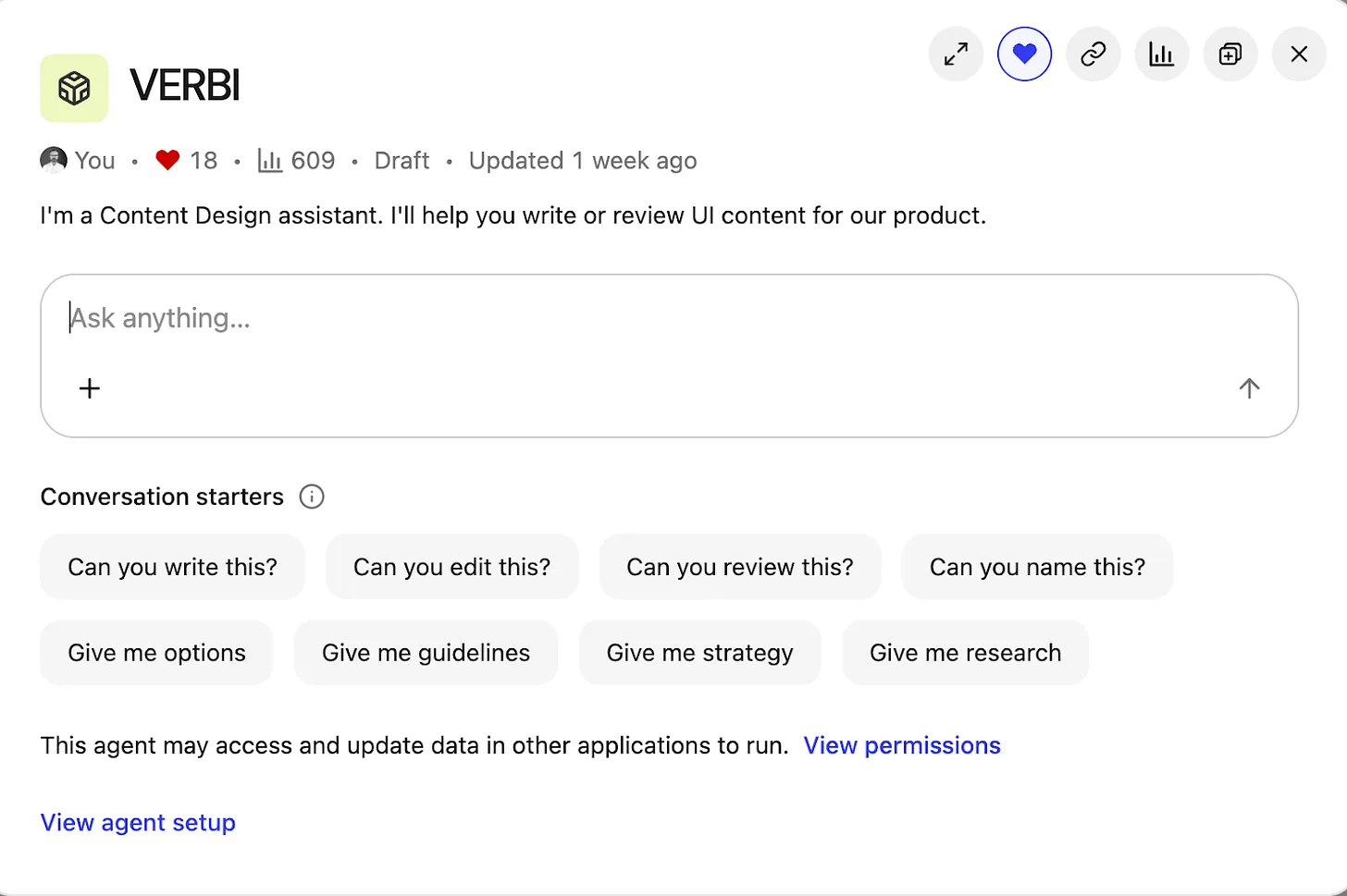
Inside the Content Design Agent workspace, a clean chat UI titled VERBI pairs a central prompt box with chips for writing, editing, and reviews, plus clear controls to view permissions and open the agent setup for product teams.
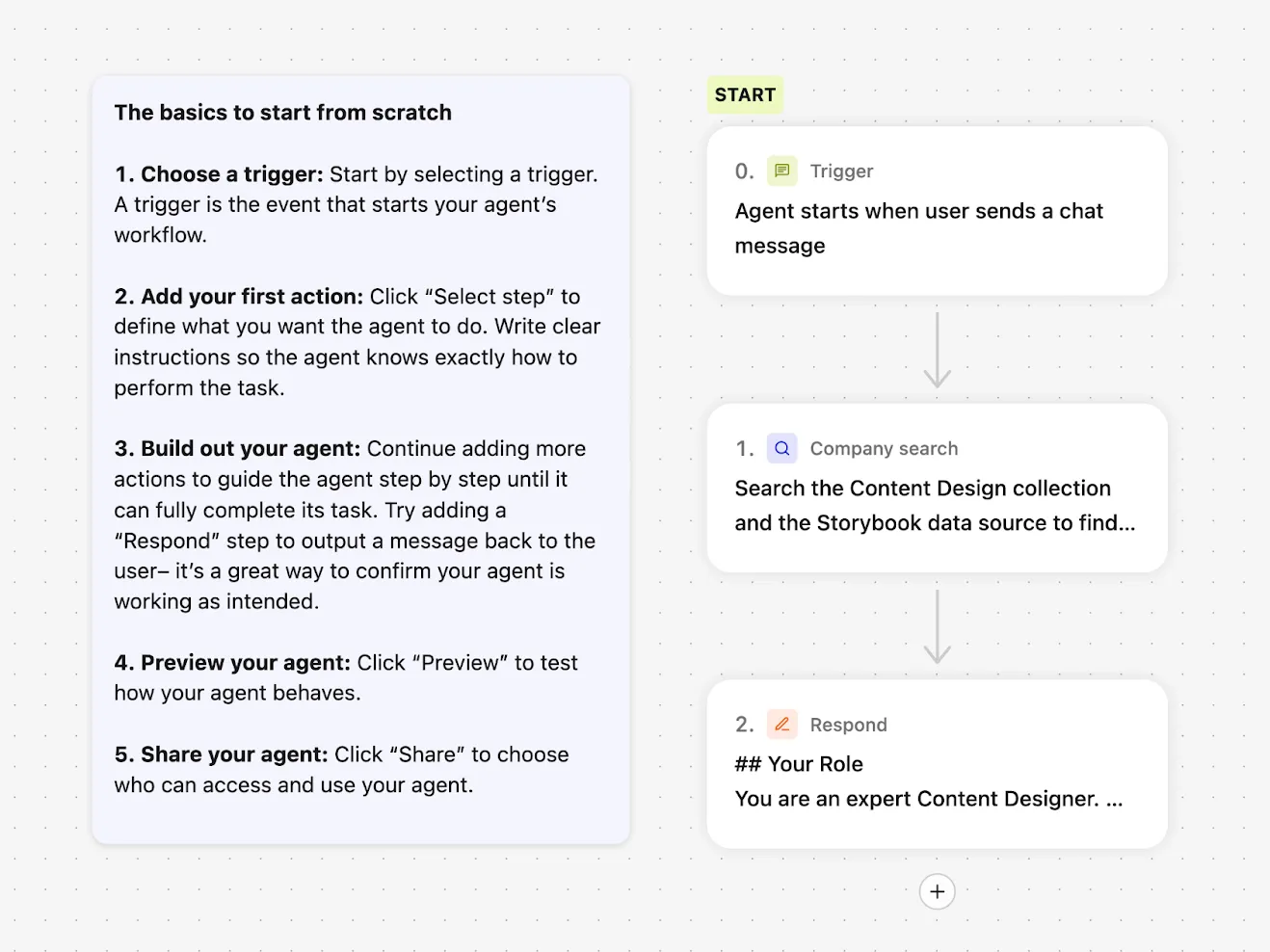
When I started this project back in May 2025, many LLMs still had frustrating limitations. Google Gemini let me build a custom Gem agent, but I couldn’t share it with other users. ChatGPT could be customized, but only with static files: I couldn’t point it to live, updatable URL sources. I settled on Glean for three simple reasons: everyone at the company had access; Glean could access all internal documentation and treat URLs as sources of truth; and its then-new Agents feature made AI search customizable. Configuring an agent in Glean is straightforward—you choose a trigger, a set of prompts, and a set of actions—but first I needed to get the inputs right.
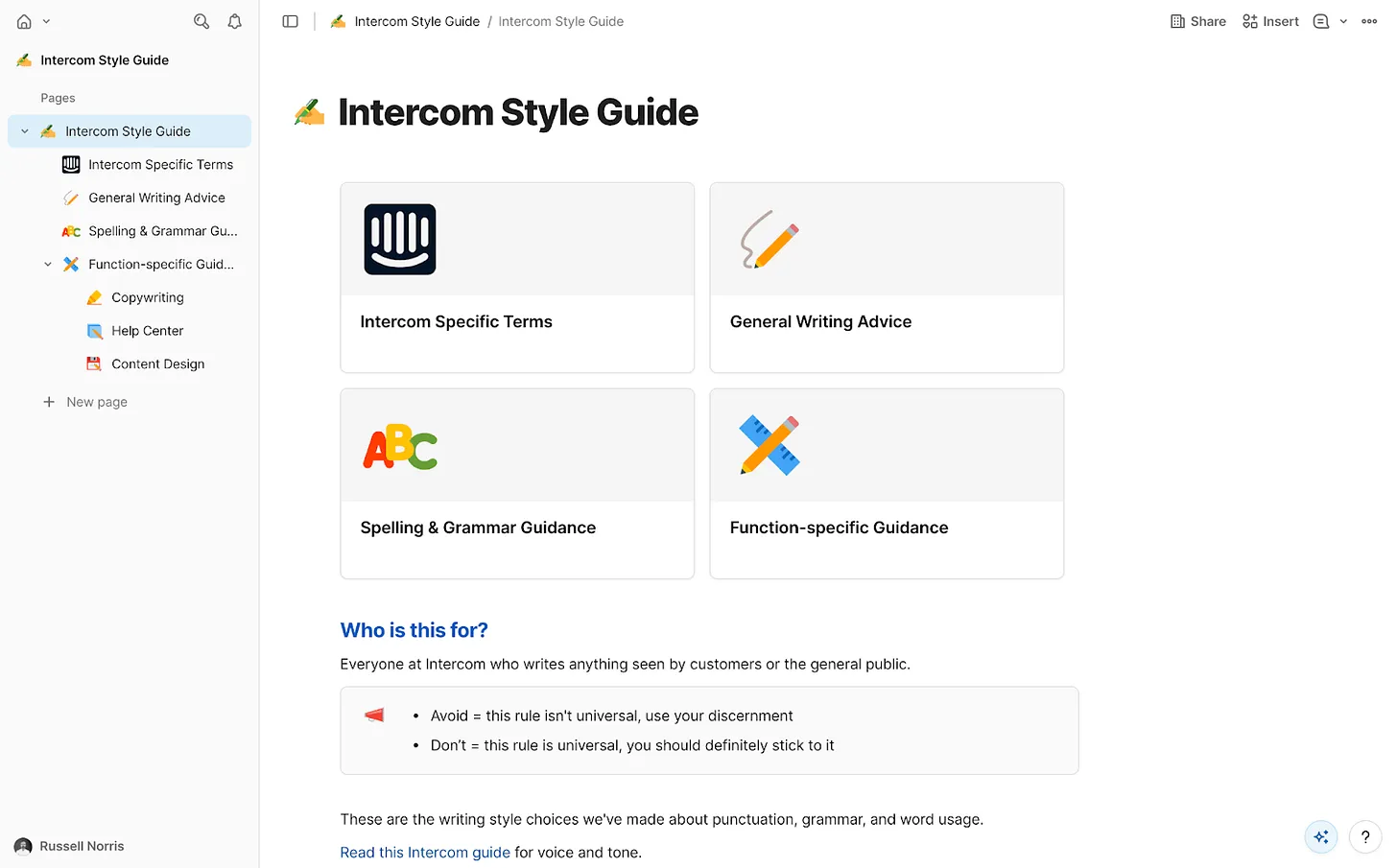
AI agents need focus. We had a wealth of internal information at Intercom, but not all of it was current or reliable. I curated exactly what the agent could access and assembled a tightly governed knowledge collection in Glean. Only essential information made the cut: the Intercom style guide—our definitive house style, including regularly-broken rules like “always write in US English” and “use sentence case everywhere”; tone of voice guidance for how we show up across mediums; a product glossary with hundreds of feature names and writing conventions; a monetization glossary for prices, plans, and add-ons; product marketing messaging guides with positioning for every feature and launch; core research insights across the product; and fin.ai and intercom.com/suite as the official, most up-to-date messaging sources.
This is classic RAG (retrieval-augmented generation) in action, ensuring every answer is grounded in approved sources of truth. With the collection in place, I instructed the agent to prioritize these resources above anything else.
Step into a clean, no-code builder that shows how to assemble a Content Design Agent: kick off with a chat-trigger, run a company search, then respond with expert guidance, all guided by a simple starter checklist.
Then came the fun part—building and branding the agent. “Content Design Assistant” felt bland, so I named it VERBI, a nod to its “verbal” design job. When people interact with VERBI, they usually begin with a question, but the intent varies widely. I defined a set of task prompts to guide expectations and outputs: “Can you write this?”; “Can you edit this?”; “Can you review this?”; “Can you name this?”; “Give me options”; “Give me guidance”; “Give me strategy”; “Give me research.” This mirrors the real breadth of content design, from creation to critique to discovery.
To manage responses, VERBI needed three things: start with a specific task prompt; understand how to draw on the right resources each time; and connect with other systems. With task prompts defined, I wrote a detailed system prompt covering the essentials. Role: you are a content designer, supporting product designers. Employer: Intercom (consisting of Fin AI Agent and our next-gen Helpdesk). Resources: content design collection, research collection, Storybook design system. Tone of voice: follow a specific tone for our UI, adjust the tone for everything else. Components: for UI, use the specific guidelines in our design system only. Use cases: writing, editing, critiquing, naming, researching, and more.
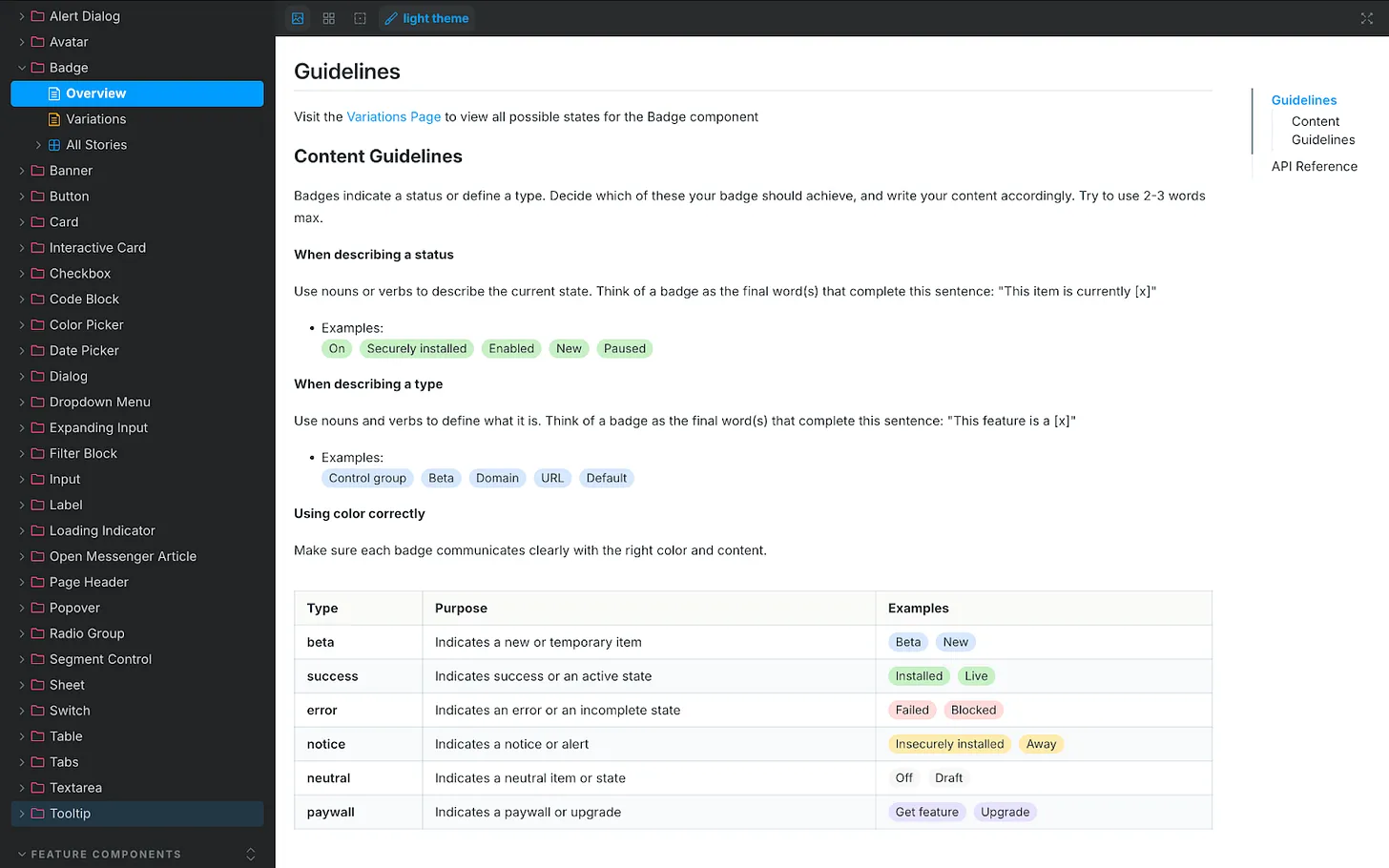
One connection mattered most: our design system, recently rebranded as “Surge.” Surge contains detailed content guidelines for every component in our product UI, from accordions and banners to tabs and tooltips. That granularity took months of human effort to codify, and it paid off. Designers no longer guess how to write for a toggle, a button, or a tooltip—and now VERBI understands and enforces those rules, too. A great content design assistant isn’t just a clever system prompt; it needs deep, component-level guidance to retrieve.
UI documentation showcases the Badge component’s content rules, teaching how to name statuses, define types, and apply color so labels read clearly. A handy visual for building a content design agent and ensuring consistent product messaging.
Accessing the design system wasn’t simple at first. It lives in Storybook, which Glean couldn’t access directly. I started by scraping guidance from Storybook into an HTML file with Cursor and uploading it to VERBI—a functional but clunky workaround that required re-scraping every few days. Then our IT team stepped in. They used the Glean Indexing API to turn Storybook into a live data source. Now VERBI connects to Storybook directly. Ask it something ultra-specific, like the correct date format for Japan, and it returns the right answer. That integration elevated the agent from helpful to indispensable—human-level precision, 24/7, at scale.
With prompts and resources in place, I launched VERBI and pressure-tested it. It was accurate and well-informed most of the time, but like any AI agent, it had quirks. I needed it to act as a gatekeeper, not a brainstorming partner that might bend rules or invent new ones. So I added a few explicit guardrails to the system prompt. Stopping sycophancy: “Inform, challenge, and assist. Never placate. Don’t agree by default. If something’s wrong, say so. Challenge assumptions.” Halting hallucinations: “If you don’t find the information required in our resources, say you don’t know the answer. Don’t guess and don’t give answers based on general knowledge.” Avoiding verbosity: “Keep answers short and to the point. Cut the fluff. Skip all niceties and social padding. Only give longer answers if the user asks you to.” These constraints keep responses crisp, correct, and consistent. Like any living system, the prompt needs occasional tune-ups, but the maintenance is minor compared to the upside.
Where we are now: VERBI has been triggered 700+ times since launch. The benefits are tangible. For me, quality scales without constant policing; repetitive questions about naming, style, or punctuation have dropped significantly. I reclaim time because the agent drafts and checks V1 content across teams, enabling me to focus on higher-impact work. For the design team, iteration is faster, confidence is higher, and strategic clarity improves because shared language and grounded guidelines make decisions easier and more consistent.
I used to spend too much time mopping up basic content mistakes and untangling spaghetti-like UI copy prone to human error. VERBI removes those errors at the source. The real advantage is speed: we get from blank slate to a high-quality first draft quickly, which means we can spend our energy deciding whether the content is right, not just “good enough.” Design is the whole interface—words, visuals, interactions—so reviews now happen with real content, never “copy TBD.” Our principle to sweat the details applies equally whether work is human-made or AI-assisted.
Knee-jerk critiques of AI-driven content design often assume teams generate content from nothing and ship it. In reality, great AI is the outcome of great human decisions and strong systems. Its value is pulling us together faster—getting us to a complete, standards-compliant design we can review as a team before sharing it with the world. That’s how AI helps us win: by turning chaos into consistency, and consistency into velocity.
Over the past year, I’ve been shipping agentic AI into production and coaching product teams on what it really takes to make these systems trustworthy in the wild. One story that crystallizes the playbook comes from Trainline’s move to an agentic architecture for travel assistance—an approach that mirrors what I’ve seen work in high-stakes, real-time customer experiences.
Trainline—the world’s leading rail and coach platform—helps millions of travelers get from point A to point B. Now, they’re using AI to make every step of the journey smoother.
I studied how "David Eason (Principal Product Manager) Billie Bradley (Product Manager), and Matt Farrelly (Head of AI and Machine Learning)" approached the build of "Travel Assistant, an AI-powered travel companion that helps customers navigate disruptions, find real-time answers, and travel with confidence." Their work exemplifies the kind of end-to-end thinking required to move beyond demos into dependable, on-the-go assistance.
They share how they: Identified underserved traveler needs beyond ticketing; Built a fully agentic system from day one, combining orchestration, tools, and reasoning loops; Designed layered guardrails for safety, grounding, and human handoff; Expanded from 450 to 700,000 curated pages of information for retrieval; Developed LLM-as-judge evals and a custom user context simulator to measure quality in real-time; Balanced latency, UX, and reliability to make AI assistance feel trustworthy on the go.
I align strongly with their core takeaways: "AI assistants need both scalable reasoning and deep domain context to be useful." "Tool design and guardrails are as critical as prompt design in agent systems." "LLM-as-judge evals make it possible to measure open-ended systems without massive labeling costs." And perhaps most importantly, "Even legacy companies can move fast when they embrace experimentation and tight PM–engineering collaboration."
From an AI strategy perspective, starting "fully agentic" was the right call. When the problem space is dynamic—disruptions, route changes, fare conditions—reasoning loops and orchestration aren’t luxuries; they’re table stakes. Tool selection becomes product design: you need the right retrieval interfaces, constraint-aware planners, and API contracts that are resilient to partial failures. Layered guardrails for safety, grounding, and human handoff reduce hallucination risk while preserving responsiveness—critical when users are standing on a platform waiting for an answer.
The retrieval scale-up—"Expanded from 450 to 700,000 curated pages of information for retrieval"—is a classic inflection point. I’ve seen teams stall here when they treat content growth as a pure indexing problem. The winning move is curation and structure: normalize sources, encode policy-level constraints, and align retrieval chunks to decision boundaries the agent actually uses. That’s how you keep precision high while coverage explodes.
Evaluation is where most open-ended assistants fail quietly, which is why I was encouraged to see "Developed LLM-as-judge evals and a custom user context simulator to measure quality in real-time." In practice, LLM-as-judge gives you scalable, scenario-based scoring without prohibitive labeling, while a user context simulator surfaces regressions tied to persona, itinerary state, and device constraints. The combination closes the loop between model behavior, tool layer changes, and UX outcomes.
On product delivery, the decision to have the system "Balanced latency, UX, and reliability to make AI assistance feel trustworthy on the go" shows mature prioritization. For travel, trust accrues in seconds: fast-enough responses, graceful degradation when upstream data lags, and explicit handoff when confidence dips. This is where guardrails meet UX writing—clear, bounded language signals competence even when the system defers.
Finally, the organizational pattern matters. The teams that win in agentic AI are cross-functional, experimentation-driven, and ruthless about instrumentation. Tight PM–engineering collaboration, explicit safety thresholds, and an eval stack that mirrors real user journeys are what turn promising architectures into dependable products.
It’s a behind-the-scenes look at how an established company is embracing new AI architectures to serve customers at scale.
If you’re building agentic AI in production, borrow these moves: invest early in tool and guardrail design, scale retrieval with curation not just volume, adopt LLM-as-judge plus context simulation for continuous evaluation, and treat latency and reliability as core product requirements—not afterthoughts. That’s how you ship AI assistance that customers trust when it matters most.
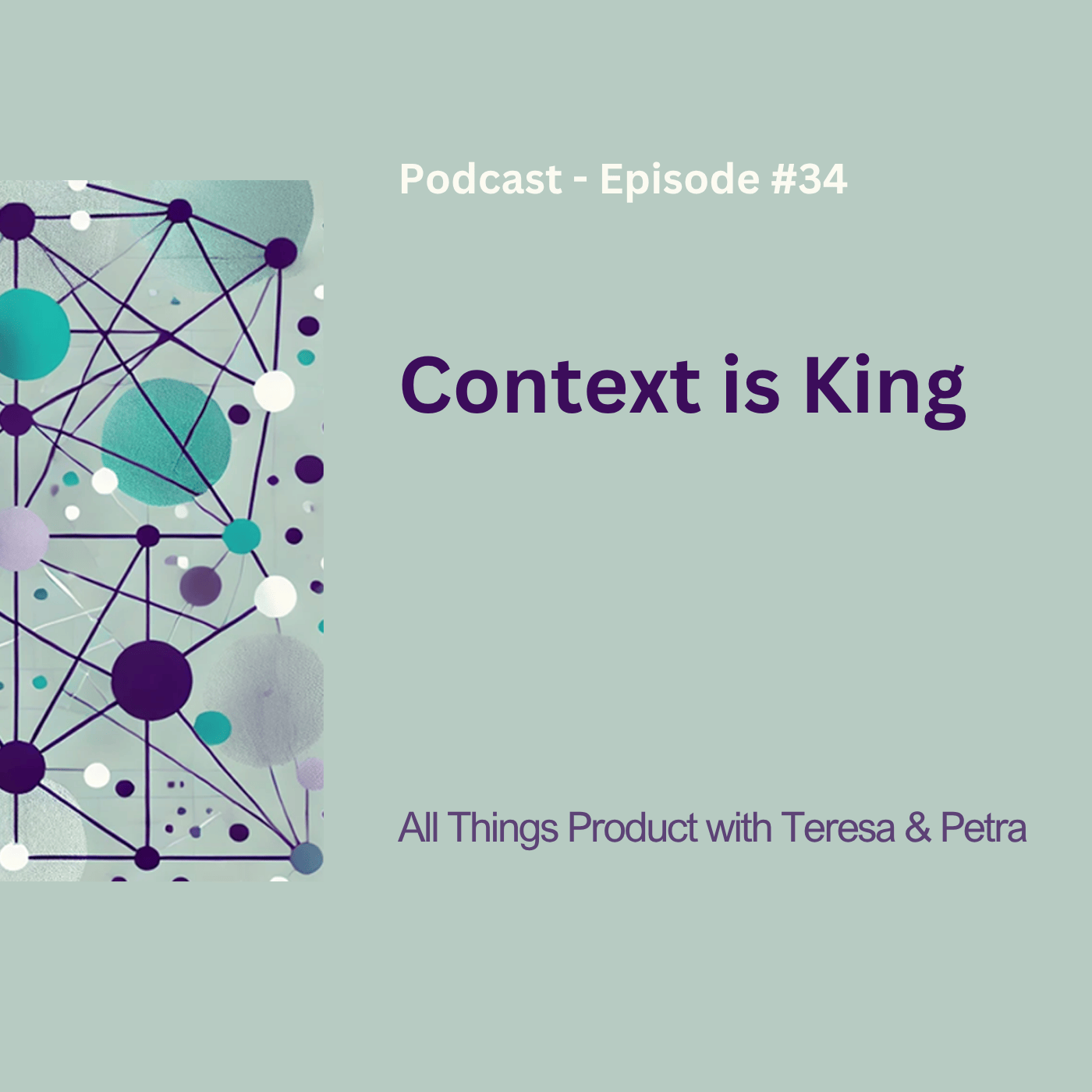
Context is king in AI-powered product work—and I felt that deeply while digging into “Context is King – All Things Product Podcast with Teresa Torres & Petra Wille.” The conversation affirmed a truth I see daily: AI becomes a powerful teammate only when we give it the right context, just as we do with empowered product teams. When we treat AI like a colleague joining mid-flight—without our company history, industry nuances, or strategy—we instantly unlock better outcomes.
Listen to this episode on: Spotify | Apple Podcasts
Here’s what stood out and how I’m applying it. First, most AI outputs fail without proper context. That’s not a model problem; it’s a leadership problem. Thinking of AI like onboarding a new intern is the right mental model—start with the minimum viable context, then iterate. Practical first steps matter: decision logs, clear success metrics, and structured documentation. The art is balancing enough context to guide performance without overloading the system. The parallels are striking: the way we create strategic context for product trios and teams is the same way we’ll empower agentic AI systems.
In my teams, we prepare for AI collaboration by operationalizing context. We keep decision logs to capture the why behind choices, use outcome-based success metrics (not just output), and maintain machine-readable documentation that LLMs for product managers can parse reliably. We define guardrails up front—constraints, customer segments, privacy-by-design considerations, and the non-goals that often trip up gen ai. This foundation turns AI from a novelty into a force multiplier for product discovery and product roadmapping and sprint planning.
I use a simple “context pack” to onboard AI agents and teammates alike: 1) business goals and outcomes, 2) constraints and guardrails, 3) canonical artifacts (like PRDs, journey maps, interview notes), 4) domain vocabulary and definitions, and 5) operating procedures (how we make decisions, when to escalate, what good looks like). Start small, then refine as the AI demonstrates capability. This mirrors great onboarding—and it works just as well for agentic AI as it does for humans.
Not all context is helpful. More isn’t better; the minimum effective context is. I resist the urge to dump our entire Confluence on an AI system. Instead, I progressively reveal relevant details—just like I would with a new PM on a complex problem space. This keeps signals high, noise low, and performance measurable against clear success metrics.
If your org isn’t adopting AI yet, don’t wait. You can become AI-ready now by documenting strategic intent, decision rationale, and definitions in structured, searchable, machine-readable ways. Treat this as core AI Strategy work that strengthens empowered product teams—regardless of tooling—while building your AI product toolbox for tomorrow.
For those who want to explore further, these resources and mentions are a strong complement to the episode’s themes.
Follow Teresa Torres: https://ProductTalk.org
Follow Petra Wille: https://Petra-Wille.com
Agentic AI
Teresa’s new podcast, Just Now Possible in Youtube, Apple Podcast, and Spotify
Petra’s Coaching Packages
ChatGPT
Henrik Kniberg’s talk at Product at Heart on treating AI agents like interns
Teresa’s webinars on how she built the Product Talk Interview Coach: Behind the Scenes: Building the Product Talk Interview Coach and How I Designed & Implemented Evals for Product Talk’s Interview Coach
Josh Seiden’s blog series about AI
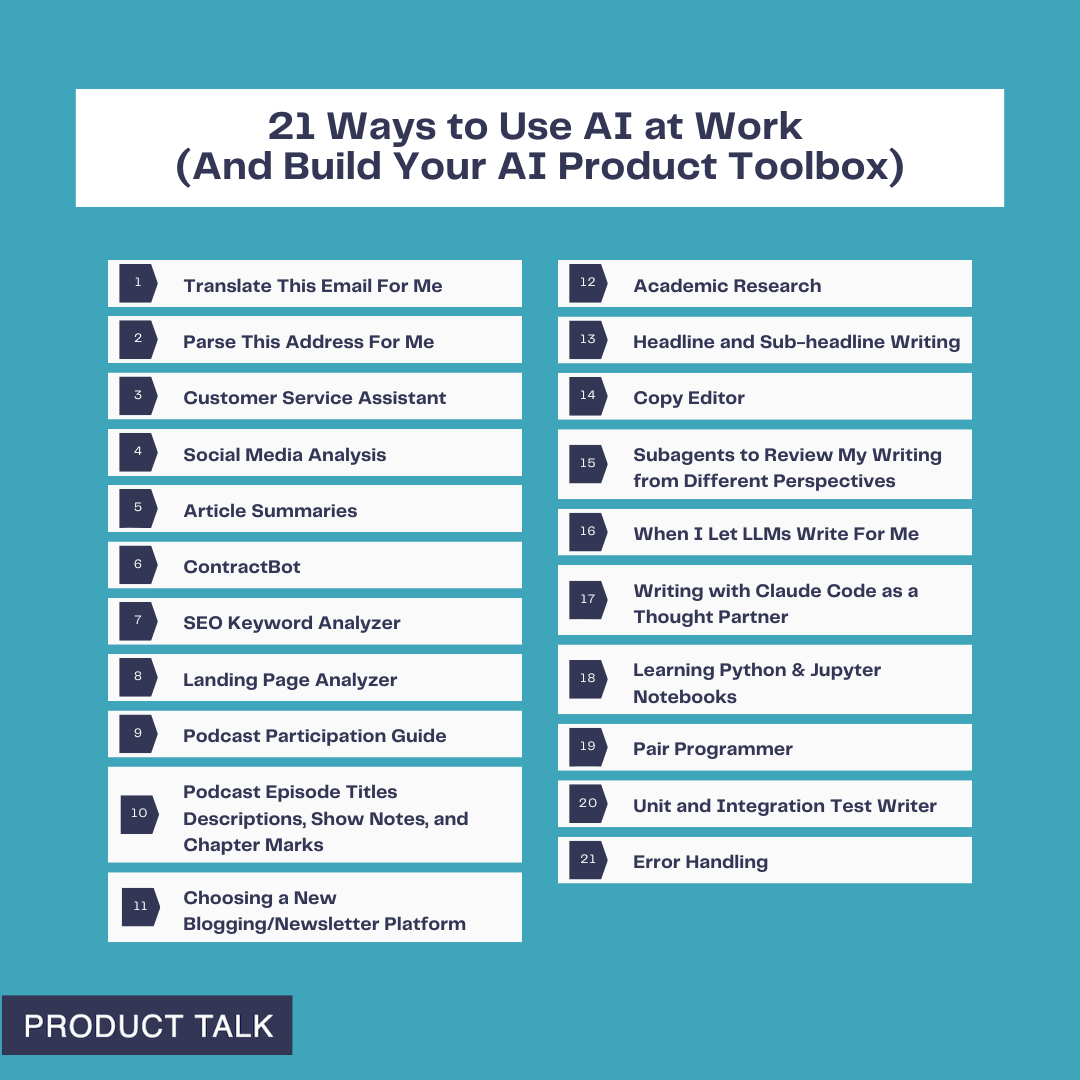
Teresa’s new blog posts: 15 Ways to Use AI at Home (and Fill Your AI Product Toolbox) and 21 Ways to Use AI at Work (And Build Your AI Product Toolbox)
Petra's new blog post: Why Context, Not Just Data, Will Define AI-Ready Product Teams
Have thoughts on this episode or how you’re preparing your teams to collaborate with AI? Leave a comment below—let’s compare playbooks and level up together.
I recently shared 15 ways I'm using AI at home—from fixing cooking disasters to researching school bonds—and those experiments turned into real skills: learning to chat with large language models (LLMs), providing the right context, verifying results, and more.
Now it’s time to apply those same skills at work. The stakes feel higher, the problems are more complex, and we have to navigate when and how AI is acceptable at work. But the foundation we built at home makes the leap far less intimidating.
My goal is to inspire you to start experimenting (if you aren’t already). Along the way, you’ll add practical techniques to your AI product toolbox.
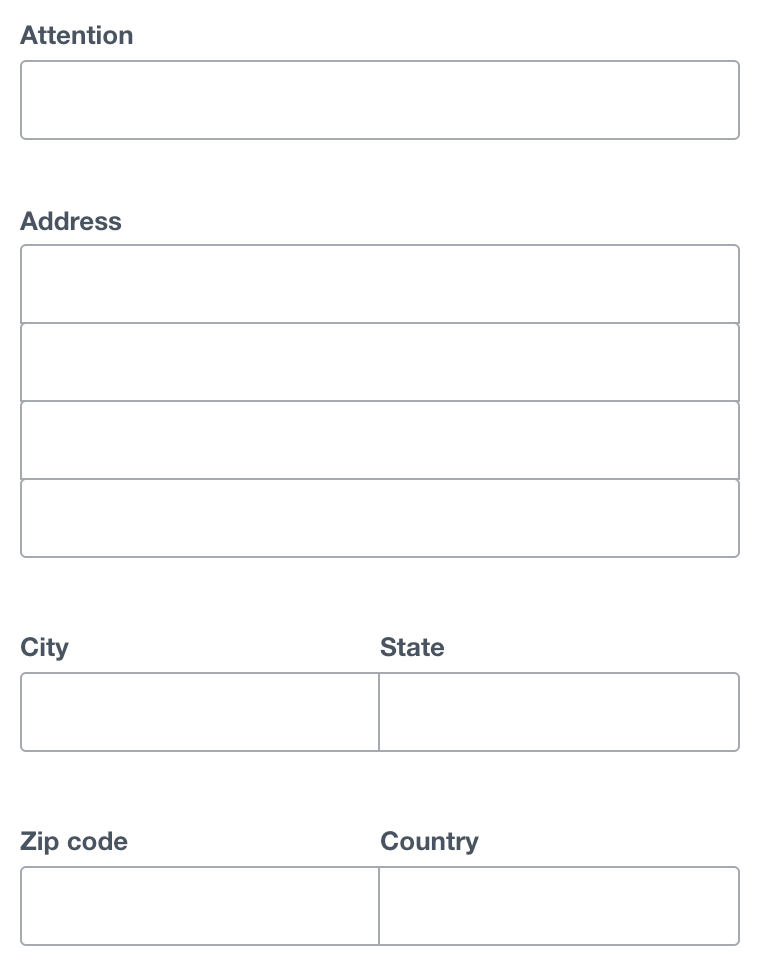
A clean address form ready for automation: fields for Attention, Address, City, State, ZIP, and Country invite AI-driven autofill, validation, and routing, accelerating workflows and reducing manual typing at work.
Using AI at home taught the basics—prompting, context windows, and hallucinations. At work, I layer in orchestration and automation. Don’t worry; we’ll take it step by step.
To make this actionable, I organize my work use cases by complexity, so you can start at the top and move down as your confidence grows. I group them into five buckets: Translator, Do the Work, Researcher, Writing Partner, and Coding Partner. Everyone can access the first three categories; I reserve the last two for subscribers.
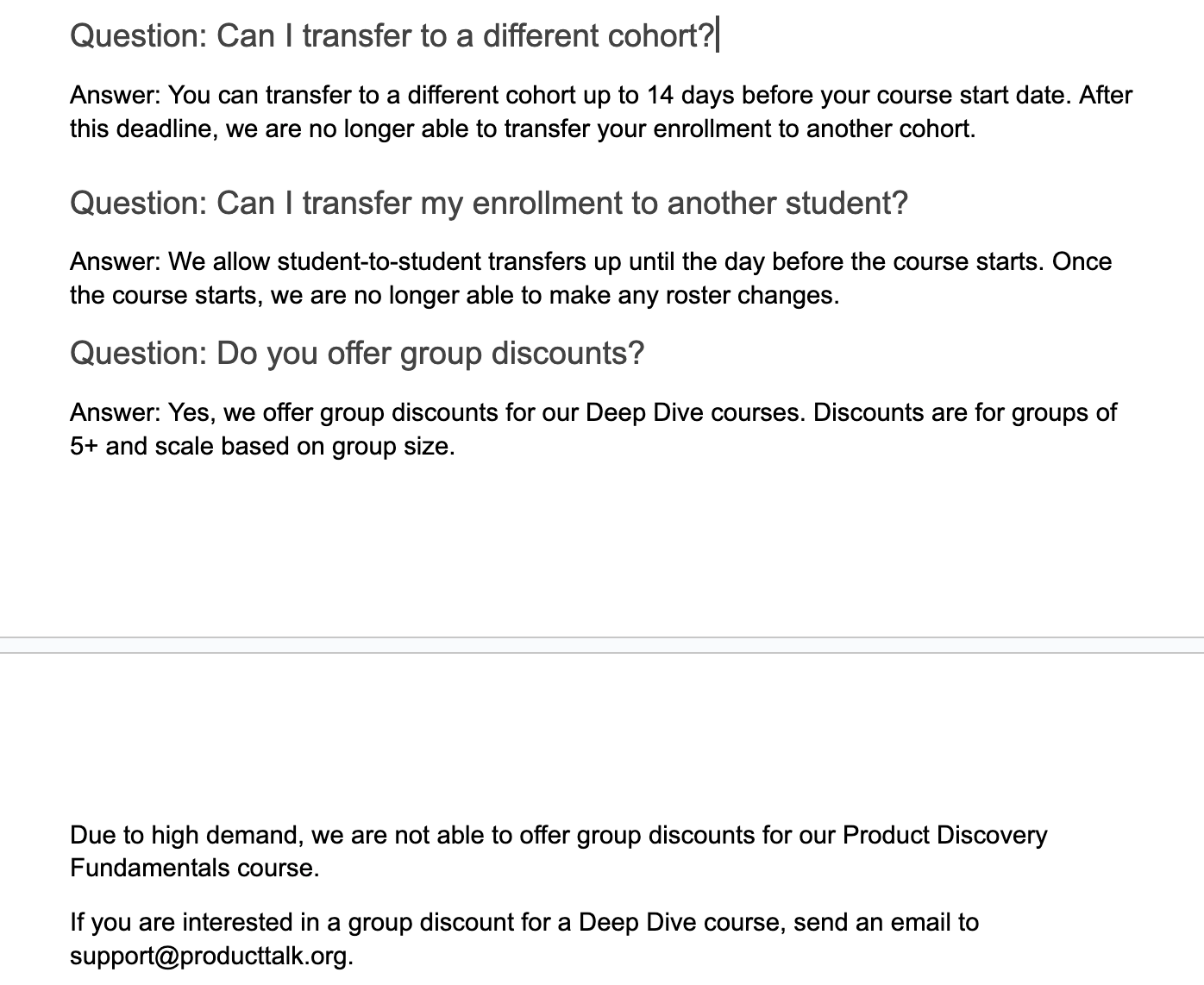
Clear course policies at a glance: switch cohorts up to 14 days before start, transfer a seat to another student until the day prior, and get scaled group discounts for Deep Dive courses, though Fundamentals is excluded.
Translator: I’ll start simple with low-stakes examples that build confidence and momentum.
1) Translate this email for me. My last name is common in both Spanish and Portuguese, so people often assume I speak both. I can get by in Spanish, but not Portuguese. When I get an email in another language, I ask ChatGPT for a translation. I used to use Google Translate, but ChatGPT tends to interpret context better. It’s a quick win that gets you comfortable with LLM interactions.
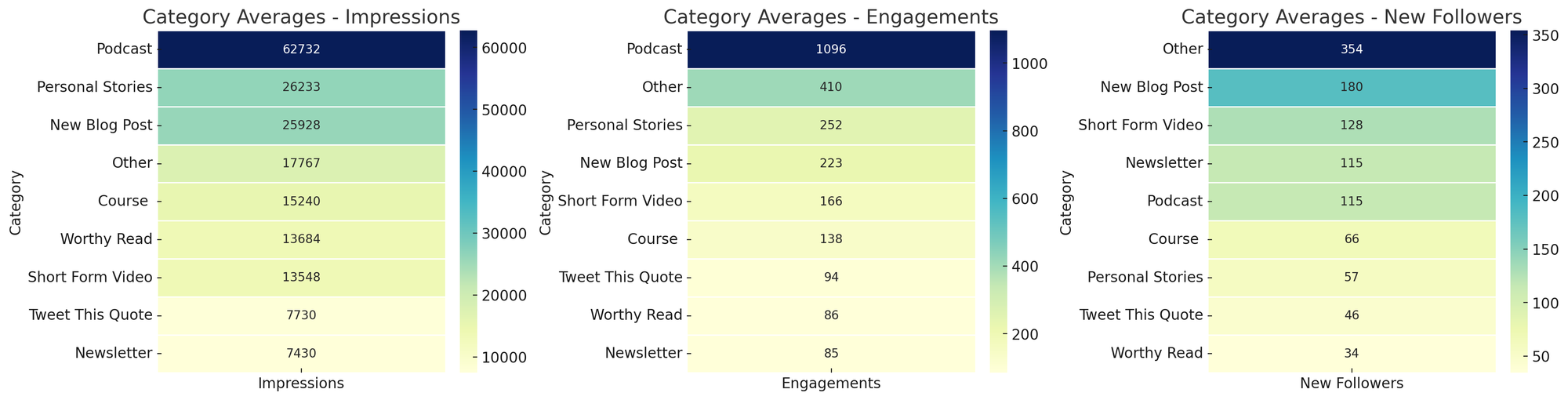
Curious which formats perform best? These heatmaps compare category averages for impressions, engagements, and new followers—spotlighting podcasts for reach and 'Other' for follower gains.
2) Parse this address for me. I live in the United States and work with companies around the world. In Xero, I have to enter addresses by street, city, state/region, country, and zip code. For international addresses, I’m not always sure how to parse fields. ChatGPT is great at this, so I created a CustomGPT to avoid rewriting the prompt. I paste the address, and it returns values mapped to Xero’s fields. If you’re new to CustomGPTs, think of them as reusable prompt-and-context bundles you can share with colleagues. Skills I built: when to use a CustomGPT versus an ad hoc prompt, and how to templatize repetitive formatting tasks.
Do the Work: This is where the magic shows up—AI accelerates execution—provided you set clear guardrails and keep humans in the loop where quality matters.
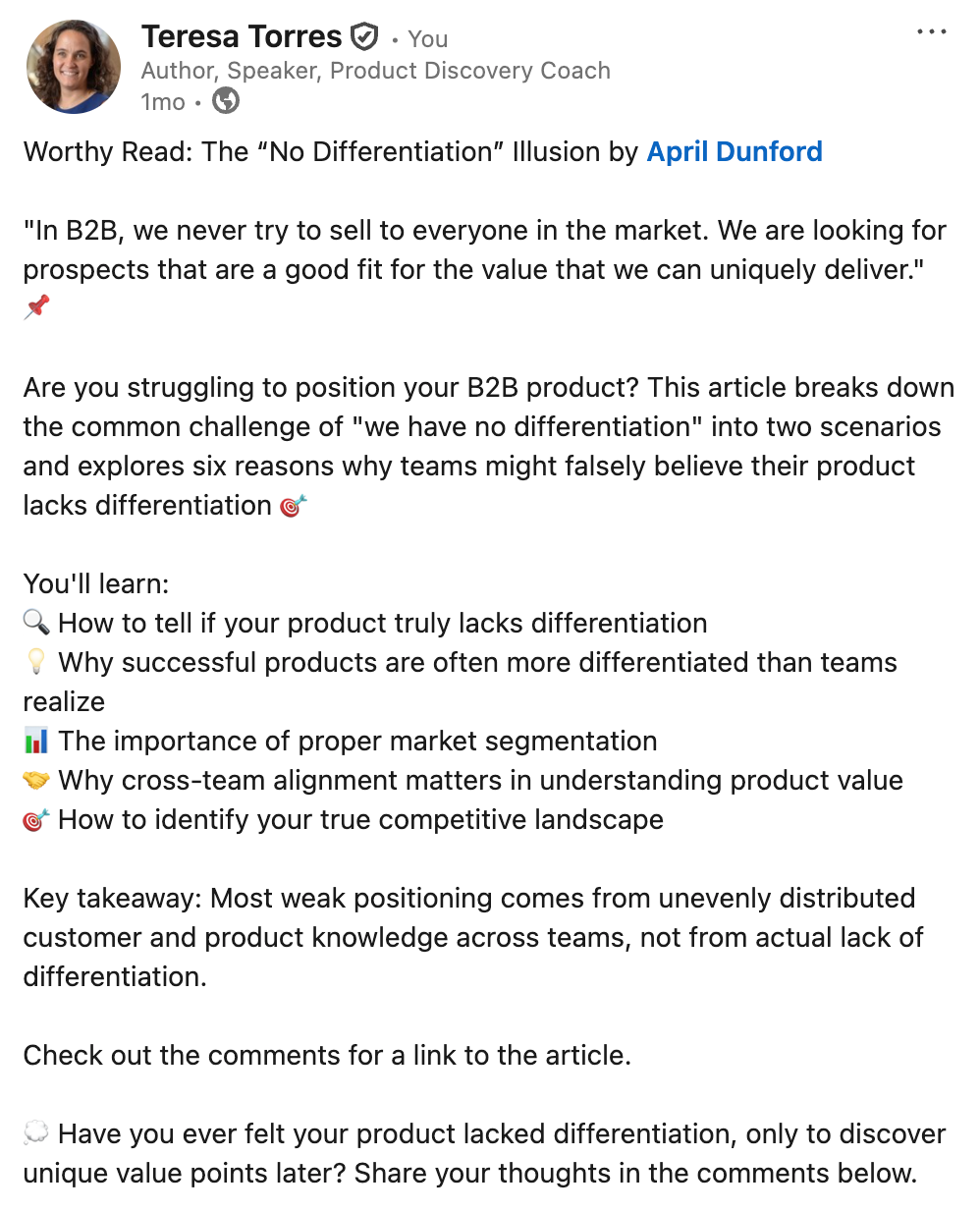
This concise social post tackles the “no differentiation” myth in B2B, highlighting how segmentation, team alignment, and a clear view of competitors reveal real product value—prompting readers to reflect and join the discussion.
3) Customer service assistant. My company offers a range of products and services, so we created a knowledge base with common questions and template answers to train support. But finding the right response in the moment is slow. I uploaded our content into a CustomGPT and instructed it to surface the most relevant templates, given an inbound email. The key decision: I did not let the model draft final replies. My admin uses suggestions to respond faster, but she remains responsible for the email content. Skills I built: discerning where human oversight is essential and using LLMs to speed up, not outsource, attention-intensive work.
4) Social media analysis. I share my work on social channels and want to know what resonates. LinkedIn lets me export analytics on top posts. Each month I export the last 30 days, ask a CustomGPT to create topic and category heat maps for impressions, engagements, and followers, and I chart trends over time. Patterns become obvious—personal stories drive impressions and engagement; short-form video drives followers. This workflow, inspired by Andy Crestodina at Orbit Media, turns raw analytics into actionable content strategy. Skills I built: using LLMs for data analysis and visualization, moving from exports to insights, and spotting outliers at a glance.
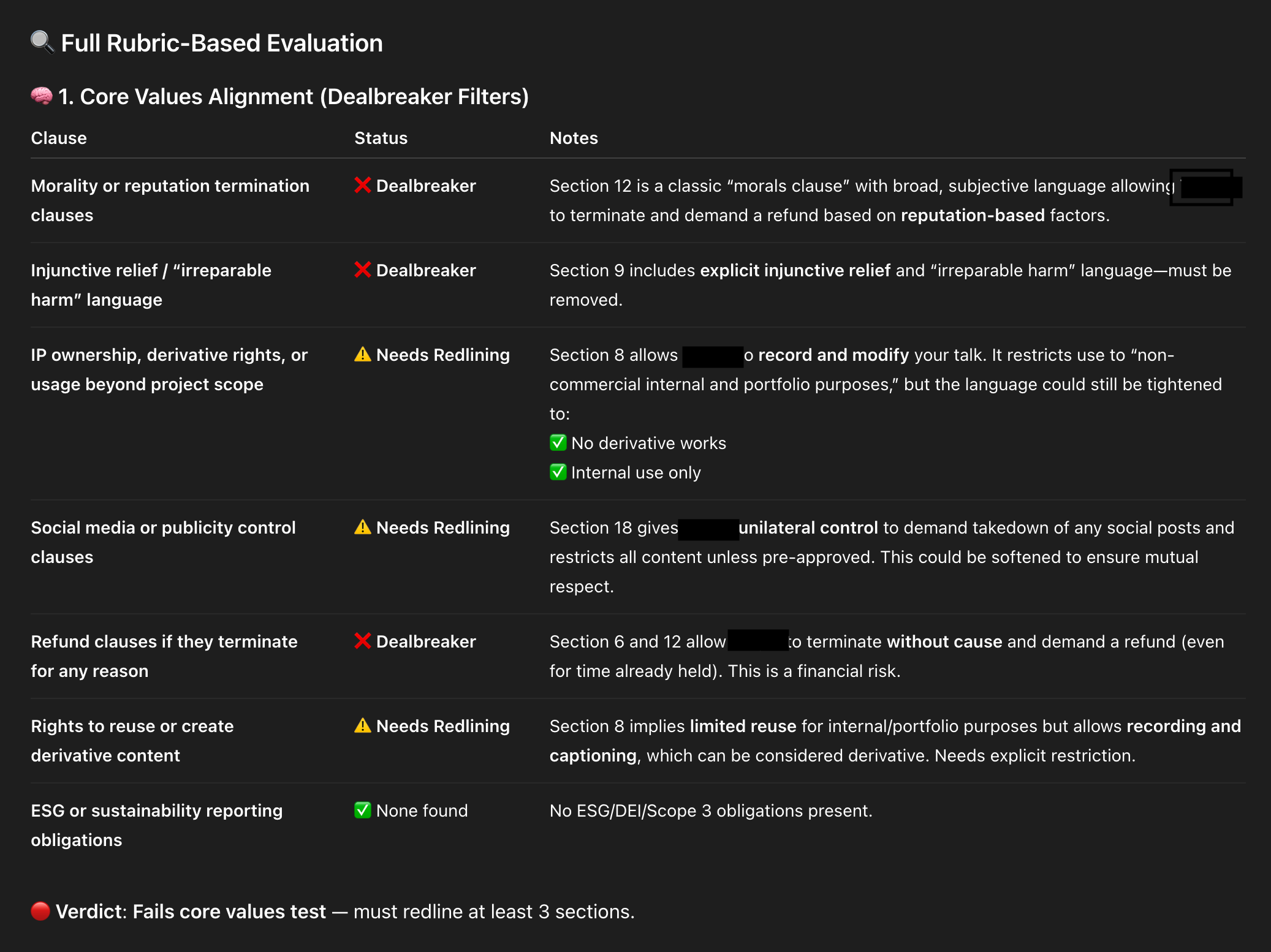
An AI-powered contract review snapshot flags risky clauses and where to push back. Clear labels—Dealbreaker, Needs Redlining, None Found—help teams tighten IP rights, social media controls, refund terms, and injunctive relief.
5) Article summaries. I used to share Worthy Reads—recommended articles—on LinkedIn and X, and I wanted stronger summaries. I asked Claude to generate them in the author’s voice, not “LLM voice.” I gave tone and style guidelines, writing samples, and a clear structure. Quality improved with each iteration. To save time, I automated the workflow with a Zapier zap: when I add a new article to my database, the Anthropic API generates a draft summary and emails it to me for a quick human review. If it looks good, I do nothing. If not, edits are one click away. Skills I built: providing precise context for tone and structure, creating a simple automation, and keeping a light human-in-the-loop review for quality.
6) ContractBot. I regularly review long legal documents and dislike every minute of it, so I built ContractBot as a CustomGPT. It started with a one-sided contract full of red flags—intellectual property, morality clauses, payment terms, and more. I asked ChatGPT to identify issues, we worked through them, and then I had ChatGPT write the reusable prompt that became ContractBot. Now I upload any new contract and get a summary of redlines tailored to my preferences. When new issues arise, I update the CustomGPT prompt, and it evolves with me. Skills I built: iterating preferences over time, using LLMs to translate and revise dense documents, and leveling information asymmetry during negotiations.
Need customer interview guidance fast? This snapshot rounds up five high-ranking guides with quick notes—perfect for scanning options and choosing the best how-to. Use it to kickstart research and structure your interview plan.
7) SEO keyword analyzer. “SEO is dead. People don’t use search engines. Now they just ask LLMs.” But LLMs still use search engines—so SEO is not dead. I still care about ranking for relevant terms, and I use ChatGPT to help. I give it a target keyword and one of my articles, then ask it to analyze the top ten Google results and highlight what they do that I don’t. I get a prioritized gap analysis. I don’t take every suggestion—I write for humans first—but many SEO improvements also boost readability, so it’s a win-win. This workflow, also inspired by Andy Crestodina, made me care about SEO because the effort is now minimal. Skills I built: competitive research and gap analysis, balancing SEO with human readability, and codifying a repeatable research pattern.
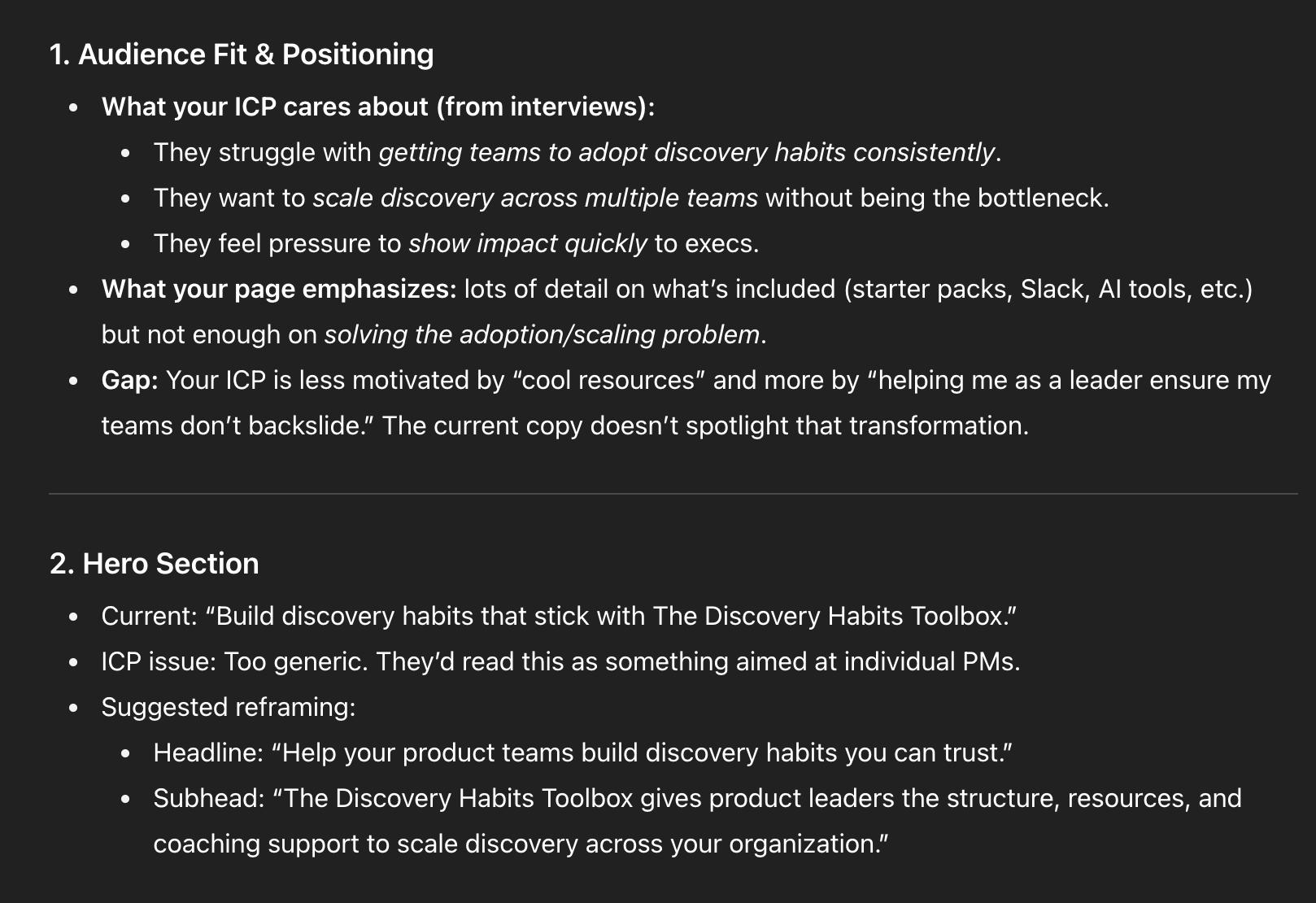
8) Landing page analyzer. I don’t love writing sales copy, but landing pages matter. I use ChatGPT to critique my course landing pages, with rich context: an ideal customer profile from real discovery interviews, a course syllabus, student testimonials, and the same knowledge base my support team uses. With all that context, I ask for a critique from the buyer’s point of view. Context is king—the more I provide, the sharper the feedback. I don’t accept every suggestion, and I still run demand and usability tests, but a second set of (virtual) eyes helps me move faster on a task I’d otherwise procrastinate. Skills I built: using LLMs to push through resistance, feeding the right context, and soliciting targeted “expert” feedback.
Messaging teardown in a sleek, dark theme shows how to turn interview findings into sharper copy: center ICP struggles with adoption and scaling, and rework the hero to speak directly to product leaders under pressure.
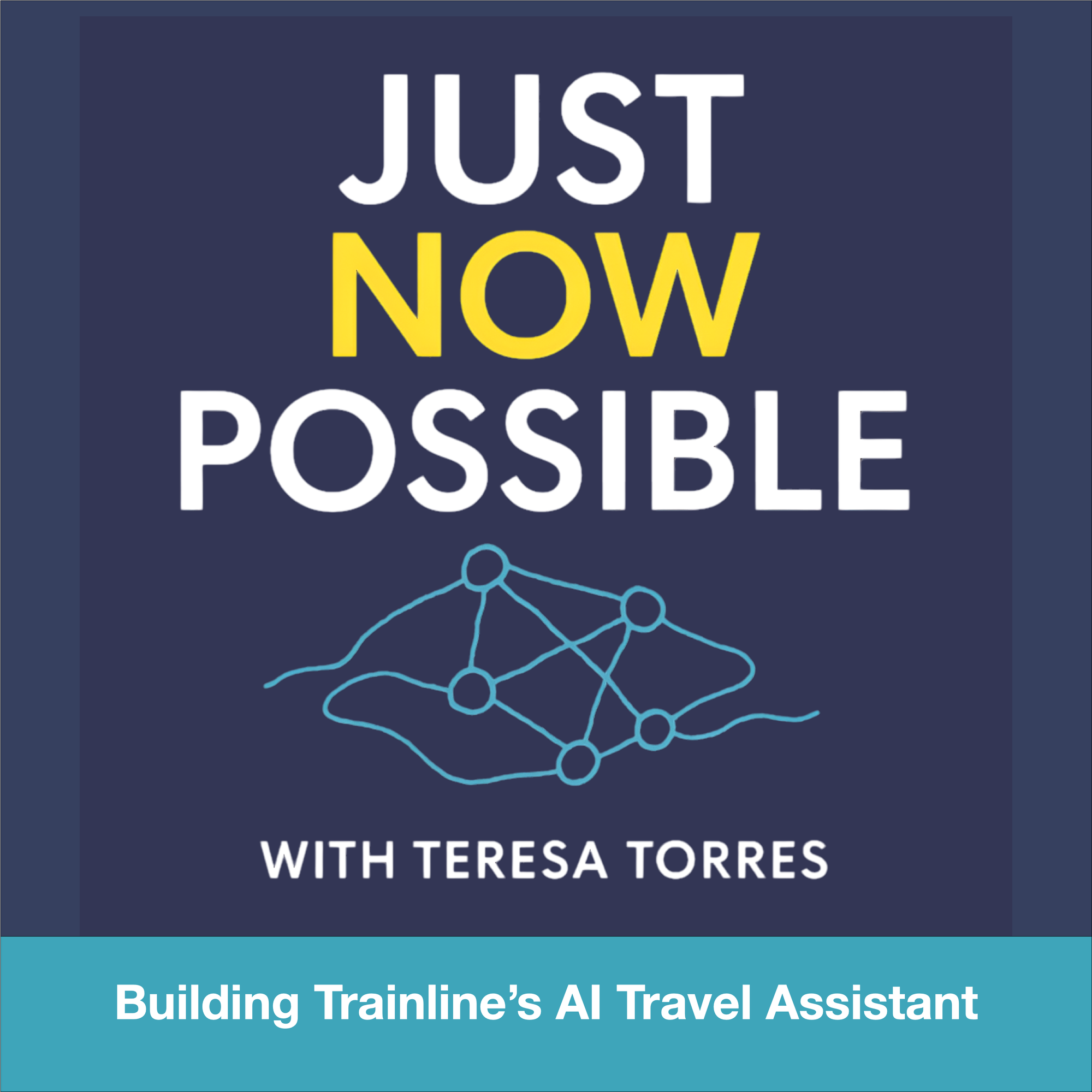
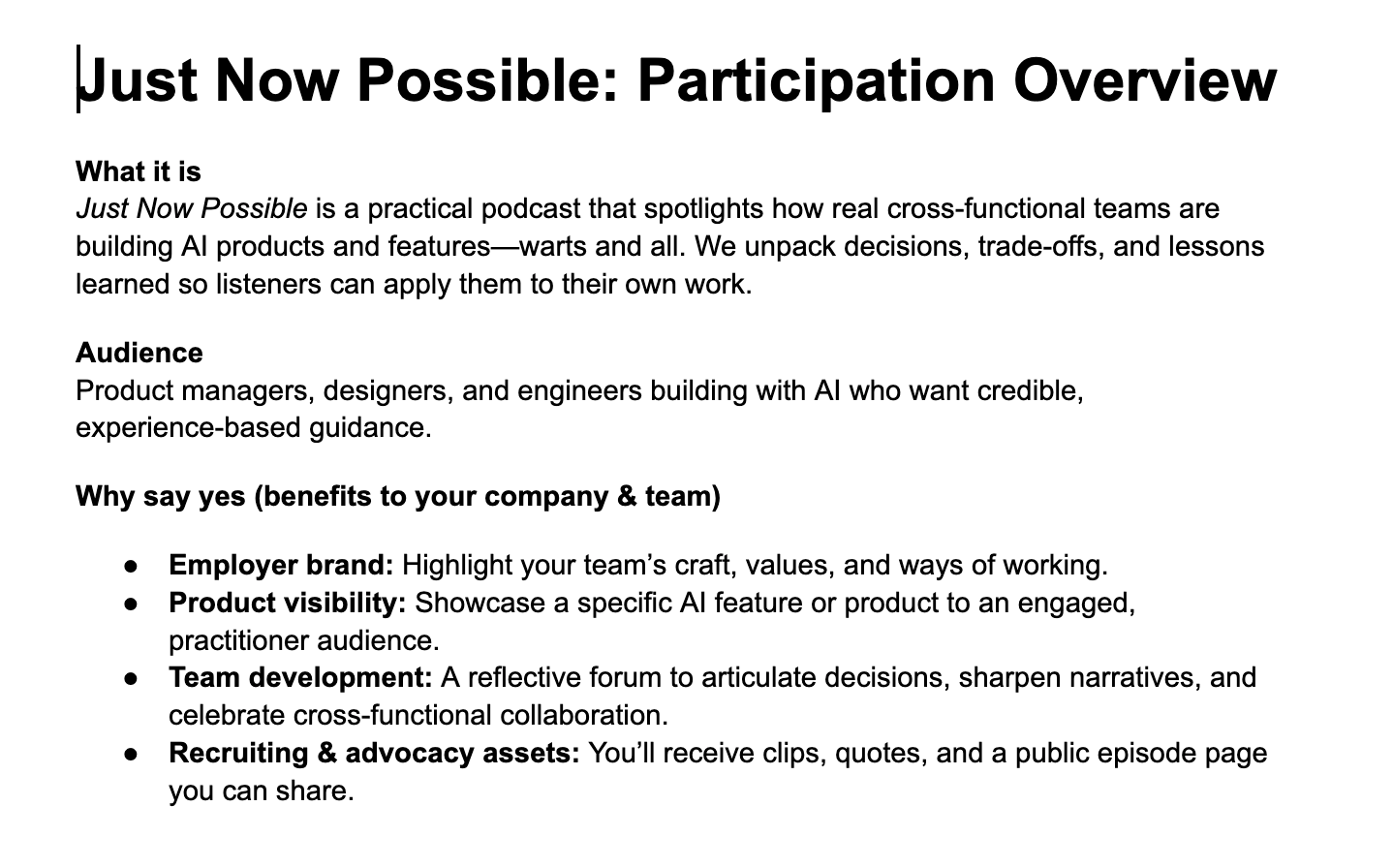
9) Podcast participation guide. I launched a new podcast, Just Now Possible, where I interview product teams about the AI products and features they’re building. Guests often need company approval to join, and I’d never had to ask for permission before. I set up a ChatGPT Project with background files—target listener, goals, and differentiation strategy—then asked it to draft a one-pager for executives explaining why their team should participate. It nailed the brief because the Project was already loaded with the right context. Skills I built: setting up Projects for ongoing domains and compounding context over time for higher-quality assistance.
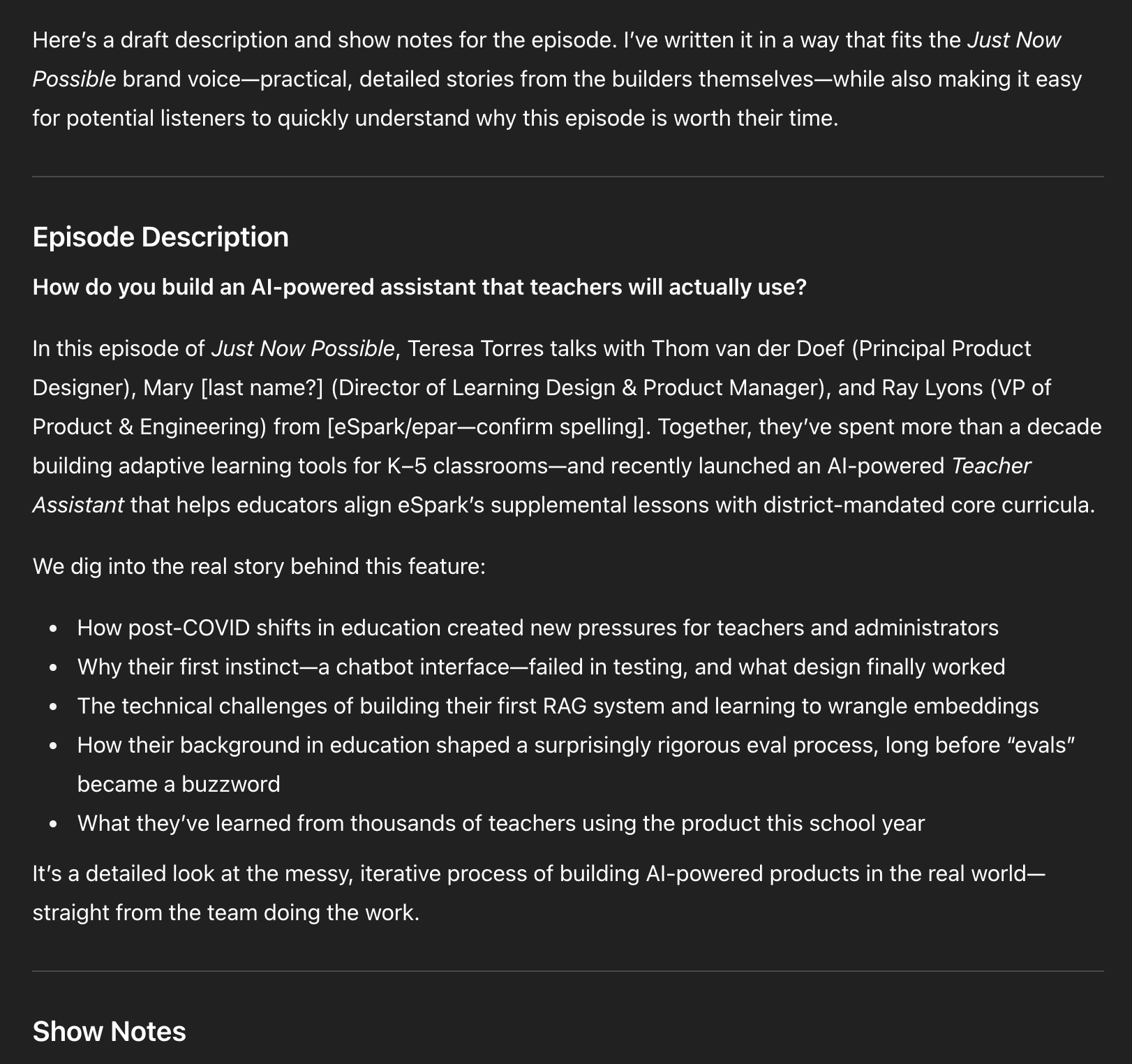
10) Podcast episode titles, descriptions, show notes, and chapter marks. In the same Project, I paste episode transcripts and ask for titles, descriptions, show notes, and chapters. As volume grows, I’m transitioning this into a CustomGPT with actions so I can click “Generate episode metadata,” paste the transcript, and go. Later, I’ll add actions for social posts and more. I don’t need to design the full system upfront; I evolve it as needs emerge. Skills I built: when to move from Projects to CustomGPTs, how to define actions, and how to evolve LLM tools incrementally.
Explore how the Just Now Possible podcast turns real AI product work into practical guidance. This overview invites PMs, designers, and engineers to share decisions, showcase features, strengthen employer brand, and gain recruiting assets.
Researcher: If you’ve tried using LLMs as an expert researcher at home, the returns at work are even better. Here are two recent examples.
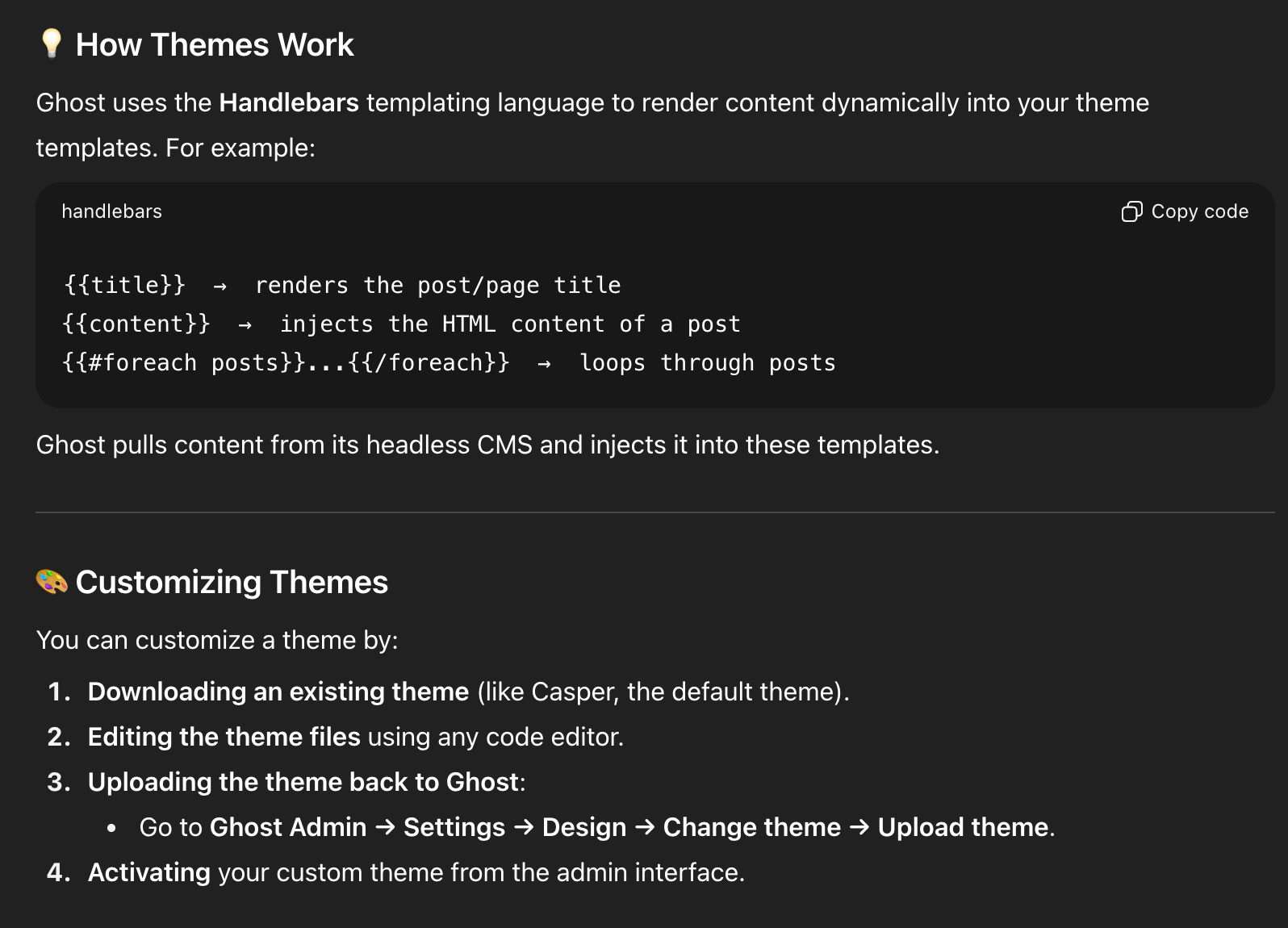
11) Choosing a new blogging/newsletter platform. After 14 years on WordPress, my site started breaking—plugin auto-updates caused critical errors, Google flagged 500s and performance issues, and I was over managing plugins. I’d also switched from Mailchimp to Kit and wasn’t thrilled. I considered Substack but had mixed feelings. I laid out constraints and goals in ChatGPT, compared options, and landed on Ghost. Before committing, I used ChatGPT to dive deep: theme customization, memberships, API documentation, and migration tasks. On a free trial, ChatGPT walked me through exporting from WordPress and importing into Ghost; Claude Code helped with theme tweaks. By the end of two weeks, I had imported data, customized the site, validated fit, and built confidence. We officially migrated in August 2025. Skills I built: tackling big projects with an AI guide on call, running structured vendor comparisons, and piloting major tech decisions with AI-assisted validation.
A draft episode description in dark mode outlines a talk on creating an AI Teacher Assistant for K–5 schools—covering post‑COVID pressures, why a chatbot interface failed, building a first RAG system, and lessons from real teacher use.
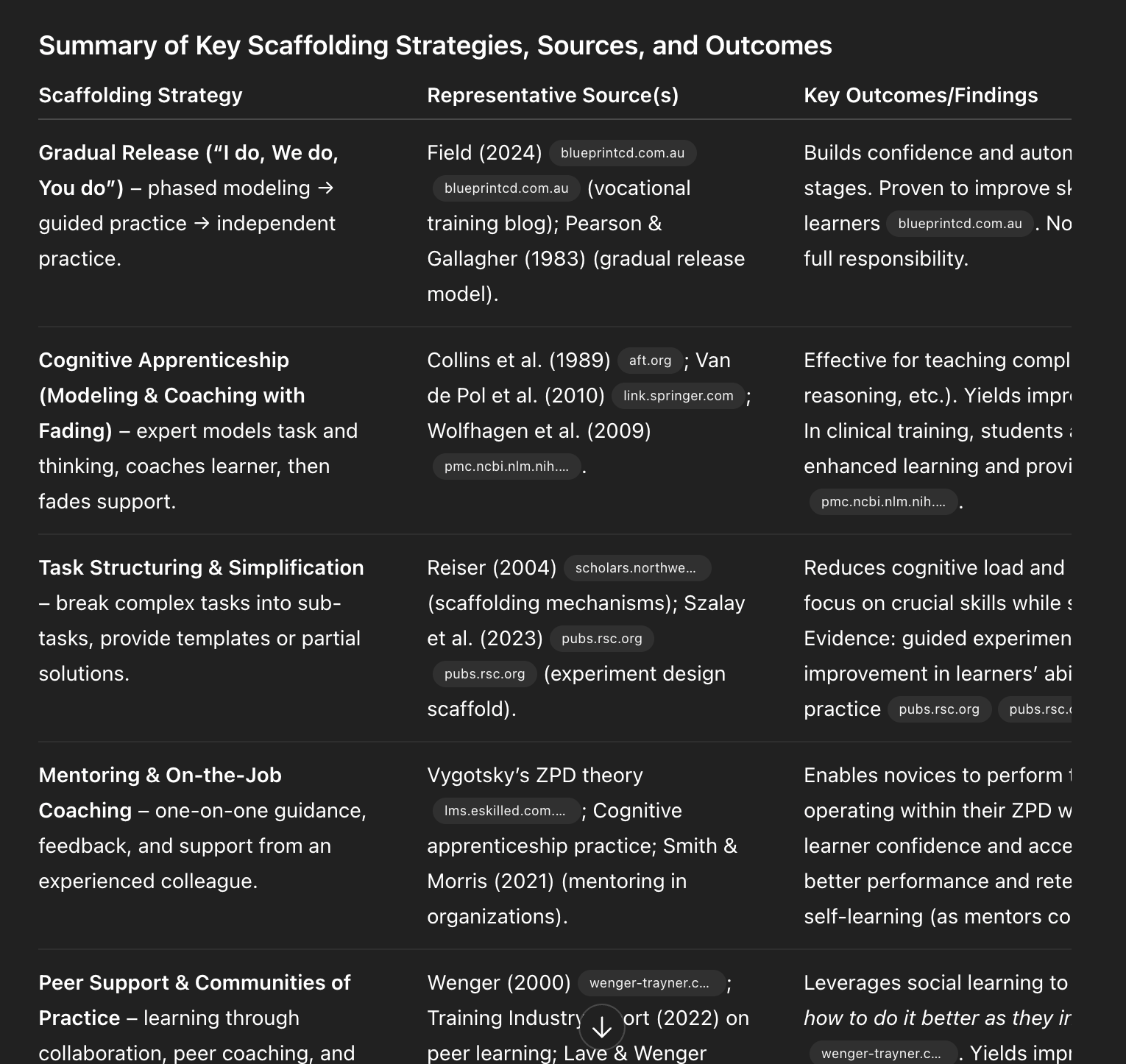
12) Academic research. I draw heavily from research on decision-making, problem-solving, and learning science, but I’m not an academic and can’t spend hours in journals. ChatGPT’s Deep Research changed that. Quarterly, I generate a report on topics like decision-making with parameters such as date ranges, peer-reviewed sources, and clear citations. I automated the pipeline so reports land in my Readwise inbox alongside other articles. I also seeded a course design Project in ChatGPT with Deep Research reports on scaffolding, modeling, and learning styles, so my course design support is evidence-based by default. Skills I built: running Deep Research on-demand and automating it so staying current is effortless.
Learning to use AI as a thought partner has been the biggest unlock for me. It’s hard to describe, so I’ll show you with detailed examples. I’ll start with how I write with AI—headline generation and copy editing—and quickly get to more advanced workflows. You’ll see how I set up subagents to review my writing from different perspectives, where I let LLMs draft versus where I insist on drafting myself, and why I now write in VS Code with Claude Code following along.
See how Ghost uses Handlebars to render posts and customize themes quickly. The screenshot highlights template helpers and a straightforward flow: download a theme, edit locally, upload in Ghost Admin, then activate.
These workflows helped me produce more, higher-quality content, and—unexpectedly—brought the joy back to writing.
I’ll also share how I use LLMs to help me code: how ChatGPT taught me to set up and use a Python Jupyter Notebook for eval data analysis, how I pair program with Claude Code, how I get Claude Code to generate high-quality unit and integration tests, and how I leveled up error handling with both Claude Code and ChatGPT. I have a light coding background; I couldn’t have done this without LLMs. Even if you don’t code today, there’s a lot here you can apply.
Evidence-backed scaffolding methods at a glance—gradual release, cognitive apprenticeship, task simplification, mentoring, and communities of practice—show how to teach AI skills, build confidence, and accelerate adoption at work.
As a reminder, those last two sections—my Writing Partner and Coding Partner playbooks—are for paid subscribers. I’ll also use comments to dig into your workflows. I hope you’ll join us.
I was initially reluctant to use LLMs as a writing partner. I’m not trying to outsource my thinking; writing is how I think. But staring at a blank page is real. I write, delete, and write again. The breakthrough was realizing the model doesn’t have to think for me—it can help me think more clearly. It can tell me when a draft is weak, offer structured feedback, and help me brainstorm ways to get unstuck. That’s how I began using LLMs as a true thought partner.