Every week I meet marketers who are working harder than ever—more campaigns, more content, more dashboards—yet seeing less movement on metrics that matter. The surge of AI tooling has amplified activity, not necessarily impact. That’s the focus problem: we confuse motion with momentum, and our backlogs look great while our outcomes stall.
Learn how AI agents for marketing can help you prioritize impact so you can do important work, instead of just more work.
In my role leading product and growth teams, I’ve learned that AI only compounds value when it is pointed squarely at outcomes. If we don’t define what “good” looks like, agentic AI will simply scale busywork. The antidote is a disciplined operating model that connects strategy to execution and instruments agents with clear success criteria.
First, anchor your program with outcomes vs output OKRs. Choose one or two measurable business outcomes—such as qualified pipeline, conversion rate, or activation—and make everything else subordinate. This provides the compass agents need to make effective trade-offs when speed and volume tempt you to do “one more thing.”
Second, map a driver tree from the target outcome down to the controllable levers: audience segments, offers, channels, messaging, and experience friction. This traceability shows where agents can move the needle fastest—whether that’s accelerating research, sharpening positioning, or eliminating handoffs that slow experimentation.
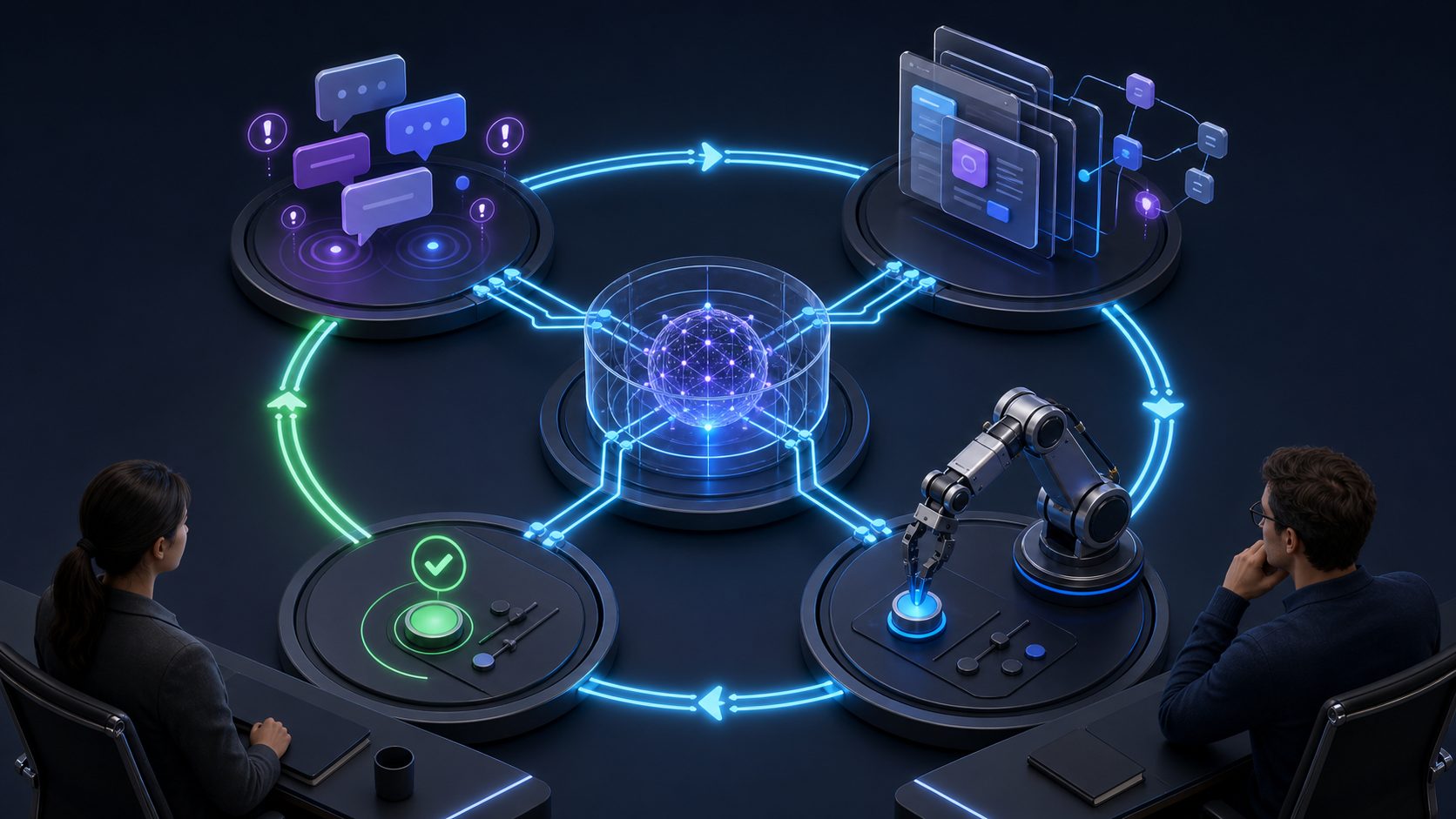
Third, design a small, agentic AI workforce aligned to those levers. For example: a Research Agent that synthesizes market insights and past performance; a Copy Agent that generates on-brief, on-brand variants; a Distribution Agent that adapts content to each channel and schedules posts; and an Analytics Agent that runs A/B tests, summarizes results, and flags anomalies. Keep human oversight where judgment matters most—strategy, brand voice, and high-stakes decisions.
Fourth, instrument rigor from day one with Agent Analytics and eval-driven development. Define offline evals for brand consistency, factuality, safety, and response time; pair them with online experiments that quantify lift on your target outcomes. Set a minimum detectable effect (MDE) so you stop shipping changes that cannot plausibly move the metric.
Fifth, operationalize your AI workflows. Standardize prompts, inputs, and handoffs; templatize briefs and acceptance criteria; and keep a change log so improvements compound rather than reset. Use short, frequent feedback loops to prune low-impact work and double down on what demonstrably advances your objectives.
I’ve seen teams reclaim focus and momentum when they treat agents as teammates, not toys. The magic isn’t in producing more assets—it’s in consistently choosing the next best action in service of a clear outcome. When you combine outcome clarity, a driver tree, targeted agents, and tight evals, AI becomes a force multiplier for marketing impact.
If you’re feeling overwhelmed by AI’s possibilities, start small: commit to one outcome, one driver you believe is material, and one agent designed for that job. Prove lift, codify the workflow, then scale. Velocity is only valuable when it’s pointed in the right direction.
Inspired by this post on Amplitude – Best Practices.
Your AI agent can resolve more conversations while customer experience quietly becomes harder to trust. A ticket marked resolved can still contain an inaccurate answer, a skipped process step, a repetitive loop, or an escalation that arrived too late.
As the product leader, you don’t have to choose between automation and judgment. You need an operating system that identifies which conversations matter, defines what good looks like, routes exceptions to the right owner, verifies fixes, and connects support quality to customer behavior.
Measure outcomes, execution quality, and coverage separately
Resolution rate is a throughput metric. It tells you how often the operation reached a terminal state, but not whether the answer was correct or the customer was treated appropriately. CSAT has a similar limitation: it captures sentiment, not conformance. Customer sentiment and adherence to your standards answer different questions, so neither should stand in for the other.
Build the dashboard around four layers. Keeping them separate prevents a good aggregate number from concealing a weak customer experience.
Whether the interaction solved the customer’s problem
Execution quality
Did the conversation meet your operating standard?
Accuracy, process adherence, clarification, escalation ease, efficiency
Whether the agent behaved correctly
Evaluation coverage
How much of the operation did you actually inspect?
Eligible, automatically evaluated, human-reviewed, and still-unreviewed conversations
How much confidence to place in the quality result
Product impact
Did better help change customer behavior?
Activation, feature adoption, retention, and journey completion by cohort
Whether the CX improvement created durable value
Read the layers together, but don’t merge them into one executive number. High sentiment with low accuracy can mean the agent sounded helpful while giving the wrong answer. A strong scorecard result with poor sentiment can expose a technically correct but difficult experience. Good conversation quality with repeated contacts may mean the product, policy, or documentation still creates the underlying problem.
The product-impact layer is especially important. A support answer may pass every conversational check without improving the journey that matters. Connect CX data to activation, adoption, and retention behavior so you can distinguish a better answer from a better customer outcome.
A simple driver tree makes that connection explicit. Start with the business result, trace it to the customer behavior that produces it, identify the journey friction blocking that behavior, and then define the AI behavior that should remove the friction. If you can’t trace a proposed quality criterion through that chain, it may be a preference rather than a requirement.
Design monitoring as a portfolio, not a random sample
A stable benchmark cohort. Evaluate a repeatable sample on a consistent schedule. Preserve the same eligibility rules and segmentation so changes in pass rate represent changes in performance rather than changes in the sample.
Risk-targeted monitors. Select conversations with signals that deserve deliberate review. Examples include a customer showing signs of financial vulnerability, an agent repeating essentially the same answer, a required escalation that did not happen, or a sensitive process being handled without its required checks.
Change-specific monitors. Create cohorts for a new model, prompt, workflow, tool, policy, or knowledge release. Version every relevant component so a quality change can be traced to the production change that preceded it.
Journey monitors. Group conversations by customer intent and journey stage, not just channel or queue. This exposes recurring friction in onboarding, adoption, billing, account management, and other product journeys that an operation-wide average will flatten.
Instrument every eligible conversation, but don’t assume every conversation needs human review. Automated evaluation is appropriate for high-volume, clearly defined criteria. Human judgment belongs on critical failures, ambiguous cases, disputed scores, new scenarios, and calibration cohorts. The scalable design is broad automated visibility with concentrated human attention.
Each monitor should report more than a pass rate:
Coverage rate: completed evaluations divided by eligible conversations. Never present pass rate without this denominator.
Pass rate: completed evaluations that met the scorecard standard divided by all completed evaluations.
Critical failure rate: completed evaluations that failed at least one critical criterion divided by all completed evaluations.
Unreviewed queue: qualifying conversations that have not received their required review. Break this out by risk and age rather than showing only a total.
Evaluator overturn rate: dual-reviewed cases in which a human changed the automated judgment. A rising rate can signal an ambiguous rubric, a weak evaluator, or a new conversation pattern.
Failure recurrence: previously addressed failure modes that appear again after a fix. This distinguishes completed work from effective work.
Segment these measures by AI versus human handling, journey, intent, customer segment, channel, and deployed version. One shared quality system can compare AI and human conversations against the same customer outcomes, while still assigning different operational responsibilities. Unified review across automated and human conversations also makes handoff failures visible; otherwise, each side can look healthy while the transition between them breaks.
Be deliberate about the data attached to monitoring. Store the fields needed for segmentation, diagnosis, and audit, and restrict access to sensitive conversation content. A monitoring program creates risk if it spreads personal or regulated data into dashboards that were designed only for aggregate analytics.
Turn scorecards into executable product requirements
I treat a scorecard as an executable product requirement. Each criterion should be observable in the conversation, interpretable by two independent reviewers, and connected to a specific action when it fails. Vague criteria such as helpful, natural, or on-brand produce arguments rather than reliable signals.
Build each criterion with the following fields:
Intent: the customer or business outcome the criterion protects.
Pass condition: the observable behavior that must be present.
Failure condition: the observable behavior that makes the conversation fail.
Evidence rule: the part of the transcript, tool trace, policy, or approved knowledge that supports the judgment.
Applicability: when the criterion is required and when it is not applicable.
Severity: whether failure contributes to a weighted score or overrides the entire evaluation.
Reviewer: automated evaluation, human evaluation, or both.
Remediation owner: the person or function expected to act on failure.
A practical CX scorecard usually needs criteria such as:
Accuracy: the answer is supported by approved knowledge, customer context, and tool results. Unsupported claims fail even if the customer accepts them.
Resolution and next step: the agent answers the request, clearly states what remains, or routes the customer to the correct next action.
Process adherence: required verification, disclosure, permission, and workflow steps are completed in the correct context.
Clarification: the agent asks for missing information when intent or account context is too ambiguous to answer safely.
Escalation: the agent recognizes defined handoff conditions, escalates without unnecessary resistance, and transfers the context the next agent needs.
Conversation efficiency: the agent avoids repetition, irrelevant steps, and loops while preserving the information necessary for a correct outcome.
Communication quality: the response is clear, appropriately direct, and consistent with the brand’s communication standard.
Weights help express relative importance, but a weighted average must not wash away a consequential failure. Mark accuracy, safety, security, required process steps, or other non-negotiable controls as critical where appropriate. A polite answer that gives a harmful instruction should not pass because it accumulated enough points elsewhere.
For legal, financial, safety, account-security, or regulated decisions, follow the applicable organizational policy and require human review or escalation where that policy demands it. An aggregate quality score is not authorization for an AI agent to make a decision outside its approved scope.
Automated evaluators also need calibration. They are measurement components, not ground truth. Build an adjudicated set of clear passes, clear failures, difficult edge cases, and not-applicable examples. Have human reviewers score the same cases independently, compare their reasoning with the automated result, and rewrite any criterion that allows materially different interpretations. Repeat calibration after changes to the model, evaluator, prompt, tools, knowledge, policy, or conversation mix.
Keep the evidence behind every automated judgment. A score without the relevant transcript excerpt or trace is difficult to challenge and nearly impossible to improve. Reviewers should be able to see what failed, why it failed, and which requirement governed the decision.
Make every failure end in a product decision
Quality monitoring creates value only when it changes the system. The review queue should represent work, not a museum of bad conversations. A useful workflow moves each case through explicit states such as Not reviewed, Reviewed, Needs a fix, and Fix complete.
Require the following information before a failed case leaves review:
The customer intent and journey stage.
The failed criterion and supporting evidence.
The failure class, not merely the visible symptom.
The owner responsible for the correction.
The proposed change and the signal expected to improve.
The regression case, deployment version, and monitor that will verify the correction.
A consistent failure taxonomy keeps teams from treating every bad answer as a prompt problem:
Knowledge failure: the approved information is missing, stale, contradictory, or too difficult to interpret.
Retrieval or context failure: the right information exists, but the system did not retrieve, rank, or apply it.
Policy or workflow failure: the operating rule is wrong, incomplete, or impossible for the agent to execute.
Model behavior failure: the system ignored instructions, made an unsupported inference, or produced an otherwise defective response despite receiving adequate context.
Conversation-design failure: the interaction collected the wrong information, asked an unclear question, or sequenced the exchange poorly.
Tool or handoff failure: an integration, action, routing rule, or transfer prevented the correct outcome.
Product-friction failure: the support interaction is a recurring symptom of something the product itself should make clearer or eliminate.
This taxonomy changes prioritization. If the same onboarding question keeps passing through support, improving the answer may reduce handling friction but preserve the underlying product problem. Journey mapping, behavioral analytics, and in-product guidance can reveal whether the better fix belongs in the interface, workflow, documentation, or agent.
Close each failure through a controlled loop:
Reproduce it. Confirm the failure and preserve the relevant inputs, context, versions, and tool behavior.
Diagnose it. Assign a cause from the shared taxonomy and identify the owner with authority to change that component.
Correct it. Update the product, knowledge, retrieval logic, prompt, workflow, policy, integration, or escalation rule that caused the defect.
Test it. Run the original failure and nearby cases that should remain unchanged. Add the sanitized case to the regression set where appropriate.
Deploy it with versioning. Preserve enough release context to compare behavior before and after the change.
Verify it in production. Watch the targeted monitor, baseline quality, and associated customer behavior. Close the case only when the expected signal improves without creating a new failure elsewhere.
Bring this loop into a regular operating review. Inspect coverage first, then critical failures, the largest changes by segment and version, queue health, recurring causes, completed fixes, and downstream customer behavior. The meeting should end with product decisions: roll back a change, revise knowledge, alter a workflow, strengthen an escalation, change the interface, expand monitoring, or explicitly accept a known limitation.
Assign ownership before volume grows. CX and support leaders can define service standards; product leaders can connect recurring friction to roadmap decisions; AI and engineering owners can maintain instrumentation, evaluators, and regression tests; analytics can connect interactions to behavioral outcomes; and security, legal, or compliance owners can approve critical controls in their domains. Your organization may divide the roles differently, but every critical criterion and failure class needs a named decision owner.
Key takeaways
Resolution rate measures throughput, not whether an AI interaction was accurate, compliant, or useful.
Track customer sentiment, execution quality, evaluation coverage, and product impact as separate layers.
Combine a stable benchmark cohort with risk-targeted, change-specific, and journey-based monitoring.
Show pass rate with coverage and critical failure rate. A strong score over thin or biased coverage is weak evidence.
Write scorecard criteria as executable requirements with pass conditions, failure evidence, severity, reviewer type, and remediation ownership.
Use automated evaluation for breadth and human judgment for calibration, ambiguity, disputes, and consequential failures.
Don’t close a quality issue when a document or prompt changes. Close it after the deployed fix passes regression checks and improves the intended production signal.
Route recurring conversation failures into product discovery. Sometimes the best CX fix is removing the reason customers need to ask.
Start with one journey that combines meaningful volume with meaningful consequence. Give it an eligibility rule, a scorecard, explicit coverage, a review queue, a failure taxonomy, named owners, regression cases, and a downstream product outcome. Run that chain until failures reliably produce verified changes, then extend the same control loop to the next journey. Scalable quality comes from repeating a dependable operating system, not from adding another dashboard.
I’ve watched too many AI agent deployments celebrate velocity while overlooking the one thing that determines long-term success: whether real users are actually getting value. Dashboards tend to spotlight model upgrades, prompt tweaks, and launch counts, yet they rarely quantify task completion, trust, or time-to-value. That blind spot isn’t technical—it’s human.
Enterprises are spending 93% of their AI budget building agents and almost none know if those agents are actually working for users. Pendo Agent Analytics closes the gap.
In my product reviews, I look for evidence that agentic AI is improving outcomes across the customer journey, not just the demo path. Without behavioral analytics and observability, teams optimize for throughput instead of resolution, for novelty instead of reliability. This is where eval-driven development, A/B testing, and rigorous cohort analysis become non-negotiable: they translate agent performance into user impact we can measure and improve.
Here’s the pattern that works for me: define user-centric success metrics first, then let the AI follow. I prioritize signals like successful task completion, low-friction activation, reduced escalations, and sentiment lift—tied directly to product-led growth indicators such as retention and expansion. When these metrics move in the right direction, I know the agent is creating compounding value, not just answering faster.
Practically, I operationalize this with an analytics spine that captures end-to-end agent interactions: intents, prompts, responses, clarifying turns, handoffs, and final outcomes. I segment by persona, journey stage, and account tier to uncover where agents delight and where they degrade trust. With this foundation, I can run controlled experiments, spot anomalies early, and connect improvements in agent behavior to improvements in business performance.
Pendo Agent Analytics closes the loop by making these user outcomes visible and actionable. Instead of guessing whether an agent helped or hindered, I can analyze where users stall, which prompts or skills drive completion, and how interventions like in-app guides or product tours change behavior. That visibility lets me tune models and experiences in days, not quarters—and gives stakeholders confidence that our AI investments are paying off for customers.
If you’re scaling agents today, start small but instrument deeply: map top user intents, define offline and online evals, A/B test prompts and policies, monitor regressions, and tie every improvement to activation, adoption, and retention. The result is a durable feedback loop that keeps agents aligned with user value as your surface area grows.
AI agents are not a destination—they’re a capability. When we anchor that capability to clear user outcomes and measure it with the right analytics, we stop flying blind and start compounding advantage. That’s how we turn promising demos into dependable products.
Your AI support agent is containing more conversations, but you still cannot answer the question that matters: did it solve the customer’s problem, or did it merely avoid a handoff?
You do not need another dashboard of conversation counts and token usage. You need a closed loop that connects customer outcomes to individual agent decisions, turns failures into test cases, and makes each release safer than the last. Here is the operating model I would put in place.
Define resolution before you optimize the agent
Continuous improvement starts with an outcome contract, not an analytics implementation. If product, support, and engineering use different definitions of success, every subsequent metric will create debate instead of direction.
Write the first outcome contract for one customer journey. Keep it to one page and specify:
Eligible cases: Which requests can the agent reasonably handle? Separate supported journeys from requests that must go directly to a person.
The unit of analysis: Decide whether success belongs to a conversation, a case, or a completed task. A customer who restarts the same issue in a second conversation has not necessarily created a new problem.
Completion evidence: Name the customer statement, downstream system event, human judgment, or evaluator result that confirms the task was completed.
Acceptable escalation: Define when handing the case to a person is the correct outcome. A policy-mandated handoff is not an agent failure.
Failure conditions: Include abandonment, repeated rephrasing, an incorrect action, an unsupported claim, a failed tool call, and a handoff without usable context where they apply.
The observation window: Choose how long you will look for a repeat contact or reversal before treating the resolution as durable. The right interval depends on the journey, so publish it with the metric.
Then separate the signals that teams commonly collapse into one number:
Signal
What it tells you
How to use it
Verified resolution
The eligible customer task was completed using the evidence in your outcome contract.
Use this as the primary outcome for a resolvable journey.
Containment
No person entered the interaction.
Treat it as a routing and labor signal, not proof of success.
Escalation
The agent transferred the case to a person.
Split appropriate escalation from avoidable escalation before drawing conclusions.
Reliability
Tools, retrieval, guardrails, and fallbacks behaved as intended.
Use step-level rates to locate the mechanism behind an outcome.
Performance
The customer waited for the first response and for the complete task.
Track both typical and tail latency so a healthy average does not hide slow cases.
Efficiency
The agent consumed tokens, model spend, tool spend, and human effort.
Measure cost per successful eligible task, not just cost per conversation.
Groundedness
Claims based on retrieved material are supported by the retrieved material.
Evaluate retrieval-dependent journeys separately from general response quality.
The distinction between resolution and containment is particularly important. An unresolved conversation that never reached a person improves containment while making the customer experience worse. Conversely, a fast and well-prepared escalation can be the right resolution path.
Use explicit formulas in the metric catalog. For example, resolution rate should be verified successful eligible cases divided by eligible cases. Cost per success should be the applicable model and tool cost divided by verified successful cases. If you change the eligibility rule or verification method, version the definition rather than silently changing the chart.
Do not let the agent’s own declaration of success become your only evidence. Prefer an observable business event or explicit customer confirmation. When neither exists, use a documented evaluation rubric and periodically compare automated judgments with human review. The goal is not to pretend ambiguity has disappeared. It is to make the ambiguity visible and consistent.
Instrument the trajectory, not just the conversation
Traditional product analytics can tell you that a conversation opened, escalated, and closed. It cannot explain why an agent chose a tool, which knowledge it retrieved, what a guardrail rejected, or where a multistep task went off course. Agent behavior includes nondeterministic trajectories, tool chains, prompt context, retrieval, policies, and fallbacks. Your telemetry has to preserve that sequence.
Build three connected records:
Case record: A stable identifier for the customer need, the normalized intent, channel, eligible cohort, final outcome, escalation reason, customer signal, and any repeat-contact relationship.
Run record: The model, prompt, policy, knowledge, tool, evaluator, and experiment versions used for one execution, along with total latency, token use, cost, guardrail events, fallback state, and final response.
Step record: Each retrieval, model decision, function call, tool result, validation, retry, and handoff. Capture inputs and outputs in an appropriately protected form, plus status, latency, error type, and the next step selected.
Every run should be reproducible at the level needed to investigate it. Version anything that can change behavior: system instructions, prompt templates, policies, model configuration, tool schemas, knowledge snapshots, routing rules, guardrails, and evaluators. Record experiment assignment on the run itself. Otherwise, a failed trace can become impossible to explain after the underlying assets change.
You need three views over these records. The aggregate scorecard shows whether customer and business outcomes are moving. The trace explorer shows the decision path behind a particular result. The evaluation system tests candidate behavior against expected results. None is a substitute for the others: aggregates reveal scale, traces reveal mechanisms, and evaluations reveal whether a proposed change is safe to release.
Privacy has to be part of the data model. Support conversations can contain personal or sensitive information, and copying every raw transcript into a broadly accessible analytics system creates unnecessary exposure. Separate human-identifiable data from model telemetry and mask sensitive content while retaining useful semantic context. Apply access controls and retention rules to raw content, and let most analysis operate on sanitized traces, structured labels, and protected identifiers.
Before declaring instrumentation complete, take one unresolved case and answer five questions from the data alone: What was the customer trying to do? What path did the agent take? Which versions governed that path? At which step did reality diverge from the expected behavior? What outcome evidence followed? Any missing answer is a concrete telemetry gap.
Turn production failures into a daily improvement queue
Analytics becomes continuous improvement only when an observation can enter a queue, acquire an owner, produce a test, and reach production. A weekly dashboard presentation without that path is reporting, not learning.
Create one improvement queue shared by product, support, engineering, and the people responsible for the agent. Feed it from failed evaluations, avoidable handoffs, repeat contacts, low-confidence outcomes, guardrail events, tool errors, and anomalies in journey-level metrics.
At each human handoff, prefill the case identifier and trace, then ask the support specialist for three short inputs:
What was the customer actually trying to accomplish?
What prevented the agent from completing it?
What reusable change could prevent the same failure?
Keep the capture lightweight. The frontline should add information the trace cannot supply, not reconstruct a conversation the system already recorded. This turns human support into a sensor for recurring defects and supports the principle that a solved customer issue should create a chance to prevent its recurrence.
Cluster related cases before prioritizing them. Fixing a single transcript can overfit the agent to one phrasing; fixing a recurring failure pattern improves a journey. Give every cluster a normalized intent and one primary root-cause label:
Knowledge: The required information was missing, stale, contradictory, or too difficult to retrieve.
Retrieval: Useful information existed, but the wrong material was selected or relevant material was omitted.
Instruction or policy: The agent had ambiguous, conflicting, or incomplete directions.
Tooling: A function was unavailable, called incorrectly, timed out, or returned unusable data.
Conversation design: The agent failed to collect required information, explain a limitation, confirm an action, or recover from confusion.
Routing and handoff: The case went to the wrong destination, escalated too late, or arrived without sufficient context.
Capability boundary: The task was eligible on paper but was not reliably achievable with the current model and workflow.
Product or process: The customer encountered a defect or an underlying workflow that support automation alone cannot repair.
Do not use the taxonomy to force certainty. Allow an unknown label, but review unknowns regularly; a growing unknown bucket usually means the taxonomy or telemetry has stopped describing production.
Each queue item should contain the affected journey and cohort, linked traces, observed and expected behavior, root-cause hypothesis, customer consequence, recurrence evidence, responsible owner, proposed smallest change, a new or updated evaluation case, rollout method, and rollback condition. That record makes the improvement auditable from failure to fix.
Prioritize with four questions instead of reacting to the loudest transcript: How often does the pattern appear? How consequential is it when it happens? How confident are you in the root cause? How reversible is the proposed change? A frequent knowledge miss with a narrow, testable correction is a good candidate for rapid iteration. An uncommon policy failure with serious consequences may deserve attention first even if its volume is low.
A prompt edit is a product change. So is a new knowledge document, model version, tool description, routing rule, or policy. Treating these assets as untracked configuration makes regressions difficult to detect and harder to reverse.
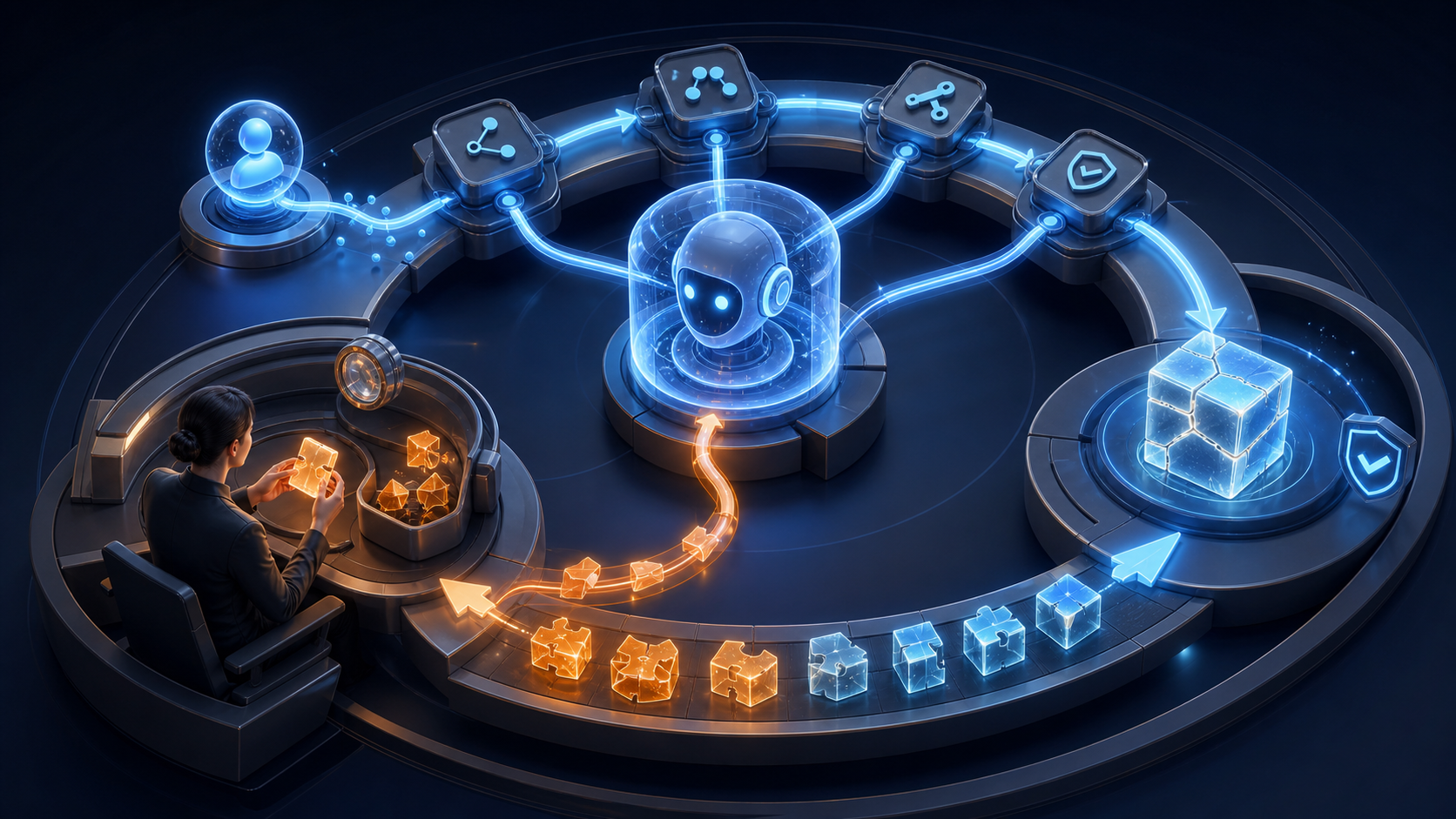
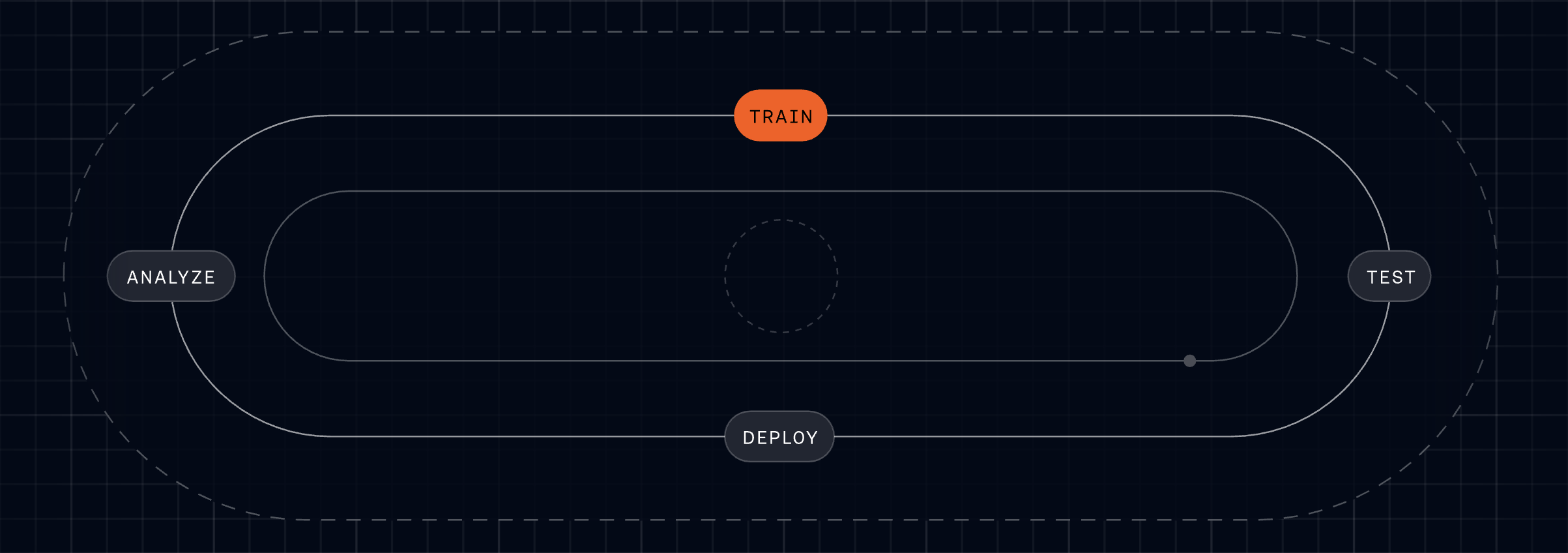
Use a four-part improvement loop: update the controlled asset, test complete simulated conversations, deploy through a controlled release, and analyze production outcomes. That train-test-deploy-analyze cycle keeps learning connected to customer behavior rather than ending at the prompt editor.
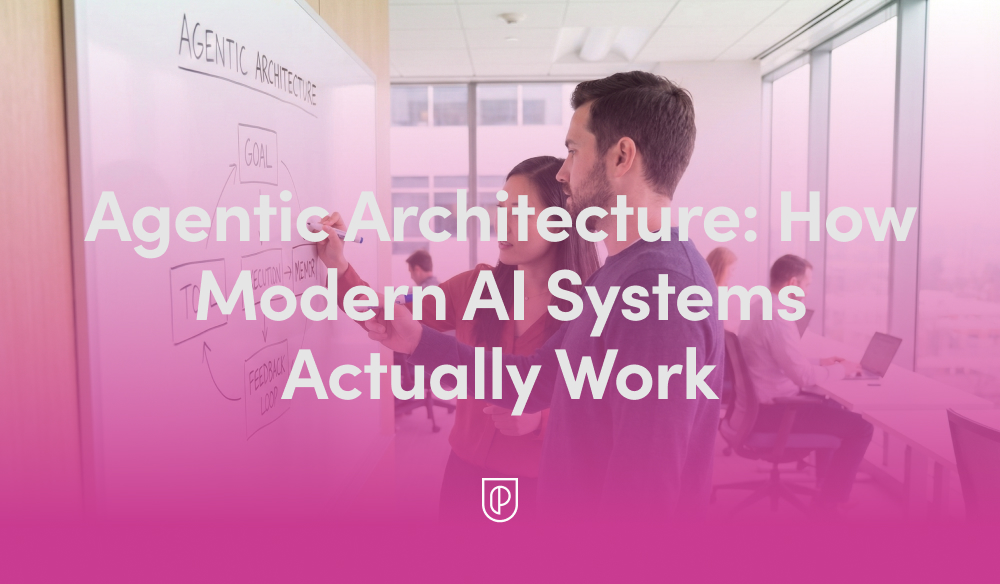
In my role leading product teams at HighLevel, I’m often asked to explain what’s really happening behind the scenes of today’s AI products. The short answer is that modern systems are built on "Agentic Architecture: How Modern AI Systems Actually Work"—not just a single model, but a coordinated loop of planning, tool use, memory, and evaluation. Once you see that pattern, the design decisions snap into focus and the roadmap becomes far easier to prioritize.
At its core, agentic AI treats the model as a reasoning engine embedded within an AI workflow. The agent interprets intent, plans steps, calls the right tools and APIs, grounds itself in trusted data, and then evaluates outcomes before deciding to continue or stop. This loop creates reliability, reduces hallucinations, and enables the system to operate in real-world, multi-step scenarios.
Here’s the practical lifecycle I rely on. A user provides intent (a goal or request). We run a retrieval-first pipeline to ground the model in accurate, current data. Prompt engineering structures the task and primes the agent with constraints and success criteria while managing context window management. The agent generates a plan, executes steps by calling tools or services, evaluates intermediate results, reflects or revises as needed, and only then returns a final answer with clear citations or evidence.
For more complex work, I orchestrate multiple specialized agents—commonly a planner, a solver, and a critic—coordinated by a lightweight controller. This multi-agent pattern reduces single-agent blind spots, encourages self-checking, and mirrors how empowered product teams collaborate. Whether it’s conversation design for support flows or a voice AI agent driving hands-free tasks, orchestration is the difference between a clever demo and a dependable product.
Memory is the second pillar. Short-term working context sits in the prompt, while long-term memory lives in vector stores or databases to track past interactions, preferences, and outcomes. Retrieval augments the model with the right facts at the right time, and tight context window management ensures the agent stays focused on signal, not noise. The result is faster responses, lower costs, and far better accuracy.
Reliability is earned through eval-driven development and robust AI risk management. I define offline and online evaluations, guardrails, and human-in-the-loop checkpoints before scaling traffic. These evaluations become living, automated tests that protect against regressions as prompts, models, and tools evolve. The payoff is real: fewer escalations, higher trust, and measurable improvements to quality over time.
From a product strategy perspective, I resist over-engineering. Start with a simple retrieval-first pipeline and a single agent; prove value; then layer in multi-agent orchestration only where it moves key metrics. Instrument everything—latency, cost, grounding coverage, and outcome quality—and build Agent Analytics dashboards so teams can diagnose issues and iterate with confidence.
If you’re looking for a practical playbook, here’s mine: clarify the user intent and success criteria; design the tools the agent can call; ground with authoritative data; write prompts that constrain scope and define termination conditions; add reflection and automated evaluations; and ship behind feature flags for safe, staged rollout. Each step compounds reliability without killing velocity.
The diagram and the video above bring these patterns to life. If you watch closely, you’ll see the same loop—plan, retrieve, act, evaluate—show up in every effective implementation, regardless of domain. That repetition isn’t accidental; it’s the backbone of agentic architecture and a blueprint you can adapt to your own stack.
Ultimately, what matters is outcomes. When we build around agentic AI, we create systems that are explainable to stakeholders, maintainable by engineers, and genuinely helpful to customers. That’s how we move past hype to durable impact—shipping AI products that plan, learn, and execute at scale.
Leading the Support function for a company that builds a leading Agent and AI-forward customer service platform has been, for me, unique, exciting, and yes—daunting. It’s where product ambition meets operational reality, and where every decision I make is immediately tested by customers who expect excellence.
It’s unique because we use the same technology as our customers. We live in the product every day, which puts us in a privileged position to be the voice of the customer across the organization. That tight feedback loop has shaped how I prioritize, what I build next, and how I measure success.
It’s exciting because we get to try all of the new features and capabilities of Fin and the Intercom helpdesk. With a relentless focus on AI innovation, I’ve had access to remarkable tools that help us deliver an incredible customer experience—and I’ve seen firsthand how the right workflows and guardrails turn those tools into outcomes.
And it’s daunting because expectations for our own Customer Support (CS) team are sky high. If we can’t deliver incredible support using our own technology, we undermine its value proposition. That imperative has kept me honest, focused, and fast.
In our new research, “The 2026 Customer Service Transformation Report,” we’ve been sharing how forward-looking teams use AI to transform their support models. If you’d like to get straight to the report, download it here.
When Intercom changed its focus in late 2022 to prioritize the customer service use case, we undertook a critical review of the support experience we were delivering and committed to driving meaningful change under an AI-first framework. That was a turning point: I aligned product strategy and operations around a single north star—automate with quality, and elevate humans to higher-value work.
Three years on, Fin now resolves over 81% of all our customer support volume, delivering immediate and high-quality resolutions. We have absorbed a 300%+ increase in customer demand since 2022 without proportional headcount growth. Without Fin, we would have needed at least 100 additional CS team members to meet that demand and our improved service levels – a net saving to Intercom of between $7.5M–$9M annually.
Throughout this work, we drew on research from the 2026 Customer Service Transformation Report and applied the lessons directly to our own org design, knowledge management, and AI workflows. What follows is our story of transformation and how we achieved a mature deployment of Fin.
The problems we set out to solve
Back in 2022, our challenges looked familiar to any modern support organization, and I knew we needed a step-change—not incremental tweaks.
We faced increased support demand from new and existing customers: Intercom was launching major features and changes at speed, driving up overall customer conversation volume and requiring additional headcount for the CS team. I could see we were scaling people faster than processes—unsustainable without automation.
Our support policy (as defined by our service level objectives) was not based on a high bar: In most cases, we were only committed to “business hours” coverage for the majority of our customers, impacting first response times. Even with SLOs that were not considered best in class, we were struggling to meet our commitments. I wanted 24/7 coverage and faster first responses without sacrificing quality.
We wanted to do more: As we pivoted our strategy, we wanted to open new routes to our support team, such as providing support to website visitors with technical questions and to trial customers. That meant meeting customers earlier in their journey with accurate, on-brand responses—at scale.
What we did
We made a very conscious decision to become our own best reference customer. As Intercom embraced the opportunity that generative AI presented to transform customer service, we intentionally moved to an AI-first strategy for our Customer Support team. I set a simple operating principle: ship value quickly, measure relentlessly, and let evidence guide the next bet.
We started with the highest-volume, informational queries and saw our resolution rates climb quickly. With that foundation in place, we pushed Fin further, training it on deeper documentation and internal procedures, and eventually giving it the ability to take actions on behalf of customers. As Fin took on more complex work, our results started to compound—and trust in the system grew across the organization.
Early adoption and building trust. When “AI Assist” features came to the Intercom Inbox, the CS team got early exposure to AI and were empowered to provide feedback directly to our product teams. This built awareness and trust across the team about what we were trying to achieve with AI, and helped shape the product roadmap. We were also the first beta customer for Fin, rolling it out to a subset of customers to watch sentiment and outcomes closely. With no adverse reaction and an initial resolution rate of over 25%, we deployed Fin to most customer segments within weeks. I’ll never forget the first week we put Fin in front of real customers—the silence of issues that never reached humans was the loudest signal of success.
Knowledge management as a product. We recognized quickly that time spent tuning our help center and knowledge assets for Fin would pay dividends. We transitioned our Help Center Manager into a “Knowledge Manager,” with a dedicated remit to optimize content for Fin. We embedded knowledge creation into our “New Product Introduction” (NPI) process, targeting that Fin would resolve at least 50% of customer issues at every new product and feature launch. Over time, we added new sources, including “Developer Documents,” enabling Fin to handle increasingly complex issues. We built a culture of continuous improvement—allocating “out of the inbox” time so every teammate could close content gaps and raise the bar.
Conversation design end-to-end. To ensure a consistent, high-quality customer experience, we created a new “Conversation Designer” role that owns the journey across automation and human handoffs. Using Intercom’s Workflows, we introduced “skills-based routing” so that when a customer asks for a human, the conversation reaches someone with the right expertise quickly. This is now handled by Fin directly using a feature called “Attributes.” The result: a seamless, on-brand experience regardless of channel or escalation path.
Leaders are racing ahead with real AI in support. Explore the 2026 Customer Service Transformation Report to see where deployment is stalling, benchmark your team, and get practical steps to scale automation that delights.
Organization changes that unlocked leverage. As we scaled Fin, we stood up a dedicated AI Support team under a senior CS leader to continuously optimize automation and define our AI adoption strategy across the journey. We restructured human roles into “Technical Support Specialist” and “Technical Support Engineer” to better align with the complexity of incoming work. We also expanded Support Operations to focus on optimization—using AI to uplevel Enablement, Workforce Management, QA, Process Management, and Data Insights. Just as important, we reset expectations about the balance between time spent supporting customers directly versus improving AI. That mindset shift created compounding returns.
Pushing Fin further with new capabilities. As capabilities matured, we were early adopters and saw measurable wins:
Fin Guidance: Multiple Guidance rules provide additional controls and a more personalized, targeted experience for customers.
Fin Tasks and Procedures: Enables Fin to carry out activities such as updating customers on incident status and deep troubleshooting for technical issues.
Insights: AI-driven dashboards provide deep insight into Fin’s performance and surface recommendations for further optimization. Insights also provides a Customer Experience (CX) Score for every customer interaction, enabling more targeted improvement efforts and opening up new ways to close the loop with customers who have had a poor experience.
What we achieved
What started as a focused effort to improve our customer support experience became the strongest proof point for what’s possible when you fully embrace AI. Fin now resolves over 81% of all our customer support volume and has allowed us to absorb a 300%+ increase in demand without proportional headcount growth. Over 90% of our customers now benefit from improved first response performance, 24/7 coverage, and outbound phone support.
What the numbers don’t fully capture is the shift in how our team operates. With volume absorbed by Fin, our CS teammates now deliver consultative support—guiding next best actions, deepening product adoption, and contributing directly to retention and expansion. Customers that receive these engagements adopt Fin at a much deeper level and achieve greater support success. What was once a reactive, volume-driven team is now a function that generates significant revenue.
What’s next
Customer expectations are always rising, so we’re building on our progress by embracing the Fin Flywheel—an actionable framework for ongoing improvement and optimization. This keeps us honest about the discipline required to sustain AI performance at scale.
Train: Teach Fin to resolve even the most complex queries with Procedures, knowledge, and policies.
Test: Run fully simulated customer conversations from start to finish to see exactly how Fin will behave before going live.
Deploy: Set Fin live across every channel – voice, email, chat, and social – for consistent support wherever customers reach out.
Analyze: Use AI-powered Insights to analyze and improve Fin’s performance and deliver better customer experiences.
We are also investing in our support teammates so they can adjust to the new world of AI—taking on more complex work and being valued for the subject matter expertise, consultative engagement, and empathy they bring to the role. That human layer is where differentiation shines.
We will continue to develop and share best practices for deploying an Agent, based on our own experience with Fin and the lessons learned from our most forward-looking customers. These are captured and continually evolving in The Agent Blueprint.
Transformation takes commitment
The most successful teams aren’t bolting AI onto old processes; they’re rebuilding support around it—investing in knowledge and people alongside technology, and treating AI as a continuous discipline rather than a one-time deployment. That’s the real change required. For support teams willing to make it, there’s a rare opportunity to redefine what customer service can deliver—higher CSAT, faster resolution, and durable ROI.
Every update we shipped this month removed a specific constraint on what teams can do with Fin. In my world, the demo-to-production gap shows up as complexity, control, and confidence. Can the agent handle the query that actually matters? Will it sound right on a call? Can the team deploy it without filing an engineering ticket? Can managers understand what it’s doing? That’s the bar I hold us to.
This month, we delivered answers to all four. Here’s how.
Procedures and Simulations (0:51). The hardest problem in AI-powered customer service isn’t answering FAQs—it’s executing complex queries with real business logic and real consequences if anything goes wrong. Think billing refunds, multi-step flows, and actions that must be right the first time.
We made it dramatically easier to build and manage Fin for those complex queries—without pulling in an engineer. You can author in natural language, test every step in simulation, and deploy with confidence.
The workflow starts with AI drafting the procedure from your existing source material. You edit in natural language, with structured hooks to pull in live data, apply business logic, and add code for deterministic control where you need it. That’s how you handle multi-step flows with the precision that matters when things go wrong.
Simulations are the test environment. Define a test case, pass in the data Fin would receive in a real conversation, and watch it work through each step. You see what Fin is doing, why, and whether it’s meeting the criteria you set. Full transparency at every point. I’ve run these end-to-end myself, and there’s a particular confidence that comes from watching it work before it goes anywhere near a customer.
A conversational moment from the February Fin Product Updates recap: two teammates trade insights with laptops open, while a bold pull-quote drives home the promise—Fin removes complexity to start selling and supporting in under two minutes.
For a deeper look at Procedures and Simulations, head to fin.ai/procedures.
Fin Voice: three major updates. When something’s off in chat, it can take a few exchanges to notice; on a call, it’s immediate. Pronunciation, noise handling, and tone all matter because they’re the customer’s first impression.
Pronunciation rules (4:18). Fin has high out-of-the-box pronunciation accuracy, but it doesn’t know your brand—your product names, your industry terminology, the way your company uses certain words. Alihan Zinna, Staff ML Scientist, showed this with an IKEA example: without pronunciation rules, Fin mispronounced both “IKEA” and a product name; after adding rules, both were corrected and sounded natural.
New natural voices (5:48). We’ve added 11 new voices tuned to a range of brand tones so you can choose one that sounds like it truly belongs to your company—not a generic AI assistant.
Background noise reduction (6:28). People call from airports, shops, and busy offices. Fin now monitors background noise continuously and increases noise reduction when the environment demands it. No configuration needed. As Alihan put it, “This is one of those things customers really notice when it’s not working. The goal was to make it invisible. That’s what we built.”
Catch up on February’s Fin Product Updates with a walkthrough of the Call Metrics dashboard—saved filters, hold‑time tiles, missed and declined call counts, and a monthly breakdown that helps support teams act faster.
Shopify setup experience (8:21). Fin began as a Service Agent and is quickly becoming a Customer Agent—working across the whole lifecycle to support, sell, and guide, even before a customer has an issue. The revamped Shopify setup is a clear step forward.
Shopify catalogs are complex—thousands of products, variants, and dynamic inventory—and connecting all of that to an agent has historically been painful. We removed the friction.
Setup now takes three steps: first, connect your store. Second, install the Messenger directly in Shopify—no code, just a few clicks. Third, deploy Fin. Total time: under two minutes. We timed it live.
What that unlocks is real. In the demo, a first-time snowboarder asked for recommendations. Fin searched the catalog, reasoned about attributes that matter to a beginner (there’s no “beginner” tag in the catalog), personalized suggestions by height and weight, and added a board to the cart.
Even better, one customer updated their website copy to promote a sale. Fin immediately picked up the new context and began recommending sale items, nudging shoppers to add more to the cart to access a discount—no extra configuration required. It read the situation and acted.
See how the latest Fin update streamlines support scheduling. A product expert walks through Holiday Office Hours, showing how to set default hours, track response metrics, and add closures so teams stay consistent.
Three steps, and you have a real-time shopping assistant that knows your store and sells on your behalf.
Helpdesk improvements (12:31). Fin works with any helpdesk, but many teams consolidate to take advantage of our native Intercom helpdesk integration. We’ve shipped 19 helpdesk improvements in 2026 so far; two from this month stand out.
11 new call metrics. Hold time, outbound dial time, missed and declined calls, call terminating party, and more. These give leaders the visibility to analyze workload distribution and call handling quality in detail.
Holiday office hours. Teams no longer need to manually update office hours for every public holiday. This was the most upvoted request in our community, and we shipped it.
Across the board, we removed the constraints that hold teams back: the complexity ceiling in automation, the quality ceiling in voice, the setup barrier in Shopify, and the operational overhead in the helpdesk.
We closed out the month with a Star Wars–style crawl of 22 additional updates. All features mentioned here are live and available now. Explore more at fin.ai/updates. More to come—see you next month.
Building a great end-to-end customer experience with AI means going beyond support, and I’ve seen firsthand how transformative that shift can be when we treat every interaction as part of one cohesive journey.
Every customer touchpoint, from the first sales conversation through to post-sales support and success, is an opportunity to get it right. Other teams are now turning to AI to transform how they show up for customers, and support, which led the way, has already written the blueprint. In my role, I focus on making that blueprint actionable across the entire lifecycle.
In The 2026 Customer Service Transformation Report, it’s clear most businesses are thinking about what’s next, with more than half planning to scale AI to other departments. Interestingly, they often cite their early success with AI in support as motivation for the move. This makes support teams uniquely positioned to help lead the transition, a strategic role unimaginable just two years ago.
In this piece, I share how teams are introducing AI to other parts of the business, how to think about this expansion effort, and the new opportunities it creates for support leaders who want to drive a unified customer experience.
Support was the first proving ground for AI, and our research suggests that businesses are now planning to expand its use to other areas based on the results it’s yielded so far. Fifty-two percent of respondents said that their organizations are actively planning to scale AI to other departments in 2026.
What will this look like? Leading companies are already finding out.
Wins in support are setting the pace for company-wide AI. Survey results rank the drivers: proven success in support (57%), the push for a unified customer experience (49%), scaling other functions without more headcount (33%), and cross-department demand (31%).
My favorite example is WHOOP, the fitness wearables company. They offer a premium product which makes their sales conversations more consultative than transactional. Customers want to know “Which membership is right for me?” or “How often do I need to charge my WHOOP?” According to Emily Shirley, Business Manager for Growth Product at WHOOP, if someone chatted with the inside sales team, they were twice as likely to convert, but they didn’t have enough reps to respond to incoming queries fast enough. Customers could wait more than 10 hours for a reply.
With a big product launch on the line and an anticipated spike in prospective customer conversations, their three-person team needed help. So they deployed Fin to the "Join" page, the final step before purchase.
With Fin resolving 84% of inbound questions, the sales team was able to focus on high-value leads. Together, they drove a 130% increase in attributable sales. The team is now exploring ways to expand Fin beyond FAQs, focusing on personalised conversation flows, multi-product recommendations, and richer data capture. As Emily says: “There are so many parts of the buyer journey where this applies. We’ve only scratched the surface.”
It’s clear there’s a desire to push AI to other parts of the customer lifecycle, but there is a risk hidden in this expansion. If sales, customer success, and other departments all launch their own Agent, each operating in isolation, you can end up fragmenting the very thing our research says teams want to create. The second-most cited reason for pushing AI beyond support: desire for a unified customer experience.
Without shared context, each handoff becomes a source of friction where customers could receive inconsistent answers or be asked to repeat information. I’ve watched even well-intentioned AI rollouts struggle here—great local wins, but an overall journey that feels disjointed.
A translucent UI visual maps a support-led AI blueprint that scales across the business—from SDR and sales to custom assistants—anchored by layers for goals, memory and user context, business knowledge, and interoperability.
The opportunity (and the challenge) is to keep the customer at the center. Instead of department-specific Agents that operate independently, we must strive for cohesion. That means shared memory, consistent governance, and connected AI workflows that respect the customer’s history and intent across channels.
This is the future I’m building toward: solutions like Fin becoming a “Customer Agent,” capable of handling the entire customer experience. This will mean Fin can function in many roles, supported by a memory that grows with the customer over time and deep knowledge of the business, creating a seamless experience for every interaction. In practice, that’s agentic AI designed to collaborate across teams, systems, and journeys—without losing context.
Pushing AI into new parts of the business requires someone to own the process. And for many organizations, that’s the support team. Nearly a third of respondents (32%) confirmed their customer service teams are leading their business' AI transformation strategy.
This presents a real opportunity for support teams to shape the future of customer experience. Instead of each function reinventing the wheel, support can act as a center of excellence, defining shared standards, guardrails, and operating practices that drive performance.
“You already manage the most complex, high-volume customer interactions; you have rich data on customer needs and behavior; and you know how Agents perform in the real world. Those insights will be invaluable as AI scales across your business.”
Leaders are racing ahead with real AI in support. Explore the 2026 Customer Service Transformation Report to see where deployment is stalling, benchmark your team, and get practical steps to scale automation that delights.
In my organization, when we extended AI from support into sales, we deliberately brought our conversation design expertise, Agent Analytics, and governance models along with it. One team owns the orchestration, memory strategy, and CRM integration so a customer can start with a sales question and end up with a support one—without ever feeling a seam. That continuity is where journey mapping meets product strategy and turns into measurable outcomes.
As Agents like Fin expand their capabilities and move into new areas, I expect many customer service leaders will see their roles expand to include AI implementation across the customer journey. It’s a natural progression for product management leadership in support: owning the experience, the data, and the operating model.
Achieving perfect customer experience is AI’s biggest promise. But in order to get there, teams need to be smart about the solutions they deploy. A unified Customer Agent capable of handling the entire journey end-to-end will have a significant advantage, delivering consistent, context-aware experiences across every interaction.
The Customer Agent future is being built right now, and it’s starting with the team pioneering AI transformation from the very beginning: support. For leaders in these organizations, this is a rare opportunity to shape how customer relationships will be built and maintained in the AI era.
If you’d like to dig deeper into the data and benchmarks guiding these decisions, download The 2026 Customer Service Transformation Report.
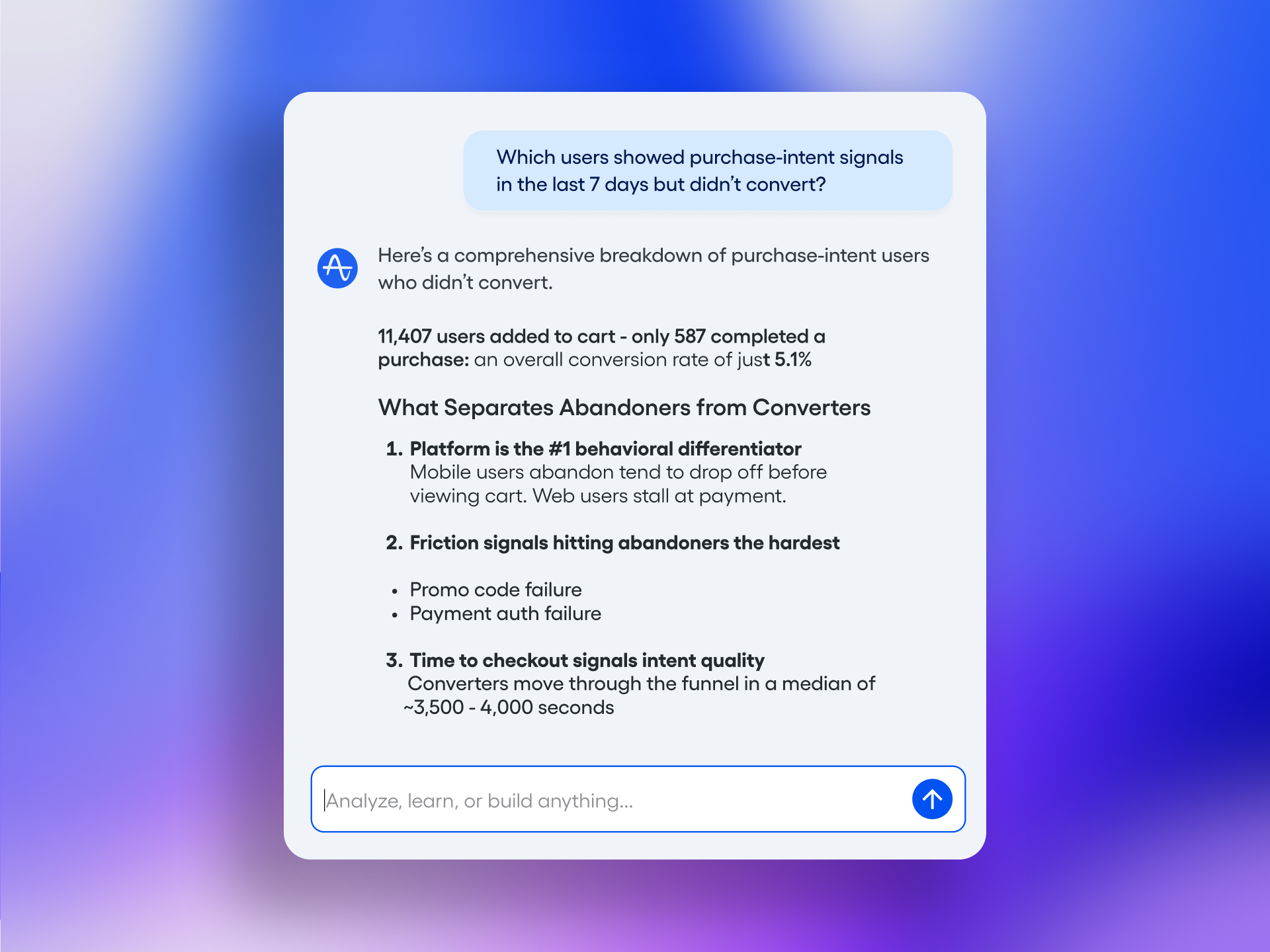
I’ve been looking for a pragmatic way to put product analytics where my teams already work—inside Slack and Microsoft Teams. The moment insights are one message away, cycle time shrinks, debates get crisper, and experiments move faster. That’s why I’m bringing Amplitude Global Agent into our daily decision flow to deliver instant, source-backed answers with visual clarity and actionable next steps.
Connect Amplitude Global Agent to Slack or Microsoft Teams to answer questions with source-backed analytics, charts, and recommended actions like A/B tests.
What excites me most is the shift from dashboards to dialogue. Instead of digging through reports, I can ask a focused question in Slack—“How did activation change week-over-week for our self-serve cohort?”—and get a chart in-channel, complete with recommendations that point me toward the next best move. This is Agent Analytics done right: faster insight loops, reduced context switching, and more confidence in the decisions we make every day.
From a product management perspective, this integration strengthens continuous discovery and aligns product trios around the same truth. Engineers, designers, and PMs see the same chart, discuss trade-offs in the same thread, and can agree on an action—often an A/B test—within minutes. It’s a lightweight but powerful way to support product-led growth and keep our roadmap tied to measurable outcomes.
In practice, the questions I ask the most look like this: “Which onboarding step causes the biggest drop-off this month?”, “Which channels drive the highest L28 activation rate?”, and “Where did retention improve after our pricing change?” In each case, the Agent returns charts we can share instantly with stakeholders, plus recommended actions like A/B test ideas to validate hypotheses quickly. The result is a reliable rhythm: ask, see, align, act.
Governance matters just as much as speed. We’re configuring strict permissions, role-based access, and purposeful channel placement so analytics land where they should—no broader, no narrower. We’re also leaning into clear query prompts and naming conventions for events and properties to help the Agent retrieve precisely what’s needed, every time. The aim is a high-signal, low-noise system that maintains trust while accelerating decisions.
To embed this into our operating cadence, I plug the Agent into three moments: daily standups (to scan activation, conversion, and incidents), weekly product reviews (to align on experiment status and next bets), and executive QBR prep (to pull clean, shareable charts fast). Because the insights arrive in Slack or Microsoft Teams, our conversations stay focused and traceable, and decisions get documented in the same place they were discussed.
We’ll measure impact with simple, telltale indicators: fewer ad-hoc analytics requests, faster time from question to decision, increased A/B test velocity, and clearer links between recommended actions and outcome metrics like activation and retention. My bar is straightforward—if this Agent can help one team make a better decision per day, it will more than pay for itself across the org.
If you’re considering a similar move, start small: connect one high-signal channel, curate a handful of common queries, and coach your team on good prompts. Within a week, you’ll feel the difference. When analytics become conversational, momentum follows—and your product strategy benefits from sharper, faster, and more transparent decision-making.
Inspired by this post on Amplitude – Best Practices.
Shipping agentic AI into production is exhilarating—until a flaky output torpedoes trust. Over the past year, I’ve led teams at HighLevel to operationalize agents across customer-facing and internal workflows, and I’ve learned that reliability isn’t an afterthought; it’s an architecture. In this piece, I share the AI Agent Orchestration Patterns for Reliable Products that consistently deliver dependable outcomes at scale.
When we talk about orchestration, we’re talking about more than a single prompt. The shift is from monolithic calls to coordinated “agentic AI” where routers, planners, and specialists collaborate through structured “AI workflows.” In practice, I rely on a few canonical patterns: a planner–executor loop for multi-step tasks, a router–specialist setup for skill selection, and a “retrieval-first pipeline” that grounds generation with authoritative context before a single token is produced.
Reliability-by-design starts with typed inputs/outputs and strict validation. I standardize on JSON schemas, enforce tool/function signatures, and implement idempotency keys so retries don’t wreak havoc on downstream systems. Timeouts, circuit breakers, and backpressure protect the platform under load, while rate limiting and dead-letter queues keep failure modes contained. Most importantly, we engineer graceful degradation: agents “abstain” when uncertain, fall back to deterministic paths, and escalate to humans instead of guessing.
Safety is a first-class concern, not a bolt-on. Our “AI risk management” pipeline includes PII redaction, allow/deny lists for tools and data, and the principle of least privilege for every connector (yes, even the ChatGPT connector). We codify policy-as-code for repeatability and require human-in-the-loop approvals for sensitive or irreversible actions. In my experience, clear red lines and reversible defaults prevent the vast majority of regrettable outcomes.
Without strong “observability,” you’re flying blind. I instrument agents with an “Agent Analytics” layer that captures traces, spans, tool invocations, and token usage across the entire chain. The essential metrics are outcome quality (task success rate), latency (p50/p95), tool failure rates, cost per task, and user-level satisfaction signals. Cross-agent lineage allows us to pinpoint where a plan went awry and which tool or prompt introduced drift—vital for rapid remediation.
Quality improves fastest when it is measured relentlessly. I practice “eval-driven development” with golden datasets, rubric-based scoring, and risk-weighted sampling of edge cases. LLM-as-judge can help, but we always calibrate against human ratings and monitor agreement. In production, I blend online metrics with controlled “A/B testing” and plan experiments to hit a realistic minimum detectable effect (MDE). The result is a virtuous loop where prompt tweaks, tool changes, and retrieval adjustments are verified before wide rollout.
Agents need the same rigor we expect from any modern system. I gate releases through “CI/CD” with linting for prompts, schema checks for tools, and simulation runs for critical paths. “Feature flags” enable shadow and canary deployments so we can throttle exposure by segment or workflow. I also track reliability with “DORA metrics” and “deployment frequency,” and I partner closely with “SRE” for on-call coverage, runbooks, and incident postmortems tailored to agent failure modes.
Context is a resource to allocate, not a bottomless pit. Thoughtful “context window management” means curating retrieval, summarizing long-running threads, setting memory time-to-live, and constraining what the agent can see at any given step. I bias hard toward retrieval over recall, keep chunks small and semantically precise, and validate that the “retrieval-first pipeline” truly returns the right evidence—not just the nearest match.
In day-to-day product work, I lean on a compact playbook: a router that selects the best specialist; a planner that decomposes tasks and allocates tools; a deterministic guard that verifies preconditions; an execution loop with explicit budgets; and a fallback policy that prefers abstaining over hallucinating. Together, these patterns create an agent that behaves like a dependable teammate rather than a creative wildcard.
No architecture thrives without the right rituals. Product trios keep discovery continuous, while clear outcomes (not output) align teams on value instead of vanity. We map risks early, maintain a public quality dashboard, and rehearse failure recoveries so incidents never become improvisations. The cultural signal is simple: we celebrate root-cause clarity and safe iteration over heroics.
If you’re just starting, implement three patterns first: retrieval before generation, abstain-and-escalate for low confidence, and canary releases under feature flags. Instrument everything from day one, run a weekly eval review, and expand scope only when the data says you’re ready. With these habits, your agents will earn user trust—and keep it.
To truly transform with AI, I’ve learned it’s never just about the technology—it’s about redesigning how we work. The teams that win don’t bolt AI on; they re-architect around it. That means rethinking roles, workflows, and governance to build a system that sustains and improves AI performance over time.
In The 2026 Customer Service Transformation Report, teams at every stage of maturity describe human agents taking on more proactive work—training AI systems, handling the hardest queries, and owning tasks that demand judgment. Job descriptions are shifting, too, with many organizations explicitly adding AI-related responsibilities.
I’m also seeing a clear rise in dedicated AI specialists. Conversation analysts, knowledge managers, and AI operations leads are fast becoming standard. For support professionals, this opens new, higher-leverage career paths—and creates a talent pipeline that blends service excellence, data fluency, and product thinking.
Support once centered on queue-level activity—ticket triage, routing, translations, and answering FAQs. Now, as AI handles more frontline interactions, our human roles are moving up the stack toward optimization, oversight, and continuous improvement.
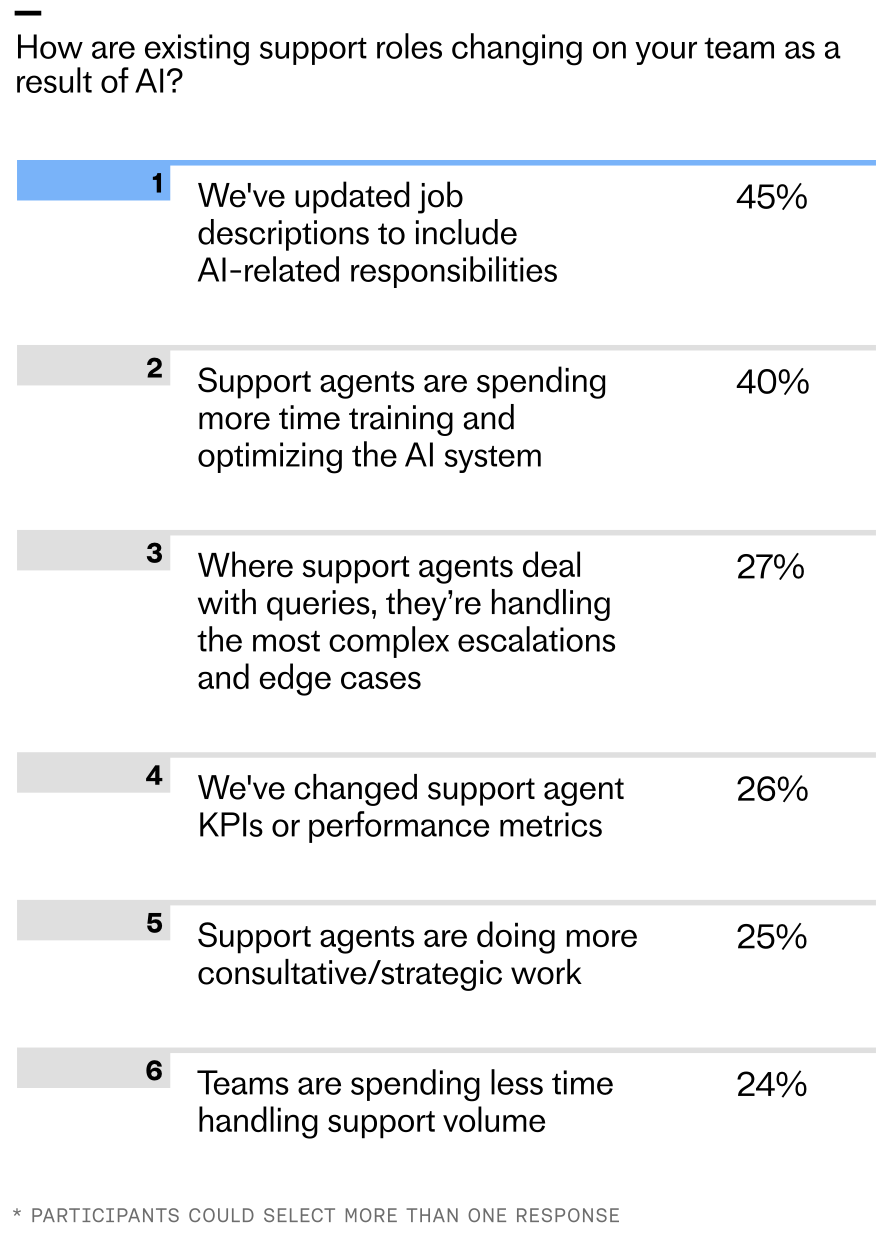
According to the latest research, 45% of teams report updating job descriptions to include AI-related responsibilities, with 40% saying their human agents are now more focused on training AI systems. Another 27% report that human agents primarily handle the most complex escalations and edge cases, while a quarter say agents are doing more consultative and strategic work.
Even at the initial deployment stage, 16% of teams report spending less time handling support volume since implementing AI – and among teams who’ve reached maturity, that figure rises to 28%.
When Intercom’s Research, Analytics & Data Science (RAD) team interviewed 166 of our customers, similar themes emerged. Nearly all participants (≈95%) reported meaningful workflow changes, with manual processes being handled by AI, and humans focusing more on monitoring or fine-tuning AI outputs. Eighty-three percent of participants also reported seeing their team’s roles and responsibilities change to become more strategic and supervisory in nature.
AI is reshaping support teams: organizations are adding conversation analysts (32%), knowledge managers (30%), AI operations leads (28%), and support automation specialists (24%). Just 8% report no new AI roles.
It’s not just the work that’s evolving; organizational structures are, too. Some teams are reallocating existing talent into AI-focused roles; others are hiring entirely new skill sets. Many of the most common job titles in this space didn’t exist two years ago.
Consider a Senior AI Knowledge Manager, Beth-Ann Sher, who transitioned from a help center manager role. Like many careers transformed by AI, her work evolved from administrative to strategic. Instead of focusing solely on customer-facing, self-serve content, her mandate expanded to designing and optimizing knowledge inputs that directly improve AI Agent Fin’s performance—work that materially lifts resolution rates.
Or look at a Senior Conversation Designer, Fred Walton, hired specifically for an AI-first function. He focuses on frictionless customer journeys with Fin, smoothing handoffs between automation and human support while keeping customer satisfaction front and center—hallmarks of mature AI workflows and conversation design.
In high-performing organizations, roles like these typically sit within a dedicated AI support team under senior CS leadership. Clear ownership and accountability for AI performance is critical; without it, optimization stalls and trust erodes.
These shifts aren’t isolated. Take Robb Clarke from RB2B. He went from Head of Technical Operations to Head of AI. With Fin, his focus moved from repetitive support questions to managing knowledge and improving the system behind it—freeing him to be proactive about product improvements and fix issues before they hit customers.
Or consider Eric Broulette from Bloomerang, a support leader who leaned into AI and became the VP of Support and Education. By deploying Fin, his team found breathing room to invest in what’s next. Agents stepped into new roles, contributed to meaningful projects, and built skills that had previously felt out of reach. As Eric puts it: “Do not wait to embrace AI. It will unlock more career growth for your teams than you can imagine.”
Leaders are racing ahead with real AI in support. Explore the 2026 Customer Service Transformation Report to see where deployment is stalling, benchmark your team, and get practical steps to scale automation that delights.
Bringing AI into support will eventually change every agent’s day-to-day work. For leaders at the start of the journey, that can feel daunting. My perspective: the most successful teams treat this as an operating model shift, not a tooling rollout—anchored in AI Strategy, governance, and continuous improvement.
Be transparent about what’s changing, why it matters, and how success will be measured. Define how AI performance will be evaluated (resolution rate, containment, CSAT impact), empower agents to train and improve the system, and communicate how responsibilities will evolve. When teams help build the AI, they’re invested in making it great.
Here’s the playbook I rely on with support leaders: First, reset expectations about time allocation—less time in the queue, more time improving the AI system that serves the queue. Second, elevate knowledge management as a core capability. Prioritize content quality and coverage for your AI Agent, and carve out dedicated “out of the inbox” time so every agent contributes. Third, keep outcome metrics—especially resolution rate—front and center. It gives the team a north star for experimentation and iteration.
Scaling AI is as much a people challenge as it is a technology challenge. As automation takes on more work, support roles become more proactive, strategic, and cross-functional—even early in the journey. Responsibilities expand, new roles emerge, and team structures adapt to concentrate on and amplify AI performance. In the process, support careers are transformed.
If you’re leading this shift, now’s the moment to reimagine your operating model: clarify ownership, invest in knowledge and conversation design, adopt eval-driven development, and build the muscle for continuous improvement. That’s how you move from tickets to strategy—and unlock compounding value for your customers, your business, and your teams.
For years, I chased the elusive goal of delivering a perfect customer experience. Today, with AI embedded in our support operations, that standard is finally within reach—and it’s reshaping how we prioritize, design, and scale service.
In “The 2026 Customer Service Transformation Report,” teams report early, tangible wins from AI: faster responses, higher efficiency, and consistent coverage across languages and time zones. Those gains create the capacity we’ve always needed. The more we push the technology, the more quality improvements we unlock.
This marks a fundamental shift. As AI takes on more, our focus can finally move from firefighting to crafting the customer experience. When the AI is working, the measure of success becomes how well it’s working—across accuracy, tone, resolution, and end-to-end journey quality.
I’ve seen this transformation firsthand. Mature AI deployment gives my team “breathing room,” so we can design for consistently excellent outcomes rather than obsess over deflection. That means widening access to support, removing friction on the path to resolution, and anticipating customer needs before they escalate.
In our own support organization, we opened support to trial customers, accelerated first response times, and added consultative sessions during onboarding. We absorbed a 300% increase in total demand without adding headcount—made possible by deep integration of an AI Agent and a disciplined AI strategy.
Teams with mature customer service deployments are nearly three times likelier to say they always meet increasing expectations—27% vs 9% at initial rollout—highlighted by bold orange and gray comparison bubbles.
Across the industry, the pattern is similar. When teams initially deploy AI, only 9% say they can always meet customer expectations. That number triples as teams reach a mature level of deployment. Even as expectations rise, the organizations that deeply integrate AI—complete with clear ownership, robust instrumentation, and continuous improvement loops—are the ones most likely to meet (and exceed) the bar.
Looking ahead to 2026, I expect omnichannel consistency to become a key differentiator. The data shows planned investment is distributed nearly equally across chat, email, and social messaging (36% each), closely followed by phone/voice (31%). The question is no longer “Which channel should we optimize?” but “How do we deliver a consistent, AI-powered experience everywhere our customers are?”
Teams that solve for omnichannel consistency will bridge the long-standing gap between what customers expect and what support can deliver. Every touchpoint becomes an opportunity to exceed expectations and build durable trust.
Consider Clay, a team that scaled support without sacrificing quality. Support is one of their main growth drivers, and as their customer base expanded, ticket volume surged. Early on, they concentrated much of their effort in Slack, cultivating close, transparent community relationships. But relying on a single channel created friction as they grew; customers wanted the flexibility of email and in-app chat, and Clay needed to deliver the same high standard everywhere.
Where AI investment is headed for customer service in 2026: chat, social, and email lead at 36%, with phone/voice close behind at 31%. A bold visual snapshot of shifting channel priorities in CX.
By unifying their support experience with an AI Agent, Clay brought consistency across channels. Today, AI is involved in 90% of all queries and handles half of Clay’s total volume, upwards of 7,000 queries a month. First response rates improved significantly, freeing the team to focus on proactive, high-impact work.
That work includes identifying content gaps for education and content marketing, reaching customers before they need to ask for help, and surfacing feature requests and recurring challenges to product teams. Clay proves that when support is truly great, it becomes a competitive edge.
So how do you build a superior customer experience with an AI Agent? Here are five principles I use when scaling toward mature deployment.
1) Treat customer experience like a product. Treating support as a product means designing, building, and managing the support experience with the same rigor as your core product. You define goals (faster onboarding, higher CSAT or CX Score, lower churn). You map flows (AI starts the conversation, human handovers, proactive nudges). You instrument the journey (track handoffs, drop-offs, success states). You run tests and ship improvements (tone tweaks, fallback paths, training updates). You own the outcomes (gather feedback, measure performance, use insights to continuously improve the system).
Leaders are racing ahead with real AI in support. Explore the 2026 Customer Service Transformation Report to see where deployment is stalling, benchmark your team, and get practical steps to scale automation that delights.
2) Lead with AI, back with humans. AI isn’t replacing the human touch. It’s redefining when, where, and how it’s most valuable. In a scaled model, AI is the first responder and the end point for most conversations. Humans step in where they add the most value—particularly during high-stakes issues—and those handoffs should feel seamless. Meanwhile, your team focuses on improving AI performance and optimizing the end-to-end journey.
3) Be proactive. Use AI to anticipate needs, guide customers before problems arise, and nudge them toward successful outcomes. This is where customer support AI strategy shines—moving from reactive triage to journey orchestration that protects momentum and builds trust.
4) Build for trust. Many customers still carry the legacy of clunky chatbots that delivered vague answers and dead ends. You earn trust by showing that your system works. Don’t hide your AI Agent behind layers of “choose an option.” Get customers to the AI quickly, demonstrate real problem-solving, and ensure that when a human is needed, they join with full context to resolve complex issues efficiently.
5) Make it feel personal. Your AI Agent represents your brand. The way it speaks, follows policies, and responds matters. Use tone control, fallback logic, and language preferences to align the experience to your standards. Consistency builds trust; personality builds connection and loyalty.
Perfect really is possible. With deep AI implementation, you can scale comprehensive, fast, and personal support across channels—so customers feel supported not just when they reach out, but throughout their journey. That’s the promise of modern AI workflows in support, and it’s what will separate leaders from laggards in the years ahead.