Category: Generative AI

  • 5 Proven Agent Skills I Use to Automate Weekly Product Reviews with Claude, Cursor, and Codex

    5 Proven Agent Skills I Use to Automate Weekly Product Reviews with Claude, Cursor, and Codex

    Weekly product reviews are where strategy meets execution, and over the past year I’ve turned them into a high-signal, low-friction ritual by leaning on agentic AI. As VP of Product Management at HighLevel, Inc., I’ve standardized a set of agent skills that compress preparation time, surface the right insights, and keep PMs, engineers, and designers focused on decisions—not document wrangling.

    "Learn how our teams use agent skills with claude, cursor and codex to run product reviews as PMs, engineers, and designers. Here are 5 killer use cases for builder."

    Below, I walk through the five skills I rely on most in our weekly cadence—each one mapped to a clear product management outcome. They’re simple to set up, easy to govern, and aligned with core practices like continuous discovery, product roadmapping and sprint planning, and eval-driven development.

    Skill 1 — Backlog triage with signal extraction: I point an agent at fresh tickets, customer notes, and experiment results to cluster themes, tag impact, and flag regressions. Using a retrieval-first pipeline and Agent Analytics, the assistant ranks items by value, effort, and risk so our meeting starts with a prioritized, explainable shortlist instead of a raw queue.

    Skill 2 — PRD and spec synthesizer: Ahead of the review, an agent drafts a one-page PRD update from design diffs, git history, and decision logs. With Claude Code and Cursor, it highlights interface changes, acceptance criteria, and open questions, linking back to sources. The result is a crisp, auditable brief that keeps product trios aligned without re-litigating context.

    Skill 3 — Experiment and metrics analyzer: An analytics agent pulls A/B testing readouts, checks minimum detectable effect assumptions, and annotates anomalies. It turns raw telemetry into a narrative: what moved, by how much, and whether we trust it. This makes our discussion about tradeoffs, not spreadsheets, and speeds commitments on next steps.

    Skill 4 — Voice-of-customer synthesizer: The assistant clusters interviews, support threads, and NPS verbatims into jobs-to-be-done and pain themes. It proposes opportunity solution tree updates and calls out places where our roadmap diverges from customer signal. That keeps continuous discovery alive in the room—even when time is tight.

    Skill 5 — Roadmap and sprint planning co-pilot: After decisions, an agent converts outcomes into scoped backlog items, engineering tasks, and stakeholder updates. It drafts sprint goals, flags dependency risks, and aligns work to objectives. Because it’s grounded in the meeting record, it preserves intent while removing ambiguity.

    Under the hood, prompt engineering patterns and guardrails keep these workflows predictable: a retrieval-first pipeline for context, eval-driven development for quality checks, and role-specific prompts for PMs, engineers, and designers. With Claude Code I generate structured diffs and test scaffolds; with Cursor I accelerate code-review summaries; and with codex I bootstrap utility scripts that keep the loop tight between insights and implementation.

    The payoff is tangible: higher decision velocity, fewer meetings to “re-clarify,” and clearer accountability across the product organization. Just as important, governance and privacy-by-design are built in—every agent logs rationale, cites sources, and respects data boundaries—so leaders can scale AI workflows confidently.

    If you’re looking to level up your product reviews, start with these five skills, measure impact with Agent Analytics, and iterate. Small automations compound quickly, and the more consistently you run them, the more your team’s attention shifts from preparing content to making better product decisions.


    Inspired by this post on Amplitude – Perspectives.


    Book a consult png image
  • Supercharge Claude and Cursor with Amplitude Plug and Play: Your AI Analytics Expert in One Install

    Supercharge Claude and Cursor with Amplitude Plug and Play: Your AI Analytics Expert in One Install

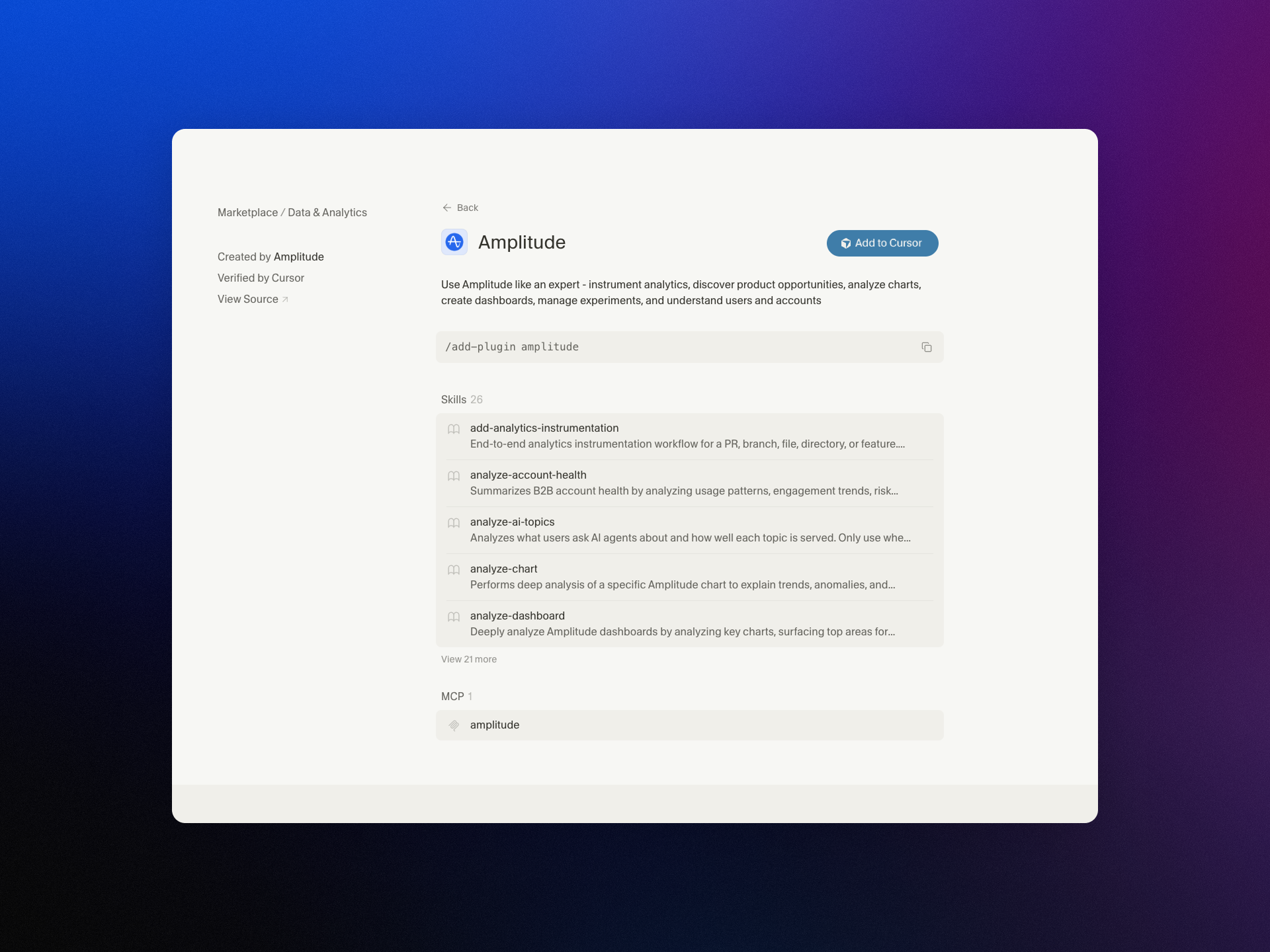
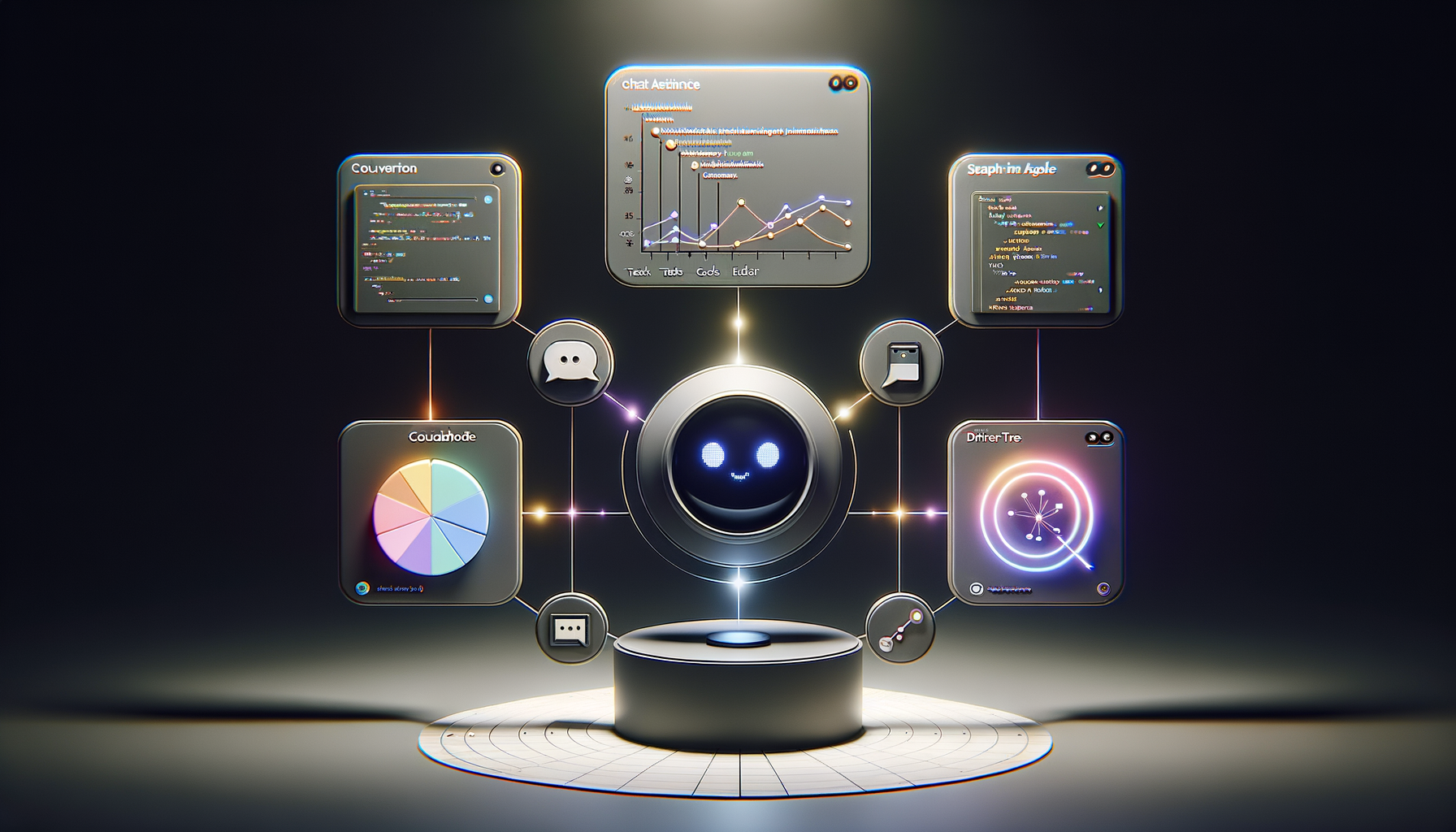
    I’m excited to share that we’ve brought Amplitude Plug and Play to the Claude and Cursor marketplaces—a lightweight way to infuse your everyday prompts with serious product analytics context and speed.

    "Learn more about our new AI plugin, the easiest way to turn your favorite AI client into an analytics expert with a single-install."

    For years, I’ve watched teams lose momentum hopping between dashboards, docs, and spreadsheets just to answer simple questions like “What changed in activation last week?” or “Which cohort is driving retention?” With Amplitude analytics and behavioral analytics at the core, Amplitude Plug and Play collapses that friction by bringing the answers to where you already think and build—inside Claude and Cursor.

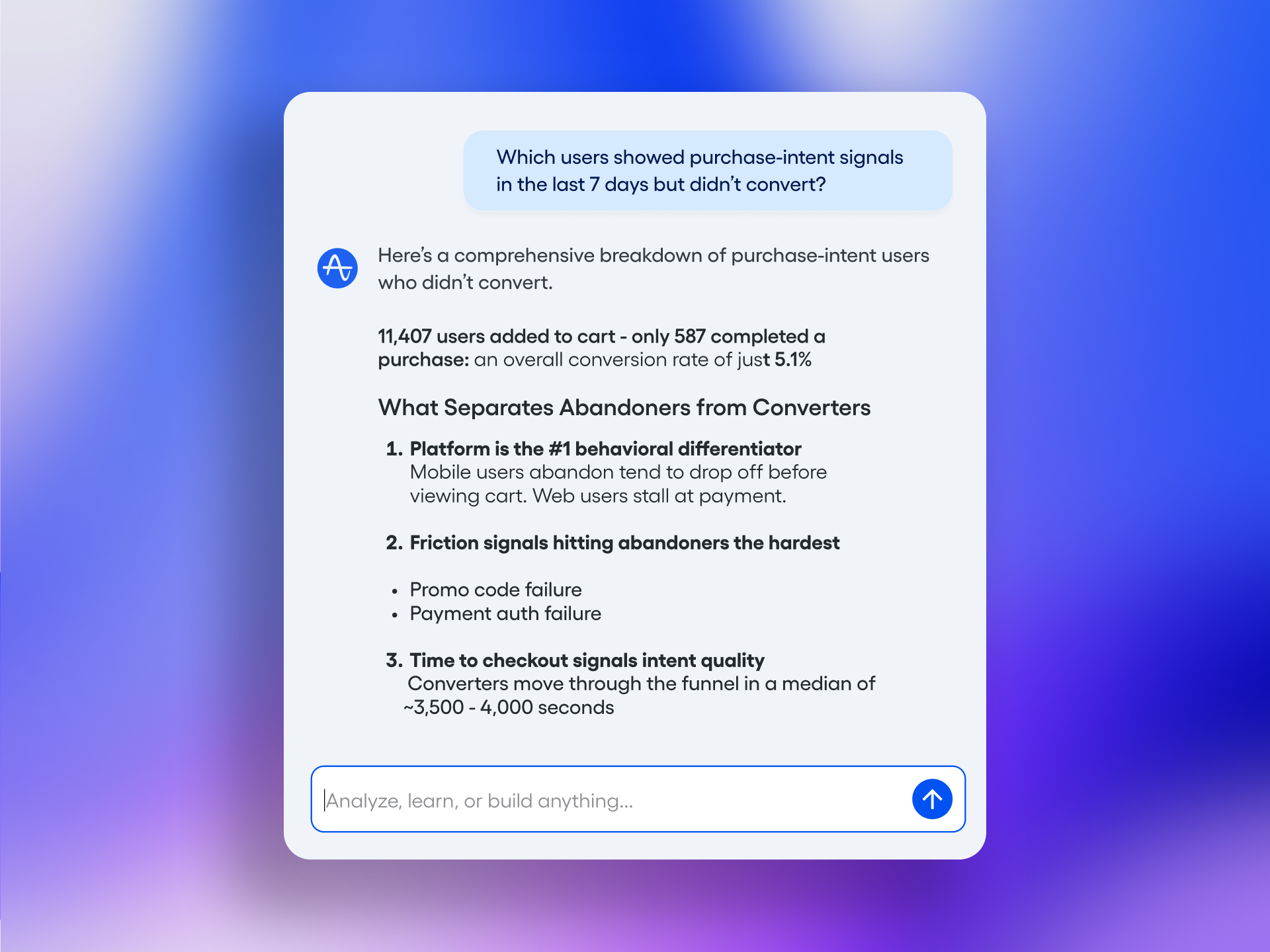
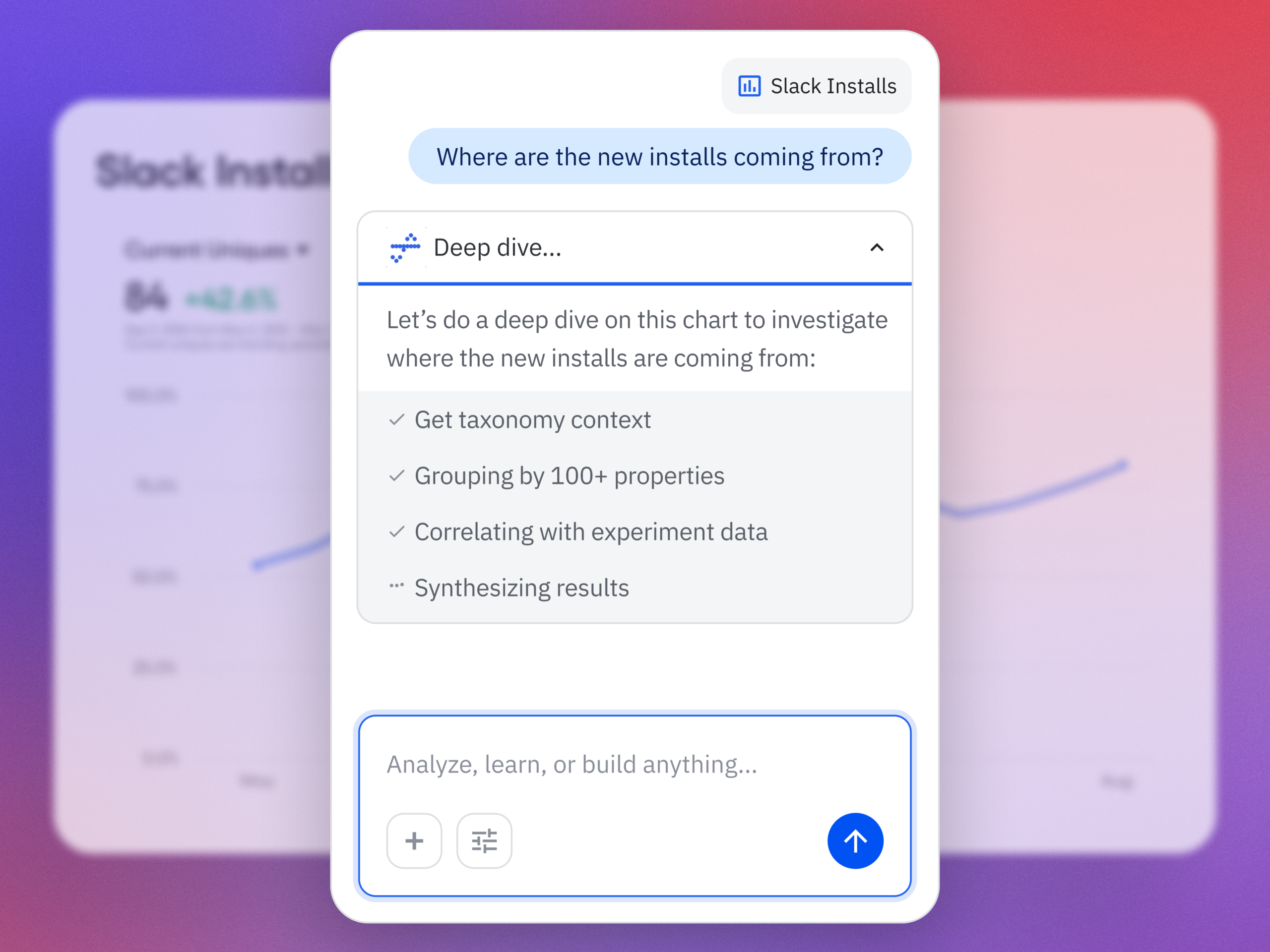
    In practice, this means I can ask natural-language questions such as “Show me the funnel from signup to activation by region,” “Compare retention week over week for new users from our latest release,” or “Summarize our last A/B testing results on onboarding” and get structured, context-aware responses. The goal is to keep me in flow while still honoring the rigor of a unified analytics platform.

    What I love most is how this elevates both discovery and delivery. Product managers can accelerate continuous discovery by querying cohorts, drivers, and anomalies mid-conversation. Engineers working in Cursor or with Claude Code can validate event definitions, sanity-check metrics, and spot regressions without leaving their IDE. The result is tighter feedback loops and better decision quality.

    Just as importantly, the experience is designed for clarity and consistency. When I ask about activation, I expect the same canonical definition every time. When I explore a retention analysis, I want clear assumptions and transparent logic. By anchoring responses to well-defined metrics and event taxonomies, the plugin helps reinforce good data governance while keeping the interaction fast and conversational.

    Getting started takes only a few minutes. Open the Claude or Cursor marketplace, search for Amplitude Plug and Play, complete the single-install flow, and connect to your Amplitude analytics workspace. From there, start prompting as you normally would—only now your AI client can reason with product context.

    This launch is part of how I see gen ai reshaping AI workflows for product teams: less context switching, more signal per prompt, and a shared, accessible understanding of what’s really moving the business. If you’re ready to turn your AI assistant into a trusted partner for product insight, Amplitude Plug and Play is a powerful next step.


    Inspired by this post on Amplitude – Best Practices.


    Book a consult png image
  • The AI PM One-Pager: Radical prototyping requirements for speed, clarity, and truth

    The AI PM One-Pager: Radical prototyping requirements for speed, clarity, and truth

    I move fastest in Generative AI when I strip work down to its essential signals. At HighLevel, I rely on a single-page format—”Prototyping Requirements: The One-Pager for AI PMs”—to turn ideas into testable artifacts within hours, not weeks. This approach reinforces AI Strategy, minimizes coordination overhead, and keeps Product Management focused on learning over ceremony.

    “Prototyping requirements go rogue: one page, zero bureaucracy, built for AI. Shape concepts fast, prompt tools directly, and get to the truth sooner.”

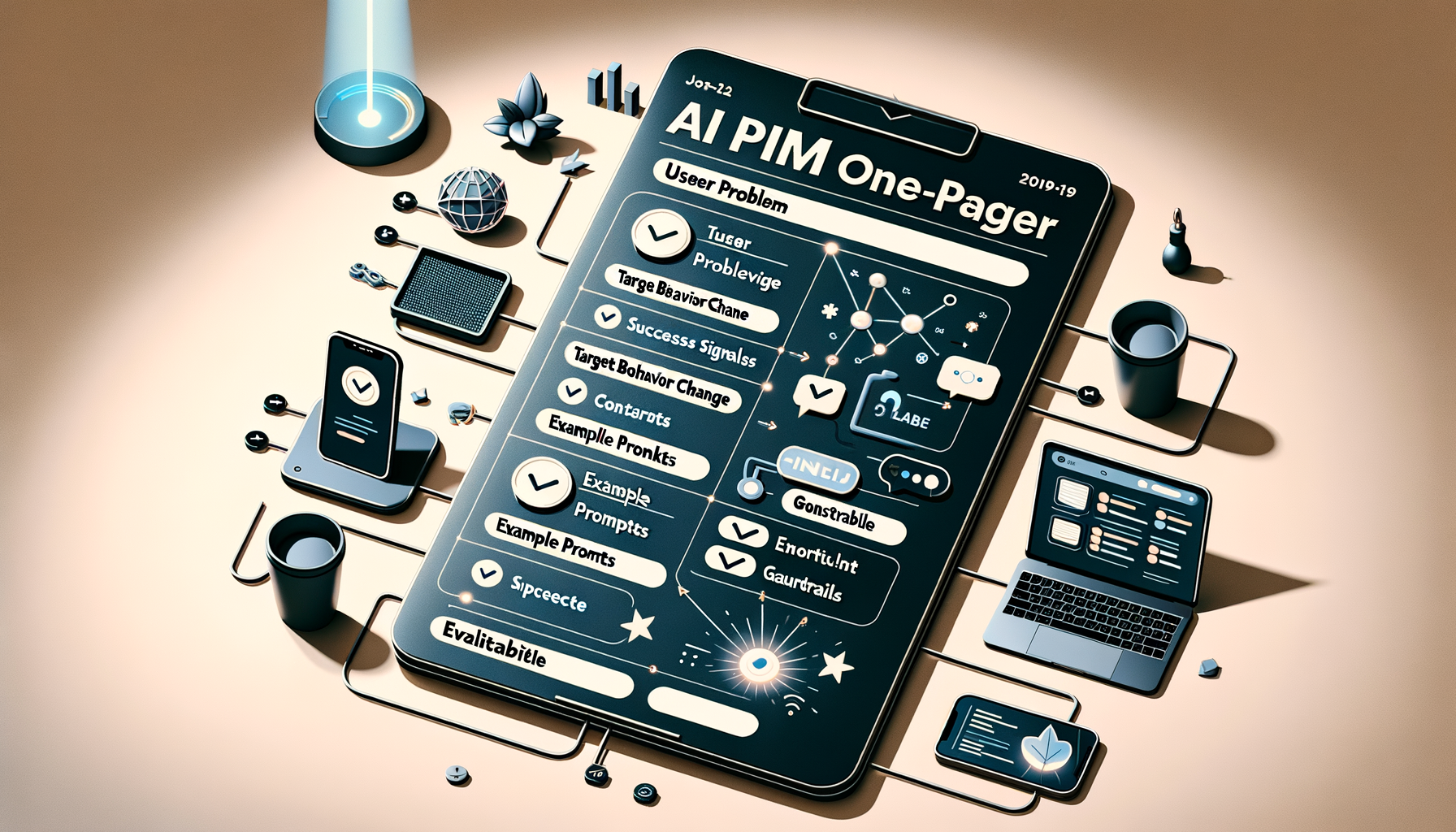
    In practice, my one-pager captures only what’s required to run an immediate experiment: the user problem, the target behavior change, success signals, core constraints, intended AI workflows, and the smallest realistic path to an evaluable demo. I also include example prompts, guardrails, and evaluation criteria so the team can apply prompt engineering and LLMs for product managers without guessing.

    This is eval-driven development in action. I document a minimal hypothesis, concrete inputs/outputs, and a quick plan for metrics, including qualitative signals from product discovery and continuous discovery. By prompting tools directly, we expose assumptions early, shorten feedback loops, and build an AI product toolbox that compounds learning sprint after sprint.

    I run this with a product trio to ensure we balance feasibility, usability, and value. We align on risks, dependencies, and what “good” looks like, then we integrate the learnings into product roadmapping and sprint planning. The result: fewer meetings, tighter collaboration, and empowered product teams delivering sharper outcomes with less friction.

    If you want speed and clarity without sacrificing rigor, adopt the one-pager. It centers the conversation on evidence, accelerates AI workflows from prompt to prototype, and makes it obvious what to try next—and what to stop doing. Most importantly, it keeps the team focused on truth over theater, which is how great AI products actually ship.


    Inspired by this post on Product School.


    Book a consult png image
  • Unleashing Inbound Sales with AI: My Playbook for Launching and Scaling Sales Agents Fast

    Unleashing Inbound Sales with AI: My Playbook for Launching and Scaling Sales Agents Fast

    Inbound leads shouldn’t wait for a rep’s calendar. When we first launched The Service Agent Blueprint, support leaders finally had a clear AI path. Go-to-market and revenue teams are now facing similar uncertainty, so I’m introducing The Sales Agent Blueprint—a practical map for launching and scaling AI for sales with confidence.

    For most sales teams, inbound motions require a lot of manual work. I’ve watched leads pile up in queues, waiting for availability rather than being prioritized by buyer intent. That delay costs meetings, pipeline, and momentum—and it’s exactly where a modern AI Strategy can transform your go-to-market strategy.

    Agents can run sales conversations end to end – engaging buyers, qualifying leads, and routing high-intent opportunities to the right team to move prospective buyers forward quickly. Humans will still be involved, but will move their focus to the consultative conversations and higher-value work they did not have time to focus on before. In practice, this shift enables cleaner AI workflows, better conversation design, and a healthier balance between sales-led growth and product-led growth.

    The questions many go-to-market and revenue leaders are facing now are where do you start? What should success look like? How do you actually test and deploy these solutions? These are the right questions—and the ones I hear most often when teams weigh build vs buy decisions, evaluation frameworks, and CRM integration nuances.

    The Sales Agent Blueprint answers those questions. It’s designed to be a strategic guide for sales, revenue, and AI transformation leaders who want to deploy AI for inbound sales fast, prove value, and build momentum. If you’re aiming for eval-driven development, this will help you define success up front and operationalize it.

    What’s inside is simple by design yet deep enough to take you from zero to value. The Sales Agent Blueprint is structured around two tracks that reflect how high-performing teams adopt agentic AI: first, launch for quick wins; next, scale for durable growth.

    Minimal blue banner for Introducing the Sales Agent Blueprint with a bold 'Scale it' headline, abstract halftone device graphic, subtle crop marks, and a 'Coming Soon' badge in the upper-right corner.
    Coming soon: Sales Agent Blueprint. A sleek, blueprint-inspired teaser with the call to 'Scale it' signals tools, playbooks, and workflows to grow revenue, streamline operations, and scale teams with confidence.

    Today, I’m releasing the first part of the Blueprint: “Launch it.” It’s a practical guide for getting your Agent live and seeing real results. You’ll learn how to deploy a Sales Agent that runs inbound sales conversations end to end, engaging buyers, qualifying leads, and routing high-intent opportunities to the right outcome in real time—without disrupting your current CRM integration or pipeline processes.

    By the end of the “Launch it” track, you’ll be ready to execute with clarity. Here’s how I frame the essential steps, based on what consistently works in the field.

    Understand what a Sales Agent is: Discover why they’re different from chatbots and how they work. Build a business case: Prove the basic economics of AI, decide whether to buy or build, and get the buy-in and budget you need to move forward.

    Evaluate an Agent: Learn how to define success, choose the right evaluation criteria, and run a focused, high-impact assessment with our five-step framework.

    Deploy with confidence: Build a deployment plan that gets your Agent live quickly to engage buyers at peak intent. Learn what to expect at each stage.

    Vector-style 'Blueprint' title on a light grid with Bézier points, plus a royal-blue panel reading '1 Launch it' next to a satellite icon; footer shows FIN.AI/BLUEPRINT/SALES promoting the Sales Agent Blueprint.
    Introducing the Sales Agent Blueprint. This crisp, grid-based graphic spotlights step 1—Launch it—signaling day-one activation for an AI sales agent. Explore the framework and get started at fin.ai/blueprint/sales.

    Continuously improve performance: After launch, your Agent becomes a system to manage. We’ll show you how to implement a repeatable process to train, test, deploy, and optimize.

    The second track, “Scale it” (coming soon), focuses on the organizational and systems design work that unlocks compounding gains. Launching AI is only the beginning. To unlock its full potential, you need to rewire your inbound sales motion—redesigning the buyer journey, building AI-first systems and ownership models, and rethinking how pipeline is generated and scaled. This is where governance, measurement, and team roles evolve to support sustainable growth.

    I’ll be building this Blueprint in public as I navigate the same challenges—sharing what works, what to avoid, and how to accelerate time-to-value without sacrificing quality or trust. If you’re ready to turn intent into revenue with agentic AI, this is your head start.

    The Sales Agent Blueprint is live now. Explore the full guide at fin.ai/blueprint/sales and start your “Launch it” sprint today.


    Inspired by this post on The Intercom Blog.


    Book a consult png image
  • From Brain Dump to Done: How Todoist’s Ramble Captures Tasks in Real Time with AI

    From Brain Dump to Done: How Todoist’s Ramble Captures Tasks in Real Time with AI

    Turning a rambling stream of consciousness into a clean task list while someone is still talking has been a longtime product dream of mine. With Ramble, Todoist brought that dream to life by using live audio AI to capture tasks in real time—no transcription step required. The result is a voice-to-task flow that feels natural, fast, and surprisingly disciplined.

    As I listened to the Doist team—Ernesto Garcia (Front-end Product Engineer), Thomas Jost (Backend Software Engineer), and Hugo Fauquenoi (Product Manager)—walk through their approach, I heard a blueprint for building pragmatic GenAI features. What began as a two-to-three month AI exploration became one of their most technically deliberate releases: a “Gemini-powered pipeline that makes tool calls while the user is still speaking, surfacing tasks on screen in real time without any text output from the model.”

    The breakthrough started with user research. People weren’t merely dictating tasks; they were doing a “brain dump” first—often into pen and paper or even ChatGPT voice—and only then committing items to Todoist. Meeting users where they already are reframed the problem: don’t force structure upfront; capture fluid thought and translate it into actionable tasks instantly.

    That insight led to a bold architectural choice: skip transcription entirely and process raw audio directly with a Gemini live audio model. By removing the brittle middleman of text, the team reduced latency and kept the model focused on one job—turning intent into structured actions. It’s a crisp example of AI workflows designed for reliability over novelty.

    The real magic is in the real-time “tool calls.” As the user speaks, the model triggers add task, edit task, and delete task operations immediately. For high-friction contexts like driving, they paired visual task cards with subtle sound effects as confirmation cues. It’s thoughtful conversation design that respects attention and safety without sacrificing speed.

    Teaching the model to capture tasks literally—without over-interpreting or trying to complete the work—required careful prompt engineering for voice and temperature tuning. Drawing a bright line between “capture versus do” kept the experience trustworthy. In my own AI Strategy work, I’ve found that establishing explicit agentic guardrails early prevents unintended autonomy later.

    Dates were the sleeper challenge. The team had to inject the current date, normalize to days vs. months, and always output dates in English for the natural language parser—while preserving the user’s original language for everything else. If you’ve ever shipped date handling across locales, you’ll appreciate how many edge cases hide in “Taming Dates and Time.”

    Quality didn’t hinge on intuition alone. They built an LLM-judge eval system using real employee recordings from 100+ people across 35 countries in 20+ languages to catch prompt regressions. That’s eval-driven development done right: representative data, repeatable scoring, and tight feedback loops as models and prompts evolve.

    For project and label matching, they chose direct context injection over RAG. Instead of building a retrieval pipeline, they injected the full project/label list into the system prompt. With smart context window management and a sharply constrained task schema, this was both simpler and more accurate. Sometimes the fastest path to product-market fit is removing moving parts, not adding them.

    One product principle stood out: easy correction beats perfect first-time accuracy. Natural language interfaces earn trust when users can fix misfires in a tap or two. That bias toward quick recovery over false precision is how you ship AI that feels useful from day one.

    Looking ahead, the roadmap is compelling: multimodal task capture from images and text blobs, Apple Watch support, and automation integrations. As voice AI agent patterns mature, this “tool-only architecture” sets a solid foundation for going from capture to coordinated execution—without losing the simplicity that makes Ramble shine.

    If you want to hear the full conversation, you can listen on Spotify or Apple Podcasts. It’s a masterclass in building focused GenAI features that trade cleverness for clarity—and still delight.

    Resources & Links: Todoist • Doist • Google Vertex AI (Gemini)


    Inspired by this post on Product Talk.


    Book a consult png image
  • Never Lose Your AI Superpowers: How I Sync Context and Skills Across Every Device

    Never Lose Your AI Superpowers: How I Sync Context and Skills Across Every Device

    I spend a meaningful portion of my week helping teams operationalize AI workflows, and one theme comes up over and over: how to share context files and skills seamlessly across devices and with colleagues. Hosting Claude Code office hours has only reinforced it—sharing context and skills is the single biggest blocker to reliable, repeatable outcomes.

    I hear from leaders driving AI adoption who have built robust, high-signal context systems and carefully crafted skills. Their challenge isn’t creating value—it’s distributing it. They need a way to make the same trusted workflows available to teammates and to keep everything in sync across laptops, desktops, and phones.

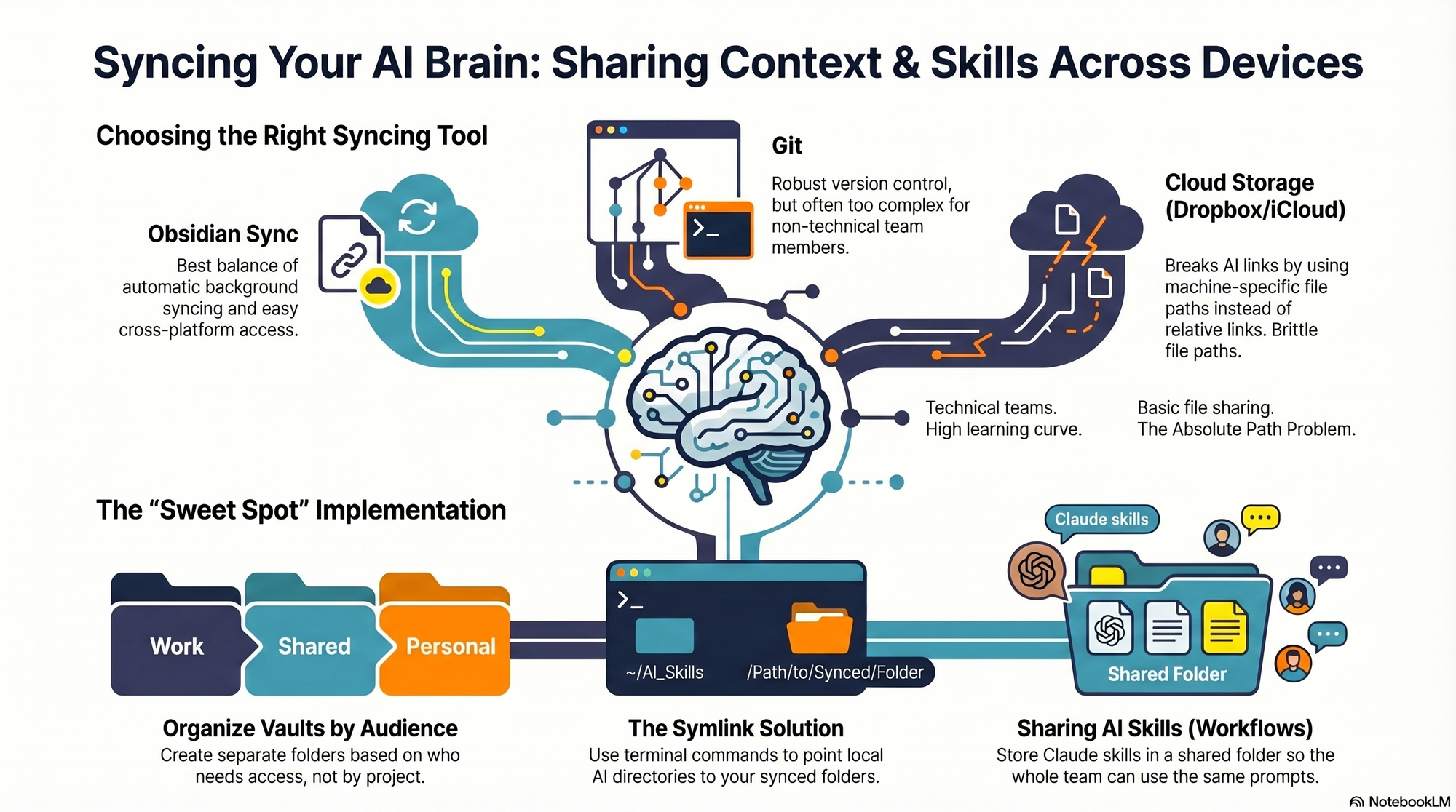
    I hit the same wall myself. I work across multiple devices (a Mac Mini for day-to-day, a MacBook Air on the road, and an iPhone) and I collaborate with a full-time admin. I wanted my context and skills to be consistent everywhere, for both of us. In this piece, I’ll share my setup—what I store where, how I share it across devices and with my team, the trade-offs of each option, and how I keep everything current. We’ll cover four different syncing services: git/GitHub, Obsidian Sync, Dropbox and iCloud.

    If you’re new to this series, this is the eighth installment. Earlier pieces provide foundational context: Claude Code: What It Is, How It's Different, and Why Non-Technical People Should Use It; Stop Repeating Yourself: Give Claude Code a Memory; How to Use Claude Code Safely: A Non-Technical Guide to Managing Risk; How to Choose Which Tasks to Automate with AI (+50 Real Examples); How to Build AI Workflows with Claude Code (Even If You're Not Technical); How to Use Claude Code: A Guide to Slash Commands, Agents, Skills, and Plug-ins; and Context Rot: Why AI Gets Worse the Longer You Chat (And How to Fix It).

    The day it really hit me was right before my interview with Claire Vo on How I AI. I was staying in an AirBnB with only my laptop, and I planned to demo my /today command along with my context file structure. Minutes before the session, I realized the latest version of my /today command wasn’t on that machine. I was able to remote into my Mac Mini and grab it—crisis averted—but it was a wake-up call. I needed a more reliable, shareable approach for syncing context and skills across devices and with my admin.

    I started by testing the tools I already used—Dropbox, iCloud, and GitHub—to see what might fit. Each got me partway there, but each also introduced friction that mattered in daily use.

    First, absolute file paths don’t travel well. I began with Dropbox but quickly ran into cross-linking headaches. Good context systems rely on rich interlinking—index files point to other context files, and those context files link to each other. When Claude creates a link from one context file to another, it tends to use the full file path: /Users/ttorres/Library/CloudStorage/Dropbox. That worked on my Mac Mini and MacBook (same user name), but not on my phone—and not for my admin. I tried to force relative links (~/Dropbox), but couldn’t get Claude to do it consistently, which led to broken links. This isn’t unique to Dropbox; Claude prefers full paths because they’re reliable on a single machine, but they’re brittle across devices and useless when sharing with colleagues. Claude is trained to use relative file paths when working within a git repository, but I struggled to get it to work reliably in Dropbox.

    Second, skills live in a user directory by default. By default, skills live in ~/.claude/skills. Most sync services aren’t designed to share your ~/ folder. iCloud is the exception, but then you’re limited to Apple devices—no Windows or Android. There is a workaround: set up a claude folder in Dropbox and create a symlink from ~/.claude to your synced claude folder, so all skills, commands, and settings live in Dropbox. Then, on each device (yours or a colleague’s), you set up a symlink to that folder so Claude can find the files. This works, but I was running into another limitation that made Dropbox a poor fit.

    Third, Obsidian on iOS doesn’t sync cleanly with Dropbox. I rely on Obsidian’s file browser alongside my notes to navigate context quickly. Storing vaults in Dropbox gave me parity across my Mac Mini and MacBook Air, but I couldn’t get the iOS Obsidian app to reliably load my Dropbox vaults. That friction was a dealbreaker for on-the-go work.

    At that point, I explored git/GitHub. GitHub is cloud storage for git repositories. A git repository is a folder of shared files used so engineers can collaborate on the same code base. Each person clones a local copy, works locally, then pushes changes back to the hosted repo on GitHub; others pull to update. Git’s merge and conflict tooling is excellent. Git is the powerhouse of file syncing and version control. It easily handles syncing context and skills, Claude behaves better with relative links in a git repo, and I can open the repo in my IDE with a clean file browser. For me, that checked all the boxes—until I factored in my admin. Git has a learning curve, requires manual pull/push hygiene, and often assumes an IDE workflow. That overhead was too heavy for a non-technical collaborator.

    The turning point was Obsidian Sync. A colleague suggested it, and it ended up being the sweet spot. Obsidian is a markdown reader; files are stored locally in a normal folder you can open in Finder or File Explorer. There’s no proprietary format—you can read files with any text editor, and Claude can access them via bash commands. Obsidian Sync is simpler than git: open a note and it syncs in the background. I can access the same vaults across my Mac Mini, MacBook Air, and iPhone, and I can share a vault with my admin so we can both create and access notes.

    Because we’re in different time zones and rarely edit the same note simultaneously, limited conflict handling hasn’t been an issue. Obsidian’s internal link notation also means one note can link to another and those links just work across devices. Claude can follow these links, so the brittle file path problem disappears.

    Here’s where I landed. After a lot of trial and error, I have a setup that works across my devices and for my admin, who uses both a Windows desktop and a Mac laptop. I keep my core context in Obsidian vaults synced with Obsidian Sync, which preserves portability, link integrity, and ease of use. For skills, I avoid scattering files in machine-specific locations and instead centralize what Claude needs to reference in shared, human-readable folders. If you require advanced version control with branching and reviews, git/GitHub is excellent. If your priority is low-friction, cross-device access for non-technical teammates, Obsidian Sync is a practical, reliable choice. And if you must use Dropbox or iCloud, consider symlinks and be vigilant about relative paths—just know that absolute paths won’t travel well.


    Inspired by this post on Product Talk.


    Book a consult png image
  • Cracking the Hardest Percentages: Turn Complex Support into Scalable, Trust-Building Automation

    Cracking the Hardest Percentages: Turn Complex Support into Scalable, Trust-Building Automation

    I’ve learned that the smallest slice of your support queue often dictates the majority of your operating cost, customer memory, and automation ceiling. In product reviews and CX ops deep-dives, I see the same pattern: the “easy” tickets pad your resolution counts, but the complex, multi-step queries quietly own your handle time and your brand trust. If you care about compounding impact, your customer support AI strategy has to target that hardest percentage first.

    Complex queries are a small percentage of your queue, but they consume a disproportionate share of your team’s time.

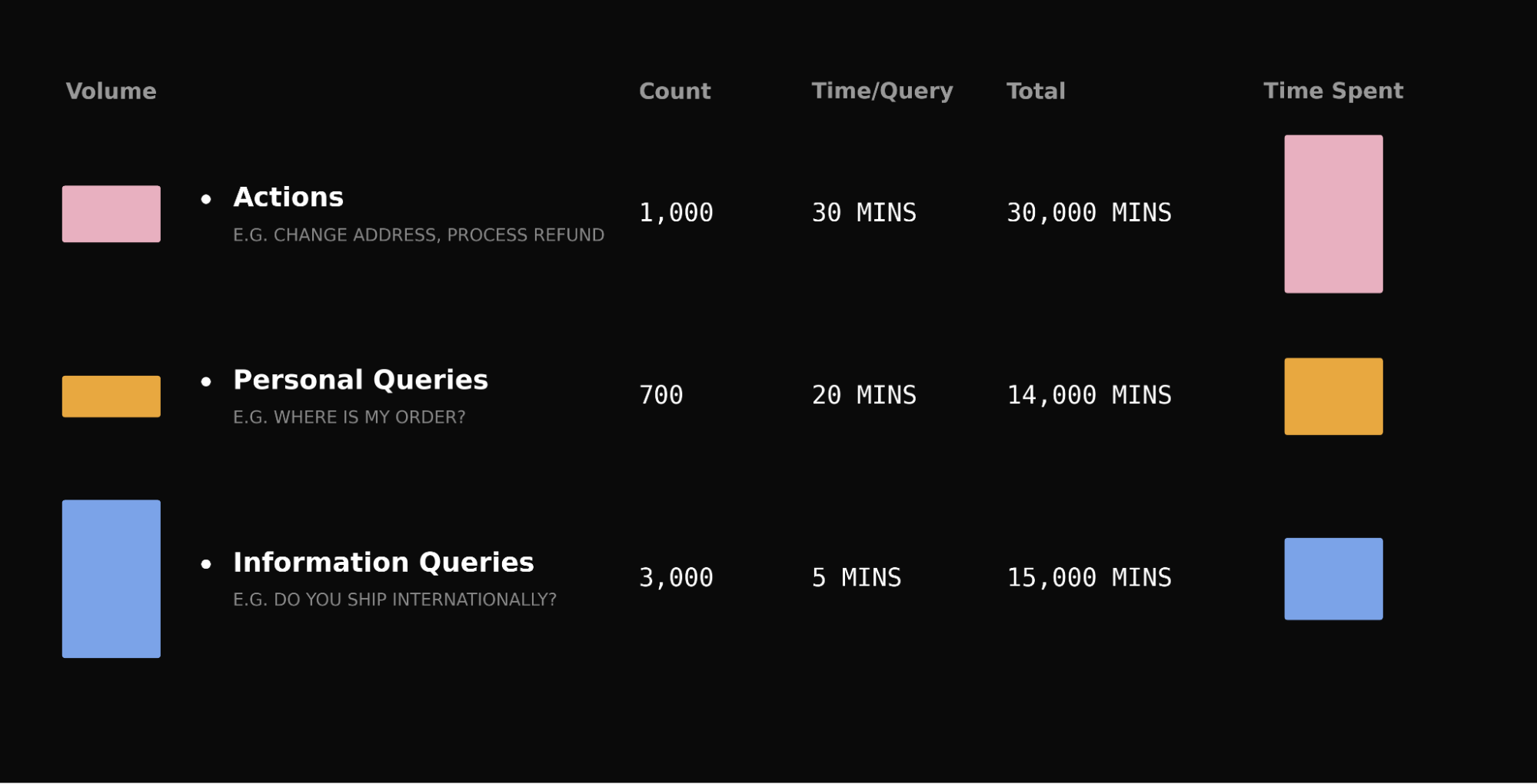
    Take a typical queue: password resets outnumber refund disputes ten to one, but a reset takes five minutes and a dispute takes thirty. The “rare” query accounts for over a third of total handling time. The same pattern holds for account investigations, subscription changes, and billing disputes.

    How you handle complex queries is also what customers actually remember about their support experience. When someone is dealing with a damaged order or a billing dispute, the stakes are higher, and a fast, good resolution is what separates a forgettable interaction from one that builds lasting trust.

    Most AI Agents automate the easy, informational queries well. The question for your automation rate is whether they can handle the hard ones. That’s where agentic AI and robust AI workflows make or break your outcomes.

    We’ve gotten really good at informational queries – the hard part is what comes next. I’ve seen teams invest deeply here, and for good reason: it lifts containment quickly and cheaply. But to break through the plateau, you have to execute actions across systems, not just answer with text.

    We’ve invested deeply in informational Q&A. We built Apex, a specialized customer service model trained on billions of support interactions, as Fin’s core answering engine. Beneath that sits a custom retrieval model, a purpose-built reranker, and a unified RAG pipeline, all trained specifically for customer service. Fin resolves issues at a higher rate than general-purpose frontier models, with fewer hallucinations and at lower cost.

    But informational Q&A only covers queries where text is the answer. Most Agents can handle that. Far fewer let you configure complex, multi-step actions without a forward-deployed engineer setting it up for you, which creates a gap.

    Every query your team handles falls into one of three categories:

    Informational: “Can you ship transatlantic by priority next day?” Answered with text from your knowledge base.

    Personalized: “Where is my order?” Requires data unique to that user.

    Action-led: “My order arrived damaged, I need a refund.” Requires doing something: checking a return window, cross-referencing transaction data, making a judgment call – reading from multiple systems and acting across them.

    Dark-themed line chart of percentages from Jan 2026 to Apr 2026. An orange line with circular markers climbs steadily, pauses briefly mid‑period, then spikes sharply to a new high near the end of the timeline.
    From Jan to Apr 2026, the trend moves steadily upward, pausing briefly before a sharp late surge. A clear snapshot of momentum for customer service KPIs, finance results, and the impact of new procedures.

    These complex queries, the ones that require multi-step processes across systems, aren’t edge cases; they’re the reason your support team exists. This is the gap Fin Procedures was built to close.

    It works in practice, and the trajectory matters for product strategy and ops planning.

    Procedures is live, it’s scaling, and the results are clear. Since launching in managed availability, Procedures has handled over 1.5 million conversations, and volume is doubling month over month across hundreds of apps in fintech, e-commerce, gaming, healthcare, and SaaS.

    When customers hit complex, multi-step queries, the experience is dramatically better when Fin can do the work end-to-end. We tested this with a randomized 5% holdout – conversations where Procedures would normally run, but didn’t. CSAT was 28.93% higher when Procedures ran, a statistically significant result.

    A product, not a services engagement. I’ve sat through too many “automation” projects that were really solutions engineering gigs: workshops, custom scripts, then a queue of change requests when policies shift. It’s fragile and slow.

    The B2B AI industry has a consultingware problem. It’s not databases being forked anymore, it’s prompts. The economics of maintaining bespoke setups per customer don’t work. Either the application falls behind new models, or the vendor changes the model and quality degrades invisibly.

    In my view, an agentic AI platform should be a product your team owns end to end: a natural language editor – literally paste your existing SOPs – branching logic, data connectors, and AI-powered simulations for testing. Your CX ops team configures this, iterates on it, owns it. If you need help, a forward-deployed team can assist, but they’re optional, not a dependency. You always have control.

    And because it’s a unified product, improvement compounds. When the vendor optimizes a prompt, every customer’s Procedures get better. When they upgrade the model, they can A/B test across the entire customer base and know it’s better before rolling out. You can’t do that when every customer has a bespoke prompt. The consulting model isn’t just expensive, it’s structurally unable to compound.

    Today, Fin Procedures is available to every Intercom customer – no waitlist or managed rollout, ready for all 8,000+ customers.

    We’re iterating fast based on real customer feedback. Here’s what’s landed since the last major update, and why it matters for reliability and governance:

    AI-powered Procedure review: Flags broken logic, missing references, and unreachable conditions before you deploy.

    Promotional banner reading "Get started with the #1 Agent today" over a dark, aurora-like gradient background, featuring a white button labeled "Start a free trial"; marketing graphic for an AI support agent.
    Kick off your journey with the #1 Agent—an AI partner designed to turn resolutions into real outcomes. Tap “Start a free trial” to explore faster, smarter customer service and see how Fin delivers value from day one.

    Procedure failure reporting: A new reporting dimension that lets you drill into conversations where Procedures failed, so you can diagnose and fix.

    Version history with rollback: Track every change, compare versions, roll back if needed.

    Data connector health monitoring: See at a glance if your integrations are healthy, degraded, or failing.

    Optional data connector parameters: Fin only asks customers for information when it’s actually needed, instead of prompting for every field.

    Email Simulation support: Test how your Procedures behave across chat and email before going live.

    Agent in the Loop (Beta) unlocks the next tranche of automation. Even with Procedures, two things hold teams back from automating their most complex queries: missing integrations and policies that require a human sign-off on sensitive decisions.

    “Agent in the Loop” is built for both. Need Fin to check your internal admin tools but haven’t built a data connector yet? Put a human checkpoint at that step. Fin handles the conversation, gathers context, and pauses, surfacing a structured summary for a human agent to verify or act, then resumes. You get automation on the 80% that doesn’t need the integration.

    For compliance – identity verification, high-value refunds – Fin does the legwork, a human makes the final call and then hands it back to Fin. This works natively in the Intercom Inbox and via Slack. Some competitors don’t have an inbox-native variant at all, meaning humans need to leave their primary workspace to review AI actions.

    Procedures are also built to let you collaborate with all your teammates – both human agents and AI Agents. Fin can work with them directly inside a Procedure, using APIs and webhooks to loop in another teammate mid-flow, hand off context, and pick back up once they’re done.

    Making it easier, faster. Procedures is already self-serve, but the next step is making Procedure creation, testing, and maintenance significantly more streamlined and easy to do, with less manual editing and more AI-assisted building and debugging. There’s a lot coming in this space over the next few months – and it aligns perfectly with a retrieval-first pipeline and stronger governance at scale.

    The hardest percentages matter the most. The biggest unlock for your automation rate won’t be answering more FAQs, it will be handling the complex, multi-step queries that consume your team’s time and define what customers remember about their experience with you.

    That means working with an Agent that goes beyond answering questions and executes processes. A product your team owns and configures, not a service you buy and hope gets maintained. And a platform where every improvement compounds across every customer. That’s Procedures. Available now, for everyone.


    Inspired by this post on The Intercom Blog.


    Book a consult png image
  • How We Taught Agentic AI to Speak Product Analytics—and Unlocked Actionable Insights

    How We Taught Agentic AI to Speak Product Analytics—and Unlocked Actionable Insights

    I set out to solve a deceptively simple problem: help our teams ask product questions in plain English and get trustworthy, analysis-grade answers—fast. That required more than a powerful model; it demanded agents that genuinely understand the language of product analytics, from behavioral analytics nuances to the messy reality of event taxonomies, funnels, and cohorts. In this post, I share how we engineered agentic AI that speaks our domain fluently and turns questions into decisions.

    The core challenge wasn’t data volume or dashboard sprawl; it was semantics. Different teams said “activation,” “onboarding,” or “first value” and meant overlapping but distinct things. Our PMs, analysts, and engineers navigated a maze of synonyms across Amplitude analytics, Pendo, and our unified analytics platform. Generic LLMs stumbled on these nuances, so we built a shared ontology—driver trees anchored to a clear North Star—with canonical definitions for activation, retention, and conversion, plus consistent event naming and cohort logic.

    We started with a rigorous metric catalog: every KPI linked to its drivers, exact formulas, cohorts, and time windows; every event mapped to a product taxonomy; every dashboard and SQL snippet versioned with ownership and lineage. That catalog became the ground truth for agents. We embedded data governance and privacy-by-design from the start—permissioning for fields and queries, PII redaction, and scoped access that reflected how product teams actually work.

    Next, we built a retrieval-first pipeline to ground the agents in our corpus before generation. We indexed metric definitions, dashboards, experiment readouts, runbooks, and high-signal Slack threads so the agent could cite relevant artifacts, not just predict plausible text. With careful context window management and prompt engineering, the agent retrieves definitions and prior analyses, then plans multi-step actions: run a query, compare cohorts, check “minimum detectable effect (MDE)” for an A/B test, and summarize findings with references.

    Architecturally, we treated this as “Agent Analytics”: an orchestrator that selects tools based on intent—querying Amplitude analytics or Pendo for behavioral paths and funnels, hitting our warehouse for cohort tables, or pulling experiment metadata and anomaly detection alerts. Tool use is permission-aware, auditable, and designed to fail safe. The agent’s outputs include citations back to the exact definitions, dashboards, and SQL used, so reviewers can validate and iterate.

    Quality came from eval-driven development, not intuition. We built a gold set of representative product questions (activation inflections, retention analysis by segment, funnel drop-offs after feature launches) and scored the agent on faithfulness to definitions, numerical accuracy, latency, and actionability. We incorporated regression checks to catch drifts after schema changes, and we tuned prompts to reduce overconfident answers and push for clarifying questions when context was missing.

    Safety and reliability were non-negotiable. We layered AI risk management with role-based access, guardrails that block destructive queries, and risk scoring for unfamiliar joins or sudden spikes in metric deltas. The agent logs every step—what it retrieved, which tools it called, and why—so analysts can replay and refine the chain of thought with transparent provenance.

    The payoff: product teams now self-serve nuanced questions in minutes instead of days, and our analysts spend more time on discovery than report wrangling. Retention analysis improved as the agent standardized cohort logic; conversion investigations accelerated thanks to consistent funnel definitions; and cross-functional decisions aligned around the same driver trees and shared language. Most importantly, the agent turned ambiguous asks into structured analyses that stand up to scrutiny.

    For fellow product leaders, my lesson is simple: start with semantics, not models. A crisp ontology, disciplined taxonomy, and clear ownership will outperform a flashy stack riddled with ambiguity. Avoid technology FOMO; favor retrieval-first grounding, small sharp tools, and continuous discovery with your product trios. When your organization speaks a common analytics language, agents can finally think with you, not just for you.

    Next, we’re extending the agent’s planning skills to recommend experiment designs, estimate power and “minimum detectable effect (MDE),” and propose driver-tree-informed bet sizing. We’re also tightening feedback loops so every accepted answer, edit, or override strengthens the retrieval corpus and evaluations. The vision: a calm, reliable layer that makes rigorous product analytics feel conversational—and helps teams move from questions to confident action.


    Inspired by this post on Amplitude – Best Practices.


    Book a consult png image
  • Stop Drowning in Tasks: How AI Marketing Agents Restore Focus and Maximize Impact

    Stop Drowning in Tasks: How AI Marketing Agents Restore Focus and Maximize Impact

    Every week I meet marketers who are working harder than ever—more campaigns, more content, more dashboards—yet seeing less movement on metrics that matter. The surge of AI tooling has amplified activity, not necessarily impact. That’s the focus problem: we confuse motion with momentum, and our backlogs look great while our outcomes stall.

    Learn how AI agents for marketing can help you prioritize impact so you can do important work, instead of just more work.

    In my role leading product and growth teams, I’ve learned that AI only compounds value when it is pointed squarely at outcomes. If we don’t define what “good” looks like, agentic AI will simply scale busywork. The antidote is a disciplined operating model that connects strategy to execution and instruments agents with clear success criteria.

    First, anchor your program with outcomes vs output OKRs. Choose one or two measurable business outcomes—such as qualified pipeline, conversion rate, or activation—and make everything else subordinate. This provides the compass agents need to make effective trade-offs when speed and volume tempt you to do “one more thing.”

    Second, map a driver tree from the target outcome down to the controllable levers: audience segments, offers, channels, messaging, and experience friction. This traceability shows where agents can move the needle fastest—whether that’s accelerating research, sharpening positioning, or eliminating handoffs that slow experimentation.

    Third, design a small, agentic AI workforce aligned to those levers. For example: a Research Agent that synthesizes market insights and past performance; a Copy Agent that generates on-brief, on-brand variants; a Distribution Agent that adapts content to each channel and schedules posts; and an Analytics Agent that runs A/B tests, summarizes results, and flags anomalies. Keep human oversight where judgment matters most—strategy, brand voice, and high-stakes decisions.

    Fourth, instrument rigor from day one with Agent Analytics and eval-driven development. Define offline evals for brand consistency, factuality, safety, and response time; pair them with online experiments that quantify lift on your target outcomes. Set a minimum detectable effect (MDE) so you stop shipping changes that cannot plausibly move the metric.

    Fifth, operationalize your AI workflows. Standardize prompts, inputs, and handoffs; templatize briefs and acceptance criteria; and keep a change log so improvements compound rather than reset. Use short, frequent feedback loops to prune low-impact work and double down on what demonstrably advances your objectives.

    I’ve seen teams reclaim focus and momentum when they treat agents as teammates, not toys. The magic isn’t in producing more assets—it’s in consistently choosing the next best action in service of a clear outcome. When you combine outcome clarity, a driver tree, targeted agents, and tight evals, AI becomes a force multiplier for marketing impact.

    If you’re feeling overwhelmed by AI’s possibilities, start small: commit to one outcome, one driver you believe is material, and one agent designed for that job. Prove lift, codify the workflow, then scale. Velocity is only valuable when it’s pointed in the right direction.


    Inspired by this post on Amplitude – Best Practices.


    Book a consult png image
  • Beat AI FOMO: A Product Leader’s Playbook to Choose Tools, Stay Focused, and Learn Deeply

    Beat AI FOMO: A Product Leader’s Playbook to Choose Tools, Stay Focused, and Learn Deeply

    Lately, it feels like every morning brings a new AI launch, a dazzling demo, or a must-try tool. I love the pace of innovation, but the constant stream can trigger counterproductive FOMO if I’m not intentional. As a product leader, I’ve learned to turn that anxiety into a disciplined learning system—one that keeps me curious without letting novelty hijack my focus.

    That’s exactly why this conversation with Petra Wille and Teresa Torres resonated with me. They explore how to stay experimental in the AI era without chasing every shiny object. Their perspective aligns closely with my own operating cadence: start with real problems, go deep on a small set of tools, and create explicit boundaries between work, learning, and play.

    Listen to this episode on: Spotify | Apple Podcasts

    Here’s the mindset I apply. I don’t start with tools—I start with problems. When I encounter concrete friction in a workflow or see a credible opportunity to improve an outcome, that’s my trigger to explore a new capability. This mirrors the continuous discovery habit of prioritizing opportunities over solutions, and it’s how I avoid performing “innovation theater.”

    To keep exploration healthy, I time-box my learning. I block recurring windows specifically for experiments, reading, and hands-on trials so they don’t overrun my core product work. During these blocks, I’ll set a clear question, run a tight test, and capture what I learned. No rabbit holes, no endless tinkering.

    I also separate “interesting” from “actionable.” Plenty of inputs are worth awareness, but very few deserve immediate action. I bookmark the rest for later. This simple filter reduces cognitive load and keeps my backlog—from ideas to proofs of concept—well-governed.

    Social media can amplify technology hype cycles, so I establish boundaries. I batch consumption, mute low-signal channels, and prioritize practitioner communities over performative threads. The goal isn’t to be first; it’s to be right for my customers, my team, and our strategy.

    When choosing what to try next, I use a practical rubric. Does the tool target a real friction I’ve seen in discovery or delivery? Can it plug cleanly into our AI workflows without unsustainable glue work? Do we have a safe, compliant way to test it? Is there a plausible path from trial to compounding value? If the answer isn’t a confident yes to most of these, I wait.

    Depth beats breadth. I’d rather take one promising tool into a real use case, instrument it, and measure outcomes than skim ten trending demos. That tighter loop produces sharper intuition, clearer product bets, and better partner decisions. A quick opportunity solution tree helps me connect user pain to outcomes before I let any solution onto the field.

    In the episode, Petra Wille and Teresa Torres talk candidly about managing FOMO, deciding which tools to explore, and designing intentional learning systems. They discuss why starting with a problem is more valuable than starting with a tool, how social media amplifies technology FOMO, and why going deeper with fewer tools can lead to better learning. If you’ve ever felt like you’re falling behind because you haven’t tried the latest AI tool yet, this conversation will help you rethink how you approach learning and experimentation.

    If you’re curious about what came up, here are some of the tools and communities mentioned: Claude Code, OpenClaw (formerly Clawdbot, Moltbot), NotebookLM, Product Talk, ElevenLabs, Lenny’s Newsletter Community, and even a nod to Bridgerton for a touch of levity.

    My takeaway is simple but powerful: curiosity doesn’t require constant experimentation. The best product managers cultivate a balanced system—grounded in product discovery, energized by focused experiments, and protected by clear boundaries—so we can learn faster while staying pointed at outcomes that matter.

    Discussion Question: How do you decide which new tools or technologies are worth exploring—and which ones you can safely ignore?

    Resources & Links: Follow Teresa Torres: https://ProductTalk.org | Follow Petra Wille: https://Petra-Wille.com

    Full transcripts are only available for paid subscribers.

    Have thoughts on this episode? Leave a comment below.


    Inspired by this post on Product Talk.


    Book a consult png image
  • Never Stop Disrupting: Why the Fin API Platform Signals a New Era for Agentic AI

    Never Stop Disrupting: Why the Fin API Platform Signals a New Era for Agentic AI

    Disruption is the only sustainable strategy in product. When a platform meaningfully changes how we build and operate, I pay attention—not just as a product leader, but as someone accountable for turning AI Strategy into durable competitive differentiation. That’s why the launch of the Fin API platform stands out: it’s a concrete step toward agentic AI at enterprise scale.

    Today, I’m diving into what this launch includes, why it matters for product strategy, and how I’d navigate the build vs buy decision in this new landscape. My goal is to translate the announcement into actionable guidance for product teams, CX leaders, and forward-deployed engineers who are building the next generation of customer support and product-led experiences.

    Fin is a customer agent platform that at present resolves over 2M customer issues a week, growing at a rapid exponential pace. It’s relied on by the best brands, large and small, in every vertical you can imagine. From Atlassian and Riot Games, to smaller hot upstarts like Mercury and Polymarket. It runs on a family of models trained by its AI group. Last week, they announced Apex, which is the world’s first specialized customer service LLM. In production tests over the last 6 months, it beat every single frontier model, including those from Anthropic and OpenAI, on resolution rate, latency, hallucination rate, and cost.

    With this launch, teams can access the platform’s core capabilities and underlying models directly via API, with contracts starting at $250k per year, and usage rates that are by far the cheapest in the industry for each of the model’s subcategories. For leaders evaluating total cost of ownership, this is a meaningful data point: it shifts the economics of scaled automation from experimental to operational.

    Why now? Because builders want options. I hear from teams daily that want to design their own agents, tune prompts and policies, and integrate with bespoke CRMs, data lakes, and product surfaces. The Fin announcement meets that demand with three clear build-paths, each mapping to a different operating model and maturity stage.

    First, for the vast majority of companies, the Fin Agent Platform is the pragmatic starting point. Fin reports ~8k companies on it today. It addresses 99% of customer needs out of the box—without exhausting consulting engagements—while delivering top-tier resolution rates. If your priority is time-to-value, governance, and platform scalability, this route de-risks implementation and accelerates outcomes.

    Second, for teams that need custom surfaces or channels, the Fin Agent API lets you present Fin in unique contexts. You get the Fin platform’s orchestration and controls, but you’re free to bypass the default messenger, email, voice, or any prebuilt channel and embed the agent natively in your product. I see this as the sweet spot for product-led growth motions where conversation design and UX writing are strategic levers.

    Third, for companies building hyper-specific agents—think service plus in-product actions—the new API access to Apex and the broader collection of models is the obvious move. Unlike generalized models, these are purpose-trained for customer service scenarios and operational policies. If you have strong in-house solutions engineering, a retrieval-first pipeline, and eval-driven development in place, this path maximizes control without reinventing the model layer.

    This also opens the door for vertical specialists. Fin-like businesses focused on deep domains can emerge quickly—Fin for dentists? Why not? Fin for car dealerships? Sure. I expect startups and modern CX providers (including players like Decagon and Sierra) to carve out niches where domain data, workflows, and compliance are the real moats. That’s where differentiated AI beats generic capability.

    There’s a defensive reason to pay attention here. The software landscape is shifting fast: the moat is no longer feature parity—it’s the quality of your agents and the data flywheels powering them. Building software is simply less hard now, and I’ve watched engineering teams more than double measurable productivity as they adopt AI-assisted development. The implication is clear: the interface-and-features era is giving way to an agents-and-outcomes era.

    Serious software companies must evolve from being a features company to an agents company—and build those agents on differentiated AI. More value will accrue at the model and orchestration layers, where safety, latency, cost, and resolution quality are won. That puts a premium on prompt engineering discipline, policy routing, continuous discovery of edge cases, and rigorous offline/online evals to keep hallucination rates low while maintaining speed.

    How would I choose among the three build-paths? If you’re early or resource-constrained, start with the Fin Agent Platform to validate outcomes and align stakeholders. If you need branded experiences and tighter product integration, use the Fin Agent API to control surfaces without owning the heavy lifting. If you have strong ML ops and a mature customer support ai strategy, go model-level with Apex and companions, layering in your own guardrails, context window management, and test harnesses. In each case, balance velocity, control, and risk—your build vs buy decision should be grounded in clear metrics and an explicit product strategy.

    Where does this lead? We’ll see more companies expose specialized model families with clearer economics and stronger governance. For now, I’m excited to see what teams build with the Fin API platform—and how they turn agentic AI into measurable improvements in resolution rate, CSAT, cost-to-serve, and ultimately, customer loyalty.


    Inspired by this post on The Intercom Blog.


    Book a consult png image
  • Inside Banani: How a Canvas-First AI Designer Elevates UX and Accelerates Product Teams

    Inside Banani: How a Canvas-First AI Designer Elevates UX and Accelerates Product Teams

    I believe the future of product design isn’t about replacing designers—it’s about giving every team access to one. That’s why Banani grabbed my attention. It’s an AI product designer that doesn’t just generate code—it generates design. For solo founders, stretched design teams, and early-stage startups, that shift matters: it raises the design floor without lowering the creative ceiling.

    I spent time with Vlad Solomakha (CEO & Co-founder), Vova Kovalchuk (CTO & Co-founder), and Vlad Ostapovats (Founding Growth) to unpack how they took Banani from a Figma plugin proof-of-concept to a canvas-first AI design tool generating hundreds of thousands of designs per week. Vlad brings a decade of design experience and a precise north star: AI should produce beautiful, tasteful design rather than average, undifferentiated UI.

    The architectural choices stood out. They engineered their agent to handle parallel screen edits, manage per-screen context across canvases with hundreds of frames, and make surgical edits without regenerating entire screens. This is the kind of agentic AI work that product leaders have been waiting for: concrete advances in context window management, tool orchestration, and prompt engineering that translate into higher throughput without sacrificing quality.

    Equally important is how they addressed the "gulf of specification"—the mismatch between how designers think visually and how agents understand text. Banani’s canvas-first approach acknowledges that design is spatial, hierarchical, and iterative. Rather than forcing a chat-first UX, they center the canvas and let the agent do production work while keeping the designer firmly in control. In practice, this narrows intent ambiguity, speeds up iteration, and preserves taste.

    The team made another pivotal bet: Why Banani doesn’t compile running applications — just HTML/CSS mockups — and how that shapes everything. By decoupling the design artifact from runnable code, they optimize for velocity, taste, and exploration. In my experience, this separation is the right product strategy for early discovery and gen ai for product prototyping—move fast on aesthetics and flows, then converge on implementation once you’ve validated the direction.

    I also appreciated their pragmatic evaluation approach. Instead of traditional evals, they spin up 10 screens from one prompt to compare models. It’s hands-on, outcome-based, and aligned with eval-driven development in real product environments. They’re relentlessly discerning about when to work around model limitations versus when to wait for the models to improve—an essential discipline when building at the edge of what’s possible.

    Under the hood, context engineering and specialized agent tools do the heavy lifting. Per-screen history with shared project context enables precise, reversible changes across large canvases. The result: fewer destructive regenerations, more reliable design intent preservation, and a workflow that feels like collaborating with a strong mid-level designer who’s exceptionally fast and consistent.

    If you want a quick tour, I recommend jumping to a few highlights: 20:13 Product Tour Canvas First AI, 33:40 Gulf of Specification, 42:54 Agent Architecture Under Hood, 48:48 State History Context Tricks, and 56:04 Navigating Busy Canvases. Each segment reveals a different layer of the system design and product thinking behind Banani’s canvas-first UX.

    For product leaders, this is a compelling blueprint for raising the design floor while protecting the last mile of craft. It aligns with empowered product teams, continuous discovery, and LLMs for product managers who need leverage without losing judgment. If you’re exploring agentic AI in design, this is a thoughtful, execution-focused model worth studying and trialing on your next product tour or redesign.

    Resources worth exploring: Banani and TL Draw. To hear the full conversation, you can listen on Spotify or Apple Podcasts. Then, pressure-test the approach inside your own product development lifecycle and see how a canvas-first AI designer reshapes your team’s velocity and quality bar.


    Inspired by this post on Product Talk.


    Book a consult png image