When I guide teams building agentic AI features, I’ve seen a single prompt turn Amplitude Global Agent into either a world-class analyst or a well-meaning rambler. The difference isn’t magic—it’s method. With the right structure and iteration, we consistently get faster, clearer insights that stand up to product and analytics scrutiny.
AI has gotten really good, but success still depends on the quality of your prompts. Explore three best practices for prompting in Amplitude Global Agent.
Tip 1 — Define the role, goal, and guardrails. I begin every prompt by stating the agent’s role (for example: “You are a product analyst”), the business objective (“identify activation drop-offs by cohort”), and the boundaries (“use only Amplitude analytics events and properties provided; return JSON with metric, segment, timeframe”). This simple pattern reduces ambiguity, improves context window management, and yields outputs I can compare across runs.
Tip 2 — Ground the model with concrete context and examples. Agent outputs improve dramatically when I supply the exact data it should reference: event names, properties, segments, filters, and timeframes. I often include a short example—one ideal question and one ideal answer—to anchor tone, structure, and depth. Think retrieval-first pipeline: feed the agent authoritative snippets (definitions, dashboards, prior queries) rather than hoping it guesses. That’s how I cut hallucinations and make results reproducible for LLMs for product managers.
Tip 3 — Iterate with measurement, not vibes. I version prompts, A/B test variants, and log inputs/outputs so I can score quality with lightweight evals (accuracy against known answers, clarity, and actionability). Over time, a small library of “winning” prompts emerges for common AI workflows—activation analysis, retention cohorts, anomaly detection—so the team can move from tinkering to repeatable performance. This is where Agent Analytics practices pay off: we inspect outcomes, not just outputs.
A practical starter structure I use: Role and Audience; Objective and Success Criteria; Data Context (events, properties, segments, timeframe); Constraints (sources, methods, privacy); Output Format (tables/JSON, fields, length); Examples (one good Q/A); and Fallbacks (what to do when data is insufficient). Even written as plain language, that scaffold reliably steers Amplitude Global Agent to precise, defensible answers.
The emotional arc here is familiar: when the agent nails a complex funnel question in one pass, the team gets that “oh wow” moment; when it meanders, morale dips. Clear prompting turns those spikes of delight into a steady cadence of wins—less rework, faster learning loops, and cleaner handoffs from discovery to delivery. In short, invest in prompt engineering once, and you compound gains across every analysis session.
If you’re just getting started, pick one critical question (for example, activation or retention), apply the three tips above, and commit to two to three prompt iterations with scoring. Within a single sprint, you’ll have a robust template you can reuse and adapt—helping Amplitude Global Agent deliver trustworthy insights at the speed your product strategy demands.
Inspired by this post on Amplitude – Perspectives.
When teams evaluate AI Agent options for customer service, I often see the rigor aimed at the wrong subset of criteria. After leading and observing dozens of proof of concept (POC) efforts with our customers and prospects, I understand why performance—accuracy scores, resolution rates, and benchmark tests on curated datasets—soaks up most of the attention. But those indicators alone won’t guarantee success once you leave the sandbox and face real customers.
If your POC only proves that the AI “works,” you’re missing the bigger picture. Here’s what else I look for to make the best long-term decision.
How does it handle your real-world setup?
Performance is table stakes, but it has to reflect the messiness of an actual support environment. The best-performing Agents don’t just get answers right—they exhibit resilient, human-like behavior under pressure. I watch how the Agent behaves when it doesn’t know an answer: does it recover or spiral? Does it stay on track through multi-step requests, and how gracefully does it hand off to human agents? If your knowledge base depends on a retrieval-first pipeline, test cross-source retrieval and grounding—not just single-document lookups.
When I build evaluation scenarios, I put the Agent through its paces with a broad, realistic mix:
Multi-turn queries that require the Agent to carry context across a conversation, not just answer isolated questions.
Vague or fragmented inputs, like typos, grammatical errors, and incomplete questions, because that’s how customers actually write.
Edge cases and sensitive scenarios, like billing disputes, frustrated customers, and questions that sit at the boundary of what the Agent is trained on.
Different phrasings of the same question. An Agent that handles one version well but fails on a rephrasing has a knowledge problem, not a performance problem.
Queries that require pulling from multiple knowledge sources. Real issues are rarely answered by a single help article, and an Agent that can only handle single-source questions will hit a ceiling fast.
Multilingual conversations, if your customer base requires it. Performance can vary significantly across languages and it’s better to discover that in testing than in production.
This preparation is worth the effort. Any Agent can look impressive in a demo; what matters is how it holds up as part of your team, serving your customers in production.
What does it feel like to interact with the Agent?
Two AI Agents can post the same quantitative scores—resolution rates, containment rate, and more—and still deliver very different customer experiences. Resolution rate tells me whether the Agent finishes conversations; it says nothing about how customers felt during them. I deliberately assess the experience, not just the outcome, because conversation design shapes trust and brand perception.
Here’s what I look for to ensure the AI Agent is enjoyable to interact with:
Is the tone natural and on-brand, or does it feel robotic and generic?
Does it build trust early in the conversation, or does it create friction that makes customers want to immediately request a human?
When it doesn’t know the answer, does it handle that gracefully?
When it hands off to a human, is that transition seamless, or does the customer feel abandoned?
As George Dilthey at Clay put it when evaluating their AI setup: “Keep what’s important to your business up front and center. For us, that was transparency and control over the customer experience.”
That framing is exactly right. The Agent represents your brand in every conversation. Customers don’t experience “accuracy,” they experience conversations. An Agent that’s technically accurate but tonally off-brand will erode customer trust over time.
I make the experience dimension explicit in my POCs. I have people on my team—and when possible, a small cohort of real customers—interact with the Agent under realistic conditions. Then I ask how it felt, not just whether it worked.
Can you keep improving it after launch?
This is the dimension most teams don’t evaluate at all, and it’s possibly the most important one. Choosing an Agent that works today and ensures you can continuously improve the customer experience over time requires more than a functional demo. You’re buying a system that must get better every week, not just during the first sprint.
The feedback loop
Can your team easily review conversations and identify where the Agent is underperforming? Can you pinpoint specific gaps (missing knowledge, incorrect tone, poor handoff decisions) and act on them quickly? The faster the loop between “something isn’t working” and “we’ve fixed it,” the more value compounds over time. In practice, that means instrumenting conversations, leveraging Agent Analytics, tagging misroutes and tone slips, and running targeted evals on known failure modes.
The speed of iteration
When you identify a gap, how quickly can you address it? This is partly a question of tooling (how easy is it to update knowledge, refine guidance, adjust behavior?) and partly a question of team capability. The teams getting the most out of AI are the ones that have changed how they operate and made continuous improvement a part of their everyday work. They’ve committed to going all-in for the long term, not just the first few weeks when launching their AI Agent. We treat this as eval-driven development: automate evaluations that mirror real tickets, tighten prompt engineering and retrieval settings, and ship small fixes daily.
The vendor partnership
The vendor behind the Agent matters just as much as the solution itself. You’re choosing a partner for transformation that will help you evolve how your business delivers customer experience. Ask:
How does customer feedback influence the product roadmap, and can they show you examples?
If you have feedback on limitations or weaknesses, do they engage transparently or get defensive?
What kind of support will you get post-launch?
Are they shaping where AI customer experience is going, or reacting to what others are building?
How a vendor responds to those questions tells you more about the long-term relationship than any benchmark result.
What a good POC proves
If your POC only proves “the AI works,” you haven’t done enough. A strong proof of concept tests performance in realistic conditions, evaluates the experience from the customer’s perspective, and validates the system that will support continuous improvement after launch. Done well, it sets you up for long-term operational success and builds organizational AI readiness—not just a flashy demo.
Default prompts are quietly sabotaging agent retention. I learned this the hard way while reviewing early funnels for our voice and chat agents—engagement looked great at the greeting, but the moment the agent stopped after a single reply, the conversation flatlined. The fix wasn’t a fancy LLM trick; it was a disciplined second message and a rigorous audit of defaults across every entry point.
When an AI agent opens with a generic, low-friction greeting and then waits, users hesitate. Cognitive load rises, intent stays fuzzy, and drop-off follows. A thoughtful second message—delivered quickly, with clarity and options—reduces ambiguity and gives people a low-effort path to progress. It’s a small behavioral nudge that pays off in outsized retention gains.
Here’s the pattern that consistently works for me. First, keep the initial default prompt short, confident, and specific to the channel and task domain. Then ship a fast follow-up if the user hesitates for a few seconds. That second message should clarify what the agent can do, present 2–3 concrete choices, and invite free-form input. I’ve repeatedly seen this simple sequence unlock a 2–3x retention lift in early sessions, especially for first-time users.
Auditing default prompts is where the leverage lives. I inventory every ingress—web widget, IVR, SMS, in-app, help center—and catalogue the exact default system, developer, and user-facing prompts. Then I inspect turn-1 and turn-2 transcripts in Agent Analytics to quantify where users stall: time-to-first-intent, clarification rate, option selection rate, and completion. This makes the drop-off visible and turns “vibes” into data we can A/B test.
Designing the second message is a conversation design exercise, not a copy tweak. My recipe: empathize with the user’s likely uncertainty, constrain scope so the agent appears capable, and apply choice architecture. For voice AI agents, I keep it shorter, use confirmation questions, and bias toward read-back for accuracy. For chat, I include tappable options and examples that mirror top intents. The goal is momentum without feeling pushy.
Operationally, I run controlled A/B tests on default and second-message variants, sized to a realistic minimum detectable effect. I segment by source (ad, organic, support), device, and use case, because the winning prompt for sales qualification rarely matches the one for customer support. With proper instrumentation in our analytics stack, we track retention curves over the first 3–5 sessions, not just single-session reply rates, to avoid optimizing for chatter over outcomes.
Strong prompt engineering underpins the experience. I keep system prompts stable and explicit about persona, tone, and refusal behavior; manage the context window so examples don’t drown live intent; and use a retrieval-first pipeline when domain knowledge matters. The most expensive mistake I see is shipping defaults like “How can I help you?” without guardrails or examples—great for demos, bad for real users.
If you’re starting fresh, begin with a prompt audit this week: list all defaults, map them to top intents, and pair each with a channel-appropriate second message. Instrument the funnel, launch two variants, and set a crisp success metric (e.g., turn-2 continuation rate to task start, then task completion). This is one of those rare changes that is simple to ship and compounds across onboarding, activation, and long-term retention.
The takeaway is straightforward: don’t let your best work stall after the first reply. A disciplined second message and a focused default prompt audit will lift engagement, reduce ambiguity, and create the kind of early momentum that sustains retention over time.
Inspired by this post on Amplitude – Perspectives.
Old-school, in-person selling is having a renaissance in the AI era, and I’ve seen why up close. From leading product and go-to-market teams through hypergrowth, I keep returning to one lesson: enterprise buyers still reward the teams who show up, orchestrate change management, and own outcomes end-to-end. The tech has changed; the human dynamics haven’t.
Has the sales playbook changed in the AI era? The tools are faster and the surface area is bigger, but the core motion remains the same: “showing up” beats letting the marketplace decide. That’s why in-person enterprise rollouts still beat product-led motions, especially when the stakes include security, governance, and cross-functional adoption. You win by reducing organizational risk, not by assuming free trials will do the heavy lifting.
Great enterprise sellers collapse silos. They sell to engineers and executives in one motion, pairing deeply technical validation with crisp business narratives. In my org, that means every high-velocity pilot has a dual thread: hands-on, eval-driven proof for the builders and a value architecture for the budget owners. When those motions run in parallel, time-to-value plummets and procurement friction fades.
Selling to AI-native buyers who grew up on ChatGPT changes tempo, not fundamentals. The same seller, different tempo: 8 weeks vs. 8 business days. These buyers evaluate fast, expect clear ROI, and push for automation-first workflows. How AI-native buyers handle build vs. buy decisions comes down to build for differentiation and buy for acceleration. If you make procurement feel like product—frictionless, instrumented, and transparent—you’ll meet their bar.
Process matters, but humanity wins. Building a robust sales process that still leaves room for unscripted moments is where trust is formed. I’ll never forget the story of the rep who taught a champion’s son guitar over Zoom—an unscripted moment that cemented a partnership. The lesson: raise the floor without capping the ceiling. Equip every rep with repeatable plays, then celebrate the creative instincts that make champions out of customers.
In early GTM, why the three highest-leverage early sales hires aren’t sellers at all resonates with my experience. I prioritize a solutions engineer who can de-risk integration, a forward-deployed operator who can run the first rollout like a product manager, and a customer success lead who designs adoption paths from day zero. Together, they compress the value journey from proof to production.
Compensation design shapes your talent market. The case for outsized commission accelerators for star sellers — and the kind of person they attract is real: magnets for competitors who close complex, multi-threaded deals and thrive with ownership. But beware: why too much process narrows the kind of seller you attract. Over-script it and you filter out the very people who can navigate ambiguity with customers.
Under the hood, instrumenting the funnel from stage zero to close keeps the system honest. I track intent signals before pipeline, conversion by persona and use case, proof milestones, and time-to-value in production. The three pillars of GTM excellence for me are repeatable discovery, referenceable outcomes, and relentless enablement. And inside the leadership team, building peers who are 80% aligned, not 100% preserves healthy tension while keeping execution fast.
AI is expanding the definition of enablement—whether AI is changing what good enablement looks like isn’t a theoretical question anymore. I see world-class teams arming reps with retrieval-first knowledge bases, sandbox environments, and objection libraries that evolve weekly. Meanwhile, selling against direct and implied competitors at once is the norm: your battlecard must cover “do nothing,” internal tools, adjacent categories, and new AI entrants—while you still remember why in-person enterprise rollouts still beat product-led motions for durable adoption.
Planning horizons tighten in AI markets. How far out should a GTM leader be planning? I work a dual cadence: a rolling 6-week operating plan that’s ruthlessly tactical and a 2–3 quarter roadmap for coverage, enablement, and category storytelling. What a normal week looks like in hypergrowth blends customer time, pipeline triage, onboarding and enablement, deal engineering, and process tuning—always with one or two high-conviction bets that could bend the curve.
If you’re scaling an AI product today, pair a disciplined sales-led growth engine with the best of product-led growth: fast paths to proof, hands-on validation for builders, executive-level value mapping, and human moments that turn customers into advocates. That’s how you compress an eight-week cycle into five business days—and keep the expansion flywheel spinning.
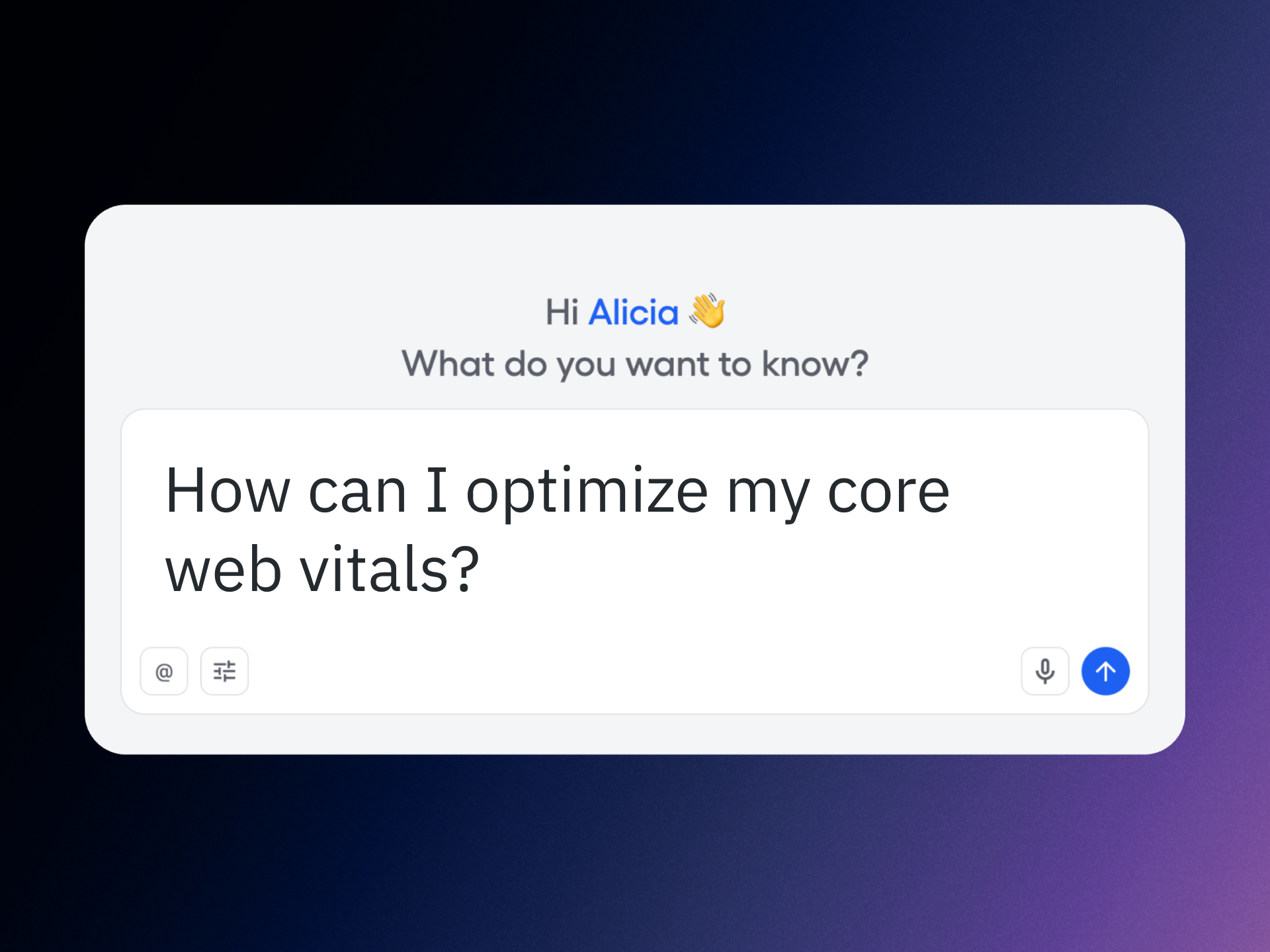
I measure product health by a simple equation: speed plus clarity equals trust. That’s why I prioritize Core Web Vitals and search performance together—because the fastest path to better UX and higher rankings is a closed loop between measurement, diagnosis, and action. Standardizing on Amplitude’s Global Agent with Amplitude AI Agents let my teams compress that loop from weeks to hours, and in many cases, to minutes.
Learn how to track your web vitals and page rankings faster with Amplitude AI Agents and improve your site’s user experience and SEO rankings. That goal sounds ambitious, but with the right instrumentation and analytics workflow, it becomes a repeatable operating rhythm rather than a one-off project.
Here’s what changed for us with Amplitude’s Global Agent: a single, consistent way to capture performance signals across pages and journeys, unified context for every session, and a lightweight footprint that doesn’t get in the way of speed. By centralizing measurement, we eliminated blind spots and gave product, growth, and engineering one shared truth for Core Web Vitals and behavioral analytics.
My practical playbook is straightforward: 1) Establish a performance baseline for Core Web Vitals on key templates and critical user paths. 2) Segment results by device, location, acquisition channel, and content type to surface where users actually feel the friction. 3) Connect those vitals to downstream behaviors—scroll depth, engagement, and conversion—so we prioritize fixes that move business outcomes, not just lab scores. 4) Use feature flags and A/B testing to ship improvements safely and quantify uplift. 5) Close the loop with Agent Analytics to keep learnings visible and actionable.
Operationally, we rely on anomaly detection to flag regressions early, CI/CD guardrails to prevent performance slips at deploy time, and observability plus session replay to accelerate root-cause analysis. This combination reduces mean time to resolution, protects page experience during fast iteration cycles, and helps us avoid trading UX for speed—or vice versa.
The strategic benefit is compounding: better Core Web Vitals improve user perception and increase engagement, which strengthens SEO signals and, ultimately, page rankings. With a unified analytics platform in place, we can spotlight the few improvements that create outsized gains, then scale those patterns across the site with confidence.
If your roadmap includes faster pages, stronger rankings, and happier users, align your teams around this simple loop: measure precisely, diagnose quickly, experiment safely, and learn continuously. Amplitude’s Global Agent and Amplitude AI Agents give you the instrumentation and insight to make that loop your competitive advantage.
Inspired by this post on Amplitude – Best Practices.
Most mornings I wake up to a to-do list that’s already been updated—because my always-on team of agentic AI assistants has been working while I sleep. I rely on Claude to orchestrate these agents so routine prep, follow-ups, and retrospectives never slip through the cracks.
When a podcast recording hits my calendar, my podcast-manager agent (powered by Claude) automatically creates a podcast-interview-prep task with a concise summary of who I’m interviewing and what they are building. It also creates a transcript review document with the correct share settings. After the recording, it adds a task to my to-do list to share the transcript with the podcast participants.
For sales, my sales-admin agent (also powered by Claude) prepares a sales-meeting-prep task with notes on who I’m meeting with, where they are in the sales process, and what I need to move the deal forward. After the call, it generates clear next-step tasks so momentum doesn’t stall.
Every week, my coding-manager agent (still powered by Claude) compiles a report from my prior week’s coding sessions and offers targeted tips. It flags recurring mistakes or dead ends, shows how to avoid them, and suggests ways to work better with Claude. It’s the retrospective I never skip.
In this walkthrough, I’ll explain how I get Claude to complete tasks for me while I’m away from the computer—and how I designed the system to balance power, safety, and cost control.
I first explored this approach after seeing the rapid growth of OpenClaw. OpenClaw is an open-source "agent harness" that lets you configure personalized agents to act on your behalf. It’s incredibly promising, but the early wave of enthusiasm also revealed pitfalls: complex safety configuration, overly broad machine access (browser, terminal, files, credentials), third-party skills of varying quality, and surprise usage bills.
After hearing one too many horror stories about wasted hours and unexpected charges, I set out to design a safer, more predictable way to capture the benefits of OpenClaw while managing risk and spend. That’s what led to my current agent setup.
For transparency: I’m a long-time practitioner and a genuine fan of Claude Code. I have not received any compensation from Anthropic for writing about my approach. If that ever changes, I will disclose it—both because it’s required by the FTC in the U.S. and because it’s simply the right thing to do.
An Overview of How My Agent Team Works
Today, I run three specialized agents: a podcast manager, a sales admin, and a coding manager. As I invest more, I expect this team to grow—because the pattern scales cleanly across use cases.
This system runs on four core components that keep everything reliable, auditable, and cost-aware.
First, agent identity. I use a simple but powerful convention: an identity markdown file that tells the agent who it is, where its task folder lives, and provides context for the types of tasks it will do. This keeps scope tight and intent explicit—critical for safety and predictable automation.
Second, the scheduler. I’m using MacOS’s built-in scheduler (via LaunchAgents). This is like cron, but runs with all your user permissions on Mac. That means I can run all of this under my Claude Code Max subscription or my ChatGPT/Codex subscription. The result is a dependable heartbeat for my AI workflows without relying on fragile cloud glue.
Third, tasks. Each agent owns a dedicated folder of tasks. A task is a markdown file with frontmatter. That structure makes work items easy to create, parse, review, and version—perfect for repeatable automation with a human-in-the-loop safety net.
Fourth, scripts. Each agent has its own scripts folder with utilities it can call on demand or that run on a schedule. These scripts are small, composable, and transparent—so I can evolve capabilities without ballooning risk or complexity.
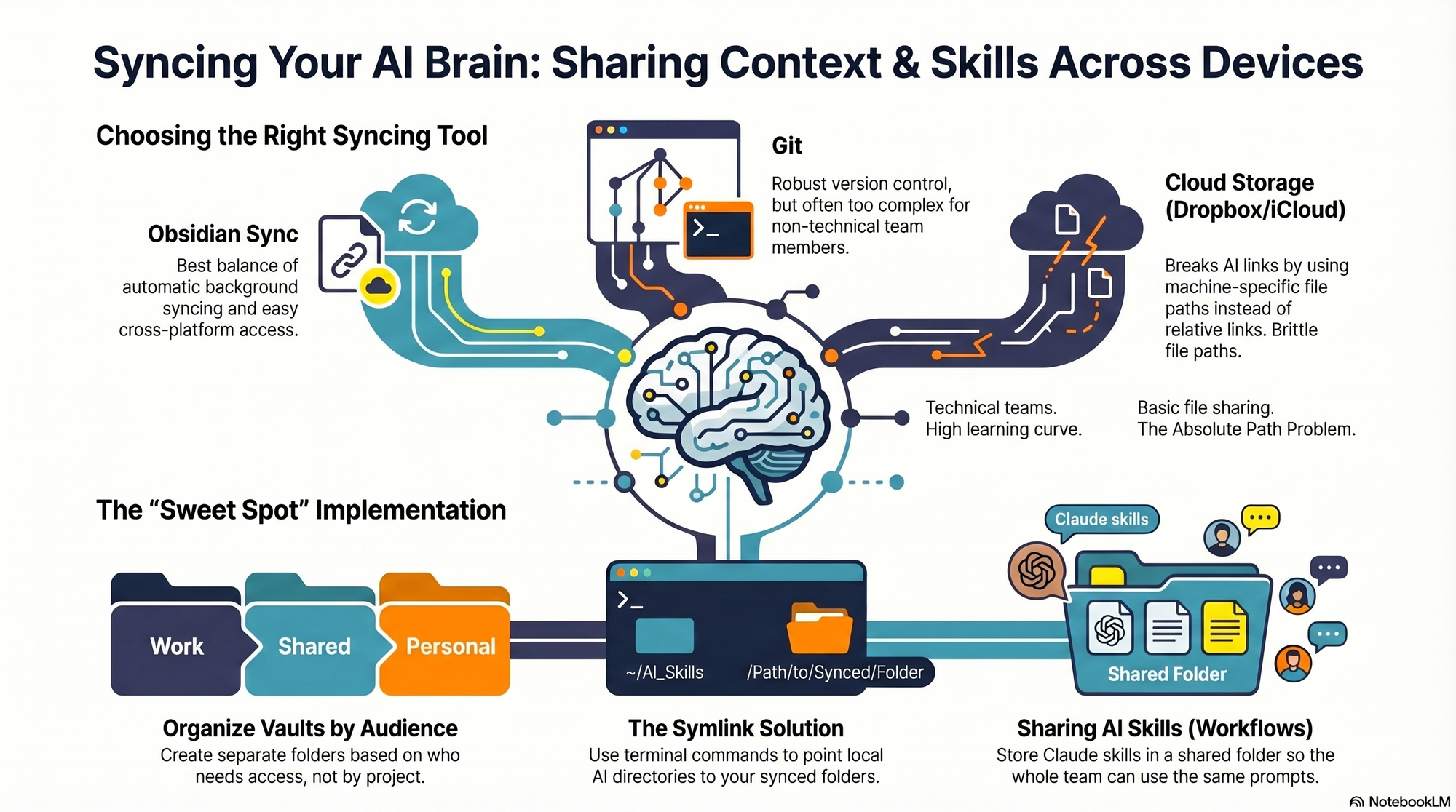
Agent identity, tasks, and scripts are saved in Obsidian—not Claude Code skills or agents. The scheduler runs on my always-on Mac Mini. The benefit of this is it just works across all of my devices and I can seamlessly switch between Claude Code, Codex—or any other coding CLI—as I need to. All it takes is updating my script that the scheduler uses.
In practice, this architecture delivers exactly what I want from agentic AI: clarity of responsibility, strong guardrails, and outcomes that compound. My podcast manager keeps interviews buttoned up, my sales admin removes administrative drag, and my coding manager turns lessons learned into steady skill gains—all while I focus on higher-leverage product management work.
If you’re considering a similar setup, start with a single agent and a narrow task, then expand. Keep identities crisp, scripts small, and schedules explicit. With that foundation, you’ll get the benefits of automation and delegation—without surrendering control.
I just finished a standout conversation on AI engineering and product discovery that hit squarely at the questions I hear from product leaders every week: What does practical AI engineering actually look like for product managers, and how do we ramp without a traditional software background?
Listen to this episode on: Spotify | Apple Podcasts
Here’s the arc that resonated with me: a product leader goes from occasional tinkerer to spending 60% of her time on real engineering work—building AI-powered tools for continuous discovery, forming a licensing partnership with Vistaly, and quietly constructing "Teresa Bot," an AI discovery coach trained on everything she’s ever written. The journey is less about mastering every framework up front and more about structuring learning, tightening feedback loops, and shipping useful outcomes.
The most energizing throughline is the myth-busting: you don’t need a deep engineering pedigree to operate in this space. Curiosity, rigorous discovery habits, and eval-driven development will take you further than brute-force coding. As one moment put beautifully, "I know anything that I don't know how to do, Claude will teach me how to do. And Claude is infinitely patient." That captures the posture I expect modern PMs to adopt with LLMs and tools like Claude Code.
On the nuts and bolts, the discussion gets concrete about AI engineering in practice: context engineering, prompt writing, RAG, observability, and evals. This is the real stack—think retrieval-first pipeline design, prompt engineering guardrails, instrumentation for model drift, and continuous, automated evals to protect behavior as you iterate. If you’ve been dabbling with context window management but haven’t formalized your test harnesses or dashboards, this is your cue.
What I appreciated most is how directly discovery skills transfer. Framing assumptions, running tight customer interviews, mapping opportunity solution trees, and aligning stakeholders—these are precisely the muscles you need to shape problem spaces before you “vibe code” solutions. As one reflection nails it, "The moment I learned more about data science, all of my discovery work became so different." That’s the bridge from qualitative sense-making to measurable, model-centered learning.
The partnership with Vistaly is also a smart build vs buy case study. Rather than reinvent infrastructure, the choice to license purpose-built opportunity solution tree software keeps focus on the differentiated layer—learning systems and product outcomes. As it’s put plainly: "I don't want to build all that stuff. I don't really want to be a software company. I'm almost set up like an AI researcher." Product leaders should internalize this lens for platform choices across their AI roadmaps.
On "Teresa Bot," the implementation breadcrumbs are familiar and pragmatic: pair a solid retrieval-first pipeline (RAG) with clean content sources, keep prompts modular, enforce code review even for vibe coding, and stand up observability and evals early. I’ve had similar success using Claude Code for rapid iteration while treating every prompt and context change as a versioned artifact. That discipline pays dividends when you need to trace regressions or prove improvements.
If you’re a PM ready to lean in, start small and systematic. Pick one high-signal discovery workflow, model the knowledge you already have, and wire up basic evals before you scale. Keep a lab notebook, use programmatic tests to gate deployments, and measure outcome movement—not just model cleverness. This is where LLMs for product managers move from novelty to execution readiness.
Resources mentioned: Watch the episode on YouTube, Claude Code, Vistaly (opportunity solution tree software), Opportunity Solution Trees: Visualize Your Discovery to Stay Aligned and Drive Outcomes, Product Talk Academy, Just Now Possible Podcast, Vibe Coding Best Practices: Avoid the Doom Loop with Planning and Code Reviews, and the AI Evals for Engineers and PMs course on Maven.
What stood out to you—RAG design choices, eval frameworks, or the discovery-to-engineering mindset shift? Drop your thoughts below; I’d love to learn how you’re applying these patterns in your own product roadmaps.
Too often I watch teams ping a global agent with vague AMAs and then wonder why they get generic summaries instead of decisive guidance. When I lead product reviews, I push the team to treat AI like a partner in decision-making, not a trivia engine. That simple mindset shift transforms how quickly we move from questions to confident action.
AI isn’t built for AMA (ask me anything). Get recommendations for outcome-based questions for the best results with Amplitude AI.
In practice, outcome-based prompting means I don’t ask an agent to “analyze the data.” I ask it to help me reach a specific product decision, grounded in behavioral analytics and connected to our outcomes vs output OKRs. To make that concrete, I always frame my prompts around three things.
First, I state the outcome and metric. I name the business goal and the exact measure in Amplitude analytics that will validate success—activation rate, funnel conversion from A to B, or 8-week retention. I’ll reference the relevant events, segments, or driver trees so the agent has a crisp target. This is where product strategy meets measurement discipline.
Second, I define the context and constraints. I specify the user cohort, the timeframe, and the surface area I care about—new self-serve signups in the last 30 days, first-session behavior on web only, or EU traffic where data governance rules apply. On a unified analytics platform, this context lets an agentic AI narrow its search to the highest-signal slices of behavioral analytics rather than pattern-matching across noise.
Third, I declare the decision and deliverable. I tell the agent exactly what I will do next and the format I need to act: a ranked list of levers for an A/B testing plan, a recommended prompt engineering template for in-app guides, or a one-page brief I can hand to the growth team. Clear decisions lead to clear outputs; vague intents lead to vague answers.
Operationally, I turn these three elements into reusable prompt templates, and I track their performance with Agent Analytics. I review traces to see which inputs drive the best recommendations, and I refine prompts the same way I iterate on product copy. For LLMs for product managers, this is the craft: small, testable improvements that compound into outsized impact.
Here’s a quick example. When I needed to lift user activation, I asked for a prioritized set of friction points blocking first-value within 24 hours for new self-serve accounts, based on last month’s data. I defined activation as completing event X within Y hours, asked the agent to analyze top drop-offs in the funnel, and requested an action plan with two experiment ideas and success thresholds. The response mapped behaviors to interventions, connected to retention analysis, and gave me a prompt engineering snippet for the onboarding nudge we shipped the same week.
If your AI workflow still starts with “What does the data say?”, you’ll keep getting broad narratives. Start with outcomes, sharpen the context, and specify the decision you will make. That’s how Amplitude analytics, paired with agentic AI, stops being interesting and starts being indispensable.
Inspired by this post on Amplitude – Perspectives.
I’m excited to share two opportunities this season to uplevel your craft, connect with peers, and leave with practical, repeatable techniques you can apply immediately to your product work.
We will be doing another round of Claude Code: Show and Tell on May 26th at 9am PDT. These community-driven sessions are hands-on and fast-paced—we swap proven workflows, compare prompts, and pressure-test approaches together. You’ll see how product teams are operationalizing AI workflows in real contexts and walk away with ideas you can adapt for your own roadmap and experimentation pipeline. Invites will go out to Supporting Members and CDH Members tomorrow. If you'd like to join us, keep an eye on your inbox for the invite.
I love these Show & Tell sessions because they translate tacit knowledge into clear, reusable playbooks. Whether you’re refining evaluation loops for LLMs, streamlining discovery synthesis, or standardizing prompts for consistency, the shared rigor and camaraderie make it a high-signal hour for any product leader invested in AI workflows.
I also want to share that I'll be teaching our June 4th – July 9th cohort of Product Discovery Fundamentals. This is the last time I'll be teaching this cohort in its current format. If you've been thinking of enrolling in this program, and want to take it with me, this is your last chance. Register here.
Across this cohort, we’ll practice continuous discovery habits—framing opportunities, tightening assumptions, running lean experiments, and aligning product trios on evidence-backed decisions. If you want a rigorous, repeatable system for turning customer insight into confident prioritization and compelling product strategy, I’d be thrilled to have you in the room.
There’s a question that runs underneath every AI Agent evaluation: what can it do?
Two years ago, that was the right question to ask because Agents were limited and capability was a genuine constraint. The gap between what organizations needed and what the technology could deliver was wide. I felt that gap acutely in early pilots—plenty of ambition, not enough dependable execution.
That gap has since narrowed considerably, and yet most organizations are running their Agents well below what’s technically possible. I see teams lean on answering and routing, but stop short of looking things up, taking actions, or resolving complex, multi-step problems—especially where data, process variance, or risk come into play.
The standard explanation is that AI isn’t good enough yet—models must improve, or vendors must ship more features. But after studying organizations across industries actively expanding their AI automation, I’ve found that this explanation holds up less often than people assume. The blockers tend to be elsewhere.
The teams I’ve observed weren’t primarily constrained by what their AI could do; they were constrained by what their organization was structured to let it do. In other words, the ceiling wasn’t the Agent’s capability—it was organizational readiness, governance, and risk tolerance.
“Readiness” for AI breaks into five distinct types, and most organizations have some but not all of them. Below is how I assess them with product, operations, and engineering leaders.
Content readiness is whether you can explain your product and policies clearly and consistently. Most companies can. In practice, that means up-to-date knowledge bases, unified policy language, and clear versions that Agents can cite and apply.
Scope readiness is whether you’ve defined the edges: when should AI engage, and when should it step aside? Edge cases multiply, intent varies by customer segment, sensitive topics surface mid-conversation, but most teams can work through this with effort. Clear guardrails reduce ambiguity and shrink risk.
Procedural readiness is where things start to get harder. This is about whether you can articulate your processes clearly enough for something other than a human with years of tacit knowledge to follow. The happy path is rarely the problem. It’s the failure paths, decision branches, variations that have never been written down because they’ve always lived in someone’s head.
Data readiness is the first real cliff. Can you reliably identify the right user, account, or object at the moment a decision needs to be made? Is the data trustworthy in real time? Are the APIs stable, accessible, and actually connected? For most organizations, the honest answer is “partially, but we’re not always sure when it breaks.”
Execution readiness is the highest bar. Not just technically (can the Agent make the change?) but organizationally. Who owns it when the wrong refund gets processed? Who detects it? Who recovers? Does someone with authority actually accept the risk?
Most companies have the first two, some have the third, fewer have the fourth and fifth. When I map this with teams, we often discover that their Agent’s ceiling is really a reflection of operational maturity and data plumbing, not model quality.
We studied companies across six industries – energy, healthcare, ecommerce, gaming, financial services, property management – all trying to expand what their Agents could do. The pattern was consistent: teams set out to automate real actions—looking up account status, processing changes, handling transactions. In most cases, the AI could technically do it, but at a certain point (somewhere between guiding a user through a process and looking something up on their behalf) they hit a wall.
One team tried to automate application changes but couldn’t reliably identify which application to modify across their internal systems. Another explored billing automation but couldn’t access live account data due to regulatory constraints. A third needed to verify status across third-party vendor systems their Agent couldn’t reliably reach. I’ve seen similar constraints surface around CRM integration, data governance, and vendor SLAs—none of which are model issues.
In most cases, the team redesigned around what their infrastructure could support. They moved toward guiding—walking users through processes step by step, rather than executing changes on their behalf. It worked, it resolved conversations and delivered real value, just differently than anyone planned. In customer support, this often looks like consultative flows that shorten time-to-resolution even without direct writes.
Most Agent evaluations are built around capability. Can it handle complex queries? Does it support multiple channels? Can it integrate with our systems? These are reasonable things to evaluate for, but they produce a capability score, and that doesn’t tell you whether your organization can actually use what you’re buying.
The teams that got to deeper automation, the ones executing actions early, didn’t have “better AI,” they had more standardized operations. Actions that were already well-defined, consistently applied, and exposed through stable systems with clear rules. Automation wasn’t inventing new behavior, it was triggering actions that were already tightly controlled elsewhere.
Readiness enables capability, not the other way around. Which reframes the evaluation question from “can the AI do this?” to “are we actually ready for it to?”
Something that gets lost in most conversations about AI readiness is that organizations are often further along than they assume, just not for the kind of work they were planning for. A team that set out to automate refunds but can reliably guide users through complex troubleshooting has genuine capability deployed. They’re operating at the level their readiness supports, which is a starting point, not a deficit.
The more useful frame isn’t “are we ready?” – it’s “what are we ready for, and what specifically stands between here and the next level?” The gaps tend to be concrete: a missing API, data that lives in three systems that don’t agree, a process that’s never been documented, or an ownership question nobody has answered. These are solvable problems. They just require a different kind of investment than buying a more capable Agent.
What nobody has worked through seriously yet is how organizations actually build readiness. Does it develop naturally through using AI at shallower levels first? Or is it mostly a function of prior decisions, like system architecture choices made years ago, operational maturity that accumulated over time, engineering investments that have nothing to do with AI? When readiness does increase, what actually changes? Does the support team develop it? Does engineering grant it? Does it require executive sponsorship and investment in infrastructure with no obvious AI label on it?
In my experience, progress comes from a joint effort: product to define scope and guardrails, operations to codify procedures and edge cases, engineering to harden APIs and observability, and leadership to underwrite risk with clear ownership. When those pieces align, agentic AI moves from guided assistance to safe, auditable execution.
Until there are clearer answers, the pattern is likely to continue. Companies will buy capable Agents, plan ambitious rollouts, and find that the harder work is building the organizational infrastructure. The Agents can do the work. The question is what it takes to let them.
AI agents are only as valuable as the measurable outcomes they deliver. In my role leading product strategy at HighLevel, I’ve learned that the fastest way to earn executive trust is to translate agent performance into clear revenue impact, cost savings, and risk reduction. The challenge isn’t enthusiasm for AI; it’s creating a disciplined, repeatable way to prove business value.
Here’s the three-step playbook my teams and I use to quantify the value of agentic AI, align stakeholders, and scale what works.
Step 1 — Define value outcomes and success criteria. Start with a driver tree that ties agent outcomes to company-level goals. For revenue, target conversion lift, average order value, and expansion (e.g., trial-to-paid, self-serve upsell). For cost, focus on containment/deflection rate, reduced handle time, and lower cost to serve. For risk, measure error rates, hallucinations, security/policy violations, and customer complaint rate. Convert these into outcomes vs output OKRs, set baselines, and pre-commit to thresholds for launch, scale, or rollback. This ensures the team is accountable to business KPIs, not vanity metrics.
Step 2 — Instrument comprehensively and establish baselines. Instrument the full journey: prompts, responses, human-in-the-loop events, escalations, feedback, and downstream conversions. Capture both leading indicators (time-to-first-value, containment rate, self-serve completion) and lagging outcomes (NRR, churn, LTV/CAC). Use behavioral analytics, session replay, product tours, and in-app guides to contextualize what users do before and after agent interactions. Baselines matter—freeze a control period so improvements are truly incremental.
Increase revenue, cut costs, and reduce risk with Pendo’s Software Experience Management platform. Optimize the entire software experience to drive adoption and improve engagement.
Step 3 — Experiment, attribute, and risk-adjust. Treat every agent capability like a hypothesis. Run A/B tests or holdouts with a precomputed minimum detectable effect so you can ship confidently. Attribute outcomes to the agent by linking events to conversions and support deflection, and calculate ROI as (incremental revenue + cost avoided – total operating cost, including model/API, labeling, and oversight). Apply AI risk management by tracking false positives/negatives, escalation rate, and policy breaches; adjust ROI with a risk score so the “cheapest” agent isn’t inadvertently the riskiest. This is eval-driven development in practice: define success, measure, iterate.
Operationalizing the playbook requires crisp reporting. Stand up Agent Analytics dashboards in your unified analytics platform that roll up per-agent KPIs, funnel performance, cohort trends, and experiment results. Review them in QBRs and with frontline teams to connect numbers to lived customer experience. When metrics improve, amplify with product-led growth motions—targeted in-app guides and lifecycle nudges to get more users into high-value agent flows.
What does this look like in the real world? Early on, we celebrated “tickets deflected” and missed that some conversations quietly increased churn risk. After we adopted this three-step approach, we saw the full picture: a modest dip in deflection quality was offset by a larger lift in expansion revenue and a meaningful drop in time-to-resolution. The risk-adjusted ROI was unambiguous, and the CFO greenlit broader rollout.
If you’re building or scaling AI agents, anchor on outcomes, instrument ruthlessly, and insist on experimentation. With the right measurement discipline, you’ll know exactly which agents deserve more investment, which need redesign, and which should be retired. The result is a portfolio of agents that reliably drive adoption, engagement, and durable business value.
Today I’m introducing Operator, an Agent that works across both Fin and the Intercom helpdesk to help you manage your customer operations.
In practical terms, Operator manages help content, builds automation, does the ongoing work that determines how well Fin performs, and runs the operational work your human team doesn’t have time for. That combination is precisely what modern support teams need to move from reactive firefighting to proactive, consultative support.
Why does this matter? Running a customer operation means managing AI and humans simultaneously, and doing this well requires more capacity than most teams realistically have. I’ve felt that strain firsthand—competing priorities, constant context switching, and a never-ending queue that blurs strategic focus.
On the AI side, Fin’s performance is largely influenced by what surrounds it: the accuracy of your help content, the quality of your Fin configuration, and how well you understand what’s working and why. When product teams ship daily, keeping your help center current means finding every affected article before customers notice the gaps. When Fin gets a conversation wrong, diagnosing it requires reading through what happened, identifying the root cause at the configuration level, making the fix, and verifying it worked. Analyzing why your resolution rate dropped means pulling conversations, finding patterns, and tracing the cause back to something actionable. And beyond individual fixes, there’s the ongoing question of what to automate next – what your human reps are still handling repetitively, whether it’s worth building a Procedure for it, and how to test it before it goes live.
On the human side, the demands are just as continuous. When an incident hits, someone needs to identify every affected customer, draft the right response, and send it before the problem compounds. Team leads need visibility into rep performance across hundreds of conversations to coach effectively and prep for 1:1s. Reps need to know what to prioritize without spending the first part of their day figuring it out. In fast-moving environments, that operational overhead wastes energy you should be investing in better customer outcomes.
Meet Operator, the agent that explains your customer conversations. This Synthesia testimonial shows how simply asking Operator reveals what happened and makes refining Fin faster for support and enablement teams.
Too often, the work outpaces what teams can manage, so it happens reactively, or not at all. Operator was built to change that, giving teams a new way to understand, manage, and improve their customer operations. Here’s how I put Operator to work across AI workflows and human-led processes.
First, I use Operator to ask my data anything. Your support operation generates more useful data than most teams have time to process. Operator gives you direct access to it. You can ask it any question about what’s happening in your operation (why a metric changed, what’s driving escalations, how the team performed last week) and it returns structured answers with charts, breakdowns, and the ability to dig further. It analyzes samples of real conversations on the fly to surface patterns and identify root causes. If your head of product wants to know what customers are saying about a new release, you can ask Operator rather than spending half a day pulling a report together. It also works across your entire operation, analyzing Fin’s performance, your human reps’ performance, and customer sentiment.
Crucially, I don’t start from scratch every time. Give Operator ongoing work, like analyzing your automation rate every Monday, flagging anything that needs attention, and posting the report in your Fin workspace. It’ll run the analysis, write the report, and deliver it without you having to go looking for it. That’s the kind of agentic AI leverage that compounds week after week.
Second, I keep the knowledge base current without writing a single article. Your knowledge base is only as useful as it is accurate. When product teams ship fast, keeping pace with content updates is a substantial, ongoing job. Give Operator a brief about anything, from a new feature or policy change to release notes, and it finds every article in your help center that needs updating, drafts the edits in your tone of voice and style, identifies content gaps, and drafts new articles to fill them. It even handles localized versions. Every change is formatted as a proposal (Operator’s version of a pull request) for you to review, edit, and approve before anything goes live. It feels like adding several knowledge managers to the team overnight, without the ramp time.
See why teams choose Fin Operator for customer operations: accurate analysis, trend insights, and conversation debugging—going beyond basic LLM connectors. A Raylo testimonial spotlights daily, real-world impact.
Third, I build, test, and ship improvements to Fin directly through Operator. When Fin gets a conversation wrong because of a content gap or misconfigured rule, Operator can debug it by reading through the conversation, identifying what caused the problem, proposing a fix, and running simulation tests to verify it before you approve. You see what changed and why before anything goes live. Beyond debugging, Operator has deep knowledge of every Fin feature and capability, so you can ask it directly to help you configure whatever you need. If you need a Procedure for a specific query type, describe the outcome you want and Operator builds it, including triggers, multi-step instructions, edge case handling, and a simulation test, all from a single prompt. The same applies to configuring Guidance rules, data connectors, monitors, and workflows. You don’t need to know which feature solves your problem or how to configure it; you just describe what you want.
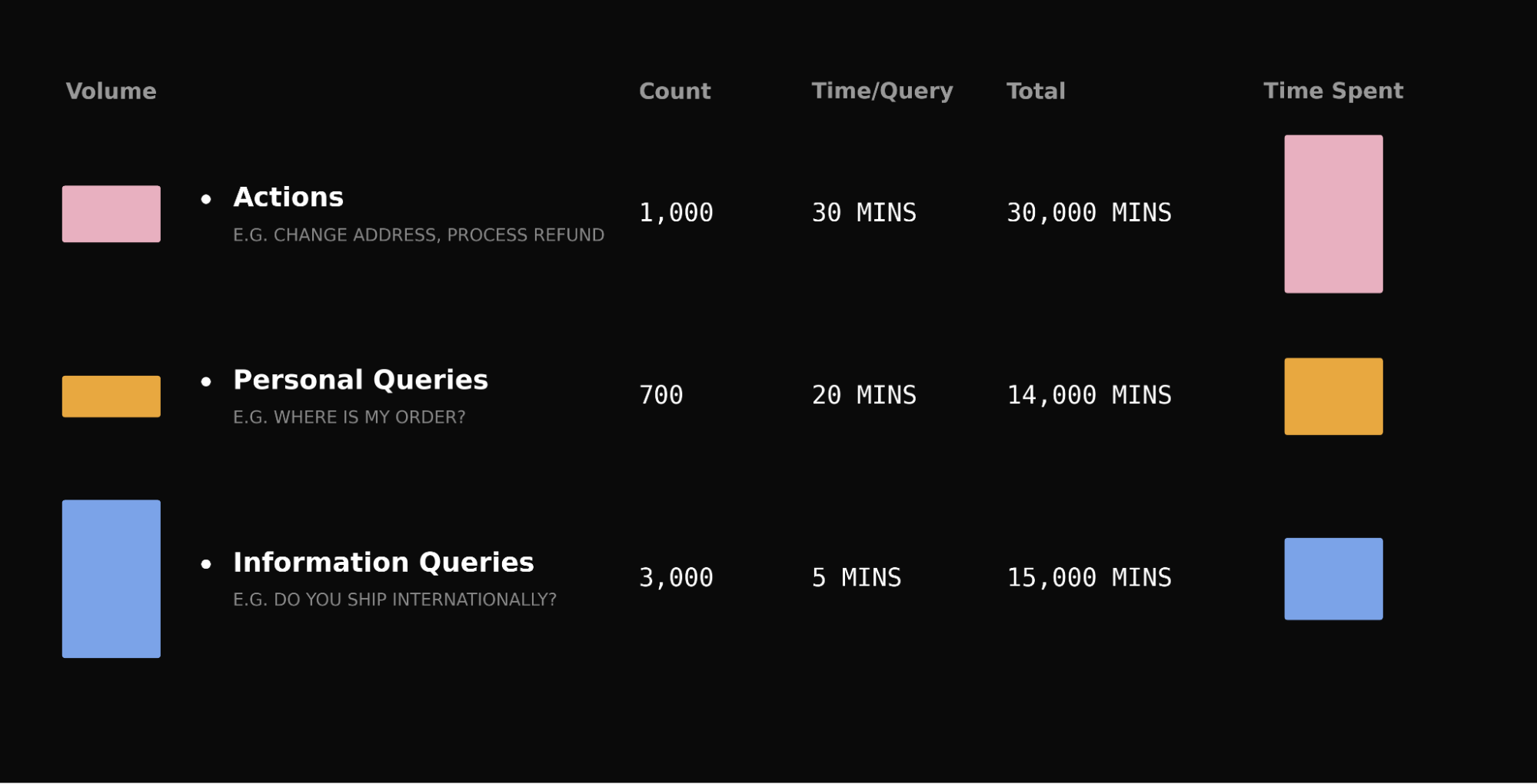
For teams looking to increase their overall automation rate, Operator can handle that strategically too. Ask it to analyze where your biggest automation opportunities are and it surfaces them by volume, along with an estimate of the weekly team time each one is consuming. Pick one, and it builds the solution for you to approve. That’s consultative support, productized.
Finally, I use Operator to effortlessly manage the human side of support. When an incident hits, Operator identifies every affected conversation, drafts targeted responses, and sends them proactively, turning what would normally be hours of reactive triage into minutes of review and approval. For ongoing management, a team lead prepping for 1:1s can ask Operator to pull each rep’s metrics, flag outliers, and surface what’s worth digging into. A rep coming back from a meeting can ask what to focus on next and get a prioritized queue based on urgency, customer value, and wait time. And because Operator sees patterns across everything your human team is handling, it can surface the conversations they’re still resolving manually, flagging your next automation opportunity before you’ve had time to go looking for it.
Here’s why this works. Operator isn’t a general-purpose AI model given access to your data. It’s built on a library of purpose-built tools that encode expertise specific to support operations, like how to pick the right attributes for a given analysis, search a knowledge base semantically, debug Fin’s reasoning in a specific conversation, or write and test a Procedure that will actually work. That specialized toolkit is what makes its recommendations trustworthy and its execution reliable.
Elevate customer service with Operator. The bold headline and vivid knot logo introduce a modern AI platform that streamlines workflows, speeds resolutions, and scales support operations without extra headcount.
The proposal (pull request) system makes this possible. When Operator updates content, adjusts configuration, or modifies how Fin behaves, it creates a proposal – a structured diff of what’s changing and why. You review it, edit if needed, and approve before it takes effect. Operator does the cognitive work; the human stays in control of what goes live.
More than 200 early users are already trying Operator, and every one of them is finding new use cases. It’s a genuine step change in capability, and I expect it will change the way support teams run their operation. We’re working towards a vision of Operator being increasingly agentic, expanding across every new role Fin takes on.
Operator is available in early access now. If you’re ready to transform your customer operations across Fin and the Intercom helpdesk with agentic AI, start here: https://fin.ai/operator.