Category: AI Strategy

  • Behavioral Analytics That Crush Fraud: Spot Anomalies, Prioritize Risk, Act with Confidence

    Behavioral Analytics That Crush Fraud: Spot Anomalies, Prioritize Risk, Act with Confidence

    Fraud teams are drowning in signals—events, alerts, and edge cases that look suspicious but rarely point to what truly matters now. In my role leading product, I focus on turning that noise into clear, ranked actions the team can trust. Behavioral analytics is how we bridge the gap from “something looks off” to “here’s why it matters and what to do next.”

    See how behavioral analytics helps fraud management teams surface anomalies, prioritize risk factors, and act faster with greater confidence.

    When I build fraud capabilities, I start by defining the outcomes that matter: find anomalies early, prioritize by impact, and respond in minutes—not days. That requires a rigorous approach to data governance, strong observability across the stack, and a mindset tuned to threat detection and response rather than passive reporting.

    For me, behavioral analytics means unifying event streams across web, mobile, payments, and support into a single, trustworthy, unified analytics platform. We then apply anomaly detection on top of baselines for user, device, and entity behavior—capturing velocity spikes, geolocation drift, account takeover signals, and unusual journey paths. The win is not more alerts; it’s clearer context per alert.

    Prioritization is where the value compounds. I combine deterministic signals (e.g., device fingerprint mismatches, impossible travel, repeated declines) with weighted risk scoring that adapts to emerging patterns. This helps fraud analysts triage by potential loss and customer impact, not just alert volume—so the highest-risk cases land at the top of the queue with the right context attached.

    Actionability is the final mile. I map each risk tier to a playbook—step-up authentication, temporary holds, secondary review, or immediate block—so teams can act with confidence. Real-time alerts route to the right channel; feature flags allow fast containment; and AI risk management practices ensure continuous learning while preserving precision and recall. We close the loop by measuring investigation time, false positive rates, and recovery to keep improving.

    A few lessons keep paying off: instrument early and consistently; keep your schema stable; document risk definitions; and test changes with A/B testing to quantify impact before scaling. Treat your fraud stack like a mission-critical cybersecurity system with tight SLAs, clear ownership, and auditable decisions—because it is.

    If you’re evaluating your next move, start with a narrow but high-ROI use case (account takeover or payment fraud), stand up clear dashboards for analysts, and iterate on the risk scoring model weekly. With disciplined data practices and aligned playbooks, behavioral analytics turns scattered signals into decisive, defensible action.


    Inspired by this post on Amplitude – Perspectives.


    Book a consult png image
  • Turn Support Wins into a Company-Wide AI Blueprint for Consistent, End-to-End CX

    Turn Support Wins into a Company-Wide AI Blueprint for Consistent, End-to-End CX

    Building a great end-to-end customer experience with AI means going beyond support, and I’ve seen firsthand how transformative that shift can be when we treat every interaction as part of one cohesive journey.

    Every customer touchpoint, from the first sales conversation through to post-sales support and success, is an opportunity to get it right. Other teams are now turning to AI to transform how they show up for customers, and support, which led the way, has already written the blueprint. In my role, I focus on making that blueprint actionable across the entire lifecycle.

    In The 2026 Customer Service Transformation Report, it’s clear most businesses are thinking about what’s next, with more than half planning to scale AI to other departments. Interestingly, they often cite their early success with AI in support as motivation for the move. This makes support teams uniquely positioned to help lead the transition, a strategic role unimaginable just two years ago.

    In this piece, I share how teams are introducing AI to other parts of the business, how to think about this expansion effort, and the new opportunities it creates for support leaders who want to drive a unified customer experience.

    Support was the first proving ground for AI, and our research suggests that businesses are now planning to expand its use to other areas based on the results it’s yielded so far. Fifty-two percent of respondents said that their organizations are actively planning to scale AI to other departments in 2026.

    What will this look like? Leading companies are already finding out.

    Survey chart showing why organizations expand AI beyond support: success with AI in support 57%, unified customer experience 49%, scaling other functions without added headcount 33%, and cross-department requests 31%.
    Wins in support are setting the pace for company-wide AI. Survey results rank the drivers: proven success in support (57%), the push for a unified customer experience (49%), scaling other functions without more headcount (33%), and cross-department demand (31%).

    My favorite example is WHOOP, the fitness wearables company. They offer a premium product which makes their sales conversations more consultative than transactional. Customers want to know “Which membership is right for me?” or “How often do I need to charge my WHOOP?” According to Emily Shirley, Business Manager for Growth Product at WHOOP, if someone chatted with the inside sales team, they were twice as likely to convert, but they didn’t have enough reps to respond to incoming queries fast enough. Customers could wait more than 10 hours for a reply.

    With a big product launch on the line and an anticipated spike in prospective customer conversations, their three-person team needed help. So they deployed Fin to the "Join" page, the final step before purchase.

    With Fin resolving 84% of inbound questions, the sales team was able to focus on high-value leads. Together, they drove a 130% increase in attributable sales. The team is now exploring ways to expand Fin beyond FAQs, focusing on personalised conversation flows, multi-product recommendations, and richer data capture. As Emily says: “There are so many parts of the buyer journey where this applies. We’ve only scratched the surface.”

    It’s clear there’s a desire to push AI to other parts of the customer lifecycle, but there is a risk hidden in this expansion. If sales, customer success, and other departments all launch their own Agent, each operating in isolation, you can end up fragmenting the very thing our research says teams want to create. The second-most cited reason for pushing AI beyond support: desire for a unified customer experience.

    Without shared context, each handoff becomes a source of friction where customers could receive inconsistent answers or be asked to repeat information. I’ve watched even well-intentioned AI rollouts struggle here—great local wins, but an overall journey that feels disjointed.

    Diagram of an AI support blueprint showing roles (SDR, CSM, Sales, Shopping Assistant, Support Rep, Custom) stacked above layers for Goals, Memory & User Context, Business Knowledge, and Interoperability.
    A translucent UI visual maps a support-led AI blueprint that scales across the business—from SDR and sales to custom assistants—anchored by layers for goals, memory and user context, business knowledge, and interoperability.

    The opportunity (and the challenge) is to keep the customer at the center. Instead of department-specific Agents that operate independently, we must strive for cohesion. That means shared memory, consistent governance, and connected AI workflows that respect the customer’s history and intent across channels.

    This is the future I’m building toward: solutions like Fin becoming a “Customer Agent,” capable of handling the entire customer experience. This will mean Fin can function in many roles, supported by a memory that grows with the customer over time and deep knowledge of the business, creating a seamless experience for every interaction. In practice, that’s agentic AI designed to collaborate across teams, systems, and journeys—without losing context.

    Pushing AI into new parts of the business requires someone to own the process. And for many organizations, that’s the support team. Nearly a third of respondents (32%) confirmed their customer service teams are leading their business' AI transformation strategy.

    This presents a real opportunity for support teams to shape the future of customer experience. Instead of each function reinventing the wheel, support can act as a center of excellence, defining shared standards, guardrails, and operating practices that drive performance.

    “You already manage the most complex, high-volume customer interactions; you have rich data on customer needs and behavior; and you know how Agents perform in the real world. Those insights will be invaluable as AI scales across your business.”

    Neon green hero graphic reading 'The 2026 Customer Service Transformation Report', with subhead 'The AI deployment gap is widening' and a black 'Get the report' button over a bar-chart pattern.
    Leaders are racing ahead with real AI in support. Explore the 2026 Customer Service Transformation Report to see where deployment is stalling, benchmark your team, and get practical steps to scale automation that delights.

    In my organization, when we extended AI from support into sales, we deliberately brought our conversation design expertise, Agent Analytics, and governance models along with it. One team owns the orchestration, memory strategy, and CRM integration so a customer can start with a sales question and end up with a support one—without ever feeling a seam. That continuity is where journey mapping meets product strategy and turns into measurable outcomes.

    As Agents like Fin expand their capabilities and move into new areas, I expect many customer service leaders will see their roles expand to include AI implementation across the customer journey. It’s a natural progression for product management leadership in support: owning the experience, the data, and the operating model.

    Achieving perfect customer experience is AI’s biggest promise. But in order to get there, teams need to be smart about the solutions they deploy. A unified Customer Agent capable of handling the entire journey end-to-end will have a significant advantage, delivering consistent, context-aware experiences across every interaction.

    The Customer Agent future is being built right now, and it’s starting with the team pioneering AI transformation from the very beginning: support. For leaders in these organizations, this is a rare opportunity to shape how customer relationships will be built and maintained in the AI era.

    If you’d like to dig deeper into the data and benchmarks guiding these decisions, download The 2026 Customer Service Transformation Report.


    Inspired by this post on The Intercom Blog.


    Book a consult png image
  • Prevent Strategy Drift: AI that flags ‘merge conflicts’ in product plans before a quarter derails

    Prevent Strategy Drift: AI that flags ‘merge conflicts’ in product plans before a quarter derails

    "What if an AI could spot the moment two product teams start pulling in opposite directions — before it derails a quarter?" That question hooked me, because I’ve lived through the costly fallout of subtle misalignments that only surface at the end of a sprint—or worse, during quarterly business reviews.

    I recently dug into an episode of Just Now Possible featuring Matthias and Charlotte Kleverud, co-founders of Momental. Their vision for "GitHub for product management" hits a nerve in the best possible way: find "merge conflicts" in strategy, not code, and do it early enough to save execution time, trust, and outcomes.

    Here’s the core: Momental ingests documents, meeting transcripts, and voice recordings across an organization, then uses AI agents to map them into a structured context layer—a set of interconnected trees covering goals, decisions, learnings, and who's doing what. When it finds a conflict—say, one team betting on retention while another is prioritizing conversion—it surfaces the misalignment for humans to resolve, just like a merge conflict in code. That framing is both familiar (for anyone who’s shipped software) and powerful (for anyone who’s scaled product strategy across multiple teams).

    Their journey tracks with what many of us have learned the hard way. "Starting in 2022 with DaVinci 002 and learning that the market wasn't ready for AI-assisted product thinking" pushed them toward experiments with agent teams. "The origin story: building a team of AI agents in 2024, only to discover agents hit the same alignment problems as humans" is exactly the kind of meta-lesson I’d expect when you scale autonomy without shared context. The breakthrough was an "OODA-loop-driven document processing agent" that continuously curates a living knowledge graph rather than relying on static prompts or brittle pipelines.

    One model that stood out was "The product chain: signals → learnings → decisions → principles, and how AI maps it." That is the backbone of healthy product thinking. When this chain is explicit and inspectable, you can trace why a team chose Path A over Path B—and detect when new signals should invalidate old decisions. I’ve seen this accelerate continuous discovery and improve executive decision hygiene.

    I also appreciated the organizational modeling: "Three trees that model an organization: the product tree (OKRs to epics), the wisdom tree (decisions and their reasoning), and the people/time tree." This maps cleanly to how we run quarterly planning at scale—tying outcomes to work, preserving rationale, and grounding ownership and timelines. With that structure, "How conflicts are detected, auto-resolved, or escalated to humans with merge options" becomes a pragmatic workflow, not a theoretical AI demo.

    On the technical front, they’re blunt about limits: "Why traditional chunking and RAG breaks down at scale and what Momental does instead." Anyone who’s tried to stitch strategy from ad hoc notes knows that naive retrieval won’t cut it. You need durable context boundaries, rich metadata, and graph-aware reasoning. Which brings me to one of my non-negotiables: "Why metadata—who said it, when, and in what context—is critical to preventing hallucinations." In my world, we treat provenance like test coverage—you can’t ship without it.

    Process-wise, the product philosophy resonated: "How a document processing agent uses OODA-loop thinking to extract and connect context across documents" reinforces the need for short feedback cycles, explicit hypotheses, and continuous refactoring of knowledge. Pair that with "The self-improving agent: collecting user feedback weekly and rewriting its own prompts" and you’ve got a blueprint for eval-driven development that keeps the system honest over time.

    Their UI choices also mirror a pattern I’ve adopted: "Moving from chat-first to UI-first to proactive agents as an AI product design pattern." Chat can feel magical, but alignment work benefits from concrete artifacts—trees, timelines, driver trees, and opportunity solution trees—so people can reason together. Then, let proactive agents watch for drift and nudge teams before the cost of change spikes.

    Two broader themes are worth calling out. First, "Specialized tools win" when the problem is deep, cross-functional context like product strategy. General-purpose chatbots struggle here; domain-specific models with strong information architecture have the edge. Second, product culture matters: "Discovery Versus Vibe Coding" is not just a catchy contrast—it’s a reminder that disciplined discovery beats intuition theater when stakes are high.

    As for the roadmap, I’m encouraged by their "Design partner strategy and what's next for Momental's public launch." Early design partners are where you validate signal quality, precision of conflict detection, and the ergonomics of human-in-the-loop resolution. I’m especially curious how this intersects with LLMs for product managers, outcomes vs output OKRs, and product roadmapping and sprint planning in large portfolios.

    Finally, a nod to the broader ecosystem. The conversation touched on "Claude Code" and a shift "Beyond documents and vectors" that many of us are living through—toward retrieval-first pipelines that respect context windows, stronger governance, and measurable improvements in decision quality. If you care about AI Strategy for empowered product teams, this is a space to watch—and to pilot.

    Bottom line: If you’ve ever wished you could prevent strategy drift before it shows up in your dashboards, this "GitHub for product management" approach is worth your attention. Make the chain of signals, learnings, decisions, and principles explicit. Keep humans in the loop for the hard calls. And let proactive, agentic AI do what it does best: flag misalignments early, so your teams can move fast together.


    Inspired by this post on Product Talk.


    Book a consult png image
  • Real-Time Answers in Slack and Teams: How Amplitude’s Global Agent Elevates Product Decisions

    Real-Time Answers in Slack and Teams: How Amplitude’s Global Agent Elevates Product Decisions

    I’ve been looking for a pragmatic way to put product analytics where my teams already work—inside Slack and Microsoft Teams. The moment insights are one message away, cycle time shrinks, debates get crisper, and experiments move faster. That’s why I’m bringing Amplitude Global Agent into our daily decision flow to deliver instant, source-backed answers with visual clarity and actionable next steps.

    Connect Amplitude Global Agent to Slack or Microsoft Teams to answer questions with source-backed analytics, charts, and recommended actions like A/B tests.

    What excites me most is the shift from dashboards to dialogue. Instead of digging through reports, I can ask a focused question in Slack—“How did activation change week-over-week for our self-serve cohort?”—and get a chart in-channel, complete with recommendations that point me toward the next best move. This is Agent Analytics done right: faster insight loops, reduced context switching, and more confidence in the decisions we make every day.

    From a product management perspective, this integration strengthens continuous discovery and aligns product trios around the same truth. Engineers, designers, and PMs see the same chart, discuss trade-offs in the same thread, and can agree on an action—often an A/B test—within minutes. It’s a lightweight but powerful way to support product-led growth and keep our roadmap tied to measurable outcomes.

    In practice, the questions I ask the most look like this: “Which onboarding step causes the biggest drop-off this month?”, “Which channels drive the highest L28 activation rate?”, and “Where did retention improve after our pricing change?” In each case, the Agent returns charts we can share instantly with stakeholders, plus recommended actions like A/B test ideas to validate hypotheses quickly. The result is a reliable rhythm: ask, see, align, act.

    Governance matters just as much as speed. We’re configuring strict permissions, role-based access, and purposeful channel placement so analytics land where they should—no broader, no narrower. We’re also leaning into clear query prompts and naming conventions for events and properties to help the Agent retrieve precisely what’s needed, every time. The aim is a high-signal, low-noise system that maintains trust while accelerating decisions.

    To embed this into our operating cadence, I plug the Agent into three moments: daily standups (to scan activation, conversion, and incidents), weekly product reviews (to align on experiment status and next bets), and executive QBR prep (to pull clean, shareable charts fast). Because the insights arrive in Slack or Microsoft Teams, our conversations stay focused and traceable, and decisions get documented in the same place they were discussed.

    We’ll measure impact with simple, telltale indicators: fewer ad-hoc analytics requests, faster time from question to decision, increased A/B test velocity, and clearer links between recommended actions and outcome metrics like activation and retention. My bar is straightforward—if this Agent can help one team make a better decision per day, it will more than pay for itself across the org.

    If you’re considering a similar move, start small: connect one high-signal channel, curate a handful of common queries, and coach your team on good prompts. Within a week, you’ll feel the difference. When analytics become conversational, momentum follows—and your product strategy benefits from sharper, faster, and more transparent decision-making.


    Inspired by this post on Amplitude – Best Practices.


    Book a consult png image
  • Stop Selling Your Roadmap: Win Stakeholder Trust by Showing Your Work, Not Conclusions

    Stop Selling Your Roadmap: Win Stakeholder Trust by Showing Your Work, Not Conclusions

    I’m seeing the same pattern in product orgs everywhere—inside HighLevel and across my network: everyone is racing to add AI to the roadmap, and every stakeholder has a strong opinion about what to build next. Delivery has never been faster, which makes it dangerously easy to confuse speed with progress.

    When we chase features without grounding in continuous discovery, we drift back into a feature factory. We ship more, but we ship the wrong things faster. The antidote is simple and hard at the same time: recommit to product discovery, validate with assumption testing, and let the evidence steer our AI Strategy—not the hype.

    Of course, that only works if we can bring our stakeholders along. In the AI moment, it’s deceptively easy to get to a slick prototype and painfully hard to harden it for production. Early demos make almost any idea look promising. That’s precisely why stakeholder management must evolve from pitching solutions to showing our work.

    In practice, stakeholder management is about alignment with the people who influence our product decisions—executives, sales, marketing, customer success, engineering leadership, and sometimes legal or finance. Some have veto power; others have input. Knowing who can block versus who can shape is crucial for where we spend our time. Even in empowered product trios, the best discovery can derail if we reveal only conclusions at the end.

    I’ve tried every mapping framework—power-interest grids, RACI matrices—and they help. But the real challenge isn’t identifying stakeholders. It’s figuring out how to bring them along so that our product roadmapping and sprint planning decisions stick.

    Infographic for product teams on stakeholder management, showing three groups—veto power, influences, and needs to be informed—with guidance on prioritizing stakeholder influence.
    Identify who shapes your product decisions. This visual groups stakeholders into three tiers—those with veto power, key influencers, and audiences to inform—so teams can align, communicate, and reduce delivery risk.

    Here’s the most common trap I see (and have fallen into): focusing stakeholder reviews on the roadmap, release plan, or prioritized backlog. That invites an opinion battle. And stakeholders have their own conclusions—usually shaped by the last customer call, a board meeting, or a market headline.

    This is how the HiPPO dynamic gets created. HiPPO stands for the “Highest Paid Person’s Opinion,” and the saying goes, “The HiPPO always wins.” When we present conclusions without the journey, we set ourselves up to lose. In the gen ai rush, the chorus of “everyone is doing AI” makes that opinion even harder to counter.

    So I don’t try to win opinion battles. I bring new information—fresh customer interviews, clear opportunity mapping, and results from assumption tests. The gap between what the market hypes and what customers actually need is often enormous. Our edge is evidence.

    The strategy that consistently works for me is simple: show your work. If you’re practicing continuous discovery, your opportunity solution tree isn’t just a thinking tool—it’s your strongest stakeholder management asset. It helps you build confidence in your decisions, and it can help your stakeholders build the same confidence.

    Infographic for product teams on stakeholder management, outlining the trap of anchoring in solution space, the HiPPO consequences, and the lever of bringing new discovery insights and data.
    Avoid the stakeholder trap of selling conclusions. This visual shows how anchoring on solutions invites HiPPO battles—and how to shift the conversation by sharing discovery evidence, insights, and data.

    Step 1 — Start with the outcome. I open every conversation by restating the shared goal and asking whether anything has changed. Anchoring on outcomes vs output OKRs reframes hot-button solution debates (like “we need an AI feature”) back to what will move the needle on the outcome we agreed to pursue.

    Step 2 — Share the opportunity space. I show how we mapped customer needs, pain points, and desires. Then I ask, “What did we miss?” Stakeholders often surface opportunities we haven’t seen yet—signals from the field, market shifts, or partner feedback. I capture their input and commit to validating it in upcoming customer interviews.

    Step 3 — Walk through prioritization. Using the tree’s structure, I explain why we prioritized one branch over another. Then I ask where they might have chosen differently. This turns debate into collaboration and lets me leverage their expertise without ceding the discovery framework.

    Step 4 — Go deep on the target opportunity. Before we talk solutions, I make the customer’s problem vivid and real. Interview snapshots help stakeholders empathize and see what matters most. Once the opportunity is crisp, solution discussions become dramatically more objective.

    Infographic titled A Better Stakeholder Management Strategy: Show Your Work, showing seven steps for product teams using the Opportunity Solution Tree to align outcomes, prioritize, test assumptions, and iterate.
    Show your work, not just your conclusions. This infographic guides product teams through seven steps to build stakeholder confidence—align on outcomes, map opportunities, prioritize, test assumptions, and repeat.

    Step 5 — Share solutions and invite theirs. I present our solution set and explicitly ask for additional ideas. If their suggestions diversify our set, we include them. Solution ideas are cheap; the opportunity is what matters. This is where product trios can benefit from leadership’s pattern recognition and industry context.

    Step 6 — Share your assumption tests and results. I walk through our story maps, high-risk assumptions, and what we’ve learned so far. I invite stakeholders to add assumptions—this is where their knowledge shines. If we have data, we share it; if we’re pre-data, we share the plan to get it and ask for feedback.

    Step 7 — Repeat. I don’t batch this into a big reveal. I keep a steady cadence and tailor depth to each audience: weekly for my manager, monthly highlights for marketing, and concise updates for executives. Continuous discovery pairs with continuous stakeholder management.

    Showing your work doesn’t mean drowning people in detail. It means tailoring the signal to the audience. My rule of thumb is outcome, opportunity, solution, evidence—walk the lines of the tree at the right altitude for each stakeholder.

    Infographic for product teams on tailoring stakeholder communication. A smart-filter funnel turns the full discovery journey into updates for a direct manager, marketing counterpart, and CEO.
    Show your work the right way for each stakeholder. Use a smart filter to turn discovery noise into clear signals—weekly journeys for your manager, focused monthly highlights for marketing, and a 30-second CEO pitch.

    In a 30-second update with a CEO, it might sound like this:

    “Our goal is to reduce time-to-first-value for new users. We’ve been interviewing customers and learned that onboarding is where most people get stuck—specifically, they don’t know which features to try first. We explored a few approaches and tested them. The most promising one is a guided setup flow that adapts based on the user’s role. In early tests, new users completed onboarding 40% faster.”

    That pattern works across channels—Slack updates, monthly reviews, or quarterly planning. The format flexes, the structure doesn’t: outcome, opportunity, solution, evidence.

    As you adopt this approach, watch for four anti-patterns that quietly erode trust.

    Infographic titled Four Anti-Patterns That Destroy Stakeholder Trust, listing: 1) telling instead of showing, 2) shooting down stakeholder ideas, 3) saving for a big reveal, 4) fighting the ideological war.
    Avoid the traps that erode stakeholder trust. This infographic guides product teams to show their work, welcome ideas, provide frequent updates, and prioritize results over ideology to build alignment and credibility.

    Anti-pattern 1 — Telling instead of showing. The curse of knowledge makes our conclusions feel obvious to us and opaque to others. The fix: slow down, start at the top of the tree, walk the decisions, and let stakeholders reach the conclusion with you.

    Anti-pattern 2 — Shooting down stakeholder ideas. As you build a library of validated assumptions, it’s easy to spot flaws in a suggestion and say “no” too quickly. Instead, place their idea within your discovery framework. If it maps to a different opportunity, say, “That idea has promise—we’ll consider it when we address that opportunity.” If it rests on risky assumptions, story map the idea together, list the assumptions, and share what you’ve already learned. People accept the evidence they help generate.

    Anti-pattern 3 — Saving everything for a big reveal. Infrequent, comprehensive updates invite opinion battles because stakeholders have formed their own conclusions in the dark. Short, frequent updates build alignment as the work unfolds.

    Anti-pattern 4 — Fighting the ideological war. Sometimes a more senior stakeholder will overrule you. Don’t turn it into a debate about how product decisions “should” be made. Focus on the decision at hand, do the best work within constraints, and let results—not ideology—prove the value of discovery over time.

    Infographic for product teams on stakeholder management as co-creation, showing four steps: stop selling, invite co-creation, leverage stakeholder expertise, and transform relationships.
    Shift from selling to showing. This co-creation guide invites stakeholders into discovery, taps their expertise, and turns relationships from obstacles into partnerships for smarter product decisions.

    Here’s the mindset shift that changes everything: stakeholder management is a co-creation opportunity. When we show our work with artifacts like an opportunity solution tree, experience maps, and interview snapshots, we’re not just communicating—we’re inviting collaboration. We’re leveraging stakeholders’ expertise, context, and connections to make better product decisions.

    When stakeholders have walked the path with us, they don’t need to be sold on the destination. They become allies. Engagement stops being a status ritual and starts being real partnership—the kind that moves outcomes and builds durable trust.

    Try this in your next review: don’t start with your roadmap. Start at the top of the tree. Reaffirm the outcome. Share the opportunity space. Explain your prioritization. Show what you’re learning. Invite contribution. You might be surprised how quickly alignment—and confidence—follow when you stop selling conclusions and start showing your work.


    Inspired by this post on Product Talk.


    Book a consult png image
  • Battle-Tested AI Agent Orchestration Patterns for Reliable, Observable, Product-Ready Systems

    Battle-Tested AI Agent Orchestration Patterns for Reliable, Observable, Product-Ready Systems

    Shipping agentic AI into production is exhilarating—until a flaky output torpedoes trust. Over the past year, I’ve led teams at HighLevel to operationalize agents across customer-facing and internal workflows, and I’ve learned that reliability isn’t an afterthought; it’s an architecture. In this piece, I share the AI Agent Orchestration Patterns for Reliable Products that consistently deliver dependable outcomes at scale.

    When we talk about orchestration, we’re talking about more than a single prompt. The shift is from monolithic calls to coordinated “agentic AI” where routers, planners, and specialists collaborate through structured “AI workflows.” In practice, I rely on a few canonical patterns: a planner–executor loop for multi-step tasks, a router–specialist setup for skill selection, and a “retrieval-first pipeline” that grounds generation with authoritative context before a single token is produced.

    Reliability-by-design starts with typed inputs/outputs and strict validation. I standardize on JSON schemas, enforce tool/function signatures, and implement idempotency keys so retries don’t wreak havoc on downstream systems. Timeouts, circuit breakers, and backpressure protect the platform under load, while rate limiting and dead-letter queues keep failure modes contained. Most importantly, we engineer graceful degradation: agents “abstain” when uncertain, fall back to deterministic paths, and escalate to humans instead of guessing.

    Safety is a first-class concern, not a bolt-on. Our “AI risk management” pipeline includes PII redaction, allow/deny lists for tools and data, and the principle of least privilege for every connector (yes, even the ChatGPT connector). We codify policy-as-code for repeatability and require human-in-the-loop approvals for sensitive or irreversible actions. In my experience, clear red lines and reversible defaults prevent the vast majority of regrettable outcomes.

    Without strong “observability,” you’re flying blind. I instrument agents with an “Agent Analytics” layer that captures traces, spans, tool invocations, and token usage across the entire chain. The essential metrics are outcome quality (task success rate), latency (p50/p95), tool failure rates, cost per task, and user-level satisfaction signals. Cross-agent lineage allows us to pinpoint where a plan went awry and which tool or prompt introduced drift—vital for rapid remediation.

    Quality improves fastest when it is measured relentlessly. I practice “eval-driven development” with golden datasets, rubric-based scoring, and risk-weighted sampling of edge cases. LLM-as-judge can help, but we always calibrate against human ratings and monitor agreement. In production, I blend online metrics with controlled “A/B testing” and plan experiments to hit a realistic minimum detectable effect (MDE). The result is a virtuous loop where prompt tweaks, tool changes, and retrieval adjustments are verified before wide rollout.

    Agents need the same rigor we expect from any modern system. I gate releases through “CI/CD” with linting for prompts, schema checks for tools, and simulation runs for critical paths. “Feature flags” enable shadow and canary deployments so we can throttle exposure by segment or workflow. I also track reliability with “DORA metrics” and “deployment frequency,” and I partner closely with “SRE” for on-call coverage, runbooks, and incident postmortems tailored to agent failure modes.

    Context is a resource to allocate, not a bottomless pit. Thoughtful “context window management” means curating retrieval, summarizing long-running threads, setting memory time-to-live, and constraining what the agent can see at any given step. I bias hard toward retrieval over recall, keep chunks small and semantically precise, and validate that the “retrieval-first pipeline” truly returns the right evidence—not just the nearest match.

    In day-to-day product work, I lean on a compact playbook: a router that selects the best specialist; a planner that decomposes tasks and allocates tools; a deterministic guard that verifies preconditions; an execution loop with explicit budgets; and a fallback policy that prefers abstaining over hallucinating. Together, these patterns create an agent that behaves like a dependable teammate rather than a creative wildcard.

    No architecture thrives without the right rituals. Product trios keep discovery continuous, while clear outcomes (not output) align teams on value instead of vanity. We map risks early, maintain a public quality dashboard, and rehearse failure recoveries so incidents never become improvisations. The cultural signal is simple: we celebrate root-cause clarity and safe iteration over heroics.

    If you’re just starting, implement three patterns first: retrieval before generation, abstain-and-escalate for low confidence, and canary releases under feature flags. Instrument everything from day one, run a weekly eval review, and expand scope only when the data says you’re ready. With these habits, your agents will earn user trust—and keep it.


    Inspired by this post on Product School.


    Book a consult png image
  • From Tickets to Strategy: How AI Is Rewriting Support Careers—and Why Now Is the Moment

    From Tickets to Strategy: How AI Is Rewriting Support Careers—and Why Now Is the Moment

    To truly transform with AI, I’ve learned it’s never just about the technology—it’s about redesigning how we work. The teams that win don’t bolt AI on; they re-architect around it. That means rethinking roles, workflows, and governance to build a system that sustains and improves AI performance over time.

    In The 2026 Customer Service Transformation Report, teams at every stage of maturity describe human agents taking on more proactive work—training AI systems, handling the hardest queries, and owning tasks that demand judgment. Job descriptions are shifting, too, with many organizations explicitly adding AI-related responsibilities.

    I’m also seeing a clear rise in dedicated AI specialists. Conversation analysts, knowledge managers, and AI operations leads are fast becoming standard. For support professionals, this opens new, higher-leverage career paths—and creates a talent pipeline that blends service excellence, data fluency, and product thinking.

    Support once centered on queue-level activity—ticket triage, routing, translations, and answering FAQs. Now, as AI handles more frontline interactions, our human roles are moving up the stack toward optimization, oversight, and continuous improvement.

    According to the latest research, 45% of teams report updating job descriptions to include AI-related responsibilities, with 40% saying their human agents are now more focused on training AI systems. Another 27% report that human agents primarily handle the most complex escalations and edge cases, while a quarter say agents are doing more consultative and strategic work.

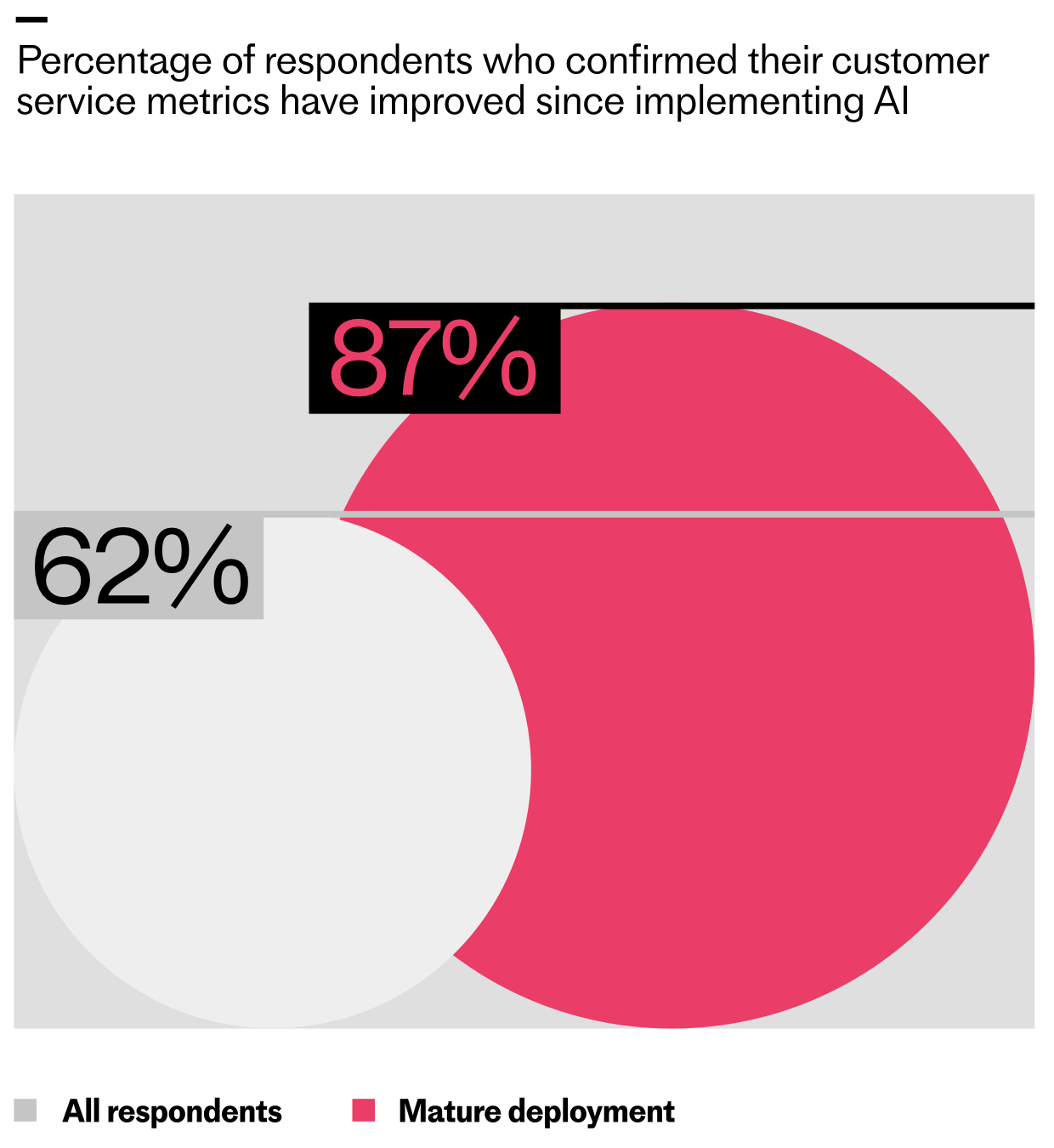
    Even at the initial deployment stage, 16% of teams report spending less time handling support volume since implementing AI – and among teams who’ve reached maturity, that figure rises to 28%.

    When Intercom’s Research, Analytics & Data Science (RAD) team interviewed 166 of our customers, similar themes emerged. Nearly all participants (≈95%) reported meaningful workflow changes, with manual processes being handled by AI, and humans focusing more on monitoring or fine-tuning AI outputs. Eighty-three percent of participants also reported seeing their team’s roles and responsibilities change to become more strategic and supervisory in nature.

    Infographic of AI-driven customer support roles and adoption rates: conversation analyst 32%, knowledge manager 30%, AI operations lead 28%, support automation specialist 24%; 8% say no new roles added.
    AI is reshaping support teams: organizations are adding conversation analysts (32%), knowledge managers (30%), AI operations leads (28%), and support automation specialists (24%). Just 8% report no new AI roles.

    It’s not just the work that’s evolving; organizational structures are, too. Some teams are reallocating existing talent into AI-focused roles; others are hiring entirely new skill sets. Many of the most common job titles in this space didn’t exist two years ago.

    Consider a Senior AI Knowledge Manager, Beth-Ann Sher, who transitioned from a help center manager role. Like many careers transformed by AI, her work evolved from administrative to strategic. Instead of focusing solely on customer-facing, self-serve content, her mandate expanded to designing and optimizing knowledge inputs that directly improve AI Agent Fin’s performance—work that materially lifts resolution rates.

    Or look at a Senior Conversation Designer, Fred Walton, hired specifically for an AI-first function. He focuses on frictionless customer journeys with Fin, smoothing handoffs between automation and human support while keeping customer satisfaction front and center—hallmarks of mature AI workflows and conversation design.

    In high-performing organizations, roles like these typically sit within a dedicated AI support team under senior CS leadership. Clear ownership and accountability for AI performance is critical; without it, optimization stalls and trust erodes.

    These shifts aren’t isolated. Take Robb Clarke from RB2B. He went from Head of Technical Operations to Head of AI. With Fin, his focus moved from repetitive support questions to managing knowledge and improving the system behind it—freeing him to be proactive about product improvements and fix issues before they hit customers.

    Or consider Eric Broulette from Bloomerang, a support leader who leaned into AI and became the VP of Support and Education. By deploying Fin, his team found breathing room to invest in what’s next. Agents stepped into new roles, contributed to meaningful projects, and built skills that had previously felt out of reach. As Eric puts it: “Do not wait to embrace AI. It will unlock more career growth for your teams than you can imagine.”

    Neon green hero graphic reading 'The 2026 Customer Service Transformation Report', with subhead 'The AI deployment gap is widening' and a black 'Get the report' button over a bar-chart pattern.
    Leaders are racing ahead with real AI in support. Explore the 2026 Customer Service Transformation Report to see where deployment is stalling, benchmark your team, and get practical steps to scale automation that delights.

    Bringing AI into support will eventually change every agent’s day-to-day work. For leaders at the start of the journey, that can feel daunting. My perspective: the most successful teams treat this as an operating model shift, not a tooling rollout—anchored in AI Strategy, governance, and continuous improvement.

    Be transparent about what’s changing, why it matters, and how success will be measured. Define how AI performance will be evaluated (resolution rate, containment, CSAT impact), empower agents to train and improve the system, and communicate how responsibilities will evolve. When teams help build the AI, they’re invested in making it great.

    Here’s the playbook I rely on with support leaders: First, reset expectations about time allocation—less time in the queue, more time improving the AI system that serves the queue. Second, elevate knowledge management as a core capability. Prioritize content quality and coverage for your AI Agent, and carve out dedicated “out of the inbox” time so every agent contributes. Third, keep outcome metrics—especially resolution rate—front and center. It gives the team a north star for experimentation and iteration.

    Scaling AI is as much a people challenge as it is a technology challenge. As automation takes on more work, support roles become more proactive, strategic, and cross-functional—even early in the journey. Responsibilities expand, new roles emerge, and team structures adapt to concentrate on and amplify AI performance. In the process, support careers are transformed.

    If you’re leading this shift, now’s the moment to reimagine your operating model: clarify ownership, invest in knowledge and conversation design, adopt eval-driven development, and build the muscle for continuous improvement. That’s how you move from tickets to strategy—and unlock compounding value for your customers, your business, and your teams.


    Inspired by this post on The Intercom Blog.


    Book a consult png image
  • 12 Game-Changing Updates to Fin Procedures & Simulations for Complex Queries

    12 Game-Changing Updates to Fin Procedures & Simulations for Complex Queries

    Today, I’m excited to share 12 major updates to Fin’s Procedures and Simulations—the foundation that lets Fin handle complex work while keeping teams fully in control of the customer experience.

    In my work building AI workflows with product and support leaders, I’ve seen how the right blend of natural language instructions, deterministic controls, and fully agentic behavior turns Fin into a reliable problem solver. Procedures make this blend possible by enabling Fin to act like a human—yet with the repeatability and governance of software. Simulations then let us test those complex Procedures at scale before they reach customers, so we can deploy with confidence.

    Together, these capabilities make Fin self-manageable, transparent, and ready for genuinely complex work.

    Here’s what’s new at a glance: we’ve made Procedures easier to build and maintain; enhanced deterministic controls for precision and policy compliance; expanded agentic behavior so Fin can adapt in real time; and delivered more powerful Simulations to validate end-to-end workflows before go-live.

    Why did we build this? Many teams see early AI gains in speed, coverage, and cost to serve—but then hit a ceiling. They keep AI confined to simple automation and information retrieval, rather than setting it up to handle the nuanced, multi-step workflows they still trust to humans. We designed Procedures and Simulations to remove that ceiling, so teams can confidently set up, govern, and iterate on complex AI workflows without bottlenecks.
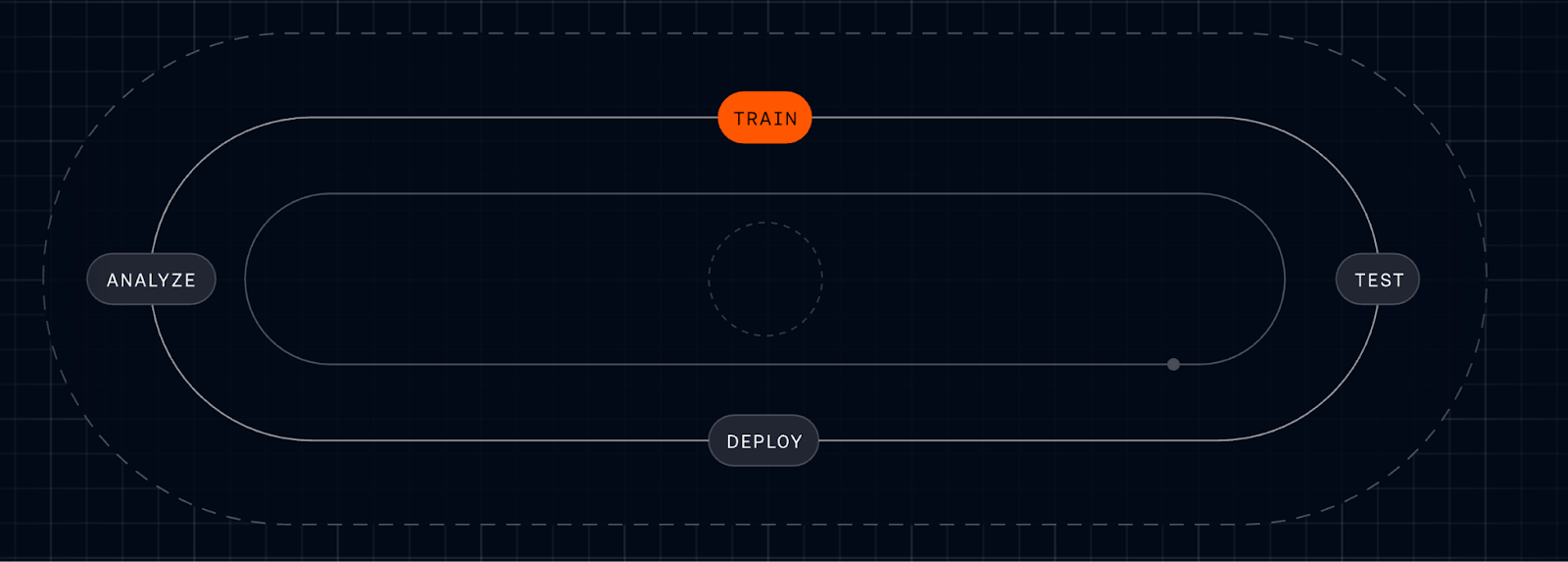
    Dark UI diagram of a continuous AI/ML lifecycle loop on a grid, labeled ANALYZE, TRAIN, TEST, and DEPLOY, with TRAIN highlighted in orange to signal iterative model development and evaluation.
    Follow the AI lifecycle as it cycles from Analyze to Train to Test to Deploy. This streamlined loop spotlights the TRAIN phase, underscoring faster iteration and feedback that power more capable procedures and realistic simulations.

    We also heard that teams needed an easy way to connect data so Fin could reliably check customer status or eligibility and then take action. And they didn’t want to route through engineering every time they needed to create or amend logic for mid-conversation decisions. Procedures combines natural language instructions and intuitive data connector setups. You tell Fin in your own words how you want it to behave, and you’ll be guided through creating conditional steps so Fin will react consistently, with the option to add in any code snippets for circumstances where absolute precision is required. Once you build one Procedure, we believe you’ll want to build several, so Fin will constantly read the conversation it’s in to ensure it’s following the most relevant Procedure, and jump to a more relevant one if the user intent changes.

    I know that taking something like this live the first time can feel like a leap of faith. That’s exactly why we built Simulations—to test Procedures comprehensively, uncover edge cases, and launch with confidence.

    Reaching mature deployment takes a deliberate, ongoing commitment to training workflows, validating them before deployment, measuring performance in production, and refining them over time. At Intercom, we call this the Fin Flywheel: train, test, deploy, analyze. Procedures form the foundation of the train stage, and Simulations make the test stage reliable at scale. Together, they enable Fin to handle complex work, and teams to stay in control of it.

    Procedures: Define exactly how Fin handles complex work. With Procedures, I can set Fin up to resolve complex, time-consuming queries that require multiple steps or business logic. Fin follows standard operating procedures and applies sound judgment—just like a seasoned teammate—so even complicated queries are resolved in controllable, predictable ways.
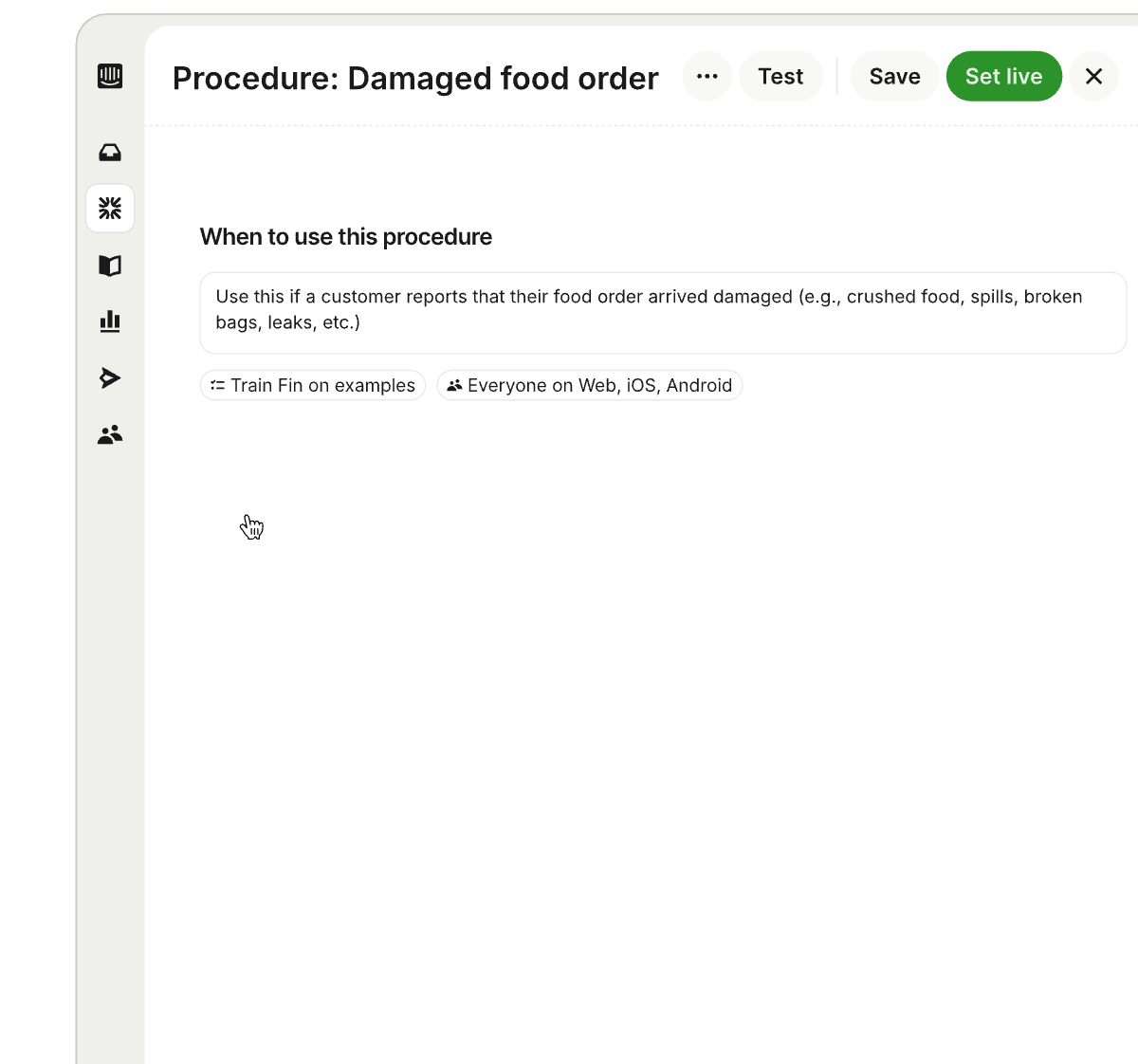
    Interface screenshot of a customer service Procedures editor titled 'Procedure: Damaged food order,' showing when-to-use guidance, Train Fin on examples, and Test, Save, Set live actions.
    A snapshot of the Procedures builder in action, mapping a clear path for handling damaged food orders while letting teams train Fin on examples, target channels, quickly test updates, and publish with Set live.

    Procedures combine three powerful elements. First, natural language instructions. You write a Procedure in plain language, just like documenting a process for a new teammate. You can paste in your existing SOPs, write from scratch, or let AI draft them for you, then iterate yourself.

    What’s new: Draft Procedures with AI. Share an outline of your process and Fin drafts a complete Procedure using your conversation history, knowledge hub content, and relevant data. If additional context is needed, it prompts you with clarifying questions to make sure the Procedure is thorough and tailored to your use case, significantly reducing setup time. For example: if you’re creating a refund workflow, the system can draft conditional paths for eligibility, approval thresholds, and verification steps based on your historical cases and policies.

    What’s new: Break complex workflows into Sub-procedures. Write a process once and reference it across multiple Procedures by breaking it down into reusable steps, called Sub-procedures. This makes workflows easier to read, faster to build, and simpler to maintain as things change.

    Second, deterministic controls. Natural language is flexible, but some steps need to be exact. You can layer in deterministic controls where precision matters, starting with a fully natural language Procedure and introducing structure gradually where it adds value: conditional steps (branching logic) to handle decision points so Fin’s behavior is consistent and predictable; data connectors so Fin can pull information from your tools or take actions automatically; code snippets for when absolute accuracy is essential; and checkpoints to pause for approval or hand off to a teammate.
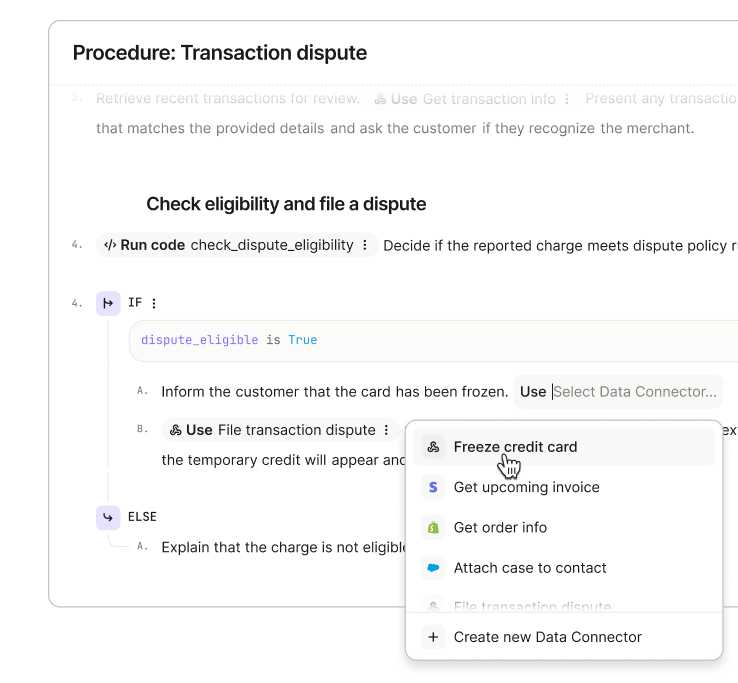
    Screenshot of a Transaction dispute procedure showing IF/ELSE logic, a code step for check_dispute_eligibility, and a Data Connector menu with Freeze credit card and Get upcoming invoice.
    Fin demonstrates structured troubleshooting: a transaction dispute flow with eligibility checks, clear IF/ELSE steps, and quick Data Connector actions like freezing a card or pulling invoices, streamlining complex support tasks.

    What’s new: Instruct Fin to read specific content from your knowledge hub. You can set clear rules for Fin to reference a specific policy or article from your knowledge hub in defined situations so Fin always surfaces the right context in a conversation.

    What’s new: Explicit Procedure switching under defined conditions. You can set rules that deterministically trigger a switch to a different Procedure, for example, escalating to a complaints Procedure if specific risk signals are detected mid-conversation.

    What’s new: Internal notes for human handoffs. When Fin hands off to a teammate, it can now include internal notes with relevant context so the person picking up the conversation knows exactly what happened and what needs to happen next.

    Third, fully agentic behavior. Because real conversations rarely follow the happy path, Procedures let Fin reason through what’s happening and adapt—jumping to the right step or switching Procedures entirely if a customer changes their mind or the issue shifts.
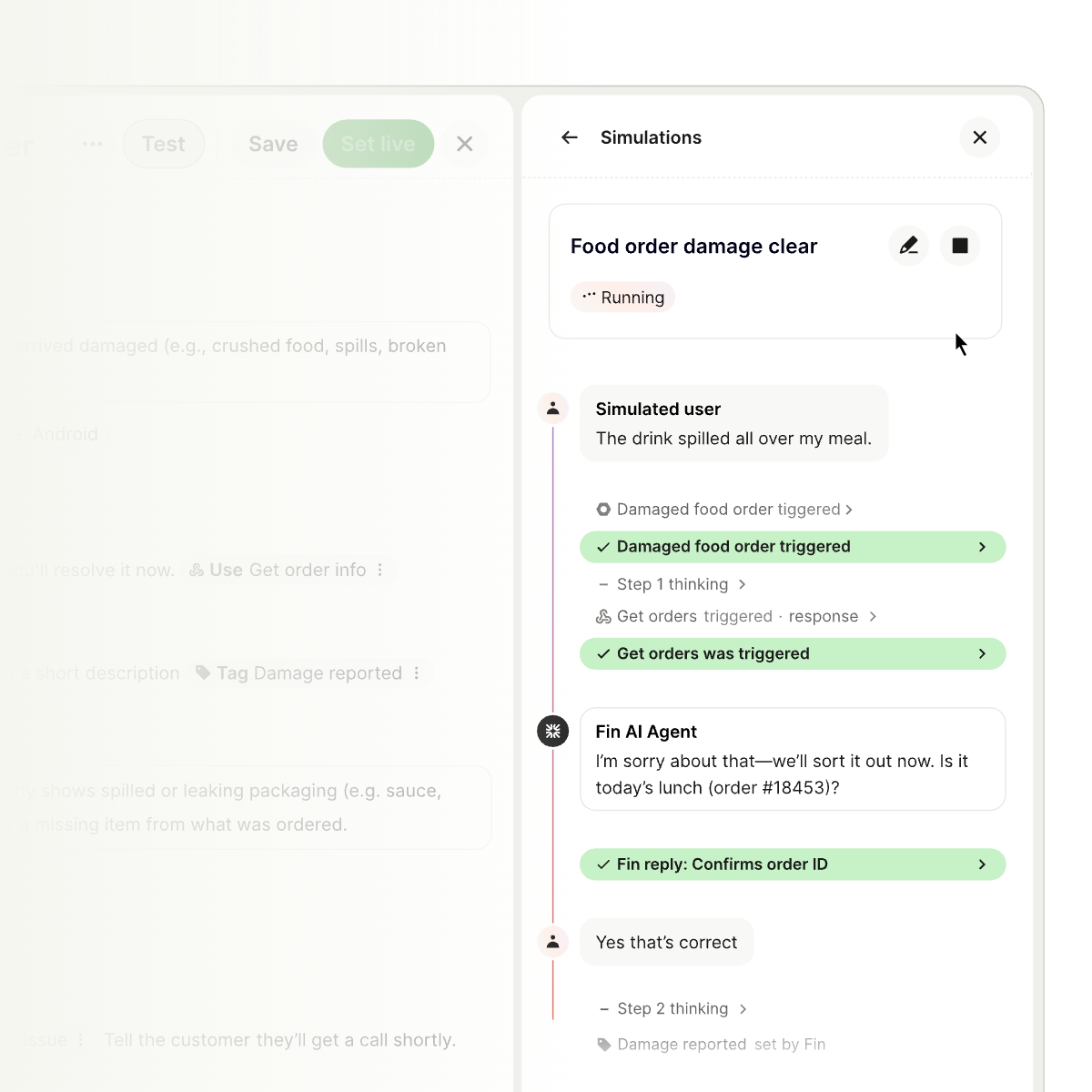
    Product UI showing a Simulations panel where a 'Food order damage clear' test is running, with a simulated user and Fin AI Agent exchanging messages and green checks marking triggered steps.
    Procedures and Simulations in action: Fin rehearses a food order damage scenario, confirming details and progressing through each trigger. Teams validate complex flows end to end as steps turn green and outcomes are tracked.

    What’s new: Automatic Procedure switching. If a customer starts in a billing workflow but then asks about cancelling their subscription, Fin transitions to the relevant Procedure without forcing the customer to restart.

    What’s new: Structured data extraction from uploaded files. Fin can now extract structured data directly from PDFs and images uploaded by customers—like invoices, forms, or receipts—and use that data within the conversation. Customers don’t have to copy and paste or repeat themselves.

    As MONY Group put it:

    “ If a customer starts down one path but their issue turns out to be something else entirely, Fin adapts seamlessly – no more getting stuck in loops or forcing customers into the wrong workflow. ”
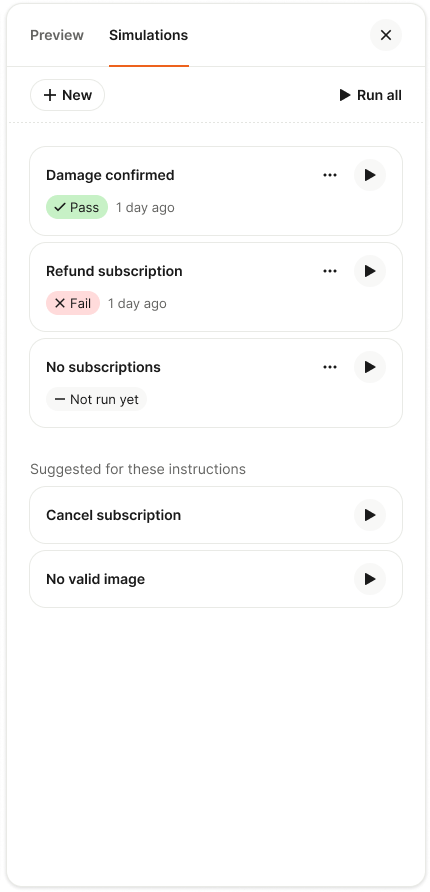
    Screenshot of a Simulations panel for AI support workflows, listing scenarios: Damage confirmed (Pass), Refund subscription (Fail), No subscriptions (Not run yet), with Run all, New, and suggested tests.
    Simulations help teams rehearse procedures and verify outcomes before going live. Run all tests or launch a new one to ensure Fin handles tricky customer scenarios—from damage confirmation to refunds and missing subscriptions.

    The result is a conversation that feels fluid, but always follows your intended rules.

    Making complexity easier to manage is just as important as unlocking new capabilities. Beyond the core updates, we’ve focused on creation, governance, and scale—while keeping ownership with your team.

    What’s new: Improved instruction authoring. We’ve made it easier to write, edit, and structure Procedures, so building and updating them takes less time and requires less effort.

    What’s new: Reporting on when Procedures trigger, resolve, or hand off. You can now track how Procedures are performing directly within the Procedures UI, seeing exactly when they trigger, when they resolve, and when they hand off to a teammate. This visibility helps you spot issues early and improve over time.
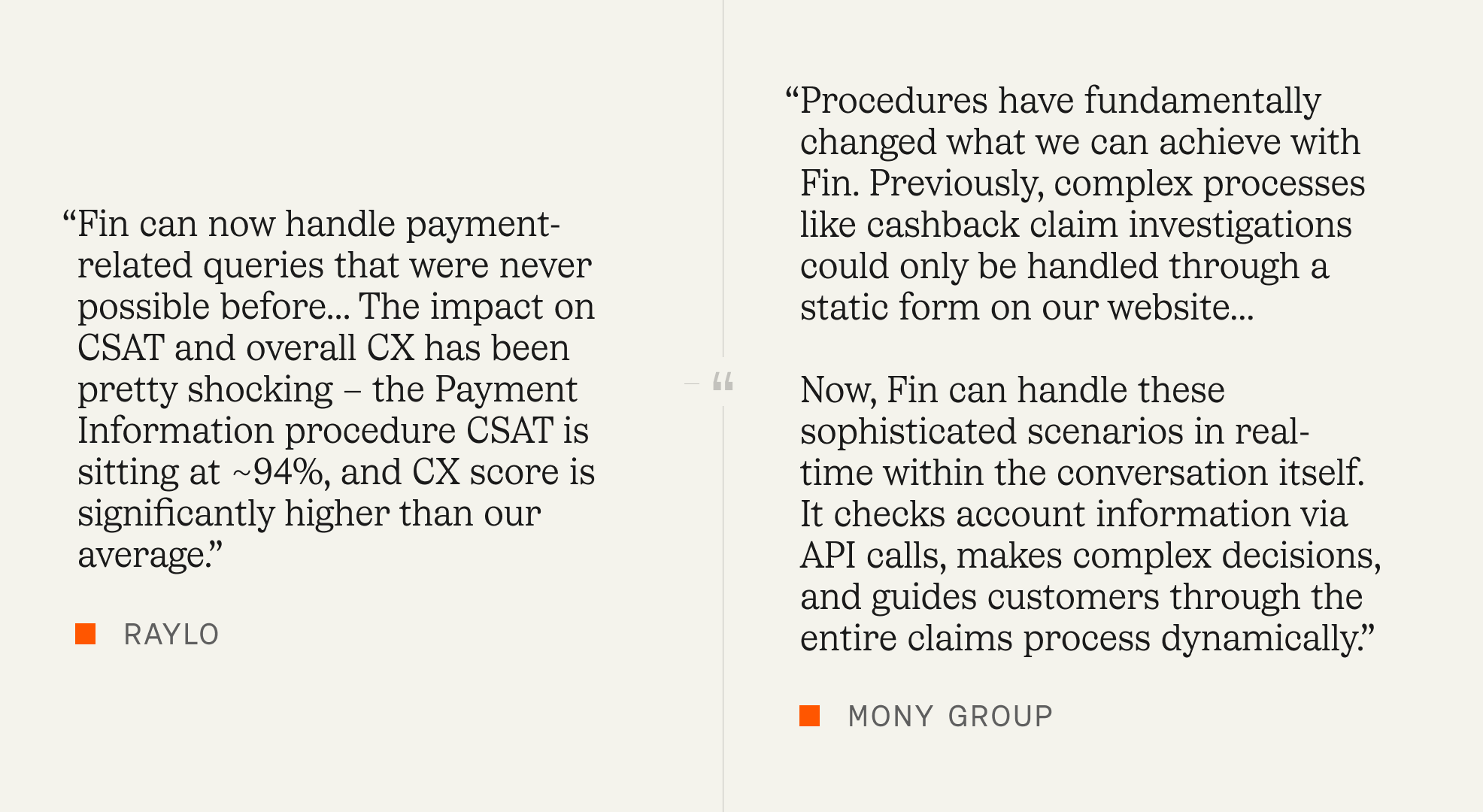
    Two-column graphic with customer testimonials on Fin’s Procedures and Simulations update, citing payment query handling, ~94% CSAT for Payment Information, and real-time claims via API-driven decisions.
    Customer stories from Raylo and Mony Group show how Fin now resolves payment issues and complex claims in-chat, checks account data via APIs, and lifts CSAT to about 94%, highlighting the impact of Procedures and Simulations.

    Simulations: Test complex workflows at scale before they reach customers. Simulations let you validate how Procedures will perform before anything goes live, and continuously revalidate as things change. Deploying complex AI can feel uncertain; Simulations remove that uncertainty so you can launch with confidence and iterate safely.

    You can simulate full conversations. For any Procedure, choose a user or customer segment and run a complete, multi-turn simulated conversation. You see every step Fin takes, how it applies your rules, reasons through decisions, and where it passes or fails—giving you the observability to debug and fix issues before they ever reach customers.

    What’s new: Upload images for richer testing. Simulations now support image uploads, so you can test workflows that involve receipts, invoices, or forms—the same inputs your customers actually send.

    What’s new: Clearer visibility into Fin’s reasoning. You can now see exactly how Fin is thinking through each step of a Simulation, making it easier to understand behavior, catch unexpected decisions, and refine Procedures with confidence.

    You can also use AI to create, store, and rerun tests. Writing test coverage manually doesn’t scale. Fin’s AI Assistant generates Simulations directly from your Procedures, suggesting realistic edge cases like partial refund disputes, missing invoice uploads, or no subscription found, so you can expand coverage without expanding overhead. All the Simulations you create are stored in a central library. When a product changes, a policy updates, or a Procedure is edited, hit “run all” to instantly check whether anything has regressed. This applies the same rigor to AI automation that engineering teams bring to software testing.

    What’s new: AI-suggested Simulations. You can now use AI to generate a full set of Simulations from any Procedure. The AI Assistant suggests realistic variations based on your workflow, so you can build comprehensive test coverage fast.

    Customers are already seeing this in production. “Fin can now handle payment-related queries that were never possible before… The impact on CSAT and overall CX has been pretty shocking – the Payment Information procedure CSAT is sitting at ~94%, and CX score is significantly higher than our average.” – Raylo

    “Procedures have fundamentally changed what we can achieve with Fin. Previously, complex processes like cashback claim investigations could only be handled through a static form on our website… Now, Fin can handle these sophisticated scenarios in real-time within the conversation itself. It checks account information via API calls, makes complex decisions, and guides customers through the entire claims process dynamically.” – MONY Group

    Procedures and Simulations are available now. I’m eager to see how teams use these updates to scale agentic AI, deliver faster resolutions, and raise the bar for customer experience—without sacrificing control, compliance, or quality.


    Inspired by this post on The Intercom Blog.


    Book a consult png image
  • Human-in-the-Loop Mastery: Proven Oversight Tactics That Elevate AI Quality and Trust

    Human-in-the-Loop Mastery: Proven Oversight Tactics That Elevate AI Quality and Trust

    Human-in-the-loop oversight is the fastest and most reliable way I know to elevate AI quality, build user trust, and reduce risk. At HighLevel, my teams treat oversight as a product feature—not an afterthought—because dependable AI experiences come from deliberate design choices across data, models, and people.

    When I say “human-in-the-loop,” I mean a system that blends automation with targeted human judgment at key moments: during data curation, prompt engineering, evaluation, deployment, and post-launch learning. This approach turns “AI workflows” into measurable, repeatable processes and keeps me honest about what’s working, what’s drifting, and where a human safety net must step in.

    Architecturally, I start with a retrieval-first pipeline to ground outputs in trusted knowledge, then wrap it in guardrails. Deterministic preprocessing, careful prompt engineering, and post-processing validators catch obvious failure modes. Confidence thresholds and policy checks route ambiguous or sensitive cases to a human reviewer, while clear, auditable traces show why the system chose automation versus escalation. This balance supports reliability at scale while preserving agility for “agentic AI” patterns when they add value.

    Quality is only real if I can measure it, so I build with eval-driven development from day one. I maintain golden datasets, rubric-based scoring guidelines, and an automated evaluation harness that runs on every change to prompts, models, or data. Pre-production gates protect against regressions, while production telemetry surfaces drift by segment and use case. When it’s time to run experiments, I use A/B tests sized with a minimum detectable effect (MDE) to avoid overfitting to noise.

    Operationally, I optimize for outcomes, not output. I track task success rate, time-to-resolution, safety violation rate, hallucination rate, and cost-to-serve, then connect these to outcomes vs output OKRs. The signal I want is simple: are we reliably solving the user’s job-to-be-done with lower effort and higher confidence? If not, I tighten prompts, refine retrieval, or expand human review where it pays off most.

    Risk governance is non-negotiable. I design with privacy-by-design and data governance from the start—role-based access, audit trails, PII redaction, and red-team tests for safety. Clear reviewer playbooks and calibration sessions reduce bias and ensure consistent decisions. These practices aren’t bureaucracy; they’re how I operationalize AI risk management while maintaining velocity.

    Teams make or break this model. I empower product trios to own the full lifecycle—discovery, build, and learning—so feedback loops close quickly. In-product feedback widgets, reviewer queues, and incident management playbooks help us respond in hours, not weeks. Over time, human review becomes a targeted scalpel rather than a blanket requirement as the system learns and improves.

    Economics guide the level of oversight. I treat each workflow like a portfolio: where the value of accuracy is high and ambiguity is common, I route more to humans; where tasks are simple, frequent, and well-bounded, I automate aggressively. The goal isn’t zero humans—it’s optimal humans, deployed precisely where their judgment compounds ROI.

    If you’re getting started, begin with one high-impact workflow, establish your golden set and evaluation rubric, and wire in a simple review queue. Prove the lift, then scale. In the short video above, I walk through the patterns I use to design these loops, measure quality with rigor, and ship AI that teams—and customers—can trust.


    Inspired by this post on Product School.


    Book a consult png image
  • Make Your Analytics AI-Ready: De-Risk, Measure, and Scale AI-First Products Fast

    Make Your Analytics AI-Ready: De-Risk, Measure, and Scale AI-First Products Fast

    I ask one question before I green‑light any new AI feature: is our analytics truly AI‑ready? If the answer is no, we slow down, because nothing derails an AI roadmap faster than shipping features we can’t measure, iterate, or trust. Over time, I’ve learned that the right analytics foundation is the difference between a flashy demo and a durable, compounding product advantage.

    "Product and engineering teams face new challenges when building AI-first products. A modern digital analytics platform offers solutions." I agree—and I’d add that the real win comes when model metrics and product outcomes live in one coherent system, so we can connect every improvement to customer value.

    Here’s what “AI‑ready” analytics means in practice for me: a unified event taxonomy tied to clear user and account identities; consistent product analytics (activation, funnels, retention analysis, cohorts); ground‑truth labels and feedback signals for model evaluation; and a single source of truth that blends model telemetry with user behavior. When those pieces click, our AI Strategy turns from guessing to “eval‑driven development.”

    Start with data governance and privacy‑by‑design. Define event names, properties, and versioning rules up front. Capture the context that AI needs—inputs, outputs, confidence scores, content types—without storing unnecessary PII. This discipline reduces rework, improves observability, and keeps auditors and customers confident in how we handle data.

    Next, operationalize eval‑driven development. I run offline evaluations with representative datasets, then shadow mode in production, and finally controlled rollouts with A/B testing and feature flags. We set a minimum detectable effect so experiments are conclusive, and we include AI risk management metrics—like safety violations, fallback rates, and moderation triggers—alongside core product KPIs such as activation, task success, and time‑to‑value.

    On the product analytics side, I rely on a unified analytics platform (e.g., Amplitude analytics or similar) to track adoption of AI features: who sees the feature, who tries it, who repeats it, and who retains because of it. Cohort analyses help me isolate lift among target segments; CRM integration connects usage to revenue; and pathing highlights where users need guidance. This is the engine of product‑led growth for AI capabilities.

    Quality and observability complete the loop. I monitor latency, error rates, and cost per successful outcome, but I also watch human‑grounded proxies: thumbs up/down, edits after AI suggestions, and deflection and CSAT for support workflows. These signals feed back into prompt engineering, retrieval quality, and model selection—closing the gap between LLM behavior and customer value.

    None of this works without strong cross‑functional rituals. Product trios align on success metrics before we write a line of code; continuous discovery validates user problems; and QBRs versus OKRs are reconciled so we invest in durable capabilities, not just quarterly spikes. When analytics and discovery move in lockstep, we ship fewer speculative features and more compounding improvements.

    Finally, choose build versus buy intentionally. I buy a robust, scalable analytics substrate and only build the custom AI evals I need for proprietary use cases. With feature flags in CI/CD and automated schema checks, instrumentation becomes part of deployment frequency—not an afterthought. The result is a reliable runway to scale AI‑first products without losing speed, safety, or clarity.

    If you want a quick readiness check: do you have a clean event schema, identity resolution, and governed properties; a measurable definition of activation for each AI feature; offline and online evals connected to business KPIs; guardrails and human feedback in the loop; and dashboards that team leaders actually use? If not, start there. The payoff is faster iteration, lower risk, and a clearer line from AI investment to customer outcomes.


    Inspired by this post on Amplitude – Perspectives.


    Book a consult png image
  • How Deep AI Transforms Support Into Proactive, Omnichannel CX—No Extra Headcount Needed

    How Deep AI Transforms Support Into Proactive, Omnichannel CX—No Extra Headcount Needed

    For years, I chased the elusive goal of delivering a perfect customer experience. Today, with AI embedded in our support operations, that standard is finally within reach—and it’s reshaping how we prioritize, design, and scale service.

    In “The 2026 Customer Service Transformation Report,” teams report early, tangible wins from AI: faster responses, higher efficiency, and consistent coverage across languages and time zones. Those gains create the capacity we’ve always needed. The more we push the technology, the more quality improvements we unlock.

    This marks a fundamental shift. As AI takes on more, our focus can finally move from firefighting to crafting the customer experience. When the AI is working, the measure of success becomes how well it’s working—across accuracy, tone, resolution, and end-to-end journey quality.

    I’ve seen this transformation firsthand. Mature AI deployment gives my team “breathing room,” so we can design for consistently excellent outcomes rather than obsess over deflection. That means widening access to support, removing friction on the path to resolution, and anticipating customer needs before they escalate.

    In our own support organization, we opened support to trial customers, accelerated first response times, and added consultative sessions during onboarding. We absorbed a 300% increase in total demand without adding headcount—made possible by deep integration of an AI Agent and a disciplined AI strategy.

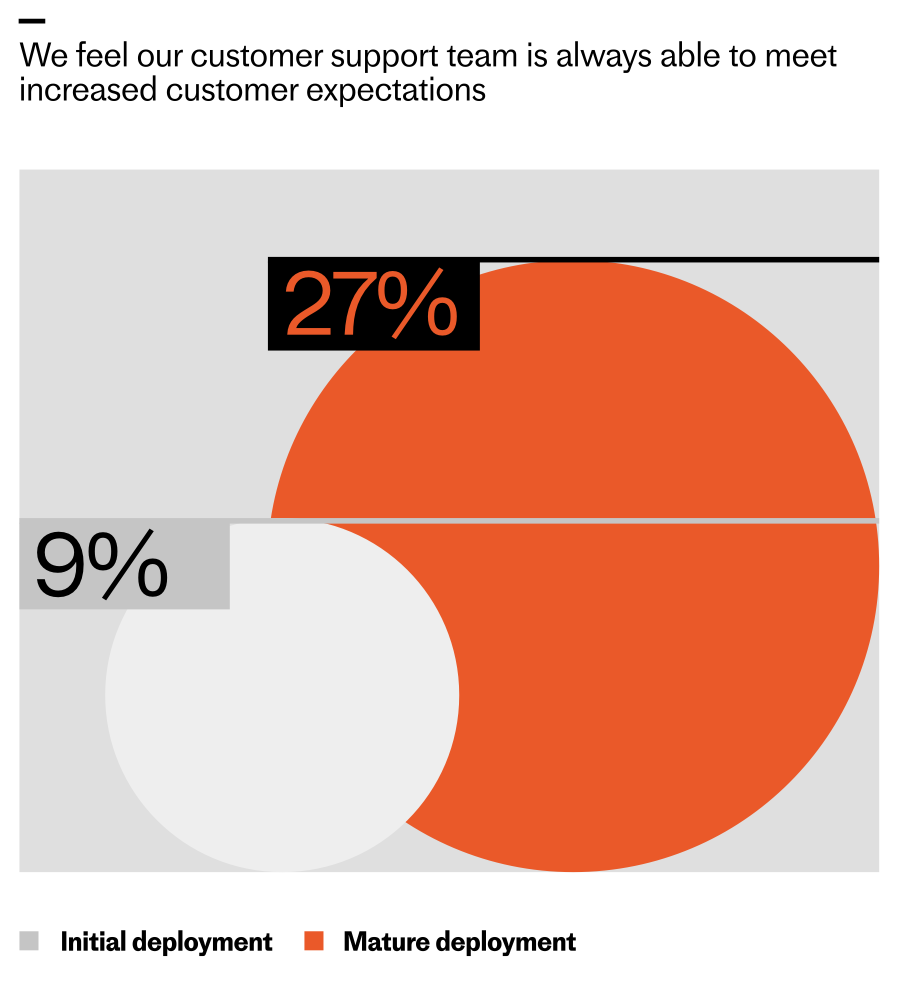
    Infographic comparing ability to meet rising customer expectations: 27% of organizations with mature deployments say support always meets expectations, versus 9% at initial deployment, shown as orange and gray bubbles.
    Teams with mature customer service deployments are nearly three times likelier to say they always meet increasing expectations—27% vs 9% at initial rollout—highlighted by bold orange and gray comparison bubbles.

    Across the industry, the pattern is similar. When teams initially deploy AI, only 9% say they can always meet customer expectations. That number triples as teams reach a mature level of deployment. Even as expectations rise, the organizations that deeply integrate AI—complete with clear ownership, robust instrumentation, and continuous improvement loops—are the ones most likely to meet (and exceed) the bar.

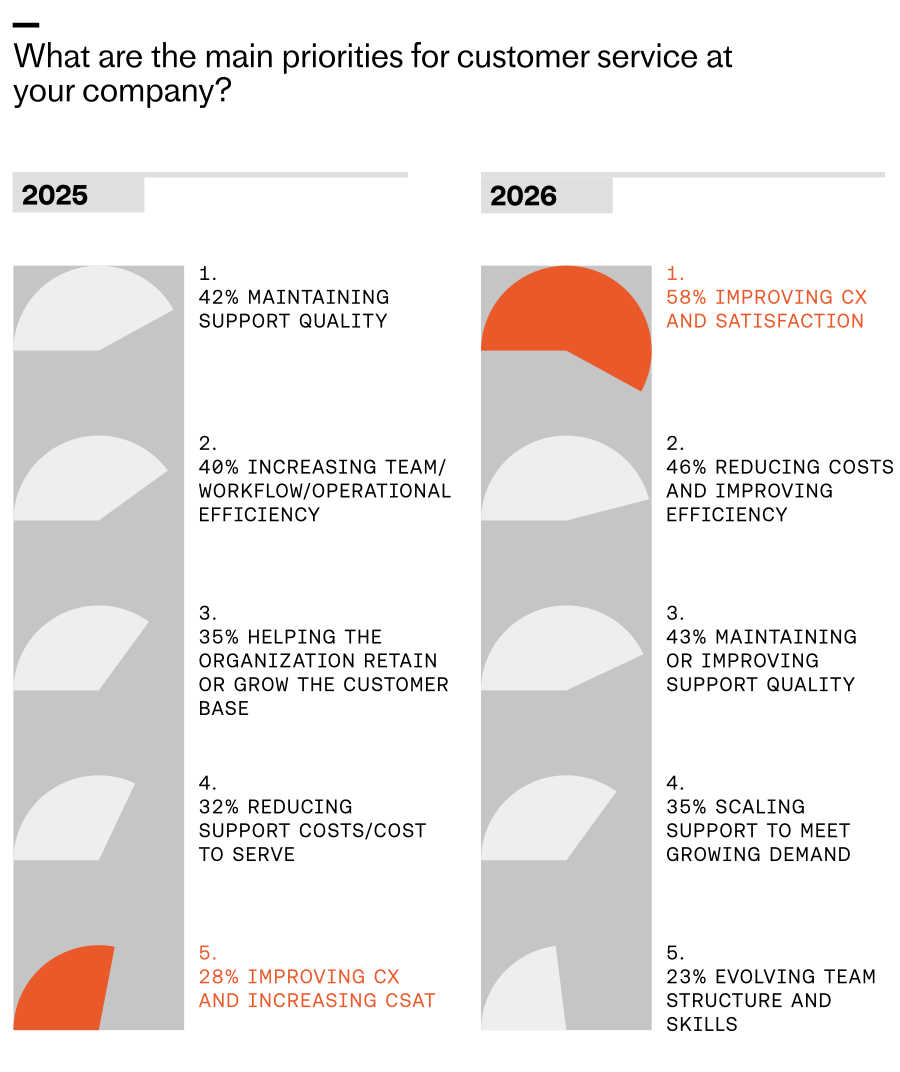
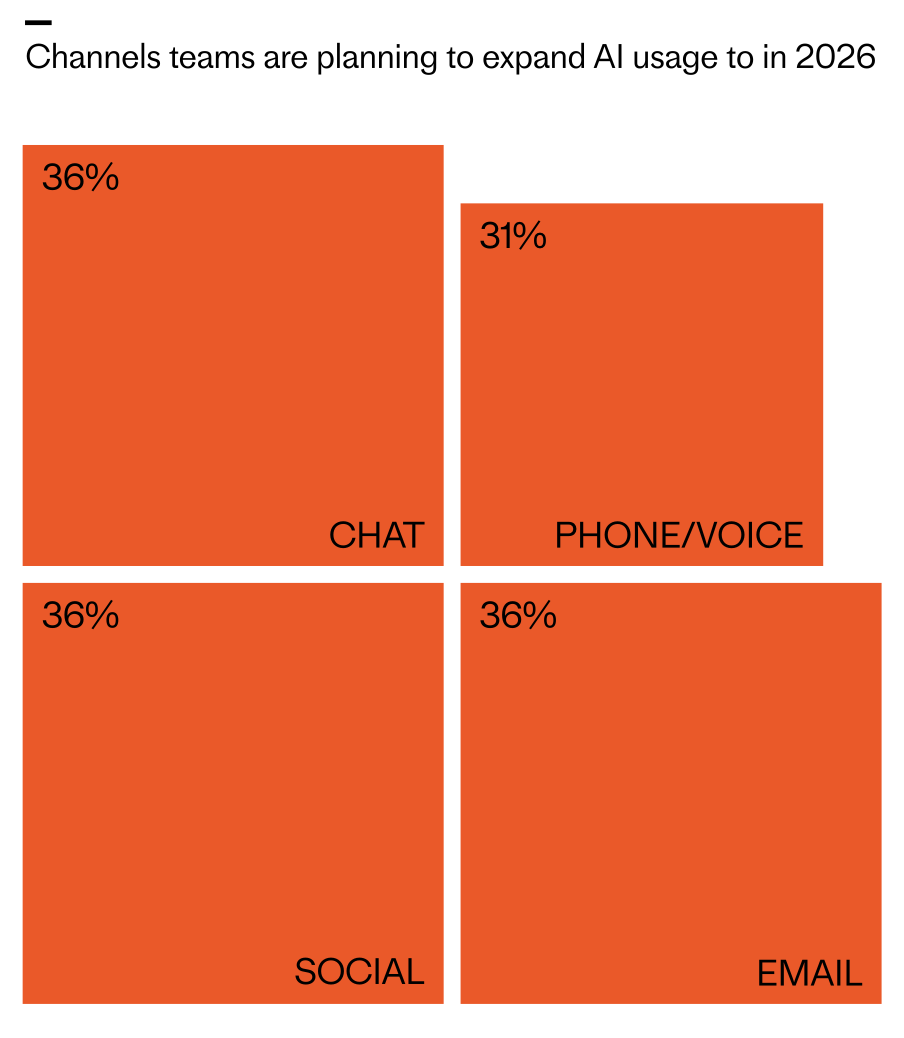
    Looking ahead to 2026, I expect omnichannel consistency to become a key differentiator. The data shows planned investment is distributed nearly equally across chat, email, and social messaging (36% each), closely followed by phone/voice (31%). The question is no longer “Which channel should we optimize?” but “How do we deliver a consistent, AI-powered experience everywhere our customers are?”

    Teams that solve for omnichannel consistency will bridge the long-standing gap between what customers expect and what support can deliver. Every touchpoint becomes an opportunity to exceed expectations and build durable trust.

    Consider Clay, a team that scaled support without sacrificing quality. Support is one of their main growth drivers, and as their customer base expanded, ticket volume surged. Early on, they concentrated much of their effort in Slack, cultivating close, transparent community relationships. But relying on a single channel created friction as they grew; customers wanted the flexibility of email and in-app chat, and Clay needed to deliver the same high standard everywhere.

    Infographic showing channels where teams plan to expand AI usage in 2026: chat 36%, social 36%, email 36%, and phone/voice 31%, displayed as four bold orange blocks with labels.
    Where AI investment is headed for customer service in 2026: chat, social, and email lead at 36%, with phone/voice close behind at 31%. A bold visual snapshot of shifting channel priorities in CX.

    By unifying their support experience with an AI Agent, Clay brought consistency across channels. Today, AI is involved in 90% of all queries and handles half of Clay’s total volume, upwards of 7,000 queries a month. First response rates improved significantly, freeing the team to focus on proactive, high-impact work.

    That work includes identifying content gaps for education and content marketing, reaching customers before they need to ask for help, and surfacing feature requests and recurring challenges to product teams. Clay proves that when support is truly great, it becomes a competitive edge.

    So how do you build a superior customer experience with an AI Agent? Here are five principles I use when scaling toward mature deployment.

    1) Treat customer experience like a product. Treating support as a product means designing, building, and managing the support experience with the same rigor as your core product. You define goals (faster onboarding, higher CSAT or CX Score, lower churn). You map flows (AI starts the conversation, human handovers, proactive nudges). You instrument the journey (track handoffs, drop-offs, success states). You run tests and ship improvements (tone tweaks, fallback paths, training updates). You own the outcomes (gather feedback, measure performance, use insights to continuously improve the system).

    Neon green hero graphic reading 'The 2026 Customer Service Transformation Report', with subhead 'The AI deployment gap is widening' and a black 'Get the report' button over a bar-chart pattern.
    Leaders are racing ahead with real AI in support. Explore the 2026 Customer Service Transformation Report to see where deployment is stalling, benchmark your team, and get practical steps to scale automation that delights.

    2) Lead with AI, back with humans. AI isn’t replacing the human touch. It’s redefining when, where, and how it’s most valuable. In a scaled model, AI is the first responder and the end point for most conversations. Humans step in where they add the most value—particularly during high-stakes issues—and those handoffs should feel seamless. Meanwhile, your team focuses on improving AI performance and optimizing the end-to-end journey.

    3) Be proactive. Use AI to anticipate needs, guide customers before problems arise, and nudge them toward successful outcomes. This is where customer support AI strategy shines—moving from reactive triage to journey orchestration that protects momentum and builds trust.

    4) Build for trust. Many customers still carry the legacy of clunky chatbots that delivered vague answers and dead ends. You earn trust by showing that your system works. Don’t hide your AI Agent behind layers of “choose an option.” Get customers to the AI quickly, demonstrate real problem-solving, and ensure that when a human is needed, they join with full context to resolve complex issues efficiently.

    5) Make it feel personal. Your AI Agent represents your brand. The way it speaks, follows policies, and responds matters. Use tone control, fallback logic, and language preferences to align the experience to your standards. Consistency builds trust; personality builds connection and loyalty.

    Perfect really is possible. With deep AI implementation, you can scale comprehensive, fast, and personal support across channels—so customers feel supported not just when they reach out, but throughout their journey. That’s the promise of modern AI workflows in support, and it’s what will separate leaders from laggards in the years ahead.


    Inspired by this post on The Intercom Blog.


    Book a consult png image
  • Eliminating the Last Bottleneck: Agentic AI in Amplitude That Builds What Matters Faster

    Eliminating the Last Bottleneck: Agentic AI in Amplitude That Builds What Matters Faster

    For years, I’ve watched high-performing product teams run into the same wall: the gap between insight and action. Dashboards multiply, yet decisions stall. That final mile—where we interpret trends, prioritize tradeoffs, and ship changes—remains the last bottleneck. It’s not a data problem; it’s a bandwidth and focus problem.

    Amplitude's AI Analytics Platform takes the next step: agents that investigate, monitor, and act so your team can build what actually matters.

    From my seat leading product at HighLevel, I see “agentic AI” as a structural upgrade to the product operating system. Instead of waiting on human cycles to discover anomalies, craft hypotheses, and trigger the next experiment, Agent Analytics can continuously investigate user behavior, monitor mission-critical metrics, and initiate actions—closing the loop from observation to outcome. That shift transforms analytics from a passive reference layer into an active, decision-making teammate.

    Practically, this matters because empowered product teams win on speed and focus, not on the volume of reports. When agents surface the most material opportunities—say, a sudden drop in activation for a high-value cohort or a retention dip tied to a recent release—we compress time-to-insight and, more importantly, time-to-action. The result is fewer context switches, fewer meetings, and more cycles invested in building meaningful value.

    The most compelling use cases are those that compound: continuous discovery that highlights friction in onboarding flows, proactive retention analysis on at-risk segments, automated experiment prioritization aligned to outcomes vs output OKRs, and closed-loop alerts that trigger workflows in your CRM or in-app guides to accelerate product-led growth. With a unified analytics platform feeding these agents, we can move from reactive analytics to anticipatory product strategy.

    Of course, leverage requires guardrails. I anchor adoption in three pillars: clear decision rights for agents (what they can autonomously act on vs. recommend), transparency in reasoning (so PMs can audit how conclusions were reached), and explicit alignment to key outcomes (activation, retention, expansion). Done right, this is not a replacement for product judgment—it’s an amplifier for it.

    If I were rolling this out today, I’d set a success dashboard that tracks: time-to-insight, time-to-action, percentage of initiatives initiated by agents, impact on North Star metrics, and the reduction in manual analysis hours. I’d also implement lightweight prompts and playbooks—LLMs for product managers—that standardize how we ask better questions and interpret agent outputs.

    The promise here is simple but profound: eliminate the last bottleneck by giving your teams a partner that never sleeps, never tires, and never loses the plot. When agents investigate, monitor, and act, we spend less time arguing about the data and more time building the right things, faster.


    Inspired by this post on Amplitude – Best Practices.


    Book a consult png image