Tag: voice AI agent

  • How I Make AI Agents Speak Like Our Team: A Conversation Design Playbook That Lifts CSAT

    How I Make AI Agents Speak Like Our Team: A Conversation Design Playbook That Lifts CSAT

    If nobody on our team trains the Agent on how to communicate, it will sound like an LLM when it speaks to customers—because it is one. I never want a customer to feel like they’re talking to a machine that doesn’t get them. That’s why I treat conversation design as a core product capability, not an afterthought.

    Conversation design is an emerging discipline in AI-first support teams built to solve this exact problem. In practice, I make someone explicitly own how the Agent communicates—tone, structure, level of detail, customer experience, and the handoff and escalation process—because that’s where trust is won or lost.

    When there’s no clear owner and no explicit guidance, the Agent starts making its own choices. I’ve seen it over-explain when a short answer would do, reply in a flat tone when a customer is frustrated, or trigger a handoff too late. None of those are model problems; they’re design problems.

    The cost is measurable. Customers who get awkwardly structured responses won’t trust the answer—even when it’s accurate—so they escalate to a human to hear the same thing phrased differently. Others will skip the Agent entirely. And when the Agent does hand off, a poor transition means the support rep inherits a frustrated customer. Every one of these outcomes is avoidable; conversation design exists to prevent them.

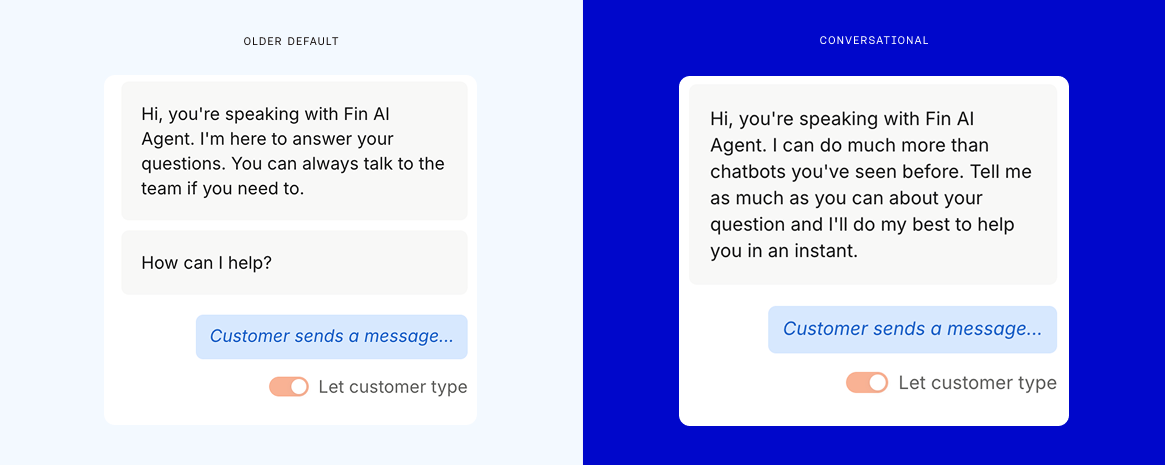
    I’ve seen A/B tests where a warmer, more conversational opening message meaningfully lifted customer satisfaction—CSAT moved from 72.8% to 78.4%. A single design change, applied to the very first message, drove a measurable difference. That’s the kind of leverage I look for as a product leader.

    Here’s the scope I use when I talk about conversation design—five areas that shape the customer experience end to end:

    1) Tone and personality: Define the Agent’s voice, level of detail, and how formal or casual it should sound—and specify where that register adapts to the situation (for example, urgent access issues versus exploratory product questions).

    Screenshot of an AI agent conversation design dashboard showing guidance for tone of voice, communication style, product naming, and a live preview, with callouts highlighting brand voice controls and response formatting.
    Design how your AI agent talks. Set tone, style, and product naming rules, then preview replies instantly. Clear callouts showcase brand voice consistency and flexible formatting so your bot communicates like your team.

    2) Response structure: Ensure the Agent matches the level of detail to the customer’s request, keeping answers tight when the ask is simple and expanding only when complexity demands it.

    3) Handoff logic: Decide when to escalate, how to communicate the transition, and what context to carry over so the human teammate can help immediately without rework.

    4) Interaction flow: Map how a conversation progresses—clarifying questions, answers, resolution, or handoff—and design for smooth pivots when customers change direction.

    5) Response quality: Go beyond technical correctness to ensure answers feel clear, helpful, and on-brand. Accuracy without clarity erodes trust.

    To put this into practice, I start with the feel of the conversation. Before tuning individual responses, I write down one tight paragraph describing the Agent’s voice. I don’t need a full brand bible—just a north star I can use to make consistent decisions about tone. The voice stays consistent, while the register adapts to the context: a locked-out customer needs directness and speed; a feature explorer might value more context and examples.

    I design the handoff with extreme care because it’s one of the highest-friction moments. Customers shouldn’t have to re-explain anything. The support rep should receive the full conversation history, the underlying context, what the Agent already tried, and why the escalation happened. Even the phrasing matters—“Let me connect you with a teammate who can help with this” feels very different from a silent handover.

    CX analytics dashboard with a CX Score of 3 and a donut chart of drivers: policy feedback, answer quality, customer effort, product or service feedback, and strong emotion beside an AI agent chat transcript.
    The new CX Score adds context to every conversation: a donut chart surfaces drivers like policy feedback and effort, while a side panel explains why this interaction earned a 3 based on signals from an AI agent chat.

    I also build a failsafe. If the Agent can’t resolve the issue cleanly, a graceful fallback still gives the customer a smooth experience. A customer might be frustrated with AI at that point, but a well-handled transition can turn that around.

    Follow-ups deserve the same rigor as handoffs. If someone drops mid-conversation—with the Agent or a human—how do we reach back out to confirm they got what they needed? Most teams miss this moment; customers don’t.

    Another common pitfall is over-explaining. The Agent has access to a lot of information, and left unguided, it will overshare. The fix is simple: match the answer’s depth to the question. A password reset shouldn’t take three paragraphs; a complex integration might. When there’s more to offer, the Agent should ask before expanding.

    I also design for the conversation the customer is actually having—not the script I wish they’d follow. Customers change direction, stack questions, or bring up unrelated follow-ups. The Agent should pivot with them, not force them back into a rigid flow. I also consider whether flows vary by channel and whether different segments merit distinct experiences.

    On the instruction side, I keep guidance short. Teams often react to edge cases by adding more rules until the LLM is parsing paragraphs before it can reply. I’ve seen it everywhere. My rule: if it’s about content or information, it belongs in the knowledge base. If it’s about tone or handling specific situations, it belongs in the Agent’s instructions. “Be direct about pricing” does more than a paragraph explaining the philosophy behind your pricing communication strategy.

    If you’re using Fin, much of this work happens in Guidance. It’s where conversation design takes shape, helping you define how the Agent should sound, how much it should say, and how it should respond in different situations.

    Word 'Blueprint' drawn as blue vector outlines with anchor points on a light grid, with text about the AI Agent Blueprint as a strategic map for launching and scaling AI in customer service.
    On a crisp grid, 'Blueprint' appears as editable vector paths, underscoring a methodical plan. The image promotes the AI Agent Blueprint—a framework to launch and scale customer service automation with confidence.

    Most teams won’t hire a dedicated conversation designer on day one—that’s fine. But someone still needs to own the Agent’s communication, even if it’s part of an existing role. I’ve often seen this start within support operations or knowledge management. As the Agent scales to more conversations, the responsibility becomes formal—and eventually becomes a dedicated role.

    Here’s how I’d start, step by step:

    1) Name an owner. Make accountability explicit; it doesn’t have to be a new hire.

    2) Pick one conversation type that isn’t landing well. Look for cases where the Agent answered correctly but the customer still escalated or left negative feedback. If you’re using Fin, CX Score can help you surface these; it shows which topics and conversation types are scoring poorly and why, so you can see whether the issue is answer quality, customer effort, or something else.

    3) Audit the Agent’s instructions. If they’ve grown beyond a few focused rules, trim them. Move content into the knowledge base and keep instructions focused on behavior.

    4) Fix your worst handoff. Review a handful of conversations that escalated. Did the customer have to repeat themselves? Did the rep have enough context? Redesign that single transition first.

    The impact of these small improvements compounds. A warmer opening can lift CSAT, trimming instructions makes responses sharper, and a better handoff prevents reps from inheriting frustrated customers. None of this requires new knowledge—just someone paying close attention to the conversation itself and designing it with intention.


    Inspired by this post on The Intercom Blog.


    Book a consult png image
  • Why We Made Fin the Most Open Agent: Instant HubSpot & Freshdesk Support With 76% Resolutions

    I’ve spent my career pairing product strategy with customer reality, and nothing is more clear right now than the demand for openness and speed. Today, we’re announcing that Fin can be used as a Service Agent on top of HubSpot and Freshworks, meaning you can use the world’s best Agent without migrating off your helpdesk.

    Hubspot and Freshdesk customers can now:

    Get Fin live, integrated, and working seamlessly in less than an hour.

    Delivering a 76% average resolution rate.

    Across all customer channels (voice, email, chat, social, and more).

    Resolving complex queries that require reading and writing to third party systems.

    With everything fully configurable to follow the unique policies of every individual business.

    This launch is a very visible step in a journey we’ve been on from day one: building an open, customer-first platform that plays well with the rest of your stack. We’ve long known that businesses want flexibility in how they configure their customer-facing tech stack. Since the very beginning, we have built Fin as an open platform, with APIs, MCPs, CLI, and opening up access to Apex, our proprietary trained model that delivers best in class performance.

    To make things easy for our customers, we have extensive public documentation of our product on our website, in our help center, and in our developer docs. We are the only Agent company in our space to do this, others hide most details behind sign-in screens, which we don’t believe is the right thing to do.

    Open Agent platforms will win because customers refuse to be boxed into closed ecosystems. We now believe our category has reached a stage where customers demand open platforms, that those who open up are more likely to win, and those who remain closed and protectionist will accelerate their demise.

    We are operating in a fast changing world, and customers do not want to be locked into a single vendor or closed ecosystem. They want the ability to experiment, to swap things in and out, and move everything with ease, technically and commercially.

    In an open world, the best product will win. In a world where businesses can easily swap vendors, the best product will win. We are happy to compete on that front, confident that Fin delivers the best customer experience and the highest performance.

    From a product management lens, this openness is powered by agentic AI patterns paired with robust CRM integration. Under the hood, we use Model Context Protocol (MCP), well-documented APIs, and orchestrated AI workflows to read from and write to third-party systems. That’s how Fin handles true multi-channel work—including voice AI agent scenarios—while giving teams the observability they need through Agent Analytics.

    If you are a Hubspot or Freshdesk customer, you can now have Fin integrated and live within an hour, without needing any help from us. We’re here if you want us, but as part of our commitment to building an open platform, we’ve designed everything to be self-servable—start in minutes or watch a quick demo of how everything works.

    Fin for Hubspot

    Fin for Freshdesk


    Inspired by this post on The Intercom Blog.


    Book a consult png image
  • A Game-Changing Leap in Voice AI: Fin Voice 2, Apex Flash, and a Live Demo You Can Trust

    A Game-Changing Leap in Voice AI: Fin Voice 2, Apex Flash, and a Live Demo You Can Trust

    In competitive markets, I see two options: try to win the game competitors set, or choose to play a different game. In the "Customer Agents" category, I’ve watched too many glossy, fabricated demos—especially around voice—mask the real challenges. Voice is just extremely hard. We all know the future of customer experiences will be Agent-driven voice, yet most of us haven’t actually spoken with a modern AI Agent when calling a business because the tech hasn’t been truly ready in the wild. Today, the bar moves.

    What changed? There’s a live, public demo of cutting-edge voice tech you can stress test yourself—no smoke, no mirrors. I recommend taking it for a spin: https://fin.ai/voice. It’s fast, natural, and, yes, very, very good.

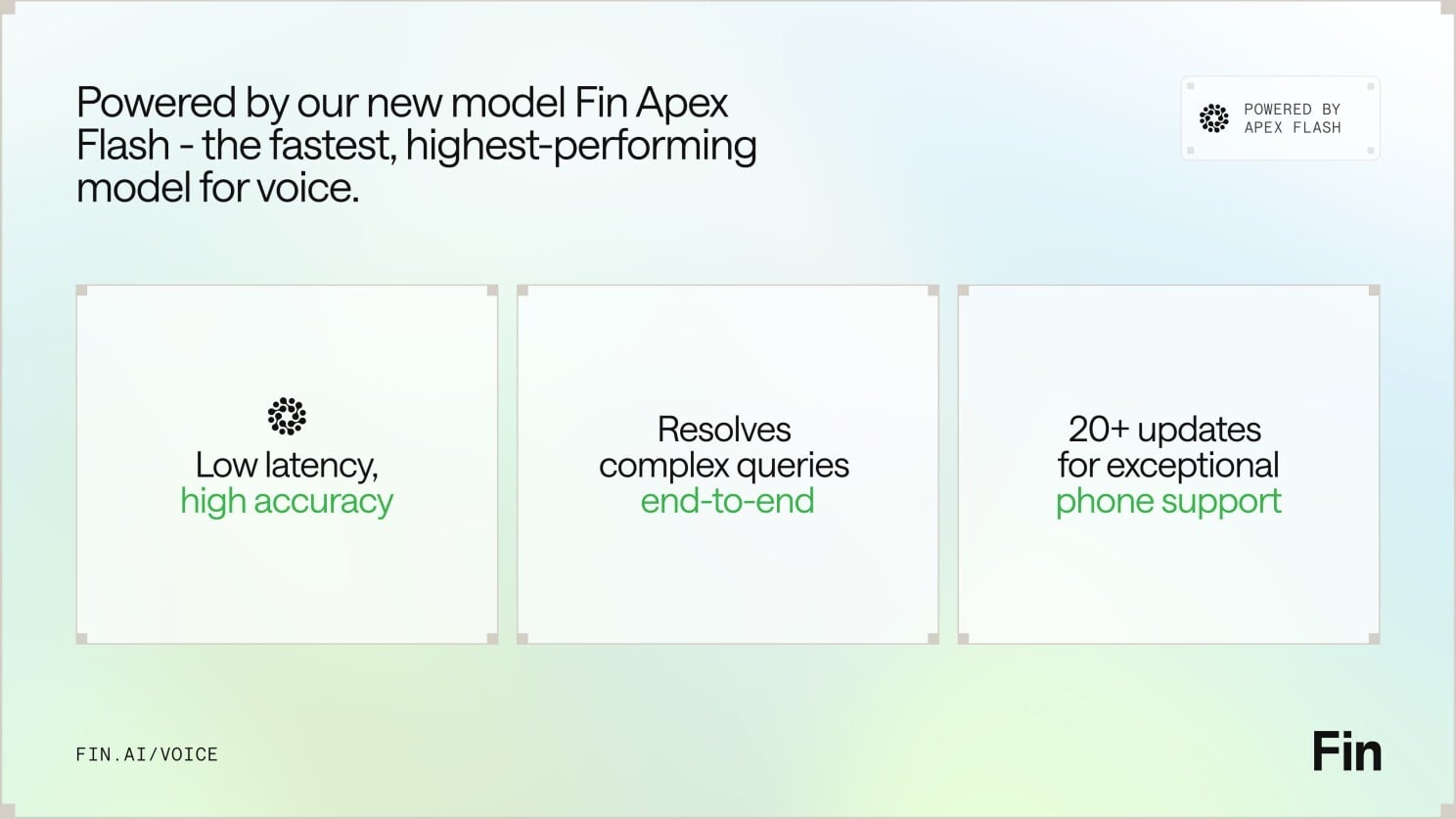
    For context, yesterday brought Apex Flash, their newest and fastest model, built for the unique demands of low latency channels like voice. Today comes Fin Voice 2, a major upgrade to Fin Voice with over 20 new features, and the first product built on Apex Flash.

    Here are the three things that stood out to me—and why they matter for customer support AI strategy and product strategy.

    First — thanks to Apex Flash, Fin Voice 2 is now the fastest, most natural Agent for phone, with higher resolution rates and customer satisfaction scores than ever before. Apex Flash is trained on millions of customer experience interactions, fine tuned for customer service, and can be configured to understand all your knowledge and follow all your policies. The result is higher resolution at significantly lower latency—the best of both worlds for voice AI agent performance.

    Speed and naturalness here aren’t accidental. Most voice AI products are slow because they convert speech to text, send it to a general model, get a text answer, and then convert it back to speech. Fin Voice 2 was designed to work differently, separating the real time layer that handles speech processing, and the layer that generates answers. That architecture is purpose-built for the demands of customer service on voice.

    Slide for Fin Voice 2, powered by Apex Flash, showing it beats Voice 1: +24.5% average resolution, +8.4% guidance following, +1.3% CSAT, -19.2% time to first audio, -37.6% semantic search latency.
    Powered by Apex Flash, Fin Voice 2 raises the bar on quality and speed—boosting resolution rates and guidance following while cutting time to first audio and semantic search latency, with a lift in CSAT too.

    Second — Fin Voice 2 can handle complex queries end to end: taking actions in external systems, verifying callers’ identities, processing refunds, booking appointments, and more. Phone is a high-stakes channel, and Fin adapts to customers across emotional states, clarifies when needed, and confirms key details before taking action. Most of the time, Fin can resolve the query in full, and when it can’t, it seamlessly hands off to the human team, maintaining full customer context and history. You also get multiple improvements to call quality, plus proactive outbound calls to follow up on unresolved issues—all orchestrated by robust AI workflows.

    Third — Fin Voice 2 gives you total control with industry-leading tools to configure and manage how Fin behaves. You get rich, detailed insights into call behavior and quality, the most common topics of calls, and one-click recommendations to improve. As with everything in Fin, you can fully self-serve and then manage it all with ease, without requiring professional services. Many vendors only let you set up their voice agent under supervision; with Fin, you get everything you need to iterate fast.

    If you haven’t tried the demo yet, go check it out: https://fin.ai/voice. If you prefer to wait, don’t be surprised when you end up speaking with it at a favorite brand soon.

    From a product management lens, this is what matters: latency is a feature customers feel; transparency builds trust in enterprise AI; and control is non-negotiable for CX leaders. The combination of a purpose-built, agentic AI architecture, measurable gains in resolution and CSAT, and true self-serve configuration signals that voice is moving from prototype theater to production reality. That’s the different game I want our industry to play.


    Inspired by this post on The Intercom Blog.


    Book a consult png image
  • Speed-to-Lead Is Dead: How AI Agents End the Wait and Rebuild a High-Velocity Sales Org

    Speed-to-Lead Is Dead: How AI Agents End the Wait and Rebuild a High-Velocity Sales Org

    A prospect lands on our site, skims pricing, watches a demo, and clicks “contact sales.” For years, that’s where momentum died. They waited, and we built entire sales motions around managing that delay.

    We optimized for “speed-to-lead,” made it the hallmark of a high-performing sales development org, hired more SDRs, tuned routing rules, added shift coverage, and stared at response-time dashboards. Typical SLA targets were one hour for best-fit leads, four hours for core MQLs, forty-eight hours for everyone else. Those were considered good numbers.

    No one questioned the premise because the lag felt structural—shift scheduling, routing delays, and humans working 9–5. The fastest teams could only shrink the gap; nobody could remove it.

    An AI Agent closes it completely.

    When a prospect arrives today, the conversation can begin immediately. That single change reshapes how I design a sales org—how we staff it, what our team prioritizes, and the metrics we hold ourselves accountable for.

    Step outside our dashboards and look at the buyer experience. We spend heavily to drive traffic, then push visitors into forms and queues that add friction precisely when purchase intent peaks.

    Intent is highest the moment someone seeks out our product. If an SDR follows up two or three hours later, that buyer’s in another meeting, the urgency has faded, and the moment is gone. We still call it a lead; the buyer has already moved on.

    What AI changes

    Agents eliminate the structural constraints that made speed-to-lead a problem—shift scheduling, routing delays, CRM batch processing, the SDR being on another call. None of it applies anymore because every single lead can be engaged immediately, at any hour and in any language.

    The impact goes beyond response time. When an Agent engages at peak intent, qualification, discovery, and even an initial demo moment can unfold in a single, continuous conversation. The gated funnel collapses. There’s no reason to qualify someone today, schedule discovery for Thursday, and demo the following week when the conversation is already happening.

    The constraint the industry built around simply isn’t there anymore. We’re already seeing it with Fin, a Customer Agent. As sales leaders, we need to frame this differently.

    If speed-to-lead is no longer the constraint, the knock-on effects reach every part of the org.

    Minimalist hero graphic with the headline 'Add Fin to your sales team today,' a glossy 3D blue spiral at center, and a black 'Start free trial' button, promoting Fin for Sales as an AI customer agent.
    Introduce Fin for Sales to your team with this clean hero banner: bold headline, signature blue spiral, and a clear 'Start free trial' call to action—inviting readers to explore an AI customer agent built for revenue.

    SDRs focus on moving deals forward. Instead of frontline triage, they double down on phone-based selling and relationship building, complex deal navigation, and multi-threaded engagement across stakeholders—the high-leverage work that used to get crowded out by the inbox.

    Pipeline gets more relevant. The old model rewarded volume: capture as many form fills as possible, respond fast, and sort quality later. When an Agent engages at the moment of intent, it qualifies during the conversation. Low-fit leads get filtered out before they reach the team, and high-fit prospects arrive with context—needs, timeline, stakeholders—instead of just a name and email.

    You measure outcomes, not response time. When first response is instant, different metrics matter. I anchor on three questions:

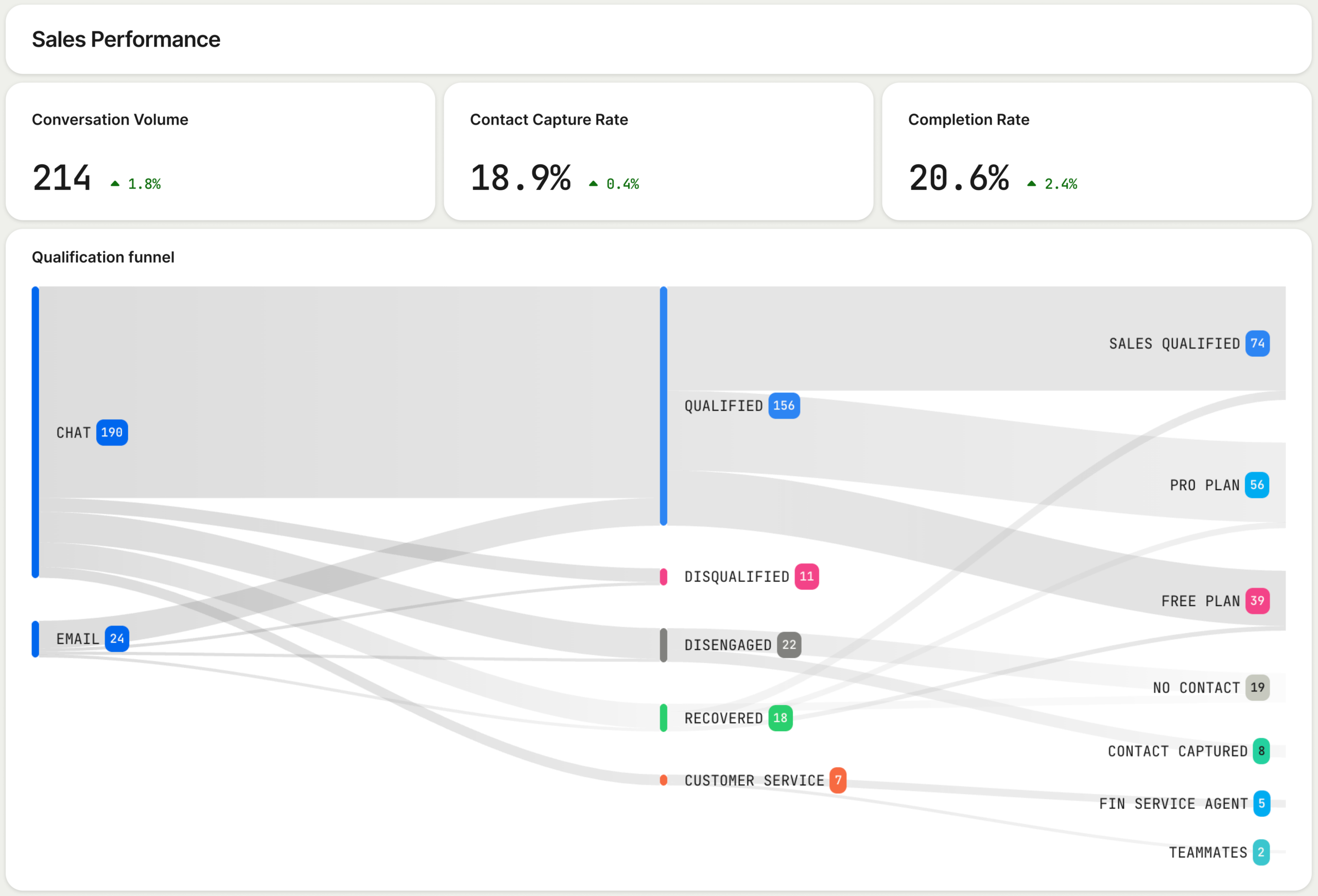
    1) Is the Agent doing the work? Completion rate, qualification rate, and contact capture rate indicate whether conversations reach clear outcomes and produce usable handoffs to the team.

    2) Is the work producing pipeline? Meetings booked and pipeline created through Agent-handled conversations are the leading indicators of revenue, not how fast someone followed up.

    3) Are buyers having a good experience? Conversation-level satisfaction matters more than ever because the Agent is the first interaction prospects have with your company. The experience it delivers is the first impression you make.

    These three questions reveal whether the motion is working. Time-to-first-response can’t.

    Sales orgs built hiring plans, workflows, and performance metrics around beating intent decay. That made sense when the lag was unavoidable. It isn’t anymore.

    An Agent is always on. It engages the moment a prospect arrives on your site, qualifies them in real time, and routes them to the right outcome without waiting for someone to be free. The lag the industry built itself around doesn’t exist when the conversation starts immediately.

    The companies leaning into this are investing in what happens after the conversation starts: how well the Agent qualifies, where it creates pipeline, and what SDRs should actually spend time on. What matters now is not how fast you respond, but what the conversation produces.

    Speed-to-lead made sense when the delay was structural. It isn’t anymore. If you’re re-architecting go-to-market, instrument Agent Analytics, revisit SDR charters, and tighten CRM integration so every qualified handoff is instant, traceable, and revenue-linked.


    Inspired by this post on The Intercom Blog.


    Book a consult png image
  • 4 Costly Agent Analytics Myths—And the Data-Backed Metrics I Rely on Instead

    4 Costly Agent Analytics Myths—And the Data-Backed Metrics I Rely on Instead

    In my work with product, operations, and support leaders, I’m often asked to help make sense of Agent Analytics—what to track, how to attribute outcomes, and where to invest. After reviewing countless dashboards and running experiments across human agents and AI agents, I’ve learned that some of the most common measurement beliefs are precisely the ones that lead teams astray.

    What comes up in conversation with leaders about Agent Analytics, and why not everything is what it seems.

    Below, I unpack four pervasive myths I encounter and share the data-centered practices I use to replace them. My goal is simple: help you upgrade the way you measure performance so you can improve customer outcomes, accelerate learning, and scale impact with confidence.

    Myth 1: “Lower average handle time (AHT) means higher performance.” AHT is useful but incomplete. When teams optimize solely for speed, they often push complexity into repeat contacts, reopens, or escalations. In the data, that shows up as a weak or negative relationship between lower AHT and durable outcomes like first contact resolution (FCR), customer effort, or revenue per conversation.

    Reality and what I measure instead: I right-size speed by pairing AHT with intent-level resolution and recontact rate. For simple intents (password reset, billing address update), shorter is usually better. For complex intents (tiered troubleshooting, multi-step verification), “right-speeding” wins—slightly longer interactions that prevent rework. Practically, that means segmenting by intent complexity using behavioral analytics, tracking weighted “intent resolution rate,” and monitoring repeat-contact windows (24–168 hours) to catch downstream pain.

    Myth 2: “AI agent containment tells the whole story.” A high containment rate can mask failure modes such as unresolved intent, silent abandonment, or low-quality handoffs that frustrate customers and spike human workload later.

    Reality and what I measure instead: I break containment into three parts for voice and chat flows: (1) intent resolution without escalation, (2) graceful handoff quality when escalation is necessary, and (3) post-handoff efficiency and satisfaction. For voice AI agent experiences, I also track escalation clarity (did the transcript summarize history and intent?), time-to-human, and customer satisfaction on the combined interaction. This provides a fuller view of customer support ai strategy effectiveness and avoids over-crediting automation for partial wins.

    Myth 3: “Quality is subjective, so it can’t be measured at scale.” Teams often default to sporadic QA because they assume it can’t be standardized across channels or agent types. The result is noisy feedback loops and stalled coaching.

    Reality and what I measure instead: Quality becomes measurable when it’s grounded in observable behaviors linked to outcomes. I use a rubric anchored in behavioral analytics (e.g., verified customer need, correct resolution path, policy compliance, empathy markers) and validate it via correlation with FCR, recontact, and retention analysis. To scale, I combine calibrated human reviews with AI-assisted scoring, check inter-rater reliability weekly, and use driver trees to connect quality levers to business results. This creates a consistent, coachable signal for both human agents and AI flows.

    Myth 4: “If the dashboard is green after launch, we’ve won.” Early wins can reflect novelty effects, cherry-picked routing, or short-term incentives that don’t persist. Declaring victory too soon locks in fragile gains and hides regressions across cohorts.

    Reality and what I measure instead: I treat go-live as the start of learning. I use A/B testing with a clear minimum detectable effect (MDE), stagger ramps, and hold out stable control cohorts for at least one full demand cycle. I track outcomes vs output OKRs—focusing on intent resolution, customer effort, and revenue/customer health over vanity metrics. I also monitor seasonality and channel mix shifts inside a unified analytics platform to ensure improvements generalize beyond the first week.

    How I operationalize this day to day: (1) define intents and complexity upfront, (2) unify journey data across channels, (3) instrument resolution and recontact rigorously, (4) apply driver trees to isolate what actually moves outcomes, and (5) iterate via disciplined experiments rather than sweeping changes. This approach aligns product and operations, speeds up coaching, and ensures AI investments compound rather than decay.

    If you’re rethinking your Agent Analytics stack, start by replacing each myth with a sharper metric: pair AHT with intent-level resolution, pair containment with handoff quality and satisfaction, pair QA with outcome-linked rubrics, and pair green dashboards with robust experiments. The payoff is a measurement system that earns trust, guides better decisions, and consistently improves customer and business results.


    Inspired by this post on Pendo – Best Practices.


    Book a consult png image
  • From Brain Dump to Done: How Todoist’s Ramble Captures Tasks in Real Time with AI

    From Brain Dump to Done: How Todoist’s Ramble Captures Tasks in Real Time with AI

    Turning a rambling stream of consciousness into a clean task list while someone is still talking has been a longtime product dream of mine. With Ramble, Todoist brought that dream to life by using live audio AI to capture tasks in real time—no transcription step required. The result is a voice-to-task flow that feels natural, fast, and surprisingly disciplined.

    As I listened to the Doist team—Ernesto Garcia (Front-end Product Engineer), Thomas Jost (Backend Software Engineer), and Hugo Fauquenoi (Product Manager)—walk through their approach, I heard a blueprint for building pragmatic GenAI features. What began as a two-to-three month AI exploration became one of their most technically deliberate releases: a “Gemini-powered pipeline that makes tool calls while the user is still speaking, surfacing tasks on screen in real time without any text output from the model.”

    The breakthrough started with user research. People weren’t merely dictating tasks; they were doing a “brain dump” first—often into pen and paper or even ChatGPT voice—and only then committing items to Todoist. Meeting users where they already are reframed the problem: don’t force structure upfront; capture fluid thought and translate it into actionable tasks instantly.

    That insight led to a bold architectural choice: skip transcription entirely and process raw audio directly with a Gemini live audio model. By removing the brittle middleman of text, the team reduced latency and kept the model focused on one job—turning intent into structured actions. It’s a crisp example of AI workflows designed for reliability over novelty.

    The real magic is in the real-time “tool calls.” As the user speaks, the model triggers add task, edit task, and delete task operations immediately. For high-friction contexts like driving, they paired visual task cards with subtle sound effects as confirmation cues. It’s thoughtful conversation design that respects attention and safety without sacrificing speed.

    Teaching the model to capture tasks literally—without over-interpreting or trying to complete the work—required careful prompt engineering for voice and temperature tuning. Drawing a bright line between “capture versus do” kept the experience trustworthy. In my own AI Strategy work, I’ve found that establishing explicit agentic guardrails early prevents unintended autonomy later.

    Dates were the sleeper challenge. The team had to inject the current date, normalize to days vs. months, and always output dates in English for the natural language parser—while preserving the user’s original language for everything else. If you’ve ever shipped date handling across locales, you’ll appreciate how many edge cases hide in “Taming Dates and Time.”

    Quality didn’t hinge on intuition alone. They built an LLM-judge eval system using real employee recordings from 100+ people across 35 countries in 20+ languages to catch prompt regressions. That’s eval-driven development done right: representative data, repeatable scoring, and tight feedback loops as models and prompts evolve.

    For project and label matching, they chose direct context injection over RAG. Instead of building a retrieval pipeline, they injected the full project/label list into the system prompt. With smart context window management and a sharply constrained task schema, this was both simpler and more accurate. Sometimes the fastest path to product-market fit is removing moving parts, not adding them.

    One product principle stood out: easy correction beats perfect first-time accuracy. Natural language interfaces earn trust when users can fix misfires in a tap or two. That bias toward quick recovery over false precision is how you ship AI that feels useful from day one.

    Looking ahead, the roadmap is compelling: multimodal task capture from images and text blobs, Apple Watch support, and automation integrations. As voice AI agent patterns mature, this “tool-only architecture” sets a solid foundation for going from capture to coordinated execution—without losing the simplicity that makes Ramble shine.

    If you want to hear the full conversation, you can listen on Spotify or Apple Podcasts. It’s a masterclass in building focused GenAI features that trade cleverness for clarity—and still delight.

    Resources & Links: Todoist • Doist • Google Vertex AI (Gemini)


    Inspired by this post on Product Talk.


    Book a consult png image
  • How We Automated 81% of Customer Support with AI—While Uplifting CX, Speed, and ROI

    How We Automated 81% of Customer Support with AI—While Uplifting CX, Speed, and ROI

    Leading the Support function for a company that builds a leading Agent and AI-forward customer service platform has been, for me, unique, exciting, and yes—daunting. It’s where product ambition meets operational reality, and where every decision I make is immediately tested by customers who expect excellence.

    It’s unique because we use the same technology as our customers. We live in the product every day, which puts us in a privileged position to be the voice of the customer across the organization. That tight feedback loop has shaped how I prioritize, what I build next, and how I measure success.

    It’s exciting because we get to try all of the new features and capabilities of Fin and the Intercom helpdesk. With a relentless focus on AI innovation, I’ve had access to remarkable tools that help us deliver an incredible customer experience—and I’ve seen firsthand how the right workflows and guardrails turn those tools into outcomes.

    And it’s daunting because expectations for our own Customer Support (CS) team are sky high. If we can’t deliver incredible support using our own technology, we undermine its value proposition. That imperative has kept me honest, focused, and fast.

    In our new research, “The 2026 Customer Service Transformation Report,” we’ve been sharing how forward-looking teams use AI to transform their support models. If you’d like to get straight to the report, download it here.

    When Intercom changed its focus in late 2022 to prioritize the customer service use case, we undertook a critical review of the support experience we were delivering and committed to driving meaningful change under an AI-first framework. That was a turning point: I aligned product strategy and operations around a single north star—automate with quality, and elevate humans to higher-value work.

    Three years on, Fin now resolves over 81% of all our customer support volume, delivering immediate and high-quality resolutions. We have absorbed a 300%+ increase in customer demand since 2022 without proportional headcount growth. Without Fin, we would have needed at least 100 additional CS team members to meet that demand and our improved service levels – a net saving to Intercom of between $7.5M–$9M annually.

    Throughout this work, we drew on research from the 2026 Customer Service Transformation Report and applied the lessons directly to our own org design, knowledge management, and AI workflows. What follows is our story of transformation and how we achieved a mature deployment of Fin.

    The problems we set out to solve

    Back in 2022, our challenges looked familiar to any modern support organization, and I knew we needed a step-change—not incremental tweaks.

    We faced increased support demand from new and existing customers: Intercom was launching major features and changes at speed, driving up overall customer conversation volume and requiring additional headcount for the CS team. I could see we were scaling people faster than processes—unsustainable without automation.

    Our support policy (as defined by our service level objectives) was not based on a high bar: In most cases, we were only committed to “business hours” coverage for the majority of our customers, impacting first response times. Even with SLOs that were not considered best in class, we were struggling to meet our commitments. I wanted 24/7 coverage and faster first responses without sacrificing quality.

    We wanted to do more: As we pivoted our strategy, we wanted to open new routes to our support team, such as providing support to website visitors with technical questions and to trial customers. That meant meeting customers earlier in their journey with accurate, on-brand responses—at scale.

    What we did

    We made a very conscious decision to become our own best reference customer. As Intercom embraced the opportunity that generative AI presented to transform customer service, we intentionally moved to an AI-first strategy for our Customer Support team. I set a simple operating principle: ship value quickly, measure relentlessly, and let evidence guide the next bet.

    We started with the highest-volume, informational queries and saw our resolution rates climb quickly. With that foundation in place, we pushed Fin further, training it on deeper documentation and internal procedures, and eventually giving it the ability to take actions on behalf of customers. As Fin took on more complex work, our results started to compound—and trust in the system grew across the organization.

    Early adoption and building trust. When “AI Assist” features came to the Intercom Inbox, the CS team got early exposure to AI and were empowered to provide feedback directly to our product teams. This built awareness and trust across the team about what we were trying to achieve with AI, and helped shape the product roadmap. We were also the first beta customer for Fin, rolling it out to a subset of customers to watch sentiment and outcomes closely. With no adverse reaction and an initial resolution rate of over 25%, we deployed Fin to most customer segments within weeks. I’ll never forget the first week we put Fin in front of real customers—the silence of issues that never reached humans was the loudest signal of success.

    Knowledge management as a product. We recognized quickly that time spent tuning our help center and knowledge assets for Fin would pay dividends. We transitioned our Help Center Manager into a “Knowledge Manager,” with a dedicated remit to optimize content for Fin. We embedded knowledge creation into our “New Product Introduction” (NPI) process, targeting that Fin would resolve at least 50% of customer issues at every new product and feature launch. Over time, we added new sources, including “Developer Documents,” enabling Fin to handle increasingly complex issues. We built a culture of continuous improvement—allocating “out of the inbox” time so every teammate could close content gaps and raise the bar.

    Conversation design end-to-end. To ensure a consistent, high-quality customer experience, we created a new “Conversation Designer” role that owns the journey across automation and human handoffs. Using Intercom’s Workflows, we introduced “skills-based routing” so that when a customer asks for a human, the conversation reaches someone with the right expertise quickly. This is now handled by Fin directly using a feature called “Attributes.” The result: a seamless, on-brand experience regardless of channel or escalation path.

    Neon green hero graphic reading 'The 2026 Customer Service Transformation Report', with subhead 'The AI deployment gap is widening' and a black 'Get the report' button over a bar-chart pattern.
    Leaders are racing ahead with real AI in support. Explore the 2026 Customer Service Transformation Report to see where deployment is stalling, benchmark your team, and get practical steps to scale automation that delights.

    Organization changes that unlocked leverage. As we scaled Fin, we stood up a dedicated AI Support team under a senior CS leader to continuously optimize automation and define our AI adoption strategy across the journey. We restructured human roles into “Technical Support Specialist” and “Technical Support Engineer” to better align with the complexity of incoming work. We also expanded Support Operations to focus on optimization—using AI to uplevel Enablement, Workforce Management, QA, Process Management, and Data Insights. Just as important, we reset expectations about the balance between time spent supporting customers directly versus improving AI. That mindset shift created compounding returns.

    Pushing Fin further with new capabilities. As capabilities matured, we were early adopters and saw measurable wins:

    Fin Guidance: Multiple Guidance rules provide additional controls and a more personalized, targeted experience for customers.

    Fin Tasks and Procedures: Enables Fin to carry out activities such as updating customers on incident status and deep troubleshooting for technical issues.

    Insights: AI-driven dashboards provide deep insight into Fin’s performance and surface recommendations for further optimization. Insights also provides a Customer Experience (CX) Score for every customer interaction, enabling more targeted improvement efforts and opening up new ways to close the loop with customers who have had a poor experience.

    What we achieved

    What started as a focused effort to improve our customer support experience became the strongest proof point for what’s possible when you fully embrace AI. Fin now resolves over 81% of all our customer support volume and has allowed us to absorb a 300%+ increase in demand without proportional headcount growth. Over 90% of our customers now benefit from improved first response performance, 24/7 coverage, and outbound phone support.

    What the numbers don’t fully capture is the shift in how our team operates. With volume absorbed by Fin, our CS teammates now deliver consultative support—guiding next best actions, deepening product adoption, and contributing directly to retention and expansion. Customers that receive these engagements adopt Fin at a much deeper level and achieve greater support success. What was once a reactive, volume-driven team is now a function that generates significant revenue.

    What’s next

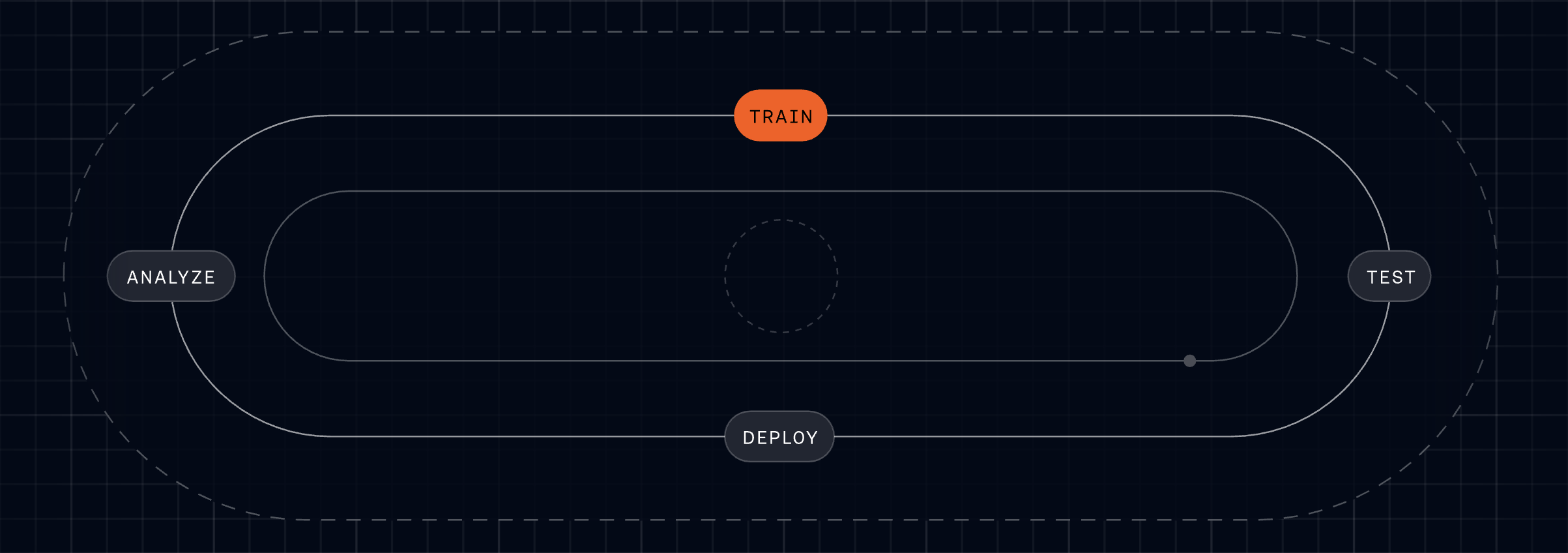
    Customer expectations are always rising, so we’re building on our progress by embracing the Fin Flywheel—an actionable framework for ongoing improvement and optimization. This keeps us honest about the discipline required to sustain AI performance at scale.

    Train: Teach Fin to resolve even the most complex queries with Procedures, knowledge, and policies.

    Test: Run fully simulated customer conversations from start to finish to see exactly how Fin will behave before going live.

    Deploy: Set Fin live across every channel – voice, email, chat, and social – for consistent support wherever customers reach out.

    Analyze: Use AI-powered Insights to analyze and improve Fin’s performance and deliver better customer experiences.

    We are also investing in our support teammates so they can adjust to the new world of AI—taking on more complex work and being valued for the subject matter expertise, consultative engagement, and empathy they bring to the role. That human layer is where differentiation shines.

    We will continue to develop and share best practices for deploying an Agent, based on our own experience with Fin and the lessons learned from our most forward-looking customers. These are captured and continually evolving in The Agent Blueprint.

    Transformation takes commitment

    The most successful teams aren’t bolting AI onto old processes; they’re rebuilding support around it—investing in knowledge and people alongside technology, and treating AI as a continuous discipline rather than a one-time deployment. That’s the real change required. For support teams willing to make it, there’s a rare opportunity to redefine what customer service can deliver—higher CSAT, faster resolution, and durable ROI.


    Inspired by this post on The Intercom Blog.


    Book a consult png image
  • February Fin Breakthroughs: Master complex workflows, natural voice, 2-minute Shopify, smarter ops

    February Fin Breakthroughs: Master complex workflows, natural voice, 2-minute Shopify, smarter ops

    Every update we shipped this month removed a specific constraint on what teams can do with Fin. In my world, the demo-to-production gap shows up as complexity, control, and confidence. Can the agent handle the query that actually matters? Will it sound right on a call? Can the team deploy it without filing an engineering ticket? Can managers understand what it’s doing? That’s the bar I hold us to.

    This month, we delivered answers to all four. Here’s how.

    Procedures and Simulations (0:51). The hardest problem in AI-powered customer service isn’t answering FAQs—it’s executing complex queries with real business logic and real consequences if anything goes wrong. Think billing refunds, multi-step flows, and actions that must be right the first time.

    We made it dramatically easier to build and manage Fin for those complex queries—without pulling in an engineer. You can author in natural language, test every step in simulation, and deploy with confidence.

    The workflow starts with AI drafting the procedure from your existing source material. You edit in natural language, with structured hooks to pull in live data, apply business logic, and add code for deterministic control where you need it. That’s how you handle multi-step flows with the precision that matters when things go wrong.

    Simulations are the test environment. Define a test case, pass in the data Fin would receive in a real conversation, and watch it work through each step. You see what Fin is doing, why, and whether it’s meeting the criteria you set. Full transparency at every point. I’ve run these end-to-end myself, and there’s a particular confidence that comes from watching it work before it goes anywhere near a customer.

    Two colleagues in a studio sit at a wooden table with laptops during a Fin Product Updates discussion; an overlaid quote highlights selling and supporting customers in under two minutes.
    A conversational moment from the February Fin Product Updates recap: two teammates trade insights with laptops open, while a bold pull-quote drives home the promise—Fin removes complexity to start selling and supporting in under two minutes.

    For a deeper look at Procedures and Simulations, head to fin.ai/procedures.

    Fin Voice: three major updates. When something’s off in chat, it can take a few exchanges to notice; on a call, it’s immediate. Pronunciation, noise handling, and tone all matter because they’re the customer’s first impression.

    Pronunciation rules (4:18). Fin has high out-of-the-box pronunciation accuracy, but it doesn’t know your brand—your product names, your industry terminology, the way your company uses certain words. Alihan Zinna, Staff ML Scientist, showed this with an IKEA example: without pronunciation rules, Fin mispronounced both “IKEA” and a product name; after adding rules, both were corrected and sounded natural.

    New natural voices (5:48). We’ve added 11 new voices tuned to a range of brand tones so you can choose one that sounds like it truly belongs to your company—not a generic AI assistant.

    Background noise reduction (6:28). People call from airports, shops, and busy offices. Fin now monitors background noise continuously and increases noise reduction when the environment demands it. No configuration needed. As Alihan put it, “This is one of those things customers really notice when it’s not working. The goal was to make it invisible. That’s what we built.”

    Video still of a presenter beside a laptop and the Fin Call Metrics dashboard, showing tiles for hold times, missed and declined call counts, outbound dialing time, and a monthly stacked bar chart.
    Catch up on February’s Fin Product Updates with a walkthrough of the Call Metrics dashboard—saved filters, hold‑time tiles, missed and declined call counts, and a monthly breakdown that helps support teams act faster.

    Shopify setup experience (8:21). Fin began as a Service Agent and is quickly becoming a Customer Agent—working across the whole lifecycle to support, sell, and guide, even before a customer has an issue. The revamped Shopify setup is a clear step forward.

    Shopify catalogs are complex—thousands of products, variants, and dynamic inventory—and connecting all of that to an agent has historically been painful. We removed the friction.

    Setup now takes three steps: first, connect your store. Second, install the Messenger directly in Shopify—no code, just a few clicks. Third, deploy Fin. Total time: under two minutes. We timed it live.

    What that unlocks is real. In the demo, a first-time snowboarder asked for recommendations. Fin searched the catalog, reasoned about attributes that matter to a beginner (there’s no “beginner” tag in the catalog), personalized suggestions by height and weight, and added a board to the cart.

    Even better, one customer updated their website copy to promote a sale. Fin immediately picked up the new context and began recommending sale items, nudging shoppers to add more to the cart to access a discount—no extra configuration required. It read the situation and acted.

    Presenter explains Fin's Holiday Office Hours feature beside a laptop, with a UI screen showing office hours, reply times, and holiday closures settings for customer support teams.
    See how the latest Fin update streamlines support scheduling. A product expert walks through Holiday Office Hours, showing how to set default hours, track response metrics, and add closures so teams stay consistent.

    Three steps, and you have a real-time shopping assistant that knows your store and sells on your behalf.

    Helpdesk improvements (12:31). Fin works with any helpdesk, but many teams consolidate to take advantage of our native Intercom helpdesk integration. We’ve shipped 19 helpdesk improvements in 2026 so far; two from this month stand out.

    11 new call metrics. Hold time, outbound dial time, missed and declined calls, call terminating party, and more. These give leaders the visibility to analyze workload distribution and call handling quality in detail.

    Holiday office hours. Teams no longer need to manually update office hours for every public holiday. This was the most upvoted request in our community, and we shipped it.

    Across the board, we removed the constraints that hold teams back: the complexity ceiling in automation, the quality ceiling in voice, the setup barrier in Shopify, and the operational overhead in the helpdesk.

    We closed out the month with a Star Wars–style crawl of 22 additional updates. All features mentioned here are live and available now. Explore more at fin.ai/updates. More to come—see you next month.


    Inspired by this post on The Intercom Blog.


    Book a consult png image
  • How Deep AI Transforms Support Into Proactive, Omnichannel CX—No Extra Headcount Needed

    How Deep AI Transforms Support Into Proactive, Omnichannel CX—No Extra Headcount Needed

    For years, I chased the elusive goal of delivering a perfect customer experience. Today, with AI embedded in our support operations, that standard is finally within reach—and it’s reshaping how we prioritize, design, and scale service.

    In “The 2026 Customer Service Transformation Report,” teams report early, tangible wins from AI: faster responses, higher efficiency, and consistent coverage across languages and time zones. Those gains create the capacity we’ve always needed. The more we push the technology, the more quality improvements we unlock.

    This marks a fundamental shift. As AI takes on more, our focus can finally move from firefighting to crafting the customer experience. When the AI is working, the measure of success becomes how well it’s working—across accuracy, tone, resolution, and end-to-end journey quality.

    I’ve seen this transformation firsthand. Mature AI deployment gives my team “breathing room,” so we can design for consistently excellent outcomes rather than obsess over deflection. That means widening access to support, removing friction on the path to resolution, and anticipating customer needs before they escalate.

    In our own support organization, we opened support to trial customers, accelerated first response times, and added consultative sessions during onboarding. We absorbed a 300% increase in total demand without adding headcount—made possible by deep integration of an AI Agent and a disciplined AI strategy.

    Infographic comparing ability to meet rising customer expectations: 27% of organizations with mature deployments say support always meets expectations, versus 9% at initial deployment, shown as orange and gray bubbles.
    Teams with mature customer service deployments are nearly three times likelier to say they always meet increasing expectations—27% vs 9% at initial rollout—highlighted by bold orange and gray comparison bubbles.

    Across the industry, the pattern is similar. When teams initially deploy AI, only 9% say they can always meet customer expectations. That number triples as teams reach a mature level of deployment. Even as expectations rise, the organizations that deeply integrate AI—complete with clear ownership, robust instrumentation, and continuous improvement loops—are the ones most likely to meet (and exceed) the bar.

    Looking ahead to 2026, I expect omnichannel consistency to become a key differentiator. The data shows planned investment is distributed nearly equally across chat, email, and social messaging (36% each), closely followed by phone/voice (31%). The question is no longer “Which channel should we optimize?” but “How do we deliver a consistent, AI-powered experience everywhere our customers are?”

    Teams that solve for omnichannel consistency will bridge the long-standing gap between what customers expect and what support can deliver. Every touchpoint becomes an opportunity to exceed expectations and build durable trust.

    Consider Clay, a team that scaled support without sacrificing quality. Support is one of their main growth drivers, and as their customer base expanded, ticket volume surged. Early on, they concentrated much of their effort in Slack, cultivating close, transparent community relationships. But relying on a single channel created friction as they grew; customers wanted the flexibility of email and in-app chat, and Clay needed to deliver the same high standard everywhere.

    Infographic showing channels where teams plan to expand AI usage in 2026: chat 36%, social 36%, email 36%, and phone/voice 31%, displayed as four bold orange blocks with labels.
    Where AI investment is headed for customer service in 2026: chat, social, and email lead at 36%, with phone/voice close behind at 31%. A bold visual snapshot of shifting channel priorities in CX.

    By unifying their support experience with an AI Agent, Clay brought consistency across channels. Today, AI is involved in 90% of all queries and handles half of Clay’s total volume, upwards of 7,000 queries a month. First response rates improved significantly, freeing the team to focus on proactive, high-impact work.

    That work includes identifying content gaps for education and content marketing, reaching customers before they need to ask for help, and surfacing feature requests and recurring challenges to product teams. Clay proves that when support is truly great, it becomes a competitive edge.

    So how do you build a superior customer experience with an AI Agent? Here are five principles I use when scaling toward mature deployment.

    1) Treat customer experience like a product. Treating support as a product means designing, building, and managing the support experience with the same rigor as your core product. You define goals (faster onboarding, higher CSAT or CX Score, lower churn). You map flows (AI starts the conversation, human handovers, proactive nudges). You instrument the journey (track handoffs, drop-offs, success states). You run tests and ship improvements (tone tweaks, fallback paths, training updates). You own the outcomes (gather feedback, measure performance, use insights to continuously improve the system).

    Neon green hero graphic reading 'The 2026 Customer Service Transformation Report', with subhead 'The AI deployment gap is widening' and a black 'Get the report' button over a bar-chart pattern.
    Leaders are racing ahead with real AI in support. Explore the 2026 Customer Service Transformation Report to see where deployment is stalling, benchmark your team, and get practical steps to scale automation that delights.

    2) Lead with AI, back with humans. AI isn’t replacing the human touch. It’s redefining when, where, and how it’s most valuable. In a scaled model, AI is the first responder and the end point for most conversations. Humans step in where they add the most value—particularly during high-stakes issues—and those handoffs should feel seamless. Meanwhile, your team focuses on improving AI performance and optimizing the end-to-end journey.

    3) Be proactive. Use AI to anticipate needs, guide customers before problems arise, and nudge them toward successful outcomes. This is where customer support AI strategy shines—moving from reactive triage to journey orchestration that protects momentum and builds trust.

    4) Build for trust. Many customers still carry the legacy of clunky chatbots that delivered vague answers and dead ends. You earn trust by showing that your system works. Don’t hide your AI Agent behind layers of “choose an option.” Get customers to the AI quickly, demonstrate real problem-solving, and ensure that when a human is needed, they join with full context to resolve complex issues efficiently.

    5) Make it feel personal. Your AI Agent represents your brand. The way it speaks, follows policies, and responds matters. Use tone control, fallback logic, and language preferences to align the experience to your standards. Consistency builds trust; personality builds connection and loyalty.

    Perfect really is possible. With deep AI implementation, you can scale comprehensive, fast, and personal support across channels—so customers feel supported not just when they reach out, but throughout their journey. That’s the promise of modern AI workflows in support, and it’s what will separate leaders from laggards in the years ahead.


    Inspired by this post on The Intercom Blog.


    Book a consult png image
  • From No-Code Hack to 10,000 Weekly Calls: Inside Perk’s Voice AI That Actually Works

    From No-Code Hack to 10,000 Weekly Calls: Inside Perk’s Voice AI That Actually Works

    I love real-world AI that ships, scales, and actually solves painful customer problems. This story checks every box. As a product leader who has brought agentic AI to production environments, I was captivated by how a small, focused team at Perk took a no-code voice AI prototype and turned it into a system that reliably makes 10,000+ calls per week to prevent failed hotel payments.

    What happens when you combine a real customer problem, a no-code prototype, and a team willing to listen to every single call?

    Steven Payne (Product Manager), Gabriel Stock (Senior Engineering Manager), and Philipe Steiff (Senior Software Engineer) from Perk share how they built a voice AI agent that calls hotels to verify virtual credit card payments, preventing travelers from arriving to find their rooms unpaid. This is a textbook example of linking operational pain to a high-leverage AI solution.

    What started as a hackathon experiment in Make.com became a production system handling over 10,000 calls per week across multiple languages. Along the way, the team learned hard lessons about prompt engineering for voice (numbers, pronunciation, and a very "Karen-like" first version), how to break a single monolithic prompt into structured conversation stages, and why listening to actual calls beats any amount of theorizing.

    From a product management perspective, this approach aligns perfectly with eval-driven development and continuous discovery. Structure the problem, instrument aggressively, ship safely, then listen—deeply—to real interactions. In my own teams, I’ve seen that nothing accelerates iteration on agentic AI like closing the loop between qualitative call reviews and quantitative evals.

    They built a working prototype without writing a single line of backend code.

    They structured the call into discrete stages (IVR, booking confirmation, payment) to improve reliability.

    They created two eval systems: one for call success classification, another for conversational behavior.

    They scaled from five calls a day to tens of thousands per week while maintaining quality.

    This is a detailed look at building AI for real-time human interaction—where the stakes are high and the feedback is immediate.

    Guests: Steven Payne, Product Manager, Perk; Gabriel Stock, Senior Engineering Manager, Perk; Philipe Steiff, Senior Software Engineer, Perk.

    What stood out to me was how Perk's team identified an AI use case by connecting prior experimentation with a real operational problem. Why they chose Make.com for prototyping—and shipped to production without touching backend code—underscores how far no-code can take you when paired with crisp problem framing. The evolution from a single prompt to structured conversation stages (IVR handling, booking confirmation, payment request) is exactly how you harden agent behavior for production.

    Breaking up the agent's task dramatically improved reliability. They also built two eval systems: classification for success rates and LLM-as-judge for conversational behavior. Even with automation, the team still listens to calls manually—a practice I strongly endorse for uncovering edge cases, trust issues, and UX nuances that dashboards can’t show.

    The challenge of prompt engineering for voice—numbers, booking references, and text-to-speech markup—was non-trivial. Expanding to German revealed that prompts in native language improve results. And, as often happens with operations-heavy rollouts, this project uncovered other operational problems they didn't know existed—valuable signal for the roadmap.

    Resources & Links: Perk. Make.com — No-code automation platform used for the prototype. Twilio — Voice/telephony provider. Eleven Labs — Text-to-speech provider (used in early experiments).

    Chapters: 00:00 Introduction to the Team; 01:54 Understanding PERK's Mission; 02:59 Challenges in Travel Booking; 07:27 AI Solutions for Customer Care; 09:52 Prototyping with AI and Voice; 17:00 Implementing AI in Production; 25:51 Learning Through Trial and Error; 26:40 Prompting Challenges and Solutions; 27:58 Iterating on Prompts and Evaluations; 30:08 Scaling and Production Challenges; 32:43 Advanced Evaluation Techniques; 35:32 Real-World Applications and Success; 49:07 Future Directions and Expansion; 53:53 Conclusion and Team Reflections.

    My product takeaways: Start with clear operational pain and measurable outcomes (e.g., payment verification). Use no-code to validate quickly, then progressively harden. Treat voice AI like any production system: break it into deterministic stages, add guardrails, and measure both outcome and behavior. Pair automated evals with hands-on reviews. And when going multilingual, write prompts in the native language—your accuracy will thank you.

    If you’re exploring agentic AI for operations, this is the blueprint: tight scoping, Make.com for speed, Twilio for reliability, structured prompts for control, and an eval-driven loop to scale quality with confidence.


    Inspired by this post on Product Talk.


    Book a consult png image
  • How to Evaluate AI Voice Support in Real-World Conditions

    How to Evaluate AI Voice Support in Real-World Conditions

    You have a shortlist of AI voice support products, a polished recording, and a decision that could affect thousands of customer conversations. The hard question is not whether an agent can sound convincing during one ideal call. It is whether the system stays useful when a caller interrupts, corrects themselves, asks an ambiguous question, waits on a backend system, or needs a human.

    You can answer that question before a broad rollout. The method is to test complete support outcomes, introduce controlled complications, score failures separately from conversational polish, and use the result to define a limited production pilot.

    Evaluate the support outcome, not the performance

    A natural voice can create an impression of competence before the agent has done anything useful. Pleasant pacing, expressive speech, and a quick opening matter, but they cannot compensate for retrieving the wrong account, misunderstanding the request, or claiming that an action succeeded when it did not.

    Treat the unit of evaluation as a completed support job. Depending on the intent, that job may require the agent to identify the caller, understand the request, retrieve the right information, explain the answer, perform an authorized action, confirm the resulting state, and send a follow-up or transfer the conversation. If you score only the spoken answer, you leave most of the product untested.

    One live Fin Voice call illustrated this end-to-end standard in about 90 seconds: the agent verified identity, retrieved account information, managed an interruption, presented options, completed a workflow, and sent a follow-up email. That sequence is a useful model for constructing a test. It is not, by itself, proof of reliability across other calls.

    Before anyone places a test call, write an outcome contract for each scenario:

    • Caller goal: What is the person trying to accomplish?
    • Starting state: What customer, account, order, subscription, or case data exists before the call?
    • Available evidence: Which knowledge, policies, and records may the agent use?
    • Permitted actions: What may the agent change, create, send, cancel, or escalate?
    • Required clarification: Which missing or conflicting facts must be resolved before an answer or action?
    • Completion evidence: What observable state proves that the request was resolved?
    • Unacceptable outcome: What error would make the call a failure even if the conversation sounded good?

    This contract prevents a common scoring mistake: confusing non-transfer with resolution. A call can remain inside the AI channel and still leave the customer with a wrong answer, an incomplete action, or no idea what happens next. Conversely, an intentional transfer can be the correct resolution when the agent reaches a policy, permission, or confidence boundary.

    Build scenarios around the ways real calls become difficult

    Start with support intents your operation actually receives. Prioritize intents that are frequent, expensive to handle, important to customer trust, or dependent on multiple systems. Do not begin with trivia questions that merely demonstrate broad language-model knowledge. You are evaluating support execution.

    For every core intent, create a straightforward case and several controlled variants. Keep the customer objective constant while changing one condition at a time. That makes a failure diagnosable instead of merely disappointing.

    A practical scenario matrix

    • Clean path: The caller gives the relevant facts in a clear order. This establishes whether the basic workflow works at all.
    • Missing information: Omit a detail the agent needs. Check whether it asks a focused question instead of guessing or restarting the intake.
    • Ambiguous intent: Use wording that could map to two support issues. The agent should disambiguate before retrieving data or taking action.
    • Mid-call correction: Let the caller change an account detail, date, product, or preferred option. Check whether the corrected fact replaces the old one throughout the workflow.
    • Interruption: Speak while the agent is answering. Observe whether it stops cleanly, understands the new input, and continues from the right point.
    • Backend delay: Introduce a slow retrieval or action. Evaluate how the agent manages the wait and whether it distinguishes a pending operation from a completed one.
    • Backend failure: Make a required system unavailable or return an error. The agent should not fabricate a result or promise completion it cannot verify.
    • Policy boundary: Ask for something the agent is not allowed to do. Test the explanation, alternatives, and escalation path.
    • Human request: Ask directly for a person. Verify that the agent follows the configured policy without turning the handoff into an argument.
    • Listening conditions: If your deployment must support different languages, accents, devices, or noisy environments, test each condition explicitly rather than treating one clear studio call as representative.

    Give testers the goal, account state, and one complication. Do not script every sentence. A fully written dialogue tests whether the agent can follow the dialogue you anticipated; a goal-based scenario tests whether it can manage the conversation the caller actually creates.

    Keep a few variants undisclosed until the live session. This is not a trick. It prevents the evaluation from becoming a memorized path while still keeping every test fair and reproducible. Record the exact variant afterward so another evaluator can run it again.

    Run the call through the systems you expect to deploy

    An unedited live call is more informative than a produced recording, but live alone is not enough. A live test can still use ideal data, a simplified integration, a practiced caller, and a workflow that avoids the hard parts of your environment.

    Ask to run the scenario through a path that resembles the intended deployment:

    1. Place a normal phone call through the proposed telephony route. If production will use call forwarding, test the forwarding path rather than a direct internal endpoint.
    2. Use a safe test account containing representative records, permissions, and history.
    3. Require the agent to retrieve data from the backend system that will be authoritative in production.
    4. Introduce the chosen interruption, correction, ambiguity, delay, or error during the live conversation.
    5. Require a real test action where it is safe to do so, not a verbal description of what the agent would have done.
    6. Inspect the backend state after the call. Confirm that the correct record changed once, with the expected values.
    7. Verify every promised follow-up, case creation, notification, or handoff outside the voice channel.
    8. Retain the recording, transcript, timestamps, tool activity, and final system state for scoring.

    This is especially important when an agent can take consequential actions. A fluent confirmation is not evidence that the action happened. The system of record is the evidence.

    Repeat important scenarios with different wording and a different caller. One successful run demonstrates that the capability can work. Repeated variants reveal whether the capability depends on a narrow phrase, a rehearsed cadence, or an unusually forgiving path.

    Key takeaways

    • Score complete resolution, including backend state and follow-up, rather than voice quality alone.
    • Change one condition at a time so you can identify why a call failed.
    • Test interruptions, corrections, ambiguity, system delays, system errors, and escalation.
    • Measure different kinds of waiting separately; a lookup pause and a turn-detection problem are not the same defect.
    • Treat a successful demo as evidence for a pilot, not permission for an unrestricted rollout.

    Score conversation, reasoning, and operational closure separately

    A single overall rating hides the information you need to make a product decision. The call may sound awkward but reach the correct outcome, or sound excellent while making a dangerous mistake. Separate the evaluation into three layers.

    LayerWhat to inspectEvidence of a passTypical failure
    Conversation mechanicsTurn detection, interruption handling, pacing, response length, and intelligibilityThe caller can speak naturally, correct the agent, and follow the response without fighting for the floorThe agent talks over the caller, leaves confusing silence, or delivers answers too long to retain by ear
    Decision qualityIntent recognition, clarification, use of account context, policy application, and answer accuracyThe agent asks only for missing information, uses the correct evidence, and avoids unsupported conclusionsThe agent guesses, asks redundant questions, ignores a correction, or applies the wrong policy
    Operational closureIdentity checks, tool calls, state changes, confirmation, follow-up, and escalationThe verified backend state matches the caller’s request and the agent’s final explanationThe agent claims success without a completed action, changes the wrong record, duplicates work, or drops context during handoff

    Use a simple 0-2 score for each criterion: 0 for failed or unsupported, 1 for completed with material caller effort or recovery, and 2 for correct and usable. The scale is deliberately small. Evaluators can usually distinguish failure, friction, and success more consistently than they can defend the difference between seven and eight on a ten-point scale.

    Do not average away critical errors. A wrong account action, failed identity control, fabricated completion, or forbidden disclosure should remain visible as a release blocker even if many low-risk calls receive high scores. Record both the criterion scores and the count of critical failures.

    Break latency into moments the caller can feel

    Latency is not one number. Capture at least three moments: the time the agent takes to recognize that the caller has finished, the time it spends reasoning or waiting for a system, and the time needed to begin and complete the spoken response.

    • End-of-turn delay: A long delay after every caller turn makes the exchange feel unresponsive and can encourage both sides to start speaking at once.
    • Reasoning or retrieval delay: A pause can be appropriate when the agent is checking account data or invoking a backend workflow. Brief pauses were audible during live subscription and backend checks, which is more informative than editing those waits out.
    • Response delivery: A fast start does not help if the answer becomes a long monologue. Voice responses need structure and pacing that work for listening, not merely text that sounds acceptable when read.

    Ask what is happening during a pause. If the system is doing useful work, the next statement should reflect that work and the action log should verify it. If the pause is long enough to make a caller wonder whether the call has dropped, the experience needs an appropriate progress cue. If the agent answers instantly but guesses, speed is concealing a quality problem.

    Review individual timings as well as an average. A generally responsive agent with occasional severe stalls creates a different operational problem from one that is consistently a little slow. Your test recordings and timestamps should make both patterns visible without inventing a universal pass threshold that ignores the complexity of the workflow.

    Make recovery and escalation part of the product test

    The strongest voice experiences are not the ones that never encounter confusion. They are the ones that recover without making the caller restart. Recovery is therefore a capability to test, not an embarrassing exception to hide.

    Interrupt the agent in the middle of an answer. Correct a fact it has already used. Add a second request after the first appears resolved. Say that an explanation was unclear. Ask for a human. These moves reveal whether the agent maintains conversational state or merely produces plausible turns one at a time.

    During recovery, look for specific behavior:

    • It stops speaking promptly when the caller takes the turn.
    • It identifies what changed instead of repeating the whole interaction.
    • It replaces corrected information rather than carrying both versions forward.
    • It asks a narrow clarification when the next action is uncertain.
    • It does not claim to understand when the transcript or subsequent action shows otherwise.
    • It preserves verified context and the reason for contact when a human takes over.
    • It tells the caller what will happen next instead of ending on an internal routing label.

    Tone belongs in this test, but not as a beauty contest between synthetic voices. Evaluate whether pacing, brevity, acknowledgement, and word choice suit the moment. A caller correcting a billing detail needs a clear acknowledgement and an accurate update, not theatrical empathy. A caller who sounds uncertain may need a shorter explanation and a confirming question. Tone is the behavior of the conversation, not just the timbre selected in a settings menu.

    Escalation should also count as a valid outcome when it is timely and informed. Define which conditions require a handoff, which allow one, and what context must travel with it. Then test the handoff from the caller’s side. If the customer reaches a person but has to repeat identity, intent, and every attempted step, the routing technically worked while the support experience failed.

    Turn the evaluation into a controlled pilot decision

    A strong live evaluation earns the right to run a pilot. It does not justify sending every eligible call to the agent. Production introduces variation in callers, data quality, traffic, integrations, and issue combinations that a demonstration cannot reproduce fully.

    I would require five gates before approving even a limited external pilot:

    1. Capability gate: Every must-have intent has completed its end-to-end workflow, including at least one controlled complication.
    2. Critical-risk gate: No unresolved failure can expose the wrong account, bypass a required check, perform an unauthorized action, or report a false completion.
    3. Conversation gate: The agent can handle interruptions, corrections, clarification, and explicit human requests without trapping the caller in a loop.
    4. Operations gate: Your team can configure terminology, guidance, escalation behavior, greetings, voice, and deployment controls for the intended support environment.
    5. Learning gate: Owners can inspect recordings, transcripts, tool activity, outcomes, and failures, then change the knowledge, workflow, policy, or conversation design responsible.

    Start the pilot with a reversible slice of traffic and a clear human fallback. Select intents whose correct outcome can be verified in your systems. Define who reviews failed and escalated calls, who can pause the rollout, and who owns each class of fix. An answer-quality issue, a telephony issue, and a backend integration issue require different owners even when the caller experiences all three as one bad call.

    Expand only when observed calls meet the outcome contracts you wrote before the demo. If the definition of success keeps changing after failures appear, the evaluation is no longer protecting the decision.

    For your next vendor session, replace “show me your best call” with a scenario pack, a test account, and a request to inspect the final system state. You will learn more from one imperfect call that recovers correctly than from a flawless recording that never had to recover at all.

    References