Tag: vibe coding

  • Package Hack Wake-Up Call: My Playbook for Securing Cowork, Coding Agents, and Secrets

    Package Hack Wake-Up Call: My Playbook for Securing Cowork, Coding Agents, and Secrets

    I love being a builder. It feels like a superpower I can’t stop using, and lately I’ve been channeling it into better workflows, faster experimentation, and sharper product thinking.

    I tinker with my Claude Code workflows to make every day more effortless. I’m having a blast creating AI-generated interview snapshots and opportunity solution trees for Vistaly. I also spend time digging into traces and iterating on the AI coaches I use for our discovery courses.

    Then the recent wave of malicious software spreading through the open-source community popped my bubble. It hit companies big and small—names like OpenAI, PostHog, and Zapier. As I dug in, I realized what many cybersecurity experts have long known: this is a deep rabbit hole. If I want to build responsibly, I have to get significantly better at protecting my devices, credentials, and code. And if you’re building with AI or modern tooling, you likely do, too.

    Here’s why. We all rely on open-source software. Most modern applications assemble tried-and-true components—parsing a PDF, handling dates across time zones, visualizing spreadsheet data, connecting to an API—rather than reinventing them. The same is true for agent skills and MCP servers; they accelerate how we get value from models. This is overwhelmingly a good thing. But it also creates an attack surface that bad actors exploit.

    We don’t need to abandon third-party code. We do need to understand the mechanisms attackers use and consistently defend against them.

    Infographic titled 'When Trusted Packages Go Rogue' summarizing a talk on package hacks: worm spread, defense framework, risks from AI coding tools, and practical mitigation steps, with security-themed icons.
    When one malicious worm compromises hundreds of packages, what should dev teams do? This visual teaser maps the agenda—how it spreads, how to guard against it, AI tool risks, and concrete steps to mitigate.

    On May 11th, I started seeing tweets about a TanStack hack. At that time, I didn’t know what TanStack was. But apparently, it’s a popular set of JavaScript libraries that are used by a lot of React sites. At first, I didn’t pay much attention. Then I learned the packages were compromised by a worm—malicious software that self-replicates—and it spread quickly. Within hours, dozens of packages were implicated; by day’s end, it was in the hundreds. That’s when I knew I had to lean in.

    If you’ve explored safe development practices with coding agents before, you’ve seen the basics of package safety. A package is a bundle of reusable code shared through registries, and nearly every app you use depends on them. The unfortunate twist with this specific hack, known as the Mini Shai-Hulud worm, is that it shows prior “safe enough” heuristics aren’t sufficient. Popularity and trust signals don’t guarantee safety. We have to do more.

    So here’s what I’ll cover today: how malicious software typically works, a practical framework for guarding against it, the specific risks of using Cowork to write and run code, and concrete steps to mitigate that risk. My goal is simple: help you keep building—despite the risks—while protecting your data and your business.

    Quick disclaimer: I’m not a security expert. I’m sharing my personal journey and what I’ve learned through research and hands-on work. Please use your best judgment when applying any of this.

    Infographic showing a 3‑step pattern in malicious software: enter via package or script, search a device for sensitive data, then exfiltrate to an attacker, with icons and expanding entry points.
    Package hacks share a simple playbook: get in, sweep for secrets, and phone home. This visual breaks down the 3 steps and flags new entry points—from packages to MCP servers, agent skills, and app extensions.

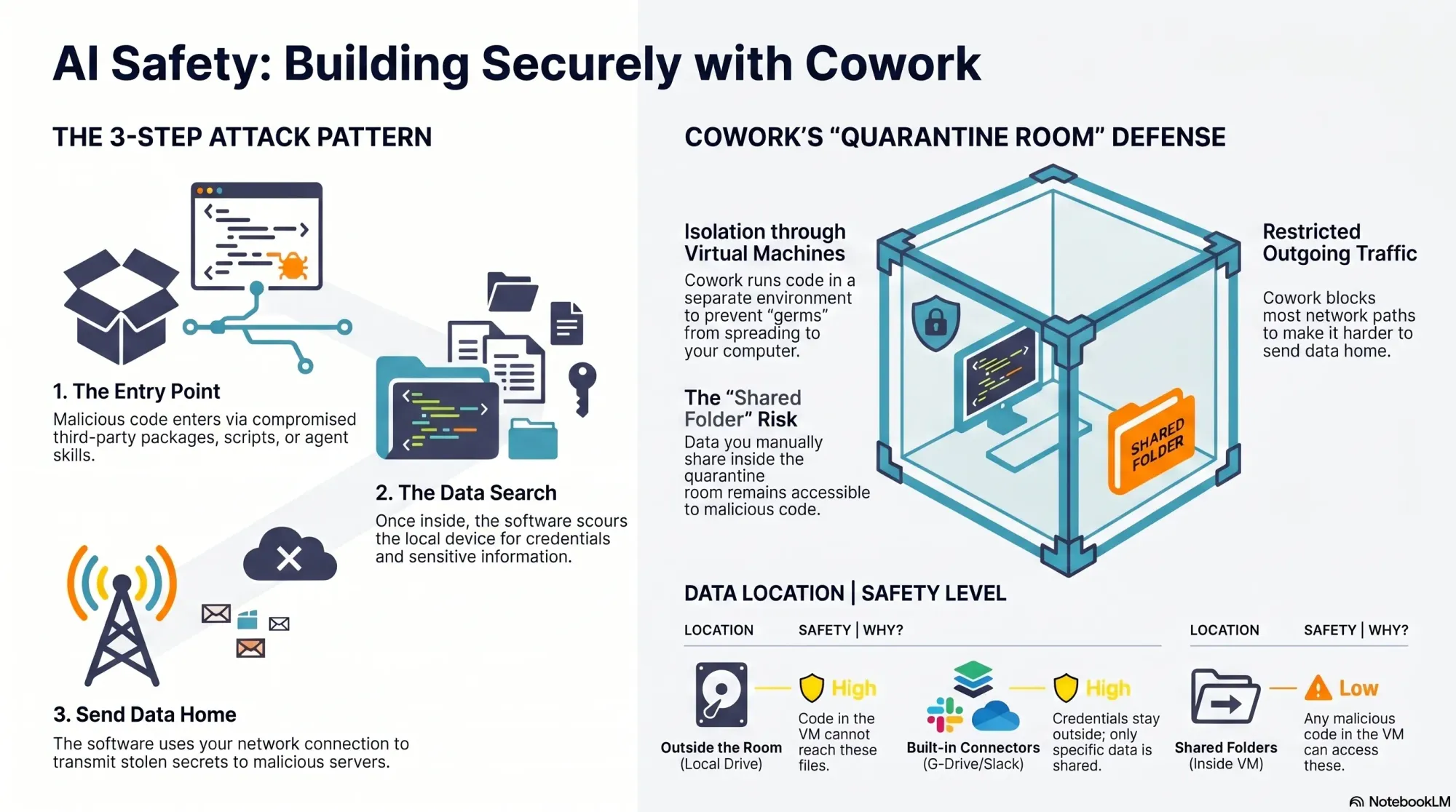
    An agent recently scoured over 230,000 malicious software incidents and found that most malicious software follows a similar pattern. First, it needs an entry point onto your computer. Once installed, it scours your device for sensitive data, and then it uses your network connection to send that data to its own servers. The Mini Shai-Hulud worm spreads via malicious package install scripts that run at download time, then searches the device for credentials (including package publishing rights), poisons additional packages to continue replicating, and uses multiple channels—including the victim’s own GitHub public repos—to distribute secrets.

    In practice, most attacks boil down to three steps: 1) It finds an entry point to your device. 2) It searches your device for sensitive data. 3) It sends that data to its own server. The good news: this pattern also tells us how to defend. We can harden entry points, minimize what code and agents can access, and constrain outgoing network traffic.

    Keep in mind that install scripts aren’t the only entry vector. Any code that runs on your machine could contain malicious payloads: third-party packages, agent skills, MCP servers, browser or desktop extensions—the list is long. As coding agents and “vibe coding” tools become mainstream, more non-engineers are exposed to the same risks engineers have managed for years.

    You might be at elevated risk if you do any of the following: you download and use third-party skills or MCP servers; you let Claude Code, Codex, or other coding agents write scripts that run locally and use third-party packages; you use an IDE like VS Code or Cursor with third-party extensions; or you install third-party extensions in tools like Obsidian. This isn’t an exhaustive list, but if any of these apply, it’s worth tightening your approach.

    Infographic titled 'Are You at Risk?' listing third-party code exposure points: agent skills and MCP servers, coding agents on local devices, IDE extensions (VS Code, Cursor), and Obsidian plugins.
    Relying on third-party code? This visual highlights four common risk zones—agent skills/MCP servers, coding agents, IDE extensions, and Obsidian plugins—and urges a review of downloads, local scripts, and add-ons.

    The “safest” approach would be to avoid installing third-party software on your local device entirely. That’s not realistic. We all depend on third-party components in our stack. So I’ll start with one of the most common paths for non-engineers writing and running code today: Cowork.

    Evaluating Cowork’s safety was eye-opening. Cowork offers meaningful protection—more than running code directly on your machine—but it isn’t bulletproof. There’s a notable gap you should understand.

    Here’s how Cowork helps. It runs code inside a virtual machine, which isolates the execution environment from your real device—a quarantine room for code. While Cowork doesn’t fully control what comes into the room (that part is on you), if malicious code gets in, it’s contained and cannot reach the rest of your filesystem. Cowork also limits outbound network traffic from the virtual machine, which helps disrupt data exfiltration. However, it’s not foolproof.

    Because Claude can install packages inside Cowork, it remains susceptible to malicious code like the Mini Shai-Hulud worm. And GitHub is on the allow list so Cowork can read and write to your repos. Since the Mini Shai-Hulud worm uses GitHub to publish secrets, this creates exposure. The crucial mitigation: if you never give Cowork access to sensitive data, there’s nothing for an attacker to steal.

    Infographic titled 'Does Cowork Keep You Safe?' with three points: entry point contained, data safe only if kept outside, and partially limited network traffic, highlighting risks in package attacks.
    A quick visual from a security deep dive on package hacks shows how Cowork handles threats: entry points are contained, data is only safe when kept outside, and network traffic is partly limited—making shared data the gap to watch.

    Your responsibility is straightforward but critical: your data is only safe if it stays outside the virtual machine. When you mount folders into Cowork, those folders become accessible to any code running inside the VM. That includes malicious scripts. Before sharing, ask two questions: do the folders contain any credentials or secrets, and do they include proprietary data that would be harmful if accessed?

    It’s common for code to need credentials. That’s why Cowork includes connectors to third-party sources like Google Drive and Slack. Credentials configured for these connectors never enter the VM—they remain outside the quarantine room—so they’re not exposed to malicious code. But if your code requires additional credentials inside the VM, scope them tightly and assume they could be compromised.

    You can also use custom MCP servers you create yourself with Cowork. Those credentials stay outside the VM as well, provided the MCP servers are remote (hosted on a web server, not downloaded locally). It’s more work than dropping in a local server, but it keeps secrets out of reach from VM-executed code.

    Beyond credentials, scrutinize the actual content you share with Cowork, including anything accessed through connectors. Least privilege is the rule: grant only what’s absolutely necessary for the task, and nothing more.

    Infographic titled 'Keep Building. Stay Safe.' outlining a 3-part series for AI builders: 1 Cowork Safety, 2 Claude Code Config, 3 Off-Device Development, with teal security, AI, and cloud icons and a 'Product Talk' label.
    Amid a wave of package-supply attacks, this Product Talk visual launches a 3-part guide to safer AI building—starting with Cowork safety today, then Claude code config next week, and off-device development coming soon.

    What about skills? Cowork supports skills, and you can add third-party skills inside the quarantine room. If you’re not placing your own data in that room, you can afford more risk. The moment you add sensitive or proprietary data, be selective. Skills can include third-party code, and bad actors use skill directories to distribute malicious payloads. Personally, I never use third-party skills as-is. If one looks useful, I read through the files, then ask Claude to recreate it so I understand what it does and maintain control. If I were to use third-party skills, I’d do it in Cowork and keep their data access to the minimum necessary.

    Overall, Cowork is a solid, “safe-ish” option if you’re disciplined about what you share. The challenge is that utility often requires access to real data—exactly what we’re trying to protect. In an upcoming deep dive, I’ll outline strategies to keep malicious code out in the first place. While I’ll focus on local development, the same patterns can extend to Cowork with a bit of setup.

    One more important clarification: don’t confuse Cowork with the Code tab in the Claude Desktop app. Cowork runs code inside a virtual machine. The Code tab does not. If you ask Claude to write and execute code from the Code tab, that code runs on your local device and you’re fully responsible for security. There is one exception: the Code tab can run code in Anthropic’s cloud; I’ll cover that approach when we get into moving development off the local machine.

    To summarize Cowork’s protections against the attacker’s three-step pattern: installs and scripts still run, but they’re contained inside an isolated virtual machine instead of your real device; access to sensitive data is strongly limited to the specific folders you mount, leaving the rest of your filesystem (including unrelated credentials) out of reach; data exfiltration is partially constrained because Anthropic limits outbound network traffic from the VM—helpful, but not absolute. By contrast, local Code tab sessions offer no isolation, no filesystem restrictions, and no network limits—so any malicious install scripts run directly on your machine with full access and open egress.

    My takeaways so far: I still love building with AI, but I’m doing it more cautiously. Cowork offers meaningful containment when used deliberately. I still prefer the flexibility of Claude Code, and I’ve reconfigured my setup to reduce risk. Even so, “safer” isn’t “safe,” which is why I’m increasingly shifting development off my local device to more controlled environments. I’ll share the practical details—tools, configs, and scripts—in the next installments.

    If this perspective is useful, let me know. I want builders to move fast—and safely—through this new era of agentic AI. Until then, stay safe out there.


    Inspired by this post on Product Talk.


    Book a consult png image
  • From PM to AI Engineer: RAG, Evals, and Discovery—The Surprising Playbook I’m Applying

    From PM to AI Engineer: RAG, Evals, and Discovery—The Surprising Playbook I’m Applying

    I just finished a standout conversation on AI engineering and product discovery that hit squarely at the questions I hear from product leaders every week: What does practical AI engineering actually look like for product managers, and how do we ramp without a traditional software background?

    Listen to this episode on: Spotify | Apple Podcasts

    Here’s the arc that resonated with me: a product leader goes from occasional tinkerer to spending 60% of her time on real engineering work—building AI-powered tools for continuous discovery, forming a licensing partnership with Vistaly, and quietly constructing "Teresa Bot," an AI discovery coach trained on everything she’s ever written. The journey is less about mastering every framework up front and more about structuring learning, tightening feedback loops, and shipping useful outcomes.

    The most energizing throughline is the myth-busting: you don’t need a deep engineering pedigree to operate in this space. Curiosity, rigorous discovery habits, and eval-driven development will take you further than brute-force coding. As one moment put beautifully, "I know anything that I don't know how to do, Claude will teach me how to do. And Claude is infinitely patient." That captures the posture I expect modern PMs to adopt with LLMs and tools like Claude Code.

    On the nuts and bolts, the discussion gets concrete about AI engineering in practice: context engineering, prompt writing, RAG, observability, and evals. This is the real stack—think retrieval-first pipeline design, prompt engineering guardrails, instrumentation for model drift, and continuous, automated evals to protect behavior as you iterate. If you’ve been dabbling with context window management but haven’t formalized your test harnesses or dashboards, this is your cue.

    What I appreciated most is how directly discovery skills transfer. Framing assumptions, running tight customer interviews, mapping opportunity solution trees, and aligning stakeholders—these are precisely the muscles you need to shape problem spaces before you “vibe code” solutions. As one reflection nails it, "The moment I learned more about data science, all of my discovery work became so different." That’s the bridge from qualitative sense-making to measurable, model-centered learning.

    The partnership with Vistaly is also a smart build vs buy case study. Rather than reinvent infrastructure, the choice to license purpose-built opportunity solution tree software keeps focus on the differentiated layer—learning systems and product outcomes. As it’s put plainly: "I don't want to build all that stuff. I don't really want to be a software company. I'm almost set up like an AI researcher." Product leaders should internalize this lens for platform choices across their AI roadmaps.

    On "Teresa Bot," the implementation breadcrumbs are familiar and pragmatic: pair a solid retrieval-first pipeline (RAG) with clean content sources, keep prompts modular, enforce code review even for vibe coding, and stand up observability and evals early. I’ve had similar success using Claude Code for rapid iteration while treating every prompt and context change as a versioned artifact. That discipline pays dividends when you need to trace regressions or prove improvements.

    If you’re a PM ready to lean in, start small and systematic. Pick one high-signal discovery workflow, model the knowledge you already have, and wire up basic evals before you scale. Keep a lab notebook, use programmatic tests to gate deployments, and measure outcome movement—not just model cleverness. This is where LLMs for product managers move from novelty to execution readiness.

    Resources mentioned: Watch the episode on YouTube, Claude Code, Vistaly (opportunity solution tree software), Opportunity Solution Trees: Visualize Your Discovery to Stay Aligned and Drive Outcomes, Product Talk Academy, Just Now Possible Podcast, Vibe Coding Best Practices: Avoid the Doom Loop with Planning and Code Reviews, and the AI Evals for Engineers and PMs course on Maven.

    What stood out to you—RAG design choices, eval frameworks, or the discovery-to-engineering mindset shift? Drop your thoughts below; I’d love to learn how you’re applying these patterns in your own product roadmaps.


    Inspired by this post on Product Talk.


    Book a consult png image
  • Beyond the Product Builder Hype: How AI, org design, and joy shape PM success

    Beyond the Product Builder Hype: How AI, org design, and joy shape PM success

    I recently spent time with the debate behind the "product builder" trend—asking whether it’s the future of product management or just another wave of tech FOMO. The conversation featuring Teresa Torres and Petra Wille is a useful prompt, but what matters most is how we translate these ideas into healthy product practices inside our own organizations.

    Here’s my take: the product builder movement is neither a mandate nor a fad—it’s a tool. The right question isn’t "should product managers code?" but whether leaning into building advances outcomes for our customers and our teams. In practice, that means letting interest and skill—not pressure—set the pace.

    Petra captured it perfectly: "Just because I can do it — is it something I enjoy doing? And do I have enough experience to really get into the flow?" Those two tests—joy and depth—are underrated filters. I’ve seen PMs light up when prototyping or vibe coding a thin slice, and I’ve also seen well-meaning dabbling create hidden complexity that slows everyone down later.

    Org design determines whether this works. It’s not about the tools—it’s about clarity of roles, healthy interfaces between product, design, and engineering, and explicit guardrails for where experiments stop and production begins. AI has raised the stakes: "AI can make unskilled work look polished. That’s a feature and a bug — executives see the shine, engineers inherit the mess." If you’ve ever watched a glossy demo turn into weeks of refactors, you know exactly what this looks like.

    To avoid that trap, I deliberately separate the three layers where AI is changing product work: personal productivity, team process, and product strategy. Treating these as different stacks keeps expectations clean: a prompt that accelerates personal workflows isn’t the same as an AI-enhanced process that reshapes delivery, and neither automatically produces durable product advantage. Don’t conflate them.

    Discovery remains stubbornly human. "Why discovery still requires talking to your customers (sorry)" is more than a friendly nudge. AI can broaden our search space and sharpen analysis, but it doesn’t replace qualitative conversations or the judgment that comes from pattern recognition across real customer contexts. Continuous discovery and disciplined customer interviews are still the most reliable compasses we have.

    Where does "vibe coding" fit? It’s great for roughing out concepts, de-risking slices, and communicating intent when words or static mocks won’t cut it. Tools like Claude Code make this faster than ever, and familiar stacks like Ruby on Rails lower the bar for spinning up functional prototypes. But remember the design system trap: AI can make bad decisions look good on the surface. If you don’t control for architecture, accessibility, data contracts, and handoff quality, your team pays the integration tax later.

    In well-set-up orgs, the output-oriented muscle memory gets rewired. When AI frees up time, strong teams reinvest it into better problem framing, sharper opportunity solution trees, and tighter product strategy—rather than simply chasing more output. That’s a leadership challenge, not a tooling problem, and it shows up quickly in how teams make trade-offs.

    Here’s how I operationalize this with empowered product teams: we articulate clear boundaries for prototypes versus shippable code, define decision rights for when PMs or designers "build," and align on review gates that protect quality without stifling speed. We also make the three AI layers explicit in roadmapping and retros, so improvements to personal workflows don’t get mistaken for strategic advantage.

    My distilled guidance echoes the episode’s throughline. The product builder trend isn’t a mandate — it’s a tool. Let enjoyment and skill guide who on your team leans into it. Organizational readiness determines whether AI empowers your team or creates chaos. Don’t conflate personal efficiency, process change, and product impact—they require different responses. Discovery fundamentals haven’t changed; AI helps you go deeper, not skip the work. And the real takeaway on product builders: not everyone has to build, but everyone can if they want to.

    If you want to hear the full discussion that sparked these reflections, listen on Spotify or Apple Podcasts. Then tell me: where will you apply builder energy in your team—and where will you deliberately say no?

    Resources & Links: Follow Teresa Torres: https://ProductTalk.org. Follow Petra Wille: https://Petra-Wille.com. Mentioned in this episode: Claude Code, Vibe coding, Ruby on Rails.

    One more quote I loved because it centers autonomy and craft: "It’s a tool in our toolbox. We can decide who on our team has fun with it, wants to do it, wants to contribute." That’s the mindset that sustains both momentum and morale.


    Inspired by this post on Product Talk.


    Book a consult png image
  • Vibe Coding Unleashed: How Parallel Agents Build KPI Driver Trees in Under Two Hours

    Vibe Coding Unleashed: How Parallel Agents Build KPI Driver Trees in Under Two Hours

    I’ve been exploring what I call the next level of vibe coding: orchestrating agentic AI to build complex product artifacts in minutes, not days. The breakthrough comes from ditching linear handoffs and embracing true parallelism—letting specialized agents tackle the work simultaneously while I steer the orchestration. In product management contexts where speed and clarity matter, this shift changes everything.

    Building a KPI Driver Tree in two hours becomes possible when you stop building sequentially and start building with parallel agents.

    For product leaders, a KPI Driver Tree is the fastest way to make strategy legible. It ties high-level outcomes to the levers we can actually pull—features, channels, pricing, onboarding, activation, and retention mechanics—so we can prioritize with confidence. Done well, it connects outcomes vs output OKRs, clarifies measurement, and aligns the team around a shared, testable model of growth.

    Here’s how I operationalize it with agentic AI and AI workflows. I spin up a small team of specialized parallel agents: a Metrics Librarian (taxonomy and definitions), a Data Modeler (event and table design), a Research Synthesizer (voice of customer and causal hypotheses), a UX Prototyper (visualizing the tree and flows), and a QA/Evaluator (logic and consistency checks). An Orchestrator coordinates these agents, resolves conflicts, and composes outputs into a single, production-ready artifact—while I set constraints, review deltas, and decide.

    In a typical two-hour sprint, all agents run at once. While the Metrics Librarian finalizes the KPI ontology, the Data Modeler validates instrumentable events and joins, and the UX Prototyper renders an interactive driver tree for a unified analytics platform. Meanwhile, the Synthesizer maps qualitative insights to quantitative levers, and the Evaluator stress-tests assumptions. Because we’re not waiting for sequential handoffs, we converge on a coherent driver tree and its initial measurement plan in one pass.

    The payoff isn’t just speed—it’s higher-quality decisions. Parallel agents reduce context loss, expose trade-offs earlier, and allow me to compare multiple viable paths side-by-side. This accelerates continuous discovery, aligns with product strategy, and gives product managers and LLMs for product managers a clear, living map of how inputs roll up to outcomes. It’s the closest I’ve found to running a product trio at machine speed.

    Guardrails matter. I pair this approach with strong data governance, privacy-by-design, and eval-driven development so every agent’s output is testable and auditable. Clear prompts, scoped corpora, and consistent acceptance criteria keep the Orchestrator honest, while lightweight Agent Analytics helps me see where reasoning falters and where to improve the system.

    If your team is still tackling analytics artifacts sequentially—requirements, then instrumentation, then visualization—consider switching mental models. Treat the driver tree as the backbone, empower parallel agents to co-create around it, and reserve human judgment for the critical calls. This is vibe coding for product management: creative, fast, and grounded in measurable outcomes.


    Inspired by this post on Pendo – Best Practices.


    Book a consult png image