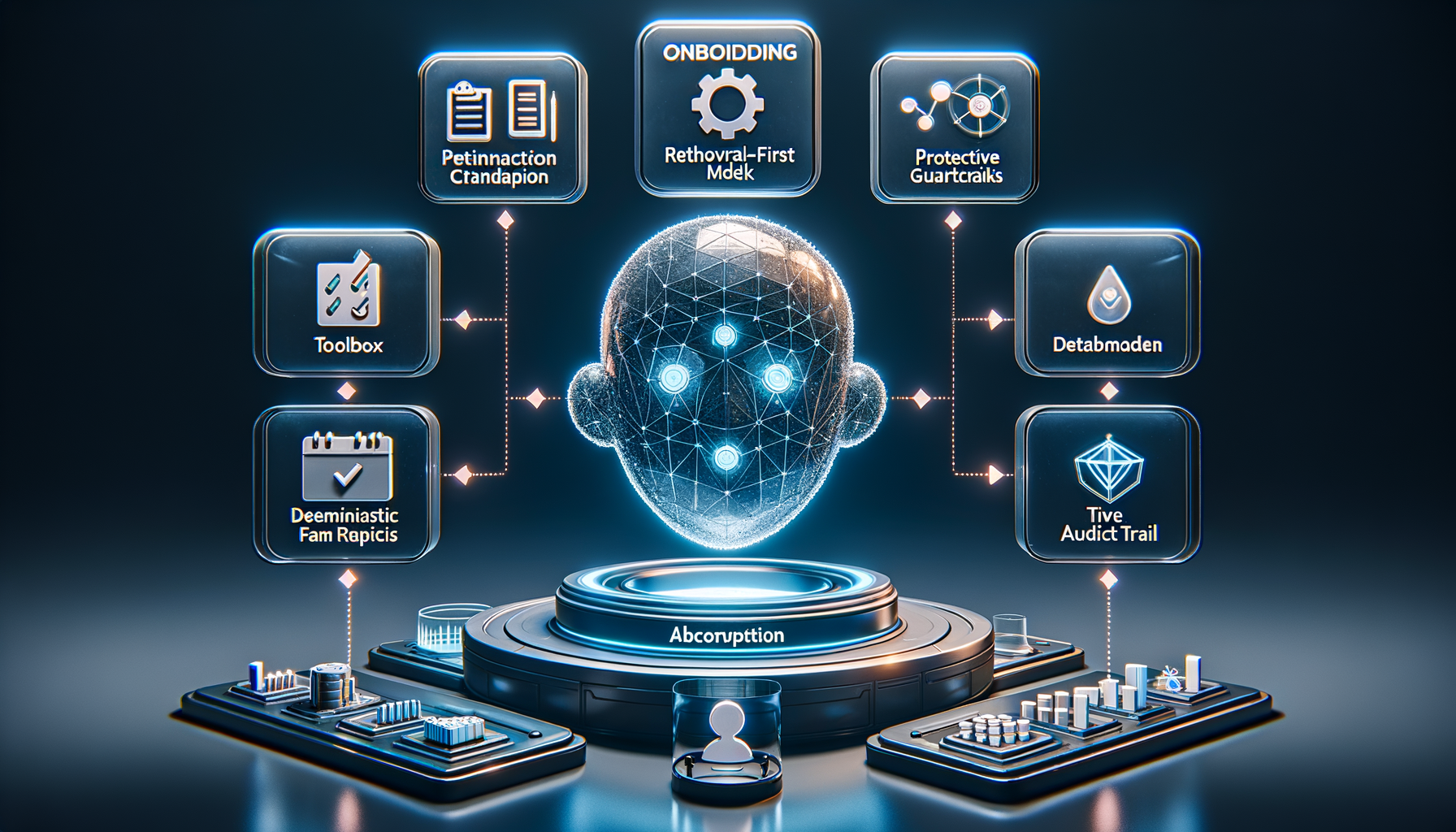
Shipping AI agents is not like shipping a typical feature. The system learns, reasons, and takes action in unpredictable environments, and when it’s customer-facing, the stakes are high. Over the past few years, I’ve refined a practical checklist that helps my teams move quickly without breaking trust. It balances speed with safety, and ambition with accountability—exactly what you need to scale agentic AI in production.
This checklist was forged in real launches—some smooth, some humbling. Early on, I watched an otherwise brilliant agent confidently offer a refund policy we didn’t have. That one incident made it clear: AI agents require a higher bar for guardrails, evals, and observability. Today, I won’t greenlight an AI rollout without these steps being explicit, owned, and testable.
Start with outcomes, not output. I define the job-to-be-done, the target users, and the measurable business impact using outcomes vs output OKRs and driver trees. Success is not “ship an agent,” it’s “reduce first-response time by 40% with no drop in CSAT,” or “increase qualified demo bookings by 20% at a lower cost per acquisition.” Clear outcomes give the agent a purpose and the team a north star.
Prepare the knowledge the agent will use. A retrieval-first pipeline beats raw prompting for most enterprise cases. I inventory sources of truth, set access controls, and enforce data governance from day one. That includes PII handling, redaction, retention policies, and privacy-by-design. If the agent can’t reliably retrieve the right fact at the right time, the rest doesn’t matter.
Choose models and prompts with discipline. I align model selection with context window management, cost, latency, and tool-use requirements. Then I build prompts and tools together, not in isolation, and I keep temperature, stop conditions, and function-calling explicit. Most importantly, I use eval-driven development: golden datasets, task-specific metrics (accuracy, helpfulness, latency, cost), and target thresholds that must be met before widening rollout.
Manage AI risk upfront. I treat jailbreaks, toxicity, and data leakage as product risks, not just security issues. I implement layered defenses—input/output filtering, policy checks, rate limits, and abuse monitoring—and define escalation paths and human-in-the-loop handoffs for ambiguous cases. Every risky capability needs an owner, a playbook, and a test.
Build the pipeline that lets you iterate safely. Prompts, tools, policies, and retrieval configs go through the same CI/CD rigor as code. I use feature flags for progressive delivery, canary cohorts to limit blast radius, and clear rollback procedures. Observability isn’t optional; I track latency, token usage, cost, failure modes, and user outcomes. I also watch DORA metrics and deployment frequency to ensure we’re improving the engine, not just the output.
Constrain autonomy intentionally. Agent behavior design matters as much as model choice. I set step limits, define tool whitelists, separate read vs write permissions, and specify decision checkpoints. When the agent is uncertain or confidence drops below a threshold, it hands off to a human or a deterministic workflow. Guardrails aren’t barriers; they’re bumpers that keep you on the track.
Instrument what users experience, not just what models produce. I track activation, task success, self-serve completion rates, and time-to-value. I pair Agent Analytics with journey analytics so I can see where the agent helps or hurts. I also invest in UX trust cues—transparent explanations, undo paths, and in-app guides—so users feel in control. When the agent changes behavior through learning, the interface should make that understandable.
If you’re shipping a voice AI agent, test in realistic conditions. I set targets for ASR accuracy, barge-in responsiveness, TTS prosody, and end-to-end latency. I predefine safe transfer logic for complex calls and ensure compliance for call recording and data retention. Voice amplifies both the magic and the mistakes; operational excellence is non-negotiable.
Plan the business rollout like a product, not a press release. I align pricing (often consumption SaaS pricing), packaging, and SLAs with actual unit economics—tokens, inference, and retrieval. I equip solutions engineering with playbooks and reference architectures, wire up CRM integration for attribution, and put feedback loops into Intercom or the support stack so we learn from every interaction.
Run operations like an SRE team. I define incident severity for AI-specific failures (e.g., harmful output, runaway cost, degraded retrieval), add alerting, and keep runbooks current. I schedule postmortems that feed directly into eval baselines and backlog priorities. Continuous discovery isn’t a ceremony; it’s the safety net that keeps improvements compounding.
Close the loop on compliance and governance. From day zero, I document data flows, vendor scopes, and audit logs. I verify regulatory compliance and adopt privacy-by-design so I’m not retrofitting later. Transparency, user consent, and opt-outs aren’t just legal checkboxes; they’re trust-building tools that differentiate your product.
The result of this checklist is speed with confidence. It gives my teams a common language to debate trade-offs, a clear path to production, and the guardrails to scale safely. If you’re preparing to deploy an agent, adapt these steps to your stack and your customers. Your future self—and your users—will thank you.
AI agents are quickly moving from novelty to necessity, and the fastest way to capture value is to approach them like any other high-stakes product initiative. In this guide, I share how I plan, build, and launch production-grade agents with a product mindset—balancing ambition with risk, speed with governance, and innovation with measurable outcomes.
I start by getting crisp on the outcome. Who is the primary user, what job are they hiring the agent to do, and how will we know it’s working? I translate this into outcomes vs output OKRs, such as resolution rate, time-to-value, cost-to-serve, or qualified pipeline influenced—anchoring the roadmap before a single line of code or prompt is written.
Next, I map the agent’s scope and boundaries. I write a simple capability canvas: the tasks the agent must perform, the tools it can use, the data it can access, and the constraints it must respect. Most successful builds follow a retrieval-first pipeline: connect trusted knowledge sources, enrich with metadata, and manage a lean context window to keep responses relevant and cost-efficient. From the start, I bake in privacy-by-design, data governance, and AI risk management so compliance isn’t an afterthought.
Model selection comes after the workflow is clear. I choose an LLM for the job (latency, cost, multilingual needs, and tool-use fidelity) and pair it with the right connectors and actions—think CRM integration, ticketing, search, or internal APIs. For voice experiences, I define a voice AI agent persona, turn-taking rules, and barge-in behavior. This is where agentic AI patterns shine: structured planning, tool invocation, and verification loops create a resilient, goal-directed system.
Prompt design is product design. I write system prompts that define role, tone, constraints, data sources, and success criteria. I add few-shot examples that mirror my top use cases and edge cases, then apply prompt engineering best practices to control style, limit speculation, and encourage citations. For voice, I include prompt engineering for voice to optimize brevity, warmth, and disfluency handling without sacrificing accuracy.
Before launch, I build an eval-driven development workflow. I curate golden datasets from real user intents, add adversarial cases, and automate evals for accuracy, safety, grounding, and tool-use success. I set a minimum detectable effect (MDE) so A/B testing can validate improvements with confidence, and I define go/no-go thresholds to prevent regression. This becomes my continuous discovery loop for the agent.
Instrumentation is non-negotiable. I wire up Agent Analytics to track task success, containment/deflection rate, handoff quality, cost per task, and user satisfaction. I supplement with a unified analytics platform and session replays to observe failure patterns. These signals feed prioritization and help me decide when to expand scope versus harden reliability.
For delivery, I rely on CI/CD with feature flags to gate risky capabilities, plus canary releases for new tools and prompts. I monitor DORA metrics to maintain deployment frequency without trading off quality. When incidents happen, I treat them like production issues: incident management playbooks, rollbacks, and clear postmortems.
Trust is earned through safety and transparency. I enforce least-privilege access, structured logging, and red-teaming for jailbreaks, prompt injection, and data exfiltration. Threat detection and response plus clear user disclosures keep the experience responsible and compliant with regulatory requirements.
GTM is product-led. I use in-app guides, product tours, and onboarding checklists to drive user activation and early wins. I define success moments, turn them into habit loops, and run retention analysis to find where users stall. This tight loop of messaging, measurement, and iteration accelerates product-market fit.
Common high-ROI use cases I prioritize include customer support ai strategy (automated resolution and augmented agent assist), sales and success workflows (lead qualification, QBR prep), and internal knowledge copilots (policy, process, engineering runbooks). Each starts narrow, ships fast, and scales with proven evidence from analytics and experiments.
If you’re skimming, here’s the blueprint: clarify outcomes, design AI workflows with a retrieval-first pipeline, select the right LLM and tools, engineer robust prompts, institutionalize evals and A/B testing, instrument Agent Analytics, ship with CI/CD and feature flags, and iterate with discipline. In the walkthrough video above, I go deeper on templates, prompts, and experiments you can use to build your first agent with confidence.
After two decades of coaching product teams, I’m making a deliberate shift in how I guide leaders and practitioners. The destination hasn’t changed—great products, empowered product teams, and durable outcomes—but the route has. AI is now a practical, compounding advantage, and it demands we evolve our product coaching model.
In my day-to-day as a VP of Product Management at HighLevel, I’ve watched AI move from novelty to necessity. Large language models, agentic AI, and streamlined AI workflows now accelerate how we discover opportunities, test hypotheses, and communicate decisions. This is not about replacing product judgment; it’s about augmenting it with a disciplined AI Strategy.
For years, I’ve raised the alarm about the gap between execution and strategy among “product owners and feature team product managers.” The intent was never to pile on more process. It was to strengthen product discovery, sharpen product strategy, and clarify outcomes vs output OKRs so that teams ship what matters. AI finally gives us the leverage to make that shift unavoidable—and repeatable.
Here’s the new coaching stance: treat AI as a co-pilot, not an answer engine. I coach teams to build an AI product toolbox they can trust—prompt engineering patterns, eval-driven development to measure model quality, and a retrieval-first pipeline for institutional knowledge. When combined with continuous discovery, this creates a tight loop between insight, iteration, and impact.
Practically, this means elevating core rituals. In product trios, we start discovery with AI-assisted opportunity mapping, then pressure-test problem framing with user evidence. We generate multiple solution sketches with LLMs for product managers, annotate assumptions, and use A/B testing with a minimum detectable effect (MDE) to validate the riskiest bets. The result is faster learning without skipping the hard thinking.
On the governance side, I set clear guardrails: privacy-by-design, data governance, AI risk management, and explicit criteria for acceptable model behavior. We treat prompts and evaluation datasets as versioned assets, and we pair product managers with forward deployed engineers to operationalize insights in production safely.
Coaching also extends to measurement. We anchor product outcomes in the customer journey and watch leading indicators for activation, adoption, and retention. On the delivery side, we look at deployment frequency and the health of the feedback loop between support signals and roadmap choices—because empowered product teams win when they learn faster than the market shifts.
The most profound cultural change is mindset. Instead of asking AI for answers, we ask it for alternatives, counterexamples, and structured ways to explain tradeoffs to stakeholders. That makes product positioning clearer, decision narratives stronger, and the path from insight to execution shorter.
If you’re responsible for developing talent, reframe coaching as enablement plus guardrails. Build the AI muscle into everyday discovery and delivery, not as a side project. When we do this well, we transform good practitioners into strategic operators—people who pair judgment with leverage and consistently ship value.
The bottom line: AI doesn’t replace the craft; it amplifies it. Our job as leaders is to harness that amplification responsibly and turn it into a durable competitive advantage.
I’ve seen first-hand how quickly a company aligns when product data becomes everyone’s common language. To make that happen at scale, I rely on MCP prompts inside Pendo to turn raw behavioral signals into clear, cross-functional actions. When we give people precise questions to ask of the data, engineering, product, marketing, customer success, and sales move in lockstep—and outcomes follow.
Increase revenue, cut costs, and reduce risk with Pendo’s Software Experience Management platform. Optimize the entire software experience to drive adoption and improve engagement.
What follows are the 12 MCP prompts I use to help teams across the business make better, faster decisions from product analytics, in-app guides, and customer feedback. They’re battle-tested, easy to adapt to your stack, and intentionally written to drive product-led growth and clearer accountability.
Prompt 1: Show me the activation funnel by segment (SMB, MM, ENT) for the last 90 days, highlight the biggest drop-off steps, and quantify which change would yield the largest absolute lift in activated users.
Prompt 2: Rank features by adoption velocity over the past 30 days, identify underutilized high-value features by persona, and recommend the top three in-app guide placements to increase engagement.
Prompt 3: Plot 30/60/90-day retention curves for new users by plan type and persona, flag statistically significant gaps, and suggest two experiments to improve week-two retention.
Prompt 4: Cluster qualitative feedback (NPS verbatims, support tickets, and in-app survey responses) by theme and feature, summarize the top friction points in one paragraph per theme, and propose fixes ordered by impact and effort.
Prompt 5: Analyze common user paths after onboarding, surface where users stall or loop, and recommend targeted product tours or tooltips to reduce time-to-first-value.
Prompt 6: Evaluate the impact of a specific in-app guide on activation rate using an A/B test, report lift with confidence intervals, and include the minimum detectable effect (MDE) assumptions used in the analysis.
Prompt 7: Identify accounts at churn risk based on declining feature usage, login frequency, and support sentiment; produce a prioritized list with the top three customer success plays for each account.
Prompt 8: Generate a weekly list of product-qualified leads (PQLs) based on usage thresholds, map them to opportunities in our CRM, and recommend the best follow-up message for sales based on feature interest.
Prompt 9: Analyze usage distribution across pricing tiers, highlight features driving upgrades, and suggest one packaging change and one in-app nudge to improve conversion to the next plan.
Prompt 10: Measure time-to-value by persona for a key action, compare pre/post tutorial launch, and quantify the impact of our in-app guides on reducing time-to-first-value.
Prompt 11: For our last three releases, summarize adoption, top feedback themes, and any regressions; recommend one quick win and one strategic bet for the next sprint.
Prompt 12: Produce a weekly executive summary with the top three product insights, the KPIs they influence, and clear owner-action pairs across Product, CS, and Marketing.
When teams start their day with these MCP prompts, product data stops being a report and becomes a decision engine. That’s how we drive adoption, run better experiments, reduce churn, and keep everyone focused on outcomes instead of opinions. If you adapt even a few of these prompts to your context, you’ll feel the shift—more clarity, tighter cycles, and a company moving as one.
This is the year to build your personal operating system. For me, that line isn’t a slogan; it’s a commitment to eliminate context switching, compress decision cycles, and turn fragmented information into a reliable source of truth. As a product leader, I needed a system that blends judgment, data, and automation—so I built mine around Claude Code.
When I say “personal operating system,” I mean an integrated set of AI workflows, rituals, and tools that capture knowledge, structure decisions, and automate execution. It’s where product discovery meets delivery: a place to synthesize signals, prioritize with clarity, and move from insight to action without friction. The outcome is fewer ad hoc decisions, more deliberate strategy, and a calmer, more focused day.
Claude Code sits at the center because it helps me translate intent into working software and repeatable processes. I use it to scaffold small utilities, write adapters for APIs, and evolve prompts into robust patterns. It accelerates everything from research synthesis and PRD drafting to backlog grooming and stakeholder updates—while keeping me in the loop for final judgment.
Under the hood, I run a retrieval-first pipeline that connects notes, docs, tickets, research transcripts, and roadmaps into a searchable, living memory. With careful context window management, I feed only the most relevant snippets into Claude Code, preserving accuracy and speed. The result: richer answers, fewer hallucinations, and an assistant that “remembers” what matters without drowning in noise.
My daily loop is simple: capture, synthesize, decide, and act. I capture customer signals and meeting notes into a personal knowledge management vault; synthesize patterns with prompt engineering that emphasizes evidence; decide using outcomes vs output OKRs; and act by generating drafts, creating tasks, and updating artifacts. Claude Code helps me wire this end-to-end, so the system works even on my busiest days.
If you’re implementing this from scratch, start small. Pick one high-friction workflow—say, product feedback triage—and build a narrow agentic AI flow to classify, summarize, and route items. Use eval-driven development to test prompts against known edge cases. Add guardrails and privacy-by-design practices from day one, then expand to neighboring workflows once the first loop is reliable.
Governance matters. I treat AI risk management, data governance, and security as first-class citizens: limited data scopes, clear audit trails, human-in-the-loop approvals, and rollback plans. Feature flags control changes; observability tracks drift and quality; and a simple playbook documents how we deploy, monitor, and improve the system.
Measure what this personal operating system earns you. Track decision latency, cycle time from signal to action, meeting-to-output ratios, and the signal-to-noise ratio of inputs. When the system is working, you’ll feel it: fewer meetings, more momentum, and sharper product strategy supported by trustworthy AI workflows.
The goal isn’t to automate judgment—it’s to protect it. By letting Claude Code handle the glue work and information wrangling, I preserve energy for high-leverage thinking: positioning, sequencing, and trade-offs. Build your personal operating system now, and make this the year your product practice runs with clarity and composure.
I’ve watched AI adoption accelerate dramatically over the last year, and the momentum is undeniable. Teams everywhere are experimenting, piloting, and operationalizing AI—but the ways they’re doing it, and the outcomes they’re seeing, vary widely.
Our latest research shows that 82% of senior leaders invested in AI for customer service in 2025, and 87% plan to in 2026. That’s the new baseline. The differentiator now is depth—how far AI is embedded into core workflows, accountability, and measurement.
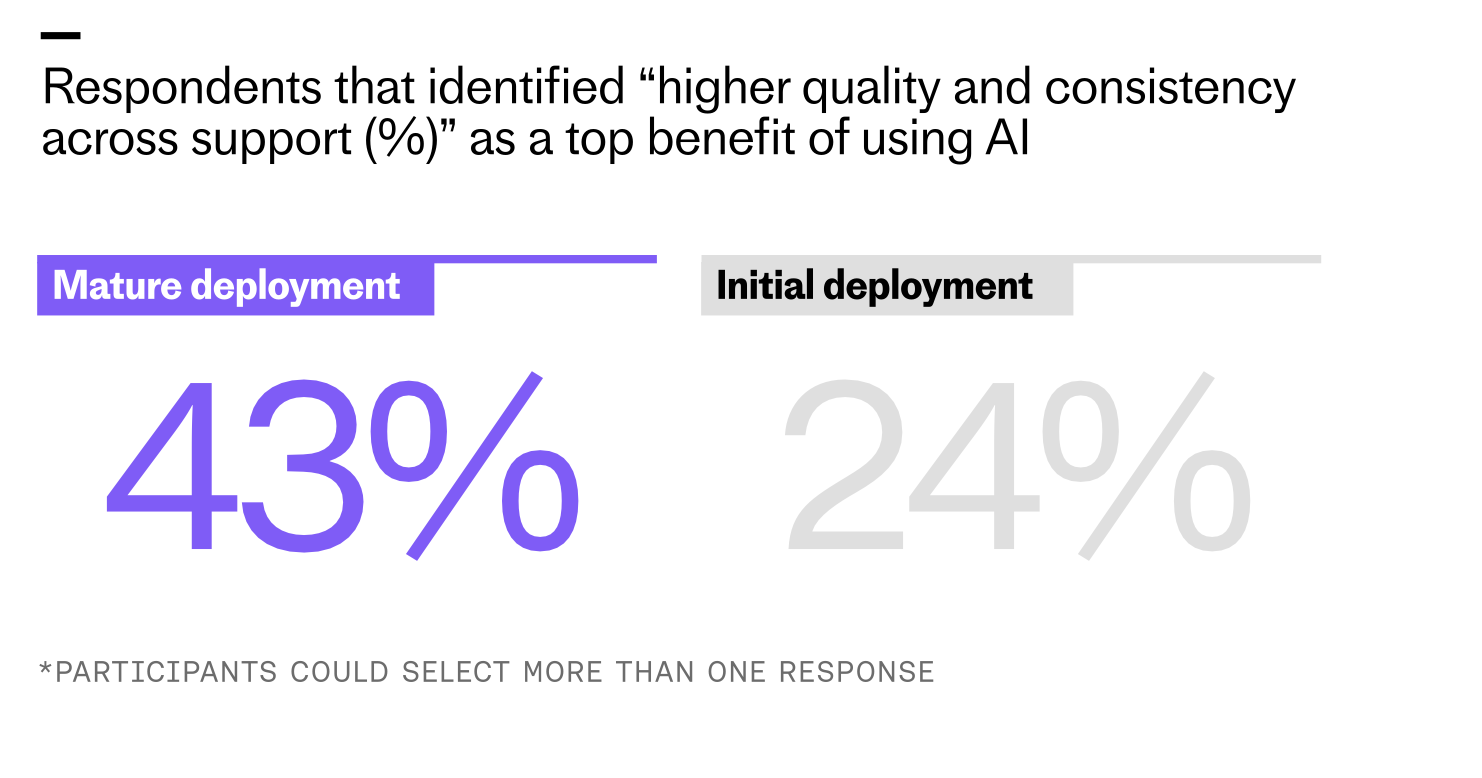
Teams with mature AI are almost twice as likely to achieve higher, more consistent support quality. Our survey shows 43% of advanced adopters citing this benefit compared with 24% of early deployments.
But while most teams are using AI, our 2026 “Customer Service Transformation Report” shows that this usage is not equal. A gap is opening up between teams that have deployed AI at a surface level and those that have integrated it deeply. I see this firsthand: shallow deployments answer FAQs; deep deployments redesign processes, policies, and teams.
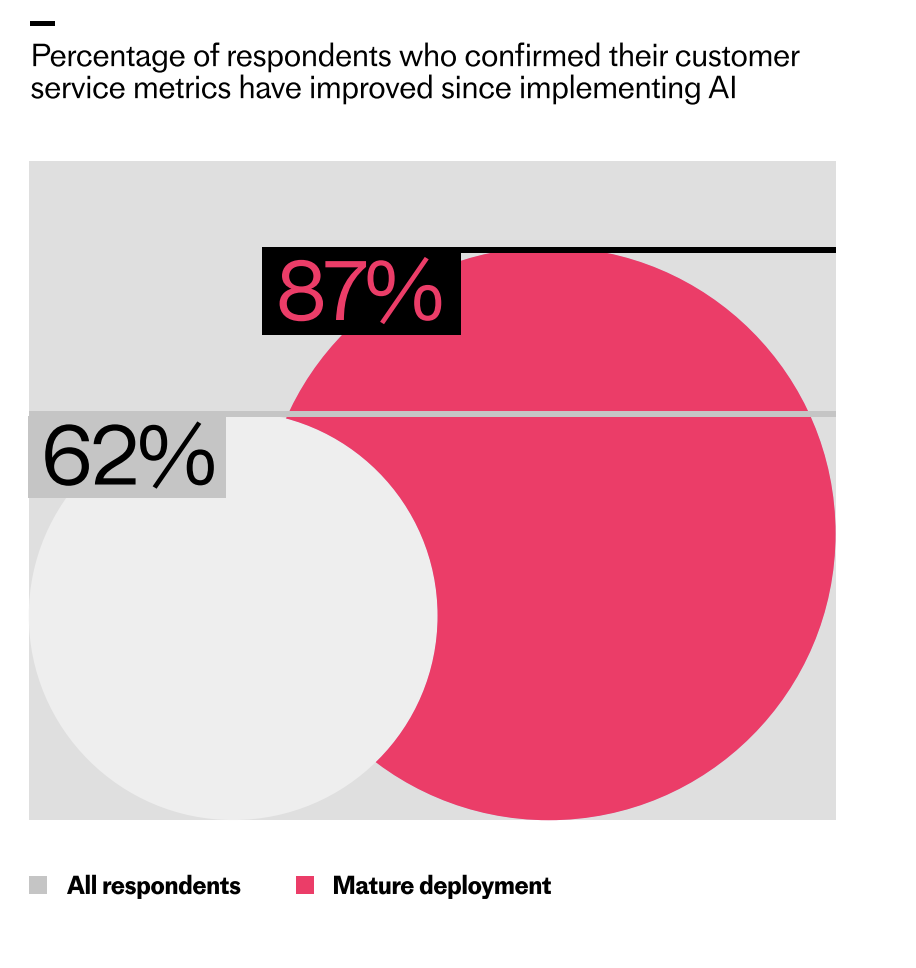
Survey results highlight the AI deployment gap: nearly nine in ten organizations with mature AI see improved customer service metrics (87%), compared with 62% across all respondents, visualized with bold circles.
For this year’s report, we surveyed over 2,400 global customer service professionals across a range of industries to see how they’re using AI today, where it’s paying off, and what they’re betting on as they plan for 2026. The findings mirror my experience leading AI Strategy and AI workflows at scale.
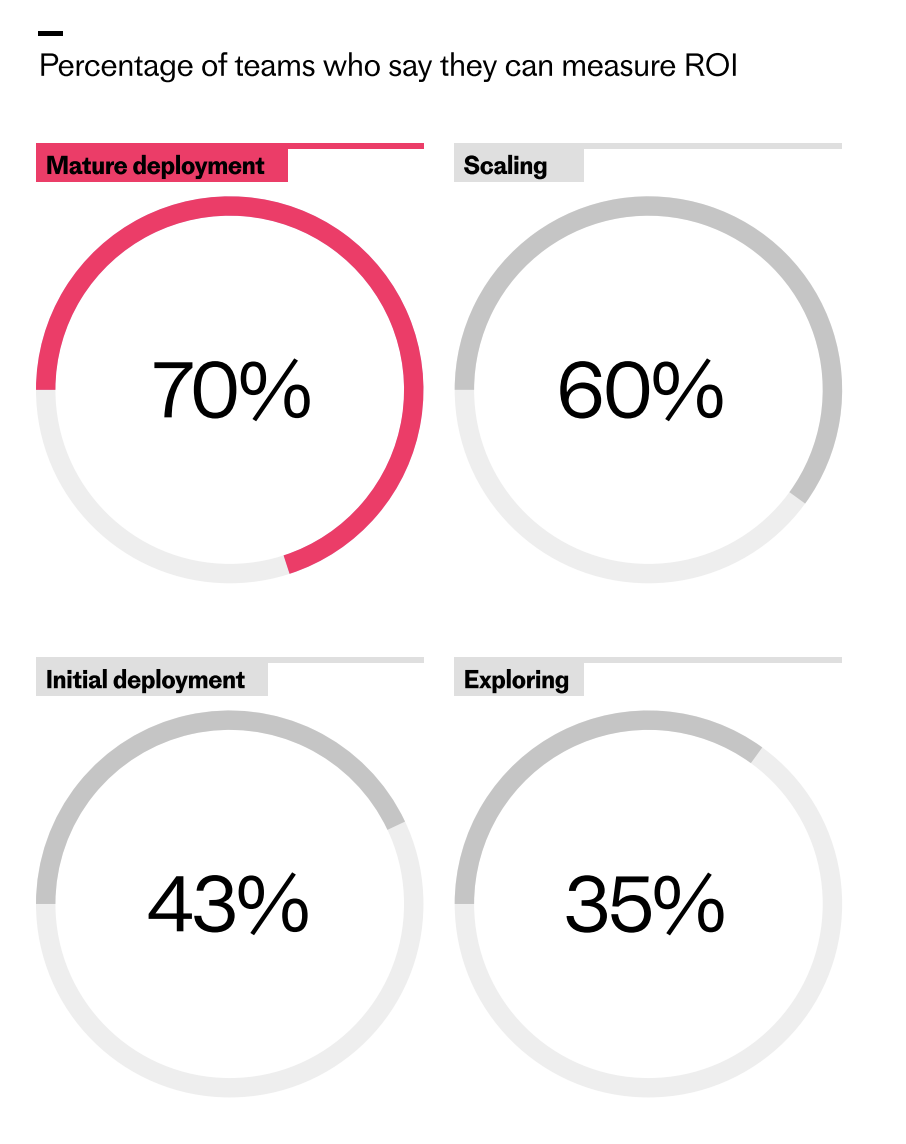
As AI programs advance, measurement confidence surges. This chart shows how ROI tracking rises from 35% in exploring to 70% in mature deployments—evidence of a widening execution gap in customer service.
We found that for many teams, AI is still doing narrow work like answering simple questions or handling small parts of workflows. These teams are seeing benefits, but only a fraction of what’s possible. Meanwhile, a smaller group is pulling away. They’ve put AI at the core of their service operation, integrating it into critical workflows, giving it more responsibility, and continuously improving it over time. That’s the hallmark of mature deployment.
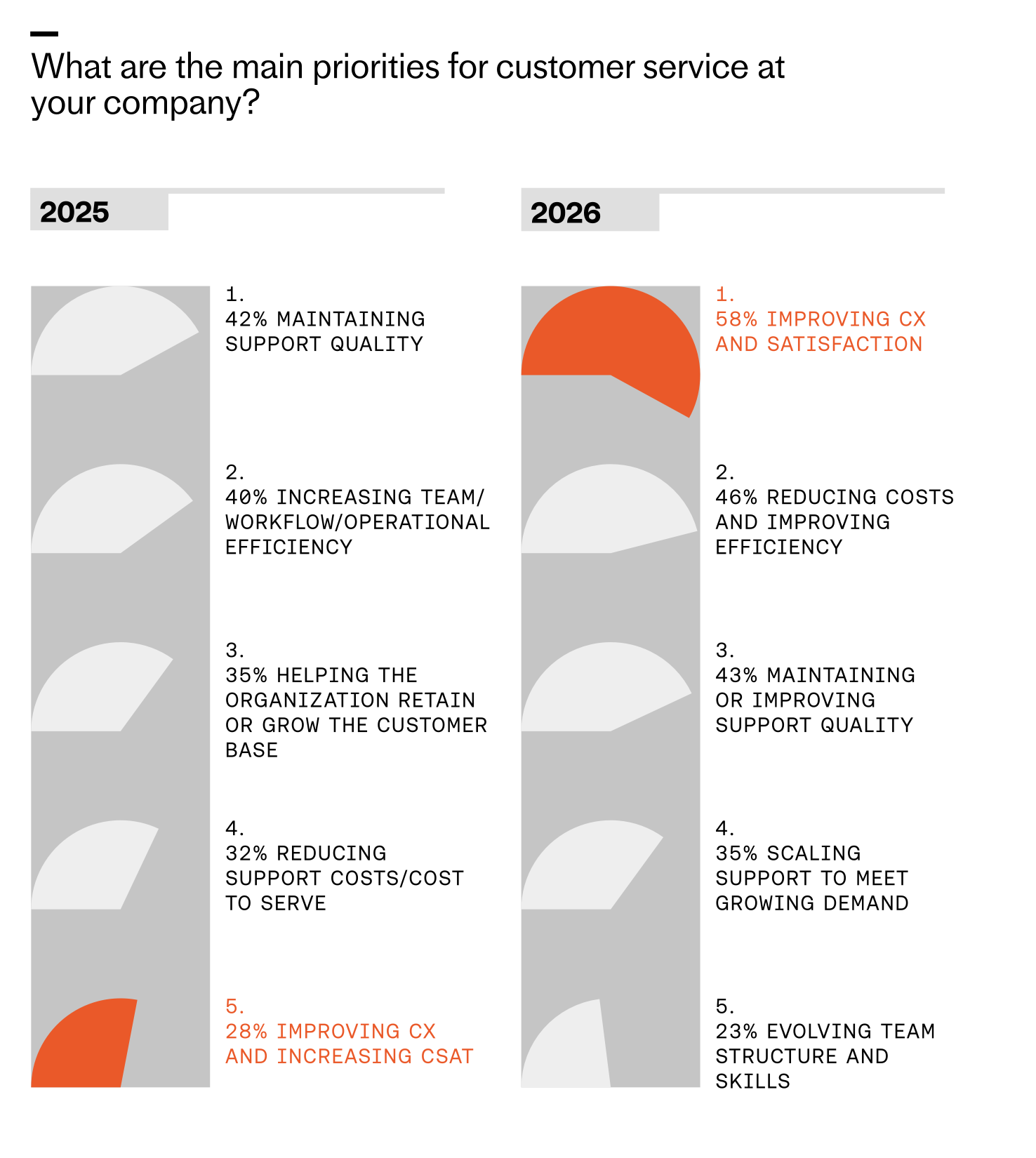
Customer service priorities are shifting fast. By 2026, improving CX tops the list at 58%, cost and efficiency climb, and quality moves to third as teams prepare to scale operations and evolve skills.
The difference in results and overall support experience – for both teams and customers – is significant. Here’s how I interpret the data and what I recommend to close the gap.
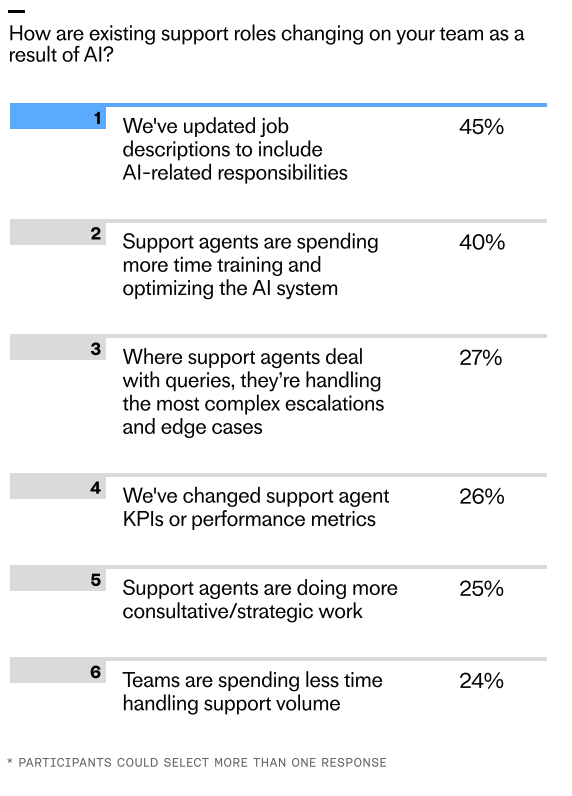
Survey insights from the 2026 customer service transformation report reveal how AI reshapes support roles: 45% of teams updated job descriptions and 40% ramped up AI training, while human agents focus more on complex escalations.
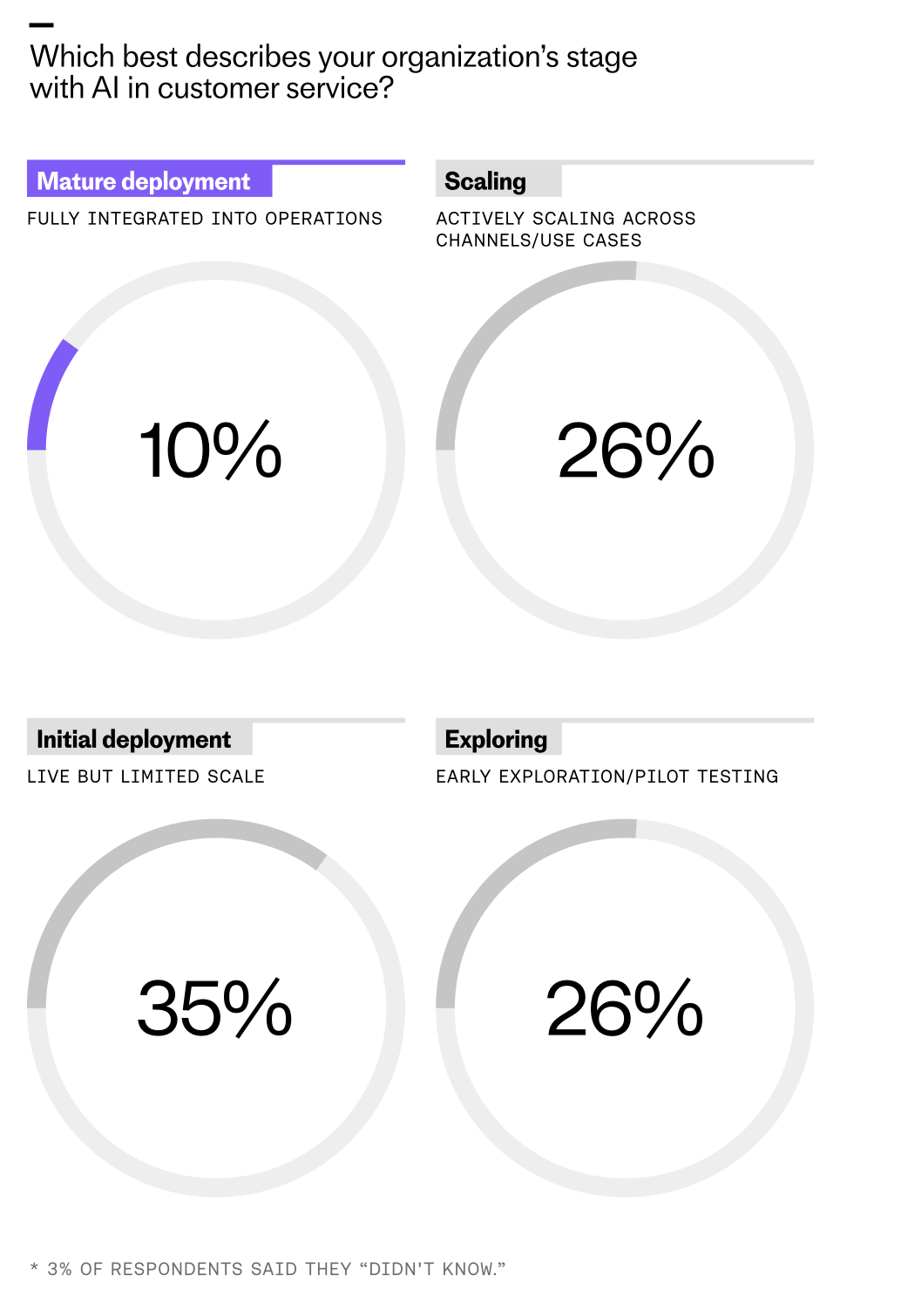
AI adoption is the norm, depth makes the difference. According to senior leaders, 82% of organizations invested in AI in 2025, with 87% planning to invest in the year ahead. Despite this widespread investment, only 10% of teams report having reached a mature level of deployment, where AI is fully integrated into operations and working at scale. In my playbook, maturity means end-to-end ownership of well-defined workflows, robust guardrails, and clear success criteria.
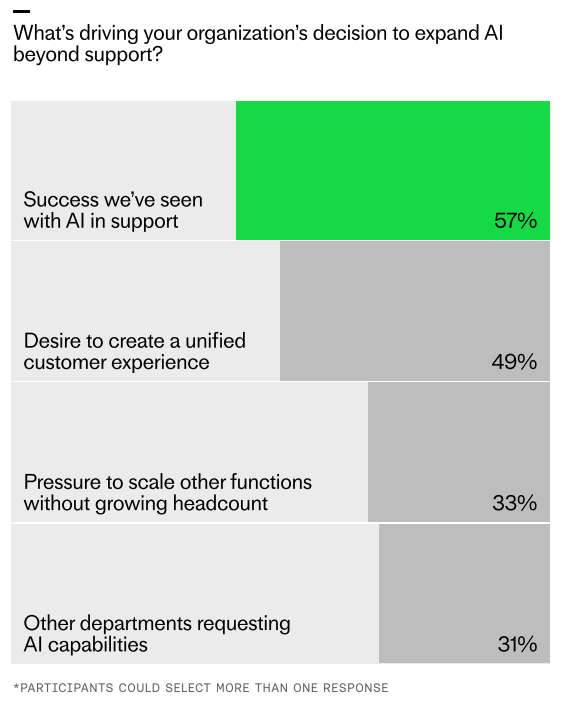
Early AI wins are fueling expansion beyond support. Survey results show 57% cite proven success, 49% aim for a unified customer experience, 33% need to scale without adding headcount, and 31% see demand from other teams.
Reaching this level of maturity is where AI’s real value lies. We found that 43% of teams with mature deployment report higher quality and consistency across support – nearly double the rate of those still in the exploration or initial deployment stages. That aligns with what I see when we move from point solutions to platform thinking and agentic AI patterns.
Leaders are racing ahead with real AI in support. Explore the 2026 Customer Service Transformation Report to see where deployment is stalling, benchmark your team, and get practical steps to scale automation that delights.
ROI becomes clearer with deeper integration. The economic benefits of AI tend to show up first in speed and throughput, and they show up fast. Across all respondents, 62% say their customer service metrics have improved since implementing AI. Most often, teams report their initial gains in efficiency and scale—faster responses, shorter handling times, and the ability to resolve more conversations with the same team—all driving lower cost per interaction.
But the deeper teams go with deployment, the more the results start to show in the metrics. We found that among teams that describe their AI deployment as mature, the cohort of respondents reporting improved metrics as a result of AI rises from 62% to 87%. What’s more, teams with more mature deployments are significantly more likely to say they can measure the return on their AI investment. My advice: instrument everything upfront, baseline rigorously, and use eval-driven development to iterate with confidence.
The bar has moved from ‘does it work?’ to ‘is it actually good?’ More than ever, teams are focused on improving customer experience and satisfaction, with 58% saying it’s the top priority for 2026. That number has more than doubled since last year, when just over a quarter (28%) of respondents cited it as a top priority. As AI assumes repetitive work, your people can shift from reactive triage to proactive journey design. Now is the time to invest in quality frameworks, prompt engineering standards, and LLMs for product managers to close the loop between product, ops, and CX.
Important support work now extends beyond the inbox. AI is reorganizing core customer service operations as it starts to take on a higher volume of work and more complex tasks. Even at the initial deployment stage, 16% of teams report spending less time handling support volume since implementing AI – and among teams who’ve reached maturity, that figure rises to 28%. I’ve seen new roles emerge—AI operations managers, conversation designers, and model evaluators—alongside upskilling for agents into higher-order troubleshooting and relationship building.
Support is creating the blueprint for AI deployment across the business. Support was the proving ground for AI, and our research suggests that businesses are now planning to expand its use to other areas based on the results it’s yielded so far. Fifty-two percent of respondents said that their organizations are actively planning to scale AI to departments like customer success, marketing, and sales in 2026. The two most cited driving forces behind this decision are the success support has seen with AI to date and a desire to create a unified customer experience. Treat your support stack as a reusable platform: shared services, governance, and reusable components accelerate adoption in adjacent functions.
Seize the opportunity to close the gap. Having or not having AI isn’t a question anymore. What you should be asking now is how close you are to mature deployment, where AI is capable of tackling nuanced, high-stakes work. Those who have reached this stage show that going deep is what unlocks real value. That’s the opportunity. Push AI to do more, bring it to more channels, use it to resolve the most complex queries, and close the gap before it becomes too wide to close.
This might seem daunting. But trying new things always is. What we’re experiencing now is a defining moment for customer service, and the teams that are leaning in are actively building the future. As this report shows, what works in customer service now will become the blueprint for how organizations transform the full customer journey with AI. If you want the benchmarks and the playbook to accelerate from pilots to production-grade outcomes, I recommend reviewing the full “2026 Customer Service Transformation Report.”
How do you help disadvantaged students take action on opportunities they don't even know exist? That question has been top of mind for me as I’ve explored how AI can augment—not replace—human mentorship. Recently, I dug into the work behind Zero Gravity, a UK-based platform using mentoring, community, and learning pathways to unlock elite career opportunities for state school students. Their approach reframed a core problem I care deeply about: the "knowing-doing gap."
I sat down with Elliot Little (Product Manager) and Dan St. Paul (Software Engineer) from Zero Gravity to unpack how they’re tackling this gap with an AI career co‑pilot. They’ve intentionally positioned the system as an orchestrator, not an automation tool—bridging the space between knowing what to do and actually doing it. As a product leader, I see this as a powerful pattern for Generative AI: use AI to coordinate steps, personalize guidance, and empower action in moments where confidence and clarity are fragile.
What resonated most was the humility of their build journey. They started with grand visions of AI mentors and synthetic avatars, then scaled back to something simpler and more effective. The first prototype—a job suitability summary—didn’t deliver the "wow moment" they expected. And they discovered that hiding the "LLM magic" backfired—students needed to feel the personalization. That insight aligns with my own experience: users must perceive the value for trust and motivation to compound.
From a UX standpoint, the team chose text chat over voice input and leaned into guided prompts rather than empty text boxes. That decision lowered cognitive load and increased completion rates—classic product management tradeoffs that privilege momentum over novelty. In my view, this is what good AI product strategy looks like: invite action with structure, then expand autonomy as confidence grows.
The technical backbone is equally thoughtful. Multi‑month journeys require rigorous context window management to avoid exploding token counts and degrading quality. I appreciated their pragmatic toolkit: context management techniques like removing stale tool calls, summarizing history, exposing tools conditionally. They also used application logic rather than complex RAG architectures to manage tool availability and context freshness. This is the kind of disciplined engineering that keeps systems reliable at scale without overcomplicating the stack.
Model selection was fit‑for‑purpose, not one‑size‑fits‑all. They’re using different models for different tasks, including "GPT-5 Nano for structured outputs, lighter models for quick replies." That modularity enables speed and cost control while preserving high‑fidelity moments where structure matters most.
Safeguarding was treated as a first‑class concern—non‑negotiable when you’re building AI for 16‑year‑olds. Their safeguarding architecture pairs moderation endpoints with external verification via Unitary. They also invested in building a failure taxonomy through internal red team/green team exercises. This is AI risk management done right: define failure modes early, test ruthlessly, and wire safety into the product surface area—not just the model layer.
Evaluation was grounded in outcomes, not demos. The team focused on whether students progressed from insight to action: applying, interviewing, and engaging with mentors. That aligns with how I run eval‑driven development—ship narrowly, measure real behavior, and iterate toward a repeatable "wow moment" that students can actually feel.
Looking ahead, I’m excited by what’s next: long‑term memory management for multi‑year student journeys. It’s a hard problem—balancing privacy, provenance, and portability—but it’s precisely where an AI career co‑pilot can compound value over time. The vision is compelling: a resilient companion that remembers goals, adapts to context, and orchestrates the right next step.
If you want to dive deeper, you can listen to the full conversation on Spotify and Apple Podcasts:
Listen to this episode on: Spotify | Apple Podcasts
Blue Dot Impact AI Safety Course – free AI safety course Elliot recommended: https://bluedot.org/
My key takeaways: build AI that augments human relationships, not replaces them; don’t hide the personalization—let learners feel it; privilege application logic over unnecessary architectural complexity; and treat safety, context, and evaluation as product features, not afterthoughts. That’s how we bridge the "knowing-doing gap" with integrity and scale.
I wanted to cut through the hype and see what’s actually changing inside customer service teams as AI agents like Fin move from pilots to production. So I analyzed 166 interviews with support leaders, managers, and frontline specialists to understand how roles, workflows, and team structures evolve once AI becomes part of everyday work.
The anecdotes were already loud: AI tools are transforming customer support. But the scale, shape, and consistency of that transformation? Less clear. I went to the source—the practitioners living it—to quantify what’s real and what’s next for customer support AI strategy.
Here’s what I gleaned from the data.
TL;DR — What’s changing
AI is reorganizing core CS operations: Nearly every team (≈95%) reported meaningful workflow changes. Triage, routing, translation, and categorization are increasingly automated. Hybrid human+AI systems are taking their place.
Frontline work is changing to AI oversight: Humans now QA, monitor, and test AI outputs. When it comes to handling queries, they step in for nuance, rather than repetition.
Structural change is widespread but uneven across companies: 83% reported new responsibilities or roles. Some built AI pods, while others retained traditional setups.
Tier 1 headcount demand is falling: 28% saw hiring freezes, slowdowns, or natural attrition at Tier 1 level as AI Agents manage more requests and improve operational efficiency.
Skill gaps are widening inside teams: Data literacy, QA, and cross-functional communication are all rising in value. For many companies, long-term role strategy is lagging behind.
Research methodology
The goal of this research is to understand how many customer service teams have changed their roles, responsibilities and ways of working due to adopting AI agents, as well as understanding how these changes manifest within their organizations.
For this study, the data chosen consists of interviews conducted by the research team, either with Intercom customers or prospects. This data was chosen because the focus of the interviews revolved around the individual experience of the participant, which gives a higher chance of information related to role changes to be present.
The data was collected using Snowflake by pulling all interviews stored in gong conducted by a member of the research team from 01-01-2025 to 14-10-2025.
After the data was pulled, a python script was used to clean the conversation corpus for each conversation retrieved. Common English stopwords (e.g. “and”, “very”, “with”, etc.) were removed, as well as all the text associated with a speaker in the conversation that was not the interview participant(s). This was done to reduce the computational power required for the conversation coding, avoid API timeouts and reduce costs.
After the corpus was cleaned, the OpenAI API was employed, alongside a prompt, to code each conversation using closed codes defined in a closed codebook.
The codes used were:
No role change mentioned: No explicit changes to roles, teams, or reporting lines are attributed to AI/Fin.
Role responsibilities changed due to AI/Fin: Duties/ownership moved between humans and AI/Fin, or scope of a role changed because AI/Fin handles tasks.
Team structure/reporting changed due to AI/Fin: Org/team boundaries, team charters, or reporting lines changed due to adopting AI/Fin.
Headcount/hiring impacted due to AI/Fin: Hiring plans, headcount, staffing coverage, or shifts/rotations changed due to AI/Fin.
Workflow/process changed due to AI/Fin: Steps, triage/escalations, routing, or playbooks changed because AI/Fin alters the process.
Other organizational changes due to AI/Fin: Other changes inside the organization due to AI/Fin that don’t involve a change in responsibilities, team structure/reporting lines, headcount or workflow/processes changes.
Data analysis
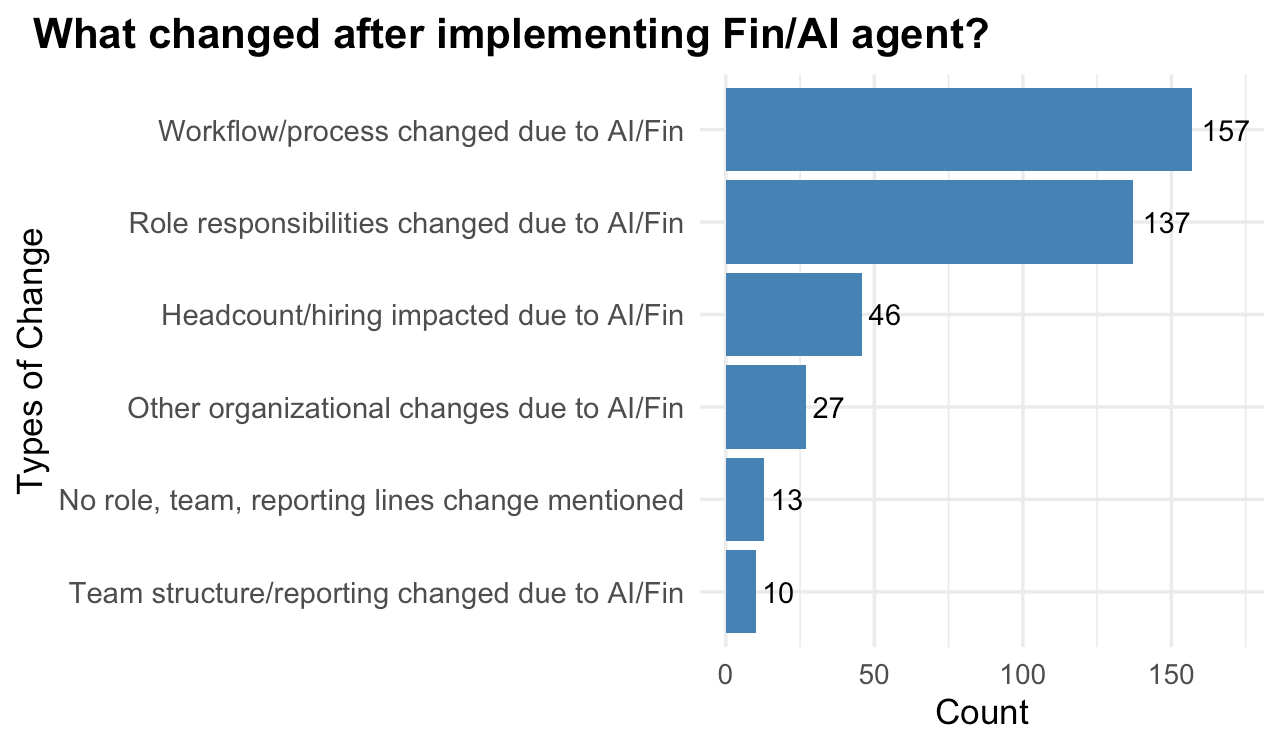
166 conversations were retrieved. More than 90% of all conversations report some sort of change either in their role, team, or processes due to implementing Fin, or a similar AI product, with only 13 participants reporting no changes.
Across these conversations, each one could have multiple types of change associated with it (M = 2.35, Med = 2, Min = 1, Max = 4, N = 166).
More specifically, after implementing Fin or a similar AI product:
94.58% participants reported having their processes and workflows disrupted
82.53% participants reported seeing their role and responsibilities change
27.71% participants reported changes in company headcount or hiring
6.02% participants reported their team structure or reporting lines changing as a result
Additionally, 16.27% participants reported a change for a different reason from the ones highlighted above (“Other organizational changes due to AI/Fin”).
Sample representativeness
The sample is representative with a confidence level of 90% and a margin of error of ±6.4% (accounting for an overall unknown population size). The individual confidence intervals for each type of change are as follows.
Workflow/process changed due to AI/Fin: 157 (94.6%), 90% CI: 91.7% – 97.5%
Role responsibilities changed due to AI/Fin: 137 (82.5%), 90% CI: 77.7% – 87.4%
Headcount/hiring impacted due to AI/Fin: 46 (27.7%), 90% CI: 22.0% – 33.4%
Other organizational changes due to AI/Fin: 27 (16.3%), 90% CI: 11.6% – 21.0%
No role change mentioned: 13 (7.8%), 90% CI: 4.4% – 11.3%
Team structure/reporting changed due to AI/Fin: 10 (6.0%), 90% CI: 3.0% – 9.1%
Thematic analysis
1) Automation and AI integration replacing manual steps (94.58%). I see AI workflows embedding into every stage of support. Manual triage, routing, translations, and repetitive responses shift to Fin or similar systems, while agents focus on human-in-the-loop oversight.
Agents’ day-to-day work now revolves around monitoring or fine-tuning AI outputs, not replying to the same questions. In many teams, conversations enter Fin first; humans only step in when nuance or exception handling is required. Testing, QA, and rollout practices have matured too—teams track Fin’s accuracy and iterate intentionally.
2) Humans shift to oversight, AI handles execution (82.53%). The role resets are unmistakable. Support agents and managers move from high-volume execution to optimization, configuration, and measurement. New roles emerge—AI specialists, automation managers, Fin owners—while responsibilities migrate toward strategic analysis and quality assurance.
Duties are redistributed: Fin takes on refunds, triage, simple messaging, even parts of the sales process. I’ve watched some careers pivot toward product/ops or AI systems strategy as managers coordinate testing and monitor adoption metrics.
3) Reductions or slower growth due to efficiency gains (27.71%). Efficiency is real. Many teams reduce Tier 1 headcount needs or slow hiring because AI absorbs simpler requests. Others reallocate people to complex work or AI management. A few still expand—adding automation engineers, implementation specialists, or technical AI leads—but not at past growth rates.
The upshot: organizations handle more volume while stabilizing or reducing staffing, especially at the frontline tier.
4) New AI teams, flatter orgs, fewer escalation layers (6.02%). I’m seeing organizational design catch up to the tech. Some companies form dedicated LLM or automation teams. Others flatten hierarchies, design around workflow complexity instead of region, or merge roles. Dedicated escalation layers shrink as Fin routes or resolves more autonomously.
Team design is getting more modular and data-driven, with clearer ownership for configuration, governance, and Agent Analytics.
5) Broader digital transformation and operational modernization (16.27%). Beyond support, companies are modernizing their operating model: automation-first, digital self-service, better data foundations, and new vendor ecosystems. Collaboration patterns between data, ops, CX, and product/engineering are tightening, with a culture of experimentation and continuous improvement taking hold.
How have customer service roles and responsibilities changed due to Fin/AI agent implementation?
Implementing Fin or a similar AI agent profoundly changes how an organization operates, with around 95% of participants reporting some level of change in their processes after implementation. These systems have significantly reshaped the workflows that customer service teams are used to. Tasks once performed manually, such as ticket triage, routing, repetitive responses, and translations are now handled by AI agents.
“This marks a clear transformation in how customer service agents work: moving away from directly resolving customer queries to focusing on more analytical and procedural work”
As a result, customer service agents’ responsibilities have shifted from performing manual tasks to monitoring and fine-tuning the AI agent whenever its output is inaccurate or incomplete. This marks a clear transformation in how customer service agents work: moving away from directly resolving customer queries to focusing on more analytical and procedural work, such as testing, QA, and performance analysis of AI outputs.
Human agents who still handle conversations tend to do so either because the AI agent cannot yet respond adequately, or because of an organizational choice to retain human involvement for sensitive or high-value interactions. Nevertheless, the need for such roles is diminishing. Around 28% of participants reported a reduction in Tier 1 staff or a hiring slowdown or a full hiring freeze, as AI agents increasingly manage simple requests and organizational attention shifts towards improving automation efficiency.
“In some cases, this has led to the creation of specialized AI teams, reorganizations around workflow complexity, or the merging and redefinition of existing roles”
However, this transformation is not uniform across companies. While some roles have disappeared (particularly escalation layers), others have emerged. Many organizations are reallocating existing staff to AI management or hiring new technical profiles such as automation engineers, implementation specialists, and AI leads. In some cases, this has led to the creation of specialized AI teams, reorganizations around workflow complexity, or the merging and redefinition of existing roles.
Around 83% of participants reported changes to their roles or responsibilities following the introduction of Fin or similar AI agents. Specifically, customer service agents who no longer handle basic queries now focus on managing AI performance, reviewing Fin tasks and improving automation outputs. Managers oversee AI evaluation and implementation, coordinate testing, and monitor AI metrics such as resolution and involvement rates. In some organizations, new dedicated roles have emerged—AI specialists, automation managers, or Fin owners—reflecting a strategic shift toward automation-first, digital self-service models.
These structural shifts are also cultural. I’m seeing teams embrace experimentation, versioning, and eval-driven development while deepening collaboration with data, operations, and product/engineering. The move from outcomes vs output OKRs is palpable: leaders are measuring containment, deflection, CSAT, and time-to-resolution with new rigor.
Overall, a widespread transformation is underway. Roles are broadening, responsibilities are diversifying, and cross-functional collaboration is becoming the norm. Given the pace of gen ai improvement and the rise of agentic AI patterns, I expect these shifts to intensify.
This evolution raises two important questions
Firstly, do customer service agents possess the skills required to succeed in these new roles? While they are experts in customer interaction and company policy, their work now demands new competencies in data analysis (e.g. reporting AI agent performance and how it changes over time), quality assurance/debugging (e.g. Fin output testing and versioning), and cross-functional communication (e.g. if help from another team is required, drafting a business case to justify the resources required could be needed).
Secondly, what long-term strategies are companies adopting to support these evolving roles? Some are reorganizing entirely around automation, while others retain traditional structures. For those undergoing transformation, it remains unclear whether these changes are part of a deliberate strategic plan aimed at achieving specific performance outcomes, or the result of experimentation without defined goals.
Ultimately, Fin’s success— and of AI in customer service more broadly— depends not only on the technology itself but on the people and strategies that shape its use. In my experience, the winners invest early in data literacy, robust QA, clear ownership, and governance; they align product, ops, and CX around a shared AI roadmap; and they measure what matters with disciplined Agent Analytics. That’s how you turn AI workflows into durable customer and business outcomes.
I’ve lost count of how many times I’ve been asked for a “quick AI agent” that can autonomously fix customer problems, write code, or run sales ops. The promise is intoxicating—and I get why. But in practice, sustainable impact comes from disciplined product thinking, not wishful automation. Drawing on my experience leading product for complex, agentic AI initiatives, I want to debunk four misconceptions I see repeatedly and share what actually works.
Misconception 1: AI agents are plug-and-play. The reality is that effective agentic AI behaves more like a new product line than a feature toggle. It needs clear job stories, domain grounding, tool access, and guardrails. I start by narrowing scope to one painful job to be done, then design AI workflows that reflect real constraints (SLAs, compliance, edge cases). From day one, I instrument with Agent Analytics and set up eval-driven development so we can see failure modes early and iterate with intent.
What consistently moves the needle is treating the agent like a teammate you onboard: define responsibilities, provide the right tools, and measure outcomes. I pair scripted validations with live evals, track containment rates and handoff quality, and balance precision/recall depending on the risk profile. This is slow to fast, not fast to broken.
Misconception 2: Bigger models make better agents. In my experience, architecture outperforms horsepower. A retrieval-first pipeline, tight context window management, and practical prompt engineering often beat an oversized model that hallucinates. Tool use matters more than model size: give the agent reliable APIs, clear schemas, and deterministic fallbacks. For LLMs for product managers, the play is to right-size the foundation model and invest in data quality, prompts, and evaluators that reflect your true acceptance criteria.
When I see erratic behavior, I don’t immediately swap models; I improve retrieval, prune irrelevant context, and clarify the agent’s planning loop. Most performance gains come from better state management and grounding rather than a pricier token budget.
Misconception 3: Agents replace teams. High-performing organizations design human-in-the-loop systems. I implement human review on high-risk actions, explicit escalation paths, and simple override mechanisms. That’s not just safety theater—it’s good product design. AI risk management and data governance are part of the product backlog, not an afterthought. In customer support ai strategy, for example, the agent drafts, a specialist approves, and the system learns from deltas to tighten future responses.
The social system matters as much as the technical one: clear role boundaries, audit trails, and feedback loops turn the agent into a force multiplier. Teams gain leverage without surrendering accountability.
Misconception 4: Shipping the agent equals success. Adoption is earned, not announced. I treat agent launches like any product-led growth motion: define activation events, remove friction with in-app guides and product tours, and A/B test prompts, tool choices, and UI affordances. We track time-to-value, task completion rate, and user trust signals (edits, undo patterns, and escalation requests). When we get those leading indicators right, retention follows.
Increase revenue, cut costs, and reduce risk with Pendo’s Software Experience Management platform. Optimize the entire software experience to drive adoption and improve engagement.
My playbook is simple and repeatable: frame the problem narrowly, ground the agent with the right tools and data, measure with eval-driven development and Agent Analytics, then grow adoption with a disciplined go-to-market inside the product. The agents that win don’t feel like magic—they feel dependable. That’s what customers trust, and that’s what scales.
In my role leading product, I’ve learned that the fastest path to higher-quality deliverables from large language models (LLMs) is not a clever prompt—it’s rigorous context. I call the practice AI context pulling: a repeatable way to assemble, compress, and structure the most relevant knowledge before the model ever starts generating. Done well, it turns generative AI into a dependable partner for discovery, prioritization, and execution.
AI context pulling means I proactively gather the right artifacts (customer insights, analytics, strategy, constraints), manage context windows intentionally, and shape the model’s task with clear objectives and guardrails. This reduces hallucinations, improves alignment, and creates traceability back to sources—critical for product management leadership and stakeholder trust.
Learn a new way in which product professionals can collaborate with AI to get even better results on their projects.
Here’s the simple flow I use: first, I define the intent (e.g., “synthesize discovery interviews for a positioning brief”). Next, I inventory relevant context: top customer pains from product discovery, usage patterns from Amplitude analytics, recent support trends from Intercom, and any constraints from our product strategy. Then I run a retrieval-first pipeline to select only the most pertinent slices—favoring recency, representativeness, and canonical sources.
Because context window management matters, I compress long documents into short, source-cited summaries and keep raw excerpts handy when nuance is important. My prompts follow a consistent structure: role and objective, constraints and audience, curated context, the explicit ask, preferred output format, and a brief self-check (e.g., “cite sources and flag uncertainty”). This is prompt engineering for reliability, not theatrics.
A quick example: when drafting a one-page feature brief, I attach three items—the product strategy paragraph that sets the frame, a usage cohort analysis that highlights who’s affected, and five verbatim customer quotes. I ask the LLM to propose a problem statement, success criteria, and a shortlist of solution hypotheses, each tied to a cited piece of evidence. The result is a grounded, decision-ready artifact I can share with product trios and stakeholders.
Tooling-wise, I keep it pragmatic. A lightweight retrieval-first pipeline (embeddings, metadata filters, and recency rules) ensures the LLM pulls what matters. I version prompts and contexts together so I can run quick A/B testing on output quality. And I log decisions and sources to support eval-driven development and continuous discovery.
Common pitfalls are avoidable. Too little context yields generic answers; too much overwhelms the model. Stale docs can mislead; curate aggressively. Vague asks invite fluffy prose; specify outcomes, audiences, and formats. If the task is high risk, I bias toward smaller, well-cited outputs and expand iteratively with human review in the loop.
To measure impact, I track rework rate, review time, and stakeholder alignment on first pass. Over time, teams adopting AI context pulling report clearer artifacts, faster synthesis cycles, and more confident decisions—because every recommendation traces back to evidence. That’s how humans and LLMs truly collaborate better: we provide the right context, and the model amplifies our judgment.
If you’re ready to operationalize this, start by templatizing your most common product workflows—discovery synthesis, roadmap rationale, and release notes—and attach small, high-signal context packs. With a retrieval-first mindset and disciplined prompting, AI becomes an extension of your product craft, not a gamble.
I’ve been refining a hands-on approach to “burger prompting” that turns prompt engineering into a reliable, repeatable system. Using an AI resume coach as the proving ground, I’ll walk through a detailed prompt structure to get the most out of your LLM and share what’s worked for me in product environments where clarity, consistency, and measurable outcomes matter.
At a high level, burger prompting follows a simple mental model: the top bun frames the role and mission, the fillings pack in context and examples, and the bottom bun locks in output format and quality guardrails. It’s deceptively simple and extremely effective for Generative AI use cases where you need predictable behavior across different inputs and user personas.
For the top bun, I establish the AI’s role, audience, and objective in one place. In the resume coach flow, I define the assistant as a structured, unbiased reviewer tasked with aligning a candidate’s resume to a specific job description. I set constraints on tone (supportive but direct), scope (resume and job description only), and safety (avoid speculative claims, defer legal or medical advice). This crisp intent statement reduces ambiguity and prevents the model from wandering outside the product’s value proposition.
The fillings are where context window management becomes crucial. I inject the job description, the candidate’s resume, a capability rubric aligned to the role, and the company’s style preferences. If the content is long, I chunk inputs and, when needed, use a retrieval-first pipeline to fetch only the most relevant snippets. I also include a brief style guide with voice, depth, and formatting expectations so the AI doesn’t drift between terse and verbose responses across sessions.
Strong examples are the meat of the burger. I include a few annotated comparisons that show what “excellent,” “good,” and “needs improvement” look like for specific competencies, from impact statements to quantification. These examples are compact and domain-specific, so the LLM sees the pattern I expect without overfitting to a single profile. I encourage transparent reasoning by asking for stepwise evaluations that reference evidence from the resume and job description, while keeping the explanations concise and user-friendly.
The bottom bun finalizes structure and guardrails. I specify an output schema that always returns a brief summary, evidence-backed strengths, concrete gaps with examples of what’s missing, and a prioritized action plan with suggested rewrites. I also request a rubric-aligned score to support eval-driven development, and I cap length to ensure scannability inside product UI. This predictable format reduces downstream parsing errors and keeps the AI workflow snappy.
To operationalize this in a product context, I run small A/B tests on the prompt variants and measure utility through user activation and completion rates. I tune the prompt with tight feedback loops, comparing structured scores against human spot checks until the variance narrows. When I see drift, I adjust the constraints, swap underperforming examples, or expand the rubric to capture overlooked signals.
Quality and trust are non-negotiable. I add guidance to avoid hallucinated credentials or inflated claims, enforce privacy-by-design around sensitive data, and encourage the assistant to cite which resume lines support each recommendation. When the model is uncertain or the resume lacks evidence, the assistant should explicitly say so and propose realistic next steps rather than guessing.
The result is an AI resume coach that feels both helpful and disciplined. With burger prompting, you get a durable prompt pattern you can reuse across adjacent AI workflows, from portfolio reviews to job description rewrites. Once you internalize the top bun, fillings, and bottom bun, you’ll find it far easier to ship prompts that scale, maintain consistency across releases, and deliver tangible, career-advancing outcomes for users.
I’ve spent the last year pushing our AI Strategy from slideware to shipped value, and one pattern keeps winning in real-world product teams: connecting agentic AI directly to trustworthy product analytics. That connection is where Model Context Protocol shines—safely bridging LLMs with the tools and data product managers rely on every day.
Model Context Protocol (MCP) gives AI agents access to your business data. Learn how MCP works, how product managers are using it, and how to connect Pendo’s MCP server to Claude, ChatGPT, or Cursor for instant product insights.
In practice, I treat MCP as a clean, auditable interface between LLMs and enterprise systems—decoupling the model choice from the data plane and enabling a retrieval-first pipeline with strong data governance. Because MCP standardizes the way agents discover resources and tools, it simplifies context window management, enforces least-privilege access, and makes it easier to evolve our stack without rewriting prompts or fragile glue code.
For product leaders, the immediate payoff is speed to insight. Instead of hopping across dashboards, I ask the agent questions in natural language—“Which onboarding step drives the biggest drop-off by segment?”—and get synthesized answers backed by traceable queries. That shift turns AI workflows into a daily habit, improving continuous discovery and accelerating product-led growth while maintaining privacy-by-design controls.
Under the hood, I think about MCP in four layers: resources (read-only data surfaces such as feature usage or retention cohorts), tools (safe operations like creating a note, exporting a segment, or proposing an in-app guide), prompts (task-scoped instructions tuned for LLMs for product managers), and observability (logs and evaluations). This structure keeps eval-driven development front and center and reduces operational risk.
Here’s how I connect Pendo analytics through MCP to my preferred assistants without compromising security or accuracy:
1) Prepare access: confirm your Pendo MCP server endpoint, authentication method, and scopes; apply least-privilege and redact any PII not required for analysis.
2) Register the server: in Claude, ChatGPT, or Cursor, add the MCP server with the provided URL and API key or token, then enable only the resources and tools your use case demands.
3) Validate the contract: prompt the agent to list available resources and describe tools; run harmless dry runs (e.g., “summarize top feature adoption trends last 30 days”) to confirm the interface behaves as expected.
4) Operationalize: standardize prompts for recurring analyses (QBRs vs OKRs, activation funnels, retention analysis), set guardrails, and log every interaction for audit. This is where prompt engineering meets governance.
5) Iterate with metrics: track answer quality, latency, and usage; expand scopes gradually and gate new tools behind human-in-the-loop until you reach reliable performance.
Once configured, I use the agent to surface weekly activation insights, identify outlier cohorts, and auto-draft product discovery notes with links back to Pendo reports. The result isn’t magic; it’s a disciplined AI product toolbox that brings the right context to the right question, fast.
If you’re starting from zero, pilot with one high-value question, one team, and one assistant. Keep the footprint small, measure outcomes, and then scale—with security, compliance, and stakeholder management baked in from day one. That’s how you turn MCP from an interesting protocol into a durable competitive advantage.