Tag: customer support ai strategy

  • Inside Alyx: Dogfooding, Evals, and Observability That Power an Agentic AI Future

    Inside Alyx: Dogfooding, Evals, and Observability That Power an Agentic AI Future

    I’ve been deep in the work of building practical, agentic capabilities into AI products, so this story about Alyx immediately resonated with me. It’s a rare, clear-eyed look at what it actually takes to ship a useful AI agent inside an AI platform—while using that same platform to build, test, and continuously improve the agent.

    What does it really take to build an AI agent inside an AI platform—especially when you’re using that same platform to build the agent?

    Listening to SallyAnn DeLucia (Director of Product at Arize) and Jack Zhou (Staff Engineer at Arize) unpack Alyx—the AI agent that helps teams debug, optimize, and evaluate AI applications—I recognized playbooks I trust: start scrappy, dogfood relentlessly, build intuition with real users, and systematize improvement with thoughtful evals.

    Their early phase looked exactly like the messy reality many of us try to hide: Jupyter notebooks, hacked-together web apps, and weekly dogfooding sessions with their customer success team. That’s where patterns emerged, confidence was built, and the highest-leverage skills for the agent were prioritized. It’s a reminder that “vibe checks” matter at first—but you must quickly graduate to measurable, repeatable learning loops.

    In my experience, the foundation of GenAI product quality is threefold: tracing, observability, and evals. They reached the same conclusion—defining traces across tool calls and sessions, creating observability into model behavior, and layering evals to compare both micro-decisions and system-level outcomes. That discipline converts hunches into evidence and makes agent behavior improvable, not mysterious.

    What stood out was how cross-functional, boundary-spanning teams made the difference. Customer success engineers surfaced repeatable workflows. Product framed early skills. Engineering wrapped prototype tools into something coherent. Using their own platform to build Alyx accelerated intuition and de-risked launch. That’s the product loop I aim to cultivate: close to customers, close to data, and fast to learn.

    As Alyx matures, the next step is moving from “on rails” workflows to more autonomous, agentic planning loops. That evolution requires stronger tool design, richer feedback signals, and evals that reflect end-to-end user value. It’s exactly the shift I expect across GenAI: from scripted assistants to adaptive systems that reason, plan, and act with guardrails.

    Listen to this episode on: Spotify | Apple Podcasts

    Guests:

    SallyAnn DeLucia, Director of Product, Arize

    Jack Zhou, Staff Engineer, Arize

    In this episode, we cover:

    What tracing, observability, and evals really mean in GenAI applications

    How Arize used its own platform to build Alyx, its AI agent

    The role of customer success engineers in surfacing repeatable workflows

    Why early prototyping looked like messy notebooks and hacked-together local apps

    How dogfooding shaped Alyx’s evolution and built confidence for launch

    Why evals start messy, and how Arize layered evals across tool calls, sessions, and system-level decisions

    The importance of cross-functional, boundary-spanning teams in building AI products

    What’s next for Alyx: moving from “on rails” workflows to more autonomous, agentic planning loops

    My takeaways for product teams building GenAI agents are simple and hard: design tools with observability in mind; operationalize evals early even if they’re imperfect; embed customer-facing engineers in the loop to capture real workflows; and keep the first skills narrow, high-impact, and testable. If your team can move from demos to disciplined measurement quickly, you’ll accelerate product-market fit.

    Resources & Links

    Arize AI — Sign up for a free account and try Alex

    Arize Blog — Lessons learned from building AI products

    Maven AI Evals Course — The course Teresa took to learn about evals (Get 35% off with Teresa’s affiliate link)

    Cursor — The AI-powered code editor used by the Arize engineering team

    DataDog — For understanding application traces

    OpenAI GPT Models — GPT-3.5, GPT-4, and newer models used in early and current versions of Alex

    Jupyter Notebooks — A tool for combining code, data, and notes, used in Arise’s prototyping

    Axial Coding Method by Hamel Husain — A framework for analyzing data and designing evals

    Chapters

    00:00 Introduction to Sally Ann and Jack

    01:08 Overview of Arize.ai and Its Core Components

    01:44 Deep Dive into Tracing, Observability, and Evals

    03:56 Introduction to Alyx: Arize's AI Agent

    04:15 The Genesis and Evolution of Alyx

    08:51 Challenges and Solutions in Building Alyx

    24:33 Prototyping and Early Development of Alyx

    26:22 Exploring the Power of Coding Notebooks

    26:51 Early Experiments with Alyx

    27:59 Challenges with Real Data

    29:20 Internal Testing and Dogfooding

    31:55 The Importance of Evals

    35:16 Developing Custom Evals

    43:09 Future Plans for Alyx

    47:59 How to Get Started with Alyx

    Full Transcript

    Podcast transcripts are only available to paid subscribers.

    If you’re building in GenAI right now, this conversation offers a pragmatic blueprint. Start with high-signal workflows, turn qualitative insights into quantitative evals, and use tracing plus observability to make agents debuggable. That’s how scrappy prototypes become reliable systems. And if you want a tangible example, “47:59 How to Get Started with Alyx” is a helpful on-ramp.


    Inspired by this post on Product Talk.


    Book a consult png image
  • AI Coworkers That Actually Work: Inside Neople’s Guardrails, Evals, and Customer-Ready Agents

    AI Coworkers That Actually Work: Inside Neople’s Guardrails, Evals, and Customer-Ready Agents

    What if my next teammate wasn’t a human hire but an AI coworker—one that can answer support tickets, process invoices, or draft emails—and my non-technical colleagues could teach it how to do those tasks themselves? That is the practical promise behind Neople’s “digital coworkers,” and it’s a shift I’ve been anticipating across customer support and operations: AI that blends the reliability of automation with the empathy and flexibility of modern agents.

    Listen to this episode on: Spotify | Apple Podcasts

    In exploring how Neople builds and deploys these agents, I appreciated the clarity from Seyna Diop (Chief Product Officer), Job Nijenhuis (CTO & Co-founder), and Christos C. (Lead Design Engineer). They walked through the evolution from simple response suggestions to fully autonomous customer service agents, the architecture powering their conversational workflow builder, and the evaluation loops that include customers as part of the quality process. As a product leader, this resonates deeply with how I approach product discovery, product management leadership, and go-to-market enablement for gen AI in customer support.

    Moved from “LLMs will solve everything” to finding the right balance between code, agents, and guardrails

    Designed evals that run in production to detect hallucinations before an email ever reaches a customer

    Helped non-technical users build automations conversationally — and taught them decomposition along the way

    Turned customers’ feedback loops into eval pipelines that improve product quality over time

    From a customer support AI strategy standpoint, these choices are decisive. I’ve seen teams struggle when they lead with model horsepower rather than a layered system of retrieval, business logic, and guardrails. The Neople approach aligns with what I’ve practiced: set clear task boundaries, ground responses in trustworthy knowledge, and instrument every step so evals reflect real-world behaviors—not just lab benchmarks.

    I also love the emphasis on conversational building for non-technical users. Teaching decomposition implicitly—by guiding users to break down tasks into steps—accelerates adoption and reduces support burden. It’s a practical onramp to gen ai for product prototyping: let users design flows in natural language, then progressively reveal structure, data dependencies, and edge cases as they iterate.

    Scaling these agents “where you work” requires deep integrations and visibility. We discussed how the team makes agents feel native in existing tools, maintains “Visibility and Transparency in Neople Responses,” and keeps humans in the loop for sensitive workflows. That transparency is non-negotiable: if an AI is going to act on behalf of my team, I want traceable reasoning, source citations, and reversible actions.

    Quality, of course, is where most agent initiatives rise or fall. Running evals in production, detecting hallucinations before messages reach customers, and converting feedback loops into continuous improvement pipelines—this is exactly how you earn trust at scale. It mirrors how I deploy forward deployed engineers with customers: ship intentional constraints, watch real usage, and feed structured signals back into the system to compound quality.

    The roadmap beyond support is equally compelling. Once agents demonstrate reliability in high-volume, high-variance environments like customer support, adjacent functions—sales ops, finance ops, and onboarding—become reachable. That’s a credible path to product-market fit lessons: start where the pain is sharp and measurable, prove value with operational KPIs, then expand horizontally with guardrails intact.

    For those who want to go deeper, the conversation spans the origin story and real-world applications, through “Integrations and Scaling: Making Neople Work Everywhere,” into techniques for “Ensuring Quality in Customer Knowledge Bases,” “Customer Feedback and Error Analysis,” and the “Technical Details of Knowledge Retrieval.” It also touches “Embedding Strategies and Document Types,” “Automation and Actions in Customer Support,” and “Expanding Beyond Customer Support.” It’s a comprehensive, pragmatic tour of what it takes to make AI coworkers production-ready.

    Neople.io – Learn more about Neople’s AI coworkers

    The Joy Lab – Neople’s community and podcast about AI and work

    If you’re piloting agents today, my recommendations are straightforward: choose a single, high-impact use case; define guardrails and “safe failure” modes; stand up production evals that mirror customer outcomes; and make transparency a default. With that foundation, AI coworkers can become dependable teammates—ones your non-technical colleagues can actually work with, trust, and improve.


    Inspired by this post on Product Talk.

    Book a consult png image
  • Stop Monitoring Systems—Start Monitoring Outcomes with Heartbeat Metrics That Protect Trust

    Stop Monitoring Systems—Start Monitoring Outcomes with Heartbeat Metrics That Protect Trust

    When millions of conversations flow through a platform every day, reliability isn’t just a technical metric—it’s the foundation of customer trust. I’ve learned the hard way that green dashboards can still mask red-hot customer pain. That’s why I push teams to focus on outcomes, not just infrastructure signals.

    For me, reliability starts with one essential question: “Can our customers do the job they’ve hired us to do?” That single question cuts through complexity and forces a customer-outcome lens on everything from alerting to SLAs.

    That mindset leads naturally to what I call “heartbeat metrics” — vital signs that instantly tell us if systems are truly serving their purpose. Think of them as a pulse check on real customer outcomes. If the pulse weakens, customers feel it instantly. A heartbeat metric is the clearest signal you can get that a product is alive and doing its job.

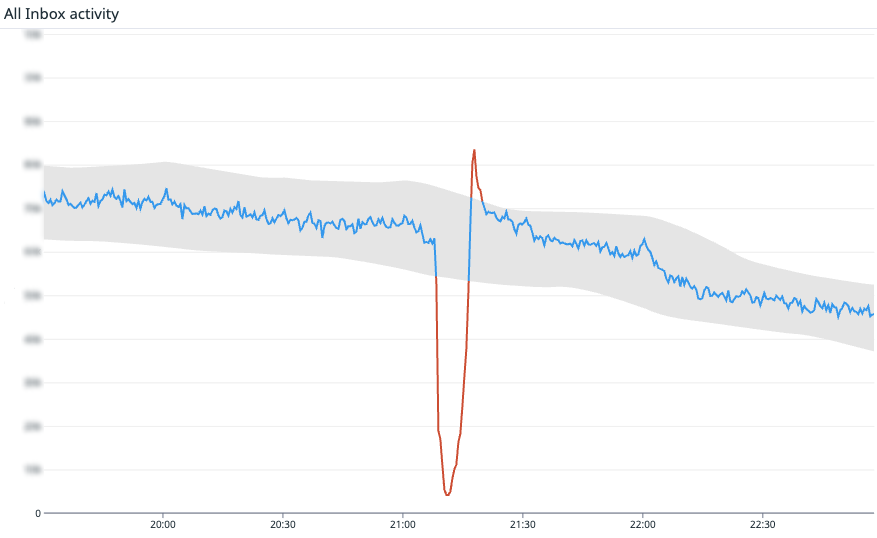
    I’ve seen this put into practice at scale. At Intercom, where the AI Agent Fin resolves millions of customer inquiries autonomously, their fundamental heartbeat metric is the rate of new messages and replies across Intercom. For Fin, it’s successful AI responses. If those dip, it’s hitting the ability to connect. It might be a database failover, a misconfigured fleet, or a bad code change — it doesn’t matter. What matters is that it’s hitting customers’ ability to use Intercom.

    Intercom isn’t alone. Amazon tracks order volume as their heartbeat. Affirm watches checkout attempts. If those numbers fall below expected levels, they don’t wait for a support ticket—they investigate immediately, because they know their customers’ success depends on it.

    Not every metric qualifies as a heartbeat. The best ones share three traits: they’re directly tied to customer value (the main job your product is hired to do), high-volume and predictable (so anomaly detection can spot small drifts quickly), and binary in spirit (a drop is a clear sign something is broken, not just “a bit slower than usual”).

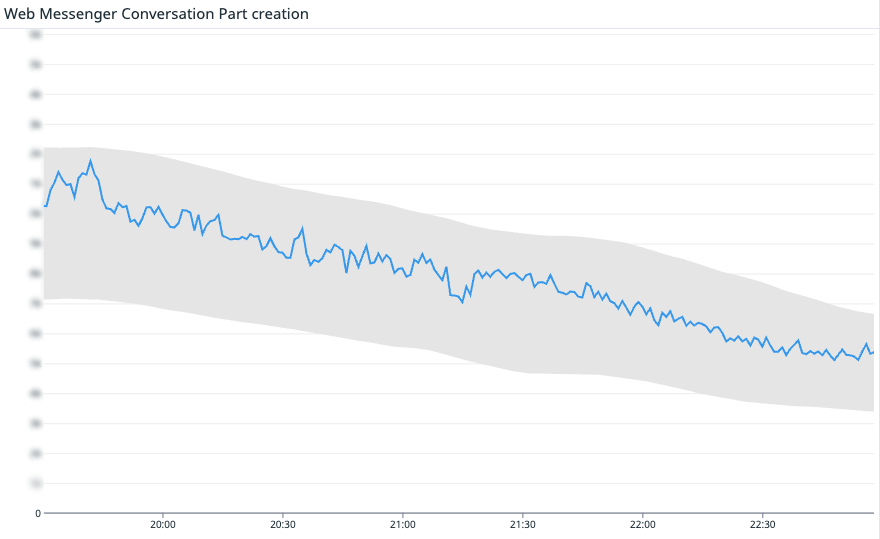
    Time-series chart titled Web Messenger Conversation Part creation, with a blue line of event rate steadily declining from 20:00 to 22:30 inside a gray tolerance band, illustrating outcome-focused SLI monitoring.
    Stop watching servers—start watching customer impact. This chart tracks conversation-part creation over time; the blue line descends within a shaded band, indicating expected behavior and clear SLIs aligned to your SLA.

    When we anchor on heartbeat metrics, three benefits show up fast: we detect issues faster than user reports or support tickets, we keep teams focused on what truly matters to customers, and we create a direct tie to our SLA—a system-level answer to, “Is the promise we made being kept?”

    To be clear, I still monitor the usual suspects—latency, error rates, and infrastructure health. Heartbeat metrics don’t replace those; they complement them. They’re the fastest shortcut to understanding customer impact.

    At scale, one pulse isn’t enough. Complex systems need multiple vital signs that reflect how different user groups succeed. Intercom started simple—are customers creating messages at the expected rate?—and then broke that signal down across core systems. Together, these metrics form a complete picture: Fin replies to your customers. Teammates reply in the Inbox. Teammates interact with the Inbox UI. Users on your website can message with the Web Messenger. Users on your app can message with the Mobile Messenger. If even one of them drops, it’s a major customer-impacting problem.

    Speed matters when the heartbeat alarm fires. After months of reliable signal, automation becomes a force multiplier—paired with human oversight. Here’s what happens when a heartbeat metric drops: If we have just deployed new code to production, we automatically roll it back. Rolling back recent changes is a safe, and fast operation. We automatically create an incident in incident.io and page in engineering and an incident commander. If this alarm fires, it’s likely we will need our full incident response including status page updates. The system automatically suggests initial actions to first responders. For example, we use incident.io’s Investigations feature to get a head start on suggesting root causes.

    This kind of automation pays off. On April 24th, a server issue slowed the Inbox, impacting teammates’ ability to use the Inbox. Heartbeat metrics caught it fast, and the issue was resolved in 10 minutes. End-user messaging was unaffected. This counted as downtime toward the SLA, with a full root cause analysis shared publicly here. That level of transparency keeps trust intact even when incidents happen.

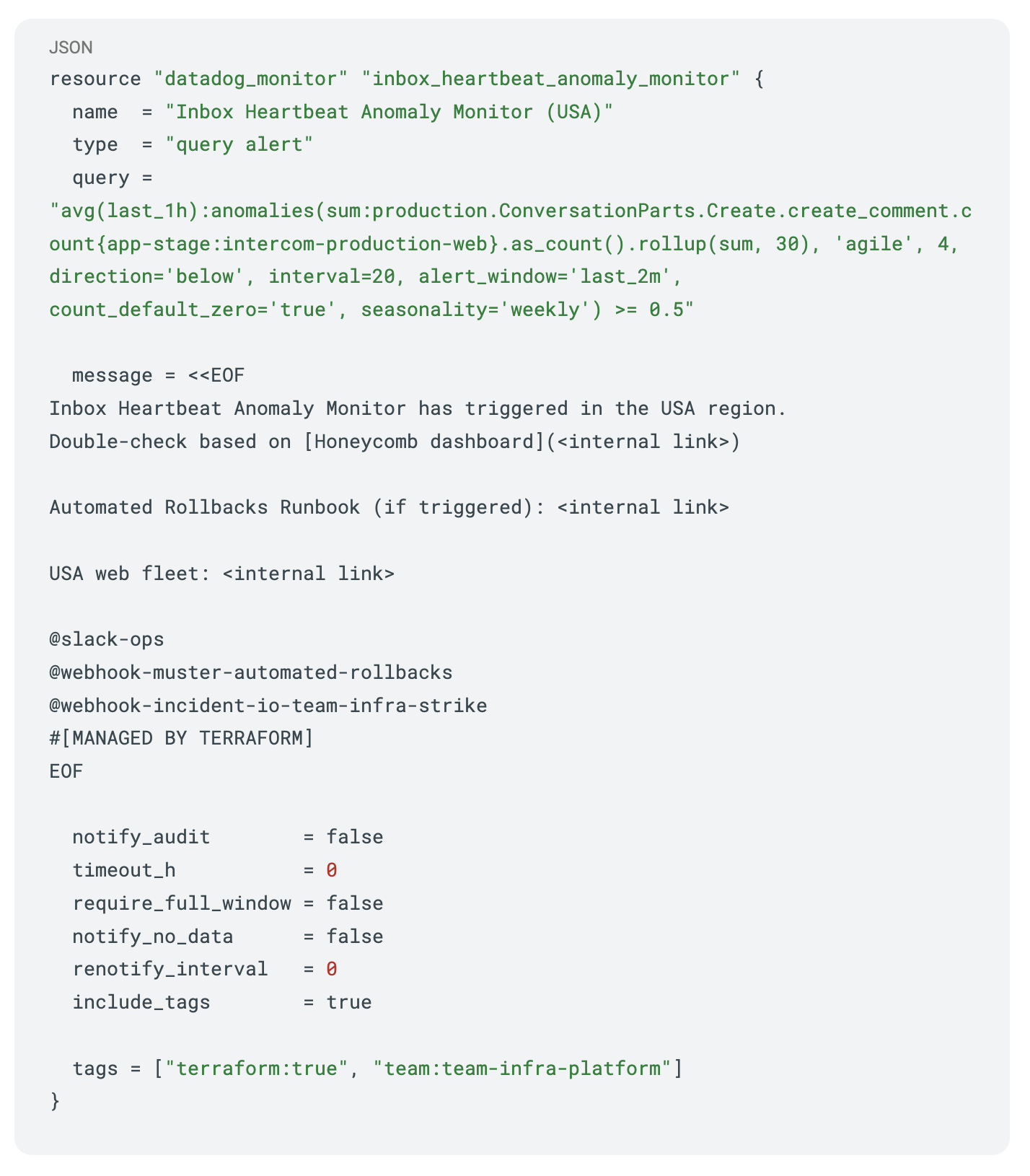
    Terraform configuration for a Datadog query alert titled 'Inbox Heartbeat Anomaly Monitor (USA)', using anomalies() on production events with Slack and webhook notifications plus team tags.
    Outcome-first monitoring in action: a Terraform-managed Datadog heartbeat anomaly alert with Honeycomb double-checks, rollback runbook links, and Slack/webhook routing for SLA-conscious operations.

    Where heartbeat metrics truly shine is in how they define and enforce accountability. They don’t just monitor; they inform SLAs in a way customers understand. Two independent SLAs matter most in this model: Core Platform SLA: If your team can’t reply in the Inbox or customers can’t message via the Messenger, that’s downtime. Fin SLA: If Fin cannot generate text answers, we record downtime.

    Measurement matters. Many status pages stay green as long as an HTTP probe returns 200 OK, even when users are stuck. Heartbeat metrics close that gap by checking real customer outcomes, not just server responses. I also favor anomaly detection—tracking expected patterns over time and flagging when something looks off—and tooling that lets us drop to a per-customer level when we need to understand individual impact.

    If you don’t have a heartbeat metric yet, start simple. Pinpoint your product’s must-do job—the one thing customers must accomplish to succeed. Choose a metric with volume so you can detect drifts quickly, not just total failures. Make it binary in spirit so a drop clearly signals breakage. Hook it to your alerts so it’s loud and reaches the right responders. Use it to align teams on what to do when the heartbeat falters. And stick to it, 24/7—reliability isn’t a 9-to-5 job.

    For monitoring, I like practical guardrails. Here’s a Datadog monitor pattern I recommend for an Inbox-style heartbeat (Terraform syntax, simplified for clarity): keep a tight baseline window, alert on negative deviations beyond statistically expected ranges, auto-page responders, and attach standard operating procedures for immediate rollback and incident initiation. It’s simple, auditable, and fast.

    Modern systems grow more complex every quarter. The question that matters stays refreshingly simple: “Can our customers do what they came here to do?” Build a reliability heartbeat that answers that question in real time, and you’ll keep your teams honest, aligned, and fast. Define yours—it might become your most valuable signal.


    Inspired by this post on The Intercom Blog.


    Book a consult png image
  • Leading Support with AI Metrics: How CX Score Transformed Our Scale and Mindset

    Leading Support with AI Metrics: How CX Score Transformed Our Scale and Mindset

    How do you lead a support team in this new world with AI metrics? That question has been front and center for me as we integrate AI-first customer service tools into our daily operations.

    The technology is amazing, but our assumptions and processes for understanding and leveraging AI metrics are very different from traditional support metrics. Our new CX Score is the perfect example.

    Two months ago, we launched CX Score – a new way to analyze every single conversation and give you a complete view of your support experience. I was genuinely excited as someone who’s battled with CSAT survey mechanics, teammate exclusion processes for CSAT, and the nagging truth that this is only a small portion of our volume. As we’ve navigated CX Score, we’ve learned lessons that apply broadly to AI metrics. Two takeaways stand out for me.

    First, lots of data calls for new processes. One of the first things we noticed was the sheer amount of data. For better or worse, CSAT was a small enough sample size to review every comment – particularly unhappy ones. Our QA team would read and categorize each response, and follow up with customers. Managers would read most comments for their team (~15 in total per manager), and discuss in 1:1s.

    But what do you do with 1,600+ reviews across the org? This is the reality of AI metrics, and when you have more data than ever before, the old processes don’t scale. We briefly tried reviewing all unhappy CX ratings. We tried taking a sample, but this felt just as limited as CSAT. We exported the trends and conversation data back into an LLM for analysis, but without in-depth prompting the results were only okay.

    What worked was reframing how we use the signal. Because CX Score is great for reviewing trends, we use it to measure week-over-week performance for both Fin and as a team wide KPI for human support. We also use CX Score to review specific targeted areas, like a new hire’s conversations on a certain product area. And we use it to review the customer experience for a group of customers, or to analyze a customer’s entire case history so we can lean in at the customer level.

    Blueprint-style illustration of an AI customer support system with chat bubbles, workflow nodes, and connectors on a grid, representing automation, routing, knowledge retrieval, guardrails, and human handoff.
    An isometric blueprint reveals how an AI agent powers modern support—from triage to resolution—linking chat, knowledge, and workflows so teams scale service without losing accuracy, context, or the human touch.

    Second, the complexities of AI mean we won’t always know the “why” – and that’s ok! People naturally want to know “the why” – especially support folks. When we started using CX Score, one of the biggest challenges was the team wanting to dig deeper into why a specific score was given. While the score provides a great overview, people wanted a detailed, step-by-step explanation. But LLMs are mostly a “black box” – especially to the everyday person. As AI becomes more and more ingrained in our work, we’ll need to accept not always knowing every detail.

    This required a mindset shift for both the wider team and leadership as we moved into a world of AI metrics. We focused on the outcome vs. the process, celebrating positives and highlighting insights and actions previously impossible with only CSAT. We refused to compare to humans, reminding ourselves that many of the unknowns of AI are equally true with humans; even with a large survey, we never know for sure how customers feel. And we acknowledged emotions. Our Ops Manager William would poll the leadership team in our weekly ops meeting, asking, “In one word, how did the CX Score make you feel last week?” That simple ritual gave managers space to surface wins and challenges, and it kept us grounded.

    What’s next is continuing to revamp how we work and adjusting our collective mindset for AI tools and metrics. The pros highly outweigh the cons, so I encourage you to jump in and start experimenting with AI metrics, especially where they can augment customer experience, operational cadence, and product feedback loops.

    Lastly, this technology is improving very quickly. Just yesterday we added deeper AI explanations and additional attributes to explain the CX Score and aggregate summaries across topics. I’m excited to try it out!

    Subscribe to The Ticket here – a bi-weekly LinkedIn newsletter delivering key insights for customer service professionals in this time of mind-blowing change.


    Inspired by this post on The Intercom Blog.


    Book a consult png image
  • Cut Through AI Hype: A Product Leader’s Guide to Vet, Buy, and Deploy with Confidence

    Cut Through AI Hype: A Product Leader’s Guide to Vet, Buy, and Deploy with Confidence

    AI is exciting. Urgent, even.

    In my role leading product management and partnering with forward deployed engineers, I’ve worked with countless companies on AI adoption. Across sizes, budgets, and ambitions, I see the same pattern: teams start with the right intentions and still end up disappointed.

    The problem isn’t that AI doesn’t work. The problem is that AI done wrong wastes time, money, and trust — and most teams aren’t set up to vet tools, ask the right questions, or structure implementation for success.

    To help teams evaluate and deploy with confidence, I often point leaders to The AI Agent Blueprint. It’s a practical roadmap for a moment when everyone’s trying to figure out what comes next.

    In this post, I share the lessons I wish every team had before they started. Whether you’re evaluating a solution like Intercom’s Fin or just exploring what gen AI can do, these are the patterns I rely on to make smart, scalable decisions.

    Core concepts to help you vet AI solutions like an expert

    Before we get into the common pitfalls, let’s cover a few key concepts. You don’t need to become an engineer to thoroughly evaluate AI Agents, but you do need to understand a few foundational terms. This knowledge will help you:

    – Ask sharper questions during demos.

    – Spot red flags in vendor pitches.

    – Choose scalable, future-proof solutions.

    – Guide internal alignment and buy-in.

    – Build confidence in your final decision.

    A little technical fluency goes a long way. Keep in mind these are just a few of the many terms out there. But here are the ones I’d suggest getting comfortable with today:

    Retrieval-Augmented Generation (RAG)

    RAG enhances generative AI by pulling in real-time, relevant information from your company’s data sources before generating a response.

    Why it matters: Most AI tools claiming to “know your business” only use pre-uploaded or static training data. RAG-based systems dynamically search live sources like help centers, product docs, or internal wikis, making them far more accurate and adaptable (assuming your data hygiene and permissions are in good shape).

    Easy way to remember: Think of RAG as an AI assistant with an open-book exam. Instead of relying only on memory (pre-trained data), it searches for the latest, most relevant information before responding. This makes RAG especially useful for AI Agents, customer support systems, and AI-driven search engines, ensuring responses are more accurate and up to date.

    Vector search

    Vector search enables AI to match by meaning, not just keywords. It converts both the user’s question and your documentation into numerical vectors and retrieves the closest semantic match even when the phrasing differs.

    Why it matters: Without vector search, your AI may only work if the user phrases things “just right.” With it, users can speak naturally and still get the correct response.

    Easy way to remember it: Vector search is like finding a song by its vibe, not its title. It works by intent, not exact match – essential for intuitive AI experiences.

    Agentic AI

    Agentic AI goes beyond answering simple questions; it can initiate actions, pursue goals, and carry out multi-step tasks.

    Why it matters: Most AI tools today are passive. They only respond when prompted. Agentic AI drives outcomes. For example, Intercom’s Fin is evolving to handle actions like checking order status, triggering refunds, or escalating issues, all without human involvement.

    Easy way to remember it: Agentic AI is like a rockstar project manager, not just a note-taker. It doesn’t just reply with information when simple questions are asked. It plans, acts, and follows through to get the job done.

    MCP (Model Context Protocol) Server / Client

    MCP is an emerging approach for managing AI agents at scale. It involves three core components:

    – The model (the AI system itself).

    – The context (what data and information it can access).

    – The protocol (the rules for how it talks to other tools and data).

    Why it matters: As AI gets embedded across your organization, centralized governance becomes critical. MCP ensures agents act within rules, respect permissions, and scale responsibly – without needing to hard-code logic into every use case.

    Easy way to remember it: Think of MCP as a control tower for your AI agents. It manages what they know, what data they can use, and what boundaries they stay within.

    Understanding concepts matters because they help you ask better questions and spot red flags during vendor evaluations. But understanding terminology alone isn’t enough.

    Common mistakes I see teams make

    Here are five mistakes I see even well-informed teams make, and how I advise product and support leaders to avoid them.

    Mistake #1: Treating all AI tools the same

    The AI space is moving fast. It’s a constantly evolving landscape and full of buzzwords, which can create confusion. I often see teams treat “chatbots” and AI Agents as interchangeable, without realizing there’s a massive difference between things like:

    – A legacy rules-based bot with generative copy slapped on top.

    – A true agentic AI system that takes action, learns from context, and scales with your business.

    If you don’t understand core terms like RAG, MCP, or the differences between LLMs and agentic AI, it’s nearly impossible to ask the right questions during your evaluation process. I’ve heard of too many teams buying solutions that are outdated or require heavy upkeep after deployment. Educating your team on the fundamentals gives you the confidence to separate real capability from flashy demos.

    Mistake #2: Assuming you can build it in-house

    There’s a real cost and complexity of building AI Agents internally – orchestration, retrieval systems, prompt chaining, governance, and more. It’s not just a weekend project. It’s a long-term infrastructure investment. And for most companies, it quickly becomes a distraction rather than a differentiator.

    Many teams assume building their own AI Agent will be faster, cheaper, or more flexible than buying. On paper, it sounds reasonable – especially if you’ve got a strong engineering team, access to top-tier models, and a healthy budget. But in practice, that path is much harder than it looks.

    I smile writing this because I’ve been there. I’ve built multiple AI apps on nights and weekends. Early wins feel amazing — then reality sets in. Shipping something truly polished, even at tiny scale, demands far more infrastructure, reliability work, and governance than most teams anticipate.

    At a company level, those challenges only grow. Building an AI Agent from scratch means committing to:

    – Data chunking, embedding, and relevance tuning.

    – Prompt chaining, context management, and hallucination reduction.

    – Real-time retrieval architecture and RAG pipelines.

    – Fine-tuning, model upgrades, and fallback orchestration.

    – Security, permissions, audit logs, AI governance… and so much more!

    Even well-resourced teams often circle back to buying after burning time, money, and momentum. The true cost of building isn’t just engineering — it’s maintenance and velocity. High-performing teams focus on their differentiators and partner for the rest.

    Mistake #3: Betting on the wrong vendor

    I often see teams focus too narrowly on slick demos or assume a vendor will “figure it out later.” In a market moving this fast, that’s a risky bet. The result is a tool that can’t keep up, needs constant hand-holding, or becomes too rigid to scale.

    The best vendors learn quickly, ship frequently, and keep driving value. When I evaluate, I ask:

    – Is the vendor investing meaningfully in AI R&D?

    – Does their team have a clear roadmap for improvement?

    – Can this system adapt to your workflows without needing engineering support at every step?

    – How much ongoing maintenance will be needed?

    These questions separate vendors building for tomorrow from those selling yesterday’s technology. You want a partner who’s staying ahead, not catching up.

    Mistake #4: Ignoring your internal foundation

    Even the best AI Agents need fuel. Your content and systems are the inputs that determine quality. If your help center is outdated, documentation is thin, or APIs are missing, you’ll get “garbage in, garbage out.”

    I’ve watched teams buy best-in-class AI and still stall because they hadn’t invested in the inputs that make it powerful:

    – A well-structured help center.

    – Clear, detailed documentation.

    – Internal process visibility (for things like internal AI/copilot).

    – Robust APIs.

    You don’t need to overhaul everything on day one. But clean, accessible content dramatically improves accuracy, confidence, and resolution rate.

    Mistake #5: Expecting instant, perfect resolution rates

    Another misconception is expecting AI to resolve 100% of support conversations immediately. In reality, no AI tool starts at perfection — and your team needs a shared understanding of how resolution rate works to set expectations.

    For context, Fin typically resolves over 65% of support questions out of the box, with minimal training needed, and continues to improve month-over-month. What separates great implementations isn’t just where you start; it’s how you optimize. Tightening content, closing automation gaps, and iterating on prompts and retrieval all compound over time.

    If you’re not tracking your current resolution rate or don’t know how your vendor defines it, it’s hard to see progress. Establish a baseline, set realistic targets, and measure consistently. Treat resolution rate as a growth metric, not a fixed score.

    Final thoughts

    The teams that win with AI don’t just adopt tools — they implement future-proof systems that connect knowledge, workflows, and decision-making to drive real business outcomes.

    – They don’t build everything from scratch.

    – They don’t fall for flashy demos of stale technology.

    – They partner with vendors already building what’s next.

    If your team is exploring AI — whether you’re starting fresh or rethinking your stack — start with the concepts and lessons here. Use them to evaluate options, align stakeholders, and choose partners who are building what’s next, not just what’s trendy.

    And if you want a broader strategic roadmap, The AI Agent Blueprint is a great place to dive deeper. It lays out how to go from launching an AI Agent to building successful systems that scale and drive real business value.

    AI isn’t just a trend. It’s a capability your business will depend on. Done right, it becomes your most powerful teammate.


    Inspired by this post on The Intercom Blog.


    Book a consult png image
  • The AI Support Blueprint: From Zero Playbook to 75% Resolution and a Reimagined Team

    The AI Support Blueprint: From Zero Playbook to 75% Resolution and a Reimagined Team

    Rolling out an AI Agent doesn’t just change how your team works – it changes who your team is.

    I learned that in the crucible of a fast-moving launch. Before we launched Fin publicly, our Support team became its first alpha/beta tester and we had to move fast. No roadmap. No step-by-step guide. Just a powerful new technology, and a steep learning curve.

    That experience is exactly what led us to create The AI Agent Blueprint – a resource we wish we’d had when we were starting out, and one we hope will give other support teams a clearer path forward.

    Looking back, I won’t lie and say I was cool, calm, and confident about how to do this – I was nervous as hell. I had no idea how to implement an AI Agent and ensure it resulted in huge cost savings and stellar customer experiences.

    We had older machine learning technology available to us (shout out to our first-gen chatbot, Resolution Bot), but as a complex software business, we really only used it for basic FAQs. In all honesty, we still had a way to go – both in using automation more effectively and in making the chatbot experience actually enjoyable for our customers.

    So why the urgency?

    When ChatGPT burst onto the scene nearly three (!!) years ago, Intercom’s Machine Learning team immediately spotted the opportunity and dived into building the world’s first (and objectively best) AI Customer Service Agent.

    Suddenly, we were being asked to pilot this brand new technology with real customers and go all in ASAP. Because we were selling this powerful new functionality, we had to use it ourselves and show it off in the best possible light so customers would want to use it too. #nopressure

    There was no playbook, just a lot to figure out. As a product management leader, I had to switch into rigorous product discovery while staying execution-minded.

    Line chart titled 'Involvement and Resolution Rates' for Feb–Jul, showing involvement steady around 87–93 while resolution climbs from 65 to 82, visualizing monthly customer support performance metrics.
    Steady involvement, rising resolutions. From February to July, teams maintain a high 87–93 involvement range as resolution rates climb from 65 to 82—signaling how AI-driven workflows can boost support efficiency and outcomes.

    How do we do a phased rollout, but scale very quickly?

    How do we QA Fin’s responses and make continuous improvements?

    How will we produce and manage all the content Fin needs?

    What will we do about all the outdated content we already have?

    What are the success metrics now? Should they be different to original Support KPIs?

    Who’s responsible for the success metrics? Who manages this newcomer to our team?

    It was daunting. We had to take a brand new technology, figure out how to use it, build a team around it, and move at breakneck speed to implement every new feature that rolled out. It was ambiguous, fast-moving, and a massive lift.

    But we got there and the results speak for themselves: Fin is now resolving over 75% of our inbound support volume.

    Blueprint-style illustration of an AI customer support system with chat bubbles, workflow nodes, and connectors on a grid, representing automation, routing, knowledge retrieval, guardrails, and human handoff.
    An isometric blueprint reveals how an AI agent powers modern support—from triage to resolution—linking chat, knowledge, and workflows so teams scale service without losing accuracy, context, or the human touch.

    That outcome didn’t happen by accident. We embedded forward deployed engineers with Support, treated our AI Agent like a product creator in its own right, and used gen ai for product prototyping to tighten our iteration loops. We prioritized a customer support AI strategy that balanced containment with quality: containment rate, CSAT on AI-resolved conversations, first-response latency, and recontact rates became our core scorecard.

    That success led to real change for me and my team: new roles, new responsibilities, and new career paths. I now run a whole new function that didn’t exist before: AI Support. We’ve created new and elevated roles like Conversation Designers and Knowledge Managers. Fin hasn’t just changed how we support customers – it’s transformed the structure of our team and the trajectory of our careers.

    And now, we’re helping our customers do the same.

    In all transparency, if I hadn’t been this close to the work, I might have waited to see how generative AI played out before committing. I might have waited for a blueprint for how to deploy and scale an AI Agent. I wish I had something like that when we got started, or even later when we had a solid foundation but needed to scale our AI strategy.

    How much less scary would it be to implement an AI Agent if something like that existed?

    Whether you’re just getting started or already using AI in some way, you’re not early anymore—and you shouldn’t have to figure it all out alone. Strong product management leadership, a clear change plan, and tight feedback loops are what separate experiments from outcomes.

    That’s why we created The AI Agent Blueprint – a practical map for launching and scaling AI in support. It brings together everything we’ve learned from our own journey, and from working closely with our customers who are doing the same.

    If you’re ready to operationalize gen ai in support, align on the right metrics, and redesign roles for the future, this blueprint will help you move from pilots to pervasive impact with confidence.


    Inspired by this post on The Intercom Blog.


    Book a consult png image
  • Harness the AI Storm: My Playbook to Elevate Support, Win Executives, and Protect Teams

    Harness the AI Storm: My Playbook to Elevate Support, Win Executives, and Protect Teams

    Over the past 18 months, I’ve watched the ground shift under support leaders. For many support leaders, the world before and after AI feels drastically different—and I feel it too.

    Rewind to before Q1 of 2023, and while the details varied, the challenges support leaders faced were largely the same as they had been for decades. Before AI, support leaders were tasked with improving the customer experience with under-resourced teams; finding ways to improve the cost-to-revenue ratio; preventing team attrition (despite managing people with difficult jobs and low compensation); and representing customers’ needs to teams with competing priorities.

    Support was expected to operate behind the scenes, often absorbing work from other departments. Despite being essential for customer retention, it was still viewed primarily as a cost center, and leaders rarely had strong executive advocacy. Those conditions sharpened valuable muscles—creativity, scrappiness, and people leadership—but they didn’t prepare most teams to operate in an AI-first world.

    Now with AI, the mandate has expanded. The core responsibilities persist, but the “how” has changed. Leaders are suddenly expected to be AI experts, spearhead large AI implementation initiatives, and keep operations rock-solid while the plane is being rebuilt mid-flight.

    They’re being asked to step out from behind the scenes to center stage and lead the company in its first large adoption of AI. They’re being asked to regularly communicate with executives who previously had little interest in their initiatives or ideas. They’re being asked to run high-lift, high-impact, cross-functional projects without the infrastructure in place to manage it. They’re also now expected to hit AI performance metrics that an executive heard somewhere were possible—targets that might be unrealistic for the actual use case.

    Oh, and if they fail, they’ll likely lose their job. And if they succeed, they could cause job loss for their team members. I’ve felt that tension firsthand: accelerate AI to drive outcomes, while also protecting the humans who make your customer experience exceptional.

    It’s tempting to wait for the storm to pass—to delay AI change until someone else takes it over and hope they don’t undo what you’ve built. I’ve seen that playbook, and it rarely ends well.

    There’s a better approach: harness the storm’s energy to elevate your customer experience, your team, and your own influence.

    Harnessing AI’s momentum

    This new era can reduce your support operation to a transactional, robotic experience—or transform it into what you’ve always envisioned. The outcome depends on how you respond to the demand to implement AI. This is one of the most unique opportunities of your career: you will have your executives’ attention, unprecedented access to product and engineering resources, and far less friction persuading stakeholders that change is essential for customers and the business.

    With the right plan, you can reframe your team from cost center to value driver, expand services instead of sweating basic metrics, and move from surviving to thriving.

    Here are the three areas I encourage every support leader to master.

    Become the AI subject matter expert

    Start by learning. Understand what is actually possible with AI now, and what may be possible in the near future. Go at least a layer or two deeper than the average person using ChatGPT. Know what it takes to implement more than a glorified answer bot—especially if your goal is end-to-end resolution, not just deflection.

    Then anticipate the pitfalls I see most often in AI adoption.

    Not digging deep enough with vendors. Demos often look similar and impressive with minimal lift. The truth emerges in a proof of concept. Run multiple trials with different vendors to uncover real capabilities and limitations—and to calibrate what “good” looks like for your environment.

    Only finding a technology solution, not a partnership. Many tools can deliver similar outcomes; partners are not interchangeable. Choose a vendor whose values align with yours, who will support your use cases post-sale, who moves at a pace you can absorb, and who is committed for the long haul (not merely positioning for acquisition in a year or two).

    Not knowing what good actually looks like. Ask each vendor about AI involvement rate and AI resolution rate. Ask what AI CSAT typically looks like in your industry. Document these answers to build benchmarks and set realistic expectations with executives.

    Not learning from others’ mistakes. Many teams have overestimated AI’s impact and underestimated the human resources still required. Some laid off hundreds of support team members—only to rehire later—damaging their brand and wasting resources. Move with purpose and pace, but not so fast that you repeat these mistakes.

    Not communicating your plan effectively. Be able to articulate why deflecting 50% of inquiry volume does not equal a 50% headcount reduction. Cite logistics like coverage windows and redundancy for SLAs, growth needs, natural attrition, and all the non-inquiry work your team handles. Practice a concise, compelling rationale for executives.

    Create a clear AI plan

    Your company is in uncharted territory. Unless you’ve hired a specialist recently, none of your executives have deployed AI in support. That makes you the most qualified person to draw the map and lead the way. Here’s what your plan should include.

    1) A vendor evaluation plan. Define how you’ll research providers, who advances from demo to trial, how many you’ll test, and in what timeframe. Establish criteria for what AI must accomplish and the effectiveness and quality metrics you’ll use to evaluate it.

    2) Implementation phases. AI is not a “set it and forget it” tool. Because AI touches customers so quickly, mitigate risk with phased rollouts. Phases don’t have to be slow—just deliberate. Sequence by audience, use case, and channel, and publish a clear timeline so cross-functional partners can plan resources.

    3) How you’ll measure success. Reuse your evaluation metrics and go deeper. Track AI involvement rate and AI resolution rate (together, your deflection rate). Measure quality through CSAT and CX Scores, and run regular QA. Quantify impact on your support cost-to-revenue ratio—your CFO cares deeply about this.

    4) How your team will use reclaimed time. If your AI program frees 20% of capacity, what value will you create? How will you improve the customer experience, drive revenue or retention, and upskill your team? Quantify the upside and set milestones for capability-building and value-added work. If you fail to plan this, you will be pushed to let too many people go.

    5) How you’ll report on progress. Communication failures sink AI programs. Align with your executive sponsor on format and cadence, then over-communicate—regularly, clearly, concisely. You can’t afford to under-communicate.

    Own the initiative at a higher level

    Support leaders are great at taking ownership, often absorbing projects other teams drop. This initiative is different: it’s highly visible and enterprise-critical. Treat it like a flagship product rollout.

    Project management. Use a tool your team can execute in and that lets you summarize progress succinctly for executives. Borrow best practices from your product managers and signal early that you’ll be partnering with them. Learn your sponsor’s preferred update style and tailor to it.

    Communication. Overcommunicate—with brevity and rhythm. Don’t let a week pass without your sponsor knowing status. For executives, I recommend weekly or bi-weekly updates with a one-line summary, three impact statements, and a link to the plan. For example: “Saved customers 30K waiting hours M/M,” “Improved full resolution time by 30% M/M,” “Next initiative will improve X metric by Y%.”

    Showcase your thought leadership. Reference industry benchmarks proactively when you set goals, and reactively when questions arise. Having succinct, data-backed answers that tie to benchmarks signals expertise and builds trust.

    The storm is here—what will you do?

    The pressure around AI is intensifying and isn’t fading anytime soon. This storm can crush your team as you know it—or become the wind under your wings that elevates your support operation to its maximum potential. The choice is yours: wait and risk cuts, or step up as the support AI expert, form a plan, and transform your team into a value engine. I’ve chosen the latter—and I invite you to do the same.


    Inspired by this post on The Intercom Blog.