I treat ChatGPT as a force multiplier across the entire product lifecycle—from discovery and strategy to delivery and growth. Unlock workflows, prompts, and real PM tips showing how ChatGPT quietly reshapes product management behind the scenes.
My goal is pragmatic: turn generative AI into repeatable, measurable leverage for product discovery, product roadmapping and sprint planning, stakeholder management, and product-led growth without sacrificing quality, privacy-by-design, or judgment. This is how I apply LLMs for product managers in a way that strengthens customer empathy and speeds up decision cycles.
In discovery, I use ChatGPT to synthesize interviews, categorize sentiment, and surface emergent themes faster than a manual pass. I’ll feed it anonymized notes and ask for Jobs-to-be-Done statements, contradictory signals to validate, and the top three risks to our hypotheses. When the corpus gets large, I pair it with a retrieval-first pipeline and apply context window management so outputs stay grounded in real customer data.
On strategy and positioning, I draft and refine a crisp value proposition, clarify points of parity, and identify competitive differentiation. I ask ChatGPT to convert inputs into outcomes vs output OKRs, pressure-test assumptions, and produce a one-page narrative that even non-technical stakeholders can engage with. The result is faster alignment and fewer meetings to get to the same level of clarity.
For planning and delivery, I use ChatGPT to accelerate PRD outlines, user stories, and acceptance criteria, while explicitly requesting edge cases, failure states, and non-functional requirements. I’ll have it map risks to mitigations and suggest simple instrumentation aligned to DORA metrics and incident management readiness—useful when we’re iterating within a CI/CD cadence.
In experimentation, ChatGPT helps me frame strong A/B testing plans, calculate a minimum detectable effect (MDE), and sanity-check sample sizes. I also use it to translate metrics into plain language updates for the team, connect learnings to the next experiment, and propose follow-up analyses for retention analysis or activation bottlenecks.
For growth and onboarding, I prompt ChatGPT to generate hypotheses for user activation, in-app guides, and tooltip design that match personas and JTBDs. It drafts variations I can quickly test through Pendo or similar tools, supports product-led growth motions, and helps craft contextual copy that aligns with our value proposition without adding cognitive load.
Stakeholder communications get sharper and faster. I’ll ask for concise executive summaries, a version tailored for engineering leaders, and another for customer-facing teams. It’s especially effective for QBRs vs OKRs updates, where I need crisp narratives tied to outcomes, plus a plain-English articulation of risks and trade-offs for empowered product teams.
The guardrails matter. I set clear AI risk management boundaries, prevent any sensitive data from entering prompts, and align usage with data governance and regulatory compliance requirements. I also version and review prompts just like product artifacts, so the best ones evolve into a durable AI product toolbox the whole team can use.
If you’re getting started, pick one high-friction workflow—say, interview synthesis or PRD drafting—and timebox a week to build a repeatable prompt set and review rubric. Measure cycle-time savings and quality deltas, then expand to a second workflow. Within a month, you’ll have a lightweight operating model for AI Strategy that compounds across your roadmap.
Every breakthrough we ship in AI reinforces a simple truth I live by: "Companies that prioritize data quality, governance, and structure will accelerate their AI initiatives the fastest." That statement captures the difference between flashy demos and durable, scalable products. In my experience, the strongest AI Strategy starts with the discipline to treat data as a product, not an afterthought.
When teams rush to production with generative AI or LLMs, the first issues rarely come from the model itself—they come from the data. Poor lineage leads to hallucinations, inconsistent schemas inflate costs, and weak access controls erode trust. For LLMs for product managers, this is the gap between a compelling prototype and a reliable system customers depend on every day.
Let me clarify what I mean by data quality, governance, and structure. Quality is completeness, accuracy, freshness, and consistency across sources. Governance is policy, ownership, and accountability—privacy-by-design, regulatory compliance, and AI risk management built in from day one. Structure is the architecture: clear data contracts, standardized schemas, metadata and lineage, and role-based access that keeps sensitive signals protected while enabling speed.
Here’s the product playbook I use to operationalize this. First, map critical sources and define data contracts at the edges so producers and consumers can move independently. Second, standardize schemas and entity resolution to eliminate ambiguous joins. Third, enforce privacy-by-design with policy-as-code and automated redaction. Fourth, converge analytics into a unified analytics platform so definitions, freshness, and observability are shared. Fifth, instrument end-to-end lineage and quality SLAs with alerting. Finally, close the loop with human feedback and labeling to continuously improve model performance.
For generative AI workloads, a retrieval-first pipeline is essential. Unify trusted sources (product analytics, CRM, support, docs), embed and index them with guardrails, and focus on context window management to keep prompts lean, relevant, and cost-effective. This approach improves response quality, reduces token spend, and makes updates near-real-time—without retraining the base model every week.
Measure what matters. Tie model outcomes to product metrics through rigorous A/B testing, and size experiments with minimum detectable effect (MDE) so you can ship confidently. Use product analytics to verify that better data actually improves activation, retention, and support deflection. When teams can trace an AI improvement back to a specific data-quality fix, they invest in governance with conviction.
Culture closes the gap. Empowered product teams and product trios (PM, design, engineering) make crisper decisions when data stewards are embedded and accountable. Clear ownership, shared definitions, and transparent dashboards reduce friction with security and compliance while speeding up delivery. This is how product management leadership sustains velocity without trading away trust.
The bottom line: if we want faster, safer, and more scalable AI, we start with the data. Build strong foundations, treat governance as enablement, and structure every step so improvements compound. With that in place, Generative AI stops being a science experiment and becomes a durable competitive advantage.
Inspired by this post on Amplitude – Perspectives.
I hear the same question in nearly every executive review and go-to-market strategy session: how do we get our brand to show up more often inside ChatGPT? As a product leader, I treat this as an AI Strategy problem, not a mystery. The path forward looks a lot like modern SEO, adapted to how large language models (LLMs) discover, trust, and summarize information across the web and via tools.
Understand how ChatGPT works and how to make your brand appear more often. Like SEO, but for AI chats.
First, let me set expectations. We can’t force mentions, but we can systematically raise the probability that an LLM chooses our content as a trusted source. My playbook centers on three levers: strengthen your public footprint (so you’re easy to learn from), amplify trustworthy signals (so you’re chosen), and enable high-fidelity retrieval and actions (so you’re accurate and current when the model reaches out).
Public footprint: I build topical authority around the entity that is our brand. That means canonical naming, clean information architecture, and interlinked explainers, how-tos, and case studies that answer real tasks. I use schema.org (Organization, Product, HowTo, FAQPage) to make our pages machine-readable, and I back claims with credible citations. Think of this as “entity-first content design” for gen ai and LLMs for product managers.
Content design for LLMs: I write like I’m teaching a capable assistant. I define acronyms in-line, structure pages with crisp headings, include concise summaries up top, and add Q&A sections that mirror natural prompts. I avoid heavy gating on foundational docs so models can ingest the essentials. I also optimize for context window management by keeping key facts succinct and repeated consistently across properties.
Authority and distribution: Models overweight high-credibility surfaces. I prioritize documentation, API references, GitHub repos, conference talks, reputable media, and third‑party reviews. Where appropriate, I pursue eligibility for knowledge bases (e.g., Wikidata) and ensure consistent facts across partner sites and directories. This isn’t about gaming; it’s about being verifiably useful wherever professionals already look.
Technical hygiene: I keep robots.txt and sitemaps friendly to docs, ensure semantic HTML, fast performance, and rich alt text, and use canonical tags to concentrate signals. Changelogs, release notes, and comparison pages help LLMs answer "what’s new" and "versus" questions with precision—core to product positioning and product-led growth.
Tools and connectors: Visibility isn’t only pre-training; it’s also in-session. I invest in a reliable ChatGPT connector and CustomGPT workflows so assistants can call our APIs via well-scoped actions. I publish a high-quality OpenAPI spec, implement a retrieval-first pipeline over our docs, and tune chunking and metadata so answers stay grounded. Good context window management, privacy-by-design, and clear guardrails are non-negotiable.
Intent coverage: I map the customer journey and write to the prompts users actually type: definitions, quick starts, integrations, troubleshooting, and “compare vs” pages with transparent points of parity. This doubles as strong customer support ai strategy while reinforcing our go-to-market strategy.
Measurement: I maintain a prompt panel representing priority intents and track our share of voice in model outputs over time. When we ship content improvements, I use disciplined A/B testing where possible and set a minimum detectable effect to avoid overfitting to anecdotal wins. I pair qualitative spot checks with analytics to see which pages, entities, and citations correlate with improved inclusion.
Governance and ethics: I avoid manipulative tactics, fabricated claims, or spammy link schemes. Sustainable AI visibility comes from trustworthy content, clear provenance, and user value. Treat LLMs like discerning editors: they reward clarity, credibility, and consistency.
The bottom line: you can’t control when an assistant mentions your brand, but you can earn it. Build an authoritative, structured footprint; show up on credible surfaces; enable high-quality retrieval and actions; and measure rigorously. Done well, AI visibility compounds—just like great SEO—only faster, and with outsized leverage for teams who execute with focus and integrity.
Inspired by this post on Amplitude – Perspectives.
Every week, I lean on ChatGPT to cut through noise, reduce rework, and move faster with more confidence. It’s not a silver bullet, but it has become an unfair advantage in my day-to-day leadership of product strategy, discovery, and delivery. Unlock workflows, prompts, and real PM tips showing how ChatGPT quietly reshapes product management behind the scenes.
Here’s my stance: ChatGPT doesn’t replace product judgment. It amplifies it. Used well, it accelerates product discovery, clarifies roadmaps, sharpens positioning, and strengthens stakeholder management. Used poorly, it creates noise and risk. What follows are the specific workflows and prompts that reliably save me hours while protecting quality and trust.
Discovery and research are where I see the biggest upside. I use ChatGPT to draft interview guides, transform raw notes into theme clusters, and generate “Jobs to Be Done” problem statements—then I validate them with customers. I anonymize inputs to protect privacy and follow privacy-by-design and data governance commitments; AI risk management matters more than ever when we’re handling real user data.
When I move from insight to definition, ChatGPT helps me spin up crisp PRDs and user stories. I provide context about our users, constraints, and success metrics and ask for structured outputs: goals, non-goals, acceptance criteria, and risks. This keeps our product trios aligned and focused on outcomes vs output OKRs, not just shipping features.
For competitive analysis and positioning, I feed in public information and ask for points of parity, points of differentiation, and potential messaging angles. I treat the output as a starting point for my value proposition and battlecards—not the final word. It’s a fast way to surface hypotheses and pressure-test our product-led growth narrative.
Roadmapping and sprint planning also benefit. I use ChatGPT to map dependencies, draft milestone narratives, and transform epics into well-formed backlogs. When we align quarterly plans, I ask for risk scenarios and contingency options so we can make trade-offs explicit before we commit.
On analytics and experiments, ChatGPT is my drafting partner. It helps me define A/B testing plans, clarify the minimum detectable effect (MDE), and outline instrumentation requirements. I still verify numbers in our analytics stack, but the scaffolding is done in minutes, not hours—freeing me to focus on retention analysis and activation levers.
Stakeholder communication is where the time savings compound. I use ChatGPT to produce executive summaries, QBRs vs OKRs comparisons, and board-ready narratives that highlight outcomes, risks, and next steps. It’s a powerful way to stay crisp and consistent across leadership updates without losing the nuance that matters.
Prompt patterns make or break results. I keep four rules: set the role, provide rich context, define constraints, and specify the output format. For example: “You are a senior PM advisor. Context: [user, market, problem]. Constraints: [privacy, timeline, budget]. Output: PRD with goals, acceptance criteria, and risks.” With larger inputs, I use context window management by chunking content and asking for summaries before synthesis.
For internal knowledge, I lean on a retrieval-first pipeline. Instead of pasting long docs, I reference curated, approved sources so answers track to current reality. CustomGPT workflows and a simple ChatGPT connector help with governance: they increase speed while reducing the chance of hallucinations and stale information.
Guardrails are non-negotiable. We never paste sensitive data into prompts; we redact PII, spot-check against source-of-truth systems, and red-team important outputs. AI risk management isn’t just a checkbox—it’s how we maintain trust while scaling productivity with gen ai.
Finally, enablement turns personal productivity into team capability. I run short playbooks for empowered product teams: discovery synthesis, PRD drafting, roadmap storytelling, and stakeholder-ready updates. The result is higher-quality thinking, faster cycles, and fewer meetings to align on the essentials.
ChatGPT for product managers isn’t hype; it’s a practical edge when you apply discipline. Start with one workflow that drains your time, add a prompt template, and measure the outcome. In a week, you’ll have proof. In a quarter, you’ll have a new operating system for how your team learns, decides, and ships.
Over the last few years, I’ve learned that the fastest path to better product outcomes isn’t “more prompts,” it’s better context. When I combine thoughtful product judgment with disciplined context window management, LLMs become true partners—accelerating discovery, sharpening strategy, and improving execution.
Learn a new way in which product professionals can collaborate with AI to get even better results on their projects.
When I say “AI context pulling,” I’m talking about the intentional process of assembling, structuring, and compressing the right product evidence—customer insights, metrics, constraints, and goals—so an LLM can reason effectively. For LLMs for product managers, the win is simple: by feeding the right inputs and framing the right outcomes, we turn generic AI into a strategic co-pilot for Product Management and AI Strategy.
I start by clarifying intent through outcomes vs output OKRs. Before I ask an LLM to ideate, critique, or plan, I anchor it in the product problem, the measurable outcomes we seek, and the guardrails we cannot cross (risk, privacy, brand). This keeps the collaboration focused and aligned with stakeholder management expectations.
Next, I build a tight “context packet.” I pull customer quotes from discovery notes, usage trends from our unified analytics platform and Amplitude analytics, funnel friction from Intercom transcripts, and commercial constraints from HubSpot data. Then I summarize, deduplicate, and highlight contradictions—so the model gets the signal, not the noise.
From there, I run an agentic AI workflow. In my AI product toolbox, I use CustomGPT workflows with specialized roles: a Summarizer (compress evidence), a Strategist (propose options), and a Skeptic (stress-test assumptions). This agentic AI pattern reduces blind spots and produces artifacts I can share with empowered product teams and executives.
I then bring the insights into a product trios forum (PM, Design, Engineering). We iterate on problem framing, explore solution narratives, and translate options into product roadmapping and sprint planning. The LLM helps us rapidly compare trade-offs, highlight dependencies, and craft crisp decision memos.
Execution still demands rigor. We validate with A/B testing when appropriate, size our minimum detectable effect (MDE), and monitor activation and retention signals. The model helps generate experiment variants and risk checklists, but we own judgment, ethics, and the call to ship.
Governance matters. I treat data governance and privacy-by-design as first-class constraints in every prompt, context packet, and workflow. Clear boundaries make collaboration safer—and paradoxically, more creative—because the LLM spends its cycles inside a well-defined sandbox.
Here’s a simple example: when we explored a new onboarding flow, I fed the model a compressed brief (user segments, friction points, support tickets, and conversion deltas). It returned three viable patterns, each with hypotheses and measurement plans. Our trio refined them, launched a controlled test, and used LLM-powered analysis to summarize learnings for leadership. The result: faster clarity, better decisions, and a tighter feedback loop.
The promise of AI context pulling isn’t that AI replaces product judgment—it’s that it elevates it. With the right structure, LLMs help us think more clearly, decide faster, and build what truly matters. If you’re ready to try this, start small: define an outcome, curate a context packet, and run a single agentic loop with your team. The compounding returns will surprise you.
"Can you critique the landing page for my new Story-Based Customer Interviews course?" That simple ask used to kick off hours of back-and-forth where I fed an AI the same context over and over—only to get generic feedback that wouldn’t land with my audience or fit my products. As a product leader, that inefficiency was unacceptable; as a writer, it was just plain frustrating.
Not anymore. Today, Claude not only critiques my work, it helps me produce it. It generates marketing copy—in my voice. It helps me write blog posts. It knows what search terms are relevant to my business and helps me optimize my articles for SEO and now AEO. It helps me with competitive research, academic research, and discovery research. And it does all of this with little prompting from me.
I don’t upload files to a web-based project. I don’t manage elaborate prompt libraries. I don’t repeat myself. I ask for help and Claude knows exactly what to do. The shift happened when I learned how to give Claude Code a memory. Claude now knows who my target customer is, the key value propositions I focus on, the specific opportunities each product addresses, my revenue model, my marketing channels, and so much more.
A dark-themed strategy slide for the post Stop Repeating Yourself: Give Claude Code a Memory, showing how to lead with a CLAUDE.md glossary page, write clearly for nontechnical readers, and link glossary and article to boost discovery and engagement.
With that memory, I consistently get high-quality output tailored to my audience and aligned to my products and services. I don’t retype the same context; Claude just remembers. In this article, I’ll show you exactly how I set up that memory. It relies on Claude Code (which requires a Pro subscription), and it’s worth it. If you’re new to Claude Code, start with "Claude Code: What It Is, How It’s Different, and Why Non-Technical People Should Use It."
Here’s the underlying problem: with large language models, every conversation starts from scratch. Yes, ChatGPT can remember some things and Claude can search past conversations, but practically speaking each new thread wipes the slate clean. If I were working on a new landing page, I’d normally need to upload target customer context, product details, primary and secondary value propositions, FAQ questions and answers, plus testimonials and logos for social proof—every single time.
Start fast with Claude’s home screen: Sonnet 4.5 is ready, and quick actions for writing, learning, and coding sit beneath a clean prompt box—ideal for showing how memory cuts repetition and streamlines daily development.
Projects in web-based tools help a bit, but they introduce a new dilemma. When I move to the next landing page targeting the same customer but a different product and value proposition, do I start a new Project (tedious) or keep expanding the old one (which muddies the context window and degrades output quality)? The good news: Claude Code solves this by giving the model a precise, durable memory without overloading any single conversation.
Claude Code can read files on my local machine, which is an understated superpower. I use those files to create a persistent, reusable memory that works across all chats and Projects. Files can be mixed and matched, so I give Claude exactly what it needs for the task at hand—and nothing more. For a first landing page, I reference the target customer and the relevant product; for the second, I reuse the same target customer file and point to the new product file.
Dark-mode Notes screenshot captures Claude Code in action: it fetches producttalk.org, reads context files, and delivers a concise homepage evaluation—showing how memory streamlines repeated analysis tasks.
When you give an LLM the exact right context, output quality jumps. More context only helps if it’s the right context. For a landing page, Claude needs to know about the current product and perhaps related products for differentiation—but it doesn’t need to know about unrelated offerings. Structure your memory so Claude gets precisely what’s required.
Once I did this, Claude shifted from “intern who needs handholding” to trusted advisor and capable teammate. It doesn’t guess at my value propositions—I’ve already told it. It writes in my voice because it has my writing guide and samples. It knows who owns which course and which use cases map to which features. The setup takes a bit of upfront work, but it compounds: update a file when something changes and you’re done. Most of this information already lives in your system; the trick is making it easy for Claude to use.
See how Claude Code stops repetition: global and project CLAUDE.md files, plus custom reference docs, flow into the editor so the assistant remembers your preferences and context while you code and run commands.
Because the files live on my machine, I own the system. No vendor or device lock-in. I decide when and who to share with. I can work with Claude on one project and ChatGPT on another—both can rely on the same file-based memory strategy. It’s an AI strategy that scales with product discovery, accelerates go-to-market content, sharpens competitive differentiation, and supports product-led growth.
Here’s how I design the memory: I use three layers. Claude Code already encourages global preferences and Project-specific instructions, but the third layer—reference context—is where the real power lives.
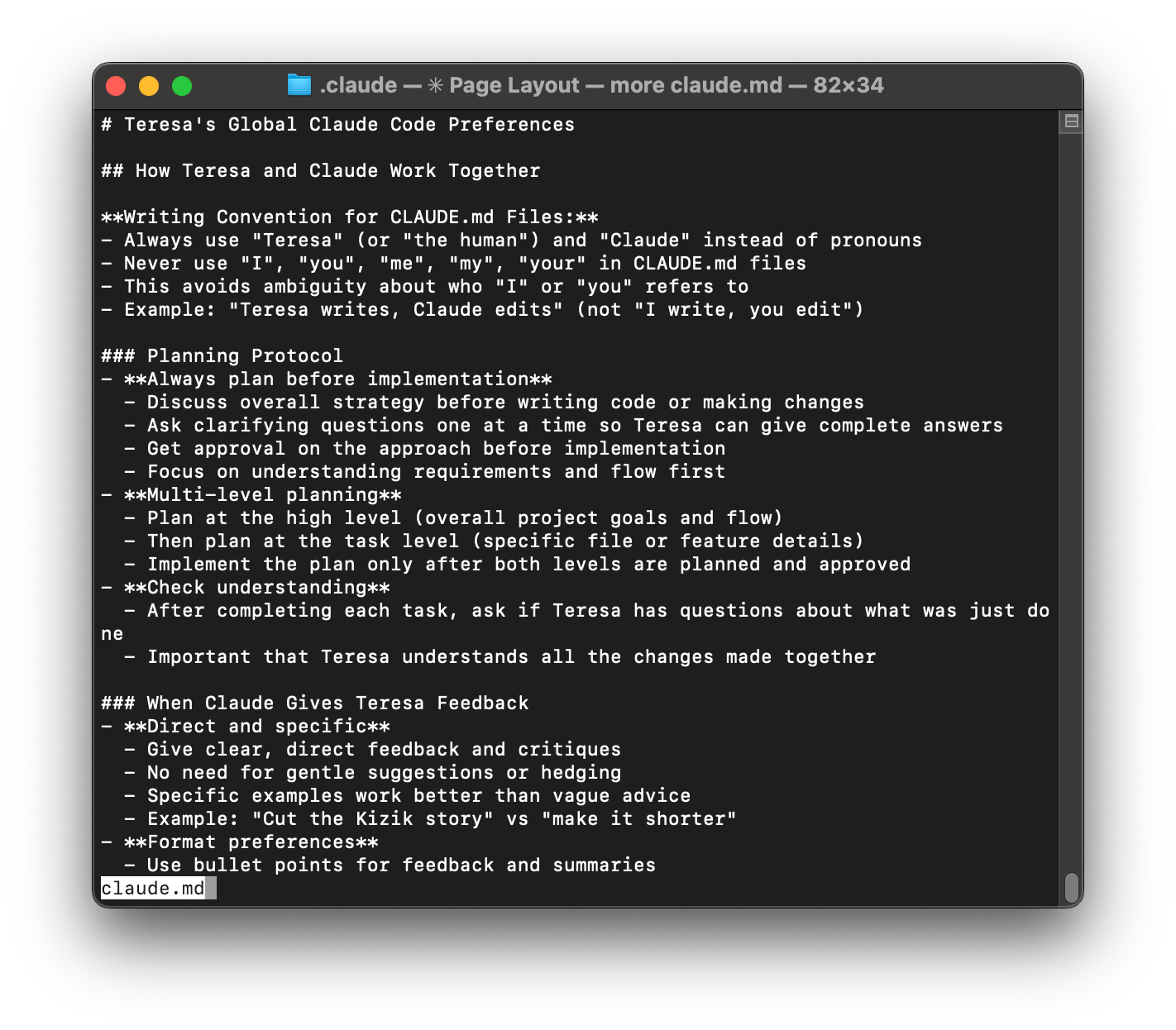
Peek inside a markdown playbook for Claude Code: concise rules for writing, multi-level planning, and clear feedback that turn repeated reminders into reusable memory and smoother, faster coding sessions.
Layer 1: Global Preferences (Always on). The first time I launched Claude Code, I created a CLAUDE.md file at ~/.claude/CLAUDE.md. This is where I keep the cross-project rules of engagement—how I like to work with Claude. Mine includes: Always create a plan for me to review before you start any work; Give me direct feedback (no hedging, no gentle suggestions); Use bullet points for summaries; Ask clarifying questions one at a time so I can give complete answers; No emojis unless I explicitly ask for them. Claude Code automatically loads this file at the start of every session, so I never restate my preferences.
Layer 2: Project-Specific Instructions. Different projects have different rules. In my writing workspace, the Project CLAUDE.md sets the roles (I’m the primary writer; Claude is my thought partner and editor), defines a multi-round review flow (content → structure → accuracy → typos), prioritizes human readability over SEO, and points to my writing style guide. In my task management system, I include how my Trello integration works, file naming conventions for tasks, and how to process research papers into summaries. In my code projects, I specify the technology stack (Node.js vs. Python), testing framework (Jest for Node.js, pytest for Python), code style and conventions, project architecture and directory structure, and which dependencies and libraries to use. Each project directory has its own CLAUDE.md, and Claude automatically loads the relevant file when I’m working there.
Peek inside a markdown playbook for collaborating with Claude—covering session setup, roles, editorial standards, and research steps—to show how saved instructions create consistent results without repeating yourself.
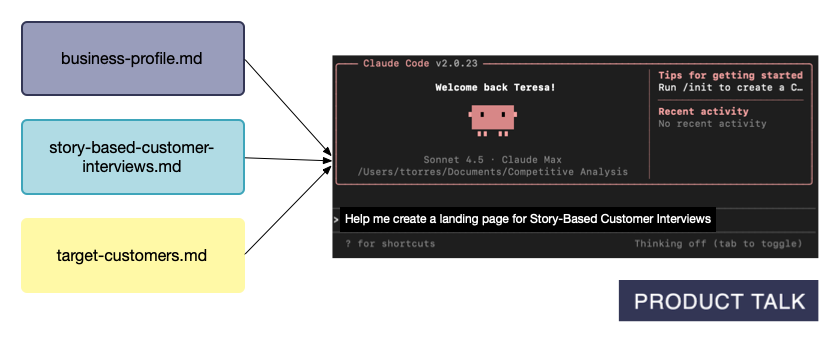
Layer 3: Reference Context (Pull as Needed)—the real power. LLMs have a context window—a limit to how much they can process at once. Even within that limit, loading too much degrades performance due to “context rot.” The remedy is ruthless context management: small, targeted files that load only when needed. Keep CLAUDE.md files concise and focused on rules and workflows. For detailed knowledge, create separate reference files and list them in your CLAUDE.md so Claude knows they exist and when to fetch them. When I ask for help creating a landing page, Claude knows to use my business profile, the product file, and my target customers context.
Here’s what most people miss: you don’t cram everything into global or Project files. You maintain small, reusable reference files that Claude only loads on demand. In my walkthrough, I share exactly which context files I created and why; how I got Claude Code to help me create them; how I break them into small, reusable components so Claude gets precisely what it needs; how I keep everything up to date; and step-by-step instructions so you can set up a similar memory system.
Three project notes funnel into Claude Code, turning reusable context into working output. This visual shows how saving key docs as memory lets the AI pick up where you left off and skip repetitive prompting across tasks.