In every AI-powered product I ship, evaluation is the difference between a compelling demo and a dependable customer experience. AI evaluation isn’t a nice-to-have; it’s a core product management competency that shapes quality, safety, and business outcomes from the first prototype to scale.
When I talk about AI evaluation, I mean a disciplined, repeatable way to measure model behavior across quality, safety, reliability, latency, and cost. Gen AI has changed the cadence of product decisions—models evolve weekly, prompts drift under real-world load, and edge cases multiply. Without rigorous evals, we risk shipping unpredictability.
My goal in this piece is simple: “Dive deep into AI evals, why they matter for PMs today, and how to master them with clear steps, examples, and best practices.” If you’re leading product strategy for LLMs, agentic AI, or applied AI features, this is the playbook I rely on.
Why this matters now: customers don’t judge AI by benchmarks, they judge by trust—did it help me, was it safe, was it fast? Strong AI evals let me set outcomes vs output OKRs, quantify risk, and make transparent trade-offs between accuracy, latency, and cost. They also give engineering and design clear guardrails to move fast without breaking user trust.
Step 1: Define the product problem and success metrics. I start by tying AI metrics to business outcomes—resolution rate, deflection rate, revenue lift, time-to-value—and include model-centric measures like hallucination rate, harmful content rate, latency, and token cost. This keeps experiments anchored to impact, not just model scores.
Step 2: Build a high-signal golden dataset. I curate real, anonymized user prompts from discovery and support channels, then add adversarial and long-tail cases. For generative tasks, I create rubric-based criteria for correctness, helpfulness, tone, and safety. This dataset becomes my regression suite as prompts, RAG pipelines, or models change.
Step 3: Choose the right evaluation methods. I combine deterministic unit tests for rules with LLM-as-judge scoring, pairwise preference tests for prompt variants, human review for critical flows, and red teaming for safety. I also apply privacy-by-design and strong data governance to ensure eval data handling meets compliance and customer expectations.
Step 4: Operationalize with CI/CD. Evals run automatically on every prompt, retrieval, or model update, with pass/fail gates and alerting. I track results in a unified analytics platform so product, engineering, and go-to-market teams see the same truth. If a change regresses key thresholds, we pause rollout or roll back.
Step 5: Optimize the cost–quality–latency triangle. Real products live within constraints. I analyze token budgets, caching strategies, model selection (e.g., small for classification, larger for complex generation), prompt structure, retrieval quality, and function-calling patterns. For agentic AI, I evaluate tool-use correctness and task completion reliability, not just text quality.
Step 6: Close the loop with experimentation. Offline evals get me confidence; online A/B testing validates business impact. I design tests with a clear minimum detectable effect (MDE), guard for novelty bias, and instrument activation, retention, and satisfaction in Amplitude or Pendo. Agent analytics help me pinpoint where users succeed or get stuck.
Step 7: Govern responsibly. I maintain model cards, decision logs, and incident playbooks. For customer-facing assistants, I gate risky actions, log explanations, and add human-in-the-loop escalation. AI risk management isn’t bureaucracy—it’s how we earn trust at scale.
A concrete example: building a customer support assistant. My success metrics include deflection rate, first-contact resolution, median response latency, and safe action rate. The golden dataset blends common queries, billing edge cases, account-specific retrieval checks, and adversarial prompts. Evals measure factuality against a knowledge base, tone alignment with brand guidelines, and safe tool use for CRM integration. Only after passing offline gates do we A/B test deflection and CSAT in production.
Common pitfalls I watch for: overfitting prompts to a tiny test set, relying solely on LLM-as-judge without human calibration, skipping safety tests when latency rises, and treating evaluations as a one-time launch task. The antidote is simple—regularly refresh datasets, diversify eval methods, and wire evals into the same release discipline as any core feature.
The payoff is compounding. With strong AI evals, we ship confidently, reduce incident rates, accelerate iteration, and communicate trade-offs clearly to stakeholders. More importantly, we build products customers trust—because quality isn’t a promise, it’s a practice we can measure every day.
AI has rewritten the rules of how we create value, and I’ve watched the most resilient organizations treat innovation as a disciplined, outcomes-driven capability—not a one-off initiative. In my role leading product teams, I’ve refined a practical approach that blends rigorous product management with an adaptive AI Strategy so we can ship faster, learn faster, and de-risk smarter.
Learn what an innovation strategy is, how to build one, which types to use, and see real examples that drive meaningful change.
At its core, an innovation strategy is the intentional system that aligns vision, portfolio bets, and execution mechanics to measurable business outcomes. I anchor this in outcomes vs output OKRs, ensuring every experiment, feature, and GTM motion ties to a clear value proposition and reinforces hard-won product-market fit lessons rather than chasing novelty.
I design portfolios around three types of innovation that work well in the age of AI. First, core optimization: drive compounding gains with CI/CD, DORA metrics, and A/B testing to improve activation, retention, and profitability. Second, adjacent expansion: extend value via new segments, channels, or use cases—often enabled by product-led growth tactics like in-app guides and product tours. Third, transformational bets: leverage gen ai and agentic AI to create step-change capabilities while proactively addressing AI risk management, data governance, and privacy-by-design.
Building the strategy starts with empowered product teams and product trios who run continuous product discovery to validate problems before validating solutions. I keep discovery tight with a minimum detectable effect (MDE), instrument the journey with a unified analytics platform, and thread learnings into product roadmapping and sprint planning so we prioritize the smallest, fastest path to decision-quality data.
On the AI front, my operating model combines an AI product toolbox (prompt patterns, evaluation harnesses, and safety rails) with LLMs for product managers to accelerate research, prototyping, and content generation. We standardize CustomGPT workflows where appropriate, define CRM integration and data boundaries early, and adopt a clear build/partner/buy decision tree to protect focus and speed without compromising risk posture.
Here are real patterns that consistently deliver meaningful change. We’ve used generative AI for product prototyping to compress concept validation from weeks to days, then confirmed impact with rapid A/B testing tied to MDE. We’ve implemented agentic AI for customer support triage to reduce response times and free human agents for high-complexity cases, all under strict data governance. And we’ve paired new AI features with a focused go-to-market strategy—clear positioning, sharp onboarding, and outcome-centric messaging—to accelerate user activation.
Measurement makes or breaks innovation. I combine deployment frequency and DORA metrics on the engineering side with activation, retention analysis, and value-moment telemetry on the product side. QBRs vs OKRs alignment keeps leadership focused on outcomes, while experiment scorecards ensure we learn even when results are neutral. The goal is to increase the rate of validated learning across the portfolio, not just ship more.
Governance is a feature, not a tax. We embed threat detection and response, privacy-by-design, and transparent data policies from day one. Stakeholder management and board management stay tight with simple narratives: the bet, the hypothesis, the metric, the MDE, the timeline, and the kill-or-scale criteria. That clarity builds trust and protects speed.
If you’re recalibrating your innovation strategy right now, start small and deliberate: define the outcomes, select one core, one adjacent, and one transformational bet, and wire in learning loops from discovery to delivery. With empowered product teams, disciplined analytics, and a pragmatic AI Strategy, you can move from interesting ideas to durable competitive differentiation—faster and with far less risk.
Will AI replace product managers, or simply transform their role? Discover what AI can and cannot do, plus insights from PMs on the future of work.
I’m asked this question in nearly every leadership meeting now, and my answer is consistent: AI won’t replace great product managers by 2035—but it will radically reshape how we operate. The PMs who thrive will pair sharp product judgment with an intentional AI Strategy and a practical AI product toolbox, unlocking speed, clarity, and scale without sacrificing vision.
Here’s what AI already does well for us today. With LLMs for product managers, I can synthesize customer feedback at scale, draft PRDs and acceptance criteria, transform notes into user stories, and even auto-generate experiment plans with a minimum detectable effect (MDE) calculation. When I connect these models to Amplitude analytics, Pendo, Intercom, and HubSpot through a unified analytics platform and CRM integration, I accelerate discovery, prioritize confidently, and tighten the loop between signal and action. CustomGPT workflows now handle routine backlog grooming, competitive landscaping, and early concept testing, freeing my team to focus on higher-order decisions.
By 2035, I expect agentic AI to operate as an execution co-pilot: autonomously scheduling A/B testing, launching targeted in-app guides and product tours, monitoring user activation and onboarding funnels, and raising anomalies via Agent Analytics long before a dashboard review. These systems will propose playbooks, draft UX writing and tooltip design, and recommend next-best actions—then wait for human approval when stakes are high. Think of it as the ultimate forward deployed engineer for operational work, working within clear guardrails.
What AI cannot do—and is unlikely to master soon—is the essence of product leadership. It won’t craft a resonant value proposition for a new segment, define points of parity vs. competitive differentiation, or set outcomes vs output OKRs that align messy stakeholder incentives. It won’t navigate board management, reconcile conflicting narratives from sales and engineering, or make ethically grounded trade-offs under uncertainty. That’s where privacy-by-design, data governance, and AI risk management converge with human judgment, context, and accountability.
As the tooling matures, the PM role will tilt from artifact production to decision quality. We’ll spend less time writing and more time deciding: which bets to place, which risks to accept, and where to concentrate our empowered product teams. Product discovery deepens, product positioning sharpens, and product roadmapping and sprint planning become faster and more adaptable—because the busywork is handled, not because the thinking is outsourced.
Practically, I’m evolving team design and rituals now. We operate as product trios, pair PMs with forward deployed engineers, and embed gen ai into daily workflows. We standardize prompts, set review thresholds, and instrument everything for observability. Our stakeholder management improves because we bring clearer narrative artifacts—and because we can test assumptions earlier and share evidence in real time.
If you’re building your own AI Strategy, start with three tracks. First, foundations: instrument data pipelines, establish data governance, and codify privacy-by-design. Second, acceleration: deploy CustomGPT workflows for research synthesis, PRD drafting, retention analysis, and experiment design, while keeping humans in the loop for decisions. Third, automation with guardrails: let agentic AI run low-risk playbooks (in-app guides, content suggestions, ops checks) and require human approval for anything customer-facing and irreversible.
Future-proofing your career is about skill stacking. Double down on first principles decision making, storytelling, and cross-functional influence, and pair that with hands-on fluency in gen ai, prompt engineering, model evaluation, and risk controls. Learn how to frame trade-offs, architect outcomes vs output OKRs, and translate strategy into experiments that AI can help execute. The combination—human judgment plus machine speed—is the new competitive advantage.
So, will AI replace product managers by 2035? No. It will transform average PMs into good ones and great PMs into force multipliers. The ones who lead will embrace AI as leverage, cultivate empowered product teams, and stay relentlessly focused on customer outcomes. The future belongs to product creators who can wield intelligent tools without surrendering accountability for the product’s direction and impact.
I’ve watched Retrieval-Augmented Generation (RAG) shift from a buzzword to a practical advantage that changes how my team discovers insights, makes roadmap bets, and competes. When I ground large language models in our own product, customer, and market data, I make faster decisions with more confidence—and I spend far less time debating opinions and more time shipping outcomes.
Think RAG for product managers is just AI hype? Wait until you see the use cases and ways it’s reshaping your work and product strategy.
RAG connects the power of LLMs with the credibility of your internal knowledge: user research, support tickets, win/loss notes, specs, QBRs, and analytics. Instead of generic answers, I get contextual, citeable responses that reflect our reality. That means cleaner product discovery, sharper product positioning, and a clearer value proposition grounded in customer truth.
Day to day, I use RAG to accelerate product discovery by synthesizing interviews and feedback across channels; to de-risk roadmapping by surfacing evidence behind feature requests; and to power go-to-market strategy with crisp messaging that maps to points of parity and true competitive differentiation. It’s equally effective for onboarding new PMs, increasing stakeholder alignment, and unblocking empowered product teams when signals are noisy or fragmented.
Execution still matters. I treat RAG like any critical system: prioritize data governance, privacy-by-design, and AI risk management. I integrate with our CRM and support stack so the model learns from live customer context, and I instrument everything with product analytics to track impact. When the outputs are measurable, RAG moves from novelty to operating system.
To start, I focus on a narrow, high-signal slice of the workflow—like summarizing support patterns or synthesizing discovery for a single segment—then iterate. I pair PMs with design and engineering in tight product trios, define quality criteria up front, and review answers with subject-matter experts. As quality rises, I scale to roadmapping and product-led growth experiments, always validating with users before I automate.
The payoff is real: faster decisions, clearer narratives, and fewer surprises. RAG won’t replace the craft of product management, but it will amplify it—giving us an edge in both speed and accuracy. If you’re serious about LLMs for product managers and want results you can defend, RAG is a strategic bet worth making now.
It’s Monday morning, and my Slack and email are already overflowing with content requests: “Can you review this flow?”; “Can you rewrite this screen?”; “Can you name this feature?” I’m not freshly back from holiday—this is just a regular work week kicking off. If you’ve ever been a solo content designer supporting multiple teams, you’ll recognize the pressure. The pipeline for content in product design is always full, and the demand for expertise never stops.
Fixing this isn’t just a matter of better time management or incremental process tweaks. To truly scale, I needed to extend my reach by bringing AI into the design process—without sacrificing judgment, standards, or quality. That Monday morning, I realized I had to scale my skills, my judgment, and our systems, not just my calendar.
Building AI is fundamentally about building systems. I wanted to use AI to scale myself without devaluing critical thinking or flooding the product with generic, verbose content. I also knew a useful AI tool must do more than spit out microcopy—it has to plug into a system we can continually shape. As a content designer, the system is always the starting point. Strong design systems create strong content standards; then AI agents can produce content that meets those standards at speed, freeing me from the bulk of standardized work. That’s not a threat—it’s an advantage. To instruct AI well, our systems must be well constructed.
I often think about this work like a bakery. You need a recipe before you can make a loaf of bread. Most interface content churns out the same loaf, day in and day out. It’s better for the master bakers to focus on the unique, custom bakes—and how the recipe needs to change. With that mindset, I set out to build an AI content design agent.
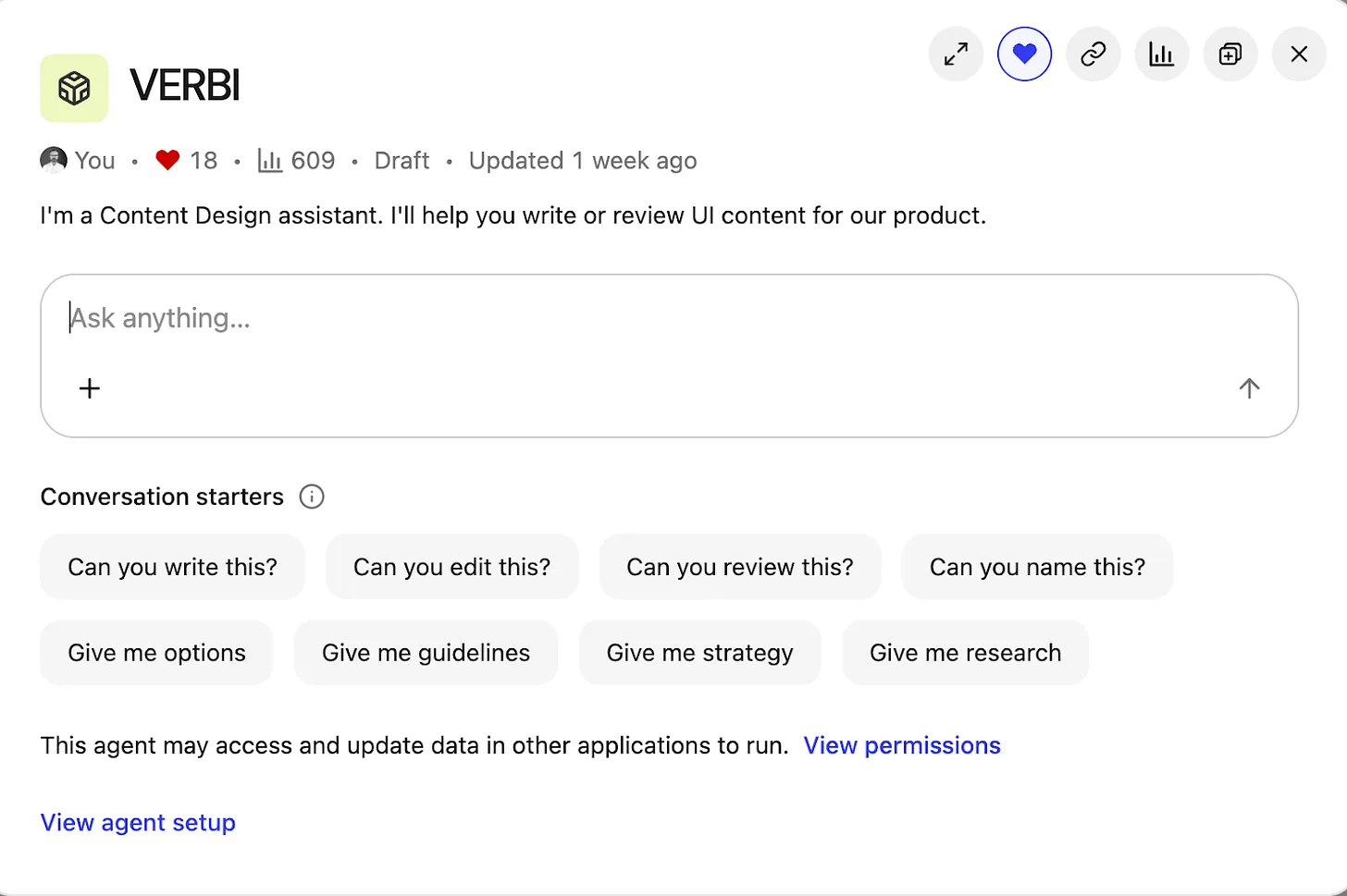
Inside the Content Design Agent workspace, a clean chat UI titled VERBI pairs a central prompt box with chips for writing, editing, and reviews, plus clear controls to view permissions and open the agent setup for product teams.
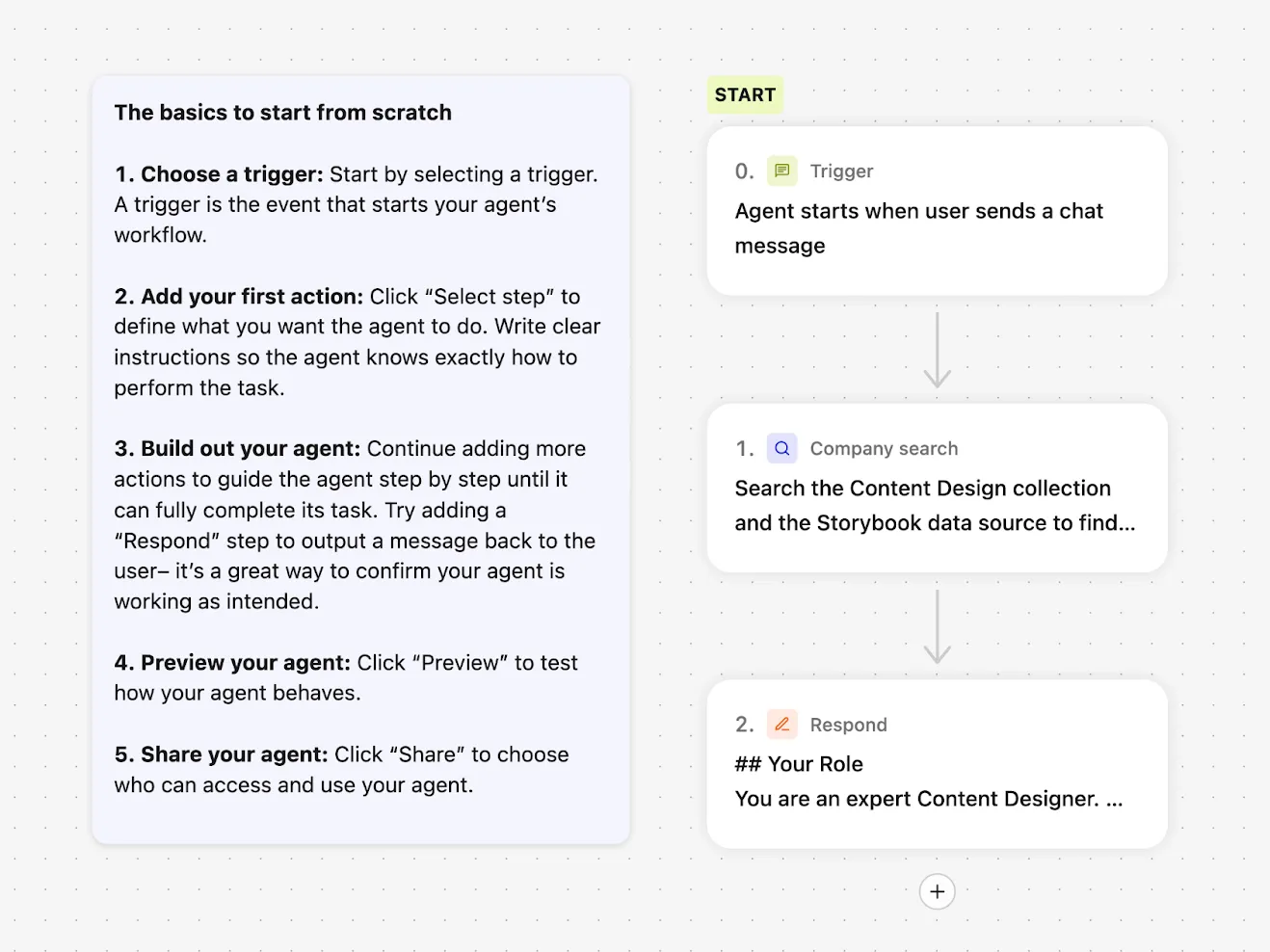
When I started this project back in May 2025, many LLMs still had frustrating limitations. Google Gemini let me build a custom Gem agent, but I couldn’t share it with other users. ChatGPT could be customized, but only with static files: I couldn’t point it to live, updatable URL sources. I settled on Glean for three simple reasons: everyone at the company had access; Glean could access all internal documentation and treat URLs as sources of truth; and its then-new Agents feature made AI search customizable. Configuring an agent in Glean is straightforward—you choose a trigger, a set of prompts, and a set of actions—but first I needed to get the inputs right.
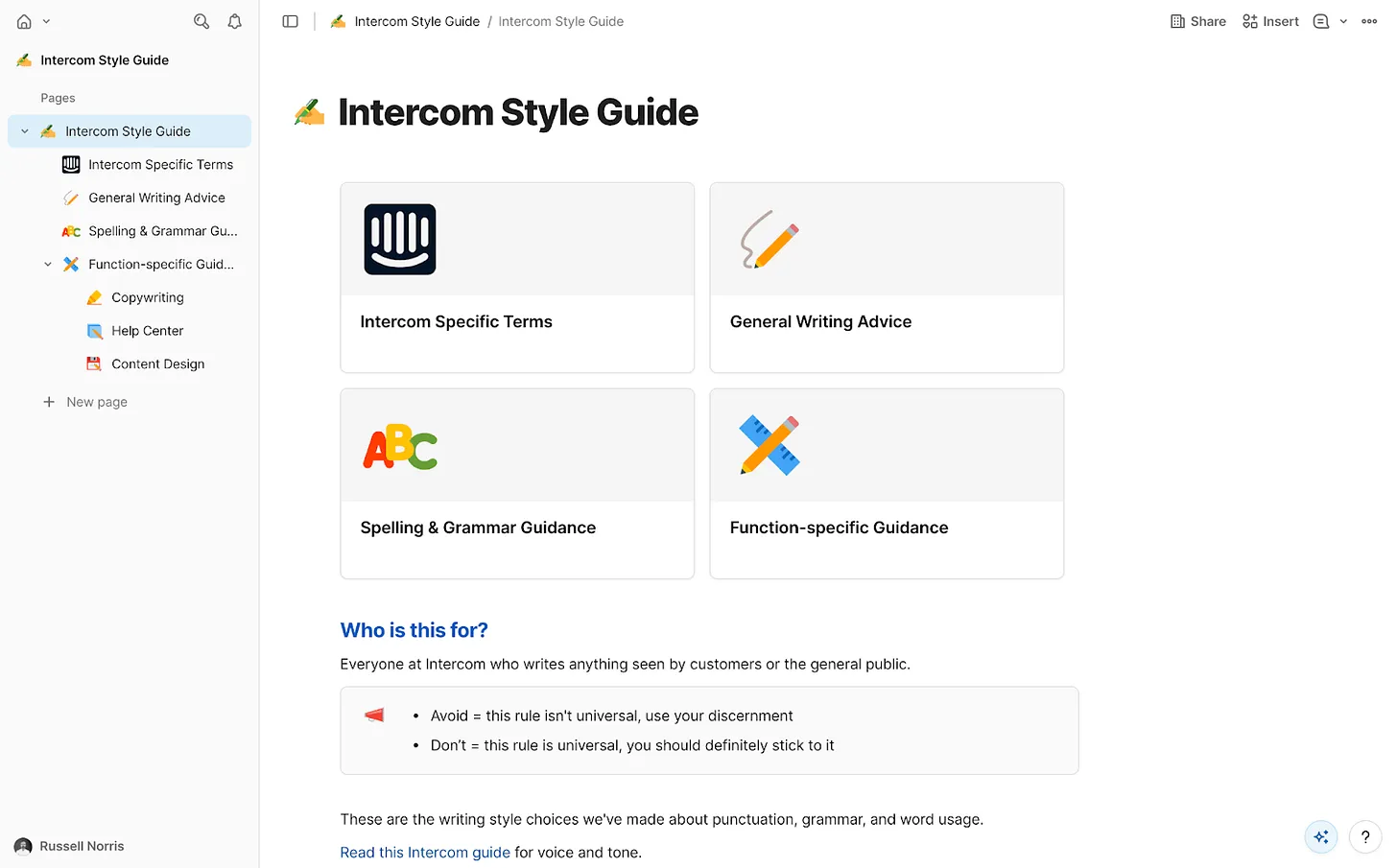
AI agents need focus. We had a wealth of internal information at Intercom, but not all of it was current or reliable. I curated exactly what the agent could access and assembled a tightly governed knowledge collection in Glean. Only essential information made the cut: the Intercom style guide—our definitive house style, including regularly-broken rules like “always write in US English” and “use sentence case everywhere”; tone of voice guidance for how we show up across mediums; a product glossary with hundreds of feature names and writing conventions; a monetization glossary for prices, plans, and add-ons; product marketing messaging guides with positioning for every feature and launch; core research insights across the product; and fin.ai and intercom.com/suite as the official, most up-to-date messaging sources.
This is classic RAG (retrieval-augmented generation) in action, ensuring every answer is grounded in approved sources of truth. With the collection in place, I instructed the agent to prioritize these resources above anything else.
Step into a clean, no-code builder that shows how to assemble a Content Design Agent: kick off with a chat-trigger, run a company search, then respond with expert guidance, all guided by a simple starter checklist.
Then came the fun part—building and branding the agent. “Content Design Assistant” felt bland, so I named it VERBI, a nod to its “verbal” design job. When people interact with VERBI, they usually begin with a question, but the intent varies widely. I defined a set of task prompts to guide expectations and outputs: “Can you write this?”; “Can you edit this?”; “Can you review this?”; “Can you name this?”; “Give me options”; “Give me guidance”; “Give me strategy”; “Give me research.” This mirrors the real breadth of content design, from creation to critique to discovery.
To manage responses, VERBI needed three things: start with a specific task prompt; understand how to draw on the right resources each time; and connect with other systems. With task prompts defined, I wrote a detailed system prompt covering the essentials. Role: you are a content designer, supporting product designers. Employer: Intercom (consisting of Fin AI Agent and our next-gen Helpdesk). Resources: content design collection, research collection, Storybook design system. Tone of voice: follow a specific tone for our UI, adjust the tone for everything else. Components: for UI, use the specific guidelines in our design system only. Use cases: writing, editing, critiquing, naming, researching, and more.
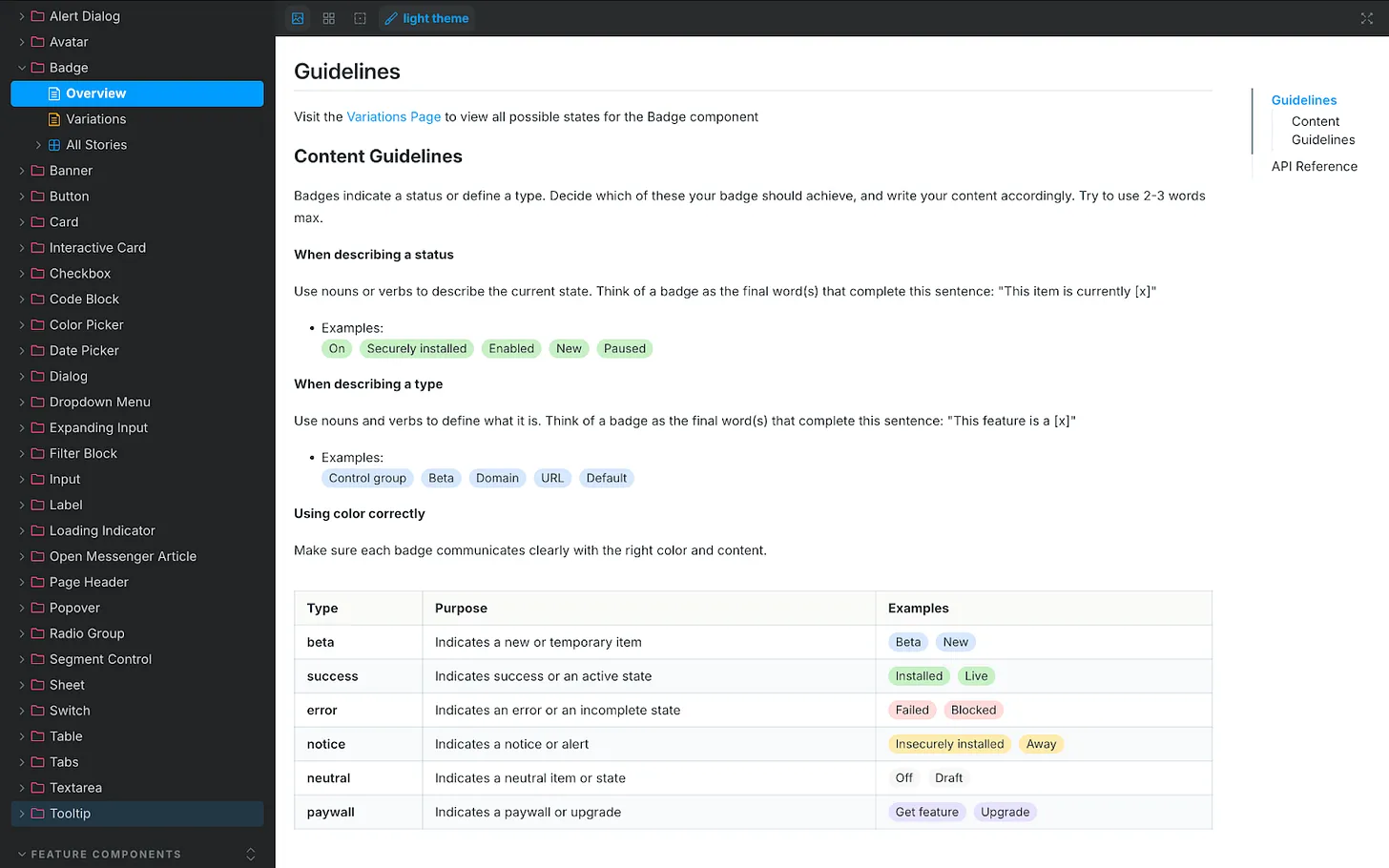
One connection mattered most: our design system, recently rebranded as “Surge.” Surge contains detailed content guidelines for every component in our product UI, from accordions and banners to tabs and tooltips. That granularity took months of human effort to codify, and it paid off. Designers no longer guess how to write for a toggle, a button, or a tooltip—and now VERBI understands and enforces those rules, too. A great content design assistant isn’t just a clever system prompt; it needs deep, component-level guidance to retrieve.
UI documentation showcases the Badge component’s content rules, teaching how to name statuses, define types, and apply color so labels read clearly. A handy visual for building a content design agent and ensuring consistent product messaging.
Accessing the design system wasn’t simple at first. It lives in Storybook, which Glean couldn’t access directly. I started by scraping guidance from Storybook into an HTML file with Cursor and uploading it to VERBI—a functional but clunky workaround that required re-scraping every few days. Then our IT team stepped in. They used the Glean Indexing API to turn Storybook into a live data source. Now VERBI connects to Storybook directly. Ask it something ultra-specific, like the correct date format for Japan, and it returns the right answer. That integration elevated the agent from helpful to indispensable—human-level precision, 24/7, at scale.
With prompts and resources in place, I launched VERBI and pressure-tested it. It was accurate and well-informed most of the time, but like any AI agent, it had quirks. I needed it to act as a gatekeeper, not a brainstorming partner that might bend rules or invent new ones. So I added a few explicit guardrails to the system prompt. Stopping sycophancy: “Inform, challenge, and assist. Never placate. Don’t agree by default. If something’s wrong, say so. Challenge assumptions.” Halting hallucinations: “If you don’t find the information required in our resources, say you don’t know the answer. Don’t guess and don’t give answers based on general knowledge.” Avoiding verbosity: “Keep answers short and to the point. Cut the fluff. Skip all niceties and social padding. Only give longer answers if the user asks you to.” These constraints keep responses crisp, correct, and consistent. Like any living system, the prompt needs occasional tune-ups, but the maintenance is minor compared to the upside.
Where we are now: VERBI has been triggered 700+ times since launch. The benefits are tangible. For me, quality scales without constant policing; repetitive questions about naming, style, or punctuation have dropped significantly. I reclaim time because the agent drafts and checks V1 content across teams, enabling me to focus on higher-impact work. For the design team, iteration is faster, confidence is higher, and strategic clarity improves because shared language and grounded guidelines make decisions easier and more consistent.
I used to spend too much time mopping up basic content mistakes and untangling spaghetti-like UI copy prone to human error. VERBI removes those errors at the source. The real advantage is speed: we get from blank slate to a high-quality first draft quickly, which means we can spend our energy deciding whether the content is right, not just “good enough.” Design is the whole interface—words, visuals, interactions—so reviews now happen with real content, never “copy TBD.” Our principle to sweat the details applies equally whether work is human-made or AI-assisted.
Knee-jerk critiques of AI-driven content design often assume teams generate content from nothing and ship it. In reality, great AI is the outcome of great human decisions and strong systems. Its value is pulling us together faster—getting us to a complete, standards-compliant design we can review as a team before sharing it with the world. That’s how AI helps us win: by turning chaos into consistency, and consistency into velocity.
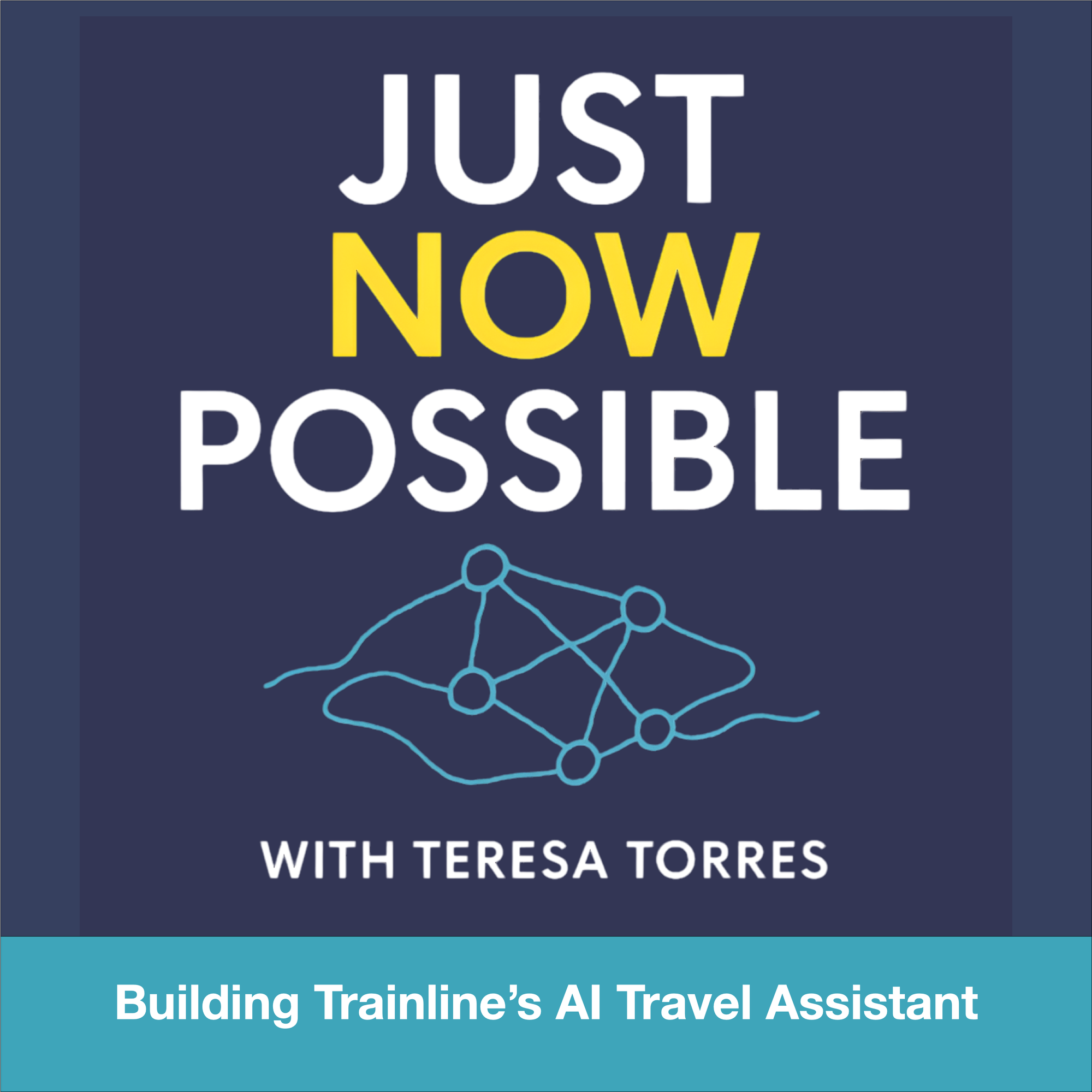
Over the past year, I’ve been shipping agentic AI into production and coaching product teams on what it really takes to make these systems trustworthy in the wild. One story that crystallizes the playbook comes from Trainline’s move to an agentic architecture for travel assistance—an approach that mirrors what I’ve seen work in high-stakes, real-time customer experiences.
Trainline—the world’s leading rail and coach platform—helps millions of travelers get from point A to point B. Now, they’re using AI to make every step of the journey smoother.
I studied how "David Eason (Principal Product Manager) Billie Bradley (Product Manager), and Matt Farrelly (Head of AI and Machine Learning)" approached the build of "Travel Assistant, an AI-powered travel companion that helps customers navigate disruptions, find real-time answers, and travel with confidence." Their work exemplifies the kind of end-to-end thinking required to move beyond demos into dependable, on-the-go assistance.
They share how they: Identified underserved traveler needs beyond ticketing; Built a fully agentic system from day one, combining orchestration, tools, and reasoning loops; Designed layered guardrails for safety, grounding, and human handoff; Expanded from 450 to 700,000 curated pages of information for retrieval; Developed LLM-as-judge evals and a custom user context simulator to measure quality in real-time; Balanced latency, UX, and reliability to make AI assistance feel trustworthy on the go.
I align strongly with their core takeaways: "AI assistants need both scalable reasoning and deep domain context to be useful." "Tool design and guardrails are as critical as prompt design in agent systems." "LLM-as-judge evals make it possible to measure open-ended systems without massive labeling costs." And perhaps most importantly, "Even legacy companies can move fast when they embrace experimentation and tight PM–engineering collaboration."
From an AI strategy perspective, starting "fully agentic" was the right call. When the problem space is dynamic—disruptions, route changes, fare conditions—reasoning loops and orchestration aren’t luxuries; they’re table stakes. Tool selection becomes product design: you need the right retrieval interfaces, constraint-aware planners, and API contracts that are resilient to partial failures. Layered guardrails for safety, grounding, and human handoff reduce hallucination risk while preserving responsiveness—critical when users are standing on a platform waiting for an answer.
The retrieval scale-up—"Expanded from 450 to 700,000 curated pages of information for retrieval"—is a classic inflection point. I’ve seen teams stall here when they treat content growth as a pure indexing problem. The winning move is curation and structure: normalize sources, encode policy-level constraints, and align retrieval chunks to decision boundaries the agent actually uses. That’s how you keep precision high while coverage explodes.
Evaluation is where most open-ended assistants fail quietly, which is why I was encouraged to see "Developed LLM-as-judge evals and a custom user context simulator to measure quality in real-time." In practice, LLM-as-judge gives you scalable, scenario-based scoring without prohibitive labeling, while a user context simulator surfaces regressions tied to persona, itinerary state, and device constraints. The combination closes the loop between model behavior, tool layer changes, and UX outcomes.
On product delivery, the decision to have the system "Balanced latency, UX, and reliability to make AI assistance feel trustworthy on the go" shows mature prioritization. For travel, trust accrues in seconds: fast-enough responses, graceful degradation when upstream data lags, and explicit handoff when confidence dips. This is where guardrails meet UX writing—clear, bounded language signals competence even when the system defers.
Finally, the organizational pattern matters. The teams that win in agentic AI are cross-functional, experimentation-driven, and ruthless about instrumentation. Tight PM–engineering collaboration, explicit safety thresholds, and an eval stack that mirrors real user journeys are what turn promising architectures into dependable products.
It’s a behind-the-scenes look at how an established company is embracing new AI architectures to serve customers at scale.
If you’re building agentic AI in production, borrow these moves: invest early in tool and guardrail design, scale retrieval with curation not just volume, adopt LLM-as-judge plus context simulation for continuous evaluation, and treat latency and reliability as core product requirements—not afterthoughts. That’s how you ship AI assistance that customers trust when it matters most.
I’m excited to share that we’re opening our next R&D hub in Berlin to support significant investment in our AI customer service platform, Intercom, and market-leading AI Agent, Fin. We intend to hire 100 people in Berlin over the year ahead across engineering, AI, data science, product, and design. This move reflects our AI Strategy, our commitment to product management leadership, and our focus on building enduring product-led growth.
We believe that in a short number of years, the vast majority of customer service will be done by AI. Fin is already the world’s best Customer Service Agent. At Pioneer, our recent summit for AI customer service leaders in NYC, we talked about how Fin will become a true end-to-end Customer Agent, extending far beyond service. We showcased how companies like WHOOP, Anthropic, and Lightspeed are already pushing Fin in ways that help them grow their business.
This market opportunity is massive and expanding at unprecedented pace. Our ambition is to earn our place as one of the most successful AI businesses during this wave of AI disruption, and we want more brilliant people on our team to pursue this as aggressively as possible. If you’re motivated by Generative AI, LLMs, and building real products that scale, you’ll find both challenge and impact here.
We are already on track to be one of the fastest growing private software companies. Fin is the primary contributor to this, and is months away from passing $100m in ARR. So far, more than 7000 businesses have transformed their customer service with Fin, including German companies like electricity provider Ostrom, smart home technology provider tado°, and grocery delivery company Flink, along with global leaders like Vanta, Clay, Lovable, and Miro.
Why Berlin? We’re drawn to the city’s rare blend of deep technical talent and rich creative culture—within a vibrant, globally connected ecosystem close to our R&D hubs in Dublin and London. It’s a place where top-tier engineers and designers thrive, and where ambitious builders from around the world want to relocate and create category-defining products.
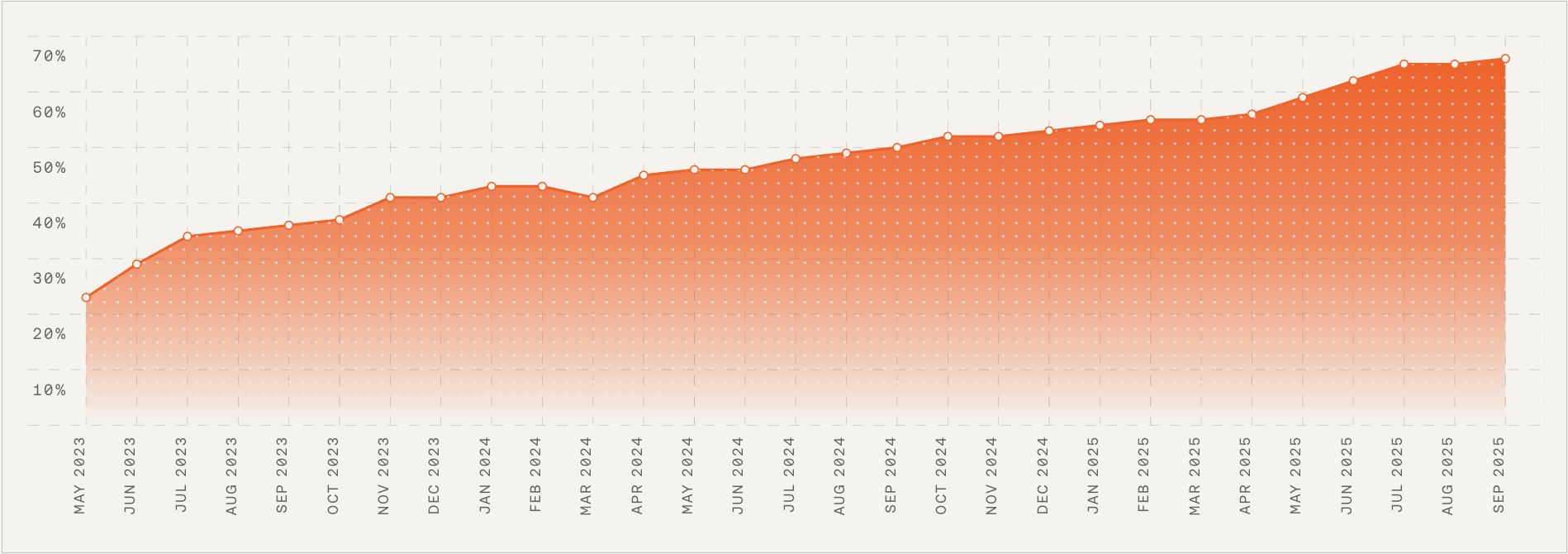
Momentum is building: this month-by-month chart shows a consistent rise from the mid-20s to nearly 70% between May 2023 and Sep 2025—signaling strong progress as we expand engineering, AI, and automation at our new Berlin R&D hub.
We needed a new location that would sustain the high ambition and standards held by our world-class AI teams in Dublin and London. Berlin has emerged as one of Europe’s hottest centers for AI talent, with a high density of AI-focused startups, applied research labs, and practitioners who bring exceptional literacy, optimism, and ambition. It’s the right accelerator for our AI hiring and a place to bring in brilliant minds to shape the future of our product and business.
While Intercom’s reach is global with our headquarters in San Francisco, our R&D leadership remains anchored in Dublin, where half of the executive team sits—making Berlin both geographically and strategically an ideal next location for our growth.
This isn’t our first time expanding our footprint; we previously bet on London and are delighted with how that’s been working. When we shared our Berlin news internally, the energy was palpable, with many teammates volunteering to help spin up the hub successfully—including colleagues who helped make London a big success, like Danny. That level of ownership and momentum is exactly what we aim to cultivate in Berlin.
We’re looking for people who thrive in a high-intensity, high-ambition, high-standards environment and want to help build one of the world’s best AI companies. For builders like that, the opportunity for impact, growth, and career progression is extraordinary. As with London and Dublin before it, the early Berlin cohort will have a disproportionate influence on team norms, culture, and long-term outcomes. We are in the middle of a huge disruptive wave with AI, and Fin is one of the leading examples of commercially successful AI applications. Joining Intercom is an opportunity to be part of this disruptive wave, and help us build out our vision for Fin becoming the world’s best Customer Agent.
On a minimalist stage, four speakers share insights on AI research, automation, and engineering as part of a panel tied to Berlin expansion and the launch of a new European R&D hub.
There are plenty of AI companies to join, but our technology and culture set us apart. Any AI product is only as good as the AI layer powering it. Ours is industry-leading, built by a highly talented, ambitious, and technical team of over 40 machine learning scientists, engineers, and designers in Europe who continuously optimize Fin’s performance through cutting-edge research, experimentation, and innovation. Fin’s average resolution rate increases 1% every month. That kind of steady, compounding improvement is exactly what great customer support AI strategy looks like in practice.
We also build in public and share our progress and learnings with the AI community at large. Recently, our Chief AI Officer Fergal Reid and SVP of Engineering Jordan Neill joined leaders from Cognition, Harvey, and Perplexity in San Francisco to share real lessons, challenges, and breakthroughs from building frontier AI products. Our AI team regularly publishes their insights on the AI research blog; from optimizing inference speed and availability, to building our own proprietary models that outperform general purpose models for CX.
Our AI group and the broader R&D org they operate within work at extraordinary scale and speed. We recognize that moving fast can’t be taken for granted—you must fight for it—and we’re doing just that, embracing the capabilities AI tooling brings us to achieve 2x the throughput. One example of this mindset in practice is us “Betting on the future of frontend at Intercom,” making a technology choice that optimizes for our teams’ ability to build high-quality product, fast.
Our design and product teams are world-class and forward-thinking; they’re embracing AI to evolve how they work, as shared in our 3-point framework for AI-driven design and recently presented by Emmet Connolly, our SVP of Design, at this year’s Hatch conference in Berlin. As a product leader, I’m grateful to work alongside brilliant product and design thinkers—it gives me confidence that we’re solving the right problems, solving them well, and driving real impact.
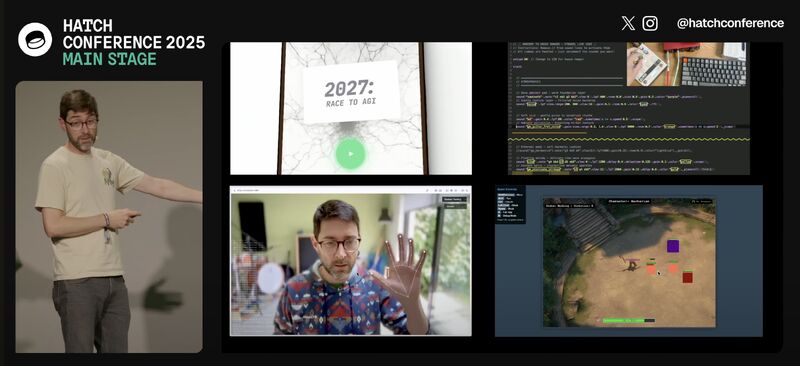
From live demos to hands-on coding, this snapshot captures the momentum we're bringing to our Berlin R&D hub – AI experiments, hand-tracking prototypes, and simulation tools powering our next wave of engineering.
We plan to open our Berlin office space in December or January. To get the office started, we’re hiring Senior Product Engineers, Machine Learning Scientists, Product Managers, Senior Product Designers, Engineering Managers, and Data Scientists immediately. If your craft sits at the intersection of LLMs for product managers, agentic AI, and empowered product teams, you’ll be right at home.
You can learn more about our open roles, company, culture, and locations on our careers site, or feel free to reach out to me, Jordan, Fergal, or Brian directly on LinkedIn if you have any questions.
Some of our engineering team will also be at LeadDev Berlin on November 3rd—come say hi if you’re attending.
I’m looking forward to continuing to build Intercom as one of our generation’s best AI companies—and I’m excited for our expansion into Berlin to be a major contribution to that success.
Digital transformation rewired our systems; AI transformation rewires how we learn, decide, and compete. “AI transformation goes beyond automation to create adaptive, intelligent organizations. Discover why it’s the next imperative and how to measure success.” That statement captures what I experience daily: we’re moving from scripted workflows to living systems that improve with every interaction.
When I talk about AI transformation, I’m not describing a tool rollout. I’m describing an operating model where data, models, and product strategy converge to create compounding advantage. In practice, that means agentic AI orchestrating tasks, robust data governance and privacy-by-design from day one, and empowered product teams that ship, measure, and iterate at high tempo.
The imperative is strategic, not merely technical. Markets are compressing cycle times, and customers now expect intelligent experiences by default. Organizations that master AI Strategy and product-led growth will set the pace—using AI for competitive differentiation rather than feature parity.
This shift changes how I build teams and backlogs. I lean on product trios, forward deployed engineers, and tight product discovery loops to reduce uncertainty early. We design for resilience and learning: human-in-the-loop feedback, clear escalation paths, and telemetry that turns every interaction into a hypothesis test.
Governance is a first-class feature. AI risk management, data governance, and threat detection and response sit alongside performance metrics in the same dashboard. We codify guardrails—policy, provenance, and permissions—so innovation scales safely and sustainably.
Measurement is where transformation becomes real. I anchor on outcomes vs output OKRs tied to customer value and revenue impact. At the product layer, I track activation, time-to-value, retention, and adoption by persona. For ML quality, I monitor precision/recall, coverage, hallucination rate, and model drift. In experimentation, A/B testing with a thoughtful minimum detectable effect (MDE) prevents false wins, while Amplitude analytics, Pendo, and Intercom instrumentation expose where guidance or UX writing can unlock activation.
The fastest wins often start in service and sales. A customer support ai strategy can deflect tickets with high-resolution answers while escalating edge cases to humans with full context. CRM integration with HubSpot and a ChatGPT connector enables reps to generate next-best-actions, summarize calls, and personalize outreach—measurably lifting conversion and lowering cost-to-serve.
On the build side, LLMs for product managers and gen ai for product prototyping accelerate discovery cycles. I use CustomGPT workflows to validate value propositions quickly, then harden successful flows with engineering. Throughout, product positioning and a crisp value proposition ensure that what we ship is understandable, differentiated, and priced to match ROI—consumption SaaS pricing when usage scales value.
If you’re getting started, begin with a single, high-frequency journey, instrument it deeply, and publish transparent OKRs. Pair empowered product teams with clear governance, and iterate toward agentic AI experiences. The payoff isn’t a one-time launch; it’s a continuously learning system—and a culture—that compounds advantage release after release.
AI overwhelm is real. Whether you’re a complete novice who isn’t sure where to begin or you’re deep into building AI features, it can feel like everyone else is light years ahead. The hype is loud, adoption is exploding, and it’s easy to assume you’re already behind. Take a breath—you have more time than the headlines suggest.
Here’s how I approach it: start with simple, low-stakes use cases you can do today. Then add a little complexity at a time. With each step, you’ll pick up a new capability—prompting, structuring context, decomposing tasks, and eventually automating workflows. Before long, you’ll be designing your own use cases and systems. And if you’re being asked to deliver AI products yesterday, the same skills will make you a more confident builder when it’s time to ship.
Start small, build fast. Every time you try an AI tool at home—whether for planning meals, organizing tasks, or learning—you're adding a new skill to your product toolbox and unlocking more ways to create.
My journey from AI consumer to AI builder started with ChatGPT. I used it like a cleaner, faster search engine—and appreciated the lack of ads. Very quickly, my questions got more complex. I began using it for day-to-day problem-solving and task execution. Through experimentation, I learned how to give the right context, what worked and what didn’t, how to use persistent memory, and how to conduct deep research. That hands-on tinkering began to influence my roadmap. In my role leading product, those experiments sparked prototypes that translated directly into features and workflows we could ship.
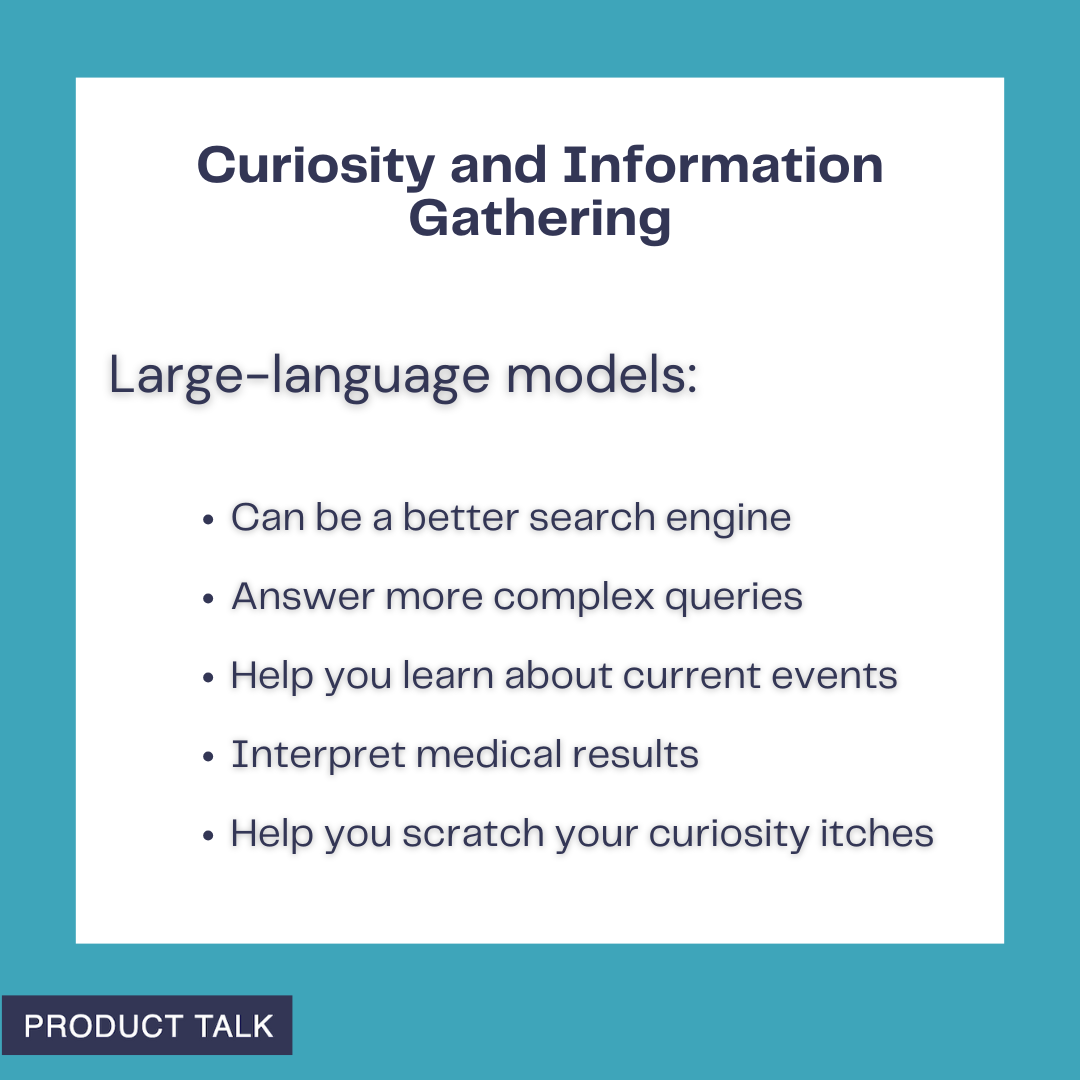
From 15 Ways to Use AI at Home: see how large-language models turbocharge information gathering—work as smarter search, tackle complex questions, explain medical results, and keep you informed about current events.
You can follow the same path. Start small. Pick something tedious or annoying. Ask ChatGPT, Claude, or Gemini for help. When you have a prompt that works, try to automate it. If automation is new to you, tools like Zapier, Make, or n8n are a great starting point—and your company might already use them. You’ll make everyday life easier while building the exact skills that underpin modern AI product work: prompt engineering (giving the right context), task decomposition, and multi-step workflows.
Turn everyday curiosity into answers. This prompt-style graphic shows how AI can quickly check civic data, like the age makeup of the US Senate, helping you build a practical, at-home AI toolbox.
To help you get started, here are the personal use cases that built my AI muscles at home, ordered from simple to more advanced. I group them into three buckets: Curiosity and Information Gathering, Everyday Life, and Deep Research. Start at the top and move down as your confidence grows.
Curiosity drives everyday learning at home. This Product Talk quote card shows someone seeking answers about the Middle East—illustrating how generative AI can support research, summaries, and safe, guided exploration.
Curiosity and Information Gathering is where large language models really shine. They’ve been trained on large portions of the internet as well as thousands of books and other resources. Here’s how I put them to work.
Use AI wisely at home: let LLMs help you prepare for appointments—organize symptoms, draft questions, and summarize records—but never treat them as a replacement for professional medical care.
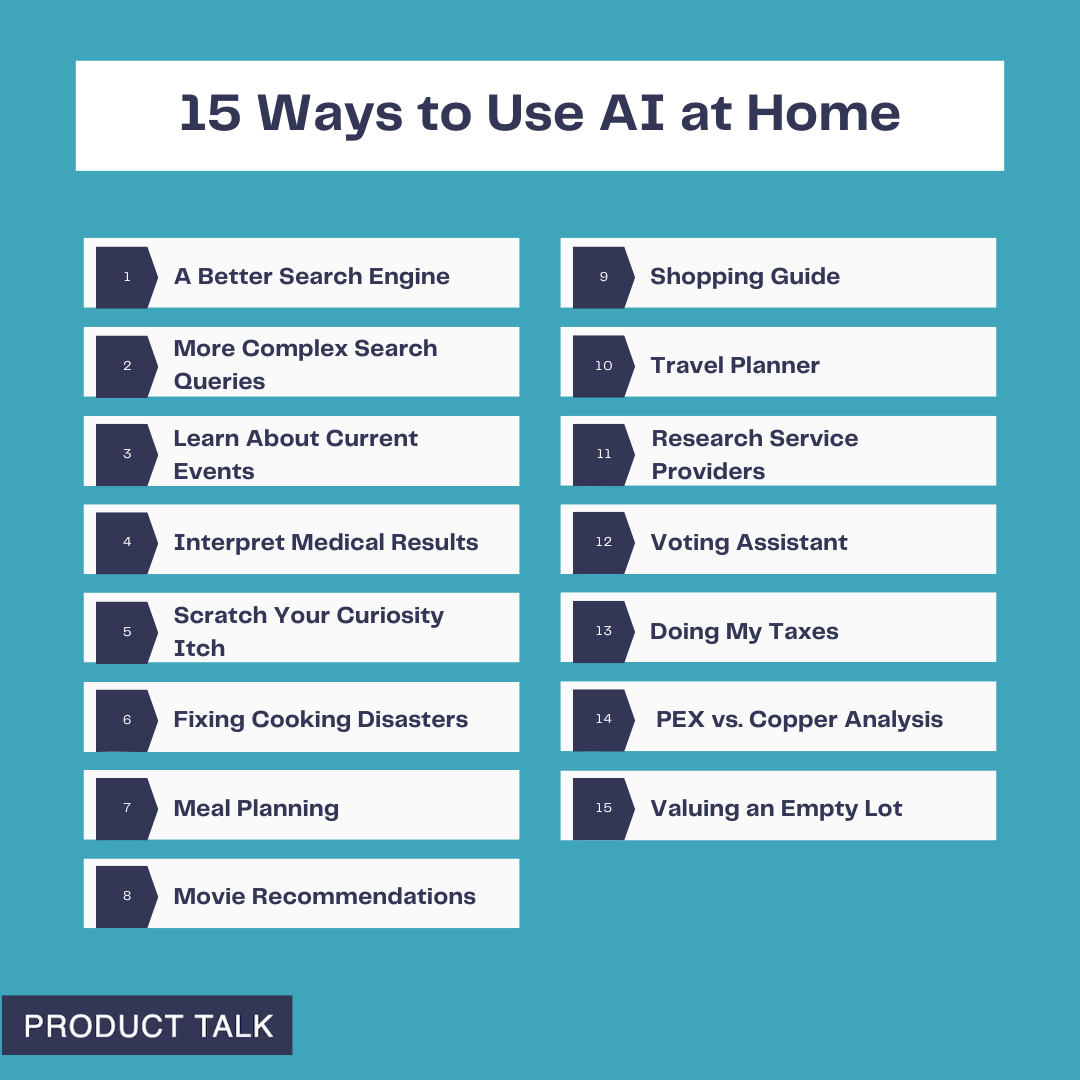
1. A Better Search Engine. I rarely Google things anymore. I ask ChatGPT and get faster answers without the noise. I still use it for simple queries like: “Can my dog eat this?”, “Can I slow peaches from ripening if I put them in the fridge?”, “Does oatmeal go bad?”, “Can my dog be off-leash at Todd Lake?”, and “What’s a good coleslaw recipe that isn’t sweet or too mayonnaise-y?” If you’re brand-new to AI, this is the perfect on-ramp. You’ll get comfortable chatting with LLMs and quickly overcome the “What do I use this for?” hurdle.
A minimalist quote card captures an everyday question—how big a tractor to buy—showing how AI can turn casual curiosity into smart guidance for home projects, purchases, and product research.
2. More Complex Search Queries. The real power shows up when your question needs reasoning or synthesis. I recently wondered how many US Senators are over 75. Google returned lists of all 100 senators; I’d still have to count. ChatGPT gave me the answer immediately—there are 10 US Senators over the age of 75—listed each one, cited Axios, and offered another way to cross-check. That was more than good enough for my purpose and a great reminder of what LLMs can do better than search engines.
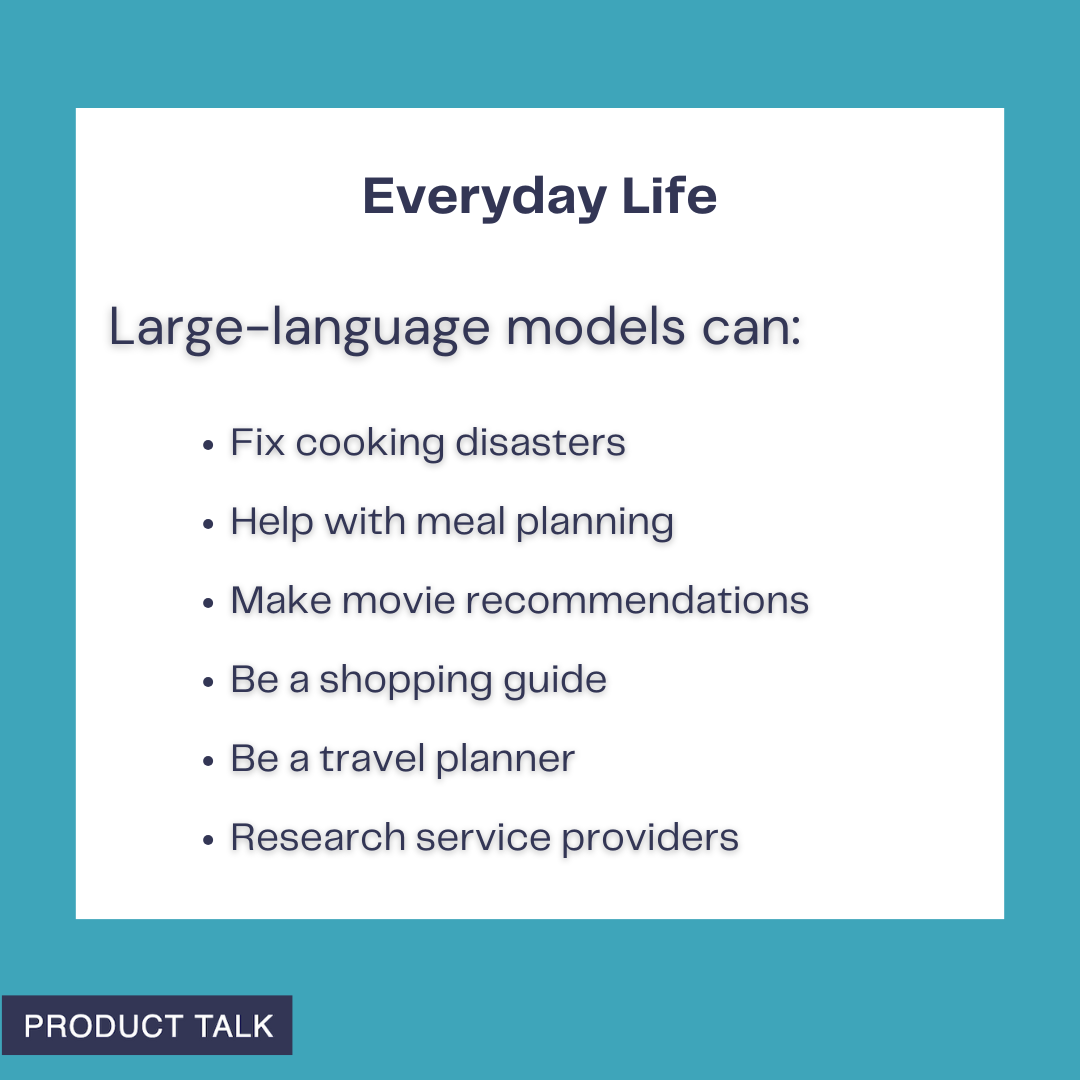
From kitchen fixes to trip planning, generative AI can streamline daily decisions. This Everyday Life graphic spotlights how large-language models support meals, movies, shopping, travel, and finding trusted service providers.
3. Learn About Current Events. When Hamas attacked Israel on October 7, 2023, I had a lot of questions—some I felt I should already know. I used ChatGPT to explore the region’s history, the etymology of “anti-Semitism,” and the context around Hamas, Hezbollah, and Jordan. It was empowering—and it also made me more vigilant about bias and hallucinations. I asked for sources, spent time on Wikipedia, and triangulated with trusted outlets. Now, I routinely use LLMs as a starting point to frame questions and then verify. You’ll learn to explore new topics while staying mindful of bias and accuracy.
From meal planning to DIY fixes, this quote shows how ChatGPT becomes your go-to helper. Explore practical, at-home ways to use generative AI and build a product toolbox you’ll actually rely on.
4. Interpret Medical Results. Medicine is full of information asymmetry. I use LLMs to prepare for appointments so I can ask better questions. After an ankle surgery, I read my operative notes and saw a ligament repair described as “secondary.” I pasted the entire report into ChatGPT and asked for an explanation. I learned that a secondary repair indicates an old tear—not the current injury. I dug into common repair types and their trade-offs, which helped me have a more productive follow-up with my surgeon. When bloodwork flags an out-of-range value, I ask ChatGPT to explain potential implications. I once tested high for bilirubin; both ChatGPT and my doctor explained that I likely have Gilbert’s Syndrome—a benign genetic variant that explains easy bruising and isn’t a concern. I never use LLMs in place of seeing a qualified medical practitioner, but they’re excellent preparation tools.
Context powers useful AI at home. This clean quote graphic underscores that adding goals, constraints, and examples leads to smarter assistants and a stronger AI product toolbox for everyday tasks.
5. Scratch Your Curiosity Itch. Once you’re comfortable, let LLMs become your curiosity engine. My husband dreams of building a trials course in our yard and wondered what size tractor could move a “4' x 2' x 2'” rock. ChatGPT asked about rock type, then reasoned: Central Oregon has basalt; basalt’s density is X; the estimated weight for a 4' x 2' x 2' basalt rock is Y; therefore, you need a tractor that can lift Z pounds; here are some models that meet your specs. We won’t be buying a tractor—but it was a fun, fast way to learn. Any time a question blends information and reasoning, an LLM can be a great copilot.
Personalization should get smarter over time—not forget you. This quote kicks off our 15 Ways to Use AI at Home series, highlighting how to diagnose drifting models and keep preferences front and center.
Everyday Life is where LLMs move from interesting to indispensable. I rely on them as all-purpose problem solvers.
Kickstart your home AI experiments by asking ChatGPT to define clear criteria for tasks and tools. With a simple prompt, you can compare options, set priorities, and grow a practical AI product toolbox.
6. Fixing Cooking Disasters. One night, I cooked rice with the wrong ratio—twice the water for half the rice—and ended up with a pot of soup. ChatGPT gave me three ways to salvage it. The first approach worked well enough to save dinner. I regularly ask for ingredient substitutions mid-recipe, fresh ideas for dinner, and tweaks to avoid dietary triggers. The more you throw at it, the faster you’ll learn what LLMs are great at (and where they stumble) and you’ll build the habit of turning to them first.
Clear prompts power better AI. This quote from our Product Talk series reminds us: add context to your requests or expect generic results. Use it as a rule of thumb for home AI tasks and experiments.
7. Meal Planning. I use ChatGPT to plan meals in a few ways: starting with what’s in the fridge, asking for a week’s worth of meals based on preferences, and, most often, requesting creative ideas when we’re bored with our rotation. The key is context. Allergies, likes and dislikes, what you’ve eaten lately, and any dietary framework all improve the suggestions. This is a perfect sandbox for practicing how to provide the right context to get high-quality output.
AI can take on the heavy lifting so you can focus on life. Discover 15 practical ways to use ChatGPT at home—from planning and chores to learning and creativity—plus tips to grow your AI product toolbox.
8. Movie Recommendations. The second hardest daily decision in my house—after dinner—is what to watch. We began with a ChatGPT thread where I listed our likes and dislikes with examples. It recommended a short list with synopses, we asked clarifying questions, picked a film, and enjoyed it. Over months, the recs got stale—ChatGPT started suggesting titles I had already rejected. That was my first brush with a context window limit. I moved to a Claude Project and added three documents: our preferences, movies we liked, and movies we didn’t. Recommendations improved dramatically. The hit rate is now much higher than the miss rate. The same setup works for TV, music, or books. Along the way, you’ll learn about context window limits, how examples improve quality (few-shot or n-shot prompting), using persistent state/memory, and iterative refinement.
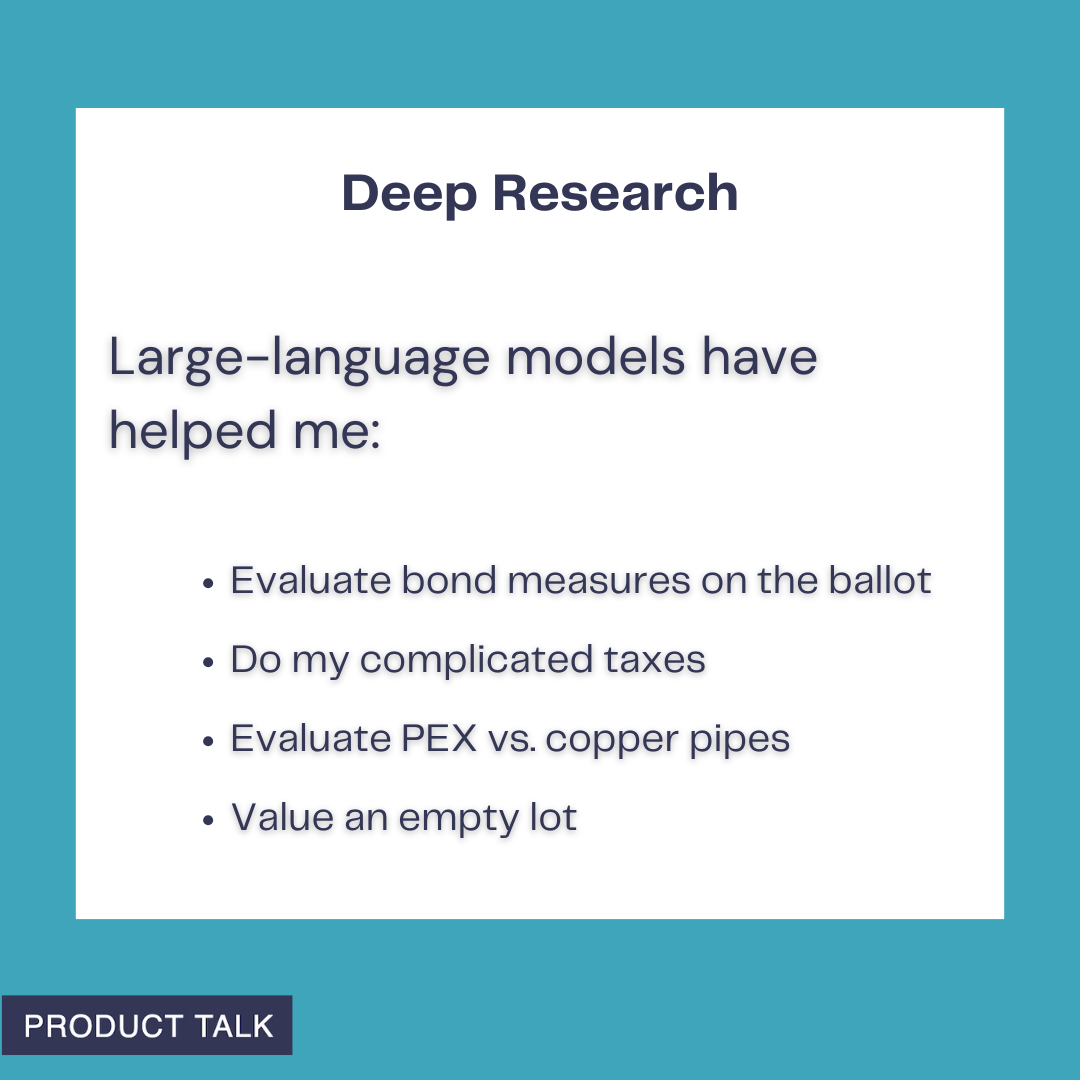
Deep Research with LLMs: from civic choices to home projects, AI helps evaluate bond measures, untangle complex taxes, compare PEX versus copper pipes, and estimate the value of an empty lot—everyday, practical wins.
9. Shopping Guide. Sometimes I outsource the whole decision; other times I use LLMs to structure criteria and compare options. I needed a new webcam without autofocus issues, explained my use cases (calls, webinars, talks, recorded video), and prioritized picture quality. ChatGPT suggested three options; I asked a few follow-ups, picked one, and was done in under ten minutes. In another case, we adopted a picky border collie/pit bull mix and wanted to level-up her food. We got overwhelmed between better kibble, fresh food, grain-free choices, and countless permutations. ChatGPT helped us define criteria, including several vet ratings that reflect nutritional balance and sustainability—both important to us. Then it generated a detailed comparison grid for top kibble and top fresh options. What felt impossible became tractable. You get to decide how much autonomy to give the LLM—pick for you, or inform your choice. Both add value.
10. Travel Planner. For the inaugural Product at Heart conference in Germany, we turned the trip into three weeks of exploring. Our shortlist included biking through wine country, visiting friends in Munich, spending time on Lake Constance, and, of course, Hamburg. I spent weeks researching and then realized I could ask ChatGPT; it compiled the core options in minutes. More recently, we needed a beachside, high-end resort near Del Mar and San Marcos for family visits, with active surf for my husband. After sifting through dated hotels, I was ready to give up. ChatGPT suggested the Alila Marea Beach Resort in Encinitas. The location was perfect, the resort delivered, the surf worked, and we booked with points. If you don’t provide context, you’ll get generic suggestions—so let the LLM interview you to surface your implicit preferences and constraints.
11. Research Service Providers. I procrastinate on chores like finding contractors. Selling our Portland townhouse forced my hand: I needed movers and someone to stretch and re-tack carpet, on a tight timeline. I asked ChatGPT for a short list of providers with strong reviews, reliable communication, and good punctuality. It then offered to draft an email—yes, please—which included questions I wouldn’t have thought of (“Do you use a power stretcher?” “Do you guarantee your work?”) and listed contact info for each. For movers, I needed a long-distance crew (three hours over a mountain pass) that could also move a hot tub. After striking out, I told ChatGPT what went wrong; it refined the search and found companies that specifically handle heavy items. I got quotes and booked the move. Having a coach that does the heavy lifting is a game-changer. If an LLM misses, tell it why and ask it to try again.
Deep Research is where LLMs become indispensable. These are the projects I wouldn’t tackle without one: being a more informed voter—including using an LLM to build a detailed model of my school district’s expenses to better evaluate a bond measure; filing both an S-corp return and a fairly complex personal tax return, and why I chose that route instead of continuing to work with my tax accountant; evaluating PEX vs. copper for a plumbing repipe when two well-respected plumbers argued opposite sides; and pricing an empty lot next door to evaluate whether it was a good purchase for us (later validated when the listing hit the market at the high end of ChatGPT’s range).
The meta-skill across all of these is partnering with LLMs: define the job to be done, supply crisp context, iterate, verify with sources when needed, and automate when a workflow stabilizes. Do that, and by the time you’re ready to build your first AI product, your toolbox will already be half full.
I recently shared 15 ways I'm using AI at home—from fixing cooking disasters to researching school bonds—and those experiments turned into real skills: learning to chat with large language models (LLMs), providing the right context, verifying results, and more.
Now it’s time to apply those same skills at work. The stakes feel higher, the problems are more complex, and we have to navigate when and how AI is acceptable at work. But the foundation we built at home makes the leap far less intimidating.
My goal is to inspire you to start experimenting (if you aren’t already). Along the way, you’ll add practical techniques to your AI product toolbox.
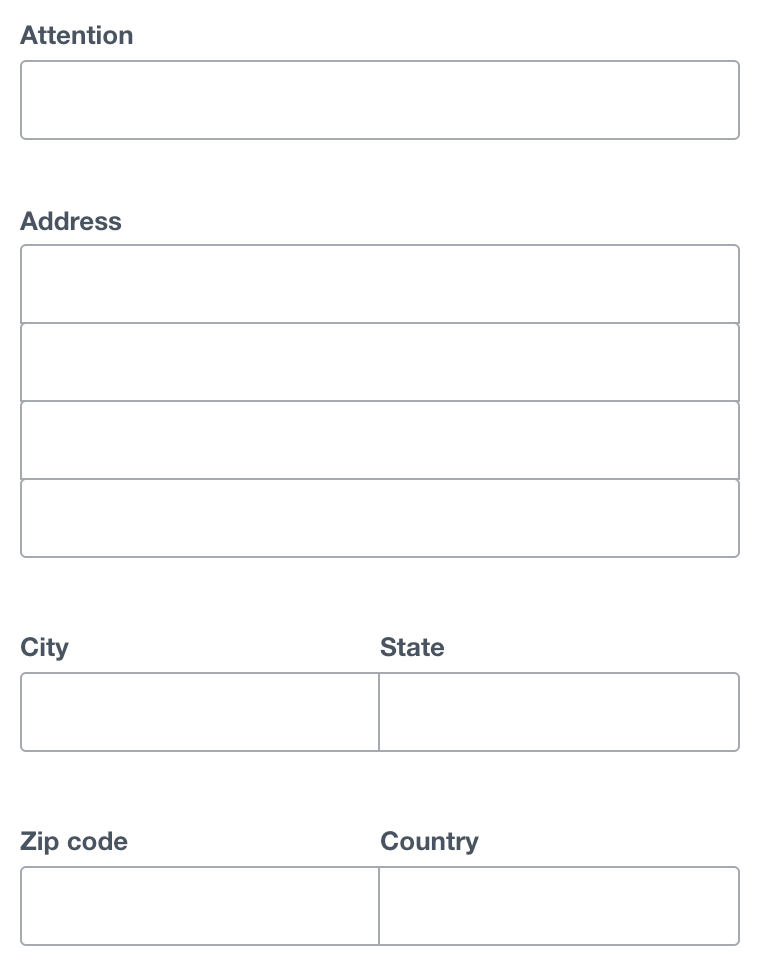
A clean address form ready for automation: fields for Attention, Address, City, State, ZIP, and Country invite AI-driven autofill, validation, and routing, accelerating workflows and reducing manual typing at work.
Using AI at home taught the basics—prompting, context windows, and hallucinations. At work, I layer in orchestration and automation. Don’t worry; we’ll take it step by step.
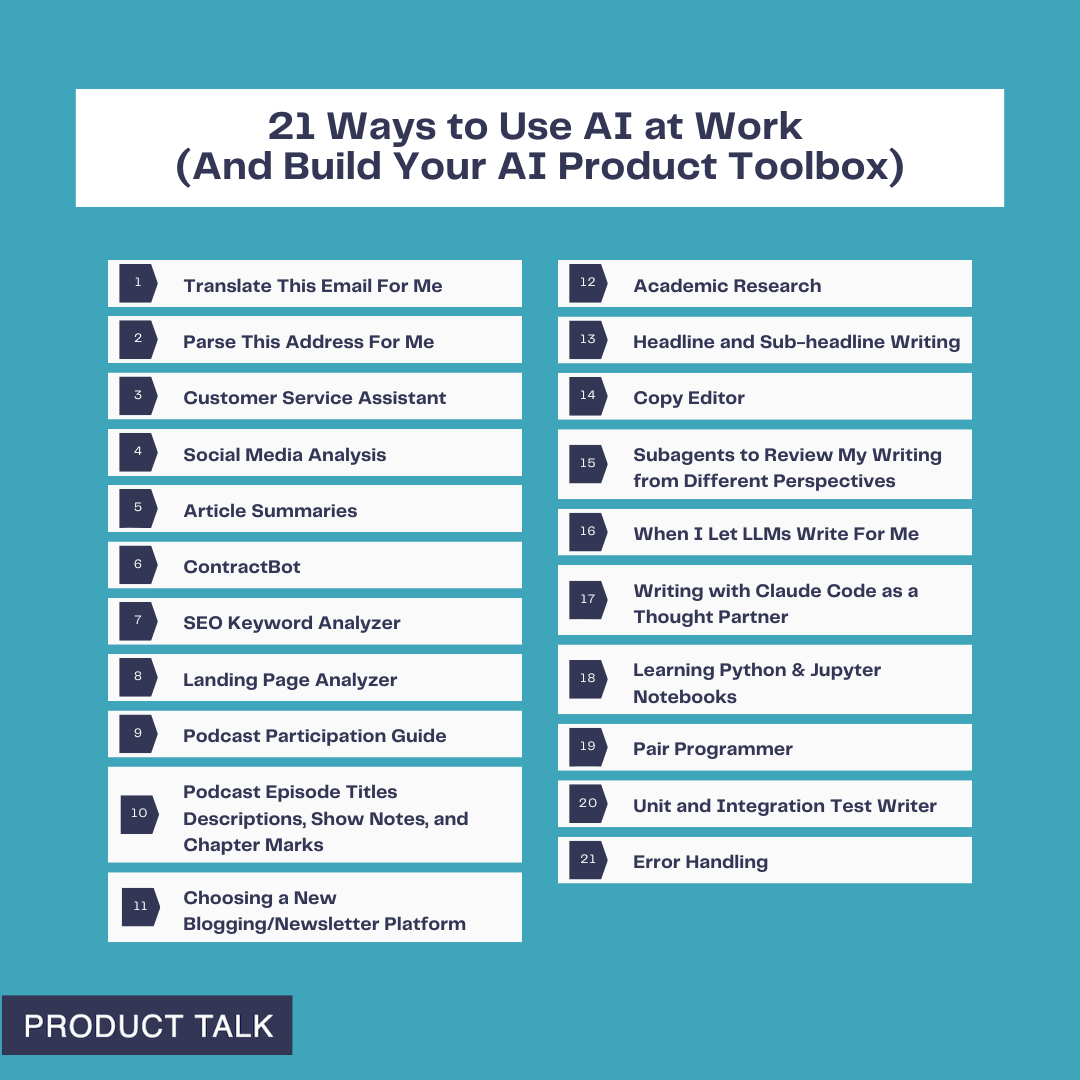
To make this actionable, I organize my work use cases by complexity, so you can start at the top and move down as your confidence grows. I group them into five buckets: Translator, Do the Work, Researcher, Writing Partner, and Coding Partner. Everyone can access the first three categories; I reserve the last two for subscribers.
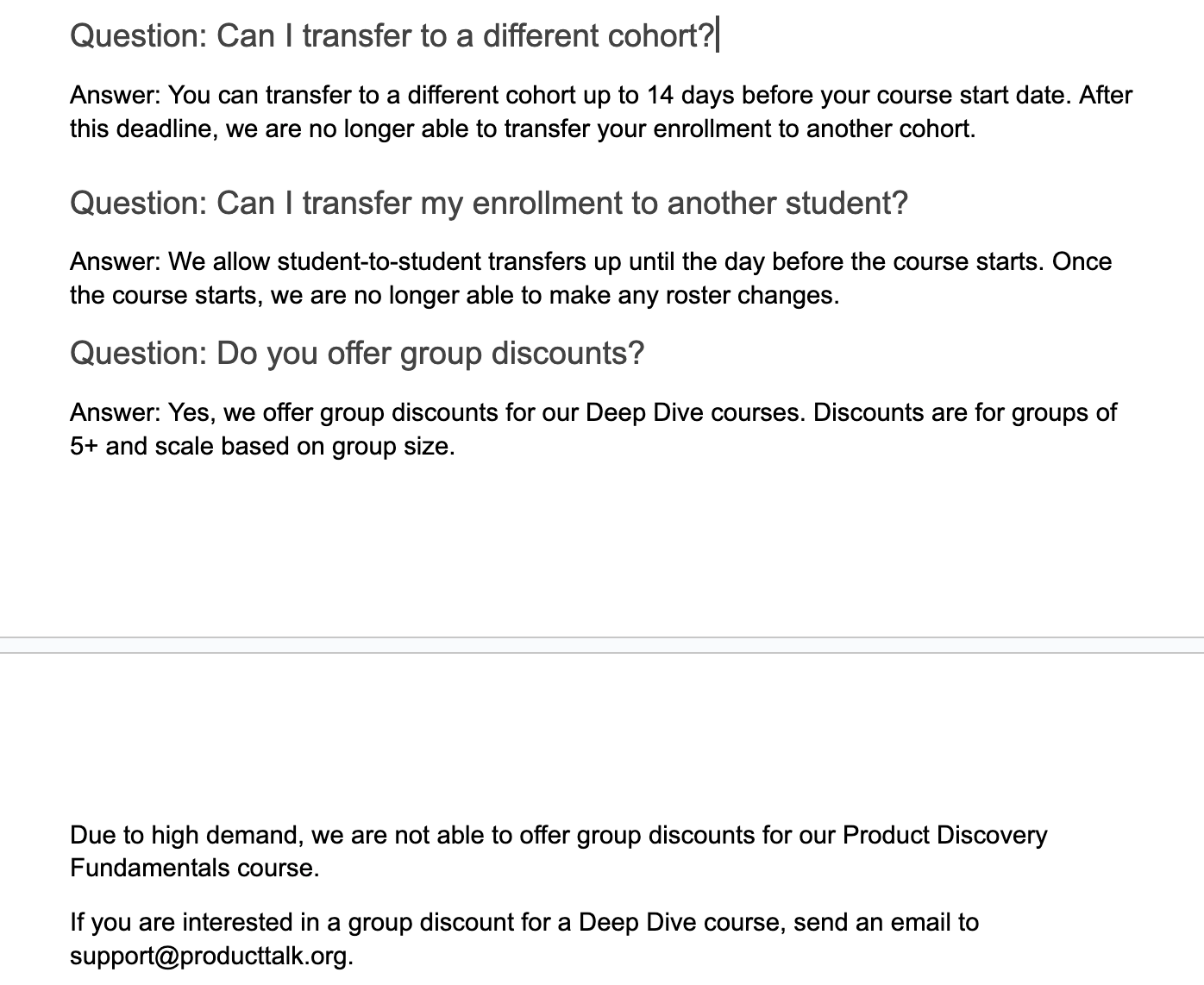
Clear course policies at a glance: switch cohorts up to 14 days before start, transfer a seat to another student until the day prior, and get scaled group discounts for Deep Dive courses, though Fundamentals is excluded.
Translator: I’ll start simple with low-stakes examples that build confidence and momentum.
1) Translate this email for me. My last name is common in both Spanish and Portuguese, so people often assume I speak both. I can get by in Spanish, but not Portuguese. When I get an email in another language, I ask ChatGPT for a translation. I used to use Google Translate, but ChatGPT tends to interpret context better. It’s a quick win that gets you comfortable with LLM interactions.
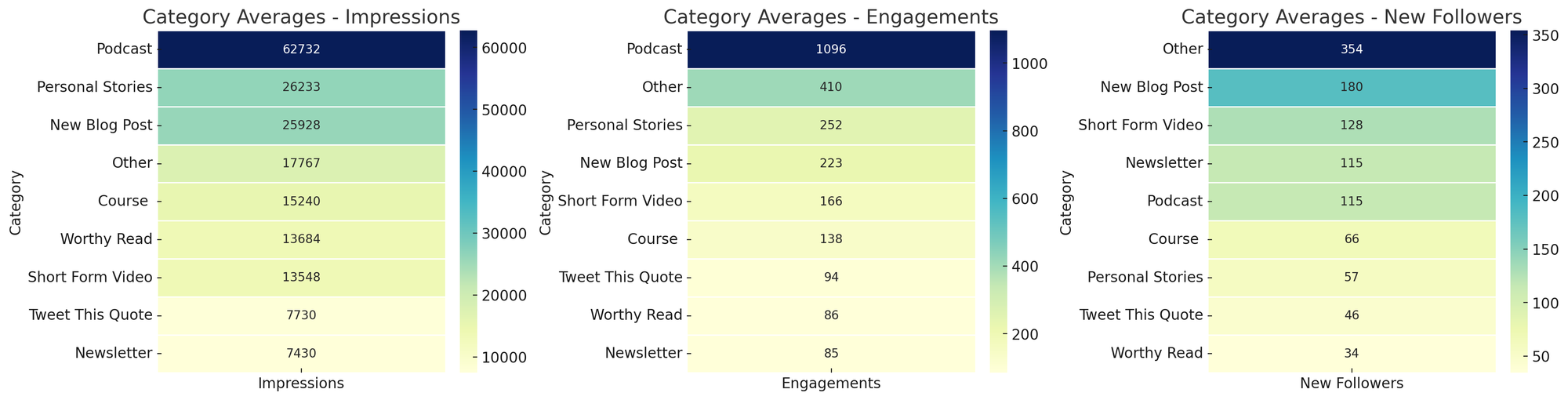
Curious which formats perform best? These heatmaps compare category averages for impressions, engagements, and new followers—spotlighting podcasts for reach and 'Other' for follower gains.
2) Parse this address for me. I live in the United States and work with companies around the world. In Xero, I have to enter addresses by street, city, state/region, country, and zip code. For international addresses, I’m not always sure how to parse fields. ChatGPT is great at this, so I created a CustomGPT to avoid rewriting the prompt. I paste the address, and it returns values mapped to Xero’s fields. If you’re new to CustomGPTs, think of them as reusable prompt-and-context bundles you can share with colleagues. Skills I built: when to use a CustomGPT versus an ad hoc prompt, and how to templatize repetitive formatting tasks.
Do the Work: This is where the magic shows up—AI accelerates execution—provided you set clear guardrails and keep humans in the loop where quality matters.
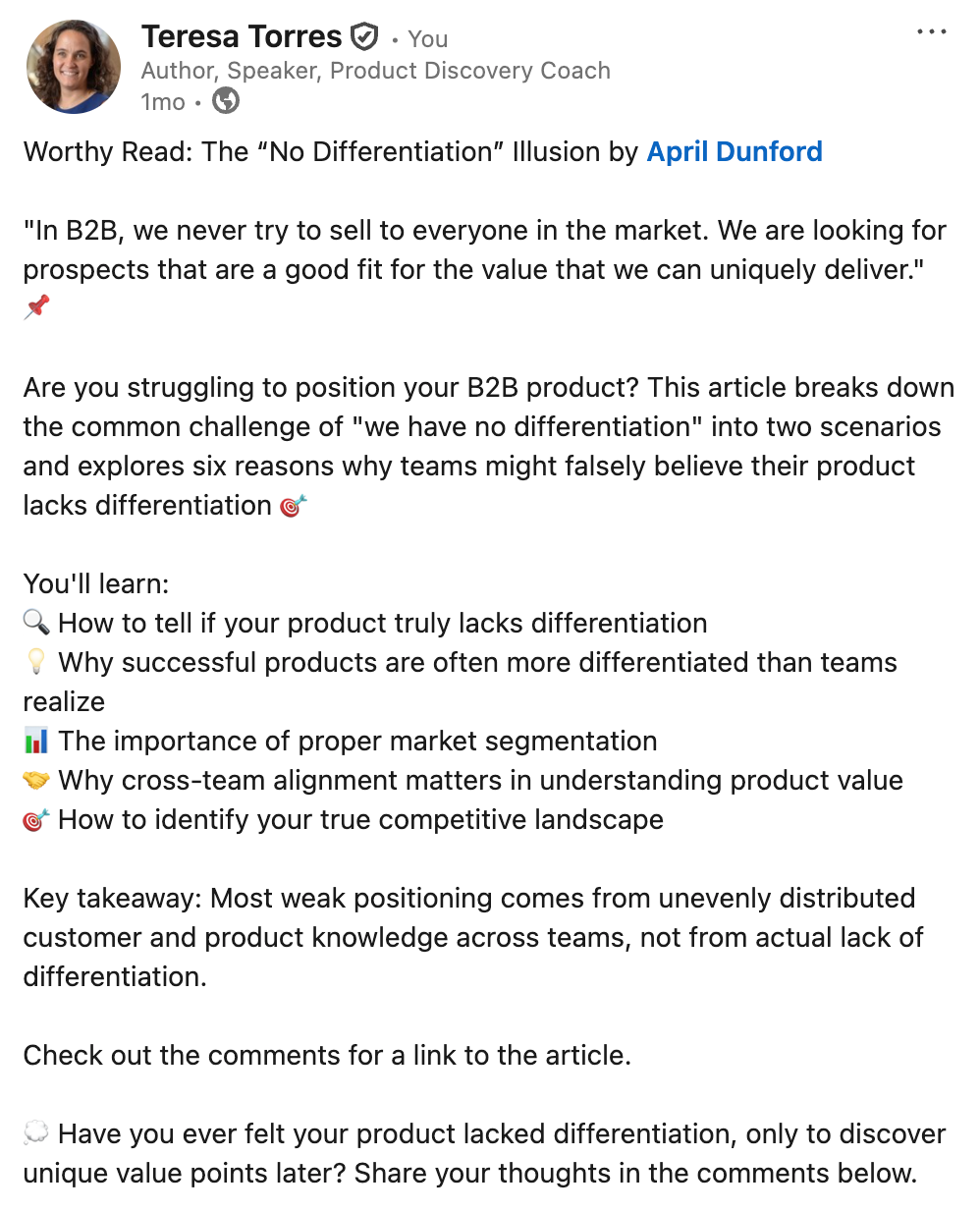
This concise social post tackles the “no differentiation” myth in B2B, highlighting how segmentation, team alignment, and a clear view of competitors reveal real product value—prompting readers to reflect and join the discussion.
3) Customer service assistant. My company offers a range of products and services, so we created a knowledge base with common questions and template answers to train support. But finding the right response in the moment is slow. I uploaded our content into a CustomGPT and instructed it to surface the most relevant templates, given an inbound email. The key decision: I did not let the model draft final replies. My admin uses suggestions to respond faster, but she remains responsible for the email content. Skills I built: discerning where human oversight is essential and using LLMs to speed up, not outsource, attention-intensive work.
4) Social media analysis. I share my work on social channels and want to know what resonates. LinkedIn lets me export analytics on top posts. Each month I export the last 30 days, ask a CustomGPT to create topic and category heat maps for impressions, engagements, and followers, and I chart trends over time. Patterns become obvious—personal stories drive impressions and engagement; short-form video drives followers. This workflow, inspired by Andy Crestodina at Orbit Media, turns raw analytics into actionable content strategy. Skills I built: using LLMs for data analysis and visualization, moving from exports to insights, and spotting outliers at a glance.
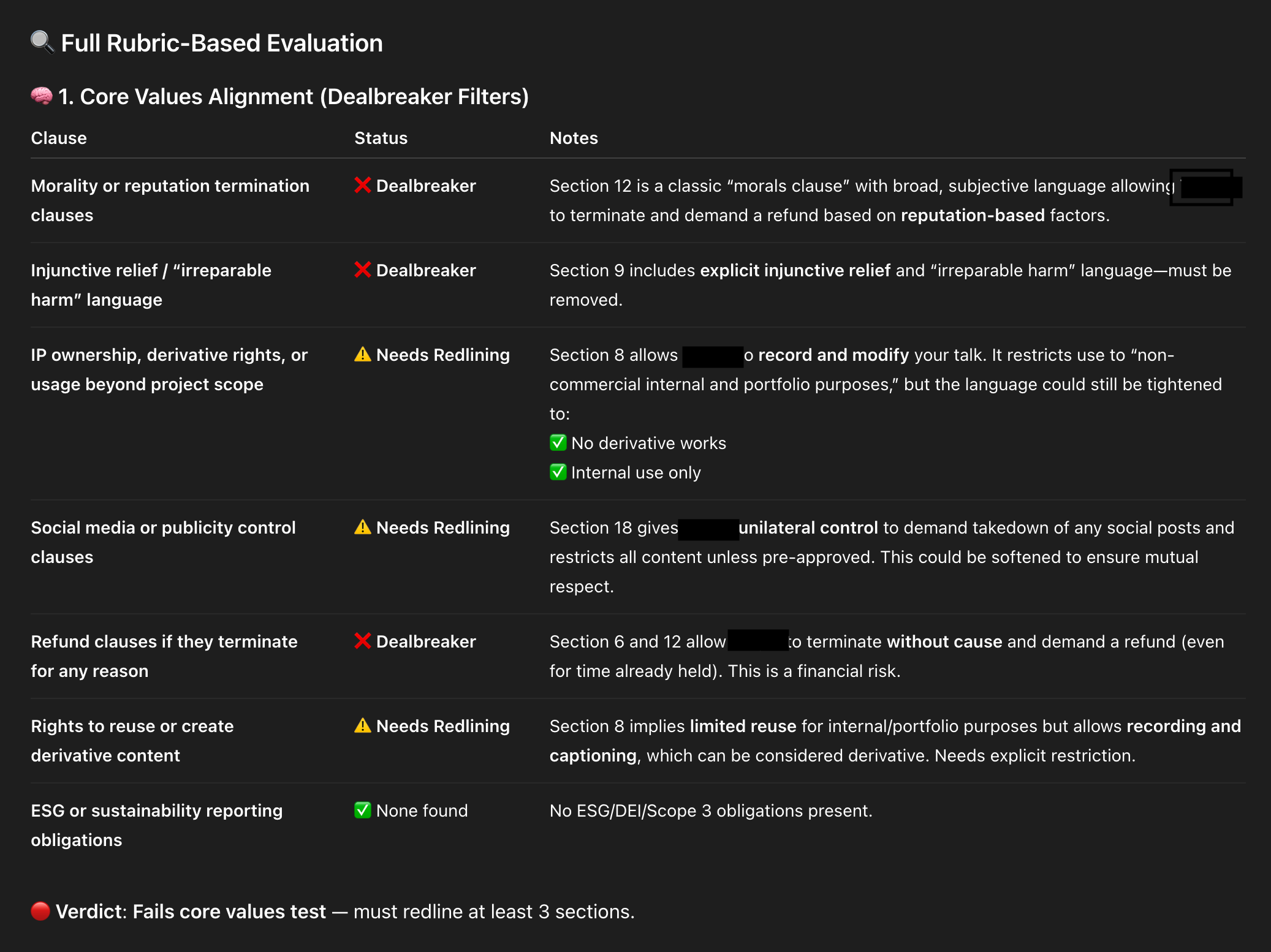
An AI-powered contract review snapshot flags risky clauses and where to push back. Clear labels—Dealbreaker, Needs Redlining, None Found—help teams tighten IP rights, social media controls, refund terms, and injunctive relief.
5) Article summaries. I used to share Worthy Reads—recommended articles—on LinkedIn and X, and I wanted stronger summaries. I asked Claude to generate them in the author’s voice, not “LLM voice.” I gave tone and style guidelines, writing samples, and a clear structure. Quality improved with each iteration. To save time, I automated the workflow with a Zapier zap: when I add a new article to my database, the Anthropic API generates a draft summary and emails it to me for a quick human review. If it looks good, I do nothing. If not, edits are one click away. Skills I built: providing precise context for tone and structure, creating a simple automation, and keeping a light human-in-the-loop review for quality.
6) ContractBot. I regularly review long legal documents and dislike every minute of it, so I built ContractBot as a CustomGPT. It started with a one-sided contract full of red flags—intellectual property, morality clauses, payment terms, and more. I asked ChatGPT to identify issues, we worked through them, and then I had ChatGPT write the reusable prompt that became ContractBot. Now I upload any new contract and get a summary of redlines tailored to my preferences. When new issues arise, I update the CustomGPT prompt, and it evolves with me. Skills I built: iterating preferences over time, using LLMs to translate and revise dense documents, and leveling information asymmetry during negotiations.
Need customer interview guidance fast? This snapshot rounds up five high-ranking guides with quick notes—perfect for scanning options and choosing the best how-to. Use it to kickstart research and structure your interview plan.
7) SEO keyword analyzer. “SEO is dead. People don’t use search engines. Now they just ask LLMs.” But LLMs still use search engines—so SEO is not dead. I still care about ranking for relevant terms, and I use ChatGPT to help. I give it a target keyword and one of my articles, then ask it to analyze the top ten Google results and highlight what they do that I don’t. I get a prioritized gap analysis. I don’t take every suggestion—I write for humans first—but many SEO improvements also boost readability, so it’s a win-win. This workflow, also inspired by Andy Crestodina, made me care about SEO because the effort is now minimal. Skills I built: competitive research and gap analysis, balancing SEO with human readability, and codifying a repeatable research pattern.
8) Landing page analyzer. I don’t love writing sales copy, but landing pages matter. I use ChatGPT to critique my course landing pages, with rich context: an ideal customer profile from real discovery interviews, a course syllabus, student testimonials, and the same knowledge base my support team uses. With all that context, I ask for a critique from the buyer’s point of view. Context is king—the more I provide, the sharper the feedback. I don’t accept every suggestion, and I still run demand and usability tests, but a second set of (virtual) eyes helps me move faster on a task I’d otherwise procrastinate. Skills I built: using LLMs to push through resistance, feeding the right context, and soliciting targeted “expert” feedback.
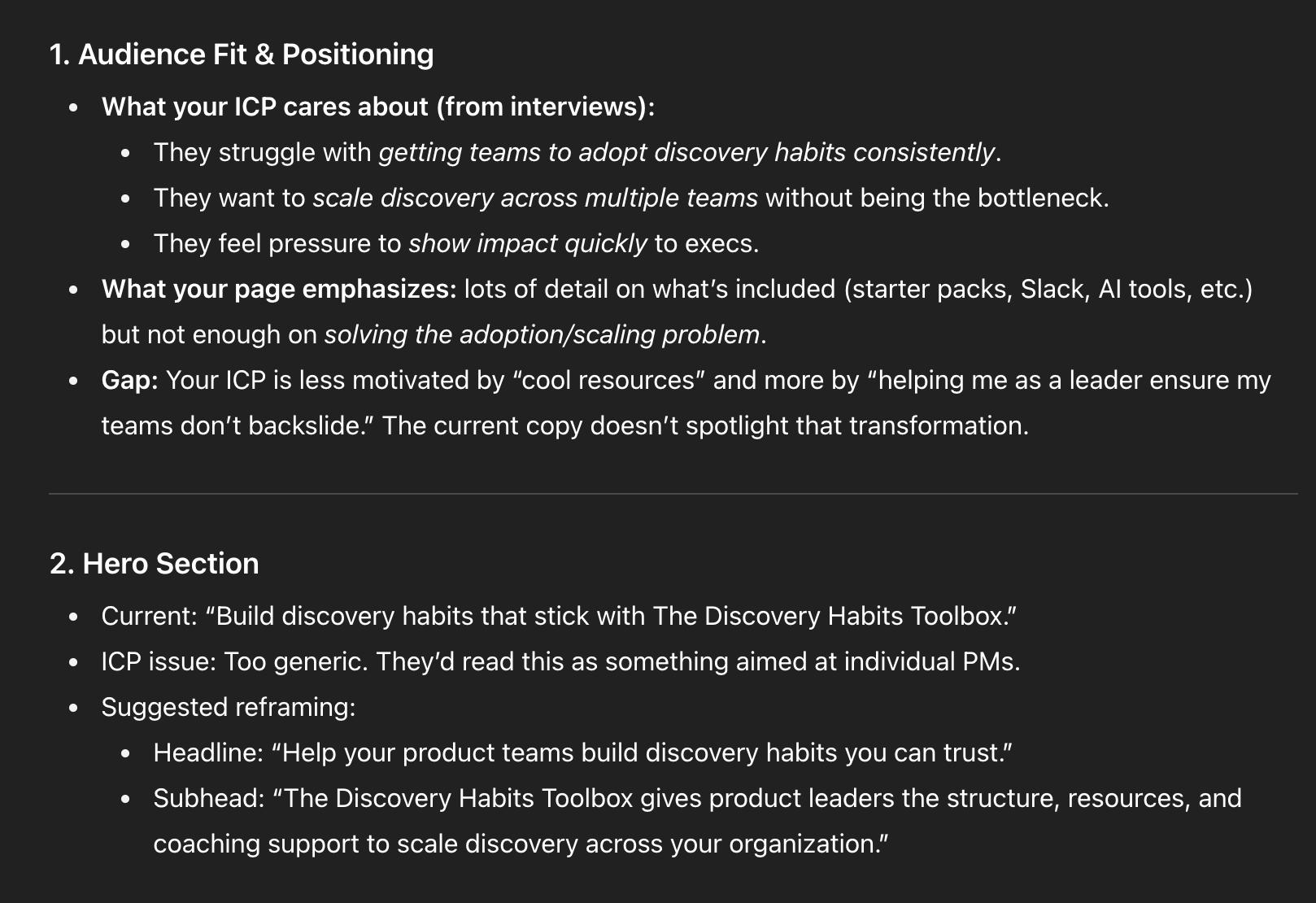
Messaging teardown in a sleek, dark theme shows how to turn interview findings into sharper copy: center ICP struggles with adoption and scaling, and rework the hero to speak directly to product leaders under pressure.
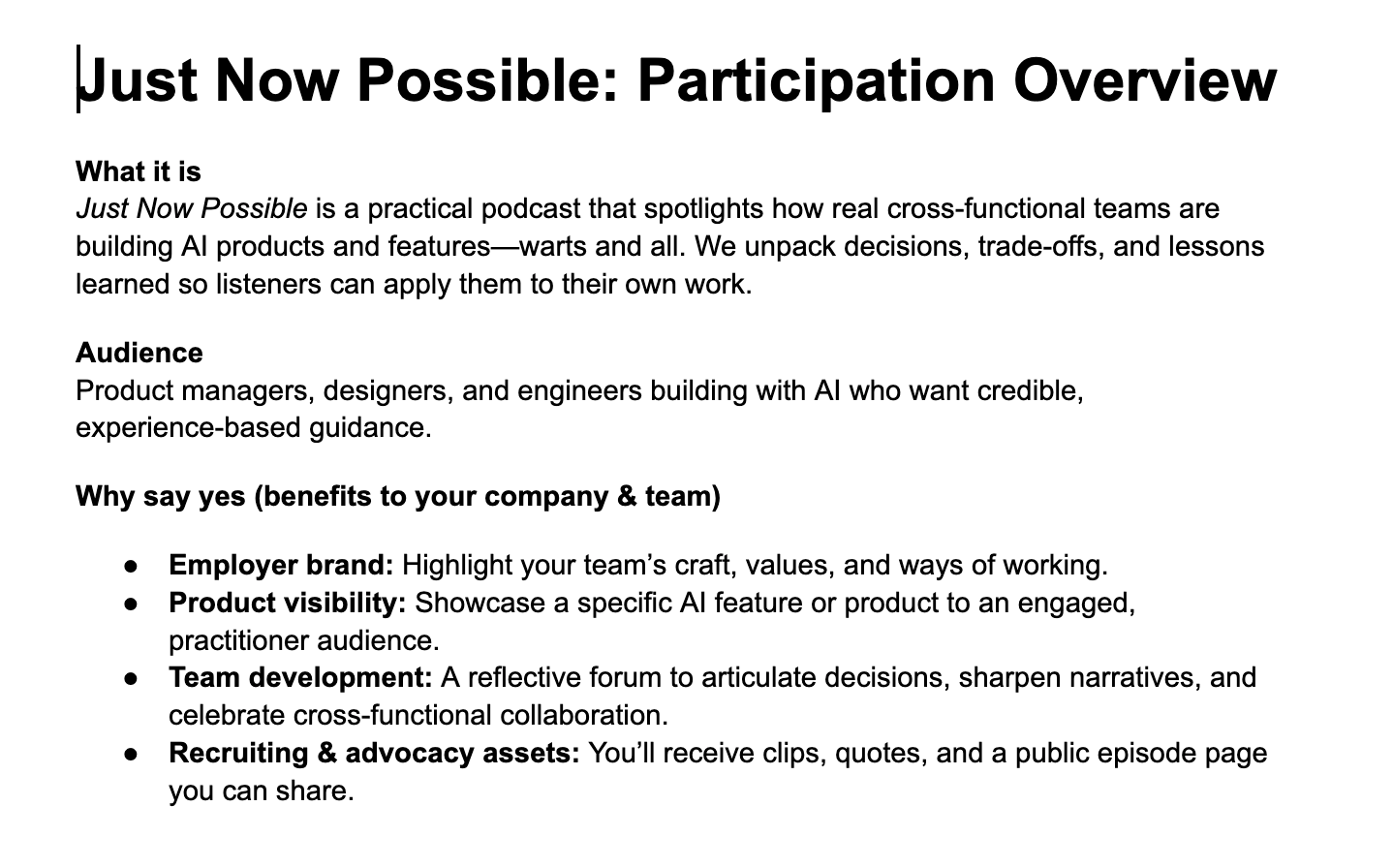
9) Podcast participation guide. I launched a new podcast, Just Now Possible, where I interview product teams about the AI products and features they’re building. Guests often need company approval to join, and I’d never had to ask for permission before. I set up a ChatGPT Project with background files—target listener, goals, and differentiation strategy—then asked it to draft a one-pager for executives explaining why their team should participate. It nailed the brief because the Project was already loaded with the right context. Skills I built: setting up Projects for ongoing domains and compounding context over time for higher-quality assistance.
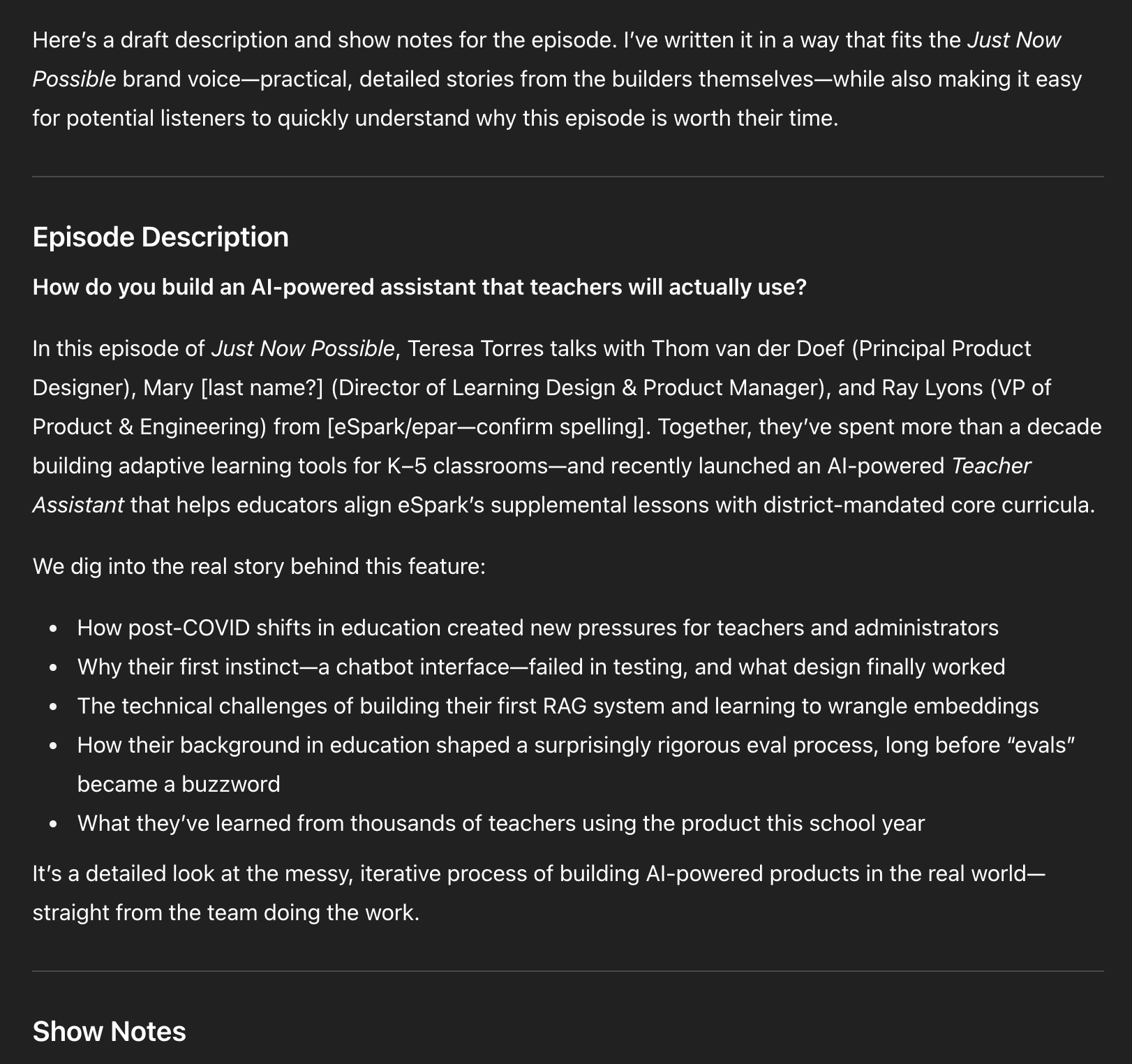
10) Podcast episode titles, descriptions, show notes, and chapter marks. In the same Project, I paste episode transcripts and ask for titles, descriptions, show notes, and chapters. As volume grows, I’m transitioning this into a CustomGPT with actions so I can click “Generate episode metadata,” paste the transcript, and go. Later, I’ll add actions for social posts and more. I don’t need to design the full system upfront; I evolve it as needs emerge. Skills I built: when to move from Projects to CustomGPTs, how to define actions, and how to evolve LLM tools incrementally.
Explore how the Just Now Possible podcast turns real AI product work into practical guidance. This overview invites PMs, designers, and engineers to share decisions, showcase features, strengthen employer brand, and gain recruiting assets.
Researcher: If you’ve tried using LLMs as an expert researcher at home, the returns at work are even better. Here are two recent examples.
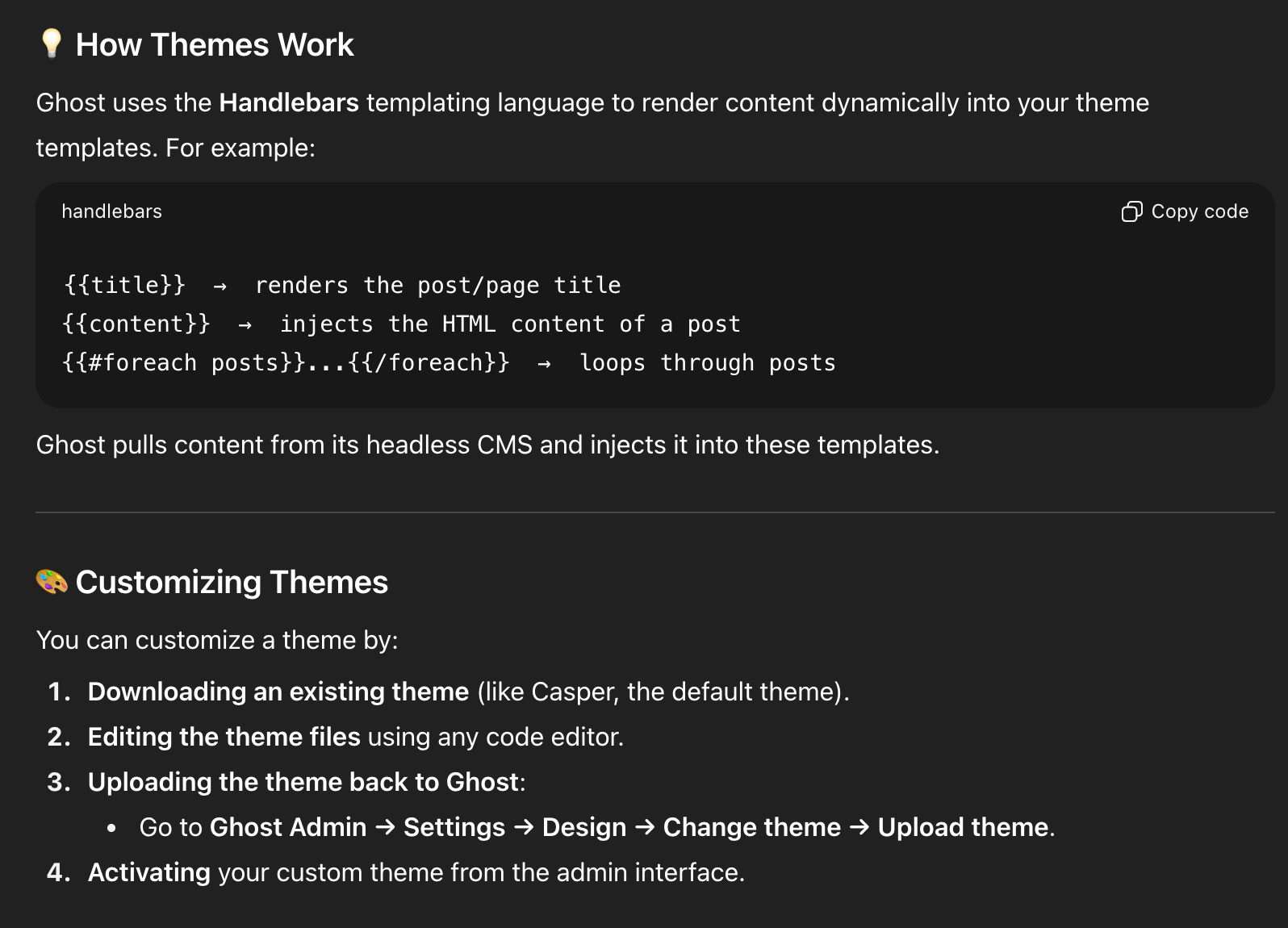
11) Choosing a new blogging/newsletter platform. After 14 years on WordPress, my site started breaking—plugin auto-updates caused critical errors, Google flagged 500s and performance issues, and I was over managing plugins. I’d also switched from Mailchimp to Kit and wasn’t thrilled. I considered Substack but had mixed feelings. I laid out constraints and goals in ChatGPT, compared options, and landed on Ghost. Before committing, I used ChatGPT to dive deep: theme customization, memberships, API documentation, and migration tasks. On a free trial, ChatGPT walked me through exporting from WordPress and importing into Ghost; Claude Code helped with theme tweaks. By the end of two weeks, I had imported data, customized the site, validated fit, and built confidence. We officially migrated in August 2025. Skills I built: tackling big projects with an AI guide on call, running structured vendor comparisons, and piloting major tech decisions with AI-assisted validation.
A draft episode description in dark mode outlines a talk on creating an AI Teacher Assistant for K–5 schools—covering post‑COVID pressures, why a chatbot interface failed, building a first RAG system, and lessons from real teacher use.
12) Academic research. I draw heavily from research on decision-making, problem-solving, and learning science, but I’m not an academic and can’t spend hours in journals. ChatGPT’s Deep Research changed that. Quarterly, I generate a report on topics like decision-making with parameters such as date ranges, peer-reviewed sources, and clear citations. I automated the pipeline so reports land in my Readwise inbox alongside other articles. I also seeded a course design Project in ChatGPT with Deep Research reports on scaffolding, modeling, and learning styles, so my course design support is evidence-based by default. Skills I built: running Deep Research on-demand and automating it so staying current is effortless.
Learning to use AI as a thought partner has been the biggest unlock for me. It’s hard to describe, so I’ll show you with detailed examples. I’ll start with how I write with AI—headline generation and copy editing—and quickly get to more advanced workflows. You’ll see how I set up subagents to review my writing from different perspectives, where I let LLMs draft versus where I insist on drafting myself, and why I now write in VS Code with Claude Code following along.
See how Ghost uses Handlebars to render posts and customize themes quickly. The screenshot highlights template helpers and a straightforward flow: download a theme, edit locally, upload in Ghost Admin, then activate.
These workflows helped me produce more, higher-quality content, and—unexpectedly—brought the joy back to writing.
I’ll also share how I use LLMs to help me code: how ChatGPT taught me to set up and use a Python Jupyter Notebook for eval data analysis, how I pair program with Claude Code, how I get Claude Code to generate high-quality unit and integration tests, and how I leveled up error handling with both Claude Code and ChatGPT. I have a light coding background; I couldn’t have done this without LLMs. Even if you don’t code today, there’s a lot here you can apply.
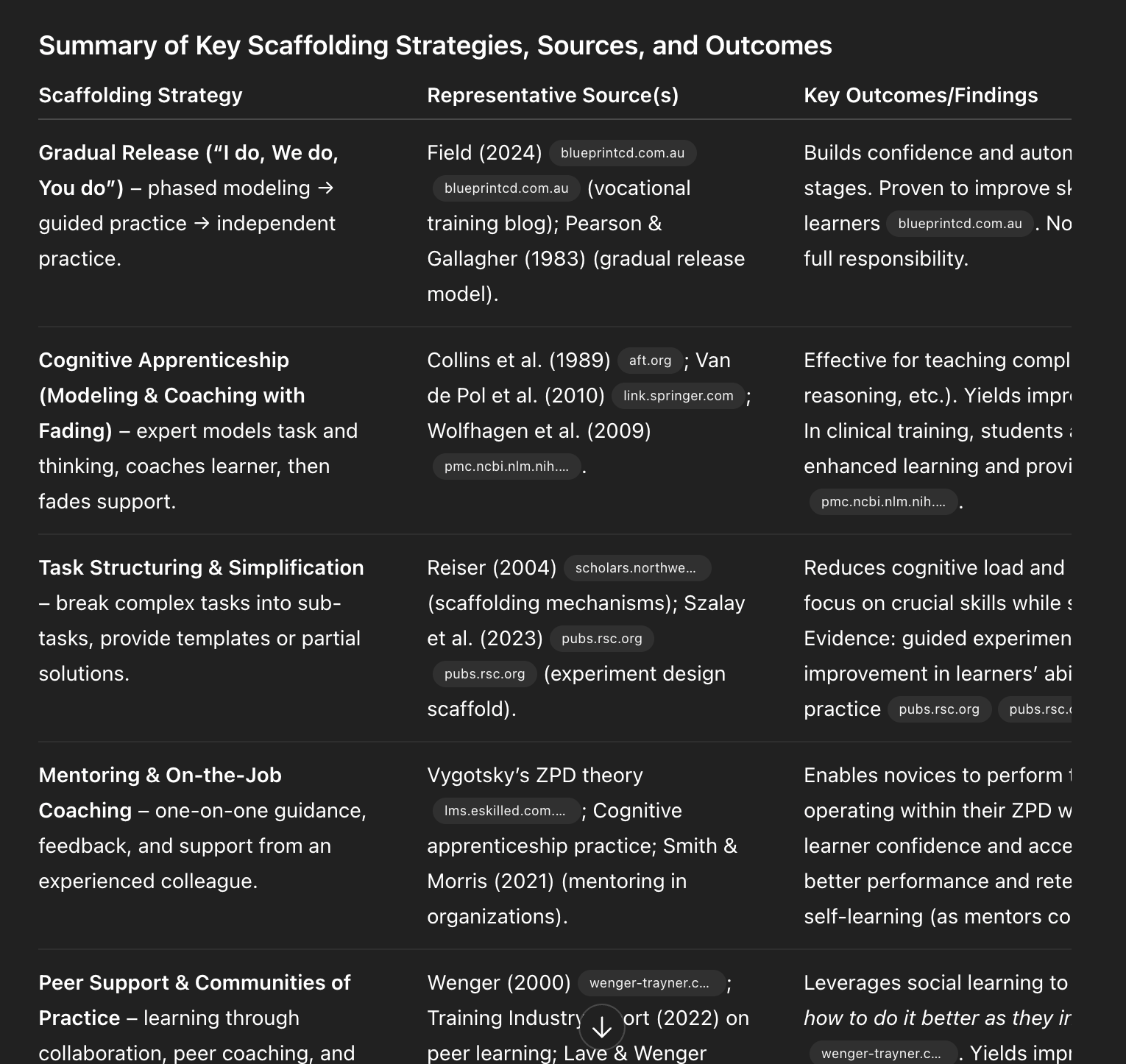
Evidence-backed scaffolding methods at a glance—gradual release, cognitive apprenticeship, task simplification, mentoring, and communities of practice—show how to teach AI skills, build confidence, and accelerate adoption at work.
As a reminder, those last two sections—my Writing Partner and Coding Partner playbooks—are for paid subscribers. I’ll also use comments to dig into your workflows. I hope you’ll join us.
I was initially reluctant to use LLMs as a writing partner. I’m not trying to outsource my thinking; writing is how I think. But staring at a blank page is real. I write, delete, and write again. The breakthrough was realizing the model doesn’t have to think for me—it can help me think more clearly. It can tell me when a draft is weak, offer structured feedback, and help me brainstorm ways to get unstuck. That’s how I began using LLMs as a true thought partner.