Tag: executive assistants

  • Never Lose Your AI Superpowers: How I Sync Context and Skills Across Every Device

    Never Lose Your AI Superpowers: How I Sync Context and Skills Across Every Device

    I spend a meaningful portion of my week helping teams operationalize AI workflows, and one theme comes up over and over: how to share context files and skills seamlessly across devices and with colleagues. Hosting Claude Code office hours has only reinforced it—sharing context and skills is the single biggest blocker to reliable, repeatable outcomes.

    I hear from leaders driving AI adoption who have built robust, high-signal context systems and carefully crafted skills. Their challenge isn’t creating value—it’s distributing it. They need a way to make the same trusted workflows available to teammates and to keep everything in sync across laptops, desktops, and phones.

    I hit the same wall myself. I work across multiple devices (a Mac Mini for day-to-day, a MacBook Air on the road, and an iPhone) and I collaborate with a full-time admin. I wanted my context and skills to be consistent everywhere, for both of us. In this piece, I’ll share my setup—what I store where, how I share it across devices and with my team, the trade-offs of each option, and how I keep everything current. We’ll cover four different syncing services: git/GitHub, Obsidian Sync, Dropbox and iCloud.

    If you’re new to this series, this is the eighth installment. Earlier pieces provide foundational context: Claude Code: What It Is, How It's Different, and Why Non-Technical People Should Use It; Stop Repeating Yourself: Give Claude Code a Memory; How to Use Claude Code Safely: A Non-Technical Guide to Managing Risk; How to Choose Which Tasks to Automate with AI (+50 Real Examples); How to Build AI Workflows with Claude Code (Even If You're Not Technical); How to Use Claude Code: A Guide to Slash Commands, Agents, Skills, and Plug-ins; and Context Rot: Why AI Gets Worse the Longer You Chat (And How to Fix It).

    The day it really hit me was right before my interview with Claire Vo on How I AI. I was staying in an AirBnB with only my laptop, and I planned to demo my /today command along with my context file structure. Minutes before the session, I realized the latest version of my /today command wasn’t on that machine. I was able to remote into my Mac Mini and grab it—crisis averted—but it was a wake-up call. I needed a more reliable, shareable approach for syncing context and skills across devices and with my admin.

    I started by testing the tools I already used—Dropbox, iCloud, and GitHub—to see what might fit. Each got me partway there, but each also introduced friction that mattered in daily use.

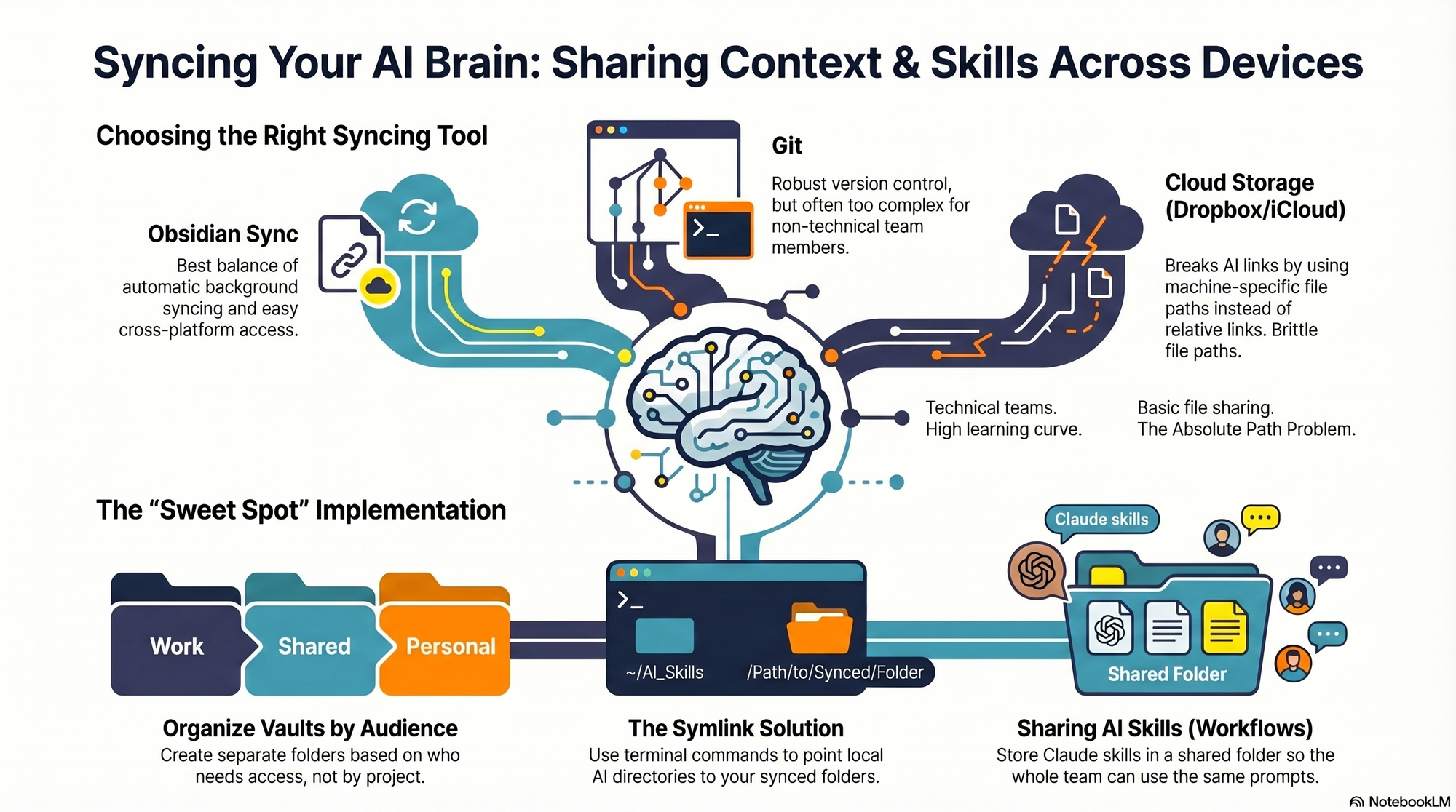
    First, absolute file paths don’t travel well. I began with Dropbox but quickly ran into cross-linking headaches. Good context systems rely on rich interlinking—index files point to other context files, and those context files link to each other. When Claude creates a link from one context file to another, it tends to use the full file path: /Users/ttorres/Library/CloudStorage/Dropbox. That worked on my Mac Mini and MacBook (same user name), but not on my phone—and not for my admin. I tried to force relative links (~/Dropbox), but couldn’t get Claude to do it consistently, which led to broken links. This isn’t unique to Dropbox; Claude prefers full paths because they’re reliable on a single machine, but they’re brittle across devices and useless when sharing with colleagues. Claude is trained to use relative file paths when working within a git repository, but I struggled to get it to work reliably in Dropbox.

    Second, skills live in a user directory by default. By default, skills live in ~/.claude/skills. Most sync services aren’t designed to share your ~/ folder. iCloud is the exception, but then you’re limited to Apple devices—no Windows or Android. There is a workaround: set up a claude folder in Dropbox and create a symlink from ~/.claude to your synced claude folder, so all skills, commands, and settings live in Dropbox. Then, on each device (yours or a colleague’s), you set up a symlink to that folder so Claude can find the files. This works, but I was running into another limitation that made Dropbox a poor fit.

    Third, Obsidian on iOS doesn’t sync cleanly with Dropbox. I rely on Obsidian’s file browser alongside my notes to navigate context quickly. Storing vaults in Dropbox gave me parity across my Mac Mini and MacBook Air, but I couldn’t get the iOS Obsidian app to reliably load my Dropbox vaults. That friction was a dealbreaker for on-the-go work.

    At that point, I explored git/GitHub. GitHub is cloud storage for git repositories. A git repository is a folder of shared files used so engineers can collaborate on the same code base. Each person clones a local copy, works locally, then pushes changes back to the hosted repo on GitHub; others pull to update. Git’s merge and conflict tooling is excellent. Git is the powerhouse of file syncing and version control. It easily handles syncing context and skills, Claude behaves better with relative links in a git repo, and I can open the repo in my IDE with a clean file browser. For me, that checked all the boxes—until I factored in my admin. Git has a learning curve, requires manual pull/push hygiene, and often assumes an IDE workflow. That overhead was too heavy for a non-technical collaborator.

    The turning point was Obsidian Sync. A colleague suggested it, and it ended up being the sweet spot. Obsidian is a markdown reader; files are stored locally in a normal folder you can open in Finder or File Explorer. There’s no proprietary format—you can read files with any text editor, and Claude can access them via bash commands. Obsidian Sync is simpler than git: open a note and it syncs in the background. I can access the same vaults across my Mac Mini, MacBook Air, and iPhone, and I can share a vault with my admin so we can both create and access notes.

    Because we’re in different time zones and rarely edit the same note simultaneously, limited conflict handling hasn’t been an issue. Obsidian’s internal link notation also means one note can link to another and those links just work across devices. Claude can follow these links, so the brittle file path problem disappears.

    Here’s where I landed. After a lot of trial and error, I have a setup that works across my devices and for my admin, who uses both a Windows desktop and a Mac laptop. I keep my core context in Obsidian vaults synced with Obsidian Sync, which preserves portability, link integrity, and ease of use. For skills, I avoid scattering files in machine-specific locations and instead centralize what Claude needs to reference in shared, human-readable folders. If you require advanced version control with branching and reviews, git/GitHub is excellent. If your priority is low-friction, cross-device access for non-technical teammates, Obsidian Sync is a practical, reliable choice. And if you must use Dropbox or iCloud, consider symlinks and be vigilant about relative paths—just know that absolute paths won’t travel well.


    Inspired by this post on Product Talk.


    Book a consult png image
  • Build a Support System That Scales: How Product Leaders Maximize Impact with Delegation and AI

    Build a Support System That Scales: How Product Leaders Maximize Impact with Delegation and AI

    I hear the same refrain from product leadership peers everywhere: we’re overwhelmed. Shrinking headcount, constant AI disruption, economic uncertainty, and relentless context switching make it feel like we’re carrying two jobs—setting strategy while shielding our teams. I recently listened to an episode of All Things Product that zeroes in on what a real support system for product leaders looks like, and it resonated deeply with my day-to-day.

    Want to listen to the conversation yourself? Find it on Spotify or Apple Podcasts.

    Here’s the core tension I see (and felt early in my own leadership journey): product leaders tend to underinvest in themselves. We hold onto work because it feels faster, safer, or “just easier if I do it.” But that pattern quietly taxes strategy, slows learning, and caps team throughput. The hidden cost of “doing it all yourself” is real.

    Early in my tenure leading product, I tried to keep every plate spinning—roadmap reviews, stakeholder prep, user research, executive updates—while protecting my team’s focus. I was busy and useful, but not maximally valuable. The turning point came when I started building a lightweight support stack: a few hours of executive assistant help each week, targeted research support for bet sizing, and a personal cadence with a leadership coach. The result wasn’t just more time; it was better time.

    One provocative point that landed hard: product leaders rarely have executive assistants—and that’s a problem. If your calendar is your operating system, an EA is an extension of your leverage. Mine now handles scheduling, meeting hygiene, prep packets, and post-meeting artifacts. That shift moved me from “calendar triage” to “strategic curation.” It also reinforced a core principle: delegation is a leadership skill, not a weakness. When I delegate outcomes (not just tasks), my team learns, ownership grows, and we ship decisions faster.

    Support for strategy work shouldn’t stop at the calendar. Research and data enable better bets. Lightweight research ops, access to product analytics, and brief synthesis sprints keep me anchored in evidence without drowning in artifacts. Paired with a strong community of practice, I get a steady stream of comparative patterns—how other leaders delegate, scope advisory boards, or run decision reviews—which short-circuits trial-and-error.

    Coaches were framed as shortcuts for clarity, accountability, and skill-building—and I agree. A good coach compresses cycles, sharpens decision quality, and holds the mirror up when you drift into doer mode. Two quotes captured the mindset perfectly: “You are a pro athlete. It makes sense to think about how you scale your impact without adding more to your calendar.” — Petra Wille. “As you get busier, it becomes more important to focus on the value only you can bring.” — Teresa Torres.

    There’s also a helpful nudge to let go of perfectionism: “80% done by someone else is 100% awesome.” — Dan Martell (quoted). In practice, that means I accept great drafts from others, then add the 10–20% only I can contribute—context, narrative, and the sharp edges of the decision.

    What about AI? The conversation hits a practical middle ground I share: use AI where it compounds leverage—meeting summaries, research synthesis starters, doc outlines, and backlog triage. But keep humans where judgment, alignment, and context truly matter—strategy framing, stakeholder management, and the final decision-making loops. In other words, apply an AI Strategy that respects product leadership’s uniquely human work.

    Key themes I took away: why product leaders struggle to scale themselves; the true cost of “doing it all yourself”; why not having executive assistants limits impact; delegation as a core leadership capability; how to identify and protect the work only you can uniquely do; using research and data to inform strategy; coaches as accelerators for clarity and accountability; communities of practice as a force multiplier; adopting a “professional athlete” mindset; when AI helps—and when humans still matter; and the liberating mantra that “80% done by someone else is 100% awesome.”

    If you’re wondering where to begin, start small and practical. Audit your time: what work truly requires you? Experiment with small amounts of support (even a few hours a week). Delegate outcomes, not just tasks. Keep the hands-on work you love—but be intentional. Use peers, coaches, and communities to learn how others delegate. Don’t wait until burnout to build your support system.

    Resources mentioned if you want to go deeper: Follow Teresa Torres: https://ProductTalk.org. Follow Petra Wille: https://Petra-Wille.com. Petra’s Coaching for Product Leaders: https://www.petra-wille.com/coaching-packages. Dan Martell’s book Buy Back Your Time: https://www.buybackyourtime.com.

    I’m curious: what’s one outcome you’ll delegate this week, and what support would make it stick? Share your thoughts in the comments—your playbook might be exactly what another product leader needs right now.


    Inspired by this post on Product Talk.


    Book a consult png image