Category: AI Strategy

  • From Stone Soup to Insights: Eval-Driven Development That Supercharges AI Analytics

    From Stone Soup to Insights: Eval-Driven Development That Supercharges AI Analytics

    I’ve learned that the most powerful AI features rarely emerge from lone-wolf brilliance—they’re born when a community rallies around a shared objective. “Building Amplitude’s AI for insight automation felt a lot like the fable of travelers making stone soup with their community.” That spirit captures how I approach shipping AI for analytics: bring focused ingredients, invite contributions, and let rigorous evaluation transform the result into something extraordinary.

    At the core is Eval-Driven Development. Rather than debating preferences, we define explicit evaluation sets, success thresholds, and guardrails, then wire them into CI/CD so every change improves reliability, quality, and relevance. For AI-driven analytics, our evals combine offline judgment tests (precision, recall, hallucination rates), user-centric measures (time-to-insight, actionability), and production health signals (failure modes, latency). When the bar rises, the product improves—continuously and measurably.

    We made “stone soup” by inviting contributions from every function. Data science established gold-standard datasets and baselines. Engineering implemented retrieval, orchestration, and safe deployment paths. Product and design framed high-value use cases, in-app guides, and UX writing that clarified intent. Customer success and support piped real-world edge cases into our evals so the system improved where it mattered. Product trios kept us outcome-focused and empowered product teams moved quickly without sacrificing governance.

    Why this matters for analytics: AI insight automation reduces the heavy lift of exploring funnels, cohorts, anomalies, and retention patterns—accelerating activation and product-led growth. With a unified analytics platform and strong data governance, we can surface relevant patterns proactively, explain the “why” behind movements, and recommend next best actions without drowning users in noise. The result is faster decisions, cleaner handoffs between teams, and a tighter loop from observation to intervention.

    Our practical playbook is simple but strict: define a clear north-star outcome; curate representative eval sets that mirror real user questions; simulate A/B testing offline before live traffic; instrument time-to-insight and adoption; and integrate evals into CI/CD so regressions never ship. We monitor DORA metrics to maintain delivery velocity while holding quality lines, and we use human-in-the-loop review to continuously refine prompts, patterns, and explanations.

    We also learned what doesn’t work. General-purpose prompts seldom transfer cleanly to analytics without domain grounding and context window management. A retrieval-first pipeline improves factuality, but only if metadata and event taxonomies are consistent. And while generative UX can delight in demos, it must earn trust in production through transparent reasoning, privacy-by-design, and predictable behavior under load.

    In the end, the stone soup metaphor isn’t about cute storytelling—it’s about disciplined collaboration. When a cross-functional community contributes the right ingredients and Eval-Driven Development keeps us honest, AI for insight automation becomes both credible and compounding. That’s how we turn analytics into action—and how we ship AI products that users rely on every day.


    Inspired by this post on Amplitude – Best Practices.


    Book a consult png image
  • Unlock Instant Product Answers: How AI-Powered Resource Centers Elevate In‑App Help

    Unlock Instant Product Answers: How AI-Powered Resource Centers Elevate In‑App Help

    I’ve spent years watching users bounce between product screens, docs, and support tickets when they hit a roadblock. The fastest path to value is always the same: deliver relevant, contextual help exactly when and where the user needs it. That’s why I’m excited about the next wave of in-app guidance that blends behavioral data with AI to anticipate intent and remove friction in real time.

    Announcing Resource Centers, Amplitude’s newest in-product help feature that uses behavioral data and AI to serve help content users actually need.

    Here’s why that matters. In a product-led growth model, in-app guides, product tours, and just-in-time tips are essential to onboarding and user activation. When help content is informed by real behavioral signals—events, cohorts, milestones—it stops being a static knowledge base and becomes a living system that adapts to a user’s journey. That means fewer context switches, faster time-to-value, and more confident users who can self-serve their way to outcomes.

    In practice, the most effective resource centers are opinionated and contextual: they surface content by role, plan, and lifecycle stage; trigger nudges based on key events; and offer multiple modalities (microcopy, short clips, interactive guides) so users can choose how they learn. They also respect pacing, avoiding notification fatigue with rate limits and prioritization rules. Think of this as high-quality UX writing paired with data-driven orchestration—useful, discoverable, and never in the way.

    Execution matters. Start with a clear content taxonomy, map help assets to journey stages, and establish a content ops cadence so guides stay fresh. Partner closely with data governance to ensure privacy-by-design and transparent consent for behavioral data usage. Then wire in feedback loops—thumbs up/down, quick polls, and session replays—so you can continuously discover gaps and iterate quickly.

    Measure impact with the same rigor you apply to product features. Track activation rates, time-to-first-value, self-serve resolution rates, reduction in ticket volume on targeted topics, and downstream retention. Use A/B testing to validate which interventions move the needle, and segment results to learn what works for new users versus power users. When results differ, treat that as a design signal—not a failure—and refine the targeting.

    Rollout thoughtfully. Pilot with a high-friction workflow, localize the help content to the user’s context, and set clear exit criteria before scaling. Align with customer support and success so your resource center becomes the canonical source for in-app help, not yet another content silo. Over time, unify insights across Amplitude analytics and your support stack to close the loop between product behavior and help outcomes.

    As product leaders, our goal is simple: reduce effort and increase confidence for every user. AI-assisted, behaviorally triggered resource centers are a pragmatic step toward that future—meeting users where they are, with exactly what they need, at the moment they need it.


    Inspired by this post on Amplitude – Best Practices.


    Book a consult png image
  • See What AI Really Says About Your Brand with Amplitude AI Visibility: Score, Rank, Win

    See What AI Really Says About Your Brand with Amplitude AI Visibility: Score, Rank, Win

    Every week, I ask a simple question with massive implications for our AI Strategy: what do large language models actually say about our brand? As a VP of Product Management at HighLevel, I’ve learned that competitive differentiation now lives as much in AI-generated responses as it does in traditional search or social. That’s why a reliable, unified analytics platform for AI visibility is quickly becoming table stakes for product management leadership.

    Discover how Amplitude AI Visibility helps you track your visibility score, uncover competitor rankings, and prove business impact—all in one platform.

    Here’s why that matters. A visibility score gives me a measurable baseline—our AI share of voice—so I can see whether our product-led growth and go-to-market strategy are landing in the places where buyers increasingly look for answers. Competitor rankings reveal points of parity and opportunities to differentiate, which directly inform product positioning and our value proposition. And the ability to prove business impact closes the loop between AI exposure and outcomes that executives care about.

    Operationally, I would start by benchmarking our visibility score against key competitors, then segment by core use cases to identify where our story underperforms. Those insights feed product discovery, content strategy, and enablement—tightening the narrative to better align with buyer intent. I’d translate the findings into prioritized bets for the roadmap and partner closely with marketing to amplify wins and address gaps.

    For teams exploring LLMs for product managers and GenAI-driven growth, this approach creates a disciplined feedback loop: measure what AI says, experiment to improve it, and verify the impact across the funnel. It’s a pragmatic way to connect messaging, discovery, and differentiation—without guessing what the models are surfacing about your brand.

    I’ve followed Amplitude analytics for years, and Amplitude AI Visibility slots naturally into a modern operating model: one platform to monitor the signals that matter, align stakeholders, and make faster, evidence-based decisions. If your mandate includes scaling product-led growth and sharpening competitive differentiation, this is a timely, actionable way to see—and shape—how AI represents you.


    Inspired by this post on Amplitude – Best Practices.


    Book a consult png image
  • I Brought Amplitude MCP Into My Workflow—Now Behavioral Insights Power Every AI Decision

    I Brought Amplitude MCP Into My Workflow—Now Behavioral Insights Power Every AI Decision

    I’m constantly looking for ways to collapse the distance between product questions and trustworthy answers. When behavioral data shows up in the tools I already use, my team moves faster, aligns better, and makes higher-confidence calls. That’s exactly why Amplitude MCP caught my attention—and why it’s quickly becoming essential to my AI Strategy and day-to-day Product Management practice.

    Discover how Amplitude MCP brings behavioral context to AI tools like Claude and Cursor, enabling data-driven decisions in your existing workflows.

    In practice, this means I can ask Claude, Cursor, or even Claude Code about activation cohorts, retention analysis, funnel drop‑offs, and feature adoption—and get responses grounded in Amplitude analytics without tab-hopping. By bringing our unified analytics platform into the flow of work, I keep momentum high and decision latency low, especially during fast-moving discovery and delivery cycles.

    This approach elevates LLMs for product managers from clever assistants to reliable copilots. During continuous discovery, I can interrogate segments, compare behaviors across personas, and pressure-test hypotheses in minutes. In product-led growth environments, that behavioral context turns prioritization into a repeatable, outcomes-first ritual rather than a debate fueled by anecdotes.

    Equally important, MCP helps me protect the integrity of our metrics. With consistent definitions flowing into AI tools, I reduce shadow analysis, preserve governance, and support privacy-by-design. Stakeholders—from engineers to design to GTM—see the same truths, which improves trust and accelerates alignment across the organization.

    Getting started is straightforward: connect your workspace, ensure your event taxonomy is clean, and align key properties with CRM integration so segments and journeys remain attributable. I also curate an AI product toolbox of prompts for common workflows—say, exploring A/B testing outcomes or checking the minimum detectable effect (MDE) before a new experiment—so the team can move quickly without reinventing the wheel.

    The payoff is immediate: fewer context switches, faster iteration loops, and sharper decisions where they matter most—inside the tools we already rely on. If you’re charting your gen ai roadmap, consider how Amplitude MCP can infuse behavioral insight into every conversation and commit. For me, it’s a pragmatic step toward an intelligent, data-informed product practice that scales.


    Inspired by this post on Amplitude – Best Practices.


    Book a consult png image
  • How I Decide What to Automate With AI: A Practical Framework + 50 Real Examples to Boost Productivity

    How I Decide What to Automate With AI: A Practical Framework + 50 Real Examples to Boost Productivity

    Most mornings start the same way for me: coffee in hand, I sit down, open Claude Code, and type /today. In a few seconds, Claude pulls fresh tasks from my Trello board, compiles a clean today.md with what matters most, and assembles a research digest of the latest academic work across my focus areas.

    Scanning that today.md has become my daily ritual. My workload typically spans writing, coding, and administration. I now make a habit of asking Claude, "What's on my to-do list that you can help with?" That simple question keeps me honest about where AI can accelerate my day.

    I’m experimenting with a workflow where Claude enriches every task based on what it can take on or accelerate. It’s still early, so we iterate together for a few minutes each morning to tighten the loop and improve the prompts and outputs.

    Next up is my research digest. I skim, download the PDFs that look promising, and move on. Tomorrow, Claude will deliver detailed summaries of every paper I saved—so I stay current without burning hours on search and sorting.

    For the first few hours, I protect deep work. Today, that means writing this article. My to-do list and draft live side-by-side in Obsidian, so I click directly from the task into the outline, pick up my running conversation with Claude, and get right back into flow. I pair-write: we outline, I draft, and then I ask, "I wrote the intro. What do you think?"

    Dark macOS terminal screenshot showing an AI assistant listing tasks to automate, including writing a blog, 2026 planning, launching a course, file migration, surveys, and research summaries.
    A terminal-based AI helper suggests concrete ways to lighten your workload—draft a blog, plan 2026, launch a course, migrate files, craft a survey, and digest research—so you can pick the next task fast.

    Claude gives pointed feedback—what’s working, what needs tightening—and we iterate. This is genuinely how I work now. I pair with Claude on almost everything I do. It didn’t happen overnight; over the past five months, I’ve built a personal AI-enhanced operating system that has fundamentally improved how I operate: more output, faster cycles, and frankly, more joy in the work.

    Because it’s made such a difference, I’m sharing the playbook. If you’re new to Claude Code or want to get more from it, start here:

    Claude Code: What It Is, How It's Different, and Why Non-Technical People Should Use It

    Stop Repeating Yourself: Give Claude Code a Memory

    Image

    How to Use Claude Code Safely: A Non-Technical Guide to Managing Risk

    In recent office hours, one question came up again and again: Where do I start—what should I automate and what should I have AI augment? Today, I’ll walk through how I decide, share my own workflows, and show how I prioritize what to build next. Next week, we’ll get into how to design and build personal workflows.

    This series was inspired by my personal usage of Claude Code. I have not received any compensation from Anthropic for writing this series. And you can trust that if that ever changes, I will disclose it. This is not only required by the FTC here in the US, but I strongly believe it is the right thing to do. You can count on me to do so.

    Understanding what AI workflows can do for you

    Dark-mode screenshot of a markdown editor showing 'How to Choose Which Tasks to Automate with AI (+50 Real Examples)' beside a folder sidebar, focused on AI automation workflow.
    Peek inside a dark-themed writing workspace where a markdown editor displays an article on choosing tasks to automate with AI. The sidebar organizes notes, while the draft outlines pulling Trello tasks, making today.md, and using Claude.

    I started with ChatGPT in the browser not long after it launched and quickly began asking, “Can ChatGPT help with this?” As my use cases grew (and my patience for copy-paste vanished), I moved to Claude Code. The philosophy never changed: continuously push the envelope of what LLMs can do today while managing risk.

    My default stance is to attempt everything with AI, then decide what becomes a reusable workflow versus a one-off assist. A workflow, to me, is a sequence of steps where some are automated by AI, others are AI-augmented, and some still require me.

    Across my setup, clear patterns emerged. I use AI to: (1) do more of what I’m already good at, (2) eliminate friction in frequent tasks, and (3) remove what drains me. The goal is simple: multiply impact without sacrificing quality.

    Take writing. I now average about 35,000 words per month—up from roughly 8,000. I’m writing more often and in more depth. I draw more from academic research and include more stories—both my own and those from others. Claude gives me detailed feedback on everything I write, which helps me maintain momentum. It’s remarkable how often a simple nudge—“Ready to write the next section?”—keeps me in the zone. I also spend more time with Claude on structure before drafting, so I discard far less.

    macOS desktop screenshot with two dark-mode documents: left shows the article title 'How to Choose Which Tasks to Automate with AI (+50 Real Examples),' right displays editorial feedback and suggestions over a forest wallpaper.
    Go behind the scenes of creating an AI automation guide: a split-screen workspace pairs the article draft with detailed reviewer notes, revealing a practical, iterative process of outlining, fact-checking, and refining before publication.

    Podcast production is another domain where AI shines. I produce two weekly shows: I love connecting with Petra Wille on All Things Product, and talking with product teams building AI-powered products on Just Now Possible. I use Descript to edit, and I rely on Claude Code shortcuts (slash commands) to draft episode titles, descriptions, show notes, chapters, and social posts. I still own the editorial bar—no “AI slop”—but I let AI handle the heavy lifting so I can focus on shaping the final story.

    Then there are tasks I fully automate. I love reading across creativity, collaboration, AI efficacy, and more. I do not love searching for relevant papers. So I don’t. Every morning, my automated research workflow finds the newest, most relevant articles and populates my digest. All I do is review.

    Choosing your first AI workflows

    Classic delegation advice still applies: build awareness of where your time goes; identify what you can delegate; invest your time in the work you’re uniquely equipped to do. That’s a great start for AI workflow strategy, but don’t ignore what you love doing and want to do more of. Augmentation often generates the highest returns—AI helps me go deeper, faster, without diluting my craft.

    Dark-mode markdown app window with a research note titled 'Filtered Research Digest - 2025-11-23', showing filtering criteria, counts, and paper summaries beside a sidebar of dated folders.
    Peek inside an AI-powered curation flow: a markdown workspace compiles a 'Filtered Research Digest' with criteria, paper counts, and summaries, demonstrating how automation turns raw literature into actionable insights.

    To uncover opportunities, I simply ask, over and over: Can AI help with this? As you go about your work today, keep asking yourself: How can AI help with this?

    Evaluating if a task is a good candidate for an AI workflow

    Through trial and error, I now run new tasks through a quick filter:

    • Is this a one-time task or do I do it often?

    Minimal slide with a small circular avatar and the prompt 'How can AI help with this?' on a white background, plus a bottom-left 'PRODUCT TALK' banner, introducing a discussion on AI task automation and workflows.
    A clean, workshop-style slide asks the pivotal question: "How can AI help with this?" Use it to spark automation ideas, map steps, and decide where generative AI can accelerate research, drafting, analysis, and repetitive work.

    • Do I enjoy doing this task or would I give it to someone else if I could?

    • How complex is the task?

    • Can I articulate how I would do the task step-by-step?

    • Does completing the task require my human judgment?

    • Can I define what "done successfully" looks like?

    • How much risk is there if the task is not done well?

    This checklist takes minutes and pays off quickly. The answers tell me whether to automate, augment, or keep a task human-only for now—and they guide how much process and guardrailing to build around each workflow.

    From here, I’ll walk through how to answer these questions in practice, how the answers map to different levels of automation or augmentation, and how I prioritize which workflows to invest in. I’ll also share 41 of my own AI workflows (noting which are automated versus augmented) plus 9 discovery-related workflows currently in development so you can steal shamelessly and ship your first one today.

    The rest of this article requires a paid subscription. This publication is reader-supported. If you’ve benefited from my writing, please subscribe today.


    Inspired by this post on Product Talk.


    Book a consult png image
  • Build Smarter MVPs with AI: Test Faster, Fail Cheaper, and Accelerate Product-Market Fit

    Build Smarter MVPs with AI: Test Faster, Fail Cheaper, and Accelerate Product-Market Fit

    I build MVPs to learn, not to launch—and AI lets me compress those learning loops from weeks into days. When the stakes are high and the clock is ticking, I default to simple architectures, ruthless scoping, and instrumentation from the very first commit. What follows is the practical playbook I use to reduce uncertainty quickly, keep risk contained, and ship value with intent.

    This is a practical guide for product people who move with purpose. Build smarter, test faster, fail cheaper. This is how AI reshapes the MVP game.

    I start by framing the problem in business terms and picking a single success metric tied to the customer’s core job-to-be-done. I document the riskiest assumptions, define guardrails (quality, safety, latency, cost), and choose a minimum detectable effect (MDE) so my A/B testing has statistical teeth. This forces clarity: What has to be true for this AI MVP to matter?

    Then I scope the thinnest, testable slice of the experience—one clear user, one context, one outcome. I write the happy path first, instrument the key events, and resist the urge to boil the ocean. If it can’t be demoed in five minutes and measured in five days, it’s not an MVP.

    Data comes next. I adopt privacy-by-design, set up basic data governance, and map inputs and outputs to avoid silent failures. I define an AI risk management checklist (prompt injection, PII leakage, hallucinations) and set budget limits to keep inference costs predictable. Responsible scaffolding early saves me from operational drag later.

    On the model strategy, I prefer the simplest option that can win the experiment. I often start with an off‑the‑shelf LLM and a retrieval-first pipeline (RAG) for grounding, plus light context window management to keep prompts lean. If the workflow demands autonomous steps or tool use, I add agentic AI behaviors incrementally; fine‑tuning only comes after I’ve validated repeatable value.

    For prototyping speed, I lean on my AI product toolbox: CustomGPT workflows for rapid flows, a ChatGPT connector for quick integrations, and Claude Code for code scaffolding and refactors. I stitch the MVP into the existing stack with pragmatic CRM integration, then layer in in-app guides and product tours so users immediately understand what to try and why it matters.

    Measurement is non‑negotiable. I set up Amplitude analytics to track activation and retention, add Pendo for in‑product guidance and usage heatmaps, and wire Intercom for qualitative feedback inside the flow. With A/B testing in place and an agreed MDE, I can make crisp calls on whether the AI feature clears the bar or needs another iteration.

    Shipping must stay frictionless. I keep a simple CI/CD pipeline, monitor deployment frequency, and prepare basic incident management with SRE hygiene appropriate to an MVP. Small, reversible releases let me learn safely while protecting user trust.

    The learning loop is continuous discovery, not a one‑off demo. I run quick research sprints with product trios, capture edge cases, and turn user feedback into structured prompts, examples, and evaluation sets. As signal strengthens, I harden guardrails, improve retrieval quality, and elevate the value proposition in messaging.

    When the metrics move and the experience feels reliable, I scale deliberately: tighten privacy-by-design controls, document outcomes vs output OKRs, and explore product-led growth motions. Only then do I consider pricing experiments, broader go-to-market strategy, and heavier investments like fine‑tuning or bespoke infrastructure.

    If you want a simple way to start: day one, define the problem and metric; day two, wire a thin RAG prototype with guardrails; day three, put it in front of real users with analytics and a clear activation path. The goal isn’t perfection—it’s validated learning you can scale with confidence.


    Inspired by this post on Product School.


    Book a consult png image
  • How Amplitude AI Feedback Turns Noise into Product Signal You Can Ship With Confidence

    How Amplitude AI Feedback Turns Noise into Product Signal You Can Ship With Confidence

    I’ve spent enough time in the trenches of product management to know the hardest part isn’t collecting feedback—it’s separating signal from noise. When every channel is buzzing, the real question becomes: what should we build next, and why? That’s where Amplitude AI Feedback has changed how I work. It gives me a disciplined, data-informed way to turn messy qualitative input into clear, defensible roadmap decisions.

    Learn how Amplitude AI Feedback leverages AI to transform massive volumes of customer feedback into actionable product insights.

    In practice, this means I can synthesize input from support tickets, NPS responses, user interviews, sales notes, and reviews—then connect those insights to product behavior data from Amplitude analytics. The result isn’t just a list of requests; it’s a ranked problem set grounded in evidence, which makes product discovery and continuous discovery faster, clearer, and less biased.

    A recent example: we were hearing recurring complaints about onboarding friction, but it wasn’t obvious which steps truly mattered. By pairing feedback themes with activation and retention signals, I could zero in on the first-session setup tasks that correlated with drop-off. That clarity guided product roadmapping and sprint planning decisions we could stand behind, and it accelerated user activation without bloating the backlog.

    My workflow is straightforward: aggregate feedback, cluster themes, validate with behavioral metrics, and translate insight into outcomes. I look for patterns tied to user activation, retention analysis, and moments that drive product-led growth. When the evidence shows a request is both frequent and high-impact, it earns a place on the roadmap; when it’s loud but low-impact, it becomes a targeted experiment rather than a default commitment.

    What I appreciate most is the confidence this brings to stakeholder conversations. Instead of debating opinions, we review the evidence: quantified themes, clear user stories, and measurable KPIs. That turns “Finally, Signal That Tells You What to Build” from a slogan into an operating principle, and it helps empowered product teams move faster with fewer reversals.

    If you’re building your AI Strategy or exploring LLMs for product managers, this is one of the highest-leverage moves you can make: use a unified analytics platform to connect qualitative feedback with quantitative behavior. It sharpens prioritization, improves time-to-learning, and keeps the team focused on outcomes—not outputs.


    Inspired by this post on Amplitude – Best Practices.


    Book a consult png image
  • Govern Like an Enterprise, Ship Like a Startup: Scaling Data Quality, Compliance, and AI

    Govern Like an Enterprise, Ship Like a Startup: Scaling Data Quality, Compliance, and AI

    Balancing rigorous governance with relentless shipping velocity is the product leader’s paradox. When I say we must "Govern Like an Enterprise, Ship Like a Startup," I’m describing a culture where controls are hardwired into how we build—without slowing down how fast we learn and deliver value.

    Learn how to scale data quality, automate compliance, and build AI-ready data foundations with Amplitude’s latest enterprise governance features.

    In practice, governing like an enterprise starts with uncompromising data governance, privacy-by-design, and regulatory compliance. I expect standardized tracking plans, clear ownership, and role-based access to be non-negotiable. Auditability matters as much as usability, and our analytics stack must enable trustworthy insights while protecting sensitive data and reducing operational risk.

    Shipping like a startup means we align governance with product velocity. My teams use CI/CD principles for analytics (think automated schema checks and data contracts), pair tracking changes with code reviews, and treat approval workflows as guardrails—not gates. We work as product trios, run continuous discovery, and keep event taxonomies lightweight and evolvable so iteration never stalls.

    Compliance cannot be an afterthought; it has to be automated. Embedding least-privilege access, consent metadata, and policy-as-code into everyday workflows turns regulatory compliance and cybersecurity from projects into practices. The result is fewer surprises during audits and more confidence during releases.

    Building AI-ready data foundations raises the bar further. Clean, consistent, and well-labeled event data; documented lineage; and explicit handling of PII give our models the context they need while honoring privacy commitments. This is how an AI Strategy moves beyond experimentation to measurable impact.

    Amplitude analytics plays a pivotal role as part of a unified analytics platform strategy: it helps us codify standards, democratize insights safely, and maintain a single source of truth for product decisions. With the right governance features in place, teams can self-serve with confidence while leaders get the assurance that quality and compliance scale with growth.

    If your organization is pushing for product-led growth while raising the bar on data governance, it’s time to operationalize both sides of the equation. The payoff is tangible: faster iteration cycles, stronger signal quality, lower risk, and a foundation that’s truly ready for AI-driven innovation.


    Inspired by this post on Amplitude – Best Practices.


    Book a consult png image
  • Why Pristine Data Wins: Accelerate AI Success with Governance, Structure, and Discipline

    Why Pristine Data Wins: Accelerate AI Success with Governance, Structure, and Discipline

    Every successful AI initiative I’ve led or advised has shared the same foundation: we treat data as a product. Models will improve, infrastructure will evolve, and use cases will expand—but only high-quality, well-governed, and well-structured data compounds value over time.

    “Companies that prioritize data quality, governance, and structure will accelerate their AI initiatives the fastest.” That line has become a non-negotiable principle in my playbook because it consistently separates prototypes that stall from platforms that scale.

    When I say data quality, I mean trustworthy signals: clear definitions, deduplication, lineage, and timely freshness. Governance adds accountability and safety: ownership, access controls, auditability, and privacy-by-design aligned with regulatory compliance. Structure makes it all usable: consistent schemas, event taxonomies, and feature stores that let product teams ship faster without reinventing pipelines.

    In practice, this looks like aligning an AI Strategy with a unified analytics platform so every team works from the same truth. It means instrumenting feedback loops, labeling outcomes, and building a retrieval-first pipeline that brings the right context to LLMs at the right time. It also means thoughtful context window management so models remain grounded, relevant, and cost-efficient.

    I’ve seen the difference firsthand. Early gen ai prototypes built on messy, conflicting data looked promising in demos but failed in the wild—hallucinations spiked, confidence scores dipped, and user trust eroded. Once we tightened governance, standardized schemas, and implemented human-in-the-loop evaluation, accuracy climbed, risk dropped, and feature velocity increased without sacrificing safety.

    For product managers, the mandate is clear: treat data work as core product work. Define quality SLAs, make data contracts explicit, and give empowered product teams the tools to observe, debug, and improve signals continuously. Pair AI risk management with measurable product outcomes, and you’ll turn experimentation into a durable advantage.

    The payoff is more than model performance; it’s organizational clarity and speed. With the right data foundation, LLMs for product managers become easier to deploy, customer experiences feel coherent, and roadmaps shift from firefighting to compounding wins. Invest in data quality, governance, and structure now, and your AI initiatives won’t just move faster—they’ll sustain momentum.


    Inspired by this post on Amplitude – Best Practices.


    Book a consult png image
  • Master Data Governance in the AI Era: Build Trust, Move Faster, and Eliminate Black Boxes

    Master Data Governance in the AI Era: Build Trust, Move Faster, and Eliminate Black Boxes

    Every time I ship a new generative AI capability with my product teams, I’m reminded that governance isn’t a compliance afterthought—it’s a strategic advantage. In today’s landscape, the way we govern data determines how quickly we can innovate, how confidently we can scale, and how credibly we can talk about risk with customers, regulators, and our own board.

    New AI pressures are redefining what good governance takes. Learn how to build better frameworks, move fast with confidence, and keep your data from being a black box.

    My north star for AI Strategy is simple: align business outcomes with responsible practices that are auditable, repeatable, and fast. Practically, that means codifying AI risk management, privacy-by-design, and regulatory compliance into the product lifecycle—requirements, design, build, deploy, and operate. When those guardrails live inside our workflows (not just in policy docs), we accelerate delivery without increasing exposure.

    Visibility breaks the “black box.” I start by establishing a unified analytics platform and a living data catalog with lineage, classification, and stewardship. When we pair that with a retrieval-first pipeline for LLMs, we can trace exactly which sources informed a response, who had access, and whether consent and retention rules were honored. Provenance, RBAC/ABAC, encryption, and deterministic masking stop sensitive data from leaking into training sets while keeping our teams productive.

    Speed with safety comes from engineering the right controls into CI/CD. Before any AI feature hits production, we run automated checks for PII exposure, policy violations, adversarial prompts, and data drift; then we add human-in-the-loop review where stakes are high. Continuous monitoring, audit logs, and playbooks for incident management and threat detection and response turn governance into an everyday habit rather than a once-a-quarter ritual.

    In the first 30 days, I inventory systems, map data flows, and assign clear ownership. We define data quality SLAs, document lawful bases for processing, and publish a concise policy that product managers and engineers can actually use. This anchors stakeholder management and sets expectations for trade-offs.

    By day 60, we implement fine-grained access controls, consent-aware tracking, and consistent metadata standards across sources. We wire dashboards for high-signal metrics—access attempts, data minimization, model input/output risk flags—so leaders can see governance health at a glance and course-correct quickly.

    By day 90, we close the loop with outcomes vs output OKRs, tying governance to business impact: faster cycle times, fewer incidents, and higher customer trust. Training for LLMs for product managers and communities of practice ensure empowered product teams can make judgment calls confidently, not wait for gatekeepers.

    If you’ve felt the friction between innovation and oversight, you’re not alone. The good news is that the right framework lets us do both: move fast with confidence, demonstrate responsible AI, and earn the trust that compounds into product-led growth. That’s the real promise of modern data governance—and it’s how we make sure our AI is powerful, reliable, and never a black box.


    Inspired by this post on Amplitude – Best Practices.


    Book a consult png image
  • Marketing Analytics 2026: Bold Predictions to Win with AI, Experiments, and First‑Party Data

    Marketing Analytics 2026: Bold Predictions to Win with AI, Experiments, and First‑Party Data

    I’ve spent the last year pressure-testing where marketing analytics is really headed, not just in slide decks but in the messy reality of product roadmaps, stakeholder management, and revenue targets. From my seat leading product teams and partnering closely with CMOs and growth leaders, I see 2026 as the year analytics stops being a rearview mirror and becomes a real-time operating system for growth.

    Start 2026 off with a bang with exclusive insights and predictions from some of marketing analytics’ most influential voices. See what they have to say.

    Prediction 1: The unified analytics platform becomes non-negotiable. Fragmented dashboards and manual spreadsheet reconciliation will give way to an integrated, privacy-by-design measurement layer that stitches product, marketing, and revenue data. Expect tighter CRM integration (think HubSpot), product analytics (Amplitude analytics, Pendo), and revenue systems in one source of truth. The practical upside: faster decision cycles, cleaner attribution, and a shared language for product-led growth.

    Prediction 2: Gen ai and agentic AI move from novelty to necessity. Analysts and product managers will deploy AI Strategy playbooks that pair retrieval-first pipeline patterns with governance to answer open-ended questions and trigger actions safely. “Agent Analytics” will summarize trends, generate experiments, and draft stakeholder updates, while LLMs for product managers become standard tooling. The bar is explainability: every AI-assisted insight must show its lineage and assumptions.

    Prediction 3: Experiments scale, rigor deepens. We’ll treat A/B testing as a system, not an event—standardizing guardrails like minimum detectable effect (MDE), pre-registration, and sequential testing where appropriate. As teams embrace continuous discovery, we’ll graduate from single-page tests to multi-surface learning agendas spanning pricing, onboarding, and lifecycle activation. The goal isn’t more tests; it’s faster time-to-learning with lower decision risk.

    Prediction 4: Causality beats correlation in measurement. Last-click and naive attribution will yield to incrementality testing, holdouts, and lightweight MMM for channels that don’t click. Retention analysis gains prominence as the north star for sustainable growth, linking value proposition clarity to user activation and downstream LTV. Outcomes vs output OKRs will force teams to track what truly moves customer behavior.

    Prediction 5: Activation loops go real-time. Unified analytics will trigger in-product nudges, product tours, and contextual in-app guides the moment a signal crosses a threshold. This closes the loop between insight and action, shrinking the distance from analysis to impact. Teams that instrument these loops well will win on speed and compounding effects.

    Prediction 6: Governance becomes a growth enabler. Data governance and privacy-by-design aren’t just compliance—they’re a competitive advantage. Clear definitions, consent-aware pipelines, and transparent AI risk management will increase trust in insights, accelerate deployment, and reduce rework. When stakeholders trust the data, they make bolder, faster decisions.

    Prediction 7: Go-to-market precision improves. With cleaner signal and shared context, we’ll price with confidence (SaaS pricing and, in many cases, consumption SaaS pricing), sharpen product positioning, and focus spend where incrementality is provable. Expect fewer vanity metrics, more revenue-linked scorecards, and tighter integration between product roadmapping and sprint planning and growth experiments.

    What to do now: 1) Audit your stack for a unified analytics platform and eliminate redundant tools. 2) Invest in first-party instrumentation and CRM integration to future-proof measurement. 3) Operationalize experimentation: document MDE, power, and decision rules. 4) Deploy gen ai responsibly with clear governance and retrieval-first context. 5) Build activation loops that turn insights into targeted in-app actions. Teams that execute on these fundamentals in 2025 will set the pace in 2026.


    Inspired by this post on Amplitude – Best Practices.


    Book a consult png image
  • Own Your AI: 4 Essential Roles to Supercharge Support and Prevent Performance Drift by 2026

    Own Your AI: 4 Essential Roles to Supercharge Support and Prevent Performance Drift by 2026

    AI doesn’t fail because the model is bad, it fails because ownership is missing.

    When someone truly owns your AI, everything changes. Resolution and automation rates climb, the system self-improves, and the customer experience transforms in ways a dashboard alone will never show you.

    This is part three of our five-part series on customer service planning for 2026. We’ll be sharing all five editions on our blog and on LinkedIn.

    If you’d rather have them emailed to you directly as they’re published, drop your details here.

    Last week, we introduced the four roles that make AI actually work in a support organization. These roles are already showing up inside the teams who are scaling AI the fastest, and this week, we get closer to the ground.

    Here’s what these roles look like in practice — what they do, how they work, and why your AI performance will inevitably drift without them.

    AI operations lead — owns AI performance, every day. I think of this person as the air-traffic controller for our AI Agent. I treat the AI as a living system that needs ongoing supervision, evaluation, and tuning. This role is accountable for what leaders care about most: quality, reliability, and continuous improvement.

    The AI ops lead sees the whole picture: conversation quality, missing knowledge, flawed assumptions, unexpected failures, new opportunities for automation, and the subtle signals that the system is beginning to drift. In practice, that vigilance is the difference between steady gains and slow decline.

    Day-to-day, here’s what I expect from this role.

    1. Reviews AI conversations and surfaces performance patterns. The AI ops lead monitors the AI Agent’s behavior — the tone shift after a product launch, a sudden dip in resolution for a specific intent, or conversation clusters revealing new customer behavior. They scan for anomalies, trends, and early warnings, with an emphasis on what’s happening right now, not last week. Without this intentional ownership, I’ve watched a 2% dip turn into a 10% drop in days.

    2. Prioritizes fixes and improvements. Once patterns emerge, they triage fixes like a product team handles bugs. Missing or incorrect content? They route it to the knowledge manager. Behavioral issues? They adjust guidance and guardrails. Action or system issues? They partner with the automation specialist. This connective tissue turns individual fixes into compounding improvements.

    3. Defines and maintains AI guardrails. Leaders everywhere worry about AI doing things it shouldn’t. This role answers that fear by establishing clarification logic, escalation rules, “never answer” policies, and safety boundaries. The goal is predictable behavior that protects customer trust — an essential pillar of any AI Strategy and AI risk management practice.

    4. Aligns reporting with leadership. The AI ops lead reports on resolution rate, CX Score, CSAT, automation coverage, and hours saved — making the economic impact visible. That visibility is a foundational step in any credible customer support ai strategy.

    Why this role exists now. AI systems are dynamic and require constant tuning. A small dip in quality quickly becomes an operational issue, and no existing role naturally owns that. When someone does, teams feel the benefit almost immediately.

    Knowledge manager — builds and maintains the structured knowledge AI depends on. I hear the same thing from leaders again and again: AI is only as good as the content you give it. This role is rapidly evolving from classic knowledge management into knowledge strategy — part content designer, part systems thinker, part information architect. Their job is to build the knowledge scaffolding that lets AI answer accurately, consistently, and safely.

    Here’s how the knowledge manager creates leverage.

    1. Writes, maintains, and improves support knowledge — continuously. After every product change, they update articles, remove duplication, resolve contradictions, and pay down “knowledge debt” that quietly erodes accuracy. The upkeep is shaped by AI performance; when patterns expose gaps, they fix the source.

    2. Structures knowledge for AI, not for browsing. Traditional help centers are for humans skimming pages. AI needs clean intent signals, crisp formatting, and clearly structured language. The knowledge manager designs that structure as intentionally as the content itself.

    3. Works hand-in-hand with AI ops. Many performance issues stem from missing or unclear knowledge. When the AI ops lead surfaces recurring misunderstandings or low-resolution categories, the knowledge manager resolves the root cause at the source.

    4. Ensures accuracy and compliance at scale. As AI handles more sensitive situations, the knowledge manager safeguards correctness, currency, and compliance — critical for data governance and regulatory alignment.

    5. Develops a cross-functional knowledge strategy. The role creates a canonical, cross-functional source of truth that product, engineering, product marketing, go-to-market, and support (AI and human) can all rely on.

    Why this role exists now. This is one of the highest-leverage positions in an AI-first support org. Teams like Rocket Money and Anthropic are hiring knowledge managers because AI accuracy depends on the quality of knowledge feeding it. Without this role, resolution rate caps out early and never climbs.

    Conversation designer — designs how the AI speaks, clarifies, and interacts. AI isn’t just a tool customers use; it’s a representative they interact with. Tone, clarity, pacing, and conversational structure matter, especially in voice. Every word affects perceived expertise, trustworthiness, and brand. The conversation designer ensures the AI feels human-friendly without pretending to be human — the sweet spot that builds trust without misleading customers.

    In my experience, staffing conversation design early accelerates results. It changes not only how we tune AI, but how we understand the end-to-end customer experience.

    Here’s what great conversation design looks like.

    1. Shapes the AI’s tone, voice, and communication style. This role refines phrasing, tunes politeness, adjusts how confusion is handled, and shapes micro-interactions that determine whether customers feel cared for or dismissed. On voice channels, natural cadence is make-or-break.

    2. Designs flows for high-value conversations. They design how the AI clarifies intent, branches, communicates uncertainty, verifies details, escalates, hands off, and returns to the main thread without feeling mechanical — treating customer experience as a product with language as the interface.

    3. Translates procedures and complex workflows into natural language and logic. As AI runs structured procedures and actions, this role becomes a conversational system architect, translating SOPs into conditional logic with exceptions and fallbacks. For example, in Intercom, our conversation designer uses Simulations to run simulated conversations to see where the AI Agent gets confused, over-confident, or awkward, and refine flows until the interaction feels effortless end-to-end.

    4. Ensures transitions to humans feel smooth and respectful. Handoffs should provide clear context to the human agent and maintain continuity so customers never feel dropped.

    Why this role exists now. As AI becomes the primary interface, conversation design directly influences trust, brand perception, and operational outcomes. It’s a core competency for any Generative AI and LLMs for product managers program.

    Support automation specialist — builds the backend actions that allow AI to do real work. If the conversation designer shapes expression, this role shapes capability. They transform AI from an answering machine into an outcome engine by bridging AI and the systems it must safely and deterministically act on.

    Support teams increasingly expect AI to do what a human would do: refund a charge, adjust a subscription, verify an identity, update an account setting, or pull relevant data. That expectation creates a new technical role at the edge of support, ops, and engineering.

    What I rely on this specialist to deliver.

    1. Creates and maintains backend workflows the AI executes. This includes building and maintaining: Fin Tasks. Fin Procedures with embedded steps. Action flows that call internal and external APIs. Automations that span billing systems, user identity layers, CRM objects, subscription entitlements, refund tools, and more. They ensure the AI can act compliantly and predictably — the playbooks that turn intent into action.

    2. Owns the integrations required for advanced automation. Many problems require data elsewhere — billing platforms, internal databases, systems of record. The specialist ensures the AI can retrieve, validate, and use that information safely, often partnering closely on CRM integration and internal services.

    3. Partners closely with product and engineering. Some workflows require new endpoints, permission layers, safety gates, or deterministic fallbacks. This role drives those changes across the stack.

    4. Ensures reliability and safety at every step. Guardrails, validation logic, exception handling, safe execution paths — all are essential. They confirm that the AI has access to the correct data, the action matches policy, edge cases are accounted for, risky flows have deterministic constraints, and every action is auditable and reversible.

    Why this role exists now. Customers don’t want answers, they want outcomes. AI can now deliver those outcomes, but only with the right backend scaffolding. This role modernizes operational architecture and unlocks end-to-end automation.

    How these roles work together — the new operating loop. These roles aren’t silos; they’re interdependent parts of one system. The AI ops lead identifies patterns and performance gaps. The knowledge manager resolves inaccuracies or missing content. The conversation designer improves clarity, tone, and flow. The automation specialist expands the system’s ability to take action. Each improvement compounds the next, moving you from early automation to transformational resolution rates through continuous refinement.

    This loop is what separates teams that plateau early from teams that scale AI into a reliable, high-performing system — the essence of a durable AI Strategy.

    How to get started (even if you can’t hire all four roles today). Most teams phase into this model: assign partial ownership, formalize responsibilities, then specialize as AI volume grows. Here’s the progression I recommend.

    Phase 1: Assign ownership. Give each role’s core responsibilities to someone who can devote five to 10 hours weekly. Early on, support ops, enablement, senior ICs, and technically inclined teammates can anchor the work.

    Phase 2: Formalize the responsibilities. As AI resolves more queries, optimization becomes core operational work. Formalizing ownership prevents performance drift and knowledge debt.

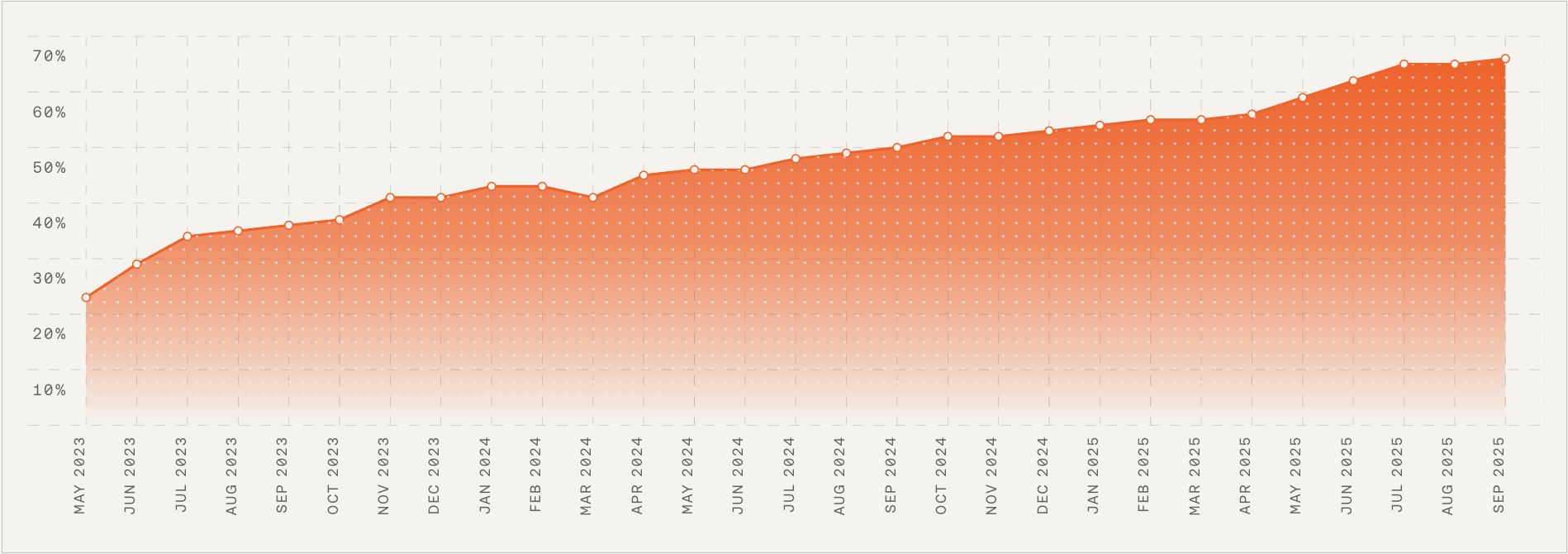
    Phase 3: Specialize and hire. Once AI handles 50–70% of incoming volume, these responsibilities become full-time roles. Investing in specialization becomes essential infrastructure for the next scale stage.

    The bottom line. AI changes the shape of your support team. These four roles — AI operations lead, knowledge manager, conversation designer, and support automation specialist — form the backbone of the AI-first support organization. They bring order to a constantly changing environment and enable AI to deliver the outcomes leaders and customers expect heading into 2026.

    Next week, we’ll continue the 2026 planning series with a deep dive into org design models for AI-first support teams — how to structure people, workflows, and accountability in a world where AI resolves most conversations before a human ever sees them.

    To follow along with the series and have each new edition emailed to you directly, drop your details here.


    Inspired by this post on The Intercom Blog.


    Book a consult png image