In competitive markets, I see two options: try to win the game competitors set, or choose to play a different game. In the "Customer Agents" category, I’ve watched too many glossy, fabricated demos—especially around voice—mask the real challenges. Voice is just extremely hard. We all know the future of customer experiences will be Agent-driven voice, yet most of us haven’t actually spoken with a modern AI Agent when calling a business because the tech hasn’t been truly ready in the wild. Today, the bar moves.
What changed? There’s a live, public demo of cutting-edge voice tech you can stress test yourself—no smoke, no mirrors. I recommend taking it for a spin: https://fin.ai/voice. It’s fast, natural, and, yes, very, very good.
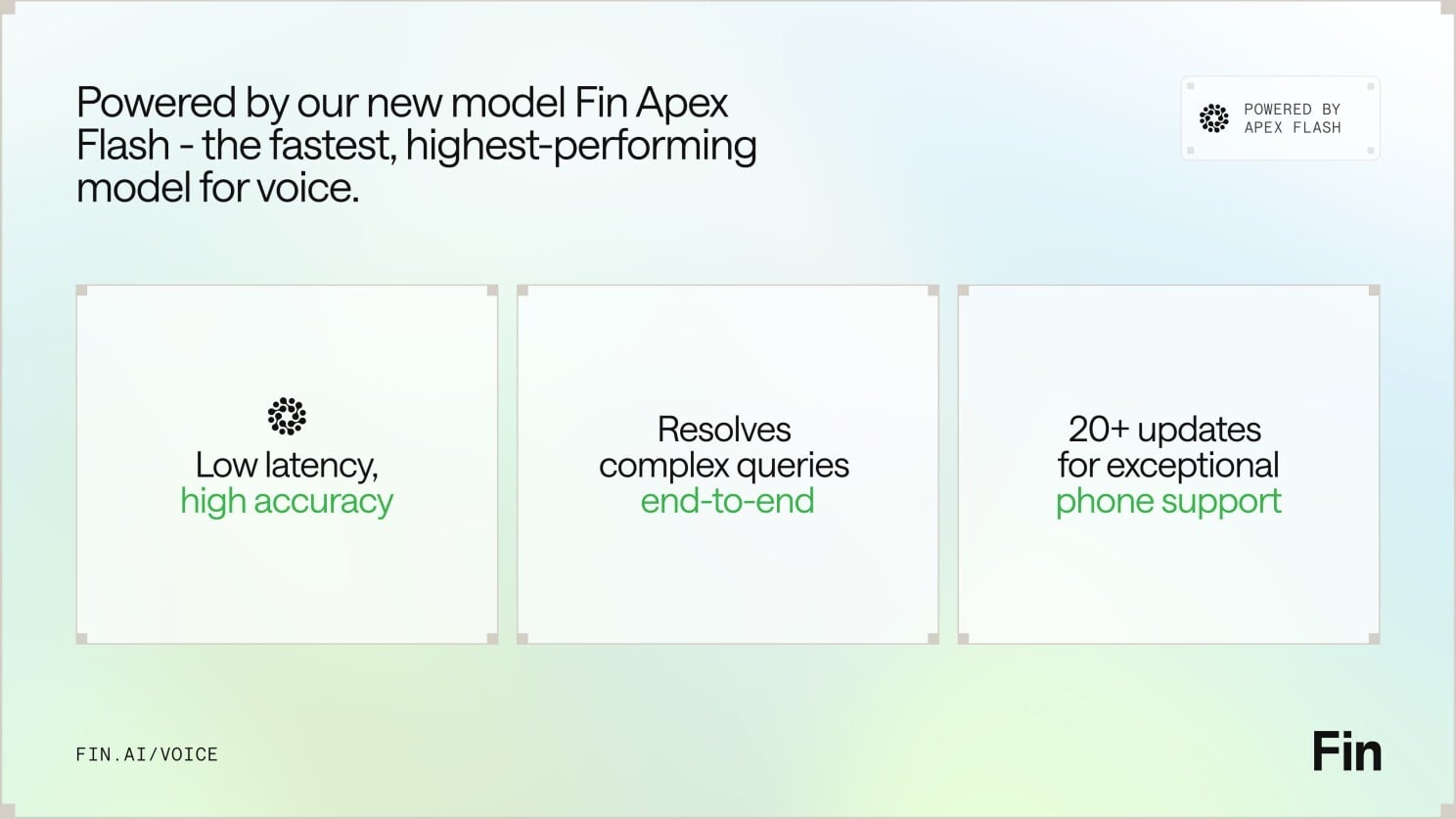
For context, yesterday brought Apex Flash, their newest and fastest model, built for the unique demands of low latency channels like voice. Today comes Fin Voice 2, a major upgrade to Fin Voice with over 20 new features, and the first product built on Apex Flash.
Here are the three things that stood out to me—and why they matter for customer support AI strategy and product strategy.
First — thanks to Apex Flash, Fin Voice 2 is now the fastest, most natural Agent for phone, with higher resolution rates and customer satisfaction scores than ever before. Apex Flash is trained on millions of customer experience interactions, fine tuned for customer service, and can be configured to understand all your knowledge and follow all your policies. The result is higher resolution at significantly lower latency—the best of both worlds for voice AI agent performance.
Speed and naturalness here aren’t accidental. Most voice AI products are slow because they convert speech to text, send it to a general model, get a text answer, and then convert it back to speech. Fin Voice 2 was designed to work differently, separating the real time layer that handles speech processing, and the layer that generates answers. That architecture is purpose-built for the demands of customer service on voice.
Powered by Apex Flash, Fin Voice 2 raises the bar on quality and speed—boosting resolution rates and guidance following while cutting time to first audio and semantic search latency, with a lift in CSAT too.
Second — Fin Voice 2 can handle complex queries end to end: taking actions in external systems, verifying callers’ identities, processing refunds, booking appointments, and more. Phone is a high-stakes channel, and Fin adapts to customers across emotional states, clarifies when needed, and confirms key details before taking action. Most of the time, Fin can resolve the query in full, and when it can’t, it seamlessly hands off to the human team, maintaining full customer context and history. You also get multiple improvements to call quality, plus proactive outbound calls to follow up on unresolved issues—all orchestrated by robust AI workflows.
Third — Fin Voice 2 gives you total control with industry-leading tools to configure and manage how Fin behaves. You get rich, detailed insights into call behavior and quality, the most common topics of calls, and one-click recommendations to improve. As with everything in Fin, you can fully self-serve and then manage it all with ease, without requiring professional services. Many vendors only let you set up their voice agent under supervision; with Fin, you get everything you need to iterate fast.
If you haven’t tried the demo yet, go check it out: https://fin.ai/voice. If you prefer to wait, don’t be surprised when you end up speaking with it at a favorite brand soon.
From a product management lens, this is what matters: latency is a feature customers feel; transparency builds trust in enterprise AI; and control is non-negotiable for CX leaders. The combination of a purpose-built, agentic AI architecture, measurable gains in resolution and CSAT, and true self-serve configuration signals that voice is moving from prototype theater to production reality. That’s the different game I want our industry to play.
I keep asking myself a simple, high-stakes question: what does it take to build an AI customer support agent that actually knows when it can't help — and says so?
Recently, I dug into how Jamie Hall (Co-founder & CTO), Xharmagne Carandang, and Rona Wang at Lorikeet are answering that question for enterprises in regulated industries. Their target outcome is refreshingly concrete: an agent that responds like the best customer support you’ve ever had — one that knows you, gets things fixed, and hands off gracefully when it’s out of its depth.
What resonated first was the honesty about early missteps. The team explored reflection tools and information dashboards before a healthcare startup reframed the job-to-be-done with a blunt directive: just help us clear the inbox. The earliest prototype wasn’t flashy — a command-line script spitting out a CSV — yet it paved the way for a scalable, measurable foundation.
Today, the system runs on a dual-agent architecture: a Concierge that handles customer tickets end-to-end, and a Coach that helps customers configure, test, and continuously improve it. That split is more than a technical choice; it’s a product strategy that separates operational resolution from the meta-work of quality, guardrails, and evaluation.
The backbone principle is "AI humility" — defaulting to a human handoff when uncertain. In practice, this isn’t about avoiding responsibility; it’s about preserving trust. When an agent signals uncertainty, it protects brand equity and customer experience while still accelerating the path to resolution.
Lorikeet integrates with Zendesk and Intercom instead of replacing them. That decision respects the entrenched workflows and analytics ecosystems support leaders already rely on, and it reduces adoption friction while enhancing existing queues, macros, and reporting.
The UX has evolved from a workflow builder to a conversational interface — and yet the blank chat box is still hard. Guardrails, prompts, and example-led onboarding help teams get started without forcing them to be prompt engineers. When you’re aiming for low cognitive load, a hybrid of guided steps and conversational nudges works better than a pure canvas.
One of the most nuanced patterns is "resolution in the loop": how human agents unblock the AI without taking over a ticket. Instead of a full manual escalation, humans can provide a targeted nudge — a missing piece of data, a policy citation, a link to a system of record — and let the Concierge finish the job. That collaboration preserves productivity while keeping humans in the quality loop.
Guardrails turned out to be deeply domain-specific — a cannabis company’s support tickets famously broke the team’s first approach. That’s a crucial lesson for regulated industries: policy nuance often lives in the edge cases. Lorikeet responded by making customer-configurable guardrails a first-class capability through the Coach interface.
Even more interesting, they’re flipping the configuration workflow so customers define "what good looks like" before they ever write a standard operating procedure. By anchoring configuration in outcomes and test cases rather than prose SOPs, teams move faster, reduce ambiguity, and get to measurable quality earlier.
The platform leans into eval-driven development: using AI to diagnose failure modes in traces and automatically suggest fixes. A "Trace Diagnosis Agent" surfaces root causes and remediation paths, shrinking the feedback loop from discovery to improvement.
Culturally, the product engineering cadence is customer-obsessed: every engineer asks weekly what they learned from a customer. That lightweight ritual is a forcing function for continuous discovery and keeps prioritization tethered to real-world tickets, not just internal hypotheses.
Here’s how I translate these lessons for any customer support AI strategy in regulated environments. First, ship with opinionated "AI humility" and measure handoffs as a quality feature, not a failure. Second, separate resolution from configuration via a dual-agent architecture so each can evolve independently. Third, integrate where your customers already work (Zendesk, Intercom) to accelerate time-to-value. Fourth, make guardrails domain-native and customer-configurable, and start with evals that define "what good looks like". Finally, invest in trace analysis and automatic fix suggestions to shorten the learning cycle.
If you’re scaling support in healthcare, financial services, or any high-stakes domain, these patterns are practical, defensible, and ready to operationalize. Build the Concierge to resolve, empower the Coach to continuously improve, and let "resolution in the loop" bind humans and agents into one reliable system of service.
AI in customer service is no longer experimental—it’s the standard. In my work leading product and customer experience teams, I’ve seen the shift firsthand, and the stakes have never been higher for getting the foundations right.
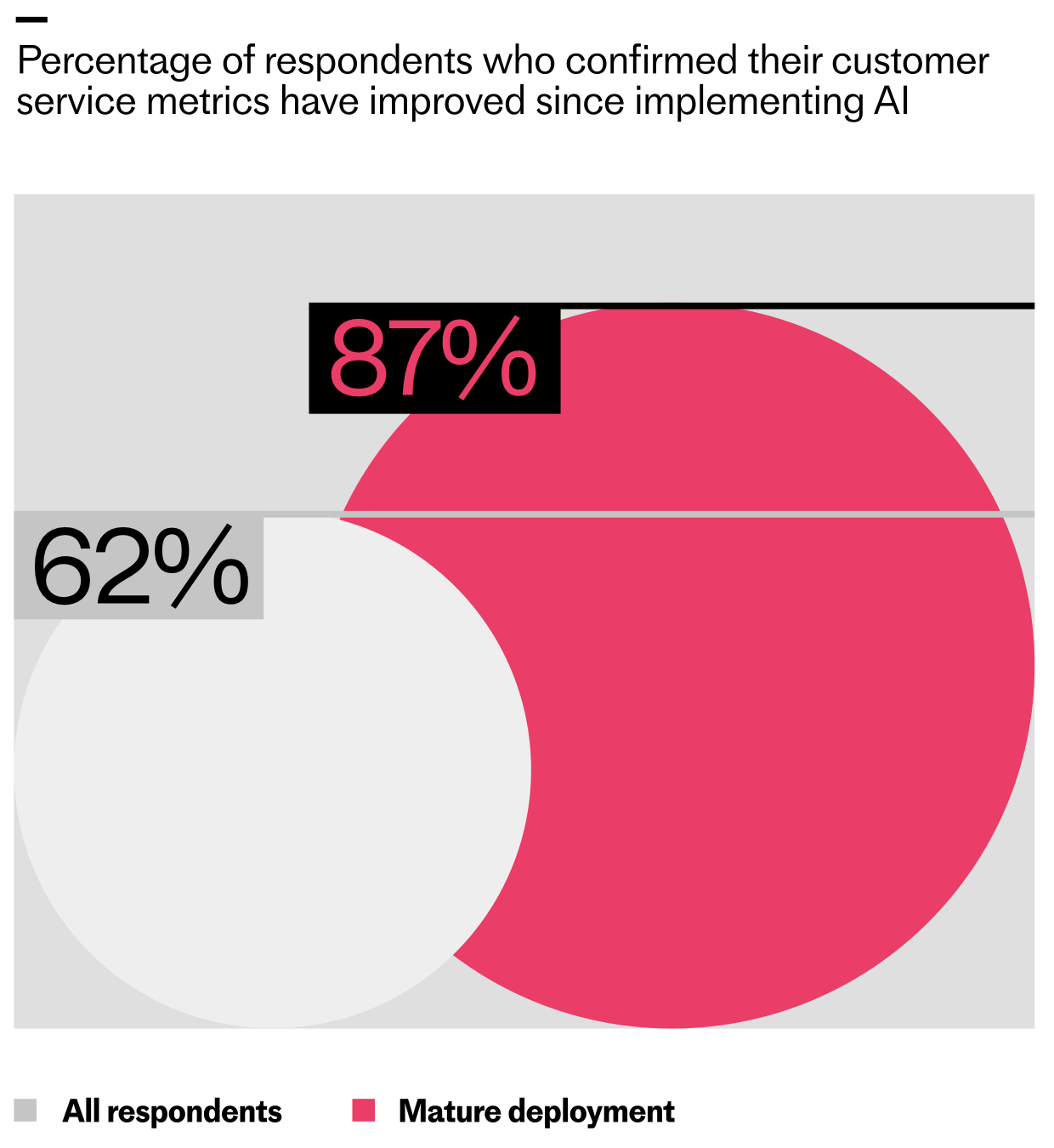
Fin’s 2026 Customer Service Transformation Report found that 82% of senior leaders say their teams invested in AI for customer service over the last 12 months, with 87% planning to invest in 2026. Those investments pay off with 24/7 availability, multilingual support, major time savings, and faster resolutions. But there’s an unsung hero behind every AI-first support experience: knowledge management.
A Service Agent is only as good as what we give it to work with. If we’re using an Agent, like Fin, to resolve customer queries end to end, it needs an extensive pool of knowledge to draw from. We have to feed it accurate answers on our product, features, policies, and troubleshooting. Without these, the Agent can’t do its job—and our team ends up handling repetitive queries that should be automated.
A Fin-branded quote pairs with a friendly black-and-white portrait to champion smarter support. It reminds readers that time spent building knowledge and processes today compounds into fewer tickets and smoother operations.
In this guide, I’ll walk you through two phases of the journey. Phase 1 is about building a high-quality knowledge base from scratch or overhauling what you have. Phase 2 is about maintaining, optimizing, and scaling that knowledge so your AI performance keeps compounding over time.
Definition: Knowledge management is the process of creating, organizing, sharing, and maintaining knowledge in your business.
Fin’s quote card blends a friendly headshot with a message to think outside the box and tap new information sources to power an AI knowledge base—ideal inspiration for service teams leveling up knowledge management.
Your help center is the obvious example, but it’s only the tip of the iceberg. Effective knowledge management also means creating resources like FAQs, troubleshooting guides, onboarding and best-practice docs, internal support guidance, and learning materials that cover everything from everyday how‑tos to complex billing and account questions.
It means identifying content gaps—missing troubleshooting steps, unclear policy explanations, outdated feature details, or unanswered edge cases—before your customers find them. It means implementing systems so both your Agent and your support reps can access the right information at the right time. And it means developing processes so your content stays in lockstep with product updates, policy changes, and bug fixes.
From Fin's guide to knowledge management, this monochrome quote card urges teams to test their first deployment themselves so agents feel the same journey customers do, turning insights into faster, higher-quality support.
Your knowledge base now fuels your entire support experience, not just self-serve. It’s the key to accurately answering complex questions, reducing handle time, and delighting customers across channels.
Here’s the blunt truth I share with every team: your Agent is only as strong as what you feed it. A lack of information, messy structure, or stale documentation will tank accuracy and trust. No large language model (LLM) knows your business like you do. It doesn’t understand your customers’ needs, pain points, and use cases. That knowledge is unique to you and your organization, meaning you need to be the one to map it all out and make it available to your Agent.
Equip service agents with a clear playbook for damaged delivery reports. This procedure page outlines when to use the guide, how to verify evidence, and the next action to reorder—ready to test, save, and set live.
Every investment in knowledge also has compounding results. Think of it as a flywheel: when you improve your knowledge base, your Agent solves more cases and generates better data. That data shows you what to add, update, or refine next. The sooner you plant the seeds, the sooner you’ll harvest the returns.
Consider a simple calculation. If it takes 30 minutes to write a troubleshooting article for a common issue, that half hour often saves hours for your support reps, who no longer need to handle that query. You can estimate impact by multiplying the average time to compose a response by the frequency of the query. For customers, multiply the number of customers who ask this question by their average time to resolution to quantify time saved. Then monitor Agent involvement rate, resolution rate, and automation rate to see the compounding effect.
Give every seller instant, trusted answers with an AI-powered knowledge base that unifies docs, FAQs, and playbooks into a single source of truth—accelerating ramp, boosting call confidence, and improving every customer conversation.
Phase 1: Building your knowledge base is about getting your content durable and AI-ready. I start by prioritizing what to include, where to source it, and how to audit and triage before go‑live.
Data-driven tools can surface the right starting points. For example, platforms like Fin can surface knowledge gaps from real customer conversations where help content is missing, unclear, duplicated, or contradictory. A centralized knowledge hub then becomes your single source of truth for both customer-facing and internal content, with audience controls to ensure your Agent only uses the right materials for the right users.
AI elevates service when teams treat deployment as a learning loop. This Fin-branded quote visual introduces our ultimate guide to knowledge management for service agents—iterate from day one to improve customer outcomes and teammate efficiency.
Here’s how I prioritize content for the first wave. Support FAQs come first—billing changes, account updates, feature usage, troubleshooting, and policy questions. I mine the inbox and historical conversations to find the highest-frequency issues and turn them into crisp help articles the Agent can quote.
Next, I build onboarding and setup guides so new customers reach value fast. I collaborate with customer success and product to document the fastest path to “first win,” and I ensure the Agent can reference those steps in chat and in‑product guidance.
Keep your help content fresh. A Fin quote urges support leaders to audit and update their knowledge base so AI assistants and service agents surface accurate answers that genuinely add value.
Then I add troubleshooting and advanced guides for deeper issues and power-user workflows. I pull in product managers, engineering, and success managers to capture deeper diagnostics, known limitations, and recommended workarounds—exactly the details that prevent escalations.
Finally, I create content for specific use cases and customer segments. Different goals and configurations require contextual guidance, so I reflect language customers actually use and tailor examples to their jobs-to-be-done.
Smarter support starts with better knowledge. A testimonial highlights how Fin learns from website and help center content, showing that robust knowledge bases train AI agents, raise accuracy, and yield compounding gains.
When sourcing knowledge, I cast a wide net and consolidate it so the Agent and my team can use it reliably. That includes public help articles and troubleshooting guides; internal runbooks, escalation steps, and policy clarifications; curated snippets for short replies and exceptions; past conversations that expose gaps; relevant website pages; and documents like PDFs and DOCX with selectable text.
Before anything goes live, I run a structured content audit. The goal is twofold: prevent the Agent from learning from outdated information, and expose gaps that will cause escalations. I divide content by product area, assign clear ownership, and set a time‑boxed review window to update, consolidate, or retire content. Shared ownership turns a daunting clean‑up into a manageable sprint.
Why can’t knowledge content be an afterthought? This Fin visual pairs a grayscale portrait with a bold message: great Service Agents rely on a strong, current knowledge base to deliver accurate, evolving support. Explore the guide.
I also walk the customer journey myself—exactly as a new user would—so I can experience the Agent’s responses firsthand and spot missing topics or keywords. Where my platform supports it, I use preview and batch testing to validate coverage across common questions, then simulate more complex workflows to ensure handoffs and steps are properly defined before launch.
After 30 days of Agent activity, I dive into the data. I look for topics driving handoffs to humans, articles correlated with low resolution rates or CSAT, and content that customers view but still escalate. Those signals tell me exactly what to write or refine next—and where to tighten conversation design or retrieval.
Centralize your conversations, customer data, and knowledge in one place to sharpen context and speed resolutions. This Fin graphic pairs a monochrome portrait with a bold pull-quote highlighting unified platforms for better support.
Prioritization is where impact accelerates. I focus first on the content my team shares most: top help articles, troubleshooting steps, onboarding flows, and policies. I study conversation analytics to identify the most common questions, the longest handle times, and the lowest CX scores, then close those gaps with targeted content. I also review high‑view articles that haven’t been updated recently and refresh anything affected by changes to product, policies, or plans.
Resourcing matters. Building a high-performing Service Agent shouldn’t be a side gig. I explicitly allocate weekly time for frontline reps, support specialists, and product partners to work on content requests and knowledge improvements. A 5–10 hour per‑person cadence is a practical baseline, and it doubles as a powerful way to upskill the team for emerging AI roles.
Jumpstart smarter support with the #1 Agent—organize knowledge, speed answers, and automate routine work. Click Start a free trial to see how AI elevates your service team and delivers faster resolutions.
Writing for AI is writing for customers. I train the Agent to mirror the terms our customers use by analyzing search queries and real conversation language. I avoid internal jargon, expand acronyms, and clarify key concepts to eliminate ambiguity. When a topic invites yes/no answers, I restate the question and add the necessary context so the Agent doesn’t misinterpret shorthand. I always pair images or videos with clear explanatory text so the guidance is accessible and machine‑readable. And I structure content for scanning with crisp headings and short sections, avoiding hidden information that requires clicks to reveal.
When I have bite‑size answers—common edge cases, policy clarifications, repetitive high‑volume queries—I collect them into focused internal snippets or compact FAQs so the Agent can retrieve and deliver precise answers quickly.
Phase 2: Knowledge management is where the compounding value kicks in. Once live, I track the metrics that matter: resolution rate (conversations fully resolved by the Agent when it was involved), automation rate (total conversations handled by the Agent across overall volume), time saved (hours of manual work offloaded), Customer Experience (CX) Score comparisons across AI and human conversations, and CSAT parity.
Then I put those learnings to work. Inevitably, some problems won’t be solvable on day one. That’s a gift—it shows me where to refine workflows, add clarifying steps, and strengthen knowledge depth. The richest insights often come from where the Agent struggles or escalates; those friction points become my highest‑ROI content tickets.
Knowledge management is never one‑and‑done. As products, customers, and business goals evolve, so must the knowledge. I formalize an ongoing maintenance cadence with clear ownership, review intervals, and time blocks on the calendar. Wherever possible, I use AI‑assisted drafting to propose updates, summarize gaps, and accelerate review without sacrificing quality.
To sustain momentum, I create a simple intake for content requests—often a lightweight ticket workflow inside our support tools—so anyone in support, success, sales, marketing, engineering, or product can flag gaps and propose improvements. The teams closest to customers usually spot the patterns first; a good intake system ensures we don’t lose those insights.
I also bake knowledge work into every launch plan. New features, product updates, plans, and policies require Agent‑ready content at launch, not after. I partner with product, support, and product marketing to produce best practices and anticipated FAQs in advance, then I review early conversations post‑launch to spot recurring confusion and fast‑follow content needs.
Brand consistency builds trust across every touchpoint. I standardize terminology for products, features, plans, and policies so the Agent, the help center, and human reps all speak the same language. I proof for tone, spelling, and grammar, and I use templates so content feels cohesive. I also include clear contact options for customers who need them—what channel to use, when to use it, and what to expect—so we maintain confidence even when escalation is required.
Clarity about audience matters, too. If certain content applies only to specific roles, plans, or regions, I label it explicitly and, where my platform supports it, target content so the Agent uses the right guidance for the right segment.
Finally, I connect the dots. When conversations, customer data, and knowledge live in one place, every interaction becomes an insight loop. A connected Agent turns support into a retrieval-first pipeline, making it far easier to diagnose issues, improve accuracy, and continuously raise the bar on customer experience.
Behind every high-performing Agent is a rigorous, AI-friendly knowledge management practice. Treating knowledge as a core service function—not a project—creates systems that improve with every conversation. That’s how we transform support from a cost center into a compounding engine for customer satisfaction, operational efficiency, and growth.
Today I’m introducing Operator, an Agent that works across both Fin and the Intercom helpdesk to help you manage your customer operations.
In practical terms, Operator manages help content, builds automation, does the ongoing work that determines how well Fin performs, and runs the operational work your human team doesn’t have time for. That combination is precisely what modern support teams need to move from reactive firefighting to proactive, consultative support.
Why does this matter? Running a customer operation means managing AI and humans simultaneously, and doing this well requires more capacity than most teams realistically have. I’ve felt that strain firsthand—competing priorities, constant context switching, and a never-ending queue that blurs strategic focus.
On the AI side, Fin’s performance is largely influenced by what surrounds it: the accuracy of your help content, the quality of your Fin configuration, and how well you understand what’s working and why. When product teams ship daily, keeping your help center current means finding every affected article before customers notice the gaps. When Fin gets a conversation wrong, diagnosing it requires reading through what happened, identifying the root cause at the configuration level, making the fix, and verifying it worked. Analyzing why your resolution rate dropped means pulling conversations, finding patterns, and tracing the cause back to something actionable. And beyond individual fixes, there’s the ongoing question of what to automate next – what your human reps are still handling repetitively, whether it’s worth building a Procedure for it, and how to test it before it goes live.
On the human side, the demands are just as continuous. When an incident hits, someone needs to identify every affected customer, draft the right response, and send it before the problem compounds. Team leads need visibility into rep performance across hundreds of conversations to coach effectively and prep for 1:1s. Reps need to know what to prioritize without spending the first part of their day figuring it out. In fast-moving environments, that operational overhead wastes energy you should be investing in better customer outcomes.
Meet Operator, the agent that explains your customer conversations. This Synthesia testimonial shows how simply asking Operator reveals what happened and makes refining Fin faster for support and enablement teams.
Too often, the work outpaces what teams can manage, so it happens reactively, or not at all. Operator was built to change that, giving teams a new way to understand, manage, and improve their customer operations. Here’s how I put Operator to work across AI workflows and human-led processes.
First, I use Operator to ask my data anything. Your support operation generates more useful data than most teams have time to process. Operator gives you direct access to it. You can ask it any question about what’s happening in your operation (why a metric changed, what’s driving escalations, how the team performed last week) and it returns structured answers with charts, breakdowns, and the ability to dig further. It analyzes samples of real conversations on the fly to surface patterns and identify root causes. If your head of product wants to know what customers are saying about a new release, you can ask Operator rather than spending half a day pulling a report together. It also works across your entire operation, analyzing Fin’s performance, your human reps’ performance, and customer sentiment.
Crucially, I don’t start from scratch every time. Give Operator ongoing work, like analyzing your automation rate every Monday, flagging anything that needs attention, and posting the report in your Fin workspace. It’ll run the analysis, write the report, and deliver it without you having to go looking for it. That’s the kind of agentic AI leverage that compounds week after week.
Second, I keep the knowledge base current without writing a single article. Your knowledge base is only as useful as it is accurate. When product teams ship fast, keeping pace with content updates is a substantial, ongoing job. Give Operator a brief about anything, from a new feature or policy change to release notes, and it finds every article in your help center that needs updating, drafts the edits in your tone of voice and style, identifies content gaps, and drafts new articles to fill them. It even handles localized versions. Every change is formatted as a proposal (Operator’s version of a pull request) for you to review, edit, and approve before anything goes live. It feels like adding several knowledge managers to the team overnight, without the ramp time.
See why teams choose Fin Operator for customer operations: accurate analysis, trend insights, and conversation debugging—going beyond basic LLM connectors. A Raylo testimonial spotlights daily, real-world impact.
Third, I build, test, and ship improvements to Fin directly through Operator. When Fin gets a conversation wrong because of a content gap or misconfigured rule, Operator can debug it by reading through the conversation, identifying what caused the problem, proposing a fix, and running simulation tests to verify it before you approve. You see what changed and why before anything goes live. Beyond debugging, Operator has deep knowledge of every Fin feature and capability, so you can ask it directly to help you configure whatever you need. If you need a Procedure for a specific query type, describe the outcome you want and Operator builds it, including triggers, multi-step instructions, edge case handling, and a simulation test, all from a single prompt. The same applies to configuring Guidance rules, data connectors, monitors, and workflows. You don’t need to know which feature solves your problem or how to configure it; you just describe what you want.
For teams looking to increase their overall automation rate, Operator can handle that strategically too. Ask it to analyze where your biggest automation opportunities are and it surfaces them by volume, along with an estimate of the weekly team time each one is consuming. Pick one, and it builds the solution for you to approve. That’s consultative support, productized.
Finally, I use Operator to effortlessly manage the human side of support. When an incident hits, Operator identifies every affected conversation, drafts targeted responses, and sends them proactively, turning what would normally be hours of reactive triage into minutes of review and approval. For ongoing management, a team lead prepping for 1:1s can ask Operator to pull each rep’s metrics, flag outliers, and surface what’s worth digging into. A rep coming back from a meeting can ask what to focus on next and get a prioritized queue based on urgency, customer value, and wait time. And because Operator sees patterns across everything your human team is handling, it can surface the conversations they’re still resolving manually, flagging your next automation opportunity before you’ve had time to go looking for it.
Here’s why this works. Operator isn’t a general-purpose AI model given access to your data. It’s built on a library of purpose-built tools that encode expertise specific to support operations, like how to pick the right attributes for a given analysis, search a knowledge base semantically, debug Fin’s reasoning in a specific conversation, or write and test a Procedure that will actually work. That specialized toolkit is what makes its recommendations trustworthy and its execution reliable.
Elevate customer service with Operator. The bold headline and vivid knot logo introduce a modern AI platform that streamlines workflows, speeds resolutions, and scales support operations without extra headcount.
The proposal (pull request) system makes this possible. When Operator updates content, adjusts configuration, or modifies how Fin behaves, it creates a proposal – a structured diff of what’s changing and why. You review it, edit if needed, and approve before it takes effect. Operator does the cognitive work; the human stays in control of what goes live.
More than 200 early users are already trying Operator, and every one of them is finding new use cases. It’s a genuine step change in capability, and I expect it will change the way support teams run their operation. We’re working towards a vision of Operator being increasingly agentic, expanding across every new role Fin takes on.
Operator is available in early access now. If you’re ready to transform your customer operations across Fin and the Intercom helpdesk with agentic AI, start here: https://fin.ai/operator.
Sometimes a corporate rename lands with such obvious inevitability—and such lateness—that it feels like a quiet confession. As a product leader, I’ve wrestled with that timing question: move early and risk confusion, or wait and risk stagnation. In this case, the industry finally received the clarity it has been circling for years.
The announcement was clear: “we’re changing the name of our company to Fin.” Crucially, the name Intercom will continue as the customer service software platform that many of the best brands rely on as their primary help desk. The team also “just launched a complete rebuild, Intercom 2,” and is doubling down investment in that product. In other words, the company brand now matches its leading customer agent platform—Fin—while Intercom remains the flagship product line.
From a product strategy and brand architecture perspective, this move aligns the corporate identity with the growth engine. I’ve seen too many winners of a prior era cling to yesterday’s positioning while markets shift under their feet. The phrase that keeps echoing in my mind—because it’s true in practice—is that “the only path to success in the future is through destroying your past.” Culture, pricing models, product lineup, investment priorities—those can evolve. But until the company name evolves, the market’s mental model often does not.
It’s telling that three years ago, when the team effectively created the service agent category, they led with Fin and kept Intercom in the background. That wasn’t indecision—it was smart category design. Humans don’t frequently remap old concepts; we add new ones. We don’t wake up reinterpreting what a chair is, but we do invest energy to understand a new kind of drone or an intelligent software agent. New categories deserve new names, or they’ll be dragged back into old expectations.
This is where product positioning meets competitive differentiation. Newcomers without legacy baggage enjoy a clean slate; they never have to convince the market they’ve changed because they never had an old position to defend. Even with provably superior technology, an incumbent can find itself explaining rather than advancing. I’ve led naming and repositioning work where the hardest task wasn’t shipping new capabilities—it was unseating the entrenched narrative in customers’ heads.
So, “baggage be gone.” Fin is clearly positioned as the future of the customer agent category and is poised to become the largest part of the business. Intercom, as a product brand, very much lives on—and with “Intercom 2” now in the world, the product roadmap and investment thesis are unambiguous. The core takeaway for product management leadership: align corporate naming with your category-creating bet, then let go. That’s how you turn momentum into market leadership.
For leaders working through similar decisions, here’s the lesson I’m taking to my own teams: rebrands aren’t about logos, they’re about narrative clarity and execution velocity. When the corporate name and the breakout product share the same story, go-to-market motions get sharper, customer understanding improves, and AI strategy integrates more naturally into customer support workflows. Naming follows strategy—not the other way around.
Today, I’m spotlighting Fin for Sales, a new role for Fin Customer Agent that runs your inbound sales motion end-to-end. From my vantage point leading product management and collaborating closely with revenue teams, this is a meaningful evolution in how we capture, qualify, and convert high-intent demand with precision and speed.
The promise here is simple and powerful: a single Customer Agent with shared context, memory, and business goals that supports the entire journey from first touch to close. Fin for Sales brings Fin to the start of the customer journey so it can engage prospects, guide them through your funnel, and ensure the best opportunities reach your sales team without delay.
At a high level, here’s what stands out to me in practice. Fin engages every prospect instantly at the moment intent is highest. It runs discovery like your best rep with clear pricing guidance, product education, and objection handling. It qualifies and routes in real time using your playbook and syncs full context to your CRM. And it closes deals while you sleep by booking meetings, starting trials, and steering buyers to the right next step—boosting MQLs, pipeline, and early close/win rates.
Fin engages every prospect instantly. It starts the right conversation when interest peaks, re-engages before prospects go cold, and works on every channel, in every language, 24/7. In my experience, that immediacy is the difference between a lead that converts and a lead that disappears.
Introducing Fin for Sales, a conversational assistant that qualifies prospects in real time. The chat compares Free vs Pro, spotlights reporting and Salesforce integrations, and invites users to book a call.
Fin runs discovery like your best rep. It explains pricing, guides product discovery, handles objections, and personalizes each interaction based on who the prospect is and what they care about. This is where thoughtful conversation design and consistent playbook execution really compound.
Fin qualifies and routes in real time. Using your playbook, it collects and enriches data about your prospects, sends qualified leads to your sales team or down self-serve paths, while syncing full context to your CRM. Your team never works the wrong lead. That’s operational rigor revenue leaders crave.
Fin closes deals while you sleep. It can book meetings, start trials, and guide buyers to the right next step. Early customers are already seeing impressive results, increasing MQLs, growing pipeline and seeing close/win rates of nearly 50% in the first month. That’s the kind of lift that reshapes go-to-market strategy and forecasting confidence.
Fin for Sales links customer agent insights with Salesforce, turning live conversations into rich profiles and lead scores. View key details, intent and opportunity signals, and guided next steps like booking a meeting.
Why this matters: most online sales experiences still rely on forms, queues, and follow-ups—exactly when prospects want clarity and momentum. Hiring enough reps to cover every time zone, channel, and hour is unrealistic, and even the best teams burn cycles on leads that were never going to convert. I’ve watched high-intent demand slip through the cracks simply because the response wasn’t fast, consistent, or contextual enough.
Revenue leaders need a system that meets every inbound interaction immediately, without sacrificing quality, and routes only the right opportunities to sales. Incremental automation doesn’t fix the core issue; an agentic approach does. Fin for Sales closes that gap by pairing instant engagement with disciplined qualification and crisp handoffs.
How it works in the moment: when a prospect is actively exploring your site, any delay—a form, a queue, a “we’ll get back to you”—erodes intent. Fin engages in real time through the Spotlight Messenger, a new interface built specifically for sales conversations. It can proactively start a conversation based on context like the page someone is on or how they’re browsing, and it offers smart suggestions to kick-start engagement.
Fin for Sales schedules meetings directly in chat. A sleek widget shows a March 2026 calendar with selectable time slots and a clear Confirm booking CTA, streamlining lead capture and speeding up sales follow-ups.
Prospects who might have waited—or never reached out—now get answers immediately. Fin also works across channels including messenger and email, so buyers can engage however they prefer. Whether someone is browsing your pricing page at 2am or comparing features during a lunch break, Fin responds instantly and relevantly so no lead is left behind.
To move prospects toward a decision, Fin guides personalized discovery conversations that clarify needs and accelerate choices. Four pillars make this consistent and trustworthy. Playbook: you brief Fin in natural language on desired outcomes and scenarios; it follows your rules, handles objections with approved guidance, and stays on track. Knowledge: it draws from your product knowledge base to answer pricing, features, and plan fit, and can reuse what you’ve already trained for customer service—no duplicate setup. Enrichment: once Fin learns a user’s email or name, it enriches that data with outside sources to improve qualification, personalization, and routing. Memory: if Fin recognizes a returning visitor, it remembers context so the buyer never starts over.
As conversations progress, Fin surfaces the opportunities most likely to close. It qualifies like your best SDR—asking about use case, budget, fit, and timing—and applies your existing playbook to identify the strongest opportunities. Details captured in conversation, plus enrichment, produce a complete picture that’s structured and synced into your CRM for immediate sales action. And when a lead isn’t a fit, Fin gracefully disqualifies or redirects to self-serve resources, ensuring your pipeline stays focused.
Introduce Fin for Sales to your team with this clean hero banner: bold headline, signature blue spiral, and a clear 'Start free trial' call to action—inviting readers to explore an AI customer agent built for revenue.
When a lead is ready to act, Fin closes. It books meetings via tools like Chili Piper or Calendly, guides qualified buyers into trials or subscriptions, and routes opportunities to your sales team with full context. Crucially, it passes the full conversation history and an AI-generated summary so reps pick up exactly where the buyer left off—no repeated questions, no lost nuance. For self-serve motions, Fin can guide prospects from discovery to trial signup or even paid conversion, automatically assigning the right path.
Real results underscore the model’s value. Fin is already delivering measurable results for early customers across different company sizes, sales motions, and go-to-market models. Attio, an AI CRM built for scaling go-to-market intelligently, deployed Fin to replace their traditional form-and-wait inbound flow with real-time conversational engagement. In three months, Fin handled over 1,600 conversations with website visitors, qualified more than 50 leads for sales, and routed over 30 applicants into their startup program. One returning prospect engaged with Fin, had their questions answered in real time, and converted to a paying customer at six times Attio’s average contract value.
Fellow, an AI-powered meeting assistant and management platform, started by deploying Fin overnight, a window where no human was online and prospects waited up to 18 hours for a reply. In January alone, Fin booked 18 meetings the team would never have reached, converting at around 48%. Importantly, the human team maintained its booking rate while Fin added net-new meetings—proof that automation layered on top of strong human coverage can be additive, not cannibalistic.
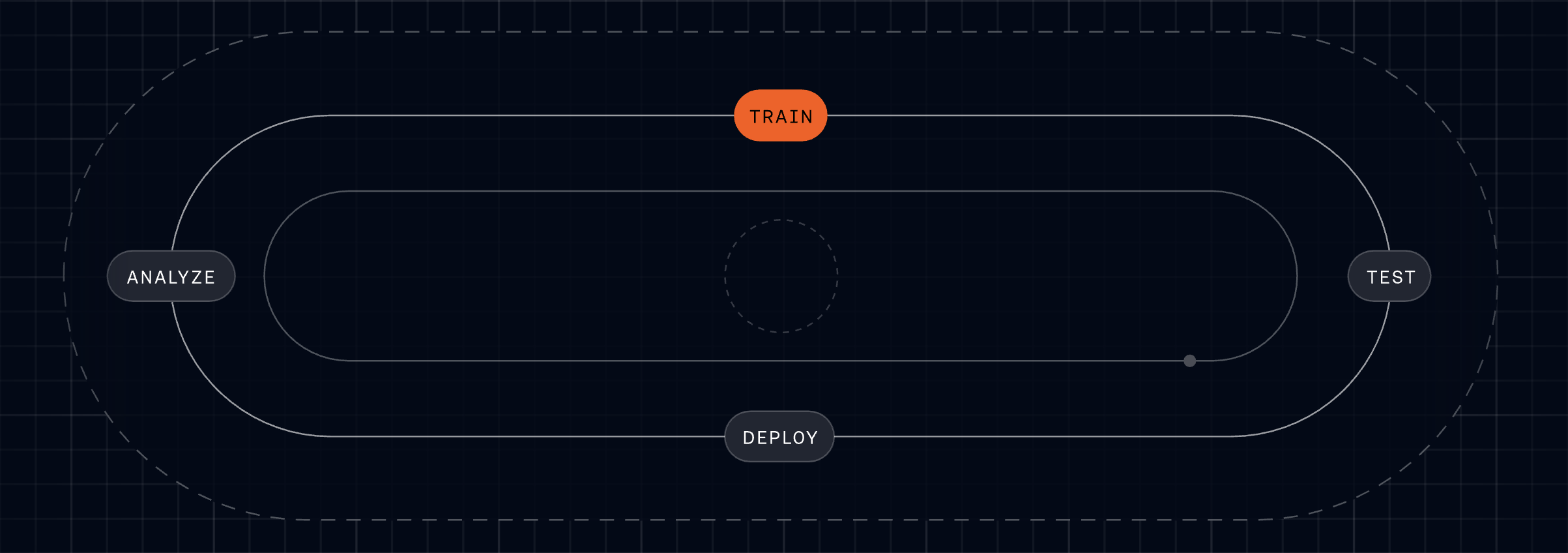
Fin for Sales is built on the same AI platform that powers the highest-performing Agent in customer service, which keeps the end-user experience consistent. If a prospect asks a support question mid-sales conversation, Fin can handle it—no handoffs to other vendors, no lost context. It shares knowledge and memory across its platform, always knows whether it’s talking to a prospect or a customer, and moves between roles as needed. Setup follows the same Fin Flywheel: Train, Test, Deploy, Analyze. Describe your sales playbook, qualification criteria, and routing rules in natural language; test in preview; deploy live; and use Analyze to understand performance and iterate quickly.
Fin for Sales is available today, and there’s more coming. I share the conviction that the future is a single Customer Agent, vertically integrated down to the model layer, orchestrating customer experience across the entire lifecycle. If you want to see it in action, go to fin.ai/sales and talk to Fin—then imagine that instant, high-quality engagement running across your inbound sales engine, every hour of every day.
At Intercom, shipping is our heartbeat. We push code to production hundreds of times a day, and I’ve seen firsthand how that pace sharpens our product instincts and forces clarity in our CI/CD practices.
Engineers, engineering managers, designers, and PMs all contribute to this, safely. The average time from merging code to it running in production is 12 minutes. For me, that’s not just a vanity metric—it’s a DORA-style signal that our release pipeline and observability are aligned with the velocity our customers expect.
I’ve long held a belief that might sound counterintuitive: speed is not the enemy of safety. It’s a prerequisite for it. Accumulating code creates risk. Shipping small batches minimizes it. The faster you ship, the smaller each change is, and the easier it is to catch problems, and roll back when something goes wrong as the context is still fresh in your head. That small-batch discipline underpins how I approach AI workflows and risk management across product teams.
Today, over 93% of our pull requests (PRs) across our two main codebases are Agent-driven. And over 19% are auto-approved with no human reviewer in the loop. When I first saw those numbers at scale, I asked the same question you might be asking: are we trading rigor for speed? The answer lives in the data.
I want to focus on that second number, and why I think it makes us safer. Most people hear “AI is approving our pull requests” and think that’s reckless. I thought so once, too—until I looked at the outcomes that actually matter.
Last year, our CTO Darragh Curran set an explicit goal: double the productivity of our entire R&D organization within 12 months. Because the faster we can build and ship, the faster our customers get the capabilities they need. Ambitious? Absolutely. But the operational clarity that comes from such a target is invaluable for product leaders.
Nine months later, we did it. The results were significant across the board, but here’s the stat that crystallized it for me: downtime from breaking code changes dropped 35%, even as our deployments doubled. Shipping faster made us safer. As we modernize how we build and ship software, we systematically surface bottlenecks and tackle them. One of the biggest we found? PR review.
Humans simply don’t have the time or mental capacity to properly review the volume of AI-generated code we’re now producing. I’ve watched great engineers get stuck in review queues, or worse, feel pressure to rubber-stamp under time constraints—an anti-pattern I’ve battled in multiple orgs.
When an AI Agent can produce a working implementation in minutes, waiting hours or days for a human to review it is an impedance mismatch. The production line is moving faster than the quality gate can keep up. When that happens, one of two things follows: either the queue backs up and velocity drops, or, more dangerously, humans start rubber-stamping. Glancing at a diff, skimming the description, clicking approve. Some companies are drifting into this failure mode silently. We chose to confront it head-on and built a rigorous solution.
PR review, done properly, is complex. A good reviewer evaluates the problem statement, aligns the diff to intent, checks for safety and logical issues, applies deep product context, and scans for performance and anti-patterns. No single human can cover all of that on every PR at high deployment frequency. The truth—borne out by data—is that the human baseline we often assume is stronger than it really is.
AI is accelerating code reviews: our data shows median merge time drops from 75.8 minutes with human review to just 14.6 minutes with AI approval—about 5.2x faster—while maintaining strong safety checks.
So we asked ourselves: what if we could do better?
Our PR review Agent doesn’t treat code review as a single task. It decomposes it into separate sub-jobs, each handled by an independent sub-Agent. One assesses the quality of the problem description. Another checks whether the diff actually aligns with the stated intent. Another reviews for safety concerns. Another checks for logical correctness. Another reviews against best practices and known anti-patterns. And so on. As a product leader, this is exactly the kind of agentic AI architecture I look for: specialized, auditable steps that strengthen the overall control plane.
The result is that every PR is reviewed as if a dozen of our most tenured and knowledgeable engineers were all looking at it simultaneously, each bringing their own specialist lens. In the past, getting that breadth of review on a single PR was impossible. Now it’s the default. And unlike ad hoc human review, this system is consistent and tireless.
A human reviewer typically focuses on the actual code changes, the diff. Our Agent goes deeper. It traces execution paths, following the implications of a change through the codebase. This is something humans rarely had time to do, even when they wanted to.
While testing our new PR review Agent on a set of historical PRs, we found it flagging a one-line text copy change as incorrect. On the surface, it looked completely harmless, just a text update. We assumed it was a mistake, but it wasn’t. Our Agent caught that the new copy contradicted an existing validation mechanism elsewhere in the codebase. No human reviewer would have realistically found this unless they happened to have written that validation code very recently. Our Agent catches this kind of thing consistently, every time, because it’s always tracing execution.
The review isn’t generic either. It’s grounded in Intercom-specific guidance that our engineers have built and continue to refine, encoding the same context, standards, and product knowledge they’d apply if they were reviewing the PR themselves. When the Agent reviews a PR, engineers flag whether the review comments were helpful or not, and that feedback continuously sharpens the guidance. It’s a flywheel: the more our engineers invest in teaching the system how to think about our codebase, the better every subsequent review gets. This is eval-driven development in action.
Automated approval is also never forced. Any engineer can request a human review on any change, at any time. The system is a tool, not a mandate. At Intercom, shipping code doesn’t end at merge. The engineer who ships a change is expected to watch it go live, monitor its behaviour in production, and be ready to roll back if something isn’t right. AI approval doesn’t change that. The human who ships the code remains accountable for the outcome.
The naive take on AI-approved PRs is that it’s just a rubber-stamp LLM call so that humans don’t have to bother. A convenience feature. That misses what’s actually happening. Our Agent is strict. It won’t approve large PRs. If a change is too big, too complex, or too broad in scope, it flags it and requires it to be broken down. That design nudges engineers toward smaller, well-scoped changes—the safest way to ship, review, test, and, if needed, roll back.
This matters enormously for safety. Small changes are easier to review, easier to test, easier to understand, and, critically, easier to roll back when something goes wrong. This is the same principle that has always underpinned our shipping culture, but now the PR review Agent actively enforces it. As someone who’s owned incident management and SRE partnerships, I can’t overstate how powerful this is.
A snapshot of our code review results: AI-authored pull requests are reverted far less often than human-written ones—around 10x lower—across both stacks, with 0.53% vs 5.39% in backend and 0.22% vs 2.00% in frontend, signaling safer merges.
It’s tempting to look at a goal like “>50% AI-approved PRs” and worry we’re optimizing for a metric rather than an outcome. I see it differently. The real goal is to remove a bottleneck that, if left unchecked, pushes people toward rubber-stamping. By elevating the review bar and keeping batch sizes small, we protect both speed and stability.
We didn’t assume AI review would be good enough; we actively ran an experiment. Our hypothesis was that AI review could match or outperform human review quality, measured by outcomes: were the changes correct? Did they cause problems in production? How quickly were they reviewed and approved?
We started with a controlled pilot of over 100 PRs through the AI approval pipeline. The results: zero reverts of AI-approved PRs, and a 6–16x improvement in time-to-approval at the 75th percentile. Since then, the system has scaled significantly. In the first four weeks of broader rollout, 497 PRs went fully autonomous, with Claude writing the code and our AI approval system reviewing, approving, and shipping to production.
Beyond the approval pipeline itself, we also looked more broadly at how AI-authored code performs in production compared to human-authored code. AI-authored backend code had a revert rate of 0.53%, compared to 5.39% for human-authored. On the frontend, it was 0.22% versus 2.00%.
AI-authored code, reviewed and approved through our automated pipeline, is being reverted at a fraction of the rate of human-authored, human-approved code. I don’t expect that to stay at zero forever, but the evidence shows the quality bar our Agent holds is at least as high as the one humans were holding, and in many cases higher. And here’s the humbling perspective: the product changes that caused outages in the past? They were all reviewed and approved by humans. Human review is not a guarantee of safety. It never was.
Everything I’ve described—the sub-Agent architecture, the traceability, the labeling, the data—wasn’t just built for speed. It was built for auditability. Every AI-approved PR is labelled, logged, and queryable. The review comments, the approval decision, the test results, the merge event: all recorded. The evidence an auditor expects to see is the same whether a human or an AI approved the change. The “who” may change, but the “what” doesn’t. That’s how you meet SOC 2, HIPAA, ISO 27001, ISO 42001, and AIUC-1 without compromising agility.
We engaged our auditors, Schellman, early, before we scaled. We proactively worked with them to confirm that our automated review processes and the evidence they produce meet the requirements of our compliance frameworks, including SOC 2, HIPAA, ISO 27001, ISO 42001, and AIUC-1, among others. We think AI-driven change management can meet and exceed the standards that human-driven processes set, and we want to help prove that. In my experience, when you build for safety, compliance follows—never the other way around.
You can only go so far with PR review as a safety mechanism, no matter how good the reviewer is, human or AI. Only in production do you discover the unknown unknowns. The majority of Intercom’s largest outages weren’t even caused by changes to product code at all. They were infrastructure issues, unanticipated customer usage patterns, or third-party outages. PR review, whether human or AI, was never going to catch those. That’s why, in parallel, we’re also working on an Agent that proactively diagnoses issues in production. We’ll share more on this soon.
Speed has always been at the core of how we build at Intercom, not in spite of safety, but because of it. And we’re getting even faster with AI. It’s easy to assume that AI-approved PRs would lead to a drop in quality and safety but our data proves otherwise. Our heartbeat is just getting stronger. For product leaders, this is the blueprint: pair agentic AI with small batches, robust observability, and clear accountability, and you make shipping both faster and safer.
I’ve learned that the smallest slice of your support queue often dictates the majority of your operating cost, customer memory, and automation ceiling. In product reviews and CX ops deep-dives, I see the same pattern: the “easy” tickets pad your resolution counts, but the complex, multi-step queries quietly own your handle time and your brand trust. If you care about compounding impact, your customer support AI strategy has to target that hardest percentage first.
Complex queries are a small percentage of your queue, but they consume a disproportionate share of your team’s time.
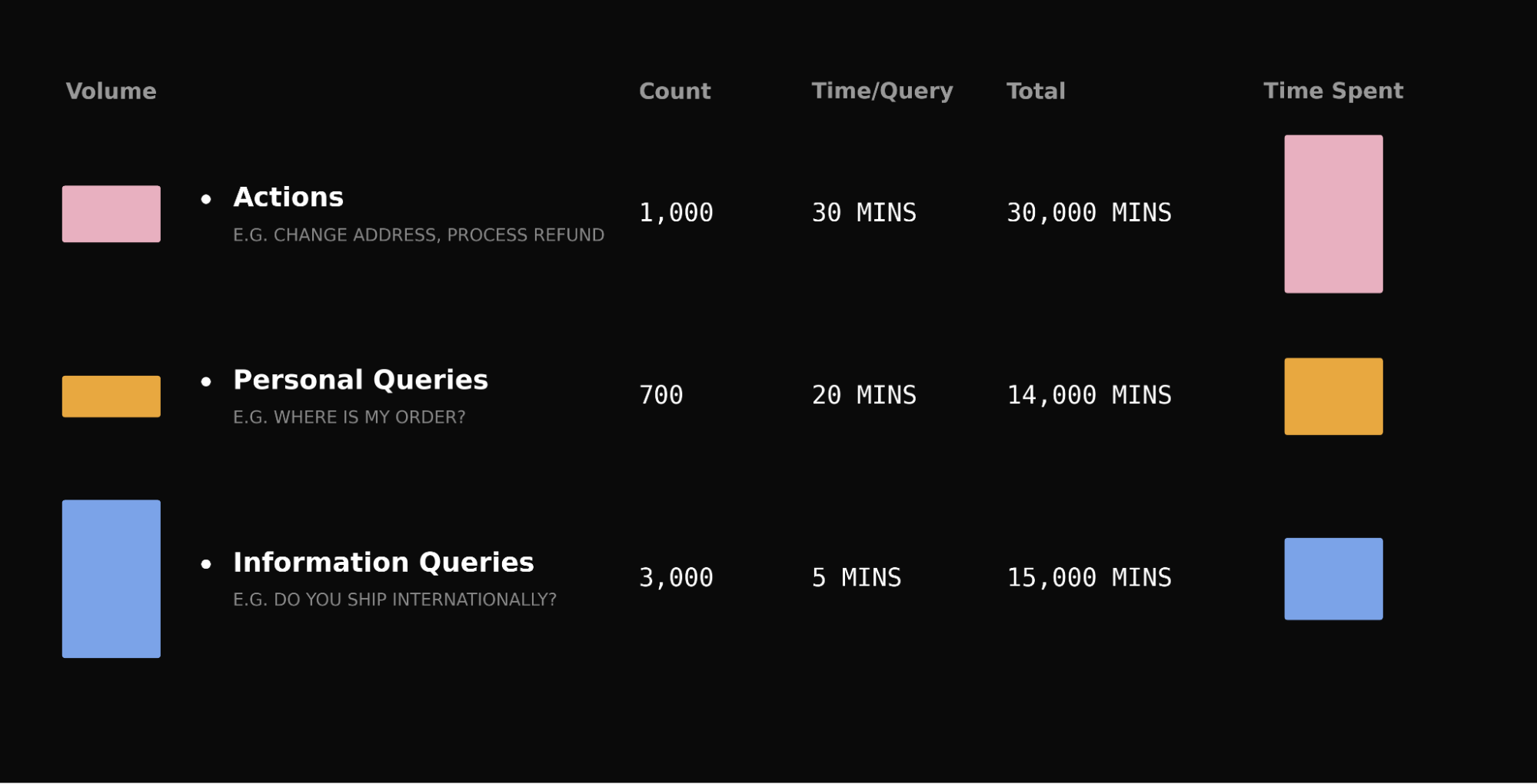
Take a typical queue: password resets outnumber refund disputes ten to one, but a reset takes five minutes and a dispute takes thirty. The “rare” query accounts for over a third of total handling time. The same pattern holds for account investigations, subscription changes, and billing disputes.
How you handle complex queries is also what customers actually remember about their support experience. When someone is dealing with a damaged order or a billing dispute, the stakes are higher, and a fast, good resolution is what separates a forgettable interaction from one that builds lasting trust.
Most AI Agents automate the easy, informational queries well. The question for your automation rate is whether they can handle the hard ones. That’s where agentic AI and robust AI workflows make or break your outcomes.
We’ve gotten really good at informational queries – the hard part is what comes next. I’ve seen teams invest deeply here, and for good reason: it lifts containment quickly and cheaply. But to break through the plateau, you have to execute actions across systems, not just answer with text.
We’ve invested deeply in informational Q&A. We built Apex, a specialized customer service model trained on billions of support interactions, as Fin’s core answering engine. Beneath that sits a custom retrieval model, a purpose-built reranker, and a unified RAG pipeline, all trained specifically for customer service. Fin resolves issues at a higher rate than general-purpose frontier models, with fewer hallucinations and at lower cost.
But informational Q&A only covers queries where text is the answer. Most Agents can handle that. Far fewer let you configure complex, multi-step actions without a forward-deployed engineer setting it up for you, which creates a gap.
Every query your team handles falls into one of three categories:
Informational: “Can you ship transatlantic by priority next day?” Answered with text from your knowledge base.
Personalized: “Where is my order?” Requires data unique to that user.
Action-led: “My order arrived damaged, I need a refund.” Requires doing something: checking a return window, cross-referencing transaction data, making a judgment call – reading from multiple systems and acting across them.
From Jan to Apr 2026, the trend moves steadily upward, pausing briefly before a sharp late surge. A clear snapshot of momentum for customer service KPIs, finance results, and the impact of new procedures.
These complex queries, the ones that require multi-step processes across systems, aren’t edge cases; they’re the reason your support team exists. This is the gap Fin Procedures was built to close.
It works in practice, and the trajectory matters for product strategy and ops planning.
Procedures is live, it’s scaling, and the results are clear. Since launching in managed availability, Procedures has handled over 1.5 million conversations, and volume is doubling month over month across hundreds of apps in fintech, e-commerce, gaming, healthcare, and SaaS.
When customers hit complex, multi-step queries, the experience is dramatically better when Fin can do the work end-to-end. We tested this with a randomized 5% holdout – conversations where Procedures would normally run, but didn’t. CSAT was 28.93% higher when Procedures ran, a statistically significant result.
A product, not a services engagement. I’ve sat through too many “automation” projects that were really solutions engineering gigs: workshops, custom scripts, then a queue of change requests when policies shift. It’s fragile and slow.
The B2B AI industry has a consultingware problem. It’s not databases being forked anymore, it’s prompts. The economics of maintaining bespoke setups per customer don’t work. Either the application falls behind new models, or the vendor changes the model and quality degrades invisibly.
In my view, an agentic AI platform should be a product your team owns end to end: a natural language editor – literally paste your existing SOPs – branching logic, data connectors, and AI-powered simulations for testing. Your CX ops team configures this, iterates on it, owns it. If you need help, a forward-deployed team can assist, but they’re optional, not a dependency. You always have control.
And because it’s a unified product, improvement compounds. When the vendor optimizes a prompt, every customer’s Procedures get better. When they upgrade the model, they can A/B test across the entire customer base and know it’s better before rolling out. You can’t do that when every customer has a bespoke prompt. The consulting model isn’t just expensive, it’s structurally unable to compound.
Today, Fin Procedures is available to every Intercom customer – no waitlist or managed rollout, ready for all 8,000+ customers.
We’re iterating fast based on real customer feedback. Here’s what’s landed since the last major update, and why it matters for reliability and governance:
AI-powered Procedure review: Flags broken logic, missing references, and unreachable conditions before you deploy.
Kick off your journey with the #1 Agent—an AI partner designed to turn resolutions into real outcomes. Tap “Start a free trial” to explore faster, smarter customer service and see how Fin delivers value from day one.
Procedure failure reporting: A new reporting dimension that lets you drill into conversations where Procedures failed, so you can diagnose and fix.
Version history with rollback: Track every change, compare versions, roll back if needed.
Data connector health monitoring: See at a glance if your integrations are healthy, degraded, or failing.
Optional data connector parameters: Fin only asks customers for information when it’s actually needed, instead of prompting for every field.
Email Simulation support: Test how your Procedures behave across chat and email before going live.
Agent in the Loop (Beta) unlocks the next tranche of automation. Even with Procedures, two things hold teams back from automating their most complex queries: missing integrations and policies that require a human sign-off on sensitive decisions.
“Agent in the Loop” is built for both. Need Fin to check your internal admin tools but haven’t built a data connector yet? Put a human checkpoint at that step. Fin handles the conversation, gathers context, and pauses, surfacing a structured summary for a human agent to verify or act, then resumes. You get automation on the 80% that doesn’t need the integration.
For compliance – identity verification, high-value refunds – Fin does the legwork, a human makes the final call and then hands it back to Fin. This works natively in the Intercom Inbox and via Slack. Some competitors don’t have an inbox-native variant at all, meaning humans need to leave their primary workspace to review AI actions.
Procedures are also built to let you collaborate with all your teammates – both human agents and AI Agents. Fin can work with them directly inside a Procedure, using APIs and webhooks to loop in another teammate mid-flow, hand off context, and pick back up once they’re done.
Making it easier, faster. Procedures is already self-serve, but the next step is making Procedure creation, testing, and maintenance significantly more streamlined and easy to do, with less manual editing and more AI-assisted building and debugging. There’s a lot coming in this space over the next few months – and it aligns perfectly with a retrieval-first pipeline and stronger governance at scale.
The hardest percentages matter the most. The biggest unlock for your automation rate won’t be answering more FAQs, it will be handling the complex, multi-step queries that consume your team’s time and define what customers remember about their experience with you.
That means working with an Agent that goes beyond answering questions and executes processes. A product your team owns and configures, not a service you buy and hope gets maintained. And a platform where every improvement compounds across every customer. That’s Procedures. Available now, for everyone.
The best signal often comes from the least scalable work.
I’ve learned this the hard way—and the rewarding way. When I’m closest to customers, rolling up my sleeves with the team, I uncover nuanced, high-signal insights that no dashboard or aggregate report can reveal. Those insights, when treated with rigor and discipline, become the backbone of a durable product strategy and true product management leadership.
At Intercom, that is at the heart of how we operate on “swarms.” Swarms are cross-functional teams of Fin experts focused on ensuring customers succeed when trialing Fin. Each team consists of engineers, data scientists, and a product manager, all focused on optimizing Fin for our customers.
Working in these teams gives us deep insights into the needs of individual customers, but they can also form the foundation of new Fin features. Let me explain.
I frame the journey from insight to impact in three levels: “Level 1: Swarms – where the signal comes from,” “Level 2: Cockpit – where the signal starts to scale,” and “Level 3: Product – where the signal reaches maximum leverage.” This model blends continuous discovery with pragmatic solutions engineering and creates a clear path from hands-on learning to product-led growth.
Level 1: Swarms – where the signal comes from. The goal is simple: help Fin resolve more conversations and help customers understand and use the product. Swarms partner with customers to define their goals and how Fin fits into their workflows. We map out an automation roadmap by analyzing their conversations, determining the APIs and Procedures they need, and the level of automation they can achieve. We then support them in implementing it and reaching that outcome. This involves ongoing analysis to identify optimizations to their configuration and the next best actions for increasing automation levels, such as improving knowledge base content or deploying new APIs.
During a swarm, the feedback loop is fast. We test something, ship something, and quickly see whether the metric moves. That speed and depth is what makes swarms so valuable. It’s also what makes them hard to scale. I’ve felt the thrill of watching a key metric bend within hours—and the constraint of knowing that kind of attention doesn’t scale to every account.
For example, we developed an automation taxonomy to predict the level of automation a customer can achieve. Initially, this analysis was manual and took more than half a day to run, with time required to prep and visualize the data. But the effort was worthwhile. For one customer, we predicted an automation rate of 70% and they achieved exactly that.
By working closely with customers, we learn what drives success, but this work is inherently hands-on and doesn’t scale on its own. So the real challenge is figuring out how to turn what we learn in those high-touch engagements into systems, tools, and product changes that benefit far more customers. That’s the inflection point where AI workflows and product strategy meet.
Level 2: Cockpit – where the signal starts to scale. Not every customer should need swarm-level attention. The way we bridge that gap is by making the swarm analyses repeatable and shareable. Once we can run the same analysis across customers, we can start turning bespoke swarm learnings into reusable signals. This is where Cockpit comes in.
Transform customer signals into action: this dashboard tracks support conversation volume, taxonomy percentages by type, and topic demand across account settings, billing, integration, and more to guide scalable feature bets.
We take patterns learned in swarms and encode them into internal tooling inside our insights web app, Cockpit. Instead of analysis being a bespoke project, it becomes a workflow. For example, we scaled the automation taxonomy and this has enabled us to quickly understand automation potential for all customers.
Now, a customer success manager (CSM) can pick a customer, see their automation potential and current performance, understand the biggest issues, and propose next actions. This is how we scale the impact of swarm learnings through CSMs and Sales. It allows far more customers to benefit from the same patterns we see in high-touch work, without requiring direct data science involvement every time.
Cockpit also functions as a valuable proving ground. It gives us a way to test ideas across a much broader set of customers and see what generalizes before we consider taking anything further. In other words, we transform sharp, local signal into broadly useful guidance—an essential step in any AI Strategy that aims to balance precision with scale.
Level 3: Product – where the signal reaches maximum leverage. The real payoff comes when the patterns we have validated internally become part of the product itself. Instead of helping one customer directly, or helping many customers through internal teams, we deliver a feature directly to customers so they can improve Fin’s performance on their own. Today, the automation taxonomy is a part of Insights and accessible to customers who have this feature.
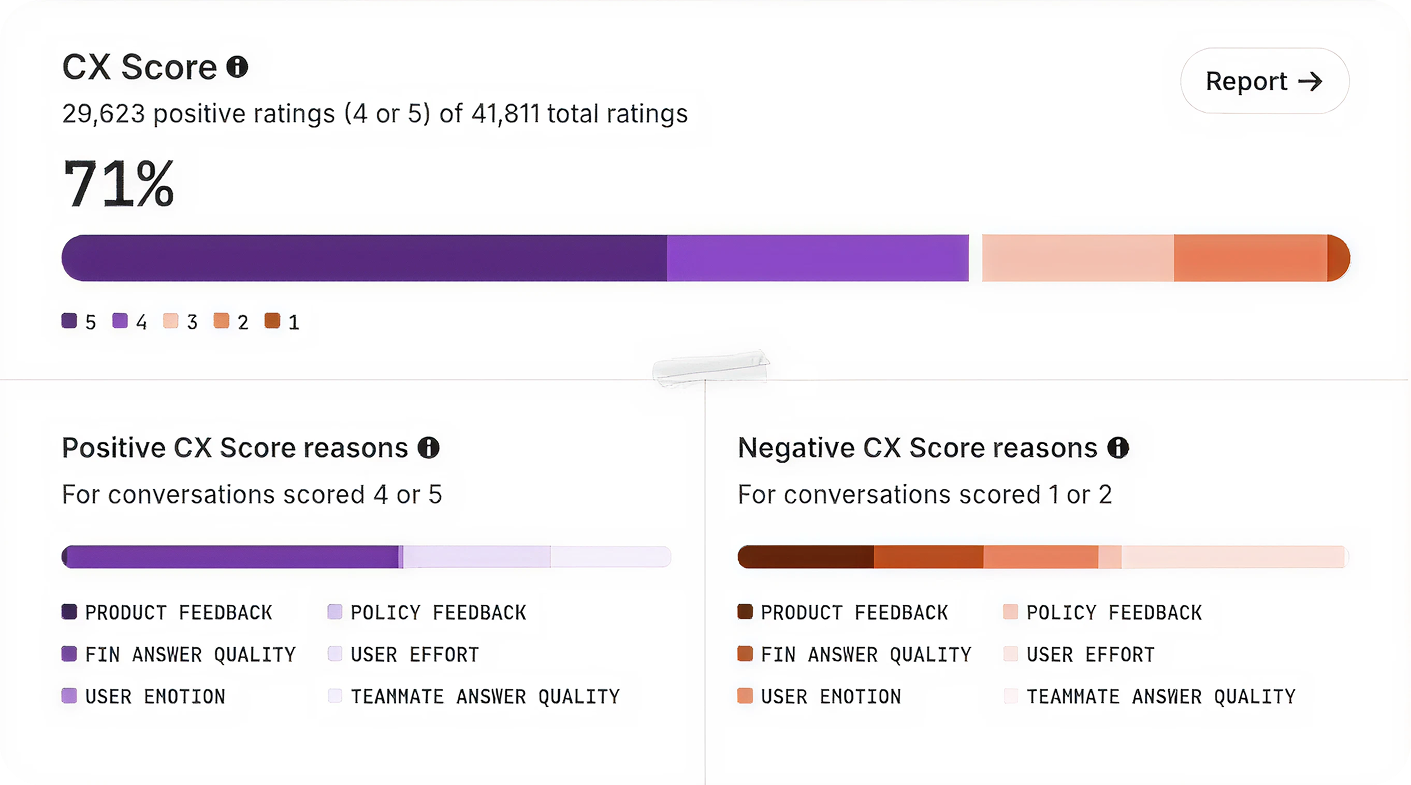
Another example is CX Score. It started with close work alongside Intercom’s Customer Support team to understand performance with Fin, initially through predicted CSAT and resolution. Over time, this work evolved into CX Score: a scalable way to measure conversation quality across all customers.
The product stage is fundamentally different from Cockpit because of the constraints. Cockpit provides a platform for our customer analyses/tools but it doesn’t need to scale as far as product. What moves into product has to work for every customer, without configuration, at scale, so it has to generalize. That bar is what protects long-term quality while unlocking product-led growth.
That’s why the move from Cockpit to product isn’t automatic. We’re not just asking whether something is useful, but whether it’s broadly useful, robust, and scalable enough to run across the entire customer base. As a product leader, I push for this discipline because it’s where customer success, engineering excellence, and business outcomes converge.
The loop. The model is simple. Swarms generate the best signal, grounded in real customer problems. Cockpit operationalizes that signal so CSMs and Sales can use it across many customers. Product takes the patterns that truly generalize and turn them into scalable features that enhance every customer’s experience.
This loop allows a small swarm data science function to have impact beyond a small set of high-touch accounts, resulting in a stream of continuous improvements across all three levels and an ever-increasing level of automation for our customers. Practically, it’s a repeatable playbook for product management leadership: start with high-signal discovery, prove repeatability, and only then scale through product. Done well, it compounds learning, accelerates time-to-value, and aligns the entire organization around measurable outcomes.
Leading the Support function for a company that builds a leading Agent and AI-forward customer service platform has been, for me, unique, exciting, and yes—daunting. It’s where product ambition meets operational reality, and where every decision I make is immediately tested by customers who expect excellence.
It’s unique because we use the same technology as our customers. We live in the product every day, which puts us in a privileged position to be the voice of the customer across the organization. That tight feedback loop has shaped how I prioritize, what I build next, and how I measure success.
It’s exciting because we get to try all of the new features and capabilities of Fin and the Intercom helpdesk. With a relentless focus on AI innovation, I’ve had access to remarkable tools that help us deliver an incredible customer experience—and I’ve seen firsthand how the right workflows and guardrails turn those tools into outcomes.
And it’s daunting because expectations for our own Customer Support (CS) team are sky high. If we can’t deliver incredible support using our own technology, we undermine its value proposition. That imperative has kept me honest, focused, and fast.
In our new research, “The 2026 Customer Service Transformation Report,” we’ve been sharing how forward-looking teams use AI to transform their support models. If you’d like to get straight to the report, download it here.
When Intercom changed its focus in late 2022 to prioritize the customer service use case, we undertook a critical review of the support experience we were delivering and committed to driving meaningful change under an AI-first framework. That was a turning point: I aligned product strategy and operations around a single north star—automate with quality, and elevate humans to higher-value work.
Three years on, Fin now resolves over 81% of all our customer support volume, delivering immediate and high-quality resolutions. We have absorbed a 300%+ increase in customer demand since 2022 without proportional headcount growth. Without Fin, we would have needed at least 100 additional CS team members to meet that demand and our improved service levels – a net saving to Intercom of between $7.5M–$9M annually.
Throughout this work, we drew on research from the 2026 Customer Service Transformation Report and applied the lessons directly to our own org design, knowledge management, and AI workflows. What follows is our story of transformation and how we achieved a mature deployment of Fin.
The problems we set out to solve
Back in 2022, our challenges looked familiar to any modern support organization, and I knew we needed a step-change—not incremental tweaks.
We faced increased support demand from new and existing customers: Intercom was launching major features and changes at speed, driving up overall customer conversation volume and requiring additional headcount for the CS team. I could see we were scaling people faster than processes—unsustainable without automation.
Our support policy (as defined by our service level objectives) was not based on a high bar: In most cases, we were only committed to “business hours” coverage for the majority of our customers, impacting first response times. Even with SLOs that were not considered best in class, we were struggling to meet our commitments. I wanted 24/7 coverage and faster first responses without sacrificing quality.
We wanted to do more: As we pivoted our strategy, we wanted to open new routes to our support team, such as providing support to website visitors with technical questions and to trial customers. That meant meeting customers earlier in their journey with accurate, on-brand responses—at scale.
What we did
We made a very conscious decision to become our own best reference customer. As Intercom embraced the opportunity that generative AI presented to transform customer service, we intentionally moved to an AI-first strategy for our Customer Support team. I set a simple operating principle: ship value quickly, measure relentlessly, and let evidence guide the next bet.
We started with the highest-volume, informational queries and saw our resolution rates climb quickly. With that foundation in place, we pushed Fin further, training it on deeper documentation and internal procedures, and eventually giving it the ability to take actions on behalf of customers. As Fin took on more complex work, our results started to compound—and trust in the system grew across the organization.
Early adoption and building trust. When “AI Assist” features came to the Intercom Inbox, the CS team got early exposure to AI and were empowered to provide feedback directly to our product teams. This built awareness and trust across the team about what we were trying to achieve with AI, and helped shape the product roadmap. We were also the first beta customer for Fin, rolling it out to a subset of customers to watch sentiment and outcomes closely. With no adverse reaction and an initial resolution rate of over 25%, we deployed Fin to most customer segments within weeks. I’ll never forget the first week we put Fin in front of real customers—the silence of issues that never reached humans was the loudest signal of success.
Knowledge management as a product. We recognized quickly that time spent tuning our help center and knowledge assets for Fin would pay dividends. We transitioned our Help Center Manager into a “Knowledge Manager,” with a dedicated remit to optimize content for Fin. We embedded knowledge creation into our “New Product Introduction” (NPI) process, targeting that Fin would resolve at least 50% of customer issues at every new product and feature launch. Over time, we added new sources, including “Developer Documents,” enabling Fin to handle increasingly complex issues. We built a culture of continuous improvement—allocating “out of the inbox” time so every teammate could close content gaps and raise the bar.
Conversation design end-to-end. To ensure a consistent, high-quality customer experience, we created a new “Conversation Designer” role that owns the journey across automation and human handoffs. Using Intercom’s Workflows, we introduced “skills-based routing” so that when a customer asks for a human, the conversation reaches someone with the right expertise quickly. This is now handled by Fin directly using a feature called “Attributes.” The result: a seamless, on-brand experience regardless of channel or escalation path.
Leaders are racing ahead with real AI in support. Explore the 2026 Customer Service Transformation Report to see where deployment is stalling, benchmark your team, and get practical steps to scale automation that delights.
Organization changes that unlocked leverage. As we scaled Fin, we stood up a dedicated AI Support team under a senior CS leader to continuously optimize automation and define our AI adoption strategy across the journey. We restructured human roles into “Technical Support Specialist” and “Technical Support Engineer” to better align with the complexity of incoming work. We also expanded Support Operations to focus on optimization—using AI to uplevel Enablement, Workforce Management, QA, Process Management, and Data Insights. Just as important, we reset expectations about the balance between time spent supporting customers directly versus improving AI. That mindset shift created compounding returns.
Pushing Fin further with new capabilities. As capabilities matured, we were early adopters and saw measurable wins:
Fin Guidance: Multiple Guidance rules provide additional controls and a more personalized, targeted experience for customers.
Fin Tasks and Procedures: Enables Fin to carry out activities such as updating customers on incident status and deep troubleshooting for technical issues.
Insights: AI-driven dashboards provide deep insight into Fin’s performance and surface recommendations for further optimization. Insights also provides a Customer Experience (CX) Score for every customer interaction, enabling more targeted improvement efforts and opening up new ways to close the loop with customers who have had a poor experience.
What we achieved
What started as a focused effort to improve our customer support experience became the strongest proof point for what’s possible when you fully embrace AI. Fin now resolves over 81% of all our customer support volume and has allowed us to absorb a 300%+ increase in demand without proportional headcount growth. Over 90% of our customers now benefit from improved first response performance, 24/7 coverage, and outbound phone support.
What the numbers don’t fully capture is the shift in how our team operates. With volume absorbed by Fin, our CS teammates now deliver consultative support—guiding next best actions, deepening product adoption, and contributing directly to retention and expansion. Customers that receive these engagements adopt Fin at a much deeper level and achieve greater support success. What was once a reactive, volume-driven team is now a function that generates significant revenue.
What’s next
Customer expectations are always rising, so we’re building on our progress by embracing the Fin Flywheel—an actionable framework for ongoing improvement and optimization. This keeps us honest about the discipline required to sustain AI performance at scale.
Train: Teach Fin to resolve even the most complex queries with Procedures, knowledge, and policies.
Test: Run fully simulated customer conversations from start to finish to see exactly how Fin will behave before going live.
Deploy: Set Fin live across every channel – voice, email, chat, and social – for consistent support wherever customers reach out.
Analyze: Use AI-powered Insights to analyze and improve Fin’s performance and deliver better customer experiences.
We are also investing in our support teammates so they can adjust to the new world of AI—taking on more complex work and being valued for the subject matter expertise, consultative engagement, and empathy they bring to the role. That human layer is where differentiation shines.
We will continue to develop and share best practices for deploying an Agent, based on our own experience with Fin and the lessons learned from our most forward-looking customers. These are captured and continually evolving in The Agent Blueprint.
Transformation takes commitment
The most successful teams aren’t bolting AI onto old processes; they’re rebuilding support around it—investing in knowledge and people alongside technology, and treating AI as a continuous discipline rather than a one-time deployment. That’s the real change required. For support teams willing to make it, there’s a rare opportunity to redefine what customer service can deliver—higher CSAT, faster resolution, and durable ROI.
Every update we shipped this month removed a specific constraint on what teams can do with Fin. In my world, the demo-to-production gap shows up as complexity, control, and confidence. Can the agent handle the query that actually matters? Will it sound right on a call? Can the team deploy it without filing an engineering ticket? Can managers understand what it’s doing? That’s the bar I hold us to.
This month, we delivered answers to all four. Here’s how.
Procedures and Simulations (0:51). The hardest problem in AI-powered customer service isn’t answering FAQs—it’s executing complex queries with real business logic and real consequences if anything goes wrong. Think billing refunds, multi-step flows, and actions that must be right the first time.
We made it dramatically easier to build and manage Fin for those complex queries—without pulling in an engineer. You can author in natural language, test every step in simulation, and deploy with confidence.
The workflow starts with AI drafting the procedure from your existing source material. You edit in natural language, with structured hooks to pull in live data, apply business logic, and add code for deterministic control where you need it. That’s how you handle multi-step flows with the precision that matters when things go wrong.
Simulations are the test environment. Define a test case, pass in the data Fin would receive in a real conversation, and watch it work through each step. You see what Fin is doing, why, and whether it’s meeting the criteria you set. Full transparency at every point. I’ve run these end-to-end myself, and there’s a particular confidence that comes from watching it work before it goes anywhere near a customer.
A conversational moment from the February Fin Product Updates recap: two teammates trade insights with laptops open, while a bold pull-quote drives home the promise—Fin removes complexity to start selling and supporting in under two minutes.
For a deeper look at Procedures and Simulations, head to fin.ai/procedures.
Fin Voice: three major updates. When something’s off in chat, it can take a few exchanges to notice; on a call, it’s immediate. Pronunciation, noise handling, and tone all matter because they’re the customer’s first impression.
Pronunciation rules (4:18). Fin has high out-of-the-box pronunciation accuracy, but it doesn’t know your brand—your product names, your industry terminology, the way your company uses certain words. Alihan Zinna, Staff ML Scientist, showed this with an IKEA example: without pronunciation rules, Fin mispronounced both “IKEA” and a product name; after adding rules, both were corrected and sounded natural.
New natural voices (5:48). We’ve added 11 new voices tuned to a range of brand tones so you can choose one that sounds like it truly belongs to your company—not a generic AI assistant.
Background noise reduction (6:28). People call from airports, shops, and busy offices. Fin now monitors background noise continuously and increases noise reduction when the environment demands it. No configuration needed. As Alihan put it, “This is one of those things customers really notice when it’s not working. The goal was to make it invisible. That’s what we built.”
Catch up on February’s Fin Product Updates with a walkthrough of the Call Metrics dashboard—saved filters, hold‑time tiles, missed and declined call counts, and a monthly breakdown that helps support teams act faster.
Shopify setup experience (8:21). Fin began as a Service Agent and is quickly becoming a Customer Agent—working across the whole lifecycle to support, sell, and guide, even before a customer has an issue. The revamped Shopify setup is a clear step forward.
Shopify catalogs are complex—thousands of products, variants, and dynamic inventory—and connecting all of that to an agent has historically been painful. We removed the friction.
Setup now takes three steps: first, connect your store. Second, install the Messenger directly in Shopify—no code, just a few clicks. Third, deploy Fin. Total time: under two minutes. We timed it live.
What that unlocks is real. In the demo, a first-time snowboarder asked for recommendations. Fin searched the catalog, reasoned about attributes that matter to a beginner (there’s no “beginner” tag in the catalog), personalized suggestions by height and weight, and added a board to the cart.
Even better, one customer updated their website copy to promote a sale. Fin immediately picked up the new context and began recommending sale items, nudging shoppers to add more to the cart to access a discount—no extra configuration required. It read the situation and acted.
See how the latest Fin update streamlines support scheduling. A product expert walks through Holiday Office Hours, showing how to set default hours, track response metrics, and add closures so teams stay consistent.
Three steps, and you have a real-time shopping assistant that knows your store and sells on your behalf.
Helpdesk improvements (12:31). Fin works with any helpdesk, but many teams consolidate to take advantage of our native Intercom helpdesk integration. We’ve shipped 19 helpdesk improvements in 2026 so far; two from this month stand out.
11 new call metrics. Hold time, outbound dial time, missed and declined calls, call terminating party, and more. These give leaders the visibility to analyze workload distribution and call handling quality in detail.
Holiday office hours. Teams no longer need to manually update office hours for every public holiday. This was the most upvoted request in our community, and we shipped it.
Across the board, we removed the constraints that hold teams back: the complexity ceiling in automation, the quality ceiling in voice, the setup barrier in Shopify, and the operational overhead in the helpdesk.
We closed out the month with a Star Wars–style crawl of 22 additional updates. All features mentioned here are live and available now. Explore more at fin.ai/updates. More to come—see you next month.
Today, I’m excited to share 12 major updates to Fin’s Procedures and Simulations—the foundation that lets Fin handle complex work while keeping teams fully in control of the customer experience.
In my work building AI workflows with product and support leaders, I’ve seen how the right blend of natural language instructions, deterministic controls, and fully agentic behavior turns Fin into a reliable problem solver. Procedures make this blend possible by enabling Fin to act like a human—yet with the repeatability and governance of software. Simulations then let us test those complex Procedures at scale before they reach customers, so we can deploy with confidence.
Together, these capabilities make Fin self-manageable, transparent, and ready for genuinely complex work.
Here’s what’s new at a glance: we’ve made Procedures easier to build and maintain; enhanced deterministic controls for precision and policy compliance; expanded agentic behavior so Fin can adapt in real time; and delivered more powerful Simulations to validate end-to-end workflows before go-live.
Why did we build this? Many teams see early AI gains in speed, coverage, and cost to serve—but then hit a ceiling. They keep AI confined to simple automation and information retrieval, rather than setting it up to handle the nuanced, multi-step workflows they still trust to humans. We designed Procedures and Simulations to remove that ceiling, so teams can confidently set up, govern, and iterate on complex AI workflows without bottlenecks.
Follow the AI lifecycle as it cycles from Analyze to Train to Test to Deploy. This streamlined loop spotlights the TRAIN phase, underscoring faster iteration and feedback that power more capable procedures and realistic simulations.
We also heard that teams needed an easy way to connect data so Fin could reliably check customer status or eligibility and then take action. And they didn’t want to route through engineering every time they needed to create or amend logic for mid-conversation decisions. Procedures combines natural language instructions and intuitive data connector setups. You tell Fin in your own words how you want it to behave, and you’ll be guided through creating conditional steps so Fin will react consistently, with the option to add in any code snippets for circumstances where absolute precision is required. Once you build one Procedure, we believe you’ll want to build several, so Fin will constantly read the conversation it’s in to ensure it’s following the most relevant Procedure, and jump to a more relevant one if the user intent changes.
I know that taking something like this live the first time can feel like a leap of faith. That’s exactly why we built Simulations—to test Procedures comprehensively, uncover edge cases, and launch with confidence.
Reaching mature deployment takes a deliberate, ongoing commitment to training workflows, validating them before deployment, measuring performance in production, and refining them over time. At Intercom, we call this the Fin Flywheel: train, test, deploy, analyze. Procedures form the foundation of the train stage, and Simulations make the test stage reliable at scale. Together, they enable Fin to handle complex work, and teams to stay in control of it.
Procedures: Define exactly how Fin handles complex work. With Procedures, I can set Fin up to resolve complex, time-consuming queries that require multiple steps or business logic. Fin follows standard operating procedures and applies sound judgment—just like a seasoned teammate—so even complicated queries are resolved in controllable, predictable ways.
A snapshot of the Procedures builder in action, mapping a clear path for handling damaged food orders while letting teams train Fin on examples, target channels, quickly test updates, and publish with Set live.
Procedures combine three powerful elements. First, natural language instructions. You write a Procedure in plain language, just like documenting a process for a new teammate. You can paste in your existing SOPs, write from scratch, or let AI draft them for you, then iterate yourself.
What’s new: Draft Procedures with AI. Share an outline of your process and Fin drafts a complete Procedure using your conversation history, knowledge hub content, and relevant data. If additional context is needed, it prompts you with clarifying questions to make sure the Procedure is thorough and tailored to your use case, significantly reducing setup time. For example: if you’re creating a refund workflow, the system can draft conditional paths for eligibility, approval thresholds, and verification steps based on your historical cases and policies.
What’s new: Break complex workflows into Sub-procedures. Write a process once and reference it across multiple Procedures by breaking it down into reusable steps, called Sub-procedures. This makes workflows easier to read, faster to build, and simpler to maintain as things change.
Second, deterministic controls. Natural language is flexible, but some steps need to be exact. You can layer in deterministic controls where precision matters, starting with a fully natural language Procedure and introducing structure gradually where it adds value: conditional steps (branching logic) to handle decision points so Fin’s behavior is consistent and predictable; data connectors so Fin can pull information from your tools or take actions automatically; code snippets for when absolute accuracy is essential; and checkpoints to pause for approval or hand off to a teammate.
Fin demonstrates structured troubleshooting: a transaction dispute flow with eligibility checks, clear IF/ELSE steps, and quick Data Connector actions like freezing a card or pulling invoices, streamlining complex support tasks.
What’s new: Instruct Fin to read specific content from your knowledge hub. You can set clear rules for Fin to reference a specific policy or article from your knowledge hub in defined situations so Fin always surfaces the right context in a conversation.
What’s new: Explicit Procedure switching under defined conditions. You can set rules that deterministically trigger a switch to a different Procedure, for example, escalating to a complaints Procedure if specific risk signals are detected mid-conversation.
What’s new: Internal notes for human handoffs. When Fin hands off to a teammate, it can now include internal notes with relevant context so the person picking up the conversation knows exactly what happened and what needs to happen next.
Third, fully agentic behavior. Because real conversations rarely follow the happy path, Procedures let Fin reason through what’s happening and adapt—jumping to the right step or switching Procedures entirely if a customer changes their mind or the issue shifts.
Procedures and Simulations in action: Fin rehearses a food order damage scenario, confirming details and progressing through each trigger. Teams validate complex flows end to end as steps turn green and outcomes are tracked.
What’s new: Automatic Procedure switching. If a customer starts in a billing workflow but then asks about cancelling their subscription, Fin transitions to the relevant Procedure without forcing the customer to restart.
What’s new: Structured data extraction from uploaded files. Fin can now extract structured data directly from PDFs and images uploaded by customers—like invoices, forms, or receipts—and use that data within the conversation. Customers don’t have to copy and paste or repeat themselves.
As MONY Group put it:
“ If a customer starts down one path but their issue turns out to be something else entirely, Fin adapts seamlessly – no more getting stuck in loops or forcing customers into the wrong workflow. ”
Simulations help teams rehearse procedures and verify outcomes before going live. Run all tests or launch a new one to ensure Fin handles tricky customer scenarios—from damage confirmation to refunds and missing subscriptions.
The result is a conversation that feels fluid, but always follows your intended rules.
Making complexity easier to manage is just as important as unlocking new capabilities. Beyond the core updates, we’ve focused on creation, governance, and scale—while keeping ownership with your team.
What’s new: Improved instruction authoring. We’ve made it easier to write, edit, and structure Procedures, so building and updating them takes less time and requires less effort.
What’s new: Reporting on when Procedures trigger, resolve, or hand off. You can now track how Procedures are performing directly within the Procedures UI, seeing exactly when they trigger, when they resolve, and when they hand off to a teammate. This visibility helps you spot issues early and improve over time.
Customer stories from Raylo and Mony Group show how Fin now resolves payment issues and complex claims in-chat, checks account data via APIs, and lifts CSAT to about 94%, highlighting the impact of Procedures and Simulations.
Simulations: Test complex workflows at scale before they reach customers. Simulations let you validate how Procedures will perform before anything goes live, and continuously revalidate as things change. Deploying complex AI can feel uncertain; Simulations remove that uncertainty so you can launch with confidence and iterate safely.
You can simulate full conversations. For any Procedure, choose a user or customer segment and run a complete, multi-turn simulated conversation. You see every step Fin takes, how it applies your rules, reasons through decisions, and where it passes or fails—giving you the observability to debug and fix issues before they ever reach customers.
What’s new: Upload images for richer testing. Simulations now support image uploads, so you can test workflows that involve receipts, invoices, or forms—the same inputs your customers actually send.
What’s new: Clearer visibility into Fin’s reasoning. You can now see exactly how Fin is thinking through each step of a Simulation, making it easier to understand behavior, catch unexpected decisions, and refine Procedures with confidence.
You can also use AI to create, store, and rerun tests. Writing test coverage manually doesn’t scale. Fin’s AI Assistant generates Simulations directly from your Procedures, suggesting realistic edge cases like partial refund disputes, missing invoice uploads, or no subscription found, so you can expand coverage without expanding overhead. All the Simulations you create are stored in a central library. When a product changes, a policy updates, or a Procedure is edited, hit “run all” to instantly check whether anything has regressed. This applies the same rigor to AI automation that engineering teams bring to software testing.
What’s new: AI-suggested Simulations. You can now use AI to generate a full set of Simulations from any Procedure. The AI Assistant suggests realistic variations based on your workflow, so you can build comprehensive test coverage fast.
Customers are already seeing this in production. “Fin can now handle payment-related queries that were never possible before… The impact on CSAT and overall CX has been pretty shocking – the Payment Information procedure CSAT is sitting at ~94%, and CX score is significantly higher than our average.” – Raylo
“Procedures have fundamentally changed what we can achieve with Fin. Previously, complex processes like cashback claim investigations could only be handled through a static form on our website… Now, Fin can handle these sophisticated scenarios in real-time within the conversation itself. It checks account information via API calls, makes complex decisions, and guides customers through the entire claims process dynamically.” – MONY Group
Procedures and Simulations are available now. I’m eager to see how teams use these updates to scale agentic AI, deliver faster resolutions, and raise the bar for customer experience—without sacrificing control, compliance, or quality.